966
©IJRASET: All Rights are Reserved
Implementation of Voice Controlled Virtual
Assistant using STT, TTS and Logic Handling
Engine
Nikunj Sartan1, Varun Jasani2, Akshit Singh3 1, 2, 3
Computer Engineering Department, Mumbai University
Abstract: In today’s world there are a lot of computerized tasks users have to perform manually. For example, if user wants to search for meaning of a particular keyword or definition, he needs to use multiple mouse clicks and keyboard button hits while using browser for searching the data he wants which consumes more time and energy.
The user basically has to do some typing work and give inputs via mouse as and when needed. Similarly, there are many other computerized tasks which user has to perform manually in order to get the required outcomes like listening to music. In order to get your music playing you need to get to the location of folder containing the music then inside that folder you need to search for the title of the track you want to play and so on.
It can help the visually impaired to connect with the world by giving them access to Wikipedia, twitter, Imgur and Music all through their voice.
This model can also be of extreme use to students who need to save their notes as with the voice assistant all they need to input is their voice and the notes will get automatically saved which they can access anytime. Also, it can be a source of entertainment and information for blind/visually impaired. Many experiments and results were accomplished and documented.
Keywords:STT, TTS, mic, play, note
I. INTRODUCTION
Virtual Assistants are useful for helping the users of a computer system automate tasks and accomplish tasks with minimum human interaction with a machine.
The interaction that takes place between a user and a virtual assistant seems natural; the user communicates using their voice, and the software responds in the same way.
Virtual assistants are useful for helping the users of a computer system automate tasks and accomplish tasks with minimum human interaction with a machine.
The user communicates using their voice, and the software responds in the same way.
Here we have used 3 types of engines Speech to text, Text to Speech and Logic Handling Engine for the virtual Assistant.
II. PROPOSEDWORK
The proposed work presents a working voice assistant system. The system can be split into three phases:
1) Speech To Text Phase: Here we basically deal with input text. As the name suggests, the STT engine converts the user’s speech into a text string that can be processed by the logic engine. This involves recording the user’s voice, capturing the words from the recording (cancelling any noise and fixing distortion in the process), and then using natural language processing (NLP) to convert the recording to a text string.
2) Logic Handling Phase: Here we extract keywords from speech text (text extracted from speech). The name logic is used because we develop logic for processing certain words. Logic engine is the software component that receives the text string from the STT engine and handles the input by processing it and passing the output to the TTS engine. The logic engine can be considered our assistant’s brain; it handles user queries via a series of if - else statements in the Python programming language. It decides what the output should be in response to specific inputs.
967
©IJRASET: All Rights are Reserved
III.MODULESIMPLEMENTED
1) Speech to Text: Speech-To-Text (STT) engine is used to convert the commands given by the user in audio input to text form, so that these commands can be interpreted by the modules properly. To use this engine, the generated API key has to be used. It requires continuous internet connection as data is sent over the Google servers.
2) Text To Speech Engine: Text-To-Speech (TTS) engine is used to create a spoken sound version of the text generated by the Logic Handling Engine. TTS can enable the reading of computer display information for the visually challenged person, or may simply be used to augment the reading of a text message.
3) Logic Handling Engine: Here we extract keywords from speech text (text extracted from speech). The name logic is used because we develop logic for processing certain words.Logic engine is the software component that receives the text string from the STT engine and handles the input by processing it and passing the output to the TTS engine. The logic engine can be considered our assistant’s brain; it handles user queries via a series of if - else statements in the Python programming language. It decides what the output should be in response to specific inputs.
4) Twitter: Twitter is the most famous microblogging platform and has a huge number of users. People love to post information about how they feel, interact with others, and express their views on different subjects. Voice assistant simplifies the usage of this platform in the most efficient way possible. Just feed in voice command tweet followed by the message you want to tweet and that’s it your tweet has been posted on your page.
5) Imgur: Imgur helps the user to upload images online.A link will be generated after user’s image has been uploaded successfully. User just needs to say the name of the image he wants to upload.
6) Wikipedia: Here we use the Wikipedia module to extract information about any definition user wants from the internet.user just needs to say the keyword define followed by the word whose definition he needs to find that’s it then the voice assistant will read out the definition for the user
7) Weather: This module tells the user about the weather conditions of the location whose station identifier is specified in the profile of the user. This module can be executed by using the keyword “weather”. The weather information is taken from the weather underground service which includes the details of temperature, wind speed and direction etc. It generates an error message, if the information cannot be retrieved for the specified location
8) Conversation: Besides virtual assistant performing specific tasks, user can also have a one to one basic conversation with the assistant. For example user can ask questions like how are you, ask assistant to tell a joke, what’s the time and so on.
9) Music: You can ask assistant to play the song of your choice. User just needs to use the keyword play followed by song name. That’s it rest it is up to assistant. Besides playing normally we have additionally implemented party mix feature in which user just needs to say in play party mix then a random list of songs will be generated and the songs will be played one by one.
10) Notes: As the name suggests user would be able to store notes by just feeding in voice command. User just needs say the keyword note followed by the note then note will be stored inside the database. User can access the note anytime he wants to and when he does it, he will even get the time and date when the note was recorded
IV.USERINTERFACE
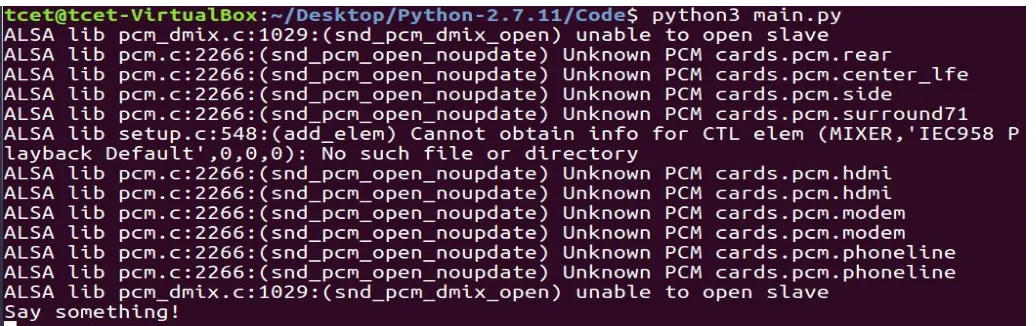
[image:2.612.50.568.559.722.2]Here we have shared of the screenshots from our project in its actual working state. Explanation has been provided along with each picture.
968
©IJRASET: All Rights are Reserved
[image:3.612.88.525.103.298.2]Here user gives the input via his voice. When the users sees the Say Something message displayed on screen, he knows that assistant is ready and listening for the voice.
Fig. 2 twitter page before tweet has been posted
Here we have intentionally deleted previous tweets just for the sake of easy understanding of the working of the twitter module.
Fig. 3 here user has used his voice to post tweet and the program responds in the following way
[image:3.612.69.541.485.710.2]Here user has wants to post hello everybody message on his twitter page. We have named our assistant as Varun. We can name it anything. After the above message is displayed user can be assured that his tweet has been posted.
969
©IJRASET: All Rights are Reserved
[image:4.612.41.561.80.304.2]So, user’s message of hello everybody was posted successfully. Anybody can now access user’s page and can read that message.
Fig. 5 music play
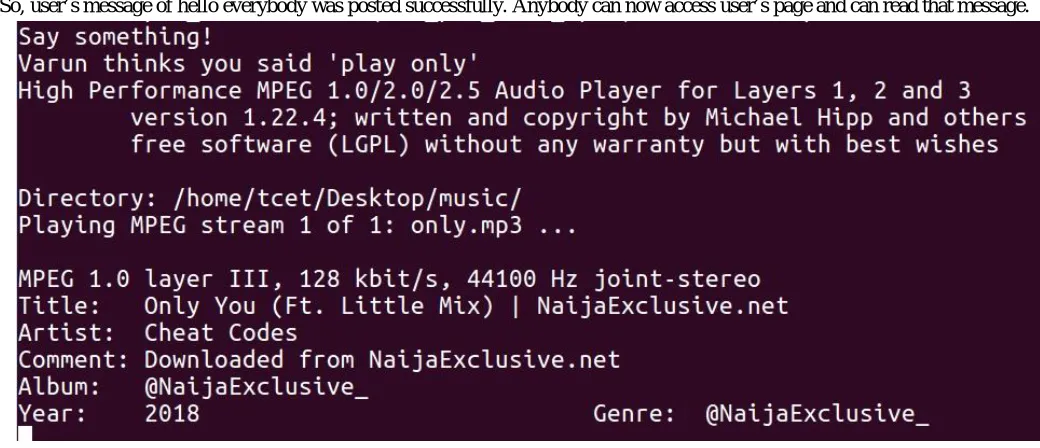
Here user has used play keyword with the song he wanted to play named only.This is how the display looks when the song is being played.
Fig. 6 saving notes
Here user uses keyword note and gives the message he wants to store. The assistant takes in everything said after note keyword and stores it in database.
Fig. 7 user uploading image
[image:4.612.154.452.543.721.2]Here user wants to upload image named lambo. So he feeds in voice command, image gets uploaded and finally gets the equivalent link of where the image has been uploaded. Anybody can go to the link and access the image uploaded by user.
970
©IJRASET: All Rights are Reserved
As you can see after accessing the link the user uploaded image was found.
Fig. 9 wikipedia implementation
Here user wants to know details of a particular college.SO he feeds in his voice by saying define followed by the name of the college whose details he wants to grab. That’s it assistant speaks out the details of the college from the Wikipedia web page and user gets the details.
V. CONCLUSIONS
The advent of virtual assistants has been an important event in the history of computing. Virtual assistants are useful for helping the users of a computer system automate tasks and accomplish tasks with minimum human interaction with a machine. The interaction that takes place between a user and a virtual assistant seems natural; the user communicates using their
voice, and the software responds in the same way.
Such a virtual assistant can serve in the Internet of things as well as run a voice-controlled coffee machine or a voice-controlled drone but for the sake of this project we have limited it to its software usability.
VI.ACKNOWLEDGMENT
We sincerely thank our guide Mrs. Ashwini Patil for her guidance and constant support and also for the stick to our backs.We also thank the project coordinators for arranging necessary facilities to carry out project work.
We thank the HOD, Dr.Sheetal Rathi, Dean Academic, Dr. R.R Sedamkar, the principal, Dr. B.K. Mishra and the college management for their support.
REFERENCES
[1] Ass. Prof. Emad S. Othman, November-2017, Senior Member IEEE - Region 8, High Institute for Computers and Information Systems, AL-Shorouk Academy, Cairo – Egypt, PH- 0020-010-25830256. E-mail: [email protected], International Journal of Scientific & Engineering Research Volume 8, Issue [2] Aditya K, Biswadeep G, Kedar S and S Sundar,2017, School of Electronics Engineering, VIT University, Vellore 632014, Tamil Nadu, India
[3] Lawrence Rabiner, Ronald W. Schafer 2013, Programs for supporting the teaching of digital speech processing IEEE Digital Signal Processing and Signal Processing Education Meeting (DSP/SPE) pp. 290 – 295.
[4] Eric Matthes, Python Crash Course: A Hands-On, Project-Based Introduction to Programming Book,2015 [5] Al Sweigart ,Automate the Boring Stuff with Python: Practical Programming for Total Beginners,2015
[6] Recording audio using Google speech recognition referred from https://pythonspot.com/personal-assistant-jarvis-in-python [7] Google speech recognition, API, Retrieved from https://pythonspot.com/en/speech-recognition-using-google-speech-api/