Introduction to Twitter for educational developers
BECKINGHAM, Sue <http://orcid.org/0000-0001-5660-125X> and ADAMS,
Joelle
Available from Sheffield Hallam University Research Archive (SHURA) at:
http://shura.shu.ac.uk/9478/
This document is the author deposited version. You are advised to consult the
publisher's version if you wish to cite from it.
Published version
BECKINGHAM, Sue and ADAMS, Joelle (2013). Introduction to Twitter for
educational developers. Educational developments, 14 (3), 10-12.
Copyright and re-use policy
See
http://shura.shu.ac.uk/information.html
Sheffield Hallam University Research Archive
Introduction to Twitter for educational
developers
Sue Beckingham FSEDA,
Sheffield Hallam University, and
Joelle Adams FSEDA,
Bath Spa University
Love it or hate it, Twitter is becoming an ubiquitous forcein educational development activity. This article introduces educational developers to the variety of ways Twitter can be used to enhance academic practice, from keeping abreast of new scholarship to building international networks. From the conversations we have had with many of you over the past year or so, we know that some educational developers are resistant to Twitter, others are open to it but unsure how to use it, and others use it in a wide range of ways. We hope that this article will help you make the best use of Twitter for your purposes or better understand how and why others find it useful, even if you’re still sceptical.
What is it?
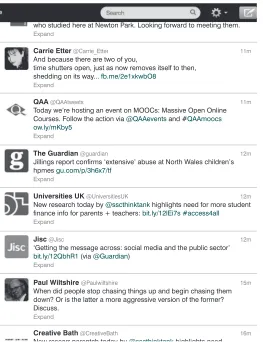
Twitter is an online social media platform that enables people to connect and communicate in short, bite-sized chunks. There is a 140-character limit to each ‘Tweet’, but messages often simply link to full-length articles or photos by including a URL. For example, in the image of Joelle’s Twitter ‘feed’ or homepage below (Figure 1), the QAA, Guardian, Universities UK and Jisc Tweets all provide a link for followers to click on, leading to detailed content.
Carrie Etter@Carrie_Etter 11m
And because there are two of you,
time shutters open, just as now removes itself to then, shedding on its way... fb.me/2e1xkwbO8
Expand
who studied here at Newton Park. Looking forward to meeting them.
Expand
QAA@QAAtweets 11m
Today we’re hosting an event on MOOCs: Massive Open Online Courses. Follow the action via @QAAevents and #QAAmoocs ow.ly/mKby5
Expand
The Guardian@guardian 12m
Jillings report confirms ‘extensive’ abuse at North Wales children’s hpmes gu.com/p/3h6x7/tf
Expand
Universities UK@UniversitiesUK 12m
New research today by @sscthinktank highlights need for more student finance info for parents + teachers: bit.ly/12lEi7s #access4all
Expand
Jisc@Jisc 12m
‘Getting the message across: social media and the public sector’
bit.ly/12QbhR1 (via @Guardian)
Expand
Paul Wiltshire@Paulwiltshire 15m
When did people stop chasing things up and begin chasing them down? Or is the latter a more aggressive version of the former? Discuss.
Expand
Creative Bath@CreativeBath 16m
[image:2.595.29.292.428.770.2]New researr parentch today by @sscthinktank highlights need
Figure 1 Joelle’s Twitter ‘feed’
Users choose who to ‘follow’ based on their interests; you do not have to follow people who follow you (though it is polite to ‘follow back’, at least for a little while). Looking at individuals’ or companies’ biographies can help you choose whom to follow (you may want to complete yours, too). Taking a look at the topics of a user’s previous Tweets will also give you an indication of potential shared interests. Once you are ‘following’ another Twitter user, you will see their messages on your homepage when you log in to Twitter, along with any messages they have ‘retweeted’ from others. Only people who follow you will automatically see your Tweets in their feeds, but your messages are also visible on your profile for others to find, unless you make them private.
Most people use Twitter as a marketing tool (explicitly or implicitly), though some users mix business with pleasure. For example, Joelle tweets about life in Bath, issues in higher education, well-being, and current events; Sue, meanwhile, regularly participates with weekly Tweet Chats where people share information on topics such as social media and technology use in education. Some users, though, prefer to keep separate personal and business accounts, or simply use Twitter as a marketing tool for work and avoid personal messages altogether.
How do I use Twitter for scholarly purposes?
You might use Twitter to help keep abreast of new articles, trends, and developments in higher education. If you manage your followers well (it is okay to ‘unfollow’) you should end up with posts that match your interests. You might, for example, follow the Higher Education Academy, SEDA and HEFCE for news about policy developments and upcoming scholarly events. Often these organisations will post links to emerging reports as they are released. You can then see who re-tweets these or comments on them for ideas of other people to follow.Some journals now run Twitter accounts and will post messages about articles, calls for papers, and editorial positions. The new Journal of Perspectives in Applied Academic Practice (@JofPAAP) has recently Tweeted about their editorial board, writers’ guidelines, and upcoming issues, while Research in Learning Technology (@Research_ in_LT), the open journal for the Association of Learning
Getting Started
1. sign up at www.twitter.com and complete your profile 2. find some people to follow (see our suggestions below) 3. watch what’s happening in your Twitter feed
Technology, also makes good use of Twitter to communicate with the sector.
Educational developers and researchers can also use Twitter to ask for ideas, input, and support; for example,
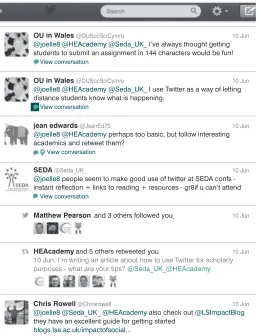
Joelle put a call out for ideas for this article and received several responses and new followers.
Chris Rowell@Chrisrowell 10 Jun
@joelle8 @Seda_UK_ @HEAcademy also check out @LSImpactBlog
they have an excellent guide for getting started
blogs.Ise.ac.uk/impactofsocial...
Matthew Pearsonand 3 others followed you_ 10 Jun
HEAcademyand 5 others retweeted you 10 Jun
10 Jun: I’m writing an article about how to use Twitter for scholarly purposes - what are your tips? @Seda_UK_@HEAcademy
SEDA@Seda_UK_ 10 Jun
@joelle8 people seem to make good use of twitter at SEDA confs -instant reflection + links to reading + resources - gr8if u can’t attend
View conversation
jean edwards@JeanEd70 10 Jun
@joelle8 @HEAcademy perhaps too basic, but follow interesting academics and retweet them?
V View conversation
OU in Wales@OUSocSciCymru 10 Jun
@joelle8 @HEAcademy @Seda_UK_ I use Twitter as a way of letting distance students know what is happening.
View conversation
OU in Wales@OUSocSciCymru 10 Jun
@joelle8 @HEAcademy @Seda_UK_ I’ve always thought getting students to submit an assignment in 144 characters would be fun!
View conversation
Joelle included @HEAcademy and @SEDA_UK_ in her Tweet above (Figure 2) to get the attention of those organisations and encourage them to retweet to their large groups of followers, thereby increasing the potential audience. This resulted in several retweets and new followers.
A ‘hashtag’ (#) is another useful tool to increase appropriate audiences for a Tweet. Hashtags are any string of characters or words without spaces, preceded with #; they denote a keyword or topic and can occur anywhere in the Tweet: at the beginning, middle, or end. Hashtags are a way of organising messages on a similar topic or a particular event because all the messages containing those keywords can be grouped together. They are often used at scholarly events and conferences.
[image:3.595.30.289.147.483.2]By searching for a hashtag you can collate all the Tweets containing it. Hashtagged words that become very popular are often referred to as ‘trending’. Try not to overuse hashtags. Do make use of capital letters to avoid confusion and provide clarity (when joining words together). Popular educational hashtags include #edtech, #elearning, #highered, #STEM, and #diglit.
Figure 2 Joelle’s ‘call for ideas’ and responses
Twitter can also be a way of disseminating your work to a wider audience and encouraging engagement with ideas. For example, when presenting at conferences, Sue uploads her talks to Slideshare.net and then shares a link via Twitter to the presentation slides. She also writes a blog on social media and uses Twitter to share links to new posts.
How do I use Twitter to build my professional
network?
Twitter is a great way to build relationships with people you might meet infrequently (or never!) in person. For example, Joelle was tweeting from the SEDA 2012 Spring conference using the conference hashtag, as were two colleagues she had never met: Karen Strickland from Edinburgh Napier University and Kathrine Jensen from the University of Huddersfield. Their Twitter activity about Becka Colley’s keynote led to a conversation about inspirational teaching and the role of students in teaching development. Since that initial Twitter ‘meeting’, the three have gone on to collaborate on an article, a research project, and a bid for other research funding.
Similarly, Sue was unable to attend the SEDA 2011 Spring conference, but followed the conference hashtag and the 4 or 5 tweeters writing about the conference and built up a dialogue with David Walker from the University of Dundee. They went on to submit a proposal for the next SEDA conference and presented on using social media to develop professional learning networks. Because global interactions are possible, Sue has also built international connections through Twitter which have led to collaborations on international conference submissions and invitations to speak.
Tweet Chats are another example of where Twitter can be used by educators. These are organised timeslots where through Twitter and the use of a hashtag (to filter the Tweets) participants can engage in a chat or dialogue about a pre-determined topic. The topic is usually communicated a week or so before the next chat, along with a reminder of the date, time and hashtag. Very often those leading the chat will post questions to facilitate a semi-structured conversation. Participants then answer those questions and engage in a debate around them. It is fairly fast-paced, but an excellent way to learn and share with others. The inclusion of links to websites, articles, books, images, video and podcasts makes it all the more rich. Popular educational examples include:
3K'FKDW²SRVWGRFWRUDOVWXGHQWVVKDUHLGHDVJRRG practice, debate and support each other
HGFKDW²HGXFDWRUVIURPVFKRROVFROOHJHVDQG
universities
KHOLYHFKDW²WKLVLVOHGE\WKH*XDUGLDQ+LJKHU Education Network and takes place most Fridays between 12 and 2.
messages’ or ‘DMs’. It is not unusual for a conversation to commence via Twitter but then continue by email, phone, Skype or a Google Hangout…or even in person!
It has become a popular practice to recommend people to follow on a Friday. This is done by preceding a tweet with #FF (which is short for ‘follow Friday’) and the Twitter names of those people suggested. Follow Friday is an excellent way to grow your network on and off Twitter. Most people find it flattering to be included in an #ff message and you can see who your favourite Tweeters recommend. For example the tweet may look like this: Looking for ideas to improve learning and teaching? #FF @HEAcademy, @rjsharpe, @ SEDA_UK_.
It is likely that you may have shared interests with various groups on a range of topics. By organising the people you follow into lists (or groups) you can view the Tweets of any one given group at a time. This can be easily set up from your profile page.
How do I use Twitter in my teaching?
A cohort might share information such as links to relevant articles, websites and videos. By including an agreed module hashtag and including this in each Tweet, it is possible to aggregate all these Tweets in one stream. Twitter can also be used by students or session participants to raise questions during a lecture, with a running stream of Tweets shown on a screen for the facilitator or speaker to refer and respond to.
The growing use of mobile devices such as smartphones, tablets, and notebooks has enabled users to access the web and Twitter on the go. Much use is being made of these tools on field trips, where photos can be taken and communicated via Twitter using the same portable device. This is an
excellent way for students to collaboratively gather and share information. Again, hashtags can be helpful to organise responses, images, and videos.
As with conferences, where delegates tweet interesting information during keynotes and workshops, students can be asked to tweet key points from lectures or peer presentations. Again, with the inclusion of a chosen and shared group hashtag, these Tweets can be collated and reviewed during and after an event. Tools such as Storify and Paper.li can be used to share the collection of Tweets in a storyline or newspaper layout. The craft of writing succinct tweets can help students develop their communication skills. Educators using Twitter have said that capturing information within a tweet at events is useful for them to refer back to and reflect upon.
Twitter can also be used to promote student blog posts, websites, or projects if they wish to share these with a wider audience for feedback or collaboration. Clever promotion by lecturers, organisations, institutions, and groups can lead to a wide range of engagement with student work.
What issues arise? What are the practical
considerations?
It is very important to realise that Twitter is a public
communication channel. It is possible to use Twitter’s search
facility and bring up Tweets from people you do not follow and who do not follow you. You can look at the Tweets on an individual’s profile to see what they are Tweeting without having to follow them (unless the user has chosen to set up protected Tweets, in which case only those connected can see the tweets). Once you have posted, anyone can then re-tweet your message, sharing this with his or her own followers. Should you decide to edit or delete your Tweet, any re-tweets are not removed or changed. As with anything that is conveyed digitally through social media channels, you need to consider what you share and how this information is phrased. Think before you Tweet!
Social media guidelines are useful as a reminder to new users and to those Tweeting on behalf of their institution or organisation. A good practice guide is often more beneficial than a social media policy which might focus on what you ‘shalt not do’. We have to remember that Twitter is still a relatively new communication channel and, just as when many of us started using email, guidelines and exemplars can be useful. Check with your institution or professional organisation for any official guidance and look online for tips about etiquette.
Depending on your interests, Twitter can also be used in a more social context to discuss wide-ranging topics of interest such as sport, music and TV programmes. Sometimes individuals prefer to separate these conversations by having two different profiles – one for professional work use and another for social and more personal use. That said, many people can and do balance the two. An injection of everyday banter can have a very positive impact, just as it might if you were having a conversation face to face.
How can I optimise my profile?
Most users of Twitter are more trusting of new users where a photo or avatar has been uploaded to replace the default icon. Additionally, creating a biography to provide some information about your interests will help others make the decision to follow you, just as it will help you when looking at others’ profiles. If you have a website or blog, it is a good idea to include a link to this in your profile bio. Alternatively, you might choose to include a link to your LinkedIn or institutional profile.
Symbols and abbreviations
Handle = your username @ = precedes any username Feed = the stream of tweets you see
Mention = when a @username is in a tweet RT = re-tweet
MT = modified tweet DM = direct message HT = hat tip
Conclusion
We hope that this article will help you get started with Twitter or at least encourage you to consider trying it out. Remember that it is a public forum with a permanent record, but that it’s okay to make small spelling mistakes or express opinions. Feel free to ‘listen’ for a while and see how others use the service, what they are saying, and the tone of conversation. Don’t be afraid to have fun, try things out, and join in. Happy tweeting!
Twitter Tips
XVHWRRUJDQLVHWRSLFVHYHQWV GRQ·WMXVW¶VHOO·FRQWULEXWH
UHSO\WRRWKHUV·WZHHWVWRVWDUWLQWHUDFWLRQV
UHWZHHWRQWRSLFVWKDWPLJKWLQWHUHVW\RXUIROORZHUV
Recommendations for Tweeters to follow
Higher education
@SEDA_UK_ @HEAcademy @HEA_Events @GdnHigherEd @QAA
@HEFCE
Educational development: some of our most active Tweeters
@chrissinerantzi @David_Baume @drdjwalker
@JofPAPP @julieh8 @helenbeetham @kshjensen @rjsharpe @smythkrs @strictlykaren @suebecks @joelle8
Learning technology
@daveowhite @dajbelshaw @gconole @hopkinsdavid @timbuckteeth
Others as a starting point to educate, inform and entertain
@BBC @StephenFry
Other resources
This set of 24 printable cards provide key tips to anyone wanting to get started with Twitter: http://www.slideshare.net/ suebeckingham/getting-started-with-twitter-23557615. This is a guide published by the LSE for its academic staff in 2011: http://tinyurl.com/18r.
Sue Beckingham is an Educational Developer and Associate Lecturer in the Faculty of Arts, Computing, Engineering and Science at Sheffield Hallam University. Joelle Adams
is Deputy Director (Learning Development) in Library and Information Services at Bath Spa University.
Imagine a scenario where the public window on your university, the point at which it is most visible, is through the individual voices of its staff.
The immediacy of technology
The world has changed, and is changing. Access to a ready means of publishing – social media – is being used by many aspects of society, from governments and campaign groups to the individual who has something to say. Publishing information, responding and engaging in conversation are now potentially instant.This aspect of technology is being exploited by a minority of academics and academic-related staff who can
Individual as institution
Lawrie Phipps,
Programme Manager, JISC
be identified and recognised through the online promotion and increased visibility of their work, and importantly, through interaction and collaboration with others:
‘My online network keeps me up to date professionally, invites me to speak at conferences, to write papers and chapters for books, and offers opportunities for research collaboration, sometimes with people I’ve never met.’ (Alan Cann, University of Leicester, http://scienceoftheinvisible. blogspot.co.uk/)
Activity using social media has led to many successes, with individuals
receiving funding, gaining book contracts and invitations to deliver keynotes through recognition of their expertise, being cited in breaking news articles, etc., all of which in turn leads to even greater exposure and impact of their work.