Pirate plunder: game-based computational thinking using
scratch blocks
ROSE, Simon <http://orcid.org/0000-0002-8165-3016>, HABGOOD, Jacob
0003-4531-0507> and JAY, Tim
<http://orcid.org/0000-0003-4759-9543>
Available from Sheffield Hallam University Research Archive (SHURA) at:
http://shura.shu.ac.uk/21715/
This document is the author deposited version. You are advised to consult the
publisher's version if you wish to cite from it.
Published version
ROSE, Simon, HABGOOD, Jacob and JAY, Tim (2018). Pirate plunder: game-based
computational thinking using scratch blocks. In: Proceedings of the 12th European
Conference on Games Based Learning. Academic Conferences and Publishing
International Limited, 556-564.
Copyright and re-use policy
Pirate Plunder: Game-Based Computational Thinking Using Scratch
Blocks
Simon Rose, Jacob Habgood and Tim Jay
Sheffield Hallam University, UK
[email protected]
[email protected]
[email protected]
Abstract: Policy makers worldwide argue that children should be taught how technology works, and that the ‘computational thinking’ skills developed through programming are useful in a wider context. This is causing an increased focus on computer science in primary and secondary education. Block-based programming tools, like Scratch, have become ubiquitous in primary education (5 to 11-years-old) throughout the UK. However, Scratch users often struggle to detect and correct ‘code smells’ (bad programming practices) such as duplicated blocks and large scripts, which can lead to programs that are difficult to understand. These ‘smells’ are caused by a lack of abstraction and decomposition in programs; skills that play a key role in computational thinking. In Scratch, repeats (loops), custom blocks (procedures) and clones (instances) can be used to correct these smells. Yet, custom blocks and clones are rarely taught to children under 11-years-old. We describe the design of a novel educational block-based programming game, Pirate Plunder, which aims to teach these skills to children aged 9-11. Players use Scratch blocks to navigate around a grid, collect items and interact with obstacles. Blocks are explained in ‘tutorials’; the player then completes a series of ‘challenges’ before attempting the next tutorial. A set of Scratch blocks, including repeats, custom blocks and clones, are introduced in a linear difficulty progression. There are two versions of Pirate Plunder; one that uses a debugging-first approach, where the player is given a program that is incomplete or incorrect, and one where each level begins with an empty program. The game design has been developed through iterative playtesting. The observations made during this process have influenced key design decisions such as Scratch integration, difficulty progression and reward system. In future, we will evaluate Pirate Plunder against a traditional Scratch curriculum and compare the debugging-first and non-debugging versions in a series of studies.
Keywords: computational thinking, Scratch, game-based learning, visual programming, computer science education
1. Introduction
Today’s children will go on to live a life greatly influenced by computing, both in the home and at work (Barr and Stephenson, 2011). Policy makers, supported by the technology industry, are arguing that children should be taught how this technology works, to produce ‘digital citizens’ for an increasingly IT-based global economy (Wilson et al., 2010; Furber, 2012). This has led several countries to introduce computer science to children across primary and secondary education (age 5 to 16) (Heintz, Mannila and Farnqvist, 2016).
One of the central arguments behind this is that the ‘computational thinking’ skills developed through programming are useful in a wider context. Current definitions of computational thinking involve working at multiple levels of abstraction, writing algorithms, understanding flow control, recognising patterns and decomposing problems (e.g. Seiter and Foreman, 2013; Kalelioğlu, Gülbahar and Kukul, 2016). These ideas have played a role in defining current computer science learning content for children, particularly in England (Manches and Plowman, 2015).
A variety of block-based programming tools have been created for novice programmers. The most widely-used of these tools is Scratch, a block-based visual programming environment used to create games, stories and animations (Maloney, Resnick and Rusk, 2010). Scratch is used to teach computer science from early-years to higher education. However, Scratch users can struggle to detect and correct bad programming practices (known as ‘code smells’) such as duplicated blocks and large scripts (Aivaloglou and Hermans, 2016), which make programs difficult to understand, debug and maintain. These ‘smells’ can be corrected by using repeats (loops), custom blocks (procedures) and clones (instances). However, the concept of code reuse, including custom blocks and clones, is rarely taught to children under 11-years-old.
Simon Rose, Jacob Habgood and Tim Jay
computational thinking and code smells. We then give an overview of the game and explain important game design decisions. This covers Scratch integration, difficulty progression, reward system, debugging and analytics.
2. Background
2.1 Block-based programming
Block-based programming is used in creative visual environments (e.g. Scratch), games, such as Code.org (Code.org, 2018), Kodetu (Learning Lab, 2017) and Lightbot (Lightbot Inc., 2016) and for programming physical devices. It allows novices to program without learning syntax or memorising commands.
2.1.1 Scratch
Scratch is the most popular block-based visual programming environment, with over 30 million projects shared on its online platform since its public release in 2007 (Scratch Team, 2018). Designed for children aged 8 and above, it has been used from early-years to higher education to teach computer science and as a stepping stone to text-based programming languages (Franklin et al., 2016). Research indicates that Scratch can be used to improve wider skills of mathematics (Calao et al., 2015) and problem-solving (Giordano and Maiorana, 2014). The teaching curriculum used with Scratch is important because of its constructionist (Papert, 1980) nature. In Scratch, all blocks are available from the start and there is little-inbuilt guidance. Scratch encourages a constructionist bottom-up (sometimes called ‘bricolage’) approach to problem-solving, where solutions are unplanned and created largely through exploration (Rose, 2016). However, this conflicts with the top-down programming approach traditionally taught in computer science and can result in bad programming practices. For example, decomposing programs into many small scripts (sometimes hundreds) that lack logical coherence (Meerbaum-Salant, Armoni and Ben-Ari, 2011) and writing programs with duplicated blocks and long scripts that can be difficult to understand and maintain (Aivaloglou and Hermans, 2016).
2.1.2 Programming games
The benefits of game-based learning in educational contexts are well researched (Boyle et al., 2016). Programming games usually involve navigating an object through a grid, either using block-based or text-based instructions. Harms, et al. (2015) suggest that puzzle-like approaches are more effective than tutorials for teaching programming to novices. There are also indications that computational thinking can be taught using these games (e.g. Gouws, Bradshaw and Wentworth, 2013; Rowe et al., 2018).
Some programming games such as Gidget (Lee and Ko, 2014) and Robot ON! (Miljanovic and Bradbury, 2016) use a debugging-first approach, where the player is given an incomplete or incorrect program instead of starting with an empty program. Liu et al. (2017) found that in their programming game, BOTS, debugging required a deeper understanding than writing new code, which supports the theory that novices learn better when completing existing programs than by generating new ones (Van Merriënboer and De Croock, 1992). This is known as the completion strategy (Paas, 1992), which reduces cognitive load because part of the solution is visible and does not have to be held in working memory.
2.2 Computational thinking
The idea that computing’s unique methods of thinking can be used as general purpose ‘mental tools’ has been around since the conception of computing and computer science (Denning, 2017). Papert (1980) first described these skills as computational thinking (CT) while researching how children can develop procedural thinking through computer programming. Wing (2006) sparked a renewed interest in the topic, suggesting that “to reading, writing, and arithmetic, we should add CT to every child’s analytical ability” (p. 33). CT was recently defined as “the conceptual foundation required to solve problems effectively and efficiently (i.e., algorithmically, with or without the assistance of computers) with solutions that are reusable in different contexts” (Shute, Sun and Asbell-Clarke, 2017, p. 142). Yet, there is still no unanimous agreement on a definition (Durak and Saritepeci, 2018). Rose, Habgood and Jay (2017) analysed several widely-cited CT definitions and came up with a list of common concepts:
Simon Rose, Jacob Habgood and Tim Jay
Algorithms and procedures (using sequences of steps and rules to solve a problem)
Data collection, analysis and representation (using and analysing data to help solve a problem) Decomposition (breaking a problem down into parts)
Parallelism (having more than one thing happening at once)
Debugging, testing and analysis (identifying, removing and fixing errors) Control structures (using conditional statements and loops)
2.2.1 Dr. Scratch
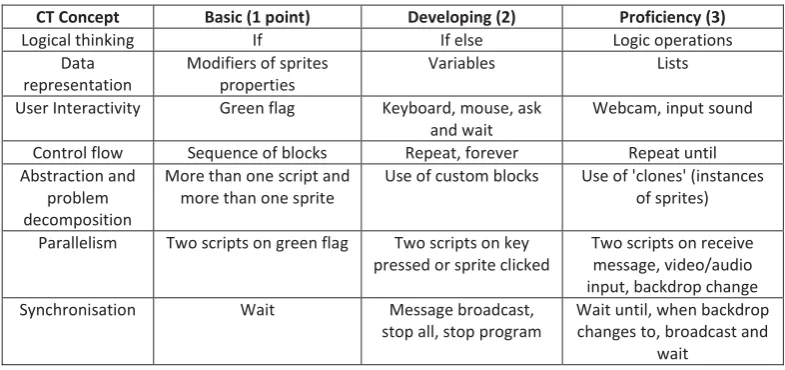
[image:4.595.101.494.282.467.2]Dr. Scratch (Moreno-León and Robles, 2015) assesses Scratch projects for CT skills. Projects are given a score out of 21 across seven CT concepts, based on the blocks used (Table 1). These scores have been correlated with both software complexity metrics and human expert judgements (Moreno-León, Robles and Román-González, 2016; Moreno-León et al., 2017). Dr. Scratch has been used in recent studies as a measure of CT (e.g. Foerster, Foerster and Loewe, 2018).
Table 1: Dr. Scratch scoring system
CT Concept Basic (1 point) Developing (2) Proficiency (3)
Logical thinking If If else Logic operations
Data representation
Modifiers of sprites properties
Variables Lists
User Interactivity Green flag Keyboard, mouse, ask and wait
Webcam, input sound
Control flow Sequence of blocks Repeat, forever Repeat until Abstraction and
problem decomposition
More than one script and more than one sprite
Use of custom blocks Use of 'clones' (instances of sprites)
Parallelism Two scripts on green flag Two scripts on key pressed or sprite clicked
Two scripts on receive message, video/audio input, backdrop change Synchronisation Wait Message broadcast,
stop all, stop program
Wait until, when backdrop changes to, broadcast and
wait
2.3 Code smells
Bad programming practices are also known as ‘code smells’. A code smell is a surface indication in a program that usually corresponds to a deeper problem (Fowler et al., 1999), for example, duplicated code, long methods and long parameter lists. In Scratch, duplicated blocks, long scripts and dead blocks (not connected to an event block) are all code smells. Code smells make Scratch programs difficult to understand and debug, which can impact project quality and the ease with which learners can alter projects. This is particularly important because ‘remixing’ other people’s projects is a large part of the Scratch online platform (Dasgupta et al., 2016).
Interestingly, novice programmers “prone to introducing some smells do so even as they gain experience” (Techapalokul and Tilevich, 2017, p. 10), suggesting that at least some formal educational intervention is required. However, it is difficult to know when to introduce the concept of code reuse to novices. In a recent work, Hermans and Aivaloglou (2017) created a Scratch-based MOOC online course that integrates software engineering concepts into a Scratch programming curriculum. Their results were promising, reporting that novices can avoid code smells and discern between good and bad programming practice. However, an analysis of 230,000 Scratch projects indicates that learners who potentially know how to avoid code duplication will still duplicate blocks frequently (Robles et al., 2017).
2.3.1 Abstraction
Simon Rose, Jacob Habgood and Tim Jay
1972) and the main tenant of CT (Wing, 2006), linking closely with other skills of generalisation, pattern recognition and decomposition. Teaching abstraction to novices is a difficult task (Armoni, 2013), which explains difficulties in knowing when to introduce the concept of code reuse.
Dr. Scratch (section 2.2.1) measures abstraction and decomposition skills through the use of multiple scripts in multiple sprites, custom blocks and clones (Table 1). Custom blocks are procedures that can be used to abstract away repeating functionality. Inputs can be used as parameters to pass information to these procedures. Clones are instances of sprites that allow for repetition of sprite behaviours. These blocks enable the Scratch user to write programs using reusable components. Repeats can also be used to reduce duplication, but do not contribute to the Dr. Scratch score for abstraction and decomposition.
3. Game overview
Pirate Plunder is a novel educational programming game that introduces repeats, custom blocks and clones in a game-based Scratch-like setting. The aim is to teach players to use these blocks to reduce block duplication. There are two versions of Pirate Plunder: one where the player is given a program that is incomplete or incorrect, and another where they begin each level with an empty program. We will compare these versions in a series of studies (section 5).
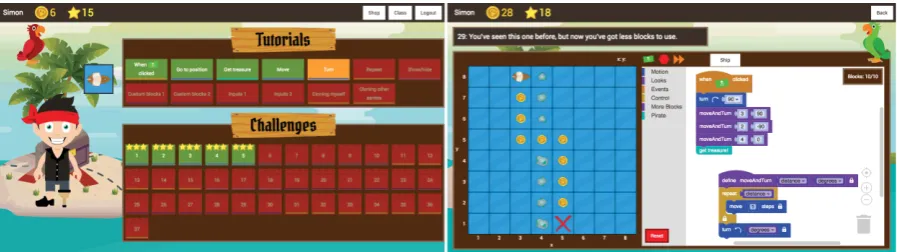
[image:5.595.74.523.383.509.2]The player uses Scratch blocks to program a pirate ship to navigate around a grid, collect items and interact with obstacles. Levels are divided into ‘tutorials’ and ‘challenges’ (Figure 1). Tutorial levels introduce blocks, with a parrot character demonstrating how and when to use each block. Players then use these blocks to complete a set of challenges before attempting the next tutorial. Most levels require the player to navigate to the ‘X marks the spot’ position on the grid and use ‘get treasure!’ block to collect a treasure chest. Levels contain coins that can be collected as the player moves around the level. Finally, there is a shop where the player can use coins to purchase items and customise their avatar.
Figure 1: Level select (left) and a challenge level that uses custom blocks (right)
4. Game design
Pirate Plunder has followed an iterative development and testing process, with regular playtesting influencing key design decisions. This section describes these decisions and the main components of the game design.
4.1 Scratch integration
The Pirate Plunder layout and functionality is similar to that of Scratch 2.0 (the version widely-used in schools at the time of development.)
4.1.1 Blocks
The Scratch 2.0 toolbox contains 116 blocks divided into 10 categories. This large number of blocks gives the user freedom, in line with Scratch’s constructionist principles, but can be both daunting and difficult for novice users. Pirate Plunder uses a selected set of blocks relevant to gameplay (Table 2).
Table 2: Pirate Plunder blocks
Category Block Use in Pirate Plunder
Simon Rose, Jacob Habgood and Tim Jay
Category Block Use in Pirate Plunder
Turn left Turn sprite anticlockwise n degrees Point in direction Point sprite in a compass direction
Go to position Move sprite to a grid position (x, y)
Looks Show Show sprite
Hide Hide sprite
Events When green flag clicked Trigger a script when the green flag is clicked Control Repeat Repeat the nested blocks n times
When I start as a clone Trigger a script when the sprite is cloned Create clone of Create a clone of a sprite Delete this clone Delete the clone of a sprite
Sensing Property of Get the x position, y position or direction of a sprite
More blocks Create and use custom blocks
Pirate* Get treasure Collect treasure
*not a Scratch category
4.1.2 User interface
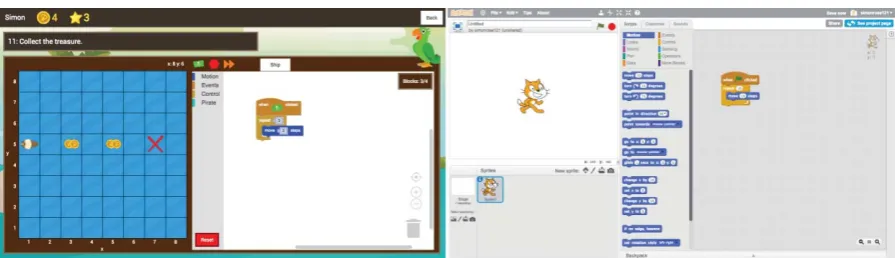
[image:6.595.121.477.72.232.2]The Pirate Plunder user interface is similar to Scratch 2.0 in that the scene is on the left and the program workspace is on the right (Figure 2). The green flag and stop buttons work in the same way. However, block execution is slowed down to make it easier for the player to debug their program.
Figure 2: Pirate Plunder (left) and Scratch 2.0 (right) user interfaces
4.1.3 Sprites
Scratch uses event-driven programming with multiple active objects called sprites. Each sprite can be programmed separately. In Pirate Plunder, the available sprites are selectable above the program workspace. However, unlike Scratch, players cannot add, edit or remove sprites. Players can use the ship sprite in each level and an additional cannonball sprite in later levels. Sprites face right and are visible by default.
4.2 Difficulty progression
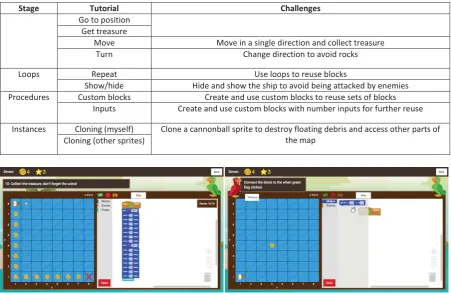
Levels in Pirate Plunder are split into four difficulty stages: statements, loops, procedures and instances (Table 3). The latter three stages introduce a different technique for block reuse, to help the player recognise and correct code smells in previous levels. Motion and event blocks are introduced first, forcing the player to duplicate blocks to collect level coins. The stage finishes with a level that requires 14 separate move blocks to achieve the maximum score (Figure 3), demonstrating the motivation behind using loops. The repeat block is then introduced, and the player must eventually use duplicated sets of repeats, demonstrating the motivation for using procedures. The player is then taught to move duplicated sets of blocks into their own custom blocks (procedures). Parameters are introduced through custom block inputs, which let the player pass numerical values into their custom blocks (see Figure 1 for an example). Finally, the player is taught how to clone a cannonball sprite, which can be used to simulate shooting and lets them destroy floating debris that block off certain areas of later levels.
Table 3: Difficulty progression
Stage Tutorial Challenges
Statements When green flag clicked
[image:6.595.73.521.319.448.2]Simon Rose, Jacob Habgood and Tim Jay
Stage Tutorial Challenges
Go to position Get treasure
Move Move in a single direction and collect treasure
Turn Change direction to avoid rocks
Loops Repeat Use loops to reuse blocks
Show/hide Hide and show the ship to avoid being attacked by enemies Procedures Custom blocks Create and use custom blocks to reuse sets of blocks
Inputs Create and use custom blocks with number inputs for further reuse
Instances Cloning (myself) Clone a cannonball sprite to destroy floating debris and access other parts of the map
[image:7.595.72.524.70.363.2]Cloning (other sprites)
Figure 3: The last level before repeats are introduced (left) and the ‘go to position’ tutorial (right)
The player is motivated to use required blocks through block limits, collectable items, required block validation and obstacles. Each challenge limits the number of total blocks that can be used in the program, forcing the player to address block duplication and produce a nearly ideal solution. Players must stop on each coin to collect it and have to collect every coin to achieve a maximum score for that level (section 4.3). Solutions are validated for containing the block related to that challenge. Some levels contain obstacles, such as enemy ghost ships, that will shoot at the player if they are within range. These can be avoided by hiding the ship using the ‘hide’ block. There are also sets of floating boxes that must be destroyed by cloning the cannonball sprite. The player receives feedback during levels from the green parrot avatar in the top right corner.
4.3 Reward system
Pirate Plunder uses several strategies to motivate the player. When collecting treasure, the player receives a random number of coins between 1 and 15 (Figure 4). Uncertain rewards such as this have been shown to enhance learning (Ozcelik, Cagiltay and Ozcelik, 2013). Players are given performance feedback (Malone and Lepper, 1987) through a star rating upon completion of each challenge (Figure 4). This is based on how many available coins they collected: 3 stars for all, 2 stars for some and 1 star for none. For example, a player could complete Figure 3 (left) using fewer blocks but would only achieve 2 stars for missing most of the level coins.
[image:7.595.73.524.604.729.2]Simon Rose, Jacob Habgood and Tim Jay
4.4 Debugging-first
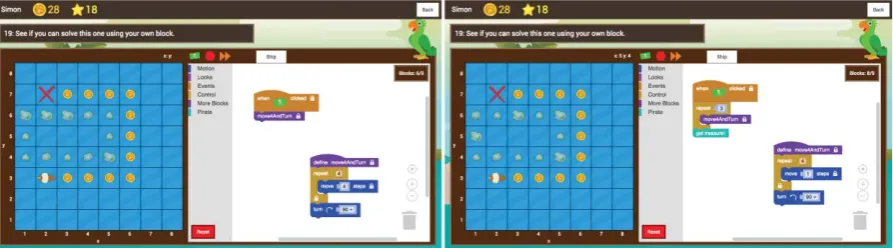
[image:8.595.75.522.158.282.2]The debugging-first blocks have either an incorrect or locked input, are there for assistance (and maybe undeletable) or aren’t needed at all. The player must either use, change or remove these blocks to complete the level using a completion strategy (Paas, 1992). Undeletable blocks have a white padlock and cannot be removed from the program. Locked inputs have the same background colour as the block they are in. The number and type of debugging blocks on each level are linked closely with the difficulty progression.
Figure 5: Debugging-first program (left) and a correct solution (right) for a level
4.5 Analytics
Pirate Plunder produces analytics for several player actions: changing game section (e.g. level select, shop, level) (to calculate time spent on each section), level attempt, level completion, shop item purchase and when working on their solution (block creation, move and deletion). We aim to use this data to investigate player approaches and performance in each version of the game.
5. Future
The next step is to perform a series of randomised controlled trials to investigate if Pirate Plunder is effective in teaching children aged 10-11 to use abstraction techniques to identify and correct code smells in Scratch. The first experiment will compare two versions of the game, debugging-first and non-debugging, over several weeks compared to a traditional Scratch curriculum. Participants will be assessed at pre-and post-test on their ability to design a Scratch solution with reusable components, as well as taking the Computational Thinking test (Román-González, Moreno-León and Robles, 2017). Artefact-based interviews (Brennan and Resnick, 2012) will be done at post-test to establish if participants have understood the rationale behind using repeats, custom blocks and clones.
We expect that the children playing Pirate Plunder will improve their scores on the Scratch assessment from pre-to post-test compared to the control. Furthermore, that the debugging-first version will have a positive impact on game progress and post-test scores. The results of this research, along with game analytics, will influence future game development and subsequent studies.
6. Summary
In summary, Pirate Plunder is designed to teach children to identify and correct code smells using repeats, custom blocks and clones. Using these blocks correctly shows abstraction and decomposition skills. Pirate Plunder uses a simplified Scratch environment and introduces a select set of blocks in a linear difficulty progression. This progression is designed to demonstrate the advantages of loops, functions and instances. Players are motivated to use these blocks through block limits, collectable items and obstacles. We will conduct several studies to establish whether Pirate Plunder is effective in teaching code reuse in Scratch compared to a traditional curriculum, whilst also comparing different versions of the game.
Simon Rose, Jacob Habgood and Tim Jay
they will have made some progress in understanding the underlying computational thinking concepts of abstraction and decomposition.
References
Aivaloglou, E. and Hermans, F. (2016) “How Kids Code and How We Know : An Exploratory Study on the Scratch
Repository”, in Proceedings of the 2016 ACM Conference on International Computing Education Research, pp 53–61. Armoni, M. (2013) “On Teaching Abstraction in Computer Science to Novices”, Journal of Computers in Mathematics and
Science Teaching, 32(3), pp 265–284.
Barr, V. and Stephenson, C. (2011) “Bringing Computational Thinking to K-12: What is Involved and What is the Role of the Computer Science Education Community?”, ACM Inroads, 2(1), pp 48–54.
Boyle, E. A. et al. (2016) “An update to the systematic literature review of empirical evidence of the impacts and outcomes of computer games and serious games”, Computers and Education, 94, pp 178–192.
Brennan, K. and Resnick, M. (2012) “New frameworks for studying and assessing the development of computational thinking”, in Proceedings of the 2012 annual meeting of the American Educational Research Association, Vancouver, Canada, pp 1–25.
Calao, L. A. et al. (2015) “Developing Mathematical Thinking with Scratch”, in Design for Teaching and Learning in a Networked World, pp 17–27.
Code.org (2018) Code.org. https://code.org/ (Accessed: 3 May 2018).
Dasgupta, S. et al. (2016) “Remixing as a Pathway to Computational Thinking”, in Proceedings of the 19th ACM Conference on Computer-Supported Cooperative Work & Social Computing, pp 1438–1449.
Denning, P. J. (2017) “Remaining trouble spots with computational thinking”, Communications of the ACM, 60(6), pp 33– 39.
Dijkstra, E. W. (1972) “The Humble Programmer”, Communications of the ACM, 15(10), pp 859–866.
Durak, H. Y. and Saritepeci, M. (2018) “Analysis of the relation between computational thinking skills and various variables with the structural equation model”, Computers and Education, 116, pp 191–202.
Foerster, E.-C., Foerster, K.-T. and Loewe, T. (2018) “Teaching Programming Skills in Primary School Mathematics Classes: An Evaluation using Game Programming”, in 9th IEEE Global Engineering Education Conference (EDUCON 2018). Fowler, M. et al. (1999) Refactoring: Improving the Design of Existing Code. Addison-Wesley Professional.
Franklin, D. et al. (2016) “Initialization in Scratch : Seeking Knowledge Transfer”, in Proceedings of the 47th ACM Technical Symposium on Computing Science Education, pp 217–222.
Furber, S. (2012) Shut down or restart? The way forward for computing in UK schools, The Royal Society. London. Giordano, D. and Maiorana, F. (2014) “Use of cutting edge educational tools for an initial programming course”, in
Proceedings of the 2014 IEEE Global Engineering Education Conference (EDUCON), pp 556–563.
Gouws, L., Bradshaw, K. and Wentworth, P. (2013) “Computational Thinking in Educational Activities An evaluation of the educational game Light-Bot”, in Proceedings of the 18th ACM conference on Innovation and technology in computer science education, pp 10–15.
Harms, K. J., Rowlett, N. and Kelleher, C. (2015) “Enabling independent learning of programming concepts through programming completion puzzles”, in Proceedings of the 2015 IEEE Symposium on Visual Languages and Human-Centric Computing, pp 271–279.
Heintz, F., Mannila, L. and Farnqvist, T. (2016) “A Review of Models for Introducing Computational Thinking, Computer Science and Computing in K–12 Education”, in Proceedings of the 2016 IEEE Frontiers in Education Conference (FIE), pp 1–9.
Hermans, F. and Aivaloglou, E. (2017) “Teaching software engineering principles to K-12 students: A MOOC on scratch”, in Proceedings of the 39th International Conference on Software Engineering: Software Engineering and Education Track, pp 13–22.
Kalelioğlu, F., Gülbahar, Y. and Kukul, V. (2016) “A Framework for Computational Thinking Based on a Systematic Research Review”, Baltic Journal of Modern Computing, 4(3), pp 583–596.
Learning Lab (2017) Kodetu. http://kodetu.org/ (Accessed: 3 May 2018).
Lee, M. J. and Ko, A. J. (2014) “A demonstration of gidget, a debugging game for computing education”, in Proceedings of the 2014 IEEE Symposium on Visual Languages and Human-Centric Computing, pp 211–212.
Lightbot Inc. (2016) Lightbot. https://lightbot.com/ (Accessed: 3 May 2018).
Liu, Z. et al. (2017) “Understanding problem solving behavior of 6–8 graders in a debugging game”, Computer Science Education. Routledge, 27(1), pp 1–29.
Malone, T. W. and Lepper, M. R. (1987) “Making learning fun: A taxonomy of intrinsic motivations for learning”, Aptitude, learning, and instruction, pp 223–253.
Maloney, J., Resnick, M. and Rusk, N. (2010) “The Scratch programming language and environment”, ACM Transactions on Computing Education, 10(4), pp 1–15.
Manches, A. and Plowman, L. (2015) “Computing education in children’s early years: A call for debate”, British Journal of Educational Technology, 48(1), pp 191–201.
Simon Rose, Jacob Habgood and Tim Jay
Van Merriënboer, J. J. G. and De Croock, M. B. M. (1992) “Strategies for Computer-Based Programming Instruction: Program Completion vs. Program Generation”, Journal of Educational Computing Research, 8(3), pp 365–394. Miljanovic, M. A. and Bradbury, J. S. (2016) “Robot ON!: A Serious Game for Improving Programming Comprehension”, in
Proceedings of the 2016 5th International Workshop on Games and Software Engineering (GAS), pp 33–36. Moreno-León, J. et al. (2017) “On the Automatic Assessment of Computational Thinking Skills: A Comparison with Human
Experts”, in Proceedings of the 2017 CHI Conference Extended Abstracts on Human Factors in Computing Systems, pp 2788–2795.
Moreno-León, J. and Robles, G. (2015) “Analyze your Scratch projects with Dr. Scratch and assess your Computational Thinking skills”, in Scratch Conference 2015, pp 1–7.
Moreno-León, J., Robles, G. and Román-González, M. (2016) “Comparing computational thinking development assessment scores with software complexity metrics”, in Proceedings of 2016 IEEE Global Engineering Education Conference (EDUCON), pp 1040–1045.
Ozcelik, E., Cagiltay, N. E. and Ozcelik, N. S. (2013) “The effect of uncertainty on learning in game-like environments”, Computers and Education, 67, pp 12–20.
Paas, F. (1992) “Training Strategies for Attaining Transfer of Problem-Solving Skill in Statistics: A Cognitive-Load Approach”, Journal of Educational Psychology, 84(4), pp 429–434.
Papert, S. (1980) Mindstorms: Children, computers, and powerful ideas. Basic Books, Inc.
Robles, G. et al. (2017) “Software clones in scratch projects: On the presence of copy-and-paste in computational thinking learning”, in Proceedings of the 2017 IEEE 11th International Workshop on Software Clones (IWSC), pp 31–37. Román-González, M., Moreno-León, J. and Robles, G. (2017) “Complementary Tools for Computational Thinking
Assessment”, in Proceedings of International Conference on Computational Thinking Education (CTE 2017), pp 154– 159.
Rose, S. P. (2016) “Bricolage Programming and Problem Solving Ability in Young Children: An Exploratory Study”, in Proceedings of 10th European Conference for Game Based Learning, pp 914–921.
Rose, S. P., Habgood, M. P. J. and Jay, T. (2017) “An Exploration of the Role of Visual Programming Tools in the Development of Young Children’s Computational Thinking”, Electronic Journal of e-Learning, 15(4), pp 297–309. Rowe, E. et al. (2018) “Labeling Implicit Computational Thinking in Pizza Pass Gameplay”, in Extended Abstracts of the 2018
CHI Conference on Human Factors in Computing Systems, pp 1–6.
Scratch Team (2018) Scratch statistics. https://scratch.mit.edu/statistics/ (Accessed: 8 April 2018).
Seiter, L. and Foreman, B. (2013) “Modeling the learning progressions of computational thinking of primary grade students”, in Proceedings of the ninth annual international ACM conference on International computing education research, pp 59–66.
Shute, V. J., Sun, C. and Asbell-Clarke, J. (2017) “Demystifying computational thinking”, Educational Research Review, 22, pp 142–158.
Techapalokul, P. and Tilevich, E. (2017) “Understanding Recurring Software Quality Problems of Novice Programmers”, in Proceedings of the 2017 IEEE Symposium on Visual Languages and Human-Centric Computing, pp 43–51.
Wilson, C. et al. (2010) Running on empty: The Failure to Teach K-12 Computer Science in the Digital Age, Association for Computing Machinery.