Scoping e-learning : use and development in
Health Sciences and Practice
Dr Pam Moule
Rod Ward
Karen Shepherd
Dr Lesley Lockyer
Celia Almeida
Centre for Learning and Workforce Research,
Faculty of Health and Life Sciences.
University of the West of England, Bristol
1 Executive summary
This study funded by the HEA HS&P subject centre aimed to survey e-learning implementation in health sciences and practice disciplines throughout the UK.
Its objectives were to:
explore issues influencing implementation and use by both early and late adopters
identify barriers to implementation and good practice
review the employment of e-learning within curricula representing a range of teaching models
In phase one, a postal survey obtained data from 25 higher education institutions relating to their uptake and development in this field. A second phase identified four case studies, two from early and two late adopters, reflecting the features identified from phase one. In the case studies interviews and focus groups with students and staff were conducted to gain a deeper understanding of the issues which were significant to them.
The main findings suggested e-learning development and use varies, with a spectrum of use across the sector. The predominant engagement is with instructivist learning
approaches managed through a Virtual Learning Environment with only limited experimentation in interactive learning online.
The characteristics of early adopters included: Access to external funding
Presence of committed local champions Strong institutional support
Central and local learning and teaching strategies that reference e-learning Student and staff are external drivers for e-learning development
Using online mechanisms for administrative processes
The characteristics of late adopters included:
Lone enthusiasts
Limited organisational support Limited need for e-learning
Maintain paper based administrative processes
The key barriers to development and use include: Poor strategic approach to development
Poor student IT skills
Lack of student awareness of e-learning resources Technology not pedagogy driven
Lack of computer resources in clinical workplace environments
Lack of demand from students, educational purchasers and academic staff
Currently IT systems are being employed to administer student data by a number of providers and the majority are keen to move towards a single entry point, accessible by academics, students and administrators. Most e-learning applications are concerned with information retrieval and database use. A number of learning resources available concentrate on information provisions through CD Roms and PowerPoint presentations. The vast majority of course provision is centred on the institutional virtual or managed learning environment (VLE/ MLE). Employment of these was limited in many cases to information provision and retrieval and more limited use of interactive features such as discussion boards and virtual classrooms. The main method of communication between students and staff is through email with only limited examples of Web 2.0 technologies, such as wikis or social networking sites being used and additionally mobile technologies were under utilised. This may reflect a view that the e-learning is best used to deliver particular curriculum areas, such as biological sciences, where factual information takes precedence over discursive techniques used in the social sciences.
The development of institutional and local e-learning strategies has the potential to enhance uptake and future engagement. Local strategies are being influenced by
national initiatives, such as the proposals for life long learning and widening participation agendas ( e.g. Scottish Executive, 1999; DH, 1998; 2000; 2001; DfES; 2003; DfEE 2003; HEFCE, 2005). Curriculum review involving stakeholders can identify appropriate opportunities for e-learning that are context specific. From this institutions can target resources towards development, purchase of existing materials, review collaborative arrangements with other providers and consider the use of open source materials. Given the continuing variance in IT skills amongst students and staff, development programmes are required. Local provision of continuing staff development in IT use was seen as important to e-learning inception and use. The provision of student training and information on e-learning use should not be overlooked.
E-learning use could be supported through:
Development of institutional strategy for e-learning, taking into account national drivers and local context
The implementation of strategies may be aided by the inclusion of aims, targets, key roles, identifying resource base, monitoring and evaluation of effectiveness Identify ways forward in provision:
o development (resources, champions, training needs, funding)
o purchase or access existing materials e.g. Reusable Learning Objects
o consider collaborative arrangements with other providers
o consider the use of open source materials Provision of a local IT staff development programme
Provision of a local IT student development programme Consider providing support materials for IT use on the web
Provide students with key information on learning resources available within the institution and beyond
Institutions developing IT materials to consider IPR, access, copyright and licensing issues to enable wider sharing
The findings suggest there is scope to engage late adopters in further appropriate work by establishing a support culture where e-learning practices and resources can be shared. Established centres of innovation have much to offer the broader sector, including their experience of operationalising strategy at institutional and individual levels; in addition to their expertise in e-learning development and use. Wider
Contents
1 Executive summary ... 2
2 Introduction ... 7
2.1 Definition of e-learning and terms ... 7
3 Aims and objectives ... 9
4 Methodology ... 9
4.1 Phase 1 ... 9
4.2 Phase 2 ... 10
5 Data collected ... 10
5.1 Phase 1 ... 11
5.2 Phase 2 ... 11
6 Data analysis ... 11
6.1 Phase 1 ... 11
6.2 Phase 2 ... 11
7 Results ... 12
7.1 Phase 1 ... 12
7.1.1 E-Learning Development ... 12
7.1.2 E-Learning Environments – Current and Future Developments ... 16
7.1.3 Future Development of Processes to Support e-Learning ... 18
7.1.4 Learning Implementation ... 26
7.1.5 Portals ... 27
7.2 Phase 2 ... 28
7.2.1 Staff views ... 29
7.2.2 Student views ... 35
8 Discussion ... 38
8.1 Issues influencing implementation and use by both early and late adopters ... 38
8.1.1 Characteristics of early adopters ... 38
8.1.2 Characteristics of late adopters ... 39
8.2 Barriers to implementation and good practice ... 39
8.3 Employment of e-learning within curricula representing a range of teaching models . 42 8.4 Learning approaches that work well include: ... 44
8.5 Learning approaches that are less successful include: ... 44
8.5.1 Limitations of the study ... 44
8.6 Recommendations for practice ... 45
8.6.1 Guidance for e-learning implementation ... 45
9 Conclusions ... 46
10 Acknowledgements ... 47
11 References ... 47
12 Appendices ... 50
12.1 Appendix one –Questionnaire ... 50
12.2 Appendix two - Features associated with early and late adopter HEIs ... 70
12.3 Appendix three – List of responding HEIs in Phase 1 ... 71
12.4 Appendix four – Interview schedules ... 72
Figures
Figure 1 E-learning ladder ... 8
Figure 2 E-learning application used (n=24)... 19
Figure 3 Number of students using e-learning applications (n=23) ... 19
Figure 4 Number of teaching staff using e-learning applications (n=21) ... 20
Figure 5 Number of modules currently actively using e-learning applications (n=20) ... 20
Figure 6 How e-learning applications divide ... 21
Figure 7 Student groups receiving specialist support ... 25
Tables Table 1 Case study sites ... 11
Table 2 Processes to support e-learning ... 12
Table 3 Major driving forces for e-learning development ... 12
Table 4 Major supporting factors for e-learning ... 13
Table 5 Methods of consultation that work for respondents (staff) ... 14
Table 6 Methods of consultation that work for respondents (students) ... 14
Table 7 Methods of consultation that work for respondents (External partners) ... 15
Table 8 Potentially collaborative organisations ... 15
Table 9 Levels of processes, services and systems to support learning and teaching - now ... 16
Table 10 Levels of processes, services and systems to support learning and teaching - Aims ... 18
Table 11Uses of elearning applications ... 22
Table 12 Units responsible for installing and maintaining e-learning applications ... 22
Table 13 Support for e-learning application development ... 22
Table 14 Units providing staff support and development in use of e-learning applications ... 23
Table 15 Training and development activities for support staff ... 24
Table 16 Units providing student support and training in e-learning applications ... 24
Table 17 E-learning technologies used ... 26
Table 18 Student groups e-learning is used to support ... 26
Table 19 E-learning materials that work well ... 27
Table 20 E-learning materials that do not work well ... 27
Table 21 Access via an institutional portal ... 28
Table 22 Responsibility for developing institutional portal ... 28
2 Introduction
This research was commissioned by the Higher Education Academy Health Sciences and Practice (HEAHS&P) Subject Centre to explore the use and development of
electronically-delivered learning within the health sciences in the United Kingdom (UK). The uptake of e-learning throughout the health sciences and practice field varies from institution to institution, but reasons for these variations have not been fully examined (Moule, 2007). Factors such as organizational strategy, availability of resources, and degree of staff confidence are thought to play a part (Gilchrist and Ward, 2006), but other relevant aspects will be identified from this scoping exercise.
The healthcare sector within the UK is dominated by the National Health Service (NHS) with educational provision being split between Education Training and Development departments within the NHS, Higher and Further Education Institutions and the private sector. This study focused on the use of elearning within Higher Education Institutions (HEIs) who provide initial undergraduate and continuing post graduate education for professions within the Health Sciences and Practice subject domains.
In 2001 the NHS published Working Together –Learning Together’: A Framework for Lifelong Learning for the NHS (Department of Health (DH), 2001) which set out plans for the development of the NHS university and included extensive plans for the design and use of e-learning. Since the demise of the NHSu these responsibilities have passed to strategic health authorities, who have taken a variety of approaches to the use of e-learning.
The sector is also informed by wider developments in e-learning such as the
Department for Education and Skills(DfES) e-Strategy 'Harnessing Technology: Transforming learning and children's services', which describes the use of digital and interactive technologies to achieve a more personalised approach within all areas of education and children's services.(DfES, 2005)
In 2005 the Higher Education Funding Council for Education (HEFCE) set out it‟s “aspirations for how e-learning can transform learning and teaching, and about supporting institutions in setting their own visions and plans”. (HEFCE, 2005). This encouraged the development of e-learning strategies and has informed developments in this area in many universities.
2.1 Definition of e-learning and terms
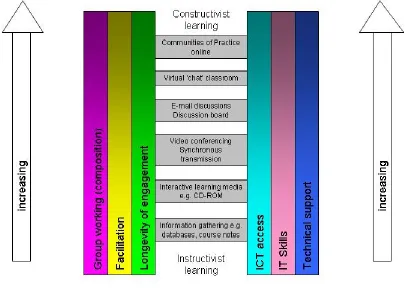
IT skills and facilitation. These „sides‟ represent some of the issues of e-learning use that will be discussed later in the chapter.
Figure 1 E-learning ladder
The „rungs‟ of the ladder are positioned to reflect an instructivist approach, where the learner takes a more passive role in learning from provided knowledge, through to
constructivist modes of e-learning, where the learner takes a more active role in learning and draws on previous experiences and those of others. The initial „rungs‟ relate to using e-learning for information gathering through the use of databases, literature searching eg OVID, and learning materials such as power point presentations, lecture notes, online learning materials and CD-Roms. These learning materials might be used as part of a blended approach that combines e-learning with a face-to-face delivery (Moule and Gilchrist, 2001). The lower „rungs‟ may also include the use of virtual simulations of environments, for example, the hospital ward and care delivery such as particular psychomotor skills.
Practice (Wenger, 1998) through long periods of online engagement of a group with shared goals and language. It is envisaged that the ladder could be developed to
include mobile learning tools, such as the use of SMS (text) messages, podcasts (digital audio files downloaded to personal digital audio players such as MP3 players) and might encompass social networking tools such as Face book, My Space and virtual worlds such as Second Life. In other words as e-learning technology continues to develop the ladder can be adapted to include a broader range of delivery modes.
Virtual Learning Environment (VLE) refers to the component(s) within an MLE that provides the “online” interactions of various kinds which can take place between learners and tutors, including online learning
(http://www.elearning.ac.uk/mle/MLElandscapestudy/e-learning_survey_2005.pdf/download.)
Portal is a network service that brings together diverse/distributed content and services into an amalgamated form for presentation to the user. The presentation is usually via a web browser and can be customised and personalised for the individual user. (
http://www.elearning.ac.uk/mle/MLElandscapestudy/e-learning_survey_2005.pdf/download.)
For an explanation of other technologies mentioned please see appendix 5.
3 Aims and objectives
The study aimed to survey e-learning implementation in health sciences and practice disciplines throughout the UK. Its objectives were to:
explore issues influencing implementation and use by both early and late adopters
identify barriers to implementation and good practice
review the employment of e-learning within curricula representing a range of teaching models
The aims and objectives were achieved through a two phase approach including an initial survey and follow up selected case study visits.
4 Methodology
4.1 Phase 1
The Joint Information Systems Committee (JISC) funded Managed Learning
current study (see appendix one), with the permission of JISC. Some of the original sections were re-worded or removed, leaving a total of 62 questions. Elements of the survey would not necessarily be completed by all respondents, depending on their institutional position.
Paper copies of the questionnaire were printed, and it was also made available for download via a link on the UWE Health and Social Care departmental website: (http://hsc.uwe.ac.uk/net/research/HSPsurvey.aspx ) and the HEA HS&P website.
An initial list was created from personal contacts. We also searched departments on the Quality Assurance Agency for Higher Education Major Review of healthcare
programmes reports listing: (http://www.qaa.ac.uk/reviews/reports/healthReviews.asp ) and the Nursing and Midwifery Admissions Service institution listing:
(http://www.nmas.ac.uk/instit/index.html ) . We added those HEAs not identified
previously from the HS&P Subject Centre list of contacts. The HEA HS&P list contained a number of duplicates and no contact names. For reasons of confidentiality, names of key contacts from the HEA database were not divulged to the research team. A final sample of (n= 93) were sent a paper version of the survey.
An additional 20 copies of the questionnaire were distributed to delegates attending the HS&P Festival of Learning, held at the Royal College of Physicians, London in March 2007. This represented a convenience sample of informed participants, with an interest in e-learning. This gave a final potential sample of (n=113).
Notification of the survey was sent to those HEIs in the HEA newsletter mailing. An advertisement was also printed in the HEA newsletter and posted as a news item on the HS&P website, with a link to the survey url.
4.2 Phase 2
Four case study sites were identified from the responses to phase one using the criteria set out (see appendix two), to include both early and late adopters of e-learning. In this study the terms early and late adopters reflect both the numbers of staff and students involved in e-learning and the variety of e-learning activities undertaken. The full range of features associated with our categorisation of early and late adopters is given in appendix two. Our definitions are therefore not consistent with Rogers (1995) definition of early and late adopters that suggested the early adopters lead revolutionary change and risk taking. These included two sites in the midlands and two towards the south east.
5.1 Phase 1
Responses were received from n=25 (28%) departments/HEIs by June 2007 (see appendix three). Data were entered into SPSS.
5.2 Phase 2
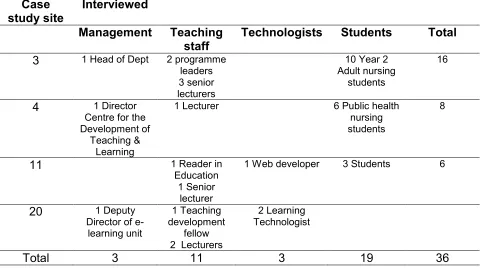
[image:11.612.67.547.275.543.2]At the case study sites visited we reviewed learning and teaching strategy documents and e-learning strategy documents for the faculty and HEI, interviewed key staff and viewed e-learning materials using an outline schedule (see appendix four). Focus groups were held with students in each site. The table below indicates the actual numbers of staff and students involved.
Table 1 Case study sites
Case
study site Interviewed
Management Teaching
staff Technologists Students Total
3 1 Head of Dept 2 programme
leaders 3 senior lecturers
10 Year 2 Adult nursing
students
16
4 1 Director
Centre for the Development of
Teaching & Learning
1 Lecturer 6 Public health
nursing students
8
11 1 Reader in
Education 1 Senior
lecturer
1 Web developer 3 Students 6
20 1 Deputy
Director of e-learning unit
1 Teaching development
fellow 2 Lecturers
2 Learning Technologist
Total 3 11 3 19 36
6 Data analysis
6.1 Phase 1
The questionnaires were coded and the data set entered into SPSS vs 13. Descriptive statistics were calculated. Further analysis did not demonstrate any significant
differences between those HEIs who were developing their e-learning support centrally and those developing this within faculties or schools.
Qualitative data obtained from the site visits and interviews was transcribed and thematically analysed, using procedures outlined by Miles and Huberman (1994).
7 Results
7.1 Phase 1
7.1.1 E-Learning Development
Twenty (80%) respondents stated the developmental organisation of processes to support e-Learning were devolved to Faculty/School/Department level within an institution wide initiative (Table 2).
Table 2 Processes to support e-learning
Number Percent
Devolved Responsibilities to Faculty/School/Department within institution wide initiative
Departmental/Local initiatives with little or no integration Activity predominantly centralised in the HEI
20
3 2
80%
12% 8%
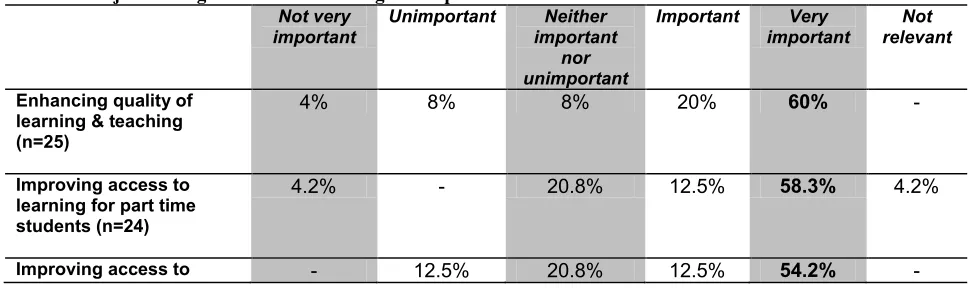
The importance of a range of driving factors for e-learning developed were considered using a five-point scale ranging from „Not very important at all‟ to „Very important‟ (Table 3); a number of factors were viewed neutrally, attracting responses relatively equally across all the response categories. Those factors which a majority viewed as
unimportant included „Attracting home students‟ where 50% believed this to be
[image:12.612.63.552.576.720.2]unimportant, and „Help standardise own institution with other‟ where 62.5% felt it to be unimportant. A single factor, „Attracting international students‟ was felt by 72% of the respondents to be „neither important nor unimportant‟. Seven factors were rated as important or very important by over 45% of the respondents. These were „Enhancing quality of learning and teaching‟ (80%), „Improving access to learning for part time students‟ (70.8%), „Improving access to learning for students off campus‟ (66.7%), „Widening participation/inclusiveness‟ (66.7%), „Students expectations‟ (52%), „HEI/ Faculty/ School Learning and Teaching Strategy‟ (60%) and „Improving access to overseas students‟ (45.8%).
Table 3 Major driving forces for e-learning development
Not very important
Unimportant Neither important
nor unimportant
Important Very important
Not relevant
Enhancing quality of learning & teaching (n=25)
4% 8% 8% 20% 60% -
Improving access to learning for part time students (n=24)
Not very important
Unimportant Neither important
nor unimportant
Important Very important
Not relevant
learning for students off campus
(n=24)
Widening participation/
inclusiveness (n=24) 8.3% 12.5% 12.5% 29.2% 37.5% -
Students expectations
(n=25) - 20% 28% 16% 36% -
Improving access to learning for overseas students (n=24)
25% 4.2% 16.7% 12.5% 33.3% 8.3%
HEI/ Faculty/ School learning and teaching strategy
(n=25)
4% 12% 24% 32% 28% -
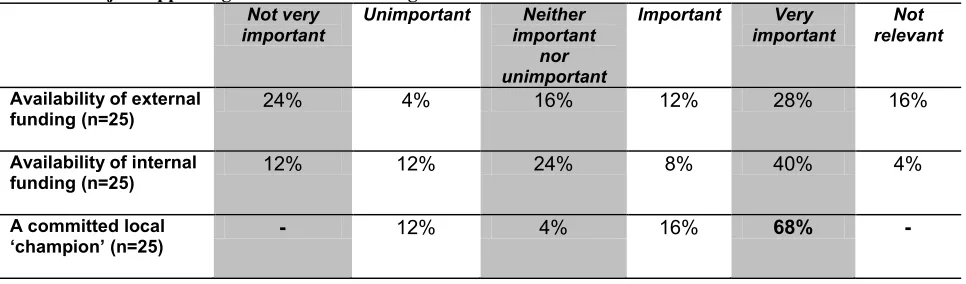
[image:13.612.66.549.436.578.2]Possible supporting factors for e-learning were also rated by the respondents on the same five-point scale (Table 4). Two factors were rated as important by over 50% of the respondents. These were „A committed local champion‟ (84%) and „Technological changes/developments‟ (60%). Three respondents highlighted other factors, although only two clarified these as technological support and in becoming a new university.
Table 4 Major supporting factors for e-learning
Not very important
Unimportant Neither important
nor unimportant
Important Very important
Not relevant
Availability of external
funding (n=25) 24% 4% 16% 12% 28% 16%
Availability of internal
funding (n=25) 12% 12% 24% 8% 40% 4%
A committed local
‘champion’ (n=25) - 12% 4% 16% 68% -
The respondents added their own methods of consultation that they deemed to work best (Table 5), a wide range of consultative processes were highlighted with differently focused meetings dominated the responses.
Table 5 Methods of consultation that work for respondents (staff)
Direct contact with all groups of staff following ideas generated at online learning meetings Open, informed and from the beginning consultative
Constant contact and an overall strategy in the HEI with regular planning and review meetings
Consensus meetings following champion presentations Targeted meetings
Strategic meetings across the university Curriculum meetings
Opportunistic meetings Joint consultative meetings Face to face discussion
Electronic communication with staff Web casts
Prototyping
Promotional material (e.g. leaflets, posters, and websites)
Presentation and demonstrations of completed work and „work in progress‟ Development with committed staff and identified focus
School e-learning portal task group Training by staff development Team networking with colleagues
Dissemination of ideas through school learning enhancement groups
Forum where staff have a presentation and then move to small workshops followed by feedback from the workshops
Contextualised, localised staff development Workshops
Students were consulted by a majority of the responding institutions when they were developing processes to support e-learning with only two (8%) stating they did not consult with students. The largest group of consulted students were those who were full time and campus based (76%), with 68% of institutions consulting with off campus and distance learning students and 64% consulting with part time campus based students. Only 36% consulted with overseas students.
[image:14.612.69.494.637.715.2]Respondents added those methods they found worked well when they consulted with students (Table 6)
Table 6 Methods of consultation that work for respondents (students) E-mail discussions
Face to face discussion Classroom discussion Listening road shows
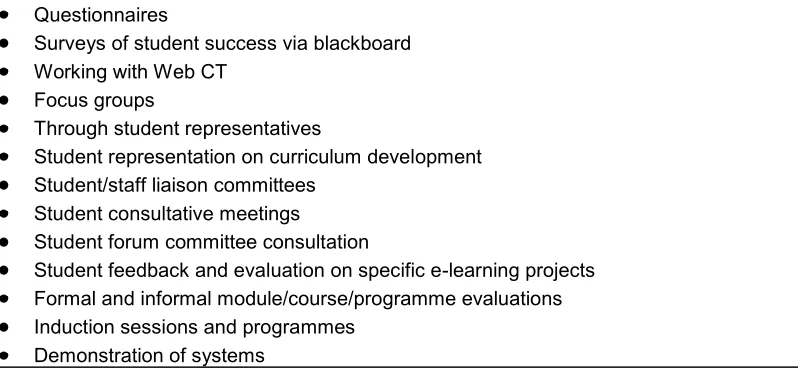
Questionnaires
Surveys of student success via blackboard Working with Web CT
Focus groups
Through student representatives
Student representation on curriculum development Student/staff liaison committees
Student consultative meetings
Student forum committee consultation
Student feedback and evaluation on specific e-learning projects Formal and informal module/course/programme evaluations Induction sessions and programmes
Demonstration of systems
[image:15.612.72.471.74.261.2]Twenty (80%) of the responding institutions stated had plans for future collaboration with others as a way of overcoming barriers to the development of processes to support e-learning. Methods of consultation that were deemed to have worked with external partners are outlined in Table 7.
Table 7 Methods of consultation that work for respondents (External partners) Initial e-mail then direct contact
Telephone Online forums
Informal groups and discussions E-learning special interest groups Workshops and conferences
Networking at seminars and conferences Via organisations such as the HEA
Via personal communication with colleagues Via faculty learning and teaching committee Meetings
Relationship building
Engaging external partners in Programme development/review Committees Specialist centre in the University
Organisations that the responding institutions planned to collaborate with and the nature of the collaboration are shown in Table 8.
Table 8 Potentially collaborative organisations
Other universities regarding collaborative funding projects London Metropolitan and Cambridge (CETL)
Northampton, Chester and Peninsular Medical School about the development of health reusable learning objects
Leeds Metropolitan about Mobile Learning
[image:15.612.71.490.367.545.2]Objects and Course development
University of Adelaide and Virginia Commonwealth University about a Distance leaning programme collaboration
York University sharing good practice on support systems and Huddersfield University about adopting their developed system of Penfield Virtual University
North West support groups for Non Medical prescribing HEI partnerships development
Pharmaceutical Companies
University of East Anglia and University of Essex about VLE development University of Greenwich and University of Kent about Janet to N3 link project
7.1.2 E-Learning Environments – Current and Future Developments A series of questions were asked outlining the functions of processes, services and systems that support learning and teaching. Four levels were given for each function ranging from level 1 (paper based systems) to level 4 (single point entry on line systems) and respondents were asked to assess their current level and that their
institution aspired to. Not all of the respondents answered each question. Some did not clarify an aim on all the questions leading to the supposition that their institution did not plan on developing that process further.
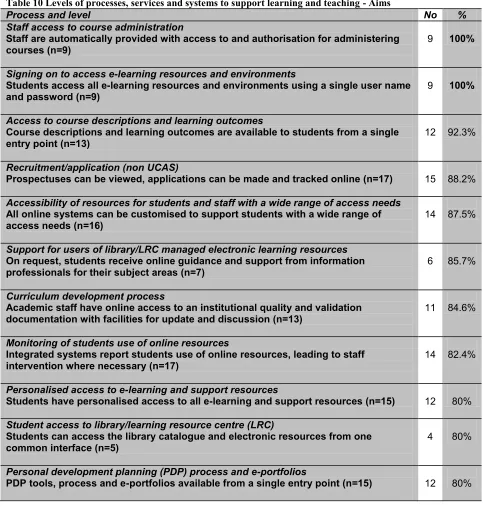
[image:16.612.68.549.437.711.2]The seven commonest responses given for where Faculties of Health Sciences within HEIs view themselves now (60% plus) are shown in table 9 and the ten most common aims (80% plus) are given in Table 10.
Table 9 Levels of processes, services and systems to support learning and teaching - now
Process and level No %
Student access to library/learning resource centre (LRC)
Students can access the library catalogue and electronic resources from one
common interface (n=25) 20 80%
Monitoring of students use of online resources
Individual staff can choose and are able to monitor students use of online resources
(n=24) 17 70.8%
Tracking students attendance
Attendance data is tracked manually (n=24) 15 62.5%
Module selection
Choice of elective modules made using paper forms (n=22) 14 63.6%
Recruitment/application (non UCAS)
Prospectus can be viewed and simple enquires can be made online (n=23) 14 60.9%
PDP transcripts
Transcripts only available in paper format (n=23) 14 60.9%
Signing on to access e-learning resources and environments
Process and level No %
Table 10 Levels of processes, services and systems to support learning and teaching - Aims
Process and level No %
Staff access to course administration
Staff are automatically provided with access to and authorisation for administering
courses (n=9) 9 100%
Signing on to access e-learning resources and environments
Students access all e-learning resources and environments using a single user name
and password (n=9) 9 100%
Access to course descriptions and learning outcomes
Course descriptions and learning outcomes are available to students from a single
entry point (n=13) 12 92.3%
Recruitment/application (non UCAS)
Prospectuses can be viewed, applications can be made and tracked online (n=17) 15 88.2%
Accessibility of resources for students and staff with a wide range of access needs
All online systems can be customised to support students with a wide range of
access needs (n=16) 14 87.5%
Support for users of library/LRC managed electronic learning resources
On request, students receive online guidance and support from information professionals for their subject areas (n=7)
6 85.7%
Curriculum development process
Academic staff have online access to an institutional quality and validation
documentation with facilities for update and discussion (n=13) 11 84.6%
Monitoring of students use of online resources
Integrated systems report students use of online resources, leading to staff
intervention where necessary (n=17) 14 82.4%
Personalised access to e-learning and support resources
Students have personalised access to all e-learning and support resources (n=15) 12 80%
Student access to library/learning resource centre (LRC)
Students can access the library catalogue and electronic resources from one
common interface (n=5) 4 80%
Personal development planning (PDP) process and e-portfolios
PDP tools, process and e-portfolios available from a single entry point (n=15) 12 80%
7.1.3 Future Development of Processes to Support e-Learning
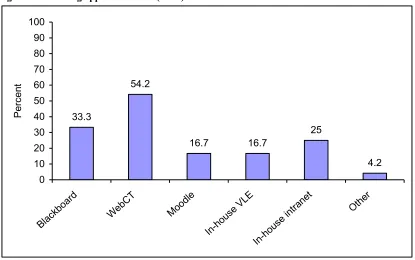
Twenty-four respondents stated their faculty, department or school currently uses a virtual learning environment (VLE); one respondent did not answer the question. The e-learning applications used are shown in Figure 2. Just over half (54.2%) the
Figure 2 E-learning application used (n=24)
33.3
54.2
16.7 16.7
25
4.2 0
10 20 30 40 50 60 70 80 90 100
Blac kboar
d
WebCT Moodl e
In-hou se V
LE
In-hou se intrane
t
Othe r
P
erc
en
t
Twelve (48%) respondents stated that conformance and compliance to e-learning standards and specifications had influenced their choice of e-learning applications.
Numbers of students using e-learning applications in the respondent‟s faculty, school or department ranged from less than 499 to between 5000 to 7499; two stated that this information was not collected and one did not answer the question (Figure 3). Around one-third stated between 500-999 students were using e-learning applications in their HEI.
Figure 3 Number of students using e-learning applications (n=23)
21.8
34.8
8.7
17.4
13
0 10 20 30 40 50
499 or less 500-999 1000-1999 2000-2999 5000-7499 Number of Students
P
er
ce
[image:19.612.74.490.520.671.2]The number of staff using e-learning applications ranged from less than nine individuals within a single school, department or faculty to between 200 to 299; three respondents stated this information was not collected in their institution and one did not answer the question (Figure 4). Approximately one third of respondent‟s had between 10 and 29 teaching staff currently using e-learning applications within their faculty, department or school.
Figure 4 Number of teaching staff using e-learning applications (n=21)
9.5
33.3
14.3 14.3
23.8
4.3
0 10 20 30 40 50
9 or less 10-29 30-49 50-99 100-199 200-299
Number of Staff
P
er
ce
nt
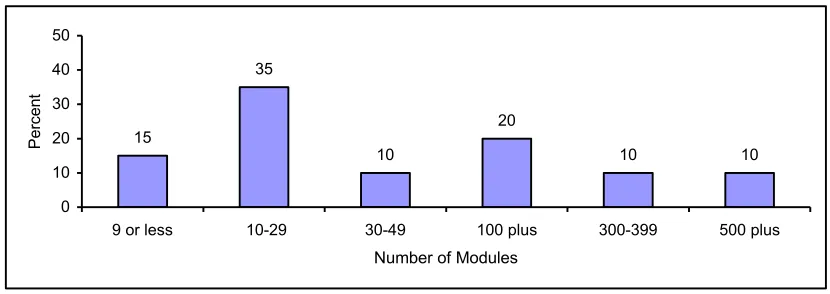
The number of modules currently actively using e-learning reported by respondents ranged from nine or less to 500 plus; again four reported this information was not
collected in their institution and one respondent did not answer the question (Figure 5). Approximately one third of respondent‟s had between 10 and 29 modules currently using e-learning applications within their faculty, department or school.
Figure 5 Number of modules currently actively using e-learning applications (n=20)
15
35
10
20
10 10
0 10 20 30 40 50
9 or less 10-29 30-49 100 plus 300-399 500 plus Number of Modules
P
er
ce
nt
[image:20.612.72.487.452.599.2]Figure 6 demonstrates how for 18 respondents the e-learning applications divide between five categories. Fourteen (77.8%) of the respondents stated that some
[image:21.612.74.531.165.530.2]modules or units of study were web supplemented, and online participation was optional for the students. Only six (33.3%) ran any fully online courses and these at most were 15% of provision.
Figure 6 How e-learning applications divide
0% 10% 20% 30% 40% 50% 60% 70% 80% 90% 100%
1 2 3 4 5 6 7 8 9 10 11 12 13 14 15 16 17 18 Respondents
Fully online course
Web dependent, participation required through interaction with content and communication Web dependent, participation required through communication with staff/students
Web dependent, participation required through interaction with content Web supplemented, online participation is optional for the student
Table 11Uses of elearning applications
Number Percent
Access to course material
Access to web based learning resources Problem based learning
Peer support e-Assessment
Collaborative working Assignment submission Formative assessment
Access to multimedia resources, including simulations and games e-Portfolio
Online student presentations (individual and group) Learning design 25 25 20 19 17 17 17 17 15 14 7 7 100% 100% 80% 76% 68% 68% 68% 68% 60% 56% 28% 28%
[image:22.612.76.545.345.405.2]Respondents indicated the units responsible for installing and maintaining the e-learning applications (Table 12); one respondent gave stated they used “subject area champions and expert users” to assist in this endeavour.
Table 12 Units responsible for installing and maintaining e-learning applications
Number Percent
Central Information Technology support Distributed Information Technology support Curriculum staff
Vendor/ external support
20 11 9 2 80% 44% 36% 8%
Respondents highlighted a number of ways through which e-learning application development was supported in their faculty, department or school (Table 13). One respondent stated that in their institution e-learning application was not fully supported as there was no “incentive or reward although technical support was available if
required”.
Table 13 Support for e-learning application development
Number Percent
Project funding
Allowing academic staff development time Funding as a service
Allowing support staff development time Career enhancement
Contractual obligation/ part of job specification
13 17 14 10 6 8 68% 56% 52% 40% 24% 32%
Units across the faculty, department or school the respondents belonged to used a range of support to provide staff development and support in using e-learning
[image:22.612.63.551.526.610.2]Table 14 Units providing staff support and development in use of e-learning applications
Staff development of
learning and teaching use of
e-learning applications
Support in creating new
courses
Support in adding content
and maintaining
courses
Creating web pages
Central Information Technology support
32% 20% 32% 36%
Distributed Information Technology support
12% 12% 16% 20%
Learning Technology Support Unit (LTSU)
44% 40% 44% 32%
Educational development Unit (EDU)
16% 12% 8% 4%
Staff
Development Unit
56% 20% 12% 24%
Dedicated VLE
support 40% 32% 32% 12%
Local 32% 36% 40% 36%
Other 16% 12% 12% 12%
Table 15 Training and development activities for support staff
Number Percent
Internal staff development National conferences/ seminars
Association for Learning Technology (ALT) events Regional seminars
External training courses
Higher Education Academy (HEA) subject centre events Regional Support Centre (RSC) events
Universities and Colleges Information Systems Association (UCISA) events 22 19 14 13 13 13 4 3 88% 76% 56% 52% 52% 52% 16% 12%
Most respondents highlighted a number of units across their faculty, department or school that provided student support and training in the use of e-applications (Table 16). Most units provided support in a relatively small number of institutions. Academic staff were the single most common point of support with 76% of respondents stating they delivered face to face training as part of their course delivery or as part of the IT skills induction (48%). Online training and support from central Information Technology Units were used by a majority (52%) of institutions. Other units named as providing student support were a learning support development unit who provided face to face training, printed guides and online training and support and librarians who supplied printed guides and information on the intranet and internet
Table 16 Units providing student support and training in e-learning applications
Face to face training as part
of course delivery
Face to face training as part
of an IT skills induction
Printed
guides Information on Intranet/ Internet Online training and support Central Information Technology support /LIS
20% 24% 48% 44% 52%
Distributed Information Technology support
12% 12% 12% 16% 4%
Learning Technology Support Unit (LTSU)
4% 8% 24% 16% 20%
Educational Development Unit (EDU)
4% - 8% 8% 4%
Dedicated VLE
[image:24.612.66.549.403.713.2]Face to face training as part
of course delivery
Face to face training as part
of an IT skills induction
Printed guides
Information on Intranet/
Internet
Online training
and support
Local 20% 28% 12% 16% 8%
Academic staff 76% 48% 44% 40% 24%
Other 4% 8% 12% 8% 8%
[image:25.612.82.491.355.495.2]Some groups of students received more focused or specialised support and training in the use of e-learning applications (Figure 7). The most commonly cited group were students with special needs (56%) through the use of study support units running extra workshops, study support tutors, individual plans for students or specialised Centres for Academic Practice. Other groups such as distance learners were brought on campus as a group for induction, residential schools or were offered local workshops. Off campus learners were offered support at induction, at their own site, or residential schools.
Figure 7 Student groups receiving specialist support
56
32
26
16
0 10 20 30 40 50 60
Students with special needs
Distance learners Offcampus
learners
Part time learners
P
erc
en
t
Mobile technologies used to connect or support e-learning applications included pilots using mobile phones, WIFI, iPods, PDA‟s, Blackberries and Bluetooth.
Nine (36%) respondents stated they were using commercial portfolio/ PDP systems in their faculty, department or school. These included Pebble Pad, Web CT, my PDP and Blackboard e-Portfolio, and Blackboard Academic Suite
7.1.4 Learning Implementation
[image:26.612.72.545.200.341.2]E-learning technologies used by the respondents‟ faculties, schools and departments are shown in Table 17. E-mail (96%), CD Roms (84%), DVDs (80%), and discussion boards (84%) were used the majority of the respondents‟ institutions, while SMS texting (8%) and mobile phones (16%) were used by a minority. Four respondents gave further examples including live web casting, the Penfield virtual hospital, video conferencing, and reusable learning objects (RLOs).
Table 17 E-learning technologies used
Number Percent
Discussion boards CD-ROMS
DVDs
Online videos and sound Blogs iPods Wikis Mobile phones Other SMS Texting 24 21 21 20 16 11 8 7 4 4 2 96% 84% 84% 80% 64% 44% 32% 28% 16% 16% 8%
Subject areas ranged in levels from undergraduate to Masters level in Nursing, Midwifery, Medicine, Public Health, Physiotherapy, Occupational Therapy, Speech Therapy, Nutrition, Podiatry, Radiography, and Pharmacy.
Subject areas and courses not using e-learning applications included Midwifery, Audiology, Music Therapy, Art Therapy, and Post-qualifying courses
Respondents were asked which students and which aspects of students e-learning in their faculties, schools or departments were supported. Their responses are
summarised in Table 18. Further examples included supporting students based with collaborative partners and franchises.
Table 18 Student groups e-learning is used to support
Number Percent
Students on campus Students on placements Discussion boards Distance students off site International students Other 22 21 19 18 16 2 88% 84% 76% 72% 64% 8%
[image:26.612.65.550.544.628.2]Table 19 E-learning materials that work well On line statistics courses
Formative assessments through Blackboard
Discussion boards as they create a learning community, particularly if the facilitator „weaves‟ the discussion
Course content with calendar, web links and quizzes as formative assessment Discussion boards to share practice with post registration students
Virtual patient (Penfield virtual patient and hospital) Virtual laboratory and microscope
Problem based learning
Support materials such as Web links, DVDs, CD-ROMs, Web CT
Pod casts (audio only) with Year 3 Distance Learning Research Methods students Videoed lectures
Online PowerPoints supplemented by audio track, pod cast content, integrated quizzes, video clips
Video clips
E-Journals (access to information outside of library hours)
Video conferencing between two cohorts one on Campus and one in South Africa
Table 20 E-learning materials that do not work well
Programme or course exercises: students either do not do them or do not seem to learn from them
Wikis in post registration courses as they rely on collaboration Large complex computer packages; students want quick answers Nursing practice modules where „hands on‟ practice is required CD-ROMS (too passive)
Text based content (boring)
Have experienced technical problems with E-pop web conferencing software PowerPoints without sound or animation (boring and not engaging)
Discussion forums have not worked well probably as all students are based on campus and do not need to go online to have a discussion
Discussion boards do not work well for post graduate students who do not know each other in advance
Chat facilities particularly if they require moderation by an academic who may not have their workload moderated to take the new role into account
Staff need training in running e-discussions E-mails
Macro-media Breeze; there are infrastructure issues
Any materials not assessed by students to relate to their assessment
7.1.5 Portals
Table 21 Access via an institutional portal
Number Percent
Access to local and remote ‘information resources’ 17 68%
A personalised single point of access to internal online resources 16 64%
Access to collaborative tools (e.g. email, discussion board) 14 56%
A personalised single point of access to external online resources 13 52%
Access to transaction based services (e.g. room booking) 10 40%
The response to the question „Who is responsible for the development of your
institutional portal‟ is shown in Table 22. For the majority (52%) this was their Central IT services. Two respondents gave a further example one stated it was an IT strategy group that including all staff members, the second stated that academic staff were responsible.
[image:28.612.70.552.340.398.2]
Table 22 Responsibility for developing institutional portal
Number Percent
Central IT
Central Administration
Library/ Learning Resource Centre Other
13 2 3 1
52% 8% 12%
4%
None of the respondents gave any examples of specific packages used to develop the institutional portal. Three gave written responses to the question. One felt the
development appeared unclear but that it seemed to be a work in progress. A second noted it was being developed locally and customised; whilst the third stated at the time of the survey it was being developed in house but for the academic year 2007 – 2008 the were moving to Moodle.
7.2 Phase 2
The qualitative data collected from focus group and individual interviews in the case study sites are presented as verbatim statements under headings that reflect the three main groups included: staff, technologists and students. The main themes are shown in table 23:
Table 23 Main themes from qualitative data
Staff Students reluctance to engage
Strategies to facilitate student engagement Drivers and enablers
Need for academics to understand/be aware of technologies
Students Variation in IT abilities and confidence in use, Limited access to IT in practice settings, Poor understanding of resource availability, Limited use of e-learning.
7.2.1 Staff views
Students reluctant to engage
Staff reported that lack of student IT skills and lack of relevance of IT use for practice, resultant from computer access issues in the workplace, contributed to student
reluctance to engage in e-learning.
Student IT skills
There were issues in the level of IT skills possessed by some health care students. Social work students, for example, complete the European Computer Driving Licence (ECDL) as part of their pre-registration courses. These students were seen as more IT literate than nursing students in case study 4.
„...whereas for nursing students in particular some of them are quite
technophobic.,.. so you have to get the student over the actual access to IT when they arrive…. I’ve included some assessment tasks that are [threaded]
discussions and things like that, which I know the rest of the world are doing, but for our students that is quite challenging.‟ Case study 4.
In contrast case study 20 felt students were, „often more highly skilled than staff,‟ in IT use. This position was felt to reflect the use of social networking software by a number of students, such as My Space and the gender differences seen in the past weren‟t apparent , „the younger students, but surprising the women seem to be, I haven’t seen any gender difference’. This said, other staff from Case Study 20 felt there were
differences in student groups, „medics are [more proficient]‟.
Lack of computers in the workplace
There are issues with a lack of availability of computers in workplace settings, poor password provision and technical support. This was felt to hamper student computer use as they are unable to transfer IT use from the university to the clinical setting, losing opportunities to further develop IT skills and use computers to enhance working.
‘A lot of them complain that they don’t have access in practice. ..If the health service is embracing e-learning it’s in completely different technology, different style to what the university is.‟ Case study 4.
‘One of the discussion board complaints that goes on, “I haven’t got a computer, I haven’t got access to the Internet [at work]” ‟. Case study 20.
Strategies to facilitate student engagement
Where students were reluctant to engage in computer use a number of strategies were employed to support engagement. These included demonstrations for students in how to access IT, using clinical practice visits as opportunities to review computer use,
developing IT use into modules that links to assessment and relates to practice, such as the use of hyperlinks. Additionally more formal processes were in place.
‘..our students are supposed to access their email every week, that’s part of the contract as a student.‟ Case study 4.
„.. made it mandatory and nearly everybody participated.’ Case study 20 „on many of the courses they are[students] introduced to e-learning right at the beginning…I say I think in terms of keeping the students coming back to Web CT, it’s very much at the module level and how tutors work,‟ Case study 11
Drivers and enablers
There are a number of drivers and enablers working to support e-learning development and use.
Institutional Strategies and resources
All the case study sites had an e-learning strategy, either incorporated into or separate from the teaching and learning strategy. The strategies aligned to corporate plans, that reflected the permanence of e-learning, Case study 4, ‘e-learning is here to stay’.
„the university has its own e-learning strategy I mean we obviously work with that..we’ve got a meeting in a few weeks time to actually to look at our e-learning strategy again’. Case study 11
To support achievement of the strategies various resources and development
opportunities were in place. Case study 4 „the new PVC has got quite big ideas about people not being sufficiently rewarded for the amount they do on the teaching side’, had introduced a teaching fellow scheme.
„well the school, in 2000 the school made a decision that e-learning was sufficiently important that they needed a role , you know somebody in a role to actually lead e-learning…the school has always supported that role and will continue to support e-learning development.’ Case Study 11
Some institutions were drawing on Centres of Excellence in Teaching and Learning (CETLs) located within the institutions to support e-learning development. This tended to happen through secondments to the CETLs, buying staff time to develop e-learning materials. In this way the existing skill base was enhanced and staff were able to cascade their learning when returning to schools and departments. Other universities had secured external HEFCE funding for e-learning developments.
‘ We just use the HEFCE learning fund.’ Case study 4
‘They put out for secondment for a certain number of days depending on how big, if you like.’ Case study 20
„for example the facilities we have got here though mainly funded by the CETL funding, the school also supported us using these facilities and converting all the rooms to become a sort of dedicated e-learning unit.‟ Case study 11
It is worth noting however, that mainstream funding was only likely to cover the costs of the virtual learning environment (VLE) licensing and that development was dependent on finding capacity within existing provision for development or more often on securing external monies.
Students
Students can act as commercial drivers to IT development and use.
“particularly felt this, whereas case study 4, dealing with more mature students, felt student demand was low amongst health care students prior to engagement. Though once students had experience e-learning they were „hungry for more‟. “Case study 20
‘.. the market, the student, if you don’t have an all singing and dancing platform then the students will not come’. Case study 20.
‘..having come from secondary schools for example, they’re sort of expecting these things [online learning]..its another selling point for the university’ Case study 4
Staff were equally thought to have the potential to drive e-learning forward, particularly those seen as „champions‟ who adopt new technologies and incorporate them into their teaching and often drove central IT services to increase technological availability. There were however, some concerns that technologies might be used because they are there, rather than for pedagogic reasons, though others felt pedagogy was a strong
consideration.
‘we do have a few enthusiasts who are using it [IT] in more sophisticated ways’
Case study 4’
‘..but the problem is that some people want to harness the technology without thinking about what they want to achieve pedagogically’ Case study 4
‘I mean I think in the early days we feel we very much had to drive things ourselves, I think the university is quite slow to take on e-learning as an overall university strategy..we use a sort of strategy whereby you target the enthusiasts and get them to try and encourage their colleagues and their own students to use e-learning’. Case study 11
‘ I think what an introduction to e-learning has done for me [ provided through a secondment to the CETL] is to focus my attention much more on the pedagogy not on the technology but on the learning’ Case study 20 .
Technological support
Technological support was seen as valuable to enabling e-learning development and delivery, including help with the production and presentation of materials. It was also seen as important to supporting users.
‘she’d [student] be emailing the technologists… support from the technologists is really good’ Case study 20.
„ very good and very proactive team there that’s encouraging us in the pilot studies, they will literally come out’ Case study 4
‘the electronic session once a week is really good at helping students with any IT problems’ Case Study 3
Though central teams were enabling, local support was particularly valuable,
‘ I think without technical support [ in the CETL] you know I think people simply wouldn’t be as enthusiastic…’ Case study 20
Lack of demand
The late adopter case study 4 site talked about a lack of demand from staff and students for any new development and a lack of purchaser interest in e-learning.
„I’m not kind of clever enough to think if I need more, I don’t ever move it any further, I just stick with what I’ve got.’ Case study 4
‘they [purchasers] demand lots of other things and this [e-learning] isn’t a priority]
Case study 4
The staff were happy to use the functions they had within Blackboard, not wishing to explore further potential within the VLE or from other e-learning and mobile
technologies. The reasons for this seemed to reflect some lack of understanding of the scope of e-learning but also a lack of incentive and need to develop the use of
technology supported learning. The main stakeholders were not making demands for change. The purchasers of education didn‟t offer challenges for development and the students, who weren‟t engaging with IT in the University or necessarily in practice seemed happy with the current position.
‘in some cases the students are driving the use of technologies, especially
through the use of IT..you have a different profile of students..’ ‘As they tell me all the time ‘’your students are not normal’.’ Case study 4
Lack of resources
The late adopter site highlighted a lack of time, difficulties of skill base and of supporting staff to undertake e-learning development as barriers.
„I think the restrictions are [our] time’ Case study 4
‘…..the difficulty there is finding someone to write it all in an interactive way, because we haven’t got the skills to write it so they have online activities’ Case study 4
‘Well quite a few of the ones that you bid for [projects] have to be endorsed by the Head of School and agreed that they will give you the time out, ..but who, who does your work..’ Case study 4
There were opportunities to bid for monies to complete e-learning developments but the small staff base made staff buy-out problematic. Additionally, there seemed to be
concern that staff didn‟t have the necessary pedagogy skills to develop interactive e-learning materials.
The people interviewed included several working in learning technologist roles. They had a range of titles and backgrounds, with some coming from IT backgrounds and others who had previously been working in learning support and similar roles. It was noticeable that those from early adopter sites were specifically connected with or employed by the particular faculty or school, whereas those in the late adopter sites were generally from central university departments.
‘we need to have the technicians allocated to the faculty/school rather than centrally in the university’ Case Study 3
Generally they appeared more knowledgeable and, in some cases enthusiastic about different technologies, than the academics interviewed but still clearly recognised that the technologies are not an end in their own right but need to be used to support learning and teaching. They wanted to keep pedagogy not IT as the driver of developments.
‘so from my point of view the computer is a tool, and that’s it, but tools can be used in various different ways and it’s a matter of finding the optimum way that it can be used, sometimes the most wonderful looking idea or wonderful looking movie or something like that on the computer isn't any good from a learning point of view because people just don’t engage with it,’ Case Study 20
‘but the problem is that some people want to harness the technology without thinking about what they’re trying to achieve pedagogically and I think that can be quite dangerous, cos that’s why the students then don’t quite get what's going on,‟ Case Study 4
They described the use of VLEs within their organisations. In general it was felt that academic under-utilised the majority of features on offer.
The importance of having minimum standards to ensure things get done was
emphasised. In one example students had been employed over the summer to ensure minimum standards were met, these included putting up basic details about modules onto the VLE.
‘we are responsible for making course documents accessible online for all students all courses and these are documents like basic course information like student handbooks, and timetables and things like that but we also have more interactive elements on the students course websites, things like discussion forums,‟ Case Study 11
‘We've been using an online environment here at XXXXX, went live for the whole university, every student, every module in 1999, but that’s a bit of an
modules are using it on a regular basis all the time such that if it stopped working we would have a lot of people shouting […] it does mean we've still got 30% of the modules that are not using it,‟ Case Study 20
They felt there was a need for academics to understand/be aware of technologies.
The use of audio recordings of lectures was used to illustrate the need for specific learning to be supported by the technologies, rather than just adding “e” to everything:
‘because I mean, I would listen to an audio probably fall asleep but if I had to listen to something specific and need to, have the ability to replay it at my own pace, then I would suggest that would be very useful.’ Case Study 20
The learning technologists discussed the importance of having “champions” for e-learning amongst the academic staff. It was also the e-learning technologists who highlighted the importance of ensuring that materials met the needs of those with disabilities.
A variety of technologies (both hardware and software) were mentioned as being used with varying levels of success. These included Smartboards, streaming servers, blogs and other tools (see appendix five).
7.2.2 Student views
Four main themes emerged from the student discussions to include: Variation in IT abilities and confidence in use, Limited access to IT in practice settings, Poor understanding of resource availability, Limited use of e-learning.
Variation in IT abilities and confidence in use was a factor.
It was apparent that the students held different levels of IT skills and varying levels of confidence in IT use. Those who were less confident had relied on colleagues and family members, often children, to assist them with their IT use and felt the university provided only minimal instruction in computer use.
‘ I hadn’t really done that much before and I was quite you know stumbling along a bit at the beginning..it helps if you live with someone who can use a computer.’
Case study 4
‘At my old uni we did a course on sort of word, Powerpoint, Excel, so I’m quite good at that and how to use the internet so I think most people on my course just kind of got on because we’d already had the training.‟ Case study 11
Limited access to IT in practice settings
The student‟s highlighted issues with computer access in clinical and practice settings. For many there had been no use of IT in the practice environment:
‘No, we’ve not used them .There tends to be one in the nursing office but usually someone is on that or it will be one on the main desk so someone is sat there even if they are not using it’. Case study 11
‘They are password protected where I’ve been working’. Case study 11
‘I mean some of our places there is only one computer and you know you are in an office with six people’. Case study 4
They felt that the lack of computing facilities in placement settings was going to be a problem for them as a number of staff were trying to use the computers to access emails and e-learning packages as a number of statutory training packages are being
introduced. They also felt that their own IT skills gained in the university may be
redundant if they were unable to use computers for long periods. However students at Case Study 3 thought that access wasn‟t an issue, but that the culture was such that sitting down at the computer wasn‟t perceived as real work.
Students were also reluctant to use social networking sites because they see this as their domain.
Poor understanding of resource availability
Students were often unaware of the number of online resources available for them. This was particularly the case in the early adopter sites where there may be a range of materials produced.
One conversion highlighted this in particular when a student was suggesting a particular learning resource online would be helpful and others knew it was already available:
‘A maths package, you know like the drug calculations, I don’t think there is one….yeah, there actually is one on the system..is there...‟ Case study 11 Limited use of e-learning
engagement with various Web 2.0 technologies available and only small parts of the VLEs available were in use, with little use of discussion boards. Some of the students were using social software outside the university, such as My Space and Facebook and were adamant that they wanted these preserved for personal use and that such media shouldn‟t be used by university staff.
‘We can get reading lists..if you go into the schools website you can click on your own school and that comes up with your own stuff, modules and planners’. Case study 11
‘Blackboard..was good for going in and finding out when assignments were due in’. Case study 4
„Blackboard is disorganised and it’s difficult to find anything – needs a good search function’ Case Study 3
„..they say employers and everyone look on Facebook about what your profile is and thing like that and I wouldn’t no, no I think it’s separate..I wouldn’t want to check my Facebook page and have an email by my teachers and everyone’.
Case study 11
The students did suggest that certain subject areas seemed to use e-learning more. Bio-sciences were particularly highlighted. Biology materials were provided as interactive online packages and worked well.
‘I think biology are really into their computing..I don’t know if you use like sociology and psychology, they’re not quite so much into putting things on the web, they will give you web addresses like, ‘look here’ but there’s no packages on, but then again I think it’s easy to do for biology because of the type of subject it is’. Case study 11
8 Discussion
The discussion addresses the aims and objectives of the study and is presented under these key aims.
explore issues influencing implementation and use by both early and late adopters
identify barriers to implementation and good practice
review the employment of e-learning within curricula representing a range of teaching models
8.1 Issues influencing implementation and use by both early and late
adopters
8.1.1 Characteristics of early adopters
The early adopters exhibited a number of key characteristics that seemed to facilitate their status at the forefront of e-learning use. These characteristics included:
External funding: the early adopter sites had access to specific funds allocated for e-learning development. These were often linked to a Centre of Excellence in Teaching and Learning or to other HEFCE funds. Whilst one of the later adopter sites also identified some external funding for e-learning development, this was held centrally and accessed through a competitive tendering process.
Committed local champions: the institutions used a bottom up approach to e-learning development, encouraging enthusiasts to experiment and develop