Xen Web-based Terminal for Learning
Virtualization and Cloud Computing Management
Abdullah Almurayh,
Member, IAENG,
and Sudhanshu Semwal,
Member, IAENG
Abstract—This paper proposes a web-based terminal for teaching the cloud. This method allows students and trainees to learn managing the cloud in a useful and secure manner. This work promotes an appreciate educational environment by enabling students to practice the knowledge practically, teaching them the ethics of using educational tools, and reduc-ing the learnreduc-ing distraction.It is also considered a crossover applications by using it in education, training, and actual management. The web-based terminal was implemented and tested. The results showed that our implementation improves Xen (the cloud example we used)usability and accessibility by allowing users to learn managing the cloud while obviating the use of SSH-clients and reducing the risk of giving everyone a Linux superuser account. Our methodology is general and applicable to other virtualization and cloud solutions.
Index Terms—Education, Computer Teaching, Cloud Com-puting, Security, Learning Tools, Accessibility, Usability
I. INTRODUCTION
N
OWADAYS, virtualization promotes many features and trends including cloud computing, software develop-ment, data centers, education, and so on [1]. Xen particularly is considered an outstanding virtualization solution. Citrix and Amazon EC2 rely on Xen hypervisor in their virtual-ization business [2] [3]. Xen Cloud Platform is a free open source version of the Xen virtualization solution [4].In computer science teaching, the role of practical work in science education–through experimental skills–is effective when the learned knowledge is linked to the understanding of computing knowledge [5]. Yet, there could be a group of students –trainees– who are required to perform practical work in a laboratory session, which requires a suitable environment [6]. Furthermore, having unenforced computer-based educational tools may cause learning distraction. In our aim, for example, students may perform unwanted cloud computing management tasks and make security and pri-vacy disruptions.Accessing Xen servers for programming and management purposes through SSH-clients requires a Linux superuser account such as root. Thus, this matters when untrusted users (e.g., students, trainees, and learners) need to access Xen servers. There are two main concerns: privacy, for example, students may disclose private data; and security that relates to compromising the server or exploiting the server.
Our work simplifies access to the Xen server with re-stricted privileges, and provides higher capability to perform Xen operations and tasks by any user (e.g. student). A customized web-based terminal can be used to overcome
Manuscript received June 28, 2014; revised August 12, 2014. This work was supported in part by the Media Convergence, Games and Media Integration Consortium (GMI) and Research Lab, awarded by the College of Engineering and Applied Science at University of Colorado at Colorado Springs, and sponsored by the Saudi Arabian Cultural Mission(SACM).
A. Almurayh and S. Semwal are with the The Department of Computer Science at the University of Colorado at Colorado Springs,CO, 80918 USA. E-mail: ([email protected], [email protected]).
such problems and allows any user to access and manage the platform. Our research supports several goals. First, it aids instructors, e.g. computer science teachers, to allow their students to learn cloud programming with no harm to the server. Second, it supports trainees to practice Xen programming and management safely. Third, it gives the ability to leverage any users to perform tasks securely. Finally, administrators or IT persons can use it for cloud management.
II. BACKGROUND
A. Virtualization
Virtualization can be defined as processing on physical servers to create logical partitions of virtual servers to handle multiple applications and allocate resources securely [7] [8]. In fact, there are several types of virtualization including Hardware Virtualization, Emulation, Full virtualization, Par-avirtualization, Kernel-based Virtual Machine (KVM), and Operating system-level virtualization [9] [10]. Virtualization supports many beneficial principles such as effective re-sources utilization, workload separation and division, isola-tion, encapsulaisola-tion, services availability and reliability, and efficient power saving [8] [9]. Numerous virtualization so-lutions are widely used commercially and non-commercially including Xen, VMware, KVM, and OpenVZ [9] [10]. In this research, we focus on Xen-based virtualization hypervisor.
B. Xen
Xen is a paravirtualization hypervisor that was created in the 1990s by Keir Fraser and Ian Pratt at Cambridge University as part of the Xenoserver research [11]. It runs directly on computer hardware and replaces the operating system to allow the computer hardware to run multiple guest operating systems concurrently [12]. Xen is provided as a part of most of the major Linux distributions. The Xen.org community develops and maintains Xen as a free virtualization and cloud solution licensed under the General Public License (GNU). There are many implementations that use Xen, such as Citrix XenServer, Xen Cloud Platform (XCP), Oracle VM, and Sun xVM [13] [3] [14]. Xen relies on the following components [11]:
1) Xen Hypervisor: runs directly on the hardware to be the interface for all hardware requests for the guest OS. It manages security and independence of the guest.
running backend device drivers.
3) Domain Guests: users’ virtual machines that are in-dependently operated on the system, launched, and controlled by the Dom0.
C. XenAPI (XAPI)
Xen application programming interface (XAPI) is an at-tached tool that allows users to manage Xen and virtual ma-chines [15]. These tools can be utilized through a command line interface (CLI) such as Xen Execute (xe) or graphical user interface (GUI) such as XenCenter [16]. In addition, XAPI allows controlling Xen servers locally and remotely as shown in Table 1.
D. Existing Xen Management Methods
There are software-bundled kits that have been aimed at managing virtualization platforms including Xen. A Number of cloud management software and tools were implemented to control Xen – through XAPI – including XenCenter, OpenStack, OpenNebula, xvp, OpenXenManager, Zentific, Xen, Orchestra, and SSH-client are common implementa-tions used for controlling Xen [17]. These tools require superuser account (e.g.root) to connect with Xen servers and perform administration tasks.
III. PROBLEMDEFINITION
Controlling Xen Cloud Platform using command line user interfaces requires a Linux user – root or the like. In some cases, the administrator (or instructor) may not allow such privileges to be given to students (users) for some reasons: (1) learning process issues, having unlimited privileges may cause learning distraction to students; (2) educational ethics, some students may use the cloud computing infrastructure inappropriately; and (3) privacy and security purposes, in-cluding accessing restricted areas, changing settings, and exploiting the operating system. Hence, there is a need for an accessible Xen command line interface that is aimed at allowing learners to perform Xen operations effectively in an secure manner.
IV. THEPROPOSEDMETHOD
[image:2.595.303.551.51.217.2]We propose a web-based terminal that only performs Xen commands. This terminal helps the learning process in the case of unavailability of an appropriate educational environment for students to learn virtualization and cloud computing management. Therefore, this allows students to practice what they have learned with low cost. Most importantly, the restricted design helps to reduce the dispersion of the students through the educational process. For example, the students are required to perform certain tasks, however; there are many other tasks that are
TABLE I: The syntax of local and remote command in Xen.
Type Command Syntax
Local xe <command-name> <argument = value> Remote xe -s <host> -u <username>
-pw <password> <command-name> <argument = value>
[image:2.595.303.550.213.381.2]Fig. 1: A Visual overview of the proposed method
Fig. 2: The required components of each side of the proposed method
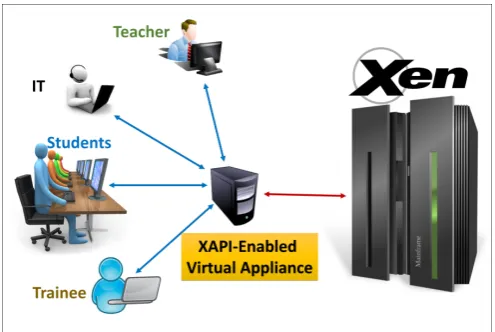
disallowed and should not be performed by them. In this case, it becomes dispersion to the students when they work beyond the desired objective of the practical work. Moreover, this work refines the students’ skills and raises the level of ethics in computing by having them carry out specific operations only and abandon curiosity. Figure 1 visualizes the proposed method, which involves three main components:
1) Xen Host: a targeted Xen virtualization based server. 2) XAPI-Enabled Virtual Appliance: a ready-to-use
virtual machine that is inserted as the in-between layer between the users and the targeted Xen host. This virtual appliance contains the essential features including: web server, MySQL server, SSH, and XAPI.
3) Client: this part requires a user with a web browser. The method promotes multiple uses as well as crossover applications [18]. Although this approach is primarily for students and trainees for educational purposes, administrators and IT persons can use it for Xen cloud managements.
V. THE DESIGN
[image:2.595.46.291.736.785.2]Fig. 3: The flow of authorizing members to access web-based terminal
side is a user with a web browser as all existing browsers are compatible. The client also needs to be registered or authorized to access and use this method. In addition, the user has to be eligible to perform certain Xen programming spec-ified and preconfigured by the administrator. Xen-Enabled Virtual Appliance (XEVA) side is the core of the method and plays an important role because it contains fundamental components:
1) Linux: a virtual Linux operating system to run other components compatibly.
2) XAPI: The Xen Management API (XAPI) is a tool stack that includes all dependencies and modules that are needed for XAPI to operate the Xen cloud platform or the Xen server [15]. It is a powerful tool for remote configuration and control to a Xen host and its virtualized guests.
3) Apache: a commonly used web software (HTTP) that has played an important role in the growth of the World Wide Web (WWW) [19]. It has been in existence since April 1996 as an efficient web server for many operating systems including Linux, UNIX, Windows, and Mac. Apache is used in our method to run a web-based terminal using the web programming languages PHP, HTML and JAVA.
4) MySQL: a common solution for web databases used for web applications. It is a free and open source project that provides a full-featured database manage-ment system. It enables users to connect to databases, run queries, and view the results. We use a MySQL database in this method to manage users who are qualified to manage Xen hosts through the web-based terminal [20].
The Xen host, which is the targeted host to manage, should typically have Xen hypervisor installed to run and manage virtual machines, storage and other services. Besides, it must have XAPI enabled so users can manage it remotely through the web-based terminal in our method.
VI. IMPLEMENTATION
The implementation of the method is concentrated in the XEVA side while there is no change required to both the client and Xen host sides. The implementation remains
Fig. 4: Diagram shows the flow of a legitimate request between the client and Xen host
localized to XEVA, which is easy to implement and maintain. Having a virtual appliance that contains all required compo-nents (i.e. httpd, XAPI, web-based terminal) simplifies de-ploying the proposed method. The implementation includes two phases:
1) Access control phase: A user is required to use cre-dentials to obtain access to the web-based terminal that is considered as a restricted area. Therefore, the user must be pre-registered and added to the user table using the MySQL database. Figure 3 indicates the flow of this phase process starting by receiving the user’s login request associated with the credentials, verifying and authorizing the user, and finally responding to the user with the result of the request. If the user is eligible, s/he can move to the next phase. Otherwise, the user is rejected as long as this phase is not successful. 2) Management phase: This is the aim of this method
where users can perform Xen commands over the web without requiring shell access or be a super user. XEVA plays the super user role and maintains the users’ requests. As Figure 4 indicates, the cycle of the user request is sent through the browser as a secure
http request to the webserver on XEVA side. XEVA handles the request and ensures its authenticity (the user can request such command) and legitimacy (the command is safe). If the request is eligible, the web-based terminal performs a shell Xen command over the XAPI tool. XAPI communicates securely with the targeted Xen host using SSH connection. After that, the XAPI tool in the Xen host executes the command locally and sends the results back to the XAPI tool on XEVA. XAPI passes the results to the web-based terminal, which then responds to the client (user) with the results.
Fig. 5: Performing a Xen task using SSH client tool
Fig. 6: Performing a Xen task using the web-based terminal
Figure 5 indicates the results of performing [xe vm-list] that displays information of virtual machines installed on the Xen host using Putty Telnet and SSH termi-nal [21]. Figure 6 shows a screenshot of the implementation in real world where the user has logged in and performed the Xen command [vm-list] to list all existing virtual machines.
By comparing the results of performing [vm-list] command in both terminals, the output and the capability seemed to be the same; however, the web-based terminal does not require the “root” user to be in position for each user. In addition, by trying to inject some malicious characters such as (&& and ||), the web-based terminal was able to prevent executing the commands as shown in Figure 7. The terminal allows only commands that are associated to the prefix “xe”.
VII. EVALUATION
We tested the web-based terminal to see whether its outcomes are as expected. Two criteria were focused on: effectiveness and usability. We selected twelve common “xe” commands including (vm-list, vm-start, vm-reboot, vm-suspend, vm-resume, vm-reset, vm-destroy, vm-install, host-list, storage-list, cd-list, network-list). In addition, we injected malicious characters ( !,|, &,#) to the entered commands to investigate the restriction level of the web-based terminal. A log tool was used to track users’ activities by saving the input commands and the results of executing or preventing each command. Twenty participants (colleagues,
Fig. 7: Performing illegitimate commands using the web-based terminal
mostly graduate students) joined the test where each indi-vidual was asked to perform valid and invalid inputs. In this group, we selected a few participants, who are skilled in the Linux shell commands, to learn how those participants could enter invalid inputs instead of just “xe” commands. After analyzing the log file, the participants entered 273 inputs (155 valid inputs and 118 invalid inputs). Our web-based terminal implementation was able to perform “xe” commands perfectly and rejected many invalid inputs. Most of the invalid input commands were flagged as illegitimate and typo conditions.
In terms of usability, cloud computing administrators who participated in the evaluation indicated their satisfaction of having such terminal accessible and usable without the need of giving privileges away. They agreed that this type of terminal can be helpful for different applications.
Based on our above mentioned, informal study, we can say that the instructors can use our implementation to manage the Xen virtualization platform safely. Administrators and IT persons can use the approach for performing actual Xen management. Finally, the latency was negligible as these inputs were processed with an average of 0.12 second.
VIII. DISCUSSION ANDFUTUREWORK
[image:4.595.47.291.218.385.2]mo-bile devices thus providing momo-bile-friendly access anywhere through mobile devices.
IX. CONCLUSION
In conclusion, this paper introduced a web-based terminal as a method for controlling the Xen cloud platform over the web. This method allows many users to access Xen hosts and run Xen shell-based commands without requiring a superuser account (e.g. root). The results showed the web-based terminal is effective and precisely allows users to perform specific Xen commands without impacting or compromising Xen servers. Our approach provides a general design that is applicable to other virtualization and cloud solutions providing an opportunity for such technology to be used for educational and training purposes. Enabling such tools in teaching computer science helps students to con-solidate their knowledge effectively, decreases the learning disruption and raises the level of learning ethics by students.
REFERENCES
[1] A. S. Almurayh, “Mceve: A model for configuring efficient virtualized environments based on multiple weighted considerations,” 2011. [2] Citrix. (2014) Citrix. Citrix Systems, Inc. [Online]. Available:
http://www.citrix.com
[3] Amazon. (2014) Amazon elastic compute cloud. IEEE. [Online]. Available: http://aws.amazon.com/ec2
[4] T. Cordeiro, D. Damalio, N. Pereira, P. Endo, A. Palhares, G. Gonc¸alves, D. Sadok, J. Kelner, B. Melander, V. Souza et al., “Open source cloud computing platforms,” inGrid and Cooperative Computing (GCC), 2010 9th International Conference on. IEEE, 2010, pp. 366–371.
[5] R. Gott and S. Duggan, “Practical work: its role in the understanding of evidence in science,”International Journal of Science Education, vol. 18, no. 7, pp. 791–806, 1996.
[6] J. P. Penny and P. J. Ashton, “Laboratory-style teaching of computer science,”SIGCSE Bull., vol. 22, no. 1, pp. 192–196, Feb. 1990. [7] R. Buyya, C. Vecchiola, and S. T. Selvi,Mastering cloud computing.
Tata McGraw-Hill Education, 2013.
[8] F. Rodr´ıguez-Haro, F. Freitag, L. Navarro, E. Hern´anchez-s´anchez, N. Far´ıas-Mendoza, J. A. Guerrero-Ib´a˜nez, and A. Gonz´alez-Potes, “A summary of virtualization techniques,”Procedia Technology, vol. 3, pp. 267–272, 2012.
[9] V. Chaudhary, M. Cha, J. Walters, S. Guercio, and S. Gallo, “A comparison of virtualization technologies for hpc,” in Advanced Information Networking and Applications, 2008. AINA 2008. 22nd International Conference on. IEEE, 2008, pp. 861–868.
[10] S. N. T.-c. Chiueh and S. Brook, “A survey on virtualization technolo-gies,”RPE Report, pp. 1–42, 2005.
[11] P. Barham, B. Dragovic, K. Fraser, S. Hand, T. Harris, A. Ho, R. Neugebauer, I. Pratt, and A. Warfield, “Xen and the art of vir-tualization,”ACM SIGOPS Operating Systems Review, vol. 37, no. 5, pp. 164–177, 2003.
[12] Xenproject.org. Xen overview. Xen Project. [Online]. Available: http://wiki.xenproject.org/wiki/XCP Overview
[13] Citrix. Xenserver. Citrix Inc. [Online]. Available: http://www.citrix.com/products/xenserver/overview.html
[14] Oracle. Oracle vm. Oracle Corporation. [On-line]. Available: http://www.oracle.com/technetwork/server-storage/vm/overview/index.html
[15] xenproject.org. Management options. Xen Project. [Online]. Available: http://wiki.xenproject.org/wiki/XAPI
[16] Xen. Xapi command line interface. Xen Project. [Online]. Available: http://wiki.xen.org/wiki/XAPI˙Command˙Line˙Interface
[17] X. Project. Xen management tools. Xen Project. [Online]. Available: http://wiki.xenproject.org/wiki/Xen˙Management˙Tools
[18] B. Wilke, J. Metzgar, K. Johnson, S. Semwal, B. Snyder, K. Yu, and D. Neafus, “Crossover applications,” inVirtual Reality Conference, 2009. VR 2009. IEEE. IEEE, 2009, pp. 305–306.
[19] Apache. The apache http server project. The Apache Software Foundation. [Online]. Available: https://httpd.apache.org
[20] MySQL. Mysql. Oracle Corporation. [Online]. Available: http://www.mysql.com