An Empirical Study of Skype Data Retrieval from
Physical Memory
Ahmad Ghafarian
Department of CSIS University of North Georgia Dahlonega, GA 30005-USAAsh Mady
Department of CSIS University of North Georgia Dahlonega, GA 30005-USACharlie Wood
Department of CSIS University of North Georgia Dahlonega, GA 30005-USAABSTRACT
Instant messaging technology is increasingly becoming popular among individuals, businesses, as well as criminals. Technologies such as Skype is widely used due to its secure and cheap services. Traditional static media computer forensics approach is not effective in retrieving traces of instant messaging activity. This research presents the findings from physical memory forensics examination of Skype communication. We examined both client-based Skype as well as web-based Skype to determine whether the forensics data remnants in memory would be different for each case. For each case, we evaluated the forensics artifacts at both the operating system level and the application level. At the operating system level, we examined active processes, terminated processes, hidden processes and open files related to Skype activity. At the application level, we evaluated Skype activity artifacts such as logins credentials, audio and video conversations, transferred files, emails, and geographical location of the caller. In addition, we found some differences in the client-based and web-based Skype data remnants in memory. Overall, we confirm that physical memory forensics is the most effective technique for retrieving forensics artifacts of instant messaging technology.
General Terms
Data recovery; physical memory; software tools; hardware tools; client-based; web-based
Keywords
Skype; forensics; instant messaging; artifacts; geographic location; operating systems; IM
1.
INTRODUCTION
Instant messaging (IM) has become a significant alternative of communications due to the increased accessibility to broadband, popularity of smart phones and powerful mobile devices. Technologies like Skype has become popular and cost effective [28]. IM services like Skype have also been exploited to commit frauds and scams, disseminate malware, and groom children online [28]. To counter these malicious activities, computer forensics techniques are employed by investigators to determine the nature of the crime and to establish the link between the IM activity and the individuals who committed the crime.
Traditional computer forensics techniques focuses on the acquisition and analysis of data stored in static media such as hard disk [21]. The data stored on these devices are permanent in nature, in a specific format and managed by file systems. The integrity of this kind of data can be verified in forensically sound manner. According to Simon and Slay [21] static media forensics has some limitations as it does not provide complete picture of events. Limitation of static media
forensics for Skype communication has also been reported by several researchers including [5, 8, 10, 14]. Information like running process list, open network connections, encrypted data, passwords and malicious code only reside on physical memory. Due to this reason and to save state of system, physical memory forensics is considered necessary in many areas including IM such as Skype communication. Physical memory, volatile memory and random access memory (RAM) is used interchangeably by several authors and throughout this paper.
Memory forensics involves the acquisition and analysis of the physical memory of the machine which is being used for IM e.g. Skype activity [12]. Data is considered volatile when it is likely to be lost when the machine is rebooted or overwritten during the course of the machine’s normal use. This situation is desirable when the investigator arrives at the site where the computer system is still on and the instant messaging application, i. e. Skype may still be open. Research in memory forensics has started around 2005 and some progress has been made so far. For some of the past research results of memory forensics for Skype communication see [3, 21, 28].
To the best of our knowledge, almost all of the previous research in RAM forensics have been performed on a virtual machine environment, such as VMware. This is done to reduce the captured memory size and make acquisition and analysis of the RAM less cumbersome. Although this approach is common in forensics research, we believe that the simulation of the real-world environment may not present the complete picture.
The major contribution of this paper is three folds. First, it is an empirical study of Skype communication data on real physical machines instead of virtual machine. This will avoid the possibility of virtual machine data remnants in RAM that could falsely influence the experiment. Second, since users can launch Skype from a client machine connection as wells as from the web, our experiment covers both. This will show the different types of forensics artifacts that can be retrieved in both ways. Third, our focus is on the recovery of data at both the operating system level and at the application level. Analysis of the operating system level data reveals data such as active processes, terminated process, hidden processes, open files, etc. Analysis of the application level data will lead to the extraction of some sensitive information related to Skype communication such as login credentials, email address, audio/video files, shared files and geographical location. The latter data may also be used to establish link between Skype usage and the suspect.
data appear in section 5. Discussion of web-based Skype data can be found in section 6. Section 7 covers conclusion and future work. Acknowledgement appears in section 8. References are shown in Section 9.
2.
LITERATURE REVIEW
Various aspects of instant messaging forensics including Skype forensics has been the subject of numerous studies in recent years. Research on instant messaging forensics is focused mainly on three different areas namely, network forensics, static media forensics such as hard drive, and physical memory forensics. Azab et al [1] discussed forensics evaluation of Skype application activity in terms of network traffic behavior for logins, calls establishment, call answering and the change status phases. They summarized the difficulties in characterizing Skype traffic in forensic contexts. An overview of static media forensics on Skype application is reported by Castle [5]. The author identifies the type of data stored on various locations on a client machine. They concluded that the user protocol function must be activated within their Skype account, otherwise no new calls and file transfers can be stored locally and a forensic investigation is not possible. They also developed a software tool to automatically gather the key artifacts from the computer system hard drive. Another similar and comprehensive study of static media forensics on Skype application is done by Meißner et al [14].
Irwin et al [10] developed an automated software that can be applied to a memory captured file to identify fragments of audio persisting in RAM after a Skype call has been terminated, using time domain and signal processing technique and frequency domain analysis. The authors claim once an individual segments of audio have been identified as a file, the reproducing audio from a VoIP call may be determined for investigation purposes.
The paper by Yang et al [28] discusses both static media forensics and memory forensics to determine the data remnants from the use of two popular instant messaging namely, Facebook and Skype on a Windows 8 client machine. The authors performed their experiment on a VMware virtual machine environment. They concluded that the use of the Windows IM can leave behind incriminating evidential material useful or critical to an investigation on the hard drive, memory and network captures. Other studies of both static media and memory forensics on Skype is reported in [16, 17, 18]. The general suggestion is that using data from memory dump, virtual machine created from static data can be adjusted to provide better picture of the live system at the time when the dump is made. Investigator can have interactive session with virtual machine without violating evidence integrity. This kind of work is only for proof of concept and no practical implementation or usage have been report.
Chang et al [6] has reported on their memory forensics experiment for only two cases. They used the usual procedure of capturing memory and then searching the memory for traces of IM usage. For the two cases of their experiment, they identified some valuable forensics artifacts. Their work is an isolated work on the two case studies and they drew no general conclusion. In another study by Karayiannis and Katos [11] the robustness and reliability of memory forensics has been studied. Moreover, investigating the feasibility of obtaining sensitive data such as unencrypted passwords is addressed. The authors argue that a knowledge of different types of meory chips and motherboard combinations should be developed in order to capture the volatility measurements,
as data persistence in memory depends upon the hardware. Similar studies can also be found in [23, 25].
A comprehensive study of physical memory forensics was reported by Simon and Slay [21]. They experimentally demonstrated that by using memory forensics an investigator is able to recover Skype usage related artifacts, which would not be otherwise available. They performed a series of controlled research experiment on a VMware virtual machine using a short spike of Skype usage. Rahman and Khan [20] presented different techniques of live analysis, their benefits and limitations. The key areas focused in their study pertain to virtualization, pagefile extraction and identifying the encryption keys. This study is only theoretical and provides some general suggestions for tools and techniques of physical memory forensics.
Studies of memory forensics on Skype application can also be found in [2, 3, 4, 8, 15]. They used VMware on a Windows machine. After performing several Skype activities, they performed memory forensics by capturing and analyzing the captured memory image file. They were able to retrieve the user contacts and other evidential information. The researchers also suggest the use of Skype Web Account but they have not provided any further details. They suggest future work should include realistic memory instead of VMware. The study by Shu et al [28] is a relatively old work on memory forensics. The authors report their experiment on the volatile and non-volatile forensics. They experimentally demonstrated that traces of voice call from cache can be retrieved for Facebook and Skype applications. However, the voice file is encrypted and decoding of it is not trivial.
3.
TOOLS AND TECHNOLOGIES
3.1
Software Tools
Generally, a computer forensics process consists of three steps namely acquisition, analysis and establishing the link between the suspect and the evidence. The analysis and evidence produced depends upon the successful acquisition of memory. The most common approach to memory acquisition is to copy contents of physical memory to another persistent storage media for later analysis [6]. This is the method we used in this research. The main requirement is that the process must provide reliability and consistency during acquisition and produce authentic and valid results during analysis. To do acquisition and analysis we need reliable computer forensics tools. Several proprietary, free as well as open source tools are available for memory forensics. The tool selection criteria we used include, open source and or free, reputation, ease of use, admissibility to the court of law, support for the operating systems, automated features, and file system support. Based on these criteria we have chosen the following tools.
For memory acquisition, we used a free software called Magnet RAM Capture, version1.01.0001 [13]. This tool creates raw memory dump which is the most widely used format and it does not carry any Meta data and header information for their identification. Then we used CCleaner [22] to forensically wipe several USB flash drives that are used to save Magnet RAM captured file.
forensic community. It supports most contemporary operating systems including Windows 10. The second tool is Process Monitor version 3.33. Process Monitor is a free tool from Windows Sysinternals, part of the Microsoft TechNet website [22]. This tool is very common among forensics investigators and researchers. An example of its usage can be found in [25]. The tool monitors and displays in real-time all file system activity, CPU usage, memory usage on a Windows operating system, Registry and process/thread activity.
For retrieving user application data, we used a hexadecimal editor called WinHex (version 19.1.0.0) [26]. This tool is free and has a wide application within the computer forensics community. The tool allows us to search the content of memory mapped files for evidential data. To verify the consistency of the results generated by WinHex, we also use Windows Sysinternals (version 2.53) [24] utility’s String search feature which allows us to search the physical memory for Skype call information.
Other tools we used include: 1) HashMyFile utility (version 2.2.3.0) [27]. This tools calculates hash value of a memory image file. We used this tool to calculate hash of the memory image files once before the analysis and once after to make sure that the files have not been changed during the analysis process. 2) Liquid Studio 2017 XML editor (version 15.1.4.7515) [29]. Since the file size generated by the string search of Sysinternals were large, we could not use notepad to open them. Therefore, we used this software to open the files.
3.2
Hardware Tools
Features of the client machine which we used include, Windows 10 operating systems 64-bit, Intel(R) Core(TM) i7 processor 4 core, 8GB of RAM, and SATA Hard disk of 32GB. We used a separate machine as forensics workstation machine: with the following features. Windows 10 operating systems 64-bit machine, AMD FX-8300 8 Core Processor, 16GB of RAM, TOSHIBA DT01ACA100 SATA Hard Drive 64GB. We also used several forensically wiped USB flash drives for saving Magnet RAM capture software and the acquired memory image files.
4.
EXPERIMENT METHODOLOGY
As described in the introduction section, our research experiments were performed for two ways of lunching and using Skype, i.e. client-based Skype and web-based Skype. For client-based, Skype was launched from a local machine using Outlook, for example. For web-based, Skype was accessed through the web account. In both ways of accessing Skype, the Skype activities were performed for predefined scenarios to retrieve specific predefined target data. The target data, scenarios, and overall testing environment for both ways of accessing Skype were the same. We applied the below procedure to both client-based Skype communication and web-based Skype communication. The only difference is on the method of launching the Skype.
This subsection presents the results of the client-based Skype experiment. At first, we defined target data as: the data feasible to retrieve from physical memory of the suspect computer during the memory forensics process. In order to simplify the process of recovery of data, we followed similar classification described by Simon and Slay [21]. These include, Skype installation data, traffic data (contact details), content data (audio/video), user authentication data (user id and password), file shared, and location data (geographical location and IP address). Retrieving these artifacts will provide valuable information to the computer forensics
investigators. Following identification of target data, we installed Skype application (version 7.40.0.103.) on the client machine. Then we installed and configured Process Monitor [19] on the client machine. The process monitor reports the status of the system.
In the second step of the experiment, we created the platform for the experiment. Unlike most of the previous researchers who performed their experiment on a virtual machine, i.e. VMware [20, 21, 28], we performed our experiment on the physical machine. The purpose is to enable memory forensics process identical to that found in real world investigations. On the client machine we created a Skype account which is used to place several Skype calls. We also created a contact list with four contacts for this Skype account. Then we defined four scenarios for using Skype for approximately two minutes separately. In scenario 1, Skype application was used with audio communication only. In scenario 2, Skype application was used for video communication only. In scenario 3, a few small files types of .txt, Word, and .JPG format were shared with the contacts. In scenario 4, Skype was closed but the machine was remained logged on. For each of these scenarios; we attached two forensically cleaned USB flash drives to the client machine. One of them contains the Magnet RAM capture tool software and the other one for saving the captured memory file. Based on the target data and the scenarios described above, the acquisition activities is listed below.
1. Turn client machine on 2. Start process monitor.
3. Save the process monitor’s report as pm_mem1.doc file.
4. Attach Magnet RAM capture USB to the client machine. Capture RAM and save it on another USB flash drive as mem1.raw file. We use this file as a base to examine the content of the memory prior to launching Skype and then comparing it with the content of memory after Skype usage.
5. Stop process monitor 6. Halt the system
7. Resume the client machine 8. Start process monitor
9. Launch Skype and login to the account created for this purpose
10. Place a Skype call for scenario 1
11. Capture RAM before closing Skype and save it as mem2.raw.
12. Save process monitor’s report as pm_mem2.doc. 13. Stop process monitor
14. Halt the client machine 15. Resume the client machine 16. Start process monitor 17. Log into the Skype account 18. Place a Skype call for scenario 2
19. Capture RAM before closing Skype and save it as mem3.raw
21. Stop process monitor 22. Halt the client machine 23. Resume the client machine 24. Log into the Skype account 25. Place a Skype call for scenario 3
26. Capture RAM before closing Skype and save it as mem4.raw.
27. Save process monitor’s report in pm_mem4.doc. 28. Stop process monitor
29. Halt the system
30. Resume the client machine
31. Login to Skype, place a call for scenario 4 32. Logout of the Skype account
33. Capture RAM and save it as mem5.raw 34. Save process monitor’s report in pm_mem5.doc. 35. Stop process monitor
36. Halt the system
Note that in the above steps, after the content of memory were saved on USB flash drives, they were immediately removed from the client machine. This will make sure that the captured memory image file is not altered by other system activities. The results of the above acquisition were five-process monitor’s report files and five-captured RAM files. Also, note that the average RAM captured size were 9.2GB and the average time it took to capture each RAM file was 6 minutes. In the next section, we provide the details of analysis of these files.
5.
ANALYSIS OF CLIENT-BASED
SKYPE RESULTS
The first step in memory forensics was to examine the content of memory files i.e. all .raw files which were captured in section 4 above. The purpose of the examination was to look for any indication of Skype usage. This include any active processes, terminated processes, hidden processes and open files. We used computer forensics tools to help us in this process. We used a tool called Volatility [26] to identify this information. Volatility is consisting of a number of plugins which parse the memory tree structure and reports memory activities in terms of processes and their relationship with each other. In this research, we used the most relevant Volatility plugins, i.e. process list (pslist), process tree (pstree), process scan (psscan) and network scan (netscan). As it was presented in section 4, there were five captured RAM files which needed to be analyzed namely mem1.raw, mem2.raw, mem3.raw, mem4.raw and mem5.raw. Before we began the analysis phase of these files, we used HashMyFile [9] tool and calculated the hash of these files once before the memory analysis and once after that. Then we compared the two hash values for each file. If they are equal, it indicates that the files have not been changed during the analysis phase. If not, then the process of RAM forensics is not accurate. This is done to make sure the integrity of the memory forensics process.
Applying pslist to these files displayed a table of all active processes, detailing their offset, name, process ID and parent
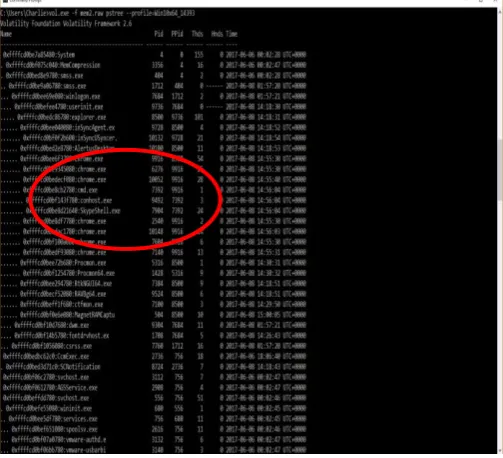
[image:4.595.317.569.234.463.2]process ID, number of threads and handles, and the timestamp of when the process started and ended. The pstree detailed a table to show the parent-child relationships between processes. The psscan showed hidden or previously terminated processes. The netscan displayed network information, such as TCP or UDP endpoints, the timestamps for the date/time that the connections were established, and the current state of TCP connections. In the context of Skype forensics, IP addresses will help the investigator to identify those involved in a Skype call. Analysis of the above files showed all files with the exception of mem1.raw displayed an important active process called SkypeShell.exe which is a child of Skype.exe process (see Figure 1). As the name of the process suggests, it indicates Skype activity by the user of the client machine.
Fig 1: SkypeShell.exe process generated by pscan
To get more detail information, we performed the Memdump command on the SkypeShell.exe process. With Memdump, Volatility copies all of the data relating to a single process into a separate file. This have been used to analyze the memory image with WinHex which will be described later in this section. This approach allowed us to search through the memory space of only the relevant process, instead of the entirety of the RAM and consequently reducing the amount of search time. To the best of our knowledge, all the previous research on Skype memory forensics have searched the entire memory which is very time consuming. That could be one of the reasons that most researchers have used virtual machine in their experiment.
share files between the Skype users. Analysis of the image taken after closing the Skype, i.e. mem5.raw, does not reveal the SkypeShell.exe or PluginHost.exe processes as it was expected.
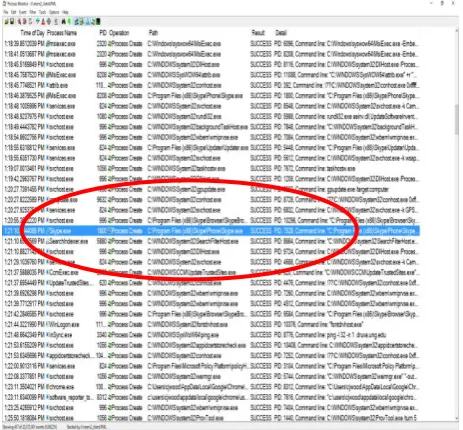
[image:5.595.55.286.236.412.2]To confirm the validity of the results of Volatility, we also used Process Monitor. Process Monitor recorded profiling information related to the same processes that were identified with Volatility (see Figure 2). A search for the processes which were found with Volatility showed that the same processes, with the same process IDs was found within the process monitor logs. Figure 2 shows the process trees recovered by the Process Monitor. The process tree shown by the Process Monitor is similar to the one recovered by Volatility, as it shows SkypeShell.exe, Notepad, and Microsoft Word as being children of Chrome.exe.
Fig 2: SkypeShell.exe process recorded by process monitor
[image:5.595.316.548.302.517.2]In addition, the process monitor recorded profiling information related to the same processes that were identified with Volatility (See Table 1). The table reveals valuable information that can be used to link the suspect with any Skype activities. For example, the table shows that the duration of Skype call was 2.625 seconds (shown in bold) which is consistent with the duration of Skype usage for each scenario
Table 1-Process Monitor profiling information of Skype Communication
File Type identified
User Time
Kernel Time
Private Bytes
Working Set
SkypeShell.ex e
2.625 1.2812 5
98,918,4 00
121,896,9 60 PluginHost.ex
e
2.25 1.6406 25
50,786,3 04
50,786,30 4 Chrome.exe(9
252)
5.28125 4.9218 75
43,892,7 36
79,753,21 6 Chrome.exe(6
752)
0.03125 0.0468 75
3,682,30 4
9,576,448
Chrome.exe(1 532)
0.00000 00
0.0937 5
3,678,20 8
10,579,96 8
Chrome.exe(7 860)
1.125 0.5781 25
39,141,3 76
45,862,91 2 Chrome.exe(2
728)
0.3125 0.1406 25
27,136,0 00
29,777,92 0
Figure 3 shows the profile of Skype.exe created by Process Monitor. It has the same PID (1800) as was shown in the Volatility results for mem2.raw. In addition, the PID for SkypeBrowserHost.exe process that is profiled by Process Monitor is the same as the PD in Volatility. Analysis of mem4.raw file with Process Monitor showed only one process hierarchy containing SkypeShell.exe in its process tree, with SkypeShell.exe having a process ID of 6568. This is identical to the process ID shown in the Volatility process tree. This indicates the Skype activity profile which was created by Volatility is identical to the profile that was created by Process Monitor. Hence, it confirms the consistency of our results.
[image:5.595.49.286.546.768.2]We applied a filter to the Process Monitor to search for TCP and UDP connections; we were able to find a list of connections made to Skype servers as shows in Figure 4. Process Monitor log of mem4.raw shows that IP addresses for the call partners as 75.143.121.68 and 38.132.117.196. This is very important results for the computer forensics investigator as it can be traced to suspect’s partner. This kind of data can only retrieved via memory forensics.
Fig 4: showing IP addresses of the Skype contacts
Although both Volatility and Process Monitor reveals data such as audio, video, file sharing applications and contact’s IP addresses but it is difficult to establish a link between the suspect and Skype activities with this information. To establish this link we examined the content of the files generated by Memdump of Volatility and performed string search. For this task, we used two different software tools namely Sysinternals [22] string search and WinHex [27]. WinHex is a popular hexadecimal editor which is commonly used by computer forensics investigators. Similarly, Windows Sysinternals is a suite of utilities including the String utility which is able to parse through a memory image and return a file containing every string that the program is able to find, which meets the user-specified criteria. For the purposes of our analysis, we included the option for the program to print the offset alongside the strings, and left the other filters on the default settings. The program searched through all the memory images and returned every string with a length greater than or equal to three characters. The reason for specifying a minimum length is to reduce the total number of strings that need to be analyzed in the output file and decrease the likelihood of filling the file with meaningless characters. Without a minimum length, every individual character in the memory image would be output to the file which makes it difficult to process the output file.
The result of the application of String search is saved in several files with average size of 3 GB. Since the files are too big to be processed with the Notepad text editor, we used the Liquid Studio 2017 XML editor [29] to open and process files. The results of the analysis of both WinHex and Sysinternals are discussed below.
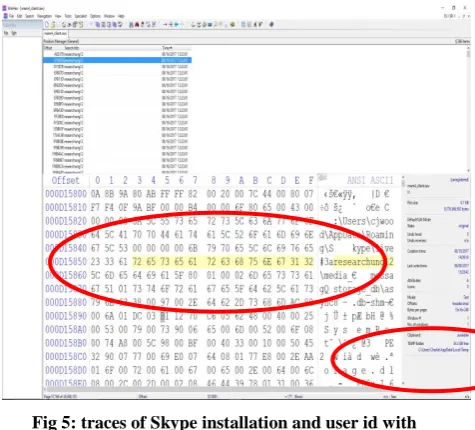
For both WinHex and Sysinternals we searched for Skype installation data, passwords, contact information, evidence of calls, IP addresses, location data, transferred messages, evidence of transferred files, and the contents of transferred files. We were able to find traces of these Skype activities. Figure 5 and 6 shows a file directory to a Skype file, which
[image:6.595.316.554.128.343.2]shows that there is a Skype installation on the client machine. Additionally, this directory shows the username of the account we were using “researchung123”, which also shows the username (researchung123) of the client Skype testing account.
Fig 5: traces of Skype installation and user id with Sysinternals
Further analysis of the results show Instances of the usernames of Skype contacts within the memory image in a section of memory referencing Skype avatars. Through both WinHex and Sysinternals String search, we were able to locate detailed evidence of Skype calls including, the call type, date message sent and received, duration, and other pertinent information (see Figure 6). Moreover, the IP address of the Skype caller as well as the recipients were present in the memory image.
Fig 6: details of the Skype call information
[image:6.595.316.551.459.658.2]and zip code (See Figure 7). However, due to privacy concern we did not include this data in the paper.
Figure 7- details of Skype call information
6.
ANALYSIS OF WEB-BASED SKYPE
RESULTS
For the purpose of this research, we created two web-based Skype account for communicating with each other. We followed the same steps that are listed in section 4. most of the data that was retrievable with client-based Skype communication were also retrievable with the web-based Skype communication. Some of the major differences between the two approaches are listed below:
A form of target data which we were able to locate with web-based Skype, which we did not locate with client-web-based Skype, is the password for the testing account. The password was listed after the keyword “password”, which can be used to locate a password in a memory image. Additionally, the email which was used to log into Skype
([email protected]) is also mentioned before the password. With both the email and password together, an investigator would be able to log into a suspect’s Skype account directly. The screenshot below shows the password and email.
Fig 8: Details of Skype password and email account
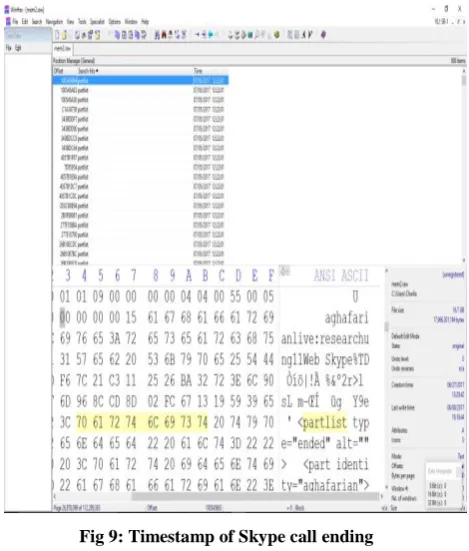
[image:7.595.315.550.118.394.2]Another Skype related information that we were able to find is a section of memory that identifies one of the calls between the example Skype accounts. The specific example (Figure 9) shows the point at which one of our calls ended.
Fig 9: Timestamp of Skype call ending
One piece of useful information that we were able to extract with client-based Skye account was the IP address (see Figure 4). However, we were not able to extract this data with web-based Skype communication. In addition, with client-web-based Skype account all messages sent during the scenario was retrievable from memory. However, this data was not present in the captured memory of the web-based Skype activity.
7.
CONCLUSION AND FUTURE
RESEARCH
Instant messaging technology such as Skype is increasingly becoming popular among individuals and businesses, including criminals. To ensure the most effective collection of evidence of relevance, it is important that forensics investigators use volatile memory forensics as well as static media forensics.
[image:7.595.54.287.584.738.2]processes, hidden processes and open files related to Skype activity. We did that by discriminating system level data from user-level data. At the user level, we were able to retrieve Skype activity artifacts such as logins credentials, audio and video conversations, transferred files, email, and geographical location of the caller.
To confirm the consistency of our results, we used two sets of RAM forensics tools namely, Volatility and Process Monitor. The results demonstrated that both tools revealed identical processes with the same status (e.g. active, terminated, hidden, etc.) and the same process identification numbers. Similarly, we used two different software tools namely WinHex and Sysinternals string search feature and a mathematical algorithm to search the relevant captured memory images for data related to the Skype caller and contacts. The results of both tools were identical. This confirms the consistency of our experimental results. This data can be used to establish the link between the evidences found in an investigation to a suspect.
The artifacts located as part of our experiments are likely to be common with other Windows IM applications such as Facebook, WhatsApp, etc. This is because the applications share a common feature set. While the implementation may vary between different IM applications. We believe that investigators could use the artifacts identified in this research as a basis for their investigation of the client.
There are a few areas of future research that can be explored further. In some cases when an investigator arrives at the crime site, he/she finds that the computer power is turned off. However, the content of memory may still be in memory for a period of time but it is not clear for how long. It is worth to do a series of experiments to determine how long evidence of Skype activity remains in RAM after the machine is turned off and whether this is hardware dependent or not. Another area of future research would be to consider the impact of various hardware processor into the memory forensics in general and Skype forensics in particular.
8.
ACKNOWLEDGMENTS
Our thanks to my colleagues and students who have contributed towards implementation of this research.
9.
REFERENCES
[1] Yang, T., Y., Dehghantanha A., Choo K. K. R., and Muda Z. Windows Instant Messaging App Forensics: Facebook and Skype as Case Studies. PLoS ONE 11(3), 2016.
[2] Simon, M. and Slay J. Recovery of Skype Application Activity Data from Physical Memory. International conference on availability, reliability and security. IEEE Explore 2010, pages 283-288, 2010.
[3] Bajwa, D., S. and Kumar S. A Comprehensive Review of Volatile Data Forensics. International Journal of Computer Technology & Applications, Vol 7(3), 357-367, 2016.
[4] Dodge, R., C. Skype Fingerprint. Proceedings of the 41st Hawaii International Conference on System Sciences, 2008.
[5] Irwin, D, Dade A, Slay J. Extraction of Electronic evidence from VoIP: Identification & Analysis of Digital Speech. Journal of Digital Forensics, Security and Law, Vol 7, No 3, 2012.
[6] Meißner, T., Kröger K., and Creutzburg R. Client-side Skype Forensics - An Overview. Brandenburg University of Applied Sciences, Department of Informatics and Media, P.O.Box 2132. D-14737 Brandenburg, Germany, 2014.
[7] Ligh, M., H., Case A., Levy, J., Walters A. The Art of memory Forensics, Detecting Malware and Threats in Windows, Linux, and Mac Memory. Wiley book, 2014. [8] Azab, A., Watters P, and Layton. Characterizing
Network Traffic for Skype Forensics. Third Cybercrime and Trustworthy Computing Workshop, 2012.
[9] Castle. D. Skype Forensics. University of Derby School of Computing & Mathematics, 2014.
[10] Mrdovic, S., Huseinovic A., and Zajko E. Combining Static and Live Digital Forensic Analysis in Virtual Environment. Faculty of Electrical Engineering University of Sarajevo Sarajevo, Bosnia and Herzegovina, 2009.
[11] Nagy. Z., Using Forensic Techniques for Internet Activity Reconstruction. Institute of Mathematics and Computer Science, College of Nyiregyhaza, Nyiregyhaza, Sostoi u. 31/B, Hungry, 2014.
[12] Nelson, B., Phillips, A. and Steuart, C. Guide to Computer Forensics and Investigation, 5th Ed. Cengage Pub, 2015.
[13] Chang, Y., T., Chung M-J, and Lee, C-F. Memory Forensics for Key Evidence Investigation in Case Illustration. 2013 8th Joint Conference on Information Security, 2013.
[14] Karayiannis, S., and Katos V. Practical Password harvesting from Volatile Memory. Information Security and Incident Response Unit, Democritus University of Thrace (retrieved from research gate), 2012.
[15] Skype Forensics: shows geographical location http://resources.infosecinstitute.com/skype-forensics-2/#gre
[16] Svoboda P. Hyyti E., Ricciato F, Rupp M., and Karner M. Detection and Tracking of Skype by exploiting Cross Layer Information in a live 3G. Network. INTHFT Department, Vienna University of Technology, Vienna, Austria.
[17] Rahman, S and Khan M.N.A. Review of Live Forensic Analysis Techniques. International Journal of Hybrid Information Technology.Vol.8, No.2, pp.379-388, 2015. [18] Baset, S. A. and Schulzrinne, H. An Analysis of the
Skype Peer-to-Peer Internet Telephony Protocol. Department of Computer Science, Columbia University, New York NY 10027, 2012.
[19] Cai L., Sha J. and Qian W. Study on Forensic Analysis of Physical Memory. 2nd International Symposium on Computer, Communication, Control and Automation, 2013.
[21]Magnet RAM Capture, Retrieved March 2017 from https://www.magnetforensics.com/free-digital-forensics-software-tools/
[22]Device cleanup, retrieved, April 2017 fromhttps://www.askdavetaylor.com/erase-wipe-old-flash-drive/
[23]Volatility foundation, retrieved January 2017 fromhttp://www.volatilityfoundation.org/25
[24]Sysinternal retrieved January 2017
fromhttps://technet.microsoft.com/en-us/sysinternals/bb897439.aspx
[25]Process monitor, retrieved February 2017
fromhttps://www.cse.wustl.edu/~jain/cse567-06/ftp/os_monitors/ https://technet.microsoft.com/en-us/sysinternals/processmonitor.aspx
[26] WinHex Hex Editor, retrieved February 2017 fromhttp://www.winhex.com/winhex/hex-editor.html [27] HashMyFile utility, retrieved February 2017
frohttp://www.nirsoft.net/utils/hash_my_files.html [28] Suh, K., Figueiredo D. R., Kurose J. and Towsley D.
Characterizing and detecting relayed traffic: A case study using Skype. Department of Computer Science University of Massachusetts Amherst, 2005.