Content
Abstract ... 1
Introduction ... 2
Theoretical Framework ... 3
Bandura’s social learning theory. (Melina) ... 3
The effect of practice. (Lea) ... 8
Experimental Design and Research Questions... 11
Method ... 14
Participants & Design (Melina) ... 14
Materials (Lea) ... 14
Procedure (Melina) ... 19
Analysis ... 20
Results ... 20
Task Performance (Lea) ... 20
Mediators of Motivation (Melina)... 21
Motivation (Melina) ... 22
Learning (Lea) ... 23
Discussion ... 24
Task Performance (Lea) ... 24
Mediators of Motivation (Melina)... 25
Motivation (Melina) ... 26
Learning (Lea) ... 26
Limitations ... 28
References ... 30
1 Abstract
The usage of video instruction for software has increased in the last decades. Especially popular is on-screen video design for procedural videos. Regarding learning from those videos, theories as the social learning theory, the generative learning effect, or the ACT-R stress the importance of practice. Empirical research on procedural videos shows that the effect of video availability during practice by conditions has not yet been tested. In the present study the effect of dealing with video instructions is compared in three conditions. In the control condition, participants could choose themselves when and how often to both watch the video instruction and practice the provided exercises. In the access condition, all videos were watched in a row and then participants practiced while still having access to the videos. In the blocked condition,
participants also had to watch all videos in a row but they were not allowed to watch them again during practice. Students with the average age of 11.6 years received Word-formatting
2 Introduction
Video, as a medium, is becoming more and more popular. This might result from the notion that videos are more effective than a description by a lecturer. It guarantees a better visualization, recognition and identification by the user (Shephard, 2003). Another reason for the popularity is easy access and upload of videos on websites like YouTube, eHow and Adobe (van der Meij & van der Meij, 2013). These websites offer a variety of videos with different purposes.
One kind of video purpose is procedural knowledge development. Big companies like Microsoft publish these videos to facilitate the use of certain computer programs. The kind of videos that are supposed to support users if they need help or have specific questions about how to carry out a task is called video tutorial. It is fast becoming the most commonly used method for instructing users about procedures (van der Meij & van der Meij, 2013).
Particularly, procedural videos should focus on temporal order and spatial relationships (Brunyé, Taylor, Rapp & Spiro, 2006). Regarding temporal order in procedures, it is important that there is a beginning and an ending phase. Between these two points, there is a sequence of steps that needs to be taken to achieve the ending state. Often, the order of the actions that needs to be taken is crucial to get to the goal state successfully.
3 congruence principle. It states that the content and format of the graphics need to be similar to
the internal representation relevant for a full understanding.
An example of a congruent design that supports the learning process (Tversky et al., 2002) commonly used for procedural video tutorials (Ertelt, 2007) is called on-screen video. In on-screen videos, a computer screen is recorded while an expert executes a step-by-step
demonstration and simultaneously explains what he is doing. In these videos, there is congruence between the screen capture animation and the task execution implemented in real life (Tversky et al., 2002). On-screen videos can make content accessible which can be shown and followed easily, but which is complicated to put into words (Ertelt, Renkl & Spada, 2006). This is, because screen changes are dynamically visualized and assist the user in perceiving movements or temporal changes in the software system (van der Meij & van der Meij, in press).
The application in the educational sector has been increasing since the rising popularity of video tutorials (Brunyé et al., 2006; van der Meij & van der Meij, in press). Not only the quantity of information transmitted in a few minutes (Ertelt, 2007), but also the decreasing costs of on-screen videos (Isnaeni, 2012) might be an important development regarding the
educational sector. To support the progress of the video medium in the educational sector, it is instrumental to understand how people learn from videos.
Theoretical Framework
Bandura’s social learning theory. (Melina)
4 observational learning” (p. 83). The video can function adequately effectively as a role model in person by for instance using animations (Eysink, de Jong, Berthold, Kolloffel, Opfermann & Wouters, 2009) or on-screen videos. Additionally, a video can show micro steps between changes (Arguel & Jamet, 2009) and make these comprehensible for the user.
Regarding Bandura’s social learning theory, an individual has to have an intention to adopt a certain behavior before it is willing to implement it. Certain factors influencing the intention might be a specific value that is connected with the behavior or the thought that the behavior has a profitable outcome (Bandura, 1971). To promote a certain goal can lead to a better perception of the importance of the task (Farkas, 1999) and can therefore support the intention to adopt. Moreover the individual has to feel confident that he can implement the behavior as well as the model (Bandura, 1971).
For learning, Bandura (1971) proposes four processes: 1. Attentional processes,
2. Retention processes,
3. Practice (which Bandura phrases “motoric reproduction processes”), and 4. Reinforcement and motivational processes
Mainly, these processes occur in this specific order and portray the processing of observed behavior from a superficial to a deep level. Throughout the following descriptions, a specific example is given for each of the processes in order to promote a better understanding of these processes.
The attentional process represents the first component of information perceiving.
5 needed to characterize or distinguish the possible objects presented” (Treisman & Gelade, 1980). That is to say whenever an individual wants to make a statement about an object it has to direct the focus on the connections of the object’s features.
An individual's attention to a performed behavior depends on the interpersonal attraction, thus if the model is attractive to the learner (Bandura, 1971). The grade of attractiveness
determines whether the individual would perceive the relevant information for implementing a certain behavior or not. If there is a negative association with the model, the individual has no intention to perform the behavior. Conveying interpersonal attraction to a video tutorial there is the means of personalization. This can be attained by one of the video guidelines presented by van der Meij & van der Meij (2013). With their guideline animation use with narration, the video becomes personalized by means of a human voice and therefore a higher grade of
attractiveness for the learner. Imagine a learner wants to learn how to format Word documents, he would already have an intention to adopt the desired behavior (learning how to format a Word document) because he knows the favorable outcome (being able to format a Word document). The learner would compare video tutorials and would try to learn the behavior from a
pleasurable and effective video.
After perceiving the relevant information of the video, the effectiveness of retrieval is dependent on the encoding process (Tulvin & Thomson, 1973). Hence, the information in the video needs to be encoded before it can be stored in the long-term memory. This process can vary in execution dependent on the cognitive load. According to Ayres and Paas (2007), the cognitive load theory determines three categories: (1) intrinsic cognitive load, (2) extraneous cognitive load and (3) germane cognitive load. First, the intrinsic cognitive load deals with
6 handles the instructional procedures (Ayres and Paas, 2007), which are under the control of the individual. At last the germane cognitive load relates to the working memory capacities that are involved in gaining and processing information. That is to say, new information can be stored by for instance the use of schemas to facilitate new information and connect them to already stored patterns. “If extraneous load is high, learning is likely to be impeded” (Ayres and Paas, 2007, p. 696). In that case, extraneous load needs to be reduced in favor of the germane cognitive load which supports learning and understanding.
The second component of learning is the one of retention processes. Retention is defined as repetitions of a situation which result from habits and effects of the given environment
(Peterson & Peterson, 1959). According to Bandura (1971), observational learning occurs on the imaginary and verbal representation systems. Thus, if an individual has to store an observed behavior, the mechanisms of verbal coding and visual imagery are activated. For the formatting Word example this means that the learner makes an inner representation of the previously learned material after the encoding process took place. These processes are supported if the congruence principle is applied.
7 deeper cognitive processing of the presented procedure with the desire to understand. In favor of the example, the learner tries to apply the formatting tasks on his own by doing them over and over again. This third component of practice highly influences the quality and predicts the continuity of the learned behavior. As this component is responsible for whether or not the individual profits from the video, the effect of practice will be discussed later in this paper.
8 The effect of practice. (Lea)
The success of learning can not only be measured by the already mentioned task performance, but also by transfer. Transfer can be defined as problem solving in an unknown situation by combining the already learned operators from other problem situations. Thus, in procedural learning, the participants need to know the operators, why the solution steps are taken, and the reason for the particular order (van Gog, Paas & van Merriënboer, 2004). It is useful and desirable that the learned procedure is also applied within settings and situations in everyday life not resembling the experimental context. This is only possible to the extent that there are shared cognitive elements of the settings or procedures (Anderson & Schunn, 2000).
For fostering task performance and transfer of procedural knowledge, active learning is seen as a crucial factor by the generation effect. Like Bandura (1971), the generation effect (Slamecka & Graf, 1978; Wittrock, 1992) supports the importance of active rehearsal for a successful acquirement of the learned material. Furthermore, it states that active selection and integration of the behavior presented in working memory facilitate memory (Slamecka & Graf, 1978). Slamecka and Graf (1978) propose that individuals recall information more accurately when they actively generate their own interpretations rather than being passively confronted with the information. Consequently, just watching the procedural tutorial is not enough. The participants need to actively rehearse the procedure in order to integrate the content accurately into long-term memory.
9 decides himself which solution strategy and implementation to use to reach the goal state. An exercise provided by the educator can be structured and may assure that the basic functions of the system are covered. For the purpose of conceiving the practice the best way, it needs to be well-designed and appropriate (Anderson & Schunn, 2000; Wiedenbeck & Zila, 1997). Thus, exercise practice as form of active learning is favored as practice method in this study.
Research shows that practice is seen as an important component not only for improving knowledge acquisition, but also for transfer. For instance one advantage, in a situation where retrieval fails, is that practice provides the learner with a back-up strategy. Especially in conceptual knowledge teaching it is conventional that theoretical learning is linked to practice. Concerning procedural knowledge learning, not only the steps of the procedure need to be learned, but also their sequence, the object, and its location. This learning consequently requires sequential encoding to maintain the separation of steps and their cumulative interdependence (Brunyé et al., 2006). Structured exercise can help to assure an efficient encoding of the basic functionality of the procedure.
One theory that stresses the importance of practice is the ACT-R model (adaptive control of thought - rational). It makes general assumptions about cognitive structures, and about
10 multiplicative effect of practice and retention (Anderson & Schunn, 2000), the probability of
retaining information improves dramatically and continuously with additional practice (Anderson & Schunn, 2000; Ertelt, 2007). Consequently, one could say that performance improves the more an analogy or a procedure is exercised.
Regarding the acquisition of procedural knowledge, Anderson (1982) describes two stages: (1) the declarative stage, in which facts about the procedure are interpreted, and (2) the procedural stage, in which domain knowledge is directly embedded in procedures for
performing a skill. The process of declarative facts passing over to production forms is called knowledge compilation. Here, factual knowledge is compiled and embodied into domain-specific
productions. Hence, knowledge compilation eliminates the need to hold long-term memory information in working memory (Anderson, 1982) and therefore lowers cognitive load. During practice, knowledge compilation takes place and helps building production rules necessary for a basic understanding. Only when the activations and strengths of these productions are adequately developed, the knowledge can be deployed (Anderson & Schunn, 2000). After knowledge compilation and in the procedural stage further practice keeps integrating and compiling the content (Ertelt, 2007); resulting in continual refinement of conditions and an increase of speed (Anderson, 1982).
11 Experimental Design and Research Questions
Earlier research already focused on the effect of videos during practice. On the one hand, in the study of Ertelt (2007) participants first received video instructions and then practiced without the videos. Results showed a significantly improved performance. On the other hand, participants in the study of van der Meij & van der Meij (in press) did have access to the videos during the whole practice session. In their study, paper-based tutorials were compared with video tutorials on procedural videos for software. Results show the best effects of practice in the video instruction condition. The present study combines these two video-practice combinations and adds a third approach. This self-determined approach implies that participants can choose the implementation themselves and do not have a predetermined structure. It is aimed to investigate the effect of possible limitations of structured exercises. It can also indicate the implementation strategy which feels naturally right for them.
12 between these two conditions lies in the practice part. Participants in the blocked condition have no access to the videos at all while doing the exercises. Thus, they have the opportunity to watch the videos just once in the beginning. In short:
Control condition: Order of video usage and practice are self-determined.
Access condition: Watch all 11 videos first and then practice with access to the videos.
Blocked condition: Watch all 11 videos first and then practice without access to the
videos.
This research is aimed to help teachers and technical communicators to better understand the functionality of video tutorials during practice sessions. This acquired knowledge can help to design the most effective teaching method with procedural video material. To get more insights into this topic, research questions are addressed and four hypotheses are formulated:
Research question 1: Does task performance during the training session differ per condition? It is expected that task performance during the training session will be lowest in the blocked condition (hypothesis 1). Participants in the blocked condition are expected to have a disadvantage because in case of forgetting they cannot counsel the video and consequently might score less on the training and posttest.
13 Flow is expected to be highest in the control condition (hypothesis 2a) because the
participants follow an unstructured strategy of how to use the video tutorials. This allows an individually chosen way and sufficient time to solve the given tasks (Wiedenbeck & Zila, 1997). Since the participants are not disturbed by a prescribed strategy, they can do what naturally feels right for them.
Furthermore it is assumed that mood is highest in the control condition (hypothesis 2b) because feeling comfortable having a good flow should result in a positive mood. Additionally, choosing one’s own strategy is expected to result in positive mood due to self determination.
Research question 3: Does motivation differ per condition?
It is hypothesized that motivation after the training is greatest in the blocked condition (hypothesis 3). As already mentioned earlier in this paper, motivation is important for learning behavior and outcomes (Bandura, 1971). Participants are expected to have a greater goal direction when they are instructed to watch the videos only once.
Additionally, participants might have a greater self-efficacy in the blocked condition after the training because they exercised the tasks during the practice part all by themselves without any further use of the videos.
Research question 4: Does learning differ per condition?
Learning is expected to be greatest in the blocked condition (hypothesis 4) because the
14 because once a learner acquired the knowledge about how to perform a task; the video will not contribute to learning anymore and might even hinder it (van Gog, Paas & Merriënboer, 2004).
Method Participants & Design (Melina)
The participants were 69 school children at the average age of 11.6 (from 11-13 years) from three sixth grade classes of two German middle schools. Two classes were from a
comprehensive school with mixed educational status, the other class was from a grammar school with higher educational status. Due to illness of three participants, their incomplete data were excluded. Also, technical problems discarded data of eight participants. Altogether, the analysis is based on 30 female and 28 male participants leading to the total number of 58 used for this study.
Participants were randomly distributed over the three conditions. The number of participants was 21 in the control condition, 20 in the access condition and 17 in the blocked condition. The experimental design was a between-subjects factorial design with type of training as independent variable.
Materials (Lea)
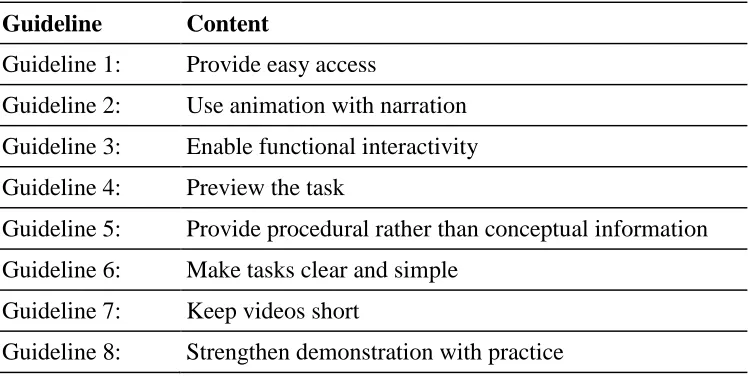
15 approach of the Eight Design Guidelines for Instructional Videos for Software Training by van der Meij and van der Meij (2013; see Table 1).
Table 1: Eight Design Guidelines for Instructional Videos
Guideline Content
Guideline 1: Provide easy access
Guideline 2: Use animation with narration Guideline 3: Enable functional interactivity Guideline 4: Preview the task
Guideline 5: Provide procedural rather than conceptual information Guideline 6: Make tasks clear and simple
Guideline 7: Keep videos short
Guideline 8: Strengthen demonstration with practice
Every video contains two parts of demonstrations: a procedure and a review. In the procedure part, the required series of actions and software reactions are presented and sometimes explained. The narration and occasionally integrated close-ups enable a more detailed instruction and highlighting of important steps of the procedure. The review is always introduced after the procedure with the sentence “You’re finished now, but remember…” Then the essential actions are shortly summarized with the purpose of reducing extraneous materials and focusing on the most important information. Over and above, the review facilitates deep understanding (Leopold, Sumfleth & Leutner, 2013) and fosters transfer of the task at hand (Neuß, 2014).
16 an automatic table of contents. These videos show the necessary steps for task completion in detail in order to illustrate how the tasks need to be carried out.
[image:18.612.140.473.402.567.2]To continue with the presentation of the videos, they were displayed on the screen in a window composed of a permanent table of contents on the left and a video player on the right side. The table of contents consists of chapter titles with below the titles of each video (see Figure 1). This gives a clear arrangement of all videos and facilitates their access (van der Meij & van der Meij, in press). By selecting the title of the to-be-viewed video in the table of contents the video appears and starts to play. The average length of the videos is 1:53 minutes (1:03 - 2:08). By using the transparent control toolbar, the participant is always able to control the pace (start and pause), to resume the video, and to change the volume (see Figure 1).
Figure 1: Presentation of the Videos
17 task execution. After completion, the documents were saved and identically scored by the
experimenter afterwards.
Tests. The pretest job-aid presented before-after screenshots of the problem. It tested the initial software skills by asking the user to change the format of the practice files that would also be asked in the training. An example of an exercise is “Open the document ‘Wundersame
Weihnacht’ and adjust the right side margin. Then save and close the document.” The
participants received a score of 0 for no or an incorrect task solution. A 1 was scored when the correct method of solving the problem was applied. The maximum score of the pretest was 8 (because participants only needed to explain a possibility of creating a table of contents, and were not asked to create it themselves, which provides a higher score).
In the training, respectively to the assigned condition, participants received a paper job-aid with instruction for the approach of the training and access to the video. It also asked
participants to complete the Word-formatting exercises seen in the videos with particular practice files. The maximum score was 10.
The posttest job-aid asked the user to solve the same problems, again with practice files and without access to the videos. It was scored identically as the training with a maximum score of 10.
In addition, transfer was measured by means of a bonus-exercise in the end of the posttest job-aid. Participants had to solve slightly different problems in the four bonus-subtasks, for example undoing the formatting of a quotation they did before. The posttest was scored too identically with a maximum score of 6.
18 Questionnaires. Motivation and experience before the training were assessed by the Initial Experience and Motivation Questionnaire. This was done in the job-aid of the pretest after
every screenshot by asking the participant to answer three questions on a 7-point Likert Scale ranging from never (1) to always (7) or from very bad (1) to very good (7). The items tested task relevance (“Have you ever had to do this task?”), experience (“How often have you needed to complete the task?”), and self-efficacy (“How well do you think you can solve the problem?”).
Motivation was also assessed at the end of the training by means of a
questionnaire derived from a study by van der Meij and van der Meij (in press). It contains questions about self-efficacy (“I know now how to change the side margins for the whole text”) and task relevance (“I find the exercise interesting”). The 16 questions were answered on a 7-point Likert Scale ranging from disagree (1) to strongly agree (7).
The mood of the participants was assessed five times during the training after completing
the subtasks of the job-aid. Answers were reported on a 5 point scale as either positive [1) happy, 2) confident], neutral [3) neutral] or negative [4) unconfident, 5) sad].
19 Procedure (Melina)
The experiment was implemented in three sessions per class. First, participants were given the pretest, in the second session the training and the posttest and in the third session (one week after the training) they received the retention test. Before, every participant had to draw a number which referred to a memory stick and a condition which he would use during the whole experiment. This procedure provided complete and structured data from all sessions per
participant. For implementation the school’s computer lab was used in the comprehensive school whereas university laptops were used in the other school.
At the beginning of each part of the experiment the participants were instructed in a ten minute talk about the content of the following session. If they could not complete a task they should go on to the following task. Additionally, they were asked to work individually and to only ask questions concerning technical problems.
In the pretest session, the advantages of the experiment were reported and students were informed that after finishing the experiment they would have greater knowledge about the use of Word. Additionally, participants were informed that the exercises would test their initial skills in Word-formatting. At last they were informed that the test would last 20 minutes and that they could put their hand up when they had finished the test. The pretest session did not only measure the students’ abilities but the initial motivation as well.
20 provided with headphones to create an individual environment and good audio quality. In this session, task performance, motivation after the training and flow were measured.
In the third session, participants were instructed about the following test for five minutes. After the 20 minutes retention test they received a verbal debriefing about the three different job-aid instructions during the training and thus the purpose of the study. Finally the participants were asked to give their feedback on the experiment. This last session only measured the participants’ task execution to determine the learning effect.
Analysis
The data of the Initial Experience and Motivation Questionnaire were analyzed and revealed no difference between conditions. Oneway analyses of variance (ANOVA’s) were implemented to examine the scores from all parts of the experiment with condition as factor. Additionally, analyses of covariance (ANCOVA’s) were computed on the different parts of the experiment with the pretest score as covariate.
Results
Task Performance (Lea)
To compare the different results of task performance during the training session, an
21 condition needed the most time (49 min), and participants in the blocked condition needed 47 min.
Table 2: Proportional Scores for Task Performance During Training by Condition
N Mean (SD)
Control condition 21 .776 (.303)
Access condition 20 .750 (.293)
Blocked condition 17 .712 (.260)
Total 58 .748 (.284)
Mediators of Motivation (Melina)
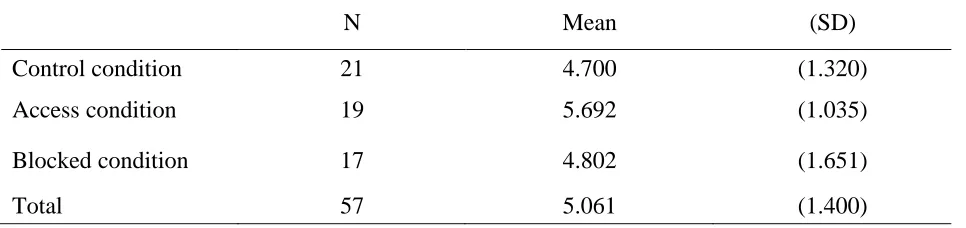
Flow. To continue with flow, an ANOVA analysis provided significant results. When the five flow measures were analyzed as dependent variable with condition as factor, the ANOVA indicated a significant effect of flow measure 5 in the access condition, F(2,43) = 6.198, p = .004. Additionally, when flow was taken as general dependent value, the access condition delivered significant effects, F(2,56) = 3.168, p = .05. When controlling for this effect, a Post Hoc analysis revealed no significant results (F(2,57) = 0.289).
Table 3: Mean Scores for Flow by Condition
N Mean (SD)
Control condition 21 4.700 (1.320)
Access condition 19 5.692 (1.035)
Blocked condition 17 4.802 (1.651)
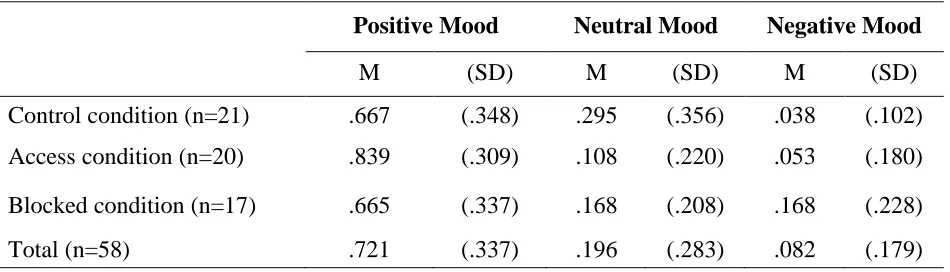
[image:23.612.66.549.548.662.2]22 Mood. Regarding the participant’s mood, no significant results were found but a
tendency in the access condition to have more positive feelings (M=.839, SD=.309) than
[image:24.612.68.543.237.373.2]participants in the other two conditions (control condition: M=.667, SD=.348; blocked condition: M=.665, SD=.337; see Table 4).
Table 4: Proportional Scores for Mood by Condition.
Positive Mood Neutral Mood Negative Mood
M (SD) M (SD) M (SD)
Control condition (n=21) .667 (.348) .295 (.356) .038 (.102)
Access condition (n=20) .839 (.309) .108 (.220) .053 (.180)
Blocked condition (n=17) .665 (.337) .168 (.208) .168 (.228)
Total (n=58) .721 (.337) .196 (.283) .082 (.179)
Motivation (Melina)
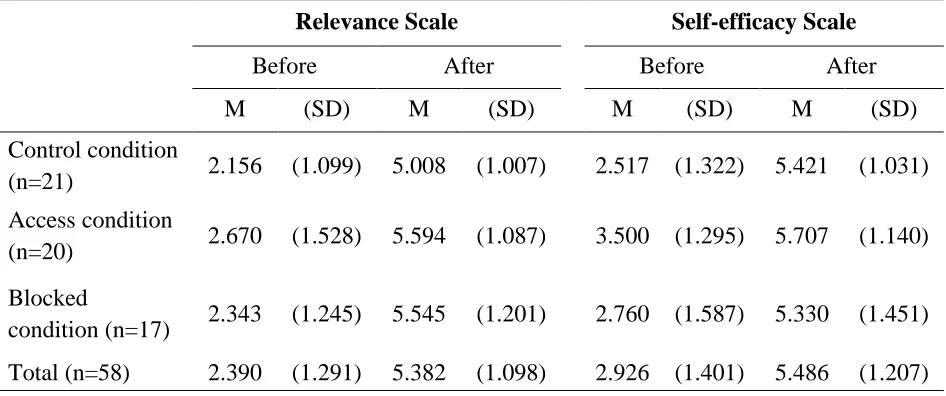
To analyze the motivation, first an ANOVA on the subscales frequency, relevance and self-efficacy was conducted. The results yielded no significant effect for frequency, F(2,56) = .329, p = .721, relevance, F(2,56) = .796, p = .457 or self-efficacy, F(2,56) = 2.624, p = .082. Looking at the mean values of the self-efficacy scale, the access condition had remarkably higher values (M= 3.500; SD=1.295) than the other two conditions (see Table 5).
Moreover, an ANOVA of motivation after the training, containing the subscales
23 Table 5: Mean Scores for Motivation Before and After the Training by Condition
Relevance Scale Self-efficacy Scale
Before After Before After
M (SD) M (SD) M (SD) M (SD)
Control condition
(n=21) 2.156 (1.099) 5.008 (1.007) 2.517 (1.322) 5.421 (1.031) Access condition
(n=20) 2.670 (1.528) 5.594 (1.087) 3.500 (1.295) 5.707 (1.140) Blocked
condition (n=17) 2.343 (1.245) 5.545 (1.201) 2.760 (1.587) 5.330 (1.451) Total (n=58) 2.390 (1.291) 5.382 (1.098) 2.926 (1.401) 5.486 (1.207)
Learning (Lea)
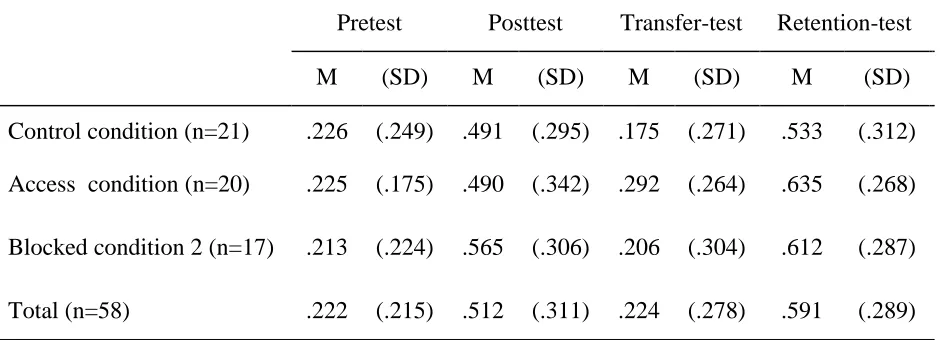
24 Table 6: Proportional Scores for the Pretest, Posttest, Transfer-test and Retention-test by
Condition
Pretest Posttest Transfer-test Retention-test
M (SD) M (SD) M (SD) M (SD)
Control condition (n=21) .226 (.249) .491 (.295) .175 (.271) .533 (.312) Access condition (n=20) .225 (.175) .490 (.342) .292 (.264) .635 (.268) Blocked condition 2 (n=17) .213 (.224) .565 (.306) .206 (.304) .612 (.287)
Total (n=58) .222 (.215) .512 (.311) .224 (.278) .591 (.289)
Discussion
Task Performance (Lea)
No significant effect of condition was found on task performance, indicating a
disagreement with the first hypothesis, stating that task performance during the training session is lowest in the blocked condition. This leads to the interpretation that watching the videos just once, or in a row, or even having the possibility to watch the videos more often does not matter for task performance. This interpretation is supported by research by van Gog, Paas and
25 & Graf, 1978) can be used as explanation because it shows that repeated passive learning
(watching the video) does not necessarily foster task performance. That is why the focus should be laid on active learning.
Mediators of Motivation (Melina)
Furthermore hypothesis 2a which states that flow is highest in the control condition could not be substantiated either. The results revealed a significant effect between conditions but favored the access condition to have better flow experiences. This effect vanished when
controlling with a Post Hoc analysis. But still, this might be explained by the structure given in this condition. Students of this age group are normally used to listening to the teacher’s
explanation of a certain subject and afterwards executing exercises themselves. In the access condition, participants were given a similar structure: First they watched all videos in which the exercises were explained and then they had to do it themselves using the support of the videos. A sample with participants of another age might deliver different results because they might be less fixated on this learning structure. In line with the research of Snyder and Lopez (2009) these results suggest a correlation between motivation and flow as the access condition scores best on both.
26 the overall mood in all conditions was obviously positive. This fits to the feedback given by the participants who said that “it was fun” and they “really liked learning from video tutorials, which they do not use often”.
Motivation (Melina)
Regarding the results of the motivation analysis hypothesis 3, that motivation after the training is greatest in the blocked condition cannot be substantiated. In contrast to the
expectations, a tendency of the access condition scoring best on the self-efficacy scale was found. A possible conclusion might be that access to the video supports self-efficacy and a feeling of confidence about the learned material. In general, the scores from the first to the second motivation measure rose and revealed high values after the training. During the first motivation measure participants did not know the practical use of the Word formatting skills.
This changed until the second measure of motivation, where participants recognized the practical relevance which then led to a higher motivation score. This fact supports Bandura’s (1971) thesis of reinforcement and motivational processes of the social learning theory. It states that estimating abilities as useful motivates the learner to a further use of these skills.
Learning (Lea)
27 trend of slightly higher results in the posttest of the blocked condition disappears in the retention-test. It is interesting that this group watched the video instructions less often than the other groups but still achieved a higher score on the posttest. The high scores of the posttest can be explained by this group paying most attention to the videos because they knew that this was their only possibility of getting proper instruction. Another explanation is the congruent structure of training- and posttest-tasks in the blocked condition.
Additionally, further interpretation is needed for both, the higher learning in all
conditions in the retention-test compared to the posttest, and regarding the blocked condition, the vanishing effect of posttest-scores compared to the retention-test. One possible explanation for these two trends is that the participants practiced the Word formatting skills on their own in the time between the posttest and the retention-test.
One last component of the results for learning which needs to be analyzed is transfer. Results of the transfer-test showed no significant results. Looking at the total mean of the transfer-test scores, they are comparable to the pretest scores. This is not a convincing transfer. There are several possible reasons for this low score. First, contrary to results of the study of Ertelt (2007) which showed a significant effect of practice on transfer, perhaps practice does not effectively foster transfer in this study. But this is not likely, as several studies and theories already showed the beneficial effect of practice for transfer when learning with visual and verbal representations (Anderson, 1982; Anderson & Schunn, 2000; Ertelt, 2007; Leopold, Sumfleth & Leutner, 2012).
Second, the time limit for the posttest job-aid with integrated transfer-test could be one explanation. Looking at the data, it is striking that little more than half of the participants
28 of 0. This influences the test scores because incomplete tasks are scored with a 0, resulting in a low test score and consequently influencing the outcomes of the transfer-test analysis. Further research should time the transfer-test carefully in order to ensure that every student has enough time to finish the tasks. This was not fully possible in the current study because only limited time was provided by the school.
Finally, the age of the students leads to the assumption that the declining concentration influenced the transfer-test results in the end of the two-hour training session. This can be justified with the finding that children increasingly improve in selective attention with age. This can be seen for example in an increased concentration on task-relevant stimuli and ignoring extraneous information with age (Hagen, 1973). Therefore, the declining concentration at the end of the training session could be a reason that not all students showed their skills as they could have.
Limitations
29 Moreover, formulations in the job-aids need to be written more comprehensively for the students as they were crucial for the understanding and performance. Examples are “indent” or “My mind is completely clear”. Another misunderstanding regarding formulations occurred during the training. The name ‘bonus exercise’ for the transfer-test was often misunderstood as ‘optional exercise’ as it is commonly used in German schools. This misunderstanding could be the reason for some incomplete transfer-tests and consequently could have influenced the results negatively.
30 References
Alexander, K. P. (2013). The usability of print and online video instructions. Technical Communication Quarterly, 22(3), 237-259.
Anderson, J. R. (1982). Acquisition of cognitive skill. Psychological Review 89(4), 369-406. Anderson, J. R., & Schunn, C. D. (2000). Implications of the ACT-R learning theory: No magic
bullets. In R. Glaser (Ed.), Advances in Instructional Psychology (pp. 1-33). Mahwah, NJ: Lawrence Erlbaum.
Arguel, A., & Jamet, E. (2009). Using video and static pictures to improve learning of procedural contents. Computers in Human Behavior, 25, 354–359.
Ayres, P., & Paas, F. (2007). Making instructional animations more effective: A cognitive load approach. Wiley InterScience, 21, 695-700. doi: 10.1002/acp.1343
Bandura, A. J. (1971). Social learning theory. New York: General Learning Press.
Brunyé, T. T., Taylor, H. A., Rapp, D. N., & Spiro, A. B. (2006). Learning procedures: The role of working memory in multimedia learning experiences. Applied Cognitive Psychology, 20, 917-940. doi: 10.1002/acp.1236
Engeser, S., & Rheinberg, F. (2008). Flow, performance and moderators of challenge-skill balance. Motivation and Emotion, 32(3), 158-172. doi:10.1007/s11031-008-9102-4 Ertelt, A. (2007). On-screen videos as an effective learning tool: The effect of instructional
design variants and practice on learning achievements, retention, transfer, and
motivation. (Doctoral Dissertation, Albert-Ludwigs University of Freiburg, Freiburg,
Germany). Retrieved from http://www.freidok.uni-freiburg.de/volltexte/3095/
31 Proceedings of the 7th International Conference of the Learning Sciences (pp. 154- 169).
Mahwah, NJ: Lawrence Erlbaum.
Eysink, T. H., de Jong, T., Berthold, K., Kolloffel, B., Opfermann, M., & Wouters, P. (2009). Learner performance in multimedia learning arrangements: An analysis across
instructional approaches. American Educational Research Journal, 46(4), 1107-1149. doi:10.3102/0002831209340235
Farkas, D. K. (1999). The logical and rhetorical construction of procedural discourse. Technical Communication, 46, 42-54.
Hagen, J. W. (1973). The Development of Attention in Children. Educational Testing Service, Princeton, N.J.
Hess, T.M., Popham, L.E., Emery, L. & Elliott (2012). Mood, motivation, and misinformation: Aging and affective state influence on memory. Aging, Neuropsychology, and Cognition, 19(1-2), 13-34. doi:10.1080/13825585.2011.622740
Hine, J. F., & Wolery, M. (2006). Using point-of-view modeling to teach play to preschoolers with autism. Topics in Early Childhood Special Education, 26(2), 83-93.
doi:10.1177/02711214060260020301
Isnaeni, M. (2012). The effectiveness comparison between on-screen video and paper-based tutorial on learning performance in text formatting. (Master’s Thesis, University of
Twente, Enschede, Netherlands). Retrieved from
http://essay.utwente.nl/62322/1/MSc_Isnaeni_M._S1085522.pdf
32 Mayer, R. E., & Moreno, R. (2010). Nine ways to reduce cognitive load in multimedia learning.
Educational Psychologist, 38(1), 43-52.doi:10.1207/S15326985EP3801_6
Neuß, P. (2014). Reviewing in video tutorials: Can it foster procedural knowledge acquisition? (Bachelor’s thesis, University of Twente, Enschede, Netherlands). Retrieved from http://purl.utwente.nl/essays/64863
Peterson, L. R., & Peterson, M. J. (1959). Short-term retention of individual verbal terms. Journal of Experimmental Psychology, 58 (3), 193-198
Rheinberg, F., Vollmeyer, R., & Engeser, S. (2003). Die Erfassung des Flow-Erlebens. In J. Stiensmeier-Pelster & F. Rheinberg (Eds.), Diagnostik von Motivation und Selbstkonzept (Tests und Trends N.F. 2) (pp. 261-279). Göttingen: Hogrefe.
Shephard, K. (2003). Questioning, promoting and evaluating the use of streaming video to support student learning. British Journal of Educational Technology, 34(3), 295-308. Slamecka, N. J. & Graf, P. (1978). The generation effect: Delineation of a phenomenon.
Journal of Experimental Psychology: Human Learning and Memory, 4(6), 592-604.
Snyder, C. R., & Lopez, S. J. (2009). Oxford Handbook of Positive Psychology. Oxford University Press.
Tulving, E., & Thomson, D. M. (1973). Encoding specificity and retrieval processes in episodic memory. Psychological Review, 80(5), 352-373.
Treisman, A. M., & Gelade, G. (1980). A feature-integration theory of attention. Cognitive Psychology, 12, 97-136.
Tversky, B., Morrison, J. B., & Bétrancourt, M. (2002). Animation: can it facilitate? Int. J. Human-Computer Studies, 57, 247-262. doi: 10.1006/ijhc.1017
33 tutorials for software training. Computers & Education.
Van der Meij, H., & Van der Meij, J. (in review). A test on the design of a video tutorial for software training. Journal of Computer Assisted Learning.
Van der Meij, H., & Van der Meij, J. (2013). Eight guidelines for the design of instructional videos for software training. Technical Communication, 60(3), 205-228.
Van Gog, T., Paas, F., & van Merriënboer, J. J. (2004). Process-oriented worked examples: Improving transfer performance through enhanced understanding. International Science: 32(1-2), 83-98.
Wiedenbeck, S., & Zila, R. L. (1997). Hands-on practice in learning to use software: A comparison of exercise, exploration, and combined formats. ACM Transactions on Computer-Human Interaction, 4(2), 169-198.
34 Appendix
Appendix A: Mood measure Appendix B: Flow items Appendix C: Motivation items
Appendix D: Job-aid example – Training
35 Appendix A
A1 Mood measure
1. Wie fühlst du dich nach dieser Aufgabe?
36 Appendix B
B1 Flow items
1. Wie hast Du diese Aufgabe erfahren?
Stimme nicht zu
Stimme zu Ich weiß bei jedem Schritt, was ich zu tun
habe.
1 2 3 4 5 6 7
Die richtigen Gedanken/Bewegungen kommen wie von selbst.
1 2 3 4 5 6 7
Mein Kopf ist völlig klar. 1 2 3 4 5 6 7
Ich habe das Gefühl, den Ablauf unter Kontrolle zu haben.
37 Appendix C
C1 Motivation Items after Training
1. Wie hast Du die Erledigung der Aufgaben erfahren? Stimme nicht zu
Stimme zu
Ich empfand die Aufgaben als wichtig. 1 2 3 4 5 6 7
Ich denke, dass ich das Gelernte schnell wieder vergesse.
1 2 3 4 5 6 7
Ich fand die Aufgaben interessant. 1 2 3 4 5 6 7
Ich fand das Lineal praktisch. 1 2 3 4 5 6 7
Was ich gelernt habe, kann ich bei meinen eigenen Arbeiten anwenden.
1 2 3 4 5 6 7
Ich fand die Aufgaben einfach. 1 2 3 4 5 6 7
Ich mag es wenn Texte übersichtlich und schön aussehen.
1 2 3 4 5 6 7
Ich denke, dass es wichtig ist, dass eine Aufzählung übersichtlich ist.
1 2 3 4 5 6 7
Ich kann gut mit dem Lineal arbeiten. 1 2 3 4 5 6 7
Ich kann nun eine übersichtliche Aufzählung erstellen.
1 2 3 4 5 6 7
Ich finde es wichtig einen ausreichenden Seitenrand bei einem Text zu haben.
1 2 3 4 5 6 7
Ich kann nun meine eigene Arbeiten attraktiver aussehen lassen.
1 2 3 4 5 6 7
Ich weiß nun wie man den Seitenrand für den gesamten Text ändert.
1 2 3 4 5 6 7
Ich kann nun den ersten Satz eines Absatzes einrücken lassen.
1 2 3 4 5 6 7
Ich finde es wichtig um ein schönes Inhaltsverzeichnis präsentieren zu können.
1 2 3 4 5 6 7
Ich weiß nun wie ich Word ein
automatisches Inhaltsverzeichnis erstellen lasse.
38 Appendix D
Job-aid example - Training
Control Condition Instruction:
Anleitung
Du lernst nun, wie du in Word einen Text schöner und übersichtlicher gestalten kannst. Diese Anleitung hilft dir dabei, die passenden Videos zu finden und die Aufgaben zu bearbeiten. Achte somit darauf, dass du die Anleitung auch sorgfältig durchliest!
Du hast für das Ansehen der Videos und die Erledigung der Aufgaben etwa 50 Minuten Zeit. Bei Fragen oder Problemen kannst du dich jederzeit melden!
Access Condition Instruction:
Anleitung
Du lernst nun, wie du in Word einen Text schöner und übersichtlicher gestalten kannst. Dieses Training sollst du in folgender Reihenfolge durchführen:
1. Sieh dir alle Videos der Reihe nach an.
2. Übe die in dieser Anleitung stehenden Aufgaben selber mit Hilfe der Videos.
Beim Üben hilft dir diese Anleitung dabei, dir einen Leitfaden für die Aufgaben zu geben und diese zu bearbeiten. Achte somit darauf, dass du die Anleitung auch sorgfältig durchliest! Du hast für das Ansehen der Videos und die Erledigung der Aufgaben etwa 50 Minuten Zeit. Bei Fragen oder Problemen kannst Du dich jederzeit melden!
Blocked Condition Instruction:
Anleitung
39 1. Sieh dir alle Videos der Reihe nach an.
2. Übe die in dieser Anleitung stehenden Aufgaben selber. Während du übst, hast du keinen Zugriff mehr auf die Videos.
Beim Üben hilft dir diese Anleitung dabei, dir einen Leitfaden für die Aufgaben zu geben und diese zu bearbeiten. Achte somit darauf, dass du die Anleitung auch sorgfältig durchliest! Du hast für das Ansehen der Videos und die Erledigung der Aufgaben etwa 50 Minuten Zeit. Bei Fragen oder Problemen kannst du dich jederzeit melden!
Dieses Symbol bedeutet, dass du dir ein Video ansiehst und wenn du darin alles gut verstanden hast zum nächsten Schritt gehen kannst.
Video
40 Deine Aufgabe
Nach jeder Aufgabe fragen wir dich wie du dich fühlst. Umkreise einfach den Smiley der am besten zu deiner momentanen Stimmung passt. In dem unteren Beispiel siehst du, dass hier z.b. ein Schüler „Sicher“ umkreist hat.
1. Wie fühlst du dich nach dieser Aufgabe?
Fröhlich Sicher Neutral Unsicher Traurig
Nach jeder Aufgabe werden dir eine Anzahl Fragen gestellt. Kreise einfach die deiner Meinung nach richtige Zahl ein. In dem unten zu sehendes Beispiel hat ein Schüler z.B. die „4“ eingekreist. Er fand somit die Aufgabe nicht schwer, aber auch nicht einfach. Sondern genau dazwischen:
2. Wie hast du diese Aufgabe erfahren?
Stimme nicht zu
Stimme zu
Ich weiß bei jedem Schritt, was ich zu
41 1. Den Seitenrand des gesamten Texts anpassen
Den rechten Seitenrand anpassen
Sieh dir das Video von Abschnitt 1.1 an
Deine Aufgabe
1. Öffne die Datei “Schäferhund”.
2. Passe, wie im Video zu sehen gewesen, den rechten Seitenrand an. 3. Speicher die Datei ab.
4. Schließe die Datei noch nicht, da du diese noch weiterverwendest.
Den linken Seitenrand anpassen
Sieh dir das Video von Abschnitt 1.2 an
Deine Aufgabe
1. Öffne die Datei “Schäferhund” (sollte noch geöffnet sein). 2. Passe, wie im Video zu sehen gewesen, den linken Seitenrand an. 3. Speicher die Datei ab.
4. Schließe die Datei.
42 1. Wie fühlst du dich nach dieser Aufgabe?
Fröhlich Sicher Neutral Unsicher Traurig
2. Wie hast Du diese Aufgabe erfahren?
Stimme nicht zu
Stimme zu
Ich weiß bei jedem Schritt, was ich zu tun habe. 1 2 3 4 5 6 7
Die richtigen Gedanken/Bewegungen kommen wie von selbst.
1 2 3 4 5 6 7
Mein Kopf ist völlig klar. 1 2 3 4 5 6 7
Ich habe das Gefühl, den Ablauf unter Kontrolle zu haben.
43 2. Den Randabstand von Textpassagen anpassen
2.1 Ein Zitat links einrücken lassen
Sieh dir das Video von Abschnitt 2.1 an
Deine Aufgabe
1. Öffne die Datei “Zitatschäferhund”.
2. Lass, wie im Video zu sehen gewesen, das Zitat links einspringen. 3. Speichere die Datei ab.
4. Schließe die Datei noch nicht, da du diese noch weiterverwendest.
2.2 Ein Zitat rechts einrücken lassen
Sieh dir das Video von Abschnitt 2.2 an
Deine Aufgabe
1. Öffne die Datei “Zitatschäferhund” (sollte noch geöffnet sein). 2. Lass, wie im Video zu sehen gewesen, das Zitat rechts einspringen. 3. Speicher die Datei ab.
4. Schließe die Datei.
44 1. Wie fühlst Du dich nach dieser Aufgabe?
Fröhlich Sicher Neutral Unsicher Traurig
3. Wie hast Du diese Aufgabe erfahren?
Stimme nicht zu
Stimme zu
Ich weiß bei jedem Schritt, was ich zu tun habe. 1 2 3 4 5 6 7
Die richtigen Gedanken/Bewegungen kommen wie von selbst.
1 2 3 4 5 6 7
Mein Kopf ist völlig klar. 1 2 3 4 5 6 7
Ich habe das Gefühl, den Ablauf unter Kontrolle zu haben.
1 2 3 4 5 6 7
2.3 Die erste Zeile eines Absatzes einrücken
45 Deine Aufgabe
1. Öffne die Datei “Rettungshunde”.
2. Lass, wie im Video zu sehen gewesen, die erste Zeile von jedem Absatz einrücken. 3. Speicher die Datei ab
4. Schließe die Datei.
Du hast die erste Zeile von jedem Absatz eingerückt.
1. Wie fühlst Du dich nach dieser Aufgabe?
Fröhlich Sicher Neutral Unsicher Traurig
4. Wie hast Du diese Aufgabe erfahren?
Stimme nicht zu
Stimme zu
Ich weiß bei jedem Schritt, was ich zu tun habe. 1 2 3 4 5 6 7
Die richtigen Gedanken/Bewegungen kommen wie von selbst.
1 2 3 4 5 6 7
Mein Kopf ist völlig klar. 1 2 3 4 5 6 7
Ich habe das Gefühl, den Ablauf unter Kontrolle zu haben.
46 2.4 Eine Aufzählung verdeutlichen
Sieh dir das Video von Abschnitt 2.4 an
Deine Aufgabe
1. Öffne die Datei “Hunderassen”.
2. Sorge dafür, dass die Beschreibung der Hunderassen, wie im Video zu sehen gewesen, übersichtlich auf einer Linie beginnt.
3. Speichere die Datei ab. 4. Schließe die Datei.
Du hast nun die Aufzählung übersichtlicher gemacht.
1. Wie fühlst Du dich nach dieser Aufgabe?
47 5. Wie hast Du diese Aufgabe erfahren?
Stimme nicht zu
Stimme zu
Ich weiß bei jedem Schritt, was ich zu tun habe. 1 2 3 4 5 6 7
Die richtigen Gedanken/Bewegungen kommen wie von selbst.
1 2 3 4 5 6 7
Mein Kopf ist völlig klar. 1 2 3 4 5 6 7
Ich habe das Gefühl, den Ablauf unter Kontrolle zu haben.
1 2 3 4 5 6 7
Ein automatisches Inhaltsverzeichnis erstellen
3.1 Eine Formatvorlage für Kapitelüberschriften
Sieh dir das Video von Abschnitt 3.1 an.
Deine Aufgabe
1. Öffne die Datei “Niederlande”.
2. Gebe, wie im Video zu sehen gewesen, allen Kapitelüberschriften die Formatvorlage „Überschrift 1“.
3. Speichere die Datei ab.
48 3.2 Eine Formatvorlage für Abschnittsüberschriften
Sieh dir das Video von Abschnitt 3.2 an. Deine Aufgabe
1. Öffne die Datei “Niederlande” (sollte noch geöffnet sein).
2. Gebe, wie im Video zu sehen gewesen, allen Abschnittsüberschriften die Formatvorlage „Überschrift 2“.
3. Speichere die Datei ab.
4. Schließe die Datei noch nicht, da du diese noch weiterverwendest.
3.3 Das automatische Inhaltsverzeichnis erstellen
Sieh dir das Video von Abschnitt 3.3 an. Deine Aufgabe
1. Öffne die Datei “Niederlande” (sollte noch geöffnet sein).
2. Erstelle, wie im Video zu sehen gewesen, das automatische Inhaltsverzeichnis. 3. Speichere die Datei ab.
4. Schließe die Datei noch nicht, da du diese noch weiterverwendest.
3.4 Textpassagen mit dem Inhaltsverzeichnis suchen
49 Deine Aufgabe
1. Öffne die Datei “Niederlande” (sollte noch geöffnet sein).
2. Suche, wie im Video zu sehen gewesen, eine Textpassage mit Hilfe des Inhaltsverzeichnisses.
3. Speichere die Datei ab.
4. Schließe die Datei noch nicht, da du diese noch weiterverwendest.
3.5 Das Inhaltsverzeichnis verändern
Sieh dir das Video von Abschnitt 3.5 an. Deine Aufgabe
1. Öffne die Datei “Niederlande” (sollte noch geöffnet sein).
2. Verschiebe, wie im Video zu sehen gewesen, einen Stück Text an eine andere Stelle. 3. Aktualisiere das Inhaltsverzeichnis, so wie im Video zu sehen gewesen.
4. Speichere die Datei ab. 5. Schließe die Datei.
Du hast nun ein Inhaltsverzeichnis erstellt.
1. Wie fühlst Du dich nach dieser Aufgabe?
50 6. Wie hast Du diese Aufgabe erfahren?
Stimme nicht zu
Stimme zu
Ich weiß bei jedem Schritt, was ich zu tun habe. 1 2 3 4 5 6 7 Die richtigen Gedanken/Bewegungen kommen wie
von selbst.
1 2 3 4 5 6 7
Mein Kopf ist völlig klar. 1 2 3 4 5 6 7
Ich habe das Gefühl, den Ablauf unter Kontrolle zu haben.
1 2 3 4 5 6 7
Du bist nun mit der Video-Einführung in Word fertig. Du hast mit Videos gearbeitet, die über drei große Themen gingen:
Verändern des Seitenrands für den gesamten Text
Einrücken und deutlich machen von Textteilen wie Absätze und Aufzählungen
In Word ein automatisches Inhaltsverzeichnis erstellen.
51 1. Wie hast Du die Erledigung der Aufgaben erfahren?
Stimme nicht zu
Stimme
zu
Ich empfand die Aufgaben als wichtig. 1 2 3 4 5 6 7
Ich denke, dass ich das Gelernte schnell wieder vergesse.
1 2 3 4 5 6 7
Ich fand die Aufgaben interessant. 1 2 3 4 5 6 7
Ich fand das Lineal praktisch. 1 2 3 4 5 6 7
Was ich gelernt habe, kann ich bei meinen eigenen Arbeiten anwenden.
1 2 3 4 5 6 7
Ich fand die Aufgaben einfach. 1 2 3 4 5 6 7
Ich mag es wenn Texte übersichtlich und schön aussehen.
1 2 3 4 5 6 7
Ich denke, dass es wichtig ist, dass eine Aufzählung übersichtlich ist.
1 2 3 4 5 6 7
Ich kann gut mit dem Lineal arbeiten. 1 2 3 4 5 6 7
Ich kann nun eine übersichtliche Aufzählung erstellen.
1 2 3 4 5 6 7
Ich finde es wichtig einen ausreichenden Seitenrand bei einem Text zu haben.
1 2 3 4 5 6 7
Ich kann nun meine eigene Arbeiten attraktiver aussehen lassen.
1 2 3 4 5 6 7
Ich weiß nun wie man den Seitenrand für den gesamten Text ändert.
1 2 3 4 5 6 7
Ich kann nun den ersten Satz eines Absatzes einrücken lassen.
1 2 3 4 5 6 7
Ich finde es wichtig um ein schönes Inhaltsverzeichnis präsentieren zu können.
1 2 3 4 5 6 7
Ich weiß nun wie ich Word ein automatisches Inhaltsverzeichnis erstellen lasse.
1 2 3 4 5 6 7
52 Bist du fertig?
Speicher die Datei ab.
Kontrolliere in der folgenden Liste ob du alles gemacht hast: Hake ab!
1. Den oberen Abstand angepasst
2. Die genannten Wörter eingerückt
3. Zitat bearbeitet
4. ‚Schloss Burg‘ entfernt und Inhaltsverzeichnis angepasst
5. Name & USB-Nummer ausgefüllt
6. Datei gespeichert. Appendix E
Example Job-aid – Transfer-test
Bonusaufgabe 5
Öffne die Datei Schlösser.
53 Bist du fertig?
Kontrolliere in der folgenden Liste ob du alles gemacht hast. Hake ab!
Inhaltsverzeichnis erstellt.
Datei abgespeichert.
Name und USB-Nummer oben rechts angegeben. 1. Gebrauche das obere Lineal um
den oberen Abstand des gesamten Textes auf ungefähr 2,5 cm
einzustellen.
2. Lasse nur einige Wörter von dem Absatz Bewohner einrücken:
Schuldeneintreiber…
Hofmädchen
Köche
Haushälter
3. Bearbeite das Zitat, sodass es wieder wie ein normaler Text aussieht.
54