$3.00
October
1984
TABLE OF CONTENTS
HSC 68000 Co .. Processor ... 5
DynaDisk for the BBII ... 8
BBI: ETX/ ACK Serial Print Driver ... 11
More I/O on the BBI ... 13
Serial Printer on a BBI Sans SIO ...
14
Parallel Printer Interface for SWP's Dual Density ... 16
Pascal Procedures ... 18
Extended 8" Single Density ... 20
SBASIC Column ... 22
The Kaypro Column ... 26
Cheap and Dirty Talker for your Kaypro ... 30
The Slicer Column ... 33
FOR THwords ... 38
C'ing Clearly ...
44
Xerox 820 Column ... 48
SOG III ... 52
On Your Own ... 62
...:
en
w::J
o
w
a:
z
o
>
c.o
o
w
w
a:
LL>=
~ Z
«
a:
a:
«
~c
w
t:::
:t :::i
>
«
c
o ena:
::J
o
LL
o
en
':t
a:
w ~w
J:
~
o
~ ~
o
w
.,
In::J
en
w
C
«
:ten
w
..J«
en
..J
..J
«
"THE ORIGINAL BIG BOARD"
OEM - INDUSTRIAL - BUSINESS - SCIENTIFIC
SINGLE BOARD COMPUTER KIT!
Z-80 CPU! 64K RAM!
(DO NOT CONFUSE WITH ANY OF OUR FLATTERING IMITATORSI)
THE BIG BOARD PROJECT: With thousands sold worldwide and over two years of field experience, the Big Board may just be one of the most reliable single board computers available today. This is the same design that was licensed by Xerox Corp. as the basis for their 820 computer.
(64K KIT BASIC I/O)
The Big Board gives you the right mix of most needed computing features all on one board. The Big Board was designed from scratch to run the latest version of CP/M*. Just imagine all the off-the-shelf software that can be run on the Big Board without any modifications needed.
SIZE: 8'12 x 133/. IN.
SAME AS AN 8 IN. DRIVE. REQUIRES: +5V @ 3 AMPS + - 12V @.5 AMPS. FULLY SOCKETED! FEATURES: (Remember, all this on one board!)
64K RAM
Uses Industry standard 4116 RAM's. AII64K Is available to the user, our VIDEO and EPROM sections do not make holes In system RAM. Also, very special care was taken In the RAM array PC layout to eliminate potential noise and glitches.
Z-80 CPU
Running at 2.5 MHZ. Handles all 4116 RAM refresh and supports Mode 2 INTERUPTS. Fully buffered and runs 8080 software.
SERIAL I/O (OPTIONAL)
Full 2 channels using the Z80 SIO andtheSMC 8116 Baud Rate Generator. FULL RS232! For synchronous or asynchronous communication. In synchronous mode, the clocks can be transmitted or received by a modem. Both channels can be set up for either data-communication or data-terminals. Supports mode 21nt. Price for all parts and connectors: $39.95
BASIC I/O
Consists of separate parallel port (Z80 PIO) for use with an ASCII encoded keyboard for Input. Output would be on the 80 x 24 Video Display.
BLANK PC BOARD - $89.95
The blank Big Board PC Board comes complete with full
documentation (including schematics), the character ROM,
the PFM 3.3 MONITOR ROM, and a diskette with the source
of our BIOS, BOOT, and PFM 3.3 MONITOR.
24 X 80 CHARACTER VIDEO
With a crisp, flicker-free display that looks extremely sharp even on small monitors. Hardware scroll and full cursor control. Composite video or split video and sync. Character set Is supplied on a 2716 style ROM, making customized fonts easy. Sync pulses can be any desired length or polarity. Video may be Inverted or true. 5 x 7 Matrix - Upper & Lower Case.
FLOPPY DISC CONTROLLER
Uses WD1771 controller chip with a TTL Data Separator for enhanced reliability. IBM 3740 compatible. Supports up to four 81nch disc drives. Directly compatible with standard Shugart drives such as the SA800 or SA801. Drives can be configured for remote AC off-on. Runs CP/M" 2.2 •
TWO PORT PARALLEL I/O (OPTIONAL) Uses Z-80 PIO. Full 16 bits, fully buffered, bl-dlrectlonal. Uses selectable hand shake polarity. Set of all parts and connectors for parallel I/O: $19.95
REAL TIME CLOCK (OPTIONAL)
Uses Z-80 CTC. Can be configured as a Counter on Real Time Clock. Set of all parts: $9.95
CP/M* 2.2 FOR BIG BOARD
The popular CP/M' D.O.S. to run on Big Board Is available for $139.00.
DOUBLE DENSITY ADAPTER BOARD - $149.95 (A&T~
Requires no cuts or MODS to an existing Big Board. Gives up to 670K storage on a single sided 8 In. diskette. With software to patch your CP/M* 2.2.
PFM 3.3 2K SYSTEM MONITOR
The real power of the Big Board lies In Its PFM 3.3 on board monitor. PFM commands Include: Dump Memory, Boot CP/M", Copy, Examine, Fill Memory, Test Memory, Go To, Read and Write I/O Ports, Disc Read (Drive, Track, Sector), and Search PFM occupies one of the four 2716 EPROM locations provided. Z-80 Is a Trademark of Zilog.
Digital Research Computers
(OF TEXAS)
P.O. BOX 461565 • GARLAND, TEXAS 75046 • (214) 271-3538
TERMS: Shipments will be made approximately 3 to 6 weeks after we receive your order. VISA, MC, cash accepted. We will accept COD's (for the Big Board only) with a $75 deposit. Balance UPS COD. Add $4.00shipping.
USA AND CANADA ONLY
MICRO CORNUCOPIA
P.O. Box 223
Bend, Oregon 97709
503-382-8048
Editor
&Publisher
David
J.
Thompson
Assistant Editor
Eric Belden
Graphic Design
Sandra Thompson
Technical Department
Dana Cotant
Eric Roby
Advertising Director
Alice Holbrow
Staff Assistants
Dorcas Dsenis
Tracey Braas Cary Gatton
Typography
Patti Morris & Martin White
Irish Setter
MICRO CORNUCOPIA is the single board systems journal sup-porting systems programming lan-guages and single board systems-including the Big Board, Big Board II, Xerox 820, Kaypro, and Slicer.
MICRO CORNUCOPIA is pub-lished six times a year by Micro Cor-nucopia of Oregon, P.O. Box 223, Bend, Oregon 97709.
SUBSCRIPTION RATES: ~t>-;(.<c.S
1 yr.(6 issues) ~<c.~ $16.00
1 yr. (first class) $22.00
1 yr. (Canada & Mexico) $22.00
1 yr.(other foreign) $30.00
Make all orders payable in U.S. funds on a U.S. bank, please.
ADVERTISING RATES: Available on request.
CHANGE OF ADDRESS: Please send your old label and new ad-dress.
SOFTWARE, HARDWARE, AND BOOK VENDORS: We would very much like to review your CP/M &
MSDOS compatible products. Send materials to the Review Depart-ment, Micro Cornucopia.
CP/M is a trademark of Digital Research, Inc. Copyright © 1984 by Micro Cornucopia
All rights reserved
liaRD aDIRuaD'1l
October 1984
The Single Board Systems Journal
No. 20
SOG
Aftermath!
Let me warn you now, you're going to be hearing a lot about SOG III in upcoming is-sues of Micro C. You see, I was able to tape most of the sessions and there was a wealth of information shared in two intense days. One piece of information that really hit me came from Philippe Kahn, president of Borland In-ternational.
Modula II, Wherefore Art Thou?
Philippe was asked how soon Modula. II would be available. "Shortly," he said. How-ever, that "shortly" referred only to the 80881
8086 version. There will probably never be a Turbo Modula for the Z80.
You see, Borland is a market driven company and marketing says that 70 percent of current sales are for MS/DOS machines and they expect that within months they will see that margin go to 85 percent.
I've noticed that a lot of the fancy new software packages are being offered only for the PC bunch (including some really cheap ones like a high-speed WordStar look-alike for $35) and a really incredible $49.95 package called Sidekick that Phi-lippe demonstrated at the SOG.
Actually, if I were going to write some
new software, I'd take a hard look at the PC market too. After all, you'd not only have a huge and growing hardware base, but you'd also have a very clearly defined memory-mapped video moni-tor.
A Real Standard
Terminal definition is one area that CP / M 80 ignored because there was simply no standard terminal. When IBM came along with the PC it not only sold a
sys-tern, it sold a standard. A lot of writers yell about gutless me-tooers jumping on the IBM bandwagon, but it makes a lot of sense, not because IBM created the standard, or that the standard is perfect, but because there finally is a standard.
This standard works because it defines the video, the expansion bus (you know, the plug in cards that handle color graphics, winchesters, more memory, additional ports ... ), the port address-es, the system calls, the monitor jump table, even the control functions on the keyboard. It is a real standard.
Of course, some systems are better copies of the standard than others. For instance, the Compaq and the latest Heath/Zenith are very compatible, while the Sanyo is only slightly compatible (al-though, at the price, it is still a very good
deal if you want a machine to do straight
text editing, spreadsheets, or BASIC). The Heath machine is available as a kit which ought to make it interesting to a number of Big Board folks. However, the assembly is reported to be 37 hours of cabinet and cable work, circuit boards come already assembled and tested.' (That's a long way from the early Heath Kits where you carefully wrapped wire leads around each tube-socket pin and then held a 75-watt soldering iron against the pins until you had smothered .. the entire area with a glistening chunk of tin and lead.) Ah well, there ought to be something a person could do with an al-ready stuffed board-don't you think?
The Z80 and Up
Of course I would have preferred to see a Z80 based standard, but one big thing precluded that. You see, there was (and is) no chip that was upwardly com-patible with the Z80. The Z8000 was not compatible with its little brother (and it was slow getting into the market place as was the 68000 chip set). The Z800 which is supposed to be somewhat compatible with the Z80 has not yet seen the light of wholesaler's shelves (it may not ever be available).
Meanwhile, Intel has a bevy of new heavies definitely on their way. In fact
Dear Editor,
I discovered an obscure bug in my Kaypro-II and may even have figured out why it's there. When I have a value between 30H and 3FH in the I (index) register of Z80 and memory bank 1 is se-lected, my screen display gets weird: it fades way out and has the jitters.
If I'm right, then all Kaypros which follow your schematic must have the same bug. According to Zilog's Z80 tech-nical manual, when the Z80 does a mem-ory refresh, the contents of the I register are placed on the upper 8 bits of the ad-dress bus, and a MREQ signal is issued.
If the I register is between 30H and 3FH,
this fools the CPU video access detector into thinking that video RAM is being ac-cessed, because it doesn't pay any atten-tion to the RFSH signal like it ought to. -As a result, the screen is blanked on ev-ery refresh cycle! Maybe you can figure an easy way to fix this.
David Hillman 2006 NE Davis Portland OR 97232
Dear Editor,
I enjoyed reading Jan Korrubel's re-view of SWP's dual density package in your April issue. Having purchased this product a few months ago myself I've been equally pleased with it's perform-ance although I too found some damage on arrival.
In my case the daughter board was in-tact but one of disks in the order had a stray board pin lodged in it's jacket. Af-ter carefully coaxing the pin out, I found it left a ghastly dent in the track area of the disk. I was lucky enough to be able to "iron" it out from the convex side so that
I could make a successful copy. It would
certainly be helpful if all distributors
wold ship such packages with disks sealed in envelopes to prevent this sort of contamination.
An annoying bug I found with the special-function keys is that if I try to use the screen dump in conjunction with the scroll pause the system locks up forcing me to reset to get out.
I also found that the SETCLK. COM program on users disk #1 can easily be adapted for this BIOS by using DDT. Simply change locations 019EH and
2
LETTERS
019FH (both 080H) to OCBH and 027H respectively. This replaces the two ADD A,B instructions with one SLA A in-struction so that the program can store the two-digit entries in each location as two BCD nibbles instead of one binary byte. The commands in DDT would ap-pear as follows:
Modifying SETCLK
A}ddt DDT VERS 2.2 -Isetclk. com -R
NEXT PC
0200 0100 -S019E 019E 80 CB 019F 80 27 01AO 81 • _AC
A}SAVE 8 setclk2.com
Paul R. Pederson 8601 E. Old Spanish Trail Tucson AZ85710
Dear Editor,
I recently received your Kaypro Disk
K21 and encountered a minor bug in the
screen dump. The first time through the dump works fine however when it ends it sends a message to my printer to go into a 5 CPI mode. The next printing whether dump or not is wide letters 5 CPI.
I then fiddled around with the source you sent along trying to insert an initiali-zation string but to no avail. My capabili-ties in this area are vey limited, so I'm looking for help. I have an Okidata 82A
printer and the strings in hex are: 1E
=
10CPI; 1F
=
5 CPI. Jim Jensen 353 Willow St.West Barnstable MA 02668
Editor's note:
It seems the non-blinking block cursor of our Pro Monitor ROM is being passed as a printer control character. We've fixed the dump programs on the new disks and will update any customer's disk that is giving them problems.
Dear Editor,
I installed the Pro-8 ROM package but could not format the odd numbered tracks on drive B or A. That problem turned out to be a trace connecting E40 to E27. This connected PA2 to PBRDY on U72, thus no floppy side select.
However, I still could not format drive A. This turned out to be a bad drive, a new Teac.
I.have a fairly early Kaypro, but my board is not exactly like the schematic. For example, U2 was a 74S04 and all but one of the inverters were being used. Al-so, my board did not have the marking "E40."
Do you know anyone who has a Sor-cerer (Exidy)?
Lawrence Norton 2490 Channing Way Suite 400
Berkeley CA 94704
Dear Editor,
Last year you published the letter wherein I mentioned having 300 used disks to share with Micro C readers. Through that letter, I was contacted by, . and am still writing to, some of the finest
people I know.
, Well, once again I came up with a su-per deal, only this one will be more than 25 cents per disk. The company I work for sells MicroPro and they just changed over from 8" format to 5" and recalled all the 8" "demo" disks from the field. Guess who bought them for scrap?
I have about 35 sets of original, legal, serial numbered, demo disks which in-clude: WordStar, SpellStar, MailMerge, CalcStar, DataStar, and SuperSort. I would like to share these with those Mi-cro C readers who cannot afford to pur-chase good commercial software at standard prices. I cannot sell them, but I can charge for postage and handling (there is no documentation, but the built-in screens should be sufficient to get someone up and running). I am try-ing to raise enough cash to purchase a Kaypro or Slicer.
Neil Joba 4774 Carter Rd Fiarport, NY 14450 716-377-3042
Dear Editor,
When I ordered my PRO-8 ROM on June 18, you asked me to let you know when Micro C #18 arrived. Issue #18, the PRO-8 set, and four Kaypro disks or-dered separately all arrived yesterday, June 25. When I renew my subscription I will go the 1st Class Mail Route. It's worth the extra money to avoid having to wait almost one month for the PO to get around to delivering bulk mail.
The PRO-8 set arrived with the box squashed and soaking wet. The instruc-tions dried out OK and the ROMs look OK, at least there was no water inside the ROM package and the pins are straight. The disk cover has a slight crimp but the disk looks OK. Will have to wait about two weeks to find out if it real-ly works since I can't get the the II to 4 conversion right now. My postmaster saw the package and she will testify
abot;~ d~,o condition if I have to make a claim. Have you considered offering to insure shipments at the buyer's request?
I know it WGL!:.1 cost more but it could
save some aggravation. Bill Warshaw
12 Tamara Drive Roosevelt NJ 08555
Editor's Note:
We know that bulk mail is slow (it's sup-posed to be 10 days maximum), but the price is right (12 cents per copy vrs. over a dollar). Also, only a very small percentage of the packages we send get damaged by the post of-fice so we take a chance by not insuring them. If any part of your shipment was damaged, just return it and we'll se11d a replacement free.
Dear Editor,
Thought your readers might like to know that I've just finished interfacing my Kaypro-II to a 1908 steam locomo-tive. The Kaypro rides up front with the engineer and controls an automatic coal shoveler that's R5232 compatible. In ad-dition, I've dedicated an unused parallel port to control the pitch and duration of
the steam whistle.
I had a problem with heat, but I've solved that by keeping the Kaypro in a
LITTERS
rather large cooler partially filled with ice. I've still got a problem with my disk-ettes, however. They won't fit with the Kaypro in the cooler, and the heat near the furnace causes them to take on funny shapes. Occasionally, I have to shove real hard to get them into the drives. Any ideas on keeping my diskettes cool?
Also, I could use some advice on my next project, interfacing a Kaypro to my new hang glider. I can't find a place on the frame to bolt both the computer and two 12 volt batteries.
Captain Mick, UFO Ret. 1924 N. 6th St.
Concord CA 94519
Editor's 1lote:
Mick, I folded your letter into an airplane and attacl1fd a Kaypro. It didn't fly. (We are going to try from the top of a neighbor'S flat-bed truck but we need to replace a cracked CRT first.)
The idea of controlling an automatic coal shoveler doesn't auger well. Considering the environmental problems, you probably should buy a shovel and then use your cooler
for beer. .
Perhaps other folks could offer advice on creative new interface ideas. We're planning to install a Kaypro-II in a 1967 Volkswagon Bug (if we can keep the bug running). At first it will be pure research, the driver will always have current informatio1l on paveme1lt tem-perature, wind velocity, and satellite-based relative position. Then, for instance, we can tell if the vehicle is running by watching the relative position over a 24 hour time period (it would also be great for checking the progress of migrating turtles and the post office.)
Dear Editor,
Having recently purchased a Kaypro-10, and being all-too-human when it comes to accidental file deletions, I pur-chased a copy of Kaypro user disk K2, mainly for the UNERA and FIX pro-grams. I have, in playing with them, dis-covered that they have considerable trouble with restoring files on the Kay-pro 10 hard disk.
The UNERA program says it is unable to locate the erased file, no matter which logical disk (A: or B:) or user number the
Micro Cornucopia, Number 20, October 1984
file is associated with. The RECOVER command in FIX seems to hang the sys-tem while accessing the hard disk. How-ever, when the system is reset, the file appears to have been restored correctly and the directory structure is intact, but this is hardly confidence-inspiring.
Is this behavior of UNERA and FIX known to others? If so, has anyone de-veloped a version of either program which is more comfortable with the Kay-pro 10 hard disk, or (even better) does anyone have a patch for one of the exist-ing programs?
Christopher Pettus
10920 Palms Blvd. Suite 110 Los Angeles CA 90034
Editor's Note:
Well, help has arrived. We have found an UNERA that works well on the hard disk and have replaced the old copy of UNERA. with the new version. However, FIX still occa-sionally hangs up on the 10. We haven't found an update for it yet. Those hard disk and hard luck purchasers of disk K2 can send their disk in for an updated UNERA.
Dear Editor,
I have modified a Xerox 820-II so that it will display black characters on a white background. The problem I'm having, however, is that the people who built the display started with a good design and then removed parts until the unit was just barely working. So, I am having some problems with retrace blanking and there is a dark vertical bar in the cen-ter, probably due to unsufficient quies- . cent current in the horizontal output.
Can anybody help me find schematics of the analogue part of the Xerox 820-II monitor? I have tried Xerox-Finland etc. bu t they regard the analogue portion as a nonserviceable module.
A W Gustafsson Kaptensgatan 2A5 SF-22100 Mariehamn
Aland Islands, Finland, Europe
{Letters continued on page 64}
4
MODEL 2000
4 MHz Z80-A COMPUTER WITH HARD DISK INTERFACE
AND UP TO A
MEGABYTE
OF RAM
o PROCESSOR:
A ZaO-A cpu running at 4 MHz with no added wait states and supporting mode 2 interrupts. Sockets are included for the optional DMA controller and a 9511 or 9512 arithmetic co-processor.
o MEMORY:
Up to 1 megabyte of main memory may be plugged in to give the ZaO-A phenomenal performance (4 banks of 64K or 256K rams). Bank selecting is in 16K segments so that there is no wasted memory. Any 16K segment may be placed into anyone or more of the four 16K banks that the zao directly ad-dresses. A 65th segment contains the 4K video ram and aK 2764 eprom. Any 16K segment may be write protected.
o DISK DRIVE INTERFACE:
The floppy disk controller is a WD 2797 and will run four 5.25" or a" drives, single or double sided, single or double density and up to 255 tracks per side.
The HARD DISK port is designed to accept a Western Digital hard disk controller.
o VIDEO:
A high quality ao x 24 character display is produced by an SMC 5037 and a002A video chip set using 7 x 9 dot character in a 9 x 12 field. Video attri-butes include: reverse, blink, blank, underline and strike-thru. Two graphics modes are supported and may be displayed along with text. The final output is composite video for easy connection to most monitors.
o KEYBOARD PORT:
An interrupt driven serial port for the keyboard provides a true type ahead buffer and allows for a simple coiled cord connection to a detached keyboard.
o INPUT-OUTPUT:
The RS232-C serial port comes complete with a D-SUB connector and will communicate at 110 to 19.2K baud. The parallel printer port uses full handshaking and has a Centronics style connector. Optional ports include two additional RS232-C serial ports or a aOOKbit networking port and one
..;I' RS232-C port.
o POWER REQUIREMENTS:
5V at 1.5 amp and + 12V at 0.1 amp
o SIZE:
a.5"x 13" o SOFTWARE:
ETOS " operating system (CP/M 2.2 compatible)
BIOS for 5.25" drives (Kaypro " & 4 format) and a HARD DISK.
CPIM is a registered trademark of Digital Research TERMS: We ship C.O.D. inside the U.S.A. Prepaid Orders: inside California add 6% sales tax, freight extra, company and personal checks, please allow 3 weeks to clear. Mastercard and Visa accepted.
ASSEMBLED
AND TESTED
BOARD WITH
64Kof RAM
PRICES
Assembled and tested board with 64K ram ... 498.00 Keyboard ... 75.00 Main case ... : ... 100.00 Keyboard case ... , ... 25.00 Drives single sided ... ... ... ... 150.00 Drives double sided ... ... 175.00 Video display, green ... 100.00 5V 3 amp power supply ... ~ ... 30.00 12V 2 amp power supply ... 30.00 Quiet fan ... ... ... ... 16.00 Cable-floppy disk 5.25" ... ... ... ... 16.00 Cable-5 & 12V power ... 8.00 10MB half high drive ... 575.00 Hard disk controller ... 250.00 Hard disk cable kit ... 50.00 Networking port ... : ... : ... 100.00 2 extra serial ports ... 50.00
JeW'=-=:-8161 BROADWAY
LEMON GROVE, CA 92045
(619) 466-1671
HSC 68000 Co- Processor
By Mark Boyd
Single board computers are great, but I think double-board computers may be the wave of the future; at least for the serious microcomputer enthusiast. I'm talking about a double-board system consisting of a utility single board com-puter, e.g, a Kaypro or Big Board, and a co-processor board with a more exotic CPU having its own memory.
Enter the 68000
Following this concept, I bought a rea-sonably priced 68000 based system inte-grated (well, almost inteinte-grated, actually it's mounted on one side of the cabinet) with my Kaypro-II. There was no way that I could afford a Sage or other com-plete 68000 system, but I really wanted a 68000.
Now don't get me wrong, my Kaypro-II is by far the best buy in bundled com-puter hardware and software around. I have no complaints about the available CP/M 80 software either. The Z80 may even be a good microprocessor, but I was brought up on Motorola microproces-sors. Ever since I got my Kaypro I have wished that I could have all that great CP/M stuff and a Motorola microproces-sor to play with.
HSC on the Horizon
After considerable searching, I finally found a useful 68000 system that allows me to "have my cake and eat it too." The heart of this system is a co-processor board known as the CO-1668, sold by HSC INC. They also have a 8086/8186
. co-processor, the CO-1686, if you like
that sort of thing.
68000 systems have been available for quite a while now, but not at a price I was willing to pay. Sure it would be nice to have UNIX and 50MB of hard disk, but I just wanted a decent development sys-tem to play with. The CO-1668 co-proc-essor board makes this possible and it has a big price advantage over a full com-puter system. All it provides is a CPU, memory, and one relatively simple 110 channel. The host computer acts as an 110 processor controlling an extensive set of 110 devices. If the host is a mass produced utility computer system, the result is quite cost effective because of the low cost of the host hardware.
The combination of the Kaypro-II and
the CO-1668 gives you: 256K 6MHz 68000 system with parity checking mem-ory, two drives, 80 X 24 display, key-board, printer port, RS-232 modem port, CP/M, and CP/M 68K (includes a C com-piler, assembler, linker). And best of all, the whole package is only about $2200 (assuming you paid $1295 for the Kay-pro). For $700 more you can expand the 68000 system memory to 768K.
All the 68000 memory is available as a RAM disk for the CP/M 80 system and any increment of 128K to the original memory can also be used as RAM disk under CP /M 68K.
Since both processors use CP/M, the file systems and the console command interpreters are completely compatible. This allows easy switching back and forth between the CPU's, and the use of CP/M 80 utility software with CP/M 68K files. (Editor's note, CP/M 68K looks like it may become the standard operating system for 68000 systems.)
Minor Rain Clouds
Probably this is sounding a bit too much like an ad. However, the only drawbacks I've discovered in this system are pretty minor. A caveat here; I've only been using the system for a limited time, maybe 60 hrs total.
Perhaps the most serious drawback: the !@#$%CTRL thing is about 1/2 inch too big too fit conveniently inside the Kaypro. I had to mount it on the outside, at least for now. It requires less than 1 amp at 5V, which the Kaypro provides without any problem. I am not sure how
the Kaypro supply would do if the board
was fully stuffed with memory. (HSC sells a separate case and power supply for the co-processor board.)
This is a general purpose co-processor which will work with any Z80 based sys-temrunning CP/M 2.2.
The Kaypro-II drives (191 K) are usa-ble, especially in combination with the 128 K RAM disk, for CP/M 68K, but a Kaypro 4 (390 K) would be better. I have had some minor problems with compati-bility between CP/M 80 and CP/M 68K; when using CP/M 80 initialized disks with CP/M 68K, the system tracks get written over by· data files. This is a minor problem since those tracks are only used when you cold boot the system, warm
Micro Cornucopia, Number 20, October 1984
Box83WSU Wichita KS 67208
boots of CP/M 68k don't use the disk. I just keep a separate boot disk and use it only for booting or setting up the RAM disk under CP/M 80.
Cold booting is always on CP/M 80, then I run a program to load CP/M 68K
and set up the 110 interface. It takes less
than half a minute to be up and running CP/M 68K.
To the casual user, CP/M 68K is CP/M 80 2.2 with some minor enhancements. For the more serious user, the enhance-ments are quite significant.
For instance, system calls are provided to take advantage of the much more so-phisticated 68000 processor.
The version of C that is provided with the operating system does not support floating point, but it is quite powerful and does follow Kernighan and Ritchie.
It provides many of the features of UNIX
C, where they make sense in a CP/M 68K environment, or where they can be sim-ulated.
I do not have much experience with C, but, after working with this C for a while, it does appear to be good imple-mentation. In fact, the entire CP/M 68K system seems to be designed around the UNIX C environment, a very good way to go with the 68000.
Is There a Doc in the House?
The software documentation supplied with the system is good, what there is of it. Several sections assume (explicitly) that you have other reference books and/ or manuals. This is frustrating since these references are neither supplied nor readily available.
Hardware documentation is almost nonexistent. Installation is simple and well-documented. The overall quality of the documentation is good, but the cov-erage is barely adequate for an experi-enced user. There is no tutorial material nor any examples for any of the software other than the installation package.
This system is not for an inexperi-enced user. Familiarity with CP/M and C
is assumed. It also wouldn't hurt to be
very familiar with the 68000 before read-ing the documentation. The system doc-umentation was designed for hardware neophytes with extensive software
back-(continued next page)
HSC 68000 CO-PROCESSOR (continued) _ _ _ _ _ _ _ _ _
... _ _ _ _ _ _ _ _ _ _ _
_
grounds.
The software supplied with my sys-tem came on two IBM format DSDD
minifloppies. It was a pain to get it
down-loaded to Kaypro-II format. I think there was a misunderstanding when I ordered, since I requested
stand-ard eight inch CP 1M. HSC did offer to
download to Kaypro-II format, for a fifty dollar charge.
A source code package for HSC's part
of the software is mentioned, but price and availability information are not giv-en. HSC says that the supplied source code is set up for their own assemblers. This means a further expense or hassle to use it.
Speed
The 6 MHz 68000 with 200 ns. memory should provide more than adequate per-formance by microcomputer standards (i.e. similar to the Slicer). The one bench-mark I have run is the BYTE version of
the sieve algorithm in C. It took about
ten seconds (six using register variables) for ten iterations. This is two and one half times as fast as the best 6 MHz Z80 result given in the June 84 issue of BYTE. The C compiler makes three passes (plus the assembly pass and the linker pass) but the entire process can be con-trolled by supplied submit files and only takes about two minutes (using the RAM disk on a small program). The output of the linker is a relocatable object file.
The archive program is used to build and maintain libraries of functions creat-ed as object code files. My overall
im-pression is that CP 1M 68K will be a very
good program development environ-ment once I get it all figured out. Better documentation would make the figuring out process less time consuming.
Conclusion
The CO-1668 co-processor system is a nice piece of work. In conjunction with a
single board Z80 based CP/M 2.2
sys-tem, it provides a powerful system at a
very reasonable price. It is expandable, .
portable in the sense that it could be transferred to other Z80 based systems,
6
and easy to install. It comes with a good
software package but weak software documentation. The hardware looks good and works well, but is almost un-documented. I just wish it were 1/2 inch shorter so that it would fit inside my Kaypro.
CO-1668 ($899.00) HSC. Inc. 262 East Main St. Frankfort NY 13340 315-895-7426
•••
A POWERFUL 68000 DEVELOPMENT
ENVIRONMENT FOR YOUR Z80 SYSTEM
C01668 ATTACHED RESOURCE PROCESSOR
• 68000 Assembler • Pascal • C Compiler • BASIC-PLUS • Forth • CBASIC • Fortran 71 • APL. 68000
6 MHZ 68000 CP/M-68K 768KRAM 4x 16081 MATH CO-PROCESSORS CPM80 RAM DISK
Develop exciting 68000 applications on your current 280 based CPM system using powerful mini·frame like 32 bit programming languages. And then, execute them at speeds that will shame many $l00K plus minicomputer systems.
The C01668 ATTACHED RESOURCE PROCESSOR offers a 280 CPM system owner a very low cost and logical approach to 68000 development. You have already spent a small fortune on 8 bit diskette drives, terminals, printers, cards cages, power supplies, software, etc. The C01668 will allow you to enjoy the vastly more powerful 68000 processing environment, while preserving that investment.
C01668 ATTACHED RESOURCE PROCESSOR SPECIAL FEATURES:
• 68000 running at 6 Mhz
• 2S6K to 768K RAM (user partitioned between CPU and RAM Disk usage)
• Up to four 160S1 math co· processors • Real time clock, Slevel interrupt controller
& proprietory I/O bus • Available in tabletop cabinet
• Delivered w/ sources, logics, & monolithic program development software
• Easily installed on ANY 2S0 CPM system • CP /M-6SK and DR!' s new UNIX V7 compatible
C complier (w/ floating point math) - standard feature
• Can be used as 768K CPM80 RAM Disk
• Optional Memory parity
• No programming or hardware design required for installation
• Optional 12 month warrantee
• PRICES START AS LOW AS $S99.OO for a C01668 with 2S6K RAM, CPM68K, C Complier, Sources, Prints, 200 page User Manual, 2S0 Interface, and 68000 System Development Software.
For further information about this revolutionary product or our Intel 8086 Co·Processor, please send $1 [no checks pleasel or call:
/HS@/
Hallock Systems Company,lnc. 262 East Main Street Frankfort. New York 13340 (315) 895·7426RESEllER AND OEM INQUIRIES INVITED.
INTRODUCING
_CALL WREN I
THE CYPHER
T.
M
_ _ _ _
DISKS: _ _ _
_
A COMPLETE 68000 & Z 80
SINGLE BOARD COMPUTER SYSTEM
WITH ULTRA-HIGH-RES GRAPHICS!!
.68000 & Z80 DUAL PROCESSORS (BEST OF BOTH • ULTRA HIGH RESOLUTION GRAPHICS. 128K. WORLDS'). PROGRAMMABLE UP TO 1024 X 1024 RESOLUTION • 256K TO 1 MEGABYTE MEMORY. (NEC 7220. GREAT FOR CAD SYSTEMS') . • DOUBLE DENSITY FLOPPY DISK CONTROLER (8" OR • REAL TIME CLOCK (MULTITASKING CAPABILITY')
5'/.". WD 2797) • TWO CHANNELS OF DIA AND AID. 12 BIT .DMA CONTROLLER FOR FAST IMAGE TRANSFERS TOI RESOLUTION (MUSIC' ROBOTICS').
FROM VIDEO MEMORY. (INT 8237) • 16K TO 64K MONITOR EPROM .2 RS232 SERIAL PORTS (ZSIO) • 4K TO 64K STATIC RAM .
Dysan Verbatim
5% SSDD S3.40 5V4 SSDD S2.70
5% DSDD 4.45 5% DSDD 3.75
5% SS4D 4.85 5% SS4D 3.50
5% DS4D 5.40 5% DS4D 4.75
8 SSSD 3.85 8 SSSD 3.10
8 SSDD 4.85 8 SSDD 3.40
8 DSDD 5.40 8 DSDD 3.80
Disk Mailers 10 for S5.00, 100 for S40.00.
PRINTERS:
OKI
82 A S&P 8.5 Carr. 120 CPS S 325. 83 A S&P 13.6 Carr. 120 CPS 575. 84 P P 13.6 Carr. 200 CPS 975. 84 S S 13.6 Carr. 200 CPS 1065. 92 P P 8.5 Carr. 160 CPS 440. 92 S S 8.5 Carr. 160 CPS 530. 93 P P 13.2 Carr. 160 CPS 715 . 93 S S 13.2 Carr. 160 CPS 900. 2350 P 13.6 Carr. 350 CPS 1975. 2350 S 13.6 Carr. 350 CPS 2025. • 24 BIT ADDRESS MANAGEMENT FOR ZBO. • PROGRAMMABLE BAUD RATE GENERATOR.
. 4 LAYER P.C.B. (9'.\ X 14Wl • PARALLEL ASCII KEYBOARD INPUT • FULL 68000 EXPANSION BUS (60 PIN HEADER.
_ _ _ _
DRIVES: _ _ _
_
BUFFERED)
HARD DISC INTERFACE PLUG-IN CARD (AVAILABLE SOON)
MANUAL ... $ 20.00 COMPLETELY ASSEMBLED "CYPHER" WITH 256K DRAM. BARE BOARD. EPROMS. CPM-80 BIOS. CPM-68K BIOS. Z80 128K VIDEO DRAM. NEC 7220. PEAL TIME CLOCK. NO D/A MONITOR. 68K MONITOR AND UTILITIES ... $ 449.95 . ... .... . $1.549.95 BASIC ASSEMBLED SYSTEM TESTED WITH 68000/Z80. KEYBOARD . $ 94.95 SERIAL 110. 128K DRAM. 4K S RAM AND DISK CONTROLLER SWITCHING POWER SUPPLY $ 154.95 $1.149.95 CASE S 94.95
- -ALL PRICES ARE IN U S. DOLLARS
~ ~ B% SHIPPING. EXCESS WILL BE REFUNDED
DELIVERY WILL BE MADE APPROXIMATELY 3 TO 5 MOTEL COMPUTERS LIMITED
Tandon 848-1 8 SSDD S325. Tandon 848-2 8 DSDD 375. Tandon 100-1 5% SSDD 175. Tandon 100-2 5% DSDD 238.
513-931-7160
Minimum Order $30.00
_ WEEKS AFTER WE RECEIVE YOUR ORDER VISA. Me
CASH
PRICES SUBJlCT TO CHANGE WITHOUT NOTICE
g~T~ER~~; tlWA~V~2W~~~WDALE,
(416) 221·2340
880 Reynard Cincinnati. Ohio 45231
THE LITTLE BOARD®
OEM - INDUSTRIAL - SCIENTIFICSECOND GENERATION SINGLE BOARD COMPUTER KIT!
4 MHZ Z80* CPU!
64K RAM!
DOUBLE DENSITY!
~~I
FREE CP/M* 2.2!!! A $139 VALUE! A FREE
~-1/4 IN. CP/M 2.2 DISKETTE IS INCLUDED
WITH EACH KIT.
A. & T. UNITS $349
•
$295
~~OMPlETE
KIT)MINI-SIZE: ONLY 5-3/4 X 7-3/4 INCHES
FULLY SOCKETED! PERFECT MATE TO OUR ZRT-80 TERMINAL BOARD. THROUGH SPECIAL ARRANGEMENT WITH AMPRO COMPUTERS, WE ARE PLEASED TO OFFER THEIR LITTLE BOARD® IN KIT FORM.
FEATURES:
4 MHZ zao CPU!
I
DOUBLE DENSITY (5-1/4 IN.) FLOPPY CONTROLLERI
64K DYNAMIC RAM! CENTRONICS STYLE PARALLEL PRINTER PORT USES +5VDC @ .75 A. AND +12VDC @ SOMATWO RS232 SERIAL PORTS SAME SIZE AS A MINI FLOPPY 2732 BOOT EPROM
Digital Research Computers
(OF TEXAS)
P.o. BOX 461565 • GARLAND, TEXAS 75046 • (214) 271-3538
TERMS: Shipments will be made approximately 3 to 5 weeks after we receive your order. VISA, MC, cash accepted. We will accept COD's with a $75 deposit. Balance UPS COD. Add $4.00 shipping.
USA AND CANADA ONLY
LITTLE BOARD® - AMPRO
Micro Cornucopia, Number 20, October 1984
zao™ - ZILOG CP/MTM DIGITAL RESEARCH (CA.)
DynaDisk For The BBII
By Donald H. Bundyand Curtis Edmonds
The BBIl can be modified to run the DynaDisk from L.A. Software with very few circuit changes, but first we outfitted our BBlls with Andy Bakkers "mixed" version of CBIOS (available through Mi-cro C) which supports both Sand 8 inch drives.
Using The Dyna
There are two ways to run Dyna. In the first method, we read an 8" disk into Dyna using BEGIN. COM. Then SWAP-.COM reassigns Dyna as drive A and sets up the system to warm-boot from ROM. At the end of the work session, QUIT. COM copies the contents of Dyna back onto an 8" disk.
When we are working from a S" drive, we format Dyna with FORAM. COM and then use PIP to transfer files into and out of the RAM disk.
Mixed Modifications
The first modification dates back to the installation of the mixed BIOS.
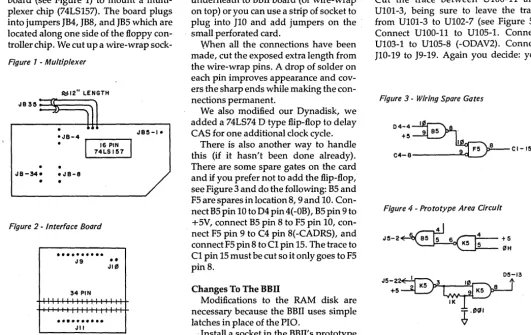
We used a small piece of perforated board (see Figure 1) to mount a multi-plexer chip (74LS1S7). The board plugs into jumpers JB4, JB8, and JBS which are located along one side of the floppy con-troller chip. We cut up a wire-wrap
sock-Figure 1 - Multiplexer
~12" LENGTH
"B 3 ~ :::~==~
[image:10.623.40.572.413.748.2]• "B - 4 r - - - , "B~-I.
Figure 2 -Interface Boord
•...
"9
••
"10
34 PIN
I
..•....•..
""
et and mounted it on the board so that its holes matched the pins on JB4, JB8, and JBS.
Note that the connector groups on the BBIl are not on 0.1 inch centers so some holes must be enlarged or redrilled in the small card before the sockets can be epoxied in place.
The connection to JB3S was made with a short piece of 3-conductor ribbon ca-ble. A socket cut from the wire wrap socket .plugs into JB3S. SV is available at JB34-3 and ground is available at JB4-1. A 0.1 or 0.01 capacitor should be soldered across the power leads.
You'll need another small piece of per-forated board to build a connector to in-terface between the RAM disk and the BBIl (see Figure 2). Cut connectors from an old wire-wrap socket. Again, the spacing l;>etween the connector groups on BBIl are not on 0.1 inch centers so you'll need to re-drill as before.
You can mount a 34-pin right angle header between the area above J10 and J11. As an alternative you can jumper J10 underneath to BBIl board (or wire-wrap on top) or you can use a s trip of socket to plug into J10 and add jumpers on the small perforated card.
When all the connections have been made, cut the exposed extra length from the wire-wrap pins. A drop of solder on each pin improves appearance and cov-ers the sharp ends while making the con-nections permanent.
We also modified our Dynadisk, we added a 74LS74 D type flip-flop to delay CAS for one additional clock cycle.
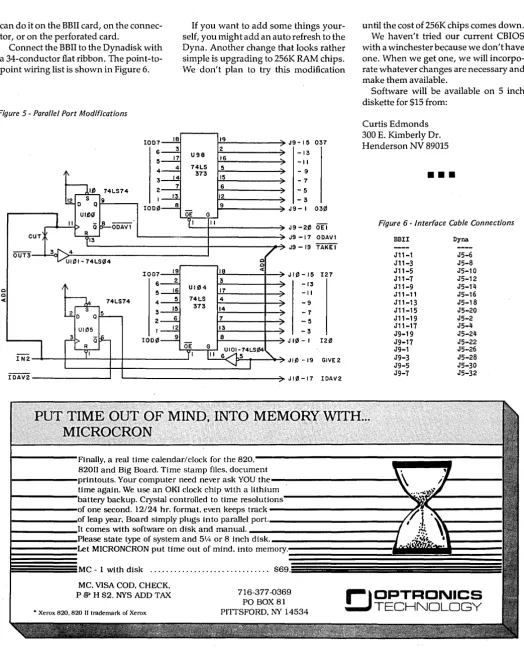
There is also another way to handle this (if it hasn't been done already). There are some spare gates on the card and if you prefer not to add the flip-flop, see Figure 3 and do the following: BS and FS are spares in location 8,9 and 10. Con-nect BS pin 10 to D4 pin 4(-OB), BS pin 9 to +SV, connect BS pin 8 to FS pin 10, con-nect FS pin 9 to C4 pin 8(-CADRS), and connect FS pin 8 to C1 pin lS. The trace to C1 pin lS must be cut so it only goes to FS pin 8.
Changes To The BBII
Modifications to the RAM disk are necessary because the BBIl uses simple latches in place of the PIa .
. Install a socket in the BBll's prototype
1884 Randa Lane Las Vegas NV 89104 702-457-3005
area (we will call this KS), see Figure 4. Cut the trace -RAS from C4 pin 6 near BS
pin S. Connect KS pin 6 to BS pin S.
Con-nect KS pin 4 to + Sv. ConCon-nect KS pin S to
-OH at D4 pin 13. Cut the trace from the
interface connector JS pin 22 (BRDY) to . DS pin 13. Connect KS pin 8 to DS pin 13. Connect KS pin 3 to KS pin 10 and to KS pin 9 with a 1K ohm resistor. Connect a 1000 pF capacitor from KS pin 9 to ground. These two parts create a small delay. Connect +SV to KS pin 2 and con-nect KS pin 1 to interface concon-nector JS pin 22 ..
BBII Parallel Interface
Finally, you must modify the BBIl's parallel interface. The DATA-IN on J10, 1 thru lS (odd only) must be paralleled with DATA-OUT on J11, 1 thru IS (odd only).
As we noted previously on the scription of the connector, you get to de-cide which of the options you prefer to do. Only three jumpers are required. Cut the trace between U100-11 and U101-3, being sure to leave the trace from U101-3 to U102-7 (see Figure S). Connect U100-11 to U10S-1. Connect U103-1 to U10S-8 (-ODAV2). Connect . J10-19 to J9-19. Again you decide: you
Figure 3 -Wiring Spare Gates
D4-4~
9 B5 .+~
I F5 8 CI-15
C4-8
Figure 4 -Prototype Area Circuit
"S-2J
6..~
6 _ 4 +5
~"H
I 05-13
"5-22~1 +5 K5 K5 8
IK
~.0"1
~an do it on the BBII card, on the connec-tor, or on the perforated card.
If you want to add some things
your-self, you might add an auto refresh to the Dyna. Another change that looks rather simple is upgrading to 256K RAM chips. We don't plan to try this modification
until the cost of 256K chips comes down. We haven't tried our current CBIOS with a winchester because we don't have one. When we get one, we will incorpo- . rate whatever changes are necessary and make them available.
Connect the BBII to the Dynadisk with a 34-conductor flat ·ribbon. The point-to-point wiring list is shown in Figure 6.
[image:11.615.38.562.101.755.2]Software will be available on 5 inch diskette for $15 from:
Figure 5 -Parallel Port Modifications
0 0
"'
lO07 18 19 6 3 U98 2 5 17 16 4 4 74LS 373 5 3 15 2 7 6 I 12
lOO~ 8 9 OE G OOAVI II
OUT3
I007 19 I
6 2 3
16 UI04 17 5
4 5 74LS 4 15 373 14 3
2 6 7 I 12 13 1000 9 8
IN2
IOAV2
J9- 15 037 -13 -II - 9 -7 -5 - 3 J9- I 03~
J9 -2~ OE I J9 -17 OOAVI J9 -19 TAKE!
0 0
"'
JI0 -15 I27 -13 -II -9-7 -5 -3
J 10 - I 120
JI~ -19 GIVE2
JI~-17 lOAV2
Curtis Edmonds 300 E. Kimberly Dr. Henderson NV 89015
•••
Figure 6 -Interface Cable Connections
BBII Dyna
J11-1 J5-6
J11-3 J5-8
J11-5 J5-10
J11-7 J5-12
J11-9 J5-14
J11-11 J5-16
J11-13 J5-18
J11-15 J5-20
J11-19 J5-2
J11-17 J5-4
J9-19 J5-24
J9-17 J5-22
J9-1 J5-26
J9-3 J5-28
J9-5 J5-30
J9-7 J5-32
Finally. a real time calendar/clock for the
820.::---jiiiiiiiii'----82011 and Big Board. Time stamp files. document
I---printouts. Your computer need never ask YOU
the---,
time again. We use an OKI clock chip with a lithiu:m::~,---~~~!l~~---
I---,L....:·tery backup. Crystal controlled to time resoluti
1 - - - 1 0 1 one second. 12/24 hr. format. even keeps track ---~ I -_ _ _ _ _ _ I(JI leap year. Board simply plugs into parallel po l. _ _ _ _ _ _ _ _ _ _ _ _ _ - - , '
I - - -_ _ _ _ It comes with software on disk and manual. _ _ _ _ _ _ _ _ _ _ _ _ _ _ --1
t -_ _ _ _ _ _ C-U:;Cl~ state type of system and 51/4 or 8 inch disk. _ _ _ _ _ _ _ _ _ _ _ _ -1
t - - - I p t MICRONCRON put time out of mind. into
memory.1~~~~~~~~~~=Z=Z=~~~~~~1
~~~~~~MC
-1 with disk ... S69.5MC. VISA COD. CHECK.
P {;j> H S2. NYS ADD TAX 716-377-0369
PO BOX 81
PITTSFORD. NY 14534
8" Dual Drive System
2 FOO 200-8 disk drives (NEW) fiberglass case
11 L x 19W x 22H
self contained power supply fan cooled
$650.00 f.o.b.
Siemens Disk Drive
Brand New
10
SS/OO (FOO 100-8) factory warrentee $159.00 f.o.b. OS/OO (FOO 200-8) factory w a rrentee $219.00 f.n.b.
Computer Table
36l x 26W x 25H laminated top steel sides'
steel legs w/levelers $75.00 f.o.b.
Keyboards
used/tested 7 bit ASCII stl & alum case single voltage vari ed mfgrs. $35.00 f.o.b
8" Disk Drive
removed from sys. mfgrd. by MPI 220 volt motor w/schematic
complete w/PC board sold -as is"
$ 50.00 f .0. b.
Diablo P-11 Printer
Brand New
100 CPS 9x7 dot matrix Centronics parallel 96 ASCII chars. adj. tractor feed $300.00 f.o.b.
Monitor Kit
12" CRT P4 phos steel chassis 12 VOC video board horz/vert input $35.00 f.o.b.
Data Royal Printer
used/refurb i shed tested
&
guarenteed u/I case & graphics RS232 - 120 cps9 x 7 dot matrix 15" adj. tractor feed bi-dir - ASCII - self test $300.00 f.o.b.
Hazeltine 1410 Sys
Brand New
Hazeltine 1410 terminal TeleOata 300 baud modem RS-232 cable
$350.00 f.o.b.
Misc. Equip.
0825 cable (m/m,m/f) $15.00 2 for $25.00
4" muffin fans----6/$15.00 3" sprite fans----6/$15.00 16 pi n IC sockets
70/$10.00
edge connectors---$1.00 EPROM (2716)---$1.00 mini toggle switches
5/$1.00 woven ribbon cable
40 pin IOS/40 pin IDS (10') $10.00 ea. 3/$25.00
min. order $10.00
BMC Monitor
12" P-31 green phos hi res 15 Mhz
80 x 24 chars refurbished & tested composite video 8N C vi deo thru port all external controls $65.00 f.o.b.
12" P-4 8 &W same specs $50.00 f.o.b
Computer Table
Brand New
26l x 28W x 27H laminated top steel sides
steel legs wllevelers $59.00 f.o.b.
Keytronic Keyboard
Brand New
8 bit ASCII single voltage w/schematic numeric keypad w/o case $35.00 f.o.b.
SELECTRONICS
Dealers in new-used-rebuilt elec equip & peripheals
1229 S. Napa St.
Phila.,Pa~
19146
215-468-4645 we ship anywhere ·all prices are f.o.b.
our warehouse .
BB I :
ETXI
ACK Serial Print Driver
By Norman B. Doty
3242 Walden Ave.Depew, NY 14043
This routine will allow you to use a diablo hytype or other printer that re-quires the ETX, ACK protocol with your BB I or Xerox 820. I incorporated the fol-lowing changes into the CBIOS on user's disk B2 (the CBIOS and BOOT on that disk work fine on both the BB I' and the Xerox 820).
four of the SIO's input buffers, just in case there is data already pending.
3. Next is the LSTOUT routine which is documented by the remarks in the list-ing.
4. Last is the initialization of serial port B for the required baud rate. This is placed in the INTAB area for use on boot. H you select a lower baud rate compati-ble with the printer (like 300) then you won't need any of the protocol since the printer can keep up with the data. The changes to the BIOS are simple:
1. Four lines are added to the equates
in the start of the cbios.
2. In the warm boot area a small rou-tine called CLRSIO is used to flush all
5. Don't forget to change the jump vector at the start of the cbios.
CBIOS Changes for £TXjACK Protocol
(CHANGE 1)
SIOOUT EQU SIOIN EQU SIOST EQU
ETX EQU
(CHANGE 2)
LD CLRSIO: CALL
INC CALL DJNZ
(CHANGE 3)
LSTOUT: LD CALL LD
CP JR RET j
LST1: LD CALL XOR CALL XOR CALL LD LD j
LST2: CALL INC JR SBC JR RET j
LST3: CALL RET
(CHANGE 4)
OF018H OF015H OF012H 3
B,4 SIOST A Z,SIOIN CLRSIO
A,C SlOOUT A,C
OAH Z,LST1
A,ETX SIOOUT A SlOOUT A SlOOUT HL,O BC,1
SIOST A Z,LST3 HL,BC NZ,LST2
SIOIN
DEFB 01
DEFB OCH
DEFB 07
DEFB OFFH
END
•••
jMONITOR SERIAL OUTPUT ROUTINE jMONITOR SERIAL INPUT ROUTINE jMONITOR SERIAL INPUT STATUS jASCII END OF TEXT CHAR.
iLOAD COUNT TO FLUSH SIO INPUT REG'S. jALL FOUR Of THEM
jMOVE DATA
jWRITE IT TO THE SERIAL DEVICE
jMOVE DATA AGAIN BECAUSE SIOOUT DOES NOT RETURN CONTROL CHARS. THAT WERE SENT TO IT iTEST FOR LF
jJUMP IF SO
jLOAD END OF TEXT jWRITE IT
jTWO NULLS TO FLUSH THESIO OUTPUT BUFFERS
jLOAD MAXIMUM DELAY iLOAD DECREMENT COUNT
jCHECK SIO STATUS jADJUST THE STATUS
jGO TO NEXT STEP IF DATA IS AVAIL. jELSE DECREMENT MAXIMUM DELAY JRE-DO IF THE DELAY NOT TIMED OUT
jRETURN AFTER MAXIMUM DELAY & NO CHAR PENDING
jREAD SIO TO FLUSH THE CHAR PENDING
jLENGTH OF TABLE DATA JSIO PORT B ADDRESS jCODE FOR 1200 BAUD jEND OF TABLE
Micro Cornucopia, Number 20, October 1984
EZPROMMER
EPROM PROGRAMMER
FOR THE BIG BOARD
AND XEROX 820
FEATURES:
• Supports
2716, 2732, 2732A,
2764, 27128, 27256
• Easily installed with only two
connections
• No external supply needed, all
power denved from +5 Volts
• All power controlled by
software
• Extensive MENU driven
soft-ware to Read, Program, Save,
Load, Verify CRC check,
Dump, Erase check complete
with source code
• Over one year of troublefree
use.
EZPROMMER
A&TwlHarness, Disk .... $125
Kit with Disk . . . .. $90
APL
CHARACTER GENERATOR
FOR XEROX 820-U
Upgrade kit allows the 820-II to
display all the standard
charac-ters and attributes while
permit-ting the display of all APL
char-acters. Kit includes ROM and
software.
APL UPGRADE KIT ... $49.95
NY RES. ADD LOCAL TAX. POSTAGE
AND HANDLING $2.00
VISA, MC, CHECK or COD
716-377 -0369
r-
J
OPTRONICS
TECHNOLOGY
P.O. BOX 81
PITTSFORD, NY 14534
,
Integrated BIOS
for BB II
This BIOS adds special features
for floppy
a~dwinchester users.
Floppies
Read and write almost any 5"
and/ or 8" disk format
40 formats included
(Kaypro, Osborne, IBM ... )
Use any type of5"and/or8"drive
(SS, DS, 40- 77- or 80 tracks)
New SYSGEN works directly
between 5" and 8" disks.
May be configured for Jini F.'s
256K RAM disk, ZCPR2,
Centronics, CP/ M in ROM, etc.
Winchester
Winchester formatter and new
Winchester SYSGEN (can make
the Winchester drive
A:)Supports XEBEC and
ADAPTEC controller.
Subdivides into any specified
number of drives.
Also includes code for
the New BB II monitor
(with all know bugs fixed)
Price:
$129.95
SASI Interface for
BB I and Xerox 820 I
Includes pcb with components,
BIOS, Formatter, and Sysgen.
Winchester formatter
automatically assigns alternate·
track(s) for track(s) with bad
sector(s). Using the Xebec
controller version F.
Price:
$99.95
In North America contact:
Bob New
P.O. Box 62-0427
Woodside, CA 94062
(415) 851-7140
Rest of the world:
ANDY BAKKERS
De Gervelink 12
7591 DT Denekamp
The Netherlands
( .. 31-5413-2488)
Please pay with US-$ Money Order.
12
PROGRAMMER/4+
A LOW COST ALTERNATIVE
TO EPROM PROGRAMMING
Reads and programs 2716, 2732, 2764, and 27128 EPROMS. Reads 2-16K ROMS.
Direct connect to any RS232C terminal or computer. Plug selectable as either a data set or data terminal. All voltages made on board, (no power supplies needed).
(User supplies power Xformer, 25.2 to 30 VAC C.T.1 Amp.). Power electronically switched, (can't damage EPROMS). Zero insertion force socket for EPROM.
Programs, verifies, and dumps in both ASCII and hex. Edit buffer (like DDT).
Saves hex and/or image files to and from disk. Saves or loads all or partial buffer.
Completely menu driven for ease of operation.
Commands of Test, Read, Display, Save, Load, Program and more. Check sum calculation.
All software on disk including well commented source code. Detailed owners manual including schematic
All chips socketed.
Not a kit! Completely built and tested.
48 hour dynamic burn-in and test before shipment. 90 day limited warranty on parts and workmanship. 24 hour return policy on repairs.
Delivery from stock.
NOTICE TO PREVIOUS CUSTOMERS: Send us your old disk and a suitable S.AS.E. for your free copy of our new software, ver. 1.6.
PROGRAMMER 4+ WITH OWNERS MANUAL AND DISK. $199.95
Order from
Rperipfico
st
.~~
1659 Scott Blvd., Suite 1~I ~U Santa Clara, CA 95050
U
(408) 244-5214 VISA and MASTERCARD telephone orders welcome. Please specify Disk formatCP/M 8" IBM format, KA YPRO II, XEROX 820, OSBORNE I, others. Please specify method of shipment, UPS or Postal Service. California residents add 6% Sales Tax. Dealer Inquiries invited.
More
1/0
On the BBI
By
Roger
E.
Nasiff
The BBI uses a 74LS138 (U85) to select one of eight 110 components. To add eight more 110 components, a 74LS154 can replace the 74LS138 to select one of
16 components. If more that 16 110
[image:15.615.44.566.254.745.2]com-ponents are needed, different address lines can be used to activate other 74LSl54 decoders. For brevity, this dis-cussion will concentrate only on replac-ing the '138 with a '154 to provide 16 110 selections.
Figure 1 -Current I/O Decoding
74LSI38 SOCKET +5
A2B
A3B 0 BAUD A A4B I SIOCE
2 GPPIO 3 BAUDB 171ICS SCROLL CTCCE
Figure 2 - Modified I/O Decoding
74LSI38 74 LSI54
E2 E3 E0
U85-6,E3 111 (6 I
"
I 0 U85-5,E2111
Expansion Hardware
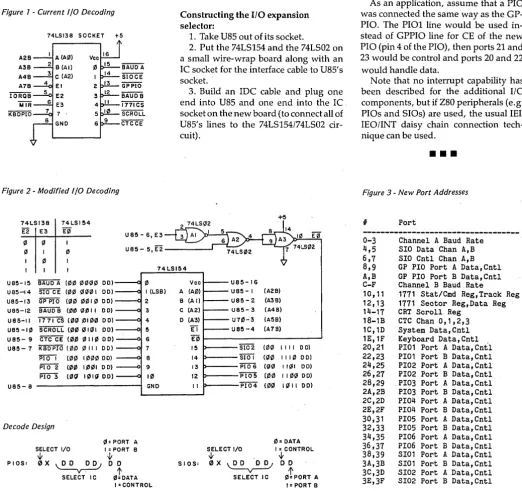
Figure 1 shows the current BBI 110 se-lection hardware. In figure 2, you can see the new 110 selection hardware sup-ports eight more 110 components (la-belled PIOl-4 and 5101-2). To provide the eight additional selections, I tied into pin 3 of U70 (see pin 20 of the 74LS154 in figure 2). To enable the 74LS154, I added a 74LS02 quad NOR.
Constructing the I/O expansion selector:
1. Take U85 out ofits socket.
2. Put the 74LS154 and the 74LS02 on a small wire-wrap board along with an IC socket for the interface cable to U85's socket. .
3. Build an IDC cable and plug one end into U85 and one end into the Ie. socket on the new board (to connect all of U85's lines to the 74LS154/74LS02 cir-cuit).
+5
E0
74 LSI54 U8S-IS BAUD A (00 0000 DO)
U8S-!4 srocE (1110 (6001 00) U85-13 GP PIO (00 0010 DO) U8S-12 B'A'Uo"i3 (1110 0011 DO) U85-11 1771 CS (111(6 DI0111 00) U8S -1111 5C'Ro1I (0111 0101 DO) U8S- 9 C'fC'"""CE (1110 011111 0 D) U85- 7 KB5PTO (1110 0 III DO)
P'iOI (00 1000 DO)
PiO"2 (00
PIO 3 (011
U8S- 8
Decode Design
PIOS:
SELECT I/O
W
0X~ SELECT IC
111: PORT A I: PORT a
{t o 0
I1I!DATA 0 I (LSa) 2
3
4
5 6 7
8
9 10 GNO
I =CONTROL
Vee
A (A0) B (A I) C (A2) o (A3)
TI
E0 15 14 13 12 II
S lOS:
Micro Cornucopia, Number 20, October 1984
U8S-16 U8S- I (A2B) U8S- 2 (A3B) U85- 3 (A4B) u7111-3 (AS B) U85-4 (A7B)
S102 (00 1111 DO) SiOi (0" 1110 DO)
P'i06 (Q(6 11(61 DO)
PlO5 (00 1100 DO) PI04 (00 1011 00)
0= DATA SELECT I/O I : CONTROL
.v
0X~
W
DOI1ItpORT A I = PORT B SELECT I C
103 Highview Dr. Syracuse NY 13209
4. Plug a wire into pin 3 ofU70 (to pick up A5B) and connect the other end of the wire into a socket hole on the little board to go to pin 20 of the 74LS154.
Total construction and testing time should take about an hour. I set up the PI Os and SIOs the same way they were originally connected in the BBI, so all of the regular BBI software assignments are
~b:e same, with the additional software shown in the figure 3. Note that the BBI decoding design was maintained.
As an application, assume that a PIO was connected the same way as the GP-PIO. The PI01 line would be used in-stead of GPPIO line for CE of the new PIO (pin 4 of the PIO), then ports 21 and 23 would be control and ports 20 and 22 would handle data.
Note that no interrupt capability has been described for the additional 110
components, but if Z80 peripherals (e.g.
PIOs and SIOs) are used, the usual IEII
1E0/INT daisy chain connection tech-nique can be used.
•
••
Figure 3 -New Port Addresses
# Port
0-3 Channel A Baud Rate
4,5 SIO Data Chan A,B
6,7 SIO Cntl Chan A,B
8,9 GP PIO Port A Data,Cntl
A,B GP PIO Port B Data,Cntl
C-F Channel B Baud Rate
10,11 1771 Stat/Cmd Reg,Track Reg
12,13 1771 Sector Reg,Data Reg
14-17 CRT Scroll Reg
18-1B CTC Chan 0,1,2,3
1C,1D System Data,Cntl
1E,1F Keyboard Data,Cntl
20,21 PI01 Port A Data, Cnt'l
22,23 PI01 Port B Data,Cntl
24,25 PI02 Port A Data,Cntl
26,27 PI02 Port B Data,Cntl
28,29 PI03 Port A Data,Cntl
2A,2B PI03 Port B Data,Cntl
2C,2D PI04 Port A Data,Cntl
2E,2F PI04 Port B Data,Cntl
30,31 PI05 Port A Data,Cntl
32,33 PI05 Port B Data,Cntl
34,35 PI06 Port A Data,Cntl
36,37 PI06 Port B Data,Cntl
38,39 SI01 Port A Data,Cntl
3A,3B SI01 Port B Data,Cntl
3C,3D SI02 Port A Data,Cntl
3E,3F SI02 Port B Data,Cntl
Serial
Printing On A BBI Sans SIO
By Richard H. Taylor
Many printers require an RS-232 se-rial interface, but many do not need the hand-shaking that RS-232 provides. These printers require only the data line and a signal earth (ground for you Amer-icans).
In cases where full RS-232 is not nec-essary the use of a serial interface chip (such as the Z80 SIO) is not warranted. The printer can be driven by using just one bit off a parallel interface chip (e.g. the Z80 PIO) and some software (of course).
A Bit of Time
The BBI has one bit of the system PIO (bit 4 of port A) available for user defined purposes. I brought out this bit to the terminal strip TB1 pin 8.
The software required to allow data to be output serially on one bit of a PIO is relatively straight forward.
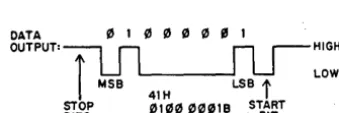
Figure 1 shows the output waveform
for the ASCII character 'A' (41H). In the
quiescent condition the output must be held high. When a character is to be sent to the printer the output must first be held low for one bit-time, this is called a start bit. The bit-time is very crucial to the correct operation of serial transmis-sion. If the bit-time is too long or too short then the printer will get out of step and print garbage. The length of the bit-time is derived from the baud-rate of the printer. In fact bit-time
=
1/(baud-rate) seconds. So, for a 300 baud printer thebit-time
=
1/300=
0.0033 seconds. 300 [image:16.621.44.214.595.651.2]haud is very common for printers.
Figure 1 -ASCII Output For 'A'
DATA " 1 " " " " " 1
OUTPUT,--:;:-,
n
n
r -
HIGHi
u
~
U
LOW MSB LSBi
41H
STOP '"III III """IB START BITS "A" ASCII BIT
After the start bit, the data byte or character itself is sent to the printer, one bit at a time, beginning with the least sig-nificant bit (LSB). After the 8th or most significant bit (MSB) has been output, the printer will store or print the charac-ter.
14
Editor's note: After the 8th bit has been sent, the line must be held high for at least one bit-time (one stop bit). This gives the printer time to start looking for the next low (the start bit). This type of communication is called asynchronous because there is no set time when the next character must start and because there is no clock transmitted with the· data. (The only critical part is that the com-puter must space the bits pretty close to how the printer expects them to be spaced.)
Printer Pickup
There is a small amount of hardware needed to connect up a printer. The RS-232 standard requires voltage levels ( + 12V to -12V) that are different from the TTL levels (+4V to +0.7V) used by the PIO. However, this interfacing prob-lem is easily overcome. The required
cir-cuit is shown in Figure 2. .
Figure 2 -RS-232 Interface
SIGNAL
GROUND 7 - - - t : - - t
2
DATA
3
RS232 CONNECTOR
TBI -12V
RESET DISK RELAY USER DEFINED
The 1488 translates the TTL signals to RS-232 levels. I have shown the data sig-nal connected to both pins 2 and 3. This is because of an idiosyncrasy in the RS232 standard which means that your printer may expect incoming data on ei-ther'pin 2 or 3.
PIOSER.ASM
The following program, called PIO-SERial (PIOSER), re-initializes the PIO to make BIT 4 an output, copies the driv-er routine to high memory and patches the driver routine address into the BIOS jump table. The driver routine controls BIT 4 of the PIO and transmits the char-acter in the C register each time it is called.
570 Glouchester St. Flat #3 Christchurch, New Zealand
You may need to make several chang-es to PIOSERASM to suit your system and printer.
1. PIOSERASM assumes a standard
60K CP/M with the BIOS starting at
EAOOH. For other configurations alter the assembly variable BIOS accordingly.
If you are using Digital Research's Big
board CP/M then BIOS
=
E800H.2. If you are already using some of the
spare memory above PFM you may wish to change the assembly variable DEST so that the driver routine is copied to some other location.
3. PIOSERASM assumes a 300 baud printer and a CPU clock running at 3.5 MHz. For other baud rates or clock fre-quencies alter the assembly variable ONEBIT according to the formula given. 4. Some printers expect only 7 bits of the character. This can be accommodat-ed by changing the assembly variable LNGTH from 8 to 7.
To use a printer connected to 'BIT 4' run PIOSERCOM then type Control-P or use PIP to send a file to the printer.
I have been using PIOSER for more than 6 months now to run an ICL 7077 Termiprinter and have found it perfectly
satisfactory. It allowed me to use the
printer before I had installed the SIO op-tion and now that I have the SIO it allows me to use both SIO channels for periph-erals that require full RS-232.
•••
Listing for BBI PIO Seria/lnterface
PIOSER.ASH CONT2: CALL OUTBYT+OFFSET ;OUTPUT BYTE IN A
LD A,1 ;OUTPUT STOP BITS
i PIOSER.Z80 CALL OUTBIT+OFFSET
iSETUPS BIT 4 OF THE SYSTEM PIO AS AN ASYNCHRONOUS OU~PUT CALL BITDEL+OFFSET
i CALL BITDEL+OFFSET
;RICHARD HUHPHREY-TAYLOR, CHRISTCHURCH, NEW ZEALAND EI iTIHING PART IS OVER
iJUNE 1984· POP BC iRETRIEVE CHARACTER
LD A,C
CP LF ;IS IT LF ?
i CALL Z,LDELAY+OFFSET iTHEN WAIT FOR PRINTER
PIO EQU 1CH ;SYSTEH PIO PORT CP CR iIS IT CR ?
PIOCTL EQU 1DH iPIO CONTROL PORT CALL Z,LDELAY+OFFSET iTHEN WAIT FOR PRINTER
BIT4 EQU 4 POP AF
LF EQU OAH POP DE
CR EQU ODH POP HL
ONEBIT EQU 0300H ;SOFTWARE DELAY VALUE FOR RET
i300 BAUD AT 3.5 MHZ CLOr.~ ;
••••••••••••••••••••••••••••••••••••••••••••••••••••••••••••••••
,
OUTBYT: LD D,LNGTH iBITS TO OUTPUT..
•
RRC A ;HOVE LSB TO B~T 4 POSITION,
..
FOR OTHER BAUD RATES OR CPU CLOCK RATES USE THE FOLLOWING•
RRC A,
..
FORMULA TO CALCULATE THE DELAY VALUE NEEDED:•
RRC A,
..
•
NEXT: RRC A iSELECT NEXT BIT,
..
ONEBIT=
CLOCK/(BAUD·15)•
LD B,A iSAVE CHAR,
..
•
AND 00010000B ;HASK ALL BUT BIT 4,
..
WHERE:- CLOCK IS THE CPU CLOCK RATE IN HERTZ•
LD C,A iSAVE IT,
..
BAUD IS THE REQUIRED BAUD RATE
•
IN A,(PIO) ;GET PIO BYTE,
..
•
AND 11101111B iSET BIT 4 TO ZERO,
;
...
OR C iTHEN SET IT ACCORDIHG'l'O C _; OUT (PIO) ,A ;THEN OUTPUT
DEST EQU OF800H iDESTINATION ADDRESS OF PRINTER CALL BITDEL+OFFSET iWAIT 1 BIT.TIME
.'-;ROUTINE IN HIGH MEHORY DEC D
BIOS EQU OEAOOH iSTART OF BIOS IN 60K SYSTEM JR Z, CONn
LNGTH EQU 8 iNUHBER OF BITS TO BE SENT LD A,B ;GET SHIFTED BYTE
JR NEXT i SEND NEXT BIT
ORG 0100H CONn: RET
i i
COPY: LD HL,PRNTST iSTART OF ROUTINE BIT