No. 41 May/June 1988
THE
MICRO
3-D
Graphics /
AI Theory
Three-Dimensional
Graphics, Part 1
page 8Earl Hinrichs uses high performance graphics IC to create and display depth.
Neur
al
Networks
page 16Modeling human reasoning is the first step in creating a useful robot.
The Logic Of Programming
Languages
page 22Proving that a language is logically valid beats testing it for 10 years.
Applying Information
Theory
page 42Calculating the maximum theoretical data compression and then applying it.
Plus:
Updating The C Reviews
page 48RS-232 Interfacing
page 30Button's Great Share",
page 58Marketi
J
,
H
'
..ofAndM
u
c M
u
II 11 • • 1 .. 1.1 11111.111 III II I "
$3.95
VERY HIGH RESOLUTION
The PC Tech COLOR and MONOCHROME video processor boards employ the TMS 34010
high performance graphics co·processor to insure the best possible video performance
at reasonable prices.
.
Color 34010 Video Processor:
• Featured on the cover of
Micro Cornucopia.
• From 800 x 512 through
1024 x 800 resolution (depending
on monitor and configuration).
• 8 Bits per pixel for 256
simultaneous colors
• Hardware support for CGA/MDA
emulation.
• PC, XT, and AT compatible
The PC Tech Color 34010 video processor is a superior 34010 native code and DGIS development tool.
We support up to 4 megabytes of program (non-display) 34010 RAM as well as up to
76aKbytes of display
RAM. Compare our architecture and prices to any other intelligent graphics board. Then choose the PC
Tech Color 34010 Video Processor for your development engine and your production requirements as well.
Color 34010 Video Processor ... $1, 195.00
Price includes 512K display RAM, 1024K program RAM, and utility software. Monitor not included.Also available: DGIS, 34010 C compiler, assembler, 34010 fractal software, additional display and program memory, and various monitor options.
PC Tech Monochrome 34010 Video Processor and Monitor
• 736 x 1024 resolution (other options available)
• 2 bits per pixel for 4 hardware gray shades
• Hardware support for CGA/M DA/Hercules emulation
• PC, XT, and AT compatible
• Full page 66 line text editing with many popular editors
• Excellent windows 2.0 application development system
The graphics and bit manipulation capabilities of the TMS 34010 make the PC
Tech Monochrome 34010 Video Processor
66line full page text and graphics
display faster than many 25 line systems. The video processor is available
separately or with the high resolution white phosphor monitor shown above.
Monochrome 34010 Video Sub-System ... $1,295.00
Price includes Monochrome Video Processor and monitor pictured above. Also available: DGIS, TI 34010 C compiler, TI assembler.
Monochrome 34010 Video Processor also available separately.
Designed, Sold and Serviced
By:
SOG SPECIAL! PC Tech will offer a 10% SOG DISCOUNT on all , 34010 based video products ordered within 1 week of SOGISpecial pricing effective July 7-21, 1988
904 N. 6th St.
Lake City, M N 55041
(612) 345·4555
(612) 345·5514 (FAX)
~-"
Switch-selectable
L
for swallping Ctrland Caps Lock positions '
/.1
/-Extra-wide , / .. ,Shift keys ,i! . .
/",,; /
Positive-tactile, firm-feel keys
12 function keys with functional
Fll & F12
DataDesk's New Turbo-lOl
Enhanced Keyboard Bundle!
Enlarged L-shaped Enter Key
Dedicated Pause, Scroll Lock, Print Screen keys
~\ ~
?,..OO ""
ftt~~· C\~\,\\~
Dedicated screen
~1.r\\\'\:~'
~'{',~."""~",,--~,,,,----control and cursor keypad with
O:f"''J'J
~.--movement keys enlarged Enter key
S __
~~-"'"You don't have to think twice. Get both - the best-selling Turbo! 01
T"Enhanced I(eyboard and ThinkTank;" the award-winning outline processor.
Now Both You and Your PC can be State-of-the-Art
For an unthinkable
$149.95!
The Turbo-lOl Enhanced Keyboard gives you all of the features of IBM's newest key-board standard (see above photo). It's ideal for word processing with its traditional "Selectric" typewriter layout featuring enlarged Shift, Enter and Control keys. Spreadsheet entry couldn't be easier be-cause we give you both a separate Cursor and Numeric keypad eliminating the need to constantly toggle Nums Lock. And the Turbo-101 's exclusive tactile-feedback keys let you type faster with fewer mistakes than ever before.
ThinkTank is the world's most powerful out-liner and idea processor. It will introduce you step-by-step to a fascinating new way of organizing and managing your ideas, your time, your business, and even your thinking. And to get you up and running quickly and easily we even include 30 predefined Think-Tank Productivity Templates. ThinkThink-Tank is considered by many to be one of the most important productivity enhancers on a micro-computer. It turns thoughts into reality and ideas into results!
Instantly Upgrade Your Productivity
The Turbo-lOl and ThinkTank are both designed to instantly streamline and improve your computing performance regardless of which model PC, XT, AT, Tandy or com-patible you use. With our Turbo-l0l-ThinkTank bundle, you'll feel the difference from the tip of your
fingers to the center of ... .... . .. ·C~\.\.
your brain. dO. ~~a
~'i~PS1lio
~O~)~;~\~
~
~.~"""-"You Don't Have To Be A Brain Surgeon To Understand This Special Offer.
ThinkTank is already a best seller at $i95. So it's easy to figure out that getting both the critically-acclaimed Turbo-lOi keyboard and the ThinkTank software for the price of the keyboard alone-$149.95-is a deal that
turbocharges your PC without flattening your wallet. And that's not all, our USA-made Turbo-Wi keyboard is so well built it carries
a full 2-year warranty-which is probably a !
lot longer than your PC's warranty! But just II
in case you are not completely satisfied,
you can always change your mind, ~-
with our no-questions-asked ~ ...
..----30-day money-bac~/
guarantee. ...-----
H ' Wh
eres a tthe Experts Think ...
" I really prefer the feel of the
Data-Desk Turbo-WI. The keys have tactile feedback. No mush at all.
Jerry Pournelle Byte Magazine, August 1987 "
" Don't plop down your simoleons for
a Keytronic or others ... for ingenuity of design and sheer dollar-value those from DataDesk can't be beat.
Curt Suplee Washington Post, May 1987 "
Models also available lor the Tandy 1000, AT&T, PCjr and all MacIntosh computers. '
"Limited offer with purchase 01 Turbo-101 enhanced keyboard. All DataDesk International products are registered trademarks or trademarks of DataOesk International, Inc. Other brand and product names are trademarks or registered trademarks of their respective holders, Copyright 1987 DataDesk International.
Reader Service Number 8
" Great typing touch ... there's only
one DataDesk Turbo-WI-the first keyboard to challenge IBM products seriously.
Jim Seymour PC Magazine, January 1988 "
" The Turbo-WI can satisfy all ... it's
a rock-solid product that does double-duty and then some.
Robert Luhn PC World, October 1987 "
I N T E R N A T I O N A L
7651 HASKELL AVENUE VAN NUYS, (A 91406
(818) 780·1673 BOTH TURBO·101 ENHANCED KEYBOARD AND THINKTANK SOFTWARE FOR ONLY:
Please add
$1~
ShiP. -(~TI
LB·
'/
.®
....
O. ·
..
·.QP
pIng and handling.CAi;)
'-residents must also include $9,75 sales tax
for each keyboard, LIMITED OFFER
Nome ________ ~ ____________________ ~ ________ _ _
Company _ _ _ ---:.. ____________ _
Phone _______________________ ~
Computer Type
IT'S WHAT'S UNDER
THE HOOD THAT COUNTS!
XT KIT WI 2 Floppy Drives.
Includes: 0K RAM, Serial, parallel and game
ports, clock/calendar, AT-Style keyboard, cabinet, power supply, mono graphics card and amber or green monitor. Keyboard switchable turbo.
8 mhz with lock, LED, Reset
& Turboswitch ... 579.00 10mhz with lock, LED, Reset
& Turboswitch... 599.00
XT KIT W 120MB Hard Drive.
Includes: 0K RAM, Serial, parallel and game
ports, clock/calendar, AT-Style keyboard, cabinet, power supply, mono graphics card and amber or green monitor. Keyboard switchable turbo.
8 mhz with lock, LED, Reset
. & Turboswitch ... 879.00* 10mhz with lock, LED, Reset
& Turboswitch ... 899.00*
*(For 30MB Miniscribe add $50.00)
CASES
&POWER SUPPLY
150 Watt Power Supply (XT) ... 50.00 200 Watt Power Supply (AT) ... 80.00 XT Slide Case ... 34.00 XT Flip Top or XT Slide
with Lock & LED... 38.00
AT with Lock & LED... 65.00
MONITORS
EGA/CGA (Auto Switch) ... 452.00 VGA/EGA/CGA Color ... 600.00
CGA Color ... 295.00 Amber 12" TTL ... 89.00 Green 12" TTL ... , 89.00
VIDEO CARDS
Color IGraphics/Parallel ... 52.00 256K EGA Graphics ... 125.00 Mono/Graphics/Parallel ... ,... 49.00 A T! Graphics
Solution-Mono, Here. Color Emulation on Mono CGA ... (List 299) 125.00 AT! Wonder Auto Switch Mono, Here
Any monitor, Any software, Auto conversion
CGA, EGA, VGA ... (List 499) 299.00 EGA, CGA, PGA (64Ox480) ... 185.00
EXPANSION CARDS
Clock Card ... , 25.00 Dual Floppy Disk Controller ... 25.00 Joystick ... 25.00 Gravis Analog Joystick... 49.95 Game Port. . . .. 19.00 Multi-Function, 1 ser/par/clk/gamel
2 floppy ... 61.00 Parallel (printer) ... 19.00 Serial Port (RS232) 1 port ... 29.00 640K RAM (0K installed) ... 35.00
XT/AT RS232
(4 port/2 installed) ... 59.00
Prices are subject to change without notice. Shipping CHARGES will be added.
2
MICRO CORNUCOPIA, #41, May-June 1988- Pictured keyboard is 5339
-KIT OPTIONS *MS DOS 3.21 or 3.3 w/
GW Basic ... 95.00 *5339 Keyboard Sub ... , 24.00 *Color Options:
(Includes video card & monitor)
CGA Color . . . .. 200.00 CGA/EGA Color. . . .. 410.00 CGA/EGAlVGA Color ... 590.00 ASSEMBLY AND TESTING
XT Systems ... , 60.00 AT /80386 Systems ... 80.00
MOTHERBOARDS
XTITurbo 4.77/10mhz ... 109.00
AT 6/10 mhz (4 layer) Choice of
Phoenix or DTK Bios ... 350.00
XT/Turbo 4.77/8 mhz
(2 layer) ... 99.00
803868/16 mhzl Award Bios &
1MB RAM, made in U.S.A ... 1595.00
For XT I AT memory ... $Call
FLOPPY DISK DRIVES
Fujitsu 360K ... ... ... 89.00 Toshiba 360K... 99.00 Teac 1.2 MB ... 125.00
Toshiba 3Y1" Drive Kit 720K ... 125.00
Toshiba 3Y1" Drive 1.44mb ... 145.00
KEYBOARDS
5339 Professional XT-AT
w/12 function key ... 69.00 5060 Keyboard AT Style ... 55.00 KB 101 Keytronic ... '" 6 7 .00
Free Instructions with Each System
80386
KIT-Includes: 0K RAM, 1.2 MB FD, 1 360K floppy drive and 40 MB Seagate St 251 hard drive, 6/1Omhz, serial, parallel and game ports, clock/ calendar, AT-style keyboard, cabinet, power supply, monographics card, amber or green monitor, keyboard switchable turbo.
1595.00
HARD DRIVES
&
CONTROLLERS
AT 40 MB Seagate #251-1 ... .495.00
AT Hard Drive &
floppy controUer (WD) ... 140.00 20 MB Miniscribe HD
with controller ... 349.00 30 MB Miniscribe HD
with controller ... 399.00
SOFTWARE
The Twin Spreadsheet... 49.00 Leading Edge Word
Processor ... 49.00 Ventura Desktop
Publisher by Xerox ... 525.00 Turbo C by Borland... 89.00 Turbo Pascal V4 ... 89.00
ACCESSORIES
1200 Baud Modem - Internal
(Leading Edge Model L)
Hayes compatible.. .. .. .. .. .. .. .. .... 99.00
2400 Baud Modem - Internal
(Leading Edge Model L)
Hayes compatible ... 219.00
1200 Baud Modem - External
Hayes compatible ... 119.00 V20-8mhz ... 14.00 Memory Chips ... (call for prices)
BUILDING YOUR OWN CLONE
****FREE BOOKLET****
*90-day warranty/30-day money back (subject to restrictions)
MicroSphere, Inc.
P.O. Box 1221 Bend, Oregon 97709 (503) 388 .. 1194 ' . ,
THE
MICRO
TECHNICAL
J
OUR N A L
MICRO CORNUCOPIA
Earl Hinrichs
8
Graphics In 3-D (Part 1)
16
22
30
36
42
There's a lot more to three dimensions than gluing a balsa-wood model to the face of your CRT. Earl tackles the nits and grits (mathematics and chip manipulation) required to give depth to your flat screen.
Diane Ingraham, Gurmail Kandola, Mark Pillon
Neural Networks
Making computers think the -way you think isn't as easy as you might think.
Paul Voda
The Logic Of
Programming
Languages
If you can prove mathematically that a language works and prove that the program is valid, then you've proven the results. Unfortunately many languages are unprovable.
Bruce Eckel
The Mysteries Of RS-232
If you need connections in the computer world, let Bruce put in a plug for you (so all your handshakes will be successful).
Larry Fogg
Intel's 8088
Larry exposes PC brains in this, his last look at the monster chips in the MS-DOS machines.
Ramachandran Bharath
How Much
Information Does A
Message Contain?
Know anything about information theory? It's that. ...
• n
-:: :r
--".r
...
-...
;:.
....
stuffy theoretical stuff they teach in graduate school. Right? Well, it's not so stuffy and it's not just for students anymore.
MAY/JUNE 1988 - ISSUE NO. 41
48
C'ing ClearlyScott Ladd updates his review of C packages and then updates us on memory model sizes.
54
86 WorldLaine returns to the U.S. and celebrates by building a keyboard translator.
58
ShareWare62
On Your Own66
Pascal Column71
Culture Comer85
Technical Tips72
CP/M Notes73
Kaypro Column~~
...
~-:
...
82
..
" Tidbits96
LastPageCover illustration by Paul Leatherwood
TH£ MICRO TECHNICAL JOURNAL
MICRO CORNUCOPIA
Editor & Publisher David
J.
ThompsonAssociate Editors Gary Entsminger
Cary Gatton
Technical Department Larry Fogg
Director of Advertising Laura Logan
Accounting Sandra Thompson
Order Department Tammy Westfall
Graphic Design Carol Steffy
MICRO CORNUCOPIA (ISSN 0747-587X) is published bi-monthly for $18 per year by Micro Cornucopia Inc. 155 NW Hawthorne, Bend, OR 97701. Second-class postage paid at Bend, OR and additional mailing offices. POSTMASTER: Send address changes to MICRO CORNUCOPIA, PO Box 223, Bend, OR 97709.
SUBSCRIPTION RATES:
1 yr. (6 issues) ... $18.00 2 yr. (12 issues) ... $34.00 3 yr. (18 issues) ... $48.00 1 yr. (Canada & Mexico) ... $26.00 1 yr. (Other foreign) ... $36.00 Make all orders payable in U.S. funds on a U.S. bank, please.
CHANGE OF ADDRESS: Please send your old label and new address. .
MICRO CORNUCOPIA P.O. Box 223 Bend, Oregon 97709
CUSTOMER SERVICE: for orders & sub-scription problems call 503-382-5060, 9 am to 5 pm, Pacific time, M - F.
For technical help call 503-382-8048, 9 am to noon, Pacific time, M - F.
RBBS - 24 hrs. 300-1200-2400 baud
8 Bits, No Parity, 1 Stop Bit 503-382-7643
Copyright 1988 by Micro Cornucopia Inc. All rights reserved
ISSN 0747-587X
By
David Thompson
Museum Pieces
There's something magic about climbing into a Stin-son, a fabric and frame tail-dragger that's pushing the ragged side of 40. And there's even more magic when I
bring to life its cranky old Franklin engine, six giant cylinders, 165 horses, sounding every bit like 600.
Forty years ago Stinsons were fast, but since then the rest of the world has more than caught up. They were once the most popular plane in the air. Now they're rare enough to be a curiosity and wherever one goes, a group gathers.
"A friend had one of these. Once."._
"1 built a model Stinson when I was in the fifth grade. Or was it the sixth grade? I've always dreamed of flying in one."
"Do you still fly it?"
Occasionally a burled hand gently presses the var-nished fabric. The hand remembers another Stinson, perhaps.
The plane is quiet too.
"It used to have a wooden prop," I tell them: "But a rough landing shortened it a bit."
That happened before the Stinson and I met, and I've often wondered how it flew with that hand-rubbed, wood-grained prop. Better, I think.
You can tell the pilots from the non-pilots. Pilots know that props suffer occasionally and let it pass. Non-pilots glance at the gray-metal replacement and then, casually, move away.
They needn't worry, I'm not offering rides.
I remember one afternoon. I was preparing to depart from a wind-torn coastal airstrip and was trying to wrestle the Stinson away from a fence when a gnarled wisp of a man approached.
"Could you use a hand?"
"Great," I shouted against the gale, wondering if he could really help. But together we moved it. Then, as he held the quivering frame I jumped in and cranked up the Franklin.
As the ancient bird and I rose from the runway I spotted the old man, standing alone by the fence, the damp coastal wind whipping at his thin clothes. I waved, the Stinson dipped a wing, and we were gone.
I think he would have liked a ride. Metal prop or not.
Interlocking Pieces:
]ffin~n§e~Iffi@
1funrrlb)(Q)
JP~§(C~no
Whether you're a Turbo Pascal expert or a novice, you can benefit from using professional tools to enhance your programs. With Turbo POWER TOOLS PLUS™ and Turbo ASYNCH PLUS~
Blaise Computing offers you all the right pieces to solve your 4.0 development puzzle.
:, Turho P'CHVER
SCREEN " $129.00, NEW! General screen managemerit; paint:,' :screens; blocknlodedata entrY or'fieJd·by~·: . . fieIdcontrol with instant screen access; Now, '. for Turbo Pascal 4.0, soon forC and llASIC.' .
Compiled units (TPU files) are provided so each package is ready to use
c, with Turbo Pascal 4.0. Both POWER TOOLS PLUS and ASYNCH PLUS
~~~ .... use units in a clear, consistent and effective way. If you are familiar
(J:!.~~,.~~;;J with units, you will appreciate the organization. If you are just getting ,'T~rboC'TO()LSC,'-':
, ' .. ,<
$129.()(r ""
, Full spectrum of gerierarservice utility func-<,~; " ,tions including:windows;'rilenus; memorY ,:~.;
resident applications; i'nterrupt service ~roll-::;" ':
lines; intervention code; and 'direct video,:', ':<'~~;
"
~
.... started, you will find the approach an illustration of how to construct~
\...-~... ","'" ~ POWER TOOLS PLUS is a library of over 180 powerful functions ,~. and use units.
(,:
~ .,":;'~
and 43-line text mode, and full keyboard support, includingCJJ""'" . ' and procedures like fast direct video access, general screen
. ~ ' . handling including multiple monitors, VGA and EGA 50-line
'. , .. "
~"""'"~
the 101II02-key keyboard. Stackable and removable win-dows with optional borders, titles and cursor memory. complete windowing capabilities. Horizontal, ver-, grid and Lotus-style menus can be easily incorporated into your programs using the menu management routines. You can create the same kind of moving pull down menus that Turbo Pascal 4.0 uses.
Control DOS memory allocation. Alter the Turbo Pascal heap size when your program executes. Execute any program from within your program and POWER TOOLS PLUS automatically compresses your heap memory if necessary. You can even force
the output of the program into a windowf
Write general interrupt service routines for either hardware or software interrupts. Blaise Computing's unique intervention code lets you develop memory resident (TSRs) applications that take full advantage of DOS capabilities. With simple pro-cedure calls, "schedule" a Turbo Pascal propro-cedure to execute either when pressing a "hot key" or at a specified time.
¢ASYNCH PLUS provides the crucial core of hardware interrupts needed to support asynchronous data communications. This package offers simultaneous buffered input and output to both COM ports, and up to four ports on PS/2 systems. Speeds to 19.2K baud, XON/XOFF protocol, hard-ware handshaking, XMODEM (with CRC) file transfer and modem control are all supported. ASYNCH PLUS provides text file device drivers so you can use standard "Readln" and "Writeln" calls and still exploit interrupt-driven communication.
, access for fast screen handling. I:orTurbo c,':;'; ;::"" :::
':":CTOOLSi~LU~r
, ,",<-',$1~9.VO:\:::~~i<>:
, :Windo.,ys;menusiJSRs; inierV~ntionc~de:', ::;"';::~~,~; , ,screen handling and EGA 43-line tex{mode ": ~;'::' ':,: , support; dire<;t screen access: DOSfile'hari~:.::: ~' :".'~; ,:' ,dling:and more. Specifically designedJor~;., 7 , ,::,
,:·Microsoft C 5.0, andQ~ickC;:;;:. ',', :,.':
,',r'
~;",'.; ;,',
;:"~»:"':,':
~', ',;,ASYNCH MANAGER: ':<·"'~${/5.00~,·(f;::~'~'
,?:.
,F,ull featured interrupt driVen $ttpport forthe:",.;,,:,:];,:,,: ::~
<COM ports. I/O: buffers up to64K~:XO~f.··\::'/;:,,':'':
, ',','XOFF; up to 9600 baud~ modem controlaud:::;'::'<,';">'
r:':;'XMODE~file'transfe'r~for¥icro~6{iqand::'';;~,;::';,;;::';"
;';:TurboCorMSPascat ':,,', : : " : ' : . . " " t / , " "
l .. ' ..
·,:,'PASC~'TOOL~iTOOLS;2:':$i7{:drit~t;~;~;~;h·
~. ,:'; Expaf!dedstringand screen hiu;'<Jling: grapb~ >::; '::.; -,", 1;',,: "" ks rOiltinys; memorY mimageioent; generat:'",~';~;:',( : ; .' . ,'programconirol; DOSfilesupportandmore::,~;,'.';,:,~ ;" ,::-".I;;':
;;:y~li:::~Cat\"~" '-.;:::~;:~t.~i~:;,;)~~;;)"
;',;.;,~"Super.::batch': program; Creat~:RatP)i ~Ilesi::.;;.:;\;i)'.<,
i-;."" ,.which,can invokeprograrnsandprQvldeiJlP4t',;~,ir: ;;( ',>
I" ',to tllem; ni~~l1Y program:~na~ieftded.;"c,r~a~e:1:>; ;;:;',;;~'l
;';:,
f '. " . ,demo,nstratlon programs; analyt!!Keyboaru';:; .',;" ";,;,::+'
l:$~:1~d.':)·
.••
)2)?~t;:%~:;~'1t¥W~Si~~~f~
t :::.': : 'NEW VERSION! Program~hainU)gexecu;:::';<;";~n:;::':' ( n:::':"tive. ,Ch~jn' ~)fle p'rogram' fr~m;anqther:)ti: ~,'.\:';;::;:;~"j)~; :) '-;':,differentlanguages; 'specify:,c()mmimi data.':-:;·;~';:", ;':;./
t:;'~f.~~~i;~fl~JI]!~~~9i~~%~~~~~1
f>: ;~:inTurbO pascal: flexibl6prirlter cohh'Qt;:us~
The underlying functions of ASYNCH PLUS are carefully crafted in assembler ['::' :"d~fin~d \tiu~hiblesi!itldex'gerieraJiorii::~iia
:f;t.ne:.~ ~:=o~~[d;':~
these functions directly to your applicationi::(i;e;~~;!~;IT' ~~:~ty,
\,
:,i}:Dl~IJ~1;~~~
Blaise Computing products include all source code that is efficiently crafted, : .,:' TO ORDER C.Att rrOI,;:ttF~t,E:'
re~:~J~~~6~~ ~::~~~~~l:J~~~~~~ r:~~~ ~i~ ~~=~~ E,c'~c::·,j:/,Z;~:'·,;.':~~.9'·~~~;~.~~~i:~f:a;;' '~r
c
code fragments. Many complete examples and useful utilities are !;.:·:-'i;::'·:P".:;~TELEX~MJMBEii~~3r
'Jt
. '
included on the diskettes The documentation examples and I:'<~"':':;'<:':""":-:<;'"'J .•... .... v;~.·~'" source code reflect the attention to detail and ~ommitment to ;,}: ;;";/;'~.;:<;/;'~'~'}~::::}:' ':'~;,:;;·,\':0::·:;:~~':";~'~~£';';-;;';:·"""'· technical support that have distinguished Blaise Computing over ~.::,:,;-':::}:::",~2.:,: 0;;~ ~:,;,;;,~ ~~';,;;'''' - ...the years. 1,,':":" .><", '_-- .
Designed explicitly for Turbo Pascal 4.0, Turbo _ - - - ....
--~~;~:c;s\
COlliesd~~
POWER TOOLS PLUS and Turbo ASYNCH _ - - - ndtUetheng ior~ourllro 1\ 00 ior
~.' PLUS provide reliable, fast, professional routines- , ~£S\ S~ is $~niorrnat\on. orders add $ ~ir. _ _ _ _
the right combination of pieces to put your Turbo Pascal\
Bnc\O~e
send tnetn~ 'I~. Dotnlt~ress
standard ) _ _ _-puzzle together. Complete price is 8129.00 each. , 0 \' e . dents add S~ior federal l' Phone: ~__ _____ _____
\ c~reS\'~lng,$10, . . _____ ____
.... l1li,. \ U\'Sshlllll . _ _ _ 'LW· Date:~
... \ Natne: State. £~ll' :.
~JI!:
\
~ddr
'BLAISE COMPUTING INC. \
~~~~or~S~~~~~l~%f'
:
2560 Ninth Street, Suite 316 Berkeley, CA 94710 (415) 540-5441 \ . _ .... ~~,~: ' .. /. l,{,(~r;fli:l,~~ad~I1JCI~~;(JI;B9r~aJ1.d.I!J'tf!r[l,f;I
Letters
C Vs. Assembly Language - One This letter is in response to the article C vs. Assembly Language in Micro C issue #40.
On the whole, I agree with Mr. Isaacson's assertion that a program is more efficient when written in assembly language than in any other language. Additionally, I agree it can take less time to develop the assembly language program than the C version of the same program-given that well-qualified programmers are working on each team.
I take issue, however, with his ab-surd example. He makes several state-ments about the C language that show he knows as much about C as those who write unmaintainable assembly code do about 8086 assembly language.
Most glaring is his statement justify-ing the construct:
iopmem [strlen (iopmem) - 1]
=
c;He says: "Because of the limitations of the C language, it's impossible at compile time to determine the location of the last element of the fixed-length array ... "
In fact, the sizeof operator is a unary operator that, according to ANSI section 3.3.3.4, "yields the size (in bytes) of its operand ... When applied to an operand that has array type, the result is the total number of bytes in the array."
Hence the following code:
'define iop_user (sizeof (iop_name) - 1)
volatile char iOp _ name [ ] "/dev/iopmem/8alXO*";
main()
{
yields the following assembly code when compiled with Microsoft C Verso 5.0 using "cl-Fa -Gs test.c":
;misc constant declarations
_DATA SEGMENT
_iop_name DB '/dev/iopmem/8alXO*',OOH
_DATA ENDS _TEST SEGMENT
;pre 5.0 MASM setup stuff
PUBLIC _main _main PROC NEAR
mov BYTE PTR _iop_name+19,99
ret _main ENDP
_TEST ENDS
This is equivalent to Mr. Isaacson's one line of assembly language. To write code like this requires a good un-derstanding of the language.
He points at the common I/O func-tions defined as part of many lan-guages but implemented as functions in C. He says this is a defect of C; I see it as an advantage. The code isn't linked in unless necessary, and I don't use it very much in a large system where I'm likely to use my own I/O library.
Mr. Isaacson points to the terse na-ture of this small, elegant language as a fault saying, "that cryptic, incom-prehensible code becomes easy to write," and that K&R "give some ex-amples (with a tone of approval!) of atrocious C programming technique."
Is C more cryptic than assembly? Is it difficult to write "atrocious" assemb-ly code? Is K&R the Devil's program-ming guide? Well, isn't that special. I think Mr. Isaacson is not a C-literate programmer.
In his summary, he states that lack of a debugger, short symbol names, and inefficient code make C a poor choice for large efforts. I· use Microsoft
C with CodeView, a fine debugger. MSC sports 31-character symbol names, and an excellent optimizer with automatic register allocation, loop optimization, intrinsic code for more common functions (such as strlen) as well as the more common optimizations that Mr. Isaacson finds so trivial.
Well-written assembly code can be more efficient, and certainly more fun to write. But portability, availability of maintenance talent, and client paranoia often preclude its use-not without good reason.
William E. Weinman
1800 S. Robertson Blvd., Ste. 206 Los Angeles, CA 90035
Editor's note: Thanks Bill. And, thanks for agreeing to speak at SaG (a talk en-titled "C Isn't The Devil's Own Language").
C V s. Assembly Language - Two Mr. Isaacson raises a few good points in his article, but I must point out a few incorrect and unduly harsh items.
First let me say that C compilers, especially for PCs, have been greatly improved in the last couple of years. The code generated by Mr. Isaacson's compiler doesn't look like the code that comes out of Microsoft C vS. 5.0. MSC doesn't save SI or DI unless they're used in the function. It also leaves values in registers if con-venient, which happens often with pointers that are used more than once.
It may be true that Mr. Isaacson's compiler limited him to seven-charac-ter names. But a Unix port I've used allowed 32 characters while the as-sembler had an eight character limit.
(Continued on page 70)
\
I
Programmer's Paradise Gives You Superb Selection,
Personal Service and Unbeatable Prices!
Welcome to Paradise. The microcomputer software source that caters to your programming needs. Discover the Many Advantages of Paradise ...
o Lowest price guaranteed o Huge inventory, immediate shipment 0 Special orders
o Latest versions o Knowledgeable sales staff 0 30-day money-back guarantee
Over 500 brand-name products in stock - if you don't see it, call!
LIST OURS 386 SOFTWARE
386·TO·THE·MAX NEW 75 65 ADVANTAGE 386 C OR PASCAL 895 829 DESQVIEW 130 109 FOXBASE+ 386 595 CALL HIGH C·386 NEW 895 835 MICRO PORT SYSTEM
V/386 (COMPLETE) 799 679 MSWINDOWS/386 SPECIAL 195 125 NDP C OR FORTRAN·386 NEW 595 545 PHARLAP 386IASM/LINK 495 419 SCO XENIX SYS V 386 (COMPLETE) 1495 1195 VM/386 SPECIAL 245 179 X·AM 595 535 ARTIFICIAL INTELLIGENCE
ARITY STANDARD PROLOG
MULISP·87 INTERPRETER 300 95 199 79 PC SCHEME
TURBO PROLOG TURBO PROLOG TOOLBOX ASSEMBLERS/LINKERS ADVANTAG E DISASSEMBLER MS MACRO ASSEMBLER OPTASM
PASM86 PJ..[NK86PLUS BASIC
95 85 100 69 100 69 295 150
NEW 195
195 495 279 99 169 115 279 DB/LIB 139 119 FINALLY! 99 89 FLASH·UP SPECIAL 89 75 MACH 2 75 59 MS QUICKBASIC 99 65 QUICKPAK 69 59 QUICKWINDOWS W/SOURCE 99 89 TRUE BASIC 100 79 TURBO BASIC 100 69 TURBO BASIC TOOLBOXES 100 69
MOUSE PRODUCTS
LOGITECH SERIAL OR BUS MOUSE W/PLUS, SOFTWARE 119 99 W/PLUS, LOGICPAINT 149 119
LIST OURS CLIBRARIES
C ASYNCH MANAGER 175 135 C·FOODSMORGASBORD 150 95 C TOOLS PLUS/5. 0 129 99 C UTILITY LIBRARY 185 125 ESSENTIAL COMMUNICATIONS 185 125 COMMUNICATIONS PLUS 250 189 GREENLEAF C SAMPLER 95 69 GREENLEAF COMM LIBRARY 185 125 GREENLEAF FUNCTIONS 185 125 MULTI·C 149 135 PFORCE 295 215 RESIDENT C W/SOURCE 198 169 TIMESLICER SPECIAL 295 269 TURBO C TOOLS 129 99 COBOL
E·ZPAGE MICRO FOCUS
COBOLl2 COBOL/2 TLSET PC·CICS LEVEL II COBOL PERSONAL COBOL OTHERS MICROSOFT COBOL MICROSOFT SORT OPT·TECH SORT REALCICS REALIA COBOL W/REALMENU RM/COBOL RM/COBOL·85 RM/SCREENS SCREENIO COMMUNICATIONS ASCOMIV CARBON COpy PLUS CO·SESSION (2 USER)
SUPPORT APPLICATION PTEL SIDETALK
295 259 900 729 900 729 1500 1189 349 279 149 119 CALL CALL 700 449 195 129 149 105 995 785 995 785 1145 899 950 759 1250 999 395 315 400 379 195 195
NEW 249 NEW 175 NEW 125
50 120 175 159 225 155 115 45 89 FILE MANAGEMENT BTRIEVE XTRIEVE REPORT OPTION BTRIEVE/N XTRIEVE/N REPORT OPTION/N CBTREE C·TREE R·TREE LIST OURS 245 185 245 189 145 109 595 455 595 459 345 269 159 139 395 315 295 239 650 519 C·TREE/R·TREE BUNDLE
D·TREE NEW 395 CALL
DBClIl DBC III PLUS DIL VISTA OR DB_QUERY
SINGLE USER W/SOURCE MULTIUSER MULTIUSER W /SOURCE INFORMIX PRODUCTS PHACT MANAGER XQL
FORTRAN COMPILERS LAHEY FORTRAN F77L EM/16 LAHEY PERSONAL FORTRAN 77 MICROSOFT FORTRAN RM/FORTRAN
250 169 750 595 195 CALL 495 CALL 495 CALL 990 CALL CALL CALL 249 229 795 599 695 625 95 89 450 285 595 479 FORTRANLIBRARIESIUTILITIES DIAGRAM'ER OR DOCUMENT'ER 129 115 GRAFMATIC OR PLOTMATIC 135 119 MAGUS NUMERICAL ANALYST 295 249 MATHPAC 495 445 SPINDRIFT LIBRARY SPECIAL 149 129 SSP/PC 350 269 GRAPHICS
ADVANTAGE GRAPHICS (C) ESSENTIAL GRAPHICS GSS GRAPHIC DEV. TOOLKIT HALO
HALO (5 MICROSOFT LANG.) METAWINDOW PLUS TURBOWINDOW/C TURBO HALO (FOR TURBO C) MODULA·2
LOGITECH MODULA·2
250 229 250 189 495 375 300 209 595 399 275 229 95 79 99 79
TURBO PASCAL ADD·ONS ASCII TURBO GHOST WRITER
LIST OURS STARTER NEW 99 89 COMPLETE NEW 289 259
FEATURED PRODUCTS ~o~~ire?~~~!~ci~~~.u;~s~:l~bt'!rg~~~~i:~:r f~\\:::pf:~~~~~i~~0~[FOii!RA~~77~i~h~:~rlrs. A
Ph~~~~AS~r{fN~) assembly language. (Requires List: $595 Special Price: $545 SPINDRIFT LIBRARY - Collection of 150
~~~!~~et~u~tNgo~J~b~stf{Ey~OlKlr~;J
SCREEN. The windowing system allows an unlimited number of windows to be defined on the screen. each having its own color, cursor position and border type. Supports automatic wrap and/or scrolling.
List: $149 Special Price: $129
~!~t~I~;~~;;. ~C;d:~m~~~~~~~:tl!b;;~~u~r
fields and windows. multi· line fields. horizontal and vertical field scrolling. menus. help boxes. and custom field validation.
List: $495 Special Price: $389
~~t~pre~~vJ;i~~~i~i~~x~fi'i~~o!;J~~~~r~~nsa~;r~es
code on DOS systems. Storage. retrieval. tracking and branching text files are effectively managed. List: $189 Intro PrIce: $169 AZATAR DOS TOOLKIT
DOS/BIOS & MOUSE TOOLS FLASH·UP
NEW 99
75 89 100 125 150 100 130 METRABYTE DATA ACQ. TOOLS SCREEN SCULPTOR SYSTEM BUILDER IMPEX 85 69 79 89 95 129 89 REPORT BUILDER
T·DEBUG PLUS V. 4.0 W/SOURCE TURBO.ASM TURBO ASYNCH PLUS TURBO GEOMETRY LIBRARY TURBO HALO
SPECIAL 45 NEW 90
99 129
NEW 100
99 99 129 95 99 95 TURBO MAGIC
TURBO POWER TOOLS PLUS TURBO POWER UTILITIES TURBO PROFESSIONAL 4.0 TURBO WINDOW/PASCAL 115 39 79 69 99 89 85 89 99 79 79 79 SCREENS/WINDOWS
C·SCAPE 279 265 CURSES W/SOURCE CODE 250 169 GREENLEAF DATA WINDOWS 225 155 W/SOURCE CODE 395 259 HI·SCREEN XL 149 119 jYACC FORMAKER 495 449 jYACC JAM 750 679 MICROSOFT WINDOWS 99 65 MS WINDOWS DEVELOPMENT KIT 500 319 PANEL PLUS SPECIAL 495 389 PANEL/QC OR /TC 129 99 SCREENSTAR W/SOURCE 198 169 VITAMIN C SPECIAL 225 149 VC SCREEN 99 79 VIEW MANAGER 275 199 WINDOWS FOR DATA 295 CALL W/SOURCE 590 CALL ADDITIONAL PRODUCTS
ADVANTAGE VCMS BASTOC
379 329 495 399
XENIXIUNIX SOFTWARE
MICROPORT & SCQ PRODUCTS ADVANTAGEC++ BTRIEVE/N DIRECTORY SHELL (286) DIRECTORY SHELL (386) EPSILON FOXBASE+ INFORMIX PRODUCTS jYACC FORMAKER JYACCJAM KORNSHELL MICROSOFT LANGUAGES PANEL PLUS RM/COBOL RMiFORTRAN WINDOWS FOR DATA
CALL CALL 695 625 595 455 349 315 495 445 195 149 795 729 CALL CALL 895 809 1350 1219 145 115 CALL CALL 795 675 1250 949 750 549 795 CALL W/PLUS, LOGICADDMOUSE 189 149
W/PLUS, PUBLISHER MOUSE 179 145
DEBUGGERS ADVANCED TRACE·86 PERISCOPE I PERISCOPE II
PERISCOPE 1Il8 MHZ PERISCOPE 1Il10 MHZ PFIX86 PLUS
175
SPECIAL 345 SPECIAL 175 SPECIAL 995 SPECIAL 1095 SPECIAL 395
119 269 135 789 869 199
COMPILER KIT 99 79
DEVELOPMENT SYSTEM 249 199 ... _ _ _ _ _ _ _ _ _ _ _ _ _ _ - . 1
W/PLUS, PAINT, CADD 199 W/PLUS, CADD PUBL.MOUSE 239 W/PLUS, PAINT, PUBL.MOUSE 199 W/PLUS, PAINT, CADD. PUBL. 253 LOGITECH SERIES 2 W/PLUS 99 MICROSOFT SER OR BUS MOUSE 150 W/EASYCAD 175 WIMS WINDOWS 200 PC MOUSE BUS W/PNT & POPUPS 179 PC MOUSE SER. W/PNT & POPUPS 159 SUMMAMOUSE 119 CCOMPILERS
LATTICEC SOO
MICROSOFTC 450 QUICKC SPECIAL 99
TURBOC 100 CINTERPRETERS
C·TERP 298 INSTANTC 495 RUN/C 120 RUN/C PROFESSIONAL 250
Terms and Policies
• We honor MC, VISA. AMERICAN EXPRESS No surcharge on credit card or C.O.D. Prepayment by check. New York State residents add applicable sale.
:~~T.J. ::~~~:~Fe..il~~·r~:. UPS • Programmer's Paradise wiD match any current nation ..
:~~~e~10fl~~ ~:bj~t~~!~:::n ~:.
• Hours 9AM EST -7PM EST
• We'U Match any NationaUy Advertised Price • Mall Orde" ,,,dude '0'" pIlo", , .... "ber ·Ask for details. Some manufacturers will not allow
return$ once dis.k seals are broken.
Dealers and Corporate Buyers-'Call for special discounts and benefits!
159 189 159 205 79 99 119 139 129 115 99 269 285 65 65 229 379 79 155 DISKIDOS/KEYBOARD UTILITIES ADVANCED NORTON UTILITIES 150 99 COMMAND PLUS NEWV.2.0 80 69 DISK OPTIMIZER 70 65 FETCH 55 45 NORTON COMMANDER 75 55 PC TOOLS DELUXE NEW 80 69 PDISK 145 105 VFEATURE 80 75 EDITORS
BRIEF 195 CALL 275 CALL 295 265 195 149 12.5 99 75 69 W/DBRIEF EMACS EPSILON KEDIT MKSVi MULTI·EDIT PC/EDT
NEW 99 89 PM ATE
SPF/PC VEDITPLUS
250 229 195 115 245 185 185 129
1-800-445-7899
In
NY: 914-332-4548
Customer Service: 914332-0869 International Orders:
914332-4548 Telex: 510-601-7602
Reader Service Number ~8
rom~T m m
SOLlDB+ TOOLBOX NEW 99 89 DAN BRICKLIN'S DEMO PROGRAM 75 59 STONYBROOKMODULA·2 195 169
W/UTILITIES 345 299 OBJECT·ORIENTEDPROGRAMMING ACTOR 495 419
DEMO PROGRAM II DB2C
FLOW CHARTING II MAGIC PC
195 155 299 CALL 229 205 195 179 139 115 ADVANTAGE C+ + 495 479
PFORCE + + 395 215
MKSTOOLKIT MKSRCS MKS·SQPS NORTON GUIDES PC·LINT POLYMAKE POLYTRON PVCS
NEW. SPECIAL 189 169 SMALLTALKIV 100 85
SMALLTALKIV286 NEW 200 169 APPLICATION PACKS 50 45 OPERATING SYSTEMS
MICROPORT SYS V/AT SCO XENIX SYSTEM V WENDlN·DOS OTHER MICRO PORT. SCO,
WEND IN PRODUCTS PASCAL COMPILERS MICROSOFT PASCAL PASCAL·2 TURBO PASCAL TURBO PASCAL DEV. LIB. BORLAND ADD·ONS
549 469 1295 995 99 79 CALL CALL 300 189 259 CALL 100 69 395 289 CALL CALL
PRE·C SOURCE PRINT TREE DIAGRAMMER
1Pou~"
A Division of Hudson Technologies, Inc.42 River Street, Tarrytown, NY 10591
NEW 495 469
100 65
Graphics
In
3-D:
Ray Tracing On The 34010 -, Part 1
8
MICRO CORNUCOPIA, #41, May-June 1988The 34010 is the fastest, smartest, most gung ho video controller ever devised (at least by TI). Since it's so smart and fast it
may as well help with the chores-chores like creating 3-D images. Here's part one of a very significant two-part series.
W
hile ray tracing provides the motivation and examples, the principles that follow apply to any three-dimensional computer gra-phic program.I'll supply 34010 assembly language code which implements the geometric principles. Some if-then conditions will help you navigate through the paragraphs.
program-ming parts, and the programprogram-ming sec-tions can be skipped without losing the continuity of the theory section.
If you are a programmer, you can use the 34010 examples as suggestions for creating a program on your favorite CPU or in your favorite language. I as-sume you have no prior knowledge of the 34010 and explain each 34010 in-struction I use in the examples.
This isn't a 34010 primer! The most interesting programming instructions, such as pixblt operations, XY address-ing, and window violation interrupts are not used here. See the TMS34010 user's guide if you're serious about learning 34010 programming.
If you're an experienced 34010 programmer, I don't want to hear about bugs in the code, or better ways to im-plement these ideas. Part of my job is to convince my editors I'm an authority in this area. I don't want any wisepersons messing up that myth.
And don't give up on this article if
you find the start too elementary. That will change before the end. Everyone, regardless of skill background, should find something of significance in here.
Ray Tracing
Imagine an eye floating in space. If
you draw a line from it, the first object it meets is the first thing you'd see if
you looked along that line.
The idea is so simple it's embarrass-ing. But it's important enough to stimu-late many interesting computer pictures.
In our computer implementation, the eye will be a point and the computer screen a rectangle in space. The com-puter universe will consist of a group of simple mathematical objects-spheres, planes, and rectangles.
After you've learned the ropes, you can add other kinds of objects to the program (if you know the mathematical equation describing the object).
So let's get to it.
We can represent an arbitrarily com-plex object as a collection of polygons, and assign each object a color.
Pick a pixel (or dot) on the screen and draw a line from the eye to that pixel. This type of line, defined by a starting point and a direction, is a ray.
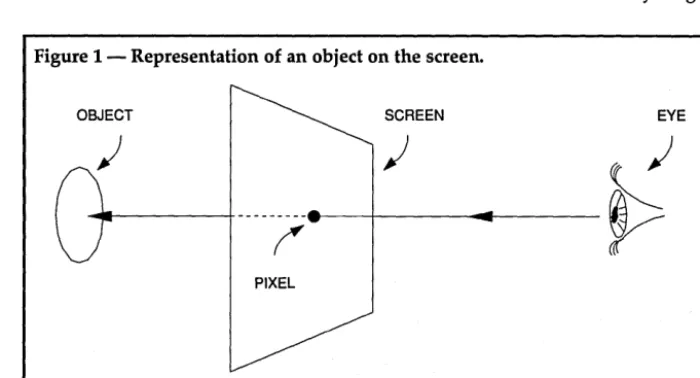
Extend the ray through the screen into space. Determine the first object that the ray intersects (see Figure 1). As-sign the pixel the same color as that ob-ject. Do this for every pixel on the screen. The resulting image will show one view of the imaginary computer universe.
To create different views of the
-
By
Earl Hinrichs
PC Tech
P.O. Box 128
Lake City, MN 55041
the obvious choice for this project, but I prefer 32-bit signed fixed point. Fixed point arithmetic is much faster than floating point with the same number of bits. Accuracy in either case depends on the number of bits.
Fixed point won't, however, let us work on just any scale (floating point will), so the fixed point implementation I'm using here will only give valid results if all values stay within a 32-bit range. But 32 bits will be plenty.
Select a screen size which enables each pixel to be about 1000 times larger than the smallest number we can repre-sent. This will guarantee that any round off error is far smaller than anything we
Figure 1 - Representation of an object on the screen.
OBJECT
PIXEL
universe, move the eye and screen around. To make things more interest-ing, you can move and alter objects or make them reflective, so that rays bounce off and continue on in other directions. The resulting game of light ray billiards generates even more fas-cinating pictures. (Editors note: Earl generated the graphic on the facing page using PC Tech's 34010 board.)
Arithmetic
Floating point arithmetic may seem
SCREEN EYE
can display on the screen.
We place objects so that the typical distance between them is on the order of 1000 pixels. This means there are plenty of pixels to resolve the object, and the scene will fill the screen.
So the size of the objects and the dis-tances between them are about 1/1000th of the largest number that can be represented. And there's enough room to avoid overflow errors.
[image:11.611.207.557.405.594.2]Fixed Point
In fixed point representation, we use regular integers, but imagine a decimal point (binary point?) at some fixed loca-tion. The fixed point will be set to the right of bit 16 here.
Thus we can represent numbers from -65535 to +65535 (_216 to 216) with a resolution of 0.00002 (2-16).
Let "A" be a real number, and sup-pose "a" is the integer representation of
"A" in the computer. Then "A" and "a" are related by the simple
formula-A = a * 216
Suppose "B" and "b" are similarly related, a representation of (A + B) be-
comes-(A + B)
=
(a * 216) + (b * 2-16)(a + b) * 2-16
So (a + b) is the fixed point repre-sentation of (A + B). In other words, fixed point addition is just simple in-teger addition. Subtraction works the same way.
For multiplication observe
that-(A * B)
=
(a * 2-16) * (b * 2-16)=
(a * b * 2-16) * 2-16Thus, the representation for (A
*
B) is just (a*
b) shifted right 16 bits.For
division-(A / B) (a * 2-16) / (b * 2-16)
(a / b)
«a /
b) * 216) * 2-16So fixed point division is integer division followed by a left shift of 16 bits.
34010 Programming
This will be the first time many readers see 34010 program code, so I'll briefly summarize the 34010.
The 34010 has 30 general purpose 32 bit registers, which are denoted AO -A14 and BO - B14.
The stack pointer can be denoted by SP, A15 or B15.
The B registers have special uses in the advanced graphic instructions. For example, in the PIXBL T (pixel block transfer) instruction, the B registers con-tain the source and destination start ad-dress, the block size, and window dimensions for clipping.
When XY addresses are used, one of the B registers specifies the screen origin. And when the source is a binary array, the foreground and background colors are held in the B registers.
Instructions with two operands have
the form "Operation Source, Destina-tion." The source comes first then the destination. For example "add aO, al" adds aO to a1 and stores the result in a1. This requires some adjustment for programmers used to Intel processors.
We use double registers in the multi-ply and divide instructions. Double registers are even and odd pairs with the even register holding the most sig-nificant bits. For example "mpys aI, aO" multiplies a1 and aO and puts the top 32 bits in aO and the bottom 32 bits in a1.
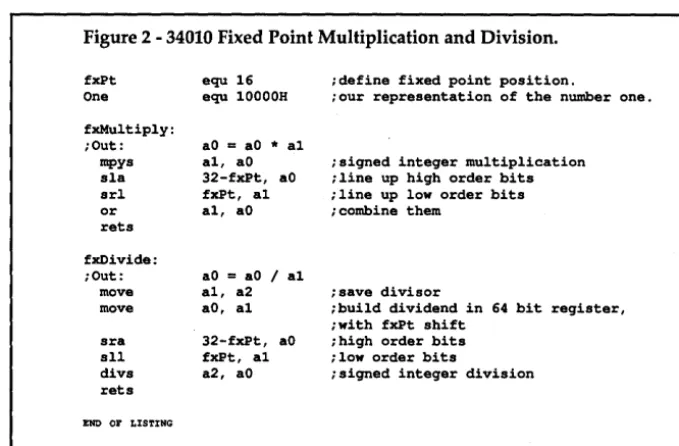
Figure 2 is the implementation of bit signed fixed point multiplication; 32-bit integer multiplication is one machine instruction on the 34010. The result is 64 bits wide and is put into two 32-bit registers.
x
=
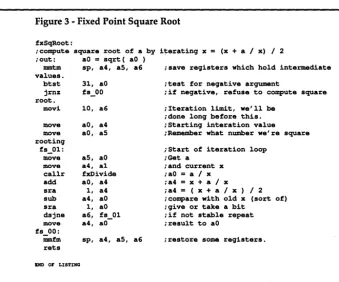
(x + a / x) / 2If we run this long enough, x will be-come the square root of a. Figure 3 com-putes the square root.
The push instruction has a strange name, mmtm. The first instruction in Figure 3 is "mmtm sp, a4, a5, a6." This instruction says to push registers a4, a5, and a6. mmtm stands for "move multi-ple to memory." The pop instruction is mmfm for "move multiple from· memory."
''btst'' is the bit test instruction. "dsjne" is the name TI gives to the loop instruction; it stands for "decrement skip jump not equal."
[image:12.606.219.559.252.475.2]The instruction "dsjne a6, fs_OI" near the end of Figure 3 will be skipped
Figure 2 - 34010 Fixed Point Multiplication and Division.
fxPt One
equ 16 idefine fixed point pOSition.
equ 10000H iour representation of the number one.
fxMu1tiply: iOut:
mpys sla
aO
=
aO * a1 a1, aO 32-fxPt, aO fxPt, a1isigned integer multiplication iline up high order bits
srl iline up low order bits
or rets
a1, aO i combine them
fxOivide: iOut:
move move
aO
=
aO / a1a1, a2 isave divisor
aO, a1 ibuild dividend in 64 bit register, iwith fxPt shift
sra sll divs rets
32-fxPt, aO fxPt, a1 a2, aO
ihigh order bits ilow order bits
isigned integer division
END or LISTING
To get the fixed point result, the in-teger result must be right shifted 16 bits. The 34010 doesn't have a double register shift instruction, so separate shifts are done on each register. Then the results are combined with an OR. The shifts used provide 0 fill, so the un-used bits are effectively masked off.
The division instruction in the 34010 takes a 64 bit double register and divides it by a 32 bit divisor. The quotient goes into a 32 bit register.
To avoid losing precision in the fixed point division routines, the shift is done first, then the division. The dividend is left shifted 16 bits in the 64-bit register pair. The "sra" instruction is a sign ex-tending right shift. The register pair is then divided by the 32-bit divisor.
Since that went so well, let's try a square root, which we can compute with the iterative
formula-if the result of the previous operation was zero. Otherwise it will decrement the a6 register and jump to fs_01 if a6 isn't, zero. There are also "dsj" and "dsjeq" instructions.
The first time I wrote 34010 code, I found myself drowning in registers. I was used to Intel CPUs, which have a relative shortage of registers. Some kind of convention on register usage has to be adopted to successfully write a 34010 program.
The subroutines in this article use the following conventions.
B registers are only used for the spe-cial graphic operations. Subroutines return values in the low A registers, AO
variables within a subroutine. They're always saved, and never used for pass-ing arguments.
AS - All are used to pass arguments to a subroutine. The values in AS - All are always preserved by the subroutine. A12 - A14 are used to pass argu;ments which may change. The subroutine may change the value of these registers, but not the meaning.
For example, if a pointer is passed in A12 to a subroutine, then the subroutine
are examples of vectors.
You may have heard the expression that vectors have both length and direc-tion. At first a point appears to have neither length or direction. But the point gets a length and direction if we think of it as being defined by the vector from the origin to that point.
We can add or subtract two vectors by adding or subtracting their coor-
[image:13.611.32.372.167.449.2]dinates-P + Q
=
(Px + QX, Py + Qy, pz + Qz)Figure 3 - Fixed Point Square Root
fxSqRoot:
icompute square root of a by iterating x
=
(x + a / x) / 2 iout: aO=
sqrt( aO )mmtm sp, a4, as, a6 ;save registers which hold intermediate values.
btst 31, aO
jrnz fs_OO
root.
movi 10, a6
move aO, a4
move aO, as
rooting fs_Ol:
move as, aO
move a4, al
callr fxDivide
add aO, a4
sra 1, a4
sub a4, aO
sra 1, aO
dsjne a6, fs 01
move a4,
aO-fs 00:
iimfm sp, a4, as, a6 rets
END or LISTING
may change the value of the pointer, but the new value will still be a valid pointer.
These conventions are personal rules only. I present them here only as an ex-planation of the register usage in this article. You should adopt whatever con-ventions fit your style of programming and the program you're writing.
Three Dimensional Geometry
The simplest object in geometry is a point. An arbitrary point in the three dimensional universe (called 3-space for short) is specified by three coordinates. We write P = ( Px, Py, pz ) where P is the point and Px, Py, and pz are respec-tively the x, y, z coordinates of P.
We have to specify directions in 3-space. We can describe a direction by D
= (
Dx, Dy, Dz ), where Dx, Dy, and Dz are the directions with respect to each axis.Point and direction defined this way
;test for negative argument
;if negative, refuse to compute square
;Iteration limit, we'll be ;done long before this. ;Starting interation value iRamember what number we're square
iStart of iteration loop iGet a
;and current x ;aO
=
a / x;a4
=
x + a / x;a4
= (
x + a / x ) / 2 ;compare with old x (sort of) ;give or take a bit;if not stable repeat ;result to aO
;restore soma registers.
P - Q
=
(Px - Qx, Py - Qy, pz - Qz)If P and Q are points then P -Q is the vector which starts at Q and goes to P.
Two types of multiplication are use-ful in vector arithmetic-one for multi-plying a vector by a number, the other for multiplying two vectors.
The first is called multiplication by a scalar. Each coordinate of the vector is multiplied by the number.
c*P
=
(c*Px, c*Py, c*PZ)Geometrically, this corresponds to stretching or shrinking the vector. The length of the vector changes but the direction does not.
The second type of multiplication is called the inner or dot product. Here two vectors are multiplied and the result is a scalar or number. The cor-responding coordinates are multiplied and the products are
summed-P • Q
=
Px * QX + Py * Qy + pz * QZThe length of a vector, denoted I P I,
is defined
by-IPI2
=
P • P=
Px * Px + Py * Py+ pz * pz
In other words, the Pathagorean Theorem.
The dot product can be used to com-pute the angle between two
vectors-The cos of angle between P and Q
=
(P • Q) / UPI * IQI)As a consequence of this, we see that two vectors are perpendicular (at right angles) when P • Q = O.
Informally, we represent direction by a vector. Sometimes mathematics and computers require us to be exact about such things. In particular, since our direction vector can have any length there are an infinite number of vectors which represent a given direction. When forced to choose a particular one, we'll choose the vector which has length one. We call vectors with length one "unit vectors."
An arbitrary vector can be converted to a unit vector by
"normalizing"-P
=
P / IPIGiven two vectors, P and Q, it's sometimes advantageous to break Pinto two components, one perpendicular to Q and one parallel to Q.
We say the parallel component is the projection of Ponto Q. The condition of perpendicularity is the same as the dot product being equal to zero. Two vec-tors are parallel if one is a scalar multi-ple of the other.
Mathematically,
(1) P
=
Pl + P2where
(2) Pl • Q
=
0Pl is the perpendicular component and
(3) P2
=
c * Qfor some number c. P2 is parallel to Q. The number c can be easily calcu-lated, dot both sides of (1) with ~
P • Q
=
Pl • Q + P2 • Qo + (c * Q) • Q
=
c * (Q • Q)
So-c
=
(P • Q) / (Q • Q)Finally
-Affordable Intelligence.
TINY EINSTEIN
The Expert System Shell
• Create your own expert systems in minutes. • With pulldown menus
and windows
• Context-sensitive online help • Free example expert systems • Tutorial
• Interactive full-screen text editor
• DOS access from shell • Turbo Fast execution • Cluster, Trace, Explain • For Diagnosing ...
Simulating .. . Predicting .. . Planning .. . Classifying .. . Training ...
and Monitoring systems.
Only $49.951 (Plus
$
5
5/H)
Designed & implemented by Gary Entsminger & Larry Fogg
I"--c __
~
_-I
=1-ACQUIRED INTELLIGENCE
P.o. BOX 2091 • DAVIS. CA 95617 • (9161753·4704
Reader Service Number 72
12
Thus, if P and Q are given, c can be computed and
so-P2
=
c * Qand
P1
=
P - c * QThe number c which arises in the above computations has an importance of its own. If Q is one of the standard unit vectors ( 1,0,0 ), ( 0, 1,0 ), or ( 0,0, 1 ) then c is just the x, y or z coordinate ofP.
A situation may arise where you need to change your frame of reference.
If Q is one of the axis vectors in a non-standard coordinate system, the value c is the Q coordinate of P. I like to think of Q as a measuring stick. I call the process of extracting the number c, calibrating P with respect to Q.
Turning These Ideas Into A Program Since I chose a 32-bit fixed point rep-resentation for numbers, we'll represent vectors by three such numbers.
I chose not to pass vectors around in registers. Instead vectors are always in memory and I pass memory pointers. A vector in memory consists of three 32-bit numbers in consecutive memory locations. The pointer to the vector points to the first number.
In the 34010, memory addressing is by bits. So if a pointer is pointing to the x coordinate, then the y coordinate is at offset 32, and the z coordinate is at off-set 64 from the base. The following definitions identify the individual com-
ponents-iPoint px equ OOOOH py equ 0020H pz equ 0040H
Memory references in the 34010 can be made to any bit boundary, and can be for 1 to 32 consecutive bits. The 34010 status register has two field size fields. The field size fields tell the 34010 how many bits to read or write during memory accesses.
When a memory value of less than 32 bits is loaded into a 32-bit register, the 34010 will either zero fill the upper bits or sign extend the value through the upper bits. The SETF instruction sets the field size.
Syntax
is-SETF <FS>, <FE>, <F>
where-FS
=
field size, 1 - 32FE
=
extend option, 0=
zero fill, 1=
sign extendF
=
field number, 0 or 1.I like to set the field sizes as follows:
SETF 16, 1, 0 SETF 32, 0, 1
Field 0 is 16 bit, sign extended; field 1 is 32 bit. All the subroutines here as-sume these settings. Whenever the field size is changed, it's changed back to the original setting as soon as possible.
The 34010 move instruction has the
form-MOVE <src>, <dst>, <F>
where-<src> is the source operand <dst> is the destination operand <F> is the field operand
F is either 0 or 1, if it's omitted zero is assumed. Most of the move
instruc-Figure 4 - Basic Vector Arithmetic
. data
;for intermediate values v'l'empO . space 60H
. text vMove:
iOut: a9
=
a8 move *a8(px), aO, 1 move aO, *a9(px), 1 move a8(py), aO, 1 move aO, *a9(py), 1 move *a8 (pz) , aO, 1 move aO, *a9(pz), 1 retsvAdd:
iOut: a10
=
a8 + a9 move *a8(px), aO, 1 move *a9(px) , a1, 1add a1, aO
move aO, *a10(px}, 1 move *a8(py) , aO, 1 move *a9(py) , a1, 1
add a1, aO
move aO, *a10 (py) , 1 move *a8(pz), aO, 1 move *a9(pz), a1, 1
add a1, aO
move aO, *a10(pz), 1 rets
vSub:
iOut: a10
=
a8 - a9 move *a8 (px) , aO, 1 move *a9(px) , a1, 1sub a1, aO
move aO, *a10(px), 1 move *a8(py), aO, 1 move *a9(py), a1, 1
sub a1, aO
move aO, *a10(py) , 1 move *a8(pz), aO, 1 move *a9(pz), a1, 1
sub a1, aO
move aO, *a10(pz), 1 rets
vDot:
iOut: aO
=
a8 . a9 [image:14.614.401.568.299.733.2]tions in the accompanying code involve 32-bit operations and so they end with
", 1". Many addressing modes are pos- sible-R *R *R+ -*R Addr *R(disp) register indirect
post increment indirect predecrement indirect absolute
indirect with displacement
Here R is a register name, Addr is an absolute memory address, and disp is a 16-bit signed displacement. Nearly any combination of source and destination addressing modes is possible.
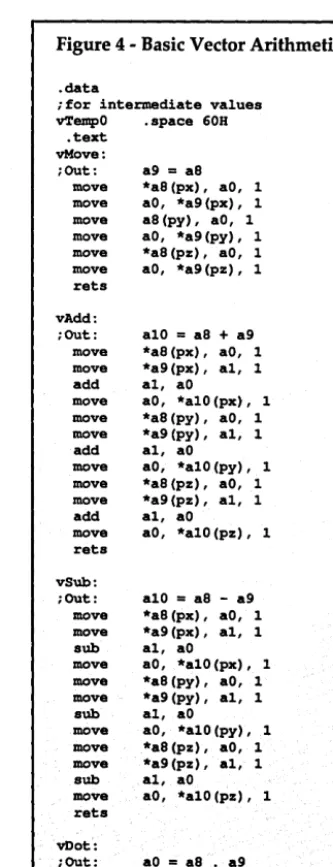
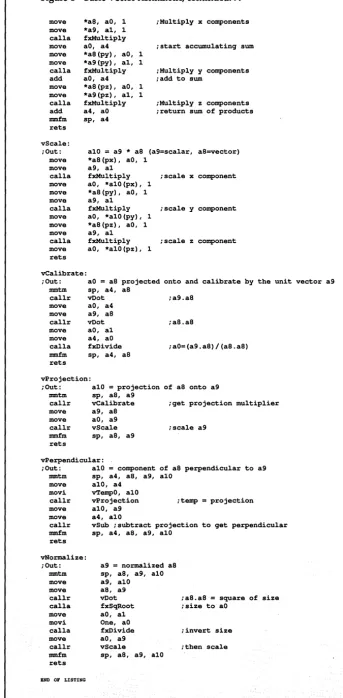
Figure 4 shows the 34010 implemen-tation of basic vector arithmetic. The routine vMove makes a copy of a the vector pointed to by as at the vector pointed to by a9.
v Adds adds as to a9 and stores the results in al0. vSub subtracts a9 from as and stores the result in a 10. Each coor-dinate in a9 is added or subtracted from the matching coordinate in as, and the result is put into al0.
vDot returns the dot product of as and a9 in aO. as and a9 point to vectors and aO is a number. vScale stores the scalar multiplication of a9 and as in alO. a9 is a scaler, and as points to a vector.
vCalibrate returns the size of the projection of as onto a9 as a multiple of the length of a9. The result is returned in aO. vProjection puts the projection of as onto a9 into the vector alO. v-Perpendicular puts the component of as perpendicular to a9 into alO. v-Normalize returns a normalized copy of as in a9.
Compound Objects
Now let's use vectors to build our descriptions of more interesting objects.
A ray is half of a line; we define it by a starting point and a
direction-Start S = (Sx, Sy, Sz) Direction D = (Dx, Dy, Dz)
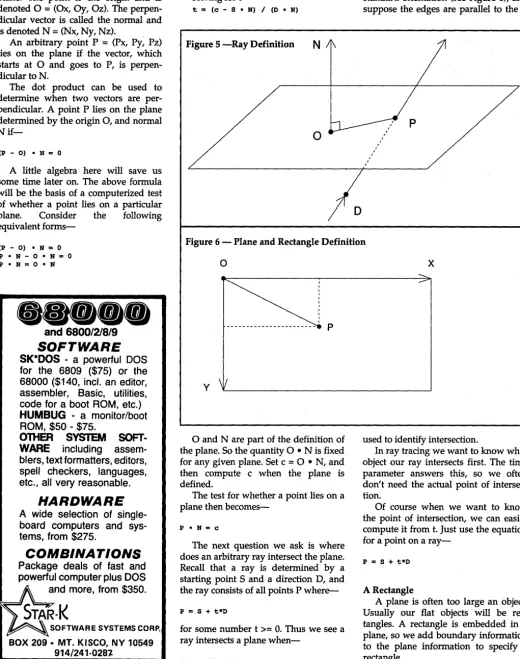
I like to imagine a point starting at 5 and traveling out in direction D (see Figure 5). The position of this traveling point at time t is given
by-P = S + t*D
where
t >= 0 is time.
[image:15.604.213.556.33.731.2]In a strict mathematical setting, t is just a number, and we say that t parameterizes the points on the ray. By the way, if we also allow t<O then the above formula represents a line.
Figure 4-Basic Vector Arithmetic, continued ...
move move calla move move move calla add move move calla add mmfm rets
*a8, aO, 1 *a9, al, 1
fxMultiply aO, a4 *a8(py), aO, 1
*a9(py), al, 1
fxMultiply aO, a4 *a8(pz), aO, 1
*a9(pz), al, 1
fxMultiply a4, aO sp, a4
;Multiply x components
;start accumulating sum
;Multiply y components ;add to sum
;Multiply z components ;return sum of products
vScale: ;Out: move move calla move move move calla move move move calla move rets
alO = a9 * a8 (a9=scalar, a8=vector) *a8(px), aO, 1
a9, al
fxMultiply ;scale x component aO, *alO(px), 1
*a8 (py), aO, 1
a9, al
fxMultiply ;scale y component aO, *alO(py), 1
*a8(pz), aO, 1
a9, al
fxMultiply ;scale z component aO, *alO (pz), 1
vCalibrate:
;Out: aO = a8 projected onto and calibrate by the unit vector a9 mmtm sp, a4, a8
callr vDot ;a9.a8
move move callr move move calla
aO, a4 a9, a8 vDot aO, al a4, aO fxOivide mmfm sp, a4, a8 rets
vProjection:
;a8.a8
;aO=(a9.a8)/(a8.a8)
;Out: alO = projection of a8 onto a9 mmtm sp, a8, a9
callr vCalibrate ;get projection multiplier move
move callr
a9, a8 aO, a9
vScale ;scale a9 mmfm sp, a8, a9
rets
vPerpendicular:
;Out: alO = component of a8 perpendicular to a9 mmtm sp, a4, a8, a9, alO
move alO, a4 movi vTempO, alO
callr vProjection ;temp = projection move alO, a9
move a4, alO
callr vSub ;subtract projection to get perpendicular mmfm sp, a4, a8, a9, alO
rets vNormalize: ;Out: mmtm move move callr calla move movi calla move callr mmfm rets
END OF LISTING
a9 = normalized as sp, a8, a9, alO a9, alO a8, a9
vDot ;a8.a8
=
square of size fxSqRoot ;size to aOaO, al One, aO
fxOivide ;invert size aO, a9
vScale ; then scale sp, a8, a9, alO
A Plane
An arbitrary plane in space can be specified by designating a point on the plane, and a vector perpendicular to the plane. The point is the origin and is denoted 0 = (Ox, Oy, Oz). The perpen-dicular vector is called the normal and is denoted N = (Nx, Ny, Nz).
An arbitrary point P = (Px, Py, pz) lies on the plane if the vector, which starts at 0 and goes to P, is perpen-dicular to N.
The dot product can be used to determine when two vectors are per-pendicular. A point P lies on the plane determined by the origin 0, and normal
Nif-(P - 0) • H "" 0
A little algebra here will save us some time later on. The above formula will be the basis of a computerized test of whether a point lies on a particular plane. Consider the following equivalent
forms-(P - 0) • H = 0
P • H - 0 • H
=
0P • H
=
0 • H_ee __
and
6800/218/9
SOFTWARE
SK*DOS - a powerful DOS for the 6809 ($75) or the 68000 ($140, incl. an editor, assembler, Basic, utilities, code for a boot ROM, etc.)
HUMBUG - a monitor/boot ROM, $50 - $75.
OntER SYSTEM SOFT-WARE including assem-blers, text formatters, editors, spell checkers, languages, etc., all very reasonable.
HARDWARE
A wide selection of single-board computers and sys-tems, from $275.
COMBINATIONS
Package deals of fast and powerful computer plus DOS and more, from $350.
SOFTWARESYSTEMSCOR~
BOX 209· MT. KISCO, NY 10549 914/241-028~
Reader Service Number 40
To the mathematician, anyone of these is as good as any other. The programmer, however, will prefer the last form.
solving for t
[image:16.606.44.565.73.732.2]-t
=
(0 - 9 • H) I (D • H)Figure 5 -Ray Definition
N
o
The questions of intersection will be answered by "when" rather than "where." The time parameter t will be Imagine a rectangle in space in a standard orientation (see Figure 6), and suppose the edges are parallel to the X
Figure 6 - Plane and Rectangle Definition
o
p
y
o
and N are part of the definition of the plane. So the quantity 0 • N is fixed for any given plane. Set c = 0 • N, and then compute c when the plane is defined.The test for whether a point lies on a plane then
becomes-P • H
=
0The next question we ask is where does an arbitrary ray intersect the plane. Recall that a ray is determined' by a starting point S and a direction D, and the ray consists of all points P
where-P
=
9 + t*Dfor some number t >= O. Thus we see a ray intersects a plane
when-(9 + t*D) • H
=
0x
used to identify intersection.
In ray tracing we want to know what object our ray intersects first. The time parameter answers this, so we often don't need the actual point of intersec-tion.
Of course when we want to know the point of intersection, we can easily compute it from t. Just use the equation for a point on a
ray-P
=
9 + t*DA Rectangle
and Y axes. Define the plane which em-beds the rectangle.
When we define a plane, the origin is arbitrary. Any point on the plane can serve as well as any other for the origin. This time pick the upper left comer of the rectangle as the origin. Put a vector on the top edge of the rectangle by starting at the origin and going to the top right side. Call this vector the X ex-tent and define the Y exex-tent along the left side in a similar fashion.
A point, P, lies on the rectangle if it's to the right of the origin but not farther to the right than the X extent, and below the origin and but not further below than the Y extent.
We can test this by verifying that the numbers which come from calibrating the vector from the upper left corner to P with respect to both the X extent and the Y extent are between 0 and 1.
A general rectangle isn't restricted to orientation with respect to the coor-dinate axes. We can expand the descrip-tion of a rectangle in a standard posi-tion in order to describe an arbitrary rectangle.
First define the plane which embeds the rectangle. We can no longer say which side of the rectangle is the top, so just pick any comer to be the origin. Connect two sides of the rectangle to the point we picked for the origin; denote one the X extent and the other the Y extent.
It doesn't matter which side you call what, just remember to define the ex-tents to start at the origin and go to the other comer on that side. The notion of calibrating one vector with respect to another can be used to test whether a point extends beyond the X or Y ex-tents.
In summary, we define a rectangle by adding two vectors, the X extent and
Yextent-N, the normal vector, 0, the origin,
c, the plane constant (0 • N) X, the X extent, and
Y, the Y extent
(The astute reader will observe that Nand c are redundant, in the sense that the rectangle could be fully defined from 0, X and Y. Nand c are carried along to simplify calculations.)
A point,