WA-Continuum: Visualising Word Alignments across
Multiple Parallel Sentences Simultaneously
David Steele
Department of Computer Science The University of Sheffield
Sheffield, UK
Lucia Specia
Department of Computer Science The University of Sheffield
Sheffield, UK
Abstract
Word alignment (WA) between a pair of sentences in the same or different lan-guages is a key component of many nat-ural language processing tasks. It is com-monly used for identifying the translation relationships between words and phrases in parallel sentences from two different languages. WA-Continuum is a tool de-signed for the visualisation of WAs. It was initially built to aid research studying WAs and ways to improve them. The tool re-lies on the automated mark-up of WAs, as typically produced by WA tools. Differ-ent from most previous work, it presDiffer-ents the alignment information graphically in a WA matrix that can be easily understood by users, as opposed to text connected by lines. The key features of the tool are the ability to visualise WA matrices for mul-tiple parallel aligned sentences simultane-ously in a single place, coupled with pow-erful search and selection components to find and inspect particular sentences as re-quired.
1 Introduction
Automatically generated WA of parallel sen-tences, as introduced by the IBM models (Brown et al., 1990), is a mapping between source words and target words. It plays a vital role in Statisti-cal Machine Translation (SMT) as the initial step to generate translation rules in most state of the art SMT approaches. It is also widely classed as a valuable linguistic resource for multilingual text processing in general.
Accurate WAs form the basis for construct-ing probabilistic word or phrase-based translation dictionaries, as well as the generation of more elaborate translation rules, such as hierarchical
or syntax-based rules. As WAs improve, it is expected that the translation rules also improve, which, in turn, should lead to better Machine Translation (MT).
Our research involves a careful study and evalu-ation of the WA process and aims to develop ways to improve its performance. A substantial part of evaluating WAs often includes human intervention where candidate WAs produced by various soft-ware are examined. Consequently, tools to display the alignment information are very important for humans to analyse and readily digest such infor-mation.
Various tools have been developed in previous work that enable the visualisation and, in some cases, direct manipulation of WAs. However, none of these tools meet important requirements in our research such as being able to quickly examine WAs for tens and even hundreds of sentences si-multaneously in a very clear format and indeed being able to search, shuffle, and filter those align-ments according to desired specific criteria. The WA-Continuum tool was developed to fulfil this need. It is implemented in Python and outputs to standard HTML files, utilising the powerful prop-erties provided by CSS and JavaScript. As the out-put file is saved as regular HTML it works with modern web browsers and thus users can make use of many of the features they provide, such as ‘search and find’.
The remainder of the paper is organised as fol-lows: Section 2 gives a brief overview of existing WA visualisation tools. Section 3 highlights the technical specification of the WA-Continuum soft-ware as well as a number of useful features. Sec-tion 4 presents the conclusion along with a brief overview of future development plans.
2 Visualising Word Alignments
With the continuing attention given to SMT and the overarching importance of WAs, various tools
Figure 1: A simple graphical visualisation of WAs for an English-Spanish parallel sentence (Jurafsky and Martin, 2009).
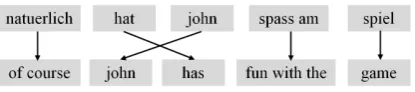
Figure 2: A simple graphical visualisation of WAs for a German-English parallel sentence. The input has been segmented into phrases (Koehn, 2013).
have been developed that help evaluate and vi-sualise such alignments by going beyond us-ing text alone. To understand the limitations of text-only visualisation, consider the following Chinese-English example, where the alignments are given in terms of the positions of source-target tokens: 我爱你! |||i love you ! |||0-0 1-1 2-2
3-3. For short and simple sentences with numer-ous 1-to-1 monotone alignments this visualisation style can be sufficient. However, it is certainly not suitable for longer and more complex sentences that may contain more intricate alignments.
[image:2.595.75.294.63.102.2]Previous tools include Cairo (Smith et al., 2000) and VisualLIHLA (Caseli et al., 2008) and have different implementations serving different pur-poses, but they are usually presented in one of two main visual styles. The earlier styles show align-ments by matching words in text boxes, across two sentences, using arrows or lines to make the con-nections. Figure 1 shows an example of this style, where the words in a parallel English and Span-ish sentence have been aligned. From the example it can be seen clearly which words map to each other, where reordering occurs (arrows cross), and where phrases are mapped to single words (e.g. ‘did not’ is mapped to ‘no’). Figure 2 shows a sim-ilar mapping, but this time it places whole phrases within a single text box and shows both word and phrase alignments. Again, the place where the ar-rows cross shows some reordering has occurred. The accuracy of the alignments shown in both fig-ures is not a concern, as the tools are purely de-signed for visualisation purposes. The clarity in how the information is presented, on the other hand, is critical.
Figure 3: A graphical visualisation of WAs for the given Spanish-English parallel sentence using the matrix format. The columns represent Span-ish words whilst the rows represent EnglSpan-ish words (Jurafsky and Martin, 2009).
The second and perhaps more sophisticated style displays the alignments in a matrix type grid, where the individual columns of the grid map to single elements (words or punctuation marks) in one language and the rows do likewise for single elements in the other language. Figure 3 shows the same parallel sentences as those in Figure 1, but in the grid style. Single blocks show map-pings between individual elements (e.g. ‘Mary’ and ‘Maria’) whereas multiple blocks appearing in the same row or column tend to show phrases mapping to single words or other phrases (e.g. ‘did not’ maps to ‘no’). As can be seen from Figures 1, 2 and 3 the same information is clearly pre-sented in two different formats, both of which are more intuitive than showing text and word position numbers only.
The tools described so far are static and only show visual representations of WAs. Tools such as Yawat (Yet Another Word Alignment Tool) (Ger-mann, 2008) and the SWIFT Aligner (Gilmanov et al., 2014), however, allow the direct manipula-tion and editing of WAs via graphical interfaces. Picaro – a simple command-line alignment visual-isation tool (Riesa, 2011) – uses the grid style to display information. It also has an online demo web page1 that allows for the demonstration of
the tool within a browser for a single parallel sen-tence. Although Picaro is a relatively simple tool, the visual presentation of the grid format on the demonstration web page is clear and is ideal for
[image:2.595.79.287.168.214.2]quickly understanding WAs. Our research in SMT requires the use of this type of presentation style using the grid format, but with a few more pow-erful features. Consequently, we had to develop a new tool that had extra features, but maintained the visual appeal and simplicity of the grid format.
3 Software Features
This section provides an overview of our software including input format and technical specification, as well as a number of the pertinent and powerful features that we have been using.
3.1 Input and Technical Specification
WA-Continuum is written in Python (version 2.7). The input commands can be typed directly into the command-line on Mac, Linux and Windows com-puters or laptops. They can also be passed as ar-guments in a number of integrated development environments (IDEs) such as Eclipse2or Spyder3.
The input for the tool should include at least one aligned parallel sentence arranged in the following format:
SOURCE|||TARGET|||WAs.
For example:
我爱你|||i love you |||0-0 1-1 2-2
Typically though the input will be a text file containing a list of many such aligned parallel sentences, one per line. The file is read along with an optional user selected keyword or key-phrase (e.g. -k ‘hello’ or -k ‘as soon as’), which then only returns sentence pairs containing that given word or phrase. Once these commands have been provided, the output is returned as an HTML page, which uses a mixture of HTML, CSS and JavaScript. The page is then automatically opened in the default web browser. This implementa-tion has been successfully tested with a number of modern web browsers including Mozilla Firefox, Internet Explorer 11, Google Chrome and Opera.
A single web page can show thousands of align-ment grids (it has been tested for 10000+ sen-tences), but despite the fact that the program pro-duces the HTML for the output very quickly, it takes the browser a while to render the page when thousands of grids are involved. We have found through testing that up to 1000 grids can be loaded
2https://eclipse.org/
3https://github.com/spyder-ide/spyder/releases
and rendered fairly quickly (under four seconds on an Intel dual core i3-3220 (3GHZ) computer with 12GB of RAM running Windows 8.1), and so, for performance, we have set the current maximum number of grids to 512 as this is usually enough per search for inspection and evaluation purposes. A short video showing a demonstration of the WA-Continuum software is available online at:
http://wa-continuum.vidmeup.com/
The software itself will be made available for download at:
http://staffwww.dcs.shef.ac.uk/ people/D.Steele/
3.2 Features
This section provides an overview of the perti-nent features that have been developed and used in our research including: keyword search, phrase search, simple regular expression searches, view-ing phrase pairs (minimal bi-phrases), and utilis-ing useful browser features.
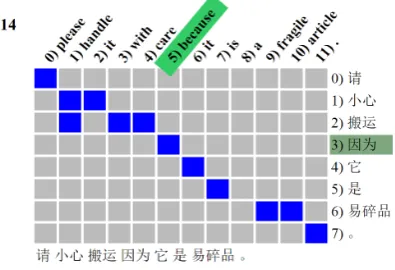
For all the given figures in this section exempli-fying the WA-continuum software, the individual coordinates for each square in the matrices should be read as row number first, followed by the col-umn number. For Figure 4, the alignment point mapping ‘因为’ to ‘because’ (as highlighted at the top and right hand side) should be read as align-ment point 3-5. The three lines of text below each grid show the source language, target language and WAs as they appear in the input file.
Keyword Searching
As the main aim of the WA-Continuum soft-ware is to be able to display clearly WAs for many sentences (possibly the whole corpus), a keyword search was implemented to enable users to select sentences to visualise from the input file, for ex-ample, for the analysis of particular constructions such as those using discourse markers.
Figure 4 shows a typical alignment grid re-turned from using the keyword search ‘because’. The ‘14’ in the top left of the figure is an indi-cation that it is the 15th4 grid for ‘because’ that
appears in the output page. Scrolling up the page will show previous sentences featuring ‘because’, while scrolling down will show subsequent sen-tences.
Figure 4: An example of a WA grid returned us-ing the keyword search term ‘because’. The cursor was placed over the alignment point for ‘because’ and ‘因为’ (point 3-5) so the tokens involved in the alignment are highlighted.
Phrase Searching
This is simply an extension of the keyword search, but by enclosing the search term in quotes it enables the user to input a phrase. For example, a user could easily run the program with the search term ‘as soon as’ and only results containing that complete phrase will be returned. If the ‘as soon as’ was typed without the quotes, the tool will return results for the keyword ‘as’.
It is worth noting here that the keyword/phrase searches also apply to other alphabets/languages in the input file. For example, a user could do a search using either ‘china’ (lower case) or ‘中国’.
Support for Simple Regular Expressions
While keyword and phrase searches are use-ful tools, if the user is looking for more specific sentences then they can use searches combined with basic regular expressions (RE). Figure 5 is an example of WAs returned using the RE search term ‘if.*, then’ which is being used to examine sentences containing the if/then conditional. Using the RE search term ‘if.*, then’ matches any sentence that contains: ‘if’ followed by any number of characters (.*) followed by a comma and space and finally a ‘then’. Being able to use REs makes the search very flexible and helps to pinpoint specific examples.
[image:4.595.82.280.70.205.2]Using Browser Features
Figure 5: A WA grid returned by using the regular expression search term ‘if.*, then’.
Web browsers often contain many powerful features, but one that is particularly useful for searching the output of tens or hundreds of grids is the ‘search and find’ function. Figure 6 shows a browser search for ‘go to the airport’ being performed on all alignment grids returned by the original command-line keyword search term ‘the’. The figure shows that the sentence being examined is the fifty-fifth one on the page as well as it being the second out of eleven containing matches for ‘go to the airport’. The up and down arrows next to the search term enables the user to quickly jump through the matches on the page. Finally, the small yellow/orange lines on the right hand side show where the other grids containing a match appear on the page.
Phrase Pairs (Minimal Bi-phrases)
Figure 6: Using the web browser features to search the results. In this case, matches for ‘go to the airport’ are sought.
‘-b’ switch, for bi-phrases on, is used in the command-line then the tool recursively extracts the phrase pairs at runtime and displays them in the relevant matrices.
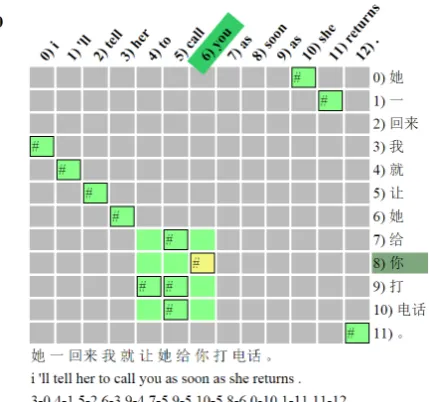
Figure 8 shows the first result returned using the phrase search ‘as soon as’ plus the command-line flag ‘-b’, which highlights phrase pairs. Each single block containing the hash symbol repre-sents the actual word alignment points, whereas the large block represents phrase alignments. Phrase alignments will always appear as rectan-gles and may include blocks that were not origi-nally aligned (coloured, but no hash symbol). In the context of Figure 8, the English words ‘to call you’ have been mapped as a phrase to ‘给你打电 话’ (literally: ‘give you make phone [call]). In this case, quite a good translation. The process to es-tablish a phrase pair works as follows. If column 5 (‘call’) is examined it is clear that it contains three mappings to rows 7, 9 and 10 respectively. This means that in order to use column 5 in a phrase we must include every alignment point that occurs in the column and by extension those that appear in each of the rows 7, 9 and 10. However, to get from row 7 to row 9 we must also include everything in row 8, and so it goes on in a recursive process.
The phrase ‘to call you’ uses columns 4, 5 and 6. Column 4 has an alignment point at row 9 (9-4). Row 9 in turn also has an alignment point with column 5 (9-5), which then encompasses the other alignment points in column 5 (7-5 and 10-5). As moving through column 5 includes using row 8
Figure 7: A WA grid showing a phrase pair map-ping of ‘assumes that’ to ‘geht davon aus , dass’ (Koehn, 2013).
then we must also include all alignment points for that row as well, which in this case is in column 6 (8-6). After this, as there are no more alignment points to consider outside of that block, then the phrase is complete. A similar process is applied in Figure 7, which is why the ‘ , ’ in column 4 must be included as part of the phrase ‘geht davon aus , dass’.
Another point worth noting in Figure 8 is that the alignment at point 8-6 (highlighted) mapping ‘你’ to ‘you’ is in a different colour. The rea-son for this is that the software has been devel-oped to show possible phrases/words that may oc-cur within a larger phrase (nested phrases), as well as being a phrase or single aligned word in its own right. That is, in this case no other item appears in column 6 or row 8 and so the word alignment could be extracted in its own right as a mapping between ‘你’ and ‘you’. None of the other ele-ments that appear in the phrase ‘to call you’ have the same property.
[image:5.595.316.517.63.237.2]Figure 8: A WA grid showing a phrase pair map-ping of ‘to call you’ to ‘给你打电话’.
Other Features
A number of other features are available to the user, including the ability to shuffle the results, select a range of matrices, and filter the results to include sentences under a certain length. Extra features such as these are continually being incorporated into the software as the need arises. Furthermore, as the software is open source and well documented, its modular design will enable others to develop and extend the tool to easily add further features as required.
4 Conclusion and Future Work
WA-Continuum was designed with one main spe-cific purpose in mind, which is visualising WAs for a large number of sentences at once, making it possible to evaluate them more efficiently. Soft-ware that enables the visualisation of WAs has been developed in previous work and they offer a myriad of features including manual editing of WAs and text highlighting. However, none of the tools that we found appeared to offer the full set of functionalities that were required. WA-Continuum builds on the idea of displaying WAs in an intuitive matrix style, but makes accessing and searching large volumes of data a fairly straightforward task. In the future we aim to further enhance the soft-ware by making a number of additions:
• Extra interactivity will be added to enable manual editing of WAs.
• Phrase pairs could be shown on a separate page or alongside the main grids, which is useful where nested phrase pairs occur.
• Results that return a larger number of grids (e.g. over 1000) will be spread over multi-ple pages, with a main master page contain-ing links to each of the sub pages.
• The option to output a small number of grids to PDF may also be added as it is a useful format, which could be used consistently in numerous ways across many devices.
Acknowledgements The authors wish to thank W Aziz for his valued input (including code snip-pets), ideas and suggestions.
References
Peter F. Brown, John Cocke, Stephen A. Della, Vincent J. Della Pietra, Fredrick Jelinek, John D. Lafferty, Robert L. Mercer, and Paul S. Roosin. 1990. A Sta-tistical Approach to Machine Translation. Compu-tational Linguistics, 16(2):76-85.
Helena Caseli, Felipe T. Gomes, Thiago A.S. Pardo, and Maria das Gracas V. Nunes. 2008. Visual-LIHLA: The Visual Online Tool for Lexical Align-ment. In XIV Brazilian Symposium on Multimedia and the Web, pages 378-380. Vila Velha, Brazil. Ulrich Germann. 2008. Yawat: Yet Another Word
Alignment Tool. ACL-08: HLT Demo Session, pages 20-23. Columbus, Ohio.
Timur Gilmanov, Olga Scrivner, and Sandra Kubler. 2014. SWIFT Aligner, A Multifunctional Tool for Parallel Corpora: Visualization, Word Alignment, and (Morpho)-Syntactic Cross-Language Transfer. LREC, pages 2913-2919. Reykjavik, Iceland. Daniel Jurafsky and James H. Martin. 2009. Speech
and Language Proecessing (2nd ed.). Pearson Pren-tice Hall, London.
Philipp Koehn. 2013.Statistical Machine Translation. Cambridge University Press, Cambridge.
Patrick Lambert. 2004. Alignment set toolkit. http://gps-tsc.upc.es/veu/personal/lambert/software/ AlignmentSet.html.
Jason Riesa. 2011. Picaro: A simple Command-Line Alignment Visualisation Tool. http://nlg.isi.edu/demos/picaro/.
Noah A. Smith and Michael E. Jahr. 2000. Cairo: An Alignment Visualisation Tool. In LREC. Athens, Greece.