COMPUTER SUPPORTED INTERACTIVE
TEACHING
An experience with triangles
Siswa Anakanda Njawa van Riesen
Computer supported interactive
teaching
An experience with triangles
Siswa Anakanda Njawa van Riesen
University Twente, Enschede
July 23rd 2012
Abstract
This work revolved around classroom collaboration in a participative instructional setting using Single Display Groupware (SDG). The domain was a mathematics subdomain that involved the understanding of triangles. Students of one class (the experimental group) were each
equipped with a mouse and shared one computer together that was connected to one big screen divided into four working areas. In four groups of six to seven students each they had to identify and create different kinds of triangles on the screen, which they could only successfully do by collaboration within their group. Verbal communication during these activities was difficult due to seating arrangements, because of which they had to find a way of collaborating silently by using their mice. Group discussions were held after the activities to stimulate students to gain deeper understanding of the material and to make sure that everyone understood the concepts they were taught. The teacher played a key role in controlling and organizing the process, and presenting the students with concepts and ideas regarding triangles. An analysis of behavioural patterns showed that students in the experimental group naturally found different ways to collaborate silently. In a control group the same domain information was presented by means of conventional instruction. Knowledge gains in the experimental group were compared to
Foreword
I am grateful for the opportunity that I have been given to perform my graduate project in Chile. Special thanks go out to Ton de Jong, who guided me and found me a tutor in Chile and the Netherlands, advised me with my project, supported me when I had difficult times, and made me a better student. Also, special thanks go out to Miguel Nussbaum, who took me in as a foreign graduate student, guided me throughout the project, gave me cultural advice, and made it possible for me to experience the educational system in Chile (both primary education and university). Furthermore, many thanks go out to Hannie Gijlers for being a great second Dutch tutor, aiding me with my statistics and thesis, and accepting me as one of her graduate students even though we were thousands of kilometres apart. Also, I thank Daniela Caballero and Sergio Álvarez, who were part of my team in Chile and took care of the arrangements with the schools, the programming of the software and other things. Furthermore, special thanks go out to Andries de Vries, a student who analysed part of the patterns on the screen as a second observer. Finally, thanks go out to all my friends, family and acquaintances for supporting me throughout my time in Latin America and the time I spent on my project in the Netherlands.
It has truly been a great journey that I undertook and I can honestly say that I have become a different person because of all the valuable moments I had. I experienced living in a different culture, working with people from this culture, being part of a different university, build up my life from scratch, having to learn and speak the Spanish language, tasting other food and many things more. I found out what it is like to do a project abroad and what advantages and
Introduction
Whole-class interactive instruction has been a key feature in mathematic sessions in
countries with the best levels of mathematics (Reynolds & Farrell, 1996). Interactive instruction is a teaching method in which knowledge is created by all students of an entire class while mediated by the teacher. Important in this approach is the active creation of knowledge in which students need to think about the material to be learned and build their own understanding of the material together with their peers. High-quality interactive instruction is “oral, interactive and lively, and will not be achieved by lecturing the class, or by always expecting pupils to teach themselves indirectly from books. It is a two-way process in which pupils are expected to play an active part by answering questions, contributing points to discussions, and explaining and demonstrating their methods and solutions to others in the class” (p. 26, DfEE, 2001). Students construct their own knowledge rather than passively receiving it. In this way they seek out meaning and make mental connections between the learning material and their knowledge (Muijs & Reynolds, 2000).
While working together students collaborate. Collaboration is described as working together as a group of individuals solving a common problem together and feeling responsible for each other’s learning as well as for their own, whilst each group member is accountable for the result of the group (Dillenbourg, 1999; Slavin, 1990). In collaboration, students learn from each other because during the interactions cognitive conflicts arise, inadequate reasoning is exposed, disequilibrium occurs, and higher-quality understandings emerge (Slavin, 1996). Students contemplating in silent collaboration are made aware of their mistakes by their peers who use their mice to communicate. The exposure of inadequate reasoning is done visually.
To reach effective whole-class collaboration several conditions must be met. First of all, there must be a common goal to work towards (Dillenbourg, 1999). Having a common goal works as an incentive for students to help and encourage each other to put forth maximum effort (Slavin, 1996). Second, there must be positive interdependence between peers, defined as “the perception that we are linked with others in a way so that we cannot succeed unless they do” (pp. 70-71, Johnson & Johnson, 1999). Students are more likely to provide each other with emotional and tutorial support when they recognize that their success is dependent upon the successes of their peers (Lowyck, Poysa, & van Merriënboer, 2003). Joint rewards and/or punishments, being the third condition, can aid in the positive interdependence between peers (Axelrod & Hamilton, 1981). When every group member receives the same treatment, they will look to maximize their joint utility and so generate a scenario where collaboration will prevail (Zagal, 2006). Fourth, students need to be aware of their peers’ work (Janssen, Erkens,
In this whole process, teachers have a mediating role and should guide and actively monitor the progress of the students, which allows them to help those that need extra attention or to encourage students to help each other (Muijs & Reynolds, 2000). They should address each student’s needs, adapt activities quickly in reaction to their responses, use errors and misconceptions as a teaching point for the whole class and keep them on tasks for longer periods of time (Muijs & Reynolds, 2001). They also need to be aware as to where pupils are in the development of their understanding of the material being taught (Graham, et al., 1999). It is important for them to know when students are ready to learn new material and to engage in new activities. When they fail to assess students properly, students are being taught new things without being ready for it (Graham, et al., 1999).
Technology can be an important support in interactive instruction. Single Display Groupware (SDG) is a technology that has shown to be valuable in both industrialized and developing countries (Moraveji et al., 2008). It refers to the practice of multiple collocated users, each with an own input device, who share one single display (Moraveji, et al., 2008). It is
especially useful when developing a collaborative activity where interaction with each member of a large group within the classroom is desired (Pavlovych & Stuerzlinger, 2008). Studies have shown that the use of SDG in education has a positive impact on participation, student
engagement, and task performance (Infante, Hidalgo, Nussbaum, Alarcón, & Gottlieb, 2009; Scott, Mandryk, & Inkpen, 2003) and that it has a positive impact on collaboration and
motivation (Inkpen, Ho-Ching, Kuederle, Scott, & Shoemaker, 1999). When using SDG students perceive more fairness since no-one is left out (Inkpen, et al., 1999), they work simultaneously on a single screen instead of taking turns (Infante, et al., 2009; Inkpen, et al., 1999) providing them with a common focus (Infante, et al., 2009), and they are all able to control the screen, allowing shared leadership and forcing them to participate and be responsible for their own learning (Infante, et al., 2009).
exploratory study for teaching Spanish using SDG, all students had their own input device (mouse) sharing one computer and a common display (a large screen in front of the classroom) (Szewkis, et al., 2011). Collaboration was achieved by making students advance only when they solved a problem together. Considering that students who were distant within the class also had to collaborate, a negotiation mechanism based on non-spoken suggestions was defined, known as “silent collaboration”, and has proven to be effective in achieving learning in large classrooms (p. 561, Szewkis, et al., 2011). In the study of Szewkis and colleagues students communicated and collaborated with each other without speaking verbally. Instead, the software with which they worked to learn Spanish provided them with a simple negotiation mechanism that allowed them to collaborate without using their voices. The screen showed a space for common
interaction between students in the form of a matrix with categories shown in the top row– e.g. nouns, prepositions, adjectives, pronouns, conjunctions, or adverbs – in which each student was assigned a cell of the matrix containing a word. Those words needed to be exchanged between students to get them into the correct category. Students could exchange words by clicking on the word they wanted in their cell to fit their category and ask the ‘owner’ of that word to trade. The owner of the word could either accept or reject the request of exchanging words after which none, one, or two words were placed in the correct category. For example, Student A was assigned a cell in the category “adverb” and the cell contained the word “everybody”. The student wanted to exchange this word with an adverb and place “everybody” in the category “pronoun”. Student B was assigned a cell in the category “pronoun” that contained the word “yesterday”. Student A clicked on the word “yesterday” of Student B, thereby asking Student B to exchange words. Student B accepted after which the words were exchanged, leading to two correctly placed words.
Method
Single display groupware for triangles
[image:9.595.73.527.302.561.2]SDG for Triangles (SDGT) is an application for interactive teaching that allows students of an entire class to work simultaneously on identifying, classifying, and constructing triangles. Figure 1 gives an impression of students in a classroom working with SDGT. The application is suitable for common computers or laptops that allow a projector to be attached to it and that have at least one USB-port to connect multiple mice to the computer with the help of hubs; one mouse for each student and one for the teacher. A projector is necessary for all the students to be able to view the screen.
Figure 1. Students in a classroom working with the interpersonal computer.
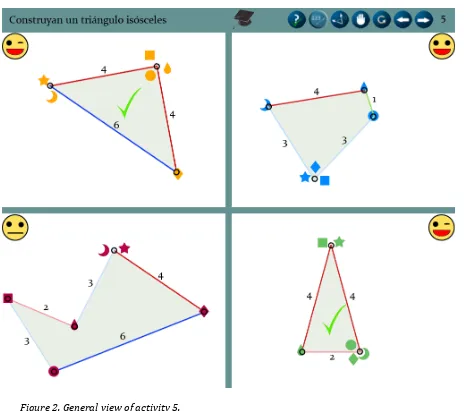
The screen is divided into four separate working areas, Figure 2. Students are able to move around freely within the working area of their group but they cannot leave their quadrant. Teachers can move their cursor – in the form of a graduate hat – anywhere on the screen and have more options than the students since they play a major part in controlling the class flow- and the students’ learning process. The menu at the top of the screen allows the teacher to choose a specific type of activity, demonstrate information, or freeze all the mice.
Figure 2. General view of activity 5.
As shown in Figure 2, the screen is composed of four elements:
1. Instruction: on the top left side of the screen the assignment is provided. At all times students can see what they have to accomplish.
explained in Table 1)
.
To the left of this a set of buttons can be found that is only accessible for teachers and that allows them, from right to left, to: go to the next or previous activity or slide, stop the movement of all cursors, restart the activity with all cursors set to their initial position, and provide students with additionalinformation like showing the angles, showing the length of the sides, or showing the correct answer.
3. Group workspace: four workspaces are defined in which students can freely move their mice within their assigned quadrant to perform their activities.
4. Group feedback: a smiley at the outer top corner indicates how good each group is performing. The face has eight different states; at the start of every activity it is neutral and it becomes happier when students get closer to their goal, see Figure 3.
Figure 3. Feedback smileys.
When the goal of building the assigned triangle is reached the smiley winks and after a few seconds a check appears in the centre of the workspace to indicate that the activity has been finished correctly. Only positive feedback is given because, as opposed to negative feedback, this stimulates eight- and nine year old students, makes them perform more accurate, and activates parts of their brain (dorsolateral prefrontal cortex and superior parietal cortex) responsible for motor planning, organization, and regulation (van Duijvenvoorde, Zanolie, Rombouts, Raijmakers, & Crone, 2008). The face is placed in the outside corner of the screen to limit
boys and girls – often view participating in a competition as being more important than the actual learning (Heimerl, Vasudev, Buchanan, Parikh, & Brewer, 2010). Teaching geometry
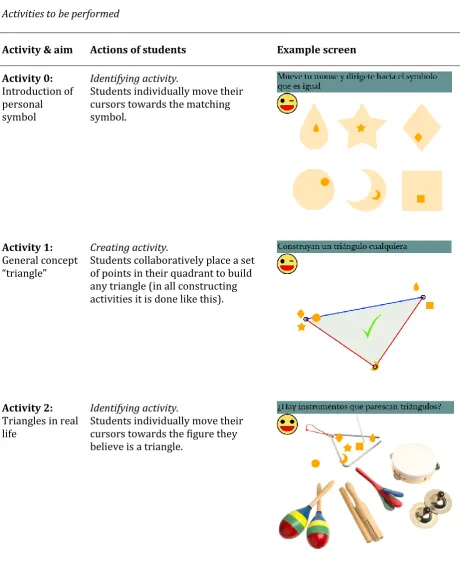
SDGT was developed to aid learning about triangles for third grade students. In order for this application to be suitable for the educational system, it needed to fit the curricular demands. Based on these demands regarding topics to be taught, extracted from the Ministry of Education of Chile (MINEDUC, 2011), an orchestrated program for four sessions of 45 minutes as explained in the following section “Classroom orchestration” was created, and provided and explained to the teacher in order for her to follow the instructions. The main operations third-grade students needed to be able to perform were the identification and construction of triangles, which were also the two main types of activities. In constructing activities students collaboratively place a set of points in the 2D space that satisfies a specific geometric condition. In identifying activities each student individually selects an object and stays there until all members of the group are pointing to the objects that satisfy the given condition.
contain multiple challenges that are similar to each other but in which numbers or other small things have been adjusted in order for students to get more opportunities to practice the activity. Activities 2, 4, and 6 have different levels of difficulty; each challenge within these activities is slightly more difficult than the previous one.
Table 1
Activities to be performed
Activity & aim Actions of students Example screen
Activity 0: Introduction of personal symbol
Identifying activity.
Students individually move their cursors towards the matching symbol.
Activity 1: General concept “triangle”
Creating activity.
Students collaboratively place a set of points in their quadrant to build any triangle (in all constructing activities it is done like this).
Activity 2: Triangles in real life
Identifying activity.
Activity 3: Different parts of a triangle
Creating activity.
Students collaboratively build a triangle. After the triangle is solid they individually move their cursors towards a specific part of the triangle; the sides, the vertexes, or the angles.
Activity 4: Classification of triangles based on the number of sides
Identifying activity.
Students individually move their cursors towards the figure they believe is the correct type of triangle (equilateral, isosceles, or scalene).
Activity 5: Construction of specific types of triangles
Creating activity.
Students collaboratively construct a given type of triangle (equilateral, isosceles, or scalene).
Activity 6: Construction of triangles with given lengths of sides
Creating activity.
Classroom orchestration
In order to guide teachers in the integration of the software into their teaching practices, an orchestration was defined (Nussbaum, Dillenbourg, Fischer, Looi, & Roschelle, 2011) for all of the topics regarding triangles. The six activities, as defined in Table 1, were alternated with slides that allowed the teacher to define concepts that the students worked with immediately after. Table 2 describes the corresponding orchestration for the activity “triangles according to their sides”.
First of all, students needed to practice the concept of triangles by identifying abstract geometric objects and triangles in real life. In a second stage, the concept needed to be defined by the teacher together with the students. A group discussion was welcome to talk about the concepts and to clarify any unclear concepts. Finally, students needed to participate in exercises to practice their knowledge and apply it to new situations.
This orchestration was printed out and handed over to the teacher. Furthermore, the teacher received oral instructions as to how to use the orchestration.
As Table 2 illustrates, the orchestration contained five elements: the session during which the activity is carried out; the time the teacher must allow the students to work on a (sub) activity or instruction; the objective of the sub activity; the instructions the students need to receive in order to carry out the sub activity, and the explanation of the sub activity for the teacher. Table 2 shows a part of the orchestration, starting with Activity 4 (Table 1): identifying types of triangles according to the number of equal sides they contain. Once the first sub activity had been carried out, the teacher was asked to present a PowerPoint slide in order to
Table 2
Orchestration for identification of triangles based on their sides, described in Table 1
Session Time Objective Student
instructions Teacher explanation
2 5 min To identify triangles according to the number of equal sides they have.
Collaboratively identify triangles that have 3 equal sides, 2 equal sides, or no equal sides.
Indicate that triangles can be classified according to their sides. Ask students to
identify triangles with 3, 2, or no equal sides. Show
different types of triangles using the software, to identify triangles according to their sides.
3 min To show the classification of triangles according to their sides: equilateral, isosceles, and scalene.
Recognize the different
classifications of triangles
according to their sides.
Show the “Classification of triangles” PowerPoint
presentation, while analysing the corresponding
classification.
7 min To ask the students to build different
triangles at the
system’s request. They will be asked to build isosceles, scalene and equilateral triangles, using the software.
Build different
types of triangles. Tell to collaboratively build an isosceles, scalene, and equilateral triangle.
Meeting the conditions for whole-class interactive instruction
In order to create a classroom environment in which whole-class interactive instruction can work, certain conditions must be met as mentioned in the Introduction. Below, the conditions are provided, accompanied by the manner in which they were met in the study.
1. Students were provided with acommon goal. All students from one group received the same instructions and they all had to carry out the same operation (constructing or identifying triangles).
3. Students were givenjoint rewards or punishments.Everyone worked for the same purpose and received the same feedback. Success or failure depended on the entire group and accordingly rewards or punishments were given to all group members in the form of smiley faces and comments of the teacher.
4. Students wereaware of their peers’ work.Considering that all students shared the same display, they could see what their peers were doing at all times. Groups could also see the performance of other groups.
5. There wasgood coordination and communication between peers.In order to be able to create triangles students needed to work together since they were only able to place one point each to create the figure. It was necessary for students to communicate and coordinate, which could be done silently during the activity by moving their cursors. Verbal communication took place in the group discussions held by the teacher. 6. Peers supported each other. The teacher encouraged the students to support each
other and to respect each other when this wouldn’t occur naturally.
7. Students wereindividually accountablefor their own work. Each student was accountable for their own cursor, without which the group as a whole could not succeed. The result of each peers’ actions was reflected in the feedback face that changed mood according to the number of students that were in the correct place. Because of the individual symbol that was assigned to every student, the teacher was able to see who was doing well, who was struggling and who was disrupting the lesson.
Experimental design
Two groups were included in the study: a group that learned with SDGT (experimental group) and a group that followed the regular lessons (control group). They were made up of 8-9 year old students from two third grade classes of a private school in Santiago, Chile. Both groups had similar average math scores and were taught by their own teachers in their usual
topics to be taught and the time they had to spend on each activity. In addition, the teacher of the experimental group received a classroom orchestration and a short course regarding the to be used software.
Participants
A total of 55 students participated in the experiment (27 in the control group and 28 in the experimental group). However, after eliminating students who missed a test, 42 students were included in the sample (23 girls and 19 boys); 20 students formed the experimental group (11 girls and 9 boys), and 22 students formed the control group (12 girls and 10 boys).
Knowledge test: pre- and (delayed) post-test
about the rules that apply to the lengths of the sides of triangles in general (Q12, Q13, Q14), taught with Activity 6. In these questions three or four lengths of sides were given and they had to tell whether or not using all of these sides could make a triangle. Students could get a
maximum score of 24 points for the test; they received one point for each (sub) question they answered correctly and no points when they answered a (sub) question wrongly. To determine the reliability of the test beforehand the instrument it was administered to fifth grade students (N=53) from another school who had already learned about the concepts. This school had the same characteristics as the school where the investigation was carried out. Based on the results, Cronbach’s Alpha was calculated for each part of the test and values ranged between 0.66 and 0.80, which is considered acceptable to good.
Procedure
The teachers had a large share in the study. They received instructions regarding the activities on paper and the teacher of the experimental group received additional face-to-face instructions regarding the classroom orchestration. Since the teacher of the control group was meant to teach the students in the traditional manner, this face-to-face instruction was not necessary. Furthermore, the software was explained and shown to the teacher in the experimental condition during a short introductory course after which a small instructional guide was handed to her.
Before the experiment took place a pre-test, as explained in the previous section, was
the experimental group did not know with whom they shared a working area. This was done to keep the symbols and colours of the students anonymous every session, allowing us to analyse silent communication patterns without the interference of personal verbal communication. Since students in the control group did not work in working groups, this was only done for the experimental group.
After taking the pre-test both groups participated in four sessions of 45 minutes each. The experimental group received participative instruction regarding learning about the triangular concepts, as mentioned before, with the help of the software that was specifically designed for this study. The control group had regular classes with the traditional teaching method and was taught the same topics as the experimental group. The sessions were carried out on four different days during one week. At the end of the last session a post-test was taken by the experimental group to measure the obtained knowledge, and a week later students took a delayed post-test to be able to calculate whether the knowledge they obtained during the sessions was still present. Due to unforeseen circumstances, the post-test could not be taken by the control group, which is why students in the control group only did the pre- and delayed post-test.
Process measures
Qualitative aspects of the processes that occurred in the experimental group were captured through observations. First, five cameras were used to record all the students and the screen. Also, four people were present to observe six or seven students each. Every observer had a tablet computer allowing him/her to count the times (s)he saw any of the following behaviours: fatigue, consisting of exhaustion, boredom or disruption; competition, consisting of pressure to give an answer, or insults between students; interaction, or speaking among peers; individual or group feedback from the teacher; and students speaking to themselves.
correctly. The log also recorded the class dynamics, i.e., the moment when each slide was shown and the exact starting time for each activity.
In this report, only the results of the knowledge test and the analysis of behavioural patterns on the screen are discussed, since this was the individual work of the author.
Results
Quantitative analysis
To determine whether students in the experimental group gained more knowledge
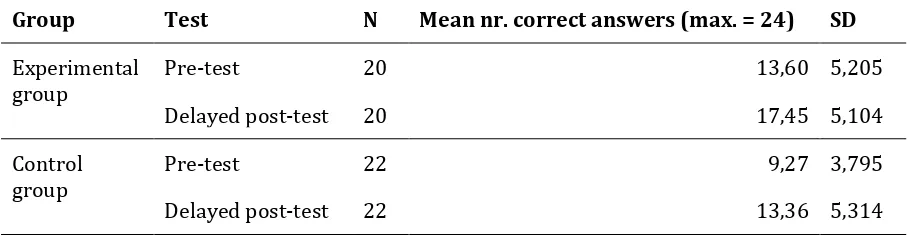
[image:21.595.65.520.641.759.2]regarding the subjects being taught over the course of the experiment than the control group, a one-way repeated measures ANOVA was conducted with the pre-test and the delayed post-test as time measures. Table 3 shows the means and standard deviations of the experimental- and control group. There was a significant effect for time, Wilks’ Lamba = .60, F(1, 40)-26.74, p<0.0005, multivariate η2 = .401, meaning that there was a significant increase in students’ test scores from pre- to delayed post-test in both groups. The multivariate effect size is well above .14 and is therefore considered a large effect size (Pallant, 2001, p. 175), meaning that a large proportion of the variance is explained by time. However, this increase was not significantly more in the experimental group than in the control group, Wilks’ Lamba = 1.0, F(1,40)-0.03, p = 0.88, multivariate η2 = .001. It must be noted that, even though the experimental group did not have a statistically significant higher increase in scores from pre-test to delayed post-test, the experimental group did have statistically significant higher scores on both the pre-test (p=0.004) as the delayed post-test (p=0.015) than the control group.
Table 3
Descriptive statistics for gain of learning with scores for the pre- and delayed post-test
Group Test N Mean nr. correct answers (max. = 24) SD
Experimental
group Pre-test 20 13,60 5,205
Delayed post-test 20 17,45 5,104
Control group
Pre-test 22 9,27 3,795
Qualitative analysis
A detailed analysis of the videos was performed on the activities that were carried out by the students. To score students’ activities a rubric of behavioural patterns was developed. A
distinction was made between patterns in which students collaborated and in which they were not. Table 4 displays patterns that students performed individually; Table 5 displays the collaborative patterns. A pattern is identified when a type of behaviour was shown in multiple activities and when more than one student showed this type of behaviour. Detailed descriptions of the behaviours were created, after which the number of activities these behaviours occurred in was counted. Moreover, since there were four working groups a type of behaviour could be counted four times per activity. Also, more than one pattern could be found in a given activity, which is why percentages may add up to more than 100% in Tables 4 and 5. The full analysis was performed by one observer. A second observer analysed 12,5% of the sub activities, of which two were identifying activities and two were constructing activities. The observers agreed on the occurrence of the patterns 87% of the times. An interrater reliability for the observers was found to be Cohen’s Kappa = 0.54 (p<0.001), which is considered a statistically significant moderate agreement (Landis & Koch, 1977).
Table 4 summarizes and explains non-collaborative patterns. It is interesting to note that differences were observed in patterns depending on the type of activity (identification or construction). For example, the pattern “Independent work” was observed in 67% of the identifying activities, while it only appeared in 17% of the constructing activities. This pattern was observed more often in the first activities of the experiment and decreased as the
coordination”. In three out of the five non-collaborative patterns that were identified, occurrences were greater in identification activities.
Table 4
Non-collaborative patterns observed and their occurrence in the number of tasks in percentages
Pattern Overall occurrence activities
(%)
Identification Construction
Independent work: in a few seconds, all the students move to the correct position on the screen without mediation or collaboration.
67 17
Copy peer’s pattern: students copied each other or
contemplated in conformity 33 23
Trial and error: relying on the feedback provided by the software (smiley face), students moved to a figure on the screen to see whether it was correct or not
33 -
Lack of coordination: students didn’t seem to be working
together to create a triangle - 31
Table 5
Collaborative patterns observed, and their occurrence
Pattern Overall occurrence in
activities (%)
Identification Construction
Collaboration by marking the correct place on the screen: students helped each other by indicating the correct position on the screen.
16 8
Collaboration by marking their peers: students who knew the correct answer helped their classmates by marking (sliding over) them when they were in the wrong position.
11 6
Collaboration by marking the peer who is in the wrong place and then moving to the correct location: students not only let their classmates know that they were in the wrong position; they also showed them the right place to go to in order to achieve the goal.
29 50
Coordination to create three vertexes: students moved among themselves to create vertexes, but without trying to change the shape of the figure.
- 35
Coordination to create the correct triangle: students began by creating the three vertexes and then each group of
students, together at a vertex, slowly moved to change the triangle and to achieve the goal.
- 46
All students adapt to one person: students moved towards the cursor that was keeping them from reaching the goal of the activity, and they built the required triangle from there.
- 8
Collaboration is essential in constructing activities because it is impossible to create a triangle with just one vertex. As the activities progressed, there was an increase in the occurrence of the “Coordination to create three vertexes” and “Coordination to create the correct triangle”
wrong place and then moving to the correct location”, because it mainly occurred in construction activities.
Conclusion and discussion
This work revolved around classroom collaboration in a participative instructional setting. The teacher introduced concepts to the students and together the students were encouraged to build knowledge regarding these concepts with the help of a SDG for Triangles software
program and whole-class discussions to make sure that the material was clear for all the students in the class. Students worked together in four groups of six to seven on one big screen that was divided in four working areas – one for each group –, whilst each individual was equipped with a mouse. Together they gained knowledge about different types of triangles and the rules that applied to them by participating in identifying and constructing activities.
We were especially interested in behavioural patterns that would emerge on the screen in a setting in which students needed to collaborate with each other to fulfil assignments, but were not always able to communicate verbally because of seating arrangements leading to alternative ways of communicating silently. An analysis of behavioural patterns performed in this study provided new insights in “silent collaboration”, as introduced by Szewkis, et al. (2011). It was demonstrated that silent collaboration occurs naturally and that students are keen to find ways to help each other without being seated next to each other and without verbal communication.
frustrating more proficient users”. However, even though more proficient users were less frustrated in the Majority model, less proficient users have no control and are not encouraged to participate since the group will continue even when not everyone understands the subject matter. Further research is necessary in order to make students progress together without frustrating more, or less, proficient users and without leaving any student behind.
A second interest we had was in the knowledge gain by students using the proposed instructional design, also compared to more traditional methods of teaching. A control group was created that was taught exactly the same concepts as the experimental group and that had to take a pre-, post-, and delayed post-tests as well in order to measure their initial knowledge and their gained knowledge after being taught the concepts. It was expected that the
experimental condition would have a positive effect on learning. Results showed a significant learning effect in both groups, but the experimental group did not gain significantly more knowledge than the control group.
Some factors might have influenced these results. First of all, the pre-test scores of the experimental group were significantly higher than the pre-test scores of the control group. Due to these differences, there was more knowledge to gain for students in the control group than for students in the experimental group. Consequently, even though students in the experimental group had a higher average score on the delayed post-test, they had not gained significantly more knowledge in the course of the experiment than students in the control group.
A factor which might have lead to the higher delayed post-test scores of the experimental group, is that this group took three tests – pre-, post-, and delayed post-test – whereas the control group only took two tests – the pre- and delayed post-test – due to some unforeseen circumstances. Because the tests they took were exactly the same, the experimental group might have had an advantage over the control group since they took the test once more.
female teacher in the experimental group and a male teacher in the control group – and teaching style can influence the results. In future research this can be resolved by conducting the
experiment in a school with two or more classes both taught by the same teacher.
References
Axelrod, R., & Hamilton, W. D. (1981). The evolution of cooperation. Science, 211, 1390-1396. doi: 10.1126/science.7466396
DfEE. (2001). Key stage 3 national strategy: Framework for teaching mathematics: Years 7, 8 and 9. Cambridge: Cambridge University Press.
Dillenbourg, P. (1999). What do you mean by collaborative learning? In P. Dillenbourg (Ed.),
Collaborative-learning: Cognitive and Computational Approaches. (pp. 1-19): Oxford: Elsevier.
Erez, M.M., & Yerushalmy, M. (2007). “If you can turn a rectangle into a square, you can turn a
square into a rectangle ...” Young students experience the dragging tool. International Journal of Computers for Mathematical Learning, 11, 271-299. doi:
10.1007/s10758-006-9106-7
Graham, T., Rowlands, S., Jennings, S., & English, J. (1999). Towards whole-class interactive teaching. Teaching Mathematics and its Applications, 18, 50-60. doi: 10.1093/teamat/18.2.50
Gutwin, C., & Greenberg, S. (2001). The importance of awareness for team cognition in distributed collaboration. (Vol. 696): Department Computer Science, University of Calgary, Alberta, CANADA.
Heimerl, K., Vasudev, J., Buchanan, K. G., Parikh, T., & Brewer, E. (2010). Metamouse: Improving multi-user sharing of existing educational applications. Paper presented at the International
Conference on Information and Communication Technologies and Development, London. Infante, C., Hidalgo, P., Nussbaum, M., Alarcón, R., & Gottlieb, A. (2009). Multiple mice based
collaborative one-to-one learning. Computers & Education, 53, 393-401. doi: 10.1016/j.compedu.2009.02.015
Inkpen, K.M., Ho-Ching, W., Kuederle, O., Scott, S.D., & Shoemaker, G.B.D. (1999). "This is fun! We’re all best friends and we’re all playing.": Supporting children’s synchronous collaboration.
Janssen, J., Erkens, G., Kanselaar, G., & Jaspers, J. (2007). Visualization of participation: Does it
contribute to successful computer-supported collaborative learning? Computers & Education, 49, 1037-1065. doi: 10.1016/j.compedu.2006.01.004
Johnson, D. W., & Johnson, R. T. (1999). Making cooperative learning work. Theory into Practice, 38, 67-73. doi: 10.1080/00405849909543834
Landis, J. R., & Koch, G. G. (1977). The measurement of observer agreement for categorical data. Biometrics, 33, 159-174. doi: 10.2307/2529310
Lowyck, J., Poysa, J., & van Merriënboer, J. J. G. (2003). Conditions of ICT-based design for learning communities. In P. Attewell & N.M. Seel (Eds.), Disadvantaged Teens and Computer Technologies. Münster: Waxmann Verlag GmbH.
Malone, T.W., & Crowston, K. (1990). What is coordination theory and how can it help design cooperative worksystems? Paper presented at the Proceedings of the 1990 ACM conference
on computer-supported cooperative work., Los Angeles, California, United States.
MI E . (20 ). Matem tica educaci n sica - Bases curriculares.
Moraveji, N., Kim, T., Ge, J., Pawar, U. S., Inkpen, K., & Mulcahy, K. (2008). Mischief: Supporting remote teaching in developing regions. CHI 2008: 26th Annual Chi Conference on Human Factors in Computing Systems Vols 1 and 2, Conference Proceedings, 353-362. doi:
10.1145/1357054.1357114
Muijs, D., & Reynolds, D. (2000). School effectiveness and teacher effectiveness in mathematics: Some preliminary findings from the evaluation of the mathematics enhancement programme (primary). School Effectiveness and School Improvement, 11, 273-303. doi: 10.1076/0924-3453(200009)11:3;1-g;ft273
Muijs, D., & Reynolds, D. (2001). Effective teaching: Evidence and practice. London: Paul Chapman Publishing.
Pallant, J. (2001). SPSS survival manual: A step-by-step guide to data analysis using SPSS for Windows (Version 10): Open University Press.
Pavlovych, Andriy, & Stuerzlinger, Wolfgang. (2008). Effect of screen configuration and interaction devices in shared display groupware. Paper presented at the Proceedings of the 3rd ACM
international workshop on Human-centered computing, Vancouver, British Columbia, Canada.
Pawar, U. S., Pal, J., Gupta, R., & Toyama, K. (2007). Multiple mice for retention tasks in
disadvantaged schools. Conference on Human Factors in Computing Systems, Vols 1 and 2, 1581-1590. doi: 10.1145/1240624.1240864
Reynolds, D., & Farrell, S. (1996). Worlds apart? A review of international surveys of educational achievement involving England. London: HMSO for OFSTED.
Scott, S. D., Mandryk, R. L., & Inkpen, K. M. (2003). Understanding children's collaborative
interactions in shared environments. Journal of Computer Assisted Learning, 19, 220-228. doi: 10.1.1.84.8139
Slavin, R.E. (1990). Cooperative learning. Boston: Allyn & Bacon.
Slavin, R.E. (1996). Research on cooperative learning and achievement: What we know, what we need to know. Contemporary Educational Psychology, 21, 43-69. doi:
10.1006/ceps.1996.0004
Szewkis, E., Nussbaum, M., Rosen, T., Abalos, J., Denardin, F., Caballero, D., . . . Alcoholado, C. (2011). Collaboration within large groups in the classroom. International Journal of Computer-Supported Collaborative Learning, 6, 561-575. doi: 10.1007/s11412-011-9123-y
Tarim, K. (2009). The effects of cooperative learning on preschoolers’ mathematics pro lem-solving ability. Educational Studies in Mathematics, 72, 325-340. doi: 10.1007/s10649-009-9197-x van Duijvenvoorde, A. C. K., Zanolie, K., Rombouts, S. A. R. B., Raijmakers, M. E. J., & Crone, E. A.
feedback-based learning across development. Journal of Neuroscience, 28, 9495-9503. doi: 10.1523/Jneurosci.1485-08.2008
Zagal, J. P. (2006). Collaborative games: Lessons learned from board games. Simulation & Gaming, 37, 24-40. doi: 10.1177/1046878105282279
Annex 1
Pre- and post-test Spanish
Test de triángulos
.
Responde todas las preguntas según lo que creas es correcto.
1.
¿Cuál de las siguientes figuras es un triángulo?
1
2
3
4
a.
Ninguna de los anteriores
b.
Sólo 1
c.
Sólo 2
d.
Sólo 3 y 4
e.
Sólo 2 y 3
2.
Hay distintos tipos de triángulos dependiendo de sus lados.
b.
Encierra todos los triángulos escalenos
3.
¿Cómo puedes reconocer un triángulo equilátero?
a.
Todos los lados y ángulos son iguales
b.
Todos los lados y ángulos son distintos
c.
Dos lados y dos ángulos son iguales
d.
Ninguna de las anteriores
4.
Más abajo se encuentra una figura que tiene lados, ángulos y vértices.
Escribe la letra que representa un:
Lado: ________
Vértice: ________
Ángulo: ________
5.
Hay distintos tipos de triángulos según de sus lados.
a.
Dibuja un triángulo equilátero y señala la medida de sus lados
b.
Dibuja un triángulo escaleno y señala la medida de sus lados
6.
Un triángulo tiene lados de longitud 2 cm, 3cm y 4 cm. ¿Qué tipo de triángulo es?
a.
Triángulo equilátero
b.
Triángulo isósceles
c.
Triángulo escaleno
7.
¿Qué es cierto en todos los triángulos escalenos?
a.
Los tres lados deben tener la misma longitud
b.
Tiene que haber al menos dos ángulos con la misma medida
c.
Los tres ángulos deben tener la misma medida
d.
Los tres lados deben ser distintos
8.
Un triángulo tiene un lado de longitud 5 cm y otro de 7 cm. ¿Cuánto debe medir, como
máximo, el lado mayor?
R: _______________
9.
Un triángulo tiene un lado de longitud 2 cm y otro lado de 4 cm. ¿Cuánto debe medir
el tercer lado para que se pueda construir un triángulo isósceles?
¡Hay dos respuestas correctas, pero sólo debes escribir una!
R: _______________
10.
¿Qué tipo de triángulo se puede crear con lados de longitud 6 cm, 6 cm y 6 cm?
a.
Triángulo isósceles
b.
Triángulo equilátero
c.
Triángulo escaleno
d.
No es posible crear un triángulo de lados 6cm, 6cm y 6cm
11.
¿Qué tipo de triángulo se puede crear con lados de longitud 7 cm, 7cm y 12 cm?
a.
Triángulo escaleno
b.
Triángulo equilátero
c.
Triángulo isósceles
12.
¿Puedes construir un triángulo con todos estos lados: 4 cm, 3 cm, 6 cm y 7cm?
a.
Sí
b.
No
13.
¿Puedes construir un triángulo con lados de longitud 7 cm, 6 cm y 5 cm?
a.
Sí
b.
No
14.
¿Puedes construir un triángulo con lados de longitud 9 cm, 7 cm y 1 cm?
a.
Sí
b.
No
15.
¿Son los dos triángulos de abajo del mismo tipo?
a.
Sí, los dos son triángulos equiláteros
b.
Sí, los dos son triángulos escalenos
c.
No, uno de ellos es un triángulo escaleno y el otro es un triángulo equilátero
d.
No, uno de ellos es un triángulo equilátero y el otro es un triángulo isósceles
16.
¿Son los dos triángulos de abajo del mismo tipo?
a.
Sí, los dos son triángulos equiláteros
b.
Sí, los dos son triángulos isósceles
c.
No, uno de ellos es un triángulo escaleno y el otro es un triángulo isósceles
17.
Marca tres triángulos en la fotografía:
Annex 2
Pre- and post-test in English
Triangles test.
Give the answers that you think are the correct ones.
1. Which of these are triangles?
1 2 3 4
a) None of these b) Just 1
c) Just 2 d) Just 3 and 4 e) Just 2 and 3
There are different kinds of triangles based on their sides.
2b.Encircle all of the scalene triangles
3. How can you recognize an equilateral triangle? a) All the sides and angles are equal
b) All the sides and angles are different c) Two sides and two angles are equal d) None of the above
4. Below you can find a figure with sides, angles and vertexes.
Write the letter that represents a:
a) Side: ________ b) Vertex: ________ c) Angle: ________
5. There are different types of triangles based on their sides.
5a. Draw an equilateral triangle and write down the lengths of the sides
5b.Draw a scalene triangle and write down the lengths of the sides
6. A triangle has sides with the length of 2 cm, 3cm and 4 cm. What type of triangle is this? a) Equilateral triangle
b) Isosceles triangle c) Scalene triangle
7. What is true in every scalene triangle?
a) The three sides must have the same length
b) There must be at least two angles with the same measure c) The three angles must have the same measure
d) The three sides all have to be different
8. A triangle has one side of 5 cm and one of 7 cm. How long can the last side be at most?
R: _______________
9. A triangle has one side of 2 cm and one of 4 cm. How long must the third side be to create an isosceles triangle?
There are two correct answers, but you only need to give one!
R: _______________
10.What type of triangle can be created with sides of 6 cm, 6 cm and 6 cm? a) Isosceles triangle
b) Equilateral triangle c) Scalene triangle
d) It is not possible to create a triangle with sides of 6 cm, 6 cm and 6 cm 11.What type of triangle can be created with sides of 7 cm, 7 cm and 12 cm?
a) Scalene triangle b) Equilateral triangle c) Isosceles triangle
12.Can you create a triangle with all of the following sides: 4 cm, 3 cm, 6 cm and 7 cm? a) Yes
b) No
13.Can you create a triangle with sides of 7 cm, 6 cm and 5 cm? a) Yes
b) No
14.Can you create a triangle with sides of 9 cm, 7 cm and 1 cm? a) Yes
b) No
15.Are the two triangles below the same types of triangles? a) Yes, they are both equilateral triangles
b) Yes, they are both scalene triangles
c) No, one of them is a scalene triangle and the other is an equilateral triangle d) No, one of them is an equilateral triangle and the other is an isosceles triangle
16.Are the two triangles below the same types of triangles? a) Yes, they are both equilateral triangles
b) Yes, they are both isosceles triangles
17.Mark three triangles in the photo: