Analysing Web-based Malware Behaviour
through Client Honeypots
A thesis submitted in partial fulfilment of the requirement for the degree of
Doctor of Philosophy
Yaser Alosefer
February 2012
Cardiff University
Declaration
This work has not been submitted in substance for any other degree or award at this or any other university or place of learning, nor is being submitted concurrently in candidature for any degree or other award.
Signed . . . (candidate) Date . . .
Statement 1
This thesis is being submitted in partial fulfilment of the requirements for the degree of PhD. Signed . . . (candidate)
Date . . .
Statement 2
This thesis is the result of my own independent work/investigation, except where otherwise stated. Other sources are acknowledged by explicit references. The views expressed are my own.
Signed . . . (candidate) Date . . .
Statement 3
I hereby give consent for my thesis, if accepted, to be available for photocopying and for inter-library loan, and for the title and summary to be made available to outside organisations. Signed . . . (candidate)
i
Abstract
With an increase in the use of the internet, there has been a rise in the number of attacks on servers. These attacks can be successfully defended against using security technologies such as firewalls, IDS and anti-virus software, so attackers have developed new methods to spread their malicious code by using web pages, which can affect many more victims than the traditional approach. The attackers now use these websites to threaten users without the user’s knowledge or permission. The defence against such websites is less effective than traditional security products meaning the attackers have the advantage of being able to target a greater number of users.
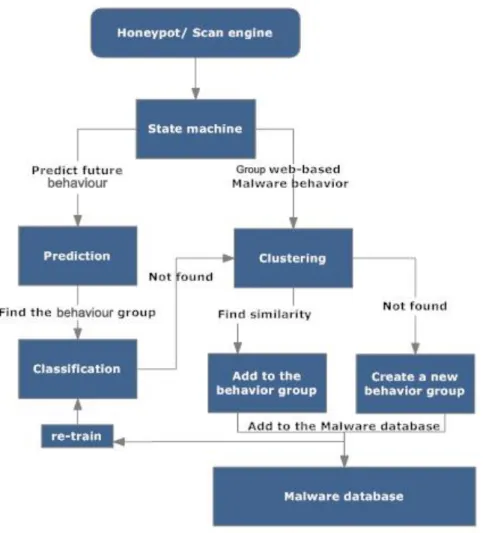
Malicious web pages attack users through their web browsers and the attack can occur even if the user only visits the web page; this type of attack is called a drive-by download attack. This dissertation explores how web-based attacks work and how users can be protected from this type of attack based on the behaviour of a remote web server. We propose a system that is based on the use of client Honeypot technology. The client Honeypot is able to scan malicious web pages based on their behaviour and can therefore work as an anomaly detection system. The proposed system has three main models: state machine, clustering and prediction models. All these three models work together in order to protect users from known and unknown web-based attacks.
This research demonstrates the challenges faced by end users and how the attacker can easily target systems using drive-by download attacks. In this dissertation we discuss how the proposed system works and the research challenges that we are trying to solve, such as how to group web-based attacks into behaviour groups, how to avoid attempts at obfuscation used by attackers and how to predict future malicious behaviour for a given web-based attack based on its behaviour in real time. Finally, we have demonstrate how the proposed system will work by implementing a prototype application and conducting a number of experiments to show how we were able to model, cluster and predict web-based attacks based on their behaviour. The experiment data was collected randomly from online blacklist websites.
ii
Acknowledgements
During the time of writing of this PhD thesis I received support and help from many people. In particular, I am thankful to my supervisor, Prof. Omer Rana, who was very generous with his time and knowledge and assisted me in each step to complete the thesis.
I would like to thank Dr. Peter Komisarczuk and Mr Damian Southard who helped me with the experimental data and the use of Honeypot, without their help and support I could not complete my research.
I am grateful to all my friends for their encouragement and friendship. To them and to the other friends I met in Cardiff University, Ioan Petri, Sultan Alyahya, Marco Lackovic, Rafael Tolosana, Sathish Periyasamy, Adrien Maglo, Ricardo Rodríguez, Ahmad Alqoud, Ahmed Alazzaw, Waleed AlNuwaiser, René Brunner, Khalid Almuzaini, Haya AlMagwash, Shada Alsalamah and Yulia Cherdantseva, goes my deepest gratitude for the intellectual and cultural growth they have provided me.
And finally, but not least, thanks go to my whole family, who have been an important and indispensable source of moral support, especially my mother, father and wife, whose precious presence has been vital to the achievement of this goal.
iii
Table of Contents
1 Introduction 1
1.1 Honeypot 3
1.2 Research Hypothesis 4
1.3 Research Aims and Objectives 5
1.4 Research Questions 6
1.5 Overview of the Thesis 8
1.6 Publications 9
2 Background 12
2.1 Web-based Malware 12
2.1.1 Malware sources 14
2.1.2 Malware types 15
2.1.3 Web-based malware tools 16
2.2 Honeypot 17
2.3 Active Honeypots (Client Honeypots) 19
2.3.1 Client Honeypot architecture 20
2.3.2 Low-interaction client Honeypot 21
2.3.3 High-interaction client Honeypot 21
iv
2.3.5 High-interaction client Honeypot tools 23
2.3.6 High-interaction client Honeypot challenges 25
3 Literature review 27
3.1 Malware analysis 27
3.1.1 Static analysis 27
3.2.2 Dynamic analysis 29
3.2 Malware modelling and representations 36
3.3 Malware detection 39
3.3.1 Hidden Markov Model (HMM) for malware analysis and detection
42
4 Automated State Machine 47
4.1 web-based attack behaviour models 49
4.1.1 The motivation of web based attacks 49
4.1.2 The state order 50
4.1.3 The challenges 51
4.1.4 web-based modeling methods 52
4.2 State Machine 53
4.2.1 State Machine types 54
4.2.2 Finite state machine modeling for web-based attacks 54
4.2.3 4.2.3 A client Honeypot with a state machine 57
4.2.4 Monitoring and detection tools 58
4.2.5 An example of drive-by download attack 59
v
4.3 Summary and Discussion 68
5 Clustering model 69
5.1 Clustering model overview 69
5.1.1 The motivation of web based attacks clustering 70
5.1.2 Clustering methodology types 71
5.1.3 Clustering model based on FSM 72
5.2 Clustering model 73
5.2.1 FP-growth clustering model 73
5.2.2 FP-growth clustering methodology 74
5.2.3 FP-growth clustering algorithm 75
5.2.4 FP-growth clustering groups 76
5.2.5 FP-growth evaluation 78
5.3 Summary and Discussion 80
6 Prediction model 82
6.1 Prediction model overview 84
6.1.1 Prediction model methodology 85
6.1.2 Prediction algorithm 85
6.1.3 Implementation 90
6.2 Classification 92
6.3 Summary and Discussion 93
7 Evaluation and Usage 95
vi
7.1.1 The motivation of Honeyware 97
7.1.2 Overcoming client Honeypot challenges 97
7.1.3 Honeyware architecture 99
7.1.4 Honeyware design 101
7.1.5 The Honeyware client 105
7.2 Web-based behaviour model evolution overview 106
7.2.1 Data collection 106
7.2.2 Experiment methodology 106
7.2.3 Experiments 107
7.2.4 The results 112
7.3 Hybrid system 118
7.4 Summary and Discussion 122
8 Conclusion and future work 124
8.1 Evaluating research hypothesis 125
8.2 Answers to the Research Questions and Problems 126
8.2.1 Behaviour states 126
8.2.2 Grouping web-based attacks 127
8.2.3 Predicting malicious behaviour 128
8.3 Contributions and novelty 129
8.3.1 Common behaviour clustering approach 129
8.3.2 Predicting malicious behaviour 129
8.4 Future Work 130
8.4.1 Improvement of the scan engine 130
vii
8.4.3 Client-server model 131
8.5 Web-based Malware Framework 132
86 Lessons Learned 133
8.7 Concluding Remarks 134
viii
List of Figures
1-1 Total number of vulnerabilities by Symantec 2011 5 2-1 The attack pathways from the 2010 data-breach investigations report 14
2-2 Screenshot of MPack. 17
2-3 Client Honeypot architecture. 21
2-4 The Capture-HPC architecture 24
2-5 The Capture-HPC client inside the operating system 24
2-6 Example of obfuscating malicious code 25
2-7 The two types of client Honeypots, their advantages, disadvantages and tools 26
3-1 An overview of malware analysis approaches. 34
3-2 MIST representation 38
4-1 Web-based behaviour system. 48
4-2 The drive-by download attack scenario 52
4-3 The state machine diagram 56
4-4 The processes monitor in action 61
4-5 Port activity after the exploitation of the vulnerability on the user’s machine. 61 4-6 The automated state machine of the CVE-2005-0553 exploit 62
4-7 Snapshot of Capture-HPC log file 63
ix
4-9 The file produced by the state machine tool. 65
4-10 Example of a state machine signature. 65
4-11 Weka graphical output of the 26 malicious web pages 67
5-1 FP-growth clustering 74
5-2 Main and sub-behaviour group of the Trojan.Apher family. 78
6-1 The prediction model overview 86
6-2 An overview idea of the prediction algorithm. 87
6-3 The prediction model interface. 90
6-4 A user interface showing prediction outcomes 91
6-5 Classification model 92
7-1 IP tracking scenario using Honeyware. 98
7-2 Mpack attack methods. 101
7-3 Honeyware architecture. 102
7-4 Honeyware results page 103
7-5 The Honeyware main page. 104
7-6 Communication between Honeyware and its clients. 105 7-7 The state machine model while interacting with malicious web page. 108 7-8 The scan results of Poison Ivy on http://vscan.novirusthanks.org. 109 7-9 The scan results of the encrypted Poison Ivy on http://vscan.novirusthanks.org. 110 7-10 One state machine signature from the malicious web page experiment. 112 7-11 Four state machine signatures from Group ID 1 in Table 7-2. 114 7-12 The prediction scenario for the second experiment. 117
7-13 Experiment results on 4 November. 119
7-14 Experiment results on 8th November. 120
7-15 The antivirus detection results. 121
x
List of Tables
1-1 Total number of vulnerabilities by Symantec 2011 2
2-1 Example of Mpack malware state changes. 22
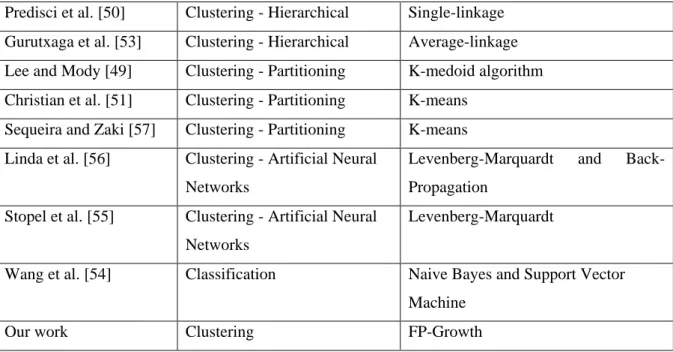
3-1 A comparison between different clustering algorithms and FP-Growth approach. 35 3-2 A comparison between the three malware detection systems 42 4-1 The state transitions table of the finite state machine in Fig 4-1 56
4-2 The state types. 58
4-3 Each monitored activity along with the relevant tools 59
4-4 The state’s characters and descriptions 66
5-1 Example of state machine signatures 70
5-2 Three state machine signatures and their label underlined. 73
5-3 Scan result of the Trojan.Apher family 77
5-4 Three Trojans state machine signatures. 77
5-5 The behaviour groups output from FP-Growth clustering. 79
5-6 The experiment behaviour groups by HAC 80
5-7 A comparison between FP-Growth and HAC. 80
7-1 Web browsers supported by Honeyware with each user agent string. 100 7-2 Number of malicious URLs used in our experiment 108
7-3 The path table of poison ivy. 111
xi
7-5 The third sub-groups from the FP-growth clustering experiment 113 7-6 The third sub-groups from the FP-growth clustering experiment 113 7-7 The variation of states for each malicious stage. 115
7-8 Demonstrating the variations in the next state given the current state and the contents
of the behaviour database 116
7-9 Predicting the next three states experiment results 118
Listings
5-1 The clustering algorithm pseudo-code. 76
6-1 How we select the similar state machine signatures from the malware database 87
6-2 The prediction model pseudo-code. 88
6-3 The forward and backward probability algorithm. 90 7-1 An example of behaviour rule to detect malicious web page 118
Page 1 of 147
Chapter 1
The internet represents a vital resource identifying a collaborative process between organisations and individuals, which can communicate and perform business processes. The internet arose from a research environment, so it was not designed to be a very secure environment. Therefore, various internet users, such as agencies and organizations have been attacked or probed by intruders, with resultant losses to productivity and reputation. In some cases, organizations have decided to disable their internet access and have invested significant resources for improving the security of their internet connection. Internet connectivity offers enormous benefits in terms of increased access to information, but using the internet can become a dangerous experience for those with low levels of security. Major threats of using the internet are problems with TCP/IP services, the complexity of host configuration and vulnerabilities introduced in the software development process.
Internet security appears as a policy for deciding how an organisation or internet user is going to protect themselves against different threats. Within this policy, there are two important parts: (i) a mechanism of protection against internet vulnerabilities and (ii) specific rules implemented in accordance with the context of internet usage.
Before the internet, computer security was restricted to ‘closed systems’ or networked computers in offices or banks, where only users could operate the computer system. Once the internet appeared, computer users were able to work in an ‘open system’, but security became a sensitive aspect. Even though users can connect to the internet and perform remote transactions, there is a security issue involved, as the transaction takes place through the internet by bouncing the information through various computers on the route from user to destination and back again.
Page 2 of 147
There are many researchers, as well as industry, working to improve the level of internet security to organizations and to home users [2]. In the past, most of the attacks used viruses or worms to open a new window, change the wallpaper or pop-up an advertisement, without serious impact to the victim’s system. However, recent attacks use complex and serious malicious methods and exploits to attack the target networks, sponsored by government or by individual attackers. According to the Internet Security Threat report 2011 by Symantec [138], shows the total number of vulnerabilities in Table 1-1:
Year Total number of vulnerabilities
2008 5,562
2009 4,814
2010 6,253
2011 4,989
Table 1-1: total number of vulnerabilities bySymantec 2011 [138].
A study has shown that a successful compromise of a computer with the default installation of Redhat 6.2 occurs within 72 hours. Where a computer has the default installation of Windows XP, it is compromised within 15 minutes [3] [126]. Many aspects have to be made secure to ensure the security of the internet, including hardware, servers and clients. This work is concerned with the client side and the threats that arise out of it. Generally, web attacks are divided into two forms:
1. Server-side attack: The server provides some services, such as Apache HTTP server, which contains vulnerabilities that lead to attacks on that service, including the possible takeover of the whole server. OWASP report [139] provides the top 10 web security attacks, 8 out of 10 top attacks are server attacks such as SQL injection where it compromised the SQL database in order to access unauthorised data.
2. Client-side attack: Here the attacker threatens the client application within the user environment. Examples of client applications are: web browsers, media players (WinZip or RealPlayer) and Microsoft office.
Attackers have preferred client-side attacks in recent years because server-side attacks have been made difficult by the improvement of a wide range of security measures, such as Firewalls and IDS. Therefore, attackers (Blackhats) are attracted to client-side attacks because of the lack of security measures.
Page 3 of 147
1.1 Honeypot
“In warfare, information is power. The better you understand your enemy, the more able you are to defeat him”[4]. In order to defeat attackers, security professionals need to learn and understand the attacker’s methods, tactics, motivation and tools. A Honeypot is defined as a “security resource whose value lies in being probed, attacked or compromised” [5]. An alternative definition is “A program, machine or system put on a network as bait for attackers” [6]. The aim of the Honeypot is to collect data on attacks and attackers by monitoring the machine being attacked. Alternatively, it can emulate the operating system services to detect attacks. Because the Honeypot is a provision made by the owner of the network, it should not receive any internet traffic from the network or the outside world. Consequently, any traffic that comes to the Honeypot could be an attempt to attack or scan the system. Generally, Honeypots are divided into two main types: passive and active Honeypots (client Honeypots). A passive Honeypot involves setting up a vulnerable system or service, or possibly their simulation, and then monitoring activity to detect any attack on the system. The objective of this process is to then improve the security of the operating system and network, as well as gather information about the attacker’s motives and behaviour. By contrast, instead of waiting for attackers passively, an active Honeypot will go and search for the attackers. The Honeypots can be used:
1. By the network administrator, to learn how the attackers are getting into the networked computers, by monitoring attacker methods and exploits when they compromise the Honeypot system.
2. To collect known and unknown malicious codes for analysis by security professionals and companies to release patches or learn new attack methods used.
3. As an easy target for the attackers to compromise. Therefore, it will attract the attacker’s attention while keeping their eyes away from network servers, which are harder targets, meanwhile the network administrator is informed of the attack and able to defend it.
The log files of Honeypot traffic have a high value for the security team and owner of the network because they reveal the traffic of the attacker with a low false positive, compared to a firewall or an Intrusion Detection System (IDS). By using a Honeypot, the effort required to analyse the log files from other security techniques can be avoided.
Page 4 of 147
1.2 Research Hypothesis
Malicious web pages can be detected by using their signature and behaviour. Most of the techniques are based on the signature, such as anti-malware software, or by using a pre-defined list, the blacklist, and then checking if the target web page matches or not. The detection and prediction of malicious web pages based on behaviour is an emerging area and there is limited work on how to build a real detection and prediction model to analyse malicious web pages based on their behaviour and activities on the end-user’s system.
The hypothesis of this research is that monitoring behaviour is a more efficient, safer and accurate approach to detecting web-based malware than a signature-based approach. This thesis has created a number of approaches that can serve to build detection and prediction models. The first method is to encode malicious web page behaviour using a state machine, which is presented in chapter 3. A clustering model is developed that can group similar malicious web pages in order to understand the relationships and similarities between particular web-based malware and others. This clustering model, which is described in chapter 4, can also find additional correspondences by creating sub-groups within each main behaviour group. The objective is to detect malicious web pages through their behaviour and activity on a client. Combining a prediction model with clustering and classification algorithms enables the detection of malicious behaviour at run time and provides a useful way to block web sites without needing to analyse the signatures of malware. The web-based malware behaviour model can be used to analyse, group, detect and predict the activity of a malicious web page within the end user’s environment while the client is surfing the web. Alternatively, it can be used in test environments, such as the Client Honeypot, in order to analyse and predict future behaviour of malicious web pages.
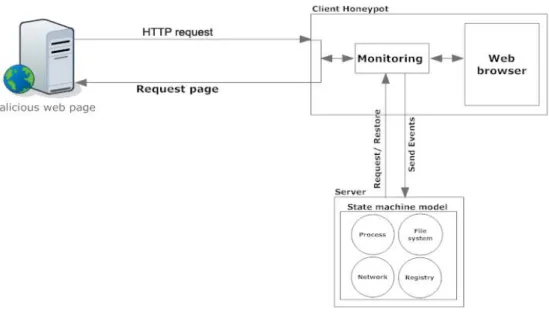
The client Honeypot monitors the web-based malware as it interacts with the end-user's system, interrupts its events and logs them. The events caused by the malicious web page may change the system state in order to compromise it, such as through writing new files or opening a back-door. We encode these events into a state machine in order to understand them and use them with clustering and prediction models. Fig 1-1 shows an overview of how the web-based malware events were monitored.
Page 5 of 147
Fig 1-1: an overview of how the web-based malware events were monitored.
1.3 Research Aims and Objectives
The overall aims of this thesis can be summarised as follows:
“The use of the pre-defined malicious behaviour to detect web-based attacks by predicting future potential malicious behaviour”
The main aims of the thesis are as follows:
Detect malicious web pages based on behaviour which represents actual malicious activity, even when the exploit code has been encrypted and packed.
Provide real-time behaviour analysis of the web-based attack while interacting with a web browser.
Identify and understand similarities between malicious web page exploits and define common characteristics to group them in one behaviour group.
Improve the detection accuracy of Web-based attacks using information from previous attacks.
Page 6 of 147
1.4 Research Questions
Question 1: How does the security analyst, network administrator and end-user interpret the behaviour of a malicious web page?
Malicious websites may cause a number of activities, as explained in chapter 4, to be performed on the victim’s system; each activity is performed in different stages. Therefore, if a malicious website causes three activities, then they will be performed in three stages, represented as three independent states.
An automated state machine has been used to convert the malicious web page stages into pre-defined states. Websites may contain one or more malicious web pages, which can affect the visitors, while the other pages are benign. For this reason the author focuses on the term ‘web page’ as opposed to ‘website’. These states can describe every malicious web page using the same state machine sequence. There will be a pre-defined sequence for any malicious web page, called a “state machine.” The state machine advantages can be summarised as:
System administrator: Helps the system administrator to explore web-based malware activities and protect networked machines, by applying the appropriate patches or reverse malicious states to undo their effects.
Security researcher:
o Creates a pre-defined sequence for any web-based behaviour and activity. o Provides easy and simple states (activities) describing web-based malware
behaviour to security researchers.
End-user:
o Provides a web-based activity to the end-user in a simple and easy way that allows them to understand what malware actually does to a victim’s system. o Provides the ability to explore the activities of current web-based malware
attacking their machine.
Question 2: How can the relationships between different malicious web pages be analysed and displayed, based on their behaviour within the end-user’s system?
To answer this question, two different clustering algorithms were implemented. The clustering algorithms are able to read the state machine signatures, encode malicious web page behaviour
Page 7 of 147
and then group similar malicious web page exploits together. The output of clustering algorithms will be categorized to build up groups of similar web-based malware, which represent the malicious behaviour performed on the victim’s system. The benefit of using this process is to identify families of malicious web pages with similar behaviours (behaviour families). The advantages are:
System administrator: Provide the ability to explore the behaviour steps of based malware attacking the network in order to protect the network from other web-based malware in the same family.
Security researcher:
o Can build behavioural families of web-based malware. There are currently no accepted web-based malware categories based on behaviour.
o Can analyse similar web-based malware to find differences between one malicious web-based activity and another.
o Can reduce the time required to analyse web-based malicious files, by using behaviour families to cluster similar malicious web-based activities, thereby enabling security researchers to analyse and study them quicker.
Question 3: How can the future behaviour of a running web page be predicted based on its past behaviour?
The clustering models as described in chapter 6 were used to understand the relationships and similarity between the behaviour of malicious web pages. The prediction model will check the current web page behaviour and try to predict the subsequent activities of the malicious web page. If the model can predict the next activity of a web page, and determine it to be malicious, then it will be able to block the web page and protect the victim’s machine. The aim of the prediction model is to act as an intrusion detection system (IDS) by using the behaviour and activities collected from the state machine and analysed by the clustering algorithm. The objective is to detect malicious web pages through their behaviour and activity with a client. Combining a prediction model with the clustering and classification algorithms enables the detection of malicious behaviour(s) at run time and provides a useful way to detect web sites. This is discussed in chapter 7 (without needing to analyse signatures of malware). The advantages of the prediction model are:
Page 8 of 147
o Help detect zero-day exploits (unknown attacks). The zero-day exploit is defined as “An exploit that has no corresponding patch to counteract it” [134]. o Assist work with other security mechanisms to provide better security
protection. Traditional security mechanisms include firewalls, intrusion detection systems (IDS) and anti-malware software.
Security researcher: Enables the detection of web-based malware, based on activities and behaviour on a victim’s machine.
End-user: Enable the detection of known and unknown web-based malware by monitoring the current web page and predicting its future malicious behaviour based on previous knowledge of the prediction model.
1.5 Overview of the Thesis
Chapter 2 examines the approaches currently being used in the area of malware analysis, detection and modelling. This chapter aims to introduce related work in detail and explain how our approaches and models will differ from existing approaches.
Chapter 3 discusses web-based malware techniques and tools. Furthermore, it introduces Honeypot technology and describes how it can help by monitoring and detecting malicious web pages. At the end of this chapter, we introduce our web-based behaviour model which combines the three different models – state machine, clustering and prediction – in order to help detect and analyse malicious web pages dynamically.
Chapter 4 describes the state machine model and shows how it works to monitor and encode web-based malware behaviour. This chapter also shows how we implement our automated state machine and then evaluate it by scanning real web-based malware. It also uses simple statistical algorithms to illustrate the common states that can be gleaned from the state machine signatures such as how many web-based attacks start by writing a file or establish a network connection in the end of the chapter.
Chapter 5 describes the idea of using a clustering algorithm with the state machine signatures. The use of FP-Growth clustering algorithm to build the clustering model using state machine signatures is described.
Chapter 6 presents the last model involved in our web-based behaviour system, which is the prediction model. The prediction model is based on the Hidden Markov Model (HMM) and is
Page 9 of 147
used to predict the potential future behaviour of malicious web pages in a multi-stage manner. This chapter discusses how we designed the prediction model, its implementation and finally gives a classification model that can help to find the correct behaviour group for a given state machine signature faster than the clustering algorithm.
Chapter 7 evaluates the proposed web-based behaviour system and shows our experimental results and findings.
Chapter 8 concludes the dissertation by discussing the contributions it has made to the literature and possible future work that could be conducted to improve its findings.
The novelty of this research is the contributions to the security field in two main areas. The first contribution allows to group web-based attacks according to their common behaviour. This new grouping system outputs specific types of groups adapted to web attacks, which are different than local attack groups such as virus and worm. It can cluster the malicious web pages based on their behaviours but not based on their signatures as most of the available security approaches. Furthermore, the model produces a label for each group that shows the common behaviours held in that group. Their label can be used to identify similarities between attack groups as well as to merge them into one common behaviour group. The clustering model and experiments are discussed in details in chapter 5. The second contribution is the prediction of the malicious behaviour of web pages in real time. The prediction model works by finding attacks with similar behaviour to the current stage of the web-based interaction. Moreover, it calculates the possibilities of future activities for current web-based attacks based on similar state machine signatures. If the prediction is accurate, our system blocks further interaction with the external server, thereby limiting the effect of potential malicious activities. It also saves the new state machine signature to the malware database to speed up the prediction process in the future. The prediction model is described in details in chapter 6.
1.6 Publications
Alosefer, Y., Rana, O., "Automated State Machines Applied in Client Honeypots", 2010 5th International Conference on Future Information Technology (FutureTech), pp.1-8, 21-23 May 2010. doi: 10.1109/FUTURETECH.2010.5482695 URL:
Page 10 of 147
This paper shows the benefits of client honeypots as well as the use of an automated state machine in conjunction with a client honeypot. The state machine provides a powerful framework to organize monitoring of malware activity and record the results. The automated state machine, when it is applied to a client honeypot as described in this paper, gives honeypot technology a number of benefits when analysing malware and tracing the details of malware steps.
Alosefer, Y., Rana, O., "Honeyware: A Web-Based Low Interaction Client Honeypot", 2010 Third International Conference on Software Testing, Verification, and Validation Workshops (ICSTW), pp.410-417, 6-10 April 2010. doi: 10.1109/ICSTW.2010.. URL:
http://ieeexplore.ieee.org/stamp/stamp.jsp?tp=&arnumber=5463678&isnumber=5463636
This paper presents the idea of using web-based technology and integrating it with a client honeypot by building a low interaction client honeypot tool called Honeyware. It describes the benefits of Honeyware as well as the challenges of a low interaction client honeypot and provides some ideas for how these challenges could be overcome.
Alosefer, Y and Rana, O., “Clustering Client Honeypot Data to Support Malware Analysis”. 2010. Springer. Knowledge-Based and Intelligent Information and Engineering Systems 4th International Conference, KES 2010, Cardiff, UK, Proceedings, Part IV. Springer Verlag.
This paper shows a clustering algorithm to group similar malicious web page exploits in order to better understand how software can be developed to better respond to such attacks. The outputs of the clustering algorithm are categorized to build up groups of similar states that represent the malicious activities performed on the victim’s system. The benefit of using this process is to build families of malicious web pages with similar behaviours (behaviour families).
Alosefer, Y., Rana, O.F., "Predicting client-side attacks via behaviour analysis using honeypot data,", 2011 7th International Conference on Next Generation Web Services Practices (NWeSP), pp.31-36, 19-21 Oct. 2011doi: 10.1109/NWeSP.2011.6088149. URL: http://ieeexplore.ieee.org/stamp/stamp.jsp?tp=&arnumber=6088149&isnumber=608814 2
Page 11 of 147
Web-based malware overcomes signature-based detection by modification of the code or using zero-day exploits. In this paper, we propose a malicious activity detection method using Hidden Markov Models (HMM) alongside a client honeypot system. Our algorithm is able to detect the potential malicious behaviour of a web server based on current and past interactions between the web client and the server and can also predict possible future behaviours. The prediction algorithm learns from previously scanned behaviours recorded by a client honeypot system. We group such behaviours in order to enable common characteristics to be investigated across these groups.
Alosefer, Y., Rana, O.F., "Predicting and Analysing Client-Side Honeypot Behaviours", 2012, The International Journal of Computer Information Systems and Industrial Management (IJCISIM), Accepted.
The client honeypot is useful for analysing malware behaviours with a low false positive rate. From a security point of view, this method is better than traditional malicious activity detection (signature-based), such as used by anti-virus products. The prediction model described in this paper is able to detect previously known and unknown malicious web behaviours at run time as well as provide a useful way to block web sites without the need to analyse malware signatures. Furthermore, our model is able to detect and analyse web-based malware behaviour in both testing and end-user environments.
Page 12 of 147
Chapter 2
Background
There are many countermeasures that can help end-users and organisations stop some of the attacks on their computers and networks. These countermeasures include firewalls and intrusion detection systems (IDS). These products can reduce risk but not eliminate it. They have a high potential for false positives and false negatives, which makes it difficult for the security team to analyse them for the detection of true attack attempts. The numbers required for this kind of work are also rather high. However, a new method focuses on the collection of data, compared to traditional security technologies [136][137]. This data has high value and can reduce the numbers of false positives and negatives; this method is termed the Honeypot. In this chapter, section 2.1 introduces and discusses web-based malware as well as its sources, types, behaviours and tools. Section 2.2 defines a Honeypot and gives an overview of the technology. Section 2.3 describes the active Honeypot (client Honeypot), its types and its tools.
2.1 Web-based Malware
Most attacks today can be successfully defended by using security technologies such as Firewalls, IDS and anti-virus software, so the attackers have developed new methods to spread their malicious code by using web pages, which can affect many more victims. The attackers now use these websites to threaten users without the user’s knowledge or
Page 13 of 147
permission. The defence of websites is less effective than traditional security products. Therefore, the attackers have the advantage of targeting a greater number of users.
Provos et al. [81] define a malicious webpage as one that attempts to cause the automatic installation of software without the owner of the computer or authority knowing. The malicious web page tries to launch an attack on the user’s system, which only a highly skilled user is able to detect.
Attackers have preferred client-side attacks in recent years because server-side attacks have been made difficult by the improvement of a wide range of security measures, such as Firewalls and IDS. Therefore, attackers (Blackhats) are attracted to client-side attacks because of the general lack of security measures. The goal of the attacker is to place malware into a user’s environment and then collect important information, such as credit card data. The attackers are able to detect vulnerabilities in a user’s application by just a single visit by the user to a malicious web page. They then exploit this vulnerability to get control of the user’s machine. This type of attack is also called drive-by-download. Polychronakis et al. [82] define the drive-by-download attack as “a malicious web page exploiting a vulnerability in a web browser, media player or other client software to install and run malware on the unsuspecting visitor’s computer.” This kind of attack uses web application technology to pose its threats. There are several ways to deliver malicious code, but first a vulnerability must be found within the user’s machine. Examples are a vulnerability within the web browser (Internet Explorer, Firefox), or in client software which can interact with the web browser, such as media players (Windows Media Player, Real Player) and office applications (Microsoft Office), or in other applications, such as Adobe Acrobat reader or WinZip. The malicious web page can affect end-users in a number of ways. A user can click on a link of spam email that will allow the attacker to exploit his machine. Drive-by download attack is a method to attack the user via HTTP/HTTPS requests in a number of possible ways. Hence, drive-by-download refers to a series of possible ways in which a client machine can be attacked from a remote server. For example, it can redirect the user from a benign web page to an exploit server where the malicious code is sent to the victim’s machine. According to OWASP [139], the second of the top 10 web security risks is Cross-site scripting (XSS), which can be used by the attacker to redirect the user to malicious web page in order to affect his machine by drive-by download attack.
Page 14 of 147
After the attacker identifies a vulnerability within the user’s client application, they can exploit this in order to install malicious software, run new processes, change existing files or add new files to the system. Fig 2-1 below shows that a survey conducted by the Verizon RISK team in cooperation with the United States Secret Service (USSS) [130], which in 2010 contributed a few hundred of their breach cases to the study, found that the web application attacks were responsible for 54% of breaches by hacking and for 92% of records breaches.
Fig 2-1: the attack pathways from the 2010 data-breach investigations report [130].
2.1.1 Malware sources
Attackers will try any possible way to deliver their malware onto a user’s machine. However, there are some common techniques that lead to attacks on larger numbers of people than others. According to Provos et al. [81], an experiment was conducted to analyse web-based malware, which found that there are four main aspects that could result in attacks.
Advertising: A site’s webmasters are always looking for ways to optimise the benefits
of their website and earn funds for the owners. The webmaster has to put their trust in the company advertising to display non-malicious code within the banner. Meanwhile, the company advertising will try to display non-malicious code in their banners with the aim of getting more websites subscribed to their services without damaging their reputation. The implementation of the advertisement is by the webmaster adding JavaScript code, from the company advertising, into their web pages. That JavaScript code generates a banner every time the page is reloaded, so that each visitor will see different banners. This method could be used in a bad way; for example, the website or company advertising could be attacked by malicious code being placed by the attackers within the banner to adversely affect large numbers of visitors without anyone ever knowing.
Page 15 of 147
Third-party widgets: The idea of third-party widgets is that a website’s owner will try to add more functionality from a third-party developer such widgets may be free or may be paid for. The widgets could include a weather data or internet speed tests. The website owner embeds these widgets in their website using JavaScript. These widgets can be targeted by attackers, and their own malicious code can be embedded within the widgets, resulting in an attack on all the website’s visitors by attacking the third party’s widgets which are embedded in the registered website.
User contributed content: In recent years, user-contributed content has been growing. It connects people with one another within a given website, such as a social network, forum or blog. These websites target more people and visitors, which might lead the attacker to focus on them, as they have a large number of people using them. For example, the attacker can perform a phishing attack through Facebook which can then easily spread to other members of the Facebook community through sharing or liking.
Web server security: Web servers are an important target for attackers. Web servers, such as Apache HTTP server, and their security, along with web programming languages, such as PHP or ASP, can all be vulnerable to direct attack. In the case of attacking the website from the server, the attacker can attack the visitor’s website easily as they have full control of the server and are able to embed any malicious codes or files into their web pages.
2.1.2 Malware types
Malware code and scripts affects programs as well as operating systems. Malware can be defined as “a set of instructions that run on your computer and make your system do something that an attacker wants it to do” [83]. Once a malicious web page attacks the user’s system, then it is able to download malware including the following, as described by Provos, et al. [81] and [84]:
Virus: This is the traditional kind of malware and takes many different forms. However, it requires user interaction to download, and it is not able to propagate through a network by itself. Viruses are able to harm a system in many ways, from changing a user desktop wallpaper to formatting hard drives.
Page 16 of 147
Worm: A worm is similar to a virus but it is also able to self-propagate, and can attack other systems through the network and removable devices.
Rootkit: A rootkit is the most dangerous type of malware. It attempts to modify the operating system files and applications and to perform activities on behalf of the attacker, such as hiding malware files, processes and network traffic.
Trojans: The unique aspect of a Trojan is that the user is required to download benign software that has malicious code embedded in it without the user’s knowledge. When the user installs the software, then the malicious software is installed as well.
Adware: Displays advertisement banners on a user’s machine. These advertisements
might be displayed on the user’s desktop as a pop-up, or redirect the user’s web browser to unwanted websites.
Spyware: Spyware software tries to collect information about a user’s browsing behaviour, such as their web browsing history, cookies, their most-visited websites or even their search keywords. These are then sent to the attacker.
2.1.3 Web-based malware tools
Web-based malware can also include tools that give the attacker more advanced control and wider options. Web-based attack tools are easy to use and can have significant effect upon the victim’s machine. According to Seifert [85], there are at least three different web-based exploitation tools, which are not available for general download but can be bought on the underground market.
WebAttacker: This was one of the first web-based exploitation tools. It originated at the beginning of 2006.
MPack: The second web-based exploitation tool was developed by the Dreamcoders team. The tool was released in June 2006. Fig 2-2 shows an Mpack screenshot [85]. It shows the attacker has the ability to view how many users are affected, and provides such statistics as their web browser, operating system, country and the previous referrer’s URL.
Page 17 of 147
Fig 2-2: Screenshot of MPack [85].
IcePack: The IcePack tool was written by the IDT group and was released in July 2007.
2.2 Honeypot
A Honeypot is defined as a “security resource whose value lies in being probed, attacked or compromised” [5]. The aim of the Honeypot is to collect high-value data by monitoring the state of an existing operating system or services. Alternatively, it can emulate them to detect traffic that could come to a server. Because the Honeypot is a provision made by the owner of the system, the Honeypot should not receive any internet traffic from the network or the outside world. Therefore, any traffic that comes to the Honeypot could be an attempt to attack or scan the system. The log files for this traffic have high value for the security team and owner of the network because they reveal the traffic about the attacker without any false positives. Using the Honeypot can reduce the effort required to analyse the log files from other security techniques. According to the Honeynet project [86], the information collected by Honeypots is explained and used differently by each organisation. For example:
Academic institutions: The data collected by a Honeypot can help them with their research into viruses, worms and attackers’ techniques.
Page 18 of 147
Security organisations: These organisations use the Honeypot to detect malicious activity and to try to understand them in order to build security defences for them by, for example, creating signatures for new viruses.
Government organisations: A Honeypot can help them halt attacks and discover where they originate.
The Honeypot has advantages and disadvantages which are summarised in the following points. The advantages of using Honeypots are:
Collecting and logging high value data for the security team and owner of the network because they reveal the traffic of the attacker.
Few false positives and false negatives compared to a firewall or an Intrusion Detection System [136] [137].
High value of the data to avoid the effort required to analyse the log files from other security techniques.
On the other hand, the disadvantages of using Honeypots are:
The risk of compromising the system, leading to attacks on other systems on the network or beyond it. The Honeypot is an easy target for the attackers and therefore they can focus on compromising the system and this will result in new attacks to the network and the internet.
The need for highly skilled people and plenty of time to operate and analyse the data. Our work operates without the use of highly skilled people and is able to analyse the collected data from Honeypot automatically by using our three models, state machine, clustering and prediction.
Honeypots can be implemented in different ways on a real computer, as a service, operating system emulated, service emulated or unused IP address on the network. This technique can bring some risks to the network as well as benefits, so it should be used carefully. Generally, the Honeypot approach covers two main types: passive Honeypots and active Honeypots (Client Honeypots) [87].
Page 19 of 147
When implementing a Honeypot system on a production network, such as a company network, the implementation team should think about the different issues in implementing the Honeypot in order to mitigate the risk of Honeypots, as mentioned earlier in section 2.2. As Mokube and Adams [88] suggest, when a Honeypot is being used the legal and privacy issues need to be looked at as some countries and cities have their own laws about implementing Honeypots in production networks as they might cause a risk to networks. Examples of the legal issues that must be considered while implementing a Honeypot are: entrapment, privacy and liability. The attacker could take over the Honeypot system and then use it as a starting point to attack other systems on the network or internet. This action by attackers is called uplink liability. Therefore, there should be a focus on the legal and liability issues when implementing a Honeypot as well as strategies for how to respond in the case when the Honeypot system is compromised.
Most of the Honeypot’s disadvantages and risks can be mitigated and avoided by the correct configuration and implementation of a Honeypot in the network. Experts suggest separating the Honeypot from the production network to avoid risks such as uplink liability [88]. In this work, we are focusing on active Honeypots, not passive Honeypots; therefore, our scanning engine does not suffer from all these risks as described in the next section. We will only monitor the web browser while it is interacting with the target malicious web page and then block or limit the outgoing connections. Furthermore, we can benefit from cloud technology by implementing the Honeypot in the cloud and pushing any monitoring activities from the production network to the cloud while having the scanning on the network. The amounts of data transferred to the cloud are only the changes made by the web based malware on the victim’s system where the analysing and detection models are in the cloud.
2.3 Active Honeypots (Client Honeypots)
In recent years attackers have mainly been targeting client applications, such as web browsers or media players, whereas before they used to threaten servers. Therefore, there have to be ways to determine methods of attack and to capture malicious scripts and tools to improve security. The active Honeypot is a new concept and is quite different from the passive Honeypot. Instead of building a Honeypot and passively waiting for attackers, the active Honeypot will go and search for attackers. The client Honeypot acts as a client and interacts with the server to study it and determine if an attack has happened. The client Honeypot can
Page 20 of 147
interact with websites using the HTTP protocol, as well as other protocols, such as SMTP and FTP. The active Honeypot has convincing names that are accepted publicly as client Honeypots and Honeyclients.
2.3.1 Client Honeypot architecture
The client Honeypot architecture is divided into three main parts: the queuing system, the client and the analysis engine. Each part is necessary for the smooth operation and correct performance of the client Honeypot. The following points below help to describe each part:
1. The queuing system: is responsible for creating the list of servers for the client to interact with. There are several techniques used to create the server list:
Search Engine: there are common malicious websites that use popular keywords or website content to target large numbers of visitors, such as those containing Music, Adult and News content.
Blacklists: a number of organisations publish malicious websites; examples of these organisations are www.mvps.com and www.stopbadware.org.
Gather links from phishing and spam messages: there are public archives of spam messages on sites such as www.untroubled.org/spam.
Typosquatting domains: typosquatting refers to mistakes in domain names such as goole.com instead of google.com, the real domain name.
Monitoring instant messaging: most instant messaging services such as MSN Messenger suffer from spam. Malware infects the victim and sends malicious URLs to their contact list. Therefore, we can monitor these services and collect malicious URLs for scanning and analysing.
2. The client: the client is the component that is able to make requests and interact with the servers collected by the queuing system.
3. The analysis engine: the analysis engine is responsible for checking the state of the client Honeypot system to determine if an attack has occurred or not. Fig 2-3 shows the client Honeypot architecture.
Page 21 of 147
Fig 2-3: Client Honeypot architecture.
Client Honeypots are divided into two main types based on their level of interaction: low-interaction and high-low-interaction client Honeypot.
2.3.2 Low-interaction client Honeypot
The low-interaction client Honeypot simulates a client used for interacting with a server without using a real system, and instead using a lightweight simulation. The aim of this is to discover malicious code present within the server by interacting with it and then examining the reply that is sent to the client, which ultimately results in the detection of malicious code within the page. The examination of the reply is made by checking the string in the source page for attack-related code. The disadvantage with this type of client Honeypot is that it cannot detect unknown malware because it uses a signature database to match them with the response from the server. However, the low-interaction client Honeypot also has some advantages, such as its ease of use and deployment, and the speed of the generated report.
2.3.3 High-interaction client Honeypot
On the other hand, the high-interaction client Honeypot is the most advanced type and uses a real operating system to examine malicious servers. The basic concept behind this is that the operating system itself acts as a client, browsing a server which has been identified previously via the queuing system, just like a human browsing the website. After a visit to the website has been made by the client, the analysis engine checks for the presence of malicious code. Table 2-1 shows an example of Mpack malware state changes [85]. Several operating system components need to be monitored while visiting and scanning each web page:
Processes will be monitored for new processes being run or any default processes being killed.
Windows Registry will be monitored for any added, deleted, or modified registry values.
Page 22 of 147
File system will be monitored for any changes, such as adding, deleting or modifying files or folders.
TCP and UDP ports will be monitored to detect if any ports are opened or closed, as these ports could be used as a backdoor by the attacker.
Monitor Action Actor Action parameter
file Write C:\Program Files\Internet
Explorer\IEXPLORE.EX E
C:\syswcon.exe
process Created C:\Program Files\Internet Explorer\IEXPLORE.EX E
C:\syswcon.exe
file Write C:\syswcon.exe C:\WINDOWS\system32\drivers\uzcx.exe
process Created C:\syswcon.exe C:\WINDOWS\system32\drivers\uzcx.exe
process Terminated C:\Program Files\Internet Explorer\IEXPLORE.EX E
C:\syswcon.exe
registry SetValueKey C:\WINDOWS\system32\ drivers\ uzcx.exe
HKCU\Software\ewrew\uzcx\main\cid
file Write C:\WINDOWS\system32\
drivers\ uzcx.exe
C:\Documents and Settings\cseifert\Local Settings\Temporary Internet
Files\Content.IE5\OPUJWX63\benupd32[1]. exe
Table 2-1: Example of Mpack malware state changes [85].
There are several advantages and disadvantages of using high-interaction client Honeypots. The advantages are:
More effective in detecting unknown attacks.
The ability to use different clients to interact with the server, such as different web browsers (e.g. Internet Explorer, Firefox and Safari).
Using real operating systems and services to interact with the target server, allowing more resources to understand and analyse threats.
On the other hand, there are also disadvantages of using high-interaction Honeypots:
The performance of the operating system could be reduced after the effects of the attacks.
The analysis time and the examination of the state of the operating system and applications are longer.
Page 23 of 147
The attacker might detect the presence of the virtual environment if the Honeypot is run under such an environment.
2.3.4 Low-interaction client Honeypot tools
A number of tools exist for low-interaction client Honeypots. They are listed below, along with their descriptions:
HoneyC: is an open source low-interaction client Honeypot developed by Christian Seifert [89]. The tool is written in the Ruby scripting language. This tool uses the three components mentioned above: first, it creates a list of websites by using the search engine Yahoo!; secondly, the website is identified and the page downloaded to be examined; finally, the web page code is analysed with Snort, an IDS tool that contains a database of signatures of malicious strings.
SpyBye: is a low-interaction client Honeypot written by Niels Provos [90]. The tool looks superficially like HoneyC, but, instead of using the Snort signature database to check the web page, the ClamAV anti-virus engine is used.
Monkey-Spider: is a low-interaction client Honeypot developed by Ali Ikinci et al. [91] at the University of Mannheim. This tool is available under a GPL licence and is free to use. Their approach detects malicious web pages on the internet, by crawling and collecting web pages from different sources such as search engines or spam emails, and then scans them to detect any malicious behaviour in the web page code. They use signature-based detection such as Clam-AV, F-Prot and Avast, and behaviour based detection by using CW-Sandbox. They do not analyse the behaviour of malicious web pages, but their approach only detects malicious code.
2.3.5 High-interaction client Honeypot tools
Capture-HPC: is an open source high-interaction client Honeypot developed at Victoria University, Wellington [36]. The tool is capable of interacting with servers through different types of HTTP applications, such as Internet Explorer, Opera and Firefox, in addition to media players and office applications. Capture-HPC has several advantages, for example, the tool is fast at detecting any changes in the operating system, since it monitors processes, the registry and the file system. In addition, the tool uses client-server methods so that it has server control over clients and saves all the log
Page 24 of 147
data within the server. Lastly, the tool allows the creation of more than one client Honeypot and controls all of the clients from the server. Figs 2-4 and 2-5 show the Capture-HPC architecture and the Capture-HPC client inside the operating system [36]. Capture-HPC uses VMware virtual machine [45] to create the clients and control them from the host system. It creates a number of virtual machine clients and controls them by using VMware API as shown in Fig 2-4, which can help to start or restore the system as well as getting the malicious behaviour from the clients in real time. Fig 2-5 shows how Capture-HPC is installed inside the operating system of the client, where it can monitor the system calls in the kernel mode and log any changes made to I/O Manager, Process Manager or Registry Manager.
Fig 2-4: The Capture-HPC architecture [36].
Page 25 of 147
HoneyMonkey:is a high-interaction client Honeypot produced by Microsoft [92]. This tool simply uses Internet Explorer to visit servers and monitors processes, the registry and files. It is focused on finding 0-day attacks against Internet Explorer. HoneyMonkey is not available for download and is only used by Microsoft. The function of this tool are summarised below: :
First, the tool utilizes a vulnerable version of Internet Explorer to visit servers on the internet.
Secondly, if there are any attacks or attempts on the system, the system stops the current interaction and re-visits the previous website with a fully-patched version of Internet Explorer.
Finally, after visiting the malicious website with the fully patched Internet Explorer, the attacks and attempts will be saved for further analysis.
UW Spycrawler: is a high-interaction client Honeypot developed at the University of Washington by Moshkchuk et al. [93]. It is based on the Mozilla web browser. As with other high-interaction client Honeypots, the UW Spycrawler monitors the state of the operating system by monitoring the file system, processes and the registry. The tool also detects other changes such as crashes by the web browser. This tool is not available for download.
2.3.6 High-interaction client Honeypot challenges
The technology and ideas behind the high-interaction client Honeypot help security researchers and other organisations to study web-based malware, their techniques and motivations. There are still challenges left to solves listed below.
IP tracking: This technology is used widely in web-based tools to track the IP addresses of visitors; one major exploitation tool using this is the MPack web-based application. According to Seifert [85], MPack provides the capacity to track a visitor’s IP address and affects the visitor only after a number of visits have been made. If the client Honeypot visits the malicious website running Mpack for the first time, then no malicious behaviour will be detected and it will assume the site is clean. However, if the client Honeypot makes a number of visits, then malicious behaviour will be seen.
Page 26 of 147
Therefore, the first challenge is to solve this problem to achieve a better result without false negatives.
Geolocation-dependent: This feature affects only visitors from certain countries and behaves normally with visitors from others. This feature is provided by malware web-based malware tools.
Obfuscation: This involves hiding code within the web page. The malicious code is encoded in such a way that the signature database will not detect it. Fig 2-6 shows an example of obfuscating malicious code [85], it is able to avoid detection as it is encrypted and it will decrypt itself in runtime and effects the visitors of the web page
<script language=javascript>document.write(unescape("%3CScript%20Language%3D%27JavaScript%27%3Edocument.write% 28 %20unescape%28%27%253C%2573%2563%2572%2569%2570%2574%253E%25 ... %252A7Khtzsyjw%252A7Knsij%257D3umu%252A77%252A8J%252A8H%252A7Knkwfrj%252A8J5%27%29%3B% 3C/Script%3E"))</script>
Fig 2-6: Example of obfuscating malicious code [85].
Fig 2-7 summarises the two types of client Honeypots along with their advantages, disadvantages and tools that support each type.
Page 27 of 147
Chapter 3
Literature review
In this chapter, we discuss and present other approaches in the area of malware analysis and detection, we also describe how our approach differs from them.
3.1 Malware analysis
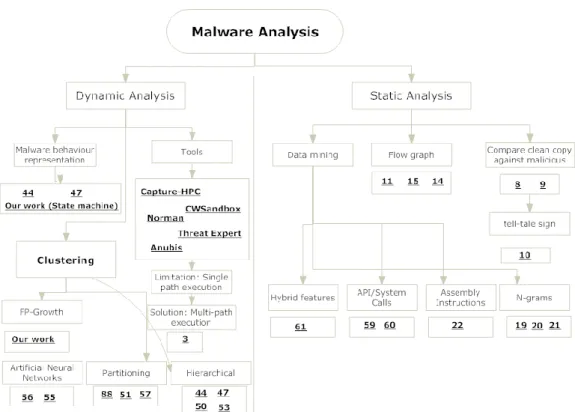
Malware is a short form for malicious software and “malicious code is any code added, changed, or removed from a software system in order to intentionally cause harm or subvert the intended function of the system” [7]. The goal of the attacker is to place malware into a user’s environment and then collect important information, such as credit card data, usernames and passwords. The malware analysis needs to understand how the malware under consideration works and then develop a patch in order to protect against that malware. There are two main types of malware analysis: static and dynamic analysis.
3.1.1 Static analysis
This type involves analysis of the malware without executing it. The analysis starts firstly by collecting information from the malware such as disassembling the code and collecting header and body data from the malware portable executable format (PE). This will give a complete view to the malware code while analysing it. One of the first approaches to detect malware is to compare an infected application against a clean copy of the same application or a formal specification to detect the malicious code [8] [9]. Lo et al. [10] developed a tell-tale sign that will be raised when the target application matched pre-defined actions such as a
Page 28 of 147
malware writing an EXE file, which they stated that linkers and compliers could only perform such action. However, the attackers use encryption and obfuscation to hide their malicious code and make it harder to analyse it by automated applications or security experts. Christodorescu and Jha [11] proposed a framework and built a tool called SAFE (a Static Analyzer For Executables) that is able to find malicious patterns in EXE files. They have also developed an obfuscator for executable code which supports transformations such as code transposition or instruction substitution. Christodorescu et al. [12] have developed their approach further by building the tool on top of IDA Pro [13] disassembler to get the flow graphs and produce an intermediate representation which produces a template for the code to pass it to the malware detector algorithm, and then developed their approached further [14] [15].
Other approaches used data mining with static analysis to detect malware. Matthew et al. [16] proposed a framework based on data mining that found malicious patterns in known malware by using automated static analysis techniques. They then detected new malware based on the previously discovered malicious patterns. The data mining techniques with static analysis are divided into four main categories [17] [18]:
N-grams: it involves a sequence of hexadecimal strings extracted from an executable file. Various literature reports such work, e.g. [19] [20] [21].
Assembly Instructions: Involves assembly instructions extractedfrom the executable disassembled file [22].
API/System Calls: the application programming interface (API) is a specific method that a service provides to communicate with other applications. In this type, the system calls by the application are collected and then determine any malicious actions by looking for patterns. There are various research works in this area such as [23] [24].
Hybrid features: involves using more than one feature to collect data about the code such as: assembly instructions, DLL usage or n-grams, such as [25] [26]
There are a number of publications that show the obfuscation of executable files make it harder to disassemble them such as [27] [28] [29]. Furthermore, malware are able to change
Page 29 of 147
the application by using polymorphic and metamorphic techniques such as [30] [31]. As Kaspersky [32] stated that recent malware uses server-side polymorphism which changes some sections of the code whenever pre-defined executions are reached. Finally, based on these limitations of static analysis, we base our work on dynamic analysis which monitors the behaviour/actions of the malware on the system without a need to decrypt the file.
3.1.2 Dynamic analysis
This type is different from static analysis as the code is analysed while executing. The code
![Fig 2-2: Screenshot of MPack [85].](https://thumb-us.123doks.com/thumbv2/123dok_us/881775.2612918/30.892.199.747.104.492/fig-screenshot-of-mpack.webp)
![Fig 2-6: Example of obfuscating malicious code [85].](https://thumb-us.123doks.com/thumbv2/123dok_us/881775.2612918/39.892.144.750.646.1031/fig-example-obfuscating-malicious-code.webp)
![Table 3-2: a comparison between the three malware detection systems [76] [67].](https://thumb-us.123doks.com/thumbv2/123dok_us/881775.2612918/55.892.153.745.108.264/table-comparison-malware-detection-systems.webp)