SEO Dynamic Tag 2
Search Engine Optimization for the title tag, the canonical tag and the meta tags author, description and keywords.
Version: 2.4.2, 2014-10-01 TYPO3: 4.5, 4.6, 4.7, 6.0, 6.1, 6.2 Extension Key: seo_dynamic_tag Language: en
Keywords: SEO, search engine optimization, tags, meta tags, meta, title, canonical, author, description, keywords Copyright 2007 - 2014, Dirk Wildt, Die Netzmacher, <http://wildt.at.die-netzmacher.de>
This document is published under the Open Content License available from http://www.opencontent.org/opl.shtml The content of this document is related to TYPO3
Table of Contents
SEO Dynamic Tag 2 ... 1
Screenshots ... 3
Backend ... 3
Frontend ... 4
Introduction ... 5
What does it do? ... 5
Ready-for-use ... 5 Requirements ... 5 TYPO3 Versions ... 5 Forum ... 5
Installation ... 6
Quick start ... 6 Details ... 6Tutorials ... 7
Calendar Base (cal) ... 7
News (tt_news) ... 10
Organiser (org) ... 13
Pages (TYPO3 CMS) ... 16
Shop System (tt_products) ... 17
Any other database ... 20
Values from foreign tables ... 27
User Interface – TypoScript Constant Editor ... 28
Canonical ... 28 Condition ... 28 Database ... 28 Debugging ... 29 Default ... 29 Keywords ... 29 Page ... 30
Workflow ... 31
In principle ... 31 Schema ... 31Canonical Tag ... 32
An unique page should have an unique URL ... 32
The canonical tag of SEO Dynamic Tag ... 32
Allow a parameter ... 33
Condition ... 34
Recommended pages ... 34Check it! ... 36
Debug Mode ... 37
Options ... 37 SQL Errors ... 37Development ... 38
Reference ... 39
Canonical Tag ... 39 MetaTag Author ... 40 MetaTag Description ... 40 MetaTag Keywords ... 40 Title ... 40 Query ... 41What's new? ... 42
In version 2.x ... 42Update ... 43
From smaller than 2.x ... 43
FAQ ... 44
SimulateStaticDocuments and RealUrl ... 44
Helpful suggestions ... 45
Forum ... 45
Support with costs ... 45
Further Information ... 46
Other extensions published by Die Netzmacher ... 46
Credits ... 47
State Development Corporation of Thuringia ... 47
To-Do list ... 48
Changelog ... 49
Screenshots
Backend
Illustration 1: User interface: Canonical Tag Illustration 2: User interface: Debugging Two of seven forms of the user interface of SEO Dynamic Tag.
Frontend
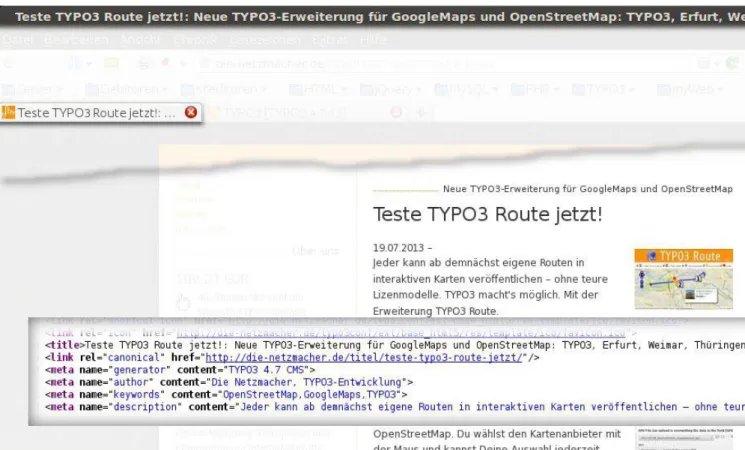
Illustration 3: SEO - Search Engine Optimization - with SEO Dynamic Tag
SEO Dynamic Tag generates the title tag, the canonical tag and the meta tags author, keywords and description. See details at "Tutorials" on page 7 below.
Introduction
What does it do?
• SEO Dynamic Tag supports the Search Engine Optimization of your TYPO3 website.
• You can generate search HTML tags for records of every TYPO3 extension automatically for the • <title>-tag
• <link rel="canonical">-tag • <meta name="author">-tag • <meta name="description">-tag
• <meta name="keywords">-tag
• SEO Dynamic Tag has a user interface for the configuration.
• If you will have any need, you can configure SEO Dynamic Tag by TypoScript directly.
Ready-for-use
• SEO Dynamic Tag has ready-for-use templates for
• Calendar Base (cal) • pages (typo3)
• News (tt_news)
• Shop System (tt_products)
You have to configure the page id for the single view only.
• The Organiser – TYPO3 for the lobby and organisers – (org) has SEO Dynamic Tag integrated.
You can install the Organiser ready-for-use with one mouse click. See http://typo3-organiser.de/
• Route – TYPO3 for GoogleMaps and OpenStreetMap – (route) has SEO Dynamic Tag integrated1.
You can install the official Route sample by importing a SQL file and a zip-aerchive with images. See http://typo3-route.de/
Requirements
• Any requirement
• If you have special needs, experience with TypoScript is recommended.
TYPO3 Versions
SEO Dynamic Tag is tested in the TYPO3 versions
• 4.5, 4.6, 4.7 • 6.0, 6.1, 6.2
Forum
SEO Dynamic Tag 2 has a forum at:
• http://typo3-browser-forum.de/#cat28
Posts are welcome in English in German
Installation
Quick start
• Install the extension with the extension manager.
• Include the static template
• SEO Dynamic Tag (seo_dynamic_tag)
• If you like to optimize the following extensions for search engines • Calendar Base (cal)
• News (tt_news)
• Shop system (tt_products)
include one of the static templates
• +SEO (2+) - cal (seo_dynamic_tag) • +SEO (2+) - tt_news (seo_dynamic_tag) • +SEO (2+) - tt_products (seo_dynamic_tag)
• If you like to optimize the following extensions for search engines • Organiser (org)
you don't need to include any further template.
• If you like to optimize the TYPO3 CMS (table: pages), please include the static template
• +SEO (2+) - pages (seo_dynamic_tag) • Configure SEO Dynamic Tag by the user interface.
• In case of the ready-for-use templates and in case of the Organiser you need to configure the page id only.
Details
• Calendar Base (cal) on page 7
• News (tt_news) on page 10 • Organiser (org) on page 13 • Pages (TYPO3 CMS) on page 16 • Shop System (tt_products) on page 17 • Any other database on page 20
Tutorials
Calendar Base (cal)
Initial Situation
Illustration 4: Calendar Base (cal): initial situation
• I am using Calendar Base (cal) for the single view on page:
[1797] cal single event
Include the static templates
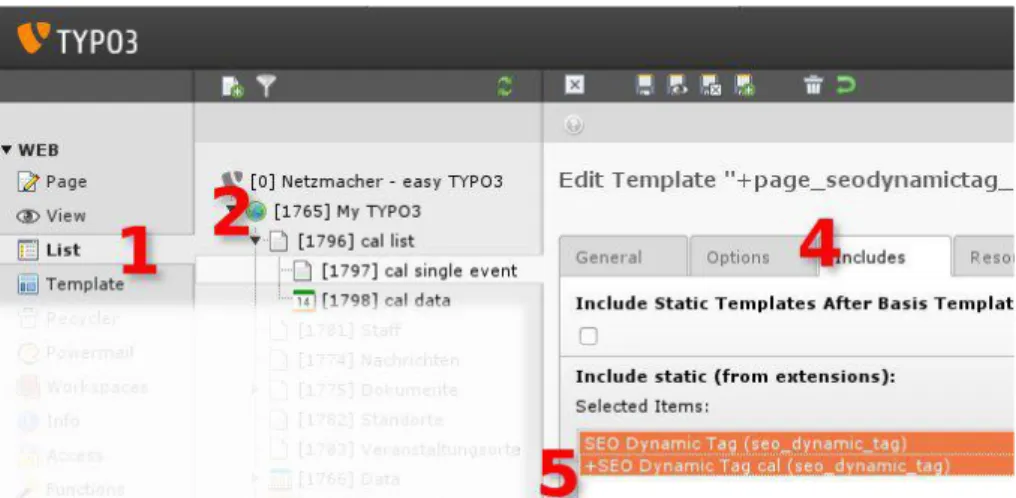
Illustration 5: Calendar Base (cal): include the static templates Include the static templates:
1. Web List
2. Page tree Page with the Calendar Base plugin for the single view (here: [1797] cal single event) 3. Edit area Select the TypoScript template1 for editing (not illustrated)
4. Tab [Includes]
5. Add the static templates:
SEO Dynamic Tag (seo_dynamic_tag) +SEO Dynamic Tag cal (seo_dynamic_tag)
Configure the page id
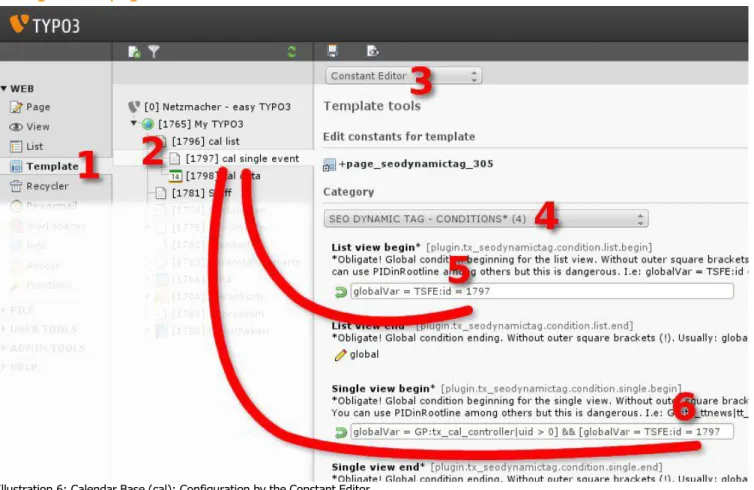
Illustration 6: Calendar Base (cal): Configuration by the Constant Editor
1. Web Template
2. Page tree Page with the Calendar Base plugin for the single view (here: [1797] cal single event) 3. Edit area [Constant editor]
4. Category [SEO DYNAMIC TAG - CONDITIONS*]
5. Replace 'xxx' with the id of your page with the News plugin (here: 1797) 6. Replace 'xxx' with the id of your page with the News plugin (here: 1797) If you are interested in details please refer to
• "Workflow" on page 31 below • "Condition" on page 34 below.
SEO – Search Engine Optimization – in the TYPO3 frontend
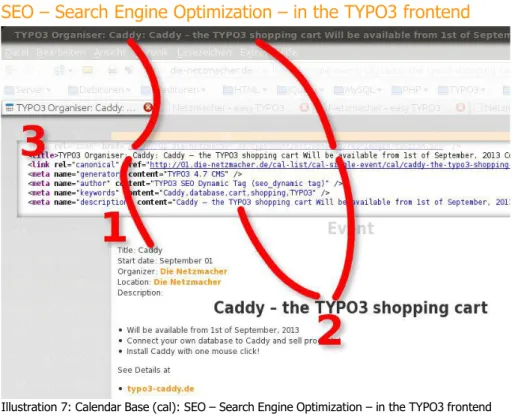
Illustration 7: Calendar Base (cal): SEO – Search Engine Optimization – in the TYPO3 frontend SEO – Search Engine Optimization – in the TYPO3 frontend:
1. Calendar event title part of the title-tag
2. Calendar event description part of the title tag and content of the description tag
3. HTML code see illustration below
HTML SEO tags
Illustration 8: News (tt_news): SEO tags
1. <title> field title and field description
2. <link rel="canonical"> URL1
3. <meta name="author"> there is no field author, it is taken a default value. 4. <meta name="description"> field description
5. <meta name="keywords"> out of the field description
News (tt_news)
Initial Situation
Illustration 9: News (tt_news): initial situation
• I am using News (tt_news) for both views – the list and the single view – on my root page:
[1025] die-netzmacher.de
Include the static templates
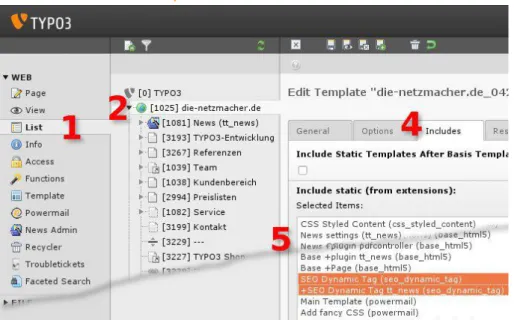
Illustration 10: News (tt_news): include the static templates Include the static templates:
1. Web List
2. Page tree Page with the News plugin for the single view (here: [1025] die-netzmacher.de) 3. Edit area Select the TypoScript template1 for editing (not illustrated)
4. Tab [Includes]
5. Add the static templates below all templates, which will configure the page object: SEO Dynamic Tag (seo_dynamic_tag)
+SEO Dynamic Tag tt_news (seo_dynamic_tag)
Configure the page id
Illustration 11: News (tt_news): Configuration by the Constant Editor
1. Web Template
2. Page tree Page with the News plugin for the single view (here: [1025] die-netzmacher.de) 3. Edit area [Constant editor]
4. Category [SEO DYNAMIC TAG - CONDITIONS*]
5. Replace 'xxx' with the id of your page with the News plugin (here: 1025) 6. Replace 'xxx' with the id of your page with the News plugin (here: 1025) If you are interested in details please refer to
• "Workflow" on page 31 below • "Condition" on page 34 below.
SEO – Search Engine Optimization – in the TYPO3 frontend
Illustration 12: News (tt_news): SEO – Search Engine Optimization – in the TYPO3 frontend See
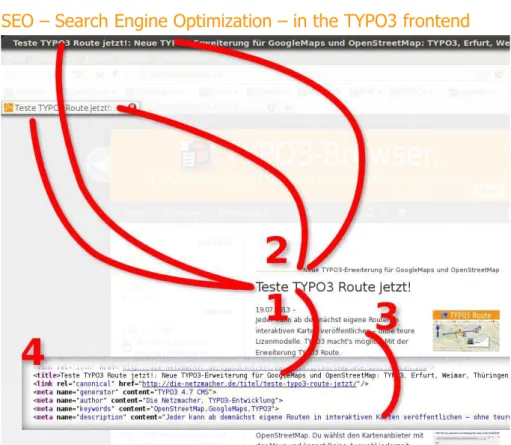
• http://die-netzmacher.de/titel/teste-typo3-route-jetzt/
SEO – Search Engine Optimization – in the TYPO3 frontend: 1. News title part of the title-tag
2. News short part of the title tag 3. News bodytext part of the description tag 4. HTML code see illustration below HTML SEO tags
Illustration 13: News (tt_news): SEO tags
1. <title> field title and short
2. <link rel="canonical"> URL with the news id only1
3. <meta name="author"> field author. If it's empty, a default value will taken. 4. <meta name="description"> field bodytext
5. <meta name="keywords"> field keywords
Organiser (org)
SEO Dynamic Tags ready-for-use
If you are installing the Organiser – TYPO3 for lobby and organisers – with the Organiser Installer (org_installer), there isn't any need for configure anything.
But if you have the Organiser installed already and you update the Organiser fom 2.x to 3.x, you have to configure SEO Dynamic Tag. See the instruction below.
Initial Situation
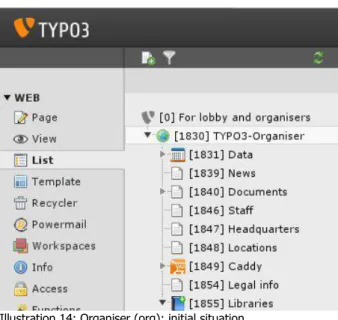
Illustration 14: Organiser (org): initial situation
The illustration above displays the page tree after the one-click-installation.
• You have to set the page id of each page with a single view for SEO Dynamic Tag. This is in the example above:
• [1830] TYPO3-Organiser • [1839] News • [1840] Documents • [1846] Staff • [1847] Headquarters • [1848] Locations
Configure the page id
Illustration 15: Organiser (org) News: Configuration by the Constant Editor
1. Web Template
2. Page tree Page with the Organiser News plugin for the single view (here: [1839] News) 3. Edit area [Constant editor]
4. Category [SEO DYNAMIC TAG - CONDITIONS*]
5. Replace 'xxx' with the id of your page with the News plugin (here: 1839) 6. Replace 'xxx' with the id of your page with the News plugin (here: 1839) Repeat the steps 1 to 6 with the other pages too.
If you are interested in details please refer to
• "Workflow" on page 31 below
SEO – Search Engine Optimization – in the TYPO3 frontend
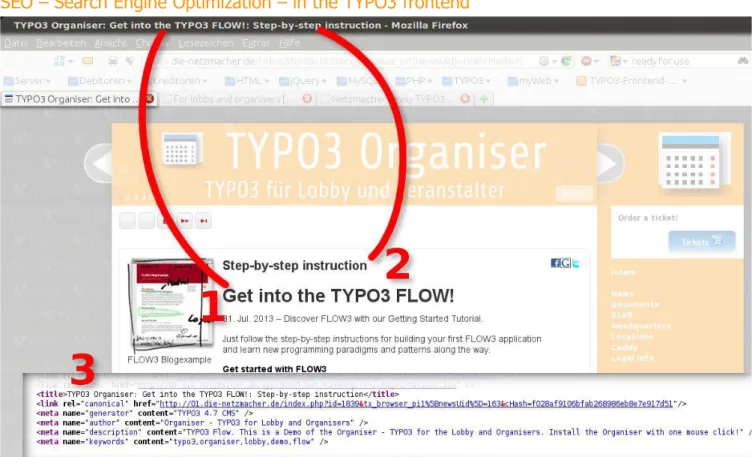
Illustration 16: Organsier (org) News: SEO – Search Engine Optimization – in the TYPO3 frontend SEO – Search Engine Optimization – in the TYPO3 frontend:
1. News title part of the title-tag 2. News subtitle part of the title tag 3. HTML code see illustration below HTML SEO tags
Illustration 17: Organsier (org) News: SEO tags
1. <title> field title and subtitle
2. <link rel="canonical"> URL with the news id only1
3. <meta name="author"> field author. If it's empty, a default value will taken. 4. <meta name="description"> field description
5. <meta name="keywords"> field keywords
Shop System (tt_products)
Initial Situation
Illustration 18: Shop System (tt_products): initial situation
• I am using the Shop System (tt_products) for the single view on page:
[191] Dentalgerät
Include the static templates
Illustration 19: Shop System (tt_products): include the static templates Include the static templates:
1. Web List
2. Page tree Page with the Shop System plugin for the single view (here: [191] Dentalgerät) 3. Edit area Select the TypoScript template1 for editing (not illustrated)
4. Tab [Includes]
5. Add the static templates:
SEO Dynamic Tag (seo_dynamic_tag)
+SEO Dynamic Tag tt_products (seo_dynamic_tag)
Configure the page id
Illustration 20: Shop System (tt_products): Configuration by the Constant Editor
1. Web Template
2. Page tree Page with the Shop System plugin for the single view (here: [191] Dentalgerät) 3. Edit area [Constant editor]
4. Category [SEO DYNAMIC TAG - CONDITIONS*]
5. Replace 'xxx' with the id of your page with the Shop System plugin (here: 191) 6. Replace 'xxx' with the id of your page with the Shop System plugin (here: 191) If you are interested in details please refer to
• "Workflow" on page 31 below • "Condition" on page 34 below.
SEO – Search Engine Optimization – in the TYPO3 frontend
Illustration 21: Shop System (tt_products): SEO – Search Engine Optimization SEO – Search Engine Optimization – in the TYPO3 frontend:
1. Product title part of the title-tag and the keywords
2. Product category part of the title-tag and the keywords
3. Product note content of the description tag and part of the keywords
4. HTML code see illustration below
HTML SEO tags
Illustration 22: Shop System (tt_products): SEO tags
1. <title> table.field product.title and category.title
2. <link rel="canonical"> URL1
3. <meta name="author"> there is no field author, it is taken a default value. 4. <meta name="description"> field note
5. <meta name="keywords"> out of the product.title, category.title and product.field note
Any other database
Initial Situation
Illustration 23: Any other database: initial situation Let us suppose
• you have created a database for cars like Grüne Autos (green cars) or you are using this database, • your page with the plugin for the single view is:
[1115] TYPO3 Grüne Autos
• the URL parameter for a link to a single view is:
tx_browser_pi1[showUid]1
Include the static template
Illustration 24: any other database: include the static template Include the static template:
1. Web List
2. Page tree Page with the plugin for the single view (here: [1115] TYPO3 Grüne Autos) 3. Edit area Select the TypoScript template2 for editing (not illustrated)
4. Tab [Includes]
5. Add the static templates:
SEO Dynamic Tag (seo_dynamic_tag)
1 Green Cars is using the Browser plugin for displaying records. If you are using your own extension, an usual parameter would be: tx_myextension_pi1[uid]
Constant Editor
You configure SEO Dynamic Tag supported by the Constant Editor. See the example "Canonical Tag" below.
Canonical Tag
You have to configure the property "Allowed parameter (single view)" at least.
Illustration 25: Any other database: Configuration by the Constant Editor
1. Web Template
2. Page tree Page with the plugin for the single view (here: [1115] TYPO3 Grüne Autos) 3. Edit area [Constant editor]
4. Category [SEO DYNAMIC TAG – CANONICAL TAG*]
5. Field [Allowed parameter (single view)*]
Replace
- 'table' with 'tx_browser_pi1' and - 'field' with 'showUid'
&table[field]={GP:table|field} will become &tx_browser_pi1[showUid]={GP:tx_browser_pi1|showUid}
Details
• "Canonical Tag" on page 32 below • "Workflow" on page 31 below
Conditions
You have to configure the properties:
• List view begin
• Single view begin
If you don't know, how to start the Constant Editor, please refer to the section "Canonical Tag" on page 21 above.
1. Web Template
2. Page tree Page with the plugin for the single view (here: [1115] TYPO3 Grüne Autos) 3. Edit area [Constant editor]
4. Category [SEO DYNAMIC TAG – CONDITIONS*]
Field [List view begin]
• Replace 'xxx' with the id of the page with the plugin for the single view (here: [1115] TYPO3 Grüne Autos) • globalVar = TSFE:id = xxx will become globalVar = TSFE:id = 1115
Field [Single view begin]
• Replace 'table|field with the URL parameter (here: tx_browser_pi1[showUid]
• Replace 'xxx' with the id of the page with the plugin for the single view (here: [1115] TYPO3 Grüne Autos) • globalVar = GP:table|field > 0] && [globalVar = TSFE:id = xxx will become
globalVar = GP: tx_browser_pi1|showUid > 0] && [globalVar = TSFE:id = 1115
Screenshot
Illustration 26: Any other database: conditions
Details
• "Condition" on page 28 below • "Workflow" on page 31 below
Database
You have to configure the properties:
• table, get parameter for uid, author, description, keywords, title and short
If you don't know, how to start the Constant Editor, please refer to the section "Canonical Tag" on page 21 above.
1. Web Template
2. Page tree Page with the plugin for the single view (here: [1115] TYPO3 Grüne Autos) 3. Edit area [Constant editor]
4. Category [SEO DYNAMIC TAG – DATABASE*]
Beforehand
The table of our example – tx_greencars_main – isn't a good example for the database configuration:
• There are missing a lot of fields.
Important information are stored in foreign tables.
How to optimise SEO Dynamic Tag for foreign tables is written at the section
• "Values from foreign tables" on page 27 below
table
Here: tx_greencars_main
get parameter for uid
Here: tx_browser_pi1[showUid]
author
tx_greencars_main hasn't any author field. We take a constant. Here: "TYPO3 Green Cars"
description
tx_greencars_main hasn't any description field. We take the title field.
keywords
tx_greencars_main hasn't any keywords field. We take the title field.
title
Here: title.short
tx_greencars_main hasn't any short field. We take the title field.
Screenshot
See illustration on the right hand.
Details
• "Database" on page 28 below • "Workflow" on page 31 below
Use values from foreign tables
• "Values from foreign tables" on page 27 below
Default values
There isn't any need to configure default values.
We configure the property "Description appendix" in the example below.
If you don't know, how to start the Constant Editor, please refer to the section "Canonical Tag" on page 21 above.
1. Web Template
2. Page tree Page with the plugin for the single view (here: [1115] TYPO3 Grüne Autos) 3. Edit area [Constant editor]
4. Category [SEO DYNAMIC TAG – DEFAULT VALUES]
Field [Description appendix]
Here: TYPO3 Green Cars - your own TYPO3 database in three hours:
Screenshot
Illustration 28: Any other database: default values
Details
• "Default" on page 29 below • "Workflow" on page 31 below
Keywords
There isn't any need to configure keywords.
We configure the property "Forced list" in the example below.
If you don't know, how to start the Constant Editor, please refer to the section "Canonical Tag" on page 21 above.
1. Web Template
2. Page tree Page with the plugin for the single view (here: [1115] TYPO3 Grüne Autos) 3. Edit area [Constant editor]
4. Category [SEO DYNAMIC TAG – KEYWORDS]
Field [Forced list]
Here: TYPO3, Green Cars, Grüne Autos
Screenshot
Illustration 29: Any other database: keywords
Details
• "Keywords" on pag 29 below • "Workflow" on page 31 below
SEO – Search Engine Optimization – in the TYPO3 frontend
Illustration 30: Any other database: SEO – Search Engine Optimization SEO – Search Engine Optimization – in the TYPO3 frontend:
1. title part of the title-tag, the description and the keywords
2. HTML code see illustration below
HTML SEO tags
Illustration 31: Any other database: SEO tags
1. <title> the title will generated from title and short. Here: title and title 2. <link rel="canonical"> URL1
3. <meta name="author"> Here: the given constant 4. <meta name="description"> title
5. <meta name="keywords"> from the title field
Use values from foreign tables
The table of our example – tx_greencars_main – isn't a good example for the database configuration. How to optimise SEO Dynamic Tag for foreign tables is written at the section
• "Values from foreign tables" on page 27 below
Debugging
See• "Check it!" on page 36 below • "Debug Mode" on page 37 below
Values from foreign tables
You can use values from one table only, if you like to configure SEO Dynamic Tag by the Constant Editor. It is possible, to use values from forteign tables too. You have to configure the SQL statement manually.
Example with the "Any other database" on page 20 above.
We are using the Green Cars database. Manufacturers are stored in the table tx_greencars_manufacturer. The relation is:
tx_greencars_main.manufacturer > tx_greencars_manufacturer.uid We like to have a title-tag like:
• manufacturer: car
TypoScript
We find the SEO Dynamic Tag configuration of the title tag1 at plugin.tx_seodynamictag_pi1.page.49442.50
Our configuration of the query:
1. plugin.tx_seodynamictag_pi1 { 2. page { 3. 49442 { 4. 50 { 5. query { 6. select = CONCAT(manufacturer.title, ': ', car.title) as value 7. from = tx_greencars_main as car, tx_greencars_manufacturer as manufacturer 8. where ( 9. car.uid = $1 10. AND car.manufacturer = manufacturer.uid 11. AND car.deleted = 0 12. AND car.hidden = 0 13. ) 14. var.1 = tx_browser_pi1[showUid] 15. } 16. } 17. } 18. } 19. } 20. 21. [{$plugin.tx_seodynamictag.condition.single.begin}] 22. {$plugin.tx_seodynamictag.page.tsProperty} { 23. {$plugin.tx_seodynamictag.page.object} < plugin.tx_seodynamictag_pi1.page.49442 24. } 25. [{$plugin.tx_seodynamictag.condition.single.end}] 26.
From line 6 to 14: individual SQL configuration
From line 21 to 25: You have to init the page object again. Here: single view only.
Example with Shop System (tt_products)
SEO Dynamic Tag has a more detailed example. See the template for Shop System (tt_products) at
• static/tt_products/constants.txt • static/tt_products/setup.txt
Debugging
See• "Check it!" on page 36 below • "Debug Mode" on page 37 below
User Interface – TypoScript Constant Editor
Canonical
See details at "Canonical Tag" on page 32 below. plugin.tx_seodynamictag.canonical
Property: Data type: Description: Default:
enabled boolean If you don't like the canonical tag, disable it. 1
host string Leave it empty, if you are using the host of the frontend. Example: http://easy-typo3.com/
list.additionalParams string Allowed parameter (list view):Allowed URL parameter for the list view. An empty value is recommended!
single.additionalParams string Allowed parameter (list view)*:*Obligate! Allowed URL parameter for the single view
Default: &table[field]={GP:table|field}
see description
useCashHash boolean Recommended. Use a cash hash parameter for a unique URL. Allowed URL parameter for the single view
1
Condition
See details at "Condition" on page 34 below. plugin.tx_seodynamictag.canonical
Property: Data type: Description: Default:
list.begin string Obligate! Global condition beginning for the list view. Without outer square brackets (!). Replace 'xxx' with the id of the page with your plugin for the list view. You can use PIDinRootline among others but this is dangerous. Example: globalVar = TSFE:id = 123
Default: globalVar = TSFE:id = xxx
see description
list.end string Obligate! Global condition ending. Without outer square brackets (!). Usually: global
global
single.begin string Global condition beginning for the single view. Without outer square brackets (!). Replace 'xxx' with the id of the page with your plugin for the single view. You can use PIDinRootline among others but this is dangerous. Example: GP:tx_ttnews|tt_news > 0] && [globalVar = TSFE:id = 123
Default: GP:table|field > 0] && [globalVar = TSFE:id = xxx
see description
single.end string Global condition ending. Without outer square brackets (!). Usually: global
global
Database
plugin.tx_seodynamictag.database
Property: Data type: Description: Default:
table string The from table in the SQL query. Example: tt_news
var.1 string The GET parameter with the uid. Example: tx_ttnews[tt_news]
field.author string The label of the author field. Example: author author field.description string The label of the description field. Example: description description field.keywords string The label of the keywords field. Example: keywords keywords field.title string The label of the title field. Example: title title field.short string The label of the short field. Example: short. You can use a constant too.
Debugging
See details at "Debug Mode" on page 37 below. plugin.tx_seodynamictag.debugging
Property: Data type: Description: Default:
all boolean If enabled, you will get a report for all options from below in the frontend
author boolean If enabled, you will get a report for the meta tag author in the frontend canonical boolean If enabled, you will get a report for the canonical tag in the frontend description boolean If enabled, you will get a report for the meta tag description in the
frontend
keywords boolean If enabled, you will get a report for the meta tag keywords in the frontend
title boolean If enabled, you will get a report for the title in the frontend
Default
plugin.tx_seodynamictag.default
Property: Data type: Description: Default:
author boolean Default author, if current record doesn't contain any author. For single views only. Leave it empty, if you don't like a default author.
Default: TYPO3 SEO Dynamic Tag (seo_dynamic tag)
see description
description string Default description, if current record doesn't contain any description. For single views only. Leave it empty, if you don't like a default description.
Default: You have a bug in your SEO Dynamic Tag configuration: description is empty!
see description
description.prefix string Value will prefixed the description. Example: My product categorie: description.appendix string Value will appendixed the description. Example: - my product categorie
Keywords
plugin.tx_seodynamictag.page
Property: Data type: Description: Default:
default string Default keywords, if current record doesn't contain any keyword. For single views only. Leave it empty, if you don't like default keywords. Default: TYPO3, SEO, Dynamic Tag, Bug
see description
amount int Maximum amount of keywords. Recommended: less is more! minLength int Minimum length of a single keyword
moveToKeywords boolean Move source to keywords. Recommended, if your field for keywords doesn't contain a keyword list. This is the case, if you are using a field like bodytext or description for generating keywords. That isn't the case, if you using a field like keywords for keywords.
0
positiveList string List with keywords, which will used, if they are part of the keyword list but are shorter than the minimum word length. List is not independent of amount of keywords.
negativeList string List with keywords, which will excluded from the list of found keywords.
forcedList string List with keywords, which will prepend to the list of keywords. List is independent of amount of keywords and minimum length for a keyword.
Page
plugin.tx_seodynamictag.page
Property: Data type: Description: Default:
tsProperty boolean The label of your page in your TypoScript configuration. Usually: page page object string The seo_dynamic_tag element of your page object like page.49442.
49442 is the number of the issue on TYPO3 forge and should be unique.
Workflow
In principle
• You configure SEO Dynamic Tag.
• You configure a condition delivered by SEO Dynamic Tag.
• If your condition is met, your SEO-Dynamic-Tag configuration will taken into the page object.
And it will override the existing configuration.
Schema
You have a page object like below. page = PAGE page { * your content * some other stuff meta { * your configuration } }
You configure the SEO-Dynamic-Tag condition. Details at "Condition" on page 34 below. [Your SEODynamicTag Condition]
If condition doesn't meet, nothing will happen:
[Your SEODynamicTag Condition == false] page = PAGE page { * your content * some other stuff meta { * your configuration } }
If condition meets, the page object will changed: [Your SEODynamicTag Condition == true] page = PAGE page { * your content 49442 { * canonical tag * metaTag author * metaTag description * metaTag keywords * title author } * some other stuff meta { * taken from page.49442.metaTag.* } }
Canonical Tag
An unique page should have an unique URL
An unique page should have an unique URL – of course!But there are a lot of reasons, why a unique page hasn't an unique URL. The both importants are:
• Plugins control the output of their content by parameters. • Search Engines confuse parameters.
But plugins control the output of their content by parameters
• Some plugins generates a link to a single view with a back pid. If the single view is accessible by more than one plugin, you will get non unique URL.
• Usually a record in a single view is accessible by a search. Some plugins send the search parameters in the URL. • Some plugin control the design of the single view by parameters.
• There are a lot of more examples.
But search engines confuse parameters
Last but not least search engines confuse parameters.• They double and triple parameters like …/title/my_news/title/my_news/title/my_news • They append irreproducible parameters like … /title/my_news/and/this/is/absolute/nonsense
Costs of non unique URL
Non unique URL have high costs:• Search engines don't index a unique page once but a lot of times.
• When search engines update their index, they won't call a unique page once but a lot of times.
• You will get a busy server.
• Search engines could evaluate unique pages with non unique URL as spam. This pages can loose their ranking.
Solution: the canonical tag
The canonical tag should solve the problem of non unique URL.
The idea is, that a page with a unique URL contains this unique URL in the canonical tag. But this sounds easier, than it is. The majority of search engines respect the canonical tag. Respect means: they try to check, if the URL in the canonical tag is the unique URL actual – they don't take the URL of the canonical tag without a successful checkup.
The canonical tag of SEO Dynamic Tag
Before a SEO tool like SEO dynamic tag can render a canonical tag, a determination in principle is needed: Should the rendering controlled by
• allowed (white list) or
• forbidden (black list)
parameters?
Allowed parameters (white list)
You have to allow parameters.If the URL of the single view contains not allowed parameters, they won't respected. Advantage: you have an unique URL.
For example: the extension calender base (cal) needs three parameters at least for displaying a single view. If you miss one of these parameters, you have an unproper URL in the canonical tag.
Forbidden parameters (black list)
You forbid parameters.If the URL of the single view contains a forbidden parameter, it won't respected. Advantage: you have a proper URL usually.
Disadvantage: the URL isn't unique in every case. Take the examples from above:
• …/title/my_news/title/my_news/title/my_news
This URL contains only allowed parameters
• … /title/my_news/and/this/is/absolute/nonsense
You can't know, which nonsense parameters are prefixed or appended to an URL. And so you can't forbid nonsense parameters.
SEO Dynamic Tag respects allowed parameters only by default (white list)
By default SEO Dynamic Tag renders URL for the canonical tag by allowed parameters only (white list). It is possible too, to use the other principle – to forbid parameter (black list).But you can't do this with the user interface, you have to configure TypoScript manually.
Website wide configuration is DANGEROUS!
Because of the default behavior it is not recommended, to configure the canonical tag with SEO Dynamic tag website wide. It is recommended to configure the canonical tag for pages with list views and single views only!
By default SEO Dynamic Tag doesn't render any canonical tag. See details at "Condition" on page 34 below.
Allow a parameter
You are allowing parameters with the Constant Editor:
• See category [SEO DYNAMIC TAG – CANONICAL] • Look for "Allowed parameter …"
The illustration on the right hand presents an example for tt_news in the single view:
• &tx_ttnews[tt_news]={GP:tx_ttnews|tt_news} This mean:
The URL will contain only
• the id of the page by default and
• the id of the news.
Condition
SEO Dynamic Tag doesn't do anything by default.
You have to allow SEO Dynamic Tag by a condition, to change your page object. See "Workflow" on page 31 above.
You define a condition by the Constant Editor (see illustration on the right hand).
Recommended pages
It is recommended, to allow SEO Dynamic Tag to change the page object on a page, which contains a plugin for a
• list view and / or • a single view.
List views
This is a recommended condition for a list view:
• If page with my list view is called.
This is in TypoScript syntax:
• [globalVar = TSFE:id = id_of page_with_list_view]
You don't need to know this syntax.
SEO Dynamic Tag delivers this condition in the user interface like:
• [globalVar = TSFE:id = xxx]
You have to replace xxx with the id of your page with the list view plugin only. BE AWARE:
The value in the user interface is
• globalVar = TSFE:id = xxx
Don't wrap the condition in square brackets! This is a technical need.
Service in list views
SEO Dynamic Tag adds only the canonical tag in list views. By default no parameter is respected.
Example:
• Your list view has the URL: …/news or
…/index.php?id=123
• By default the canonical tag will be: …/news or
…/index.php?id=123
If your list view has a page browser, than the following URL are possible:
• Your list view has the URL:
…/news/pointer/23
…/index.php?id=123&tx_myext_pi1[pointer]=23 But the URL of the canonical tag will be untouched:
• It will be:
…/news or
…/index.php?id=123
If you like to allow a parameter for the canonical tag, please refer to "Allow a parameter" on page 33 above.
Single views
This is a recommended condition for a list view:
• If a page with my single view is called with the id for a record of this view. This is in TypoScript syntax:
• [globalVar = TSFE:id = id_of page_with_lingle_view] && [globalVar = GP:my_table|uid > 0]
You don't need to know this syntax.
SEO Dynamic Tag delivers this condition in the user interface like:
• [globalVar = TSFE:id = id_of page_with_single_view] && [globalVar = GP:my_table|uid > 0]
You have to replace
• xxx with the id of your page with the single view plugin and • my_table|uid with the parameter of your URL.
BE AWARE:
The value in the user interface is
• globalVar = TSFE:id = xxx] && [globalVar = GP:my_table|uid > 0
Don't wrap the condition in square brackets! This is a technical need.
Service in single views
SEO Dynamic Tag
• adds the canonical tag • the metaTags
• author
• description • keywords and
• the title tag.
Add means override!
By default no parameter is respected. See details at 'List views' on page 34 above.
Check it!
You can check your configuration with the TypoScript Object Browser.
Please select the page with your configuration in the page tree and then:
1. select the [TypoScript Object Browser] 2. Browse: [Setup]
3. Display constants: [Plain substitution (default)]1 4. Enable the SEO-Dynamic-Tag condition.
5. Analyse the content rendered by SEO Dynamic Tag: See page.49442.*
6. Analyse the metaTags rendered by SEO Dynamic Tag: See page.meta.*
1 Otherwise you won't see the SEO-Dynamic-Tag condition!
Debug Mode
You enable the debugging with the user interface. See Constant Editor category [SEO DYNAMIC TAG – DEBUGGING].
If you have enabled a debug option, you will get a report in the frontend at the bottom of the website.
Options
All• You will get a report for all options below.
Author
• Report for the metaTag author. Canonical Tag
• Report for the canonical tag. Description
• Report for the metaTag description.
Keywords
• Report for the metaTag keywords.
Title
• Report for the title tag.
SQL Errors
SQL errors will displayed in the frontend for that tag, that has an enabled debugging option.
Development
If you like to develop SEO Dynamic Tag or to integrate SEO Dynamic Tag into your extension, this is recommended: Take a look in the ready-for-use templates. See
• static • cal
• tt_news
• tt_products
cal and tt_news are simple: Only one table has to be handled
tt_products is complex: Two tables with a relation have to be handled.
Take a look in the Organiser templates, look for "seodynamictag". The configuration is very small. See the extension Organiser (org) • static • calendar • department • downloads • headquarters • location • news • staff
Reference
Canonical Tag
plugin.tx_seodynamictag_pi1.page.49442.10
BE AWARE: SEO Dynamic Tag copies the setup into the page object. If you like to change any property in the setup, you must configure the copy in the page object at page.49442.* or page.meta.* See "Check it!" on page 36 above.
Property: Data type: Description: Default:
special string Internal. Don't touch it! canonical
enabled boolean Enable or disable the canonical tag.
Please configure the property with the Constant Editor. Example:
plugin.tx_seodynamictag_pi1.page.49442.10 { enabled = 1
}
1
host string Host for the absolute URL. Leave it empty, if the default host of the frontend should used.
Please configure the property with the Constant Editor. Example:
plugin.tx_seodynamictag_pi1.page.49442.10 { host = http://easy-typo3.com/
}
path COA Configuration for rendering the canonical tag. Please configure the property with the Constant Editor. Example: plugin.tx_seodynamictag_pi1.page.49442.10 { path = TEXT path { typolink { parameter { data = page:uid } additionalParams = {$plugin.tx_seodynamictag.canonical.single.additiona lParams} additionalParams { insertData = 1 } //addQueryString = 1 //addQueryString { // method = GET // exclude = L,id,cHash,no_cache,tx_ttnews %5BbackPid%5D //} useCacheHash = {$plugin.tx_seodynamictag.canonical.useCashHash} returnLast = url } } }
debug boolean Debug the canonical tag.
Please configure the property with the Constant Editor. Example:
plugin.tx_seodynamictag_pi1.page.49442.10 { debug = 1
}
MetaTag Author
plugin.tx_seodynamictag_pi1.page.49442.20
BE AWARE: SEO Dynamic Tag copies the setup into the page object. If you like to change any property in the setup, you must configure the copy in the page object at page.49442.* or page.meta.* See "Check it!" on page 36 above.
Property: Data type: Description: Default:
special string Internal. Don't touch it! author
register string SEO Dynmaic Tag stores the author value in this register. It calls that value in the page.meta.author property. Default: tx_seodynamictag_author
See description
query array See "Query" on page 41 below
debug boolean Debug this tag.
Please configure the property with the Constant Editor. Example: plugin.tx_seodynamictag_pi1.page.49442.20 { debug = 1 } 0
MetaTag Description
plugin.tx_seodynamictag_pi1.page.49442.30 See MetaTag Author above.BE AWARE: SEO Dynamic Tag copies the setup into the page object. If you like to change any property in the setup, you must configure the copy in the page object at page.49442.* or page.meta.* See "Check it!" on page 36 above.
MetaTag Keywords
plugin.tx_seodynamictag_pi1.page.49442.40 See MetaTag Author above.
BE AWARE: SEO Dynamic Tag copies the setup into the page object. If you like to change any property in the setup, you must configure the copy in the page object at page.49442.* or page.meta.* See "Check it!" on page 36 above.
Property: Data type: Description: Default:
keywords string/array Array for controlling the handling of keywords. Please configure the property with the Constant Editor.
all other properties See MetaTag Author above.
Title
plugin.tx_seodynamictag_pi1.page.49442.50
See MetaTag Author above. Title hasn't any register property.
BE AWARE: SEO Dynamic Tag copies the setup into the page object. If you like to change any property in the setup, you must configure the copy in the page object at page.49442.* or page.meta.* See "Check it!" on page 36 above.
Query
plugin.tx_seodynamictag_pi1.page.49442.[10 - 50]
BE AWARE: SEO Dynamic Tag copies the setup into the page object. If you like to change any property in the setup, you must configure the copy in the page object at page.49442.* or page.meta.* See "Check it!" on page 36 above.
Property: Data type: Description: Default:
select string SQL select command.
Please configure the property with the Constant Editor. Example 1:
plugin.tx_seodynamictag_pi1.page.49442.[10-50] { select = CONCAT(`title`, ': ', `short`)
from = `tt_news` where = `uid` = $1 var.1 = tx_ttnews[tt_news] } Example 2: plugin.tx_seodynamictag_pi1.page.49442.[10-50] { select = CONCAT(product.title, ' \ (', category.title, ')') as value
from = tt_products as product, \ tt_products_cat as category
where = product.uid = $1 \
AND product.category = category.uid \ AND product.deleted = 0 \
AND product.hidden = 0
var.1 = tx_ttproducts_pi1[product]
}
from string SQL table name. See example "select" above. where string SQL where expression. See example "select" above.
var array Variable in a SQL query.
You can use a variable with any name in your SQL query everywhere.
• You have to label the variable with a dollar character ($).
• You have to define the array var with an element named with your variable.
• Then you have to allocate the global get variable or the global post variable.
If you need a post variable see property "method" below.
See the example in the tutorial 'Error: Reference source not found' on page Error: Reference source not found.
Example:
plugin.tx_seodynamictag_pi1.page.49442.[10-50] { ...
where = `uid` = $my_var AND \ `pid` = $my_other_var
var.my_var = tx_ttnews[tt_news]
var.my_other_var = tx_ttnews[pid]
}
It's only an example. There is no global var tx_ttnews[pid]
method string:
get, post You can choose the global array GET or POST for substituting variables in your SQL query. Example:
plugin.tx_seodynamictag_pi1.page.49442.[10-50] { method = post
}
get
maxLength integer If set, the result will be cut after maxLength chars. Example:
plugin.tx_seodynamictag_pi1.page.49442.[10-50] { maxLength = 100
}
100
dontStripTags boolean If set, the result value won't be stripped of it's HTML-tags. Example:
plugin.tx_seodynamictag_pi1.page.49442.[10-50] { dontStripTags = 1
}
What's new?
In version 2.x
Canonical tag
[2.0.0]SEO Dynamic Tag renders the canonical tag.
Default values
[2.2.0]
plugin.tx_seodynamictag.database.field.author got a default value [2.1.0]
Default meta-tag configuration
Dynamic page object
[2.0.0]The page object is changed dynamically.
No manual configuration of TypoScript is needed any longer.
Static Template for Pages
[2.3.0]
New default template for the TYPO3 CMS table pages.
TYPO3 6.1
[2.2.0]
Seo Dynamic Tag 2 fits into TYPO3 6.1
TYPO3 6.2
[2.3.0]
Seo Dynamic Tag 2 fits into TYPO3 6.2
User interface – the constant editor
[2.0.0]All properties can set by the user interface – the Constant Editor. No manual configuration of TypoScript is needed any longer.
Update
From smaller than 2.x
If you update SEO Dynamic Tag from a version smaller than 2.x, please
• remove your configuration
• include the static template of SEO Dynamic Tag • configure SEO Dynamic Tag with the user interface.
FAQ
SimulateStaticDocuments and RealUrl
The extension is compatible. In RealUrl you can't see the global get variables. The extension displays this variables in debug mode (see page 37).
Helpful suggestions
Forum
SEO Dynamic Tag 2 has a forum at:
• http://typo3-browser-forum.de/#cat28
Posts are welcome in English in German
Support with costs
Further Information
Other extensions published by Die Netzmacher
• +AOE Linkhandler Configurator: Configure the AOE linkhandler supported by userinterfaces. Out-of-the-box
templates for cal, org, tt_news and tt_products. Don't edit page TSconfig any longer. http://typo3.org/extensions/repository/view/linkhandlerconf/
• autositemap: A smart site-map optimised for the footer. It groups menus in columns. Great menus will get
two columns. Configuration is based on TypoScript HMENU. http://typo3.org/extensions/repository/view/autositemap/
• Browser – TYPO3 without PHP. Develop your TYPO3 extension 8 times faster! You need one line TypoScript
for a result list with a search form, a record browser and an index browser. Images are wrapped self-acting. SEO, Search Engine Optimization, is integrated. http://typo3.org/extensions/repository/view/browser/
• Caddy – the TYPO3 shopping cart. You can use it for your own needs. You need a database with products or any other items only. You can install Caddy out of the box with one mouse click – see Quick Shop below.1 http://typo3.org/extensions/repository/view/caddy/
• Flip it! offers lovely and smooth page flip transitions. It enables you to run over pages in PDF documents like in a real magazine. It is based on flash. Flipt it! can convert PDF documents to swf files automatically.
http://typo3.org/extensions/repository/view/flipit/
• Green Cars (Grüne Autos) - Database optimized for ecological cars. It is a case study and demonstrates, how to get a complex database with the browser (see above) in three hours only.
http://typo3.org/extensions/repository/view/green_cars/
• Jobmarket is a catalogue with job offers. Views, the a-z-browser, the page-browser, the search, social
bookmarks and a lot of other stuff can configured by the Browser plugin with the mouse. Job Market hasn't any PHP code, it should be easy to adapt it to your needs.
http://typo3.org/extensions/repository/view/job_market/
• Majordomo: For subcribing to and unsubscribing from a majordomo mailing list. http://typo3.org/extensions/repository/view/majordomo/
• Organiser – TYPO3 for the lobby and the organisers. Handle news, events, staff, headquarters, locations,
workshops and a calendar with one extension. Sell online tickets! Install the Organiser with one mouse click! http://typo3-organiser.de/
• Quick Shop – the fastest shop in the history of TYPO3. Install it with one mouse click! Quick Shop is based on
the browser (see above) and powermail. http://typo3-quick-shop.de/
• PDF Controller: Easy to install. Add to your HTML page the PDF-controller-button. Link from the button to the
controller. Adjust the controller by mouseclicks. The PDF Controller supports CSS 3. http://typo3-pdfcontroller.de/
• Route – Publish your routes with GoogleMaps or OpenStreetMap. Routes have points of interest (POI). You
can categorise and filter both: routes and POI. Address data can geocoded automatically.2 http://typo3.org/extensions/repository/view/route/
• TSconfig Pages and Users by extManager (extkey: tsconf): Configure the the eight most commonly used TSconfig porperties with the mouse - like page tree uids, activated extended view, activated clipboard, ... http://typo3.org/extensions/repository/view/tsconf/
• tt_news select configuration (extkey: ttnews_selectconf) enables to select tt_news by any SQL clause. The extension adds an andWhere clause to the SQL query of the tt_news plugin.
http://typo3.org/extensions/repository/view/ttnews_selectconf/
• Wine Catalogue provides a data base for wine with regions, wineries, styles, variety and ageing among others.
It is localized. English, German and Spanish ist of the box. Wine based on the extension browser (see above). http://typo3.org/extensions/repository/view/wine/
1 I purpose to publish Caddy in the TYPO3 repository in September of 2013 2 I purpose to publish Route in the TYPO3 repository in September of 2013
Credits
State Development Corporation of Thuringia
The German State Development Corporation of Thuringia – German: Landesentwicklungs-Gesellschaft Thüringen – has contracted a part of the development.
To-Do list
Nothing to do.Changelog
2.4.2 Manual
Update
2.4.1 Feature
* #58584: Fit it into TYPO3 6.2
* Improvement of page.meta * Removing of pibase
* #i0012: New default template for pages
2.2.0 Feature
* #58437: Fit it into TYPO3 6.1
Improvement
* #i0011: plugin.tx_seodynamictag.database.field.author got a default value
2.1.2 Bugfix
* #i0010: TYPO3 6.x, PHP 5.3.10: unproper result of mysql_fetch_row Replaced with $GLOBALS['TYPO3_DB']->sql_fetch_row( $res )
2.1.1 Bug
* #53767: Meta tags for list view are missing
2.1.0 Feature
* #i0009: Proper lables for static templates * #52158: Default meta-tag configuration
2.0.4 Improvement
* #i0009: Manual
2.0.3 Improvement
* #i0008: TYPO3 version in ext_emconf.php * #i0007: Manual
* #i0006: Labelling Constant Editor
2.0.2 Improvement
* #i0005: mb_strtolower
2.0.1 Improvement
* #i0004: Control workflow of keyword handling by the Constant Editor
2.0.0 Features
* #49442: Canonical tag * #i0004: Dynamic page object
* #i0001: User interface: integration of the constant editor
Improvement
* #i0003: The labels of registers got the prefix tx_seodynamic_tag_
1.1.1 Bugfix
* #44545: Class 't3lib_utility_Debug' not found Downgrade for TYPO3 4.4
Improvement
* #00000: Update the manual
1.1.0 Improvement
* #42405: t3lib_div::view_array is deprecated Update for TYPO3 4.7
1.0.0 New Main Version
- Corporate Design Die Netzmacher GbR
0.0.5 Improvement - Documentation 0.0.3 Improvement - Keywords 0.0.2 New Feature - Keyword configuration 0.0.1 Initial release
Illustration Index
Illustration 1: User interface: Canonical Tag...3
Illustration 2: User interface: Debugging...3
Illustration 3: SEO - Search Engine Optimization - with SEO Dynamic Tag...4
Illustration 4: Calendar Base (cal): initial situation...7
Illustration 5: Calendar Base (cal): include the static templates...7
Illustration 6: Calendar Base (cal): Configuration by the Constant Editor...8
Illustration 7: Calendar Base (cal): SEO – Search Engine Optimization – in the TYPO3 frontend...9
Illustration 8: News (tt_news): SEO tags...9
Illustration 9: News (tt_news): initial situation...10
Illustration 10: News (tt_news): include the static templates...10
Illustration 11: News (tt_news): Configuration by the Constant Editor...11
Illustration 12: News (tt_news): SEO – Search Engine Optimization – in the TYPO3 frontend...12
Illustration 13: News (tt_news): SEO tags...12
Illustration 14: Organiser (org): initial situation...13
Illustration 15: Organiser (org) News: Configuration by the Constant Editor...14
Illustration 16: Organsier (org) News: SEO – Search Engine Optimization – in the TYPO3 frontend...15
Illustration 17: Organsier (org) News: SEO tags...15
Illustration 18: Shop System (tt_products): initial situation...17
Illustration 19: Shop System (tt_products): include the static templates...17
Illustration 20: Shop System (tt_products): Configuration by the Constant Editor...18
Illustration 21: Shop System (tt_products): SEO – Search Engine Optimization...19
Illustration 22: Shop System (tt_products): SEO tags...19
Illustration 23: Any other database: initial situation...20
Illustration 24: any other database: include the static template...20
Illustration 25: Any other database: Configuration by the Constant Editor...21
Illustration 26: Any other database: conditions...22
Illustration 27: Any other database: database...23
Illustration 28: Any other database: default values...24
Illustration 29: Any other database: keywords...25
Illustration 30: Any other database: SEO – Search Engine Optimization...26
Illustration 31: Any other database: SEO tags...26
Illustration 32: Allowed parameter in the single view...33
Illustration 33: Conditions by SEO Dynamic Tag Constant Editor...34
Illustration 34: Page properties by SEO Dynamic Tag...36