USING ARDUINO TO ENHANCE COMPUTER PROGRAMMING
COURSES IN SCIENCE AND ENGINEERING
Miguel A. Rubio
1, Carolina Mañoso Hierro
2, Ángel Pérez de Madrid y Pablo
21
Departamento de Ciencias de la Computación e Inteligencia Artificial.
Universidad de Granada (SPAIN)
2
Departamento de sistemas de comunicación y control. UNED (SPAIN)
[email protected]
Abstract
Engineers and scientists increasingly rely on computers for their work. As a consequence most science and engineering degrees have introduced a computer programming course in their curricula. However, lecturers face a complex task when teaching this subject: students consider the subject to be unrelated to their core interests and often feel uncomfortable when learning to program for the first time.
A non-traditional approach might help students to overcome these difficulties. Several studies have proposed the use of the physical computing paradigm. This paradigm takes the computational concepts “out of the screen” and into the real world so that the student can interact with them.
The present study had two aims: to design and implement several introductory programming learning modules applying the physical computing paradigm and to evaluate these modules when taught to science students.
We designed different learning modules for lectures and for laboratory sessions. The aim was to enhance the traditional teaching methodology instead of replacing it. The modules covered the teaching of a compiled language, C/C++, and an interpreted language, Matlab.
We selected the Arduino board as the hardware platform for the electronic component. Arduino – thanks to its open-source nature– is supported by a vast user community who share their ideas, projects and solutions.
The effectiveness of the Arduino modules was assessed by comparing two programming courses: in one the teacher used traditional methods; in the other he enhanced these with the Arduino modules. In the second case traditional lectures were enhanced using Arduino demonstrations and students performed laboratory sessions with the Arduino platform.
Keywords: Arduino, Physical Computing, Scientific Computing, Introductory Programming, Novice Programmer, STEM.
1 INTRODUCTION
In recent years, computer programming course have spread to Science, Technology, Engineering and Mathematics (STEM) degrees. The reason is simple: as computers have become a fundamental tool scientists and engineers often need to write or understand computer programs.
Lecturers in charge of these subjects face a complex challenge [1]. STEM students usually struggle to learn the main programming concepts. They often consider the subject to be unrelated to their core interests and feel uncomfortable when learning to program for the first time [2].
New teaching methodologies might help the student to overcome their initial difficulties [3],[4]. Several studies have proposed the use of the physical computing paradigm. This paradigm takes the computational concepts “out of the screen” and into the real world so that the student can interact with them [5]. Resnick [6] proposed a similar concept: “Digital manipulatives”, tangible objects with some computational capabilities. Mathematics teachers have used similar methods for decades. Physical objects are used in the teaching of mathematics since the beginning of the last century [7].
programming [10], [11] but science students lack the design skills needed. Other approaches [12] require the students to handle programming tasks too complex for novice scientists and engineers.
Figure 1. Board used during the lecture demonstrations and lab sessions: Arduino UNO
The present study has two aims: (1) to design and implement several learning modules using the physical computing paradigm and (2) to evaluate these modules when taught to science students. These modules teach basic programming techniques without introducing robotic concepts. We develop these learning modules on an open hardware platform -Arduino [13]- which is widely available.
2 MATERIAL AND METHODS
2.1 Materials
We developed several learning modules covering introductory programming concepts aimed to STEM students. These modules can be used both in lecture demonstrations and in laboratory sessions. Our aim is to enhance the traditional teaching methodology, not replacing it. Lecturers would explain a computational concept using the traditional methodology and afterwards would reinforce it using the Arduino modules.
These modules can be used to teach C/C++, or Matlab. We wanted to cover both compiled languages and interpreted ones. Different course approaches and teaching methodologies might benefit from their use.
We have selected the Arduino microcontroller board [13] as the development platform. Arduino is an open hardware board that is becoming increasingly common within the teaching community [14]. A wide variety of developers have selected it as a development platform for all kinds of computational systems. Arduino presents several advantages for our project. The creators of Arduino designed a very easy to use board: their main targets were artists and designers. Also, thanks to its open-source nature, it is supported by a vast user community who share their ideas, projects and solutions.
The contents of the laboratory sessions are directly related to the lecture demonstrations. It is our experience that lecture demonstrations create a desire to learn more about the inner workings of the system shown. We can take advantage of this interest if students find similar activities during the laboratory sessions.
2.1.1 Lecture demonstrations
Lecture demonstrations show physical examples of computational concepts. To engage the student we used LEDs of various colours, loudspeakers to generate melodies and servo motors to link movements with different programming elements.
The lecture demonstrations can be performed using only two different electronic circuits. Tha way we reduce the burden on the lecturers mounting two different protoboards at the beginning of the course. The software code needed to perform the demonstrations was also developed.
Lecture demonstrations use different perceptive elements –light, sound and movement- to reach a broader audience. It’s been shown that the use of diverse perceptive paths enhance the student understanding [15]. The methodology used in the lecture demonstrations is based on Reference 16. A brief description of selected demonstrations follows:
• We use the loudspeaker to teach arrays. We associate different arrays to different melodies.
That way we can explore concepts as arrays concatenation or the difference between the position and the value of an array.
• Conditional structures are illustrated using the photocell and the LEDs. We write in the
classroom a small program that will light a variable number of lights depending on the light conditions.
• Loop concepts are reinforced using the ultrasonic sensor and the servo motor. We write in the
classroom a program that will continuously read from the proximity sensor. When the value drops below a certain threshold the servo motor and the associated LEDs are activated.
Figure 2. Electronic circuit used in lecture demonstrations: design (left) and implementation (right). The design shows a piezoelectric loudspeaker (left), a servo motor with LEDs (center)
and an ultrasonic sensor (right).
2.1.2 Laboratory sessions
The laboratory session modules aim to link the Arduino demonstrations to the laboratory activities. Laboratory modules are based on the lecture demonstrations, that way we can take advantage of students’ curiosity. The laboratory modules provide enough material for two to three laboratory sessions.
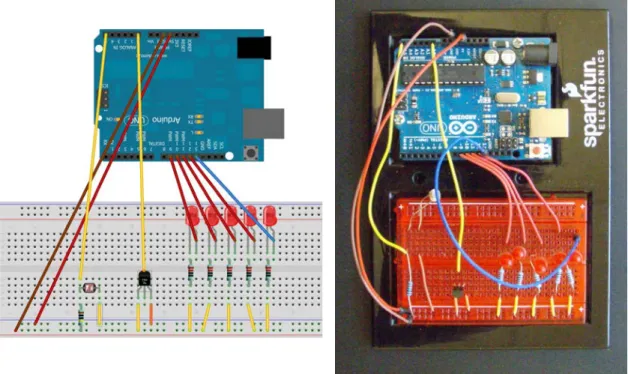
Laboratory activities try to enhance learning using several senses at once. One activity asks the student to create a light pattern similar to those seen in science fiction television shows. Another involves the use of a temperature sensor, converting the temperature measurement from decimal to binary and finally showing it using LEDs.
Figure 3. Electronic circuit used in the laboratory sessions: design (left) and implementation (right). The design shows a photocell (left), a temperature sensor (center) and several LEDs
(right).
2.2 Methodology
The effectiveness of the Arduino modules was assessed comparing two introductory programming courses in the biology degree: in one the teacher used traditional methods; in the other he enhanced these using the Arduino modules. The same teacher taught both courses in two consecutive years. Lesson plans [17] and a course diary [18] were used to guarantee both courses comparability.
We measured the achievements and attitudes of the students. Students’ achievements were measured by means of an exam testing their programming knowledge and skills. We also administered an extensive survey at the end of the semester. This survey contained questions about the students’ attitude towards programming and towards Arduino. The students provided feedback using a five-valued Likert scale.
3 RESULTS
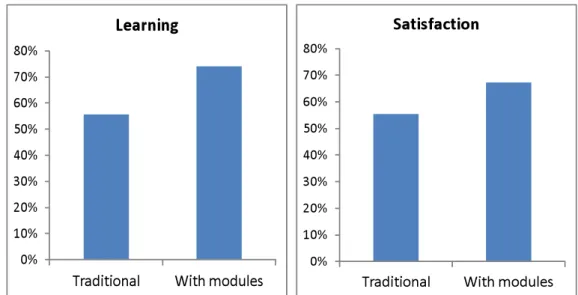
We found that the training modules enhanced the students learning. Seventy four percent of the students attained a good programming level, a 32% increase compared to the traditional course.
Figure 4. Percentage of students that attained a good programming level (left) and enjoyed programming (right). Note the increase in both these factors with the Arduino modules.
Attitudes improved also: sixty four percent of the class felt confident programming by themselves, a 21% gain. Only 55% that received the traditional approach asserted their satisfaction with programming.
The Arduino platform was received well by the students. Over 95% of student found the laboratory sessions interesting and over 85% enjoyed the lecture demonstrations.
Table 1. Student feedback from lectures and lab sessions when Arduino was used. Most students found Arduino interesting and learnt from it.
A lot Quite Some A little Nothing
Did you find the Arduino lectures
interesting? 61% 24% 15% 0% 0%
Did you learn in the Arduino lectures? 28% 37% 35% 0% 0% Did you find the Arduino lab sessions
interesting? 53% 43% 4% 0% 0%
Did you learn in Arduino the lab sessions? 30% 57% 13% 0% 0%
Students’ responses -both formal and informal- were very encouraging. One student wrote: “incredibly useful lesson, now the whole course makes sense”. A more graphic comment is shown in figure 5.
Figure 5. A student response. The question reads “Any other comment? (Explanations or examples that got your attention, improvements…) Write on the backside if needed.”
4 DISCUSSION
We evaluated the modules in a introductory programming course and found that they were highly effective: more students learned to program and more students enjoyed programming.
The use of the Arduino board increases students learning and motivation. Students find reasonable the effort necessary to work with Arduino. They perceived it as a valuable learning experience. They expressed their belief that more laboratory sessions should be devoted to Arduino.
These results are consistent with those obtained in other fields [19], [20] [16]. Several researchers have described situations where students failed to solve a problem at an abstract level, but succeeded using tangible objects [21].
One possible explanation of this learning improvement lies in the use of multiple representations of the same knowledge [15], [22]. Different representations offer the student alternative paths to knowledge and the student can choose the one that suits him better. Additionally the availability of different representations might help their abstraction process [23], [24].
Our study has some limitations. The main one is that we have only used these modules in one course in one degree. We believe that the results will be similar in the empirical sciences and engineering disciplines. In more formal fields, like mathematics and statistics, these modules might be less effective. We plan to extend this study to these disciplines and compare the results obtained with those obtained till now.
One future line of work is to adapt these learning materials to other programming languages. We are interested in including an open-source interactive language. Matlab is a very powerful platform but the fact that is proprietary hampers its development in academic environments. Using interactive environments like iPython [25] would increase these modules usefulness.
5 CONCLUSION
We developed an introductory programming teaching resource that enhances students learning in STEM degrees. These modules can be used to teach C/C++ and Matlab. These modules follow the principles of the physical computing paradigm using the Arduino board as the physical platform. The results obtained show that when using these modules more students learn to program and more students enjoy programming.
Teaching computer programming to STEM students is a challenge: students find the subject unrelated to their core interests and feel uncomfortable during the course. The application of the physical computing paradigm engages students more effectively and enhances their learning.
REFERENCES
[1] A. Robins, J. Rountree, and N. Rountree, “Learning and teaching programming: A review and discussion,” Computer Science Education, vol. 13, no. 2, pp. 137–172, 2003.
[2] H. Qin, “Teaching computational thinking through bioinformatics to biology students,” in ACM SIGCSE Bulletin, vol. 41, no. 1, 2009, pp. 188–191.
[3] J. Wells, R. M. Barry, and A. Spence, “Using Video Tutorials as a Carrot-and-Stick Approach to Learning,” IEEE Transactions on Education, vol. 55, pp. 453–458, 2012.
[4] K. E. Merrick, “An Empirical Evaluation of Puzzle-Based Learning as an Interest Approach for Teaching Introductory Computer Science,” IEEE Transactions on Education, vol. 53, pp. 677– 680, 2010.
[5] G. T. Richard, “Employing Physical Computing in Education: How Teachers and Students Utilized Physical Computing to Develop Embodied and Tangible Learning Objects,” The International Journal of Technology, Knowledge and Society, 2010.
[6] M. Resnick et al., “Digital manipulatives: new toys to think with,” in Proceedings of the SIGCHI conference on Human factors in computing systems, 1998, pp. 281–287.
[7] P. S. Moyer, “Are we having fun yet? How teachers use manipulatives to teach mathematics,” Educational Studies in Mathematics, vol. 47, no. 2, pp. 175–197, 2001.
[8] A. Ruthmann, J. M. Heines, G. R. Greher, P. Laidler, and C. Saulters II, “Teaching
computational thinking through musical live coding in scratch,” in Proceedings of the 41st ACM technical symposium on Computer science education, 2010, pp. 351–355.
[9] L. Xu and F. G. Martin, “Chirp on crickets: teaching compilers using an embedded robot controller,” in ACM SIGCSE Bulletin, vol. 38, no. 1, 2006, pp. 82–86.
[10] M. Cuéllar and M. Pegalajar, “Design and implementation of intelligent systems with LEGO Mindstorms for undergraduate computer engineers,” Computer Applications in Engineering Education, 2011.
[11] L. Maia, V. Silva, R. E. de S Rosa, J. P. Queiroz-Neto, and V. F. de Lucena, “An experience to use robotics to improve computer science learning,” in Frontiers in Education Conference, 2009. FIE’09. 39th IEEE, 2009, pp. 1–6.
[12] D. Ubeda, A. Gil, J. Lucas, L. Paya, and O. Reinoso, “The ‘ARDILLA’ platform for C/C++ programming practices,” INTED2009 Proceedings, pp. 1844–1851, 2009.
[13] M. Banzi, Getting Started with arduino. Make, 2009.
[14] J. Grasel, W. Vonnegut, and Z. Dodds, “Bitwise Biology: Crossdisciplinary Physical Computing Atop the Arduino,” in 2010 AAAI Spring Symposium Series, 2010.
[15] S. Ainsworth, “The functions of multiple representations,” Computers & Education, vol. 33, no. 2, pp. 131–152, 1999.
[16] C. Crouch, A. P. Fagen, J. P. Callan, and E. Mazur, “Classroom demonstrations: Learning tools or entertainment?,” American Journal of Physics, vol. 72, p. 835, 2004.
[17] S. Mahajan, “5.95J Teaching College-Level Science and Engineering,Spring 2009.,”
(Massachusetts Institute of Technology: MIT OpenCourseWare), http://ocw.mit.edu (Accessed 01 Mar, 2013), 2009.
[18] S. Moore, G. Walsh, and A. Rísquez, Teaching at college and university. Open University Press, 2007.
[19] M. Montessori, The Advanced Montessori Method..., vol. 1. Frederick A. Stokes Company, 1917. [20] Z. P. Dienes, Z. Paul, and H. Read, Building up mathematics. Hutchinson Educational London,
1971.
[21] J. Piaget, “How children form mathematical concepts,” Scientific American, vol. 189, pp. 74–79, 1953.
[22] J. S. DeLoache, D. H. Uttal, and S. L. Pierroutsakos, “The development of early symbolization: Educational implications,” Learning and Instruction, vol. 8, no. 4, pp. 325–339, 1998.
[23] S. Ainsworth, P. Bibby, and D. Wood, “Examining the effects of different multiple representational systems in learning primary mathematics,” The Journal of the Learning Sciences, vol. 11, no. 1, pp. 25–61, 2002.
[24] S. Ainsworth and N. VanLabeke, “Multiple forms of dynamic representation,” Learning and Instruction, vol. 14, no. 3, pp. 241–255, 2004.
[25] F. Perez and B. E. Granger, “IPython: a system for interactive scientific computing,” Computing in Science & Engineering, vol. 9, no. 3, pp. 21–29, 2007.