SAS
®
9.2
Integration Technologies
Directory Services Reference
The correct bibliographic citation for this manual is as follows: SAS Institute Inc. 2009. SAS®9.2 Integration Technologies: Directory Services Reference. Cary, NC: SAS Institute
Inc.
SAS®9.2 Integration Technologies: Directory Services Reference
Copyright © 2009, SAS Institute Inc., Cary, NC, USA ISBN 978-1-59994-848-5
All rights reserved. Produced in the United States of America.
For a hard-copy book: No part of this publication may be reproduced, stored in a retrieval system, or transmitted, in any form or by any means, electronic, mechanical, photocopying, or otherwise, without the prior written permission of the publisher, SAS Institute Inc.
For a Web download or e-book: Your use of this publication shall be governed by the terms established by the vendor at the time you acquire this publication.
U.S. Government Restricted Rights Notice. Use, duplication, or disclosure of this software and related documentation by the U.S. government is subject to the Agreement with SAS Institute and the restrictions set forth in FAR 52.227-19 Commercial Computer Software-Restricted Rights (June 1987).
SAS Institute Inc., SAS Campus Drive, Cary, North Carolina 27513. 1st electronic book, February 2009
1st printing, March 2009
SAS®Publishing provides a complete selection of books and electronic products to help
customers use SAS software to its fullest potential. For more information about our e-books, e-learning products, CDs, and hard-copy books, visit the SAS Publishing Web site atsupport.sas.com/publishingor call 1-800-727-3228.
SAS®and all other SAS Institute Inc. product or service names are registered trademarks
or trademarks of SAS Institute Inc. in the USA and other countries. ®indicates USA registration.
Other brand and product names are registered trademarks or trademarks of their respective companies.
Contents
Chapter 1
4
Overview of Directory Services
1
What Are Directory Services? 1What Is the Lightweight Directory Access Protocol (LDAP)? 2 Understanding the Directory Information Tree (DIT) 3 Understanding LDAP Security 5
How Does SAS Implement Directory Services? 6
Chapter 2
4
LDAP CALL Routine Interface
7
Overview of the LDAP CALL Routine Interface 7 Dictionary 7Chapter 3
4
LDAP SCL Interface
29
Overview of the LDAP SCL Interface 291
C H A P T E R
1
Overview of Directory Services
What Are Directory Services? 1
What Is the Lightweight Directory Access Protocol (LDAP)? 2
Understanding the Directory Information Tree (DIT) 3
Directory Structure 3
Directory Entries 3
Searching a Directory Information Tree 4
Understanding LDAP Security 5
Overview of LDAP Security 5
Authentication 5
Access Control 6
How Does SAS Implement Directory Services? 6
What Are Directory Services?
Today’s enterprise computing environments support an extensive array of users and resources. Frequently, users require access to computing resources from multiple operating environments across the distributed enterprise. This need for access makes the administration and tracking of user profiles and resource attributes difficult, if not completely unmanageable. It is also difficult for applications to access data about resources that are located on other systems.
Enterprise directory services solves these problems by enabling you to collect information that describes users, applications, file and print resources, access control, and other resources into a commondirectorythat is accessible from all users and applications on the network. This directory, or repository, can be administered in one place using one interface. SAS Integration Technologies software provides application interfaces that enable you to develop SAS programs using either the DATA step or SAS Component Language (SCL) that use directory services. These interfaces enable SAS distributed application components to share a common application directory with components that execute in other run-time environments across the distributed enterprise. This common application directory eliminates the islands of information that can be created when applications implement their own specialized repositories to manage resource information.
Additionally, SAS Integration Technologies uses directory services to host all of its product infrastructure and run-time configuration information. This includes server and transport bindings, publish/subscribe channel and subscriber profiles, package archive repositories, and data source locators.
For Version 9 of Integration Technologies, SAS provides the SAS Open Metadata Architecture. The SAS Open Metadata Architecture provides a central repository for metadata for the entire enterprise. For the SAS Metadata Server, SAS includes the SAS Management Console, which enables you to administer the configuration
2 What Is the Lightweight Directory Access Protocol (LDAP)? 4 Chapter 1
information using a graphical user interface. Because the information is centrally managed, any additions or changes that you make to the information in the directory are immediately available toallusers and directory-enabled applications. For example, instead of changing an access control list for a resource on each system that accesses it, you change the information only once. Each application can use this information to control access to the resource.
Another type of directory service is the Lightweight Directory Access Protocol (LDAP). Using this access protocol, applications can search, retrieve, add, delete, and modify objects in an enterprise directory from anywhere within the distributed environment.
This document provides information on how to incorporate the LDAP directory services functions into your SAS programs.
What Is the Lightweight Directory Access Protocol (LDAP)?
In 1987 the Comité Consultatif International Téléphonique et Télégraphique (CCITT) X.500 recommendation on directory services was adopted. The CCITT later became the International Telecommunications Union (ITU). This recommendation included a specification for a Directory Access Protocol (DAP) that defined a protocol used to control communication between a user and the directory. This DAP was based on the Open Systems Interconnect (OSI) protocol stack.
The X.500 recommendation set the stage for several successful commercial implementations of directory services. (One early implementation of particular note was the Novell Directory Services (NDS) first introduced in NetWare Version 4.0.) However, one of the obstacles to broader acceptance of the X.500 standard was the reliance of the DAP on the OSI protocol stack. The OSI stack has yet to gain widespread acceptance by the industry, in part because of its complexity.
To address this issue, the University of Michigan, with support from the Internet Engineering Task Force (IETF), developed a simpler DAP called the Lightweight Directory Access Protocol (LDAP). LDAP was developed to provide access to a directory server without the overhead of the OSI protocol stack. LDAP is based on TCP/IP and is therefore applicable for use on Local Area Networks (LANs), Wireless Area Networks (WANs), as well as over the Internet.
LDAP is an open, vendor-neutral standard that enables you to work with any LDAP-compliant server. LDAP specifies only the interface protocol to the directory and does not specify how the actual directory is implemented. For example, the Microsoft Active Directory in Windows 2000 is implemented quite differently than the iPlanet Directory Server (previously known as the Netscape Directory Server). However, because they both support an LDAP interface, you can use the same applications to work with them.
LDAP is supported in most network operating systems and collaborative applications. LDAP support has also been implemented in most network-oriented middleware products.
Specific platform support for LDAP access is broad. Client bindings are available for various platforms in C/C++ from the OpenLDAP and Mozilla organizations as well as commercial vendors. PERL support is available from Mozilla, and Java support is provided through Sun Microsystems’ JNDI facility. Support for Windows is provided through the Active Directory Services Interface (ADSI) and third-party ActiveX controls.
Draft specifications have been developed to extend LDAP by adding a standard access control model, dynamic directories, server-side sorting of search results, LDAP server discovery, and other extensions.
Overview of Directory Services 4 Directory Entries 3
Understanding the Directory Information Tree (DIT)
Directory Structure
A directory is a specialized database that is designed to retrieve information quickly and securely. It is optimized for read access because the type of information in the directory is searched often, but changes infrequently. For example, a user name that you add for a new employee is not likely to change for the entire period of employment.
Information about the services, resources, users, and other objects that are accessible from the applications is organized as a collection of individual entries that contain information about each resource. To make accessing these entries as efficient as
possible, they are organized in a hierarchy called the Directory Information Tree (DIT). The following figure shows an example of a DIT:
The root of the tree is typically a country (C) followed by an organization (O). For example, in the preceding figure, the root of the tree is o=Alphalite Airways,c=US. One or more organizational units (OU) typically appear below the root. These arecontainer
objects in that they can contain other directory entries. Directory entries that store information about a specific resource are referred to asleaf objects and they are added to the tree under an existing container object.
The path to each entry in the tree is called its distinguished name (DN), and each DN in the tree is unique. For example, using the DIT in the preceding figure, the DN for the Airplane Maintenance Department of Alphalite Airways is
ou=Planes,ou=Maintenance,o=Alphalite Airways,c=US.
Directory Entries
A directory entry contains a set of name/value pairs, which are calledattributes. An objectclass attribute is required for each entry in the directory. The object class
determines which attributes are allowed for the entry as well as any attributes that are required. The set of defined attributes and object classes that defines the content of acceptable entries within the directory server is called the Directory Schema.
An attribute for a given entry can have multiple values. For example, because an OU can have multiple values assigned to it, a person might belong to more than one
organization unit. When the DIT is searched, the order in which the attributes are returned cannot be guaranteed. Therefore, no implicit priority or hierarchy of attribute values can exist within an entry.
Here is an example of a directory entry for a person in our example airline enterprise: cn=John Smith,o=Alphalite Airways,c=US
4 Searching a Directory Information Tree 4 Chapter 1 cn=John_Smith sn=Smith objectclass=top objectclass=person objectclass=salesPerson l=Chicago
title=Senior Sales Manager ou=Finance ou=Marketing [email protected] telephonenumber=312-258-8655 roomnumber=117 uid=jsmith
Searching a Directory Information Tree
Entries in an LDAP directory can be read directly if the exact DN is known. Usually, however, the directory is searched for entries that match a particular set of
specifications. In order to perform a search, the directory server has to know the starting place in the tree (called the base), how deep in the tree the user wants to look (called thescope), and the search criteria (called thefilter).
The base can be any DN that is served by the directory server that is being queried. If the DN is outside the domain of the server, it might return areferral. The referral has the data that is necessary to connect to another server that might have more entries that match the filter. The client might decide either tochase(peruse possible filter matches on the other server) the referral or to ignore it.
A search can also contain a scope. The scope determines how far down in the tree from the base the search is made. A scope of BASE returns only the base object if it exists and matches the filter. (The filter is required even with a scope of BASE). A scope of ONE searches only the base and entries immediately below the base entry. A scope of SUB searches the entire sub tree starting at the base entry. Limiting the scope of a search makes it more efficient. If you know that an entry is one level below the base, then limiting the search to that scope makes the search run faster. If you want to search all entries that are below the base, search the sub tree.
A scope of BASE is used when you retrieve special entries. For example, most servers support a special entry with a DN of cn=monitor that returns information about the state of the server. When you search for that entry, a scope of BASE is required.
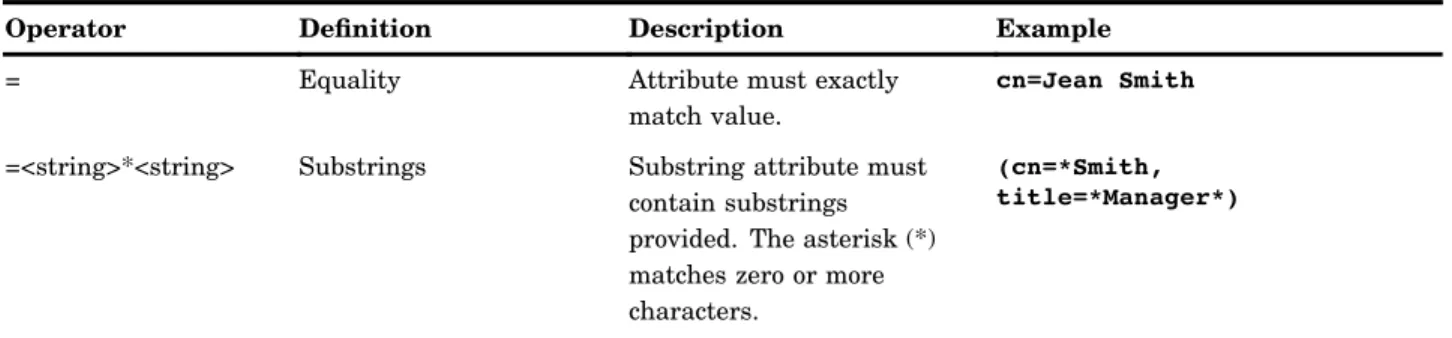
The search filter determines which entries below the base are returned. A simple filter consists of an attribute name, an operator, and a value. The following table describes the valid search operators.
Table 1.1 LDAP Search Filter Operators
Operator Definition Description Example
= Equality Attribute must exactly match value.
cn=Jean Smith
=<string>*<string> Substrings Substring attribute must contain substrings provided. The asterisk (*) matches zero or more characters.
(cn=*Smith, title=*Manager*)
Overview of Directory Services 4 Authentication 5
Operator Definition Description Example
>= Greater than or equal to Attribute must be greater than or equal to value.
age>=30
<= Less than or equal to Attribute must be less than or equal to value.
roomnumber<=3999
=* Presence matches Entry has attribute of specified name.
(objectclass=*)
~= Approximate Usually implemented as a "sounds like" algorithm. Attribute must be "approximately equal" to value.
cn~=Jean Smits
& Boolean AND All filters must be true. (&(sn=Smith)(ou=Reservations))
| Boolean OR Any of the filters might be true.
(|(manager=cn=Jean
Smith,ou=Reservations,o=Alphalite Airways,c=US)(ou=Marketing))
! Boolean NOT None of the filters might be true.
(&(!(ou=Maintenance)(!(ou=Finance))))
Understanding LDAP Security
Overview of LDAP Security
While the intent of the directory is to share much of the information in it across many applications, it must also be protected in order to prevent unauthorized access to sensitive data.
Security within the directory is achieved using both authentication and access control. Authentication identifies a user’s credentials to the directory server. Access control determines which entries a user is allowed to access based on that identity. Both of these topics are discussed next.
Authentication
A user establishes a connection to a directory server by performing a bindoperation. Part of the information that is used in performing this operation is the user’s identity and password. The three basic bind mechanisms are anonymous, simple, and secure.
The most basic bind mechanism is an anonymous bind. Access is granted based on the user having no identity within the directory. While it is normal to provide read access to certain entries and attributes for anonymous users, most application data is protected against retrieval by unknown users.
A simple bind operation is performed when the user provides a DN for an entry within the directory and a password that goes with that entry. The entry must have a USERPASSWORD attribute, which is checked against the password provided. If the bind is successful, the user’s identity becomes that DN for the duration of the connection and access to entries are based on that identity.
While the simple bind is adequate for most environments, it requires that you send the password in clear text over the network. Some directory servers implement secure authentication methods, such as Kerberos or certificate-based authentication like
6 Access Control 4 Chapter 1
Secure Sockets Layer (SSL). Any authentication method that is used must resolve to a directory entry in order to permit a comparison with the access control list (ACL). After authentication, the ACL specifies access controls that are based on the DN for the user.
Access Control
There are as many access control schemes as there are directory servers. The OpenLDAP server keeps the access control lists in the configuration file and uses regular expressions for the comparison of ACL targets (what is being secured) and subjects (who is being allowed access) while iPlanet (previously Netscape) and IBM keep the access control information in the directory tree as an attribute of the entries. However, the basic ideas are similar across server implementations. The ACLs can control access to the entire directory tree, or portions of it, down to the attribute level. Special access can be granted so that users can access their own DNs. Users might be allowed access to attributes on their own entry that no one else has access to, such as the USERPASSWORD attribute. There is usually a default access mode, and the ACLs are used to override that default. For example, iPlanet directory servers have a default access of none. If no ACLs are defined on a directory tree, then no users can access the tree except the directory manager. ACLs can be added to allow access to parts of the tree or specific entries based on user DN or group membership.
How Does SAS Implement Directory Services?
The SAS implementation of directory services is based on LDAP Version 2. Integration Technologies versions 8.2 and 9 include support for UTF-8 character encoding, which means that you can use either an LDAP Version 2 or LDAP Version 3 server.
Integration Technologies software includes two facilities that can be used to add, modify, delete, and search entries in an LDAP server:
3 Chapter 2, “LDAP CALL Routine Interface,” on page 7
3 Chapter 3, “LDAP SCL Interface,” on page 29
The LDAP CALL Routine Interface and the LDAP SCL Interface are application facilities that enable you to use an enterprise directory server from within a SAS application environment.
These facilities interact with a directory server using either LDAP Version 2 or Version 3. SAS Integration Technologies supports the following directory servers that have been tested for use with the product:
3 iPlanet Directory Server
3 IBM eNetwork LDAP Directory Server
3 Microsoft Active Directory.
Active Directory is the Microsoft implementation of directory services that runs on Windows 2000 Server platforms. While more than a generic LDAP server, it does support an LDAP interface through the Active Directory Service Interface (ADSI).
While commercial enterprise directory servers are currently recommended, SAS Institute acknowledges the LDAP open-source initiative. SAS makes executables of the openLDAPslapdserver generally available across a variety of platforms. If your site has not yet implemented an LDAP-enabled directory, contact your SAS account representative for deployment options.
7
C H A P T E R
2
LDAP CALL Routine Interface
Overview of the LDAP CALL Routine Interface 7
Dictionary 7
Overview of the LDAP CALL Routine Interface
The LDAP CALL Routine Interface consists of a set of SAS CALL routines that enable your SAS programs to manipulate LDAP directory entries.
The following are two examples of SAS programs that use the LDAP CALL Routine Interface to manipulate LDAP server entries:
3 “Searching an LDAP Directory” on page 25
3 “Adding a Directory Entry to an LDAP Server” on page 24.
For more information about manipulation LDAP directory entries, see Chapter 3, “LDAP SCL Interface,” on page 29.
Dictionary
LDAPS_ADD
Adds new entries to an LDAP directory
Syntax
CALL LDAPS_ADD(lHandle,entryName, rc,attr,numValues, attrVal1, …attrValN, <attr, numValues,attrVal1, …attrValN>);
Arguments
lHandle
identifies the connection handle that is returned by a successful LDAPS_OPEN call. The connection handle identifies the open connection to use when adding entries.
8 LDAPS_ADD 4 Chapter 2
Type: Numeric Direction: Input
entryname
names the directory entry that is to be created. Type: Character
Direction: Input
rc
receives a numeric code that indicates success or failure. Type: Numeric
Direction: Output
attr
names an attribute for this particular entry. Type: Character
Direction: Input
numValues
specifies the number of values that are associated with theattrparameter. Type: Numeric
Direction: Input
attrVal1, … attrValN
specifies one or more attribute values. The number of values is determined by the
numValuesparameter.
Type: Numeric or Character Direction: Input
Details
One or more attributes can be specified. Each attribute name must be followed by the number of attribute values, then followed by a comma-separated list of one or more attribute values.
Examples
The following example adds two single-value entries to a distinguished name. dn = cn=alpair02.unx.com,o=Alphalite Airways,c=US;
attrName = objectclass; objValue = SASDomain; attrName2 = node;
nodeValue = oak.unx.com;
CALL LDAPS_ADD(lHandle, dn, rc, attrName, 1, objValue, attrName2, 1, nodeValue); The following example adds three attributes, one with multiple values.
dn=sasSubscriberCn=JohnSmith,cn=sassubscribers,
sasComponent=sasPublishSubscribe,cn=SAS,o=Alphalite Airways,c=US; attrName = objectclass;
LDAP CALL Routine Interface 4 LDAPS_ATTRNAME 9 attrName2 = sasEntryInclusionFilter; val = gif; val2 = dataset; htmlvalue = html; attrnName3 = sasPersonDN;
val3 = uid=JSmith,ou=people,o=Alphalite Airways,c=us; CALL LDAPS_ADD(lHandle, dn, rc, attrName, 1, objValue, attrName2, 3, val, val2, htmlvalue, attrName3, 1, val3);
LDAPS_ATTRNAME
Returns the name and the number of values of an attribute in an LDAP entry
Syntax
CALL LDAPS_ATTRNAME(sHandle,entryIndex, attributeIndex, attributeName,
numValues,rc);
Arguments
sHandle
specifies the search handle that is returned by the LDAPS_SEARCH CALL routine. The search handle identifies the entry list returned in the search.
Type: Numeric Direction: Input
entryIndex
specifies the index into the entry list. This index is 1-based. Type: Numeric
Direction: Input
attributeIndex
specifies the index into the attribute list for the specified entry. This index is 1-based. Type: Numeric
Direction: Input
attributeName
returns the name of the specified attribute. Type: Character
10 LDAPS_ATTRVALUE 4 Chapter 2
numValues
returns the number of values for the specified attribute. Type: Numeric
Direction: Output
rc
receives a return code that indicates success or failure. Type: Numeric
Direction: Output
Example
The following example prints to the SAS log the names and values of all attributes in all entries in a given LDAP directory.
call ldaps_search(lhandle, sHandle, filter, attribs, numEntries, rc); do entryIndex = 1 to numEntries;
numAttributes = 0; entryName=’’;
/* retrieve entry indexed by integer entryIndex */
call ldaps_entry(sHandle, entryIndex, entryName, numAttributes, rc); put ’Entry name is ’ entryName;
put ’Number of attributes returned is ’ numAttributes; do attrIndex = 1 to numAttributes;
call LDAPS_ATTRNAME(sHandle, entryIndex, attrIndex, attribName, numValues, rc);
put ’Attribute name is ’ attribName;
put ’Number of values for this attribute is ’ numValues; do attrValueIndex = 1 to numValues;
call ldaps_attrvalue(sHandle, entryIndex, attrindex, attrValueIndex, value, rc);
put Attribute value is value; end;
end; end;
LDAPS_ATTRVALUE
Retrieves an attribute value
Syntax
CALL LDAPS_ATTRVALUE(sHandle, entryIndex,attributeIndex,valueIndex,value,
LDAP CALL Routine Interface 4 LDAPS_ATTRVALUE 11
Arguments
sHandle
specifies the search handle that is returned by the LDAPS_SEARCH CALL routine. The search handle identifies the entry list that is returned in the search.
Type: Numeric Direction: Input
entryIndex
specifies an index into the entry list. This index is 1-based. Type: Numeric
Direction: Input
attributeIndex
specifies an index into the attribute list for the specified entry. Type: Numeric
Direction: Input
valueIndex
specifies an index into the list of attribute values. Type: Numeric
Direction: Input
value
returns the value of the specified attribute. Type: Character
Direction: Output
rc
receives a return code that indicates success or failure. Type: Numeric
Direction: Output
Example
The following example prints to the SAS log the names and values of all attributes in all entries in a given LDAP directory.
call ldaps_search(lhandle, sHandle, filter, attribs, numEntries, rc); do entryIndex = 1 to numEntries;
numAttributes = 0; entryName=’’;
/* retrieve entry indexed by integer entryIndex */
call ldaps_entry(sHandle, entryIndex, entryName, numAttributes, rc); put ’Entry name is ’ entryName;
put ’Number of attributes returned is ’ numAttributes; do attrIndex = 1 to numAttributes;
call ldaps_attrname(sHandle, entryIndex, attrIndex, attribName, numValues, rc);
put ’Attribute name is ’ attribName;
12 LDAPS_CLOSE 4 Chapter 2
do attrValueIndex = 1 to numValues; value=’’;
call LDAPS_ATTRVALUE
(sHandle, entryIndex, attrindex, attrValueIndex, value, rc);
put Attribute value is value; end;
end; end;
LDAPS_CLOSE
Closes a connection to an LDAP server
Syntax
CALL LDAPS_CLOSE(lHandle, rc);
Arguments
lHandle
specifies the connection handle that is returned by the LDAPS_OPEN CALL routine. Type: Numeric
Direction: Input
rc
receives a return code that specifies success or failure. Type: Numeric
Direction: Output
Details
When invoked, the LDAPS_CLOSE CALL routine closes the connection to the LDAP server. All resources associated with the connection are freed. Therefore, any valid search handles that are associated with this connection are no longer valid.
Example
The following example closes an open connection to an LDAP server. call ldaps_close(lHandle, rc);
LDAP CALL Routine Interface 4 LDAPS_ENTRY 13
LDAPS_DELETE
Deletes an entry from an LDAP directory
Syntax
CALL LDAPS_DELETE(lHandle,entryName,rc);
Arguments
lHandle
specifies the connection handle that is returned by the LDAPS_OPEN CALL routine. Type: Numeric
Direction: Input
entryName
names the entry that is to be deleted from the LDAP directory. Type: Character
Direction: Input
rc
receives a return code that indicates success or failure. Type: Numeric
Direction: Output
Example
The following example deletes an entry from an LDAP directory. dn = "cn=alpair02.unx.com,o=Alphalite Airways,c=US"; rc=0;
call ldaps_delete(lHandle, entryName, rc);
LDAPS_ENTRY
Retrieves information about a specific entry returned in a search
Syntax
14 LDAPS_ENTRY 4 Chapter 2
Arguments
sHandle
specifies the search handle that is returned by the LDAPS_SEARCH CALL routine. The search handle identifies the entry list that is returned in the search.
Type: Numeric Direction: Input
entryIndex
specifies the index into the entry list that is returned by the search. This index is 1-based.
Type: Numeric Direction: Input
entryName
returns the name of the entry. Type: Character
Direction: Output
numAttributes
returns the total number of attributes for the specified entry. Type: Numeric
Direction: Output
rc
receives a return code that indicates success or failure. Type: Numeric
Direction: Output
Example
The following example prints to the SAS log the names and values of all attributes in all entries in a given LDAP directory.
call ldaps_search(lhandle, sHandle, filter, attribs, numEntries, rc); do entryIndex = 1 to numEntries;
numAttributes = 0; entryName=’’;
/* retrieve entry indexed by integer entryIndex */
call LDAPS_ENTRY(sHandle, entryIndex, entryName, numAttributes, rc); put ’Entry name is ’ entryName;
put ’Number of attributes returned is ’ numAttributes; do attrIndex = 1 to numAttributes;
call ldaps_attrname(sHandle, entryIndex, attrIndex, attribName, numValues, rc);
put ’Attribute name is ’ attribName;
put ’Number of values for this attribute is ’ numValues; do attrValueIndex = 1 to numValues;
call ldaps_attrvalue(sHandle, entryIndex, attrindex, attrValueIndex, value, rc);
LDAP CALL Routine Interface 4 LDAPS_MODIFY 15
put Attribute value is value; end;
end; end;
LDAPS_FREE
Frees search resources
Syntax
CALL LDAPS_FREE(sHandle, rc);
Arguments
sHandle
specifies the search handle that is returned by the LDAPS_SEARCH CALL routine. The search handle identifies the entry list that is returned in the search.
Type: Numeric Direction: Input
rc
receives a return code that indicates success or failure. Type: Numeric
Direction: Output
Details
When invoked, the LDAPS_FREE CALL routine frees all resources that are associated with the specified search handle. The resources that are freed include all returned entry and attribute information, as shown in the following example:
call ldaps_free(sHandle, rc);
LDAPS_MODIFY
Modifies an LDAP directory entry
Syntax
CALL LDAPS_MODIFY(lHandle,entryName,rc, modifyType1,attr1,numValues1<,
attr1Val1, …attr1ValN> <…,modifyTypeN,attrN,numValuesN< ,attrNVal1…,
16 LDAPS_MODIFY 4 Chapter 2
Arguments
1Handle
specifies the connection handle that is returned by the LDAPS_OPEN CALL routine. The connection handle identifies the open connection to use when modifying the LDAP directory entry.
Type: Numeric Direction: Input
entryname
names the directory entry to be modified. Type: Character
Direction: Input
rc
receives a return code that indicates success or failure. Type: Numeric
Direction: Output
modifyType
specifies the type of modification. Valid values are ADD, DELETE, and REPLACE. Type: Character
Direction: Input
attr
identifies the attribute to be modified. Type: Character
Direction: Input
numValues
specifies the number of values to be modified for the specified attribute. Type: Numeric
Direction: Input
attrVal1, …attrValN
specifies zero or more attribute values, the number of which is specified by the
numValuesparameter.
Type: Numeric or Character Direction: Input
Details
Zero or more attributes can be specified.
If the value of the modifyType parameter isDELETE and if the value of the
numValues parameter is0, then the entire attribute and all of its values are deleted. If the value of the modifyType parameter isDELETE and if the value of the
numValues parameter is1or greater, then only the specified values will be deleted. If the value of the modifyType parameter isREPLACE, then the existing attribute and all of its values are deleted and replaced with the specified attribute and its newly specified values.
Examples
LDAP CALL Routine Interface 4 LDAPS_OPEN 17 dn = "cn=alpair02.unx.com,o=Alphalite Airways,c=US"; attrName = "objectclass"; objValue = "SASDomain"; attrName2 = "node"; nodeValue = "oak.unx.com";
CALL LDAPS_MODIFY(lHandle, dn, rc, "ADD", attrName, 1, objValue, "DELETE", attrName2, 0);
The following example modifies a filter associated with an LDAP entry. dn="sasSubscriberCn=JohnSmith,cn=sassubscribers, sasComponent=sasPublishSubscribe,cn=SAS,o=Alphalite Airways,c=US"; attrName = "sasDescription"; attrName2 = "sasEntryInclusionFilter"; val = "gif"; val2 = "dataset"; htmlvalue = "html";
CALL LDAPS_MODIFY(lHandle, dn, rc, "DELETE", attrName, 0, "REPLACE", attrName2, 3, val, val2, htmlvalue);
LDAPS_OPEN
Opens a connection to an LDAP server
Syntax
CALL LDAPS_OPEN(lHandle,ldapServerName,port, base,bindDN, password,rc, <options>);
Arguments
lHandle
returns a connection handle that is used in subsequent CALL routines to access the LDAP server session.
Type: Numeric Direction: Output
ldapServerName
identifies the LDAP server that is to be connected to. If blank, the value defaults to the host that issued the CALL routine. Otherwise, the value must be the DNS name or IP address of a host on which an LDAP server is running.
Type: Character Direction: Input
18 LDAPS_OPEN 4 Chapter 2
port
specifies the TCP port of the LDAP server. If the value is zero, then the standard port of 389 is used.
Type: Numeric Direction: Input
base
specifies a distinguished name that establishes the base object for the search. The base object is the point in the LDAP tree at which you want to start searching. If this value is blank, then the default value is the macro variable or environment variable LDAP_BASE.
Type: Character Direction: Input
bindDN
specifies the distinguished name that is used to bind to the server. If this value is blank, then the macro variable or environment variableLDAP_BINDDNis used as the bind-distinguished name. If the value""is specified and theLDAP_BINDDN
variable has not been set, then an unauthenticated bind is performed. Type: Character
Direction: Input
password
specifies the password that is associated with thebindDNvalue. If this value is blank, then the macro variable or environment variableLDAP_BINDPWis used as the bind-distinguished name. If the value""is specified and theLDAP_BINDPW
variable has not been set, then an unauthenticated bind is performed. Passwords that have been encoded by using the PWENCODE procedure can be used to bind to the server. For more information, see the PWENCODE procedure inBase SAS Procedures Guide.
Type: Character Direction: Input
rc
receives a return code that identifies success or failure. Type: Numeric
Direction: Output
options
specifies one or more session options to use with this bind. Type: Character
Direction: Input
The following session options are valid: OPT_REFERRALS_OFF
instructs the server to not chase referrals. Specifying this option overrides the default value of OPT_REFERRALS_ON.
SUBTREE_SEARCH_SCOPE
sets the scope of the search to include all subtrees. This is the default value. BASE_SEARCH_SCOPE
sets the scope of the search to include only the base. This value overrides the default value of SUBTREE_SEARCH_SCOPE.
LDAP CALL Routine Interface 4 LDAPS_SETOPTIONS 19
ONELEVEL_SEARCH_SCOPE
sets the scope of the search to include the base and one additional level. This value overrides the default value of SUBTREE_SEARCH_SCOPE.
Note: Specify only one search scope option. If multiple search scope options are specified, then the one that appears last is used. If none of the search scope options are specified, then the default value of SUBTREE_SEARCH_SCOPE is used.4
Details
The options that are specified in the LDAPS_OPEN CALL routine include only those that must be specified when the server connection is first opened. Additional options can be specified after the connection is opened by using the LDAPS_SETOPTIONS CALL routine.
Examples
The following example opens a connection to an LDAP server by using an anonymous bind and default session options.
server="alpair01.unx.com";port=8010;
base="sasComponent=sasPublishSubscribe,cn=SAS,o=Alphalite Airways,c=US"; bindDN="";
Pw="";
call LDAPS_OPEN(lHandle, server, port, base, bindDN, Pw, rc);
The following example opens a connection to an LDAP server, binds to the server, and passes in a session option of OPT_REFERRALS_OFF. This instructs the LDAP server not to chase referrals.
server = "alpair02.unx.com"; base = "o=Alphalite Airways,c=US";
bindDN ="cn=John Doe,o=Alphalite Airways,c=us"; bindPW ="myPass1";
option= "OPT_REFERRALS_OFF";
call LDAPS_OPEN(lHandle, server,8001,base,bindDN,bindPW,rc, option);
LDAPS_SETOPTIONS
Sets options on an open LDAP server session
Syntax
CALL LDAPS_SETOPTIONS(lHandle,timeLimit,sizeLimit,base, referral,restart, rc
20 LDAPS_SETOPTIONS 4 Chapter 2
Arguments
lHandle
specifies the connection handle that is returned by the LDAPS_OPEN CALL routine. The connection handle identifies the open connection to use when specifying options on the LDAP server session.
Type: Numeric Direction: Input
timeLimit
specifies the maximum number of seconds that the client waits for an answer to a search request. The value0indicates that no limit is imposed. The default value is0 unless another value is specified. The value-1specifies that the server retain its current timeLimitvalue; the value is not changed.
Type: Numeric Direction: Input
sizelimit
specifies the maximum number of entries that the server is to return from the search. The value0indicates that no limit should be imposed. The default value is0 unless another value is specified. The value-1specifies that the server is to retain its currentsizeLimitsetting; the value is not changed.
Type: Numeric Direction: Input
base
specifies the base object (distinguished name) for the search operation. An initial base object was specified when the connection to the LDAP server was established with the LDAPS_OPEN CALL routine. Specifying a non-blank value for thebase
parameter overrides the existing base object definition. To retain the existing base object definition, specify a blank value for the baseparameter.
Type: Character Direction: Input
referral
indicates whether to chase referrals, by setting either the OPT_REFERRALS_ON option or the OPT_REFERRALS_OFF option. One or the other of these options was specified when the connection to the LDAP server was established with the
LDAPS_OPEN CALL routine. Specifying either option as the value of the referral
parameter overrides the existing value. Specifying a blank value retains the existing value.
Type: Character Direction: Input
restart
indicates whether to restart a query if error condition EINTR occurs. At ldaps_open time, the default session settings are determined. ldaps_setOptions can be used to change these defaults. Valid values for restart are OPT_RESTART_ON or
OPT_RESTART_OFF. A blank value can be passed in to indicate that the default value of OPT_RESTART_OFF should be used.
Type: Character Direction: Input
LDAP CALL Routine Interface 4 LDAPS_SETOPTIONS 21
rc
receives a return code that indicates success or failure. Type: Numeric
Direction: Output
property
specifies the name of an optional property that is being set. Currently, the only property that is supported is the SEARCH_SCOPE property, which specifies the scope of searches in the LDAP directory. Specify the value of the property by using the propertyValue parameter.
Type: Character Direction: Input
propertyValue
specifies the value for the property parameter. Type: Character
Direction: Input
The following values for the SEARCH_SCOPE property are valid: SUBTREE_SEARCH_SCOPE
sets the scope of the search to include all subtrees. This is the default value. BASE_SEARCH_SCOPE
sets the scope of the search to include only the base. This value overrides the default value of SUBTREE_SEARCH_SCOPE.
ONELEVEL_SEARCH_SCOPE
sets the scope of the search to include the base and one additional level. This value overrides the default value of SUBTREE_SEARCH_SCOPE.
Examples
The following example specifies maximum limits on search time and number of entries returned. This example also specifies that the server is to refrain from chasing
referrals. The existing base object definition is to remain unchanged. timeLimit=120;
sizeLimit=100;
base=; /* use default set at _open time */ referral = OPT_REFERRALS_OFF;
restart = ;
call ldaps_setOptions(lHandle, timeLimit, sizeLimit, base, referral, restart, rc);
The following example uses the optional properties parameter to set the scope of LDAP searches.
timelimit = -1; /* use current setting */ sizelimit = -1; /* use current setting */ base=; /* use default set at _open time */ referral = ; /* use default set at _open time */ restart = ; /* use default */
prop = SEARCH_SCOPE;
propValue = BASE_SEARCH_SCOPE; /* only search the base */
call ldaps_setOptions(lHandle, timelimit, sizelimit, base, referral, restart, prop, propValue);
22 LDAPS_SEARCH 4 Chapter 2
LDAPS_SEARCH
Searches and retrieves information from the specified LDAP directory
Syntax
CALL LDAPS_SEARCH(lHandle,sHandle,filter, attributes, numEntries,rc);
Arguments
lHandle
specifies the connection handle that is returned by the LDAPS_OPEN CALL routine. The connection handle identifies the open connection to use when searching the LDAP server.
Type: Numeric Direction: Input
sHandle
returns the search handle that identifies the list of entries returned in the search. The search handle is used in subsequent CALL routines to access the search results. The search handle remains valid until it is closed with the LDAPS_FREE or
LDAPS_CLOSE CALL routine. Type: Numeric
Direction: Output
filter
specifies search criteria that determine that the entries are to be added to the entry list that is returned by the search.
Type: Numeric Direction: Input
attributes
specifies the attributes to return along with each entry that matches the search criteria. If more than one attribute is specified, then the attributes must be separated by blank spaces, as follows:
attrs = objectclass sasdeliverytransport sasnamevalueinclusionfilter; Specifying a null string indicates that all available attributes are to be returned, as follows:
attrs =
Type: Character Direction: Input
numEntries
returns the total number of result entries found during the search. Type: Numeric
LDAP CALL Routine Interface 4 LDAPS_SEARCH 23
rc
receives a return code that indicates success or failure. Type: Numeric
Direction: Output
Details
The LDAPS_SEARCH CALL routine selects and retrieves entries from a specified LDAP directory. A search handle is returned so that information about specific entries and attributes can be obtained. The search information that is identified by the search handle can be used until it is explicitly freed using the LDAPS_FREE CALL routine or until the connection is closed using the LDAPS_CLOSE CALL routine.
Note: For Microsoft Active Directory servers, the maximum number of attributes that can be returned is limited. You can use a technique called range retrieval to work around this issue. For more information, see
http://msdn.microsoft.com/en-us/library/aa367017.aspxin the Microsoft Developer Network library. 4
Examples
The following example returns a list of entries on the LDAP server that match the values of the specified filter. The list of entries returned from the search includes the values of two attributes for each matching entry.
filter=(&(saschannelcn=DeleteTest)(objectclass=*)); attrs=description objectclass;
rc=0;
numEntries=0; sHandle=0;
call LDAPS_SEARCH(lhandle, sHandle, filter, attrs, numEntries, rc);
The following example prints to the SAS log the names and values of all attributes in all entries in a given LDAP directory.
call LDAPS_SEARCH(lhandle, sHandle, filter, attribs, numEntries, rc); do entryIndex = 1 to numEntries;
numAttributes = 0; entryName=’’;
/* retrieve entry indexed by integer entryIndex */
call ldaps_entry(sHandle, entryIndex, entryName, numAttributes, rc); put ’Entry name is ’ entryName;
put ’Number of attributes returned is ’ numAttributes; do attrIndex = 1 to numAttributes;
call ldaps_attrname
24 LDAPS_SEARCH 4 Chapter 2
do attrValueIndex = 1 to numValues; call ldaps_attrvalue
(sHandle, entryIndex, attrindex, attrValueIndex, value, rc); put Attribute value is value;
end; end; end;
Adding a Directory Entry to an LDAP Server
The following example uses the LDAP CALL Routine Interface to add an entry to an LDAP directory.data _null_; rc =0; handle=0; server="alpair.unx.sas.com"; port=8010; base="sasComponent=sasPublishSubscriber,cn=SAS,o=Alphalite Airways,c=US"; bindDN=""; Pw="";
/* open connection to LDAP server */
call ldaps_open(handle, server, port, base, bindDn, Pw, rc); if rc ne 0 then do;
msg = sysmsg(); put msg;
end; else
put "LDAPS_OPEN call successful.";
/* add the following entry, which has 6 attributes */
entryName="saschannelcn=DeleteTest,cn=saschannels,sasComponent=sasPublishSubscribe, cn=SAS,o=SAS Institute,c=US";
a1="objectclass"; a1Value="saschannel"; a2="sasSubject";
a2Value="Steph’s channel to test"; a3="description";
a3Value="Entry include/exclude testing"; a4="sasFrequency"; a4Value="bi-monthly"; a5="SASDeliveryTransport"; a5Value="queue"; a5Value2="email"; a5Value3="ftp"; a6="sasSubscriberCn"; a6Value="stephEmail";
/* add entry (including all attributes and attribute values) */ call ldaps_add(handle, entryName, rc, a1, 1, a1Value,
a2, 1, a2Value, a3, 1, a3Value, a4, 1, a4Value,
a5, 3, a5Value, a5Value2, a5Value3, a6, 1, a6Value);
if rc ne 0 then do; msg = sysmsg();
LDAP CALL Routine Interface 4 LDAPS_SEARCH 25
put msg; end;
else
put "LDAPS_ADD call successful."; /* close connection to LDAP server */ call ldaps_close(handle,rc); if rc ne 0 then do; msg = sysmsg(); put msg; end; else
put "LDAPS_CLOSE call successful."; run;
quit;
Searching an LDAP Directory
The following example uses LDAP call routines to search an LDAP directory and process the search results.data _null_;
length entryname $200 attrName $100 value $100 filter $100; rc =0; handle =0;
server="alpair01.unx.com"; port=8010;
base="sasComponent=sasPublishSubscribe,cn=SAS,o=Alphalite Airways,c=US"; bindDN=""; Pw="";
/* open connection to LDAP server */
call ldaps_open(handle, server, port, base, bindDn, Pw, rc); if rc ne 0 then do;
msg = sysmsg(); put msg;
end; else
put "LDAPS_OPEN call successful."; shandle=0;
num=0;
filter="(&(saschannelcn=DeleteTest)(objectclass=*))"; attrs="description";
/* search the LDAP directory */
call ldaps_search(handle,shandle,filter, attrs, num, rc); if rc ne 0 then do; msg = sysmsg(); put msg; end; else do; put " ";
put "LDAPS_SEARCH call successful."; put "Num entries returned is " num; put " ";
26 LDAPS_SEARCH 4 Chapter 2
do eIndex = 1 to num; numAttrs=0;
entryname=’’;
/* retrieve each entry name and number of attributes */ call ldaps_entry(shandle, eIndex, entryname, numAttrs, rc); if rc ne 0 then do; msg = sysmsg(); put msg; end; else do; put " ";
put "LDAPS_ENTRY call successful.";
put "Num attributes returned is " numAttrs; end;
/* for each attribute, retrieve name and values */ do aIndex = 1 to numAttrs;
attrName=’’; numValues=0;
call ldaps_attrName(shandle, eIndex, aIndex, attrName, numValues, rc); if rc ne 0 then do; msg = sysmsg(); put msg; end; else do; put " ";
put "Attribute name is " attrName; put "Num values returned is " numValues; end;
do vIndex = 1 to numValues;
call ldaps_attrValue(shandle, eIndex, aIndex, vIndex, value, rc); if rc ne 0 then do;
msg = sysmsg(); put msg;
end; else do;
put "Value : " value; end;
end; end; end;
/* free search resources */ call ldaps_free(shandle,rc); if rc ne 0 then do; msg = sysmsg(); put msg; end; else
LDAP CALL Routine Interface 4 LDAPS_SEARCH 27
/* close connection to LDAP server */ call ldaps_close(handle,rc); if rc ne 0 then do; msg = sysmsg(); put msg; end; else
put "LDAPS_CLOSE call successful."; run;
29
C H A P T E R
3
LDAP SCL Interface
Overview of the LDAP SCL Interface 29
_ADD 29 _CLOSE 31 _DELETE 31 _MODIFY 32 _OPEN 33 _SETOPTIONS 36 _SEARCH 38
Overview of the LDAP SCL Interface
The LDAP SAS Component Language (SCL) Interface consists of an SCL class that is named LDAPSERVICES, which enables you to write SCL programs to manipulate LDAP directory entries.
The LDAPSERVICES class is included in the Base SAS catalog and is available for use when you license SAS Integration Technologies software.
For more information about manipulating LDAP directory entries, see Chapter 2, “LDAP CALL Routine Interface,” on page 7.
_ADD
Adds a new entry to an LDAP directory
Syntax
30 _ADD 4 Chapter 3
Arguments
entryName
names the new directory entry. Type: Character
Direction: Input
entry
specifies the attributes and values of the new directory entry. Type: SCL list
Direction: Input
Details
When invoked on an LDAPSERVICES instance, the _ADD method adds a new entry to the specified LDAP directory.
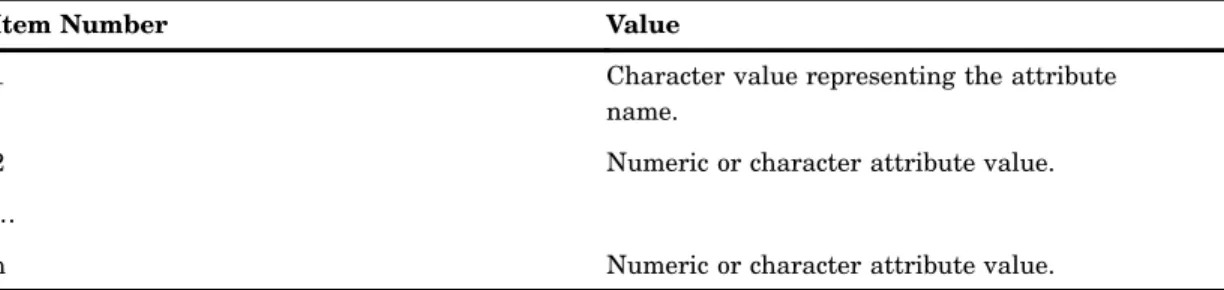
The entry parameter is an SCL list that specifies the attributes of the new directory entry, as well as the values associated with each attribute. The format of the entry parameter is a list of lists. Each list contains the attribute name as well as its values and should have the following format:
Table 3.1 SCL List Format
Item Number Value
1 Character value representing the attribute name.
2 Numeric or character attribute value. …
n Numeric or character attribute value.
Example
The following example adds an entry to an LDAP directory by creating three attribute and value lists, combining the three lists, and using the combined list as the entry parameter in the _ADD method.
dn = "cn=myhost.pc.com,o=Alphalite Airways,c=US"; entry = makelist(); alist1 = makelist(); rc = insertc(alist1, "objectclass", -1); rc = insertc(alist1, "SASDomain", -1); alist2 = makelist(); rc = insertc(alist2, "cn", -1); rc = insertc(alist2, server, -1); alist3 = makelist(); rc = insertc(alist3, "node", -1); rc = insertc(alist3, "oak.unx.com", -1); rc = insertl(entry, alist1, -1);
LDAP SCL Interface 4 _DELETE 31 rc = insertl(entry, alist2, -1); rc = insertl(entry, alist3, -1); rc = ds._ADD(dn,entry); rc = dellist(alist1); rc = dellist(alist2); rc = dellist(alist3);
_CLOSE
Closes the connection to the LDAP server
Syntax
_CLOSE
Details
When invoked on an LDAPSERVICES instance, the _CLOSE method closes the connection to the LDAP server, as shown in the following example:
rc = ds._CLOSE();
_DELETE
Deletes an entry in an LDAP directory
Syntax
_DELETE(entryName);
Arguments
entryName
names the directory entry that is to be deleted. Type: Character
32 _MODIFY 4 Chapter 3
Details
When invoked on an LDAPSERVICES instance, the _DELETE method deletes an entry from the LDAP directory, as shown in the following example:
dn = "cn=myhost.net.com,o=Alphalite Airways,c=US"; rc = ds._DELETE(dn);
_MODIFY
Modifies an LDAP directory entry
Syntax
_MODIFY(entryName, attrs);
Arguments
entryName
names the directory entry that is to be modified. Type: Character
Direction: Input
attrs
Type: SCL list Direction: Input
specifies the modify type, attributes, and values that are to be modified in the LDAP directory entry.
Details
When invoked on an LDAPSERVICES instance, the _MODIFY method modifies the attributes and attribute values in an LDAP directory entry.
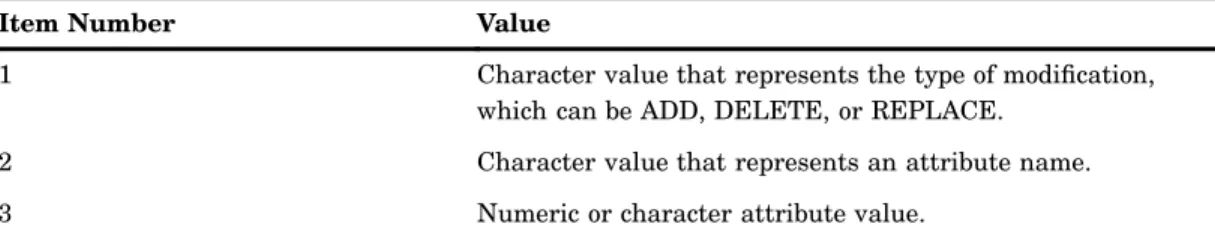
The attrs parameter specifies the attributes and the values in each attribute that are to be modified. The format of the attrs parameter is a list of lists. Each list contains the modification type, attribute name, and attribute values, if any. The lists must have the following format:
Table 3.2 List Format
Item Number Value
1 Character value that represents the type of modification, which can be ADD, DELETE, or REPLACE.
2 Character value that represents an attribute name. 3 Numeric or character attribute value.
LDAP SCL Interface 4 _OPEN 33
Item Number Value
…
n Numeric or character attribute value.
If the type of modification is DELETE and if no attribute values are specified, then the entire attribute and all values are deleted. If DELETE is specified with one or more attribute values, then only the specified values are deleted.
If the type of modification is REPLACE, then the existing attribute is deleted and is replaced with the specified attribute and attribute values. You must specify all
attribute values, because all of the existing attribute values are replaced with the attribute values specified with this method.
Example
The following example modifies three attributes in an LDAP directory entry. dn = "cn=srvr01.unx.com,o=Alphalite Airways,c=US";
entry = makelist(); alist1 = makelist();
rc = insertc(alist1, "ADD", -1); /* modify type */
rc = insertc(alist1, "sasFrequency", -1); /* attribute name */ rc = insertc(alist1, "monthly", -1); /* attribute value */ rc = insertc(alist1, "weekly", -1); /* attribute value */ alist2 = makelist();
rc = insertc(alist2, "DELETE", -1); /* modify type */
rc = insertc(alist2, "sasNameValueFilter", -1); /* attribute name */ alist3 = makelist();
rc = insertc(alist3, "REPLACE", -1); /* modify type */
rc = insertc(alist3, "sasDeliveryTransport", -1); /* attribute name */ rc = insertc(alist3, "email", -1); rc = insertl(entry, alist1, -1); rc = insertl(entry, alist2, -1); rc = insertl(entry, alist3, -1); rc = ds._MODIFY(dn,entry); rc = dellist(alist1); rc = dellist(alist2); rc = dellist(alist3);
_OPEN
Opens a connection to an LDAP server
Syntax
34 _OPEN 4 Chapter 3
Arguments
ldapServerName
names the LDAP server to connect to. If theldapServerName parameter is left blank, the default server name is that of the host that is running the application that called this method. Otherwise, the value of theldapServerNameparameter must be the DNS name or IP address of a host on which an LDAP server is running.
Type: Character Direction: Input
port
specifies the TCP port of the LDAP server. If the value 0is specified, then the standard port of 389 is used.
Type: Numeric Direction: Input
base
specifies the base object for the upcoming search operation. The base object is the point in the LDAP tree at which you want to start searching. Its value is a
distinguished name. If this value is blank, then the macro variable or environment variable LDAP_BASEis used for the definition of the base object.
Type: Character Direction: Input
bindDN
specifies the distinguished name that is used to bind to the server. If this value is blank, then the macro variable or environment variableLDAP_BINDDNis used as the bind distinguished name. If the value""is specified and theLDAP_BINDDN
variable has not been set, then an unauthorized bind is performed. Type: Character
Direction: Input
password
specifies the password that is used to bind to the server. If this value is blank, then the macro variable or environment variableLDAP_BINDPWis used as the bind password. If the value""is specified and the LDAP_BINDPWvariable has not been set, then an unauthenticated bind is performed. Passwords that have been encoded by using the PWENCODE procedure can be used to bind to the server. For more information, see the PWENCODE procedure inBase SAS Procedures Guide. Type: Character
Direction: Input
session_options
specifies one or more session options to use with this bind. Type: Character
Direction: Input
Valid session options are as follows: OPT_REFERRALS_OFF
instructs the server to not chase referrals. Specifying this option overrides the default value of OPT_REFERRALS_ON.
SUBTREE_SEARCH_SCOPE
LDAP SCL Interface 4 _OPEN 35
BASE_SEARCH_SCOPE
sets the scope of the search to include only the base. This value overrides the default value of SUBTREE_SEARCH_SCOPE.
ONELEVEL_SEARCH_SCOPE
sets the scope of the search to include the base and one additional level. This value overrides the default value of SUBTREE_SEARCH_SCOPE.
Note: Specify only one search scope option. If multiple search scope options are specified, then the one that appears last is used. If none of the search scope options are specified, then the default value of SUBTREE_SEARCH_SCOPE is used.4
Details
When invoked on an LDAPSERVICES instance, the _OPEN method initializes the connection to the specified LDAP server.
The %SYSRC macro can be used to check for errors that are returned from the _OPEN method. Here are the possible error return codes:
_SELDBOS indicates that the specified bind distinguished name is outside the scope of the directory server.
_SELDNSO indicates that the bind DN does not exist. _SELDICR indicates that an invalid password was specified.
_SELDDWN indicates that the SAS system was unable to connect to the LDAP server.
If the return code is not one of these pre-defined system return codes, use the SYSMSG() function to determine the exact error message. See the examples section for sample code that shows how to check for these return codes.
Examples
The following example opens a connection to an LDAP server using an anonymous bind and the default session options. It also shows how to check for error conditions from the _OPEN method.
dclass = loadclass(’sashelp.base.ldapservices.class’); ds = instance(dclass);
server = "myhost.net.com"; base = "Alphalite Airways,c=US"; bindDn="";
pw="";
rc = ds._open(server,8001,base,bindDn,pw); if rc ne 0 then do;
if (rc = %sysrc(_SELDBOS)) then put ’Bind outside of scope.’; else if (rc = %sysrc(_SELDNSO)) then
put ’No such object.’;
else if (rc = %sysrc(_SELDICR)) then put ’Invalid credentials.’; else if (rc = %sysrc(_SELDDWN)) then
36 _SETOPTIONS 4 Chapter 3 else do; msg = sysmsg(); put msg; end; end;
The following example opens a connection to an LDAP server, binding as user John Doe. It passes in a session option of OPT_REFERRALS_OFF; this option instructs the LDAP server not to chase referrals.
server = "myhost.net.com"; base = "Alphalite Airways,c=US";
bindDN ="cn=John Doe,ou=People,o=Alphalite Airways,c=us"; pw="myPass1";
referral= "OPT_REFERRALS_OFF";
rc = ds._OPEN(server,8001,base,bindDn,pw,referral);
_SETOPTIONS
Sets options on an open LDAP server session
Syntax
_SETOPTIONS(timeLimit, sizeLimit,base,referral,restart,property, propertyValue);
Arguments
timeLimit
specifies the maximum number of seconds that the client is willing to wait for a response to a search request. The value0indicates no time limit. The time limit is set to 0by default. The default value is in effect until it is changed. The value-1 indicates that the existing value is to remain unchanged.
Type: Numeric Direction: Input
sizeLimit
specifies the maximum number of entries to return in a search result. The value0 indicates no size limit. The size limit is set to0by default. The default value
remains in effect until it is changed. The value-1indicates that the existing value is to remain unchanged.
Type: Numeric Direction: Input
base
specifies the base object for the search operation, which must be a distinguished name. An initial base object was specified when the connection to the LDAP server was established. Specifying a non-blank value for thebaseparameter overrides the existing base object definition. Specifying a blank value retains the existing value. Type: Character
LDAP SCL Interface 4 _SETOPTIONS 37
referral
indicates whether to chase referrals, by setting either the OPT_REFERRALS_ON option or the OPT_REFERRALS_OFF option. One or the other of these options was specified when the connection to the LDAP server was established. Specifying either option as the value of thereferralparameter overrides the existing value. Specifying a blank value retains the existing value.
Type: Character Direction: Input
restart
indicates whether to restart a query if error condition EINTR occurs. At _open time, the default session settings are determined. The _SETOPTIONS method can be used to change these defaults. Valid values for restart are OPT_RESTART_ON or
OPT_RESTART_OFF. A blank value can be passed in to indicate that the default value of OPT_RESTART_OFF should be used.
Type: Character Direction: Input
property
specifies the name of an optional property that is being set. Currently, the only property that is supported is the SEARCH_SCOPE property, which specifies the scope of searches in the LDAP directory. Specify the value of the property by using the propertyValue parameter.
Type: Character Direction: Input
propertyValue
specifies the value for the property parameter. Valid values for the SEARCH_SCOPE property are as follows:
SUBTREE_SEARCH_SCOPE
sets the scope of the search to include all subtrees. This is the default value. BASE_SEARCH_SCOPE
sets the scope of the search to include only the base. This value overrides the default value of SUBTREE_SEARCH_SCOPE.
ONELEVEL_SEARCH_SCOPE
sets the scope of the search to include the base and one additional level. This value overrides the default value of SUBTREE_SEARCH_SCOPE.
Type: Character Direction: Input
Details
When invoked on an LDAPSERVICES instance, the _SETOPTIONS method configures an LDAP session by changing session options. Once changed, these values remain in effect until they are overridden by a subsequent call.
Examples
The following example sets various session options. timelimit=120;
sizelimit=100;
38 _SEARCH 4 Chapter 3
referral = OPT_REFERRALS_OFF; restart = ; /* use default */
rc = ds._SETOPTIONS(timelimit, sizelimit, base, referral, restart);
The following example uses the optional properties parameter to set the search scope. timelimit = -1; /* use current setting */
sizelimit = -1; /* use current setting */ base=’’; /* use default set at _open time */ referral = ; /* use default set at _open time */ restart = ; /* use default */
prop = SEARCH_SCOPE;
propValue = BASE_SEARCH_SCOPE; /* only search the base */
rc = ds._setOptions(timelimit, sizelimit, base, referral, restart, prop, propValue);
_SEARCH
Searches and retrieves information from an LDAP directory
Syntax
_SEARCH(filter,attribs,results);
Arguments
filter
specifies search criteria that determine that the entries are to be added to the entry list returned by the search.
Type: Character Direction: Input
attribs
specifies in an SCL list the names of the attributes to be returned in the search results for each entry that matches the search criteria. The value0indicates that all attributes are to be returned.
Type: SCL list Direction: Input
results
returns the results of the search. Type: SCL list
LDAP SCL Interface 4 _SEARCH 39
Details
When invoked on an LDAPSERVICES instance, the _SEARCH method allows you to select and retrieve entries from an LDAP directory.
The content returned in the results parameter is a list of SCL lists containing the entries, attributes, and values that match the search criteria. Each entry in the entry list contains a sublist in the following format:
Table 3.3 Entry Contents
Item Type Value
1 Character Distinguished name of an
entry.
2 Numeric Number of attributes and
values in an entry.
3 SCL list Attribute name and values.
… SCL list Attribute name and values.
num_attrs+2 SCL list Attribute name and values.
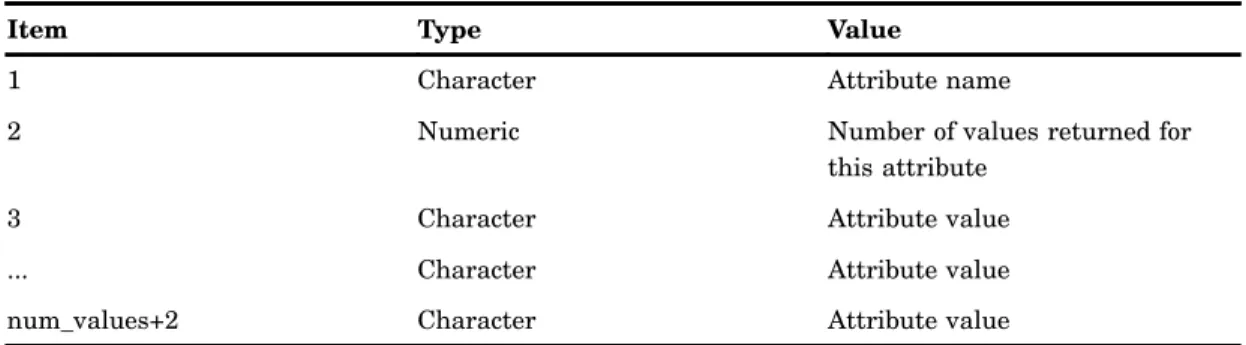
The SCL list that contains the attribute names and values (see item 3 in Table 3.1) has the following format:
Table 3.4 SCL List Contents
Item Type Value
1 Character Attribute name
2 Numeric Number of values returned for
this attribute
3 Character Attribute value
... Character Attribute value
num_values+2 Character Attribute value
Note: This method should not be used to retrieve internal attributes from a Microsoft Active Directory server.4
Examples
For a single LDAP directory entry, the following example returns four attributes and the values of those attributes.
/* list of attributes to be returned */ attribs = makelist();
rc = insertc(attribs, uid, -1); rc = insertc(attribs, mail, -1); rc = insertc(attribs, roomnumber, -1); rc = insertc(attribs, employeenumber, -1); r = makelist(); /* results returned in r */ rc = ds._SEARCH(’cn=John Smith’, attribs, r);
40 _SEARCH 4 Chapter 3
The following example searches an LDAP directory and extracts from the search results the attribute names and all the values of those attributes.
results=makelist();
rc = dirInst._SEARCH(filter, attribs, results); total_entries = listlen(results);
do i = 1 to total_entries;
/* each list in results is entry matching criteria */ entry = getiteml(results, i);
/* distinguished name */ dn = getitemc(entry, 1);
/* total number of attributes returned */ attribNum = getitemn(entry, 2);
do k= 3 to (attribNum+2);
/* each attribute is its own list, get first attrib */ attrib = getiteml(entry, k); /* name of attribute */ attribname = getitemc(attrib,1 ); /* number of values */ numValues = getitemn(attrib, 2); /* retrieve values */ do z = 3 to (numValues + 2); value = getitemc(attrib, z); end; end; end;
41
Index
A
access control 6 _ADD method 30 anonymous bind 5LDAP_OPEN CALL routine and 19 _OPEN method and 35
attribute names 9, 38 attributes 3
adding 32 deleting 32 list format 32 <