Simón Roses Femerling www.vulnex.com 07/03/12
Smartphone Apps Are Not That Smart:
Insecure Development Practices
VULNEX Research Paper
Version 2.0
ABSTRACT
Mobile Apps are a growing business with thousands of applications to choose from across the dominant mobile platforms and new Apps released every week. Users install in their smartphones all kind of free Apps and many users are willing to pay for commercial ones usually due to low prices. Apps have become the new Web.
The App fever has provoked that thousands of developers, experienced and inexperienced, worldwide release new and updated Apps constantly to attract users so they become popular and in most cases make a profit. Unfortunately this development madness tends to sacrifice security and privacy.
This VULNEX research paper unveils an ugly truth: that too many Apps are highly insecure. The results are based on the security analysis performed on dozens of Apps on different smartphones by identifying flaws that can be avoided with safe development practices.
Table of Contents
Introduction ... 3
OWASP Mobile Security Project ... 4
Vulnerabilities on Smartphone Apps ... 5
Clear Text Secrets ... 5
Insecure Channels ... 6
Debug Code Enabled ... 7
Dynamic SQL ... 7
Cross-Site Scripting (XSS) ... 8
Phone Back Home ... 8
PII Compromise ... 0
Mixing Social Features... 9
Data Validation ... 0
Weak Crypto Algorithms ... 0
Conclusion ... 11
Introduction
For several months VULNEX has been analyzing mostly Android and a few Windows Phone 7 (WP7) apps (do not worry iOS - you’re next!) and it’s amazing how developers have gone back to the 90´s when it comes to development practices.
Yes, developing apps for smartphones is easy, fun and in some cases can provide a fast ROI. All this has started an avalanche of apps for the major platforms, but that doesn’t mean we should ignore the knowledge we acquired from past experiences with standalone clients and web apps, and start once again developing insecure apps. What about OWASP Top Ten [1] or even better OWASP Mobile Top 10 Risks [2] for that matter?
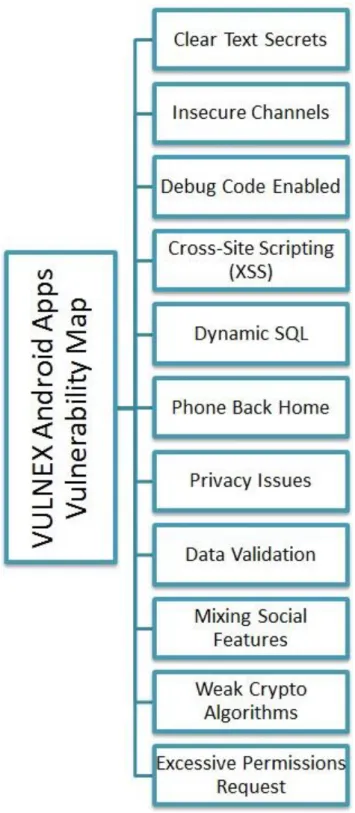
Through the course of the research, we were able to identify well-known bugs on popular apps (games, banking, finance, security, communications and social apps) that should not be there. We are sure there are many more bugs that we aren’t covering here, but Fig. 1 provides some of the bugs we have seen so far on Android Apps. Some of these bugs also affect other mobile platforms Figure 1 provides a framework of common bugs that this research and other researchers have identified on mobile apps. It is quite scary that some of these bugs are still being found on brand new apps with plenty of literature on how to identify and protect against these issues. There is no excuse for this lack of secure development practices among mobile developers. We agree it is not only developers’ (independent software vendors’) fault but also the major mobile houses’, but we will talk
more about that later.
Now let’s move on by analyzing in greater detail some of these bugs with Fig. 1 - VULNEX Android Apps Vulnerability Map
the hope they will stop being introduced into mobile apps.
Note: Version 1 of this paper was released as an article in Insecure Magazine. Current paper is a revised and extended version of the research performed by VULNEX into insecure Apps.
OWASP Mobile Security Project
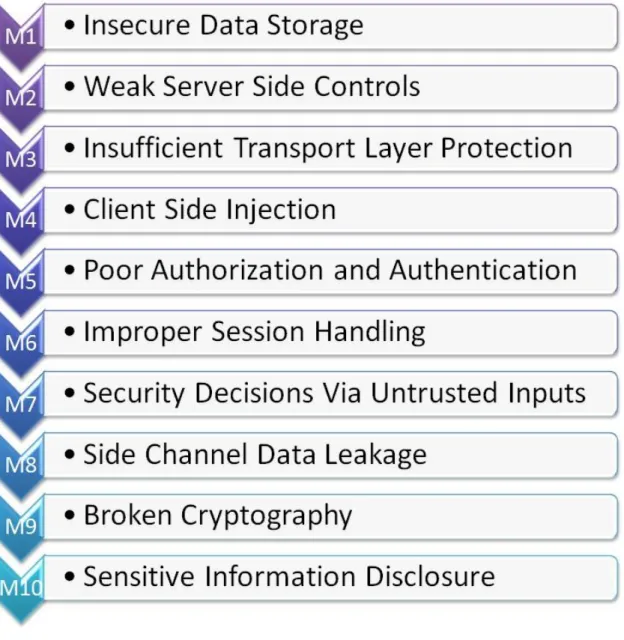
Mobile Apps security is becoming so important that even OWASP have created a Mobile Security Group to create resources for developing safe Apps. Besides the guides and tools they are working on they have come up with the Top 10 Mobile Risks based on research by several authors.
Both OWASP Mobile Top 10 Risks and VULNEX Apps Vulnerability Map share almost the same kind of flaws, so each flaw we describe in this paper will also match into the OWASP Mobile Top 10 Risks. You can read the OWASP Mobile Top 10 Risks in Fig. 2.
Vulnerabilities on Smartphone Apps
Clear text secrets
This bug is an old classic that occurs when the developer does not care to protect some sensitive information by using cryptography or other security means because he considers the underlying platform to be safe from attacks.
An example of this type of bug is CVE-2011-1840 [3], where the app does not encrypt the master password and is stored in an.xml file in clear text.
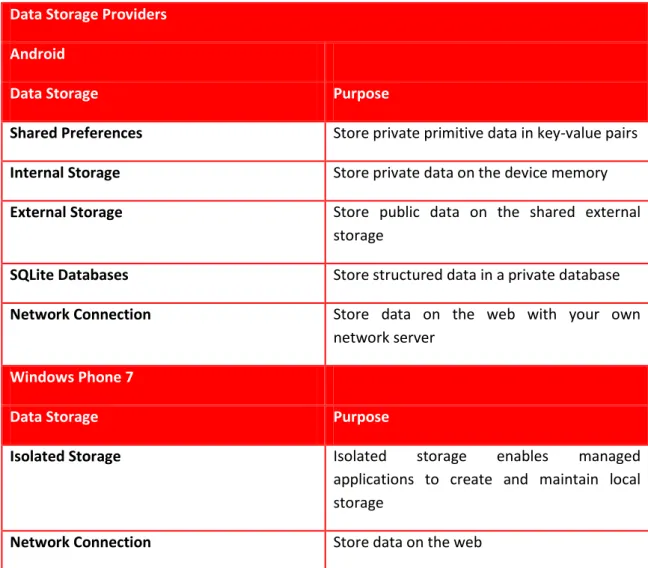
Both Android and WP7 provide a number of convenient and easy storage mechanisms that the apps can use to store persistent information. However, security must be managed by the developer himself (see Table 1 – Data Storage Providers).
Data Storage Providers
Android
Data Storage Purpose
Shared Preferences Store private primitive data in key-value pairs
Internal Storage Store private data on the device memory
External Storage Store public data on the shared external storage
SQLite Databases Store structured data in a private database
Network Connection Store data on the web with your own network server
Windows Phone 7
Data Storage Purpose
Isolated Storage Isolated storage enables managed applications to create and maintain local storage
Network Connection Store data on the web
Table 1 – Data Storage Providers
Usually this bug on Android can be found by examining the application directory as shown in Code Box 1.
Insecure Channels
Many mobile apps communicate with systems on the Internet using web services to exchange information, updates and such. The issue arises when the information in transit is not secure because encryption is not used to protect the channel. An attacker can spy on the communication between the smartphone and the server and sniff data, especially if you keep in mind that many users use smartphones over Wi-Fi.
An example of this practice is when an app creates a URL query using a HTTP GET method with no encryption and includes sensitive information (see Code Box 2). Besides the obvious issues, the developers forgot that GET requests are often stored in logs (proxy, web servers, etc.).
# pwd /data/data/app_folder # ls shared_prefs lib databases # cd shared_prefs # ls
app.prefs.xml <- Check Here!
# cd .. # cd databases # ls
app.db<- Check Here! Code Box 1
… More code …
StringBuilder localStringBuilder1 = new
StringBuilder("wsLogin.jsp?dni=").append(paramString1).append("&pwd=").append(paramString2).append("&bbrand="); <- Interesting String str1 = BrandManager.getInstance().getBrand().toUpperCase(); StringBuilder localStringBuilder2 = localStringBuilder1.append(str1).append("&lmode=").append(paramString3).append("&exInf=").append(1).append("&brand=").append("AndroidNative") .append("&model="); String str2 = Constants.DEVICE_MODEL;
StringBuilder localStringBuilder3 = localStringBuilder2.append(str2).append("&SO="); String str3 = Constants.DEVICE_OS;
… More code …
Code Box 2
Debug Code Enabled
While developing an app it is common practice to add debug routines to the code. The issue arises when the developer forgets to remove these debug routines and the app ships with debugging enabled.
Android apps can be debugged using Dalvik Debug Monitor Server (DDMS) but it also provides some classes such as util.Log and Debugthat can be used inside an app. On Windows Phone 7 we can use Visual Studio 2010 for debugging.
Code Box 3 shows an Android app where the developer encapsulated the debug classes into a custom class but forgot to disable the debug flag when the app was shipped.
Dynamic SQL
Everyone has heard about SQL Injection but one can still find plenty of applications (mobile and otherwise) that suffer from this type of bug due to the use of Dynamic SQL and lack of data validation.
We would imagine that when it comes to mobile apps developers are not that concerned about SQL Injection since the databases are very simplistic– Android uses SQLite to store data and Windows Phone 7 none natively; for databases support on WP7 we need to use externally services like SQL Azure. But since smartphones and tablets are entering into corporate networks and companies are deploying Line of Business (LOB) apps, developers should take action to prevent this type of bugs. We could argue they are hard to exploit but worst things have happened in the past.
Code Box 4 contains an example of an app that stores information into the database (SQLite) using Dynamic SQL and
no data validation, allowing an attacker controlling the paramString value to perform SQL injection attacks.
public final class Debuglog {
private static boolean mLoggingEnabled = 1; <- Debug Enabled
public static int d(String paramString1, String paramString2) { int i = 0; if (mLoggingEnabled) { String str = paramString2; i = Log.d(paramString1, str); } return i; } …. More code…. Code Box 3 …. More code….
public void addBank(int paramInt, String paramString) { SQLiteDatabase localSQLiteDatabase = this.mDb;
String str = "INSERT INTO banks(_id, name) VALUES('" + paramInt + "', '" + paramString + "');"; localSQLiteDatabase.execSQL(str);
}
…. More code….
public void deleteCaseValue(String paramString) { SQLiteDatabase localSQLiteDatabase = this.mDb;
String str = "DELETE FROM case_values WHERE _id = " + paramString; <- Here
localSQLiteDatabase.execSQL(str); }
…. More code….
Code Box 4
Cross-Site Scripting (XSS)
XSS is another old classic when it comes to application security. XSS and SQL Injection bugs are the most common type of bugs on web apps (see OWASP Top 10). There is plenty of literature and solutions against XSS but it still pops up everywhere. SQL Injection and XSS are hard to exploit but should not be underestimated in the mobile space.
As this is old news we will not spend too much time on the subject, just be careful when using WebView class on Android and WebClient or HttpWebRequest classes on Windows Phone 7.
Phone Back Home
When loading many apps typically connect back to servers to check for updates or other types of information. By itself this should not be a problem, however combined with other issues like PII compromise, insecure channels, etc. it could present a big problem.
We have seen plenty of mobile apps that phone back home to update information and in some cases share too much information. While analyzing an app, watch out for how and what information is sent back to servers, since users usually have no control over it.
PII Compromise
Google and Apple have lately been accused of gathering information about their users’ location. But if we analyze mobile apps we see this pattern is quite common for both small and big independent software vendors- they gather a lot of information about their users. Honestly, we are not sure what is worse -that the big players gather information on my location or that companies we have never heard of gather the same or even more information. Code Box 5 is a good example of a mobile app that gathers
too much information (such as the device name, OS version, model, etc.) from the device. Being that this is a financial app, one could argue about the vendor’s need to collect all that info. Sure, there are different OS versions and screen sizes but we are still not convinced they need all that information.
By using smartphones we are sacrificing our privacy big time (see iPhone secretly tracking users [4]). Developers should gather only the information they need and no more. Also, apps need to make an effort on being more transparent and let their users decide about what information is sent back to servers.
…. More code…. !! so much info !!
Object[] arrayOfObject = new Object[16]; arrayOfObject[0] = "app_platform"; arrayOfObject[1] = paramString1; arrayOfObject[2] = "user_id"; arrayOfObject[3] = paramString2;arrayOfObject[4] = "device_id"; arrayOfObject[5] = paramString3; arrayOfObject[6] = "device_name"; arrayOfObject[7] = paramString4; arrayOfObject[8] = "app_version"; arrayOfObject[9] = paramString5; arrayOfObject[10] = "sys_model"; arrayOfObject[11] = paramString6; arrayOfObject[12] = "sys_version"; arrayOfObject[13] = paramString7; arrayOfObject[14] = "carrier"; …. More code…. arrayOfObject[15] = paramString8;
OWASP Mobile Risk Classification: M4 – Client Side Injection
Mixing Social Features
Today it’s all about being social; if you are not on Facebook and Twitter, you don’t exist to the online world. Again, this is not an issue by itself but the risks arise when apps try to add social capabilities by integrating services like Facebook, Twitter, Foursquare and similar with insecure development practices.
During the research we discovered banking apps that integrate Facebook (not sure why you need your friends while you pay your bills), but the issues were that the Facebook account was not protected correctly by the application developer (clear text secrets) and anyway why should the bank get access to your friends contact list (PII compromise)?
Being social is good but there is a limit and developers should think about that when developing their apps. If an app needs to integrate social features it must be done securely, following secure development practices.
Data Validation
It is a fact that many bugs are related to a lack of data validation and unfortunately mobile apps are no exception. We can find plenty of these bugs as developers don’t check data for safe content, length, type, and such.
In Code Box 6 we can see an example where an app doesn’t perform any data validation on the input provided by the user. The developer assumes that all of the context is good and trusts the user (they would never enter malicious code, right?). By examining the code we can also observe that the data is saved to the platform log file, which presents an additional problem. An attacker could, for example, try to fill the logs with junk and trigger a Denial of Service (DoS) since mobile devices have limited disk space, or insert malicious code to logs and wait for some vulnerable tool to open the log. Also sensitive information (PII) is logged.
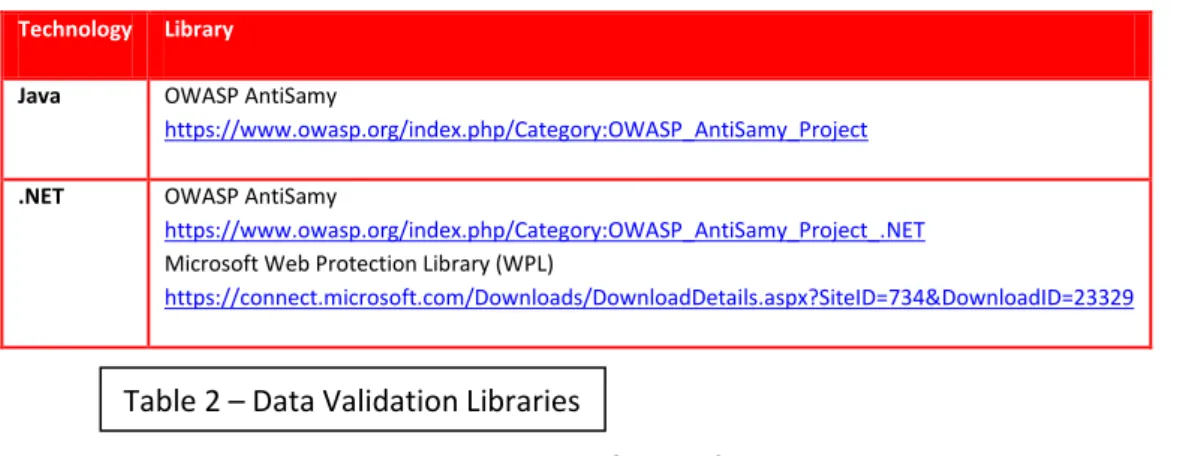
This type of bug is still quite common on all sorts of applications. There are plenty of checklists and security tools to perform data validation so there are no more excuses. See table 2 for some of these tools but keep in mind these libraries are not focused on mobile development. For better guides on data validation see OWASP Data Validation [5].
Technology Library
Java OWASP AntiSamy
https://www.owasp.org/index.php/Category:OWASP_AntiSamy_Project
.NET OWASP AntiSamy
https://www.owasp.org/index.php/Category:OWASP_AntiSamy_Project_.NET Microsoft Web Protection Library (WPL)
https://connect.microsoft.com/Downloads/DownloadDetails.aspx?SiteID=734&DownloadID=23329 …. More code….
String str3 = TAG;
String str4 = "Ignored change to " + paramString + ". Back to watching"; int j = Log.i(str3, str4);<- No validation on ParamString and saved to log
…. More code….
Code Box 6 OWASP Mobile Risk Classification: M4 – Client Side Injection
Weak Crypto Algorithms
A developer should never try to develop his or her own crypto algorithm, as this is just a recipe for failure. Instead, developers should take advantage of proven libraries that use strong algorithms like Advanced Encryption Standard (AES) and such.
Both platforms offer strong cryptographic algorithms to choose from, but the issue arises whenthe developer implements themineffectively or chooses the incorrect solution like using a hash algorithm with no salt to encrypt sensitive information. Code Box 7 is another example of the issue discussed earlier. In this case the app is using MD5 (a well-known insecure algorithm) to protect some sensitive information.
MS SDL Approved Cryptographic Algorithms (ripped from Microsoft SDL [6])
are a good recommendation on how to select and securely use a cryptography algorithm for your app needs. Cryptography is a sensitive issue, andMicrosoft has some excellent resourceson how to use it safely [7].
Algorithm Type
Banned (algorithms to be replaced in existing code or used only for decryption)
Acceptable (algorithms
acceptable for existing code, except sensitive data)
Recommended
(algorithms for new code)
Symmetric Block DES, DESX, RC2,
SKIPJACK 3DES (2 or 3 key) AES (>=128 bit)
Symmetric Stream SEAL, CYLINK_MEK,
RC4 (<128bit) RC4 (>= 128bit)
None, block cipher is preferred Asymmetric RSA (<2048 bit), Diffie-Hellman (<2048 bit) RSA (>=2048bit), Diffie-Hellman (>=2048bit)
RSA (>=2048bit), Diffie-Hellman (>=2048bit), ECC (>=256bit)
Hash (includes HMAC usage)
SHA-0 (SHA), SHA-1,
MD2, MD4, MD5 SHA-2
SHA-2 (includes: SHA-256, SHA-384, SHA-512)
…. More code….
public static byte[] getMD5(byte[] paramArrayOfByte) { Object localObject = (byte[])0;
try {
MessageDigest localMessageDigest =
MessageDigest.getInstance("MD5"); <- weak crypto
localMessageDigest.update(paramArrayOfByte); byte[] arrayOfByte = localMessageDigest.digest(); localObject = arrayOfByte;
return localObject; }
catch (NoSuchAlgorithmException localNoSuchAlgorithmException) { while (true) localNoSuchAlgorithmException.printStackTrace(); } } …. More code…. Code Box 7 OWASP Mobile Risk Classification: M9 – Broken Cryptography
Conclusion
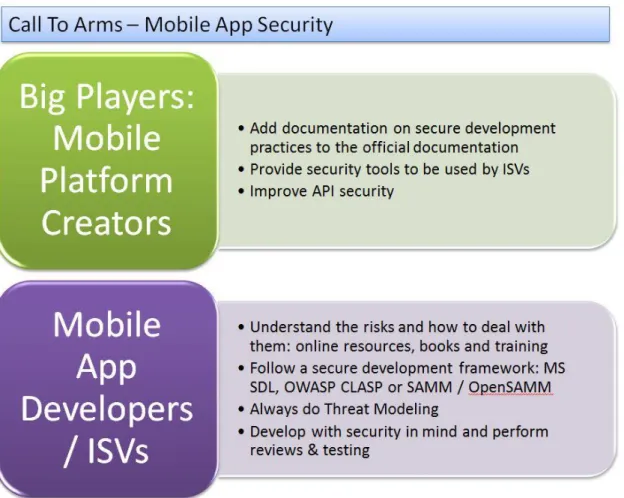
At this point, it should be clear that the security state of mobile applications should be improved and that mobile developers need to understand the risks and follow secure development practices. Likewise, mobile platform creators need to come up with security tools and better documentation/guides on security so that independent software vendors can use them to develop secure apps.
Projects such as OWASP Mobile Security should be mandatory reading for anyone developing mobile apps. This guide covers all major smartphone platforms.
Microsoft has a section on the mobile developer documentation devoted to developed secure apps [8],and the same goes for Google [9] [10] and Apple [11]. They are not perfect but it is a start.
Here are a few recommendations for addressing the security of mobile apps:
Figure 2 – Call to Arms, Mobile App Security
Hopefully this research can raise awareness about mobile app security and we can start fixing things. Most security researchers focus on the platform itself but what is the point of having a secure platform when you have thousands of insecure apps running on top of it?
It is crucial that mobile app security becomes important as many mobile devices (iPads, Android tablets and possibly starting next year Windows 8 tablets) are being introduced into
corporate networks, as well as an array of smartphones from a variety of companies breaking traditional security defenses.
It goes without saying that users need to raise concerns about the security and privacy of smartphones and apps - they have to demand better security. The security industry needs to start raising the awareness of the dangers of lousy mobile app security.
We will continue with the research, analyzing more apps and other platforms to create a better framework of mobile app bugs and how to deal with them.
VULNEX would like to thanks Brian Honan of BH Consulting and the Veracode team for reviewing and providing great feedback to the original paper (v1).
References
1. OWASP Top Ten
https://www.owasp.org/index.php/Category:OWASP_Top_Ten_Project 2. OWASP Mobile Top 10 Risks
https://www.owasp.org/index.php/OWASP_Mobile_Security_Project
3. SRF-SA-2011-01: Clear Text Secrets in PassmanLite Could Allow Access to Passwords http://www.simonroses.com/security-advisories/
4. IPhones Secretly Track Their Users Locations
http://edition.cnn.com/2011/TECH/mobile/04/20/iphone.tracking/ 5. OWASP Data Validation
https://www.owasp.org/index.php/Data_Validation 6. Cryptographic Agility (MS SDL)
http://msdn.microsoft.com/en-us/magazine/ee321570.aspx 7. Banned Crypto and the SDL
http://blogs.msdn.com/b/sdl/archive/2009/07/16/banned-crypto-and-the-sdl.aspx 8. Security For Windows Phone
http://msdn.microsoft.com/en-us/library/ff402533(VS.92).aspx 9. Android Security and Design
http://developer.android.com/guide/market/billing/billing_best_practices.html 10.Android Security and Permissions
http://developer.android.com/guide/topics/security/security.html 11.IPhone Developer Library: Security Coding How-To’s