Web Content Management System based on XML Native Database
Mihaela Sokic
Croatian Telecom, Jurisiceva 13, Zagreb, HR-10000, CROATIA [email protected]
Viktor Matic and Alen Bazant University of Zagreb
Faculty of Electrical Engineering and Computing, Unska 3, Zagreb, HR-10000, CROATIA [email protected], [email protected]
Abstract. In this paper we are identifying
problems in the complex Web application im-plementations. In more details we are ad-dressing problem of content management and specific components of such system. We are also presenting our implementation of Web Content Management System (WCMS), which is based on relational database and XML technologies. It also uses some rather new concepts and technologies like XForms and Native XML database.
Keywords. Content Management System, Native XML database, XML.
1. Introduction
As Internet evolves Web sites are becom-ing more and more complex. They are offer-ing variety of informations and services, or-ganized in different ways. What is common to all of them is tendency to serve information in the most flexible and accessible way to the end user.
There are two aspects of this problem: the user’s side and the site administrator’s. Infor-mation, which will be presented through the Web site to the user, has to be prepared, orga-nized and populated behind the scenes. Even more, generally speaking, data storage orga-nization and the way of presenting it to the end user do not have to be the same. Even if we focus only on content and possibilities to organize it and present it, we can foresee complexity of this problem. There is obvious
need to divide the whole problem in smaller parts and then to analyze their interaction and purpose one by one.
A Web site conceptually can be divided in the following four basic parts, like in [4]:
Content; Structure;
Functionality and Presentation.
Content takes care of information that will be presented to the users. Structure provides structural access to information and services offered on the Web site. Site structure should not be mistaken for information structure in content part because they can have completely different structure. Functionality means pro-cessing the content that site offers. And fi-nally, presentation defines in which way infor-mation will be clearly and attractive presented to the user.
We can gain more benefits if we approach the problem of site’s inner organization in de-scribed manner. The main benefit is possibil-ity to change one part without affecting the other. As practical example of this approach we can imagine complete site graphical re-design while keeping existing data.
In this paper we will be focused only on the content part of site. We will try to im-plement our Web Content Management Sys-tem (WCMS) as solution for the administra-tion of content part of Web site. Also, we
will propose one of possible solutions to im-plement WCMS using XML technologies and Java programming language in conjunction with modern database approaches.
2. Proposed solution
After we have defined the needs we will will propose our solution. As we have already seen the Web site could be analyzed and im-plemented through the parts presented in in-troduction. Content itself can be also further decomposed to the smaller functional parts. We will try to identify the functions which should be covered by the WCMS. The main functions are:
Data structure; User interface (UI); Storing data;
Search and retrieval.
Data structure functions are mechanism for data structuring and organizing. It is impor-tant that administrator can easily alter data structure. Data manipulation is done using UI, and UI have to be conformant to the defined data structure. UI should be automatically ad-justed to changes in data structure. Informa-tion entered through UI should be validated against adequate structure and then, if confor-mant, it should be stored. At end we need mechanism for searching through the content and for data retrieval.
We are proposing the solution in which structure is described in a hybrid way, with XML Schema [6] and relational schema. HTML UI is generated automatically, based on XML Schema, using eXtensible Stylesheet
Language (XSLT) [6]. Entered data is
stored in XML [6] format inside Native XML
database. Data retrieval, based on search
mechanizam, is conducted using standard SQL extended with XPath syntax [6]. We will call this complex system Web Content Man-agement System (WCMS).
3. Implementation
Today, most application data and Web con-tent is stored either in a relational database or the file system or a combination of both. However, when implementing flexible data structures none of these two technologies or combination is not adequate.
XML has arrived as a key technology for the next stage of evolution of the Internet. Integrating XML as a key technology into WCMS systems is not a new solution, how-ever using XML only to separate presentation from content is not always the most efficient solution. During the process of generation of Web pages, data are retrieved from data storage, transformed into XML format, fur-ther processed or combined and finally trans-formed into HTML. However, as the XML technology progreses and new technologies emerge (especially Native XML databases) it becomes obvious that the data can also be stored in XML format. Comparing to the rela-tional database, we are no longer constrained on current database schema and yet we are able to maintain the consistency of data more efficiently than having data in file system.
Native XML database has an XML docu-ment as its fundadocu-mental unit of logical stor-age, just as a relational database has a row in a table [5]. Since XML documents are used in process of generating Web content there are good reasons to use Native XML databases for storing these documents.
Supposing we already have Web content and application data stored in a relational database. If we want to extend our WCMS functionalities with flexible content structures related to existing content, the Native XML database would not be the most efficient so-lution. Transformation of existing relational data into XML structures and adjustments of existing application functionality in process of retrieving and storing data is far to prob-lematical at the moment and thus inefficient. The solution comes in a form of combination of relational and Native XML database [3]. This gives us ability to store and manage both fixed and flexible data structures.
3.1. Data Storage
Analyzing the content, our conclusion is that every content structure has some attributes and relations that are common. It is efficient to keep these data stored in relational database because of all the advantages the relational databases bring us, like retrieval speed, in-dexes, data constraints, etc.
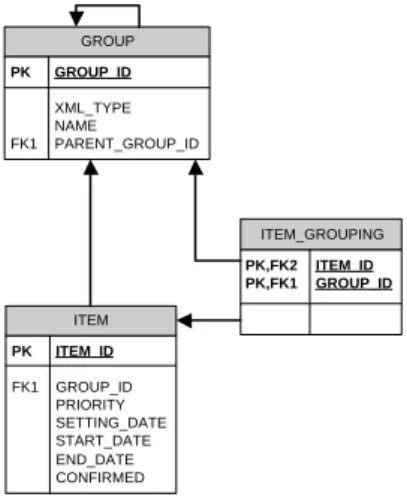
Relational structure that would satisfy our common structure is shown in Fig. 1.
ITEM PK ITEM_ID FK1 GROUP_ID PRIORITY SETTING_DATE START_DATE END_DATE CONFIRMED GROUP PK GROUP_ID XML_TYPE NAME FK1 PARENT_GROUP_ID ITEM_GROUPING PK,FK2 ITEM_ID PK,FK1 GROUP_ID
Figure 1: Information grouping model
Since hierarchical organized structure
of groups is not flexible enough, we
store alternative grouping definitions in
ITEM_GROUPING table. We have also introduced a restriction where all the items belonging to the same group have to be of the same content type. As it can be seen on Fig. 1 groups are hierarchically organized. Every branch in the group can contain data of only one type. This makes data retrieval
and presentation much easier. Every item
stored inITEMtable has an XML document,
where the rest of the attributes and its values are stored. These XML documents are inside an XML table that can be represented in relational database notation as shown in Fig. 2.
The XML table has following properties: The name of the table;
Relation to the ITEM in relational table;
ITEM PK ITEM_ID FK1 GROUP_ID PRIORITY SETTING_DATE START_DATE END_DATE CONFIRMED ITEM_VARCONTENT PK,FK1 ITEM_ID VARCONTENT XSD_NAME
Figure 2: XML storage table
Storage for XML documents;
The Name of the XML Schema docu-ment the content is validated to.
The other approach to data modelling would be having attribute-value pairs inside a relational table. In that case all the valida-tion of the attributes would be done on the ap-plication level. The advantage of introducing the XML table versus having attribute-value pairs is that the validation of variable content is done on database level and the definition of variable content can be changed without the affecting application logic.
An example of XML Schema document that validates variable content structures is shown in Fig. 3.
In order to be able to define the presenta-tion characteristics in UI for inserting and up-dating item instances, we added attributes that are part of a namespace noted with prefix "ed" in our documents. These attributes are de-fined for the elementary types "ID", "Name", "CoverType", "Description", etc. (Fig. 3), and later applied to the elements. We can also override these default settings when defining an element, e.g. "bookId"). The final result will be that all elements defined as "Name" type will be by default displayed as an "En-try" element, while the default settings for the element "bookId" are overridden, and it will be displayed as non-updatable "Display" ele-ment.
There is an analogy between XML Schema document that defines the structure of the
con-<xs:schema>
<xs:element name="VarContent" > <xs:complexType>
<xs:choice>
<xs:element name="Book" type="BookType"/> <xs:element name="Magazine" type="MagazineType"/> <xs:element name="ComicBook" type="ComicBookType"/> <!--and so on--> </xs:choice> </xs:complexType> </xs:element> ... <xs:complexType name="BookType" > <xs:sequence>
<xs:element name="bookID" type="ID" ed:xmlform="Display"/> <xs:element name="bookName" type="Name"/>
<xs:element name="cover" type=" CoverType"/> <xs:element name="description" type="Description"/> </xs:sequence>
</xs:complexType> ...
<xs:simpleType name="ID" ed:xmlform="Entry" > <xs:restriction base="xs:integer" >
<xs:totalDigits value="12"/> <xs:fractionDigits value="0"/> </xs:restriction>
</xs:simpleType>
<xs:simpleType name="Name" ed:xmlform="Entry" > <xs:restriction base="xs:string" > <xs:minLength value="0"/> <xs:maxLength value="4000"/> </xs:restriction> </xs:simpleType> ... </xs:schema>
Figure 3: A part of XML Schema for storing vari-able content structures
tent of XML data like the relational schema in relational databases. Using attributes we de-fined, we are referring to the abstract presen-tation objects and relating them to the content. By adding new elements inside the choice list (Fig. 3), we are actually adding support for new content structures.
Described XML Schema document and all other documents included in the process are stored inside the database and available to the designers and content administrators through WebDAV protocol [1]. Using this protocol content administrators are able to use software like XML Spy to change documents directly in the database. In that way the content ad-ministrators define the content structures by themselves.
Since the WCMS is unaware of the con-tent structures before the actual design and loading of content starts, the further challenge is to provide a flexible UI. Since our UI is Web based, WCMS should be able to dynam-ically generate HTML forms for creating,
up-dating and deleting content instances. The
most challenging part for implementation was content structure interpretation and dynamic
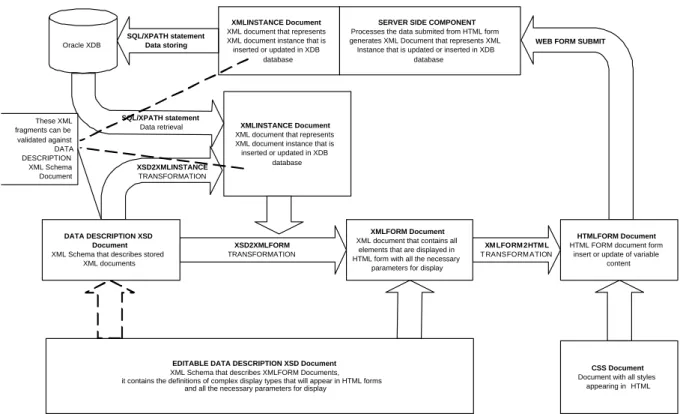
transformation to HTML forms. The com-plete process of dynamic generation of user interface and retrieving/storing the content is presented in Fig. 4.
3.2. Presentation
The process can be segmented into follow-ing phases:
Generation of XMLINSTANCE docu-ment;
Generation of XMLFORM document from the content structure description; Transformation of XMLFORM docu-ment into HTML form;
Generation of XMLINSTANCE docu-ment from the user input and storing it into database.
The first phase is generation of XMLIN-STANCE document. This document is an in-stance of content. In this document the ac-tual data presented on the Web are located. Its structure can be validated against XML Schema document described in Section 3.1. In the Fig. 4 this document is named DATA DESCRIPTION document. The information about the type of content stored in XML is located under group information. The exam-ple of XMLINSTANCE document that is an instance of "BookType" structure is shown in Fig. 5
<VarContent> <Book>
<bookID>22</bookID>
<bookName>Applying Use Cases</bookName> <cover>Soft</cover>
<description>A practical guide to UML</description> </Book>
</VarContent>
Figure 5: An example of "BookType XML In-stance"
If we are updating the existing content, the document is retrieved from the database us-ing XPath extensions in SQL. XPath standard [6] is used while it provides the access ab-straction on top of the storage model. XPath traverses nested XML elements by specifying
XSD2XMLFORM TRANSFORMATION XM LFORM 2HT M L T RANSFORM ATION XSD2XMLINSTANCE TRANSFORMATION Oracle XDB SQL/XPATH statement Data retrieval SQL/XPATH statement
Data storing WEB FORM SUBMIT
These XML fragments can be validated against DATA DESCRIPTION XML Schema Document XMLINSTANCE Document XML document that represents XML document instance that is inserted or updated in XDB
database
SERVER SIDE COMPONENT Processes the data submited from HTML form generates XML Document that represents XML Instance that is updated or inserted in XDB
database
XMLINSTANCE Document XML document that represents XML document instance that is inserted or updated in XDB
database
DATA DESCRIPTION XSD Document XML Schema that describes stored
XML documents
XMLFORM Document XML document that contains all
elements that are displayed in HTML form with all the necessary
parameters for display
EDITABLE DATA DESCRIPTION XSD Document XML Schema that describes XMLFORM Documents, it contains the definitions of complex display types that will appear in HTML forms
and all the necessary parameters for display
HTMLFORM Document HTML FORM document form
insert or update of variable content
CSS Document Document with all styles
appearing in HTML
Figure 4: Transformation path
the elements to navigate through with a slash-separated list of element and attribute names. This conjunction of SQL and XPath gives us a method for accessing both data from the rela-tional and XML tables using single statement. If we are creating a new instance of con-tent then we use XML Schema definition and XSL transformation to create an XML doc-ument that has exactly the same structure as the one previously shown, only without any element value inside it.
The next phase uses XMLINSTANCE doc-ument as a part of XMLFORM docdoc-ument. XMLFORM document is XML document that combines content structure with the pre-sentation characteristics of each element. The structure of XMLFORM document is defined using XML Schema document and in the Fig. 4 is named EDITABLE DATA DESCRIP-TION document. An example of this docu-ment and the idea can be found in [2].
Elements appearing in the "Form" element represent common form inputs types appear-ing in HTML forms or parts of HTML
syn-tax. If we compare them to the part of
XML Schema document that describes con-tent structure for "BookType", we can no-tice that each element of the complex struc-ture is transformed into one element inside the "Form" element.
Using XMLINSTANCE document inside XMLFORM document we define the struc-ture of XML document that is inserted or up-dated and we are passing the data during and update action. An example of complete XML-FORM document is shown in Fig. 6
<XMLForm> <XMLInstance>
<VarContent> <Book>
<bookID>22</bookID>
<bookName>Applying Use Cases</bookName> <cover>Soft</cover>
<description>A practical guide to UML</description> </Book>
</VarContent> </XMLInstance> <Form>
<Display key="bookID" label="ID"/> <Entry key="bookName" label="Name"/> <RadioGroup key="cover" label="Cover type">
<Option value="S" valueTitle="Soft"/> <Option value="H" valueTitle="Hard"/> </RadioGroup>
<LargeEntry key="description" label="Description"/> </Form>
</XMLForm>
The next phase is the generation of HTML
form. It is done also using XSLT.
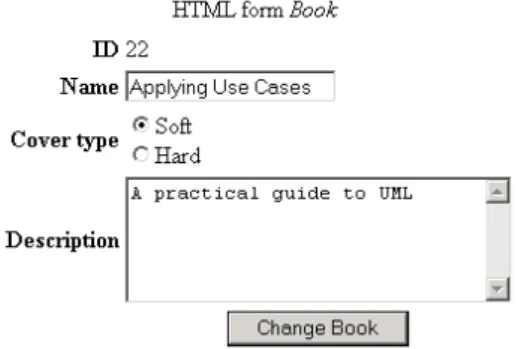
Dur-ing the process of generation of HTML form each element inside the "Form" element will be transformed to create an element inside a HTML form. Elements inside an "XMLIn-stance" element will be used to populate the HTML form with data. For example, trans-formation of previously shown XMLFORM would result in HTML form that would look like in the Fig. 7.
Figure 7: Final HTML form
This concept is very simplified idea found
in XForms standard [6]. XForms is W3C
specification of Web forms that can be used with a wide variety of platforms. It has sepa-rate sections that describe how the form looks, and what the form does. Our implementa-tion is similar to the secimplementa-tion of XForms that describes how the form looks. XForms have ability to suspend and resume the completion of a form. This is done in XForms Processor that is part of Web client software. Currently, that is the main disadvantage of XForms tech-nology and the reason why we did not use XForms for presentation purposes.
The final phase begins after content admin-istrator fills in a form and submits the content to the server. Server component (Fig. 4) cre-ates XMLINSTANCE document for the given type and populates the values of the XML el-ements with user data. If all required data are filled in, the XMLINSTANCE is stored inside the database.
4. Conclusions and Further Work
In this paper we presented a part of imple-mentation of Web Content Management Sys-tem (WCMS). Our implementation use es-tablished technologies like relational database and XML technologies as basis, and intro-duces some rather new concepts and technolo-gies like XForms and Native XML Database. We have decided to build hybrid model com-bining XML Native database with relational database. The next step would be storing the
entire content into an XML database. We
are also planning to fully implement XForms standard, instead of modified version de-scribed in this paper.
References
[1] IETF. RFC:2518 - HTTP
Ex-tensions for Distributed
Author-ing – WEBDAV. University of
California, Irvine; January 2002.
http://www.ics.uci.edu/ ejw/authoring/
protocol/rfc2518.txt
[2] Ogbuji C. Editing XML Data
Us-ing XUpdate and HTML Forms.
O’Reilly xml.com; June 2002.
http://www.xml.com/pub/a/2002/06/12/ xupdate.html
[3] Oracle Corporation. Oracle XML DB.
Oracle Official Web Site; January 2002. http://otn.oracle.com/tech/xml/xmldb/pdf /xmldb_92twp.pdf
[4] Simic H. Patterns of Web Site Structure in UriGraph. To be published on The 7th International Conference on Telecommu-nications, ConTEL; 2003, Zagreb, Croa-tia.
[5] XML:DB Initiative. XML:DB
Initia-tive for XML Databases. XML:DB
Initiative Official Web Site; 2003.
http://www.xmldb.org
[6] W3C. W3C Technical Reports and Pub-lications. W3C Official Web Site; 2003. http://www.w3.org/TR/