Issues in User Data Access and Reporting
Becky Smith, SAS Institute Inc., Cary, NC
Art Conklin, Aetna Health Plans, Middletown, CT
Emily Wallace, SAS Institute Inc., Cary, NC
Abstract
Users are relying on computers to help them become more 5elf-sufficient in getting their job done. They want to extract information from the company's enterprise systems with minimum intervention from the Information Systems (IS) staff. The solution to
empowering these users and eliminating the impact on your enterprise databases is to provide them with access
to
a separate data repository of infonnation to use for business intelligence purposes.This paper examines the role of the SAS® System, specifically SAS/ACCESS® software and SAS/CONNECT® software, in building a data warehouse of decision support information in a client/server environment. To illustrate the power of the SAS System, we explore the use of SAS software in decision support and management information system applications at Aetna Health Plans (AHP), a business unit within Aetna Life and Casualty.
Introduction
The balance of computer usage has shifted from data processing professionals to end users who want to be empowered
to
fulfill their own information needs. Companies are aligning IS goals with business goals in attempt to reduce the number of user requests to IS. This shift introduces challenges to 18 to serve a different role in providing users with access to enterprise data. Their new role is to manage the enterprise resources and empower users with more effective decision support tools.There are primarily two types of applications that contain critical information about an organization: operational and decision support. We distinguish between the two based on the primary use and audience addressed by the application. This paper explores the differences between these two application types and examines the problems associated with users needing to access them. These problems have caused organizations to move in the direction of establishing a data warehouse for use by the business users within the company. In fact, the Meta Group Inc., a consulting firm in Westport. Connecticut, conducted a survey on 250 1.8. professionals and found that in 1994,
"95% of companies surveyed plan to introduce or continue to use some kind of data warehouse in the next year."
The main goal of this paper is to describe the database features and clienVserver components of the SAS System that enable it to be a cost effective alternative to a commercial database management system as a data warehouse.
We will aChieve our objective by explaining how the SAS System can help you in each of the three phases of data warehousing: 1) Accessing operational data
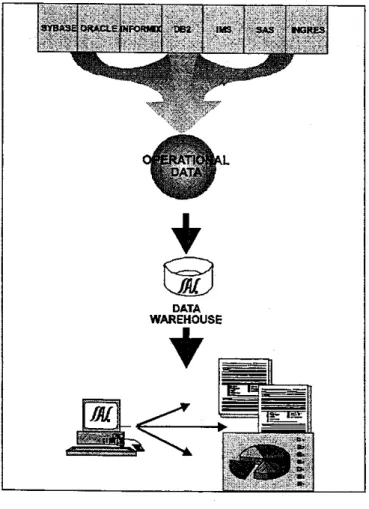
2) Transforming operational data into decision support data 3) Populating the data repository for decision support Information flows into a data warehouse from the operational environment where
tt
is accessed by users of deCision support applications. We depict this information flow in Figure 1 below. As you can see in the diagram, the SAS System can help you access operational data, transform it into decision support data, store it in a warehouse, and develop reports and analyses.DATA WAREHOUSE
T
Statement of Problem
In implementing a successful data access strategy, it is important to recognize that there are appropriate and inappropriate ways to access data depending on the nature and distribution of the data and the types of applications requiring access to the data. Problems arise because of two facts:
• Data is both operational and 'decision support in nature • Users need varying levels of access to data
Operational Data
Operational data often 'are stored in your company's production systems or other legacy databases or file structures usually written in COBOL. These systems are designed to handle the processing of large numbers of read/write and update transactions. For example, an insurance company might have operational
applications for health, automobile. life and casualty claims. Many of these systems were developed over twenty years ago and the data are stored in non-relational form.
The infonnation contained in operational systems is critical to managemenfs decision-making process. Operational data is often difficult to obtain because these systems are organized by application, like automobile claims, instead of by subject, such as customer name or policy number. There is a lack of consideration taken in developing the systems for analysis and reporting purposes. User requests to IS for reports against these data are time-sensitive and often divert IS from other systems development efforts because of their interrupt-driven nature.
Performance of operational systems is effected by
poorly-constructed or ill-timed queries generated by users who have direct access authority. Data downloaded to the desktop for analysis frequently clog already overtaxed networks. Timely access to data in these systems is lacking because the business analysts compete for resources with the people entering transactions.
Decision Support Data
Decision support data is used for business intelligence, query and reporting systems, and analytical applications, all designed to augment your organization's decision-making process. These applications typically require read-only access to large volumes of data derived from the operational environment.
These data are usually scattered throughout your company in many forms; such as relational database management systems (DBMS), spreadsheets and word-processing documents. This type of data is hard to access because it originates in many locations.
Types of Users
Data is as much of an issue in providing users with access to information as the people who request it. The users of business information can be categorized into three groups:
1) Management
Management and decision-makers of today want computers to present to them a Single vision of their organization's success. An executive information system designed with drill-down reporting on the critical success factors of the company will serve a manager's or executive's needs. They must receive information in a timely manner so they can make effective business decisions. 2) Business Analysts
Business analysts need ad-hoc query and reporting tools to access summary and detailed information stored in operational systems. Those interested in dynamically exploring relationships between these data want multi-dimensional analysis tools that give them the power to view and subset the data any number of ways.
3) Programmer Analysis
The programmer analyst needs access to more detailed information and possibly on a more frequent basis than management. Programmer analysts are interested in analyzing trends in data and performing statistical analytical functions on samples of detail data.
Introduction to Data Warehousing
The problems with users needing various levels of access to all types of data, and IS wanting to protect the company's data assets, present sound business reasons for creating a data warehouse. A data warehouse is an intennediate repository of summary and detail data organized by subject rather than by application
to
facilitate easier reporting against production systems. Data warehousing is an evolutionary process, and as a recent article in Computerworld states,·You can't buy a data warehouse, you have to build
it.-ComputelWorld, February 6, 1995.Characteristics of a Data Warehouse
A data warehouse is a strategy and a process for staging corporate data defined by the physical and logical separation of decision support data and the operational data from which they are derived. The data in a warehouse is characterized by being: • Subject-oriented
• TIme-variant • Non-volatile • Integrated
Only the data needed for decision support processing are integrated from the operational environment. The data are organized by subject to facilitate easier reporting. For example, information about customers can be summarized into one table in the warehouse. Inquiries pertaining to customer activity become much easier because the data is stored in one place. In the operational systems where the data Originates, the customer information can be stored in many files. It might be organized by applications like health, life or automobile policyholders, making
reporting on information stored in these files more difficult.
As data pass into the warehouse, they are integrated into a consistent structure for decision support. These data should have structure of varying levels of detail to support the types of reporn> needed by users. These levels of detail include:
• Highly summarized • Lightly summarized • Current detail • Old or historical detail
In Figure 2, you see an example of how sales information might be stored in a data warehouse. By separating monthly, weekly and detailed sales data, userS can quickly obtain
timely
and pertinent information needed for reports.Highly Summarizad Cumont Oetall Old DeIIIII Monthly Solos b ProductUne 1981 -1992 WHidySolos" Sub-prOcluct Une 1984 -1192 Salas DetaIl 1990 .. t61
Figure 2 Levels of Detail ;n a Data Warehouse
The transformed data are placed directly into the warehouse at the current level of detail. where they are summarized. archived into the older detail data Jevel, or purged. Data in the warehouse are
non-voJatile and usually not modified once they enter the
warehouse.
Reasons For Creating A Data Warehouse
A data warehouse strategy benefits all three types of users identified in this paper; from management,
to
business users, to IS. The main reasons for creating a data warehouse are to:• Prevent users from impacting production systems • Alleviate users from having to learn data access methods • Reduce interrupt-driven requests to IS
• Empower business users
to
become self-sufficient • Summarize production dataA successful data warehouse strategy is dependent on the efficient use of existing infrastructure to effectively flow data in and out of the warehouse. As stated in Datamation,
·Concentrate on how information flows if you want to be successful with a data warehouse. Remember the point: to deliver information to make better business decisions amid rapidly changing business environments.·
Datamation, February 1, 1995.
If you are successful with the information flow in a warehouse, users will discover the efficiency of the warehouse as an integrated source of data that is easy
to
get to and that lends itself well to analysis of data over time. IS should be prepared for a gradual, but dramatic increase in the usage of a data warehouse forreporting purposes.
For the remainder of the paper, we will focus on the features of the SAS System that address each of the steps in building a data warehouse: accessing operational data, transforming it into deCision support information, and populating the data repository.
Accessing Operational Data
The first step in creating a data warehouse strategy involves extracting data from your operational environment. With the SAS System's unique data access strategy, operational data is accessible, regardless of its form, through a single access method. The SAS System even has capabilities to transfer data across different hardware platforms without the user knowing that the data they have requested resides on a server or host machine.
The SAS System's
Data
Access StrategyThe enabling technology behind our data access strategy is
Multiple Engine Architecture. The SAS/ACCESS family of
products provides engines to over 50 relational, hierarchical, and networ1< database management systems, data gateways and standard API's such as OOBC, and extemal file fonnats including VSAM. The engines translate SAS read and write requests for data into the appropriate calls for each database management system and file structure. Engines surface data to the SAS System in
two
forms:1) Logical views to the native data source
2) Extracts of native data into SAS data set form
The main benefit of our data access strategy is that SAS application logic is abstracted from data access and management
functions. As a result, users are shielded from having to learn Structured Ouery Language (SOL) or other database specific query languages to perform simple extracts of information. With the SAS System, users have a single technology for accessing all their data sources. The SAS System also supports it's own version of SOL. When the SAS internal Sal processor is unable to optimize queries for the DBMS, the user can pass native Sal statements to the DBMS.
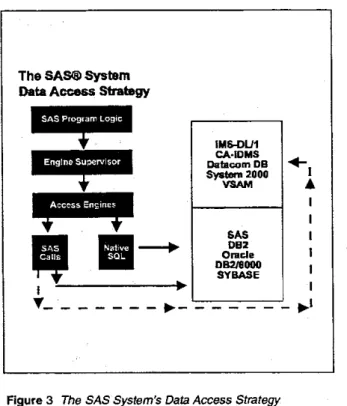
An illustration of the SAS System's data access strategy is presented in Figure 3. The diagram clearly shows the abstraction of data access logic from the application or program logic. This detachment of data access logic eliminates the need for users to perform data access and management functions.
The SAS® System
Data Access Strategy
SAS Program LogIC
I IMS-DU1 CA·IDMS Datacom DB $yo_2000 VSAM SAS DB2 Oracle DB2/6000 SVBASE
T _ _ _ _ _ _ _
~_
,=_C"":_=-=_C"":_=-=_,-J
Figure 3 The SAS System's Data Access Strategy I ~I
Once operational data has been accessed using logical views or by extracting native data into SAS data set form, it is available to the SAS System for processing. To the user, a SAS/ACCESS view looks like a SAS data set, except that it does not contain actual data.
As part of a data warehousing strategy, it is more efficient to allow applications developers to build and use views to extract relevant operational data and stage it in the data warehouse. Features provided by SAS/ACCESS views for extracting and staging operational data to the SAS System include:
• Instructions and a path to the target data source • Mappings from target resource names into SAS names • Mappings from target data types into SAS data types
SAS/ACCESS views provide the user with the most current version of the data for their application since they act as a map to the data source. This reduces redundant data and requires a small amount of storage space. Views allow the user to subset and filter the original data elements to reduce the amount of data being accessed. Using the Sal native to the database, users can combine dissimilar data sources across hardware platforms. Four methods exist within the SAS/ACCESS family of products for accessing external data. Not all of the SAS/ACCESS engines have full functionality as described below.
1} Access and View Descriptors
Access descriptor--Holds database connection and data description information about the structure and attributes of the DBMS table
View descriptor-- Defines some or all of the data described by one access descriptor
2) SOL Procedure Pass-Through facility
Passes SOL statements directly to the DBMS 3) DATA step interface
Embeds program logic into a view to pass to the DBMS 4) DBLOAD
Loads SAS data into a DBMS
The suite of SAS/ACCESS products provides transparent and dynamic access to a variety of data sources and operational database formats. When these data reside on different hardware platforms, SAS/CONNECT software provides tools for a seamless transfer of the data between machines.
The SAS System's Client/Server Services
The SAS System provides two sets of services to enable a clienVserver distribution of data and application logic across diverse hardware platforms:
1) Compute SelVices
Enable the utilization of remote computing resources, including hardware, softv.Jare, and data, to execute an application
2) Remote data services
Enable access to data stored in a remote environment using data transfer services
The features of interest to us in accessing operational data across hardware platforms are the remote data $.ervices in
to assume the entire role of accessing operational data for staging
it in the warehouse.
Functionality in SAS/ACCESS software allows you to access data in the operational environment. What if these data reside on <
multiple hardware platforms, as they usually do? You can use the data transfer facilities in SAS/CONNECT software to move data from one machine to another. The client/server computing services of SAS/CONNECT software are highlighted in the next section on transforming operational data.
Transforming Operational Data
Only the data needed for decision support processing are carried over from the operational environment into the data warehouse. Some pre-processing must occur that summarizes, archives into older detail, or purges the data. Decision support applications are designed to present a broad view of what the data represent They rarely need to display the detail level data, so it is not necessary to move all of the detail information from the operational' setting. However, it is important to integrate the data into a consistent structure.
During this stage of the data warehousing process, it is critical for those who are responsible for data migration strategies to examine the activities that users are performing on the data they use today. According to Bill Inmon, a reknown consultant for data
warehousing issues,
"95% or more of decision support processing can be done against lightly summarized data and only 5% or Jess heeds to go against the archived detail data-.
Bill Inmon. "Building the Data Warehouse,M 1992.
It makes sense then to perform some data management logic on the detail data prior to placing it into the data warehouse repository. This may include activities such as: • Cleaning
• Reconciliation • Oe-nonnalization • Summarization • Loading
The SAS System provides the following tools for accomplishing these data management functions:
• PROe SUMMARY
Grouping by classification values • PROe MEANS
Collapsing numeric data • PROe FRED
One-way, two-way and n-way classifications
• Sal
Groupby, orderby, and summary functions • Data step programming
Arithmetic, random number and trig functions • Open multiple input'output files simultaneously • look-ahead reads and table look-up logic
Client/Server Data Management
Data management functions can be performed in the operational environment or on the machine housing the data warehouse. The remote compute services of SAS/CONNECT software can help in distributing data management tasks in a client/server environment With SAS/CONNECT software, program logic can be submitted to the hardware environment most appropriate for performing data management tasks on your operational data. These remote compute services allow you to take advantage of the power of your hardware resources by distributing program and application logic across your organization's enterprise systems.
Creating Metadata and a Data Dictionary
After applying data management logic to the operational data to transform it into decision support data, you should consider developing a data dictionary; and more explicitly metadata. Metadata is information that describes how different structures and variables in a data warehouse relate to each other. A data dictionary is a subset of metadata and serves as an organized listing of data and associated descriptions.
Both metadata and the data dictionary will be developed by IS to make the views of data in the warehouse more meaningful to the user who does not understand database table name logic. These tools will become an invaluable reference tool for more advanced analysts who want to learn about the database and write queries that take advantage of existing tables, views and indexes. The SAS System provides several methods for creating metadata and a data dictionary:
1) SAS® macro facmty
To customize the SAS System for building metadata 2) SOL procedure
To generate dictionary tables for a data dictionary 3) CONTENTS procedure
4) DATASETS procedure
SAS InstiMe is working
to
improve the m.ethods used for storing and retrieving metadata using a data dictionary in the SAS System.Populating the Data Repository
Once data has been integrated into a consistent structure, it is then ready to be placed directly into a data repository. Organizations face an important decision in choosing their data repository for the warehouse. Many are conditioned to thinking that a DBMS is necessary for the data repository because of the essential features it provides for storing many types of data.
The intent of this paper is to suggest -that it is not necessary to use a commercial DBMS as the data repository for a data warehouse. One SAS Institute customer, Diane Brown at Athena of North America, says they chose SAS over a DBMS as their data warehouse repository because,
"We didn't need rollback and recovery and other things that DBMS provide because we are getting our information from systems that have already done that.·
Diane Brown. Director of Clinical Systems, Athena
SAS Data Sets
Specific characteristics of SAS data sets reinforce the SAS System's ability to serve as the data repository for the data warehouse. These features include:
• Relational SAS data sets
Requests for information can be completed more quickly because fixed relationships between data are determined dynamically upon request
• Data set indexing
Processing time is reduced by aiding users in locating and selecting observations based on the value of a particular column
• WHERE-clause processing
Users receive only relevant data by specifying a set of criteria for select rows
• Compressed record format, or variable-length record
Maximizes query and storage resources by requiring less mass storage and fewer I/O operations
• lean file format
Data can be stored on disk with low overhead
Multi-Vendor Architecture (MVA)
Portability is an important issue when choosing the appropriate hardware platform for the data repOSitory. With the Multi-Vendor Architecture (MVA) of the SAS System, companies can choose from a mix of platforms and know that the SAS System will perform. MV A assures that applications will run the same across
all host, server and client machines support~ by the SAS System.
SAS Institute's Open Architecture
The SAS System has provided an open architecture for accessing data since the introduction of engines in Version 6 of the SAS System in the 1980's. These engines can be used interactively or in batch mode to communicate with other applications and data sources across a wide range of hardware environments. SAS Institute is continuously adding support for new engines.
This year, we have added an engine to support Microsoft Corporation's Open Database Connectivity (OOBC) standard. The SAS/ACCESS to OOBC facility enables users to access third-party ODBC-compliant data sources from within the SAS environment.
The strengths of our open data access strategy for decision support reporting against a data warehouse include:
1) Access to only pertinent infonnation
2) No impact on production systems
3) View to the most current data
Many companies expect that a repOSitory of decision support information should be open to third-party applications. With our client support for OOBC (Introduced in January, 1995), a repOSitory of SAS data can be accessed or updated by any OOBC-compliant third-party application using the SAS OOBC Driver.
For the first time in the histo'ry of SAS Institute, users are now able to access SAS System data from machines that are not licensed for SAS software. When the SAS data repository resides on a server platfonn, through the use of the SAS/SHARE'NET® facility, the SAS data can be accessed or updated by any OOBC-compliant application.
Decision Support Tools
A data warehouse is not complete without an effective set of decision support tools to report against the data. This step can be one of the most difficuft parts of developing a data warehouse strategy. However, if you are considering the SAS system for your data repoSitory, then you are probably familiar with the rich set of decision support tools available in the SAS System of software.
The SAS System provides tools for four major application areas:
• Business intelligence and On-line analytical processing (OLAP)
• Applications development
• Technical and scientific analysis
• Horizontal and vertical business solutions
business intelflgence and decision support tools for scheduling projects, controlling quality, analyzing data, building appli~tion~,
presenting information, and querying databases. SAS Instit~e IS in the business of delivering information across your enterpnse. The following case study presents just one example of how the SAS System has helped an organization access their volumes of enterprise data and deliver it to the analyst and management community for better decision~making.
Case Study-Aetna Health Plans
"Technology Challenges for Healthcare Information Analysis in the Managed Care
Era-Business Issues and Challenges
Success in managed care relies upon effective analysis of healthcare information. Analysis of this information is dependent upon manipulation and linkage of relatively large stores of claim/utilization, member and provider data. It is not uncommon for inquiry to be exercised against hundreds of megabytes of data. Appropriate data access and reporting tools must be provided to
decision~makers to respond to these challenges.
Role of the SAS System
Currently, the SAS System's role at AHP is built around its support for data access, reporting, analysis and applications development on multiple platforms against large volumes of data. The SAS System has allowed AHP to implement ~ critical reporting application that is nearing completion. We will explore the application in more detail in this case study.
Let's first examine the use of the SAS System across AHP's enterprise. There are currently five areas in which the SAS System performs at AHP:
1) Cross platform processing 2) Data access
3) Statistical analysis 4) Data management 5) Applications development
The SAS system executes consistently across all standard platforms at AHP, and lends itself to a cooperative processing model. The SAS/ACCESS products are used to support access to common data formats in their native mode. The SAS System is quite capable of managing large volumes of these data effectively. SAS software originated at AHP as a statistical analysis package and continues to be strong in that arena. AHP has also taken advantage of the rich set of applications development tools in the SAS System for the construction of applications to meet the needs of users of various skills.
Users of the SAS System
The SAS System is used at AHP by the three main types of users of business information:
• Management • Business analysts • Programmer analysts
SAS software is viewed primarily as a tool for developers and programmer analysts at AHP. However, SAS applications are made available to management and business analysts via SAS/AF® applications, SAS/ASSIST® software, Microsoifs Visual Basic applications and C++ applications communicating with SAS program logic.
Business analysts at AHP use SAS/ASSIST software or customized graphical user interiaces to communicate and make requests
to
the DBMS. SAS/CONNECT software serves as the middleware for communicating to the DBMS through SAS/ACCESS software. Business analysts can design reports locafly and submit them remotely. Remote submit capabilities of SAS/CONNECT software are used to shift the report processing to the host environment and release the workstations to process other tasks. Views are used both locally and remotely with SAS/ACCESS software depending on the desired processing location.Programmer analysts use the applications development facilities of the SAS System to write the graphical user interfaces used by management and the business analysts. They also write batch SAS programs that are submitted by the graphical user intertaces for periorming a variety of functions. One key function AHP has automated is the transfer of programs between two different machines using SAS/CONNECT software.
Business Problem Solved By the SAS System
The challenge in an information-driven business such as AHP's is to allow inquiry of data by business analysts and management ~n
demand. The SAS System has been an important component In meeting that challenge. A number of AHP applications have begun
to
exploit the clienVserver capabilities of the SAS software. Discussed below is a specific application nearing completion that utilizes this model.The Solution
The reporting system, described here and nearing completion, is a distributed, data warehouse application designed to support the information and analysis needs of a segment of AHP's managed care business. The warehouse spans approximately 60 tables and comprises approximately 5·6 gigabytes of data. The SAS System is intended to enhance data access and business intelligence within the application.
AHP chose an RS/6000 as the server witt> DB/2 6000 as the data warehouse. The client is a Windows 3.1 workstation connected to
a Novell LAN and running a TCP/IP stack for communicating with the AIX Server.
On a monthly basis, data is taken from host systems, in some cases utilizing features of SAS software described earlier, and bulk loaded into DB/2 6000 on the RS/6000. Once loaded into the target tables, SAS/ACCESS to 08216000 software (experimental version) is used to create SAS/ACCESS views to make the 08216000 resources available to users. The middleware component is SAS/CONNECT software which provides a message-based scheme to allow clients to request and receive-resources from the server.
Within the application, the interface to the database will either be through the command line in 8as8® SAS software for developers,
SAS/ASSIST software for data analysts or SAS/AF applications for
business analysts and management Data retrieval and report requests will be made through SAS/ASSIST software or a custom
SASI AF application intertacing to the SAS System.
At the time a request is generated, SAS/CONNECT software takes the client request and routes it to the AIX server. The client request has identified the target 09216000 resource through a look-up list maintained in the server environment. When the request is received by the server, the appropriate SAS/ACCESS view, containing mapping information for the SAS System, is referenced and the engine constructs a query using DBl2 6000's flavor of SOL. Through the SAS/ ACCESS view, a result-set is passed from DB/2 6000 to a remote SAS/CONNECT session. At this point, the result set may either be returned-to the PC client SAS session for local report generation and analysis, or remotely processed on the AIX server.
The capability to remotely process requests makes the SAS System scalable as report and analysis logic can be shifted to the host environment. Future plans include librarying report and analysis logic on the AIX server and remotely triggering their execution. Other considerations include having the A1X server initiate the processing on additional hosts.
Conclusion
The concept of the information database has existed for over 10 years; almost as long as our customers have been using the SAS System for data warehousing. However, the practice of
implementing a data warehouse in a production environment is just beginning in most companies. Data warehousing may be a required step in incorporating client/server computing into your enterprise, because it makes effective use of your company's critical legacy systems as informational resources.
This paper is intended to make both users and decision·makers aware of the capabilities of the SAS System for both accessing data to populate a data warehouse and buiding applications for decision support purposes. The staff at SAS Institute is well-positioned
to
assist you as you begin the task of re..<Jesigning decision support systems to take advantage of data warehouses of your company's enterprise data. We understand that your ultimate goal is to deliver the right information to the right people in your organization in a timely manner. After all, the SAS System is the world's leading information delivery system.References
Betancourt, Randy (1993), "The SAS System as an Information Database in a Client/Server Environment, ~ Cary, NC: SAS Institute Inc.
Bull, Katherine, "Data Warehousing. The Ideal File Cabinet.·
Informationweek, January 16,1995.
Hackathorn, Dr. Richard, "Data Warehousing Energizes Your Enterprise," Datamation, February 1, 1995.
Inmon, W.H. (1992), "Building the Data Warehouse," OED, Wellesley, MA.
Jenkins, Avery, "'n Depth: Warehouse Woes,· Computerworfd, February 6, 1995.
SAS Institute Inc. (1990), SAW Language: Reference, Version 6,
First Edifion, Gary, NC: SAS Institute Inc.
SAS Institute Inc. (1994) , "The Data Warehouse: Storing Decision Support," SAS Communications, Second Quarter, Cary, NC: SAS Institute Inc.
Stranieri, Mali< (1990), "Creating and Managing a SOL Database with the SAS System,· Proceedings of the Fifteenth Annual SAS
Users Group International Conference, Cary, NC: SAS Institute Inc.
Wallace, Jack (1994), "New Features for Remote and Open Access to Enterprise Data: Enhanced Distributed Data Access Through Multiple Engine Architecture," Proceedings of the
Nineteenth Annual SAS Users Group Intemational Conference,
Gary, NC: SAS Institute Inc.
Base SAS, SAS, SASIACCESS, SAS/AF, SAS/ASSIST, SAS/CONNECT, SAS/SHARE"NET are registered trademarks of SAS Institute Inc. in the USA and other countries. ® indicates USA registration.
IBM, AIX, DB2 and DB2I6000 are registered trademarks of International Businesss Machines Corporation.
Other brand and product names are registered trademarks or trademarks of their respective companies.