SURFnet bv | Radboudkwartier 273 | PO Box 19035, NL-3501 DA Utrecht T +31 302 305 305 | F +31 302 305 329 | [email protected] | www.surfnet.nl
Non-web federated authentication
Authors: Roland van Rijswijk, Joost van Dijk, François Kooman (SURFnet) Martijn Oostdijk, Jaap Reitsma (Novay)
Reviewers: Remco Poortinga, Niels van Dijk, Pieter van der Meulen, Maarten Kremers (SURFnet)
Maarten Wegdam (Novay) Peter Clijsters
Contents
Executive Summary ... 4 1 Introduction ... 5 1.1 Goals ... 5 1.2 Use cases ... 6 1.3 Scope ... 6 1.4 SURFconext ... 6 1.5 Results ... 7 2 Project Moonshot ... 8 2.1 Introduction ... 8 2.2 Architecture ... 92.3 Required software modifications ... 11
2.4 Available implementations ... 11
2.5 Evaluation of use cases ... 11
2.6 Risks and threats ... 12
2.7 References ... 12
3 SASL/SAML ... 13
3.1 Introduction ... 13
3.2 Architecture ... 13
3.3 Required software modifications ... 15
3.4 Available implementations ... 16
3.5 Evaluation of use cases ... 16
3.6 Risks and threats ... 16
3.7 References ... 17
4 OAuth2 ... 18
4.1 Introduction ... 18
4.2 Architecture ... 18
4.3 Required software modifications ... 24
4.4 Available implementations ... 25
4.5 Relation to identity federations ... 25
4.7 Evaluation of use cases ... 26 4.8 References ... 26 5 Google OAuth ... 28 5.1 Introduction ... 28 5.2 Evaluation ... 35 6 Summary ... 37 7 Future Work ... 39 8 Conclusion ... 40 8.1 Project Moonshot ... 40 8.2 SASL/SAML ... 40 8.3 OAuth v2... 40
8.4 Application Specific Passwords ... 40
Executive Summary
This document analyzes and evaluates various methods of achieving federated authentication for non-web applications like email clients running on the desktop, access to remote store from your computer and accessing remote computers using the SSH protocol.
Currently federated authentication as implemented by most identity federations only works with web applications. However, there is a lot of interest in using federated identities for non-web “rich client” applications. In addition, mobile applications, usually called “apps”, can also be considered “rich clients”. They can also benefit from federated authentication.
We looked into 3 new proposals that can solve this problem and one existing approach that deals with the issue by working around it. The 3 proposals are: Project Moonshot, OAuth v2 and SASL/SAML. The currently existing solution is the use of “application specific passwords” that are configured through a website protected by federated authentication that is then manually
configured in the application.
We found that OAuth v2 is the most promising solution to solve the non-web federated
authentication problem. It is currently being deployed by various big service providers and the user experience of the authorization flow is already familiar for a lot of users as it is currently used for OAuth v1. Extending this to rich clients is only logical and was already done for some applications. The following actions are recommended:
1) Modify an existing mobile and desktop mail client to use OAuth (v2) to authenticate to an email provider.
2) Investigate the suitability of BrowserId and OpenID Connect as alternative methods for SURFconext to make available services not supporting SAML.
3) Monitor Project Moonshot and start a proof of concept once the implementation is sufficiently developed.
1
Introduction
A “traditional” federated authentication scenario usually specifies two components, three with client included: the Identity Provider (IdP) and Service Provider1 (SP). The IdP is used to validate user credentials and vouches for this user to the SP. The typical protocol flow looks like this:
1. The user browses with a web browser to the website of the SP;
2. The browser is redirected by the SP to the website of the IdP, possibly after selecting the home organization;
3. The user authenticates at the IdP or was remembered from earlier authentication2;
4. The web browser is redirected back by the IdP to the SP with an assertion3 in which the IdP vouches for the user.
Based on this assertion the SP authorizes or denies the user access to the service. The advantage of this system is access to websites in a way that does not require the user to convey their credentials, typically user name and password, to the SP but only to the IdP. This architecture requires a formal established trust between the IdP and SPs in which the SP trusts assertions by the IdP.
A disadvantage of this system is that it currently only works for web based applications that have been modified to support it. Native platform applications, such as email clients, chat clients, remote file system access and WiFi configuration, are not “federated”. Those applications still require (separate) credentials and don't allow for SSO. The flow for the user is usually somewhat enhanced by (permanently) storing the credentials on the client themselves.
Fixing federated authentication for the native platform applications is complex due to the various protocols used and will most likely require changes in the users' operating system by at best requiring additional software or plugins to be installed and at worst require operating system or application modifications.
1.1
Goals
The goal of this research is to find out if and how it is possible to achieve the same federated identity scenario for “native”, i.e. non-web, applications as currently exists for the web based federated applications. This report will evaluate various proposed candidates that claim to achieve this.
We consider the following elements to be required features in order to be a successful solution:
1 Also called “relying party” in Moonshot, or “resource server” in OAuth.
2 This is called Single Sign On (SSO). The user authenticates once with the IdP which is then remembered. Future requests to the IdP by other services will immediately redirect the user back to the SP without user interaction.
3 A statement signed by the IdP containing the subject, i.e.: the user together with optional attributes (which can be used for authorization).
1. Access to non-web4 applications using federated identity5; 2. SSO to non-web applications;
3. Access to non-web applications without providing user credentials to the SP; 4. Revoke clients from having access to SP, e.g. in case of lost smartphone/laptop; 5. The solution has to work on mobile platforms, i.e. smartphones, tablets;
6. No, or very little, modifications are required for the client.
1.2
Use cases
The following use cases are in-scope for this project:
1. Use federated authentication with a desktop and mobile “native” mail client, e.g. Thunderbird, Outlook, Android Mail, iPhone Mail, ...;
2. Use federated authentication to access a WebDAV share (remote file storage) from a desktop/mobile device;
3. Use federated authentication to access SSH services (remote shell).
The use cases should all consider (at least) the six requirements from the previous section.
1.3
Scope
There are a number of technologies being development that try and solve non-web federated authentication:
1. Project Moonshot6; 2. OAuth (2);
3. SASL, SAML;
4. Google (GMail for Education) SAML/OAuth implementation;
A problem with these technologies is that they may no longer be relevant in the (near) future as more applications move to the web, so the time in which the technologies become stable and adoptable is relevant.
Some applications, e.g.: mail clients, usually require extra configuration in addition to user name and password, like mail server configuration, but this is out of scope here and other solutions exists for that problem.
1.4
SURFconext
In the context of rich clients and federated identities SURFconext is the bridge between IdPs and SPs to limit the amount of configuration required by both IdPs and SPs. It takes care of attribute
4 Non-web means applications/services that are not accessed through a web browser, e.g. IMAP, SMTP, XMPP and WebDAV.
release policies to configure which attributes an SP gets access to (and optionally require user consent before releasing those attributes). In addition, a “social” API (OpenSocial) is available to send, manage and retrieve notifications, groups, and user information that can be used by SPs. For this project only the (SAML2) IdP of SURFconext which also provides Where Are You From (WAYF) functionality is in scope.
1.5
Results
The results of this research will be a recommendation as to how (and with what) to proceed with non-web federated identity. We will make a recommendation what technolog(y)(ies) are most promising for the future and worth pursuing.
2
Project Moonshot
2.1
Introduction
Moonshot (http://www.project-moonshot.org/) is a project which implements and develops specifications in the context of a larger standardization effort of the so-called ABFAB architecture (Application Bridging for Federation Beyond the Web). The project results thus far (the project is still relatively young) are:
a reference implementation consisting of a collection of open source software and patches for existing open source software
several IETF drafts detailing the overall architecture of ABFAB
several IETF drafts detailing specific application profiles for existing protocols and application programmer's interfaces (APIs)
The drafts and RFCs defined in the latter two results define the “Moonshot protocol” which is implemented by the former result. Since the Moonshot and ABFAB definition efforts are closely related, the remainder of this section will use the terms Moonshot and ABFAB interchangeably. Moonshot aims to develop technology that can be used to enable (with minimal changes) existing non-web-based applications to leverage web-based identity federation single sign on (SSO) to connected service providers. The developed specifications make use of existing building blocks, primarily GSS, EAP, RADIUS (or Diameter, or RADSEC), on the one hand, and SAML on the other. The focus appears to be on the high-performance computing (Grid, etc.) applications (see, e.g., the use-cases described in [3]), although the project's ambitions are to address a broader range of applications and service providers (as witnessed by the standardization efforts).
From the non-technical, more visionary, design documents [3, 4] it becomes clear that a scenario where a user is redirected to a browser in order to authenticate to the SAML IdP is not the intention. I.e., authentication is either handled directly by the application and credentials are entered into (or managed by) the application itself, or a user interface component shared by multiple applications (a so-called identity selector) is used. The requirements for the latter solution are, at this point, not very clear (see [7]).
What sets Moonshot apart from some of the other technologies discussed in this technology scouting is that it does not rely on a reliable transport layer (such as TCP) between client and SP and between SP and IdP at all. Instead, when Radius is used, then UDP is sufficient. This makes it possible to re-use existing authentication infrastructure for network authentication, such as for example Eduroam.
Active participating members of the community driving the Moonshot project are UK-based NREN JANET and a Massachusetts based private company called Painless Security. Principal editors of the draft specs are Josh Howlett (JANET) and Sam Hartman (Painless Security, Hartman is an author of MIT Kerberos). Other contributors (to Moonshot or to ABFAB related IETF drafts and RFCs) are Margaret Wasserman (Painless Security), H. Tschofenig (Nokia Siemens Networks), E. Lear (Cisco Systems GmbH), R. Smith (Cardiff University), and others. Part of the work is done in Geant 3,
2.2
Architecture
The underlying principle of Moonshot is to pass authentication requests originating from a given non-web based application that is attempting to access a resource at a given non-web based SP to SAML Web SSO (i.e.: web-based) IdP, and to pass the response back to the SP
without having the client application and SP implement SAML (or even HTTP) itself
and by re-using existing authentication relaying infrastructure (typically Radius or similar (RADSEC, Diameter) based)
The client application needs to implement a specific “mechanism” of the GSS API (Generic Security Service API) called GSS-EAP (a relatively new mechanism defined in [1] as part of the project, in fact the core component of Moonshot). The same holds for the SP. There are some possibilities to GSS-EAP-enable applications indirectly via protocol bridging, see “Required Software Modifications” below.
Ingredients of the solution are:
Client side standardization using GSS-EAP.
SP side (authentication server) standardization using GSS-EAP and SAML over Radius (the latter is in effect a SAML to Radius binding profile)
IdP side standardization using EAP and SAML over Radius
2.2.1 Abstract protocol flow
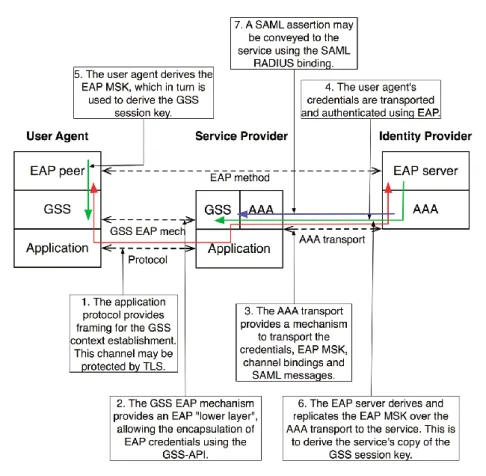
The protocol flow is shown in Figure 1, taken from the Briefing paper by Howlett and Hartman presented at TNC 2010 [4].
Figure 1: Protocol flow
A simplified explanation of the different steps in the diagram (mapped to 4 steps):
1,2. The client attempts to access a resource at the SP by issuing an authentication request against GSS-EAP.
3. The SP packages the request in Radius packets and forwards it (possibly over multiple hops) over the AAA transport. (3)
4,5,6. The IdP checks the user’s credentials as part of EAP
7. The IdP sends a SAML response, possibly containing user attributes, using SAML-over-AAA [6] to the SP.
Channel Binding
Moonshot implements so-called channel binding functionality. Channel binding uses information (attributes) of the client application and of the back-end authenticator so that the EAP server can check consistency. It enables, for example, mutual authentication. A precise description is out of scope of this technology scouting. Channel binding makes it possible, for example, for the SAML IdP to relay meta-data to the EAP server so that it can assess to what level user attributes issued by the IdP can be trusted.
A disadvantage is that support for channel binding needs to be implemented by client applications, raising the barrier for applications to support Moonshot.
2.3
Required software modifications
In principle, a necessary and sufficient condition is to have client applications issue their authentication requests via the GSS API using EAP. Depending on the precise application this is trivial (minor modification and recompile) or more complex.
In some cases where applications use a different abstract authentication API a translation (or “protocol bridge”) at the API level can help to GSS-EAP-enable a class of applications, such as for example certain Microsoft applications by the GSS-EAP Security Service
Provider by Padl Software7, or via the mechanism defined in RFC5801 [22] which GSS-EAP-enables GSS-SASL clients.
An SP needs to support GSS, Radius and SAML-over-AAA. The feasibility analysis [23] claims that: “On server platforms, it may significantly reduce implementation costs as implementing for one application may accomplish much of the work of implementing for other applications. On the client, implementation cost savings of GSS-API will be much more modest than on the server.” [5]
The IdP needs to support SAML-over-AAA and EAP, but can otherwise be a stock SAML IdP supporting Web SSO profile.
2.4
Available implementations
The project’s web-site contains references to the open source reference implementation. This includes core Moonshot libraries, sample clients (openssh, Firefox), and the server side (amongst others a patched Apache).
The web-site also conveniently provides a live-DVD. Also prepackaged software for Red Hat Enterprise Linux (CentOS) and Debian is provided.
2.5
Evaluation of use cases
2.5.1 Accessing IMAP e-mail from a rich client
It seems entirely reasonable to use Moonshot with an IMAP client as such a client will typically use SASL for authentication. In [5] (an early feasibility analysis of Moonshot from 2010) this use case is explicitly mentioned with “good server support” and client support for all major clients.
An IMAP e-mail client is currently not part of the Moonshot sample code base, however, the GSS-EAP SSP mentioned above reportedly allows Microsoft Exchange to use Moonshot for
authentication.
2.5.2 Accessing a WebDAV resource
The situation with WebDAV is more complicated. WebDAV uses HTTP and traditionally typical authentication mechanisms used by WebDAV clients include basic authentication over TLS and digest authentication. On Microsoft Windows additional authentication mechanisms NTLM and Kerberos can be used.
Depending on which authentication mechanism is used by an existing WebDAV client the use case for using Moonshot ranges from “technically possible” to “technically possible but unlikely to receive wide acceptance”.
The sample client software that comes with the Moonshot distribution (on the Live DVD image) includes a Firefox adaptation (or Iceweasel, to be precise) in a scenario in which a .htaccess protected directory can be accessed by a user after authenticating via Moonshot. This scenario is not too different from a WebDAV scenario.
Hartman indicates in [5] that “there is no inherent technical problem developing the protocol and implementation necessary to use Moonshot with Kerberos”. And it appears that work is in progress to enable Kerberos for GSS-EAP [10].
On the other hand, for a fair comparison, one should compare the effort needed to enable a WebDAV client for Moonshot (i.e. enable it for GSS-EAP) with the effort needed to SAML-enable it directly. As the WebDAV protocol itself is based on HTTP it is conceivable that the latter, more direct approach has advantages over the former approach.
2.5.3 SSH
An adapted OpenSSH implementation is part of the code samples that come with Moonshot.
2.6
Risks and threats
Usability scope. On the application side the number of use cases that match with the advantages of Moonshot may be very limited. (Say “openssh”, and a few others.)
Configuration, while relatively simple, may be an obstacle to wide spread adoption.
The project is relatively young, and the community relatively small (compared to, say, the OAuth community)
2.7
References
1. S. Hartman, Ed., J. Howlett, A GSS-API Mechanism for the Extensible Authentication Protocol, https://tools.ietf.org/html/draft-ietf-abfab-gss-eap-04, October 30, 2011 2. S. Josefsson, N. Williams, Using Generic Security Service Application Program Interface
(GSS-API) Mechanisms in Simple Authentication and Security Layer (SASL) - The GS2 Mechanism Family, IETF RFC 5801, https://tools.ietf.org/html/rfc5801, July 2010
3. R. Smith, Ed., Application Bridging for Federated Access Beyond web (ABFAB) Use Cases, http://tools.ietf.org/html/draft-ietf-abfab-usecases-01, July 2011
4. J. Howlett, S. Hartman, Briefing paper for TERENA Networking Conference 2010, Vilnius, http://web01ulcc.ja.net/documents/development/moonshot-tnc-2010.pdf, June 2010 5. S. Hartman, Project Moonshot: Feasibility Analysis, Painless Security for the JNT
Association, available from the web site, February 2010
6. J. Howlett, S. Hartman, A RADIUS Attribute, Binding and Profiles for SAML, https://tools.ietf.org/html/draft-ietf-abfab-aaa-saml-02, October 2011 7. R. Smith, ABFAB Usability and User Interface Considerations,
3
SASL/SAML
3.1
Introduction
Simple Authentication and Security Layer (SASL) is an authentication framework for use by rich client applications. The framework decouples authentication mechanisms from application
protocols, in theory allowing any authentication mechanism supported by SASL to be used in any application protocol that uses SASL. The most popular application protocols using SASL are IMAP and XMPP. SASL is a proposed IETF standard [1].
Security Assertion Markup Language (SAML) is an XML-based open standard for exchanging authentication and authorization data between security domains, that is, between an Identity Provider (IdP, a producer of assertions) and a Service Provider (SP, a consumer of assertions). SAML is an extensive and versatile specification, but the most popular profile in SAML is the Web Browser Single Sign-On (SSO) profile.
The combination of SASL with SAML augments an ‘old-fashioned ’rich client application with a Single-Sign-On user experience. A draft RFC [3] describes the approach. The proposed SAML mechanism aims to re-use the Web SSO profile (section 4.1 of [5]). This profile implies the use of HTTP and therefore a browser, either external or embedded in the application. An alternative approach would be the use of the SAML Enhanced Client Profile (section 4.2 of [5]). This profile enables the client to directly exchange SAML messages with the SP and the IdP. Although architecturally cleaner (no out-of-band communication), there are just a few implementations of this profile. The remainder of this chapter assumes the use of the Web SSO profile as described in the RFC.
The author [4] of the RFC expects the final publication of the RFC [3] in the first half of 2012.
3.2
Architecture
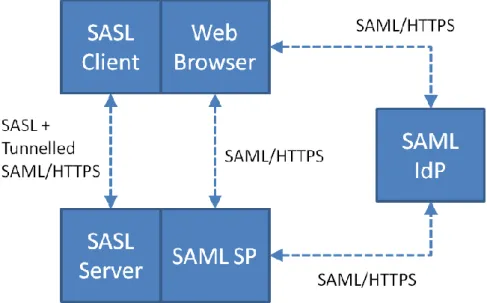
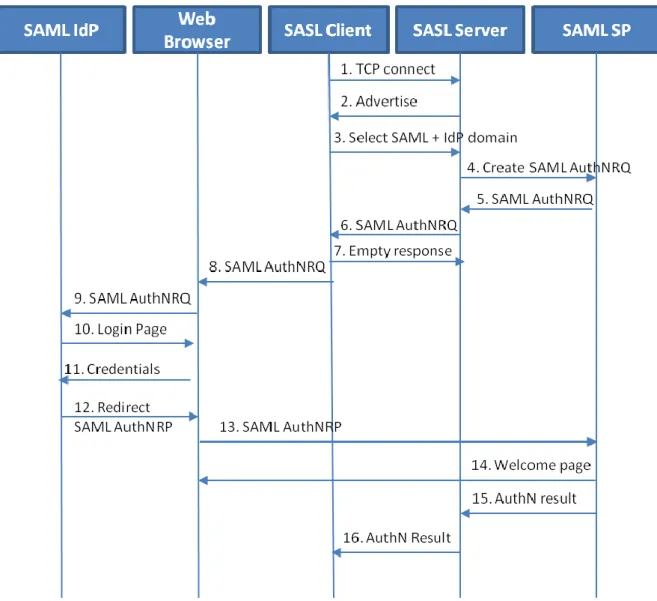
Figure 2 describes the interworking between SAML and SASL: This setup requires enhancements to the SASL Server as well as to the SASL Client. Also the SAML SP needs a small adaptation for interfacing with the SASL Server. No changes to the SAML IdP are necessary. To accomplish this goal some indirect messaging is tunneled within SASL, and some use of external methods is made. The client enhancements are minor, no SAML protocol knowledge is needed in the client. The enhancements at the SASL Server have more impact, because a full SAML SP needs to be brought into operation, sitting next to the SASL Server.
The interworking between the SASL Server and the SAML SP is out of scope with reference to the RFC [3], the RFC just assumes a single Relying Party capable of both the SASL and SAML protocols.
Figure 2: SASL-SAML interworking architecture
The authentication flow is depicted in Figure 3. 1. The SASL Client connects to the SASL Server.
2. The SASL Server advertises its capabilities, among which the support for SAML20. 3. The client initiates a SASL authentication with SAML20 and sends an IdP domain (e.g.
“surfnet.nl”). The domain is used by the SASL Server to discover the SAML IdP. 4. The SASL Server requests the SAML SP to create an SAML authentication request.
5. The SASL receives the SAML authentication request as an uuencoded URL (intended for the IdP)
6. The SASL Server packages the HTTP Redirect to the SAML IdP as a BASE64 encoded challenge and sends it to the SASL Client.
7. The SASL Client sends an empty response to the SASL server.
8. The SASL Client decodes the challenge and hands the URL to an (external) Web Browser. 9. The Web Browser will become activated and goes to the SAML IdP.
10.If not yet authenticated, the IdP will display a login page. If already authenticated, the next step is omitted.
11.The user submits his credentials to the IdP.
12.The IdP sends an SAML Authentication Response to the SAML SP with a HTTP redirect to the Web Browser.
13.The Web Browser redirects to the SAML SP.
14.The SAML SP displays some kind of a welcome page.
15.The SAML SP forwards the SAML Authentication Response to the SASL Server.
16.The SASL Server retrieves the SASL session belonging to the SAML authentication assertion and sends a SASL response to the SASL Client, along with an optional list of attributes. The SASL Client process the SASL response with the optional attributes. Normal operation starts. The user will be looking at the welcome screen in the browser at this point and will need to switch back to the application.
Figure 3: SASL-SAML Authentication Flow
3.3
Required software modifications
3.3.1 Client-side
The SAML extension has little impact on the client-side, nevertheless, a small extension is needed with the knowledge that a domain has to be returned with the choice of SAML as authentication mechanism. Additionally the SASL Client must be able to decode the BASE64 encoded challenge from the tunneled message from the SASL server and forward the resulting URL to an (external) web browser.
3.3.2 SASL Server
The SASL server needs to be extended with a SAML SP library for handling the SAML
Authentication Request Protocol. Alternatively, the SASL Server can use an existing SAML SP (e.g., SimpleSAMLphp) as a delegate for the SAML work [4]. The proof of concept for the RFC [3] used the file system as exchange mechanism to get the SAML Authentication Response back into the SASL server.
3.3.3 Identity Provider
The IdP is SAML-based and does not need any change. This is the main advantage of using the Web SSO profile. All known SAML IdPs support the Web SSO, but only a very few support the Enhanced Client profile.
3.4
Available implementations
The only known implementation is written by the author of the RFC [3] as a proof of concept. He used GNU SASL as a SASL Relying Party and used SimpleSAMLphp for the SAML-side [4]. Being two entirely different technologies, the integration was kept to a minimum. The SASL Server requests an SAML Authentication Request using the regular HTTP channel of the SAML SP. In the other direction the file system is used to exchange the Authentication Response. The SASL Server is able to track the SAML messages for a client by tracking the SAML message id.
3.5
Evaluation of use cases
3.5.1 Accessing IMAP e-mail from a rich client
Adding SAML as mechanism to SASL allows for a Single Sign-On user experience. The disadvantage for the user is that he still has to change to a different application to enter his credentials.
However, it is not a new application, he is used to entering his credentials in a browser window. After authentication the user has to switch back to the application window. Even if the user was already authenticated, the end result will always be some kind of a welcome web page from the SP. The SASL client does not know beforehand whether the user needs to authenticate to the IdP, so the browser will always come to the front.
3.5.2 Accessing a WebDAV resource
In the past there have been efforts to include SASL in the HTTP1.1 standard, but the proposals have never made it through.
There are no known implementations of WebDAV clients using SASL for authentication.
3.5.3 SSH
There are no known implementations of SSH clients using SASL for authentication.
3.6
Risks and threats
1. The user experience might be degraded by the authentication causing a switch from the application to the web browser window. Even when the user was already authenticated at the IdP, the browser window will still come to the front.
2. Also related to the user experience is the logout: The user must remember that a logout from the application is only definite when the browser is shut down.
3. This is more of a SAML issue: When the web browser appears for entering credentials, it is not mentioned in the browser which application requested the authentication of the user. 4. Both SASL Client and SASL Server needs to be modified and re-compiled.
3.7
References
1. Simple Authentication and Security Layer (SASL), Standards Track RFC, Melnikov, A. et al, http://tools.ietf.org/html/rfc4422, retrieved 24-11-2011.
2. SAML v2.0 Security Assertion Markup Language, March 2005, OASIS standard, http://www.oasis-open.org/standards#samlv2.0, retrieved 24-11-2011.
3. A SASL and GSS-API Mechanism for SAML, Wierenga, K., Lear, E. & Josefsson, S., http://tools.ietf.org/html/draft-ietf-kitten-sasl-saml-05, retrieved 24-11-2011. 4. Telephonic interview with Klaas Wierenga at 31-10-2011, Wegdam, M. & Reitsma, J. 5. SAML v2.0 Profiles, March 2005, OASIS standard,
4
OAuth2
4.1
Introduction
OAuth2 is a protocol targeted at delegating access to a user’s resources to various types of clients. OAuth2 was inspired by OAuth 1.0and shares many of its architectural features. It is, however, a completely new protocol and not compatible with the original OAuth 1.0 protocol.
OAuth was first developed in 2006 and has been deployed by a number of leading providers of online services such as Twitter, Google, Vimeo and Yahoo. OAuth2 is currently under development. The standardisation process is part of an IETF Working Group, the OAuth working group.
According to earlier statements in [2] from Eran Hammer-Lahav (editor of the RFC), the standard should already have been finalised by the end of 2010. It is, however, still in an advanced draft [3] stage at the moment. More recent comments [4] from the RFC editor indicate that there is no set date yet for finalising the standard; nevertheless, he also claims that the core protocol has been stable since version 12 of the draft8 and that “it [the protocol] is ready and stable” and that developers should “just go implement it”.
Indeed, there are already a number of leading vendors who provide OAuth2 enabled APIs, notably including Microsoft [6] and Google [7].
Given that important players are actively implementing and pushing OAuth2 technology and are involved in its standardisation it is very likely that OAuth2 will see broad adoption across the industry. There is also already an active community around OAuth2. Several reference
implementations in a number of much-used programming languages have been made available by this community. The only risk inherent in the current situation is that a prolonged period of the protocol staying in draft status may lead to a divergence in implementation features because the standard fails to meet specific criteria of certain users or is ambiguous. In the long term this will hamper interoperability.
4.2
Architecture
4.2.1 Goals
As was already mentioned in the previous section, the main goal of OAuth2 is to provide delegated access to a user’s resources for various types of clients. To elaborate a bit on this, here are some example use cases:
A user wishes to use an online service that aggregates data such as links from the tweets in a user’s Twitter feed to create a newspaper-like presentation (http://paper.li/); OAuth2 can be used to grant the online service access to the user’s Twitter feed (if it is not public).
A user has an email account at a provider (e.g. Hotmail or Google Mail) and would like to access his or her email via a dedicated client from their desktop system or mobile device.
OAuth2 requires that users give explicit consent to access their protected resources. Optionally, a request can also be scoped to request only certain rights on a resource owner’s resource (e.g. only read a Twitter feed but not being able to post Tweets).
4.2.2 Abstract protocol flow and actors
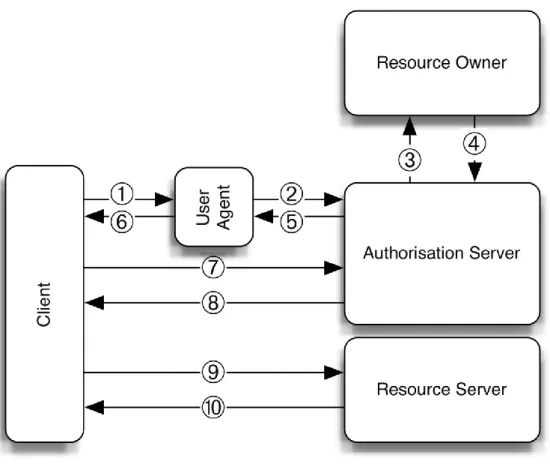
Figure 4 below shows the abstract protocol flow (taken from [3]) and the actors that are involved:
Figure 4: Abstract OAuth2 protocol flow
The actors shown in Figure 1 have the following roles:
Client – the application that needs to access protected resources on the user’s behalf
Resource Owner – the user owning the protected resources that the client needs to access
Authorisation Server – the server issuing access tokens to the client after the user has been authenticated and has granted access to his/her resources
Resource Server – the server managing the user’s protected resources The protocol flow shown in the figure consists of the following steps:
1. The client requests authorisation for accessing the resource from the resource owner. This can be done directly or through, for instance, the authorisation server as an intermediary 2. The resource owner grants the client access in the form of some sort of credential or
authorisation token (the exact type depends on the method used by the client to request access)
3. The client requests an access token from the authorisation server by authenticating and presenting the authentication grant from the resource owner
4. The authorisation servers checks the client’s authentication and validates the authorisation grant; if both validations are successful, it issues an access token
5. The client requests access to the resource and presents the access token as a means of authentication
6. The resource server validates the request and access token and grants the request if validation is successful
The exact protocol flow depends on the authorisation scheme that is chosen. These are discussed in the next section.
4.2.3 Authorisation grant types
As mentioned in the previous section, there are a number of different ways in which clients can get authorisation grants. The scheme selected is integral to the OAuth2 implementation. There are currently four different schemes, which are described below, and the specification allows for defining new mechanisms in the future.
Authorisation code – In this scheme, the client requesting access redirects the resource owner to an authorisation server. This server authenticates the resource owner and obtains authorisation from the resource owner. Upon successful authentication and access grant, it releases an authorisation code to the client, which can be used in turn to request an access token.
Implicit grant – this is a simplified version of the authorisation code scheme; instead of returning an authorisation code the authorisation server will immediately return an access token to the client. This scheme improves responsiveness since it requires less round-trips. It does, however, have some security drawbacks, one of which is that the client system is not authenticated explicitly when this scheme is used, however due to the preregistered redirect URI this drawback is mostly mitigated.
Resource owner password credentials – in this scheme, the resource owner has a high degree of trust in the client and supplies his/her password credentials directly to the client. The client then uses these credentials to obtain an access token, thus obviating the need to store sensitive credentials for future logins and instead being able to rely on the access token.
Client credentials – this scheme is mostly used in a scenario where the client is also the resource owner.
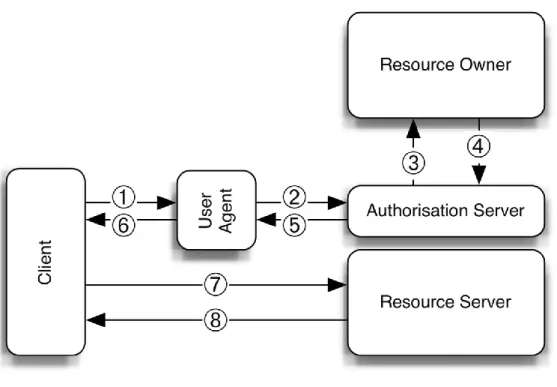
In the following two paragraphs the first two schemes will be explained in more detail because these are most common. Note that in both explanations abstract descriptions are used for the actors involved in the data flows. The client and user agent are named as two separate entities; in fact, it is quite possible that the client runs as an application inside the user agent in which case this separation is much less strict than the diagrams may suggest.
Authorisation code explained
Figure 5: Authorisation code protocol flow
Figure 5 above illustrates the data flow in the authorisation code scheme. The following data flows take place:
1. The client - wishing to obtain an access token for a resource owned by the resource owner - opens the user agent
2. The user agent redirects the resource owner to the authorisation server
3. The authorisation server requests authentication from the resource owner and also asks for consent to access the requested resource
4. The resource owner authenticates and gives consent
5. The authorisation server releases an authorisation code to the user agent
6. The authorisation code is released to the client through the user agent (details on how this is done can be found in the OAuth2 specification [3])
7. The client sends a request for an access token to the authorisation server including the authorisation code in the request; this request is sent over an authenticated connection, where the client authenticates to the resource server
8. The authorisation server sends back an access token
9. The client requests access to the protected resource using the access token
10.The resource server grants access based on the token and returns the requested protected resource data (or performs the requested protected function)
Implicit grant explained
Figure 6: Implicit grant protocol flow
Figure 6 above illustrates the data flows in case the implicit grant scheme is used. The following steps are shown:
1. The client - wishing to obtain an access token for a resource owned by the resource owner - opens the user agent
2. The user agent redirects the resource owner to the authorisation server
3. The authorisation server requests authentication from the resource owner and also asks for consent to access the requested resource
4. The resource owner authenticates and gives consent
5. The authorisation server returns an access token to the user agent
6. The user agent releases the access token to the client (details on how this is done can be found in the OAuth2 specification [3])
7. The client requests access to the protected resource using the access token
8. The resource server grants access based on the token and returns the requested protected resource data (or performs the requested protected function)
The biggest difference between the authorisation code scheme and the implicit grant scheme is that in the first case the clients needs to authenticate to the authorisation server and in the second case the client is assumed to be public (and needs not authenticate).
Access and refresh tokens
As explained in the abstract protocol flow, access to the protected resource is regulated using an access token that is issued to the client by an authorisation server. The format of this access token is not explicitly defined in the OAuth2 specification. In fact, it is explicitly stated to be an opaque
When an access token is granted the response includes a field indicating the type of access tokens. Clients must only accept access tokens, which they can handle.
Examples of access tokens are:
Bearer tokens – these are opaque data blobs that are to be included in the request as a form of authentication; their format and use are specified in [9]
SAML assertions – specified in [8]
MAC-based access – this scheme relies on using Message Authentication Codes to authenticate the actual HTTP requests (e.g. request query, host, port, request method); the access token in this case is a cryptographic key combined with associated MAC algorithm to use; for more information see [10]
In addition to access tokens OAuth2 also supports the optional notion of refresh tokens. Refresh tokens can be used to obtain new access tokens when the old one expires or to obtain additional access tokens with a scope similar to or more limited than the original access token. Refresh tokens can only be used with the authorisation code and resource owner password credentials profile.
4.2.4 Clients
In OAuth2 clients register themselves with an authorisation server before they can make use of its services. During the registration process, the client is issued a public client identifier that can be used in interactions between the client and the authorisation server. Although OAuth2 does not exclude unregistered clients, the specification contains no information about this use case and states that “[using unregistered clients] requires additional security analysis and review of its interoperability impact”. The specification recognises that client registration in and of its own is not sufficient to verify the identity of a client but it does prevent delivery of credentials to an evildoer in case of malicious modifications to a client.
The OAuth2 specification distinguishes two types of clients:
Confidential clients – these are clients capable of securely storing credentials, for example clients implemented on a secure server
Public clients – these are clients incapable of maintaining confidentiality of credentials, for example clients running as native applications on a resource owner’s device or executing inside a web browser
In addition to this OAuth2 also specifies three client profiles:
Web applications – these are confidential clients running on a web server; any credentials are stored securely on the server and are not accessible from the outside
Browser-based applications – these are public clients for which the code is downloaded from a web server and executes in the context of the user’s browser
Native applications – these are public clients that execute natively on the user’s device (e.g. “apps” on mobile phones)
4.2.5 Trust model
The goal of OAuth2 is to grant clients access to protected resources hosted on a resource server. In effect, a user delegates access to one of his/her resources to an automated system - the client. Users need to be able to make some sort of informed decision about whether or not they should allow a client to access their resources. The trust model reflects this.
As mentioned in the previous section, OAuth2 distinguishes confidential and public clients. The trust model for these two types of clients is different. For confidential clients, there needs to be an explicit trust relationship between the client and the authorisation server. This relationship is established when the client registers with the authorisation server (this is an out-of-band process that is explicitly defined as out of the scope of the specification). During registration, the client is issued credentials, which it needs to present when requesting an access token (in the authorisation code scheme).
Public clients establish a somewhat weaker trust relationship in that they must register a redirect URI that is used in the authorisation workflow. This URI will always be used when the authorisation server redirects the resource owner after successfully authenticating him/her and obtaining
consent. The access token is included in the redirect.
OAuth2 also puts certain requirements on the communication channels used to guarantee that a sufficient security level is maintained. In most cases, the use of SSL/TLS for communication is mandatory (with the exception of the MAC-based access token scheme).
4.3
Required software modifications
4.3.1 Client side
For a rich client application that currently uses a direct connection to a server authenticated using - for instance - username/password the following changes will need to be made:
The client must support opening a user agent (i.e. web browser or embedded web “frame”) to request an access token using the implicit grant authorisation scheme
The client has to be able to process and store the access token returned through the user agent
The client will presumably need an updated implementation of the protocol between the client and the resource server to support OAuth2 authentication
For a web application client the changes required are:
The client must support requesting an authorisation code (thus using the authorisation code scheme)
The client must be able to obtain access and/or refresh tokens using a back channel to the authorisation server
The client must be able to securely store the access (and refresh) token
The client will presumably need an updated implementation of the protocol between the client and the resource server to support OAuth2 authentication
4.3.2 Resource server side
On the resource server side, the required modifications depend on the architecture that is chosen. There are two options:
The server uses an external authorisation server
full authorisation server that implements the OAuth2 protocol, possibly having to support multiple authorisation schemes depending on the type of clients it wishes to support.
In both cases the API that the resource server exposes for accessing the resources it manages will need to be OAuth2 enabled.
4.4
Available implementations
4.4.1 Server
A large number of leading service providers such as Google, Facebook, Microsoft, Salesforce and many others have implemented OAuth2 as a means for third party access to resources on their servers [11]. The majority of them have implemented draft version 10 of the specification although there are also some service providers that have implemented older drafts and a few that have implemented newer versions.
According to the OAuth2 Wiki [11] there are not that many generic server-side implementations that can be used to build new web services. In fact, the only current server-side implementation that listed seems to be publicly available is a Ruby library called rack-oauth2 [12]. A quick search on Google shows that there are a number of other implementations not listed on the OAuth2 Wiki. Most of them are in some sort of proof-of-concept stage. The most promising ones for various web development languages are implementations in Java [13], Python [14] and PHP [15].
4.4.2 Client
There are already a lot of different clients that support OAuth2 in some form or other. There are also a number of client-side libraries that can help developers integrate OAuth2 into their (web) application. The OAuth2 Wiki [11] lists a number of them, including client libraries for Mac OS Cocoa applications, for iPhone and iPad, for PHP (to use in web applications) and for Python.
4.5
Relation to iden tity federations
The goal of this technology scouting is to find suitable means for non-web single sign-on for services connected to an identity federation. In a sense, OAuth2 can be seen as a technology that is orthogonal to what identity federations aim to achieve. The goal of an identity federation is to establish single logon (i.e. using a single identity to logon to a multitude of services), possibly combined with single sign-on. The goal of OAuth2 is not to authenticate users but rather to allow users to delegate access to their resources to clients (of course this does require authentication as part of the consent process).
Identity federations and OAuth2 can thus be seen as complementary technologies; the identity federation serves as a means to authenticate to a service and OAuth2 can serve as a means to delegate access to resources and/or functions within this service to a client. We therefore feel that OAuth2 is a promising lightweight way of realising delegated access to resources when added to a service that is already a member of an identity federation.
4.6
Risks and threats
There are some caveats to do with de-provisioning and role changes. If a user is de-provisioned at an identity provider, this automatically means that he/she would no longer have access to the resources at a service provider through the identity federation. If OAuth2 access tokens have been
issued for these resources, however, the user may retain access to resources that he/she no longer has a right to use anymore.
Similarly, the role of a user may change (e.g. a student can become an employee). Such role changes will be reflected in the attributes describing the user released by his or her IDP. If the user uses a client to access the service based on an OAuth2 access token, however, such changes will not propagate to the resource server. This may result in unauthorised or unlicensed access to the service and/or data stored at the service.
Both these risks can be tackled by carefully managing the validity of access tokens; these should not have unlimited expiry times for instance. This validity will need to be managed carefully though; setting the expiry time too low will result in user frustration and may hamper the adoption of a service and setting the time too high incurs the risks described above. Managing the policy that governs these timings is mainly the responsibility of the service provider although the identity provider may also play a role (as they may be the same party who is billed for services rendered to a user). In the long term, de-provisioning solutions may alleviate this problem.
4.7
Evaluation of use cases
4.7.1 Accessing IMAP e-mail from a rich client
The current state of technology does not make it possible to use OAuth2 as a mechanism for IMAP authentication. OAuth2 is a web service oriented protocol, making it harder to implement in legacy protocols like IMAP.
Fortunately, there is work ongoing to standardise the use of OAuth2 over SASL [16]. This will make it possible to use OAuth2 for IMAP in SASL-enabled mail clients. Most e-mail clients already support SASL.
4.7.2 Accessing a WebDAV resource
Since WebDAV is a web-oriented protocol, it should be theoretically possible to enable it to use OAuth2. This will require changes on both the client as well as the server side.
It seems that Google supports OAuth authentication to access documents through WebDAV on its Google Docs service [17], but it is as yet uncertain whether OAuth2 is also supported. The Unhosted project, which aims to separate data storage and application service providers, has created a WebDAV specification with OAuth2 support [18]. However, the Unhosted specification considers the WebDAV back-end deprecated in favour of a simpler subset of WebDAV.
4.7.3 SSH
Similarly to the situation described for IMAP, there is currently no SSH client or server support for OAuth2. The SASL standardisation effort [16] is also relevant in the SSH case; there are plenty of SSH solutions with support for SASL or GSS-API. Once the SASL standardisation is successful, these can then be leveraged to add OAuth2 support to SSH.
3. E. Hammer-Lahav, D. Recordon, D. Hardt, “The OAuth 2.0 Authorization Protocol”, IETF, draft RFC version 21, September 2011, http://tools.ietf.org/html/draft-ietf-oauth-v2-21 4. ‘Mark’ and E. Hammer-Lahav, “OAuth 2.0 final specification” – discussion on Stack
Overflow, December 2010, last visited September 2011,
http://stackoverflow.com/questions/4461945/oauth-2-0-final-specification 5. “OAuth 2 – Implementations”, OAuth Wiki, last visited September 2011,
http://wiki.oauth.net/w/page/25236487/OAuth%202
6. “Windows Azure AppFabric LABS September release now available”, Windows Azure AppFabric Team, September 2010, last visited September 2011,
http://blogs.msdn.com/b/windowsazureappfabric/archive/2010/09/16/windows-azure-appfabric-labs-september-release-now-available.aspx
7. “Using OAuth 2.0 to Access Google APIs (Experimental)”, Google, 2011, last visited September 2011, http://code.google.com/apis/accounts/docs/OAuth2.html
8. B. Campbell and C. Mortimore, “SAML 2.0 Bearer Assertion Profiles for OAuth 2.0”, IETF, draft RFC version 8, August 2011, last visited October 2011,
http://tools.ietf.org/html/draft-ietf-oauth-saml2-bearer-08
9. M. Jones, D. Hardt and D. Recordon, “The OAuth 2.0 Authorization Protocol: Bearer Tokens”, IETF, draft RFC version 12, October 2011, last visited October 2011, http://tools.ietf.org/html/draft-ietf-oauth-v2-bearer-12
10.E. Hammer-Lahav, A. Barth and B. Adida, “HTTP Authentication: MAC Access Authentication”, IETF, draft RFC version 0, May 2011, last visited October 2011, http://tools.ietf.org/html/draft-ietf-oauth-v2-http-mac-00
11.“OAuth2 Wiki”, last visited October 2011,
http://wiki.oauth.net/w/page/25236487/OAuth%202
12.“rack-oauth2 Ruby OAuth2 implementation”, last visited October 2011, https://github.com/nov/rack-oauth2
13.“OAuth in Restlet”, last visited November 2011, http://wiki.restlet.org/docs_2.1/13-restlet/28-restlet/392-restlet.html
14.“OAuth2 on AppEngine”, last visited November 2011, https://github.com/progrium/oauth2-appengine
15.“OAuth 2.0 PHP Library - server in PHP”, last visited November 2011, http://code.google.com/p/oauth2-php/
16.W. Mills, T. Showalter and H. Tschofenig, “A SASL and GSS-API mechanism for OAuth”, IETF, draft RFC version 4, October 2011, http://tools.ietf.org/html/draft-mills-kitten-sasl-oauth-04
17.“DAV-pocket lab - WebDAV access to Google Docs”, last visited November 2011, http://dav-pocket.appspot.com/
18.J.C. Borchardt and M. de Jong, “The Unhosted WebDAV standard”, last visited November 2011, http://unhosted.org/spec/dav/0.1/deprecated.html
5
Google OAuth
5.1
Introduction
This chapter does not discuss a new technology for rich client support like the previous chapters. Instead, we will focus on the federated email use case and discuss solutions that are available today. For the sake of illustration, we will use one specific mail provider as a running example: Google.
5.1.1 Google
Google provides various services to the Internet community, such as Gmail, Google Docs, and Youtube. Users of those services need to authenticate before they can access any protected resources stored within those services (e.g. their mail when accessing Gmail).
Google Accounts
Most users have a Google Account to access Google services. Anyone with a Gmail account automatically owns a Google account, but users can also explicitly create a Google account using any other email address.
When registering a Google account users need to provide a username and a password. When accessing a Google service, users are required to authenticate using this username and password. Google uses Single Sign On (SSO) across its services to seamlessly integrate its services. Google accounts can also be used for non-Google services by way of OpenID. Any OpenID Relying Party can let its users authenticate using their Google account by connecting to Google as an OpenID Provider.
Google Apps
Google Apps is a service that bundles several web applications under a custom domain name. This domain name is typically associated with an organisation, and the Google Apps domain is managed by a domain administrator. The domain administrator is responsible for user provisioning: user accounts must be created for members of the organisation before they can make use of Google Apps. User provisioning can be done manually using a web interface, or automatically using provisioning tools. Google supplies a provisioning API that can be connected to an organisation’s directory to implement automatic account creation.
Authentication can also be externalized using the SAML 2.0 protocol, such that organisations can connect their own Identity Provider (IdP) to their Google Apps environment. This way, SSO is achieved not only across Google services but also to any other service connected to the same IdP. Google Apps is connected as a Service Provider in SURFfederatie, enabling federated login to Google Apps environments for the higher education and research community in the Netherlands. Note that using SAML 2.0 based authentication, user provisioning is still required, although no passwords need to be set for users as they will authenticate at the organisation’s IdP.
5.1.2 Case: IMAP and SMTP access to Google Mail
Although using SAML 2.0 based authentication seems like a good idea, a problem arises when users want to use traditional mail clients to read and send email instead of using Google’s web
In the remainder of this chapter, we will evaluate several solutions that can be deployed to support rich clients within a Google Apps domain that is connected to a SAML 2.0 IdP. We will focus on IMAP as the protocol used. Solutions for POP and SMTP are similar.
The solutions we will consider are all readily available in Google Apps today. All solutions have in common that somehow an extra set of credentials is provisioned to Google, and in that sense none of them provide a purely federated solution. The solutions differ in who defines those extra
credentials and what the accompanying user experience is like. The following solutions will be considered:
1. Account provisioning: when provisioning accounts, generate passwords that can be used for IMAP authentication.
2. Application specific passwords: let users generate a password themselves for IMAP authentication.
3. OAuth: let users provision their clients with OAuth tokens for IMAP authentication. In the following sections these solutions are described in more detail.
5.1.3 Solution 1: Account Provisioning
Every Google Apps user must be provisioned by the domain administrator beforehand. Provisioning can be done manually, but for large user populations this can be automated using the Google provisioning API. Google also provides tools built on top of this API to implement provisioning, for instance using the Google Directory Sync utility.
Like many of Google’s APIs, the provisioning API uses Atom as its fundamental data structure. An example Atom entry that can be used to create a new user in Google Apps is:
<atom:entry xmlns:atom="http://www.w3.org/2005/Atom" xmlns:apps="http://schemas.google.com/apps/2006"> <atom:category scheme="http://schemas.google.com/g/2005#kind" term="http://schemas.google.com/apps/2006#user"/> <apps:login userName="jodi" password="51eea05d46317fadd5cad6787a8f562be90b4446" hashFunctionName="SHA-1" suspended="false"/> <apps:quota limit="2048"/>
<apps:name familyName="van Dijk" givenName="Joost"/> </atom:entry>
If this XML fragment is posted to the correct Provisioning API endpoint with the domain
administrator’s credentials, a new user is created within the corresponding Google Apps domain. The password hash that is included will typically never be used in a web SSO scenario, as authentication will be federated using the domain’s configured IdP. For IMAP authentication however, this password can be used as an alternative.
When using this solution, it is important that random passwords are generated - they must be different from the passwords used at the IdP, otherwise this would defeat the purpose of Identity Federation. These passwords need to be distributed to the domain’s users somehow, meaning the burden of password handout, recovery, etc (often a prime motivation for identity federation) will get reintroduced.
Furthermore, it is advisable that the ability to change the provisioned passwords is disabled for domain users, as they will typically choose the same password that is used at their IdP, again defeating the purpose of identity federation. Domain administrators can disable this ability by redefining the change-password URL in the Google Apps control panel web interface, as shown below.
5.1.4 Solution 2: Application-specific passwords
Presumably as a reaction to various incidents where Google accounts were compromised, Google introduced two-step verification to let users opt-in for additional security on their Google accounts. Two-step verification can be enabled for any Google account by enrolling a shared secret between Google and the user that is used for generating One Time Passwords (OTPs). Such OTPs are used as a second layer of defense: when a user has authenticated with a password, an additional OTP has to be entered before access is granted. Google provides a mobile application called Google Authenticator to generated OTPs. As this app uses the HOTP (RFC 4226) standard for generating OTPs, any device with HOTP support can be used, including hardware tokens.
While the two-step verification process works well in a web browser context, this poses a problem for rich clients (e.g. mail clients) as they usually only support entry of a username and password in their user interface, and not any additional credentials such as OTPs. To circumvent this problem, Google introduced the concept of application-specific passwords. These passwords form an
additional set of credentials that can be used on rich clients and are self-managed by users through their account settings.
Application-specific passwords can be generated in the user’s account settings page, as shown below:
Application-specific passwords can be given a name that can be used to distinguish them in the event a password needs to be revoked in the future. When the “Generate password” button is pressed, Google will generate a random password and associates that as an extra credential with the user’s account.
Note that the generated password can be used to access any of the user’s resources within Google Apps. It is not restricted to email access for instance. It still may be advisable to use a separate application specific password for every application, so that in the event that one password gets compromised, that password can be revoked without the need of renewing passwords for all other applications.
To conclude this section, it must be noted that in order to use this solution, a domain administrator first has to enable two-step authentication for all user accounts. This may seem awkward, but this is because application specific passwords were introduced to solve a problem with clients unable to perform two-step verification, not to solve federated authentication. Note that after two-step verification is enabled by the domain administrator, users are offered to setup two-step verification, but are not enforced to do so.
5.1.5 Solution 3: OAuth access to IMAP/SMTP in Gmail
Google provides APIs for many of its services. Most API calls require authentication when accessing protected user resources, such as a user’s contacts. As the Google APIs are often used by third parties that act on these resources on behalf of a user, Google has implemented support for OAuth in many of their APIs.
Although a typical OAuth scenario is based on HTTP, it is also possible to bind OAuth credentials to an IMAP session. Google has implemented XOAuth as a way to provide access to IMAP mailboxes leveraging existing OAuth9 support in Google Accounts. This is particularly interesting for mail clients implemented on mobile devices, as they can integrate with a mobile browser to provide a more seamless user experience when provisioning the mobile client with OAuth credentials. This is usually easier to implement on a mobile device than on a desktop client, because by mobile apps can register app-specific URL schemes that can trigger the app to launch when such a URL is opened. This is often used to communicate information between a mobile app and a mobile browser without the need to copy and paste this information between apps.
Below is shown a sequence of screen shots to illustrate the user experience when provisioning an OAuth token in this way. The OAuth client (i.e. the mail client) first obtains a request token for the user to authorise:
If the user grants access, he or she is presented a verification code to feed into their client, so the client can obtain an access token. Note that this can also be automated in such a way that the user is not required to copy/paste the verifier into the client.
the client will use the verification code to obtain an access token associated with the user’s
The client can use the access token in an IMAP session using Google support for SASL/OAuth, as illustrated in the IMAP session below:
$ openssl s_client -connect imap.googlemail.com:imaps
...
* OK Gimap ready for requests from 192.0.2.1 z60if1285367eea.26
A01 AUTHENTICATE XOAUTH
+ R0VUIGh0dHBzOi8vbWFpbC5nb29nbGUuY29tL21haWwvYi9qb2RpQG13cy5zdXJmbmV0Lm5sL2l tYXAvIG9hdXRoX2NvbnN1bWVyX2tleT0iYW5vbnltb3VzIixvYXV0aF9ub25jZT0iODc2NjMzMz c0NzA4NDg2NjQzMiIsb2F1dGhfc2lnbmF0dXJlPSJDMUkyTkxXZTg2ZEt0RzFPQ0ZxNSUyQm5hN WltRSUzRCIsb2F1dGhfc2lnbmF0dXJlX21ldGhvZD0iSE1BQy1TSEExIixvYXV0aF90aW1lc3Rh bXA9IjEzMjA5MzkxOTIiLG9hdXRoX3Rva2VuPSIxJTJGVTRVWnRiRXdHdnNsUURFR1dTWlF2aXh DdG1MRHVuUUFXYW1RZlZnQUM0TSIsb2F1dGhfdmVyc2lvbj0iMS4wIg==
* CAPABILITY IMAP4rev1 UNSELECT IDLE NAMESPACE QUOTA ID XLIST CHILDREN X-GM-EXT-1 UIDPLUS COMPRESS=DEFLATE
A01 OK [email protected] Joost van Dijk authenticated (Success)
Note that the second parameter to IMAP’s AUTHENTICATE command is simply the BASE64-encoded version of the following OAuth request:
GET https://mail.google.com/mail/b/[email protected]/imap/ oauth_consumer_key="anonymous", oauth_nonce="8766333747084866432", oauth_signature="C1I2NLWe86dKtG1OCFq5%2Bna5imE%3D", oauth_signature_method="HMAC-SHA1", oauth_timestamp="1320939192", oauth_token="1%2FU4UZtbEwGvslQDEGWSZQvixCtmLDunQAWamQfVgAC4M", oauth_version="1.0"
As should be apparent from the above description, when using this approach the IMAP client must support the XOAUTH authentication method. We could find only one mobile app (called SmartPush for iOs) that supports this, but this app seems to be withdrawn from the Apple Store.
5.2
Evaluation
This section will evaluate the described solutions according to the following criteria:
Is the solution providing access using a federated identity?
Does the solution provide Single Signon?
Are passwords disclosed to service providers?
Can access be revoked?
Do clients need to be modified?
First of all, note that none of the solutions described enables true federated access to a user’s mailbox. All solutions boil down to a method for provisioning additional user credentials and storing them at the service provider. In a true federated solution, user credentials are stored at the IdP exclusively, and these credentials are the only credentials required for a user to authenticate when accessing resources. This feature is called “Single Login” and is a prerequisite for the more
common term “Single Sign-On” - meaning that these credentials need to be entered only once during a session. The proposed solutions provide neither Single Login, nor Single Sign On. The latter is less important when using rich clients, as credentials are typically stored in the client and used automatically whenever authentication is triggered. The former however has repercussions in deprovisioning. In a true federated scenario, a user can be denied access to any service by the IdP administrator by disabling a user’s account. This “single trigger” feature will not be available when additional credentials are stored at some service provider. In that case, the user’s account must be disabled at that service provider as well. In short, this means that a deprovisioning problem is introduced.
Second, we can conclude that with all solutions, a secret is disclosed with the service provider. This is not a big deal however, as these secrets can be kept distinct from a user’s credentials at their IdP.
Third, in all solutions credentials can be revoked either by the domain administrator, or by the user himself (or both).
Fourth, when using the provisioning API or application specific passwords, no modifications to either clients or servers are required, as the authentication methods are identical to the non-federated use cases. This means that these solutions are also applicable to any other hosted mail provider like for instance Microsoft Office 365. The SASL/OAuth solution requires both support from clients as well as from servers to support a new SASL authentication mechanism. This means users probably cannot use clients they are using today. However, as this solution is primarily targeted to mail clients on mobile devices, chances are that new mobile IMAP clients with support for XOAUTH will become available (although this hasn’t happened so far). Server support is not hard to
implement, but apart from Google we have found no other providers implementing this solution on the server.
In conclusion, although no true federated solution for our IMAP use case is available for Google Apps, a domain administrator can use of one or more of the described solutions as a workaround to circumvent the problems of federated IMAP access. The main considerations are:
Do the pros of enabling IMAP access outweigh the cons of introducing a deprovisioning problem? The answer to this question will determine if IMAP access must be enabled in the first place.
Who will initiate the provisioning of extra credentials - the user or the administrator? The latter would use the provisioning API while the former would use either an application specific password or an OAuth token.
Is the IMAP client a traditional mail client or a mobile app (or maybe a web app)? The former will prohibit the use of OAuth tokens.
6
Summary
In order to rate the technologies based on the requirements set forth in the “Goals” section of the Introduction the following table matches technologies with requirements.
The rating is based on the currently expected way in which the technology will work when the development phase is over, and thus does not say anything about the current situation.
Technology Uses Federated Identity Single Sign On No credentials to SP Revoke Access Works on Mobile Extent of Modifica-tions User Expe-rience
Moonshot yes yes yes n/a no client,
server, OS
good10
SASL/SAML yes yes yes n/a yes client, server okay11
OAuth v2 no yes yes yes yes client, server good
Application Specfic Password
no no yes yes yes nothing bad12
The evaluation below considers the use cases and their compatibility with the technologies.
Technology SSH WebDAV Email
Moonshot good possibly13 good
SASL/SAML no no ok
OAuth v2 possibly possibly14 possibly15
Application Specific Password
n/a n/a good
10 We assume users will not have a problem with the proposed identity selector, however based on earlier research [h
ttp://www.surfnet.nl/Documents/indi-2009-12-027%20(User%20controlled%20privacy%20voor%20de%20SURFfederatie%20gebruikersstudie).pdf] this appears not to be the case.
11 Although users may need to authenticate every thim they start the mail client.
12 Bad because setting it up is cumbersome. Good if you look after the initial configuration phase. 13 By replacing the low level authentication framework in Windows it appears to be possibly to also use Moonshot for WebDAV authentication to WebDAV servers supporting this.
14 Same as with Moonshot for the client on Windows. WebDAV servers supporting OAuth v2 already exist for the Unhosted project.
15 For IMAP and SSH OAuth2 is currently not a solution but with Google’s effort to standardise a SASL binding it may become one in the future
7
Future Work
A proof of concept with OAuth v2 and a REST API web service, StatusNet, was performed while writing this report and showed the viability of rich client and mobile support with OAuth.
A next possible step would be to repeat this proof of concept with a mail client, e.g. Thunderbird (desktop) or K9Mail (mobile), and modify it to look into both SASL/SAML and SASL/OAuth. Those two approaches seem to result in a similar modification to the user experience and can possibly be combined.
It is already possibly to modify WebDAV servers to support OAuth v2 as shown by the Unhosted project [http://www.unhosted.org]. As most operating systems have built-in WebDAV clients, modifying those may be problematic. However, looking into this, e.g. by writing a Windows authentication plugin supporting OAuth, similar to the approach taken by the Moonshot project, seems an interesting approach to investigate.
Concerning Project Moonshot it is a very interesting project to monitor
![Figure 4 below shows the abstract protocol flow (taken from [3]) and the actors that are involved:](https://thumb-us.123doks.com/thumbv2/123dok_us/410299.2546814/19.892.116.656.284.745/figure-shows-abstract-protocol-flow-taken-actors-involved.webp)