Available Online at www.ijcsmc.com
International Journal of Computer Science and Mobile Computing
A Monthly Journal of Computer Science and Information Technology
ISSN 2320–088X
IMPACT FACTOR: 6.017IJCSMC, Vol. 7, Issue. 12, December 2018, pg.29 – 41
Web-Based Ticketing System Helpdesk
Application Using CodeIgniter Framework
(Case Study: PT Commonwealth Life)
Eka Rachmawati
1, Suhendra, S.Kom, M.Kom
2 ¹,²Faculty of Computer Science, Mercu Buana University, Indonesia1
[email protected]; 2 [email protected]
Abstract— The ticketing system process is a technically regulated procedure. With the ticket system, submission of problems from the user becomes a ticket that will be forwarded to be followed up by the IT Helpdesk and IT Officer. Activities in ticket management generally consist of collecting ticket data in whole, ticket receipts ticket approval, ticket delegate until ticketing closure. Then for the current system, for sending tickets through the system but still using documents for ticket submission attachments. This is considered ineffective even though the document is still often used for audit purposes. This web-based Ticketing Helpdesk application is an application that is built as a ticket delivery tool in a system and to facilitate and can be used as a communication channel by the IT Department with users, in terms of supporting the provision and use of facilities related to systems and technology evaluate problems that often occur. The design of this application uses UML diagrams and SWOT analysis, Application are built using PHP.
Keywords— The Ticketing System Process, Ticket, WEB, SWOT.
I. INTRODUCTION
In this information age the need for information is very important and urgent, besides that the element of speed, accuracy and accuracy of the arrival of information is very calculated so that the chain of activity processes that require that information can be maximally done[1]. In a company that uses the help of information technology devices in the routine implementation of its duties or business processes, then operations in the field of systems and information technology are one of the critical problems. Usually the part that handles and overcomes information systems and technology receives several even relatively many complaints from several parts in the application process. Handling these problems is closely related in terms of service, so that requires good management[2]. A dynamic environment in the use of IT that is efficient and effective in supporting business strategies and processes of an organization depends on the environment is the key to success in an organization. With the benefits of IT in an organization that makes IT parts can be required to be able to provide quality services while paying attention to the efficiency and effectiveness of IT functions[3].
must be able to categorize problems, keep knowledge of the solutions obtained and prioritize workmanship. This also helps IT staff when facing a problem in a company with many users[4]. With the increasing number of complaints that occur every day, the use of e-mail and telephone is considered to be less efficient and effective in handling these complaints because it will be increasingly difficult to control the complaints made by the user. Helpdesk Ticketing System application is an application that can facilitate users with technicians in handling a problem quickly and accurately. The Ticketing System Helpdesk application itself has been used by many companies and agencies. This application is considered to facilitate the work of technicians technically because it can divide the work between technicians evenly, can facilitate users in reporting questions, services, technical support or complaints about certain services so that the technicians can directly identify precisely[5].
A. Research Problems
Based on the background described above, then the outline of the problem is:
1) How can user know the status in the process of working on ticket through the application that will be built? 2) How can user easily choose the type of service request without having to contact the IT Helpdesk through
the application to be built?
3) How can user send a ticket without having to attach supporting documents through the application to be built?
4) How can IT Helpdesk process tickets without having to wait for supporting documents from the user through the application to be built?
5) How can IT Helpdesk make a ticket report through the application that will be built?
B. Limitation of Research
In order for the research to be conducted is not too widespread, there are limits to this research:
1) Scope and case studies are conducted at an insurance company in Jakarta (PT Commonwealth Life). 2) This application only used in the internal environment of this company only (PT Commonwealth Life). 3) This application is run through a desktop web browser (Intranet).
4) Giving a ticket number will not be discussed here. 5) This application will issue ticket reporting. 6) This application does not discuss SLA.
C. Objectives and Benefits
The expected goal and the benefits of this research are:
1) Building communication channels between IT Departments and users becoming more efficient in matters that support and use facilities related to systems and technology.
2) Facilitate users in terms of submitting data requests or improvements without having to contact the team involved in it and be able to know the progress of the process.
3) For administrative, every activitys can be carried out for an audit.
II. STUDYOFLITERATURE
A. Previous Research
The Impact Of E-Ticketing Technique On Customer Satisfaction By Mazen Kamal Qteishat, Haitham Hmoud Alshibly, Mohammad Atwah Al-ma’aitah. 2014[6]. Declare the user satisfaction with e-ticketing services that are selected as the dependent variable for this purpose. In the context of e-ticketing satisfaction by various variables on the quality of services provided to users.
Supporting Environmental Compliance Manager Through Ticket Systems By Heiko Henning Thimm 2017[7].
Tickets can be used in an organization to track, detect, report and review of several types of incidents / problems.
IT Service Desk Implementation Solutions By Maris Harcenko, Pjotrs Dorogovs, Andrejs Romanovs. 2010[8].
Declarethat IT Service Desk or end-user in one or another form can now be found in almost every company that uses IT Service Support services.
Trouble Ticket Automation for Improving Information System Performance Monitoring Network Support Devices PT. INDOSATM2 By Angga Janottama, Awalludiyah Ambarwati, Mohammad Noor Al Azam. 2017[9].
Web-based Online HelpDesk Application System By Dion Darmawan, Wilsen Senjaya. 2018[10]. Declaring Helpdesk has a very important role because it can provide solutions to complaints in a short period of time. Every problem that has been followed up will be automatically documented and can be used as a reference and can present a report to meet information needs in a company that can be accessed quickly and easily so that it can produce the right solution in managing existing resources.
B. Ticketing
Ticketing is an interruption ticket (or also called a problem report) that is used in an organization to track detection, reporting and resolution of several types of problems. Trouble ticketing systems come from manufacturing a basic paper reporting system. Now it's mostly web based[11].
C. Mysql
MySQL is an open source database management system software. MySQL is a database server that is created and distributed by commercial companies, namely MySQL AB. MySQL is distributed free of charge under the General Public License (GPL) license. MySQL is a system that supports relational databases. That is, in a database has several tables for storing data where each table has a relationship or relationship with each other so that a combination of data from several tables can be carried out at one time. This kind of system is often referred to as RDBMS (Relational DataBase Management System)[12].
D. Codeigniter
Codeigniter is an open source application in the form of a framework with an MVC model (Model, View, Controller) to build dynamic websites. Using PHP Codeigniter will make it easier for developers to create web applications quickly and easily compared to making from scratch[13].
E. PHP
PHP (Hypertext Preprocessor) which is a high-level scripting language that is attached to an HTML document. Most PHP syntax is similar to C, java and perl. However, PHP has several more specific functions. PHP is used to design that is dynamic and can work automatically[14].
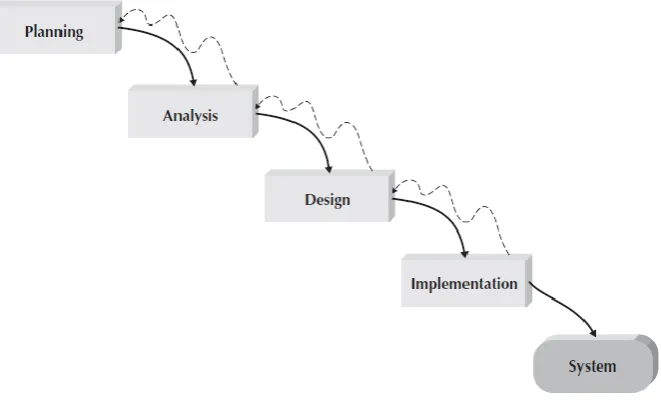
F. Waterfall Development
The original structured design methodology (still in use today) is Waterfall Development. With the waterfall development methodology, analysts and users continue sequentially from one phase to the next[15].
Figure 1 Waterfall Development
1. Planning
Planning Phase is a fundamental process for understanding why a system must be built and determining how the project team will build.
2. Analysis
3. Design
How the system will operate, in terms of hardware, software, network infrastructure, user interfaces, forms, reports, program specifics, databases, and files that will be needed. Although most strategic decisions about systems are made in developing system concepts during the analysis phase, the steps in the design phase determine exactly how the system will operate.
4. Implementation
The final phase in waterfall development is the implementation phase, where the system is built. This is the phase that usually gets the most attention, because for most systems it is the single most expensive part of the development process.
III.RESEARCH METHODS
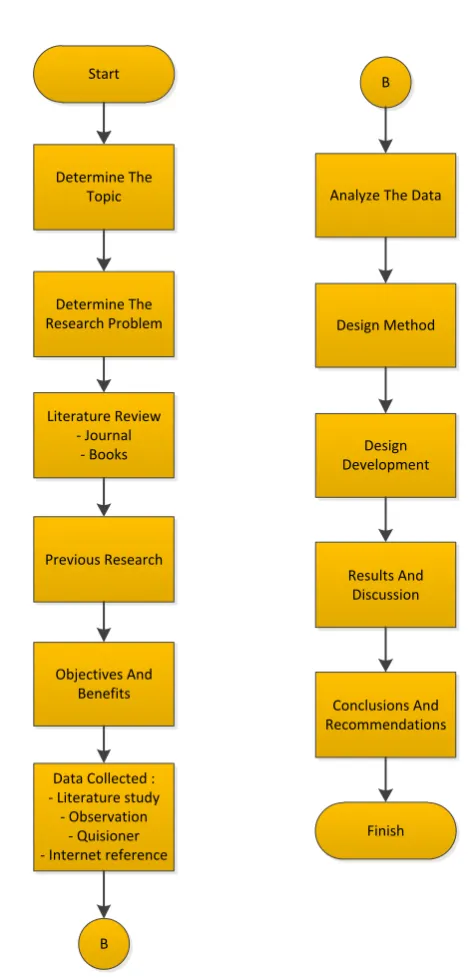
A. Research Flow
Start
Determine The Topic
Determine The Research Problem
Literature Review - Journal
- Books
Previous Research
Objectives And Benefits
Data Collected : - Literature study
- Observation - Quisioner - Internet reference
Analyze The Data
B
B
Design Development Design Method
Results And Discussion
Conclusions And Recommendations
Finish
Explanation on figure 2 :
1. First determine the topic you want to examine, look for problems that have been long but there is no right step to complete.
2. Determine the formulation of the problem from the chosen topic. 3. Make a literature review sourced from book or journal theory.
4. Studying previous research also compares with the research that we do. 5. Make goals and benefits of the research conducted.
6. Collecting research data by looking for data, namely by observation, interviews, journals and documentation.
7. Analyze the data that has been collected. 8. Make a design method.
9. Determine the development method.
10. Make results and discussion of the research conducted.
11. Conclusions and suggestions from the research that has been done.
B. Analysis Method
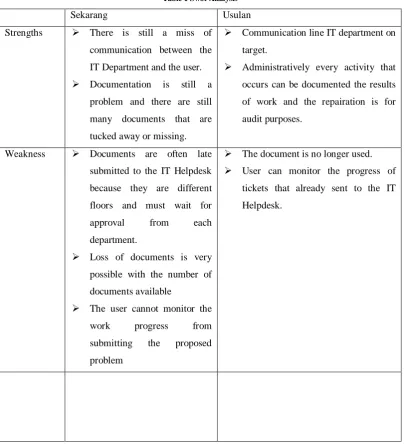
After identifying the background and problems in the Ticketing System Helpdesk, the problem will be analyzed using SWOT analysis (Strengths, Weakness, Opportunities, Threats), below are the results of the analysis that obtained :
Table 1 Swot Analysis
Sekarang Usulan
Strengths There is still a miss of
communication between the
IT Department and the user. Documentation is still a
problem and there are still
many documents that are
tucked away or missing.
Communication line IT department on
target.
Administratively every activity that
occurs can be documented the results
of work and the repairation is for
audit purposes.
Weakness Documents are often late
submitted to the IT Helpdesk
because they are different
floors and must wait for
approval from each
department.
Loss of documents is very
possible with the number of
documents available
The user cannot monitor the
work progress from
submitting the proposed
problem
The document is no longer used. User can monitor the progress of
tickets that already sent to the IT
Opportunities The application is currently
used by the IT Department.
Existing systems can continue to be
developed as needed
This application can be used not only
in IT Departments, but from other
Departments can use this application
Threats Tickets are late because they
are waiting for documents to
be received by the IT
Helpdesk.
Without ticket documents, you can
receive them quickly and quickly to
the IT Helpdesk.
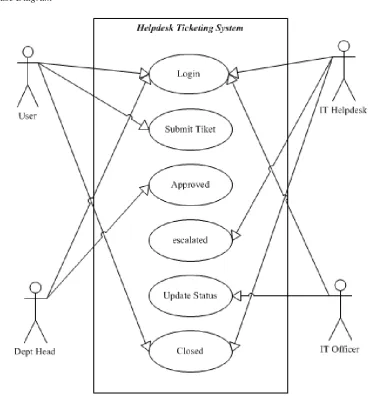
C. Use Case Diagram
Figure 3 Use Case Diagram
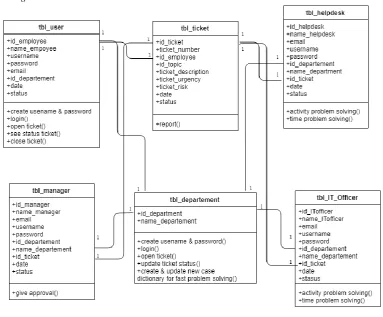
D. Class Diagram
Figure 4 Class Diagram
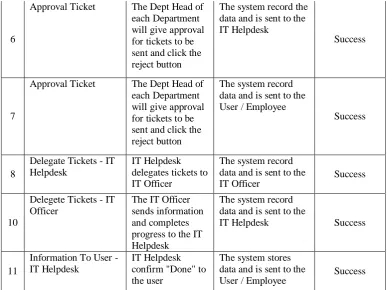
E. System Testing
The testing is using Blackbox Testing Method. Black Box Testing is a method used in testing this application and focuses on functional requirements of software
Table 2 Testcase
No Tested Interface Testing Scenario Expected Results Test Result
1
User Login, IT Helpdesk and IT Officer
Login by entering the correct username and password
The system displays the main page
Success
2
User Login, IT Helpdesk and IT Officer
Login by not entering your username and password
The system displays "Login Failed"
Success
3
User Login, IT Helpdesk and IT Officer
Login by entering the wrong username and password
The system displays "Login Failed"
Success
4
Send Ticket The user fills out the ticket form and clicks the send ticket button
The system stores data and is sent to the
Dept. Head Success
5
Send Ticket User not fill in the ticket form and click the send ticket button
The system does not record the data
6
Approval Ticket The Dept Head of each Department will give approval for tickets to be sent and click the reject button
The system record the data and is sent to the IT Helpdesk
Success
7
Approval Ticket The Dept Head of each Department will give approval for tickets to be sent and click the reject button
The system record data and is sent to the User / Employee
Success
8
Delegate Tickets - IT Helpdesk
IT Helpdesk delegates tickets to IT Officer
The system record data and is sent to the
IT Officer Success
10
Delegete Tickets - IT Officer
The IT Officer sends information and completes progress to the IT Helpdesk
The system record data and is sent to the
IT Helpdesk Success
11
Information To User - IT Helpdesk
IT Helpdesk confirm "Done" to the user
The system stores data and is sent to the
User / Employee Success
F. System Implementation
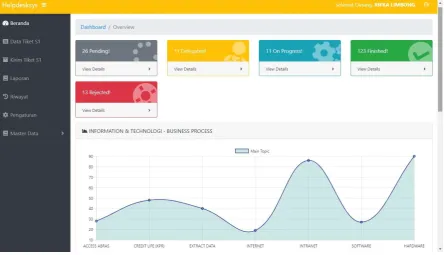
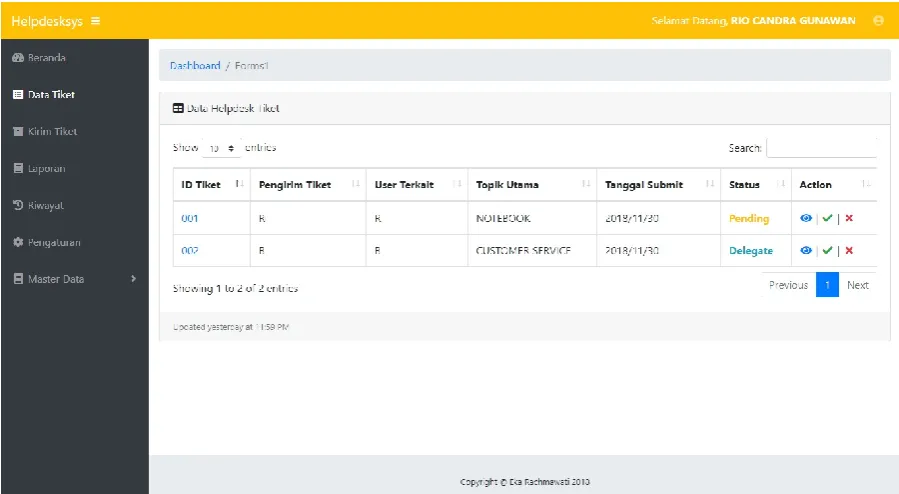
Figure 6 Screenshot Dashboard
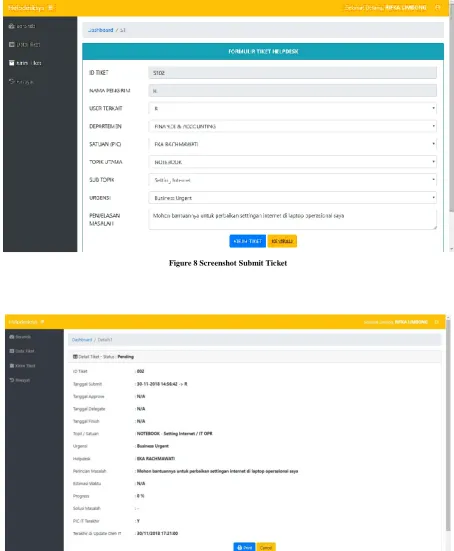
Figure 8 Screenshot Submit Ticket
Figure 10 Screenshot Approval Ticket
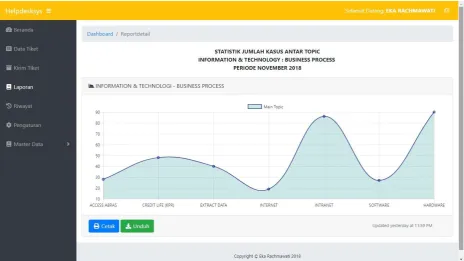
Figure 12 Screenshot Report Ticket View
IV.CONCLUSIONS
After being described application, the application for borrowing inventory items can be concluded:
1. This application is useful in correcting user complaints against IT Departments in handling data repairs and handling hardware damage.
2. This application can record problems that are carried out systematically, so that the data will not be lost. 3. This application can be used as monitoring in handling problems.
R
EFERENCES
[1] A. Husain, J. P. Maulana, and Y. Widiastuti, “Perancangan Sistem Aplikasi Request Maintenance,” vol. 3, no. 1, pp. 49–63. [2] Rico, “Analisis Dan Perancangan Sistem Informasi It- Helpdesk ( Studi Kasus : Pt . Lontar Papyrus Pulp & Paper Industry ),”
Teknol. Inf., vol. 10, no. 2, pp. 296–305, 2016.
[3] M. I. Fianty, “Meningkatkan Kualitas Pelayanan Teknologi Informasi Menggunakan Metode DMAIC pada Divisi IT Helpdesk PT XYZ,” vol. 4, no. 1, pp. 96–102, 2017.
[4] E. M. Sipayung, C. Fiarni, and E. Aditya, “Perancangan Sistem Informasi Helpdesk Menggunakan Framework ITIL V3,” J. Nas. Tek. Elektro dan Teknol. Inf., vol. 6, no. 2, 2017.
[5] N. I. Wibowo, F. Metandi, S. Room, and S. Room, “RANCANG BANGUN APLIKASI HELPDESK BERBASIS WEB PADA,” pp. 125–132.
[6] M. K. Qteishat, H. H. Alshibly, and M. A. Al-ma’aitah, “The impact of e-ticketing technique on customer satisfaction: an empirical analysis,” J. Inf. Syst. Technol. Manag., vol. 11, no. 3, 2014.
[7] H. H. Thimm, “Supporting Environmental Compliance Managers by Ticket Systems-An Industry Survey, Deployment Options and a Reference Business Process,” Int. J. Environ. Sustain., vol. 6, no. 1, 2017.
[8] M. Harcenko, P. Dorogovs, and A. Romanovs, “IT Service Desk Implementation Solutions,” Sci. J. Riga Tech. Univ. Comput. Sci., vol. 42, no. 1, pp. 68–73, 2010.
[9] P. Jaringan and P. T. Indosatm, “Otomatisasi Trouble Ticket Untuk Peningkatan Performansi Sistem,” no. March, pp. 51–58, 2017. [10] D. Darmawan and W. Senjaya, “Sistem Aplikasi Helpdesk Online Berbasis Web Pada Pt Xyz Web Based Online Helpdesk
Application System in,” Tek. dan Ilmu Komput., vol. 07 No. 25, no. November 2017, pp. 79–96, 2017.
[11] W. D. Suryono and R. Saptono, “Implementasi Pengembangan Smart Helpdesk di UPT TIK UNS Menggunakan Algoritma Naive Bayes Classifier,” pp. 39–43, 2017.
[12] R. Nadia et al., “Rancang Bangun Aplikasi CallTenant dengan Penyimpanan Basis Data untuk Form Dinamis Menggunakan
Framework Laravel,” vol. 7, no. 1, pp. 264–269, 2018.
[13] A. Junaidi AMIK BSI Jakarta, “Dashboard Sistem Informasi Support Maintenance (Studi Kasus: Pt Polyta Global Mandiri),”
Indones. J. Comput. Inf. Technol., vol. 1, no. 1, pp. 17–26, 2016.
[14] D. Mediana, “RANCANG BANGUN APLIKASI HELPDESK ( A-DESK ) BERBASIS WEB MENGGUNAKAN FRAMEWORK LARAVEL ( STUDI KASUS DI PDAM SURYA SEMBADA KOTA SURABAYA ) Andi Iwan Nurhidayat Abstrak.”