Abstract-Cloud computing is a pool of resources over internet, where resources can be pooled on demand as pay per use basis. Users have to lease the platform and resources from cloud service providers to run their complex applications. Cloud is a different style of computing in world of computing, where one can access huge amount of shared resources on demand. This is possible with virtualization, by creating virtual images of different resources which can be provisioned on demand to different users. Virtualization has brought the cloud computing to the next step of technology by providing more security, isolation and resource sharing. This paper basically discusses about virtualization, virtualization architecture, types of virtualization and its various research challenges.
Keywords—Cloud computing, Hypervisor, Traditional server, Virtualization, Virtual server
I. INTRODUCTION1
The term “Cloud” is used for something which is not visible to us. We are using resources in cloud, but still don’t have idea of its location, availability. Cloud is a location independent technology. It is not visible to us where our data gets stored in cloud. Cloud is not a new technology; its concept firstly came near 1960’s. But as such the term “Cloud” became popular in 2007. Now a days cloud is used almost in everything on internet from web browsing, emails, data storage to processing. Cloud is not a new concept, but it is combination of various already existing technologies like distributed computing, virtualization, service oriented architecture and grid computing [1].
In distributed environment, nodes are located at different geographical locations and work in parallel to process complex applications by distributing the load among nodes at different geographical locations. Service oriented architecture is another powerful concept on which cloud technology is based. It’s the concept of providing a full-fledged service which may be combination of loosely coupled or tightly coupled services [2]. Grid computing is a technology where resources are shared in a collaborative manner. Cloud computing is extension of grid computing. Difference between two is cloud uses concept of virtualization but grid doesn’t.
Earlier computing was not dynamic and fast over internet. Even limited amount of storage space was available over
network. But cloud solved all these issues and provides dynamic and very fast services with huge storage on internet, cutting down the cost significantly. This provides opportunities to small business houses to start their business without too much initial investment. It helps them to reshape their business. They need not invest in infrastructure and hardware, but they use them as resources in cloud and pay for their use. They only pay for the portions of resources they are using. All this is possible in cloud through virtualization. Virtualization is key concept of cloud on which this whole technology is based. Virtualization is process of creating fictitious image of software and hardware, which can be shared among multiple users on demand basis. These virtual images are provided by virtual servers called virtual machines. Virtualization concept was firstly introduced in 1960’s in IBM’s main-frame systems. Now it is used almost in every field like different IT services, memory, processors, storage, networks and software. In virtualization virtual machines provides virtual images of resources dynamically on demand, reducing overall cost. Users are also provisioned for scaling up and down their resources depending on requirement. Although virtualization concept provides many benefits in cloud but it also have some issues like
management of virtual resources, migration of services etc.
II. VIRTUALIZATION
Virtualization means something which does not exist in real but gives us illusion for its existence. It is not a new
Virtualization Foundation of Cloud Computing
Poonam, Nisha
Dept. of Computer Science Dept. of Computer Science IB (PG) College, Panipat (HR.) IB (PG) College, Panipat (HR.)
Available online: https://edupediapublications.org/journals/index.php/IJR/ P a g e | 1192 technology like cloud rather it is well established.
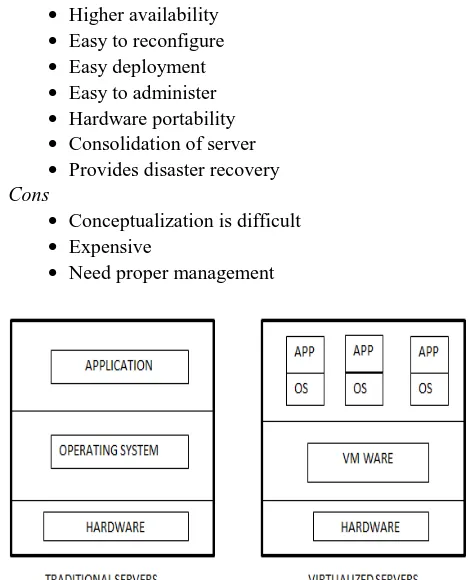
Virtualization with cloud computing is something new that is at initial stage of development. It provides a platform where multiple virtual machines can coexist on a single physical machine. The physical machine consist of a monitoring software called hypervisor or virtual machine monitor (VMM) that enable existence of multiple virtual machines on same physical machine. In traditional servers there exist one to one relationship between application and hardware, but virtualization has many to one relationship between application and hardware. Virtualization can be of various types like storage virtualization, server virtualization, network virtualization, application virtualization, memory virtualization, hardware virtualization, desktop virtualization vnnn etc. Companies offering virtualization are VMware, Microsoft and Sun etc.
A. Traditional Servers
Traditionally the servers consist of everything from operating system, memory, hardware to applications as a single unit. If any resource runs out of stock then whole server need to be replaced by new one. These servers are generally operated by system administrator and named according to their usage like file server, database server, web server etc. [3]. These traditional servers are very easy t in operating and developing the applications but they were not scalable as shown in figure 1.
Pros
Easy to maintain
Different applications can be run virtually Easy to conceptualize
Easy to backup Easy deployment Cons
Expensive Non-scalability
Software and hardware tightly coupled Underutilization of resources
Non-replicable
B. Virtual Servers
Virtual servers are virtual images of physical server to serve multiple applications on same physical server. Various templates are available for creating multiple identical copies of virtual servers. Virtual server keeps hardware away from software and applications, which enables multiple hosts to use one virtual server or a host to use multiple virtual servers. Like traditional physical servers these servers can be named according services provided by
them [4]. Virtual servers can be easily migrated from one host to another according to requirements. As virtual servers are scalable but proper attention needs to be given to their management and conceptualization.
Pros
Provides pool of resources Higher availability Easy to reconfigure Easy deployment Easy to administer Hardware portability Consolidation of server Provides disaster recovery Cons
Conceptualization is difficult Expensive
Need proper management
Fig. 1. Traditional/virtual server concept
C. Hypervisor
Fig. 2. Hypervisor
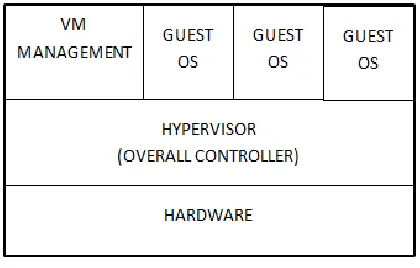
Hypervisor is main unit to achieve virtualization. It enables multiple guest operating systems to coexist on same physical hardware. These guest operating systems can be of different types like windows, Linux etc. as shown in fig. 2. Hypervisor provides high security and enables multiple applications to run simultaneously without interfering in others workspace.
Pros
Provide interface to virtual environment Act like firewall [6]
Easy to conceptualize Provide portability Provide high security Cons
If hypervisor crashes, whole virtualization concept fails.
Vulnerable to buffer overflow
D. Reasons of virtualization
There are various reasons for virtualization. The most important ones are as under:
Resource sharing, through virtualization we can share the resources of a single physical machine among multiple applications.
Isolation among users, users can be easily allocated to different virtual machines on the same physical host.
Resource aggregation, resources of different virtual machines can be easily consolidated when virtual machines are no longer required. Dynamic resource allocation, virtualization allows
resource provisioning in real time.
Easy resource management, it is easy to manage
all resources on a physical machine through virtualization [7].
Money saving, by sharing the resources cost is automatically reduced instead of investing on resources for each application.
Optimization of resources, virtualization provides finest use of resources by allocating to the VMs when required.
CPU utilization increases, increased utilization is resulted due to virtualization of physical hosts in cloud environment.
III. VIRTUALIZATION ARCHITECTURE
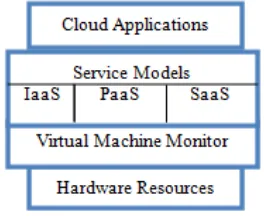
Virtualization provides a layer of abstraction between physical resources and user through hypervisor or virtual machine monitor (VMM) [8] shown in figure 3.
Fig. 3. Virtualization Architecture
Virtualization architecture in cloud is shown in fig. 3. It consist of physical resources at bottom, above it is the virtual machine monitor or hypervisor to implement virtualization, which provides separate virtual machines to different users. Above VMM are different service models provided by cloud.
IV. VIRTUALIZATION APPROACHES
Various virtualization approaches exists depending on the requirements of applications.
A. Full virtualization
Available online: https://edupediapublications.org/journals/index.php/IJR/ P a g e | 1194 machines imitating them as virtual resources as depicted in
figure 4. Main advantage of this approach is easy to implement. Disadvantage is poor performance as compared to when running directly on hardware [9]. Examples of full virtualization are Microsoft Virtual Server, VMware ESXi etc. [8].
Fig. 4. Full Virtualization
B. OS based virtualization or Para virtualization In OS assisted virtualization kernel image has been modified to facilitate proper communication between hypervisor and guest operating system in order to improve performance. In this case not the hardware but operating system itself is virtualized and all VMs use same virtualized OS image. The host operating system controls all VMs [10] as in figure 5. This approach also has drawback that if attacker intrudes in host operating system, then he can get control of all VMs.
Fig. 5. OS based Virtualization
C. Hardware based virtualization
In hardware virtualization VMM runs directly over hardware and control access of all physical resources by VMs as shown in figure 5. In this approach VMs can run different guest operating systems on same physical hardware like Linux, Windows etc. [9]. This technique provides high performance and isolation of different VMs.
Fig. 5. Hardware based Virtualization
V. PROS AND CONS OF VIRTUALIZATION
A. Pros
Virtualization technique has various benefits listed below:
Energy efficient More resources usage
Makes cloud computing more efficient Dynamic resource allocation
Isolation among users Resources aggregation Increased productivity Increase in CPU utilization Flexibility increases[9] Availability increases Scalability increases Cost reduction Can use Legacy software
Support service oriented architecture [10]
B. Cons
Virtualization also has some limitations listed below: Overhead to achieve virtualization increases like
energy consumption, increase in temperature etc.
Single point of failure
VI. RESEARCH ISSUES
Although virtualization is carving concept of cloud and brought a revolution in IT sector. Still here are some issues related to virtualization which need to be explored more by the researchers. Some related issues are as under
Security of VM’s, security is one of the major issues in virtualization. In virtualization multiple VM’s exist at same physical host, security of individual VM’s is at stake. Number of VM’s can be increased and decreased according to requirements and to maintain privacy of individual VM is important. Security concerns for VM’s include authentication and authorization of users on VM’S, network security management, controlling data movement across multiple VM’s and communication among VM’s etc. Data Stealing, data on cloud is stored remotely at data
centers and data is now moving or being used in multitenant environment instead of single user environment. Issue of data escape may arise in virtualization environment as data is communicated on multiple VM’s on same physical host.
Security of Hypervisor, hypervisor also has its own security zone on same physical machine. It is overall controlling authority for virtualization environment and can control all activities of different virtual machines. A serious issue arises if an attacker gets control over hypervisor , as by getting control on hypervisor he can get control on all VM’s and their activities. Another concern is that by hacking VM’s he gets control over hypervisor and then control whole system. So it’s very important to build a trust zone of hypervisor [10].
VM Migration, VM migration is process of moving a virtual machine from one physical host to another. VM migration is performed when a physical machine gets overloaded and then one instance is transferred from one host to another one on same physical machine or different one. Earlier migration is performed by shutting down the VM but nowadays migration can be performed without shutting down the VM and it is known as live migration. Migrating VM’s with minimum migration time, energy consumption and without violating SLA agreement are major concerns.
VM consolidation, it is the packing up of multiple VM’s together on a physical host. It is just opposite to the VM migration. VM consolidation is performed in under loaded situations of physical host. Consolidation process releases system resources, reduces management task and energy consumption of
physical machine. Energy-aware VM consolidation is the major concern nowadays.
VII. CONCLUSION
As cloud relies highly on virtualization and provide virtual images of physical resources to different machines. Nowadays virtualization is an attractive technology for commercial applications. It’s very important to provide high security so that VMs won’t be able to peep into one another workspace [11]. Various security measures have already been provided but more research can be done in this area to provide high security to different guest operating systems running over same physical resources.
REFERENCES
[1]
R. Kaur, A. Kaur, “A Review Paper on Evolution of Cloud Computing, its Approaches and Comparison with Grid Computing,” International Journal of Computer Science and Information Technology, Vol. 5, pp. 6060-6063, 2014.[2] S. M., S. B. and S. Karthik, "A Load Balancing Model in Public Cloud Using ANFIS and GSO", 2014 International Conference on Intelligent Computing Applications, 2014.
[3] L.Malhotra, D. Agarwal & A. Jaiswal, ”Virtualization in cloud computing,” JITSE, Vol. 4, Issue 2, 2014.
[4] K. Koganti, E. Patnala, S. S. Narasingu and J. N. Chaitanya, “Virtualization Technology in Cloud Computing Environment,” International Journal of Emerging Technology and Advanced Engineering, Vol. 3, No. 3, Mar. 2013.
[5] F. Sabahi, “Secure Virtualization for Cloud Environment Using Hypervisor-based Technology,” International Journal of Machine Learning and Computing, Vol. 2, No. 1, February 2012.
[6] U. Jangid, N. Sharma, K. Rathi, “A Survey on Secure the Cloud Environment using hypervisor-based virtualization technology,” International Journal of Innovative Computer Science & Engineering, Vol. 1, No. 3; pp. 27-29, Dec 2014.
[7] R. Jain and S. Paul, “Network virtualization and software defined networking for cloud computing: a survey,” IEEE Commun. Mag., vol. 51, no. 11, pp. 24–31, Nov. 2013.
[8] Buyya, C. Yeo, S. Venugopal, J. Broberg and I. Brandic, "Cloud computing and emerging IT platforms: Vision, hype, and reality for delivering computing as the 5th utility", Future Generation computer systems, vol. 25, no. 6, pp. 599-616, 2009.
[9] J. Sahoo, S. Mohapatra & R. Lath, “Virtualization: A survey on concepts, taxonomy and associated security issues," In Computer and Network Technology (ICCNT), IEEE Second International Conference, pp. 222-226, 2010 .
[10] F. Sabahi, “Virtualization-level security in cloud computing,”
InCommunication Software and Networks (ICCSN), IEEE 3rd
International Conference, pp. 250-254, 2011.