International Journal of Research (IJR)
e-ISSN: 2348-6848, p- ISSN: 2348-795X Volume 2, Issue 08, August 2015Available at http://internationaljournalofresearch.org
Smart Wearable for Android Devices
M. Chandra Shekhar
1& Devarakonda Nitesh
21ASSISTANT PROFESSOR, Dept of ECE, MLRITM, Hyderabad, Telangana 2PG Student [Embedded Systems], MLRITM, Hyderabad, Telangana
Mail id’s:[email protected],[email protected] Abstract—
A Bluetooth client device is connected to the controller which is used to communicate with the android smart phone. This Bluetooth device which is paired with the smart phone will send data when the MEMS have tilted. In this application, call will be enabled when MEMS tilts in one direction and message will be enables when MEMS tills in another direction and song will be played when MEMS tills another direction and Song will be stops when MEMS tills in another direction, so each direction will plays some action on Android Smart Phone with the help of Android Application.
Keywords— Android Application; Bluetooth; MEMSARM7 (LPC2148) Processor
I. INTRODUCTION
The calculator watch, introduced in the 1980s, was one original piece of widespread worn electronics. IlyaFridman designed a Bluetooth headset into a pair of earrings with a hidden microphone. Twitter users can wear a "Pocket Tweet" using a Java application and cutting out and applying a Twitter text bubble to a person's shirt, one example of Do-it-yourself wearable tech that was part of an art exhibit for the Wearable Technology AIR project in spring 2009.
In the proposed solution, a simple, smart, low cost, secure hand Wearable Device is designed which communicates with the Android Devices simply using Bluetooth. The simple application is to alert the Police when Women are in Emergency.
A Bluetooth client device is connected to the processor which is used to communicate with the android smart phone. This Bluetooth device which is paired with the smart phone will send data when the MEMS have tilted. In this application, call will be enabled when MEMS tilts in one direction and message will be enables when MEMS tills in another direction.
Song will be played when MEMS tils another direction and Song will be stops when MEMS tils in another direction, so each direction will plays some action on Android Smart Phone with the help of Android Application.
II. SYSTEMARCHITECTURE
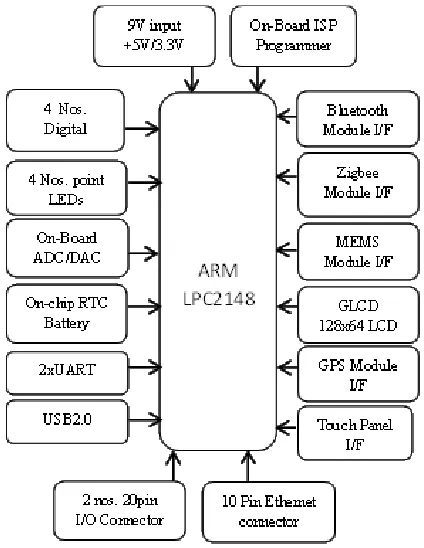
The system architecture of this proposed system is divided into two different blocks.
HARDWARE END: In hardware
implementation we have four major hardware blocks.
International Journal of Research (IJR)
e-ISSN: 2348-6848, p- ISSN: 2348-795X Volume 2, Issue 08, August 2015Available at http://internationaljournalofresearch.org
words whatever the characters coming out from the MEMS has receiving the Android Smart Phone through Bluetooth.
Figure – 1: Block Diagram
ANDROID END: The BLUETOOTH module
interfaced at ARM7 will send a no. of characters like ‘a’, ’b’, ’c’ so on as per our requirement. We have designed an Android Application so that when a character receives from ARM& Android Smart will perform respected task as we have given in Android Application
III.IMPLEMENTATION
HARDWARE:
In hardware implementation, ARM processor plays a key role in monitoring and controlling the security system. Low-power consumption ARM processor (LPC2148) operating at 3.3V, 50uA is designed and mounted on a PCB along with Reset Circuit and a Clock Circuit. LPC2148, a 32-bit microcontroller with advanced RISC architecture and having 48 GPIO lines with a program memory of 32KB and a data memory of 512Bytes.
Figure – 2: LPC 2148 Architecture
Figure – 3: LPC2148 Development Board
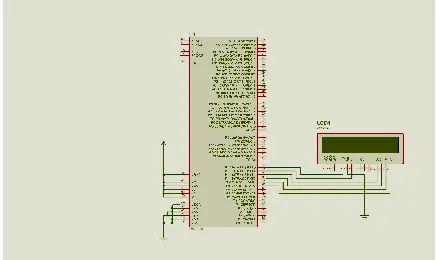
Here, in the above figure the clock circuit and reset circuits were assembled along with the LCD display circuit. A 16 X 2 LCD display is used for displaying the status of the system. MEMS has interfaces to ARM7 (LPC2148).
In Hardware we have used mainly for communication BLUETOOTH transceiver and for input MEMS has interfaced to the processor
ARM7 LPC2148
MEMS
ANDROID DEVICE
International Journal of Research (IJR)
e-ISSN: 2348-6848, p- ISSN: 2348-795X Volume 2, Issue 08, August 2015Available at http://internationaljournalofresearch.org
and processor to the Android smart phone. And processor is LPC 2148. We have each individual module circuit connection with the controller, let’s see their specifications
MEMS: The inputs have given by the MEMS.
Each direction has its value, by taking that value we are sending one character and it performs its individual task as we discussed, below will show configuration of MEMS.
Figure – 4: MEMS Circuit
BLUETOOTH: Bluetooth is a Transceiver that
means it can be Transmit the data as well Receive the data. In this project Bluetooth transmit the input data (the data comes from the MEMS) to the Android Smart Phone, by our Android Application it perform its respected task. Connection of Bluetooth should be like, it operates on 5v DC and we have mainly 4 pins one is power supply, second RX (Receiver), third TX (Transmitter) and fourth is ground. Rx pin should be connected to UART1 of Tx pin of ARM7 and Tx pin should be connected to UART1 of Rx of ARM7. Let’s see connection between BLUETOOTH and ARM7
Figure – 5: Bluetooth interfaced with ARM7
LCD: LCD is used for displaying purpose, in this
project LCD has connected to the ARM7 (LPC 2148) to see the output. The connections are given below,
Figure – 6: LCD interfaced with ARM7
Following is the final schematic diagram of the paper proposed:
Figure – 7: Schematic Diagram
International Journal of Research (IJR)
e-ISSN: 2348-6848, p- ISSN: 2348-795X Volume 2, Issue 08, August 2015Available at http://internationaljournalofresearch.org
SOFTWARE:
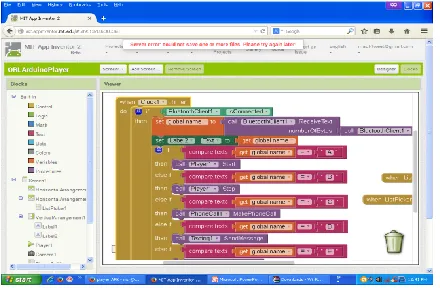
Here, to program ARM processor KeiluVision 4 was used as a cross compiler and Flash Magic was used as a programmer. Android Application was designed using Android Developer Tools with Eclipse
IV.ALGORITHM&FLOWCHART ALGORITHM:
Step – 1: Initialize the Serial Communication.
Step – 2: Set the Baud Rate 9600.
Step – 3:Initialize MEMS.
Step – 4: Check MEMS direction
Step – 5: If the MEMS in one direction then transmit its respective character to the android smartphone.
Figure – 8: Task Truth Table
FLOWCHART:
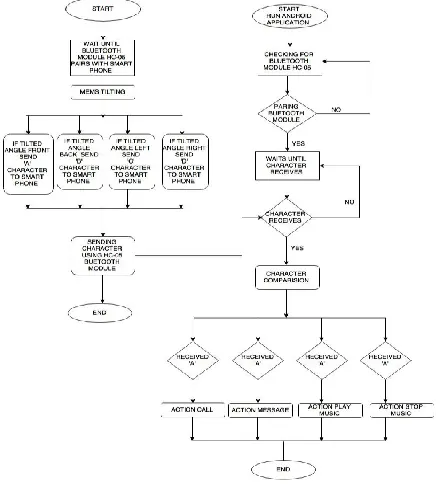
The flowchart of this paper is divided into three sub parts. The first flowchart is for ARM evaluation, and the second one is for Image Processing, and the last one is for web server interface.
Figure – 9: Flow Chart
V. RESULTS
Figure – 12: Final Prototype 1
International Journal of Research (IJR)
e-ISSN: 2348-6848, p- ISSN: 2348-795X Volume 2, Issue 08, August 2015Available at http://internationaljournalofresearch.org
Figure – 14: Final Result Analysis
VI.CONCLUSION
Smart, Low-Cost, Simple and Secured wearable device has designed and communicated with Android Smartphone with API Level 7 or greater.
ACKNOWLEDGEMENT
I would like to express my special thanks of gratitude to Marri Laxman Reddy Institute of Technology & Management as well as our Principal Dr. K Venkateswara Reddy, M. Tech., Ph.D., MISTE ,K. N. BHUSHAN, Assoc. Prof & HOD ECE, Asst Prof. M.Chandrasheker, Dept of ECE, MLRITM who gave me the golden opportunity to do this wonderful project on the topic (Wearable Technology), which also helped me in doing a lot of Research and i came to know about so many new things we are really thankful
to them. And,
secondly i would also like to thank my parents and friends who helped me a lot in finalizing this project within the limited time frame.
REFERENCES [1] http://www.engineersgarage.com/arm- projects/introduction-to-arm-microcontroller-lpc2148
[2]https://www.pantechsolutions.net/microcontro
ller-boards/user-manual-arm7-lpc2148-development-kit
[3]http://www.nex-robotics.com/lpc2148
development-board/arm7-lpc2148-development-board.html
[4]https://github.com/arm7/LPC2148
[5]https://developer.android.com/training/
[6]https://www.udacity.com/course/android-development-for-beginners--ud837
[7]http://www.coreservlets.com/android
[8]http://www.computacaonaescola.ufsc.br/?page _id=536&lang
[9]http://www.instructables.com/id/Modify-The-HC-05-Bluetooth-Module-Defaults-Using-A/
[10]https://bytedebugger.wordpress.com/2014/06 /27/tutorial-how-to-connect-an-android-device-with-arduino-and-bluetooth/
[11]http://www.elecfreaks.com/677.html
[12]http://stackoverflow.com/questions/1032750 6/android-arduino-bluetooth-data-transfer
BIOGRAPHY
Asst.Prof. M.chandrashekhar has completed M.TECH from CVR Engineering College in VLSI SYSTEM DESIGN and B.Tech in ECE from Indur Institute Of Engineering and Technology.