Available online: https://edupediapublications.org/journals/index.php/IJR/ P a g e | 2863
Power Management Strategy in Linux
Kernel Environment
Haider Ali Mohammed Basheer Abdulmutalib Hassoon Department of Computer Applied Technology, Hust Email: [email protected] , [email protected]
ABSTRACT
This paper looks to investigate how Android operating system manages power on a relatively small platform such as a mobile phone or a tablet. The aim of this document is to further find the differences that exist in the design of Android power management modules as compared to the parent kernel from Linux. We will investigate to check if platforms with smaller batteries like mobile phones require a lot of power management or the same as larger and power hungry devices likes desktop computers. This paper will look deeper into why Google decided to use Linux’s kernel as opposed to developing one from scratch.
Keywords
Wakelock, Android, Power Management, Advanced Power Management, Advanced
Configuration and Power Interface
1. Introduction
Available online: https://edupediapublications.org/journals/index.php/IJR/ P a g e | 2864
also want to compare them with the design of Android PM [1][2].
2. How does power management
system work?
One power manageme nt
standard for computers is ACPI, which
supersedes APM. All recent
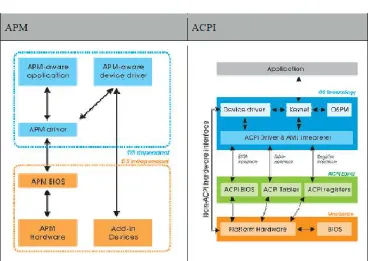
(consumer) computers have ACPI support. Why ACPI has more advantage than APM? We’ll write a brief introduction for both of them and compare their differences [3].
2.1 APM (Advanced Power Management)
APM consists of one or more layers of software that support power management in computers with power manageable hardware. APM defines the hardware independent software interface between hardware-specific power management software and an operating system power manage me nt policy driver. It masks the details of the hardware, allowing higher level software to use APM without any knowledge of the hardware interface.
The APM software interface
specification defines a layered
cooperative environment in which applications, operating systems, device drivers and the APM BIOS work together to reduce power consumption. In brief, APM can extend the life of system batteries and thereby increases productivity and system availability [2][3].
2.2 ACPI (Advanced Configuration & Power Interface)
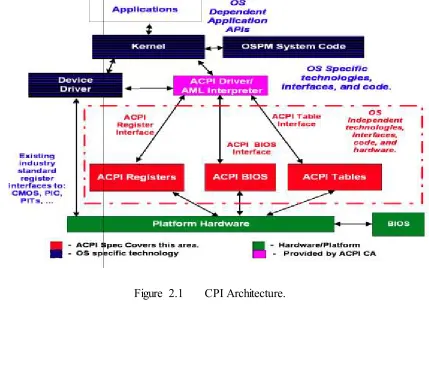
The ACPI specification was developed to establish industry common interfaces enabling robust operating system (OS)-directed motherboard device configuration and power management of both devices and entire systems. Different from APM, ACPI allows control of power management from within the operating system. The previous industry standard for power management, APM, is controlled at the BIOS level. APM is activated when the system becomes idle. The longer the system idles, the less power it consumes (e.g. screen saver vs. sleep vs. suspend). In APM,
the operating system has no
knowledge of when the system will change power states.
Available online: https://edupediapublications.org/journals/index.php/IJR/ P a g e | 2865
A subsystem which
controls hardware states and functions that may have previously been in the BIOS configuration These states include:
Thermal control
Motherboard configuration
Power states (sleep, suspend)
a policy manager, which is
software that sits on top of the operating system and allows user input on the system policies
The ACPI also has device
drivers those control/monitor devices such as a laptop battery, SMBus
(communication/transmission path) and EC (embedded controller) [3].
Available online: https://edupediapublications.org/journals/index.php/IJR/ P a g e | 2866
Figure 2.2 CPI power state transition diagram.
Available online: https://edupediapublications.org/journals/index.php/IJR/ P a g e | 2867
We can either use “acpi -V” or look in each of the acpi files individually for information about our system. Check in the /proc/acpi directory for various things of importance. If you want to check your battery we can read the
following file like this:
cat/proc/acpi/battery/BAT1/ state [4].
3. The Concept of Android
power management
First of all, Android OS design is based on Linux kernel. Linux has its own power management that we have described in previous section. The following diagram (Figure 3.1) shows the main components of the Android OS.
Figure 3.1 Android architecture [6].
Android inherits many kernel components from Linux includ ing
power management component.
Original power management of Linux is designed for personal computers, so there are some power saving status such as suspend and hibernatio n.
Available online: https://edupediapublications.org/journals/index.php/IJR/ P a g e | 2868
of limited battery power capacity, they need a special power manage me nt mechanism. Therefore, Android has an additional methodology for power saving.
The implementation of Android power management was sitting on top of Linux Power Management. Nevertheless, Android has a more aggressive Power Management policy than Linux, in which app and services must request CPU resource with "wake locks" through the Android application framework and native Linux
Available online: https://edupediapublications.org/journals/index.php/IJR/ P a g e | 2869
Figure 3.2 Android Power Management.
Refer to Figure 3.2 Android try not to modify the Linux Implements an applications framework on top of the kernel called Kernel and it Android Power Management Applicatio ns
Framework. The Android PM
Framework is like a driver. It is written by Java which connects to Android power driver through JNI. However, what is JNI? JNI (Java Native Interface) is a framework that allows Java code running in a Java Virtual Machine (JVM) to call native C
Available online: https://edupediapublications.org/journals/index.php/IJR/ P a g e | 2870
Table 3.1 Different wake locks of Android PM
Wake Lock Type
ACQUIRE_CAUSES_WAKEUP
FULL_WAKE_LOCK
ON_AFTER_RELEASE
PARTIAL_WAKE_LOCK
SCREEN_BRIGHT_WAKE_LOCK
SCREEN_DIM_WAKE_LOCK
Currently Android only supports screen, keyboard, buttons backlight, and the brightness of screen. Because of full usage of CPU capability, it does not support suspend and standby mode. The following diagram shows how Android PM works. Through the
framework, user space applicatio ns can use “Power Manger” class to control the power state of the device. We will introduce more details about how to implement them in applicatio ns later [7].
Available online: https://edupediapublications.org/journals/index.php/IJR/ P a g e | 2871
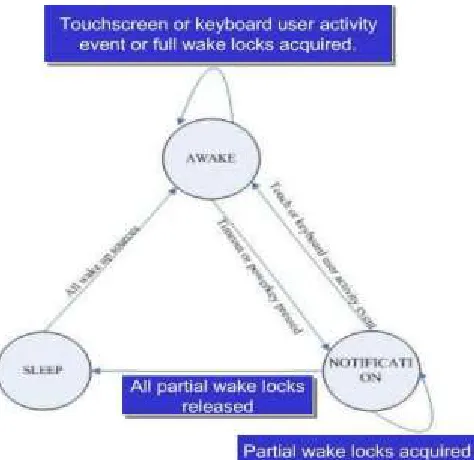
Figure 3.4 A finite state machine of Android PM
Figure 3.4 shows that the full state machine. There are three states: “SLEEP”, “NOTIFICATION”, and “AWAKE”. The scenario is: While a user application acquire full wake lock or touch screen/keyboard activity event, the machine will enter or keep in the “AWAKE”. If timeout happen or power key pressing, the machine will enter “NOTIFICATION”. While partial wake locks acquiring, it will keep in “NOTIFICATION”. While all partial locks released, the machine will go into “SLEEP”. In “SLEEP” mode, it will transit if all resource awake. This state machine make power saving
of Android more feasible for mobile devices.
Available online: https://edupediapublications.org/journals/index.php/IJR/ P a g e | 2872
Figure 3.5 the overall architecture of Android PM
4.
Android PM Implementation
Android PM Framework provides a service for user space applicatio ns through the class PowerManger to achieve power saving. Hence, the app must get an instance of PowerManger in order to enforce its power requirements. The flow of exploring Wake locks are here:
1. Acquire handle to the
PowerManager service by calling
Context.getSystemService().
2. Create a wake lock and specify
the power management flags for screen, timeout, etc.
3. Acquire wake lock.
4. Perform operation such as play
MP3.
5. Release wake lock.
Available online: https://edupediapublications.org/journals/index.php/IJR/ P a g e | 2873
5.
Conclusion
Power saving is an important issue for mobile devices, and there are many ways to implement. How to design a PM for mobile device need is a good question. Android builds up its user space level solution in order to maintain Linux fundamental support and increase flexibilities. Android PM already supports some power saving type for modern diverse embedded systems.
The number of wake locks type might be not enough for diverse power consuming I/O devices. For example, WiFi antenna is a main power consumption device. Android doesn't automatically turn off WiFi if user is not using.
There are two main points that we think PM can be improved. First, Nowadays, CPU can enter into more states for power saving and usability
purpose. There could be more types of wake lock to set the power saving mode specifically.
Available online: https://edupediapublications.org/journals/index.php/IJR/ P a g e | 2874
References
1. Robin Kravets, P. Krishnan, Power management techniques for mobile communication, Internatio na l Conference on Mobile Computing and Networking.
2. Dynamic power management for embedded systems IBM and Monta Vista Software Version 1.1, November 19, 2002.
3. Robin Kravets, P. Krishnan,
Application-driven power
management for mobile
communication.
4. Andreas Weissel, Frank Bellosa, Process cruise control: event-drive n clock scaling for dynamic power management.
5. APM V1.2 , data sheet
specifications. 6. ACPI,
http://www.lesswatts.org/projects/a cpi/index.php
7. Android Project - Power
Management,
http://www.netmite.com/android/ mydroid/development/pdk/docs/p ower_manage ment.html
8. Steve Guo, Android Power
Management.
![Figure 3.1 Android architecture [6].](https://thumb-us.123doks.com/thumbv2/123dok_us/7776856.1282808/5.595.86.505.311.594/figure-android-architecture.webp)