C H A P T E R
2
Commands for the Catalyst 6500 Series Switch
WebVPN Module
This chapter contains an alphabetical listing of commands for the Catalyst 6500 series WebVPN Module.
For additional WebVPN Services Module information, refer to the following documentation:
• Catalyst 6500 Series Switch WebVPN Services Module Installation and Verification Note
• Catalyst 6500 Series Switch WebVPN Services Module Configuration Note
Chapter 2 Commands for the Catalyst 6500 Series Switch WebVPN Module clear webvpn nbns
clear webvpn nbns
To reset the NetBIOS name service (NBNS) cache on the WebVPN Services Module, use the clear webvpn nbns command.
clear webvpn nbns [context {name | all}]
Syntax Description
Defaults This command has no default settings.
Command Modes EXEC
Command History
Usage Guidelines To reset all the statistics counters that the WebVPN Services Module maintains, use the clear webvpn nbns command without options.
Examples This example shows how to reset the statistics counters that are maintained in the different system components on the WebVPN Services Module:
webvpn# clear webvpn nbns context context1
context (Optional) Clears the statistics for a specific context.
name Specifies the name of the context. all Specifies all contexts.
Release Modification
WebVPN Module Release 1.1
Chapter 2 Commands for the Catalyst 6500 Series Switch WebVPN Module
clear webvpn platform
clear webvpn platform
To reset the platform extenstions on the WebVPN Services Module, use the clear webvpn platform command.
clear webvpn platform {conn | session | stats [type] | tunnel stats}
Syntax Description
Defaults This command has no default settings.
Command Modes EXEC
Command History
Usage Guidelines The available options for stats type are as follows:
• crypto—Clears crypto statistics information.
• crypto module module—Clears crypto statistics for the specified module type.
• fdu—Clears FDU statistics information.
• ipc—Clears IPC statistics information.
• ipc module module—Clears IPC statistics for the specified module type.
• module module—Clears statistics for the specified module type.
The available options for the module variable are as follows:
– all—All CPUs
– fdu—FDU CPU
– ssl1—SSL1 CPU
– tcp1—TCP1 CPU
– tcp2—TCP2 CPU
conn Clears global connection. session Clears session information. stats Clears statistics information.
type (Optional) See the“Usage Guidelines” for available options. tunnel stats Clears tunnel counters.
Release Modification
WebVPN Module Release 1.1
Chapter 2 Commands for the Catalyst 6500 Series Switch WebVPN Module clear webvpn platform
• pki [pki_type]—Clears PKI statistics information.
The available options for the pki_type variable are as follows:
– auth—Certificate authentication and authorization statistics.
– cache—Peer certificate cache statistics.
– cert-header—Certificate header insertion statistics.
– expiring—Certificate expiration warning statistics.
– ipc—Interprocessor communication statistics.
– memory—Memory usage statistics.
• pki module module—Clears PKI statistics for the specified module type.
• ssl—Clears SSL statistics information.
• tcp—Clears TCP statistics information.
Examples This example shows how to reset the platform counters that are maintained in the different system components on the WebVPN Services Module:
Chapter 2 Commands for the Catalyst 6500 Series Switch WebVPN Module
clear webvpn session
clear webvpn session
To clear the WebVPN session, use the clear webvpn session command.
clear webvpn session {context {name | all} | user name {context {name | all}}}
Syntax Description
Defaults This command has no default settings.
Command Modes EXEC
Command History
Usage Guidelines To reset all the statistics counters that the WebVPN Services Module maintains, use the clear webvpn nbns command without options.
Examples This example shows how to reset the session counters that are maintained in the different system components on the WebVPN Services Module:
webvpn# clear webvpn session
context Clears the statistics for a specific context.
name Specifies the name of the context. all Specifies all contexts.
user name Specifies the user name.
Release Modification
WebVPN Module Release 1.1
Chapter 2 Commands for the Catalyst 6500 Series Switch WebVPN Module clear webvpn stats
clear webvpn stats
To reset the statistics counters that are maintained in the different system components on the WebVPN Services Module, use the clear webvpn stats command.
clear webvpn stats [cifs [context {name | all}] | context {name | all} | mangle [context {name | all}] | port-forward [context {name | all}] | tunnel [context {name | all}]]
Syntax Description
Defaults This command has no default settings.
Command Modes EXEC
Command History
Usage Guidelines To reset all the statistics counters that the WebVPN Services Module maintains, use the clear ssl-proxy stats command without options.
Examples This example shows how to reset the statistics counters that are maintained in the different system components on the WebVPN Services Module:
webvpn# clear webvpn stats cifs
webvpn# clear webvpn stats context context1 webvpn# clear webvpn stats mangle context all webvpn# clear webvpn stats tunnel
This example shows how to clear all the statistic counters that the WebVPN Services Module maintains:
webvpn# clear webvpn stats webvpn#
cifs (Optional) WebVPN CIFS statistics
context (Optional) Clears the statistics for a specific context.
name (Optional) Specifies the name of the context. all (Optional) Specifies all contexts.
mangle (Optional) Clears the WebVPN mangling statistics. port-forward (Optional) Clears the WebVPN port-forwarding statistics. tunnel (Optional) Clears the WebVPN tunnel statistics.
Release Modification
WebVPN Module Release 1.1
Chapter 2 Commands for the Catalyst 6500 Series Switch WebVPN Module
crypto key export rsa pem
crypto key export rsa pem
To export a PEM-formatted RSA key to the WebVPN Services Module, use the crypto key export rsa pem command.
crypto key export rsa keylabel pem {terminal | url url} {{3des | des} pass_phrase}
Syntax Description
Defaults This command has no default settings.
Command Modes Global configuration
Command History
Usage Guidelines The pass phrase can be any phrase including spaces and punctuation except for a question mark (?), which has special meaning to the Cisco IOS parser.
Pass-phrase protection associates a pass phrase with the key. The pass phrase is used to encrypt the key when it is exported. When this key is imported, you must enter the same pass phrase to decrypt it.
keylabel Name of the key.
terminal Displays the request on the terminal.
url url Specifies the URL location. Valid values for url are as follows:
• archive:—Exports to archive: file system
• flash:—Exports to flash: file system
• ftp:—Exports to ftp: file system
• http:—Exports to http: file system
• https:—Exports to https: file system
• null:—Exports to null: file system
• nvram:—Exports to nvram: file system
• rcp:—Exports to rcp: file system
• scp:—Exports to scp: file system
• system:—Exports to system: file system
• tftp:—Exports to tftp: file system
3des Specifies the 168-bit DES (3DES) encryption algorithm. des Specifies the 56-bit DES-CBC encryption algorithm.
pass_phrase Pass phrase.
Release Modification
WebVPN Services Module Release 1.1
Chapter 2 Commands for the Catalyst 6500 Series Switch WebVPN Module crypto key export rsa pem
Examples This example shows how to export a key from the WebVPN Services Module:
wwbvpn(config)# crypto key export rsa test-keys pem url scp: 3des password % Key name:test-keys
Usage:General Purpose Key Exporting public key...
Address or name of remote host []? 7.0.0.7 Destination username [ssl-proxy]? lab Destination filename [test-keys.pub]?
Password:
Writing test-keys.pub Writing file to scp://[email protected]/test-keys.pub Password:
!
Exporting private key...
Address or name of remote host []? 7.0.0.7 Destination username [ssl-proxy]? lab Destination filename [test-keys.prv]?
Password:
Writing test-keys.prv Writing file to scp://[email protected]/test-keys.prv Password:
Chapter 2 Commands for the Catalyst 6500 Series Switch WebVPN Module
crypto key generate
crypto key generate
To generate RSA key pairs, use the crypto key generate command.
crypto key generate rsa {usage-keys|general-keys} {label key-label} [exportable] [modulus
size]
Syntax Description
Defaults This command has no default settings.
Command Modes Global configuration
Command History
Usage Guidelines The WebVPN Services Module supports up to eight levels of certificate authority (one root certificate authority and up to seven subordinate certificate authorities).
You can specify that a key is exportable during key generation. Once the key is generated as either exportable or not exportable, it cannot be modified for the life of the key.
Note The WebVPN Services Module supports modulus lengths of 512, 768, 1024, 1536, and 2048 bits. Although you can specify 512 or 768, we recommend a minimum modulus length of 1024. A longer modulus takes longer to generate and takes longer to use, but it offers better security.
After you generate a key pair, you can test the SSL service by generating a self-signed certificate. general-keys Generate a general purpose RSA key pair for signing and encryption usage-keys Generate seperate RSA key pairs for signing and encryption
label key-label Specifies the key.
exportable (Optional) Specifies that the key is allowed to be exported.
modulus size (Optional ) Specifies the modulus length in bits; valid values are 512, 768, 1024, 1536, and 2048 bits. See the “Usage Guidelines” section for more information.
Release Modification
WebVPN Services Module Release 1.1
Chapter 2 Commands for the Catalyst 6500 Series Switch WebVPN Module crypto key generate
Examples This example shows how to generate special-usage RSA keys:
crypto key generate rsa usage-keys
The name for the keys will be: myrouter.example.com
Choose the size of the key modulus in the range of 360 to 2048 for your Signature Keys. Choosing a key modulus greater than 512 may take a few minutes.
How many bits in the modulus[512]? <return>
Generating RSA keys.... [OK].
Choose the size of the key modulus in the range of 360 to 2048 for your Encryption Keys. Choosing a key modulus greater than 512 may take a few minutes.
How many bits in the modulus[512]? <return>
Generating RSA keys.... [OK].
This example shows how to generate general-purpose RSA keys:
Note You cannot generate both special-usage and general-purpose keys; you can generate only one or the other.
webvpn(config)# crypto key generate rsa general-keys label kp1 exportable
The name for the keys will be: kp1
Choose the size of the key modulus in the range of 360 to 2048 for your General Purpose Keys. Choosing a key modulus greater than 512 may take a few minutes.
Chapter 2 Commands for the Catalyst 6500 Series Switch WebVPN Module
crypto key import rsa pem
crypto key import rsa pem
To import a PEM-formatted RSA key from an external system, use the crypto key import rsa pem command.
crypto key import rsa keylabel pem [usage-keys] {terminal | url url} [exportable] passphrase}
Syntax Description
Defaults This command has no default settings.
Command Modes Global configuration
Command History
keylabel Name of the key.
usage-keys (Optional) Specifies that two special-usage key pairs should be generated, instead of one general-purpose key pair.
terminal Displays the request on the terminal.
url url Specifies the URL location. Valid values are as follows:
• archive:—Imports from archive: file system.
• cns:—Imports from cns: file system.
• flash:—Imports from flash: file system.
• ftp:—Imports from ftp: file system.
• http:—Imports from http: file system.
• https:—Imports from https: file system.
• null:—Imports from null: file system.
• nvram:—Imports from nvram: file system.
• rcp:—Imports from rcp: file system.
• scp:—Imports from scp: file system.
• system:—Imports from system: file system.
• tftp:—Imports from tftp: file system.
exportable (Optional) Specifies that the key can be exported.
passphrase Pass phrase.
Release Modification
WebVPN Services Module Release 1.1
Chapter 2 Commands for the Catalyst 6500 Series Switch WebVPN Module crypto key import rsa pem
Usage Guidelines The pass phrase can be any phrase including spaces and punctuation except for a question mark (?), which has special meaning to the Cisco IOS parser.
Pass-phrase protection associates a pass phrase with the key. The pass phrase is used to encrypt the key when it is exported. When this key is imported, you must enter the same pass phrase to decrypt it.
Examples This example shows how to import a PEM-formatted RSA key from an external system and export the PEM-formatted RSA key to the WebVPN Services Module:
wwbvpn(config)# crypto key import rsa newkeys pem url scp: password % Importing public key or certificate PEM file...
Address or name of remote host []? 7.0.0.7 Source username [ssl-proxy]? lab
Source filename [newkeys.pub]? test-keys.pub
Password:
Sending file modes:C0644 272 test-keys.pub
Reading file from scp://[email protected]/test-keys.pub! % Importing private key PEM file...
Address or name of remote host []? 7.0.0.7 Source username [ssl-proxy]? lab
Source filename [newkeys.prv]? test-keys.prv
Password:
Sending file modes:C0644 963 test-keys.prv
Reading file from scp://[email protected]/test-keys.prv!% Key pair import succeeded.
Chapter 2 Commands for the Catalyst 6500 Series Switch WebVPN Module
crypto pki authenticate
crypto pki authenticate
To obtain the certificate that contains the public key of the certificate authority, use the crypto pki authenticate command.
crypto pki authenticate trustpoint-label
Syntax Description
Defaults This command has no default settings.
Command Modes Global configuration
Command History
Usage Guidelines The trustpoint-label argument is case-sensitive.
For each trustpoint, you must obtain a certificate that contains the public key of the certificate authority; multiple trustpoints can use the same certificate authority.
Note Contact the certificate authority to obtain the correct fingerprint of the certificate and verify the fingerprint displayed on the console.
Examples This example shows how to obtain the certificate of the certificate authority:
webvpn(config)# crypto pki authenticate PROXY1 Certificate has the following attributes:
Fingerprint: A8D09689 74FB6587 02BFE0DC 2200B38A % Do you accept this certificate? [yes/no]: y Trustpoint CA certificate accepted.
webvpn(config)# end webvpn#
trustpoint-label Name of the trustpoint label.
Release Modification
WebVPN Module Release 1.1
Chapter 2 Commands for the Catalyst 6500 Series Switch WebVPN Module crypto pki certificate
crypto pki certificate
To configure and define the PKI implementation on the WebVPN Services Module, use the crypto pki certificate command.
crypto pki certificate {chain name | map map_name | query | validate trustpoint-label}
Syntax Description
Defaults This command has no default settings.
Command Modes Global configuration
Command History
Usage Guidelines The crypto pki certificate chain command puts you into certificate chain configuration mode. When you are in certificate chain configuration mode, you can delete certificates using the certificate command. You need to be in certificate chain configuration mode to delete certificates.
The crypto pki certificate validate command validates the router's own certificate for a given trustpoint. Use this command as a sanity check after enrollment to verify that the trustpoint is properly
authenticated, a certificate has been requested and granted for the trustpoint, and that the certificate is currently valid. A certificate is valid if it is signed by the trustpoint certification authority (CA), not expired, and so on.
chain Identifies certificates.
name CA server name.
map Defines certificate attributes map.
map_name CA map tag name.
query Obtains certificates from the CA after reboot. validate Validates a certificate chain.
trustpoint-label Trustpoint label name.
Release Modification
WebVPN Module Release 1.1
Chapter 2 Commands for the Catalyst 6500 Series Switch WebVPN Module
crypto pki crl request
crypto pki crl request
To configure and define the PKI implementation on the WebVPN Services Module, use the crypto pki crl request command.
crypto pki crl request name
Syntax Description
Defaults This command has no default settings.
Command Modes Global configuration
Command History
Usage Guidelines A CRL lists all the certificates of the network device that have been revoked. Revoked certificates will not be honored by your module; therefore, any IPSec device with a revoked certificate cannot exchange IP Security traffic with your module.
The first time your module receives a certificate from a peer, it will download a CRL from the CA. Your module then checks the CRL to make sure the certificate of the peer has not been revoked. (If the certificate appears on the CRL, it will not accept the certificate and will not authenticate the peer.)
A CRL can be reused with subsequent certificates until the CRL expires. If your module receives the certificate of a peer after the applicable CRL has expired, it will download the new CRL.
If your module has a CRL which has not yet expired, but you suspect that the contents of the CRL are out of date, use the crypto pki crl request command to request that the latest CRL be immediately downloaded to replace the old CRL.
This command is not saved to the configuration.
Examples This example shows how to specify the timeout in seconds for each request:
wwbvpn(config)# crypto pki crl request
name Specifies the name of the CA. This is the same name used when the CA was declared with the crypto pki trustpoint command.
Release Modification
WebVPN Module Release 1.1
Chapter 2 Commands for the Catalyst 6500 Series Switch WebVPN Module crypto pki enroll
crypto pki enroll
To request a certificate for the trustpoint, use the crypto pki enroll command.
crypto pki enroll trustpoint-label
Syntax Description
Defaults This command has no default settings.
Command Modes Global configuration
Command History
Usage Guidelines The trustpoint-label argument is case-sensitive.
You must obtain a signed certificate from the certificate authority for each trustpoint.
You have the option to create a challenge password that is not saved with the configuration. This password is required if your certificate needs to be revoked, so you must remember this password.
Note If your module or switch reboots after you have entered the crypto pki enroll command, but before you have received the certificates, you must reenter the command and notify the certificate authority administrator.
Examples This example shows how to request a certificate:
webvpn(config)# crypto pki enroll PROXY1 %
% Start certificate enrollment..
% The subject name in the certificate will be: C=US; ST=California; L=San Jose; O=Cisco; OU=Lab; CN=host1.cisco.com
% The subject name in the certificate will be: host.cisco.com % The serial number in the certificate will be: 00000000 % The IP address in the certificate is 10.0.0.1
% Certificate request sent to Certificate Authority % The certificate request fingerprint will be displayed.
% The 'show crypto pki certificate' command will also show the fingerprint. Fingerprint: 470DE382 65D8156B 0F84C2AF 4538B913
webvpn(config)# end
trustpoint-label Name of the trustpoint label.
Release Modification
WebVPN Module Release 1.1
Chapter 2 Commands for the Catalyst 6500 Series Switch WebVPN Module
crypto pki export pem
crypto pki export pem
To export privacy-enhanced mail (PEM) files from the WebVPN Services Module, use the crypto pki export pem command.
crypto pki export trustpoint_label pem {terminal {des | 3des} {url url}} pass_phrase
Syntax Description
Defaults This command has no default settings.
Command Modes Global configuration
Command History
Usage Guidelines The pass_phrase can be any phrase including spaces and punctuation except for a question mark (?), which has special meaning to the Cisco IOS parser.
Pass-phrase protection associates a pass phrase with the key. The pass phrase is used to encrypt the key when it is exported. When this key is imported, you must enter the same pass phrase to decrypt it.
trustpoint-label Name of the trustpoint.
terminal Displays the request on the terminal.
des Specifies the 56-bit DES-CBC encryption algorithm. 3des Specifies the 168-bit DES (3DES) encryption algorithm. url url Specifies the URL location. Valid values for url are as follows:
• archive:—Exports to archive: file system
• flash:—Exportsto flash: file system
• ftp:—Exports to the FTP: file system
• http:—Exports to HTTP: file system
• https:—Exports to HTTPS: file system
• null:—Exports to the NULL: file system
• nvram:—Exports to the NVRAM: file system
• rcp:—Exports to the RCP: file system
• scp:—Exports to the SCP: file system
• system:—Exports to the system: file system
• tftp:—Exports to the TFTP: file system
pass-phrase Pass phrase that is used to protect the private key.
Release Modification
WebVPN Services Module Release 1.1
Chapter 2 Commands for the Catalyst 6500 Series Switch WebVPN Module crypto pki export pem
You can change the default file extensions when prompted. The default file extensions are as follows:
• public key (.pub)
• private key (.prv)
• certificate (.crt)
• CA certificate (.ca)
• signature key (-sign)
• encryption key (-encr)
Examples This example shows how to export a PEM-formatted file on the WebVPN Services Module:
wwbvpn(config)# crypto pki export TP5 pem url tftp://10.1.1.1/TP5 password
Chapter 2 Commands for the Catalyst 6500 Series Switch WebVPN Module
crypto pki export pkcs12
crypto pki export pkcs12
To export a PKCS12 file from the WebVPN Services Module, use the crypto pki export pkcs12 command.
crypto pki export trustpoint_label pkcs12 file_system [pkcs12_filename] pass_phrase
Syntax Description
Defaults This command has no default settings.
Command Modes Global configuration
Command History
Usage Guidelines Imported key pairs cannot be exported.
If you are using SSH, we recommend using SCP (secure file transfer) when exporting a PKCS12 file. SCP authenticates the host and encrypts the transfer session.
trustpoint_label Specifies the trustpoint label.
file_system Specifies the file system. Valid values for file_system are as follows archive:—Exports to archive: file system.
cns:—Exports to cns: file system.
flash:—Exports to flash: file system.
ftp:—Exports to ftp: file system.
http:—Exports to http: file system.
https:—Exports to https: file system.
null:—Exports to null: file system.
nvram:—Exports to nvram: file system.
rcp:—Exports to rcp: file system.
scp:—Exports to scp: file system.
system:—Exports to system: file system.
terminal—Outputs the PKCS12 file to the terminal.
tftp:—Exports to tftp: file system.
pkcs12_filename (Optional) Specifies the name of the PKCS12 file to import.
pass_phrase Specifies the pass phrase of the PKCS12 file.
Release Modification
WebVPN Module Release 1.1
Chapter 2 Commands for the Catalyst 6500 Series Switch WebVPN Module crypto pki export pkcs12
If you do not specify the pkcs12_filename value, you will be prompted to accept the default filename (the default filename is the trustpoint_label value) or enter the filename. For the ftp: or tftp: value, include the full path in the pkcs12_filename value.
You will receive an error if you enter the pass phrase incorrectly.
If there is more than one level of CA, the root CA and all the subordinate CA certificates are exported in the PKCS12 file.
Examples This example shows how to export a PKCS12 file using SCP:
wwbvpn(config)# crypto ca export TP1 pkcs12 scp: sky is blue Address or name of remote host []? 10.1.1.1
Destination username [ssl-proxy]? admin-1 Destination filename [TP1]? TP1.p12
Password:
Writing TP1.p12 Writing pkcs12 file to scp://[email protected]/TP1.p12
Password: !
Chapter 2 Commands for the Catalyst 6500 Series Switch WebVPN Module
crypto pki import pem
crypto pki import pem
To import a PEM-formatted file to the WebVPN Services Module, use the crypto pki import pem command.
crypto pki import trustpoint_label pem [exportable] {terminal | url url | usage-keys}
pass_phrase
Syntax Description
Defaults This command has no default settings.
Command History Global configuration
Command History
trustpoint-label Name of the trustpoint.
exportable (Optional) Specifies the key that can be exported. terminal Displays the request on the terminal.
url url Specifies the URL location. Valid values for url are as follows:
• archive:—Imports from archive: file system.
• flash:—Imports from flash: file system.
• ftp:—Imports from the FTP: file system.
• http:—Importsfrom HTTP: file system.
• https:—Imports from HTTPS: file system.
• null:—Imports from the NULL: file system.
• nvram:—Imports from the NVRAM: file system.
• rcp:—Imports from the RCP: file system.
• scp:—Imports from the SCP: file system.
• system:—Imports from the system: file system.
• tftp:—Imports from the TFTP: file system.
usage-keys Specifies that two special-usage key pairs should be generated, instead of one general-purpose key pair.
pass_phrase Pass phrase.
Release Modification
WebVPN Services Module Release 1.1
Chapter 2 Commands for the Catalyst 6500 Series Switch WebVPN Module crypto pki import pem
Usage Guidelines You will receive an error if you enter the pass phrase incorrectly.The pass phrase can be any phrase including spaces and punctuation except for the question mark (?), which has special meaning to the Cisco IOS parser.
Pass-phrase protection associates a pass phrase with the key. The pass phrase is used to encrypt the key when it is exported. When this key is imported, you must enter the same pass phrase to decrypt it.
When importing RSA keys, you can use a public key or its corresponding certificate.
The crypto ca import pem command imports only the private key (.prv), the server certificate (.crt), and the issuer CA certificate (.ca). If you have more than one level of CA in the certificate chain, you need to import the root and subordinate CA certificates before this command is used for authentication. Use the cut-and-paste feature or TFTP to import the root and subordinate CA certificates.
Examples This example shows how to import a PEM-formatted file from the WebVPN Services Module:
wwbvpn(config)# crypto pki import TP5 pem url tftp://10.1.1.1/TP5 password % Importing CA certificate...
Address or name of remote host [10.1.1.1]? Destination filename [TP5.ca]?
Reading file from tftp://10.1.1.1/TP5.ca
Loading TP5.ca from 10.1.1.1 (via Ethernet0/0.168): ! [OK - 1976 bytes]
% Importing private key PEM file... Address or name of remote host [10.1.1.1]? Destination filename [TP5.prv]?
Reading file from tftp://10.1.1.1/TP5.prv
Loading TP5.prv from 10.1.1.1 (via Ethernet0/0.168): ! [OK - 963 bytes]
% Importing certificate PEM file... Address or name of remote host [10.1.1.1]? Destination filename [TP5.crt]?
Reading file from tftp://10.1.1.1/TP5.crt
Loading TP5.crt from 10.1.1.1 (via Ethernet0/0.168): ! [OK - 1692 bytes]
% PEM files import succeeded. wwbvpn(config)# end
webvpn#
*Apr 11 15:11:29.901: %SYS-5-CONFIG_I: Configured from console by console
Chapter 2 Commands for the Catalyst 6500 Series Switch WebVPN Module
crypto pki import pkcs12
crypto pki import pkcs12
To import a PKCS12 file to the WebVPN Services Module, use the crypto ca import pkcs12 command.
crypto pki import trustpoint_label pkcs12 file_system [pkcs12_filename] pass_phrase
Syntax Description
Defaults This command has no default settings.
Command Modes Global configuration
Command History
Usage Guidelines If you are using SSH, we recommend using SCP (secure file transfer) when importing a PKCS12 file. SCP authenticates the host and encrypts the transfer session.
If you do not specify a value for pkcs12_filename, you will be prompted to accept the default filename (the default filename is the trustpoint_label value) or to enter the filename. For the ftp: or tftp: value, include the full path in the pkcs12_filename value.
trustpoint_label Specifies the trustpoint label.
file_system Specifies the file system. Valid values for file_system are as follows: archive:—Exports to archive: file system.
cns:—Exports to cns: file system.
flash:—Exports to flash: file system.
ftp:—Exports to ftp: file system.
http:—Exports to http: file system.
https:—Exports to https: file system.
null:—Exports to null: file system.
nvram:—Exports to nvram: file system.
rcp:—Exports to rcp: file system.
scp:—Exports to scp: file system.
system:—Exports to system: file system.
terminal—Outputs the PKCS12 file to the terminal.
tftp:—Exports to tftp: file system.
pkcs12_filename (Optional) Specifies the name of the PKCS12 file to import.
pass_phrase Specifies the pass phrase of the PKCS12 file.
Release Modification
WebVPN Module Release 1.1
Chapter 2 Commands for the Catalyst 6500 Series Switch WebVPN Module crypto pki import pkcs12
You will receive an error if you enter the pass phrase incorrectly.
If there is more than one level of CA, the root CA and all the subordinate CA certificates are exported in the PKCS12 file.
Examples This example shows how to import a PKCS12 file using SCP:
wwbvpn(config)# crypto ca import TP2 pkcs12 scp: sky is blue Address or name of remote host []? 10.1.1.1
Source username [ssl-proxy]? admin-1
Source filename [TP2]? /users/admin-1/pkcs12/TP2.p12
Password:password
Sending file modes:C0644 4379 TP2.p12 !
wwbvpn(config)#
Chapter 2 Commands for the Catalyst 6500 Series Switch WebVPN Module
crypto pki profile enrollment
crypto pki profile enrollment
To define an enrollment profile, use the crypto pki profile enrollment command in global configuration mode. To delete all information associated with this enrollment profile, use the no form of this command.
crypto pki profile enrollment label
Syntax Description
Defaults This command has no default settings.
Command Modes Global configuration
Command History
Usage Guidelines After entering the crypto pki profile enrollment command, you can use any of the following commands to define the profile parameters:
• authentication command—Specifies the HTTP command that is sent to the certification authority (CA) for authentication.
• authentication terminal—Specifies manual cut-and-paste certificate authentication requests.
• authentication url—Specifies the URL of the CA server to which to send authentication requests.
• enrollment command—Specifies the HTTP command that is sent to the CA for enrollment.
• enrollment terminal—Specifies manual cut-and-paste certificate enrollment.
• enrollment url—Specifies the URL of the CA server to which to send enrollment requests.
• parameter—Specifies parameters for an enrollment profile. This command can be used only if the authentication command or the enrollment command is used.
Note The authentication url, enrollment url, authentication terminal, and enrollment terminal commands allow you to specify different methods for certificate authentication and enrollment, such as TFTP authentication and manual enrollment.
Examples This example shows how to specify the timeout in seconds for each request:
webvpn(config)# crypto pki profile enrollment test webvpn(ca-profile-enroll)#
label Certificate enrollment profile tag.
Release Modification
WebVPN Module Release 1.1
Chapter 2 Commands for the Catalyst 6500 Series Switch WebVPN Module crypto pki trustpoint
crypto pki trustpoint
To enter the configuration submode for the certificate-authority trustpoint and define the
certificate-authority trustpoint, use the crypto pki trustpoint command. Use the no form of this command to remove any commands that you have entered in the WebVPN subcommand mode from the configuration.
crypto pki trustpoint trustpoint-label
no crypto pki trustpoint trustpoint-label
Syntax Description
Defaults This command has no default settings.
Command Modes Global configuration
Command History
Usage Guidelines The trustpoint-label argument is case-sensitive.
After you enter the crypto pki trustpoint command, the prompt changes to the following:
webvpn(ca-trustpoint)#
After you enter the ca-trustpoint submode, there are commands available to configure the CA trustpoint.
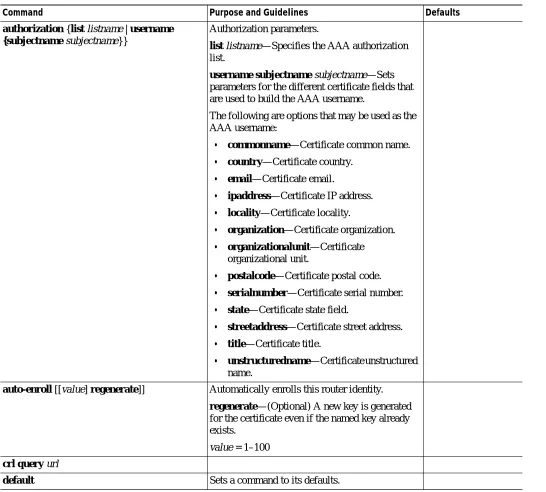
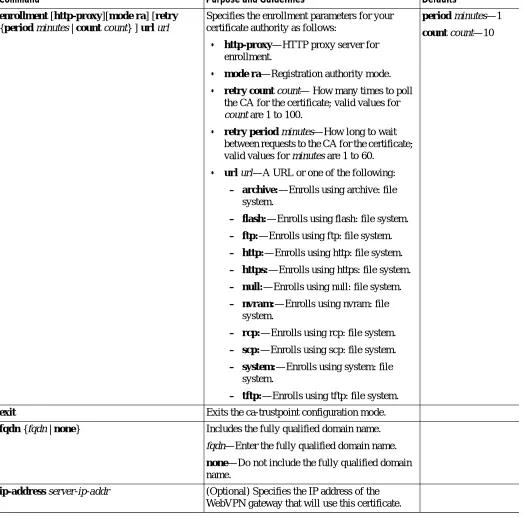
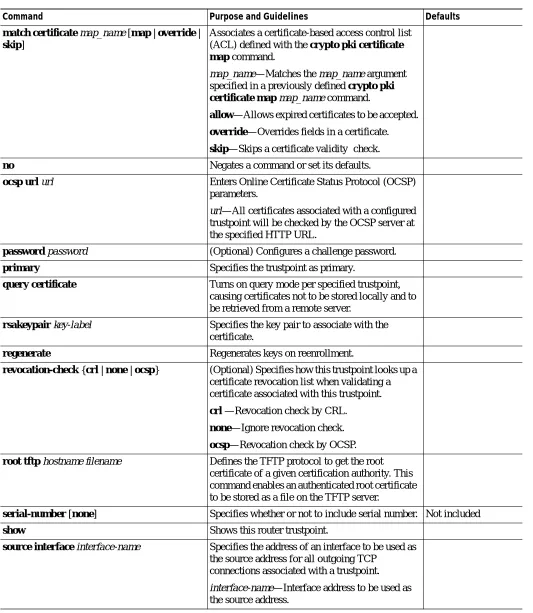
Table 2-1 lists the ca-trustpoint submode commands.
trustpoint-label (Optional) Name of the trustpoint label.
Release Modification
WebVPN Module Release 1.1
Chapter 2 Commands for the Catalyst 6500 Series Switch WebVPN Module
crypto pki trustpoint
Table 2-1 Certificate-Authority Trustpoint Submode Commands
Command Purpose and Guidelines Defaults
authorization {list listname | username {subjectname subjectname}}
Authorization parameters.
list listname—Specifies the AAA authorization list.
username subjectname subjectname—Sets parameters for the different certificate fields that are used to build the AAA username.
The following are options that may be used as the AAA username:
• commonname—Certificate common name.
• country—Certificate country.
• email—Certificate email.
• ipaddress—Certificate IP address.
• locality—Certificate locality.
• organization—Certificate organization.
• organizationalunit—Certificate organizational unit.
• postalcode—Certificate postal code.
• serialnumber—Certificate serial number.
• state—Certificate state field.
• streetaddress—Certificate street address.
• title—Certificate title.
• unstructuredname—Certificate unstructured name.
auto-enroll [[value] regenerate]] Automatically enrolls this router identity.
regenerate—(Optional) A new key is generated for the certificate even if the named key already exists.
value = 1–100
crl query url
Chapter 2 Commands for the Catalyst 6500 Series Switch WebVPN Module crypto pki trustpoint
enrollment [http-proxy][mode ra] [retry {period minutes | count count} ] url url
Specifies the enrollment parameters for your certificate authority as follows:
• http-proxy—HTTP proxy server for enrollment.
• mode ra—Registration authority mode.
• retry count count— How many times to poll the CA for the certificate; valid values for
count are 1 to 100.
• retry period minutes—How long to wait between requests to the CA for the certificate; valid values for minutes are 1 to 60.
• url url—A URL or one of the following:
– archive:—Enrolls using archive: file system.
– flash:—Enrolls using flash: file system.
– ftp:—Enrolls using ftp: file system.
– http:—Enrolls using http: file system.
– https:—Enrolls using https: file system.
– null:—Enrolls using null: file system.
– nvram:—Enrolls using nvram: file system.
– rcp:—Enrolls using rcp: file system.
– scp:—Enrolls using scp: file system.
– system:—Enrolls using system: file system.
– tftp:—Enrolls using tftp: file system.
period minutes—1
count count—10
exit Exits the ca-trustpoint configuration mode.
fqdn {fqdn | none} Includes the fully qualified domain name.
fqdn—Enter the fully qualified domain name.
none—Do not include the fully qualified domain name.
ip-address server-ip-addr (Optional) Specifies the IP address of the WebVPN gateway that will use this certificate.
Table 2-1 Certificate-Authority Trustpoint Submode Commands (continued)
Chapter 2 Commands for the Catalyst 6500 Series Switch WebVPN Module
crypto pki trustpoint
match certificate map_name [map | override | skip]
Associates a certificate-based access control list (ACL) defined with the crypto pki certificate map command.
map_name—Matches the map_name argument
specified in a previously defined crypto pki certificate map map_name command.
allow—Allows expired certificates to be accepted.
override—Overrides fields in a certificate.
skip—Skips a certificate validity check.
no Negates a command or set its defaults.
ocsp url url Enters Online Certificate Status Protocol (OCSP)
parameters.
url—All certificates associated with a configured
trustpoint will be checked by the OCSP server at the specified HTTP URL.
password password (Optional) Configures a challenge password.
primary Specifies the trustpoint as primary.
query certificate Turns on query mode per specified trustpoint, causing certificates not to be stored locally and to be retrieved from a remote server.
rsakeypair key-label Specifies the key pair to associate with the certificate.
regenerate Regenerates keys on reenrollment.
revocation-check {crl | none | ocsp} (Optional) Specifies how this trustpoint looks up a certificate revocation list when validating a certificate associated with this trustpoint.
crl —Revocation check by CRL.
none—Ignore revocation check.
ocsp—Revocation check by OCSP.
root tftp hostname filename Defines the TFTP protocol to get the root certificate of a given certification authority. This command enables an authenticated root certificate to be stored as a file on the TFTP server.
serial-number [none] Specifies whether or not to include serial number. Not included
show Shows this router trustpoint.
source interface interface-name Specifies the address of an interface to be used as the source address for all outgoing TCP
connections associated with a trustpoint.
interface-name—Interface address to be used as
the source address.
Table 2-1 Certificate-Authority Trustpoint Submode Commands (continued)
Chapter 2 Commands for the Catalyst 6500 Series Switch WebVPN Module crypto pki trustpoint
You should declare one trustpoint to be used by the module for each certificate.
The trustpoint-label value should match the key-label value of the keys; however, this is not a requirement.
When you specify the IP address of the WebVPN gateway that will use this certificate, some web browsers compare the IP address in the SSL server certificate with the IP address that might appear in the URL. If the IP addresses do not match, the browser may display a dialog box and ask the client to accept or reject this certificate.
When specifying the subject-name line value, use these guidelines:
• The subject-name command uses the Lightweight Directory Access Protocol (LDAP) format.
• Arguments specified in the subject name must be enclosed in quotation marks if they contain a comma. For example, O=“Cisco, Inc.”
• Some browsers compare the common name (CN) field of the subject name in the SSL server certificate with the hostname that might appear in the URL. If the names do not match, the browser may display a dialog box and ask the client to accept or reject the certificate. Also, some browsers will reject the SSL session setup and close the session if the CN field is not defined in the certificate.
Examples This example shows how to declare the trustpoint PROXY1 and verify connectivity:
webvpn(config)# crypto pki trustpoint PROXY1 webvpn(ca-trustpoint)# rsakeypair PROXY1
webvpn(ca-trustpoint)# enrollment url http://exampleCA.cisco.com webvpn(ca-trustpoint)# ip-address 10.0.0.1
webvpn(ca-trustpoint)# password password webvpn(ca-trustpoint)# serial-number
webvpn(ca-trustpoint)# subject-name C=US; ST=California; L=San Jose; O=Cisco; OU=Lab;
CN=host1.cisco.com
webvpn(ca-trustpoint)# end webvpn# ping example.cisco.com Type escape sequence to abort.
Sending 5, 100-byte ICMP Echos to 20.0.0.1, timeout is 2 seconds: !!!!!
Success rate is 100 percent (5/5), round-trip min/avg/max = 1/1/4 ms webvpn#
subject-name line (Optional) Configures the host name of the WebVPN gateway.
usage {ike | ssl-client | ssl-server} (Optional) Specifies the intended use for the certificate.
vrf vrf Name of the VPN routing and forwarding instance
(VRF) to use for enrollment and obtaining CRLs.
Table 2-1 Certificate-Authority Trustpoint Submode Commands (continued)
Chapter 2 Commands for the Catalyst 6500 Series Switch WebVPN Module
debug webvpn
debug webvpn
To turn on the debug flags in different system components, use the debug webvpn command. Use the no form of this command to turn off the debug flags.
debug webvpn [aaa | cifs | cookie | dns | emweb | http | package | platform [type] | port-forward | sock | timer | trie | tunnel | webservice]
Syntax Description
Defaults This command has no default settings.
Command Modes EXEC
Command History
aaa Enables WebVPN AAA debugs.
cifs Enables WebVPN CIFS.
cookie Enables WebVPN cookie debugs.
dns Enables DNS debugs.
emweb Enables EmWeb debugs.
http Enables HTTP debugs.
package Enables package debugs.
platform type See the “Usage Guidelines” for information on the platform type option. port-forward Enables port-forward debugs.
sock Enables socks debugs.
timer Enables timer debugs.
trie Enables trie debugs. tunnel Enables tunnel debugs. webservice Enables web service debugs.
Release Modification
WebVPN Module Release 1.1
Chapter 2 Commands for the Catalyst 6500 Series Switch WebVPN Module debug webvpn
Usage Guidelines
Note For the following options, module module has the following values:
• fdu—FDU CPU
• ssl1—SSL1 CPU
• tcp1—TCP1 CPU
• tcp2—TCP2 CPU
The platform type has the following options:
The platform app includes the following values:
– app [module [module]]—App Record Layer
– hdr [module [module]]—App HTTP Header Insertion
– module [module]—Module to be debugged
– url [module [module]]—App URL Rewrite
The platform app-driver includes the following values:
– dispatch—Dispatch events
– error—Error events
– event {app | next-hop | tcp}—Event debugging
– fsm—FSM
– mc—Multi-core events
The platform content includes the following values:
– detail [module [module]]—Content detail
– error [module [module]]—Content error
– ipc [module [module]]—Content IPC
– module [module]—Module to be debugged
– rewriting [module [module]]—Content rewriting
– scanning [module [module]]—Content scanning
The platform fdu includes the following values:
– cli [module [module]]—FDU CLI
– hash [module [module]]—FDU hash
– ipc [module [module]]—FDU IPC
– module [module]—Module to be debugged
– trace [module [module]]—FDU trace
The platform flash includes the following values:
– module [module]—Module to be debugged
The platform ipc includes the following values:
Chapter 2 Commands for the Catalyst 6500 Series Switch WebVPN Module
debug webvpn
The platform pc includes the following values:
– module [module]—Module to be debugged
The platform pki includes the following values:
– auth—Certificate authentication and authorization
– ca-pool—CA Pool
– cert—Certificate management
– events—Events
– history—Certificate history
– ipc—IPC messages and buffers
– key—Key management
The platform remote includes the following values:
– loop count [module [module]]—Remote debug. Valid values for count are from 1 to 65535.
– module [module]—Module to be debugged
The platform ssl keyword includes the following values:
– alert [module [module]]—SSL alert events
– error [module [module]]—SSL error events
– handshake [module [module]]—SSL handshake events
– module [module]—Module to be debugged
– pkt [module [module]]—Debugs the received and transmitted SSL packets
Note Use the TCP debug commands only to troubleshoot basic connectivity issues under little or no load conditions (for instance, when no connection is being established to the virtual server or real server).
If you run TCP debug commands, the TCP module displays large amounts of debug information on the console, which can significantly slow down module performance. Slow module
performance can lead to delayed processing of TCP connection timers, packets, and state transitions.
The platform tcp keyword includes the following values:
– events [module [module]]—Debugs the TCP events.
– module [module]—Module to be debugged.
– pkt [module [module]]—Debugs the received and transmitted TCP packets.
– state [module [module]]—Debugs the TCP states.
– timers [module [module]]—Debugs the TCP timers.
The platform tunnel keyword includes the following values:
– hash—Tunnel hash entry
Chapter 2 Commands for the Catalyst 6500 Series Switch WebVPN Module debug webvpn
Examples This example shows how to turn on tunnel debugging:
webvpn# debug webvpn tunnel webvpn#
This example shows how to turn on App debugging:
webvpn# debug webvpn platform app webvpn#
This example shows how to turn on FDU debugging:
webvpn# debug webvpn platform fdu webvpn#
This example shows how to turn on IPC debugging:
webvpn# debug webvpn platform ipc webvpn#
This example shows how to turn on PKI debugging:
webvpn# debug webvpn platform pki webvpn#
This example shows how to turn on SSL debugging:
ssl-proxy# debug webvpn platform ssl ssl-proxy#
This example shows how to turn on TCP debugging:
ssl-proxy# debug webvpn platform tcp ssl-proxy#
This example shows how to turn off TCP debugging:
Chapter 2 Commands for the Catalyst 6500 Series Switch WebVPN Module
do
do
To execute EXEC-level commands from global configuration mode or other configuration modes or submodes, use the do command.
do command
Syntax Description
Defaults This command has no default settings.
Command Modes Global configuration or any other configuration mode or submode from which you are executing the EXEC-level command.
Command History
Usage Guidelines
Caution Do not enter the do command in EXEC mode. Interruption of service may occur.
You cannot use the do command to execute the configure terminal command because entering the configure terminal command changes the mode to configuration mode.
You cannot use the do command to execute the copy or write command in the global configuration mode or any other configuration mode or submode.
Examples This example shows how to execute the EXEC-level show interfaces command from within global configuration mode:
wwbvpn(config)# do show interfaces serial 3/0
Serial3/0 is up, line protocol is up Hardware is M8T-RS232
MTU 1500 bytes, BW 1544 Kbit, DLY 20000 usec, rely 255/255, load 1/255 Encapsulation HDLC, loopback not set, keepalive set (10 sec)
Last input never, output 1d17h, output hang never Last clearing of "show interface" counters never .
. .
wwbvpn(config)#
command EXEC-level command to be executed.
Release Modification
WebVPN Module Release 1.1
Chapter 2 Commands for the Catalyst 6500 Series Switch WebVPN Module nbns-list
nbns-list
To enter the nbnslist submode and configure NetBIOS Name Service (NBNS) servers, use the nbns-list command. Use the no form of this command to remove the specified list from the configuration.
nbns-list name
no nbns-list name
Syntax Description
Defaults This command has no default settings.
Command Modes WebVPN context submode
Command History
Usage Guidelines The listname argument is case-sensitive and can be a maximum of 64 characters.
After you enter the nbns-list command, the prompt changes to the following:
webvpn(config-webvpn-nbnslist)#
After you enter the nbnslist submode, there are commands available to configure the NBNS servers.
Table 2-4 lists the nbnslist submode commands.
name Name for the NBNS list.
Release Modification
WebVPN Module Release 1.1
Chapter 2 Commands for the Catalyst 6500 Series Switch WebVPN Module
nbns-list
Examples This example shows how to enter the nbnslist submode and configure the NBNS list and server address:
webvpn(config)# webvpn context c1
webvpn(config-webvpn-context)# nbns-list list2 webvpn(config-webvpn-nbnslist)# nbns-server 10.1.1.2 webvpn(config-webvpn-nbnslist)# exit
webvpn(config-webvpn-context)#
Related Commands webvpn context
Table 2-2 NBNSlist Submode Commands
Command Purpose and Guidelines Defaults
nbns-server ip_addr [master] [timeout
timeout][retry retries]
Specifies a NetBIOS name service (NBNS) list and server address for common Internet file system (CIFS) name resolution. You can configure up to three servers.
Note Supported only on Windows 2000 and Samba servers running on Linux.
The ip_addrs value specifies the primary domain controller (PDC) on a Windows network.
The master keyword indicates that this is a master browser. Do not enter the master keyword if this a Windows Internet Naming Service (WINS) server.
The timeout value specifies the initial time in seconds to wait for a response to an NBNS query before sending the query to the next server. The default timeout value is 2 seconds; the range is from 1 to 30.
The retries value specifies the number of times to retry sending a NBNS query to the configured servers. This value represents the number of times to cycle through the list of servers before returning an error. The default retries value is 2; the range is 0 to 10.
Timeout is 2 seconds.
Retries is 2 retries.
Chapter 2 Commands for the Catalyst 6500 Series Switch WebVPN Module policy group
policy group
To define a group-policy template, associate a group-policy with a particular proxy server, and enter the group-policy submode, use the webvpn policy group command from context subcommand mode. Use the no form of this command to remove any commands that you have entered in the WebVPN
subcommand mode from the configuration.
policy group group-policy-name
no policy group group-policy-name
Syntax Description
Defaults See the “Usage Guidelines” section for the submode command defaults.
Command Modes WebVPN context submode
Command History
Usage Guidelines The group-policy-name argument is case-sensitive.
After you enter the policy group command, the prompt changes to the following:
webvpn(config-webvpn-group)#
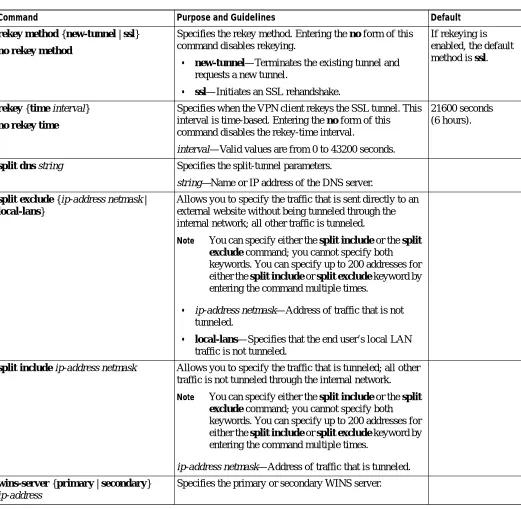
Table 2-3 lists the commands available to configure the group-policy template.
group-policy-name Name of the group policy.
Release Modification
WebVPN Module Release 1.1
Support for this command was introduced on the Catalyst 6500 series switches.
Table 2-3 Group-policy Commands
Command Purpose and Guidelines Defaults
banner value string Specifies the banner string for the user or group. The string value may contain 7-bit ASCII values, HTML tags, and escape
sequences. This string is presented to the user after login.
No string is specified.
exit Exits from group-policy configuration mode.
filter tunnel {ip-acl |
ip-expanded-acl | name}
Defines the tunnel-specific access list.
• ip-acl—IP access list (standard or extended); valid values are
from 1 to 199.
• ip-expanded-acl—IP expanded access list (standard or
extended); valid values are from 1300 to 2699.
• name—Access-list name.
Chapter 2 Commands for the Catalyst 6500 Series Switch WebVPN Module
policy group
functions {file-access | file-browse |
file-entry| svc-enabled| svc-required}
Specifies the file function as follows:
Note You must enable file-access before you can enable file-browse or file-entry.
• file-access—Allows you to access the file servers that are listed on the home page.
• file-browse—Allows you to browse file servers. When you disable this option, you are denied entry to a file server.
• file-entry—Allows you to alter a file in a file server.
• svc-enabled—Allows the user of the group to use tunnel mode. If the SVC fails to install on the end user's PC, the end user can continue to use clientless mode or thin-client mode.
• svc-required—Tunnel mode is required. If the SVC fails to install on the end user’s PC, the end user cannot use other modes.
All values are disabled.
hide-url-bar Disables the URL bar on the portal page.
Note This command applies only to clientless mode.
nbns-list name Specifies the NBNS list for CIFS as defined in the context configuration.
Supported only with Windows 2000 servers and Linux/UNIX.
Note This command applies only to clientless mode.
no Negates a command or set its defaults.
port-forward name Specifies the port-forward list as defined in the context
configuration. Entering the command again overrides the previous setting. The default is to have no list specified,
Note This command applies only to thin-client mode.
No list specified, and port forwarding is disabled.
timeout {idle | session} seconds
Specifies the end-user idle timeout value and maximum session timeout value for the user or group.
idle seconds—Specifies the end-user inactivity. Valid values for idle timeout are from 0 (disabled) to 3600 seconds.
session seconds—Specifies the total session time, regardless of activity. Valid values for session timeout are from 1 to 1209600 seconds.
idle seconds—2100 seconds (35 minutes)
session seconds—43200 seconds (12 hours)
svc Specifies the tunnel configuration; see thesvc command for additional information.
url-list name Specifies the URL list as defined in the context configuration. Entering the command again overrides the previous setting.
Note This command applies only to clientless mode.
No list is specified.
Table 2-3 Group-policy Commands
Chapter 2 Commands for the Catalyst 6500 Series Switch WebVPN Module policy group
Examples This example show how to configure the WebVPN context and the WebVPN group-policy:
webvpn(config)# webvpn context cisco
webvpn(config-webvpn-context)# policy group cisco_tunl webvpn(config-webvpn-group)# function svc-enabled webvpn(config-webvpn-group)# timeout idle 36000 webvpn(config-webvpn-group)# timeout session 144000
webvpn(config-webvpn-group)# svc address-pool "cisco_tunl_pool" webvpn(config-webvpn-group)# svc keep-client-installed
webvpn(config-webvpn-group)# svc rekey time 40000 webvpn(config-webvpn-group)# svc rekey method new-tunnel webvpn(config-webvpn-group)# svc dpd-interval gateway 0 webvpn(config-webvpn-group)# svc dpd-interval client 300 webvpn(config-webvpn-group)# exit
Chapter 2 Commands for the Catalyst 6500 Series Switch WebVPN Module
port-forward
port-forward
To enter the port-forwarding submode and configure port-forwarding entries, use the port-forward command. Use the no form of this command to remove the given list from the configuration.
port-forward listname
no port-forward listname
Syntax Description
Defaults This command has no default settings.
Command Modes WebVPN context submode
Command History
Usage Guidelines The listname argument is case-sensitive and can be a maximum of 64 characters.
After you enter the port-forward command, the prompt changes to the following:
webvpn(config-webvpn-port-fwd)#
After you enter the port-forward submode, there are commands available to configure the port-forwarding services.Table 2-4 lists the port-forwarding submode commands.
listname Name for list of forwarded ports.
Release Modification
WebVPN Module Release 1.1
Support for this command was introduced on the Catalyst 6500 series switches.
Table 2-4 Port-Forwarding Submode Commands
Command Purpose and Guidelines Defaults
default local-port
port-number
Specifies the default local port; valid values are from 1 to 65535.
Chapter 2 Commands for the Catalyst 6500 Series Switch WebVPN Module port-forward
You can specify multiple entries for a given listname value. The listname value is provided to group the port forwarding entries into a list that can be applied to a username or a group policy.
Specifying no removes the matching line from the configuration; the remote server and remote port do not need to be included.
Examples This example shows how to enter the port-forwarding submode and configure port-forwarding entries:
webvpn(config-webvpn-context)# port-forward abc
webvpn(config-webvpn-port-fwd)# local-port 25 remote-server "mailman" remote-port 25
description "SMTP server"
webvpn(config-webvpn-port-fwd)# local-port 110 remote-server "pop3-ny" remote-port 110
description "POP3-server"
webvpn(config-webvpn-port-fwd)# local-port 143 remote-server "imap-ny" remote-port 143
description "IMAP server"
webvpn(config-webvpn-port-fwd)#
Related Commands url-list
webvpn context
local localport Specifies the local port that is listened upon; a localport value may be used only once within a given listname. Valid values are from 1 to 65535. After you specify the local port, the following keywords and arguments are available:
• remote-server remoteserver—Specifies the DNS name or IP address to connect to on the remote server.
• remote-port remoteport—Specifies the port to connect to on the remote server. Valid values are from 1 to 65535.
• description description—Specifies an application name or short description to display on the end user applet window. The maximum length of the description value is 64 characters.
no Removes the matching line from the configuration.
Table 2-4 Port-Forwarding Submode Commands (continued)
Chapter 2 Commands for the Catalyst 6500 Series Switch WebVPN Module
show webvpn context
show webvpn context
To display information about a specific context, use the show webvpn context command.
show webvpn context name
Syntax Description
Defaults This command has no default settings.
Command Modes EXEC
Command History
Examples This example shows how to collect information about the software-forced reset:
webvpn# show web context tunnel Admin Status: up
Operation Status: up TCP Policy not configured SSL Policy not configured
Certificate authentication type: peer certificate is always accepted AAA Authentication List: webvpn
AAA Authentication Domain not configured Default Group Policy: tunnel
Associated WebVPN Gateway: s2
Domain Name and Virtual Host not configured Maximum Users Allowed: 2560 (default)
NAT Address Range: 10.81.12.4-10.81.12.9 mask 255.255.255.0 VRF Name not configured
webvpn#
name Specifies the name of the context.
Release Modification
WebVPN Module Release 1.1
Chapter 2 Commands for the Catalyst 6500 Series Switch WebVPN Module show webvpn dispatch
show webvpn dispatch
To display WebVPN dispatching information, use the show webvpn dispatch command.
show webvpn dispatch {algorithm | member | stats}
Syntax Description
Defaults This command has no default settings.
Command Modes EXEC
Command History
Examples This example shows how to display the WebVPN dispatching statistics:
webvpn# show webvpn dispatch stat SSLVPN: Dispatching Statistics: Total packets dispatched = 2827
Total packets need multiple buffers = 12 Total packets with no core id = 93
Total packets with embedded core id = 2722 Per Core Dispatching Statistics:
Assigned Core-ID Symbolic-ID Connections --- 1 SwCidIos 43 7 SwCidVpn1 51
This example shows how to display the current CLB algorithm:
webvpn# show webvpn dispatch algorithm SSLVPN: Current CLB algorithm:
Weighted Round Robin (Master Weight = 5 Slave Weight = 6)
algorithm Displays the current content load balancing (CLB) algorithm. member Displays CLB member table infomation.
stats Displays the dispatching statistics.
Release Modification
WebVPN Module Release 1.1