Towards a Prototyping Tool for Behavior Oriented Authoring of
Conversational Agents for Educational Applications
Gahgene Gweon, Jaime Arguello, Carol Pai, Regan Carey, Zachary
Zaiss, Carolyn Rosé
Human-Computer Interaction Institute/ Language Technologies Institute Carnegie Mellon University
5000 Forbes Avenue, Pittsburgh, PA 15213 USA
Ggweon,jarguell,cpai,rcarey,zzaiss,[email protected]
Abstract
Our goal is to develop tools for facili-tating the authoring of conversational agents for educational applications, and in particular to enable non-computational linguists to accomplish this task efficiently. Such a tool would benefit both learning researchers, al-lowing them to study dialogue in new ways, and educational technology re-searchers, allowing them to quickly build dialogue based help systems for tutoring systems. We argue in favor of a user-centered design methodology. We present our work-in-progress de-sign for authoring, which is motivated by our previous tool development ex-periences and preliminary contextual interviews and then refined through user testing and iterative design.
1
Introduction
This paper reports work in progress towards developing TuTalk, an authoring environment developed with the long term goal of enabling the authoring of effective tutorial dialogue agents. It was designed for developers without expertise in knowledge representation, artificial intelligence, or computational linguistics. In our previous work we have reported progress
to-wards the development of authoring tools spe-cifically focusing on robust language understanding capabilities (Rosé et al., 2003; Rosé & Hall, 2004; Rosé, et al., 2005). In this paper, we explore issues related to authoring both at the dialogue and sentence level, as well as the interaction between these two levels of authoring. Some preliminary work on the un-derlying architecture is reported in (Jordan, Ro-sé, & VanLehn, 2001; Aleven & RoRo-sé, 2004; Rosé & Torrey, 2004). In this paper we focus on the problem of making this computational linguistics technology accessible to our target user population.
We are developing the TuTalk authoring en-vironment in connection with a number of exist-ing local research projects related to educational technology in general and tutorial dialogue in particular. It is being developed primarily for use within the Pittsburgh Sciences of Learning Center (PSLC) data shop, which includes devel-opment efforts for a suite of authoring tools to be used for building the infrastructure for 7 dif-ferent computer enhanced courses designated as LearnLab courses. These LearnLab courses, which are conducted within local secondary schools as well as universities, and which in-clude Chinese, French, English as a Second Language, Physics, Algebra, Geometry, and Chemistry, involve heavy use of technology both for the purpose of supporting learning as well as for the purpose of conducting learning research in a classroom setting. Other local pro-jects related to calculus and thermodynamics
tutoring also have plans to use TuTalk. In this paper we will discuss specifically how we have used corpora related to ESL, physics, thermody-namics, and calculus in our development effort.
To support this multi-domain effort, it is es-sential that the technology we develop be do-main independent and usable by a non-technical user population, or at least a user population not possessing expertise in knowledge representa-tion, artificial intelligence, or computational lin-guistics. Thus, we are employing a corpus based methodology that bootstraps domain specific authoring using examples of desired conversa-tional behavior for the domain.
2
A Historical Perspective
While a focus on design based on standards and practices from human-computer interaction community have not received a great deal of attention in previously published tool develop-ment efforts known to the computational linguis-tics community, our experience tells us that insufficient attention to these details leads to the development of tools that are unusable, particu-larly to the user population that we target with our work.
Some desiderata related to the design of our system are obvious based on our target user population. Currently, many educational tech-nology oriented research groups do not have computational linguists on their staff with the expertise required to author domain specific knowledge sources for use with sophisticated state-of-the-art understanding systems, such as CARMEL (Rosé, 2000) or TRIPS (Allen et al., 2001). However, previous studies have shown that, while scaffolding and guidance is required to support the authoring process, non-computational linguists possess many of the ba-sic skills required to author conversational inter-faces (Rosé, Pai, & Arguello, 2005). Because the main barrier of entry to such sophisticated tools are expertise in understanding the underlying data structures and linguistically motivated rep-resentation, our tools should have an interface that masks the unnecessary details and provides intuitive widgets that manipulate the data in ways that are consistent with the mental models the users bring with them to the authoring proc-ess. In order to be maximally accessible to
de-velopers of educational technology, the system should involve minimal programming.
The design of Carmel-Tools (Rosé et al., 2003; Rosé & Hall, 2004), the first generation of our authoring tools, was based on these obvious desiderata and not on any in-depth analysis of data collected from our target user population. While an evaluation of the underlying computa-tional linguistics technology showed promise (Rosé & Hall, 2004), the results from actual au-thoring use were tremendously disappointing.
A formal study reported in (Rosé, et al., 2005) demonstrates that even individuals with exper-tise in computational linguistics have difficulty predicting the coverage of knowledge sources that would be generated automatically from ex-ample texts annotated with desired representa-tions. Informal user studies involving actual use of Carmel-Tools then showed that a conse-quence of this lack of ability is that authors were left without a clear strategy for moving through their corpus. As a result, time was lost from an-notating examples that did not yield the maxi-mum amount of new knowledge in the generated knowledge sources. Furthermore, since authors tended not to test the generated knowledge sources as they were annotating examples, errors were difficult for them to track later, despite fa-cilities designed to help them with that task.
Another finding from our user studies was that although the interface prevented authors from violating the constraints they designed into their predicate language, it did not keep authors from annotating similar texts with very different representations, thus introducing a great deal of spurious ambiguity. Thus, they did not naturally maintain consistency in their application of their own designed meaning representation languages across example texts. An additional problem was that authors sometimes decomposed exam-ples in ways that lead to overly general rules, which then lead to incorrect analyses when these rules matched inappropriate examples.
3
Preliminary Design Intents from
Contextual Interviews
The core essence of the user-centered design approach is designing from data rather than from preconceived notions of what will be useful and what will work well. Expert blind spots often lead to designs based on intuitions that overlook needs or overly emphasize issues that are not centrally important (Koedinger & Nathan, 2004; Nathan & Koedinger, 2000). Contextual inquiry is used at an early stage in the user-centered de-sign process to collect the foundational data on which to build a design (Beyer and Holtzbatt, 2000). Contextual Inquiry is a popular method developed within the Human Computer Interac-tion community where the design team gathers data from end users while watching what the users do in context of their work. Contextual interviews are used to illuminate these observa-tions by engaging end-users in interviews in which they show specific instances within their work life that are relevant for the design process. These methods help define requirements as well as plan and prioritize important aspects of func-tionality. At the same time, the system design-ers get a chance to gain insights about the usdesign-ers’ environment, tasks, cultural influences and diffi-culties in the current processes.
Many aspects of the Tutalk tool were de-signed based on contextual inquiry (CI) data. The design team conducted five CIs with users who have experience in using existing authoring tools such as Carmel-Tools (Rosé & Hall, 2004). The design team leader also spent one week ob-serving novice tool users working with the cur-rent set of tools at an Intelligent Tutoring Summer School. Here we will discuss some findings from those CIs and observations and how they motivated some general design intents, which we flesh out later in the paper.
A common pattern we observed in our CIs was that having different floating windows for different tasks fills up the computer screen rela-tively quickly and confuses authors as to where they are in the process of authoring. The TuTalk design addresses this observed problem by an-choring the main window and switching only the components of the window as needed. A stan-dard logic for layout and view switching helps authors know what to expect in different
con-texts. Placement of buttons in TuTalk is consis-tently near the textboxes that they control, and a bounding box is drawn around related sets of controls so that the user does not get lost trying to figure out where the buttons are or what they are for.
We observed that authors needed to refer to cheat sheets and user documentation to use their current tools effectively and that different users did not employ the same terminology to refer to similar functionality, which made communica-tion difficult. Furthermore, their current suites of tools were not designed as one integrated en-vironment. Thus, a lot of shuffling of files from one directory to another was required in order to complete the authoring process. Users without Unix operating system experience found this especially confusing. Our goal is to require only very minimal documentation that can be ob-tained on-line in the context of use.
TuTalk is a single, integrated environment that makes use of GUI widgets for actions rather then requiring any text-based commands or file system activity. In this way we hope to avoid requiring the users to use a manual or a “cheat-sheet” reference for the commands they forget. As is common practice, TuTalk also uses consis-tent labels throughout the interface to promote understandability and communication with tool developers as well as other dialogue system de-velopers.
4
Exploring the User’s Mental Model
through User Studies
As an additional way of gaining insights into what sort of interface would make the process of authoring conversational interfaces accessible, we conducted a small, exploratory user study in which we examined how members of our target user population think about the structure of lan-guage.
three levels of conversational interface author-ing:
Macro Organization Tasks (dialogue level)
Level 1. How authors understand, seg-ment, and organize dialogue topics Level 2. How authors generalize across dialogues as part of constructing a “model” script
Micro Organization Task (sentence level)
Level 3. How authors categorize and decompose sentences within these dia-logues
The first group (Group A, five participants) was asked to perform MacroOrganization Tasks
before processing sentences for the Micro Or-ganization Tasks. The second group (Group B, four participants) was asked to perform these sets of tasks in the opposite order.
Our findings for the Macro Organization Tasks showed that participants effectively broke down dialogues into segments that reflected in-tuitive breaks in the conversation. These topics were then organized into semantically related categories. Although participants were not ex-plicitly instructed on how to organize the topics, every participant used spatial proximity as a rep-resentation for semantic relatedness. Another finding was the presence of primacy effects in the “model” restaurant scripts they were asked to construct. These scripts were heavily influenced by the first dialogue read. As a result, important topics that surfaced in the other two dialogues were omitted from the model scripts.
Furthermore, we found that participants in Group B took much longer in completing the
Micro Organization Task (35-40 minutes as op-posed to 25-30 minutes) without performing the
Macro Organization Tasks first. In general, we found that participants clustered sentences based on surface characteristics rather than creating ontologically similar classes that would be more useful from a system development perspective. In a follow-up study we are exploring ways of guiding users to cluster sentences in ways that are more useful from a system building perspec-tive.
Our preliminary findings show that getting an overall sense of the corpus facilitates micro-level organization. This is hindered by two
fac-tors: First, primacy effects interfere with macro-level comprehension. Second, system developers struggle to strategically select portions of their corpus on which to focus their initial efforts.
5
Stage One: Corpus Organization
While existing tools from our previous work required authors to organize their corpus data prior to their interaction with the tools, both our contextual research and user studies indicated that support for organizing corpus data prior to authoring is important.
In light of this concern, the TuTalk authoring process consists of three main stages. Corpus collection, corpus data organization through what we call the InfoMagnet interface, and au-thoring propper. First, a corpus is collected by asking users to engage in conversation using either a typed or spoken chat interface. In the case of spoken input, the speech is then tran-scribed into textual form. Second, the raw cor-pus data is automatically preprocessed for display and interactive organization using the InfoMagnet interface. As part of the preprocess-ing, dialogue protocols are segmented automati-cally at topic boundaries, which can be adjusted by hand later during authoring propper. The topic oriented segments are then clustered semi-automatically into topic based classes. The out-put from this stage is an XML file where dia-logue segments are reassembled into their original dialogue contexts, with each utterance labeled by topic. This XML file is finally passed onto the authoring environment propper, which is then used for finer grained processing, such as shifting topic segment boundaries and labeling more detailed utterance functionality.
5.1 Corpus Collection
An important part of our mission is developing technology that can use collected and automati-cally pre-processed corpus data to guide and streamline the authoring process. Prior to the arduous process of organizing and extracting meaningful data, a corpus must be collected.
As part of the PSLC and other local tutorial dialogue efforts we have collected corpus data from multiple domains that we have made use of in our development process. In particular, we have been working with data collected in con-nection with the PSLC Physics and English as a Second Language LearnLab courses as well as local Calculus and Thermodynamics tutoring projects. Currently we have physics tutoring data primarily from one physics tutor (interac-tions with 40 students), thermodynamics data from four different tutors (interactions with 27 students), Calculus data from four different tu-tors (84 dialogues), and ESL dialogues collected from 15 pairs of students (30 dialogues alto-gether).
While we have drawn upon data from all of these domains for testing the underlying lan-guage processing technology for our develop-ment effort, for our user studies we have so far mainly drawn upon our ESL corpus, which in-cludes conversations between students about every-day tasks such as ordering from a restau-rant or about their pets. We chose the language ESL data for our initial user tests because we expected it to be easy for a general population to relate to, but we plan to begin using calculus data as well.
5.2 InfoMagnets Interface
As mentioned previously, once the raw dia-logue corpus is collected, the next step is to sift through this data and assign utterances (or groups of utterances) to classes conceptualized by the author. Clustering is a natural step in this kind of exploratory data analysis, as it promotes learning by grouping and generalizing from what we know about some of the objects in a cluster. For this purpose we have designed the InfoMagnets interface, which introduces a non-technical metaphor to the task of iterative docu-ment clustering. The InfoMagnets interface was
designed to address the problems identified in the user study discussed above in Section 4. Specifically, we expected that those problems could be addressed with an interface that:
1. Divides dialogues into topic based segments and automatically clusters them into conceptually similar classes 2. Eliminates primacy effects of sequen-tial dialogue consumption by creating an inclusive compilation of all dialogue topics
3. Makes the topic similarity of docu-ments easily accessible to the user
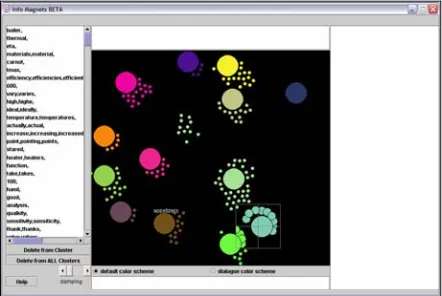
The InfoMagnets interface is displayed in Figure 1. The larger circles (InfoMagnets) cor-respond to cluster centroids and the smaller ones (particles) correspond to actual spans of text. Lexical cohesion in the vector space translates into attraction in the InfoMagnet space. The at-traction from each particle to each InfoMagnet is evident from the particle’s position with respect to all InfoMagnets and its reaction-time when an InfoMagnet is moved by the user, which causes the documents that have some attraction with it to redistribute themselves in the InfoMagnet space.
Figure 1 InfoMagnets Interface
Initially, the corpus is clustered using the Bi-secting K-means Algorithm described in (Kumar et al., 1998). Although this is a hard clustering algorithm, the InfoMagnet interface shows the particles association with all clusters, given by the position of the particle. Using a cross-hair lens, the author is able to view the contents of each cluster centroid and each particle. The au-thor is able to select a group of particles and view the common features between these parti-cles and any InfoMagnet in the space. The inter-face allows the editing of InfoMagnets by adding and removing features, splitting In-foMagnets, and removing InfoMagnets. When the user edits an InfoMagnets, the effect in the particle distribution is shown immediately and in an animated way.
5.3 XML format
The data collected from the conversations in .txt format are reformatted into XML format before being displayed with InfoMagnet tool. The basic XML file contains a transcription of the conversational data and has the following structure: Under the top root tag, there is <dia-logue> tag which designates the conversion about a topic. It has an “id” attribute so that we can keep track of each separate conversation. Then each sentence has a <sentence> tag with two attributes “uid” and “agent”. “uid” is a uni-versal id and “agent” tells who was speaking. Additionally, sentences are grouped into seg-ments, marked off with a <subtopic> tag.
The user’s interaction with the InfoMagnet in-terface adds a “subtopic-name” attribute to the subtopic tag. Then, the authoring interface proper, described below, allows for further ad-justments and additions to the xml tags. The final knowledge sources will be generated from this XML based representation.
6
Authoring
The authoring environment proper consists of two main views, namely the authoring view and tutoring view. The authoring view is where the author designs the behavior of the conversa-tional agent. The authoring view has two levels; the topic level and the subtopic level. The tutor-ing view is what a student will be looktutor-ing at
when interacting with the conversational agent. Our focus here is on the Authoring view.
Authoring View: Topic Level
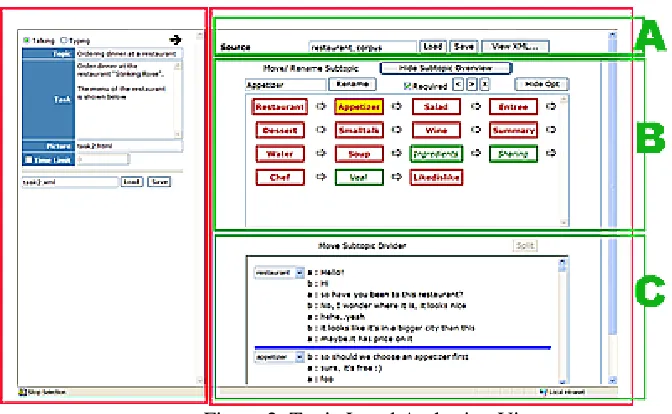
The Topic level of the authoring view allows for manipulating the relationship between subtopics as well as the definition of the subtopic. Figure 2 shows the topic level authoring view, which consists of two panels. In the left, the author in-puts the description of the task that the student will engage in with the agent. The author can specify whether the student will be typing or talking, the title of the topic, the task description, an optional picture that aids with the task (such as a menu or a map of a city), and a time limit.
In the right panel of the topic level authoring view, the structure imposed on the data by inter-action with the InfoMagnets interface is dis-played in sequential form. The top section of the interface (figure 2, section A) has a textbox for specifying an xml file to read. The next section (figure 2, section B), “Move / Rename Subtopic” displays the subtopics. The order of the subtop-ics displayed in this section acts as a guideline for the agent to follow during the conversation. Double-clicking on a subtopic will display a subtopic view on the right panel. This view acts as a reference for the agent’s conversation within the subtopic and is explained in the next section. The author can also rearrange the order of subtopics by selecting a subtopic and using the “>” and “<” buttons to move the subtopic right or left respectively. “x” is used to delete the subtopic. The author can also specify whether the discussion of a subtopic is required (displayed in red) or optional (in green) using the checkbox that is labeled “required”. Clicking on the “Hide Opt” button will only display the required subtopics.
Figure 2: Topic Level Authoring View
Authoring View: Subtopic Level
While the Topic View portion of the authoring interface proper allows specification of which subtopics can occur as part of a dialogue, which are required and which are optional, and what the default ordering is, the Subtopic Level is for specification of the low level turn-by-turn details of what happens within a subtopic segment. This section reports early work on the design of this portion of the interface.
The subtopic view displays a structure that the conversational agent refers to in deciding what its next contribution should be. The building blocks from which knowledge sources for the dialogue engine will be generated are templates abstracted from example dialogue segments, similar to KCD specifications (Jordan, Rosé, & VanLehn, 2001; Rosé & Torry, 2004). As part of the process of abstracting templates, each ut-terance is tagged with its utut-terance type using a menu-based interface as in (Gweon et al., sub-mitted). The utterance type determines what would be an appropriate form for a response. Identifying this is meant to allow the dialogue manager to maintain coherence in the emerging dialogue. Users may also trim out undesired portions of text from the actual example frag-ments in abstracting out templates to be used for generating knowledge sources.
Each utterance type has sets of template re-sponse types associated with them. The full set of utterance types includes Open questions, Closed questions, Understanding check ques-tions, Asserques-tions, Commands/Requests, Ac-knowledgements, Acceptances, and Rejections. The templates will not be used in their authored form. Instead, they will be used to generate knowledge sources in the form required by the backend dialogue system as in (Rosé & Hall, 2004), although this is still work in progress. Each template is composed of one or more ex-changes during which the speaker who initiated the segment maintains conversational control. If control shifts to the other speakers, a new tem-plate is used to guide the conversation. After each of the controlling speaker’s turns within the segment are listed a number of prototypical sponses. One of these responses is a default re-sponse that signals that the dialogue should proceed to the next turn in the template. The other prototypical responses are associated with subgoals that are in turn associated with other templates. Thus, the dialogue takes on a hierar-chical structure.
when the dialogue system has conversational control. In this case, conversations can be man-aged as in (Rosé et al., 2001). The second way in which templates are used is for determining how to respond when user’s have conversational con-trol. Provided that the user’s utterances match what is expected of the conversational partici-pant who is in control based on the current tem-plate, then the system can simply pick one of the expected responses. Otherwise if at some point the user’s response does not match, the system should check whether the user is initiating yet a different segment. If not, then the system should take conversational control.
7
Future Plans
In this paper we have discussed our user re-search and design process to date for the devel-opment of TuTalk, an authoring environment for conversational agents for educational purposes. We are continuing our user research and design iteration with the plan of end-to-end system test-ing in actual use starttest-ing this summer.
Acknowledgements
This work was supported in part by Office of Naval Research, Cognitive and Neural Sciences Division Grant N00014-05-1-0043 and NSF Grant SBE0354420.
References
Aleven , V. and Rosé, C. P. 2004. Towards Easier Creation of Tutorial Dialogue Systems: Integration of Authoring Environments for Tutoring and Dia-logue Systems, Proceedings of the ITS Workshop on Tutorial Dialogue Systems
Allen, J., Byron, D., Dzikovska, M., Ferguson, G., Galescu, L., & Stent, A. 2000. An Architecture for a Generic Dialogue Shell. NLENG: Natural Lan-guage Engineering, Cambridge University Press, 6 (3), 1-16.
Beyer, H. & Holtzblatt, K. (1998). Contextual De-sign, Morgan Kaufmann Publishers.
Gweon, G., Rosé, C., Wittwer, J., Nueckles, M. (submitted). Supporting Efficient and Reliable Content Analysis with Automatic Text Processing Technology, Submitted to INTERACT ’05.
Jordan, P., Rosé, C. P., & VanLehn, K. (2001). Tools for Authoring Tutorial Dialogue Knowledge. In J. D. Moore, C. L. Redfield, & W. L. Johnson (Eds.),
Proceedings of AI-ED 2001 (pp. 222-233). Am-sterdam, IOS Press.
Koedinger, K. R. & Nathan, M. J. (2004). The real story behind story problems: Effects of representa-tions on quantitative reasoning. The Journal of the Learning Sciences, 13(2).
Nathan, M. J. & Koedinger, K. R. (2000). Moving beyond teachers’ intuitive beliefs about algebra learning. Mathematics Teacher, 93, 218-223.
Porter, M. 1980. An Algorithm for Suffix Stripping,
Program 14 {3}:130 – 137.
Robertson, S. and Walker, S., 1994. Some simple effective approximations to the 2-poisson model for probabilistic weighted retrieval Proceedings of SIGIR-94.
Rosé, C. P., and Torrey, C. (2004). ,DRESDEN: To-wards a Trainable Tutorial Dialogue Manager to Support Negotiation Dialogues for Learning and Reflection, Proceedings of the Intelligent Tutoring Systems Conference.
Rosé, C. P. and Hall, B. (2004). A Little Goes a Long Way: Quick Authoring of Semantic Knowledge Sources for Interpretation, Proceedings of SCa-NaLu ‘04.
Rosé, C. P. 2000. A framework for robust semantic interpretation. In Proceedings of the First Meeting of the North American Chapter of the Association for Computational Linguistics, pages 311–318.
Rosé, C. P., Pai, C., Arguello, J. 2005. Enabling Non-Linguists to Author Advanced Conversational In-terfaces Easily. Proceedings of FLAIRS 2005.
Steinbach, Kepis, and Kumar, A Comparison of
Document Clustering Techniques, pg. 8.