ABSTRACT
LUTTRELL, WESLEY ABRAM. An Examination of Auditory Warnings and Their Effects on a Computer User’s Response to Error Messages. (Under the direction of Dr. Christopher Mayhorn.)
The use of the auditory modality has many advantages across domains, especially when a need to alert the human operator of an error or change in the state of the system arises. Thus, there is a strong argument for the effectiveness of auditory warnings in a typical computing environment. The purpose of such a computerized warning is to elicit a specific, correct response to the message being conveyed to the user. In the following research, eighty-one participants performed an ordinary computing task and were
An Examination of Auditory Warnings and Their Effects on a Computer User’s Response to Error Messages
by
Wesley A. Luttrell
A thesis submitted to the Graduate Faculty of North Carolina State University
in partial fulfillment of the requirements for the degree of
Master of Science
Psychology
Raleigh, North Carolina 2013
APPROVED BY:
_______________________________ ______________________________ Dr. Anne McLaughlin Dr. Michael Wogalter
________________________________ Dr. Christopher Mayhorn
DEDICATION
BIOGRAPHY
I was born and raised in Louisville, Kentucky, where I attended St. Xavier High School. I continued my education at the University of Kentucky in Lexington, Kentucky where I received my Bachelor’s degree in Psychology and first learned about Human Factors
ACKNOWLEDGEMENTS
First and foremost I would like to thank my thesis committee members, Chris Mayhorn (committee chair and advisor), Anne McLaughlin and Mike Wogalter for their support and effort. Thank you for your help, guidance and for sharing your knowledge and insights.
I also would like to thank my parents. Without their guidance throughout my life and especially their patience and encouragement in my pursuit of this degree, I would not have achieved this milestone. Thanks Mom and Dad!
Without a strong support system, this would have never been completed. I need to thank all my friends and loved ones who have given me advice, listened to me, let me blow off steam and above all kept me grounded, positive and moving forward throughout this process.
TABLE OF CONTENTS
LIST OF TABLES ………...……….. vi
LIST OF FIGURES ………...…………... vii
INTRODUCTION ………...………... 1
Using HCI as a Tool to Understand How People Interact with Warnings ………... 1
How Warning Information is Processed ………...…….... 2
Textboxes, Usability, and Warnings: Making Computer Safety Easier ………...….... 5
Exploring the Benefits of Auditory Warnings ………...………... 6
Alleviating Stress on Visual Resources via an Auditory Warning …………...…….... 8
Some Factors to be Considered when Developing Conspicuous Auditory Stimuli ... 10
Using Auditory Icons to Supplement Visual Warnings ………...………... 13
Current Research ………...…..……….... 15
Research Hypotheses ………...…….……….. 15
METHOD ………....…... 16
Participants ………....……….. 16
Design ………...….………. 17
Stimuli ………...……….. 17
Procedure ………...….……… 19
RESULTS ………...….……….. 21
Results from the Computerized Warning Procedure ………...….……….. 21
Self-Report Results from the Questionnaire ………...….………... 25
DISCUSSION ………...…….……….... 28
CONCLUSIONS ………...….………... 33
REFERENCES ………...….……….. 34
APPENDIX …….………...….………... 43
LIST OF TABLES
Table 1. Cumulative Responses to the Error Message by Condition ... 22
Table 2. Responses to the Error Message, Combined Persistence Conditions ...23
Table 3. Pilot Study Ratings of Auditory Stimuli ………...………..41
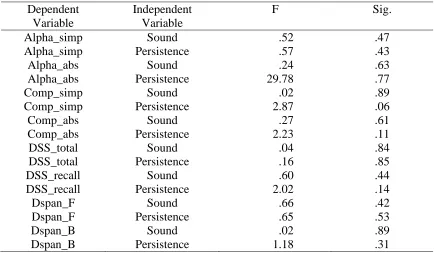
Table 4. Cognitive Ability Tests ANOVA Results ………...……… 41
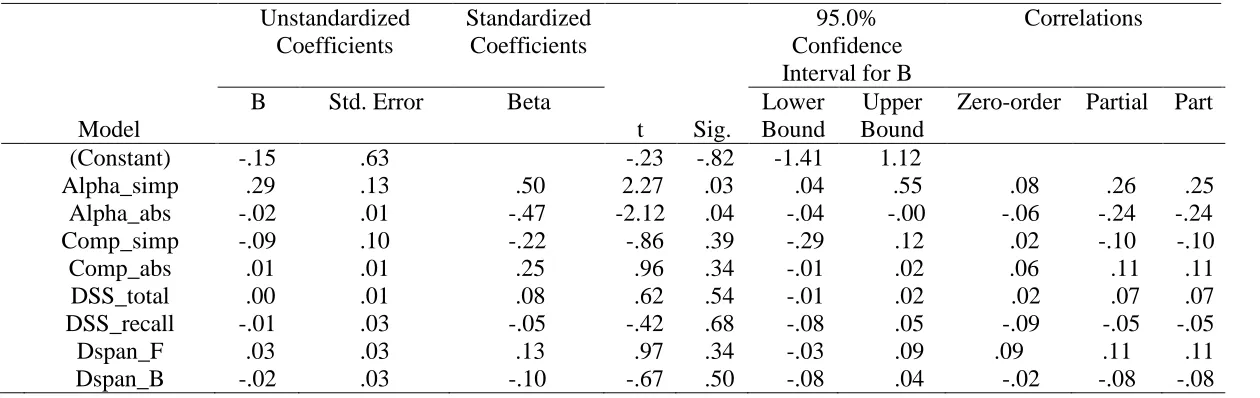
Table 5. Cognitive Ability Tests Multiple Regression Results …………...…..……. 42
LIST OF FIGURES
Figure 1. Communication-Human Information Processing (C-HIP) Model ……... 38 Figure 2. Example error message ………...……… 39 Figure 3. Screen shot of the experiment’s initial error message that was
presented to all participants ……..………...……... 39 Figure 4. Screen shot of the dialog box that appeared if a participant chose
INTRODUCTION
Warnings are defined as safety communications used to inform people about hazards, system states, changes, or numerous other factors so that undesirable consequences are avoided or minimized. Fire alarms, smoke detectors, caution signs, illuminated road barriers and automotive dashboard instrument lights are all warnings in their respective contexts that we encounter on an almost daily basis. These safety communications come in many different forms, including visual and auditory modalities. As technology progresses, warnings are becoming more dynamic and departing from the traditional static warnings found on labels (see Wogalter & Mayhorn, 2005 for a comprehensive review). With the advent of new technology-based warnings, much can be gained from reviewing the Human-Computer Interaction (HCI) literature for the purpose of understanding how people might respond to these warnings. For instance, human response to error messages and other dialog boxes encountered during typical computer usage might be better understood from an HCI standpoint.
result (both the positive and the negative) are applied to the design or redesign of the computer system (Dix, 2005).
How Warning Information is Processed
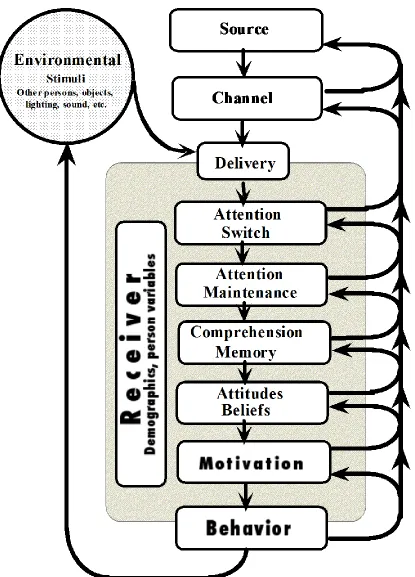
While HCI efforts are generally useful in understanding how people interact with technology, it should be informative to note that there are specific models that describe how people interact with warnings in general. As illustrated in Figure 1, the Communication-Human Information Processing (C-HIP) Model is a popular model used for structuring the stages involved as warning information flows from a source (e.g., a manufacturer) to a receiver (e.g., the user) who then cognitively processes the information to possibly produce a safety behavior (Wogalter, 2006b). There are seven factors that make up this model: the first two are Source and Channel of the information.
The source is the first transmitter of warning information and can come in many different forms such as a company or government. A critical role the source must fulfill is to identify hazards and determine if warning about these hazards is necessary (Sanders & McCormick, 1993). Hazard analyses are performed to determine whether the hazards can be designed out or guarded against. If they cannot be designed out of the system or effectively guarded, warnings are necessary. It is then the source’s obligation to determine how the hazards should be warned.
The channel in the C-HIP Model refers to the medium and modality in which
scenarios for warnings in the auditory modality. There are two dimensions incorporating the channel: media and modality. Media refers to where the warning information is embedded in the system. Modality refers to the sensory modality used to capture the information by the receiver. Research has shown that presentation in one modality is effective, but presentation in multiple modalities (e.g. visual and auditory) simultaneously or in sequence is more
effective (Paivio, 1991). These multimodal warnings provide redundancy and have the ability to attract an individual’s attention especially when one modality may be impaired or
obstructed. Transmitting the warning to the intended receiver is the next step in the process (Wogalter, 2006b). Interactive warnings, those requiring action by the user, have been shown to increase instances of being noticed and with the frequency of compliance. An interactive warning requires the user to deviate from procedures that may be well-learned or
automatized. This interruption typically increases the likelihood the user will notice and take the required action regarding the warning. By requiring some sort of action to be taken, rather than a simple notification warning, the action the designers intended the user to take (Duffy, Kalsher & Wogalter, 1995).
The environment is an element that is not always entirely under any one individual’s
control. Other stimuli may be present in the form of other warnings or distracting elements. With respect to a given warning, these other stimuli may be described as noise that could potentially interfere with intended warnings. Environments must be taken into consideration when designing warnings to make them the most salient and therefore the most effective warnings possible. The warnings must be designed so that the receiver will take notice of and heed the warning (Wogalter, 2006b).
Attention, Comprehension, Attitudes/Beliefs and Motivation are all components that are internal to the human receiver. Attention includes two sub-processes: (1) attention switch and (2) maintenance. An effective warning must first attract the attention of the receiver, or cause him or her to switch the focus of their attention, so it must be sufficiently salient. If a warning fails to do this it is utterly ineffective. Failure during the process of notification reduces the effectiveness of the warning (Rousseau, Lamson & Rogers, 1998). Attention maintenance is important because a warning must first attract the receiver’s attention but it must also maintain that attention long enough to convey the intended information. Once the message is conveyed, it must be understood to be effective.
Comprehension refers to understanding the meaning of the warning. The intended message must be comprehended correctly (and in a timely manner) by the receiver or the warning has failed. The individual receiver’s background knowledge, subjective
The receiver’s beliefs and attitudes refer to the knowledge that the individual accepts
as true (DeJoy, 1999). Whether this information is true or not can create some problems. Warnings must be designed to be consistent with the potential receiver(s)’s beliefs and attitudes about the environment, the warning and all other elements involved. Along with these beliefs, motivation affects the individual receiver’s actions concerning the warning.
Motivation incorporates cost of compliance, severity of injury, social influence and stress. All of these factors affect whether or not the receiver will the take safety-related action that is being promoted by the warning. Thus, behavior is the end result of a successful warning.
In the best of circumstances, behavior is the result of the synthesis of all the
information and the action the human receiver decides to take, or refrain from taking. Each factor can allow for a flow through to the next stage; otherwise, a bottleneck is formed, stopping the flow which decreases the likelihood that a safety-related behavior will be initiated by the receiver. Optimally, an effective warning will focus and maintain a user’s attention such that it is correctly interpreted and safety behavior is initiated. Problems can arise at any one of these parts of the model, thus, the CHIP model offers a means to evaluate ineffective warnings (i.e., why they failed).
Textboxes, Usability, and Warnings: Making Computer Safety Easier
easy to use or ‘user-friendly,” (Wickens, 1998, p. 69). A focus on HCI and usability more
specifically refers to the ease of use of the computer system, the software applications and operating system (OS) incorporated in the system. A computer’s operating system, regardless of which one, has to have some way of conveying error messages to the end-user. The
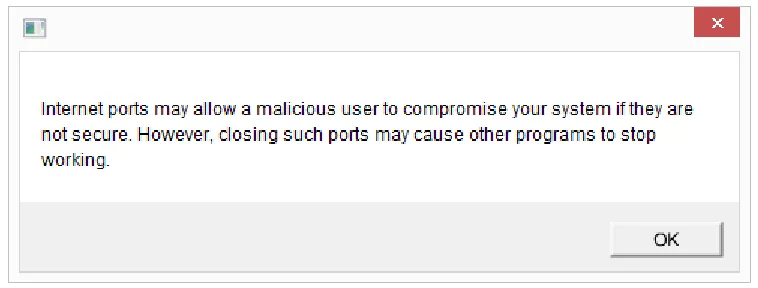
majority of the time, the OS will produce a text dialog box, describing what has occurred with the system. Most computer software generates error messages in the same forms. See Figure 2 for an example of such an error message. The text may not be completely
comprehensible to the end-user, but action must be taken either in the form of closing the dialog box or clicking a button, sometimes labeled “OK” (Wogalter, 2006a). Such
nondescript warnings could be augmented by an auditory aspect to increase comprehension and appropriate responses.
Exploring the Benefits of Auditory Warnings
The critical feature of an auditory warning is that it is sound added to a system of some sort, intended to signal when a specific level of some parameter is exceeded, a critical change in the system has occurred, or if some critical event occurs. This adds more obvious implications for computer-based warnings in the case of error messages. Once that parameter is reached or a critical event occurs, an error message is triggered and the visual display as well as the auditory warning can be simultaneously deployed (Haas & Edworthy, 2006).
A computer’s OS (operating system) or a particular piece of software will try to alert
the error message itself. Wogalter (2006b) states that “An effective warning must initially attract attention, and to do so, it needs to be sufficiently salient (conspicuous or prominent). Warnings typically have to compete with other stimuli in the environment for attention” (p. 54). This is important from a software designer’s perspective, because the objective of an
error message is ultimately for the user to be able to correct what is wrong or address the error in an appropriate manner. If the user never acknowledges the message, he or she can never respond appropriately. Inappropriate actions, such as disregarding the message, blindly closing the dialog box or simply moving the dialog box out of the viewable area need to be minimized to provide a better computing experience from a usability and security standpoint. One purpose of the proposed research is to investigate the effects of adding auditory tones to error messages in an attempt to increase the frequency with which users take appropriate safety-related action regarding the messages. If users take inappropriate actions, the purpose of the error message is lost and the user may never solve the problem and will most likely be forced to endure the same situation again.
Research on users’ behavior regarding error messages has shown various results.
auditory aspect and manipulations of the auditory elements can direct this behavior in a positive direction.
Alleviating Stress on Visual Resources via an Auditory Warning
The advantages of adding auditory tones to the already visually-rich computing environment are somewhat obvious. As stated, a computing environment is typically highly visual, sometimes to a point where the user’s visual system can be overloaded and stressed.
Auditory tones provide some relief to the visual system, offloading some of the stimulus processing to a separate sensory system. Multiple Resource Theory (Wickens, 2002) describes multiple task performance by describing four important categorical and
dichotomous dimensions that are responsible for variance in time-sharing performance. Two tasks demanding the same resource, such as auditory processing, will ultimately interfere if they demand the same level. In particular, it has been found that cross-modal time-sharing is superior to intra-modal time-sharing when it comes to simultaneous tasks. Thus,
incorporating an auditory aspect to a visually rich environment should increase the likelihood that a warning message is attended to and responded to appropriately.
Auditory warnings can be a vital supplement to visual warnings. In particular, when an individual or a group of people are under high workload conditions, the auditory modality can be effective. This is especially true in situations of high visual workload and/or poor visual conditions. Humans’ hearing is a natural warning sense; humans cannot shut their ears
like they can close their eyes or avoid visual stimuli in various ways. In other words, humans’ auditory systems are always active. Research has shown that real, concrete sounds
Examples of concrete sounds were: sound sample of jingling bells, sound sample of person walking on leaves, sound sample of ocean waves and sound sample of approaching train (Edworthy & Hards, 1999).
Other research has also shown the potential usefulness of the auditory modality to convey important information or instructions. When compared to a situation with no auditory supplement, humans tend to comply with instructions less often than when there is an
auditory element involved. The combination of voice and printed messages increases
compliance to instructions, so it is possible to infer that supplemental auditory aspects are of great use and should be implemented in designing interfaces or materials for instructional purposes. It is especially important and useful in situations where the user may experience problems or other negative issues when not complying with the instructions (Conzola & Wogalter, 1999).
Likewise, the auditory sense in humans has been said to act as an early warning system, due to the fact that it is free of the spatial restrictions of the other senses. The auditory sense can constantly monitor changes in the environment. This makes auditory warnings a perfect solution for alerting users of errors or changes in the state of the
computing system. Oftentimes the visual system can be overloaded and every opportunity to offload some of the work to another sensory system should be taken to create a better overall user experience (Dalton & Lavie, 2004).
principles of conveying information via the aural modality are being tested. They state, “The auditory channel has undeniable advantages for the transmission of caution/warning (C/W) information in that it is independent of the pilot’s head position and locus of visual fixation,”
(p. 258). As in their example, computer users are not always attending to one specific thing in their visual field; they may or may not attend to the visual aspect of an error message or warning, but because the auditory channel is “always on” it is a perfect alternative for communicating information about the system. The authors go on to say, “The principle advantage of adding an auditory signal to the master warning light/annunciation panel system is that the auditory signal virtually eliminates situations in which the master warning light goes unnoticed for a lengthy time period,” (p. 285). While most typical computing situations
may not be quite as urgent, the principle remains that the presence of an auditory element alerts the user whether or not he or she visually attends to the stimuli.
Some Factors to be Considered when Developing Conspicuous Auditory Stimuli To design an auditory tone that is easily distinguishable as a warning and can more easily draw a user’s attention away from their task, several things need to be considered. Wogalter and Vigilante (2006) say, “To attract attention while other stimuli are being
processed, warnings must be adequately conspicuous relative to the particular background context in which they occur…To be effective, warnings must possess characteristics that make them prominent and salient so that they stand out from background clutter and noise”
warning signals. Musical tones or chimes could easily be confused as being part of a song or movie that the user is listening to and could therefore easily be ignored or lost.
The perceived urgency of an error message or warning is another aspect that must be considered when designing auditory tones for implementation. Correct and appropriate mapping of warnings with appropriate urgency would be the most effective solution. Perceived urgency is the impression of urgency or criticality that a listener gets when listening to a particular sound. Urgency mapping aims to match the psychoacoustic urgency of a warning sound to the contextual urgency of the situation it is signaling. In the proposed research, the focus will be that the auditory tone must convey some sort of sense that an action is needed for the system to progress. Something needs to alert the user that an action must be taken or a choice must be made. This should increase the likelihood of a response from the user (Hellier & Edworthy, 1999; Edworthy et. Al, 2003).
Haas and Edworthy, (1996) also commented on the process of designing perceived urgency into warnings by manipulating the auditory characteristics of the warnings used. They recommend that, “Those who wish to obtain signals containing the highest level of perceived urgency and the shortest response time…would employ signals with the highest
fundamental frequency (800Hz), the shortest time between pulses (0 ms), and the highest sound pressure level above ambient,” (p. 198). Thus, to maximize perceived urgency, or at
least increase the level above baseline, these recommendations would be followed in the development of the auditory warning component used in the proposed research. However, most of the time, error messages in a typical computing environment are not incredibly time-sensitive, therefore only increasing the perceived urgency is necessary to increase the likelihood of a correct responsive action taken by the user.
It has been established that an auditory warning needs to be loud enough to be heard, but not too loud and that it needs to be psychologically appropriate in some way. Being psychologically appropriate means that the auditory warning itself conveys some
characteristic or attribute concerning the situation at hand. Auditory warnings can convey senses of urgency as well as other conditions that may be present in a given scenario.
Research has shown that if an auditory warning conveys some attribute of the situation being signaled, learning time will decrease and responses will be more immediate and appropriate (Edworthy, 1994). Mapping a specific auditory tone with a specific problem, error or system status is an ideal situation. A practiced and experienced user will be able to quickly identify what has happened and will be able to take appropriate action. In the same sense, an
of time be able to recognize the problem, error or system status by the auditory tone that it is associated with. These should produce the appropriate user responses on a fairly regular basis.
Other design recommendations will also be followed for auditory warnings. Appropriateness of the warnings is one issue that is important from a psychological perspective. Having a warning that is more appropriate means the warning creates a less aversive emotional response than traditional warnings. The intention of this recommendation is to convey a certain degree of urgency without disturbing the listener. This notion is
especially applicable in the realm of the average computing environment. The last thing a user wants is to be frightened by the machine they are trying to use due to a poorly-designed auditory warning. The minimization of learning time and potential confusion is important as well. The auditory warnings must be distinct enough from one another to minimize the confusion among them (Edworthy, 1994).
Using Auditory Icons to Supplement Visual Warnings
By implementing such associations with system events in a computer’s OS, the designers can
more efficiently convey the status of the system to the end user, (Belz, Robinson & Casali, 1999).
Persistence of warnings is also something that needs to be investigated. There is little research concerning the persistence variable for error messages in computer-based
environments. However, it has been shown that error messages, warnings or dialog boxes that cannot be dismissed or ignored result in a higher rate of compliance. Something that can be ignored or removed from the user’s view is going to be rendered ineffective. This notion
suggests that an increased level of persistence of an error message will ultimately lead to increased compliance or appropriate response from the user, which is the ultimate goal (West, Mayhorn, Hardee & Mendel, 2009).
One problem with the effectiveness of typical error messages within most software programs is that they can be easily dismissed or ignored, either by closing them immediately without reading or dragging them to another spot in the viewable area or desktop. It is suspected that users do these things because they either do not understand the error message or think that they can continue working by ignoring them. Not only can this behavior cause serious problems for the user, it can provide for a frustrating user experience and ultimately cause discontent amongst a program’s users.
This study addressed three main hypotheses. Using a web-based application task, an application was run (in the background, unseen to the user) that generated an artificial error message. Using a screen capture application, the computer observed and recorded the users’ responses and actions regarding the error message.
Research Hypotheses
H1 – The first hypothesis predicted that the presence of the auditory aspect will
increase users’ actions regarding the message and therefore decrease the instances
where the message is ignored (Dalton & Lavie, 2004; Edworthy & Hards, 1999; Haas & Edworthy, 2006; Wogalter, 2006b)
H2 – The second hypothesis is that an increased persistency level of the auditory
warning will increase users’ actions regarding the message and decrease the instances where the message is ignored (Hellier & Edworthy, 1999; Edworthy et. Al, 2003) H3 – The third hypothesis predicted that there is an interaction between the presence
such that the presence of the warning and high level of persistence will result in the most compliance behavior observed across participants
METHOD Participants
Participants in this study were recruited using Experimetrix, an online experiment database that allows experimenters to post available experiments, set criteria, and allow certain individuals, in this case students, to sign up to be participants. Students were recruited from Psychology 200 courses at North Carolina State University using this system. Students were also recruited from other undergraduate Psychology courses including Learning and Motivation, Personality, Industrial and Organizational Psychology and Visual Perception. These students were awarded extra credit from their instructors for participating. There was a total of eighty-one students recruited. Participants were awarded two credits for participating in the study that went towards the requirement to pass the course. Thirty-four males and forty-seven females were recruited. Participants’ ages ranged from seventeen to thirty-one years of age. Education level of participants ranged from High school graduate/G.E.D. to those having reported some graduate work completed. The vast majority of 97.5%, 79 participants had less than a bachelor’s degree. Participants’ marital status was reported in the
following frequency: 95.1% single, 1.2% married, 1.2% separated, 2.5% other. The primary languages of the participants were: 93.8% English and 6.2% Other. Ethnicity of the
listed the following characteristics regarding their current working situations: 5.1% working full-time, 46.3% working part-time, 87.5% student, 3.8% homemaker, 10% volunteer worker, 2.5% seeking work, 1.3% other work. Results of the Technology Experience survey indicated that the sample was rated fairly high, 55.6% of the participants scored at least 22 out of a possible 26 (higher scores indicate higher level of experience with technology). Every participant indicated that he or she had at least some experience using a PC. PC experience level was fairly high for this sample, 50.6% of participants scored at least 36 out of a possible 44 on this scale (higher scores indicate higher level of PC experience). Web usage was also high amongst this group, 95.1% of participants scored at least a 13 out of a possible 15 (higher scores indicate higher level of World Wide Web usage). Experience using the World Wide Web was mixed in this group, 49.4% of participants scored at least a 27 out of a possible 33 (higher scores indicate higher level of World Wide Web experience). Design
The experiment was a 2 (warning modality: visual vs. visual + auditory) X 2
(Persistence level: high vs. low) between-subjects factorial design. Participants’ responses to the error messages were recorded as the dependent variable in each condition and categorized as “No,” “X” in which case the participant simply closed the error message or “Yes.” Data on
further behavior regarding whether or not the participants sought more information, participants’ reaction time, and screen recordings were collected as well.
Stimuli
asked to fill out a hypothetical “plan of work,” outlining all of the courses they would need to take to obtain their bachelor’s degree in Psychology from NC State University. They were only asked to fill in Psychology courses in an attempt to keep the task relatively short. An application designed to run in the background of the OS, unnoticeable to the participant, which randomly generated a pop-up error message at varying time intervals was also utilized (Sharek, 2012). The error message was designed to look like a firewall security message, instructing the user to take action, or choose to take no action regarding a possible open port. See Figure 3 for a screen shot of the message displayed to all participants. The options available to the user were:
Yes – allowing the computer to close and secure the unsecure port.
More Information – displays a second window providing more detail of why
secured ports is important. After closing this window, the participant must still make a decision. See Figure 4 for the information dialog that was displayed to participants who chose this option.
No – closes the window with no further explanation or interaction required.
X – mimics behavior of clicking the “X” in the upper-right hand corner of a
window to close that window. No further explanation or interaction required as with “No.”
It should be noted again that there was no true security threat, just a false message generated for our experiment.
(high or low) of the sound, operationalized as how frequently and repeatedly it was played after the error message was displayed. In the low persistence condition, the sound was played once as soon as the message appeared. In the high persistence condition, the sound was played once every thirty seconds after the message appeared, until the participant made a choice of “Yes,” “No,” or clicked the “X” to close the window in the warning.
Prior to stimulus development for the proposed study, a pilot test was conducted with a separate group of participants who did not participate in the later portions of the study to determine what auditory signal from a series of sound examples constitutes a relatively low score of annoyance and relatively high score of appropriateness and a relatively high score of “attention-grabbing.” The included tones were: siren alarm, baby crying, car horn, barking
dog, doorbell, breaking glass, roaring lion, telephone ringing and thunder crashing. Amazon’s Mechanical Turk participant pooling system was utilized to gather the twenty
participants for this pilot study. Participants were compensated $.75 for completing the study and were required to submit a completion code that they would only receive after having completed the task fully. This was to ensure that there were no false reports of completion. The study was completed online. This resulted in the selection of a generic doorbell sound to accompany the warning message. This sound received the best scores on each of the scales. See Table 3 for full results of the pilot study
Procedure
Substitution Digit Span Forward and Backward from the WAIS III (Wechsler, 1997). They were then given a hearing test using an Earscan Audiometer to measure hearing on a pass/fail basis, followed by a vision test using a wall-mounted Snellen Eye chart.
Next, the main task commenced. The experimenter explained the task briefly, adding that there were also written instructions for the task placed next to the computer. Then, the participants were told to begin the task and to take their time, not to rush through the task. The plan of work application was already open on the computer, as well as the other message generating application, although it was be running in the background and the participants were unaware of its existence. At this time, the experimenter left the room, instructing the participant to notify them once he or she completed the task. After a period of time roughly 5 minutes, the application generated an error message, either accompanied by a tone or no tone, depending on which condition. In the high persistence condition, the tone would repeat every 30 seconds until the user made a choice regarding the error message. Reaction time was measured from the time the message was generated on the screen to the time the
participant interacted with the message. Next an Exit Questionnaire administered. The object of the questionnaire was to obtain demographic information about the participants, as well as qualitative data regarding their level of expertise with computers, how often they use
RESULTS
After all data was collected and entered into the computer, quantitative data from the computerized warning procedure was analyzed first, followed by the self-report data from the questionnaire.
Results from the Computerized Warning Procedure
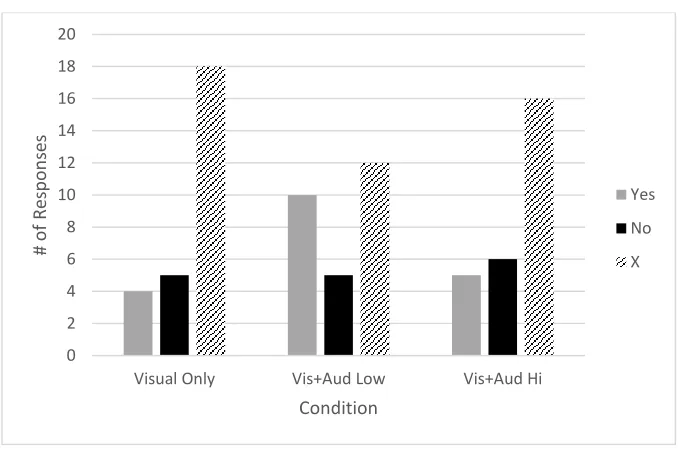
A one-sample chi-square test was conducted to investigate whether participants chose different options (Yes, No, X) in the computer task. The test results were significant, χ2 (2, N
= 81) = 20.22, p < .001. The proportion of participants who chose “X” (P = .57) was much greater than the hypothesized proportion of .33, while the proportion of participants who chose “Yes” (P = .23) and the proportion who chose “No” (P = .20) were approximately the
same value and were less than the hypothesized proportions of .33. It is evident that in this sample, participants were most likely to choose to close the error message across all
Table 1.
Cumulative Responses to the Error Message by Condition.
A Mann-Whitney U test was used to determine the effects of the presence of an auditory cue (tone) on users’ response to error messages. After combining the auditory
conditions (low and high persistence) into one group (N = 54), the results for the “Yes” responses were not significant, z = -1.29, p = .20, the results for the “No” responses were not significant, z = -.20, p = .85, and the results for the “X” responses were not significant, z = -1.26, p = .21. Therefore, Hypothesis 1 (H1) was not supported by the data. However the
“Yes” responses approached significance and future samples may indicate that a “Yes”
response was more likely to occur when a sound was present than when no sound was present. 0 2 4 6 8 10 12 14 16 18 20
Visual Only Vis+Aud Low Vis+Aud Hi
Table 2.
Responses to the Error Message, Combined Persistence Conditions.
A Kruskal-Wallis test was conducted to determine the effects of persistence level (low or high) of the auditory warning. The results were not significant, χ2 (2, N = 81) = 2.78,
p = .25. Therefore, Hypothesis 2 (H2) was not supported by the data. However, it was
observed that participants were more likely to choose “X” in the low persistence condition
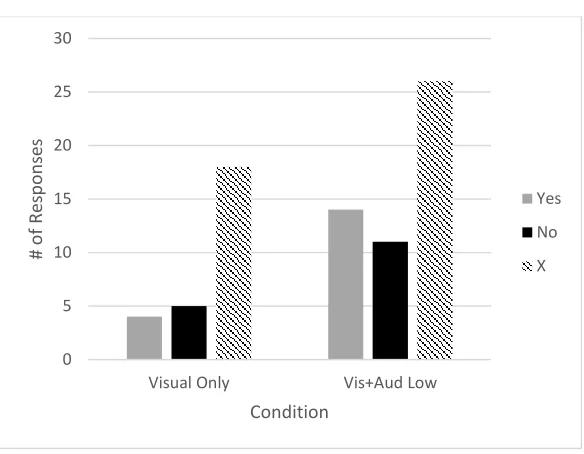
than in the high persistence condition. This was not significant, but is important to note. Finally, to test H3, we expected to find an interaction between tone and persistence
such that a combination of a tone present and high persistence condition would produce the largest amount of user actions and that a no tone present and low persistence level condition would produce the least amount of user actions. The analysis showed that the interaction was not significant. 0 5 10 15 20 25 30
Visual Only Vis+Aud Low
Follow-up analyses were conducted to determine whether there were any differences across ability levels regarding the influence of the auditory warning and their respective manipulated persistence levels. First, an ANOVA was run to determine whether the groups were equal across conditions. Results showed that none of these cognitive abilities test scores were significantly different across groups (see Table 4 for complete listing).
A regression analysis was conducted to determine if variance in performance on the computerized warning task could be explained using the data from the cognitive ability tests as predictor variables. This effort was intended to reveal if there are any differences across ability levels regarding the influence of the auditory warnings and their respective
manipulated persistence levels. There were no significant results for any of the cognitive ability scores when all were entered together, nor were there significant results when either condition was controlled for (auditory condition or persistence level). See Table 5 for full results. Therefore, differences in performance on the cognitive abilities tests administered in this experiment did not influence the participants’ action regarding the error message
presented in the task.
Lastly, reaction time data was examined to determine if any relationship exists between the time to respond to the error message and the resulting behavior taken by the participant. No significant relationship was observed.
Self-Report Results from the Questionnaire
The results of each question are separated into sections below. See Appendix A for full details of the Exit Questionnaire and all questions, scales and ratings contained within it.
Question 1: “Did you experience any errors during the experiment task?”
For the first question, 46 out of 81 total participants (57%) responded “yes.” Ideally, this should have resulted in all 81 participants responding “yes,” because the warning
message appeared in every session. This was corroborated by the screen-capture of the computer screen for each participant, which showed the message appearing in all sessions.
In the visual only condition, 11 out of 27 participants (41%) reported experiencing an error.
In the visual + auditory low persistence condition, 18 out of 27 participants (66%) reported experiencing an error.
In the visual + auditory high persistence condition, 17 out of 27 participants (63%) reported experiencing an error.
Question 1a: Participant-supplied descriptions of the error.
If participants responded “Yes” to Question 1, they were asked to describe the error
using a free-response blank. Across all participants, the top responses were “Virus” (17 participants), “Firewall” (7 participants) and “Pop-up” (3 participants). Other responses included “alert,” “port open,” “security,” and “noise.”
Question 2: “Was there any sound accompanied by the error message?”
the auditory aspect of the warning was present in 2 of the 3 conditions of 27 participants each. After Question 2, if participants did not report hearing a sound accompanying the warning message, they were instructed to skip to Question 9 on the Exit Questionnaire.
In the visual only condition, only 1 out of 27 participants (4%) reported experiencing a sound accompanied by the error message. This participant did not put a response in the blank asking to describe the sound. It is possible this person may have been confused by the question or he/she was reporting on activity outside the laboratory.
In the visual + auditory low persistence condition, 18 out of 27 participant (66%) reported experiencing a sound accompanied by the error message.
In the visual + auditory high persistence condition, 14 out of 27 participants (52%) reported experiencing a sound accompanied by the error message.
Question 3: “What was the sound you heard?”
For the third question, no participants in the visual only condition responded, which is acceptable as they should not have heard any sound and the instructions stated they should skip the question.
Across all participants in the visual + auditory low persistence condition, the top responses were “Doorbell,” (6 participants) and “ding” (2 participants). Other responses included “alert,” “pitch,” “bing,” “ping,” “bell,” “bloop,” and “chime.” The responses were
quite varied.
Question 4: “How frequently did you hear this sound?”
For the fourth question, one participant in the visual only condition responded with “2.” This was likely a mistake, and was the same participant who possibly responded to
Question 2 mistakenly. Instructions on the Exit Questionnaire should have led the participant to skip to Question 9 instead of continue to answer these questions.
In the visual + auditory low persistence condition, all 18 participants who reported hearing a sound reported hearing it only once. This aligns with the experimental protocol, but ideally the results would have indicated that all 27 of the participants in this condition would have reported hearing the sound once.
In the visual + auditory high persistence condition participants responded with a variety of responses, due to the auditory tone being played once as the warning message was displayed, and then once every 30 seconds after that until the participant made a selection regarding the warning message. Responses to this question included: One time (6
participants), twice (2 participants), three time (3 participants), three to six times (1 participant) and 20 times (1 participant).
Question 5: Ratings of how annoying the auditory tone was perceived.
This question asked the participants to rate the auditory warning on a scale of 1 (not annoying at all) to 7 (extremely annoying). See Appendix A for the scale. Thirty-four participants reported an average annoyance level of 2.79 (SD = 1.37). This result indicates that the doorbell sound was perceived as an appropriate (perhaps too low) level of
Question 6: Ratings of how appropriate the auditory tone was perceived. This question asked the participants to rate the auditory warning on a scale of 1 (not appropriate at all) to 7 (completely appropriate). See Figure 6 for the scale. Thirty-four participants reported an average appropriateness level of 5.00 (SD = 1.71). This result
indicates that the doorbell sound was perceived as being a moderate level of appropriateness. Question 7: Ratings of how noticeable the auditory tone was perceived.
This question asked the participants to rate the auditory warning on a scale of 1 (not noticeable at all) to 7 (completely noticeable). See Figure 7 for the scale. Thirty-four
participants reported an average noticeability level of 5.91 (SD = 1.38). This result indicates that the doorbell sound was perceived as being somewhat highly noticeable.
Question 8: Ratings of how helpful the auditory tone was perceived.
This question asked the participants to rate the auditory warning on a scale of 1 (not helpful at all) to 7 (completely helpful). See Figure 8 for the scale. Thirty-four participants reported an average helpfulness level of 4.56 (SD = 1.65). This result indicates that the doorbell sound was perceived as being a moderate level of helpfulness.
DISCUSSION
This study had three main purposes. The primary interest was to explore the effect of an auditory aspect on users’ actions regarding the warning message presented in the
aspect (visual vs. auditory + visual condition) and the persistence level of the auditory aspect (low persistence vs. high persistence condition). Of secondary interest was whether the combination of high persistence level and presence of the auditory aspect of the warning message resulted in a difference in the participants’ actions regarding the warning message.
The results of the analyses regarding the auditory aspect of the warning message showed that presence of the auditory aspect had no significant effect on the participants’
actions regarding the warning message. However it should be noted that this relationship approached significance, so there is still a possibility that there is something important there, but this particular experiment failed to completely capture that relationship. We can see that our doorbell sound, as selected by the preliminary survey, seemed to have little bearing on the participants’ decisions. There are several possible reasons for this lack of influence. One
participant commented that the doorbell sound was perceived as happening in another part of the lab where the experiment was conducted, not as emitted from the computer as a warning tone. Therefore, this person did not believe an auditory tone was present in the experiment. Thus, potential avenues for future research might address the concept of “relatedness” such
that we could manipulate whether computer consistent and inconsistent sounds might influence the efficacy of tones. For instance, computer-consistent tones may be more likely to attract attention to the pop-up warnings than seemingly inconsistent sounds like a doorbell.
warning message. We can see that this method of increasing persistence may not be the most effective in influencing how participants interact with messages. One possible explanation for this having no significant effect on the participants’ behavior is that the time between
repeated tones may have been too great. Only three out of the 27 (11%) participants in the auditory + visual high persistence level condition waited long enough before making a choice to have heard the tone more than once; the total time from when the warning message
appeared to when a choice was made was greater than or equal to 30,000 milliseconds (30 seconds). Because the majority of participants made their choice within this time, future experiments should examine these behaviors using shorter intervals between instances of the auditory aspect of the warning. The data collected in this experiment shows an average time before participants made a choice to be 17735.51 ms (17.74 seconds), so we suggest a time interval of at least 15 seconds, if not shorter. Future research could also investigate the possibility of variable time intervals. Two options include random intervals between instances of the auditory aspect, and systematically decreasing the time interval with each repeated instance of the auditory aspect (i.e. the auditory aspects are played with increased frequency as time passes).
Another aspect that should be investigated regarding persistence level is the
Regarding the exit interview information, there are some interesting outcomes that need to be mentioned. Out of the 54 participants in the visual + auditory condition, only 65% (35 participants) reported experiencing an error during the task. There are several points to be noted that may have caused some confusion or misinterpretation of the purpose of this
question worded: “Did you experience any errors during the experiment task?” This question
was followed with a free-form response option to describe the error that occurred. First, the interpretation of the word “error” may have led participants to report something other than
the warning message as an error. For instance, one participant described the error reported as an error on the experimenter’s part (misspeaking a word on one of the cognitive ability
tasks). This obviously had nothing to do with the warning message presented on the computer during the experimental task, but is a prime example of how one participant misinterpreted the meaning of the question. Follow-up and future studies should revisit the verbiage used in the questions to investigate possible less-confusing means of posing the questions.
This research examined only a few parameters of auditory warnings that should be considered in creating warnings with an auditory aspect. There are several other
This research had some notable methodological limitations that should be considered and carefully controlled in future research. First, this experiment resulted in some
participants reporting having not experienced any errors during the course of the experiment. The experiment was designed to display the error warning message in all three conditions, so all participants should have experienced the error, and the video data confirmed this was the case. This indicates that the language used in the Exit Questionnaire may not have been completely clear in what it was seeking to describe. Future research should focus on writing questions and instructions in as clear of language as possible to avoid such confusion.
A second methodological limitation of this experiment regarding the language of the materials and instructions concerns a possible language barrier issue. Five of the eighty-one participants in this experiment reported their native speaking language as something other than English. This may have resulted in some kind of confusion throughout the experiment including the instructions for the cognitive ability tests, the text on the demographic and exit questionnaires, and any verbal instructions from the experimenter. A language barrier is a difficult obstacle to overcome, but it may be beneficial to take note and adjust recruiting accordingly for future experiments. Recruiting experimenters who are multilingual is another possible solution.
something that is particularly conducive to being perceived as outside of an interior room, so it is an understandable mistake. It is possible that increased volume from the computer speakers may have convinced the participant that the source of the sound was in fact the speakers and not an outside source. Investigation of other possible warning sounds would also be beneficial for future experiments. The use of headphones, or some other means to ensure that the source of the sound is clearly the computer and nothing else could reduce confusion of this sort.
CONCLUSIONS
This research investigated only two of many aspects of auditory warning messages within a computing environment. While the parameters chosen were not perfect, they provided valuable insight into the future direction of related research. Simply having a tone accompany a visual warning was not enough to elicit specific responses, nor was increasing persistence of the auditory aspect. Selection of the auditory aspect should be taken into great consideration; the doorbell in this experiment may not have been the best example even though it was rated as most appropriate and least annoying. There are many other parameters that must be carefully designed and controlled to craft an effective auditory warning, and this research has only grazed the surface. Future research should focus on further, more extensive manipulation of the auditory aspects of warning messages, their persistence level and
REFERENCES
Belz S. M., Robinson, G. S., Casali, J. G. (1999). A New Class of Auditory Warning Signals for Complex Systems: Auditory Icons. Human Factors, 41(4) 608 – 618.
Cohen, H. H., Cohen, J., Mendat, C. C., & Wogalter, M. S. (2006). Warning Channel: Modality and Media. Handbook of Warnings, 123 – 134.
Conzola, V. C., & Wogalter, M. S. (1999). Using voice and print directives and warnings to supplement product manual instructions. International Journal of Industrial
Ergonomics, 23, 549 – 556.
Conzola, V. C., & Wogalter, M. S. (2001). A Communication-Human Information
Processing (C-HIP) approach to warning effectiveness in the workplace. Journal of Risk Research, 4(4), 309 – 322.
Dalton, P. & Lavie, N. (2004). Auditory Attentional Capture: Effects of Singleton Distractor Sounds. Journal of Experimental Psychology: Human Perception and Performance,
30(1) 180 – 193. Dejoy, D. M. (1999). Attitudes and Beliefs. Warnings and Risk Communication, 189 –
219.
Dix, A. (2005). Human-Computer Interaction and Web Design. Handbook of Human Factors in Web Design, 28 – 47).
Doll, T. J. & Folds, D. J. (1986). Auditory signals in military aircraft: ergonomics principles versus practice. Applied Ergonomics, 17.4 257 – 264.
Duffy, R. R., Kalsher, M. J., & Wogalter, M.S. (1995). Increased effectiveness of an
of IndustrialErgonomics, 15, 159 – 166.
Edworthy, J. (1994). The design and implementation of non-verbal auditory warnings.
Applied Ergonomics, 25(4) 202 – 210.
Edworthy, J. & Hards, R. (1999). Learning auditory warnings: The effects of sound type, verbal labeling and imagery on the identification of alarm sounds. International Journal ofIndustrial Ergonomics, 24 603 – 618.
Edworthy, J., Hellier, E., Walters, K., Clift-Matthews, W., & Crowther, M. (2003). Acoustic, Semantic and Phonetic Influences in Spoken Warning Signal Words. Applied
Cognitive Psychology, 17 915 – 933.
Haas, E. & Edworthy, J. (1996). Designing urgency into auditory warnings using pitch, speed and loudness. Computing & Control Engineering Journal, August 1996 193 – 198. Haas, E. & Edworthy, J. (2006). An Introduction to Auditory Warnings and Alarms.
Handbook of Warnings, 189 – 198.
Hardee, J. B. (2008). Cybersecurity (Version 2.0) [Computer Program]. Raleigh, NC: Author.
Hellier, E. & Edworthy, J. (1993). Improving Auditory Warning Design: Quantifying and Predicting the Effects of Different Warning Parameters on Perceived Urgency.
Human Factors, 35(4) 693 – 706.
Hellier, E. & Edworthy, J. (1999). On using psychophysical techniques to achieve urgency mapping in auditory warnings. Applied Ergonomics, 30 167 – 171.
andCognition, 16, 1118 – 1133.
Paivio, A. (1991). Dual Coding Theory: Retrospect and Current Status. Canadian Journal of Psychology, (45(3), 255 – 287.
Rousseau, G. K., Lamson, N., & Rogers, W. A. (1998). Designing Warnings to Compensate for Age-Related Changes in Perceptual and Cognitive Abilities. Psychology & Marketing, 15(7), 643 – 662.
Sanders, M., & McCormick, E. (1993). Human Factors in Engineering and Design (7th ed.).
New York, NY: McGraw-Hill Book Company.
Sharek, D. (2012). NCSU Firewall Alert. (Version 1.0) [Computer Program]. Raleigh, NC: Author.
Sharek, D., Swofford, C., & Wogalter, M. (2008). Failure to Recognize Fake Internet Popup Warning Messages. Human Factors, 52, 557 – 560.
Wechsler, D. (1997). Wechsler Adult Intelligence Scale III. (3rd Ed.). San Antonio, TX: The Psychological Corporation.
West, R., Mayhorn, C.B., Hardee, J. & Mendel, J. (2009). Chapter IV The Weakest Link: A Psychological Perspective on Why Users Make Poor Security Decisions. Social and Human Elements of Information Security: Emerging Trends and Countermeasures, 43 – 58.
Wickens, C.D., Gordon, S. E., & Liu, Y. (1998). An Introduction to Human Factors Engineering (1st ed.). New York, NY: Addison-Wesley Educational Publishers. Wickens, C. D., (2002). Multiple resources and performance prediction. Theoretical Issues in
Wogalter, M. S., (2006a). Purposes and Scope of Warnings. Handbook of Warnings, 3 – 9. Wogalter, M. S., (2006b). Communication – Human Information Processing (C-HIP) Model.
Handbook of Warnings, 51 – 61.
Wogalter, M. S., & Mayhorn, C. B. (2005). Providing cognitive support with technology-based warning systems. Ergonomics, 48(5), 522-533.
Figure 2: Example error message.
Table 3
Pilot Study Ratings of Auditory Stimuli
Stimulus Mean Appropriateness* Mean Annoyance**
Alarm 3.40 5.50
Baby crying 3.45 3.95
Car horn 3.40 5.00
Dog bark 2.75 4.80
Doorbell 5.05 3.05
Breaking glass 4.45 3.95
Lion roaring 2.95 5.45
Phone ring 4.60 4.30
Thunder 2.85 5.10
* Appropriateness was rated on a scale of 1-7 with 1 being the lowest rating of appropriateness and 7 being the highest rating of appropriateness.
** Annoyance was rated on a scale of 1-7 with 1 being the lowest rating of annoyance and 7 being the highest rating of annoyance.
Table 4
Cognitive Ability Tests ANOVA Results
Dependent Variable
Independent Variable
F Sig.
Alpha_simp Sound .52 .47
Alpha_simp Persistence .57 .43
Alpha_abs Sound .24 .63
Alpha_abs Persistence 29.78 .77
Comp_simp Sound .02 .89
Comp_simp Persistence 2.87 .06
Comp_abs Sound .27 .61
Comp_abs Persistence 2.23 .11
DSS_total Sound .04 .84
DSS_total Persistence .16 .85
DSS_recall Sound .60 .44
DSS_recall Persistence 2.02 .14
Dspan_F Sound .66 .42
Dspan_F Persistence .65 .53
Dspan_B Sound .02 .89
Table 5
Cognitive Ability Tests Multiple Regression Results
Model
Unstandardized Coefficients
Standardized Coefficients
t Sig.
95.0% Confidence Interval for B
Correlations
B Std. Error Beta Lower
Bound
Upper Bound
Zero-order Partial Part
(Constant) -.15 .63 -.23 -.82 -1.41 1.12
Alpha_simp .29 .13 .50 2.27 .03 .04 .55 .08 .26 .25
Alpha_abs -.02 .01 -.47 -2.12 .04 -.04 -.00 -.06 -.24 -.24
Comp_simp -.09 .10 -.22 -.86 .39 -.29 .12 .02 -.10 -.10
Comp_abs .01 .01 .25 .96 .34 -.01 .02 .06 .11 .11
DSS_total .00 .01 .08 .62 .54 -.01 .02 .02 .07 .07
DSS_recall -.01 .03 -.05 -.42 .68 -.08 .05 -.09 -.05 -.05
Dspan_F .03 .03 .13 .97 .34 -.03 .09 .09 .11 .11
Dspan_B -.02 .03 -.10 -.67 .50 -.08 .04 -.02 -.08 -.08
Table 6
Reaction Time ANOVA Results
Dependent Variable Independent Variable F Sig.
Total Time Sound .05 .83
APPENDIX A: Content of Exit Questionnaire
1. Did you experience any errors during the experiment task?
a. Yes, please describe: ______________________________ b. No (please skip to question # 8)
2. Was there any sound accompanied by the error message? a. Yes
b. No (please skip to question # 8)
3. What was the sound you heard? ____________________________
4. How frequently did you hear this sound? ____________________________
5. Please rate how annoying this sound was on the scale provided where 1 is the lowest rating of annoyance, or “not annoying at all” and 7 is the highest level of annoyance, or “extremely annoying”:
1 2 3 4 5 6 7
Not Annoying Somewhat Somewhat Extremely At All Not Annoying Annoying Annoying
6. Please rate how appropriate this sound was for a typical computing environment (office, library, home, etc.) on the scale provided where 1 is the lowest rating of appropriateness, or “not appropriate at all,” and 7 is the highest level of appropriateness, or “completely appropriate”:
1 2 3 4 5 6 7
7. Please rate how noticeable the sound was on the scale provided where 1 is the lowest level of noticeability, or “not noticeable at all,” and 7 is the highest level of noticeability, or “completely noticeable”:
1 2 3 4 5 6 7
Not Noticeable Somewhat Somewhat Completely At All Not Noticeable Noticeable Noticeable
8. Please rate how helpful the sound was on the scale provided where 1 is the lowest level of helpfulness, or “Not helpful at all,” and 7 is the highest level of helpfulness, or “Completely helpful”:
1 2 3 4 5 6 7