ISSN(Online): 2320-9801
ISSN (Print) : 2320-9798
I
nternational
J
ournal of
I
nnovative
R
esearch in
C
omputer
and
C
ommunication
E
ngineering
(An ISO 3297: 2007 Certified Organization)
Vol. 4, Issue 3, March 2016
Language Translator using Image Processing
Krutika Pai, Gautami Pinkyar, Manisha Pachapur,
Varsha MaliStudent, Dept. of I.T., SIES GST, Mumbai University, Navi Mumbai, India
Student, Dept. of I.T., SIES GST, Mumbai University, Navi Mumbai, India
Student, Dept. of I.T., SIES GST, Mumbai University, Navi Mumbai, India
Assistant Professor, Dept. of I.T., SIES GST, Mumbai University, Navi Mumbai, India
ABSTRACT People travelling to different places find it difficult to communicate with local people as they do not know the language. They are unable to interpret the words written on any board or banner. So there is a need to develop text information extraction systems that can identify and recognize text that is contained in the images. The project was selected keeping in mind the need to develop an Android App which will extract the text from images in cases where the user cannot manually enter the characters. After the method of text extraction, the characters are translated in the user understandable language. Thus the user will have faster access to the unknown language and will be able to interpret it.
KEYWORDS Android, Tesseract OCR engine, Tesseract android tools, Android Studio, Android ndk, Android sdk, Tess-two, Translator API
I. INTRODUCTION
Language translator using image processing is an android application which will do the task of extracting text from the captured image and will convert the extracted text into the language understood by the user. Many people face the language barrier while travelling to different places. They cannot communicate because they don’t know how to speak the local language. So they end up annoyed as their work is not done. Also there are many language translator android applications wherein user has to type the text he wants to interpret. But if he doesn’t understand the language at all, that application would be of no use. The user will take image of the text which he is unable to interpret. Then the characters will be extracted from the image. Then the extracted text will be translated in the user understandable language. Also, one of the reasons of implementing this project is that current applications require internet connection to get the translated text. But that restricts the usage as the user might face network problems in some remote areas.
There are two main functions of this application : a) Text extraction from image b) Translation of the extracted text The text extraction from image task is performed using OCR algorithm.OCR stands for Optical Character Recognition. Optical Character Recognition is a technology that enables you to convert different types of documents, such as scanned paper documents, PDF files or images captured by a digital camera into editable and searchable data. . The OCR (Optical Character Recognition) algorithm relies on a set of learned characters. It compares the characters in the scanned image file to the characters in this learned set. Generating the learned set is quite simple. Learned set requires an image file with the desired characters in the desired font be created, and a text file representing the characters in this image file. Accuracy, flexibility and speed are the main features that characterize a good OCR system.
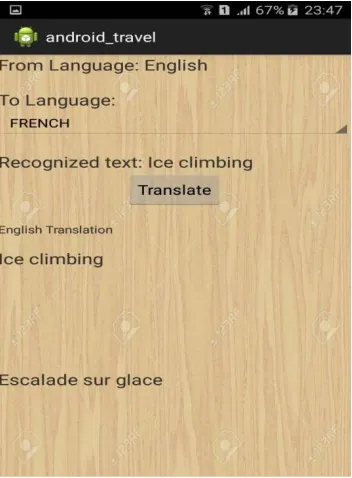
For the translation of the extracted text, we have integrated an open source translation API with our OCR application. Once the text is extracted from the image, translate button should be clicked to get the meaning of the text on the banner, board etc.
II. RELATED WORK
ISSN(Online): 2320-9801
ISSN (Print) : 2320-9798
I
nternational
J
ournal of
I
nnovative
R
esearch in
C
omputer
and
C
ommunication
E
ngineering
(An ISO 3297: 2007 Certified Organization)
Vol. 4, Issue 3, March 2016
edge pixels to single connected component structures. Then the detected text candidates undergo another treatment in order to be ready for OCR.
In [2] Li and Doerman typically use a small window of 16 x16 pixels to scan the image and classify each of them as a text or non -text window using a layer neural network. For a successful detection of various text sizes, a three-level pyramid approach is used. Text regions are extracted at each three-level and then extrapolated at the original scale. The bounding box of the text area is generated by a connected component analysis of the text windows.
In [3] Ron Cemer’s blog gave information regarding the usage of java in OCR algorithm. Java was used to implement character recognition procedure. An OCR package was developed and integrated with java library. First the image was loaded and the characters were printed out, then they were scanned. The image was cropped to obtain only training characters. The scanned image was converted to grayscale. Later the characters are appeared in output window. Latest version of Sun’s JDK is the prerequisite for this application
III. PROPOSED ALGORITHM
A. Design Considerations:
Camera button: The user will click the picture of the text that needs to be understood.
Gallery button: If the image was taken previously, the user can select the image from gallery of the mobile.
Crop function: After image is given as input, the user is given an option to crop only the required word from the whole text. Only that word would be extracted
Translate button: After getting the extracted text, the user can press the translate button to get the meaning of the extracted text.
B. Description of the Proposed Algorithm:
1. Text detection and Character recognition
Optical Character Recognition is a technology that enables you to convert different types of documents, such as scanned paper documents, PDF files or images captured by a digital camera into editable and searchable data. Imagine you’ve got a paper document – for example, magazine article, brochure, or PDF contract your partner sent to you by email. Obviously, a scanner is not enough to make this information available for editing, say in Microsoft Word. All a scanner can do is create an image or a snapshot of the document that is nothing more than a collection of black and white or colour dots, known as a raster image. In order to extract and repurpose data from scanned documents, camera images or image-only PDFs, you need to implement OCR technology that would single out letters on the image, put them into words and then - words into sentences, thus enabling you to access and edit the content of the original document. The OCR (Optical Character Recognition) algorithm relies on a set of learned characters. It compares the characters in the scanned image file to the characters in this learned set. Generating the learned set is quite simple. Learned set requires an image file with the desired characters in the desired font be created, and a text file representing the characters in this image file. The learned set is in xml format. Generating the learned set is quite simple. Learned set requires an image file with the desired characters in the desired font be created, and a text file representing the characters in this image file. The learned set is in xml format. This learned set is basically coordinates related information.
2. Language translation of the text
Translation Software API
Forming the structure of words formed in Recognition of the desired Language
Integration with available APIs.
IV. PSEUDO CODE
1. Load training images
2. Load the scanned image of the document to be converted to text 3. Convert the scanned image to greyscale
ISSN(Online): 2320-9801
ISSN (Print) : 2320-9798
I
nternational
J
ournal of
I
nnovative
R
esearch in
C
omputer
and
C
ommunication
E
ngineering
(An ISO 3297: 2007 Certified Organization)
Vol. 4, Issue 3, March 2016
5. Break the document into lines of text, based on whitespace between the text lines
6. Break each line into characters, based on whitespace between the characters; using the average character width, determine where spaces occur within the line
7. For each character, determine the most closely matching character from the training images and append that to the output text; for each space, append a space character to the output text
8. Output the accumulated text
9. If there are any more scanned images to be converted to text, return to step 2
V. SIMULATION RESULTS
Firstly, an application is created on android studio and all the required libraries and packages are imported. The main activity is created which is the home screen of the application.
Fig 1: Main activity
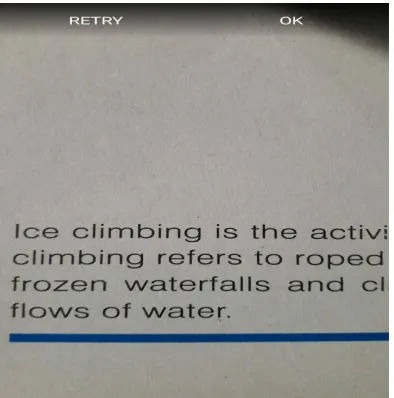
Then the camera button is launched in the application. So on clicking the camera button, the camera of the starts. The image of the text is taken on mobile phone .
ISSN(Online): 2320-9801
ISSN (Print) : 2320-9798
I
nternational
J
ournal of
I
nnovative
R
esearch in
C
omputer
and
C
ommunication
E
ngineering
(An ISO 3297: 2007 Certified Organization)
Vol. 4, Issue 3, March 2016
The crop option is available after the image is captured
Fig 3: Cropping the image
The cropped text is extracted using OCR algorithm. Tesseract is an OCR engine which is integrated with the android studio application for the text extraction task. The tess two package and android ndk are required along with tesseract for OCR support for android.
ISSN(Online): 2320-9801
ISSN (Print) : 2320-9798
I
nternational
J
ournal of
I
nnovative
R
esearch in
C
omputer
and
C
ommunication
E
ngineering
(An ISO 3297: 2007 Certified Organization)
Vol. 4, Issue 3, March 2016
VI. CONCLUSION AND FUTURE WORK
The extraction of text from image may prove effective for people travelling to different places as they will overcome the language barrier. The user will not have to give manual input to get the meaning of the text. Language interpretation will be easier.This application will enable the user to get faster access to the language and the meaning.Subsequently, by using this application they are able to integrate with the local people and get the right information
REFERENCES
1. Dimitrova, L. Agnihotri [1999], “Color super-histograms for video representaion. In: Proc. Of the International Conference on Image Processing.
2. H.Li and D.Doermann in “ Progress in camera-based document image analysis”, 606 - 616 vol.1 3-6 Aug. 2003 3. Ron Cemer’s Blog on Java OCR available on: http://roncemer.com/software-development/java-ocr/
4. Vijay Rajan Nadar, ” Optical Character Recognition” on 14 Oct 2012 http://www.codeproject.com/Articles/476142/Optical-Character-Recognition
5. Kede Ma , “Objective Quality Assessment for Color-to-Gray Image Conversion” Image Processing, IEEE Transactions on 22 July 2015
BIOGRAPHY