iA110
VHF AIR BAND TRANSCEIVER
INSTRUCTION MANUAL
FOREWORD
READ ALL INSTRUCTIONS
carefully and completelybefore using the transceiver.
SAVE THIS INSTRUCTION MANUAL
—
Thisin-struction manual contains important operating inin-structions for the IC-A110.
EXPLICIT DEFINITIONS
The explicit definitions below apply to this instruction manual.
CAUTIONS
R
WARNING! NEVER
operate the transceiver with aheadset or other audio accessories at high volume levels. Hearing experts advise against continuous high volume op-eration. If you experience a ringing in your ears, reduce the volume level or discontinue use.
NEVER
connect the transceiver to an AC outlet or to apower source of more than 27 V DC. Such a connection will damage the transceiver.
NEVER connect the transceiver to a power source that is
DC fused at more than 5 A. Accidental reverse connection will be protected by this fuse, higher fuse values will not give any protection against such accidents and the transceiver will be ruined.DO NOT operate the transceiver near unshielded electrical
blasting caps or in an explosive atmosphere.DO NOT
connect the transceiver to a power source using reverse polarity. This connection will not only blow fuses but also may damage the transceiver.WORD DEFINITION
RWARNING Personal injury, re hazard or electric shock may occur.
CAUTION Equipment damage may occur.
NOTE If disregarded, inconvenience only. No risk
of personal injury, re or electric shock.
DO NOT
place unit in a non-secure place to avoid inad-vertent use by children.DO NOT
push the PTT when not actually desiring to trans-mit..AVOID using or placing the transceiver in direct sunlight or
in areas with temperatures below –30°C (–22°F) or above +60°C (+140°F).AVOID
placing the transceiver in excessively dusty envi-ronments.AVOID
placing the transceiver against walls. This will ob-struct heat dissipation.AVOID
the use of chemical agents such as benzine or al-cohol when cleaning, as they damage the transceiver sur-faces.BE CAREFUL!
The transceiver will become hot when operating continuously for long periods.TABLE OF CONTENTS
FOREWORD ... i
EXPLICIT DEFINITIONS ... i
CAUTIONS ... i
TABLE OF CONTENTS ... ii
1 PANEL DESCRIPTION ... 1 – 3 ■Panel description ... 1 – 2 ■Function display ... 3
2 BASIC OPERATION ... 4 – 5 ■Power ON ... 4
■Channel selection ... 4
■Squelch function ... 5
■Side tone function ... 5
■LCD backlight control ... 5
■Dial select function ... 5
3 SCAN OPERATION ... 6 – 7 ■Scan operation ... 6
■On-hook scan ... 7
■Dualwatch ... 7
4 MEMORY PROGRAMMING ... 8 – 9 ■Programming a memory channel ... 8
■Memory names ... 9
5 OTHER FUNCTIONS ... 10-11 ■Initial set mode ... 10-11 6 CONNECTION AND INSTALLATION ... 12 – 13 ■Rear panel and connections ... 12
■Mounting ... 13
■Supplied accessories... 13
7 CLONING ... 14
8 SPECIFICATIONS ... 15-16 9 OPC-871 HEADSET ADAPTER... 17-18 ■OPC-871 Headset adapter ... 17
■
Panel description
qTUNING [DIAL(TS)]
➥Changes the operating frequency; memory channel in
memory mode; set mode contents in set mode, etc.
➥Push to toggle the dimmer control OFF, Low and High.
➥Push and hold for 1 sec. to select the Tuning Step [TS];
1 MHz or 10 kHz are available. (p. 5)
wFUNCTION DISPLAY(p. 3)
Displays the operating frequency, memory channel name, etc.
eVOLUME UP[Y] DOWN[Z]KEY
Adjusts the audio output level.
rLOUD SPEAKER
Front mounted loud speaker.
tPOWER SWITCH [POWER]
Push and hold 500 m sec. to turn the power ON and OFF. ➥The following functions are available at power ON as options:
• Initial set mode (p. 10) • Cloning mode (p. 14)
1
PANEL DESCRIPTION
V/M SCAN PRI SQL
!0
q w e r
t y u i
1
PANEL DESCRIPTION
ySQL SWITCH [SQL]
➥Push to turn on the squelch adjust mode. (p. 6)
➥Push and hold this switch for 1 sec. to turn ON/OFF the ex-ternal speaker output. (p. 4)
uPRIORITY SWITCH [PRI]
Push to select priority channel. (p. 11) • “Pr” appears on the display.
iSCAN SWITCH [SCAN]
➥Starts and stops the scan function: • VFO mode: VFO scan function.
• Memory mode: Memory channel scan function. (p. 6)
➥Push and hold this switch for 5 sec. to set the displayed channel as a memory lock-out channel. (p. 8)
• “LOCK OUT” appears on the display.
oVFO/MEMORY SWITCH [V/M]/[MW]
➥Push to toggle the VFO mode or the Memory mode. (p. 4)
• “X” and memory channel number appear when memory mode is selected.
• The transceiver has 20 memory channels.
➥When VFO mode is selected;
•Push and hold this switch for 5 sec. to program the VFO fre-quency to memory channel. (p. 8)
➥When Memory mode is selected;
•Push and hold this switch for 5 sec. to turn the “Memory name
!0MICROPHONE CONNECTOR
Connects the supplied microphone or optional.
NEVER connect other microphones. The pin assignments may be different and the transceiver may be damaged.
MICROPHONE
The supplied microphone has a PTT switch and a cradle. The following functions are available when the microphone is taken off from the hook or put back on hook:
➥Automatic scan starts when putting on hook. (p. 7)
➥Automatic scan stops when taken off hook. (p. 7)
NOTE:Optional functions vary with transceiver version.
In this manual, optional functions are indicated by
“ ” Icon.
1
PANEL DESCRIPTION
■
Function display
qMEMORY MODE INDICATOR(p. 5)
Appears when memory mode is selected.
wDUALWATCH INDICATOR(p. 7)
Indicates when the dualwatch function is activated.
eSCAN INDICATOR(p. 8)
Indicates when the scan function is selected.
rBUSY INDICATOR(p. 6)
“BUSY” appears when receiving a signal or when the squelch is open. (p. 6)
tTX INDICATOR (p. 5) Appears while transmitting.
yFREQUENCY DISPLAY(p. 11)
➥Shows the operating frequency.
➥Shows the channel name when the memory name function
is selected. (p. 10)
uVOLUME LEVEL INDICATORS
➥Shows the AF volume level(while receiving).
iSET MODE INDICATOR
➥Appears when the Initial set mode is selected. (p. 12)
oLOCK OUT INDICATOR
➥Appears when the channel is set as a ‘LOCK OUT’
chan-nel. (p. 8)
!0MEMORY CHANNEL INDICATOR
➥Indicates the selected memory channel number
➥‘Pr’ appears when the priority channel is selected.
*NOTE: The VFO/memory switch [V/M] and the memory write switch [M/W] functions may not be available de-pending on version.
w
q r t
!1
e
o i u
2
BASIC OPERATION
■
Power ON
qPush [POWER] to turn power ON.
wOperate the transceiver as indicated in the following sec-tions.
eSelect the desired memory channel (or VFO frequency)
with the [V/M] keys.
• When receiving a signal, appears and audio is emit-ted from the speaker.
• Further adjustment of audio level may be necessary at this point. • Push [SQL] to adjust the squelch level. (p. 6)
• Push and hold the tuning dial for 1 sec. to select the [TS], each push increments/decrements to the frequency are either 10 kHz or 1 MHz. (p. 7)
rPush and hold [PTT] to transmit, then speak into the
mi-crophone.
• Transmit indicator lights.
tRelease [PTT] to receive.
■
Channel selection
ï
VFO/Memory selection
qPush [V/M] to select memory
mode or VFO mode.
➥Rotate the dial to select a de-sired frequency/channel.
wDuring memory mode
opera-tion, push [V/M] key to trans-fer the memory contents to VFO.
• Push [V/M] to select VFO mode.
NOTE: Only frequency data is transferred even if the memory channel has a memory name.
ï
External speaker output control
External speaker output can be turned OFF, if desired.
qPush and hold [SQL] for 1 sec.
wRotate the dial to select “SP OFF”.
ePush [SQL] to turn to the previous mode.
2
BASIC OPERATION
■
Squelch function
The transceiver has a noise squelch circuit to mute undesired noise while receiving no signal.
D
Setting the squelch level
qPush [SQL] to turn the level adjusting mode ON.
wTurn the tuning [DIAL] to select the squelch level. •‘SQ 01’ is loose squelch and ‘SQ 25’ is tight squelch.
(Ini-tial level is ‘SQ 01’)
•‘SQ 01’ indicates that the squelch circuit is turned off. • “ ” appears on the display.
ePush [SQL] to return to regular operation.
■
Side tone function
When using an optional headset, such as those from the
David Clark Co. via the OPC-871HEAD SET ADAPTOR, the
transceiver outputs your transmitted voice to the headset for monitoring. (p. 17)
■
LCD backlight control
The backlight of the can be set OFF, Low or High.
➥Push [DIAL] to toggle the backlight control; OFF, Low or
High are available.
■
Dial select function
Use the dial select function to adjust the tuning behavior of the [DIAL] keys—use 1 MHz tuning when you want to change the frequency in large increments; use regular tuning (25 kHz
or 8.33* kHz) when you want to change the frequency in
smaller increments. *Except USA version
qPush [V/M] to select VFO
mode.
wPush and hold [DIAL(TS)] for
1 sec. to select the desired tuning increment.
•1 MHz tuning or regular
tuning steps can be se-lected. (see diagrams at right)
ePush and hold [DIAL(TS)] for
1 sec. to return to normal op-eration.
NOTE: Large tuning steps should be used only when you want to change the frequency in large increments. Please select regular tuning steps for normal operation.
1 MHz tuning selected
3
SCAN OPERATION
■
Scan operation
qPush [V/M] to select memory mode or VFO mode, if
nec-essary.
• “ ” appears on the memory mode.
wMake sure the squelch level is set to the threshold point. • Set a squelch level (01 to 25) where the noise is muted.
ePush [SCAN] to start scan.
• To change the scan direction, turn [DIAL]. • “SCAN (or P SCAN)“ flashes while scaning.
rPush [SCAN] again to stop the scan.
NOTE:Normal scan or Priority scan is pre-programmed by cloning. Please ask your dealer or system operator for details.
ï
NORMAL SCAN
•
Memory lock scan
Repeatedly scans memory channels except skip (lockout) channels.
•
VFO scan
Repeatedly scans all frequencies over the entire band.
Scan step is minimum channel spacing. (eg 25 kHz or 8.33* kHz) *Except USA version
ï
PRIORITY SCAN
•
Priority memory scan
While scaning on a memory mode, priority watch checks for a signal on the selected priority channel every 250 m sec except lockout channel. MR
Mch 2* Mch 1
Mch 3
Mch 20
250 msec. *: Lockout ch
SKIP Scan Jump Start highest frequency lowest frequency Priority ch Mch 2* Mch 1 Mch 3 Mch 20 250 msec. 250 msec.
SKIP
3
SCAN OPERATION
■
On–hook scan
On–hook scan (Hanger scan) is available when taking the mi-crophone from its hanger (off–hook) and /or returning it into the hanger (on–hook).
qPush [SCAN] to start scanning.
wWhen receiving a signal, scan pauses until the signal dis-appears.
➥•You can converse by taking the microphone from the
hook.
ePlace the microphone on the hook to restart scanning.
rScan restarts 2 sec. after the signal disappears even if you did not converse the station.
When you take the microphone during the scan operation. ➥•In VFO scan; scan resumes promptly to frequency.
➥•In memory scan; scan resumes promptly to memory
channel.
➥•In priority memory scan; scan resumes to priority channel,
NOTE: Be sure to connect the supplied microphone hanger to the vehicle’s ground for on/off hook microphone functions. (p. 12)
■
Dualwatch
Dualwatch monitors priority channel while you are receiving an other channel (VFO or memory channel).
• If a signal is received on pri-ority channel, dualwatch pauses on priority channel until the signal disappears. • To transmit on the selected
channel during dualwatch, push and hold PTT.
ï
ï
Operation
qSelect the desired operating channel (VFO or Memory
channel).
wPush and hold [PRI] for 1 sec. to start dualwatch. ‘P’ blinks during dualwatch.
eTo cancel dualwatch, push [PRI] again.
VFO frequency
or memory channel Priority
channel
4
MEMORY PROGRAMMING
D
Setting lock out channels
In order to speed up the scan interval, you can set memory channels you don’t wish to be scanned as lock out channels.
qPush [V/M] to select memory mode, if necessary.
• “ ” appears.
wTurn the [DIAL] to select a memory channel to set as a lock out channel.
ePush [SCAN] for 5 sec. to toggle the lock out setting
ON/OFF.
• “LOCK OUT” appears when the channel is set as a lock out channel.
MR
■
Programming a memory
channel
The transceiver has 20 memory channels for storage of often -used frequencies.
qPush [V/M] to select VFO
mode, if necessary.
wTurns the [DIAL] to select the desired frequency.
• Push [DIAL/TS] one or more times to use the dial select function, if desired.
ePush [V/M] for 5 sec. to enter memory programming mode. • “ ” and memory channel
number appear.
rTurn the [DIAL] to select the desired memory channel number.
tPush [V/M] for 1 sec. to pro-gram the information into the channel and return to VFO mode.
• Push [SQL] for 1 sec. to clear the memory information.
MR
*NOTE: The VFO/memory switch [V/M] and the memory write switch [M/W] functions may not be available de-pending on version.
4
MEMORY PROGRAMMING
■
Memory names
ï
Programming memory names
qSelect the memory channel to be programmed:
➥Push [V/M] to select memory mode.
➥Turns [DIAL] to select the memory channel.
wPush [V/M] for 5 sec. to enter memory name writing mode.
• The first character of the name flashes.
eTurns the [DIAL] as many times as necessary to enter the
desired name.
• To erase a character, overwrite with a space (displayed as _). • To move the cursor forwards or backwards, use [Y] or [Z]. • Push [SQL] for 2 sec. to erase all characters.
rPush [SCAN/MW] for 2 sec. to input the set name.
• Flashing stops.
• Memory channels can be programmed with names of up to 7 characters in length.
• When no name is programmed, the display shows the operating frequency.
NOTE:•Push PTT switch to abort the programming memory name.
• The following characters can be used in names:
➥0 to 9,A to Z (capitals), (space),$,%,’,(,),✽,+,“ , ”,–,/,<,=,>,?,@,[,\,],^,_ and`.
V/M for 5 sec.
+
or V/M for 1 sec.5
OTHER FUNCTIONS
■
Initial set mode
Initial set mode is accessed at power ON and allows you to set seldom-changed settings. In this way you can “customize” transceiver operations to suit your preferences and operating style.
D
Entering initial set mode
qWhile pushing and holding [V/M] + [TS(DIAL)], push
[POWER] sw to turn power ON.
• The transceiver enters initial set mode and “MN”, “BP”, “ST” or “PR” (p. 11) appears on the display.
wPush [TS(DIAL)] to select the desired item as described below and at right.
eTurn [DIAL(TS)] to select the desired condition.
rPush [SCAN] to exit initial set mode and select the previous operating mode.
D
Memory names
This item allows you to display a memory name instead of fre-quency.
• When a memory channel has not been programmed with a name, frequency indication appears instead.
D
Beep tones ON/OFF
Confirmation beep tones nor-mally sound when you push a key. These can be turned ON or OFF as you prefer.
D
Side tones ON/OFF
When using an optional headset such as those from the David Clark Co. via the adapter, the transceiver outputs your trans-mitted voice to the headset for monitoring.
•Optional OPC-871 HEADSET
OTHER FUNCTION
5
D
Priority channel
The priority channel is used to store your most often-used channel for quick recall. In addition the priority channel is monitored during priority scan modes. The default setting for the priority channel will differ depending on pre-programming.
➥Push [PRI] to toggle the prior-ity channel mode or previous mode.
•
Setting the priority channel
qWhile pushing and holding [V/M] and [DIAL(TS)], push
[POWER] to turn the power ON. • The transceiver enters initial set mode.
wPush [TS(DIAL)] to select
the priority channel set mode.
eSelect the desired channel
number as a priority chan-nel or OFF with [DIAL].
rPush [POWER] to turn
power OFF.
6
CONNECTION AND INSTALLATION
■
Rear panel and connections
qConnects to an antenna
Ask your dealer about antenna selection and best installa-tion locainstalla-tion. (Standard 50 Ωantenna with a SWR <3.0)
wMICROPHONE HANGER
Connect the supplied microphone hanger to the vehicle’s ground for hanger scan function when hanging or releas-ing the microphone.
eDC POWER RECEPTACLE
Connects to a 12 or 24 V DC battery. Pay attention to
po-larities.NEVERconnect to a over 27 Vbattery. This could damage the transceiver.
rEXTERNAL SPEAKER JACK
Connect an 8 Ω,10 W (Max.) external speaker, if desired.
CAUTION : Be sure to use the external speaker’s power input rating more than 10 W, other wise the speaker dam-age may occur.
tOPC-871 OPTIONAL HEADSET ADAPTER
Connect an optional headset. (See p. 17) ¤ ⁄
‹ ›
fi
black: .
red: , External speaker jack
OPC-871 HEADSET ADAPTER (Option)
Antenna
Supplied DC
6
CONNECTION AND INSTALLATION
■
Mounting
The universal mounting bracket supplied with your transceiver allows overhead or dashboard mounting. Please read the fol-lowing instructions carefully.
• Mount the transceiver securely with the 4 supplied screws (M5 ×20) to a surface which is more than 10 mm thick and can support more than 5 kg.
• Mount the transceiver so that the face of the transceiver is at 90 ˚ to your line of sight when operating.
■
Supplied accessories
qMicrophone . . . .1.
wMicrophone hanger and screw set . . . .1 set eMicrophone cable . . . .1
rDC power cable (OPC-344) . . . .1
tMounting bracket . . . .1
yBracket bolts . . . .4
uMounting screws (M5 × 12) . . . .4
iSelf-tapping screws (M5 ×20) . . . .4
oFlat washers . . . .4
!0Spring washers . . . .4
!1Nuts . . . .4
!2Fuses (10 A) . . . .2
1 2
3
4
5
6
7
8
9 0 A B
Flat washer
Spring washer
7
CLONING
D
Data cloning
Cloning allows you to quickly and easily
transfer the programmed contents from one transceiver to another transceiver, or, data from PC to a transceiver using the optional CS-A110 cloning software.
D
Transceiver to transceiver cloning
qConnect the OPC-591 CLONING CABLE with adapter plugs to
the [MIC] jack of the master and slave transceivers. • The master transceiver is used to send data to the slave
trans-ceiver.
wWhile pushing and holding [Y] + [Z] + [V/M], push
[POWER] ON to enter cloning mode (master transceiver only—power ON only for slave transceiver).
• “CLONE” appears and the transceivers enter the clone standby condition.
ePush [POWER] on the
mas-ter transceiver.
• “CL-OUT” appears in the master transceiver’s display. • “CL-IN” appears automati-cally in the slave trans-ceiver’s display.
eWhen cloning is finished, turn power OFF, then ON again to
D
Cloning using PC
Data can be cloned to and from a PC (IBM compatible) using the optional CS-A110 CLONING SOFTWAREand the optional
OPC-478 CLONING CABLE+ OPC-592 CLONING CABLE ADAPTER. Consult the
CS-A110 CLONING SOFTWAREHELP message for details.
D
Cloning error
When the display at right ap-pears, a cloning error has oc-curred.
SPECIFICATIONS
8
D
General
• Frequency coverage : 118 to 136.975 MHz
• Channel spacing : 25 kHz or 25/8.33* kHz
• Mode : AM (6K00A3E)
• Number of memory channels : 20
• Acceptable power supply : 13.75* V or 27.5* V DC
(negative ground) *Automatic selection
• Usable temp. range : –30˚C to +60˚C
• Frequency stability : ±5 ppm
• Current drain (at 13.75 V DC):
Tx 5 A (max.)
Rx 4 A ( at AF max.)
0.5 A (at STAND BY)
• Dimensions : 150 (W)✕50 (H)✕180 (D) mm
(projections not incl.) 529/32(W)✕131/32(H)✕73/32(D) in
• Weight : 1.5 Kg; 3 lb 5 oz
D
Transmitter
• Output power : 36 W (pep) typical
9 W (carrier) typical
• Modulation : Last Stage modulation
• Modulation limiting : 70 to 100 %
• Audio harmonic distortion : Less than 10 % (at 85 % modulation)
• Hum and noise ratio : More than 40 dB
• Spurious emissions : –16dBm or less
• Antenna impedance : Standard 50 Ωwith SWR <3
D
Receiver
• Receive system : Double conversion
superheterodyne
• Intermediate frequencies : 1st 38.85 MHz
2nd 450 kHz
•Sensitivity (at 6dB S/N) : Less than 1 µV (pd)
• Squelch sensitivity : Less than 0.35 µV (pd)
(at threshold) • Selectivity
25 kHz ch. spacing : More than ±8 kHz (at –6 dB)
Less than ±17 kHz (at –40 dB) Less than ±25 kHz (at –60 dB)
8.33*kHz ch. spacing More than ±2.778 kHz (at –6 dB) Less than ±7.37 kHz (at –60 dB)
• Spurious response rejc, : More than 74 dBµ
• Audio output power : More than 10 W (at 13.75 V DC
with 8 Ωload 60 % MOD. 10%
distortion)
Side tone More than 100 mW (with 500 Ω
load 60% MOD. 10 % distortion)
• Hum and noise : More than 25 dB
• Audio output impedance : Ext. SP 8 Ω
Side tone 500 Ω
*Except USA version
8
SPECIFICATIONS (VFO CHANNEL ID LIST)
Operating Freq. Channel spacing Channel ID
(MHz) (kHz) (Displayed Freq.)
118.0000 25 118.000
118.0250 25 118.025
118.0500 25 118.050
118.0750 25 118.075
118.1000 25 118.100
etc
Operating Freq. Channel spacing Channel ID
(MHz) (kHz) (Displayed Freq.)
118.0000 25 118.000
118.0000 8.33 118.005
118.0083 8.33 118.010
118.0167 8.33 118.015
118.0250 25 118.020
118.0250 8.33 118.030
118.0333 8.33 118.035
118.0417 8.33 118.040
118.0500 25 118.050
118.0500 8.33 118.055
118.0583 8.33 118.060
118.0667 8.33 118.065
118.0750 25 118.070
118.0750 8.33 118.080
118.0833 8.33 118.085
118.0917 8.33 118.090
118.1000 25 118.100
118.1000 8.33 118.105
etc
•Channel spacing: 25 kHz (Actual frequency is displayed.)
•Channel spacing: 8.33* kHz
•Channel spacing: 25/8.33* kHz auto selection mode
Operating Freq. Channel spacing Channel ID
(MHz) (kHz) (Displayed Freq.)
118.0000 8.33 118.005
118.0083 8.33 118.010
118.0167 8.33 118.015
118.0250 8.33 118.030
118.0333 8.33 118.035
118.0417 8.33 118.040
118.0500 8.33 118.055
118.0583 8.33 118.060
118.0667 8.33 118.065
118.0750 8.33 118.080
118.0833 8.33 118.085
118.0917 8.33 118.090
9
OPC-871
HEADSET ADAPTER
(OPTION)
■
OPC-871 Headset adapter
When using an optional headset, such as those from the David Clark Co. via the adapter, the transceiver outputs your
transmitted voice to the headset for monitoring. (pgs. 5, 10)
D
D
Installation
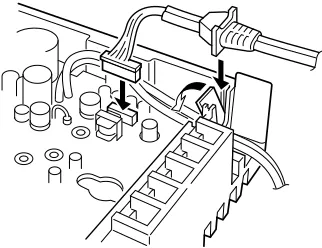
The optional OPC-871 HEADSET ADAPTER install as follows.
qTurns the power OFF, then disconnect the DC power
cable.
wUnscrew the 4 screws, then remove the bottom cover. (Fig. 1)
eInsert the connector as shown below. (Fig. 2)
rMount the phone plug attachment together with the
mo-bile mounting bracket with 2 supplied screws. (Fig. 3)
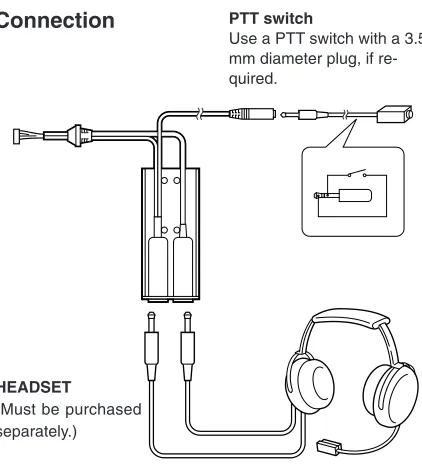
HEADSET
(Must be purchased separately.)
PTT switch
Use a PTT switch with a 3.5 mm diameter plug, if re-quired.
D
Connection
9
OPC-871
• Use the upper side mounting hole.
• You can mount the attachment on either side of the transceiver.
• Bent the plastic dust cover before install the strain relief into the notch.
10
OPTIONS
D
Other options
OPC-871HEADSET ADAPTER (See pgs. 17-18)
CS-A110CLONING SOFTWARE
Provides quick and easy programming of items, including pri-vate channels, scan settings, etc., via an IBM®compatible PC
(Microsoft®Windows®95/98) to transceiver.
OPC-478CLONING CABLE
OPC-592CLONING CABLE ADAPTOR
These three components work as one set and provide a quick and easy programming of items, including memory channels, memory names and set mode contents, etc. via a PC.
OPC-591CLONING CABLE
Cloning cable for transceiver to transceiver. Very convenient when programming cloning process. Allows transfer of pro-grammed contents from one transceiver to another.
1-1-32 Kamiminami, Hirano-ku, Osaka 547-0003 Japan A-5616H-1EX-q