USB Flash to USB Flash Data Transfer Using
Arm
Meenakshi Patil1, Ashwini Patil2, Jayush Gobre3, Pallavi Jorwar4
Assistant Professor, ICEM, Paranwadi, Pune, India1
B.E, ICEM, Paranwadi, Pune, India2
B.E, ICEM, Paranwadi, Pune, India 3
B.E, ICEM, Paranwadi, Pune, India 4
ABSTRACT: Generally, we used to transfer data between two pen drives by using laptops or desktops. But it is not
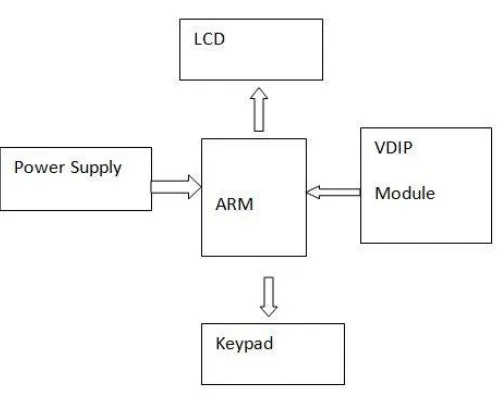
always possible to carry such a large size device to the particular location. So to overcome this problem, we are designing a hardware which is more compact to carry anywhere. With the help of this project we can not only transfer the data but also we can see the transfer of the particular file which we want to send by using LCD display. In our project we are transferring the data between two pen drives without using any computers or laptops. We have designed a project which is known as pen drive to pen drive data transfer, and pen drives to mobile in which we will be transferring the data between two pen drives and pen drives to mobile using ARM processor. In the block diagram we can observe, whenever we insert the pen drive into the USB port then an signal will be sent to the arm processor indicating that source pen drive is inserted so now arm processor will start fetching the data from the source pen drive into the buffer and arm processor waits for the signal from destination pen drive. When arm processor gets the signal from the destination pen drive now arm processor is ready to transfer the data between those. Only the arm processor should get the input from external hard key from the user, once the user press the hard key the arm processor gets the information to transfer the data between two pen drives. While transferring the data the led blinking rate will be increased when data transfer is completed then led will stop blinking.
1. INTRODUCTION
Several data and application are developed daily which common computer user has to transfer from one USB Flash device into another, with the minimum wastage of time. For this user has to first find a computer then wait for it to boot up, then plug in his device, and then transfer the data. Different types of USB ash devices are used now-a-days. It is not necessary that all of these devices are supported by the computer and the operating system and their device drivers are available and installed. Carrying a computer or a laptop just for the sake of data transfer is not affordable these days in the age when people want all devices to be handy. More- over, transferring data via a computer involves a lot of power to be wasted, since the computer has to be entirely functional before it can transfer data. Also, the threat of viruses and malware has made the life of computer users more complicated. These viruses get activated as soon as the device is plugged into the system and get copied along with other data from one ash device into another. Our project here can provide a valuable solution to all problems faced by person in above situations. Our aim is to build a small and handy device to transfer data from one USB Flash device to another. The device will have following features:-
1. Small, lightweight and handy device
2. Powered by 9V battery
3. Support for all USB Flash devices formatted with FAT32 file System
1.1 Universal Serial Bus (USB)
USB was initially designed to be an interface for communicating with many types of peripherals without the Limits and frustrations of older interfaces. Every recent PC includes USB ports that can connect to standard peripherals such as keyboards, mice, scanners, cameras, printers, and storage drives. It is a very useful protocol designed for a computer to communicate with almost any type of peripheral. Some of its benefits for users include:
1. Single Interface for many devices.
2. Considerably high Data rate.
3. Automatic Configuration.
4. Easy connection.
5. Hot Pluggable.
6. No user Settings.
7. Frees Hardware Resources for other devices.
8. No extra Power Supply needed.
9. Low Cost and Low Power consumption. Benefits for Developer include.
1. Operating system support.
2. Peripheral support.
3. Open source support available online.
4. Versatility.
1.1.1 Inside USB
As mentioned above, the connection comprises of four terminals.
1. Vcc
2. D-
3. D+
4. Ground
II. LITERATURE SURVEY
In[2] Rahul.R.Menon1, Hardik.Sukhadiya2, Jainish.Patel used PIC 16 for standalone USB to USB data transfer with 2 USB ports which is capable of copying entire flash disk to another. The USB disks are slave devices which mean they cannot initiate data transfers and operation on data on their own. These slave devices needs a master controller(PC or Laptop) which commands them to do appropriate operations on the data. So we cannot eliminate the master controller, only thing which can be done is to reduce the size of master controller and make it portable, quick and user-friendly for access. This paper demonstrates a way of data transfer between two USB flash drives using an Host controller chip called VNC1L and a microcontroller for user interface and commands.The standalone device will display the files inside the USB in the LCD screen. There will be a small keypad provided for browsing through files and selecting required operations on files like cut, copy, paste or delete files. The PIC 16F877A microcontroller is used for peripheral interface and for sending commands to VNC1L host controller via UART serial mode. The PIC 16F877A has 4 I/O ports which can be used for interfacing USB slave disks and VNC1L. The microcontroller acts as a bridge between the host controller and slave disk by sending the commands to VNC1L .In[3] Rupali C. Bachalkar, Shrutika D. Durge, Purvaja V. Pote, Sapana V. Ajmire, Prof.Reetesh V. Golhar have used raspberry pi module to implement the USB to USB data transfer. Raspberry pi module is a small module which comes with inbuilt RAM, VGA HDMI ports and a microprocessor CPU which makes this module work like a mini computer. In [4] OmprakashGawali, KetanPandurang Kale, Mahesh Sanjay Gund, Ganesh BalasahebGawarehaveprovided methodology to transfer data from one USB to another using a ARM processor. We have matter USB terminal and a slave USB terminal. Here user has to first insert the first pen drive in the master USB terminal. Then the ARM controller reads the data from pen drive using and display contents list on LCD. After this user needs to put another pen drive in slave USB terminal. The ARM controller reads the data of this pen drive as well and displays the contents on LCD. From the menu screen the user can select/copy/cut/paste the data/files from the master pen drive to the slave pen drive. For USB interface with microcontroller we are using interfacing IC VNC1L. The IC has features of serial interface and a USB host interface.
III. COMPONENTS USED
1. ARM processor
2. USB host controller IC- VNC1L
3. Power supply unit
4. Computer interface
5. Graphical LCD
IV. BLOCK DIAGRAM
Fig No 01 Block Diagram of System
This IC will in turn communicate with USB device, in our case it is pen drive. Once the IC successfully establish a communication with the USB devices i.e. pen drives, the user can do the necessary like copy and paste operation from one pen drive to another pen drive with help of keyboard.
V. VDIP MODULE
The VDIP1 module is an MCU to embedded USB host controller development module for the VNC1L IC device. The VDIP1 is supplied on a PCB designed to fit into a 24 pin DIP socket, and provides access to the UART, parallel FIFO, and SPI interface pins on the VNC1L device, via its AD and AC bus pins. Not only is it ideal for developing and rapid prototyping of VNC1L designs, but also an attractive quantity discount structure makes this module suitable for incorporation into low and medium volume finished product designs.
Features:
1. Uses FTDI’s VNC1L embedded dual USB host controller IC device 2. USB single ‘A’ type USB socket to interface with USB peripheral devices 3. Second USB interface port available via module pins if required
VI. ADVANTAGES
1. Considerably high Data rate. 2. Automatic Configuration. 3. Easy connection.
4. Low Cost and Low Power consumption.
VII. APPLICATION
The best and only application is to transfer data.
VIII. RESULT ANALYSIS
Problems are stepping stones towards success. Once we start working with the hardware we are bound to face some obstacles in our way to reach our goal. While working on the hardware of the project we initially had opted for an ARM board combined with the general purpose board. The idea was opted because we were new with the use of the VNC1l IC and so the method we opted was the try and error method. We opted the general purpose board so that we can easily demount the components if something goes wrong. Also it was used so that future modifications could be made easier if required or necessary. We initially mounted all the circuit components related to the ARM board and so far the work was going as we had planned. The problem arised as we mounted the VNCL1 IC, the board became bulky and it became difficult for us to mount all the components that were to be interfaced between ARM and VNCL1. Size of the board became the reason behind the bulkiness. We had to compromise with the spacing of the components and that made the work very untidy and difficult for us to distinguish between various components. So finally we decided to switch the boards. We then designed a board using ORCAD 9.0. This board was very specific with what we needed and was the correct decision which leads us to the perfect working of our project.
IX.CONCLUSION
Now aday’s transferring data through USB is the most common task. But the problem is that if you don’t have PC or laptop it is very difficult. Hence we are making this hardware which is compact and easy to carry anywhere. It is also time and power saving device. Transferring the data through USB in today’s scenario is the most common task. But the problem is that for transferring the data to a personal computer or laptop is difficult if u don’t have any of them. It is affordable to purchase a USB data drive than purchasing a laptop or PC. Therefore we came up with a handled battery operated affordable device which can transfer the data between two USB data drives without the help of PC or laptop. The advantage of this device is that it is battery operated so there is no need of power supply connection and data transfer can take place at any place. Currently we have design the system for transfer of data up to 2GB only, but it can be increased by proper selection of the bus.
REFRENCES
[1].Mr.V.S.Gawali ,Mr.A.M.Agarkar ,” Pen Drive to Pen Drive and Mobile Data Transfer Using ARM”, IOSR Journal of Electronics and Communication Engineering (IOSR-JECE) ISSN: 2278-2834, ISBN: 2278-8735, PP: 43-47 .
[2].Rahul.R.Menon1, Hardik.Sukhadiya2, Jainish.Patel,” Standalone USB Flash to USB Flash Data Transfer”, International Journal of Innovative Research in Computer and Communication Engineering, Vol. 3, Issue 7, July 2015.
[3].Rupali C. Bachalkar, Shrutika D. Durge, Purvaja V. Pote, Sapana V. Ajmire, Prof. Reetesh V. Golhar, “Data Transfer between Two Pendrives without PC”, International Journal of Advanced Research in Computer Science and Software Engineering, Vol.5, Issue 1.
[4].OmprakashGawali, KetanPandurang Kale, Mahesh Sanjay Gund, Ganesh BalasahebGaware, “Communication In USB’S For Data Transfer”, International Journal of Engineering and Advanced Technology (IJEAT) ,ISSN: 2249 – 8958, Volume-2, Issue-4, April 2013.
[5] ieeexplore.ieee.org.
[6] Philips Semiconductors LPC2148 datasheet
[7] FTDI Inc, www.ftdichip.com/document Reference No.: FT-000006v. Vinculum Firmware User Manual Version 2.05. [8] www.keil.com
[9] www.sciencedirect.com