Volume 8, No. 5, May-June 2017
International Journal of Advanced Research in Computer Science
RESEARCH PAPER
Available Online at www.ijarcs.info
ISSN No. 0976-5697
Database Connection Technology
Sonia Kumari
Department of Computer Science Shyama Prasad Mukherji College (For Women)
University Of Delhi, India
Kumari Seema Rani Department of Computer Science Shyama Prasad Mukherji College (For Women),
University Of Delhi , India
Manvendra Yadav * Department of Computer Science Atma Ram Sanatan Dharma College,
University Of Delhi, India
Abstract: This paper discusses innovative and proficient methods to access vast databases and concentrates on database connection with three technologies: Java, Python and PHP. The interaction of web and database is becoming a vital module of database education; the incorporation of information across diverse systems is a foremost challenge with existing information systems. Seeing the immense popularity of database management systems, we discuss about the proficient and secure access to remote databases. This paper offers insight into database technologies, its execution and applications.
Keywords: Java, Python, PHP, Database, Hibernate, JDBC
1.INTRODUCTION
Database Management Database management technology has gained worldwide popularity because of heavy dependence of business world on online record maintenance like finance, transport, education, culture, healthcare, leisure (theatre, concerts), utilities like water, gas, electricity etc. To manage work easily and efficiently database connection technologies have been a boon. This paper describes various database connection technologies, particularly Python, Java and PHP. It gives a brief introduction on each of the languages and how we can connect to database using each of the specified languages .It involves basic step by step procedure which works perfectly well and is easy to implement too. We can connect MySQL database with python using the connect function and perform various tasks such as connecting to existing MySQL database, creating a new database, inserting tables into the created database and modifying the contents of the database, everything using Python.
In Java, there are two methods for connectivity to the database: JDBC and Hibernate. There are four types of JDBC drivers. Then we discuss Hibernate query language and finally, the advantages of Hibernate over JDBC. We can connect MySQL database using PHP using the connect function which can create a database.
2.DATABASECONNECTIVITYINJAVA
A. Introduction to Java
Sun Microsystems introduced an innovative programming language in the year 1995 - Java. Earlier the word ‘Java’ could have only these meanings like an island or a specific blend of coffee. It stems the syntax from C and its features from C++. Thus, the goal behind developing Java was to
create software that could be embedded in electronic devices [1].
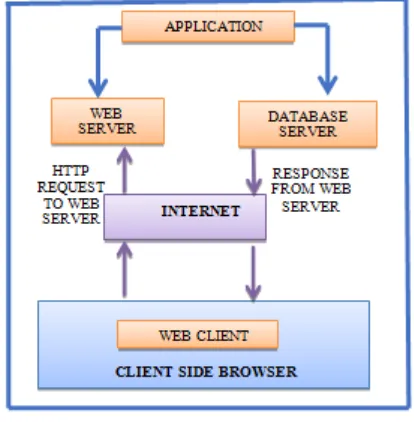
[image:1.595.320.527.525.736.2]Java is an object oriented programming language that offers a robust, secure and portable environment. It is unique in the sense that it is platform independent i.e. its programs can run in various platforms such as Linux, Microsoft Windows, Apple Macintosh, etc. Compared to other high level, fully interpreted scripting languages, Java is one of the best in terms of performance. Moreover, it is a dynamic language that fully supports multithreading [4]. Multiple relational databases over the web can be retrieved by its database connectivity interface. Fig.1. shows the integration of web server and database server.
B. JDBC Overview
Web application runs at a remote location, which can be viewed and controlled by all the users having administrative rights at any instance of time. An application can have three components:
1) Presentation logic defines the user interface and appearance of the application.
2) Business logic implements several business related policies into the application.
3) Data access logic looks after the connectivity of presentation and business logic with database. For extension to the web, JDBC was created. JDBC is a database access framework API that comprises of a collection of interfaces and classes, allowing java programs to interrelate with database. JDBC driver transforms low level proprietary DBMS data to low level data understood by the JBC API.J2EE component use some process for interaction with DBMS. The process is divided into subsequent routines [4]:
• Load the JDBC driver.
• Open a connection between J2EE and DBMS.
• Create and execute a statement.
• Return data and error messages that adapt to the JDBC specification to the JDBC driver.
• Return transaction management routines.
[image:2.595.311.556.55.305.2]• Terminate the connection with database.
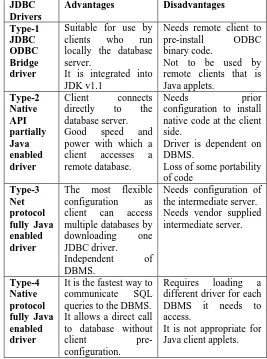
Fig. 2.depicts a code connecting database through JDBC ODBC driver. A JDBC driver can be implemented in four different types [2]. These four types are illustrated in Fig.3. They differ in two ways:
• How they support multiple database connections?
• Size of their downloadable code. <%@ page language="java" import="java.lang.*" import="java.sql.*" %>
<html>
<body border="1" bgcolor="white" width="650"> <%
Connection con_1 = null;
Class.forName("sun.jdbc.odbc.JdbcOdbcDriver"); con_1 =
DriverManager.getConnection("jdbc:odbc:abc","",""); Statement stmt=null;
%>
<form method="GET" ACTION="ProcessAction_1.jsp"> <h3><P ALIGN="LEFT"><FONT SIZE=10> EMPLOYEE INFO</FONT></P></h3></br></br>
<table callspacing=8 cellpadding=3 bgcolor="pink" colspan=4 rowspan=4 align="left">
<tr><td><font size=5> Enter Emp ID_1</td> <td><input type="TEXT" ID="id"
name="emp_id"></font> <select name="empIds"
onchange="document.getElementById('id'). value=this.options_1[this.selectedIndex_1].text"> <option>Select One</option>
<%String rec="SELECT empid_1,empname_1 FROM Employee ORDER BY empid_1";
try {
stmt=con.createStatement();
ResultSetrs=stmt.executeQuery(rec); while(rs.next())
{ %><option><%= rs.getInt(1)%></option><%} }
catch(Exception e){System.out.println(e); } %>
</select></font></td></tr>
<tr><td><font size=5> Enter EmpName_1</td> <td><input type="text"
name="empname_1"></font></td></tr> <tr><font size=5><B>
<td><input type="RADIO" name="n1" VALUE="add_1" >Insert </td></tr>
<tr><td><input type="RADIO" name="n1" VALUE="del_1" >Delete </td></tr>
<input type="RADIO" name="n1" VALUE="modify_1" >Modify/Update
</font></b><tr>
<input type="SUBMIT" VALUE="Submit_1"> <input type="RESET" value="1_reset"> </body>
[image:2.595.306.573.344.703.2]</html>
Fig. 2.Sample java code connected with JDBC ODBC driver (depicting employee information)
JDBC Drivers
Advantages Disadvantages
Type-1 JDBC ODBC Bridge driver
Suitable for use by clients who run locally the database server.
It is integrated into JDK v1.1
Needs remote client to pre-install ODBC binary code.
Not to be used by remote clients that is Java applets. Type-2 Native API partially Java enabled driver Client connects directly to the database server.
Good speed and power with which a client accesses a remote database.
Needs prior configuration to install
native code at the client side.
Driver is dependent on DBMS.
Loss of some portability of code Type-3 Net protocol fully Java enabled driver
The most flexible configuration as client can access multiple databases by downloading one JDBC driver.
Independent of DBMS.
Needs configuration of the intermediate server. Needs vendor supplied intermediate server. Type-4 Native protocol fully Java enabled driver
It is the fastest way to communicate SQL queries to the DBMS. It allows a direct call to database without client pre-configuration.
Requires loading a different driver for each DBMS it needs to access.
It is not appropriate for Java client applets.
Fig.3. Comparison between types of JDBC Drivers
C. Hibernate Technology
Gavin King with colleagues from Cirrus Technologies in 2001. It maps an object oriented domain model to traditional relational database. It is free software whose primary features are mapping from java data types to SQL data types and mapping from java classes to database tables. It supports Inheritance, associations and collections. It solves object relational impedance disparity by replacing direct database access with high level object handling functions.
D. Hibernate Architecture
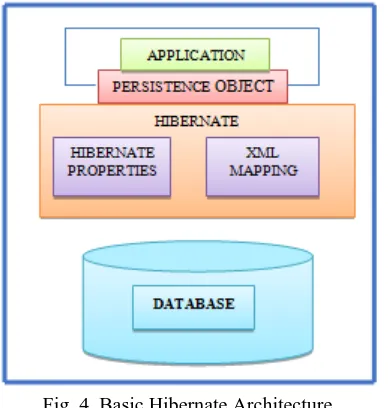
For using Hibernate, a java class needs to be created that denotes a table in some database followed by mapping the instance variable in the class as shown in Fig. 4.. Then, Hibernate is ready to implement actions like select, insert, update and delete records in table [3].
E. Hibernate Query Language(HQL)
[image:3.595.64.258.321.525.2]HQL is a powerful query language. It is case insensitive like SQL, except for the names of java classes and properties. If it is used then Hibernate automatically generates SQL query and executes it [3].Instead of tables and columns, it uses classes and properties. Queries are database independent. Its query results are in the form of objects.
Fig. 4. Basic Hibernate Architecture F. Understanding of HibernateConnection of database It requires the following steps to be performed: create the java objects, create the mapping files for objects and create hibernate configuration file, create hibernate util helper class and create a class to use persistence objects
For an object to be persisted to a database, Hibernate requires a mapping file for each and every object that is to be persisted. Inside the class element is where you define the attributes of your Java object to columns in the database. The following is a description of the commonly used ones and their attributes:
• <id> - When you are mapping a Java object to a database, an ID is required which removes any duplicate entries. name - States the name of the id. column - The name of the database column for the id.
• <generator> - This element is actually a sub-element of the id element. It is used to create a unique id every time an object is persisted to the database. It also states how the id element will be created by using the subsequent built in generators: increment– It is most frequently used when each time the generator needs a new id it executes a select on database to govern the
present largest id and it increments to the next value. native– It chooses the best strategy depending on the configured database. assigned – It is used to assign the id yourself in the application. Set the id by using the set<identifier> method of the Java class.
• <property> - For every attribute in your Java class that you want persisted you need to define one of these tags for each one. Some generally used attributes for the property element: name- States the name of the property. The first character must be lowercase. column - States the name of the column in the database where the attribute will be saved.
• <set> - It is the most common collection mapping used . name - States the name of the set used in the Java class. table- States the name of the table to be used for the collection.
• <key> - It is a sub-element of set and is used to specify the property of the class. column - States the foreign key column.
• <many-to-many> - It is a sub-element of set and is used to define the other class in the many-to-many relationship. column- States the column name of the other class. class - States the path of the other class. G. Which is better, Hibernate or JDBC?
Hibernate generates the SQL and automatically execute queries, saving the precious debugging and development time. Therefore, Hibernate is better than plain JDBC. H. Advantages of Hibernate
• Pagination is an easy task here.
• Even if we change the database, our application will work as HQL is database independent.
• While inserting any record, if we don’t have some table in database JDBC will create an error and will throw an exception. But in this situation Hibernate will create a table [11].
• It supports annotations, apart from XML.
• It provides Dialect classes. Therefore, writing SQL queries in hibernate is not required and methods provided by the API are used.
• It supports relationships like many to one, one to one, one to many and many to many.
• All exceptions are checked exceptions in case of JDBC. But, in hibernate there are only unchecked exceptions, so there is no need to write try, catch and throw functions [11].
I. Disadvantages of Hibernate
• Since, Hibernate generates loads of SQL statements in runtime, it is therefore slower than pure JDBC
• It is not appropriate for Batch processing [3].
3.DATABASECONNECTIVITYINPYTHON
J. Introduction to python
Python is an old language created by Guido Van Rossum. He was a great fan of the comedy series” Monty Python’s Flying Circus” and hence named the language as“Python”. It is an object-oriented,interpreted,high level programming language with applications in numerous areas including scripting ,web programming,scientific computing and artificial intelligence. It is a very popular language and is used by organizations such as Google, NASA, the CIA and Disney. It has simple syntax and is easy to learn by someone trying to learn computer programming for the first time. This language is processed at runtime by the interpreter so, there is no need to compile program before executing it.
K. The following are the steps involved to establish the connection and proceed further-:
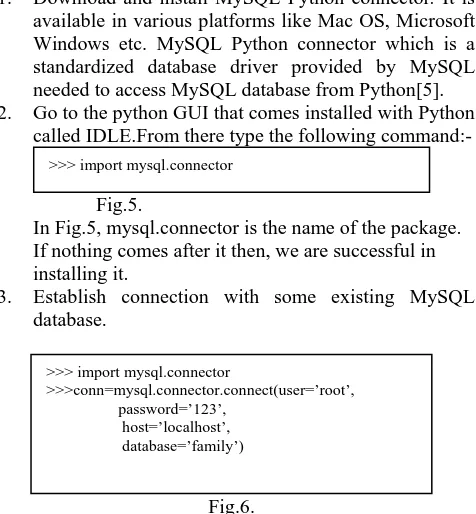
1. Download and install MySQL Python connector. It is available in various platforms like Mac OS, Microsoft Windows etc. MySQL Python connector which is a standardized database driver provided by MySQL needed to access MySQL database from Python[5]. 2. Go to the python GUI that comes installed with Python
[image:4.595.315.537.210.372.2]called IDLE.From there type the following command:-
Fig.5.
In Fig.5, mysql.connector is the name of the package. If nothing comes after it then, we are successful in installing it.
3. Establish connection with some existing MySQL database.
Fig.6.
In Fig. 6, below we create a connection object which is conn here, using the connect function with arguments to the function. Here root and password are the MySQL database username and password respectively and family is the name of the database. We have created a cursor which is basically a messenger between MySQL and Python[6]. Here the name of the cursor is pen. Now, using the cursor pen we can fetch all the tables of the database family using the commands in Fig. 7.
Fig.7.
We can also find the MySQL version using the command in Fig.8.
Fig.8.
4. Create a new database using python
Fig.9. Created database and inserted table
In Fig. 9, we have created a database “mypython” and a table named customer with five fields.
5. Insert data into the created database
Fig. 10. Inserting three tuples into the table customer[7].
6. Update the table
Fig.11.
In Fig.11, we have modified the age of the tuple with id=2 and set its value as 8[8].
We can even delete any of the tuples using the code given in Fig.12[10].
Fig. 12. Deleting a tuple with id=3
L. Connector/Python Connection Pooling
A connection pool refers to a cache of database connections needed so that connections can be reused later in future. MySQL connector/python 1.1.1 and up supports connection pooling with the following characteristics:-
• The mysql.connector.pooling module executes pooling.
• A pool opens numerous connections and handles thread safely during connections to requesters.
• The size of a connection pool is configurable at pool creation time and can’t be resized later.
• A connection pool can be named at its creation time and if no name is given, it is generated with the connection parameters.
>>>pen.execute(“DELETE FROM customer WHERE id=3”)
>>>conn.commit()
>>>pen.execute(“UPDATE customer SET age=8 WHERE id=2)
>>>conn.commit() >>> import mysql.connector
>>>conn=mysql.connector.connect(user=’root’, password=’123’,
host=’localhost’, database=’family’) >>>pen=conn.cursor ()
>>>pen.execute(“““INSERT INTO customer VALUES(1,’JOE’,[email protected],22,’F’)”””)
>>>pen.execute(“““INSERT INTO customer VALUES(2,’JIMMY’, [email protected],10,’F’)”””)
>>>pen.execute(“““INSERT INTO customer VALUES(3,’JACK’, [email protected],28,’M’)”””)
>>>conn.commit()
>>>pen.execute(“SELECT * FROM customer”) >>>print(pen.fetchall())
>>>pen.execute(“CREATE DATABASE mypython”) >>>pen.execute(“USE mypython”)
>>>pen.execute(“““CREATE TABLE customer ( idint primary key,
namevarchar(30), emailvarchar(30), ageint,
gender char(1))”””)
>>>pen.execute(“SHOW VARIABLES LIKE’%version%’”) >>>print(pen.fetchall())
>>>pen=conn.cursor()
>>>pen.execute(“SHOW TABLES”) >>>print(pen.fetchall())
>>> import mysql.connector
>>>conn=mysql.connector.connect(user=’root’, password=’123’,
[image:4.595.42.280.268.525.2]• The connection pool name can be retrieved from the connections obtained from it.
• It is possible to have multiple connection pools.
• For each connection, the pool provides the next available connection. In case the pool is exhausted, a Pool Error is raised.
• It is also possible to restructure the connection parameters used by a pool[10].
4. DATABASECONNECTIVITYINPHP
M. PHP Overview
PHP is an important language in the software development market. PHP is at the forefront of Web2.0 and Service Oriented Architectures supports technologies along with other open source projects MYSQL and Apache [12]. For many people, the foremost reason why they acquire knowledge about a scripting language like PHP is of the interaction with database it can offer. In this, I will show you how to use PHP to connect with MYSQL databse.PHP is endorsed not only by its large open source community in the IT market such as IBM, Oracle and Microsoft. This paper provides instructions for connectivity to MYSQL database using PHP.
N. Creating a Database
To create and delete a database you should have admin privilege. It is very easy to create a new MYSQL database. PHP uses mysql_queryfunction to create a MYSQL database. It takes two parameters. It returns FALSE on failure or TRUE on success.
Syntax:-
bool mysql_query_1( sql, connection);
• Parameter & its Description
sql - Required – It is an SQL query to form a database Connection - Optional- if not given then last opened connection by mysql_connect will be used.
O. Establish a connection to the MySQL database
This is a meaningful step because if script cannot connect to its database, queries to the database will fail.
$user name=”your_username_1”; $password=”your_password_1”; $database=”your_database_1”;
Fig. 13.
P. Connect PHP script to the database.
Connection can be established with the mysql_connectPHP function:
Mysql_connect($localhost,$user name,$password)
Fig.14.
• Parameter &Description
Localhost- Optional – It is the host name running database server. In case, if it is not stated then default value is localhost:3306.
Username- Optional – the username accessing the database. Password- Optional – the password of the user accessing the database.
• After the connection is established, select the database wish to use. This should be a database that username has access to. This can be accomplished through the following command:-
@mysql_select_db($database) or die($cant choose database)
Fig. 15.
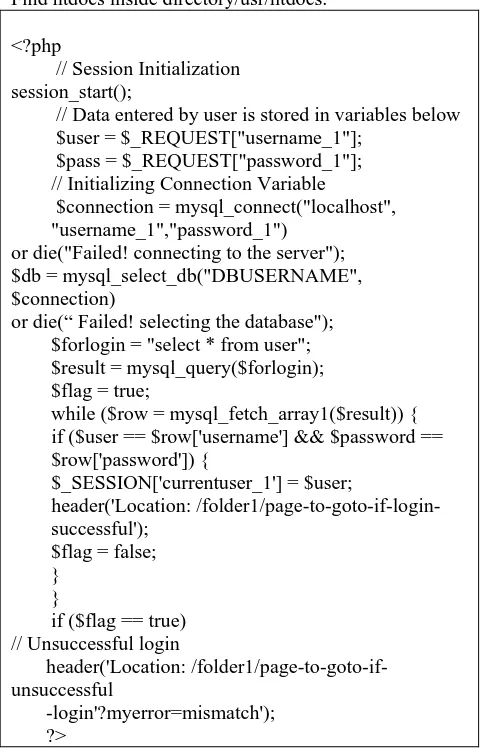
This command instructs PHP to choose the database kept in the variable $database. If the script cannot connect, it will stop executing and will display the error message: not able to choose database. The debugging functionality is provided by 'or die' part and it is useful. Though, it is not essential. Fig. 15. shows an example login code. Since, there is no platform dependent code for database connectivity in PHP, it works on all types of OS[12].
Q. Running the database_connectivity.php file
Please make sure that save the work in a folder created inside htdocs.
Path for Windows:
Find htdocs inside directory C://ProgramFiles/xampp/htdocs
Path for MAC:
Find htdocs inside directory/usr/htdocs.
<?php
// Session Initialization session_start();
// Data entered by user is stored in variables below $user = $_REQUEST["username_1"];
$pass = $_REQUEST["password_1"]; // Initializing Connection Variable
$connection = mysql_connect("localhost", "username_1","password_1")
or die("Failed! connecting to the server"); $db = mysql_select_db("DBUSERNAME", $connection)
or die(“ Failed! selecting the database"); $forlogin = "select * from user"; $result = mysql_query($forlogin); $flag = true;
while ($row = mysql_fetch_array1($result)) { if ($user == $row['username'] && $password == $row['password']) {
$_SESSION['currentuser_1'] = $user;
header('Location: /folder1/page-to-goto-if-login- successful');
$flag = false; }
}
if ($flag == true) // Unsuccessful login
header('Location: /folder1/page-to-goto-if-unsuccessful
[image:5.595.310.550.384.760.2]-login'?myerror=mismatch'); ?>
5.CONCLUSION
In this paper have successfully established connection to database through various technologies. We are able to do MySQL tasks of managing databases using Python, PHP and Java. In Java we have discussed various types of JDBC drivers. We have illustrated an introduction to what hibernate can do and how it can reduce the effort needed for coding, testing and investment of time. We have discussed the advantages and disadvantages of hibernate. Using Python and PHP, we are now able to manage large databases .The advantage of python is it’s easy to implement short code which works efficiently, whereas in PHP, advantage is that it has been designed for the creation of web apps.
6.REFERENCES
[1] S. Papastavrou , P. K. Chrysanthis, G. Samaras, E. Pitoura (2000) “An evaluation of the java-based approaches to web database access”,International Conference on Cooperative Information Systems. Springer Berlin Heidelberg., 10(4), 102-113
[2] Database Programming in Java Using JDBC.
(2007).Retrieved from
[3] B.Vasavi, Y.V.Sreevani, G.Sindhu Priya(2011) “Hibernate technology for an efficient business application extension”, Journal of Global Research in Computer Science, 2(6), 118-125
[4] J. Keogh, C.J. Date, H. Darwen. (2002). J2EE: The Complete Reference: A Guide to the SQL Standard,New York,NY:Tata McGraw-Hill Education.
[5] Getting Started with MySQL Python connector.(2008).Retrieved from
[6] Python Connecting to MySQL Databases. (2008).Retrieved
from
[7] Python MySQL Insert Data. (2008).Retrieved from
[8] Python MySQL Update Data. (2008).Retrieved from
[9] Python MySQL Delete Data. (2008).Retrieved from
[10] Connector/Python Connection Pooling.Retrieved from
[11] Main Advantage And Disadvantages of Hibernates. (2011).Retrievedfrom