.\sun
~
®
microsystemsNeWS™
2.0
Programmer's Guide
1M 1M S · 1M V' 1M 0 W' d 1M d k NeWS ,XlllNeWS , unVlew ,X lew, and pen In ows are tra emar s
of Sun Microsystems, Inc. Sun Workstation@, Sun Microsystems®, and the Sun logo f;® are registered trademarks of Sun Microsystems Inc.
POSTSCRIPT® is a registered trademark of Adobe Systems Inc. Adobe owns copyrights related to the PoSTSCRIPT language and the PoSTSCRIPT interpreter. The trademark POSTSCRIPT is used herein to refer to the material supplied by Adobe or to programs written in the PoSTSCRIPT language as defined by Adobe. The X Window System is a trademark of Massachusetts Institute of Technology. UNIX® is a registered trademark of AT&T.
All other products or services mentioned in this document are identified by the trademarks or service marks of their respective companies or organizations.
Copyright © 1989 Sun Microsystems, Inc. - Printed in U.S.A.
All rights reserved. No part of this work covered by copyright hereon may be reproduced in any form or by any means - graphic, electronic, or mechanical - including photocopying, recording, taping, or storage in an information retrieval system, without the prior written permission of the copyright owner.
Restricted rights legend: use, duplication, or disclosure by the U.S. government is subject to restrictions set forth in subparagraph (c)(1)(ii) of the Rights in Technical Data and Computer Software clause at DFARS 52.227-7013 and in similar clauses in the FAR and NASA FAR Supplement.
Contents
Chapter 1 Introd.uction ... 3
1.1. NeWS Programming: An Overview ... 3
The POSTSCRIPI' Language ... 3
NeWS Types ... 3
NeWS Operators ... 4
The Xll/N"eWS Server ... 4
Client-Server Communication ... 4
C Client Interfa~e ... 5
Canvases ... 5
The NeWS Imaging Model ... 6
Events ... 6
Memory Management ... 7
Color Support ... 7
Font Support ... 7
1.2. POSTSCRIPT Language Files Used with the Server ... 8
The Window Manager ... 8
Classes ... ;;... 8
Debugging ... 8
Chapter 2 Canvases ... ~... 11
The canvastype Extension ... ; ... ~... 12
Canvas Operators ... , ... , .. : 12
2.1. Coordinate System Overview ... ;... 13
2.2. Creating and Displaying Canvases ... 13
-iii-Contents - Continued
Creating Canvases ... 13
Shaping Canvases ... 14
Setting the Current Canvas ... 15
Mapping Canvases to the Screen ... 15
2.3. Manipulating Canvases ... 16
Moving Canvases ... 16
Transparent and Opaque Canvases ... 17
Retained and Non-Retained Canvases ... 19
Further Infonnation on Damage ... 21
The SaveBehind Key ... 21
2.4. Parent, Child, and Sibling Canvases ... 22
The Sibling List ... ... 22
Establishing a New Parent ... 24
2.5. Overlay Canvases ... 25
Drawing on Overlays ... 25
2.6. Canvas Dipping Operators ... 26
2.7. Cursors ... 26
2.8. Canvases, Files, and Imaging Procedures ... 27
Writing Canvases to Files ... 27
Reading Canvases from Files ... 27
Other File-Related Operators ... 28
Imaging ... 28
2.9. Other Dictionary Keys ... 29
Events ... 29
Color ... 29
X -Specific Features ... ... ... ... 29
Grab State ... ... ... ... ... 29
File Sharing ... ... ... ... ... 30
Chapter 3
Events ...33
The eventtype extension ... 33
Event Operators ... 34
3.1. Overview of Event Distribution ... 34
-iv-Contents - Continued
3.2. Creating an Event ... 35
3.3. Expressing Interests ... 36
Copying an Event Before Expressing Interest ... 36
Changing and Reusing Interests ... 36
3.4. Rules for Matching Events to Interests ... 37
Rules for Name And Action Key Matching ... 37
Rules for Process Key Matching ... 37
Rules for Serial Key Matching ... 37
3.5. Sending an Event into Distribution ... 38
3.6. Awaiting Events ... 38
3.7. Specifying the Name, Action, and Canvas Keys as Dictionaries ... 39
N on-Executable Dictionary Values ... 39
Executable Dictionary Values ... ... 41
3.8. Using the Canvas Key: Matching Multiple Interests ... 43
Pre-Child and Post -Child Interest Lists ... 43
Order of Interest Matching ... 44
Specifying a Single Canvas ... 44
Specifying an Array or Dictionary... ... 44
Specifying null ... 44
U sing the canvastype EventsConsumed Key... 45
Multiple Post-Child Interest Matching: An Example ... 45
Multiple Pre-Child Interest Matching: An Example ... 49
3.9. System-Generated Events ... 49
Mouse Events ... 50
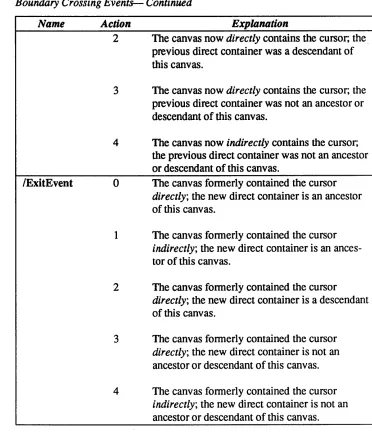
Enter and Exit Events ... 52
Name Key Values ... 52
Action Key Values ... 54
Using the postcrossings Operator ... 55
Using the XLocation and YLocation Keys ... 56
U sing the Coordinates Key... ... 57
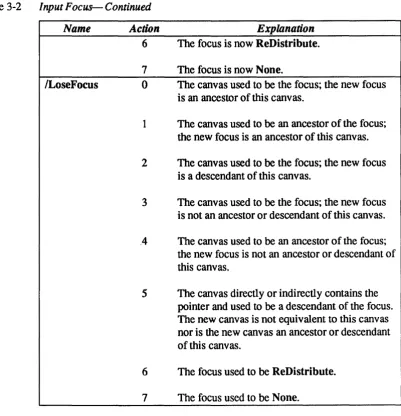
Focus Events ... 57
Keyboard Events ... 58
-v-Contents - Continued
The Repeat Key Dictionary ... 58
Damage Events ... 59
Obsolescence Events ... 59
ProcessDied Events ... 59
3.10. Using the ClientData Key ... 60
3.11. Using the Priority Key ... 60
3.12. Using the Exclusivity Key... 62
U sing the redistributeevent Operator ... 63
3.13. Using the TimeStamp Key... 64
U sing the recallevent Operator ... 65
3.14. Using the Process Key ... 66
3.15. Input Synchronization with Multiple Processes ... 67
Using blockinputqueue ... 67
3.16. Event Logging ... 68
Chapter 4 Classes ... 71
4.1. Basic Terms and Concepts ... 71
Classes and Instances ... 71
Inheritance and the Class Tree ... 73
Superclasses and Subclasses ... 73
The Immediate Superclass ... 73
Inheritance ... :... 73
Single Inheritance and Multiple Inheritance ... 74
The Inheritance Array ... 74
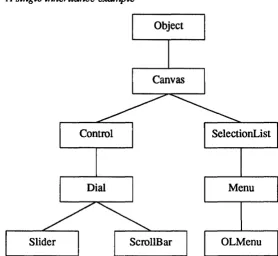
A Single Inheritance Example ... 75
Summary of Terms ... 77
4.2. Creating a New Class ... 79
The Class Definition ... 79
classbegin ... ... 79
classend ... 79
redef ... 79
Initializing a New Class ... 80
4.3. Sending Messages With the send Operator ... 80
-vi-Contents - Continued
The Usual FOnTl of send ... 80
The Steps Involved in a send ... 80
U sing send to Invoke a Method ... 81
A Nested send ... 82
Using send to Create a New Instance ... 83
Another Fonn of send ... 84
U sing send to Change the Value of an Instance Variable ... 84
U sing send to Change the Value of a Class Variable ... 84
4.4. f The Psuedo-Variables self and super ... 85
The self Psuedo-Variable ... 87
The super Psuedo-Variable ... 88
U sing super to Send a Message Up the Superclass Chain ... 90
Restrictions on the Use of self and super ... 90
4.5. Method Compilation ... 90
Compiling self send ... 91
Compiling super send ... 91
Local Dictionaries ... 91
Controlling Method Compilation ... 92
Imethodcompile ... 92
linstallmethod ... 93
Idoit ... 93
SetLocalDicts ... 94
4.6. Creating a New Instance ... 96
Inew ... 97
Inewobject ... 97
Inewinit ... 98
Inewmagic ... 99
4.7. Intrinsic Classes ... 100
Inewdefault ... 101
I defaultclass ... 102
ISubClassResponsibility ... 102
4.8. Overriding Class Variables With UserProfile ... 102
Overriding DefaultClass ... 103
-vii-Contents - Continued
4.9. Promoting Class Variables to Instance Variables ... 103
promote ... 103
unpromote ... 104
promoted? ... 104
Avoiding an Accidental Promotion ... 104
4.10. Destroying Classes and Instances ... 104
I destroy ... 104
classdestroy ... 105
Icleanoutclass ... 105
4.11. Obsolete Objects in the Class System ... 105
lobsolete ... 105
4.12. Multiple Inheritance ... 106
A Simple Multiple Inheritance Example: a Utility Class ... 106
A More Complex Multiple Inheritance Example ... 109
Rules for Valid Inheritance Array Orders ... 109
Possible Inheritance Arrays for this Example ... 110
Which Order Do You Choose? ... 111
Constraining the Order of the Inheritance Array... 112
super and Multiple Inheritance ... 112
4.13. Utilities for Setting and Retrieving an Object's Name and Classname ... 113
Iname ... 113
lsetname ... 113
Iclassname ... 114
4.14. Utilities for Inquiring About an Object's Status ... 114
isobject? ... 114
isclass? ... ... 114
isinstance? ... 114
4.15. Utilities for Inquiring About an Object's Heritage ... 114
Isuperclasses ... 114
Isubclasses ... 114
linstanceof? ... 114
Idescendantof? ... 114
viii-Contents - Continued
lunderstands? ... 115
Iclass ... 115
4.16. Utilities for Finding Objects on the send Stack ... 115
Itopmostinstance ... 115
Itopmostdescendant ... 115
lsendtopmost ... 115
4.17. Class OJ)erators ... 116
4.18. Class Methods ... 116
Chapter 5
Client-Server Interface ... 119
5.1. The CPS Facility ... 119
5.2. Creating the . cps File ... 120
Argument TYJ>es ... 122
Sending POSTSCRIPf Language Code without Returning Values ... 123
Receiving Synchronous Replies ... 124
Receiving Asynchronous Replies ... 125
5.3. Creating the . h File ... 126
CPS Utilities ... 127
5.4. Creating the . c File ... 127
POSTSCRIPT Language Communication Files ... 128
Reading the Client's Input Queue ... 128
5.5. Tokens and Tokenization ... 129
Compiling the . c File ... 130
Comments ... 130
5.6. Debugging CPS ... 131
5.7. Supporting NeWS From Other Languages ... 131
Contacting the Server ... ... 132
5.8. Byte Stream Format ... 132
Encoding For Compressed Tokens ... 132
enc_int ... 132
enc_short_string ... 133
enc_string ... 133
ix-Contents - Continued
enc_syscommon ... 133
enc_syscommon2 ... 133
enc_usercommon ... 133
enc_lusercommon ... 133
enc_eusercommon ... 133
enc_IEEEfioat ... 133
enc _ IEEE double ... 134
Object Tables ... 134
Magic Numbers ... 134
Examples ... 134
Chapter 6 Debugging ... 139
6.1. Loading the Debugger ... 139
6.2. Starting the Debugger ... 139
6.3. Using the Debugger ... 139
Multi-Process Debugging ... 140
6.4. Client Commands ... 140
6.5. User Commands ... 141
6.6. Miscellaneous Hints ... 145
Aliases ... 145
Use Multiple Debugging Connections ... 146
Chapter 7 Memory Management ... 149
7.1. Reference Counting ... 149
Objects ... 149
References to Counted Objects ... 150
Counted References ... 150
Uncounted References ... 150
Soft References ... 150
Obsolescence Events ... ... ... 151
Reference Tallies ... 151
Object Types ... 151
7.2. Memory Management Operators ... 152
-x-Contents - Continued
7.3. Memory Management Debugging Operators ... 153
Using tlle debugdict ... 153
Debugging Operators ... 153
7.4. The Unused Font Cache ... 156
Specifying tlle Size of the Cache ... 156
Hushing tlle cache ... 157
Applications ... 157
Chapter 8 NeWS Type Extensions ... 161
8.1. NeWS Objects as Dictionaries ... 161
8.2. List of NeWS Types ... 162
POSTSCRIP1' LaIlguage Types ... 162
NeWS Type Extensions ... 162
8.3. colortype ... 163
8.4. graphicsstatetype ... 163
8.5. monitortype ... 163
8.6. packedarraytype ... 163
8.7. path type ... -... 164
8.8. canvastype ... 164
8.9. colormaptype ... 170
8.10. colormapentrytype ... 170
8.11. cursortype ... 171
8.12. environmenttype ... 172
8.13. eventtype ... 174
8.14. fonttype ... 177
8.15. processtype ... 177
8.16. visualtype ... 182
Chapter 9 NeWS Operator Extensions ... 187
Chapter 10 Extensibility through POSTSCRIPT Language Files ... 221
10.1. Initialization Files ... 221
init.ps ... 221
xi-Contents - Continued
redbook . ps ... 221
basics. ps ... 221
colors. ps ... 221
cursor. ps ... 221
statdict. ps ... 221
compa t . ps ... 222
utile ps ... 222
class .ps ... 222
rootmenu . ps ... 222
10.2. User-Created Extension Files ... 222
. user .ps ... 222
. startup. ps ... 222
Oilier Extension Files ... 222
debug .ps ... 222
event log . ps ... 222
journal.ps ... -... 222
repeat. ps ... 222
Extension File Contents ... 223
10.3. Miscellaneous ... 223
10.4. Array Operations ... 226
10.5. Conditional Operators ... 228
10.6. Input Operators ... 228
10.7. Rectangle Utilities ... 231
10.8. Class Operators ... 231
10.9. Graphics Utilities ... 231
10.10. File Access Utilities ... 233
10.11. CID Utilities ... 234
10.12. Journalling Utilities ... 235
Journalling Internal Variables ... 236
10.13. Constants ... 236
10.14. Key Mapping Utilities ... 237
10.15. Repeating Keys ... 238
10.16. Standard Colors ... 238
xii-Contents - Continued
10.17. Logging Events ... 238
UnloggedEvents ... 239
Appendix A NeWS Operators ... 243
A.l. NeWS Operators, Alphabetically ... 243
A.2. NeWS Operators, by Functionality ... 246
Canvas Operators ... 246
Event Operators ... 247
Mat:l1ematical Operators ... 248
Process Operators ... 248
Path Operators ... 248
File Operators ... 249
Color Operators ... 249
KeyboR{d and Mouse Operators ... 249
Cursor Operators ... 250
Font Operators ... 250
Miscellaneous Operators ... 250
Appendix B The Extended Input System ... 255
B.l. Building on NeWS Input Facilities ... 255
B.2. The LiteUI Interface ... 256
B.3. Keyboard Input ... 257
Keyboard Input: Simple ASCII Characters ... 257
Revoking Interest in Keyboard Events ... 257
Keyboard Input: Function Keys ... 257
Assigning Function Keys ... 258
Keyboard Input: Editing and Cursor Control ... 258
B.4. Selections ... 259
Selection Data Structures ... 259
Selection Procedures ... 261
Selection Events ... ... ... 262
ISetSelectionAt ... 263
IExtendSelectionTo ... 264
xiii-Contents - Continued
IDeSelect ... 265
IShelveSelection ... 265
ISelectionRequest ... 266
B.S. Input Focus ... 266
Appendix C Omissions and Implementation Limits ... 273
C.I. Operator Omissions and Limitations ... 273
C.2. Imaging Omissions ... 274
C.3. The statusdict Dictionary ... 274
C.4. Implementation Limits ... 275
C.5. Other Differences with the POSTSCRIPT Language ... 276
Index ... 275
-Tables
Table 3-1 Boundary Crossing Events ... 54
Table 3-2 Input Focus ... 57
Table 4-1 Summary of TeI11ls ... 78
Table 5-1 CPS Argument Types ... 122
Table 5-2 C Utility Routines Provided by CPS ... 127
Table 5-3 Token Values ... 134
Table 5-4 Meaning of Bytes in Encoding Example ... 135
Table 7-1 Uncounted Object Types ... 152
Table 7-2 Counted Object Types ... 152
Table 8-1 Standard Object Types in the PoSTSCRIPT Language ... 162
Table 8-2 Additional NeWS Object Types ... 163
Table 9-1 Events sent to incanvas and its parents ... ... 206
Table 9-2 Events sent to outcanvas and its parents 207 Table 9-3 Rasterop Code Values 214 Table 10-1 Standard NeWS Cursors ... ; ... ;;;;.; •.... :; .. ;,"~~ ... ;.: .. ;.:;; ... ,
Table B-1 Selection-Dict Keys ... ; ... ;:.;;;... 260
Table B-2 System-defined Selection Attributes ... 260
Table B-3 Request-dict Entries ... ~"... 261
-xv-Tables - Continued
Table B-4 High-Level Selection-Related Events ... 261
Table B-5 Input Focus ... 267
Table C-I Implementation Limits ... 275
Table C-2 NeWS Versions of Various POSTSCRIPT Language Operators ... 276
-xvi-Figures
Figure 2-1 Canvas Mapped at 0,0 ... 16
Figure 2-2 Canvas Mapped at 25,25 ... 17
Figure 2-3 A Mapped Child Canvas ... 18
Figure 2-4 Parent Canvas Made Transparent ... 19
Figure 2-5 Parent Canvas Made Opaque and Repainted ... 19
Figure 2-6 Damage on Unretained Canvas ... 20
Figure 2-7 Younger Sibling Obscuring Elder ... 23
Figure 2-8 Elder Sibling Made to Obscure Younger ... 24
Figure 2-9 Modified Parenthood Between Canvases ... 24
Figure 2-10 Results of Canvas Clipping Operation ... 26
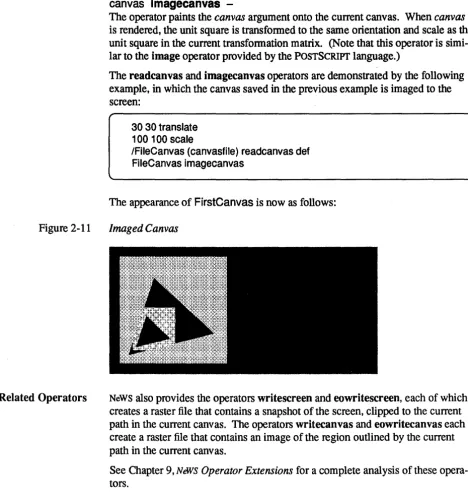
Figure 2-11 Imaged Canvas ... 28
Figure 2-12 Canvas Imaged with buildimage Operator ... 29
Figure 3-1 Initial Appearance of Canvases ... 48
Figure 3-2 Result of Pre-Child Interest Matching ... 48
Figure 3-3 Result of Multiple Pre-Child Interest Matching ... 49
Figure 3-4 Initial Appearance of FirstCanvas and SecondCanvas .... ;.~... 53
Figure 3-5 First Entry Event, Matched by FirstCanvas ... ~~ ... ; ... H U • • • • • ~~... 53
Figure 3-6 Second Entry Event, Matched by SecondCanyas ... ~ ... ; .... ; .... , ... ,.,. 54
Figure 3-7 Third Entry Event, Matched by FirstCanvas... 54
Figure 3-8 Result of Mouse-Generated Event ... 57
Figure 4-1 A simple class tree ... ; .. ; ... ;... 73
Figure 4-2 A class tree with multiple inheritance ... ;... 74
xvii-Figures - Continued
Figure 4-3 A single inheritance example ... 76
Figure 4-4 Dictionary stack before and during a send to MyScroll Bar ... 82
Figure 4-5 Dictionary stack before and during a nested send ... 83
Figure 4-6 Class tree for self and super example ... 86
Figure 4-7 Basic class hierarchy for the multiple inheritance examples ... 106
Figure 4-8 Class hierarchy with a utility class ... 107
Figure 4-9 Class tree for LabeledOial example ... 109
Figure 4-10 A breadth-first order for LabeledOial's inheritance array... 110
Figure 4-11 A depth-first order for LabeledOial's inheritance array... 111
xviii-Preface
TM
This manual provides a guide to programmin~in the NeWS language. This language is supported as part of the XIIlNeWS server, which itself fonns a part
TM
of the Open Windows distributed window system.
The NeWS interpreted programming language is based on the POSTSCRIPT® language. 1 Developed at Adobe Systems, the POSTSCRIPT language is a general programming language used primarily for specifying the visual appearance of printed documents. The NeWS language uses POSTSCRIPT language operators to display text and images on a graphics console. Importantly, the NeWS language also provides operators and types that are extensions to the POSTSCRIPT language; many of these extensions handle the interactive aspects of window management that the POSTSCRWT language does not consider.
This manual, which assumes the reader's familiarity with the POSTSCRIPT language, describes all the basic concepts of NeWS programming. It also provides a syntactic analysis for each NeWS operator and includes code examples that demonstrate the use of NeWS operator and type extensions.
For infonnation about using the Xll/NeWS server, see: o XllIN&lS Server Guide
o Xll1N&lS Release Notes
For infonnation about Open Windows, see: o OpenWindows User's Guide
o OpenWindows Installation and Startup Guide
For infonnation about the POSTSCRIPT language, see: o POSTSCRIPT Language Tutorial and C ookbook2
o POSTSCRIPT Language Reference Manuaz3
1 POSTSCRIPT is a registered trademark of Adobe Systems Inc.
2 Adobe Systems, POSTSCRIPT Language Tutorial and Cookbook, Addison-Wesley, July, 1985. 3 Adobe Systems, POSTSCRIPT Language Reference Manual, Addison-Wesley, July, 1985.
xix-Preface - Continued
Notational Conventions This manual uses the following notational conventions:
o bold listinq font
This font indicates text or code typed at the keyboard.
o listing font
This font indicates infonnation displayed by the computer. It it also used in code examples and textual passages to indicate use of the C programming language.
o sans serif font
This font is used in code examples to indicate use of the POSTSCRIPT language or NeWS extensions.
o bold font
This font is used in textual passages to indicate names of NeWS operators,
NeWS types, and system-defined dictionaries.
o italic font
This font is used in code examples and textual passages to indicate user-specified parameters for insertion into programs or command lines. It is also used to indicate special tenn,s or phrases the first time they are used in the text.
-xx-1
Introduction
Introduction ... 3
1.1. NeWS Programming: An Overview ... 3
The POSTSCRIP1' Language ... 3
NeWS Types ... 3
NeWS Operators ... 4
The Xll/NeWS Server ... 4
Client-Server Communication ... 4
C Client Interface ... 5
Canvases ... 5
The NeWS Imaging Model ... 6
Events ... 6
Memory Management ... 7
Color Support ... 7
Font Support ... 7
1.2. POSTSCRIP1' Language Files Used with the Server ... 8
The Window Manager ... 8
Classes ... 8
1.1. NeWS Programming: An Overview
The POSTSCRIPT Language
NeWS Types
1
Introduction
The XlllNeWS server can be used either by a single computer or by multiple computers linked across a communication network; thus, it is a distributed win-dow system. When the XII/NeWS server is used with multiple computers, an application run by one machine can use the windows displayed by another. The NeWS interpreted programming language is based on the POSTSCRIPT language. Developed at Adobe Systems, the PoSTSCRIPT language is used pri-marily for specifying the visual appearance of printed documents. A
POSTSCRIPT program consists of operations that are sent to a PoSTSCRIPT language interpreter residing within a printer; when interpreted, the operations define text, graphics, and page coordinates.
The NeWS language uses POSTSCRIPT language operators to display text and images on a graphics console. Programs are interpreted and executed by the XII/NeWS server, which is resident on the machine to which the graphics console is attached. Importantly, the NeWS language also provides operators and types that are extensions to the POSTSCRIPT language; many of these extensions deal with the interactive and multi-tasking aspects of a window system, which are not handled by the POSTSCRIPT language.
This section provides an ovelView of NeWS programming. Detailed infonnation is provided in later chapters.
The POSTSCRIPT language is a high level language designed to describe page appearance to a printer. It possesses a wide range of graphics operators. Nevertheless, only about a third of the language is devoted to graphics; the remainder provides a general purpose programming capability.
The PoSTSCRIPT language is extensible and thus allows programmers to use the supplied operators to define their own procedures. This extensibility facilitates the creation of modular code, encourages the design of well-structured and comprehensible programs, and helps keep programs small.
The NeWS language implements all the standard types provided by the
POSTSCRIPT language. In addition, the NeWS language provides special types as extensions to the POSTSCRIPT language.
Some of the NeWS type extensions can be accessed as if they were PoSTSCRIPT language dictionaries. These objects are known as magic dictionary objects.
4 NeWS Programmer's Guide
NeWS Operators
The XIIlNeWS Server
Client-Server Communication
Magic dictionaries have keys with predefined names. The programmer can change the value associated with many of the keys; other keys are read-only. The programmer can add new keys to magic dictionaries.
Other NeWS type extensions are opaque and cannot be accessed as dictionaries. A
full description of all NeWS type extensions is provided in Chapter 8, NIM'S Type Extensions .
The NeWS language implements most of the standard operators provided by the POSTSCRIPr language; many of the omitted operators .relate to page-description requirements, which are not relevant for a window system. Conversely, the NeWS language provides many operators as extensions to the POSTSCRIPT language; many of these operator extensions relate to interactivity requirements, and many of them exist to create and manipulate the NeWS type extensions.
A full deSCription of all NeWS operator extensions is provided in Chapter 9, NeNS
Operator Extensions.
The XII/NeWS server is not a machine used to serve files; it is a process that can exist on any graphics machine within a network, its function being to interpret and execute programs written in the POSTSCRIPT language and to display the resulting graphics on the screen.
The XII/NeWS server contains multiple lightweight processes, some of which
communicate with client processes. A lightweight process is not a UNIX® pro-cess; it is a process that lives in the server's address space and is scheduled to be run by the server. 1 Each lightweight process can perfonn operations on the display and can receive messages from the keyboard, the mouse, or another light-weight process. A lightlight-weight process can share data with other lightlight-weight processes. Many lightweight processes can be created with relatively little over-head. Lightweight processes are also known as NeNS processes.
Note that the XII/NeWS server is neither a toolkit nor a user interface; it provides neither standards nor defaults for the creation and appearance of windows. The XII/NeWS server simply interprets and executes POSTSCRIPT language operations and NeWS extensions that are specified by the programmer. Different user inter-faces can thus be designed entirely by the programmer: written in the
POSTSCRIPT language, all can be run on the XII/NeWS server.
The Xll/News server communicates with client programs that run either locally or remotely. Clients can send POSTSCRIPT language code to the server. The server runs this code on behalf of the clients.
Typically, a client program contains two main sections. One section, which can be written in C, FORTRAN, or any other language, is used to perfonn the application's basic computations; this section is executed in the client process. The other section, which must be written in the POSTSCRIPT language, is used to provide corresponding windows or graphics; this section is interpreted by the
1 UNIX~ is a registered trademark of AT&T.
C Client Interface
Canvases
Chapter 1 - Introduction 5
server process. The POSTSCRIPT language section of the client program can be detatched, sent to the server, and executed remotely by means of function calls. The ability to download POSTSCRIPT programs to the server gives the program-mer great freedom in designing the communication protocol and the split in func-tionality between server and client. The server does not directly notify the client program of events such as mouse manipulation; instead, the server notifies interested lightweight processes, and the client's POSTSCRIPT language code may either handle the information itself or write the information across the connection to the client program. Thus, the way in which the client and server communicate is specified by the POSTSCRIPT language contents of the client application. The POSTSCRIPT language code downloaded by the client program can use any of NeWS' built-in features.
Most programmers are likely to use C as the language of the client application. Therefore, NeWS provides a special interface facility that supports C client com-munication. The C client interface, named cPs, converts the client's POSTSCRIPT language code into functions callable by the client's C code.
Programmers can also create their own interface facility for use with other languages. The client interface protocol and the C client interface are discussed in Chapter 5, Client-Server Inter/ace.
A NeWS canvas is a region of the screen in which the client application can
display information to the user. Canvases provide the basic drawing surfaces in NeWS and are thus the raw material from which windows and menus are created; each window and menu is usually composed of more than one canvas. Canvases need not be rectangular since their boundaries are defined by POSTSCRIPT language paths. When visible on the screen, canvases can overlap. When this occurs, the hidden portion of a canvas can be stored offscreen and redisplayed when the canvas is re-exposed.
A canvas is implemented as a NeWS type extension that can be accessed as a dic-tionary. Many canvas characteristics can be set by changing the values of the keys in the canvas dictionary. For example, a canvas can be opaque or tran-sparent, mapped or unmapped. An opaque canvas visually hides all canvases
underneath it; a transparent canvas does not. When drawing operations are per-fonned on a mapped canvas, the image is visible on the screen (unless it is over-lapped by another canvas); drawing operations can be performed on an
unmapped canvas, but the image is not visible on the screen.
Canvases exist in a hierarchy. The background of the screen is the root of the hierarchy and is thus known as the root canvas. A canvas can have any number
of children; the display of each child canvas is clipped to the edges of its parent. Canvases overlap according to their positions in the hierarchy. When visible on the screen, opaque children obscure their parent. A canvas' children exist in an ordered list that determines their overlapping relationships. For a canvas to be visible on the screen, the canvas and all its ancestors must be mapped.
A canvas can be repositioned in the hierarchy, causing adjustments to the display of any overlapping canvases on the screen. A canvas can also be repositioned
6 NeWS Programmer's Guide
The NeWS Imaging Model
Events
horizontally and vertically on the screen, and it can be reshaped and resized. Each NeWS process can have a current canvas, which is the canvas that is
mani-pulated by the drawing operations performed by that process.
The NeWS language provides operator extensions for creating and manipulating canvases. A full account of canvases is provided in Chapter 2, Canvases. The
canvas dictionary keys are described in Chapter 8, NtlNS Type Extensions.
The NeWS imaging model, which is essentially that of the POSTSCRIPT language, can be described as a stencil/paint model. A stencil is an outline specified by an
infinitely thin boundary; the boundary can be composed of straight lines, curves, or both. Paint is a color, texture, or image that is applied to the drawing surface;
the paint appears on the drawing surface within the boundary of the stencil. Note that the stenciVpaint model differs from the pixel-based imaging model
used by most window systems. The pixel-based model requires that rectangular source and destination areas of pixels be combined using logical operations such as AND, OR, NOT, and XOR. The stenciVpaint model allows images of any shape or size, rectangular or non-rectangular, to be specified; it thus provides a more natural and comprehensible way of specifying images.
A NeWS event is an object that represents a message between NeWS processes. An
event is implemented as a NeWS type extension that can be accessed as a diction-ary. Events can transmit any kind of information and thus serve as a general interprocess communication mechanism. Some events report user manipulation of input devices and are therefore known as input events.
An event can be generated by the server or by any NeWS process. The server
automatically generates input events when the user manipulates the keyboard or mouse. The server also generates events to report when a canvas is damaged, when an object becomes obsolete (see Memory Management, below), when a
process dies while it is still referenced, and when the mouse pointer leaves one canvas and enters another.
The NeWS language provides operators that allow any NeWS process to create an
event and send it into the server's event distribution mechanism. System-generated events are automatically sent into the distribution mechanism as soon as they are generated. After an event enters the distribution mechanism, the server gives a copy of the event to NeWS processes that are interested in the event.
The NeWS language provides an operator that allows processes to describe the
types of events that interest them; each such description of events that interest a process is known as an interest.
A full account of events is provided in Chapter 3, Events. The event dictionary
keys are described in Chapter 8, NeWS Type Extensions.
Memory Management
Color Support
Font Support
Chapter 1 - Introduction 7
The Xll/NeWS server provides an automatic garbage collection facility that removes objects from virtual memory when the objects are no longer needed. Objects survive as long as they are referenced. If an object's last reference goes away, the server destroys it to reclaim the memory that it occupied.
The NeWS language provides the notion of soft references for programs that want to track objects without affecting the lifespan of the objects. A window manager is an example of this type of program. A window manager has references to the canvases that it tracks, but the window manager does not want its references to prevent canvases from being garbage collected. In this type of situation, client programs should use soft references.
If all the references to an object are soft, the object is considered to be obsolete.
When an object becomes obsolete, the server sends notice, in the fonn of an event, to all processes that have expressed interest in obsolescence events for that object. The processes should then remove their references to the object so that the server can destroy it.
Note that the server does not count references for all objects. Simple objects such as booleans, numbers, and names are not shared and therefore never have more than one reference. The server only counts references to objects that represent shared resources, such as arrays, dictionaries, canvases, and events. The NeWS language provides operators that aid in memory management. A full account of the memory management facilities is provided in Chapter 7, Memory
Management.
The NeWS language includes types and operators that provide color support for appropriate displays. A NeWS color object consists of either red/green/blue or hue/saturation/brightness components. The NeWS language also provides
color-map objects, which function as color lookup tables, and colormapsegment objects, which are groups of entries within a colonnap. Facilities are provided for using bitmasks and planemasks, which pennit colors to be detennined accord-ing to arithmetic operations.
Full infonnation on all color-related types is provided in Chapter 8, NeWS Type
Extensions.
The server allows bitmap fonts to be defined and placed in the NeWS font library. Cursor fonts and icon fonts can be created, and existing text fonts can be con-verted into NeWS fonnat. The server provides the commands convertfont, bldfamily, and makeiconfont, which are used in font definition. See the manual pages in the XllINeWS Server Guide for further information.
NeWS font dictionaries are identical to standard POSTSCRIPT language font tionaries except for one additional key. For a description of the NeWS font dic-tionary, see Chapter 8, NeWS Type Extensions.
8 NeWS Programmer's Guide
1.2. POSTSCRIPT Language
Files Used with the
Server
The Window Manager
Classes
Debugging
In addition to the operator and type extensions that are part of the server itself, the server also provides various POSTSCRIPT language files that support the NeWS programming environment; most of these POSTSCRIPT language files are loaded automatically when the server is initialized. The user can examine the supplied files and modify the procedures that they contain.
This section describes some of the more important POSTSCRIPT language files. Full information on these files is provided in Chapter 10, Extensibility through
POSTSCRIPT Language Files.
The POSTSCRIPT language files loaded by the server provide a default window
manager that allows the user to control the appearance of windows on the screen. The window manager allows the user to move, resize, open, and close windows. Note, however, that the window manager does not actually create the windows; this task is the responsibility of the client application. The default window manager can be replaced if desired. See the XIl1NfM'S Server Guide for more information on the window manager.
The POSTSCRIPT language files loaded by the server provide support for object-oriented programming; client applications can create objects known as classes and instances. A class is a template for a set of similar instance objects. A class is essentially a blueprint from which any number of instances can be created. , Each instance inherits the characteristics of its class but can override some of
these characteristics. Qasses and instances are represented as POSTSCRIPT language dictionaries that contain variables and procedures.
NeWS classes belong to a class hierarchy. The root of the hierarchy is class Object; class Object is implemented by the server, and the other classes in the hierarchy are provided by the client or by a toolkit.
Any class in this system can have subclasses, each of which inherits the charac-teristics of its superclass. A subclass can add new characcharac-teristics and can over-ride its inherited characteristics. A subclass can also inherit characteristics from more than one branch of the class tree, a feature known as mUltiple inheritance. The class system is especially useful for defining user interfaces. For example, class Canvas might be a subclass of class Object, and class Canvas might have subclasses such as Menu, Scrollbar, Frame, and Window.
Information on the class system is provided in Chapter 4, Classes.
The server provides a debugging facility that allows the user to set breakpoints and print to debugging output windows. The POSTSCRIPT language file contain-ing the debugger code is not loaded when the server is initialized; a command must be given to load this file.
Full information on using the debugger is provided in Chapter 6, Debugging.
2
Canvases
Canvases ... 11
The canvastype Extension ... 12 Canvas Operators ... 12 2.1. Coordinate System Overview ... 13 2.2. Creating and Displaying Canvases ... 13 Creating Canvases ... 13 Shaping Canvases ... 14 Setting tl1e Current Canvas ... 15 Mapping Canvases to the Screen ... 15 2.3. Manipulating Canvases ... 16 Moving Canvases ... 16 Transparent and Opaque Canvases ... 17 Retained and Non-Retained Canvases ... 19
2
Canvases
A NeWS canvas is a region of the screen in which the client application can display information to the user. Canvases provide the basic drawing surfaces in NeWS and are thus the raw material from which windows and menus are created; each window and menu is usually composed of more than one canvas. Canvases need not be rectangular since their boundaries are defined by PoSTSCRIPT language paths. When visible on the screen, canvases can overlap. When this occurs, the hidden portion of a canvas can be stored off screen and redisplayed when the canvas is re-exposed.
A canvas is implemented as a NeWS type extension that can be accessed as a dic-tionary. Many canvas characteristics can be set by changing the values of the keys in the canvas dictionary. For example, a canvas can be opaque or tran-sparent, mapped or unmapped. An opaque canvas visually hides all canvases underneath it; a transparent canvas does not When drawing operations are per-formed on a mapped canvas, the image is visible on the screen (unless it is over-lapped by another canvas); drawing operations can be performed on an
unmapped canvas, but the image is not visible on the screen.
Canvases exist in a hierarchy. The background of the screen is the root of the hierarchy and is thus known as the root canvas. A canvas can have any number
of children; the display of each child canvas is clipped to the edges of its parent. Canvases overlap according to their positions in the hierarchy. When visible on the screen, opaque children obscure their parent. A canvas' children exist in an ordered list that determines their overlapping relationships. For a canvas to be visible on the screen, the canvas and all its ancestors must be mapped.
A canvas can be repositioned in the hierarchy, causing adjustments to the disp:', of any overlapping canvases on the screen. A canvas can also be moved on the screen, and it can be reshaped and resized.
Each NeWS process can have a current canvas, which is the canvas that is
mani-pulated by the drawing operations performed by that process. This chapter describes canvases and shows how they can be used.
12 NeWS Programmer's Guide
The canvastype Extension
Canvas Operators
Each canvas is an object of type canvastype, which is a NeWS extension to the POSTSCRIPT language. Each canvastype object can be accessed as a
POSTSCRIPT language dictionary. The values of the dictionary keys detennine the properties of the canvas. A canvas dictionary includes keys for specifying the following:
o Ancestor and sibling relationships between canvases (TopCanvas, Bottom-Canvas, CanvasAbove, CanvasBelow, TopChild, Parent)
o The appearance of canvases on the screen (Transparent, Mapped)
o The handling of canvas storage (Retained, SaveBehind)
o The event management properties of the canvas (EventsConsumed, Interests)
o The color properties of the canvas (Color, Colormap, Visual, VisualList)
o The cursor associated with the canvas (Cursor)
o Properties for keeping a canvas in shared memory (SharedFile, RowBytes) o XII-related properties (OverrideRedirect, BorderWidth, UserProps,
XID)
o The grabbed state of a canvas (Grabbed, GrabToken)
The keys are discussed in detail throughout this chapter; a full syntactic descrip-tion of each key is also provided in Chapter 8, Nt!NS Type Extensions.
NeWS includes a variety of operator extensions to be used on canvases. The operators provide the following functionality:
o Creating canvas objects and overlays (buildimage, createdevice, createo-verlay, newcanvas)
o Changing ancestor and sibling relationships between canvases (canvasto-bottom, canvastotop, insertcanvasabove, insertcanvasbelow)
o Defining canvas shapes and paths (clipcanvas, clipcanvaspath, eoclipcan-vas,eoreshapecanvas,reshapecanvas)
o Reading and writing canvases to files (eowritecanvas, eowritescreen, imagecanvas, imagemaskcanvas, readcanvas, writecanvas, writescreen) o Detennining and specifying canvas locations (getcanvaslocation,
movecan-vas)
o Specifying the current canvas (setcanvas)
The operators are described throughout this chapter, a list of the operators is pro-vided for quick reference in Appendix A, NeNS Operators. A syntactic analysis
and description of all NeWS operators is provided in Chapter 9, NeNS Operator Extensions.
2.1. Coordinate System Overview
2.2. Creating and
Displaying Canvases
Creating Canvases
Chapter 2 - Canvases 13
In the standard use of the POSTSCRIPT language, a user coordinate system is associated with the page and a device coordinate system is associated with the printer. A current transformation matrix, or CfM, contains the current transfor-mation from user coordinates to device coordinates. The CfM can be changed at any time with operators such as scale, rotate, or translate.
In NeWS, each canvas represents a separate "user space" with its own coordinate
system, and the device space corresponds to the screen rather than to a printer. A current transformation matrix is still used to store the current transformation between the user and device coordinate systems, but in NeWS, each process has its own CfM as a part of its graphics state. A process' current coordinate system is specified by its CfM. When a new process is created, it inherits its CfM (along with the rest of its graphics state) from its parent.
Each NeWS canvas has a default coordinate system determined by its default transformation matrix. A canvas' default transformation matrix specifies the ini-tial transformation from the canvas' coordinate system to the screen's coordinate system. After a new, empty canvas is created with newcanvas, the canvas' shape and default coordinate system should be set with reshapecanvas. The
reshapecanvas operator sets the canvas' shape to be the same as the current path and sets the canvas' default coordinate system to be the same as the CfM.
When a canvas is made the current canvas with the setcanvas operator, the CfM is set to that canvas' default transformation matrix. The CfM can then be changed with standard PoSTSCRIPT language operators. To change an existing
canvas' default transformation matrix and shape, simply set the CfM and current path to the desired values and execute reshapecanvas.
These coordinate system definitions are illustrated in this chapter's examples.
This section discusses how canvases can be created, shaped, and mapped to the display. It also provides an introduction to using the canvastype type extension.
NeWS canvases exist in a hierarchy; thus, each canvas has a parent and can have
one or more children.
When NeWS is initialized, the create device operator is called to create the back-ground of the screen (note that the createdevice operator should not normally be
used by the programmer). This background is known as the root canvas or
framebuffer; it can be accessed by means of a global variable named frame-butTer. Any canvas that you wish to create immediately on top of this back-ground must have framebutTer specified as its parent.
NeWS provides the following operator for creating a canvas with a specified
parent:
14 NeWS Programmer's Guide
Shaping Canvases
pcanvas newcanvas ncanvas
This operator creates a new canvas whose parent is pcanvas.
If framebutTer is used as the pcanvas argument, the new canvas is opaque by default If the parent is specified as some other canvas, the new canvas is tran-sparent. Detailed information on canvas transparency and other factors affecting canvas appearance is provided later in this chapter.
The following example uses newcanvas to create a new canvas that has the framebuffer specified as its parent
IFirstCanvas framebuffer newcanvas def
FirstCanvas is opaque by default, since the framebuffer is its parent.
All coordinates in NeWS are measured with reference to the origin of a specified
canvas, which is often the lower-left comer of the canvas. Methods exist both for specifying the origin of a canvas and for specifying the canvas from whose origin coordinates are measured; these are discussed throughout this chapter.
NeWS allows you to shape canvases according to the current path. The following
operator reshapes a canvas.
canvas
reshapecanvas-This operator sets the shape of canvas to be the same as the current path. It also sets the canvas' default transformation matrix to be the same as the current coor-dinate system. If the canvas that is being reshaped is the current canvas, this operator sets the current clipping path (in the graphics state) to be the same as the canvas' new shape.
The following example uses reshapecanvas to establish a shape and default coordinate system for the canvas defined in the previous example:
newpath 00 moveto 0250 lineto 250 250 lineto 2500 lineto closepath
FirstCanvas reshapecanvas
% Define a path to which the % new canvas can be shaped.
% Reshape the canvas to the % current path.
NOTE NdVS also provides an operator named eoreshapecanvas. This operator is
ident-ical to reshapecanvas except that it uses the even-odd winding rule, rather than the non-zero winding rule, to interpret the specified path. For information on winding rules, see the POSTSCRIPT Language Reference Manual. For an analysis
of eoreshapecanvas, see Chapter 9, NeWS Operator Extensions.
Setting the Current Canvas
Mapping Canvases to the Screen
Chapter 2 - Canvases 15
NeWS SUpports the concept of a current canvas. Each NeWS process can have a current canvas as part of its graphics state. Many NeWS canvas operations do not
take a canvas argument, but simply use the current canvas. To set the current canvas, use the following operator:
canvas
setcanvas-The operator sets canvas to be the current canvas. It also sets the current coordi-nate system to be the same as the canvas' default coordicoordi-nate system. The current coordinate system can then be changed by calls to scale, rotate, and translate. The setcanvas operator sets the current clipping path to be the same as the can-vas'shape.
The following example demonstrates how to set the current canvas:
(
FirstCanvas setcanvasNeWS does not provide an operator for mapping canvases; instead, it allows you
to map canvases by setting the Mapped key of the canvastype dictionary to true. This causes the canvas to be visible on the screen within the borders of its parent, provided that the following conditions are fulfilled:
o All of the canvas' ancestors are also mapped.
o The canvas is not clipped away by its parent or any overlapping canvases. Even when the canvas is mapped, it might not be noticed on the screen if no drawing operations have been performed on it.
J
To fill a canvas with a color, use the fillcanvas operator; this operator is included in the POSTSCRIPT language extensibility files that NeWS provides. The operator
takes a single argument, which can be an integer or a color; see Chapter 10,
Extensibility through POSTSCRIPT Language Files for a syntactic analysis.
To retrieve and establish values for any read-write NeWS dictionary key, use the POSTSCRIPT language operators get and put respectively. This is demonstrated by the following example:
When FirstCanvas has been mapped to the screen, it appears in this example at the bottom-left comer of the framebuffer. This is illustrated in the following figure:
16 NeWS Programmer's Guide
2.3. Manipulating Canvases
Moving Canvases
Figure 2-1
NOTE
Canvas Mapped at 0,0
Nt!NS does not provide an operator for destroying a canvas,' even when
unmapped, a canvas continues to exist. A canvas is destroyed only when the last reference to the canvas is removed (see Chapter 7, Memory Management).
This section discusses how canvases can be manipulated on the screen. It
describes how to move canvases and discusses the concepts of transparency, retaining, and damage.
The display of a canvas is clipped to its parent's boundaries; thus, if a canvas is moved or reshaped so that parts of the canvas fall outside of its parent's boun-daries, those parts of the canvas do not appear on the screen when the canvas is mapped.
NeWS provides the following operator for moving canvases:
x y movecanvas -x y canvas movecanvas
If no canvas argument is specified, this operator moves the current canvas so that
the origin of its default coordinate system is at the coordinates x and y, where (x,
y) is a vector from the origin of the parent canvas' default coordinate system to the origin of the repositioned current canvas' coordinate system, measured in units of the current coordinate system.
If the canvas argument is specified, the operator moves that canvas so that the
origin of its default coordinate system is at the coordinates x and y in the current coordinate system.
NOTE If a canvas obscures an unretained canvas and is then moved, damage occurs on the unretained canvas. Detailed information on damage and retained canvases is provided in the following section.
The following operator returns the coordinates of a canvas:
canvas getcanvaslocatlon x y
The operator returns two integers, which specify the x and y location of the origin
of canvas' default coordinate system. This location is specified relative to the
origin of the current coordinate system (rather than of the parent canvas); thus, the coordinates may be returned as either negative or positive integers.
Figure 2-2
Transparent and Opaque Canvases
Chapter 2 - Canvases 17
In the following example, a canvas is moved and its coordinates are returned:
The appearance of FirstCanvas is now as follows:
Canvas Mapped at 25,25
An opaque canvas visually hides all canvases underneath it; a transparent canvas does not. When you create a canvas whose parent is any canvas other than the framebuffer, the new canvas is transparent by default. If drawing operations are performed on a transparent canvas, the drawn images appear on the canvas(es) beneath the transparent canvas (its parent or any siblings that are beneath it); thus, if the transparent canvas is unmapped, the drawn images remain. A tran-sparent canvas may define screen areas that are sensitive to input.
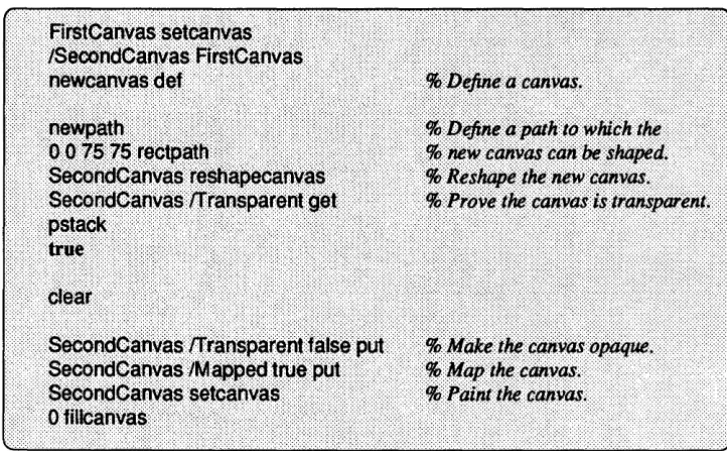
To create an opaque canvas whose parent is not the framebuffer, you must set the new canvas' Transparent key to false. The following psh example creates a canvas whose parent is the canvas FirstCanvas , which was created in the previ-ous example.
Note that this example uses the rectpath utility, which is provided by the
POSTSCRIPT language extensibility files. The rectpath utility takes four numbers as arguments: the x and y location of the rectangle origin, the width of the rectan-gle, and the height of the rectangle. The rectpath utility adds the rectangle to the current path. For a complete definition ofrectpath, see Chapter 10, Extensibility
through POSTSCRIPT Language Files.
18 NeWS Programmer's Guide
The appearance of SecondCanvas is as follows:
Figure 2-3 A Mapped Child Canvas
When a parent canvas is made transparent, its opaque children are not affected and remain opaque. This is demonstrated by the following example:
FirstCanvas !Transparent true put % Make the parent transparent; the
% opaque child remains opaque.
This example is illustrated in the following figure:
Chapter 2 - Canvases 19
Figure 2-4 Parent Canvas Made Transparent
Figure 2-5
Retained and Non-Retained Canvases
The following code makes the parent opaque again and paints it, thus restoring
FirstCanvas and SecondCanvas to their previous appearance:
FirstCanvas /Transparent false put FirstCanvas setcanvas .9 fillcanvas
Parent Canvas Made Opaque and Repainted
The canvastype dictionary has a key named Retained that can be set to true or false and specifies whether or not a canvas is retained. If a canvas is retained,
any portion of its visible surface that becomes obscured by another canvas is automatically saved offscreen. The saved portion is restored to the screen automatically when no longer obscured; thus, the canvas does not receive dam-age and does not need to be redrawn.
A transparent canvas does not have its own retained image; instead, it shares the retained image of its parent.
If a canvas is unretained, damage occurs when another canvas, by which it was
previously obscured, is moved or unmapped; the damage takes the form of an after-image of the moved canvas. Damage can also occur in other situations, such when an unretained canvas is mapped to the screen. Note that a transparent canvas never receives damage; instead, damage may be received by the canvas beneath the transparent canvas.
20 NeWS Programmer's Guide
A client must be prepared for damage even on a retained canvas: a retained can-vas can and will receive damage, although less frequently than will an unretained canvas. For example, a retained canvas may receive damage when it is reshaped.
NOTE Each system has a retain threshold that specifies the number of bits per pixel below which a canvas has its Retained key automatically set to true. However,
if
your application desires that a canvas be retained, you should always set theRetained key explicitly.
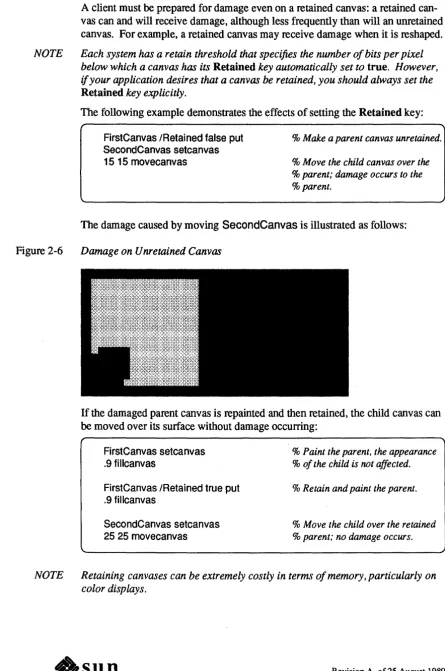
The following example demonstrates the effects of setting the Retained key:
FirstCanvas IRetained false put SecondCanvas setcanvas 15 15 movecanvas
% Make a parent canvas unretained.
% Move the child canvas over the % parent; damage occurs to the
% parent.
The damage caused by moving SecondCanvas is illustrated as follows:
Figure 2-6 Damage on U nretained Canvas
If the damaged parent canvas is repainted and then retained, the child canvas can
be moved over its surface without damage occurring:
FirstCanvas setcanvas .9 fillcanvas
FirstCanvas IRetained true put . 9 fillcanvas
SecondCanvas setcanvas 25 25 movecanvas
% Paint the parent, the appearance
% of the child is not affected.
% Retain and paint the parent .
% Move the child over the retained % parent; no damage occurs.
NOTE Retaining canvases can be extremely costly in terms of memory, particularly on color displays.
Further Infonnation on Damage
The SaveBehind Key
Chapter 2 - Canvases 21
The NeWS server considers a canvas to be damaged if all or part of its image is
incorrect and needs to be redrawn. Damage can occur in the following ways:
o An unretained canvas is damaged when a canvas by which it was previously obscured is moved away.
o An unretained canvas is damaged when first mapped to the screen.
o An unretained canvas is damaged when its Retained key is set to true (thus changing it to retained) while part of the canvas is not visible.
o A retained or unretained canvas is damaged when is it reshaped.
When a canvas is initially damaged, the NeWS server automatically sends a dam-age event to processes interested in damdam-age on that canvas; a damdam-age event has IDamaged in its Name field and a copy of the affected canvas in its Canvas field. After receiving a damage event, the client program should repair the dam-age by redrawing the damdam-aged parts of the canvas. If the client does not immedi-ately repair the canvas and damage continues to occur, the NeWS server sends no
additional damage events to the client. Instead, the server maintains and updates a record of all the damage that has occurred to the client. Eventually, the client should request a copy of this record and repair all damage (for infonnation on doing this, see the description of the damagepath operator in Chapter 9, NtM'S
Operator Extensions).
The SaveBehind key of the canvastype dictionary can be used to prevent dam-age from occurring to other canvases. When the key is set to true, NeWS saves
the values of the pixels that the canvas obscures when it is mapped. Even if the pixels belong to unretained canvases, they can be restored directly to the screen when the canvas that obscures them is removed.
The SaveBehind key is useful for pop-up menus and other canvases that are small and are not required to be visible for long; when used with such canvases, the key can greatly enhance server perfonnance.
The SaveBehind key is demonstrated by the following example: SecondCanvas IMapped false put
FirstCanvas IRetained false put SecondCanvas ISaveBehind true put SecondCanvas IMapped true put SecondCanvas setcanvas Ofillcanvas
SecondCanvas IMapped false put
% Unmap the child.
% Make the parent unretained.
% Specify use of SaveBehind.
% Remap the child.
% Make the child current, paint % it. and unmap it; no damage % occurs to the parent.
22 NeWS Programmer's Guide
2.4. Parent, Child, and Sibling Canvases
The Sibling List
This section discusses the parent/child and sibling relationships that exist between canvases.
When a parent canvas has multiple children, the children are automatically arranged in a sibling list. The list controls the appearance of the siblings when they are visible on the screen and are made to overlap. By default, the most recently created child becomes the top sibling in the list; thus, if all siblings are visible on the screen and overlap, the top sibling covers all others; the bottom sibling is covered by all others. When the newcanvas operator is called, the created canvas becomes the top child of its parent
You can change the list-position of a sibling by specifying values for the follow-ing keys of the canvastype dictionary:
[J CanvasAbove
This key specifies the canvas that is immediately above this canvas in the sibling list; if no such canvas exists, the value of the key is null. The value of this key can be set to any sibling; thus, this canvas is inserted in the list at a position directly below the specified sibling.
[J CanvasBelow
This key specifies the canvas that is immediately below this canvas in the sibling list; if no such canvas exists, the value of the key is null. The value of this key can be set to any sibling; thus, this canvas is inserted in the list at a position directly above the specified sibling.
NeWS also provides the following operators, which allow you to manipulate the sibling list:
canvas canvastobottom
-Moves the canvas to the bottom of its list of siblings.
canvas canvastotop
-Moves the canvas to the top of its list of siblings.
canvas x y Insertcanvasabove
-Inserts the current canvas into the list at the position immediately above canvas.
canvas x y Insertcanvasbelow
-Inserts the current canvas into the list at the position immediately below canvas.
For the operators insertcanvasabove and insertcanvasbelow, the coordinates x
and yare computed with reference to the origin of the default coordinate system of the parent of the current canvas (as described for the fonn of the movecanvas operator that takes no canvas argument). The current canvas must be a sibling of
canvas.
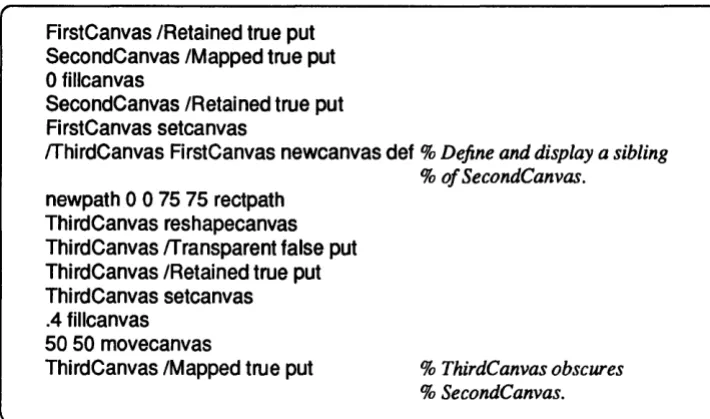
The following example creates ThirdCanvas , which is a sibling to the canvas
SecondCanvas (defined in a previous example); by default, the new canvas is placed at the top of the sibling list and thus obscures its sibling. The insertcan-vasabove operator is then used to reverse the position of the canvases in the list; thus, SecondCanvas obscures the new canvas.
Figure 2-7
FirstCanvas IRetained true put SecondCanvas IMapped true put Ofillcanvas
SecondCanvas IRetained true put FirstCanvas setcanvas
Chapter 2 - Canvases 23
rrhirdCanvas FirstCanvas newcanvas def % Define and display a sibling
% of SecondCanvas.
newpath 0 0 75 75 rectpath ThirdCanvas reshapecanvas ThirdCanvas rrransparent false put ThirdCanvas IRetained true put ThirdCanvas setcanvas .4 fillcanvas
50 50 movecanvas
ThirdCanvas IMapped true put % ThirdCanvas obscures
% SecondCanvas.
The appearance of ThirdCanvas is illustrated as follows:
Younger Sibling Obscuring Elder
The following code inserts SecondCanvas above ThirdCanvas :
SecondCanvas setcanvas
ThirdCanvas 25 25 insertcanvasabove
% Insert SecondCanvas above
% ThirdCanvas.
The appearance of the canvases is now as follows:
24 NeWS Programmer's Guide
Figure 2-8 Elder Sibling Made to Obscure Younger
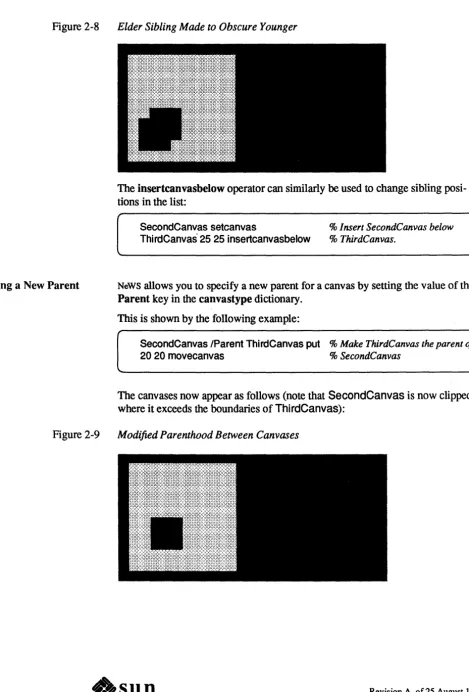
Establishing a New Parent
The insertcanvasbelow operator can similarly be used to change sibling posi-tions in the list:
SecondCanvas setcanvas
Thi rdCanvas' 25 25 insertcanvasbelow
% Insert SecondCanvas below % ThirdCanvas.
NeWS allows you to specify a new parent for a canvas by setting the value of the
Parent key in the canvastype dictionary. This is shown by the following example:
SecondCanvas IParent ThirdCanvas put % Make ThirdCanvas the parent of
20 20 movecanvas % SecondCanvas
The canvases now appear as follows (note that SecondCanvas is now clipped where it exceeds the boundaries of ThirdCanvas):
Figure 2-9 Modified Parenthood Between Canvases
2.5. Overlay Canvases
Drawing on Overlays
Chapter 2 - Canvases 25
NeWS allows you to create overlay canvases. An overlay canvas, which can only be created over an existing non-overlay canvas, is always transparent. However, when graphic objects are drawn on an overlay, they appear on the overlay itself, rather than on the canvas below.
Overlays are intended for use in transient or animated drawing procedures, such as the creation of "rubber-band" boxes, which expand or contract according to mouse movement when a user is resizing a window.
The following operator is provided for creating overlays:
canvas createoverlay canvas
The canvas argument must be an existing canvas; the canvas object returned is the created overlay. Note that the overlay is not a child of the specified canvas; it is considered a part of that canvas.
Other features of overlays are as follows:
o Each non-overlay canvas (whether transparent or opaque) can possess one overlay canvas only.
o An overlay canvas cannot receive any events. If you express interest on an overlay, the interest is placed on the prechild interest list of the canvas over which the overlay was created.
o An overlay never receives damage; therefore, it never requires repainting.
o An overlay cannot have a parent, nor can it have children.
o If an overlay's corresponding non-overlay canvas has children, these may have their own overlays. A canvas' overlay appears above the overlays of the canvas' children.
o If a canvas possesses an overlay, any subsequent attempt to create an overlay of the canvas returns the existing overlay.
o An overlay cannot be reshaped; attempting to reshape an overlay produces no result. An overlay always has the shape of its associated non-overlay canvas.
o An overlay cannot be possessed by more than one non-overlay, nor can it change owners.
o An overlay should not be specified as mapped or unmapped; it should appear in accordance with the state of its associated non-overlay. Programmers should not attempt to change the keys in the overlay's dictionary.
Due to the way in which overlays are implemented on some machines, perfor-mance problems may occur if too many objects are drawn on an overlay. The current color is usually ignored when drawing operations are perfonned on overlays; this is a deliberate feature to allow the implementation of overlays using various procedures on different kinds of hardware.
26 NeWS Programmer's Guide
2.6. Canvas Clipping
Operators
NeWS provides operators that perform clipping operations on canvases. These operators are similar to the clipping operators described in the POSTSCRIPT Language Reference Manual, except that they specify paths that NeWS considers only in relation to the current canvas. These operators, clipcanvas, clipcan-vaspath, and eoclipcanvas, are described in Chapter 9, NtM'S Operator Exten-sions. The clipping operators are typically used to limit the portion of the canvas
painted during damage repair.
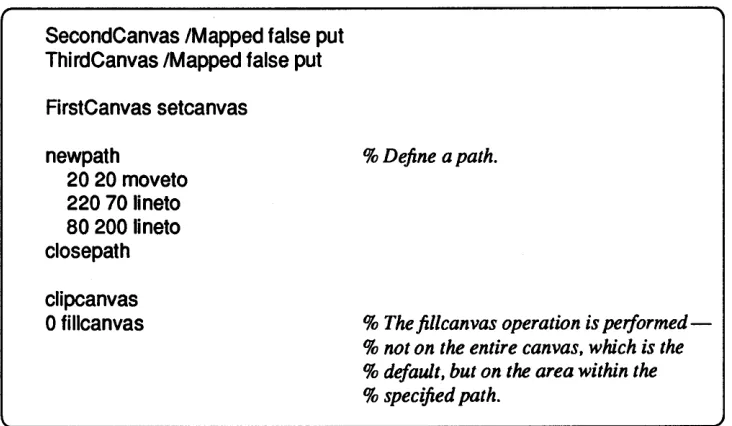
The following example demonstrates the clipcanvas operator:
SecondCanvas IMapped false put Thi rdCanvas IMapped false put FirstCanvas setcanvas
newpath
2020 moveto 220