A Survey on Enhancing Security of Android
Platform by Use of Reverse Engineering and
Need Based Security
Nikita. V. Mulchandani
M.Tech Student, Department of Computer Science and Engineering, Jhulelal Institute of Technology, Nagpur, India
ABSTRACT: The security in android based device is based on the permission based security model. Android OS allows each developer to define their access to the resource and OS allows developer to do this. But this leads the vulnerability in OS functionality. As the number of applications increasing on application store this is becoming a serious concern. The recent work in this area has been suggested the change in OS but this leads to usability issues. We have proposed the Need Based Security Model which will allow user to select permission during run time. This model does not change the operating system too much so there are no usability problems. Our problem solving method expect the efficient use of reverse engineering to form Better security model for Android Applications.
KEYWORDS: Android, Android Security, Need-based Security, Architecture.
I. INTRODUCTION
The world has been changed by the introduction of Smart-phones to the people. The apple’s IOS and Google’s Android are dominating smart-phones OS in the market. Both the OS have their own security framework. And based on their security features applications are allowed to access their resources. Android gives options to the user to allow or deny specific access but IOS does not.
Android basically works on permission based security model and each app prompts the user while installation. This prompt message shows that which particular resources are going to be accessed by app. The existing model of the android does not allow picking specific feature of the security. Sometimes app asks for access to those resources which are not at all legitimate. Example is gaming app ask the permission to the contacts of the phone. Android has given developer this liberty to access the resources this leads to the vulnerability to the OS and to the privacy of the user. All the research performed till date mostly focused on the changes in the OS for security which can lead to usability issues. We are proposing the need based security feature which will allow user to access permission during runtime and does not required more modification to the existing OS. This can minimize the usability issues.
II. HOW DOES ANDROID SECURITY WORKS?
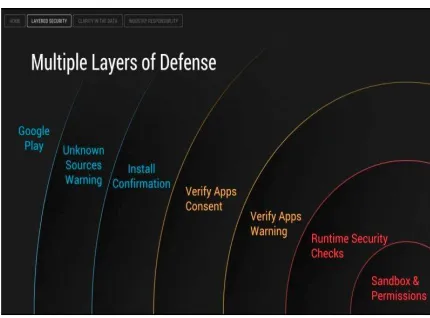
Fig. Multiple Layers of Android Security.
Android has multiple layers of defence to protect itself against malware incursions, and since Google started paying attention to what users install on their devices, they've seen very little malware appear.
As an example of this, Ludwig presented the graph above. Just to get installed, an app has to get through Google Play or an unknown sources warning, and a user who confirms the installation. Past that, it has to get past Google's "Verify Apps" security feature, which checks an APK against its own database of malware before it can be installed (more on this later). Then, the app is sandboxed and restricted to the permissions granted to it, and Android's own security checks again whenever the app runs.
III. SECURITY MECHANISM IN ANDROID
As it is seen that android has a multi-layer architecture each layer deals with its own problem and there prevention mechanism. Android provides following security features to achieve these objectives by robust security at the operating system level through the Linux kernel, a compulsory application sandbox for all applications, a Secure interposes communication, Application permission mechanism, and Application signing.
Fig. Android System Security Mechanism. These preventive measures can be broadly classified into 3 types:
1) Privilege Separation (Sandboxing) Mechanism 2) Application Permission Mechanism
executing the applications. This means that, similar to UNIX system, the Android operating system requires every application to run with its own user identifier (UID) and group identifier (GID). Parts of the system architecture are separated in this fashion. This ensures that not even a single applications and processes have no permissions to access other applications or processes. Because the kernel implements privilege separation, it is one of the core design features ofAndroid. The philosophy behind this design is to ensure that no application have permission to read or write to code or data of other applications, the device user, or the operating system itself. This protects other application from accessing the private information of the application. Unauthorized access to hardware features like GPS, camera or network communication can also be prevented using this sandboxing mechanism. As two processes have run in their own sandboxes, the only way they have to communicate with each other is to explicitly request permission to access data thus re-insuring privilege separation.
2. Application Permission Mechanism: When installing new application, Android prompts the user with certain declared permissions required by the application. The user must grant all the requested permissions, in order to install the application. The only possibility for not granting the permissions is not to install the application. Once the permissions are granted and the application is installed it cannot request for further permissions and the user cannot change these permissions, it can only be changed or removed by uninstalling the application from the device. As a result of granting permission to an application, the application can unrestricted access the respective resources. This is one major limitation of android security model.
3. Application Code Signing: Any application that is to run on the Android operating system must be signed. Android uses the certificate of individual developers in order to identify them and establish trust relationships among the various applications running in the operating system. The operating system will not allow any unsigned application to execute. Any certification authority to sign the certificate is not required, and Android will happily run any application that has been signed with a self-signed certificate. But Like permissions checks, the certificate check is done only during installation of the application. Therefore, if your developer certificate expires after your application is installed on the device, then the application will continue to execute [7]
IV. LITERATURE SURVEY
Each time a user installs an application on their Android phone they are presented with a full screen of information describing what access they will be granting that application. The permissions displays are generally viewed and read, but not understood by Android users. Alarmingly, we find that people are unaware of the security risks associated with mobile apps and believe that app marketplaces test and reject applications [1]. Internet survey and laboratory study found that 17% of participants paid attention to permissions during installation, and only 3% of Internet survey respondents could correctly answer all three permission comprehension questions. This indicates that current Android permission warnings do not help most users make correct security decisions [2]. Changes has been investigated over time in the behaviour of Android ad libraries which says that the use of most permissions has increased over the last several years, and that more libraries are able to use permissions that pose particular risks to user privacy and security. A wide variety of smart-phone applications today rely on third-party advertising services, which provide libraries that are linked into the hosting application. This situation is undesirable for both the application author and the advertiser. Advertising libraries require their own permissions, resulting in additional permission requests to users. Ad-Split, app extended Android to allow an application and its advertising to run as separate processes, under separate user-ids, eliminating the need for applications to request permissions on behalf of their advertising libraries, and providing services to validate the legitimacy of clicks, locally and remotely [3].
V. RECENT SECURITY ENHANCEMENTS
To avoid the malware attack Google itself provide cloud services such as Google Play which is collection of services that allow user to discover, install or buy application on their android device in addition it provide community review application license verification, application security scanning and other security services [6], Security Mechanisms need to be made concrete as per the new trends. It is seen the refinements that need to be done in current security models.
Hence next work could be to build a security mechanism that could take care of issues that we’ve discussed that would refine the permission mechanism to avoid monitor unnecessary access to the resources. Many new frameworks like MADAM [14,15] a multi-level anomaly detector for android malware which concurrently monitors Android at the kernel level and user-level to detect real malware infections help in making android secure .It is clear that user involvement is greater & important in android security than other mobile phone platform hence user should be made aware of the basic possible threats at the beginning of his android experience, further various frameworks like KIRIN, SCanDroid, Saint, Apex also purposed .
Many independent Android security enhancements have been proposed [8]. These mechanisms allow an organization to create fine grained security policies for their employee devices. Contextual information such as device location, app permissions and inter-app communication can be monitored and verified against the already declared policies. Scope of this paper is to investigate Android security, malware issues and defence techniques, it does not examine the above mentioned prevention techniques in detail.
VI. NEED BASED SECURITY MECHANISM
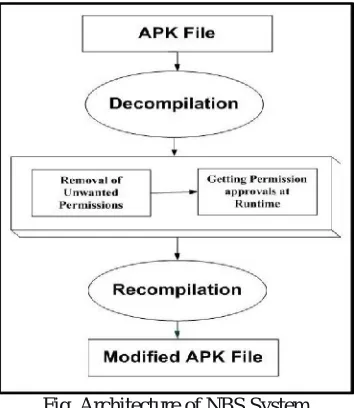
The Need-Based Security (NBS) system designed to enhance the privacy of the user at run time is shown in the figure below. The main advantage of the proposed NBS system is that the user is informed about the authorized and unauthorized access of the resources at run time. The NBS system decompiles the APK file which includes several files particularly the most important file AndroidManifest.xml. The main file of android application is AndroidManifest.xml. This file includes all the permissions as well as roadmap to run the app.
Fig. Architecture of NBS System
VII. CONCLUSION AND FUTURE SCOPE
We are going to apply the technique of de-compilation and then after removal of permission from AndroidManifest.xml file we will write permission again during runtime. This technique won’t allow unauthorized access by the application to the smart-phone resources and at the same time does not ask for more restructuring in existing OS or plug-ins. So this method does not result in usability issues. We have also made this process as semi-automatic which is the major drawback of existing system. We can extend our work to make this method completely automatic and de-compilation and recompilation can be done via third party application and user should not be worry about permissions.
REFERENCES
1.P.G. Kelley, S. Consolvo, L.F. Cranor, J. Jung, N. Sadeh & D.Wetherall, “A Conundrumof Permissions: Installing Applications on an Android Smartphone”, Financial Cryptography and Data Security 2012, pp. 68-79.
2. A.P. Felt, E. Ha, S. Egelman, A. Haney, E. Chin & D.Wagner,“Android permissions: User attention, comprehension, and behavior”, SOUPS 2012, p. 3.
3. T. Book, A. Pridgen & DS. Wallach, “Longitudinal Analysis of Android Ad Library Permissions”, arXiv preprint arXiv:1303.0857, 2013. 4. S. Shekhar, M. Dietz & D.S. Wallach, “Adsplit:Separating smartphone advertising from application”,CoRR, abs/1202.4030, 2013.
5. J. Helfer & T. Lin, 2012, “Giving the User Control over Android Permissions”, http://css.csail.mit.edu/6.858/2012/projects/helfer-ty12.pdf,accessed 25 March 2013.
6. M. Kern, & J. Sametinger, “Permission Tracking in Android”,UBICOMM 2012, pp. 148-155. 7.”AndroidSecurityOverview“at:http://source.android.com/devices/tech/security/index.html.
8. M. Conti, B. Crispo, E. Fernandes, Y. Zhauniarovich, CRˆePe: A system for enforcing fine-grained context-related policies on android, Information Forensics and Security, IEEE Transactions on 7 (5) (2012) 1426–1438.
9. M. Nauman, S. Khan, and X. Zhang, “Apex: Extending android permission model and enforcement with userdefined runtime constraints,” in Proceedings of the 5th ACM Symposium on Information, Computer and Communications Security. ACM, 2010,
10. “The ultimate android guide,” available at:
http://www.digitaltrends.com/how-to/the-ultimate-android-malware-guide-what-it-does-where-it-came-from-andhow- to-protect-your-phone-or-tablet/