124i/384i
Software Manual
P/N 92000SWG08 Issue 1-0, June 1998 Printed in U.S.A.
This manual has been developed by Nitsuko America. It is intended for the use of its customers and service personnel, and should be read in its entirety before attempting to install or program the system. Any comments or suggestions for im-proving this manual would be appreciated. Forward your remarks to:
Nitsuko America, Telecom Division 4 Forest Parkway
Shelton, CT 06484 http://www.nitsuko.com
Attention: Manager, Technical Publications
Nothing contained in this manual shall be deemed to be, and this manual does not constitute, a warranty of, or representation with respect to, any of the equipment covered. This manual is subject to change without notice and Nitsuko America has no ob-ligation to provide any updates or corrections to this manual. Further, Nitsuko America also reserves the right, without prior no-tice, to make changes in equipment design or components as it deems appropriate. No representation is made that this manual is complete or accurate in all respects and Nitsuko America shall not be liable for any errors or omissions. In no event shall Nit-suko America be liable for any incidental or consequential damages in connection with the use of this manual. This document contains proprietary information that is protected by copyright. All rights are reserved. No part of this document may be photo-copied or reproduced without prior written consent of Nitsuko America.
Charts and Illustrations . . . 5
Abbreviated Dialing . . . 61
Account Codes . . . 69
Optional Account Codes . . . 69
Forced Account Codes. . . 69
Verified Account Codes . . . 70
Operator Notification . . . 70
Account Codes for Incoming Calls . . . 70
Hidding Account Codes . . . 70
Account Code Capacity . . . 70
Alarm . . . 78
Alphanumeric Display . . . 80
Analog Communications Interface (ACI) . . . 83
Music on Hold . . . 83
External Paging . . . 83
Auxiliary Device Control . . . 83
ACI Call Recording . . . 84
Physical Ports and Software Ports. . . 84
Attendant Call Queueing . . . 90
Automatic Call Distribution (ACD). . . 91
Automatic Route Selection . . . 96
ARS Feature Summary . . . 96
Call Routing . . . 96
Dialing Translation (Special Dialing Instructions) . . . 96
Time of Day Selection . . . 96
Hierarchical Class of Service Control . . . 96
Forced Authorization Code . . . 96
Separate Routing for Selected Call Types . . . 97
Separate Routing for Equal Access (10XXX) Calls . . . 97
Separate Routing for 976 Calls . . . 97
Basic ARS Operation. . . 97
Background Music . . . 105
Barge In . . . 108
Call Coverage . . . 111
Call Forwarding . . . 112
Call Forwarding Immediate. . . 112
Call Forwarding with Both Ringing . . . 112
Call Forwarding when Unanswered . . . 112
Call Forwarding, Fixed . . . 118
Fixed Call Forwarding Chaining . . . 118
Call Forwarding, Off-Premise . . . 123
Call Forwarding with Follow Me. . . 127
Call Forwarding/Do Not Disturb Override . . . 130
Call Timer. . . 132
Call Waiting / Camp On . . . 133
Callback . . . 135
Caller ID . . . 138
Central Office Calls, Answering . . . 148
Delayed Ringing . . . 148
Universal Answer . . . 148
Central Office Calls, Placing . . . 156
Computer Telephony Integration (CTI) Applications . . . 178
Personal Computer Interface (PCI) . . . 178
Telemarketing Dial . . . 178
Database Lookup . . . 178
Open Architecture Interface (OAI) . . . 178
Conference . . . 179
Split (From Conference) . . . 179
Conference, Voice Call/Privacy Release . . . 184
Continued Dialing . . . 187
Continued Dialing for Intercom Calls. . . 187
Continued Dialing for Trunk Calls . . . 187
Cordless Telephone (Nitsuko 900i) . . . 190
Data Communications Interface (DCI) . . . 194
RS-232-C DCI Module (DCI-A: P/N 92266) . . . 194
Centronics DCI Module (DCI-B: P/N 92267) . . . 194
3-Port DCI Unit (3DCI-A: P/N 92258). . . 194
DCI Features . . . 194
Keyset-Originated Data Call . . . 194
Terminal-Originated Data Call. . . 194
Terminal-Originated Voice Call (Telemarketing Dial). . . 194
DCI Department Group . . . 195
Hayes Compatibility . . . 196
DCI Hotline . . . 196
Speed Conversion. . . 196
Physical Ports and Software Ports. . . 196
Department Calling . . . 212
Overflow Routing . . . 212
User Log Out/Log In . . . 212
Enhanced Hunting . . . 213
Department Step Calling . . . 221
Dial Number Preview. . . 223
Dial Pad Confirmation Tone . . . 225
Dial Tone Detection . . . 227
Direct Inward Dialing (DID) . . . 230
DID Dialed Number Translation . . . 230
Flexible DID Service Compatibility . . . 231
DID Intercept. . . 231
Vacant Number Intercept . . . 231
Busy Intercept . . . 231
Ring-No-Answer Intercept. . . 231
DID Camp-On . . . 231
DID Routing Through the VAU Automated Attendant . . . 231
Federal Communications Commission DID Requirements . . . 231
Direct Inward Line (DIL). . . 241
DIL Delayed Ringing . . . 241
Direct Inward System Access (DISA) . . . 245
DISA Class of Service. . . 245
Trunk Group Routing/ARS Access . . . 245
Trunk Group Access. . . 246
Common Abbreviated Dialing . . . 246
Operator Calling. . . 246
Paging . . . 246
Direct Trunk Access . . . 246
DISA Toll Restriction . . . 246
DISA Operating Modes. . . 246
Dual Line Appearance . . . 278
E911 Compatibility . . . 279
External Alarm Sensors . . . 284
Fax Machine Compatibility . . . 287
Transfer to Fax. . . 287
Direct Inward Line to Fax . . . 287
Bridged Fax Line . . . 287
Flash . . . 290
Flexible System Numbering. . . 293
Forced Trunk Disconnect . . . 296
Group Call Pickup . . . 298
Group Listen. . . 303
Handsfree and Monitor . . . 305
Handsfree Answerback/Forced Intercom Ringing. . . 307
Headset Operation . . . 310
Hold . . . 312
System Hold . . . 312
Exclusive Hold . . . 312
Group Hold . . . 312
Intercom Hold . . . 312
Hotel/Motel . . . 319
Hotline . . . 321
Hotline, External . . . 323
InDepth and inDepth+ . . . 324
Intercom . . . 326
Intercom Abandoned Call Display. . . 331
ISDN Compatibility . . . 333
Primary Rate Interface (PRI). . . 333
Basic Rate Interface (BRI) . . . 333
Labelmaker. . . 335
Last Number Redial . . . 336
Line Preference . . . 338
Incoming Line Preference . . . 338
Outgoing Line Preference . . . 338
Auto-Answer of Non-Ringing Lines. . . 338
Loop Keys . . . 345
Incoming Only Loop Keys . . . 345
Outgoing Only Loop Keys . . . 345
Both Ways Loop Keys . . . 345
Meet Me Conference . . . 349
Meet Me Paging . . . 353
Meet Me Paging Transfer. . . 356
Memo Dial . . . 360
Message Waiting . . . 362
Microphone Cutoff. . . 366
Multiple Directory Numbers / Call Coverage . . . 368
Call Coverage . . . 368
Music on Hold . . . 373
Name Storing . . . 377
Night Service . . . 383
Assigned Night Answer (ANA) . . . 383
Universal Night Answer (UNA) . . . 383
Off Hook Signaling . . . 389
Called Extension Block . . . 389
Automatic Signaling . . . 389
Manual Signaling. . . 389
Selectable Off Hook Signaling Mode . . . 389
Off Hook Signaling Enhancements. . . 389
One-Touch Calling . . . 395
One-Touch Serial Operation . . . 400
Paging, External . . . 402
Combined Paging . . . 402
Paging, Internal . . . 406
Combined Paging . . . 406
Park. . . 411
PBX Compatibility. . . 415
PBX Trunk Access Code Screening . . . 415
PBX Trunk Toll Restriction. . . 415
PBX Call Restriction . . . 415
Automatic Pause . . . 415
PC Attendant Console . . . 419
Prime Line Selection . . . 420
Outgoing Prime Line Preference. . . 420
Incoming Prime Line Preference. . . 420
Privacy (Data). . . 424
Private Line . . . 427
Incoming only . . . 427
Outgoing only . . . 427
Both ways . . . 427
Programmable Function Keys . . . 430
Pulse to Tone Conversion . . . 433
Repeat Redial . . . 435
Reverse Voice Over . . . 438
Ring Groups . . . 440
Ringdown Extension . . . 444
Room Monitor . . . 447
Save Number Dialed . . . 450
Secretary Call (Buzzer) . . . 453
Secretary Call Pickup . . . 456
Selectable Display Messaging . . . 457
Selectable Ring Tones . . . 461
Serial Call . . . 463
Data Call Tracking. . . 470
Digit Counting . . . 470
Digit Masking . . . 470
Duration Monitoring . . . 471
Extension Exclusion . . . 471
PBX Call Reporting. . . 471
Serial and Parallel SMDR Communication . . . 471
Trunk Exclusion . . . 471
Usage Summaries . . . 471
Extension Name or Number . . . 471
T1 Trunking (with ANI/DNIS Compatibility). . . 483
ANI/DNIS Compatibility . . . 484
ANI/DNIS Routing to the VAU Automated Attendant . . . 493
Tandem Trunking (Unsupervised Conference) . . . 495
TAPI Compatibility . . . 502
Tenant Service . . . 507
Tie Lines. . . 512
Tie Line Class of Service. . . 512
First Digit Absorption . . . 512
Trunk Group Routing/ARS Access . . . 512
Trunk GroupAccess . . . 512
Common Abbreviated Dialing . . . 512
Operator Calling. . . 512
Paging . . . 512
Direct Trunk Access . . . 513
Forced Trunk Disconnect . . . 513
Tie Line Outgoing Call Restriction . . . 513
Tie Line Toll Restriction Class . . . 513
Flexible Tie Line Service Compatibility . . . 513
Time and Date . . . 521
Toll Restriction . . . 524
Common Permit Code Table . . . 524
Common Restrict Code Table . . . 524
Restrict Code Table . . . 524
Permit Code Table . . . 524
International Call Restriction . . . 524
Toll Restriction for Abbreviated Dialing . . . 525
Local Call Digit Counting . . . 525
Toll Call Digit Counting . . . 525
Toll Free Trunks. . . 525
PBX Call Restriction . . . 525
Toll Restriction Overview . . . 525
Toll Restriction Override . . . 532
Traffic Management Report (TMS) . . . 534
Transfer . . . 543
Screened Transfer . . . 543
Unscreened Transfer . . . 543
Extension (Department) Groups Transfer . . . 543
Transfer Without Holding . . . 543
Automatic On-Hook Transfer Operation . . . 543
Trunk Group Routing . . . 549
Trunk Groups . . . 552
Voice Announce Unit . . . 558
VAU Messages. . . 558
General Message . . . 559
Personal Greeting . . . 559
Park and Page . . . 560
Automated Attendant (Operator Assistance). . . 561
Single Digit Dialing . . . 561
Simultaneous Call Answering . . . 561
Flexible Routing. . . 561
Automatic Overflow. . . 561
Programmable Automated Attendant Greetings . . . 561
Voice Prompting Messages . . . 562
900 Preamble . . . 565
Time, Date and Station Number Check. . . 566
Voice Mail . . . 585
Call Forwarding to Voice Mail . . . 585
Leaving a Message . . . 586
Transferring to Voice Mail. . . 586
Conversation Record . . . 586
Personal Answering Machine Emulation . . . 586
Voice Mail Overflow . . . 586
Voice Mail Caller ID . . . 586
Message Center Mailbox. . . 586
Voice Over . . . 599
Volume Controls. . . 603
Warning Tone For Long Conversation . . . 604
0000 - Maintenance Options. . . 621
0001 - Save Data . . . 621
0002 - Load Data . . . 622
0003 - Time and Date. . . 623
0004 - Automatic Extension Circuit Type Setup . . . 623
0005 - Extension Circuit Type . . . 625
0006 - Slot Control. . . 628
0007 - System Report Port Setup. . . 629
0008 - Alarm Report Port Setup. . . 635
0009 - Loop Back Testing . . . 637
0010 - Alarm LED Setup . . . 639
0011 - Alarm Display Telephone . . . 641
0012 - Remote Service Center Phone Number . . . 642
0013 - Remote Service Center Trunk Group . . . 643
0014 - Remote Service Center User’s Data . . . 644
0015 - Automatic Backup . . . 645
0091 - View System Report . . . 646
0092 - View Alarm Report . . . 647
0100 - Basic Hardware Setup (Part A) . . . 649
0101 - DTMF Tone Duty Cycle . . . 649
0103 - Time and Date Display Mode. . . 650
0104 - DP to DTMF Conversion Options . . . 651
0109 - Keyset Splash Tone . . . 652
0110 - Keyset Confirmation Tone . . . 654
0111 - Trunk Ring Tone . . . 656
0112 - Intercom and Alarm Ring Tone . . . 661
0114 - Analog Trunk (ATRU PCB) Timers (Part A) . . . 666
0115 - Analog Station (ASTU) Timers . . . 669
0116 - Tone Detection Setup . . . 671
0117 - Trunk CODEC Gain Type Settings . . . 676
0118 - Extension CODEC Gain Type Setup . . . 677
0119 - External Page/Door Box CODEC Gain Types . . . 679
0120 - External Page/Door Box CODEC Gain Setup . . . 681
0121 - ISDN Layer 1 Operation Mode Setup . . . 682
0122 - ISDN Layer 1 Timer Setup . . . 683
0123 - ISDN Layer 2 Operation Mode Setup . . . 684
0124 - ISDN Layer 2 Timer Setup . . . 685
0125 - ISDN Layer 3 Operation Mode Setup . . . 686
0126 - ISDN Layer 3 Timer Setup . . . 687
0127 - ITSU Operation Mode Setup . . . 688
0128 - Analog Station (ASTU PCB) Sidetone Level . . . 689
0129 - Analog Trunk (ATRU PCB) Sidetone Setting . . . 691
0130 - Date Format for SMDR and System Reports . . . 693
0131 - Unsupervised Conf. CODEC Gain Setup . . . 694
0132 - DID Trunk Timers . . . 696
0133 - Tie Line Timers. . . 698
0135 - Analog Trunk (ATRU PCB) Timers (Part B) . . . 701
0136 - T1 Trunk Timers . . . 703
0137 - ISDN Primary Interface Layer 2 Operating Mode Setup. . . 709
0138 - ISDN Primary Interface Layer 3 Operating Mode Setup. . . 710
0200 - Programming Passwords. . . 713
0201 - Setting the Programming Passwords . . . 713
0202 - Setting User Passwords. . . 716
0300 - Basic Hardware Setup (Part B) . . . 717
0301 - Inter-Tenant Calling . . . 717
0302 - Music on Hold and Conference SetUp. . . 718
0303 - DTMF and Dial Tone Circuit Setup . . . 719
0304 - PGDU PCB Alarm/Fax Sensor Setup . . . 721
0305 - PGDU PCB Sensor Activation Mode. . . 722
0306 - Pre-ringing Enable . . . 723
0307 - Setting the ISDN Line Operating Mode. . . 724
0308 - Conference Circuit Setup . . . 725
0309 - DSS Console Operating Mode . . . 726
0400 - Extension Options (For Tenant Groups) . . . 727
0401 - Tenant Group Options (Part A). . . 727
0402 - Tenant Group Options (Part B). . . 732
0403 - Selectable Display Messages . . . 734
0404 - SMDR Options . . . 736
0405 - System Timers (Part A). . . 739
0406 - Class of Service Options (Part A). . . 746
0407 - Account Codes . . . 756
0408 - 0409 . . . 757
0410 - Extension (Department) Group Options. . . 758
0412 - DISA and Tie Trunk Class of Service Options . . . 761
0413 - Hotel Mode Printer Port . . . 763
0414 - System Timers (Part B). . . 764
0415 - Repeat Redial Count . . . 766
0416 - Voice Mail Integration Options. . . 767
0417 - Traffic Management Report Options . . . 769
0419 - Class of Service Options (Part B). . . 772
0420 - E911 Options . . . 775
0500 - System Numbering. . . 777
0501 - System Numbering . . . 777
0502 - Extension Numbers and Names . . . 786
0503 - DCI Extension Number . . . 788
0504 - ACI Extension Number. . . 789
0506 - Department Calling Group Numbers . . . 791
0507 - DCI Pooling Pilot Numbers . . . 793
0508 - ACI Group Pilot Number . . . 794
0510 - Trunk Access Code . . . 796
0511 - Service Code Setup (Part A) . . . 797
0512 - Single Digit Service Code Setup . . . 803
0514 - Service Code Setup (Part B) . . . 806
0515 - VAU Master Number . . . 811
0516 - Voice Mail Master Number. . . 812
0518 - Alternate Trunk Route Access Code. . . 815
0519 - Hotel Mode One-Digit Service Codes . . . 816
0600 - Abbreviated Dialing Options . . . 817
0601 - Common Abbreviated Dialing Bins . . . 817
0602 - Group Abbreviated Dialing Bins . . . 820
0603 - Abbreviated Dialing Numbers and Names . . . 822
0802 - Weekly Night Service Switching . . . 838
0803 - Holiday Night Service Switching . . . 839
0900 - Trunk Options . . . 841
0901 - Basic Trunk Port Setup (Part A) . . . 841
0902 - Trunk Ring Tone Range . . . 846
0903 - Trunk Names. . . 847
0904 - Trunk Tenant . . . 849
0905 - Trunk Groups . . . 850
0906 - Trunk Group Routing (Dial 9) . . . 851
0907 - Trunk Group Routing for Extensions . . . 853
0908 - Trunk Group Routing for DCI Ports. . . 854
0909 - Extension Ring Group Assignment . . . 855
0910 - Incoming Trunk Ring Group Assignment . . . 856
0911 - Trunk Access Map Setup . . . 857
0912 - Extension Access Map Assignment . . . 859
0914 - Setting the Music On Hold Source. . . 861
0915 - Incoming ISDN (3.1 Khz Audio) Ring Group . . . 862
0916 - Incoming ISDN Data Trunk Ring Group . . . 863
0917 - DIL Assignment . . . 864
0918 - Data Line Assignment . . . 866
0919 - DIL No Answer Destination . . . 867
0920 - ACI Call Recording (Per Trunk). . . 869
0921 - Basic Trunk Port Setup (Part B) . . . 870
0922 - Alternate Trunk Route for Extensions . . . 872
0923 - Alternate Trunk Route for DCI Ports . . . 873
0924 - ANI/DNIS Service Option Number Assignment . . . 874
1000 - Extension Options . . . 875
1001 - Basic Extension Port Setup (Part A). . . 875
1002 - Extension Tenant. . . 878
1003 - Extension (Department) Groups. . . 879
1004 - Toll Restriction Class . . . 880
1005 - Class of Service . . . 882
1006 - Programming Function Keys (Part A) . . . 883
1007 - Programming One-Touch Keys . . . 891
1008 - Basic Extension Port Setup (Part B). . . 893
1009 - Cordless/Desktop Extension Assignment. . . 895
1010 - External Alarm Extensions . . . 896
1011 - Function Key Initialization . . . 897
1012 - Call Pickup Group . . . 898
1013 - Extension Ringdown (Hotline) Assignments . . . 899
1014 - Park Group . . . 900
1015 - Universal Answer/Auto-Answer. . . 901
1016 - Multiple Directory Number Ring Assignment . . . 903
1017 - Voice Mail Port Assignment . . . 905
1018 - Multiple Directory Number Ring Tone Range. . . 906
1019 - Multiple Directory Number Ring Tone Priority . . . 907
1020 -ACI Call Recording Destination (Per Extension) . . . 908
1021 - Hotel Telephone Setup . . . 909
1022 - Hotel Mode Toll Restriction Class . . . 910
1023 - Abbreviated Dialing Groups . . . 911
1025 - Toll Restriction Override Codes . . . 913
1026 - Loop Key Data . . . 914
1027 - Fixed Call Forwarding Setup . . . 916
1028 - Multiple Directory Number Key Delayed Ringing . . . 918
1029 - Fixed Call Forwarding When Busy . . . 919
1030 - Fixed Call Forward Off-Premise . . . 920
1100 - DSS Console Options . . . 921
1101 - DSS Console Extension Assignment . . . 921
1102 - DSS Console Key Range . . . 922
1103 - DSS Console Key Assignments . . . 922
1104 - DSS Console Alternate Answering. . . 924
1105 - Operator’s Extension . . . 925
1106 - Direct Line Selection . . . 926
1107 - DSS Console Lamp Table. . . 927
1200 - DCI Options . . . 931
1201 - DCI Setup . . . 931
1202 - DCI Port Type . . . 936
1203 - DCI Tenant Group . . . 937
1204 - DCI Department Group . . . 938
1205 - DCI Toll Restriction Class . . . 939
1206 - Initialize DCI . . . 941
1207 - DCI Hotline Setup . . . 942
1300 - ACI Options . . . 943
1301 - ACI Port Function . . . 943
1302 - ACI Tenant Group . . . 944
1303 - ACI Department Calling Group . . . 945
1500 - Door Box Options . . . 947
1501 - Door Box Tenant Assignment. . . 947
1502 - Door Box Ring Assignments . . . 948
1503 - Door Box Chime Pattern . . . 949
1600 - Paging Options . . . 951
1601 - Internal Paging Groups . . . 951
1602 - Internal Paging Group Names . . . 952
1603 - External Paging Zone Tenant . . . 954
1604 - External Paging Zone Control . . . 955
1605 - Universal Night Answer . . . 958
1606 - External Paging Zone Group . . . 960
1607 - Internal Paging Tone . . . 961
1608 - All Call Internal Paging . . . 962
1609 - All Call Paging Zone Name . . . 963
1610 - Combined Paging Assignments . . . 965
1700 - Pooled Modem Options . . . 967
1800 - DISA, OPA and DID . . . 969
1801 - DISA Password. . . 969
1802 - DISA and OPA Operating Mode . . . 971
1803 - DISA and OPA Transfer Destination . . . 973
1804 - VAU Setup. . . 975
1805 - DID Translation Table Setup . . . 977
1806 - DID Translation Table Number Conversion. . . 978
1807 - DID Translation Table Expected Digits . . . 981
1808 - DID Trunk Group to Translation Table Assignment . . . 982
1809 - DID Intercept Ring Group . . . 983
2000 - Copy and Clear Options . . . 995
2001 - Copy Command . . . 995
2002 - Initialize Extension Numbers and Names . . . 997
2003 - Initialize Service Codes . . . 998
2100 - Automatic Route Selection . . . 999
2101 - ARS Call Route Options Table . . . 999
2102 - ARS Six Digit Table . . . 1000
2103 - ARS Three Digit Table . . . 1001
2104 - Conflict Area. . . 1002
2105 - Minimum COS for Dialing 976 . . . 1003
2106 - ARS Rate Period Table . . . 1004
2107 - ARS Dial Treatments . . . 1006
2108 - Separate ARS Routing Options . . . 1009
2109 - ARS Authorization Codes. . . 1011
2110 - ARS Class of Service . . . 1012
2111 - ARS Equal Access Control . . . 1013
2200 - VAU Module Options . . . 1015
2201 - VAU Initialization . . . 1015
2202 - VAU Message Length . . . 1016
2203 - General Message Number . . . 1017
2204 - VAU No Answer Destination . . . 1018
2205 - OPA Message Assignment . . . 1019
2207 - 900 Preamble . . . 1021
2208 - VAU Password . . . 1022
2209 - OPA Error Message Assignment . . . 1023
2210 - Automated Attendant Single Digit Codes . . . 1025
2211 - Hotel Wake Up Message Assignments . . . 1026
2300 - Tie Line Options. . . 1027
2301 - DID/E&M Start Signaling . . . 1027
2302 - Tie Line Class of Service . . . 1028
2304 - Tie Line Route . . . 1030
2305 - Inbound Trunk Outgoing Call Restriction . . . 1 031 2306 - Tie Line Toll Restriction Class . . . 1032
2400 - Caller ID Options. . . 1033
2401 - Caller ID Table Setup . . . 1033
2402 - Caller ID Table Entries . . . 1035
2403 - Caller ID Printer Port . . . 1037
2404 - ANI/DNIS Service Options . . . 1038
2500 - PC Attendant Options . . . 1043
2501 - PC Attendant Console Port Assignment . . . 1043
2502 - PC Attendant Console Tenant . . . 1044
2503 - PC Attendant Console Options . . . 1045
2600 - T1 Options . . . 1047
2601 - T1 Setup . . . 1047
3000 - Account Codes . . . 1049
Each of the eight
Abbreviated Dialing Groups has 20 group bins.
Abbreviated Dialing Groups available.
• DSS Console Chaining requires Base 2.13 and EXCPRU 2.18. system software or higher. You can only chain to stored Group Abbreviated Dialing numbers.
• DSS Console Chaining requires system software 3.06.14 or higher.
• Storing a Flash requires Base 2.13 and EXCPRU 2.18 system software or higher.
• Storing a Flash requires system software 3.06.
• Modifying the outgoing dial tone detection criteria requires Base 2.13, EXCPRU 2.18 or higher.
• Modifying the outgoing dial tone detection criteria is available in all versions.
• Storing a bin number with a Programmable Function Key requires Base or EXCPRU 4.02 or higher.
• Storing a bin number with a Programmable Function Key requires system software 3.07.10 or higher 14 or higher.
• Available. • Available.
• Verified Account Codes, Operator Notification and Account Codes for Incoming Calls require Base or EXCPRU 4.02 or higher.
• Verified Account Codes, Operator Notification and Account Codes for Incoming Calls require system software 3.07.10 or higher.
• Hidden Account Codes require Base or EXCPRU 4.02 or higher.
• Hidden Account Codes require system software 3.07.18 or higher.
• Prior to Base or EXCPRU 4.02 software, Account Codes are from 1-8 digits long. In Base or EXCPRU 4.02 or higher, Account Codes are from 1-16 digits long.
• In system software prior to 3.07.10, Account Codes are from 1-8 digits long. In system software 3.07.10 and higher, Account Codes are from 1-16 digits long.
Account Codes
• Verified Account Codes are from 3-16 digits long with Base 4.02 or higher and EXCPRU 4.02 or higher.
Feature Name 124i 384i
• In system software 3.07.25 or higher, all X11 calls except for 01 and 411 are local calls.
Account Codes (cont.)
• In Base 3.05, EXCPRU 3.05 or higher. Forced Account Codes do not block 911 calls.
• Forced Account Codes do not block 911 calls.
Alarm • Available. • Available.
Alphanumeric Display • Available. • Available.
• Available ---- six ACI software ports (two 3-ACI Modules max.) and 4 ACI Department Groups (1-4).
• Available ---- 192 ACI software ports (64 3-ACI Modules max.) and 32 ACI Department Groups.
Analog Communications Interface (ACI)
• ACI modules auto-ID when plugged in.
• ACI modules do not auto-ID.
Attendant Call Queuing • Not available. • Available ---- requires system software 3.01.02 or higher.
• Available. • Available.
• Basic ACD operation requires EXCPRU version 2.18 or higher. ACD is not available with Base software.
• Basic ACD operation requires system software 3.04 or higher.
• ACD ---- The Next Generation is available in EXCPRU 4.02 or higher. InDepth/inDepth+ is not available.
• ACD ---- The Next Generation requires system software 3.07.18 or higher.
Automatic Call Distribution (ACD)
• For more information, refer to the ACD Manual (P/N 92000ACD**).
• For more information, refer to the ACD Manual (P/N 92000ACD**).
• Available. • Available
• Changing the tone detection setup and trunk access code requires Base 2.13,
EXCPRU 2.18 or higher.
• Changing the tone detection setup and trunk access code requires system software 3.04 or higher.
Automatic Route Selection
• Dial Treatments can contain # and * characters in Base 2.13, EXCPRU 2.18 or higher.
• Dial Treatments can contain # and * characters in system software 3.06.02 and higher.
Background Music • Available. • Available.
• Available. • Available.
Barge In
• In Base or EXCPRU software 4.02 or higher, turning off the Barge In tones also turns off the called extension’s display.
• Users can Barge In only after hearing busy tone.
• System software 3.07.24 and higher allows users to Barge In after hearing busy/ring tone in addition to busy tone.
• Users cannot press a Barge In key (or a Super Display Barge In soft key) before calling a busy extension.
• System software 3.07.30 and higher allows users to press a Barge In key (or a Super Display Barge In soft key) before calling a busy extension.
Call Coverage • See MULTIPLE DIRECTORY NUMBERS/CALL COVERAGE
• Available • Available
• Base software prior to 1.2R uses different dial codes
• System software prior to 3.04 uses different dial codes.
Call Forwarding
• COS control for reminder messages requires system software 2.13 Base, 2.18 EXCPRU or higher.
• COS control over reminder message requires system software 3.04 or higher.
• Available. • Available---- system software prior to 3.04 has different programming options.
• Fixed Call Forwarding Off-Premise requires Base 1.2N or higher or any version of EXCPRU.
• Fixed Call Forwarding Off-Premise available in all versions.
Call Forwarding, Fixed
• Fixed Call Forwarding Chaining requires Base or EXCPRU software 4.02 or higher.
• Fixed Call Forwarding Chaining requires system software 3.07.12 or higher
• Available • Available
• System software prior to 3.04 uses different procedures.
Call Forwarding, Off-Premise
• DSL sets require Base 2.13, EXCPRU 2.18 or higher.
• DSL sets require system software 3.06.02 or higher.
Call Forwarding with Follow Me • Available. • Available ---- system software prior to 3.04 uses different procedures.
Call Forwarding/ Do Not Disturb Override
• Available. • Available.
Call Timer • Available. • Available.
Call Waiting/Camp On • Available. • Available.
Feature Name 124i 384i
• Available. • Available.
• Multiple Message Format requires system software 1.2N.
• Multiple Message Format type codes 4 (number absence) and 8 (name absence) require system software 3.04.
• There are 200 Caller ID bins available, numbered 000-199.
• There are 1000 Caller ID bins available, numbered 000-999.
• Automatically out dating the Caller ID Block Code (*67) is available. Base 1.2R and earlier out dated the non-standard code *6.
• Automatically out dialing the Caller ID Block Code (*67) requires system software 3.06.02 or higher.
Caller ID
• Prior to Base 2.13 and EXCPRU 2.18, the Caller ID display can be up to 10 digits. In Base 2.13 and EXCPRU 2.18 or higher, the display can be up to 12 digits (for non-ACD calls).
• Prior to system software 3.06.09, the Caller ID display can be up to 10 digits. In 3.06.09 and higher, the display can be up to 12 digits (for non-ACD calls).
• Available ---- 52 trunks. • Available---- 128 trunks.
• Adjusting the side tone for analog trunks is not available.
• Adjusting the side tone for analog trunks is available.
• Customizing CODEC Gain Types and Trunk Ring Tones requires Base 2.13, EXCPRU 2.18 or higher.
• Customizing CODEC Gain Types and Trunk Ring Tones requires system software 3.04 or higher.
• Unanswered calls can overflow to Voice Mail in Base 1.2R or higher and all versions of EXCPRU.
• Unanswered calls can overflow to Voice Mail in system software 3.05.15 or higher.
Central Office Calls, Answering
• Unanswered calls can overflow to the VAU Automated Attendant in Base 4.02, EXCPRU 4.02 or higher.
• Unanswered calls can overflow to the VAU Automated Attendant in system software 3.07.10 or higher.
• Available ---- 52 trunks. • Available ---- 128 trunks.
• Customizing CODEC Gains and setting up Alternate Trunk Access Codes require Base 2.13, EXCPRU 2.18 or higher.
• Customizing CODEC Gains and setting up Alternate Trunk Access Codes require system software 3.04 or higher.
Central Office Calls, Placing
• The ability to turn DTMF tones for outgoing trunk calls on and off requires Base 2.13, EXCPRU 2.18 or higher.
• An extension’s Class of Service cannot be changed via a Service Code.
• In system software 3.07.31 or higher, an extension’s Class of Service can be changed via Service Code 177.
Computer Telephony
Integration (CTI) Applications
• Available. • Available.
• The system allows either 8 four-party conferences or 4 eight-party conferences.
• Each DTU-A/C allows either 4 four-party conferences or 2 eight-party conferences per PCB.
• Split (From Conference) is not available.
• Split (From Conference)
requires system software 3.07.24 or higher.
• Adding a parked call to a Conference requires Base 4.02, EXCPRU 4.02 or higher.
• Adding a parked call to a Conference requires system software 3.07.24 or higher.
• The Conference initiator cannot place conference trunks on Hold.
• System software 3.07.24 or higher allows the initiator to place conference trunks on Hold.
Conference
• The Trunk Answer Code (867) requires Base 4.02, EXCPRU 4.02 or higher.
• The Trunk Answer Code (867) Requires system software 3.07.24 or higher.
Conference, Voice Call/ Privacy Release
• The system allows either 8 four-party conferences or 4 eight-party conferences.
• Each DTU-A/C allows either 4 four-party conferences or 2 eight-party conferences per PCB.
Continued Dialing • Available. • Available.
Cordless Telephone (Nitsuko 900i)
• Available ---- requires Base 3.03 or EXCPRU 3.03 or higher.
• Available ---- requires system software 3.07.10 or higher.
Data Communications Interface (DCI)
• Available ---- 72 DCI software ports, allocated between 72 DCI Modules and six 3-DCI Units (two per cabinet) maximum.
• Available ---- 288 DCI software ports, with 144 DCI Modules and 48 3-DCI Units maximum. System software prior to 3.04 uses different DCI Types. System software 3.05 and higher has default assignments for the first 3-DCI installed.
• Available. • Available.
Department Calling
• Enhanced hunting requires Base 2.13, EXCPRU 2.18 or higher.
• Enhanced hunting requires system software 3.06.02 or higher.
Feature Name 124i 384i Dial Number Preview • Available. • Available.
• Available. • Available.
Dial Pad Confirmation Tone
• Changing the tone requires Base 2.13, EXCPRU 2.18 or higher.
• Changing the tone requires system software 3.04 or higher.
• Available. • Available.
• Allocating circuits for Dial Tone Detection is not required.
• Allocating CDTU circuits for Dial Tone Detection is required.
• Tone Detection Setup requires Base 2.13, EXCPRU 2.18 or higher.
• Tone Detection Setup requires system software 3.04 or higher.
Dial Tone Detection
• The Next Trunk in Rotary if No Dial Tone option requires Base 4.02, EXCPRU 4.02 or higher.
• The Next Trunk in Rotary if No Dial Tone option requires system software version 3.07.10 or higher.
• Available ---- Four DID Translation Tables with 200 entries each. Prior to Base 1.2R, Wink Start Dial Pulse DID operation was
unavailable.
• Available ---- eight DID Translation Tables with 1500 entries each.
• Intercept routing to Voice Mail requires Base 2.13, EXCPRU 2.18 or higher.
• Intercept routing to Voice Mail requires system software 3.02 or higher.
• DTMF DID requires a Tone Detector (DTDU) PCB. Tone Detection Setup requires Base 2.13, EXCPRU 2.18 or higher.
• Tone Detection Setup requires system software 3.04 or higher.
• Enhanced Answer Supervision requires Base 2.13, EXCPRU 2.18 or higher.
• Enhanced Answer Supervision requires system software 3.05.15 or higher.
• DID Routing Through the VAU Automated Attendant requires Base 2.13 or EXCPRU 2.18 or higher. Routing by trunk to a specific VAU message requires Base 4.02, EXCPRU 4.02 or higher.
• DID Routing Through the VAU Automated Attendant requires system software 3.06.16 or higher. Limited capabilities available with 3.06.09. Routing by trunk to a specific VAU message requires system software 3.07.10 or higher
Direct Inward Dialing (DID)
• Intercept routing to the VAU Automated Attendant requires Base or EXCPRU software 4.02 or higher.
• Intercept routing to the VAU Automated Attendant requires system software 3.07.10 or higher.
Direct Inward Line (DIL) • Available ---- 52 trunks, 96 extensions/virtual
extensions and eight Department Groups.
requires Base 2.13, EXCPRU 2.18 or higher.
requires system software 3.05.15 or higher.
• DIL overflow to the VAU Automated Attendant is not available.
• DIL overflow to the VAU Automated Attendant requires system software 3.07.10 or higher.
• Available ---- 15 users, 8 DISA Classes of Service and 52 trunks.
• Available ---- 15 users per Tenant Group, 15 DISA Classes of Service and 128 trunks.
• Requires DTDU PCB for DTMF DISA trunks.
• Requires DTMF receivers on CDTU PCB for DTMF DISA trunks.
• Enhanced Answer Supervision requires Base 2.13, EXCPRU 2.18 or higher.
• Enhanced Answer Supervision requires system software 3.05.15.
• Overflow routing to Voice Mail requires Base 2.13, EXCPRU 2.18 or higher.
• Overflow routing to Voice Mail is available.
• Tone Detection Setup and setting the CODEC Gain Type transmit and receive levels requires Base 2.13, EXCPRU 2.18 or higher.
• Tone Detection Setup and setting the CODEC Gain Type transmit and receive levels requires system software 3.04 or higher.
Direct Inward System Access (DISA)
• Overflow routing to the VAU Automated Attendant is not available.
• Overflow routing to the VAU Automated Attendant requires system software 3.07.10 or higher.
• Available. • Available.
• 8 consoles maximum (two maximum per extension).
• 32 consoles maximum (four maximum per extension.
• Storing additional digits after a Service Code requires system software Base 2.13 or EXCPRU 2.18 or higher.
• Storing additional digits after a Service Code requires system software 3.06.14 or higher.
Direct Station Selection (DSS) Console
• DSS Console flash rates may be customized in Base or EXCPRU software or higher.
• DSS Console flash rates may be customized in system software 3.07.14 or higher.
Directed Call Pickup • Available. • Available.
• Not available. • Available.
Directory Dialing
• Requires Base 2.13 or EXCPRU 2.18 or higher.
Feature Name 124i 384i Distinctive Ringing, Tones and
Flash Patterns
• Available. • Available.
• Customizing the Keyset Splash Tone, Keyset Confirmation Tone, Trunk Ring Tone, Intercom Ring Tone and Alarm Ring Tone requires Base 2.13,
EXCPRU 2.18 or higher.
• Customizing the Keyset Splash Tone, Keyset Confirmation Tone, Trunk Ring Tone, Intercom Ring Tone and Alarm Ring Tone requires system software 3.04 or higher.
Do Not Disturb • Available. • Available.
Door Box • Available ---- eight Door Boxes and one Chime Tone.
• Available ---- eight Door Boxes and three Chime Tones.
Dual Line Appearance • Available. • Available.
E911 Compatibility • Available ---- Requires Base or EXCPRU software 4.02 or higher.
• Available ---- Requires system software 3.07.10 or higher.
• Each PGDU PCB has 4 sensors, with 8 maximum per system (2 PCBs). All sensors set for alarm.
• Each PGDU has 8 sensors, with 16 maximum per system (2 PCBs). Sensors 1-4 and 9-12 as set for alarm. Sensors 5-8 and 13-16 set for fax.
External Alarm Sensors
• Changing the Alarm Ring Tone frequencies requires Base 2.13, EXCPRU 2.18 or higher.
• Changing the Alarm Ring Tone frequencies requires system software 3.04 or higher.
Fax Machine Compatibility • Each PGDU PCB has 4 sensors, with 8 maximum per system (2 PCBs). All sensors set for alarm.
• Each PGDU has 8 sensors, with 16 maximum per system (2 PCBs). Sensors 1-4 and 9-12 as set for alarm. Sensors 5-8 and 13-16 set for fax.
Flash • Available. • Available.
• Available. • Available.
Flexible System Numbering
• Complete numbering flexibility requires Base 2.13, EXCPRU 2.18 or higher.
• Complete numbering flexibility requires system software 3.04 or higher.
Forced Trunk Disconnect • Available. • Available.
Group Call Pickup • Available ---- eight Call Pickup Groups.
• Available ---- 32 Call Pickup Groups
• Available. • Available.
Group Listen
• Enhanced operation is available in Base 2.13, EXCPRU 2.18 or higher.
• Enhanced operation available in system software 3.05.15 or higher.
Handsfree and Monitor • Available. • Available.
Handsfree Answerback/ Forced Intercom Ringing
• Available. • Available.
Headset Operation • Available. • Available.
• Not available. • Available ---- refer to the Hotel/Motel User Guide (P/N 92000HMT**) for additional information.
Hotel/Motel
• Year 2000 Compliance not available.
• Year 2000 Compliance requires system software 3.07.25 or higher.
Hotline • Available. • Available.
Hotline, External • Available. • Available.
InDepth and inDepth+ • Not available. • Available ---- requires system software 3.07.18 or higher.
• Available. • Available.
Intercom
• Changing the Intercom ring tone requires Base 2.13, EXCPRU 2.18 or higher.
• Changing the Intercom ring tone requires system software 3.04 or higher.
Intercom Abandoned Call Display
• Available. • Available.
ISDN Compatibility • Currently not implemented. • Contact your sales
representative for availability.
Labelmaker • Available. • Available.
Last Number Redial • Available. • Available.
Line Preference • Available. • Available.
Loop Keys • Available. • Available.
Meet Me Conference • The system allows either 8 four-party conferences or 4 eight-party conferences.
• Each DTU-A/C allows either 4 four-party conferences or 2 eight-party conferences per PCB.
Meet Me Paging • Available. • Available.
Meet Me Paging Transfer • Available. • Available.
Memo Dial • Available. • Available.
• Available. • Available.
• Single line telephones can leave, cancel and receive Messages Waiting.
• Single line telephones can leave, cancel and receive Messages Waiting. Prior to system software 3.02, single line telephones cannot receive a Message Waiting.
Message Waiting
• COS control for reminder messages requires system software 2.13 Base, 2.18 EXCPRU or higher.
• COS control for reminder messages requires system software 3.04 or higher.
Microphone Cutoff • Available. • Available.
Multiple Directory Numbers/ Call Coverage
Feature Name 124i 384i Multiple Directory Numbers/
Call Coverage (cont.)
• In Base 4.02, EXCPRU 4.02 or higher, a Call Coverage key will flash when the covered extension has a second call waiting.
• In system software 3.07.10 and higher, a Call Coverage key will flash when the covered
extension has a second call waiting.
Music on Hold • Available. • Available.
Name Storing • Available. • Available.
Networking • Not Available. • Available ---- requires system software 3.07.15 or higher.
Night Service • Available. • Available.
• Available. • Available.
Off Hook Signaling
• Off Hook Signaling Enhancements are not available.
• Off Hook Signaling
Enhancement require system software 3.07.24 or higher.
• Available. • Available.
• Entering names at a keyset requires Base 2.13, EXCPRU 2.18 or higher.
• Entering names at a keyset requires system software 3.06.02 or higher.
One-Touch Calling
• Storing a Flash command requires system software Base 2.13 or EXCPRU 2.18 or higher.
• Storing a Flash command requires system software.
One-Touch Serial Operation • Available. • Available.
• Available ---- eight External Paging zones and eight alarm circuits maximum.
• Available ---- eight External Paging zones and 16 alarm circuits maximum.
Paging, External
• Combined Paging is always available.
• Combined Paging is available prior to system software 3.04 only if a PGDU is installed.
Paging, Internal • Available ---- eight Internal Paging Groups (Zones).
• Available ---- 32 Internal Paging Groups (Zones).
• Available ---- 8 System Park orbits.
• Available ---- 32 System Park orbits.
• Personal Park requires Base 2.13, EXCPRU 2.18 or higher.
• Personal Park requires system software 3.04 or higher.
• Enhanced Dial Buffering not implemented.
• Enhanced Dial Buffering requires system software 3.06.06 or higher.
Park
• Splitting between calls on Park keys not available.
• Splitting between calls on Park keys requires system software 3.06.14 or higher.
PBX Compatibility • Available. • Available.
PC Attendant Console • Not available. • Consult your sales
representative for availability.
Prime Line Selection • Available. • Available.
Privacy (Data) • Available. • Available.
Ring Groups • Available ---- 16 Ring Groups.
• Available ---- 128 Ring Groups.
Ringdown Extensions • Available ---- 96 extensions/virtual
extensions and 24 Hotline assignments.
• Available ---- 384
extensions/virtual extensions and 50 Hotline assignments (in each Tenant Group).
Room Monitor • Available. • Available.
Save Number Dialed • Available. • Available.
Secretary Call (Buzzer) • Available. • Available.
Secretary Call Pickup • Available. • Available.
Selectable Display Messaging • Available. • Available ---- system software prior to 3.04 uses different procedures and programmable keys.
Selectable Ring Tones • Available. • Available.
Serial Call • Available. • Available.
• Available ----72 single line telephones maximum.
• Available ----255 single line telephones maximum.
• Install 2-OPX Modules in odd numbered ports only. The system automatically disables the next adjacent port.
• Install 2-OPX Modules in any port. The system automatically disables the next adjacent port.
• Analog Message Waiting lamping not available.
• Analog Message Waiting lamping is available.
• Setting the DTMF criteria requires Base 2.13, EXCPRU 2.18 or higher. Adjusting the side tone level is not available.
• Setting the DTMF criteria requires system software 3.04 or higher.
Single Line Telephones
• Loop Disconnect Supervision for 2- OPX Modules not available.
• Loop Disconnect Supervision for 2- OPX Modules requires system software 3.06.02.
• Available. • Available.
• The RD/COST field and Call Costing is available.
• The RD/COST field and Call Costing is only available in system software prior to 3.07.10.
• Expanded ACCOUNT column not available.
• The ACCOUNT column is expanded to 16 digits in 3.07.10 or higher.
Station Message Detail Recording
• Year 2000 Compliance is not available.
Feature Name 124i 384i
• Available ---- Basic T1 capabilities require EXCPRU version 2.18 or higher. T1 DID and tie lines require a DTDU PCB.
• Available ---- Customizing the CODEC Gain Types requires system software 3.04 or higher.
• ANI/DNIS Compatibility requires EXCPRU 2.18 or higher. It is not available in Base software.
• ANI/DNIS Compatibility requires system software 3.06.02 or higher.
• ANI/DNIS routing to the VAU Automated Attendant requires EXCPRU software 4.02 or higher. Routing by trunk to a specific VAU message is also available in EXCPRU 4.02 or higher.
• ANI/DNIS routing to the VAU Automated Attendant (page 447) requires system software 3.06.09 or higher. Routing by trunk to a specific VAU message requires system software 3.07.10 or higher.
• Enhanced Answer Supervision for T1 tie trunks requires Base 2.13, EXCPRU 2.18 or higher.
• Enhanced Answer Supervision for T1 tie trunks requires system software 3.05.15 or higher.
T1 Trunking (with ANI/DNIS Compatibility
• Voice Mail Caller ID with ANI/DNIS requires EXCPRU version 2.18 or higher.
• Voice Mail Caller ID with ANI/DNIS requires system software 3.06.14 or higher.
• Available • Available ---- requires system software 3.04 or higher.
• Basic TAPI commands require the Nitsuko TAPI Service Provider 1.02.02.
• Basic TAPI commands available in both Nitsuko TAPI Driver versions.
• TAPI Enhancements require Base 2.13 and EXCPRU 2.18 or higher.
• TAPI Enhancements require system software 3.06.02.
• Additional TAPI
Commands not available.
• Additional TAPI Commands require 384i Proprietary Mode Telephony SPV 1.00.03 (or higher) driver.
TAPI Compatibility
• Compatibility with the Nitsuko 384i Proprietary Mode Telephony SPV 1.00.03 (or higher) driver is not available.
• System software 3.07.12 or higher provides compatibility with the Nitsuko 384i Proprietary Mode Telephony SPV 1.00.03 (or higher) driver through Program 0419:11.
• The system allows either 8 four-party conferences or 4 eight-party conferences.
• Each DTU-A/C allows either 4 four-party conferences or 2 eight-party conferences per PCB.
Tandem Trunking
• Enhanced Tandem Trunking requires Base 2.13, EXCPRU 2.18 or higher.
Type transmit and receive levels and Tone Detection Setup requires Base 2.13, EXCPRU 2.18 or higher.
transmit and receive levels and Tone Detection Setup require system software 3.04 or higher.
• Enhanced Answer Supervision requires Base 2.13, EXCPRU 2.18 or higher.
• Enhanced Answer Supervision requires system software 3.05.15 or higher.
• Available. • Available.
Time and Date
• Year 2000 Compliance is not available.
• Year 2000 Compliance requires system software 3.07.25 or higher.
• Available ---- eight Toll Restriction classes and 72 extensions.
• Available ---- 15 Toll Restriction Classes in each Tenant Group and 256 extensions.
Toll Restriction
• Digit counting (0702:4) not required in order to use the Permit and Restrict Code Tables.
• In system software 3.05.15 and earlier, you must enable digit counting (0702:4) in order to use the Permit and Restrict Code Tables.
Toll Restriction Override • Available. • Available.
• Available ---- requires EXCPRU 2.10 or higher and an LAPB PCB. Not available in Base software.
• Available ---- requires system software 3.04 or higher.
Traffic Management Report (TMS)
• Year 2000 Compliance is not available.
• Year 2000 Compliance requires system software 3.07.25 or higher.
• Available. • Available.
Transfer
• MOH or ringback on Transfer requires Base 2.13, EXCPRU 2.18 or higher.
• MOH or ringback on Transfer requires system software 3.04 or higher.
• Available ---- 16 trunk groups and 36 routes.
• Available ---- 128 trunk groups and 64 routes.
Trunk Group Routing
• Changing the Trunk Access Code requires Base 2.13, EXCPRU 2.18 or higher.
• Changing the Trunk Access Code requires system software 3.04 or higher.
Trunk Groups • Available ---- 16 trunk groups.
• Available ---- 128 trunk groups.
Feature Name 124i 384i
• Available ---- install VAU in odd numbered ports only. The system reserves the next adjacent port for the expansion module (if installed). If not installed, the adjacent port is disabled.
• Available ---- Park and Page and Personal Greeting have different procedures prior to system software 3.04.
• When a user presses 8 with system software 2.13 Base, 2.18 EXCPRU or higher, they hear the date
immediately after the time.
• When a user presses 8 with system software 3.06.02 or higher, they hear the date immediately after the time.
Voice Announce Unit
• The Voice Announce Unit is Year 2000 Compliant and will announce the year 2000 and above.
• The Voice Announce Unit is Year 2000 Compliant and will announce the year 2000 and above.
• Available. • Available.
• COS control over the reminder message requires Base 2.13, EXCPRU 2.18 or higher.
• COS control over the reminder message and requires system software 3.04 or higher.
• Changing the DTMF tone detection criteria requires Base 2.13, EXCPRU 2.18 or higher.
• Changing the DTMF tone detection criteria setup requires system software 3.04 or higher.
• To accommodate customer-provided pagers, Base 2.13 and EXCPRU 2.18 or higher can accept Park and Page strings containing any valid DTMF digits.
• To accommodate customer-provided pagers, system software 3.05.09 and higher can accept Park and Page strings containing any valid DTMF digits.
• In Base 2.13, EXCPRU 2.18 or higher, a line key changes from red to green when an AME users presses CALL1 to intercept the call.
• In system software 3.06.02 or higher, a line key changes from red to green when an AME users presses CALL1 to intercept the call.
• Voice Mail Caller ID with ANI/DNIS requires EXCPRU version 2.18 or higher.
• Voice Mail Caller ID with ANI/DNIS requires system software 3.06.14 or higher.
• Message Center Mailbox requires Base 4.02, EXCPRU 4.02 or higher.
• Message Center Mailbox requires system software 3.07.10.
Voice Mail
• Voice Mail key flashes red when there are messages waiting.
NVM-Series Voice Mail software.
Voice Over • Available. • Available.
Volume Controls • Available. • Available.
Warning Tone For long Conversation
• Available. • Available.
Year 2000 Compliance • Available ---- unaffected by the date change to the year 2000. The system uses a two-digit date code entry. Future releases will use a four-digit date code entry.
Before Reading This Section
This section provides detailed information on the system’s features. If you don’t know what the various features are, review the Table of Contents for this section and the manual’s Index. After reviewing, turn back to this sec-tion for the specifics.
Using This Section
The features in this section are in alphabetical order, like a dictionary. This section subdivides each feature defi-nition into headings as follows:
Description tells what the feature is and describes its benefits. Along with the Description are the Conditions and the
Default Setting. Conditions provides the feature’s operational limits (if any). Default Setting outlines how the
feature works with the default programming. When initially installed, the system uses the default setting. For specific default settings on each program, refer to the chart at the end of this book.
Programming explains the system programming that lets you customize the feature. Some features require
programming; other’s don’t. If you decide to customize a feature, use Section 2 to enter the change into the system.
Related Features presents the feature interaction.
Operation consists of instructions on how to use each feature.
Read These Notes
Simplifying Keyset Operation with One-Touch Keys...
A keyset user can access many features through Service Codes (e.g., Service Code *0 answers a Message Wait-ing from a co-worker). To streamline the operation of their phone, a keyset user can store these codes under One-Touch Keys. This provides one-button operation for almost any feature. To find out more, turn to the One-One-Touch Calling and One-Touch Serial Operation features.
Differences Between Telephone Models...
System telephones are available in two models: the 926 series and the 920/922 series. Although the phones work identically, they have different cosmetics. In addition, certain keys are labeled differently or are in different loca-tions. Refer to Figures 1-1 and 1-2 to determine which model telephone you have. The Operation instructions in this section use 926 series key names. Keep the following differences in mind when using 920/922 model tele-phones:
Key Labels
926 Series vs. 920/922 Series
926 Series Key 920/922 Series Key Used with this feature ...
DIAL DC Abbreviated Dialing
CALL 1 and CALL 2 CL 1 & CL 2 Dual Line Appearance
FLASH FLSH Flash
CONF (TRF) CONF (TRFR) Conference or Transfer
Programmable Keys...
When reading an instruction using programmable keys, you will see a notation similar to (PGM 1006 or SC 851:
1050). This means that the key requires function code 1050, and you can program this code through Program 1006 or
by dialing Service Code 851. Refer to the Programmable Function Keys feature for more information.
Using Handsfree...
The manual assumes each extension has Automatic Handsfree. This lets a user just press a line key or CALL key to answer or place a call. For extensions without Automatic Handsfree, the user must:
•
Lift the handset or press SPK for Intercom dial toneFor this feature. . . When you are. . . For this feature. . . When you are. . .
* (+ ext. no.)
Directed Call Pickup Picking up a call ringing or waiting at an
extension
System Programming Password Protection
Entering the telephone programming mode
# Group Call Pickup Picking up a call ringing an extension in your own pickup group
Account Codes Entering an Account Code from an SLT
0 Message Waiting Answering a Message Waiting request
Central Office Calls, Answering
Using Universal Answer to pick up a call ringing over the
paging system
1 (+ Zone 0-8)
Paging Making a Combined Page
Conference Adding a caller to a Conference from an SLT
2 (+ option)
Call Forwarding Enabling a Call Forwarding option
Abbreviated Dialing Dialing a Common Abbreviated Dialing
number
3 (+ trunk no.)
Forced Trunk Disconnect
Disconnecting a call in progress on a trunk
Flash Flashing a trunk from an SLT
4 Call Forwarding, Off Premise, Selectable Display Messaging, Voice Announce Unit
Setting up Selectable Display Messaging,
Off Premise Call Forwarding or Personal
Greeting
Abbreviated Dialing Dialing a Group Abbreviated Dialing
number
5 Automatic Call Distribution (ACD)
Logging out of or on to an ACD Group
Last Number Redial Using Last Number Redial
6 (+ orbit)
Park Picking up a call parked in a system Park orbit
(1-8 or 01-32)
Park Parking a call in a system Park orbit (1-8
or 01-32)
7 Call Waiting / Camp On Splitting (switching) between calls on an
SLT
Abbreviated Dialing Using Personal Abbreviated Dialing
8 Voice Mail Calling your mailbox Tandem Trunking (Unsupervised
Conference)
Setting up an Unsupervised Conference
9 Not Used Central Office Calls,
Placing
Placing an outside call over a specific trunk
1
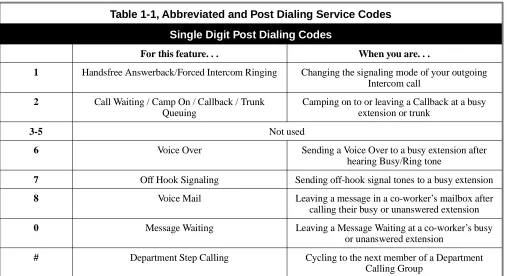
Table 1-1, Abbreviated and Post Dialing Service Codes
Single Digit Post Dialing Codes
For this feature. . . When you are. . .
1 Handsfree Answerback/Forced Intercom Ringing Changing the signaling mode of your outgoing Intercom call
2 Call Waiting / Camp On / Callback / Trunk Queuing
Camping on to or leaving a Callback at a busy extension or trunk
3-5 Not used
6 Voice Over Sending a Voice Over to a busy extension after hearing Busy/Ring tone
7 Off Hook Signaling Sending off-hook signal tones to a busy extension
8 Voice Mail Leaving a message in a co-worker’s mailbox after calling their busy or unanswered extension
0 Message Waiting Leaving a Message Waiting at a co-worker’s busy or unanswered extension
** Picking up a call ringing or waiting at another extension
Directed Call Pickup Voice Announce Unit
-*# Picking up a call ringing an extension in your own pickup group (except Ring Group calls)
Group Call Pickup 1007
*0 Answering a Message Waiting request Message Waiting 1023
*1 Making a Combined Page Paging
-*2 + 0 Canceling Call Forwarding Call Forwarding 1080
*2 + 1 + Type (2-4) Activating Personal Answering Machine Emulation
Voice Mail (Personal Answering Machine Emulation)
1080
*2 + 2 + Destination + Type (2-4)
Activating Call Forwarding when Busy Call Forwarding 1080
*2 + 3 + Destination + Type (2-4)
Activating Call Forward Follow Me at the destination extension
Call Forwarding with Follow Me
1080
*2 + 4 + Destination + Type (2-4)
Activating Call Forwarding Immediate Call Forwarding 1080
*2 + 6 + Destination + Type (2-4)
Activating Call Forwarding when Unanswered (delayed)
Call Forwarding 1080
*2 + 7 + Destination + Type (2-4)
Activating Call Forwarding (Both Ringing)
Call Forwarding 1080
*3 (after #9 + 001-128 + busy)
Disconnecting a call in progress on a trunk Forced Trunk Disconnect
-*4 + 3 + Message (01-20), or *4 + 3 + Hang up to cancel
Activating and canceling Selectable Display Messaging
Selectable Display Messaging
1081
*4 + 6 + Trunk access code + Outside number, or *4 + 6 + Hold + Hang up to
cancel
Forwarding your calls to an off-premise telephone number
Call Forwarding Off-Premise
1081
*4 + 7 + Record message + # + Condition (2, 4, 6 or 7) + Destination + Type (2 or 3), or
*4 + 7 + 3 to cancel
Recording, listening to or erasing a Personal Greeting or Park and Page
Voice Announce Unit (Personal Greeting)
1081
*5 Logging out of or on to an ACD Group Automatic Call Distribution (ACD)
1046
*6 + Orbit (1-8 or 01-32) Picking up a call parked in a system Park orbit (1-8 or 01-32)
Park 1033 + orbit
*7 Splitting (switching) between calls on an SLT
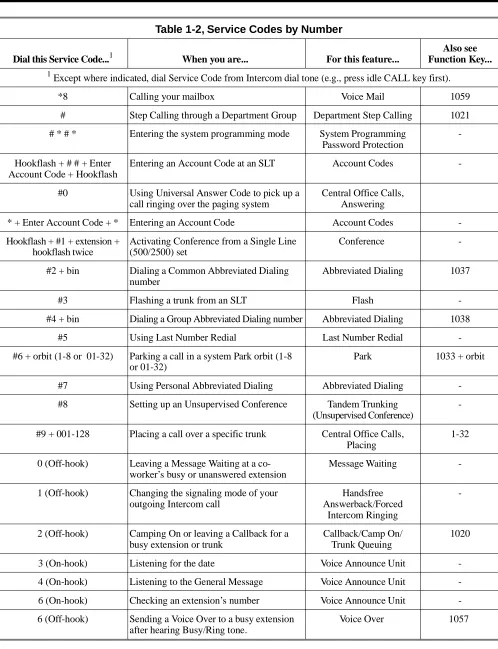
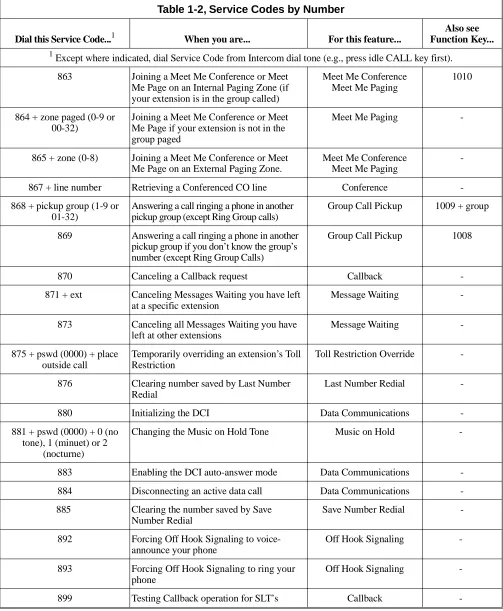
-Table 1-2, Service Codes by Number
Dial this Service Code...1 When you are... For this feature...
Also see Function Key...
1
Except where indicated, dial Service Code from Intercom dial tone (e.g., press idle CALL key first).
*8 Calling your mailbox Voice Mail 1059
# Step Calling through a Department Group Department Step Calling 1021
# * # * Entering the system programming mode System Programming Password Protection
-Hookflash + # # + Enter Account Code + Hookflash
Entering an Account Code at an SLT Account Codes
-#0 Using Universal Answer Code to pick up a call ringing over the paging system
Central Office Calls, Answering
* + Enter Account Code + * Entering an Account Code Account Codes
-Hookflash + #1 + extension + hookflash twice
Activating Conference from a Single Line (500/2500) set
Conference
-#2 + bin Dialing a Common Abbreviated Dialing number
Abbreviated Dialing 1037
#3 Flashing a trunk from an SLT Flash
-#4 + bin Dialing a Group Abbreviated Dialing number Abbreviated Dialing 1038
#5 Using Last Number Redial Last Number Redial
-#6 + orbit (1-8 or 01-32) Parking a call in a system Park orbit (1-8 or 01-32)
Park 1033 + orbit
#7 Using Personal Abbreviated Dialing Abbreviated Dialing
-#8 Setting up an Unsupervised Conference Tandem Trunking (Unsupervised Conference)
-#9 + 001-128 Placing a call over a specific trunk Central Office Calls, Placing
1-32
0 (Off-hook) Leaving a Message Waiting at a co-worker’s busy or unanswered extension
Message Waiting
-1 (Off-hook) Changing the signaling mode of your outgoing Intercom call
Handsfree Answerback/Forced
Intercom Ringing
-2 (Off-hook) Camping On or leaving a Callback for a busy extension or trunk
Callback/Camp On/ Trunk Queuing
1020
3 (On-hook) Listening for the date Voice Announce Unit
-4 (On-hook) Listening to the General Message Voice Announce Unit
-6 (On-hook) Checking an extension’s number Voice Announce Unit
-6 (Off-hook) Sending a Voice Over to a busy extension after hearing Busy/Ring tone.
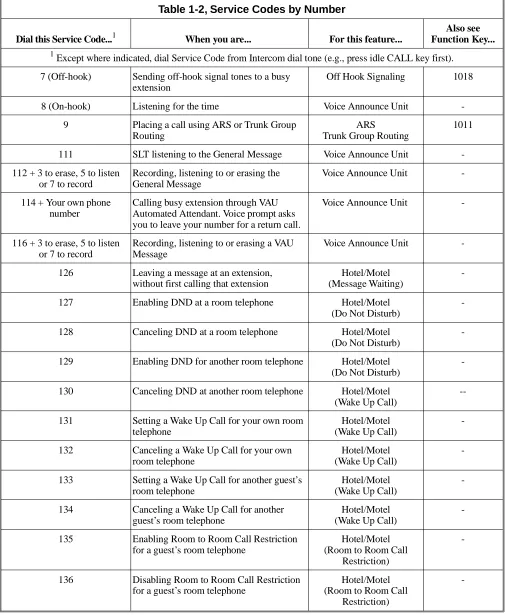
7 (Off-hook) Sending off-hook signal tones to a busy extension
Off Hook Signaling 1018
8 (On-hook) Listening for the time Voice Announce Unit
-9 Placing a call using ARS or Trunk Group Routing
ARS
Trunk Group Routing
1011
111 SLT listening to the General Message Voice Announce Unit
-112 + 3 to erase, 5 to listen or 7 to record
Recording, listening to or erasing the General Message
Voice Announce Unit
-114 + Your own phone number
Calling busy extension through VAU Automated Attendant. Voice prompt asks you to leave your number for a return call.
Voice Announce Unit
-116 + 3 to erase, 5 to listen or 7 to record
Recording, listening to or erasing a VAU Message
Voice Announce Unit
-126 Leaving a message at an extension, without first calling that extension
Hotel/Motel (Message Waiting)
-127 Enabling DND at a room telephone Hotel/Motel (Do Not Disturb)
-128 Canceling DND at a room telephone Hotel/Motel (Do Not Disturb)
-129 Enabling DND for another room telephone Hotel/Motel (Do Not Disturb)
-130 Canceling DND at another room telephone Hotel/Motel (Wake Up Call)
--131 Setting a Wake Up Call for your own room telephone
Hotel/Motel (Wake Up Call)
-132 Canceling a Wake Up Call for your own room telephone
Hotel/Motel (Wake Up Call)
-133 Setting a Wake Up Call for another guest’s room telephone
Hotel/Motel (Wake Up Call)
-134 Canceling a Wake Up Call for another guest’s room telephone
Hotel/Motel (Wake Up Call)
-135 Enabling Room to Room Call Restriction for a guest’s room telephone
Hotel/Motel (Room to Room Call
Restriction)
-136 Disabling Room to Room Call Restriction for a guest’s room telephone
Hotel/Motel (Room to Room Call
Restriction)
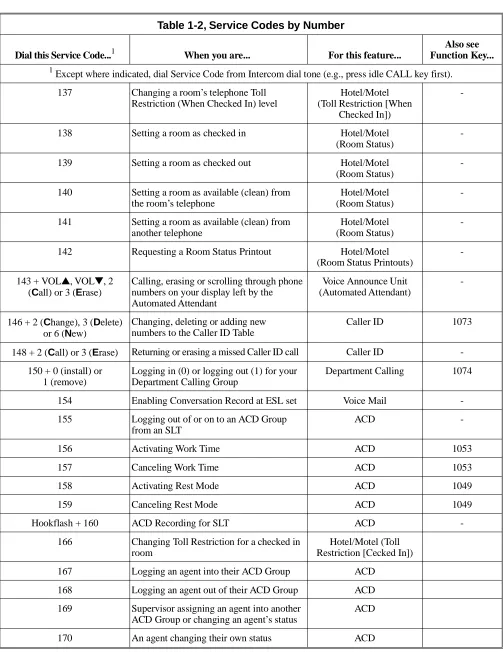
-Table 1-2, Service Codes by Number
Dial this Service Code...1 When you are... For this feature...
Also see Function Key...
1
Except where indicated, dial Service Code from Intercom dial tone (e.g., press idle CALL key first).
137 Changing a room’s telephone Toll Restriction (When Checked In) level
Hotel/Motel (Toll Restriction [When
Checked In])
-138 Setting a room as checked in Hotel/Motel (Room Status)
-139 Setting a room as checked out Hotel/Motel (Room Status)
-140 Setting a room as available (clean) from the room’s telephone
Hotel/Motel (Room Status)
-141 Setting a room as available (clean) from another telephone
Hotel/Motel (Room Status)
-142 Requesting a Room Status Printout Hotel/Motel (Room Status Printouts)
-143 + VOL▲, VOL▼, 2 (Call) or 3 (Erase)
Calling, erasing or scrolling through phone numbers on your display left by the Automated Attendant
Voice Announce Unit (Automated Attendant)
-146 + 2 (Change), 3 (Delete) or 6 (New)
Changing, deleting or adding new numbers to the Caller ID Table
Caller ID 1073
148 + 2 (Call) or 3 (Erase) Returning or erasing a missed Caller ID call Caller ID
-150 + 0 (install) or 1 (remove)
Logging in (0) or logging out (1) for your Department Calling Group
Department Calling 1074
154 Enabling Conversation Record at ESL set Voice Mail
-155 Logging out of or on to an ACD Group from an SLT
ACD
-156 Activating Work Time ACD 1053
157 Canceling Work Time ACD 1053
158 Activating Rest Mode ACD 1049
159 Canceling Rest Mode ACD 1049
Hookflash + 160 ACD Recording for SLT ACD
-166 Changing Toll Restriction for a checked in room
Hotel/Motel (Toll Restriction [Cecked In])
167 Logging an agent into their ACD Group ACD
168 Logging an agent out of their ACD Group ACD
169 Supervisor assigning an agent into another ACD Group or changing an agent’s status
ACD