60498300
CONTRpL DATA
QUERY UPDATE
VERSION 3
REFERENCE MANUAL
CDC® OPERATING SYSTEMS:
NOS 2
REVISION RECORD
■
/<^%\
Revision
A (11/01/75)
B (03/05/76)
C (12/06/76)
D (03/31/78)
E (07/15/79)
F (10/31/80)
G (05/14/82)
H (02/20/84)
J (06/06/86)
D e s c r i p t i o n
Manual released.
This revision documents feature DM157, a new directive and a new parameter in the QU control statement. Minor technical corrections and recently added diagnostics are included.
This revision documents Version 3.1 of Query Update. Feature CP144 includes the relational data base facility, read-only and alternate key update modes of operation, modifications to the USE, RETURN, DESCRIBE, EXHIBIT, ERASE, PREVIEW, COMPILE, and SORT directives, the VIA directive, the SCAN function, and the CURRENT-ANY register. Numerous technical corrections clarify and update directive descriptions. Released at PSR level 439.
This revision documents Version 3.2 of Query Update, incorporating minor maintenance changes and reorganization of the manual content. The entire manual has been reprinted.
This revision incorporates minor maintenance changes.
This revision documents the Query Update ability to access a data base through CDCS. The new directives INVOKE, STORE, REMOVE, and MODIFY (also used in the IMF data base management system) replace the USE, INSERT, DELETE, and UPDATE directives, respectively. The new directives ACCESS and RECOVERY have been added. Released at PSR level 528.
This revision documents Query Update Version 3.4 at PSR level 564. Version 3.4 can be used under NOS 2. Enhancements were made to the DISPLAY UPON, EXTRACT, and IF direc tives. A FOR DATABASE option was added to the CREATE, INVOKE, and VERSION directives. Numerous technical changes were made to update some directives. Refer to the Preface
for specifics on new features and the operating systems to which they apply. This is a complete reprint.
This revision incorporates minor technical clarifications and documents recently added error diagnostics. Released at PSR level 599.
This revision documents Query Update Version 3.4 at PSR level 647. References to NOS 1 and FORTRAN 4 are removed, and Sort/Merge 4 is changed to Sort/Merge 5. The revision corrects user library support, clarifies use of IFSAME, adds two directives, DIRECTORY and LOOKUP, and includes miscellaneous technical changes.
REVISION LETTERS I, 0, Q, AND X ARE NOT USED
©COPYRIGHT CONTROL DATA CORPORATION
1975, 1976, 1978, 1979, 1980, 1982, 1984, 1986 All Rights Reserved
Printed in the United States of America
Address comments concerning this manual to:
CONTROL DATA CORPORATION
Publications and Graphics Division P. 0. Box 3492
SUNNYVALE, CALIFORNIA 94088-3492
or use Comment Sheet in the back of this manual
A t ^ S
0nms
LIST OF EFFECTIVE PAGES
New features, as well as changes, deletions, and additions to information in this manual are indicated by bars in the margins or by a dot near the page number if the entire page is affected. A bar by the page number indicates pagination rather than content has changed.
0$ms
/tfffX.
h
Page Revision Front Cover
Inside Front Cover Title Page
i i i i i / i v
V
v i v i i / v i i i i x
X
x i / x i i x i i i
1-1 thru 1-6 1-7
1-8 1-9 1-10
2-1 thru 2-4 3-1 thru 3-5 3-6
3-7 thru 3-10 4-1 thru 4-10 4-11 4-12 4-12.1/4-12.2 4-13 4-14 4-15 4-16 4-17 4-18 4-19 4-20 4-21 4-22 4-23 4-24 4-24.1/4-24.2 4-25 4-26 4-27 4-28 4-29 4-30 4-30.1/4-30.2 4-31 4-32
4-33 thru 4-37 4-38
4-39 thru 4-47 4-48
4-49 4-50
5-1 thru 5-3 5-4
5-5 thru 5-7 5-8
6-1 6-2
60498300 J
Page Revision 6-3 6-4 6-5 6-6 A-l A-2 A-3 A-4 B-l B-2 B-3 B-4 B-5
B-6 thru B-l3 B-l 4
B-l 5 thru B-l7 B-18 B-19 B-20 B-21 B-2 2 B-2 3
B-24 thru B-26 B-27
B-28 B-29 B-30 B-31
B-3 2 thru B-34 B-3 5
B-36
B-36..l /B - 3 6 .2 B-37 thru B-39 B-40
B-40,,1/B-40.2 B-41 thru B-48 B-49
C-l
C-2 thru C-4 D-l thru D-l2 E-l
F-l thru F-5 G-l
G-2
G-3 thru G-5 G-6
G-7 thru G-9 G-10
H-l thru H-9 1-1
1-2 1-3 J - l Index-1 Indes:-2 Index-3
Inde>:-4 thru -6 Comment Sheet/Mailer Back Cover
PREFACE
. N » . u i l M r M » 1
0 ^ S
This manual describes the Query Update language Version 3.4, which is designed for data storage and r e t r i e v a l o p e r a t i o n s . Q u e r y U p d a t e V e r s i o n 3 . 4 o p e r a t e s u n d e r c o n t r o l o f t h e f o l l o w i n g o p e r a t i n g systems:
NOS 2 for the CDC®1 CYBER 170 Computer Systems; CYBER 70 Computer System models 71, 72, 73, 74;
and 6000 Computer Systems
NOS/BE 1 for the CDC® CYBER 170 Computer Systems; CYBER 70 Computer System models 71, 72, 73, 74; and 6000 Computer Systems
The Query Update reference manual is designed for b o t h t h e i n e x p e r i e n c e d d a t a p r o c e s s i n g u s e r w h o p re pare s simp l e re p o rts, and the exp erienced pro g r a m m e r w h o p e r f o r m s c o m p l e x fi l e m a n i p u l a t i o n
operations.
Q u e r y U p d a t e a c c e p t s a n d i n t e r p r e t s u s e r - o r i e n t e d directives. Although Query Update was designed for interactive use, directives can be submitted through either a terminal or a deck of punched cards. Indi v i d u a l t e r m i n a l o p e r a t i o n i s b e y o n d t h e s c o p e o f
this manual; the user should reference the appro priate manual for terminal operation.
T h r e e d a t a b a s e i n t e r f a c e s e x i s t i n w h i c h Q u e r y Update can be used: CYBER Database Control System (CDCS), CYBER Record Manager (CRM), and Information
Management Facility (IMF). This manual presents an overview of these interfaces and documents specific interface information in the following ways:
C R M C o m p l e t e d o c u m e n t a t i o n ; d i s c u s s i o n s o n using Query Update are in terms of using t h i s i n t e r f a c e .
C D C S S y n t a x a n d b r i e f e x p l a n a t i o n o f s y n t a x are included.
IMF S y n t a x a n d b r i e f e x p l a n a t i o n o f s y n t a x are included.
Detailed information pertaining to the CDCS and IMF interfaces is contained in the CDCS and IMF appli cation programming reference manuals.
R e l a t e d m a t e r i a l i s c o n t a i n e d i n t h e l i s t e d p u b l i c a t i o n s . T h e p u b l i c a t i o n s a r e l i s t e d a l p h a b e t i c a l l y w i t h i n g r o u p i n g s t h a t i n d i c a t e r e l a t i v e i m p o r t a n c e to readers of this manual.
The NOS manual abstracts and the NOS/BE manual a b s t r a c t s a r e i n s t a n t - s i z e d m a n u a l s c o n t a i n i n g b r i e f d e s c r i p t i o n s o f t h e c o n t e n t s a n d i n t e n d e d audience of all NOS and NOS product set manuals, and NOS/BE and NOS/BE product set manuals, respec t i v e l y. T h e a b s t r a c t s m a n u a l s c a n b e ' u s e f u l i n determi ni ng w hi ch manual s are of greatest interest t o a p a r t i c u l a r r e a d e r.
The Software Publications Release History serves as a g u i d e i n d e t e r m i n i n g w h i c h r e v i s i o n l e v e l o f software documentation corresponds to the Program m i n g S y s t e m R e p o r t ( P S R ) l e v e l o f i n s t a l l e d s i t e s o f t w a r e .
/ H i
0/ms
The following manuals are of primary interest:
P u b l i c a t i o n
DMS-170 CYBER Database Control System Application Programming
Reference Manual
Information Management Facility Version 2
Reference Manual
P u b l i c a t i o n Number
60485300
60484600
NOS 2 NOS/BE 1
N O S V e r s i o n 2 R e f e r e n c e S e t 6 0 4 5 9 6 8 0 Volume 3, System Commands
NOS /B E Ve rs i o n 1 R efer enc e Man ual 60493800
Q u e r y U p d a t e Ve r s i o n 3 P r o g r a m m e r 6 0 4 9 9 0 0 0 User's Guide
Query Update Version 3 User's Guide 60387700 For Use With: CYBER Record Manager
The following manuals are of secondary interest:
P u b l i c a t i o n
CYBER Record Manager
Advanced Access Methods Version 2 Reference Manual
P u b l i c a t i o n Number
60499300
NOS 2 NOS/BE 1
C Y B E R R e c o r d M a n a g e r 6 0 4 9 5 7 0 0 Basic Access Methods Version 1.5
Reference Manual
DMS-170 CYBER Database Control System 60485200 Version 2 Data Administration
Reference Manual
DMS-170 CYBER Database Control System 60481800 Version 2 Reference Manual
DMS-170 DDL Version 3 Reference Manual 60481900 Volume 1, Schema Definition for Use
With: COBOL FORTRAN Query Update
DMS-170 DDL Version 3 Reference Manual 60482000 Volume 2, Subschema Definition for
CYBER Database Control System Use With: COBOL
Query Update
DMS-170 FORTRAN Data Base Facility 60482200 Version 1 Reference Manual
DMS-170 Query Update/CYBER Record 60482100 Manager Data Administration
Reference Manual
4,
■
0^\
Publication
NOS Version 2 Manual Abstracts
NOS/BE Version 1 Manual Abstracts
Software Publications Release History
P u b l i c a t i o n
Number NOS 2 NOS/BE 1
60485500
84000470
60481000
CDC manuals can be ordered from Control Data Corporation, Literature and Distribution Services, 308 North Dale Street, St. Paul, Minnesota 55103.
T h i s p r o d u c t i s i n t e n d e d f o r u s e o n l y a s d e s c r i b e d i n t h i s d o c u m e n t . C o n t r o l D a t a c a n n o t b e r e s p o n s i b l e f o r t h e p r o p e r functioning of undescribed features or parameters.
k
CONTENTS
i
y ^ S
NOTATIONS
1. SYSTEM DESCRIPTION
Query Update Organization Input/Output Methods
Interactive Mode
Interactive Transmission of Directives Query Update Interactive Responsn Batch Mode
Catalog Operations CRM Catalog Mode CDCS Catalog Mode Query Update Processing
Query Update Non-Data-Base File Access Query Update Data Base File Access
Concurrent Data Base File Access Query Update/CRM Interface Query Update/CDCS Interface Query Update/IMF Interface External File Organizations F i l e P o s i t i o n i n g
2. QUERY UPDATE OPERATIONS
Temporary Item Identification Condition References
Special Characters S e l e c t i o n C r i t e r i a Retrieval Operations
R e t r i e v a l S p e c i fi c a t i o n O u t p u t S p e c i fi c a t i o n
Unformatted Output Formatted Output Data Base Access
Data Base Modification Modifying Data Storing Data Removing Data Relation Processing
3. LANGUAGE ELEMENTS
Data Types CHARACTER LOGICAL INTEGER FLOATING DOUBLE COMPLEX FIXED NUMERIC Names
Data Name Subscripts Data Name Qualification L i t e r a l s
Nonnumeric Literals Numeric Literals
x i i i F u n c t i o n s
Independent Functions Cumulative Functions 1 - 1 E x p r e s s i o n s
Conditions 1-1
1-5
1-5 4. QUERY Ul 1-5 1-6 ACCESS 1-6 ALTER 1-6 BREAK 1-6 COMPILE 1-6 CREATE 1-6 DATE 1-7 DEFINE 1-7 DELETE 1-7 DESCRIBE 1-7 DETAIL 1-8 DIAGNOSTIC 1-9 DIRECTORY 1-9 DISPLAY 1-10 DUPLICATE END ERASE EVALUATE 2-1 EXECUTE EXHIBIT 2-1 EXTRACT 2-1 FOLLOW 2-1 FOOTING 2-1 FORMAT 2-1 HEADING 2-1 HELP
2-1 I F
2-1 INSERT 2-2 INVOKE 2-2 LOOKUP 2-3 MODIFY 2-3 MOVE 2-3 NOTE 2-3 OS 2-3 PAGE-NUMBER PAGE-SIZE PERFORM PREFACE 3-1 PREPARE PREVIEW 3-1 RECAP 3-1 RECORDING 3-1 RECOVERY 3-1 REMOVE 3-1 RETURN 3-1 REWIND 3-1 SELECT 3-1 SEPARATOR 3-2 SORT 3-2 SPECIFY 3-3 STOP 3-3 STORE 3-4 SUMMARY 3-4 TABS 3-5 TIME 3-6 3-6 3-8 3-9 3-10 4-1 4-1 4-2 4-2 4-3 4-4 4-5 4-5 4-7 4-7 4-9 4-10 4-11 4-11 4-12 4-13 4-13 4-14 4-15 4-15 4-19 4-20 4-20 4-21 4-22 4-23 4-23 4-27 4-28 4-29 4-29 4-30 4-31 4-31 4-31 4-32 4-33 4-34 4-34 4-35 4-35 4-36 4-37 4-37 4-38 4-39 4-39 4-42 4-42 4-43 4-4 J 4-43 4-44 4-45 4-45
TITLE UNIVERSAL UPDATE USE VERIFY VERSION
CRM Catalog Mode CDCS Catalog Mode VETO
VIA
5. REPORT GENERATION
Report Specifications Report Preparation Sample Reports
Sample Reports Data Description CYLIST Report
CYUN Report CYACRE Report CYDENS Report
6. OPERATING SYSTEM INTERFACE
QU Control Statement QUMIP Control Statement REPORT Control Statement NOS Operating System NOS/BE Operating System
APPENDIXES
A Standard Character Sets B D i a g n o s t i c s
C G l o s s a r y
D Summary of Query Update Directives E Reserved Word List
F P i c t u r e S p e c i fi c a t i o n C l a u s e G Report Extraction Logic Flowcharts H Alternative Query Update Directives I Summary of Data Definition in DMS-170 J Future System Migration Guidelines
INDEX
FIGURES
1-1 Query Update Input/Output Methods 1-2 Data Base Access With CRM
1-3 Data Base Access With CDCS 1-4 Data Base Access With IMF 2-1 Relational Data Base Example 3-1 Query Update Data Types 3-2 ANY and CURRENT-ANY Example 3-3 Data Name Qualification Example 3-4 Independent Function Examples 3-5 Cumulative Function Example 4-1 ACCESS Directive Format 4-2 ACCESS Directive Examples 4 - 3 A LT E R D i r e c t i v e F o r m a t 4-4 BREAK Directive Format 4-5 BREAK Directive Examples 4-6 COMPILE Directive Format 4-7 Sample COMPILE Directives 4-8 CREATE Directive Format
4-9 Making Files Permanent Under CRM 4-10 Making Files Permanent Under CDCS
4-46 4-11 4-46 4-12 4-47 4-13 4-47 4-14 4-47 4-15 4-48 4-16 4-48 4-17 4-49 4-17 4-49 4-18 4-50 4-19 4-20 4-21 5-1 4-22 4-23 5-2 4-24 5-2 4-25 5-3 4-26 5-3 4-27 5-3 4-28 5-5 4-29 5-6 4-30 5-6 4-31 4-32 4-33 6-1 6-1 4-34 6-1 6-1 4-35 6-5 6-5 4-36 4-37 4-37, 4-38 4-39 4-40 A - l 4-41 B - l 4-42 C - l 4-43 D - l 4-44 E - l 4-45 F - l
G-l 4-46 H - l 4-47 1-1 4-48 J - l 4-49 4-50 4-51 4-52 4-53 4-54 4-55 4-56 4-57 1-5 4-58 1-8 4-59 1-9 4-60 1-10 4-61 2-4 4-62 3-1 4-63 3-3 4-64 3-4 4-65 3-7 4-66 3-8 4-67 4-1 4-68 4-1 4-69 4-2 4-70 4-2 4-71 4-3 4-72 4-3 4-73 4-3 4-74 4-4 4-75 4-5 4-76 4-5 4-77
D A T E D i r e c t i v e F o r m a t 4 - 5 D E F I N E D i r e c t i v e F o r m a t 4 - 6 D E S C R I B E D i r e c t i v e F o r m a t 4 - 7 S a m p l e D E S C R I B E D i r e c t i v e 4 - 8 D E T A I L D i r e c t i v e F o r m a t 4 - 9 S a m p l e D E T A I L D i r e c t i v e s 4 - 1 0 D I A G N O S T I C D i r e c t i v e F o r m a t 4 - 1 0 , 1 D I R E C T O R Y D i r e c t i v e F o r m a t 4 - 1 1
D I S P L A Y D i r e c t i v e F o r m a t 4 - 1 1 D U P L I C A T E D i r e c t i v e F o r m a t 4 - 1 2 . 1 E N D D i r e c t i v e F o r m a t 4 - 1 3
E R A S E D i r e c t i v e F o r m a t 4 - 1 3 E V A L U A T E D i r e c t i v e F o r m a t 4 - 1 4 E X E C U T E D i r e c t i v e F o r m a t 4 - 1 5 E X H I B I T D i r e c t i v e F o r m a t 4 - 1 6 S a m p l e E X H I B I T D i r e c t i v e s 4 - 1 6 E X T R A C T D i r e c t i v e F o r m a t 4 - 1 9 F O L L O W D i r e c t i v e F o r m a t 4 - 2 0 F O O T I N G D i r e c t i v e F o r m a t 4 - 2 0 F O R M A T D i r e c t i v e F o r m a t 4 - 2 1 H E A D I N G D i r e c t i v e F o r m a t 4 - 2 2 H E L P D i r e c t i v e F o r m a t 4 - 2 3 I F D i r e c t i v e F o r m a t 4 - 2 3 General Flow of Directive Checking
and Saving Directives for Later
E x e c u t i o n 4 - 2 5 General Flow of the Processing of
S a v e d D i r e c t i v e s 4 - 2 b Relational Data Base Examples for
I F D i r e c t i v e 4 - 2 7 I N V O K E D i r e c t i v e F o r m a t 4 - 2 8 I N V O K E D i r e c t i v e E x a m p l e 4 - 2 9 1 L O O K U P D i r e c t i v e F o r m a t 4 - 2 9 M O D I F Y D i r e c t i v e F o r m a t 4 - 2 9 M O D I F Y D i r e c t i v e E x a m p l e 4 - 3 0 M O V E D i r e c t i v e F o r m a t s 4 - 3 0 . 1 N O T E D i r e c t i v e F o r m a t 4 - 3 1 O S D i r e c t i v e F o r m a t 4 - 3 1 P A G E - N U M B E R D i r e c t i v e F o r m a t 4 - 3 1 P A G E - S I Z E D i r e c t i v e F o r m a t 4 - 3 2 Horizontal and Vertical Placement of
D e t a i l L i n e s i n S e c t i o n s 4 - 3 3 P E R F O R M D i r e c t i v e F o r m a t 4 - 3 4 P R E F A C E D i r e c t i v e F o r m a t 4 - 3 4 P R E P A R E D i r e c t i v e F o r m a t 4 - 3 4 P R E V I E W D i r e c t i v e F o r m a t 4 - 3 5 R E C A P D i r e c t i v e F o r m a t 4 - 3 5 R E C O R D I N G D i r e c t i v e F o r m a t 4 - 3 6 R E C O V E R Y D i r e c t i v e F o r m a t 4 - 3 7 R E M O V E D i r e c t i v e F o r m a t 4 - 3 8 R E M O V E D i r e c t i v e E x a m p l e 4 - 3 8 R E T U R N D i r e c t i v e F o r m a t 4 - 3 8 R E W I N D D i r e c t i v e F o r m a t 4 - 3 9 S E L E C T D i r e c t i v e F o r m a t 4 - 3 9 D e t a i l S e l e c t i o n 4 - 4 0 D e t a i l S e l e c t i o n W i t h B r e a k s 4 - 4 1 S E P A R A T O R D i r e c t i v e F o r m a t 4 - 4 2 S O R T D i r e c t i v e F o r m a t 4 - 4 2 S P E C I F Y D i r e c t i v e F o r m a t 4 - 4 3 S T O P D i r e c t i v e F o r m a t 4 - 4 3 S T O R E D i r e c t i v e F o r m a t 4 - 4 4 S T O R E D i r e c t i v e E x a m p l e 4 - 4 4 S U M M A R Y D i r e c t i v e F o r m a t 4 - 4 4 T A B S D i r e c t i v e F o r m a t 4 - 4 5 T I M E D i r e c t i v e F o r m a t 4 - 4 5 T I T L E D i r e c t i v e F o r m a t 4 - 4 6 U N I V E R S A L D i r e c t i v e F o r m a t 4 - 4 6 U P D A T E D i r e c t i v e F o r m a t 4 - 4 7 S a m p l e U P D A T E D i r e c t i v e 4 - 4 7 V E R I F Y D i r e c t i v e E x a m p l e 4 - 4 7 V E R S I O N D i r e c t i v e F o r m a t 4 - 4 8 V E R S I O N D i r e c t i v e E x a m p l e s 4 - 4 8 V E T O D i r e c t i v e F o r m a t 4 - 4 9 V I A D i r e c t i v e F o r m a t 4 - 5 0
/*r^|K
Acsms
5 - 1 Q u e r y U p d a t e R e p o r t G e n e r a t i o n 5 - 1 T A B L E S 5-2 REPORT Utility Program Report Generation 5-1
5-3 DESCRIBE and DEFINE Directives for
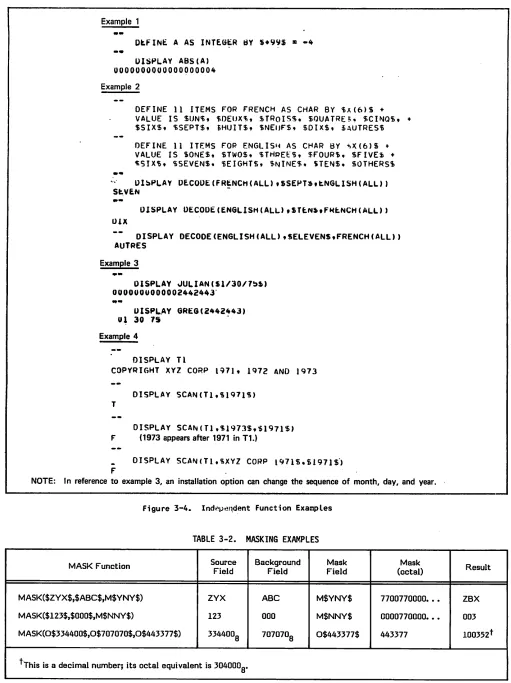
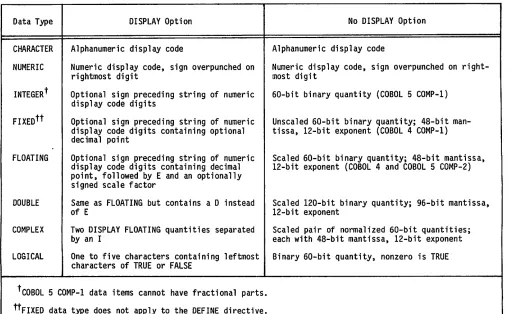
S a m p l e R e p o r t s 5 - 3 1 - 1 Q u e r y U p d a t e D i r e c t i v e s 1 - 1 5 - 4 C Y L I S T R e p o r t 5 - 4 3 - 1 Q u e r y U p d a t e R e g i s t e r s 3 - 2 5 - 5 C Y U N R e p o r t 5 - 5 3 - 2 M a s k i n g E x a m p l e s 3 - 7 5 - 6 C Y A C R E R e p o r t 5 - 7 3 - 3 A r i t h m e t i c O p e r a t o r s 3 - 9 5 - 7 C Y D E N S R e p o r t 5 - 8 4 - 1 D E F I N E a n d D E S C R I B E D i r e c t i v e D a t a T y p e s 4 - 6 6 - 1 Q U C o n t r o l S t a t e m e n t F o r m a t 6 - 2 4 - 2 R e c o r d s S e a r c h e d f o r R e t r i e v a l 4 - 2 4 6 - 2 R E P O R T C o n t r o l S t a t e m e n t F o r m a t 6 - 4 4 - 3 A c t i o n o n D i r e c t i v e s D u r i n g R e c o r d i n g 4 - 3 7
0$ms
NOTATIONS
Each directive is described in terms of a reference format. When more than one specific arrangement is p e r m i t t e d , t h e f o r m a t i s s e p a r a t e d i n t o n u m b e r e d formats.
NOTATION USED IN REFERENCE
FORMATS
UPPERCASE Uppercase words are reserved words and must appear exactly as shown. Reserved words can be used in di r e c t i v e s o n l y a s s p e c i fi e d i n t h e reference formats.
Ve r t i c a l b a r s e n c l o s e t w o o r m o r e v e r t i c a l l y s t a c k e d i t e m s i n a r e f erence format when at least one of t h e e n c l o s e d i t e m s m u s t b e u s e d . Each of the vertically stacked items can be used once.
E l l i p s e s i m m e d i a t e l y f o l l o w a p a i r o f b r a c k e t s o r b r a c e s t o i n d i c a t e t h a t t h e e n c l o s e d m a t e r i a l c a n b e r e p e a t e d a t t h e u s e r ' s o p t i o n . E l l i p s e s a l s o f o l l o w d a t a n a m e , e x p r e s s i o n , o r fi l e n a m e t o i n d i cate that the user-supplied element can be repeated.
UNDERLINED Underlined uppercase words or parts U P P E R C A S E o f w o r d s a r e r e q u i r e d w h e n t h e f o r m a t i n w h i c h t h e y a p p e a r i s u s e d . A n y p a r t w o r d i n c l u d i n g t h e underlined part up to the full word i s a v al i d abb rev i ati o n.
[II II ]
V e r t i c a l b a r s w i t h i n b r a c k e t s e n c l o s e t w o o r m o r e v e r t i c a l l y s t a c k e d i t e m s w h e n e a c h o f t h e stacked items can be used once, or o m i t t e d . A n y i t e m s c a n b e w r i t t e n in any order.lowercase
[ ]
Lowercase words are generic terms that represent the words or symbols supplied by the user. When generic t e r m s a r e r e p e a t e d i n a f o r m a t , a number is appended to the term for i d e n t i fi c a t i o n .
B r a c k e t s e n c l o s e o p t i o n a l p o r t i o n s o f a r e f e r e n c e f o r m a t . A l l o f t h e f o r m a t w i t h i n t h e b r a c k e t s c a n b e o m i t t e d o r i n c l u d e d a t t h e u s e r ' s o p t i o n . I f i t e m s a r e s t a c k e d v e r t i c a l l y w i t h i n b r a c k e t s , o n l y o n e of the stacked items can be used.
P u n c t u a t i o n s y m b o l s s h o w n w i t h i n t h e f o r m a t s a r e r e q u i r e d u n l e s s e n c l o s e d i n b r a c k e t s a n d s p e c i fi c a l l y n o t e d a s o p t i o n a l . I n g e n e r a l , c o m m a s a n d semicolons are optional. One or more spaces sep arate the elements in a directive.
NOTATION USED IN EXAMPLES
t
A n u p a r r o w i n d i c a t e s t h e p o s i t i o n of an assumed decimal point in an i t e m .A delta indicates a space (blank).
{ } Braces enclose one item or several v e r t i c a l l y s t a c k e d i t e m s i n a r e f
erence format. One of the enclosed items must be used. When one item is enclosed in braces and followed by ellipses, the item must be used o n c e a n d c a n b e r e p e a t e d a t t h e u s e r ' s o p t i o n .
A plus or minus sign above a numeric c h a r a c t e r i n d i c a t e s a n o p e r a t i o n a l s i g n i s s t o r e d i n c o m b i n a t i o n w i t h the numeric character.
C h a r a c t e r p o s i t i o n s i n s t o r a g e a r e shown by boxes.
S
SYSTEM DESCRPTSON
Query Update is a nonprocedural interpretive system t h a t e n a b l e s i n d i v i d u a l s w i t h v a r y i n g l e v e l s o f t e c h n i c a l k n o w l e d g e t o p e r f o r m d a t a s t o r a g e a n d retrieval operations. Query Update can be used to p r o d u c e s p e c i a l - p u r p o s e r e p o r t s e i t h e r Interactively or through the batch-oriented REPORT u t i l i t y . Q u e r y U p d a t e c a n a d d n e w r e c o r d s t o fi l e s , r e m o v e r e c o r d s f r o m e x i s t i n g fi l e s , e x t r a c t d a t a f r o m r e c o r d s w i t h i n fi l e s , o r c h a n g e i n d i v i d u a l fi e l d s w i t h i n r e c o r d s . Q u e r y U p d a t e c a n access data either from a collection of files known as a data base or from non-data-base files.
Query Update can be used to access data base files through the following interfaces:
CYBER Record Manager (CRM)
CYBER Database Control System (CDCS)
Information Management Facility (IMF)
Although IMF terminology refers to permanent files c o n t a i n i n g p h y s i c a l i n f o r m a t i o n a s a n i n f o r m a t i o n b a s e , t h e t e r m d a t a b a s e r e p l a c e s t h e t e r m i n f o r m a t i o n b a s e i n t h i s m a n u a l . A l s o , t h e t e r m subschema replaces the term external schema in this manual.
CDC offers gui del i nes for the use of the softw are described in this manual. These guidelines appear in appendix J. Before using the software described i n t h i s m a n u a l , t h e r e a d e r i s s t r o n g l y u r g e d t o r e v i e w t h e c o n t e n t o f t h i s a p p e n d i x . T h e g u i d e l i n e s r e c o m m e n d u s e o f t h i s s o f t w a r e i n a manner that reduces the effort required to migrate software application programs to future hardware or software systems.
QUERY UPDATE
ORGANIZATION
Query Update is made up of a series of elements t h a t i n c l u d e t h e f o l l o w i n g :
Reserved words
Recognized symbols
Punctuation
U s e r - s u p p l i e d e l e m e n t s s u c h a s n a m e s , l i t e r a l s , f u n c t i o n s , e x p r e s s i o n s , c o n d i t i o n s , a n d p i c t u r e s p e c i fi c a t i o n s
Q u e r y U p d a t e p a r a l l e l s t h e C O B O L l a n g u a g e convention of grouping these elements into sentence i n s t r u c t i o n s c a l l e d d i r e c t i v e s . D i r e c t i v e s b e g i n w i t h a u n i q u e k e y w o r d t h a t i d e n t i fi e s t h e o p e r a t i o n t o b e p e r f o r m e d . D I S P L AY, S TO R E , R E M O V E , a n d M O D I F Y a r e e x a m p l e s o f k e y w o r d s t h a t b e g i n d i r e c t i v e s . D i r e c t i v e s c a n b e s u b m i t t e d t o
Compare data content
P e r f o r m a r i t h m e t i c e v a l u a t i o n s
Remove, insert, or otherwise modify data
Design and generate reports
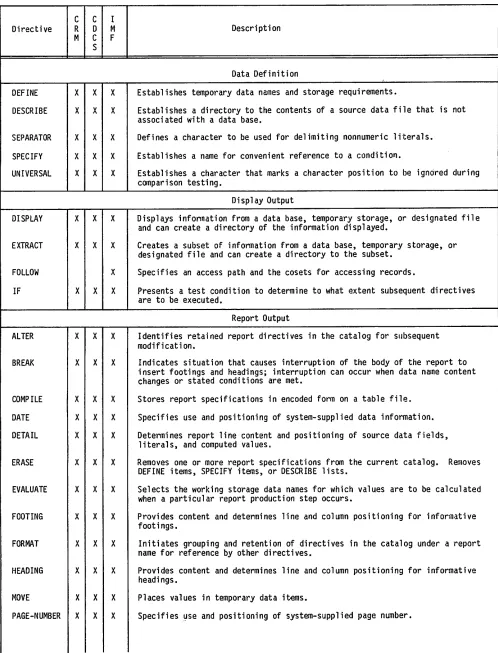
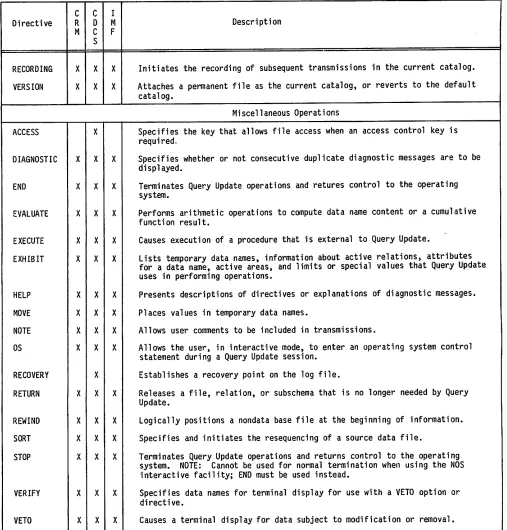
T h e Q u e r y U p d a t e d i r e c t i v e s a r e l i s t e d i n t a b l e l - l . T h i s t a b l e i n d i c a t e s t h e d i r e c t i v e s t h a t c a n be used with each data management interface and the f u n c t i o n o f t h e d i r e c t i v e . D e t a i l e d d e s c r i p t i o n s o f a l l t h e d i r e c t i v e s a n d t h e i r c o m p l e t e f o r m a t s are given in section 4 and summarized in appendix D.
j ^ & S
TABLE 1-1. QUERY UPDATE DIRECTIVES
0 ^ S
0fi$&S
Directive
Description
Data Base Identification
CREATE
INVOKE
USE1"
Initiates access to an area for initial insertion of data. When used through
IMF, terminates processing through the IMF interface and establishes either
the CRM or CDCS interface.
Initiates data base access depending on the specified subschema directory or
external schema.
Initiates data base access depending on the specified subschema directory.
When used through IMF, terminates the IMF interface and establishes either
the CRM or CDCS interface.
'This direc
tiv
2 isavail able, but its use is not recommended. See appendix H.
TABLE 1-1. QUERY UPDATE DIRECTIVES (Contd)
Directive
Description
Data Definition
DEFINE
Establishes temporary data names and storage requirements.
DESCRIBE
Establishes a directory to the contents of a source data file that is not
associated with a data base.
SEPARATOR
Defines a character to be used for delimiting nonnumeric literals.
SPECIFY
Establishes a name for convenient reference to a condition.
UNIVERSAL
Establishes a character that marks a character position to be ignored during
comparison testing.
Display Output
DISPLAY
Displays information from a data base, temporary storage, or designated file
and can create a directory of the information displayed.
EXTRACT
Creates a subset of information from a data base, temporary storage, or
designated file and can create a directory to the subset.
FOLLOW
Specifies an access path and the cosets for accessing records.
IF
Presents a test condition to determine to what extent subsequent directives
are to be executed.
Report Output
ALTER
Identifies retained report directives in the catalog for subsequent
modification.
BREAK
Indicates situation that causes interruption of the body of the report to
insert footings and headings; interruption can occur when data name content
changes or stated conditions are met.
COMPILE
Stores report specifications in encoded form on a table file.
DATE
Specifies use and positioning of system-supplied data information.
DETAIL
Determines report line content and positioning of source data fields,
literals, and computed values.
ERASE
Removes one or more report specifications from the current catalog. Removes
DEFINE items, SPECIFY items, or DESCRIBE lists.
EVALUATE
Selects the working storage data names for which values are to be calculated
when a particular report production step occurs.
FOOTING
Provides content and determines line and column positioning for informative
footings.
FORMAT
Initiates grouping and retention of directives in the catalog under a report
name for reference by other directives.
HEADING
Provides content and determines line and column positioning for informative
headings.
MOVE
Places values in temporary data items.
PAGE-NUMBER
Specifies use and positioning of system-supplied page number.
TABLE 1-1. QUERY UPDATE DIRECTIVES (Contd)
Directive
Description
PAGE-SIZE
Specifies maximum number of vertical lines, horizontal columns, horizontal or
vertical sectional page divisions, and multiple copy images.
PREFACE
Causes lines of text or another report to precede the first page of the
report generated according to the format specifications.
PREPARE
Initiates execution of report directives.
PREVIEW
Causes sample execution of report directives.
RECAP
States content and positioning of recapitulative information generated at the
end of each report page.
SELECT
Indicates alternative DETAIL specifications to be selected when stated
conditions are met.
SUMMARY
Causes lines of text or another report to follow the last page of the report
generated according to the format specifications.
TABS
Relates tabular references to horizontal column numbers.
TIME
Specifies use and positioning of system-supplied time information.
TITLE
States content and positioning of title to start each page.
Modification Operations
MODIFY
Modifies data item values of existing records in a data base.
UPDATEt
Identifies and obtains data items to be modified when used through CRM or
CDCS; can be used only with temporary items through the IMF interface.
REMOVE
Removes specific records from a data base.
DELETE1'
Removes specific records from a data base.
STORE
Places a record in a data base.
INSERT1"
Creates a record entry and places it in an area in the data base.
Catalog Operations
DUPLICATE
Copies recorded sessions or report specifications from one catalog to another.
ERASE
Removes a temporary data name, a recorded directive, a report specification,
or a directory for a non-data-base file.
EXHIBIT
Lists information recorded in the current catalog.
FORMAT
Causes the subsequent report specification directives to be retained in the
current catalog under a specified report name.
PERFORM
Retrieves and executes transmissions recorded in the current catalog.
PREPARE
Initiates production of a report according to the specifications associated
with report name; report name must exist in the current catalog.
+1 This directive is
ava
ilable, but its use is not recommended. See appendix H.
TABLE 1-1. QUERY UPDATE DIRECTIVES (Contd)
Directive
Description
RECORDING
Initiates the recording of subsequent transmissions in the current catalog.
VERSION
Attaches a permanent file as the current catalog, or reverts to the default
catalog.
Miscellaneous Operations
ACCESS
Specifies the key that allows file access when an access control key is
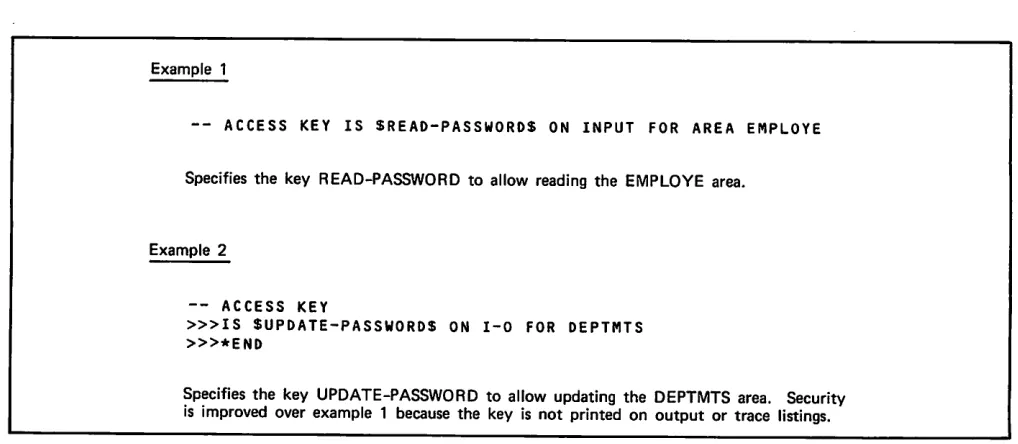
required.
DIAGNOSTIC
Specifies whether or not consecutive duplicate diagnostic messages are to be
displayed.
E
N
D
Terminates Query Update operations and retures control to the operating
system.
EVALUATE
Performs arithmetic operations to compute data name content or a cumulative
function result.
EXECUTE
Causes execution of a procedure that is external to Query Update.
EXHIBIT
Lists temporary data names, information about active relations, attributes
for a data name, active areas, and limits or special values that Query Update
uses in performing operations.
HELP
Presents descriptions of directives or explanations of diagnostic messages.
MOVE
Places values in temporary data names.
NOTE
Allows user comments to be included in transmissions.
O
S
Allows the user, in interactive mode, to enter an operating system control
statement during a Query Update session.
RECOVERY
Establishes a recovery point on the log file.
RETURN
Releases a file, relation, or subschema that is no longer needed by Query
Update.
REWIND
Logically positions a nondata base file at the beginning of information.
SORT
Specifies and initiates the resequencing of a source data file.
STOP
Terminates Query Update operations and returns control to the operating
system. NOTE: Cannot be used for normal termination when using the NOS
interactive facility; END must be used instead.
VERIFY
Specifies data names for terminal display for use with a VETO option or
directive.
VETO
Causes a terminal display for data subject to modification or removal.
VIA
Establishes the relation to be used when an ambiguity exists on a query.
' This dire ctive is
ava
iTable, but its use is not recommended. See appendix H.
INPUT/OUTPUT METHODS
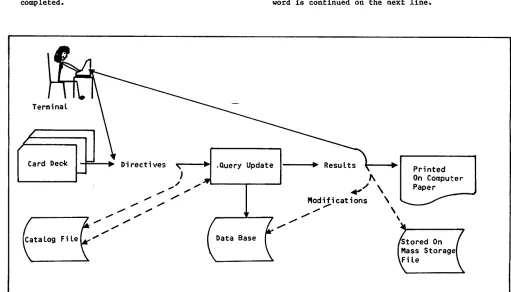
Directives can be submitted to Query Update either in interactive mode through a terminal or in batch mode through an input deck of punched cards.
In either Interactive or batch mode, directives can b e c o l l e c t e d o n a c a t a l o g fi l e . T h e c a t a l o g fi l e can be submitted to Query Update either during the present Query Update session, or in a future Query Update session.
In both interactive and batch modes, the results of d i r e c t i v e o p e r a t i o n s c a n b e e i t h e r o u t p u t t o t h e u s e r t e r m i n a l , o r s t o r e d o n a fi l e t h a t c a n subsequently be printed. Results can be printed as an unformatted list or as a fully formatted report.
Query Update fi g u r e l - l .
i n p u t / o u p u t m e t h o d s a r e s h o w n i n
INTERACTIVE MODE
I n t e r a c t i v e c o m m u n i c a t i o n w i t h Q u e r y U p d a t e consists of the following actions:
Connecting the terminal to the computer.
Requesting Query Update.
I d e n t i f y i n g t h e d a t a b a s e , i n f o r m a t i o n b a s e , independent file, or report to be manipulated.
Submitting Query Update directives and reviewing any responses.
Te r m i n a t i n g Q u e r y U p d a t e w h e n t a s k s a r e completed.
The appropriate terminal manual should be consulted f o r d e t a i l e d o p e r a t i n g i n s t r u c t i o n s . T h e t e r m i n a l m a n u a l s h o u l d a l s o b e c o n s u l t e d t o d e t e r m i n e t h e a p p r o p r i a t e g r a p h i c c h a r a c t e r r e p r e s e n t a t i o n f o r t h e t e r m i n a l t y p e . A l l c h a r a c t e r s i n d i c a t e d i n this manual are CDC graphic characters as shown in a p p e n d i x A . I n d i v i d u a l t e r m i n a l s m i g h t u s e o t h e r g r a p h i c s .
Interactive Transmission of Directives
A n i n t e r a c t i v e t r a n s m i s s i o n c a n c o n s i s t o f a c o m p l e t e d i r e c t i v e , o r a s e r i e s o f m u l t i p l e d i r e c t i v e s . A t r a n s m i s s i o n i s e x e c u t e d b y Q u e r y Update as a unit. A transmission is submitted in a l i n e ( o r l i n e s ) o f i n p u t t h a t i s t e r m i n a t e d w h e n t h e t r a n s m i t k e y i s s t r u c k ; f o r e x a m p l e , t h e S E N D a n d R E T U R N k e y s a r e t r a n s m i t k e y s . A p h y s i c a l t r a n s m i s s i o n c a n c o n t a i n a m a x i m u m o f 1 5 0 c h a r a c t e r s , w h i l e a l o g i c a l t r a n s m i s s i o n c a n c o n t a i n a m a x i m u m o f 1 0 3 0 c h a r a c t e r s u n l e s s t h e t r a n s m i s s i o n l e n g t h p a r a m e t e r ( T L ) o f t h e Q u e r y Update control statement specifies otherwise.
If a transmission cannot be completed on one input l i n e , a c o n t i n u a t i o n c h a r a c t e r c a n b e e n t e r e d a s t h e l a s t c h a r a c t e r o f t h e l i n e . T h e c o n t i n u a t i o n characters recognized by Query Update are the plus sign (+) and the equal sign (=).
W h e n t h e l a s t e l e m e n t e n t e r e d o n a l i n e i s a c o m p l e t e w o r d ( r e s e r v e d w o r d , n a m e , o r l i t e r a l ) , a s p a c e m u s t b e e n t e r e d b e f o r e t h e c o n t i n u a t i o n character, or a space must be entered as the first c h a r a c t e r i n t h e n e x t l i n e . W h e n a s p a c e i s n o t e n t e r e d o n e i t h e r l i n e , Q u e r y U p d a t e a s s u m e s t h e word is continued on the next line.
Terminal
Card Oec-k ■▶ D i r e c t i v e s 5 7
Catalog File
*tV M o d i fi c a t i o n s \
Data Base
P r i n t e d On Computer Paper
/Stored On [Mass Storage] LFi le
Figure 1-1. Query Update Input/Output Methods
[image:19.610.67.578.398.690.2]Query Update Interactive Response
Qu e r y U pdate indi ca te s th a t i t i s r eady to r ec ei v e a transmission by displaying two hyphens (—). On NOS an additional symbol, the question mark (?), is d i s p l a y e d b y t h e o p e r a t i n g s y s t e m t o i n d i c a t e a
request for terminal input.
When Query Update has received a transmission, it e i t h e r e x e c u t e s o r c a t a l o g s t h e t r a n s m i s s i o n . During execution Query Update might send a response to the user. The response can consist of either an e r r o r m e s s a g e o r a r e q u e s t f o r I n f o r m a t i o n . Information Is requested as follows:
Tw o g r e a t e r t h a n s i g n s ( » ) i n d i c a t e t h a t Q u e r y Update Is requesting data.
T h r e e g r e a t e r t h a n s i g n s ( > » ) i n d i c a t e t h a t Q u e r y U p d a t e i s r e q u e s t i n g p e r m a n e n t fi l e parameters.
BATCH MODE
B a t c h o p e r a t i o n s a l l o w t h e u s e r t o s u b m i t t r a n s m i s s i o n s t o t h e c o m p u t e r o n p u n c h e d c a r d s . With the exception of the VETO, OS, and VERIFY directives, which are ignored in batch mode, batch input produces the same results as terminal input.
A b a t c h t r a n s m i s s i o n c a n c o n t a i n a c o m p l e t e d i r e c t i v e , o r a s e r i e s o f m u l t i p l e d i r e c t i v e s . A t r a n s m i s s i o n i s e x e c u t e d b y Q u e r y U p d a t e a s a u n i t . A t r a n s m i s s i o n i s s u b m i t t e d o n o n e o r m o r e p u n c h e d c a r d s ; o n l y t h e fi r s t 7 2 c o l u m n s o f e a c h card are read by Query Update. A transmission can contain a maximum of 1030 characters unless the t r a n s m i s s i o n l e n g t h p a r a m e t e r ( T L ) o f t h e Q u e r y Update control statement specifies otherwise.
If a transmission cannot be completed on one card, i t c a n b e c o n t i n u e d b y p u n c h i n g a c o n t i n u a t i o n c h a r a c t e r a s t h e l a s t n o n b l a n k c h a r a c t e r o f t h e c a r d o r b y p u n c h i n g a c o n t i n u a t i o n c h a r a c t e r i n c o l u m n I o f t h e n e x t c a r d . T h e c o n t i n u a t i o n characters recognized by Query Update are the plus s i g n ( + ) a n d t h e e q u a l s i g n ( = ) . W h e n t h e c o n t i n u a t i o n c h a r a c t e r i s e n t e r e d a s t h e l a s t nonblank character on a card, it must be preceded b y a s p a c e u n l e s s t h e d i r e c t i v e e l e m e n t p u n c h e d ( r e s e r v e d w o r d , n a m e , o r l i t e r a l ) i s b e i n g c o n t i n u e d o n t h e n e x t c a r d . I f t h e c o n t i n u a t i o n c h a r a c t e r i s e n t e r e d a s t h e fi r s t c h a r a c t e r o n a card, Query Update accepts all 72 columns of the p r e c e d i n g c a r d ; t h e r e f o r e , b l a n k c o l u m n s a r e included in the transmission as spaces. If a space i s n o t i n c l u d e d o n e i t h e r c a r d , Q u e r y U p d a t e assumes that the word is continued on the next card.
CATALOG OPERATIONS
Query Update can record directives for subsequent e x e c u t i o n . T h e s e d i r e c t i v e s a r e s t o r e d o n a m a s s storage file called a catalog. When a Query Update s e s s i o n i s i n i t i a t e d , a d e f a u l t c a t a l o g i s a v a i l a b l e t o r e c o r d t r a n s m i s s i o n s o r r e p o r t s p e c i fi c a t i o n d i r e c t i v e s . T h e d e f a u l t c a t a l o g i s n o t c r e a t e d u n t i l r e c o r d i n g o r r e p o r t f o r m a t t i n g i s requested. The catalog can be made permanent at t h e e n d o f a s e s s i o n . T h e c a t a l o g fi l e c a n b e d e si gnat ed ei ther as th e d e faul t fi l e (Z Z ZZ Z Q2) or
a s a s p e c i fi c p e r m a n e n t fi l e . I n s u b s e q u e n t Q u e r y U p d a t e s e s s i o n s , t h e p e r m a n e n t c a t a l o g fi l e i s
attached through the VERSION directive.
T o i n i t i a l i z e t h e d e f a u l t c a t a l o g , t h e u s e r specifies one of the following:
No VERSION directive, and then RECORDING or FORMAT followed by the directives to be written t o t h e c a t a l o g fi l e ( a s s u m i n g n o V E R S I O N directive had been specified previously).
VERSION IS DEFAULT, and then RECORDING or FORMAT f o l l o w e d b y t h e d i r e c t i v e s t o b e w r i t t e n t o t h e c a t a l o g fi l e .
Information can be copied from the current catalog t o t h e d e f a u l t c a t a l o g b y u s i n g t h e D U P L I C AT E d i r e c t i v e . T h e d e f a u l t c a t a l o g i s n o t r e t u r n e d b y t h e V E R S I O N d i r e c t i v e ; t h e r e f o r e , i t i s a l w a y s a v a i l a b l e f o r d u p l i c a t i o n .
T h e r e c o r d i n g o f d i r e c t i v e s i n a c a t a l o g c a n b e i n i t i a t e d o r t e r m i n a t e d b y t h e R E C O R D I N G d i r e c t i v e . R e c o r d e d d i r e c t i v e s c a n t h e n b e executed using the PERFORM directive.
Information recorded in a catalog can be displayed by using the EXHIBIT directive. Information can be eliminated by using the ERASE directive.
The catalog file Is used whenever a Query Update u s e r r e c o r d s a s e s s i o n , p e r f o r m s a s e s s i o n , specifies report directives with ALTER or FORMAT, o r p r e p a r e s a r e p o r t . A Q u e r y U p d a t e c a t a l o g fi l e c a n b e u s e d t h r o u g h e i t h e r C R M , C D C S , o r I M F. There are two methods of access: CRM catalog mode and CDCS catalog mode.
CRM CATALOG MODE
C R M c a t a l o g m o d e i s a l w a y s a v a i l a b l e t o p r o v i d e d i r e c t i v e s w h e n Q u e r y U p d a t e i s u s e d t h r o u g h t h e CRM, CDCS, or IMF interface.
C R M c a t a l o g m o d e i s a l s o a v a i l a b l e w h e n Q u e r y Update is used to access non-data-base files.
In CRM catalog mode, the catalog is independent of t h e s u b s c h e m a . T h e r e f o r e , t h e V E R S I O N d i r e c t i v e , w h i c h s p e c i fi e s t h e c a t a l o g , i s i n d e p e n d e n t o f t h e I N V O K E o r C R E AT E d i r e c t i v e , w h i c h s p e c i fi e s t h e subschema.
CDCS CATALOG MODE
CDCS catalog mode is available when Query Update accesses data base files through the CDCS interface and when CDCS accesses non-data-base files. The c a t a l o g fi l e m u s t b e d e s c r i b e d b y t h e d a t a administrator within the subschema.
QUERY UPDATE PROCESSING
Query Update, whether operating in interactive mode o r b a t c h m o d e , r e c e i v e s d i r e c t i v e s f r o m t h e u s e r, p e r f o r m s d a t a m a n i p u l a t i o n a n d d a t a b a s e maintenance operations, and produces output. Query Update can perform operations on nondata base files o r i t c a n p e r f o r m o p e r a t i o n s o n d a t a b a s e fi l e s
through an interface to CRM, CDCS, or IMF.
QUERY UPDATE NON-DATA-BASE
FILE ACCESS
Query Update can be used to access files that are n o t p a r t o f a d a t a b a s e . I f a n o n - d a t a - b a s e fi l e i s t o b e a c c e s s e d , i t m u s t b e d e s c r i b e d b y a d i r e c t o r y . A d i r e c t o r y t o t h e c o n t e n t s o f a non-data-base sequential file can be established by the DESCRIBE directive.
QUERY UPDATE DATA BASE
FILE ACCESS
Q u e r y U p d a t e o p e r a t i o n s c a n a c c e s s i n f o r m a t i o n stored in a data base through interfaces to CRM, CDCS, and IMF. To interface with any of these data m a n a g e m e n t f a c i l i t i e s , Q u e r y U p d a t e m u s t b e p r o v i d e d w i t h a d i r e c t o r y t h a t d e s c r i b e s t h e d a t a t o b e m a n i p u l a t e d . T h e a p p r o p r i a t e d i r e c t o r y f o r each of these interfaces is as follows:
CRM The directory is a subschema (referred to in this manual as a Query Update/CRM subschema) that contains data descriptions not based on a schema definition.
CDCS The directory is a subschema (referred to in this manual as a Query Update/CDCS subschema) t h a t c o n t a i n s d a t a d e s c r i p t i o n s b a s e d o n a schema definition.
I M F T h e d i r e c t o r y i s a n e x t e r n a l s c h e m a ( e i t h e r COBOL or FORTRAN) that has been initialized as symbolic.
Both the Query Update/CRM subschema and the Query U p d a t e / C D C S s u b s c h e m a a r e c r e a t e d b y a d a t a a d m i n i s t r a t o r u s i n g D a t a D e s c r i p t i o n L a n g u a g e (DDL). The IMF symbolic external schema is created b y a n a p p l i c a t i o n a d m i n i s t r a t o r u s i n g s p e c i a l f e a t u r e s o f t h e I M F c o m p i l e r . R e f e r t o t h e a p p r o p r i a t e r e f e r e n c e m a n u a l f o r m o r e i n f o r m a t i o n about subschema or external schema definition.
Concurrent Data Base File Access
If concurrent file access is allowed, several Query Update applications can access a data base file at t h e s a m e t i m e . D a t a b a s e fi l e s c a n b e a c c e s s e d c o n c u r r e n t l y t h r o u g h t h e d a t a b a s e m a n a g e m e n t interfaces as follows:
C R M Q u e r y U p d a t e a t t a c h e s fi l e s i n r e a d m o d e ( a l l o w i n g c o n c u r r e n t fi l e a c c e s s ) f o r d i r e c t i v e s t h a t o n l y r e a d t h e fi l e . Q u e r y U p d a t e a t t a c h e s fi l e s i n w r i t e m o d e ( n o t a l l o w i n g c o n c u r r e n t fi l e a c c e s s ) f o r d i r e c t i v e s t h a t m o d i f y t h e fi l e . S i n c e e a c h t r a n s m i s s i o n i s e x e c u t e d a s a u n i t , Q u e r y Update attaches and returns each file before p r e c e e d i n g t o t h e n e x t t r a n s m i s s i o n ; t h e r e f o r e , t h e a c c e s s a l l o w e d f o r a fi l e c a n c h a n g e f r o m t r a n s m i s s i o n t o t r a n s m i s s i o n d e p e n d i n g o n t h e d i r e c t i v e s p e c i fi e d . ( R e f e r to the discussion of the AF parameter of the Q u e r y U p d a t e c o n t r o l s t a t e m e n t i n s e c t i o n 6
for more information.)
C D C S C D C S p r o v i d e s c o n c u r r e n t fi l e a c c e s s . T h e d a t a a d m i n i s t r a t o r d e t e r m i n e s c o n c u r r e n t fi l e a c c e s s f o r a p a r t i c u l a r fi l e . ( R e f e r t o t h e C D C S 2 A p p l i c a t i o n P r o g r a m m i n g r e f e r e n c e manual for more information.)
I M F T h e a p p l i c a t i o n a d m i n i s t r a t o r d e t e r m i n e s i n t h e e x t e r n a l s c h e m a w h e t h e r c o n c u r r e n t fi l e a c c e s s i s a l l o w e d . ( R e f e r t o t h e I M F Application Programming reference manual for more information.)
Query Update/CRM Interface
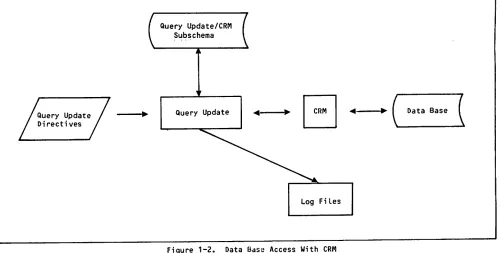
When a Query Update application operates through C R M , a l l i n p u t / o u t p u t o p e r a t i o n s a r e h a n d l e d directly by the CRM Advanced Access Methods. CRM p e r f o r m s a l l l o g g i n g a n d d a t a b a s e p r o c e d u r e s a s specified in the Query Update/CRM subschema. When this interface is used, the features of CDCS cannot be used. An overview of data base access with CRM is shown in figure 1-2.
To access a data base through CRM, Query Update m u s t b e p r o v i d e d w i t h a Q u e r y U p d a t e / C R M s u b s c h e m a . T h e s u b s c h e m a d e s c r i b e s d a t a b a s e organization and defines data names. The subschema d o e s n o t c o n t a i n t h e a c t u a l d a t a ; i t m e r e l y describes the data.
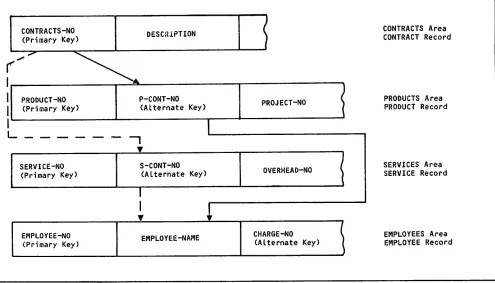
T h e d a t a a d m i n i s t r a t o r n a m e s a l l t h e e l e m e n t s i n the subschema through DDL and decides which file and relation descriptions are to be included in the subschema. Data descriptions in the subschema are o r g a n i z e d i n s t r u c t u r e s c a l l e d a r e a s . W h e n t w o areas have common data items, they can be joined in a l o g i c a l s t r u c t u r e c a l l e d a r e l a t i o n . ( R e f e r t o s e c t i o n 2 f o r m o r e i n f o r m a t i o n a b o u t r e l a t i o n s . ) W i t h i n a n a r e a , d a t a i t e m s a r e g r o u p e d i n t o a
record. A record consists of group data names and e l e m e n t a r y i t e m s t h a t a r e n a m e d a n d d e s c r i b e d i n t e r m s o f s i z e , t y p e ( a l p h a b e t i c , n u m e r i c , a l p h a n u m e r i c ) , a n d u s a g e ( d i s p l a y, c o m p u t a t i o n a l , and so forth).
One elementary data name in each record description i s s p e c i fi e d b y t h e d a t a a d m i n i s t r a t o r a s t h e r e c o r d k e y. T h e r e c o r d k e y i s u s e d t o l o c a t e a s p e c i fi c r e c o r d , t h u s e l i m i n a t i n g t h e n e e d f o r Q u e r y U p d a t e t o e x a m i n e a l l r e c o r d s . A l t e r n a t e k e y s c a n a l s o b e s p e c i fi e d f o r a r e c o r d . W h e n a l t e r n a t e k e y s a r e s p e c i fi e d , t h e r e c o r d k e y i s t h e p r i m a r y k e y ; 2 5 5 a l t e r n a t e k e y s c a n b e s p e c i fi e d f o r t h e r e c o r d . I f a l t e r n a t e k e y s a r e d e fi n e d , a n i n d e x fi l e i s m a i n t a i n e d ; t h i s fi l e p r o v i d e s l i s t s o f p r i m a r y k e y s o r r e c o r d s t h a t c o n t a i n s p e c i fi c a l t e r n a t e k e y v a l u e s . A l l a l t e r n a t e k e y i n d e x i n f o r m a t i o n f o r a n a r e a i s c o n t a i n e d i n o n e i n d e x fi l e .
The character keys of CRM files used through Query U p d a t e a r e c o n s i d e r e d t o b e c o l l a t e d . I f a n u n c o l l a t e d k e y i s d e s i r e d , s e e t h e d a t a a d m i n i s t r a t o r t o s p e c i f y t h e a r e a c o l l a t i n g sequence. No attempt should be made to use KT=U on t h e F I L E c o n t r o l s t a t e m e n t ; i n c o r r e c t r e s u l t s w i l l o c c u r.
The Query Update user can initially access a data base through CRM by specifying either the INVOKE or CREATE directive with the name of the subschema to
Query Update/CRM Subschema
Query Update D i r e c t i v e s
Query Update CRM Data Base
Log Fi Les
Figure 1-2. Data Bass Access With CRM
A ^ ^ ^ \
be used and the permanent file information for the fi l e t h a t c o n t a i n s t h e s u b s c h e m a d i r e c t o r y. T h e user can access elements within the area or areas joined in a relation by specifying names that have b e e n d e fi n e d i n t h e s u b s c h e m a . N a m e s a n d d a t a descriptions can be obtained from a listing of the Q u e r y U p d a t e / C R M s u b s c h e m a . A l t e r n a t i v e l y, t h e E X H I B I T d i r e c t i v e c a n b e u s e d t o p r o v i d e t h i s i n f o r m a t i o n .
Data can be inserted in the data base after a Query Update/CRM subschema has been established. The d a t a i s p l a c e d i n t h e d a t a b a s e a c c o r d i n g t o descriptions in the subschema directory.
R e c o r d s a r e s e l e c t e d f o r m o d i fi c a t i o n , r e m o v a l , o r d i s p l a y . T h e c r i t e r i a f o r s e l e c t i n g r e c o r d s i s specified by the user. The range of records to be p r o c e s s e d i s i d e n t i fi e d b y t h e fi e l d s s p e c i fi e d a s s e l e c t i o n c r i t e r i a .
A Query Update/CRM subschema can be used as the directory to access CDCS-controlled data base files if the subschema describes the data exactly as it is described in the CDCS schema.
Query Update/CDCS Interface
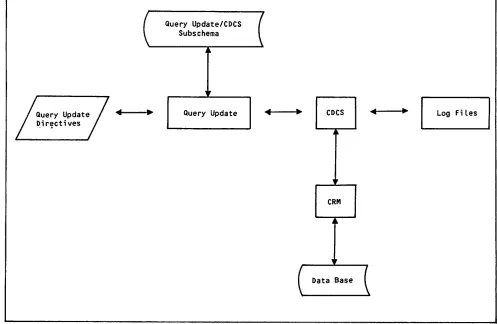
When a Query Update application operates through t h e C D C S i n t e r f a c e , C D C S c o n t r o l s a l l d a t a b a s e a c c e s s . C D C S u s e s C R M f o r i n p u t / o u t p u t o p e r a t i o n s . T h r o u g h t h i s i n t e r f a c e , t h e c o n c u r r e n c y , p r i v a c y c h e c k i n g , l o g g i n g , a n d recovery features of CDCS are used. An overview of data base access with CDCS is shown in figure 1-3.
To access a data base through CDCS, Query Update must be provided with a Query Update/CDCS subschema t h a t d e s c r i b e s t h e p o r t i o n o f t h e d a t a b a s e a n d r e l a t i o n s a v a i l a b l e t o t h e a p p l i c a t i o n . T h e s u b s c h e m a d o e s n o t c o n t a i n t h e a c t u a l d a t a ; i t merely describes the data and provides for locating and accessing it.
T h e d a t a a d m i n i s t r a t o r n a m e s t h e s u b s c h e m a a n d d e c i d e s w h i c h fi l e a n d r e l a t i o n d e s c r i p t i o n s a r e t o b e i n c l u d e d i n i t . D a t a i s o r g a n i z e d i n a structure called an area in the schema and a realm i n t h e s u b s c h e m a . ( I n t h i s m a n u a l , h o w e v e r, t h e term area is used for both area and realm.) A set of areas can be accessed as a data base version.
When two areas have common data items, they can be j o i n e d i n a l o g i c a l s t r u c t u r e c a l l e d a r e l a t i o n . ( R e f e r t o s e c t i o n 2 f o r a d e s c r i p t i o n o f relations.) Within an area, data items are grouped i n t o a r e c o r d . A r e c o r d c o n s i s t s o f g r o u p d a t a n a m e s a n d e l e m e n t a r y i t e m s t h a t a r e n a m e d a n d d e s c r i b e d i n t e r m s o f s i z e , t y p e ( a l p h a b e t i c , n u m e r i c , a l p h a n u m e r i c ) , a n d u s a g e ( d i s p l a y , c o m p u t a t i o n a l , a n d s o f o r t h ) . N a m e s a n d d a t a d e s c r i p t i o n s a r e o b t a i n e d f r o m a l i s t i n g o f t h e Q u e r y U p d a t e / C D C S s u b s c h e m a . A l t e r n a t i v e l y, t h e E X H I B I T d i r e c t i v e c a n b e u s e d t o p r o v i d e t h i s
i n f o r m a t i o n .
T h e Q u e r y U p d a t e u s e r i n i t i a l l y a c c e s s e s t h e d a t a base through CDCS by specifying either the INVOKE o r C R E AT E d i r e c t i v e a n d i n c l u d i n g t h e n a m e o f a Query Update/CDCS subschema and the permanent file i n f o r m a t i o n r e q u i r e d t o a t t a c h t h e fi l e c o n t a i n i n g the subschema directory.
[image:22.610.40.543.65.318.2]/S£?PN
Query Update/CDCS Subschema
Query Update D i r e c t i v e s
Query Update CDCS Log Fi Les
CRM
Data Base
Figure 1-3. Data Base Access With CDCS
r
If a data base is accessed and manipulated from a p r e v i o u s l y p r e p a r e d Q u e r y U p d a t e s e s s i o n , t h e catalog file containing the session can be accessed t h r o u g h C D C S i f t h e c a t a l o g fi l e i s a n a r e a included in the subschema.
Query Update/IMF Interface
When a Query Update application operates through the IMF interface, data base access is determined b y t h e a p p l i c a t i o n a d m i n i s t r a t o r . A l l d a t a b a s e processing is handled by IMF. An overview of data base access with IMF is shown in figure 1-4,
To access a data base through IMF, Query Update must be provided with a symbolic external schema t h a t d e s c r i b e s r e c o r d s a n d d a t a i t e m s . T h e external schema does not contain the actual data; i t m e r e l y d e s c r i b e s t h e d a t a a n d p r o v i d e s f o r locating and accessing it.
T h e a p p l i c a t i o n a d m i n i s t r a t o r d e fi n e s t h e e x t e r n a l schema and names the record types and data Items t h a t a r e i n c l u d e d i n i t . T h i s i n d i v i d u a l a l s o defines any cosets (records related by equal values for one or more data items) and access paths (the m e a n s o f l o c a t i n g a p a r t i c u l a r r e c o r d ) . T h e a p p l i c a t i o n a d m i n i s t r a t o r a l s o s p e c i fi e s t h e p e r m i s s i b l e o p e r a t i o n s f o r e a c h r e c o r d . Information about data names, access path names,
and coset names can be obtained from a listing of t h e e x t e r n a l s c h e m a . A l t e r n a t i v e l y, t h e E X H I B I T directive can be used to provide this information.
T h e Q u e r y U p d a t e u s e r c a n i n i t i a l l y a c c e s s a n i n f o r m a t i o n b a s e i n I M F m o d e b y s p e c i f y i n g t h e I N V O K E d i r e c t i v e a n d i n c l u d i n g t h e n a m e o f t h e e x t e r n a l s c h e m a . T h e I N V O K E d i r e c t L v e m u s t a l s o i d e n t i f y t h e c o n c e p t u a l s c h e m a a s s o c i a t e d w i t h t h e external schema and must specify the permanent file
information required by IMF.
Refer to the IMF Application Programming reference manual for more information about the Query Update
Interface with IMF.
EXTERNAL FILE ORGANIZATIONS
A l l d a t a b a s e fi l e s a c c e s s e d t h r o u g h a n i n t e r f a c e to the data management facilities (CRM, CDCS, IMF) can be read without a FILE control statement.
All Query Update generated by the d i s p o s i t i o n ) h a v e block type C and fi l e s c o n t a i n i n g c h a r a c t e r i s t i c s . Methods reference of the meaning of
o u t p u t fi l e s a n d t h e o u t p u t fi l e s R E P O RT u t i l i t y ( i n t e n d e d f o r p r i n t t h e C R M fi l e c h a r a c t e r i s t i c s o f record type Z. Query Update input directives have the same CRM file (Refer to the CRM Basic Access manual for a complete description record and block types.)
[image:23.610.71.568.70.394.2]ExternaL Schema (FORTRAN or COBOL)
Query Update D i r e c t i v e s
Query Update IMF Data Base
Figure 1-4. Data Base Access With IMF
All other files read or written by Query Update are a s s u m e d t o h a v e t h e C R M fi l e c h a r a c t e r i s t i c s o f b l o c k t y p e C a n d r e c o r d t y p e F b y d e f a u l t . ( T h i s default can be changed by a FILE control statement; refer to the CRM Basic Access Methods reference m a n u a l f o r i n f o r m a t i o n a b o u t t h e F I L E c o n t r o l s t a t e m e n t . ) W h e n w r i t i n g a fi l e w i t h t h e s e fi l e characteristics, Query Update determines the record length unless the record length has been previously s p e c i fi e d b y a F I L E c o n t r o l s t a t e m e n t . W h e n r e a d i n g a fi l e n o t w r i t t e n i n t h e p r e s e n t s e s s i o n , Q u e r y U p d a t e r e q u i r e s t h a t e i t h e r t h e D E S C R I B E directive or a FILE control statement be present to p r o v i d e i n f o r m a t i o n a b o u t t h e fi l e . Q u e r y U p d a t e r e t a i n s t h e fi l e i n f o r m a t i o n f o r t h e d u r a t i o n o f t h e Q u e r y U p d a t e s e s s i o n o r u n t i l e i t h e r t h e fi l e is returned or the description is erased.
Q u e r y U p d a t e c o m m u n i c a t e s a l l t h e a v a i l a b l e fi l e information to the REPORT utility via the COMPILE d i r e c t i v e ; t h e r e f o r e , a F I L E c o n t r o l s t a t e m e n t i s n e c e s s a r y t o d e s c r i b e t o t h e R E P O R T u t i l i t y a l l files that were created after the COMPILE directive was used. The REPORT utility uses by default a CRM b l o c k t y p e C a n d r e c o r d t y p e Z f o r t h e fi l e s supplying text in the PREFACE/SUMMARY TEXT IS FROM fi l e - n a m e d i r e c t i v e s , a s w e l l a s f o r t h e v a r i a b l e fi l e t h a t s u p p l i e s t h e n a m e s a n d v a l u e s o f temporary data items that are to be preset before the report is generated.
FILE POSITIONING
T h e f o l l o w i n g r u l e s g o v e r n t h e p o s i t i o n i n g o f a l l fi l e s n o t i n a d a t a b a s e , u n l e s s o t h e r w i s e n o t e d f o r a p a r t i c u l a r d i r e c t i v e :
A file to be read by Query Update (DISPLAY FROM, PREPARE...FROM, MODIFY USING...FROM, and so f o r t h ) i s r e w o u n d b e f o r e r e a d i n g , a n d n o t r e w o u n d a f t e r r e a d i n g . T h e fi l e c a n n o t b e m o d i fi e d b e f o r e r e a d i n g . T h e fi l e i s r e a d u n t i l end-of-information is encountered.
A fi l e t o b e w r i t t e n b y Q u e r y U p d a t e ( D I S P L AY UPON, COMP ILE... UPON, and so forth) is not r e w o u n d e i t h e r b e f o r e o r a f t e r t h e w r i t e o p e r a t i o n .
A file to be read tor input data values by Query Update (REMOVE...FROM or STORE...FROM) must be w r i t t e n i n d i s p l a y c o d e . T h e D I S P L AY d i r e c t i v e can be used for this purpose because all data is converted to display code. The EXTRACT UPON d i r e c t i v e i s u s e d o n l y i f a l l i t e m s i n t h e fi l e are nonnumeric (EXTRACT does not convert items to display code.)
I - ^ ^ s