·-:-.,
-CRAY-3 Software
Introduction Manual
. CSOS 1.0
Publication Number: 3102
Cray Computer Corporation 1110 Bayfield Drive
CSOS 1.0
Copyright
Copyright © 1991 by Cray Computer Corporation. All Rights Reserved. This manual or parts thereof may not be reproduced in any fonn unless permitted by contract or by written pennission of Cray Computer Corporation.
Autotasking, CF77, CFT, CFr2, CFf77, CRAY-2, CRAY X-MP, CRAY Y-MP2E, and SEGLDR are trademarks and CRAY, CRAY-I, CRAY Y-MP, HSX, UNICOS, and X-MP EA are registered trademarks of Cray Research, Inc.
bdb, CSOS, Doyle, Holmes, Hudson, stb, Watson, and Wigins are trademarks of Cray Computer Corporation.
BSD is a registered trademark of the University of California, Berkeley.
Ethernet is a registered trademark of the Xerox Corporation.
HYPERchannel is a trademark and NSC is a registered trademark of Network Systems Corporation.
libtd is authored by Professor John Osterhout. U.C. Berkeley and extended by Cray Computer Corporation.
NeWS, NFS, OpenWindows, Sun, Sun Microsystems, Inc., Sun View, and XView are trademarks and Sun Workstation and SunOS are registered trademarks of Sun Microsystems. Inc.
System V is a trademark and OPEN LOOK and UNIX are registered trademarks of USL (UNIX System Laboratories) in the United States and other countries.
OSF and OSF/Motif are trademarks of Open Software Foundation.
POSIX is a trademark of The Institute of Electrical and Electronics Engineers, Inc.
'I.'
Ii
SPARCstation and SPARCware are trademarks of SPARC International, Inc.
UltraNet is a registered trademark of Ultra Network Technologies, Inc.
VAST is a registered trademark of Pacific Sierra Research Corporation.
X Window System is a trademark of the Massachusetts Institute of Technology.
Copyright
The CSOS operating system is derived from Cray Research, Incorporated's UNICOS
operating system. The UNICOS operating system is derived from the USVs UNIX System V operating system. UNICOS is also based in part on the Fourth Berkeley Software Distribution under license from The Regents of the University of California.
',,---.
Revision
History
Release Date Summary of Changes
Nov 8,1991 Initial Release of Manual .
.
Revision History
CSOS 1.0
Reader Comments
If you have any comment about the technical accuracy, content, or organization of this manual, please tell us. You can contact us in any of the following ways:
Call our Technical Publications deparunent at (719) 579-6464 during the hours of 8:00 A.M. to 5:00 P.M. (Mountain Time).
Send us electronic mail from a CSOS or UNIX system to [email protected]
Write to us at the following address: Cray computer Corp.
Technical Publications Department 1110 Bayfield Drive
Colorado Springs, CO 80906
We value your comments and will respond to them promptly.
Reader Comments
Table oJContents
Copyright
IRevision History
111Reader Comments
v
Conventions
XIINTRODUCTION 1
1.1 Purpose 1
1.1.1 Organization of This Manual 1
1.2 Software Philosophy 2
1.3 Software Heritage 3
1.4 Product Set 3
CSOS 5
2.1 CSOS DIFFERENCES FROM UNICOS 5.0 6
2.2 CSOS HARDWARE SUPPORT 7
2.3 CSOS CONNECTIVITY 8
\ \.
[image:15.613.52.564.58.746.2]
2.4 THE STRUCTURE OF CSOS 2.4.1 The Kernel
2.4.2 System Interface 2.4.3 Utilities
2.4.4 The Shell 2.5 THE CSOS FILE SYSTEM
2.5.1 Directories 2.5.2 Regular Files 2.5.3 Special Files 2.5.4 Processing Flow
2.6 STANDARD CSOS SECURITY MECHANISMS 2.6.1 Password Protection
2.6.2 File and Directory Access Permissions 2.6.3 Encrypted Files
2.7 PROCESSING FEATURES
2.7.1 Enhanced 110 Capabilities 2.7.2 Multitasking Features 2.7.3 Batch Processing Features
2.7.4 Job and Process Recovery Features 2.7.5 Interactive Environment
2.7.6 Real Time Capabilities 2.7.7 CSOS Security Feature 2.7.8 Accounting Features
COMPILERS AND MULTITASKING FEATURES
3.1 CRAY-3 FORTRAN COMPILER, f77 3.1.1 ft77 Extensions
3.1.2 Fortran I/O Capabilities 3.2 CRAY-3 C COMPILER
3.3 ASSEMBLY LANGUAGE, VERSION 2
3.4 MULTITASKING 3.4.1 Macrotasking 3.4.2 Microtasking 3.4.3 Autotasking
3.5 COMPILER PREPROCESSORS
3.5.1 fpplvast - Pacific-Sierra Research Corporation's VAST-2/CCC 3.5.2 fmp - Fortran Microtasking Preprocessor
UTILITIES, TOOLS AND LIBRARIES
8 9 9 9 10 10 11 11 12 13 15 15 15 16 16 16 19 19 20 21 22 23 26
29
31 33 34 34 35 36 36 37 37 38 38 39 41 ---vIII4.1 EDITORS
4.2 CRAY-3 LOADER
4.3 DEBUGGING 4.3.1 bdb
Cray Computer Corporation
42
42 42 43
Nov 8, 1991
CSOS 1.0
4.3.2 dasm - CRAY-3 disassembler 45
4.3.3 debug 45
4.3.4 symdumpO 45
4.4 PROCESS PERFORMANCE TOOLS 45
4.4.1 Flowtrace - Tracing Procedure Calls 45 4.4.2 Jumptrace - A Finer Granularity Flowtrace 46
4.4.3 memtrace, memtrck 46
4.4.4 prof and profview - Non-Invasive Execution Profiler 46 4.4.5 procstat and procrpt -Input/Output and Memory Usage Statistics 47
4.4.6 trace - Trace System Calls 47
4.4.7 vpm - Visual Process Monitor 48
4.5 SYSTEM PERFORMANCE TOOLS 48
4.5.1 sar - System Activity Report 48
4.5.2 vsm - Visual System Monitor 48
4.6 SOURCE CONTROL MAINTENANCE UTILITIES 49
4.6.1 CSOS Source Manager (sm) 49
4.6.2 CSOS Source Control Manager (nupdate) 49
4.6.3 Source Code Control System (SCCS) 50
4.7 GLOBAL CROSS-REFERENCE FACILITY 50
4.7.1 ftref - Fortran Global Cross-Reference 50
4.7.2 cxref - C Program Cross-Reference 51
4.8 MULTITASKING TRACE ANALYSIS 51
4.8.1 Multitasking History Trace Processor (mtdump) 51
4.8.2 Microtasking Trace Buffer 51
4.9 SUPPORT TOOLS 52
4.9.1 awk 52
4.9.2 diff 52
4.9.3 grep family 52
4.9.4 mail 52
4.9.5 make 53
4.9.6 perl 53
4.9.7 tail/head 53
4.10 SIMULATORS - sim and vm 53
4.11 CRAY-3 SOFTWARE LIBRARIES 54
4.12 CRAY-3 DEBUGGER SUPPORT LIBRARIES 55
4.12.1 IIbbdb 4.12.2 IIbdls 4.12.3 IIbsym 4.12.4 IIbtool
4.13 CRAY-3 GRAPHICAL APPLICATION SUPPORT LIBRARIES 4.13.1 MIT X Window System
4.13.2 OSF/Motif
4.13.3 AT&T OPEN LOOK 4.13.4 Holmes System Libraries
3102 - CRAY -3 Software Introduction Manual
NETWORKING AND COMMUNICATIONS
5.1 TCP/IP PROTOCOL SUITE
5.2 CSOS NETWORK FILE SYSTEM (NFS)
APPLICATIONS
FOREGROUND PROCESSOR SOFTWARE
7.1 MONITOR
7.2 BACKGROUND PROCESSOR INTERFACE 7.3 MACRO DEFINITIONS
7.4 FOREGROUND PROCESSOR REAL TIME CAPABILITIES 7.5 FOREGROUND CONFIGURATOR
7.6 CRAY-3 CONSOLE FACILITIES
APPENDIX A CCC DOCUMENTATION
A.1 PRESENTATION OF INFORMATION A.2 DOCUMENTATION TOOLS
A.3 DOCUMENTATION CATALOG A.3.1 Multimedia
A.3.2 Electronic Documentation - Manuals A.3.3 Electronic Documentation - Man Pages
x Cray Computer Corporation
61
61
63
I 65
Typographic:
CSOS 1.0
Conventions
An effort has been made to utilize the following conventions throughout Cray Computer Corporation manuals and documentation:
Body text is set in 12 point Times Roman font.
boldface Boldface indicates any literal value or name, including CSOS commands, command options, file names, and directory names which a user is expected to type verbatim.
italics typewriter UPPERCASE underscore [ ] alb choice!
Italics represent terms being defined, words or names of variables for which the user supplies exact information and for emphasis.
Attributes, procedures, macros, and anything resembling source language code are all set in a typewriter font. Representations of anything that might appear on your screen are also set in a
typewriter font.
Uppercase is primarily used for programming language statements or functions (e.g.: Fortran statements) and acronyms.
Underscored words in command lines indicate default values, underscoring is also used to specify accepted option abbreviations.
Brackets enclose optional portions of a command or directive format.
A vertical bar in a command format separates two or more possible choices, one of which you may specify.
Stacked items indicate two or more literal parameters when only one
Acronyms:
choice2 name(number) "Siring" 0' Conventionsof those parameters may be used.
Items in text with a number in parentheses after them are references to
CSOS manual page descriptions. The (number) denotes the section of CSOS documentation in which they are described. for example. £77(1) refers to the CRAY-3 Fortran user command manual page and
ctime(3C) refers to the C library ctime function.
Quotation marks are used to delimit literal strings, groups of words which are used as a single word or in describing a unique concept or in the invention of new terminology.
Ellipses indicate the optional use of the preceding item two or more times in succession.
The capitalleller 0 followed by an apostrophe is used to indicate an octal number; 0'177777 means 177777 octal.
CCC is an acronym of Cray Computer Corporation.
CRI is an acronym of Cray Research. Incorporated.
NFS is an acronym of Network File System.
SVR4 is an acronym of the System V Release 4 system of UNIX Systems Laboratories.
TCP/IP is an acronym of Transmission Control Protocol/lnternet Protocol.
Nomenclature:
dataset/file
on I off
The terms dataset andfile are used interchangeably in some manuals. except where a difference is explicitly noted. Under CSOS, a file specification can be a file path name.
The terms on and off are used interchangeably with enabled and disabled. true and false. or with 1 and O. respectively.
Manual Page Formats:
xli
Many Cray Computer Corporation manuals are comprised of information which is available on-line for use with the man(1) command. To retrieve a manual page entry, the following command may be typed, substituting the entry of interest for entry:
man entry
If there is more than one entry of the same name, all entries are printed. To retrieve the entry for a particular section. an optional section specification may be supplied between the man command and the desired entry:
man section entry
For example, the "man write" command will display three different man pages. one for the write command (section 1), one for the write system call (section 2) and one for the write
CSOS 1.0
Conventions
Fortran I/O library function (section 3u). If the user is interested solely in the write system call, then the command "man 2 write" may be used. For more information on the man command, and the various sections available, see man(l) by issuing the command "man 1 man".
Standard typesetting conventions for printed manual pages include:
bold
italic
Boldface indicates literal strings, including command names, directory names, file names, path names, man page entry names, options, shell or system variable code names. system call names, C structures and C reserved words.
Italics indicate variables, user-supplied (non-literal) options, terms or concepts being defined within the text and for additional emphasis.
It should be noted that these conventions are not necessarily adhered to by various text filters available on the CSOS system (e.g.: pg(l), more(l)). Some filters will render boldface indistinguishable from normal Roman body text. Some filters will render italics as
underscored. Thus these conventions are not immediately applicable to the visual perception of information displayed with on-line utilities and documentation.
Manual page entries are based upon a common format. The following list shows the order of sections within a manual page and provides a brief description of the information content of those sections. Not all sections shown below are found in each manual page entry.
NAME
SYNOPSIS
DESCRIPTION
OPTIONS
Shows the name of the entry and briefly states its function.
Presents the syntax of the entry. The following conventions are used in the SYNOPSIS section:
Brackets [ ] enclosing a command line component may indicate that the component is optional.
When an argument or operand is given as name or file, it always refers to a file name.
Ellipses ... indicate that the preceding command line component may be repeated.
An argument beginning with a minus, plus or equal sign (-, +, or =) is usually an option.
Discusses the entry and its purpose or function in detail.
Lists and describes the entry's options, their purpose, use and potential interactions.
IMPLEMENTATION Provides details for using the entry.
NOTES
CAUTIONS
WARNINGS
EXAMPLES
Points out items of particular importance.
Describes actions which may alter data or produce undesirable results.
Describes actions which may produce harmful effects on the system or its users.
Provides examples of usage for the entry.
xlv
Conventions
FILES Lists files that are either part of the entry or related to it.
RETURN VALUE Describes return values for the entry and possible error return codes.
MESSAGES Describes the informational, diagnostic and error messages that may be produced by the entry. Self-explanatory messages are generally nOl listed.
DIAGNOSTICS Describes diagnostic messages produced by the entry.
BUGS Lists known bugs or deficiencies of the entry.
SEE ALSO Lists man page entries or manuals which contain information related to this manual page entry.
Chapter 1
INTRODUCTION
1.1 Purpose
-CSOS 1.0
This manual provides an introduction to the software products offered with the Cray Computer Corporation CRAY-3 supercomputer system. These software products include the operating system, utilities and libraries, external interface software, and applications software. Software development, at Cray Computer Corporation, is an ongoing activity with improvements in performance,
reliability, functionality, and maintainability released on a periodic basis.
The software offers a consistent user interface to the architectural features of the CRAY-3 system. The system software provides facilities that enhance user productivity through easy-to-use and flexible interfaces. These interfaces provide the ability for users to develop and maintain very large, complex applications programs, locate and remove program errors, and verify the correct performance of the applications.
1.1.1 Organization of This Manual
This chapter provides a general introduction to CCC's software philosophy, heritage, and product set. Subsequent chapters explore each of the key
Chapter 1 INTRODUCTION Software Philosophy
2
components of the product set in more detail. References to other appropriate
~ documentation are signified by the use of a book icon:
1.2 Software Philosophy
-CCC's general philosophy on software is to take advantage of commercially available software solutions wherever practicable. This has the dual benefits of:
• Allowing CCC's software development resources to focus on CRAY-3 specific attributes, especially as these relate to delivering optimal performance from the CRA Y- 3 system.
• Allowing CCC to exploit "standard" solutions that are also available to other computing platforms. This provides CCC users the opportunity to exploit common products across a heterogenous network.
A few years ago, there were few commercially available software products that had real applicability in the supercomputer environment. Fortunately, today the picture is very different. While there are still many areas in which
supercomputer users are the first to recognize the need for a particular capability, these same needs are increasingly being mirrored in other computing environments. It therefore follows that, in the future, one may expect to see an increasing proportion of supercomputer software needs satisfied by commercially available, multi-platforms products.
CCC will play its part in promoting this concept by making the software products that it develops, and which might have a wider application within the industry, available via recognized third party providers. CCC's purpose here is not entirely altruistic, but rather to continually reduce the amount of generic software that it needs to maintain and integrate with new third party products.
Chapter 1 INTRODUCTION Software Heritage
1.3 Software Heritage
-CSOS 1.0
Much of CCC's current software is based on software inherited from Cray Research at the time that CCC was spun off as a separate company. This gave CCC a base of mature, facilities-rich software upon which to build. CCC's ongoing software development may be viewed as an evolution from this initial base with a specific focus on meeting the needs of the CRAY-3 user. With the passing of time, there will naturally be some divergence in the CRI and CCC product offerings, particularly as CCC seeks to utilize standard third party, rather than proprietary, software solutions wherever possible. However, CCC remains conscious of the value of providing a simple migration path for the CRI user to a CRA Y-3 system and will therefore maintain the inherited CRI user interfaces where this is practicable.
1.4 Product Set
CCC's software product set provides an environment that allows the CRAY-3 user to fully exploit the capabilities of the system through
standards-conformant interfaces. In addition, it recognizes that in the near term, many CCC users will be migrating from a CRI environment and would therefore benefit from a degree of compatibility with CRI interfaces. CCC software supports the following user environment:
• Applications written in Fortran or C - with CRI extensions for compatibility
- With automatic op~imization, vectorization, and aids for mul ti processing
• UNIX operating system interface
- currently based on an AT&T SVR2 kernel and SVR3 commands - with CRI and CCC extensions, eventually to be replaced by an SVR4
base
• Full multiprocessing support
- multiple job streams, multitasking of individual jobs
Chapter 1 INTRODUCTION Product Set
4
• Full symbolic debugging capabilities
- including debugging of multitasked codes
• Windows based user interface
- via OSF/Motif, OPEN LOOK, X Windows or Curses environments
• Network access via standard UNIX protocols
- Transmission Control ProtocollInternet Protocol (TCPIIP), Network File System (NFS)
This manual describes each of the major components of CCC's software product set under the following headings:
• CRAY-3 Colorado Springs Operating System (CSOS) • CRAY-3 compilers and multitasking features
• Utilities, tools, and libraries • Communications software • Applications software
• Foreground processor software
Appendix A to this manual reviews the various types of documentation provided by CCC and provides a catalogue of existing and planned materials.
An AT&T UNIX System V Release 4 source license is required for CSOS. Customers must obtain this directly from UNIX Systems Laboratories, a subsidiary of AT&T.
Chapter 2
CSOS 1.0
csos
The CRA Y -3 operating system, CSOS, is based on Cray Research's UNICOS 5.0 operating system which, in turn, is based on AT &T UNIX System V, with extensions ported from 4.3BSD UNIX. CSOS includes supercomputer-specific extensions developed by Cray Research (as part of UNICOS 5.0) and further extensions developed by Cray Computer Corporation.
CSOS is an operating system that can execute many processes at the same time. It provides multiprogramming and multiprocessing services, permitting a single user or many users to execute processes simultaneously. In addition, CSOS supports the application of multiple processors (CPU's) to a single process through multitasking. These characteristics en,able CSOS to provide exceptional problem-solving performance and ease-of-use, which
complements the computational capability of the CRA Y- 3.
A primary advantage of CSOS is its ability to fit effectively into existing environments as a part of a computer network. CSOS provides connectivity to a variety of user environments, including multi-drop, high-performance networks, and point-to-point access.
Cray Computer Corporation developers are committed to improving the performance of all parts of CSOS with each release of the product.
Enhancements have been made to basic UNIX, but the traditional UNIX theory
Chapter 2 CSOS
6
CSOS DIFFERENCES FROM UNICOS 5.0
of operations is preserved in the CSOS environment. The enhancements that enable CSOS to exploit the power of the CRAY-3 include the following:
• Enhanced I/O capabilities to deliver supercomputer performance
• File system enhancements that improve traditional UNIX file-space
allocation methods. These enhancements provide more effective disk usage and optimal I/O throughput.
• Multiprocessor and multitasking support
• Additional networking software
• Batch processing and process/job recovery capabilities
• Accounting features
• Enhanced resource usage for CPU's, memory, batch access, and interactive access
• Debugging aids
• Various tuning and optimization utilities
• Implementation of the group membership method available in 4.2BSD, providing more effective control of access to the file system
• An optional security feature that provides support for concurrent processing of sensitive information at multiple security levels. Design specifications for this feature were derived from the U.S. Department of Defense (000) Trusted Computer System Evaluation Criteria.
2.1 CSOS DIFFERENCES FROM UNICOS 5.0
CSOS is an incrementally enhanced version of the CRI UNICOS 5.0 product, designed to provide a functional yet stable software environment for early users of the CRAY-3 system. Where practicable, it takes advantage of technologies being developed for the AT&T SVR4 product platform, where these do not compromise the goal of stability. CCC's intent is that the
proprietary components of UNICOS will be progressively phased out in favor
Chapter 2 CSOS
2.2
CSOS 1.0
CSOS HARDWARE SUPPORT
of SVR4 standards confonnant, portable versions as these become available. An important difference between CSOS and UNICOS 5.0 is that CSOS is written in Standard C, as opposed to the Portable C (PCC)/Standard C mixture found in UN-ICOS 5.0. This simplifies maintenance and improves the inherent stability and performance of the product.
Several new features have been added to the original UNICOS 5.0 base. These additions support new capabilities in the applications development and system administration areas (see following sections) as well as providing additional tools for systems programming.
The major, essential enhancement in CSOS is support for the new CRAY-3 hardware and its associated subsystems. Where practicable, all of the code associated with new hardware support has been tested under simulation in advance of the availability of actual hardware.
CSOS HARDWARE SUPPORT
• CRAY-3:
- Up to 16 CPU's
- Up to 1 Gigaword memory
• CRAY-2:
-
Up to 8 CPU's- Up to 512 Megaword memory
- 1 or 2 foreground processors
• Disk:
-
CRI DD49 and DS40 subsystems-
CCC RAID via HIPPI1•
Network:-
Network Systems' HYPERchanhel-
VME• Console:
-
Sun compatible1. From mid-1992.
, Chapter 2 CSOS CSOS CONNECTIVITY
2.3 CSOS CONNECTIVITY
Since the CRA Y-3 system will usually operate as the computational node in a network, physical and logical connection mechanisms are critical. CSOS
supports network connections through Network Systems Corporation (NSC) interfaces as well as VME for workstations. In the future it will support network connections via HIPPI, as the appropriate hardware becomes available from network vendors. In the protocol area, NFS and TCP/IP protocols are fully supported, as is the new BSD 4.4 Telnet capability which provides improved line mode processing, removing inappropriate interrupts and character handling from the CRAY-3.
2A THESTRUCTUREOFCSOS
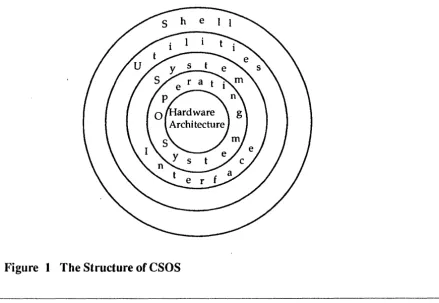
The structure of CSOS is pictorially represented by a set of five concentric circles as shown in Figure 1. The innennost circle (1) represents the hardware system architecture. The next outward radiating circle (2) represents the operating system, called the kernel. Circle 3 outside of the kernel represents the system calls or software protocols of CSOS. Circle 4 represents CSOS utilities, libraries, languages, and other Cray Computer and vendor software applications. The outennost radiating circle (5) represents the shell.
Figure 1 The Structure of CSOS
[image:45.617.98.537.414.717.2]Chapter 2 CSOS THE STRUCTURE OF CSOS
CSOS 1.0
2.4.1 The Kernel
The CSOS kernel is a collection of memory-resident routines that interact with the underlying hardware architecture through hardware interfaces such as interrupts, status words, registers, and interact with programs through system calls. The kernel routines perfonn the following major functions.
• Manage fundamental hardware resources: CPU's, memory, channels, and peripheral devices
• Transfer data and computer programs between the CRAY-3 common memory and peripherals
• Allocate space for files
• Monitor the use of resources: log and retain infornlation about errors encountered and recovery from these errors where possible
• Provide information regarding processes and resources
• Schedule the central processors by activating user and system processes by using a prioritized scheduling algorithm
2.4.2 System Interface
Programs make requests for kernel services through the system calls. System calls provide the functional building blocks for all the utilities and application programs that use the CSOS operating system.
2.4.3 Utilities
A large set of simple utilities exists that provides frequently used functional services for the user. CSOS is designed to accommodate virtually an unlimited number of additional utilities; existing utilities do not need to be modified to work with new ones. CSOS provides an environment that allows complex tools
Chapter 2 CSOS
10
THE CSOS FILE SYSTEM
to be built by combining several utilities to work together. Additional information on the utilities is provided later in this section.
2.4.4 The Shell
The shell is a powerful utility that provides the user interface to CSOS. Shells process user commands and provide a programming language to invoke utilities and application programs and control the flow of users' work. The shell initiates the processing of commands entered interactively by a user or as a script for batch processing. The shell interprets a command as a shell command, a program name, or a script. Through system calls, the shell requests programs to be executed or services to be perfonned. With CSOS, users are able to create their own powerful shell programs or scripts, thus customizing the environment for their needs. CSOS supports the two most popular shells, the Bourne shell (System V UNIX) and the C shell (BSD).
2.5 THE CSOS FILE SYSTEM
A CSOS file is defined as a sequential stream of data. CSOS does not impose a file structure upon the file. A file may contain data, programs, or both. With the necessary access pennissions, the user can store, retrieve, and modify the information contained in a file; the user can also create new files and delete existing ones.
The CSOS file system is structured in the fonn of a hierarchical "tree"; all disk space is grouped into manageable file system pieces that become "branches" of the tree. This arrangement of files is efficient because associated files may be grouped together by the user, and the amount of searching for files is bounded; that is, each level of searching is restricted to the current directory unless the user specifies alternative search paths. This structure limits possible damage due to hardware failure and provides for effective control of the allocation of disk space.
CSOS maintains six kinds of files: directories, regular files, block special files, character special files, fifo (first in first out) special files, and restart files. See Job and Process Recovery Features for more infonnation about restart files.
Chapter 2 CSOS THE CSOS FILE SYSTEM
"'---"
2.5.1 Directories
CSOS 1.0
Directories provide user-specified structure to the CSOS file system and provide mapping between the disk parameters that describe a file's location and its file name. A directory entry points to a file using one or more pointers, also referred to as links.
The system rules governing links to directories determine the tree structure on the file system. The origin of the file system is called the root and is specified by the / character. A list of directories, separated by slashes and followed by a file name is called a path name and allows the user to specify any file or scan any part of the tree structure on the file system. Directories can be read, written, or copied (shared) provided appropriate permission has been es tab lished.
As noted earlier, CSOS groups available disk space into manageable file system pieces. This has two effects at the user level: file space can be
exhausted in one but not all of these pieces, and no links can exist between one file system hierarchy and another.
The individual user has a directory called home for the user's personal files. CSOS allows the user to create files and subdirectories within the user's home directory; similarly, the user can create files and additional subdirectories within any subdirectory they create.
CSOS maintains several directories for its own use, including the root directory and directories containing information such as the utility tool set, system logs, peripheral device configuration data, and administrative and configuration programs.
2.5.2 Regular Files
Regular files contain an arbitrary sequence of bytes such as program text, executable binary files, or data. The system neither requires nor imposes structuring of these files. Therefore, regular files are sequences of bytes that are randomly addressable. When a structure must be introduced in a file (for example, to format compiler output to be acceptable to the loader), the programs involved accomplish the task without the intervention of CSOS.
Chapter 2 CSOS THE CSOS FILE SYSTEM
-_
.. _ .._
-12
2.5.3 Special Files
Each I/O device is associated with a special file, which is read and written as an ordinary file permitting device-independent I/O operations. Any request to read and write a special file results in the activation of the associated I/O device. Device files contain the specifications for interfacing with any of the named devices. Special files are protected from indiscriminate use. This treatment of I/O devices results in several operational advantages:
• I/O operations to files, devices, or fifo special files are usually indistinguishable from one another.
• Files and devices have the same syntax and meaning, so a device name can be passed to programs expecting a file name as an argument, and vice versa.
• Files and devices are protected by the same security mechanism.
There are two types of special files: block special files and character special files. When reading from or writing to a block device, data may be staged through a cache of systeol buffers. Disks are the current block devices supported. Those devices that do not use the system buffer cache are loosely referred to as character devices. For example, a console is a character device that uses its own buffers. The disk can also be read or written as a character device; in this case, the system buffer cache is not used, and the data is moved directly between the device and the user's buffer. The following are special files currently supported under CSOS.
• Disk drive interface .• Error logging interface
• Memory-resident files • Network entry device • Pseudo terminal driver • General terminal interface • Controlling terminal interface • Special CPU functions interface
• High Performance Parallel Interface (HIPPI) • Low-speed channel interface
• SECDED maintenance function interface • HYPERchannel interface
• Security log interface
Cray Computer Corporation Nov 8, 1991
.--_._-'\
Chapter 2 CSOS THE CSOS FILE SYSTEM
2.5.4 Processing Flow
This section explains the hierarchical structure of th,e file system and the operation of commands.
2.5.4.1 The Hierarchical Structure
CSOS 1.0
The hierarchical structure of the file system is, in essence, a network of directories and files. Since the directories are used for routing searches through the file structure for the desired directory or file, the directories act as indexes. Each directory contains the addresses of directories and files of the next subordinate level of the hierarchical structure; thus, the tree structure is used to describe the file organization. Figure 2 is an example showing one possible configuration for part of the user's file system. The contents of the directories and subdirectories shown are often as follows.
Directory / /bin /usr /dev /usr/bin /usr/local /usr/include /usr/include/sys /usr/man Contents Root Directory
Executable files containing the compiled versions of user level CSOS commands.
Subdirectory containing system files and/or user subdirectories and files; other subdirectories may also contain system files.
Special files describing software interfaces to system hardware devices; generally, all files that represent peripheral devices such as terminals and printers are kept in this directory.
More executable files; this directory commonly contains additional user level CSOS commands.
Subdirectories containing compiled versions of local commands, data files, and so on. The names of subdirectories within /usr/local are often defined by the site.
Header (.h) files and subdirectories containing header files. Header files contain definitions of symbols required by the kernel or used by library routines, structure definitions, and so on.
System header files.
Files containing on-line manual entries.
Chapter 2 CSOS
Figure 2
THE CSOS FILE SYSTEM
The fetc directory (not shown in the diagram below) usually contains
administrative commands and data files.
/ (root)
bin local include sys
I
sys
The I-lierarchical Structure of CSOS
2.5.4.2 The Operation Of Commands
14
When a user enters
a
command, the shell, serving as a command interpreter, reads the command and begins to search in one of several directories, in the order specified by the user's path. The operation of the shell is suspended when the command (the process) is being executed. The process, which is nonnally an executable file, contains the instructions for controlling the operation and making requests of CSOS to perform the user's work. When the process completes, CSOS resumes operation of the shell. The shell then prompts the user to indicate it is ready for the next command. The shell also supports the ability to run processes in the background while continuing the execution of other work in the shell.~any commands support the compilers and software products that Cray Computer Corporation provides to enhance the power, usability, and portability of the software.
The Fortran and C language compilers, as well as the assembler, relocatable loaders, and other utilities, are all accessed by commands. These software products are described later in this manual.
[image:57.612.109.448.135.325.2]Chapter 2 CSOS STANDARD CSOS SECURITY MECHANISMS
2.6 STANDARD CSOS SECURITY MECHANISMS
CSOS security provides protection from unauthorized users gaining access to the computer systenl and from authorized users tampering with other users' files, and permits access and sharing of files when an authorized user needs to access shared files. The security features specified in the DoD Trusted
Computer System Evaluation Criteria are optionally available in CSOS and are described later in this chapter. The following standard security measures are available in CSOS:
• Password protection
• File and directory access permissions • Encrypted files
2.6.1 Password Protection
The user password is maintained in a password file in an encrypted form. The encryption is a one-way transformation. Access is permitted after matching the encryption of the entered password and the encrypted password stored in the file.
The user data base (UDB) contains one entry for each ,user and contains the login name, the encrypted password, the numerical user ID (UID), the numerical group ID (GID), the comment field, the initial working directory, and a default shell.
2.6.2 File and Directory Access Permissions
CSOS 1.0
Each directory and file in the file system is associated with a set of permissions that specifies who can access the file and how it can be accessed. The
permissions specify read, write, and execute permission for the user, group, and all legitimate users. The permissions are checked when any user except the superuser attempts to gain access to the file. CSOS supports the multiple simultaneous group membership method available in 4.2BSD. This means that all authenticated group ID's are available for simultaneous access permission testing. This method of group ID management permits the sharing of files within an authenticated group or among project team members.
Chapter 2 CSOS PROCESSING FEATURES
2.6.3 Encrypted Files
The crypt command allows the user to encrypt files to make them unreadable. A 'key, supplied on the command line, provides a transformation that the data undergoes before it is stored. The decrypt command restores the file to its original state.
2.7 PROCESSING FEATURES
esos
and UNIX have a similar philosophy, structure, and function. The major differences consist of the following processing features available toesos
users. These features enableesos
to exploit the power of theeRA Y-3
supercomputer:• Enhanced I/O capabilities
•
Multitasking features•
Batch processing features•
Job and process recovery features•
Interactive environment• Real time capabilities
• CSOS security feature
•
Accounting features2.7.1 Enhanced
1/0Capabilities
The following I/O extensions have been included in CSOS:
• Asynchronous I/O • Large I/O block sizes
• File system that span disk volumes • Disk striping
• Handling of disk flaws • File allocation
• Raw I/O operations
• Varying input
modes16 Cray Computer Corporation Nov 8, 1991
Chapter 2 CSOS PROCESSING FEATURES
CSOS 1.0
• Logical Volume Manager/Configuration Manager • Support of RAID disks
2.7.1.1 Enhanced 1/0 Capabilities - Definitions
Asynchronous 1/0. Asynchronous I/O capabilities are supported by the queued compound asynchronous read and write system calls allowing a user to send a list of I/O requests to the system to be handled asynchronously. The queued compound asynchronous I/O system calls support multiple I/O
requests on a file to be queued with a single system call. Each I/O request in the list provides for maximum control of the desired I/O characteristics. This allows a user to overlap CPU processing with the transfer of data to or from memory.
Large 1/0 Block Sizes. CSOS supports file systems with very large block sizes .. This pennits optimum space usage on a disk volume, and also improves file contiguity improving I/O performance and data transfer rate. Large I/O block size reduces the number of disk I/O operations required to locate and transfer file information. Users are able to request contiguous disk space for a file.
File Systems that Span Disk Volumes. CSOS allows a file system to span physical device volumes by use of a cluster descriptor file. File systems can be linked into one file system either at configuration time or after the system is booted. File size is restricted only by the combined size of the disks in a file system.
Disk Striping. CSOS supports disk striping which allows the distribution of a . single file across several physical devices or volumes to decrease access time. This enables the parallel transfer of data to all devices in the striped group for enhanced performance and for maintaining high transfer bandwidth. Striping files onto several disks makes concurrent access to sequential blocks of a file possible. In some applications, I/O performance can be significantly improved with striping. An example of foreground processor striping is for a system swap file. Striping is specified at file open time or during CSOS configuration.
Handling of Flawed Disk Media. Flawed disk blocks are marked and not used for file allocation, allowing devices with physical flaws to remain in service.
Chapter 2 CSOS
18
PROCESSING FEATURES
File Allocation. A sector-linked list method and a track-bit map method are used to allocate disk space. Allocations of eight sectors (32,768 bytes) or less are allocated with the sector-linked list method. Allocations with greater than 8 sectors are allocated with the track-bit map method. This permits optimum space usage on a disk volume and improves contiguous use of file space and I/O performance.
Raw 110 Operations. CSOS supports direct I/O transfers into user memory by bypassing the system I/O buffer. The direct transfer block size is 172,032 bytes for the DD49 disk and 196,608 bytes for the DS40 disk subsystem. Raw I/O capability can be selected at file open time. Once selected, raw I/O is done with the normal read and write system calls. Bypassing the system I/O buffer yields improved performance for those programs that select the raw I/O capability.
Varying Input Modes. CSOS supports both line-at-a-time and
character-at-a-time input modes. This allows the front end computer systems running the TCP/IP communications utility telnet to perform line editing. In the front end mode, the front end system forwards every character to the CRA Y-3 as soon as it is typed. CSOS instructs a front end system running telnet to alternate between line-at-a-time and character-at-a-time input modes, as appropriate to the application running on the CRAY-3. This adds enhanced flexibility and performance to system operation.
Logical Volume Manager. The Logical Volume Manager provides a new level of flexibility and control in the way in which file systems may be allocated and administered on-line. Used in conjunction with the graphical application support libraries described in Chapter 4, this provides the system administrator with a graphical interface through which he can monitor and redistribute the use of available disk space, without impacting the running system. The Logical Volume Manager is a collection of kernel, user mode utilities, and user mode daemons that provides:
• Partitioning of physical disks into slices
..
• Grouping of slices into partition groups that act like single disk partitions • Configuration data distributed over managed disks
• Flaw recovery and management
System Configuration Manager. The System Configuration Manager works in conjunction with the Logical Volume Manager to provide a graphical icon and menu-driven interface for managing, administering, and configuring the CSOS system software and the hardware on which it runs.
Chapter 2 CSOS
CSOS 1.0
PROCESSING FEATURES
RAID Disk Support. CSOS provides support for CCC RAID disk subsystems via HIPPI channel connections2.
2.7.2 Multitasking Features
CSOS supports the parallel processing of a user's application program. Parallel processing with several processors can significantly improve program
performance and programmer productivity. Independent parts of a single program can be executed concurrently by several processors using a software technique called multitasking. CSOS also supports the execution of multiple job streams across the multiple processors of a CRA Y-3' system.
2.7.3 Batch Processing Features
The CSOS Network Queuing System (NQS) provides for the execution and control of batch work within the CRAY-3. NQS permits the creation of a batch environment and manages the workload and resources.
The batch environment can be composed of UNIX front-ends running RQS for job submission, UNIX peers running NASA/COSMIC NQS, and one or more CRAY-3's running NQS.
NQS allows the user to perform the following:
•
Submit requests to a batch queue. The user can specify a set of qualifications for the batch request, including time, memory and CPU resource limits, exporting of environment variables, class name, and the queue to which the request is submitted.• Submit a batch request interactively or submit a batch job from a front end computer batch job stream ..
• Display the status of NQS queues. The qstat command displays the ordering of NQS requests and provides information about the requests in their respective queues.
2. Available mid-1992.
Chapter 2 CSOS PROCESSING FEATURES
• Delete or signal NQS requests.
• Display the status of NQS queues.
• Display supported batch limits and shell strategies for each host.
NQS allows the system administrator to perform the following:
• Establish queues that manage batch requests by their resource requirements.
• Establish priorities for queues and set a selection algorithm.
• Define a multiple system batch environment.
• Control the flow of requests through the queues.
• Initiate orderly shutdown of batch environment with checkpointing of executing jobs.
2.7.4 Job and Process Recovery Features
20
Two CSOS commands,
chkpnt
andrestart,
allow the user to checkpoint and restart a process or an entire job.All checkpoint and recovery decisions are made at the user level. For an orderly system shutdown, the system sends out a SIGSHUTDN signal to all processes, indicating that a shutdown is imminent. The
chkpnt
andrestart
commands call the following:• The
chkpnt
system call, which causes a user process or job to checkpoint its current operating environment to the named restart file. Processes with open pipes can be checkpointed and restarted if their pipe connections do not go outside the job or multi task group being checkpointed.• A restart file contains sufficient information to restart the process or job , described by the checkpoint image, provided that the required files are
present.
Chapter 2 CSOS PROCESSING FEATURES
CSOS 1.0
• The restart system call, which causes recovery of the process or job described in the named restart file. The system verifies that the process or job can recover from the last checkpoint image.
Jobs that are run under NQS are automatically recovered over orderly scheduled shu tdowns.
The qchkpnt command permits the batch job to perform a checkpoint, and resume processing. This capability allows protection from unscheduled system interruptions by creating a restart file that NQS can use to restart jobs during the next system start-up.
2.7.S Interactive Environment
CSOS provides an extremely productive interactive environment based on use of the DoD TCP/IP protocol.
TCP/IP provides high-performance communications for interactive
environments. The ease-of-use and flexibility of the CSOS command syntax provide a user-friendly, interactive environment. Productivity tools are available to efficiently use interactive file access, file manipulations, text editors, and on-line interactive debuggers.
The CSOS environment, in conjunction with the software network protocols, permits a very high productivity environment to be established for the user community. As an example, a highly compatible command environment exists between CSOS and workstations running software based on UNIX and
interfacing to the CRAY-3.
This computational environment allows the user to determine where to execute a process. The highly interactive functions may take place locally on a
workstation, while computationally-intensive parts may be distributed to the CRAY-3, and a high resolution graphics device may be used to display the results. This computational environment also supports the traditional batch, large-scale computational processes.
Chapter 2 CSOS
22
PROCESSING FEATURES
2.7.6 Real Time Capabilities
Real time features on CRA Y-3 systems include least-time-to-go, real time process scheduling and very fast direct communication with real time external devices. The CSOS real time capabilities support fast response times for processes operating in real time mode. The specific response time that can be attained depends on the actions required by CSOS to service the requests, the real time external device hardware and software, and the media connecting that device with the CRAY-3 system.
Real time external devices that can be supported by these real time features include analog-to-digital conversion equipment, satellite telemetry or radar antenna data acquisition equipment, or other similar high-speed, low-latency devices. These devices can be connected to either the low-speed channels capable of 50 or 100 Mbits/second (6 or 12 Mbytes/second), or to the high-speed HIPPI channel capable of up to 100 Mbytes/second.
Foreground direct I/O, another real time support feature on the CRAY-3, is described in the foreground processor section of this document.
The following list specifies the CSOS features that are provided to support real time processes for the CRAY-3:
•
•
•
• ••
•Ability to schedule real time processes based on fixed, high real time priorities
Ability to schedule real time processes using the Least-Time-To-Go (LITG) scheduling algorithm
Ability to preempt non real time processes
Ability to exert scheduling control over a group of processes
Abili~y to pre-allocate disk file space
Ability to dedicate one or more CPU's to a real time process
Ability to lock real time processes into physical memory
Chapter 2 CSOS
CSOS 1.0
PROCESSING FEATURES
• Ability to maintain an interval timer with I-millisecond granularity
• Ability to interface to real time capabilities through special system calls, while retaining access to all non real time CSOS system calls
• Ability to access real time capabilities from Fortran or C
2.7.7 CSOS Security Feature
CSOS provides a multiuser environment in which information and resources can be easily shared. In many cases, proper administration of physical security and adherence to standard system security measures ensure adequate
protection for both user data and the system itself. However, at some sites and under certain circumstances, system integrity and the protection of sensitive information may require using the CSOS security feature.
The secure CSOS system facilitates concurrent processing of sensitive information at multiple security levels. No user may have access to sensitive information unless both discretionary and mandatory access control rules are followed. To provide a secure framework for a CRAY-3 running CSOS, the system exercises control over the flow of information between a CRA Y- 3 and remote network hosts; that is, the secure CSOS system provides protection for sensitive information and controls access to a CRA Y- 3 from networks,
preserving security within CSOS system boundaries.
However, CSOS does not provide security enhancements to connected networks, nor does it guarantee a secure environment, which depends upon proper administration of physical security and proper application of system security features. •
Design specifications for this feature were derived from the DoD Trusted Computer System Evaluation Criteria. These criteria describe the system software capabilities needed to satisfy government and private industry security requirements. The CSOS security feature offers the following:
• It supports concurrent processing of sensitive information at multiple security levels. This reduces the need to dedicate CRAY-3 to a specific sensitive process, thereby allowing efficient system use in environments where both sensitive and unclassified processing take place.
Chapter 2 CSOS PROCESSING FEATURES
24
• It sustains system performance. The CSOS security feature requires minimal overhead, and it accommodates customer regulation of functions (such as security logging) that could affect overall system perfonnance. Security log conditionals may be regulated by each installation, based upon system workload and required security audit coverage.
• It maintains compatibility with the architectural features and user interfaces of the UNIX operating system, as developed by AT&T Bell Laboratories. Because the CSOS security feature preserves familiar security mechanisms and user interfaces, it has a minimal impact on the usability of the system. Integration of the security feature is confined to a limited set of kernel functions; access controls for all processes are centralized and exercised in a manner consistent with the existing architecture.
2.7.7.1 CSOS Security Feature - Definitions
Subject. A subject is a validated user or process.
Object. An object can be a process, a regular file, a directory, a block or character special file, a fifo special file (named pipe), a message, or a socket. A socket is an interactive bidirectional communication, based on a client/server relationship and supported by the Transmission Control Protocol (TCP), between two or more programs running on different computer systems.
Discretionary Access Control. Discretionary access control is a set of rules that controls and limits access to an object, based on an identified individual's need to know and· without intervention by a security officer for each individual assignment. This is accomplished by the use of standard CSOS mode
pennission bits (read (r), write (w), and execute (x» and an access control list (ACL); the ACL allows the owner of a file to control r/w/x access to that file. The owner entersthe individual or group identifiers and the r/w/x privileges for the subjects that will be allowed to access the file into the ACL.
File owners usually establish the discretionary access rules for files they own; however, file access is always governed by the mandatory policy restrictions established by the security administrator.
Mandatory Access Control. Mandatory access control is a set of rules that ' controls access based directly on a comparison of the subject's mandatory access values (security level, compartments, and pennission) and the object's
Chapter 2 CSOS
CSOS 1.0
PROCESSING FEATURES
security level and compartments. The security administrator establishes a site's mandatory access rules and each user's access control by the assignment of these security levels, compartments, and user pennissions in the validation file (/etc./udb). These mandatory access controls are the significant security features activated by the secure state of CSOS.
A maximum of 16 hierarchical classifications, called security levels, are used to represent a given subject's security clearance and the sensitivity of any object in the system.
At login, an individual user is uniquely identified and validated for access to CSOS as part of a successful login procedure. During the validation
processing, the user is given minimum security level, maximum security level, active security level, authorized compartments, active compartments, and pennissions.
The security level range is defined by minimum and maximum security levels; this range establishes a security window within which' the user is allowed to operate. The active security level, automatically set to the user's default security level at login, constitutes the user's current clearance while executing under CSOS. In general, the user's active security level must be equal to the security level of any object that is accessed. The user can raise the active security level, but it cannot be set higher than the maximum level assigned by the security administrator.
The security window is bounded at each level by a set of compartments that restrict the access privileges to objects in specified categories. The user is assigned a set of active and authorized compartments during login; the active compartments define the current set while executing under CSOS. The authorized compartments are those compartments that a user can activate by command. The user's active compartments must be equal to or a superset of an object's compartments for access. The user can add compartment(s) to the set of active compartments, as long as the request is within the set of the
authorized compartments assigned to the user.
At login, a set of pennissions can also be granted to a user. The security administrator can use these permissions to define the site's security policy on a per-user basis. For example, permission may be given to read objects with a security level lower than that of the user (read down) and/or to append
information to an object with a security level higher than that of the user (write up). Permission to read down or write up is always constrained by the user's minimum or maximum securi ty level.
Chapter 2 CSOS' PROCESSING FEATURES
CSOS supports the principle of least privilege, which requires that each subject in the system be granted the most restrictive set of privileges commensurate with the performance of authorized tasks. The application of this principle limits the damage that can result from accident, error, or unauthorized use. In the secure CSOS system, restricted privileges can be administered through discretionary and mandatory access controls, by assignment of user
permissions, and by the establishment of restricted environments in the form of restricted shells and restricted directories. Except for some system directories and files, all objects in the system inherit the active security level and/or active compartments of the creating subject. .
Trusted Facility Management Capability. Some security compartments are reserved by CSOS to provide for trusted facility management. The trusted facility management capability allows a site to distribute security
administration, system administration, and system operator responsibilities among separate users. The security administrator is responsible for assigning such compartments to specific utility programs and can define additional compartments as needed.
Security Log Feature. The secure CSOS system also ensures that all events and actions that have an impact on system security can be documented and traced to an individual user. To do so, CSOS provides a login validation mechanism by which each user is uniquely identified and validated before accessing the system. As each user performs security-related tasks, the system records the user and the task in the security log. CSOS commands allow the security administrator to access and produce reports of log entries.
Access Control List. Subject to the mandatory access controls described in the preceding paragraphs, standard CSOS access permissions and, optionally, the access control list (ACL) specify who may read, write, and/or execute the user's file. The ACL feature refines the discretionary access mechanism to allow the application of access permission on a per-user basis; that is, the ACL allows the user to restrict access of files to users who need such access to do their jobs or to perform specific tasks.
2.7.8 Accounting Features
26
CSOS provides the CRA Y- 3 user and the system administrator with accurate measurements of the user's resource usage. Both standard AT&T System V process accounting and the enhanced System Accounting, ConSolidated
}
Chapter 2 CSOS
CSOS 1.0
PROCESSING FEATURES
Accounting, (CSA) are provided. Information available for user jobs includes interactive sessions and NQS jobs. CSOS accounting provides the following:
• Process accounting - elapsed time - CPU time - memory usage - I/O requests
- I/O wait time -lock and unlock in memory - device usage and connect time
- multitasking usage
• Job accounting
- memory high water mark - summary of file system usage - accumulation of process statistics - NQS queue time
• Administration tools - flexible billing
- flexible non periodic/periodic accounting report generation - accounting file management
Chapter 2 CSOS PROCESSING FEATURES
Chapter 3
CSOS 1.0
COMPILERS AND
MULTITASKING
FEATURES
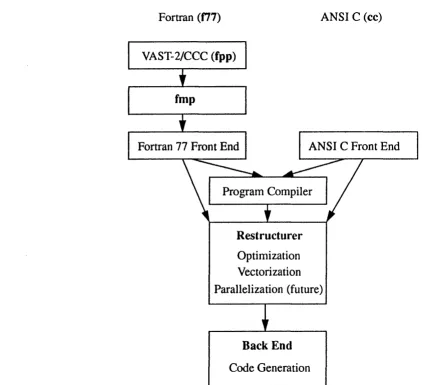
The CCC software product set includes enhanced versions of the inherited CRI CFT77 and Standard C compilers. The concept of a modular compiling system with common optimization and code generation modules for both Fortran and C remains. However, the restructurer (optimization) module has been
completely rewritten and a new intermediate text form has been introduced to provide a better basis for communication between the compiler modules.
The new restructurer incorporates improved vectorization capabilities which are already resulting in improved program execution times (as compared to the inherited CRI CFT77 compiler). Future enhancements will include
parallelization' and further vector, scalar, and whole program optimizations. A major goal of the restructurer is to be able to detect and exploit parallelism without user intervention. This will include inner and outer loop analysis, defining the scope of variables, benefit prediction, and conditional
parallelization. Explicit parallelism will also be supported, allowing users to guide the compiler in code segments where the user can provide additional infonnation or where the compiler cannot automatically detect parallelism.
Chapter 3 COMPILERS AND MULTITASKING FEATURES COMPILERS AND MULTITASKING FEATURES 30 Fortran (177) Program Compiler Restructurer Optimization Vectorization
ANSI C (cc)
Parallelization (future)
Back End
Code Generation
Figure 3 Cray Computer Corporation Compiler Development
Improvements to code generation for the CRA Y-3 will be made by focusing and simplifying the back end; for example, by permitting instruction and register assignment interaction, improving peephole optimizations, and
de~eloping compiler techniques for increasing local memory usage.
CCC's compiler development may be seen as an evolutionary process with the gradual replacement of the compiler technology inherited from CRI with improved capabilities such as the new restructurer, within the framework provided by the new intermediate text representation (termed ir) internal to the compiler and its components. CCC currently supports both its new compiler, 177, and a CRAY-3 version of the inherited CRI eFT?? compiler, c177. 177 incorporates the new optimizer (restructurer) and provides some significant
[image:89.613.78.500.95.480.2]