Wireless Electronic Notice Board Using
Raspberry Pi 3
Er. G. Jalalu1, Er. Polepogu Rajesh2
1, 2Assistant Professor, Department of EIE V. R. Siddhartha Engineering College, Vijayawada, Andhra Pradesh, India
Abstract: Notice boards can change the way communication with each other, using notice boards is a constructive method of promoting important information to a large number of people. Notice board is ideally useful tool for organizing and displaying information, these are used in multitude of businesses such as schools, colleges, hospitals, railway station, bus station, hotels, shopping malls etc.As they can be used over and over again to display important notices or advertise forthcoming events or meeting. In this paper, we proposed an advanced wireless notice board in which at any time we can add or remove or alter the message according to our requirement. The main aim of this proposed project is to drastically reduce the cost involved, consume smaller amount of power and help in achieving quality of service. For this we need a computer/laptop as a transmitter, Raspberry PI 3 model B as a receiver, Wi-Fi for data transmission and a LED/LCD screen as a display.
Keywords—Raspberry pi card, Light Emitting Diode (LED), Liquid-Crystal Display (LCD),Wireless Fidelity (Wi-Fi).
I. INTRODUCTION
Many new communication technologies have been developed in the last couple of decades. Sharing information is the main motto of any communication technology. Apart from sharing information, technology has evolved in such a way that, the desktops and electronic appliances are accessed remotely. In our day-today life, we are using many notice boards in home, office and public places like airport, bus stands, hospitals etc. For our comfort and convenience. Communication technology helps us to exchange information and also allows monitoring and controlling the machines from remote locations. This controlling is possible with wired or wireless communication. In this world everyone needs a comfort living life. In today’s world of connectedness, people are becoming accustomed to easy access to information. Whether it’s through the internet, television, people want to be informed and up-to date with the latest events happening around the world.Wired network connection such as Ethernet has many limitations depending on the need and type of connection. Now a day’s people prefer wireless connection because they can interact with people easily and it require less time [1].
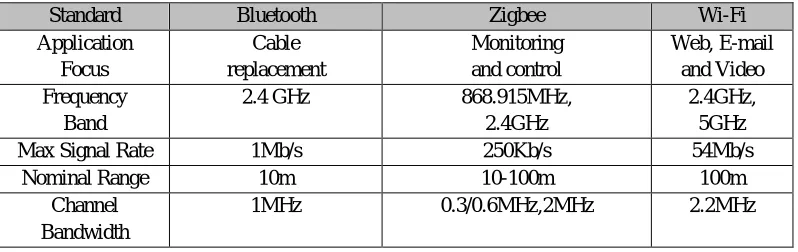
[image:2.612.108.507.583.709.2]Notice Board is used in various institutes to display notices and these boards are managed manually. It is a long process to put up notices on the notice board. This wastes a lot of resources like paper, printer ink, man power and also loss of time. In this paper we have proposed a system which will enable people to wirelessly transmit notices on notice board using Wi-Fi. Here we have proposed a system by which only authorized person can accesses the notice board. It require less time due to fast data transmission through Wi-Fi. Less cost and save the resources like paper. The table 1summarizes the key differences between the three short range wireless technologies. Wi-Fi provides higher data rates for multimedia access as compared to both Zigbee and Bluetooth which provides lower data transfer rates. Zigbee and Bluetooth are intended for communication (about 10m), while Wi-Fi and Zigbee is designed for WLAN about 100m [2].
Table 1.Comparison of Bluetooth, Zigbee and Wi-Fi Protocols
Standard Bluetooth Zigbee Wi-Fi
Application Focus Cable replacement Monitoring and control Web, E-mail and Video Frequency Band
2.4 GHz 868.915MHz,
2.4GHz
2.4GHz, 5GHz
Max Signal Rate 1Mb/s 250Kb/s 54Mb/s
Nominal Range 10m 10-100m 100m
Channel Bandwidth
A. Starting of System
1) Connect HDMI cord to your monitor and make sure SD memory card is inserted into the slot properly and fully.
2) Now plug the power cord and power on the board.
3) There will be a welcome screen on monitor and system should start booting process and will give the home screen.
4) A python application developed for full screen notification should be executed after the booting process is over.
B. System Execution
1) Once the system is power on and system is loaded we need to display the notice message.
2) Notice messages can be stored on folder which can be read and displayed on screen.
3) Notice messages stored in folder will be read by an application developed in python and executed just after start of operating system.
4) And keep on displaying notices unless stop by authorized person or shut down of the system.
C. Objectives of this paper are
1) To develop a wireless notice board that display message sent from the user and
2) To design a simple, easy to install, user friendly system, which can receive and display notice in a particular manner with respect to date and time which will help the user to easily keep the track of notice board every day and each time he uses the system. Wi-Fi is the wireless technology used.
II. HARDWARECOMPONENTS Block Diagram of Wireless Electronic Notice Board
[image:3.612.67.516.355.563.2]WIFI
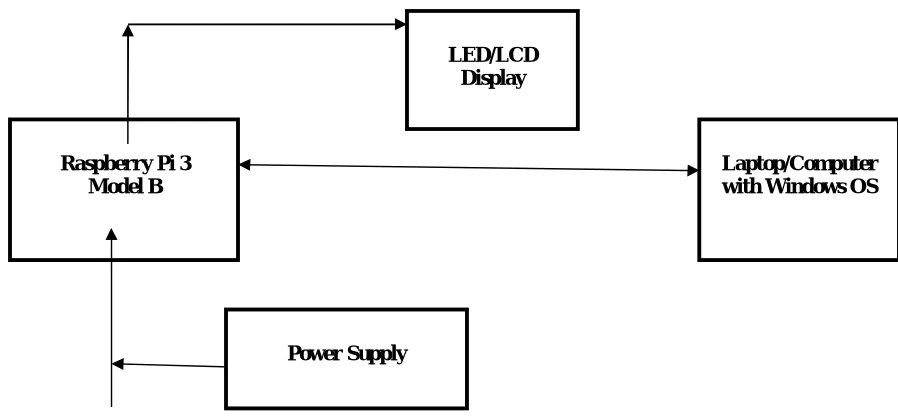
Figure 1 Block Diagram of Wireless Electronic Notice Board
The Figure 1 shows the Block Diagram of Wireless Notice Board. In this project, Laptop is used to send the notices, the Raspberry Pi receives the notices and is displayed in the display using Wi-Fi.
List of Hardware Components
A. Raspberry PI 3 Model B
The Raspberry Pi is a series of small single-board computers developed in the United Kingdom by the Raspberry Pi Foundation to promote the teaching of basic computer science in schools and in developing countries.
Raspberry Pi 3 Model B
LED/LCD Display
Laptop/Computer with Windows OS
Figure 2 Raspberry Pi Model
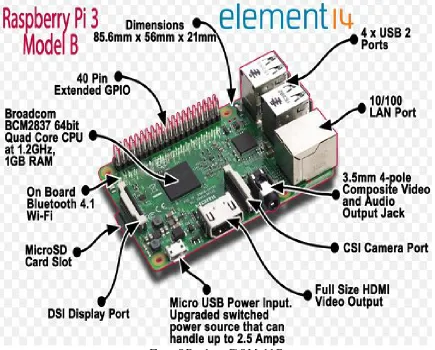
Several generations of Raspberry Pi’s have been released. Its representation is similar to a raspberry fruit as shown in Figure 2. The first generation (Raspberry Pi 1 Model B) was released in February 2012. It was followed by a simpler and inexpensive model A. In 2014, the foundation released a board with an improved design in Raspberry Pi 1 Model B+. These boards are approximately credit-card sized and represent the standard mainline form-factor. Improved A+ and B+ models were released a year later. A "compute module" was released in April 2014 for embedded applications, and a Raspberry Pi Zero [5] with smaller size and reduced input/output (I/O) and general-purpose input/output (GPIO) capabilities was released in November 2015 for US$5. The Raspberry Pi 2 which added more RAM was released in February 2015. Raspberry Pi 3 Model B released in February 2016 is bundled with on-board Wi-Fi, Bluetooth and USB Boot capabilities. As of January 2017, Raspberry Pi 3 Model B is the newest mainline Raspberry Pi [3].
The hardware diagram of Raspberry Pi 3 Model B is shown in Figure 3.A brief description of the components on the Pi is given below.
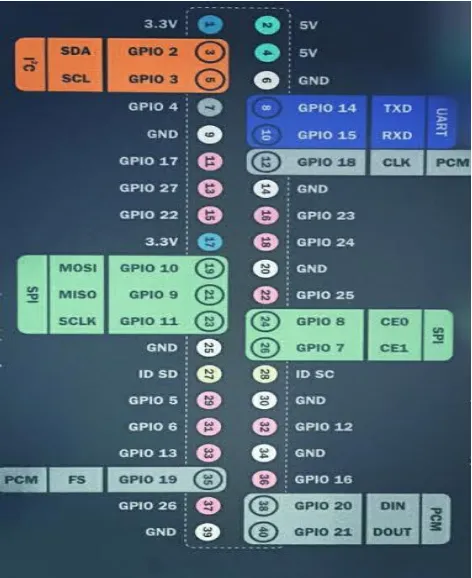
Figure 4 Pin Diagram of GPIO Pins
Most computers have an I2C bus, presumably for some of the purposes listed by wikipedia, such as interfacing with the RTC (real time clock) and configuring memory. However, it is not exposed, meaning you can't attach anything else to it, and there are alot of interesting things that could be attached -- pretty much any kind of common sensor (barometers, accelerometers, gyroscopes, luminometers, etc.) as well as output devices and displays. We can buy a USB to I2C adapter for a normal computer, but they cost a few hundred dollars. We can attach multiple devices to the exposed bus on the pi [4].
B. Wi-Fi Router
Wireless Fidelity (Wi-Fi).is a technology that allows electronic devices to connect to a wireless LAN (WLAN) network, mainly using the 2.4 gigahertz (12 cm) UHF and 5 gigahertz (6cm) SHF ISM radio bands. A WLAN is usually password protected, but may be open, which allows any device within its range to access the resources of the WLAN network.The Wi-Fi Router is shown below in Figure 5.
The Wi-Fi Alliance defines Wi-Fi as any "wireless local area network" (WLAN) product based on the Institute of Electrical and Electronics Engineers' (IEEE) 802.11 standards. However, the term "Wi-Fi" is used in general English as a synonym for "WLAN" since most modern WLANs are based on these standards. "Wi-Fi" is a trademark of the Wi-Fi Alliance. The "Wi-Fi Certified" trademark can only be used by Wi-Fi products that successfully complete Wi-Fi Alliance interoperability certification testing. Devices which can use Wi-Fi technology include personal computers, video-game consoles, smart phones, digital cameras, tablet computers and digital audio players. Wi-Fi compatible devices can connect to the Internet via a WLAN network and a wireless access point. Such an access point (or hotspot) has a range of about 20 meters (66 feet) indoors and a greater range outdoors. Hotspot coverage can be as small as a single room with walls that block radio waves, or as large as many square kilometres achieved by using multiple overlapping access points [5].
C.SD Card
A SD Card is necessary to install the OS and save the data received from sender.
Figure 6 SD Card
D. Light Emitting Diode (LED)/ Liquid-Crystal Display (LCD)
A Light Emitting Diode (LED) display is a flat panel display, which uses an array of light-emitting diodes as pixels for a video display. Their brightness allows them to be used outdoors in store signs and billboards, and in recent years they have also become commonly used in destination signs on public transport vehicles. LED displays are capable of providing general illumination in addition to visual display, as when used for stage lighting or other decorative (as opposed to informational) purposes [6].
[image:6.612.224.388.527.657.2]A Liquid-Crystal Display (LCD) is a flat-panel display or other electronically modulated optical device that uses the light-modulating properties of liquid crystals. Liquid crystals do not emit light directly, instead using a backlight or reflector to produce images in color or monochrome.
Figure 7 LCD Display
E. USB Keyboard and USB Mouse
The USB Keyboard and USB Mouse are used initially for installing the OS into SD Card.
F. Laptop/Computer with Windows OS
Here only a laptop/Computer with Windows OS can be used as transmitter because the File-Zilla software supports only Windows OS on the Server side.
G. Power Supply
The Power Supply shown in Figure 8 is a primary requirement for the project work. The required DC power supply for the base unit as well as for the recharging unit is derived from the mains line. For this purpose center tapped secondary of 12V-012V transformer is used. From this transformer we get 5V power supply.In this, +5V output is a regulated output and it is designed using 7805 positive voltage regulator. This is a 3 Pin voltage regulator, can deliver current up to 800milliamps. Rectification is a process of rendering an alternating current or voltage into a unidirectional one. The component used for rectification is called ‘Rectifier’. A rectifier permits current to flow only during positive half cycles of the applied AC voltage. Thus, pulsating DC is obtained to obtain smooth DC power additional filter circuits required. The power supply consists of a step down transformer, full wave rectifier, capacitive filter, 7805 regulator.
[image:7.612.46.557.291.396.2]AC line
Figure 8 Block Diagram of Power Supply
III.SOFTWARE
A. Raspbian Jessie
The goal of Raspbian is to become the leading OS of choice for all users of the Raspberry Pi. This goal has been largely achieved. There are still some rough edges but these are generally more related to the Pi's hardware and kernel than Raspbian itself.Raspbian tries to stay as close to Debian as reasonably possible. Debian is used by millions of users around the globe on a daily basis and there is a vast store of knowledge and documentation about using Debian across the web. Any information you find that applies to Debian will almost certainly apply to the same version of Raspbian. Information for earlier versions of debian will often apply too but may need some tweaks just as it would when be using it on a newer version of debian.Debian is a free operating system for your computer and includes the basic set of programs and utilities that make your computer run along with many thousands of other packages. Debian has a reputation within the Linux community for being very high-quality, stable and scalable. Debian also has an extensive and friendly user community that can help new users with support for practically any problem. This makes Debian an ideal operating system for the Raspberry Pi that will be used by children and many others using Linux for the first time.The Raspbian Operating System is based on Debian Linux and the different versions of Debian are named after characters from the “Toy Story” films. Recent versions of Raspbian have been based on DebianWheezy (the penguin who’s lost his squeaker in Toy Story 2”), but Raspbian has now been updated to the new stable version of Debian which is called Jessie [1].
The first thing anyone starting the new Jessie image from scratch will notice that the default behavior is to boot straight to the desktop GUI, not to the Linux command line. This was a decision taken because this is the expected behavior for all modern computers; the default interface for a personal computer in 2015 is a desktop GUI, not just text on screen. It is still possible to set the Raspberry PI to boot to the command line for people who prefer that just toggle the relevant settings in the Raspberry PI configuration application described below.
When the desktop launches, we might notice some slight teaks to the appearances of things like menus, check boxes and radio buttons. This is because the appearance of Raspbian is now based on version Three of GTK+, the user interface toolkit used for the LXDE desktop environment. The older version Two of GTK+ is slowly being replaced with version three in many applications, so
this change as inevitable at some point the new appearance isn’t a hue change, but does look slightly more modern. Many of the applications in Raspbian are still using GTK+ version two, but the PiX theme for GTK+ two has been changed it into the line with that for GTK+ three.
We will notice on the bar that there is now an eject icon at the top right this is a new plug in that allows USB drives and the like to be safety ejected without the risk of losing data. It’s slightly risky to just pull out a USB drive, particularly if you have just copied a file to it, as the system manages the write to a drive in the background, and the rite takes a finite amount of time. If we pull the drive out before the write has finished, you’ll corrupt the file and lose data clicking the eject icon and then selecting the drive to remove the drive.
[image:8.612.110.504.194.373.2]We have added the Libre Office suite shown in Figure 9 and Claws Mail.
Figure 9 Diagram of LibreOffice
LibreOffice is a full-featured office suite which is compatible with Microsoft Office files it includes a word processor, spread sheet, presentation graphics, vector drawing and database programs, all of which should feel familiar to anyone used to using Office. It has had some optimisation for Pi, and runs pretty well, particularly on Pi 2.
Claws Mail is an email client for those of us who are old-fashioned enough to prefer not to do email through a browser – it supports all common email protocols, and offers all the functionality of a standalone mail client like Windows Mail or Thunderbird [1][2].
B. Java tools
There are also two new applications in the Programming category ,these are two new environments for writing Java applications, called BlueJ and Green foot (from the University of Kent and Oracle). If interested in learning Java, or already a Java programmer, we a look at them. There are some sample projects for both in the /home/pi/Documents directory.
1) Settings and configuration: There are a couple of new settings dialogs in this release, found under the Preferences entry in the main menu.
[image:8.612.166.449.550.710.2]The configuration of Raspberry Pi is shown in Figure 10. The first is Raspberry Pi Configuration – this is a GUI version of the old raspberry pi-configuration command-line application, which provides all the same functionality in a nicer interface. (The old raspberry pi-configuration is still on the system and can be accessed from the command line by typing “sudoraspi-config”, but it shouldn’t be necessary to do so anymore.)
The new Raspberry Pi Configuration allows you to enable and disable interfaces, tweak performance and configure internationalisation options, such as time zone and keyboard. It also allows some more control over boot options than was available in the past, with the option to automatically log in as the “pi” user available when booting to both CLI and desktop.
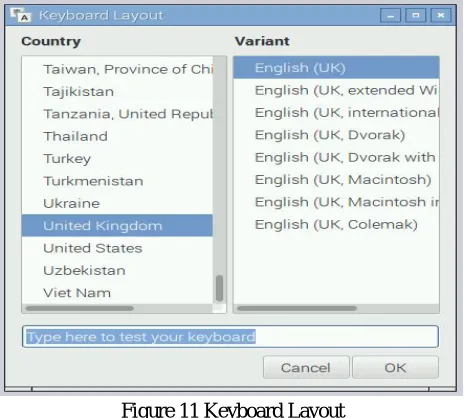
[image:9.612.190.422.209.418.2]There is a new keyboard setting dialog, accessed from the Localisation tab, but hopefully many people won’t need this – the system will detect some common keyboards sold for use with Pi and set up the GUI keyboard driver correctly. If that doesn’t happen, it’s now easy to choose the right country and keyboard type in this dialog shown in Figure 11.
Figure 11 Keyboard Layout
The other new setting dialog shown in Figure 12 is the Main Menu Editor. This is a Pi version of a menu editor called Alacarte, written in Python – this should make it easier for people to add or remove items to the main menu. (And, by popular demand, the Other menu is back on the system – but it will now only appear if applications are installed that don’t appear in any other categories)
Figure 12 Main Menu Editor
C. File-Zilla Software
FileZilla was started as computer science class project in the second week of January 2001 by Tim Kosse and two
[image:9.612.116.496.472.657.2]single copy if they made FileZilla commercial. FileZilla was written in C++ and wxwidgets. Size 6. 8MB, Initial release 22June 2001, 15 years ago. Latest release 3.25.0-rc1(4March 2017). It is FTP server type with General Public License.FileZilla Client is a fast and reliable cross-platform FTP, FTPS and SFTP client with lots of useful features and an intuitive graphical user interface. The
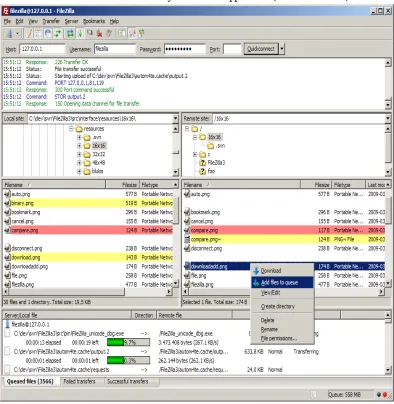
[image:10.612.109.503.139.543.2]application consists of FileZilla Client and FileZilla Server as shown in Figure 13. Client binaries are available for Windows, Linux, and mac OS, server binaries are available for Windows only. The client supports FTP,SFTP and FTPS (FTP over SSL/TLS).
Figure 13 FileZilla Window
Storing encrypted private key files is still not supported in current versions, as well as using sh-agent, in the same way as previous versions of FileZilla. Private key authentication is usually recommended over password-based authentication.
adware download appears as the primary link, highlighted and marked as "recommended”. As of 2016, FileZilla displays ads (called sponsored updates) when starting the application. These ads appear as part of the "Check for updates" dialog [1][2][3].
Raspberry Pi being very cost effective can be deployed in large numbers in underdeveloped and developing countries like Africa, India, China, Brazil etc. to schools and colleges and to everyone who is interested in computers and electronics.
IV. EXPERIMENTALSETUPANDRESULTS
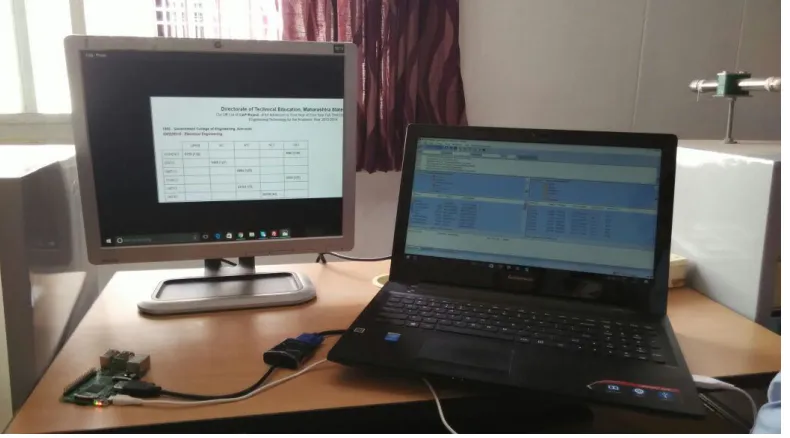
[image:11.612.112.507.192.411.2]The proposed system was fully developed and tested to demonstrate its feasibility and effectiveness. In this paper, we have used the laptop as transmitter to send the notices and Raspberry Pi 3 model is used as receiver. When both the transmitter and receiver are connected to the same network, then the notices are displayed on the monitor.
Figure 14 Experimental Setup
They are displayed one after the other after 5 seconds time gap. We can add or remove the notice at any time. The software which is used in this project is Filezilla. The screenshots of the smart home app developed has been presented in Figure 14.The Raspberry Pi is connected to the monitor through HDMI to VGA converter as shown in the figure. The supply to the Raspberry Pi is also provided. Initially keyboard and mouse are used to operate the monitor display.
V. CONCLUSIONANDFUTURESCOPE
A. Now the world is moving towards automation, so in this world, if we want to do some changes in the previously used system, we have to use the new techniques.
B. Wireless operation provides fast transmission over long range communication.
C. It saves resources and time. Data can be sent from remote location.User authentication is provided. Previously the notice board using GSM was used in that there was the limit of messages but in our system Multimedia data can be stored on chip or on SD card. Text messages and multimedia data can be seen whenever we want to see.
D. The proposed system can further be extended to provide the notices from longer distances by providing the internet connectivity which will allow the system to update notices anywhere in the world.
REFERENCES
[1] Vinod B. Jadhav, Tejas S. Nagwanshi, Yogesh P. Patil , Deepak R. Patil, “Digital Notice Board Using Raspberry PI”, International Research Journal of Engineering and Technology (IRJET), Volume 3, Issue 5, May 2016.
[2] JadhavVinod, NagwanshiTejas, PatilYogesh, Patil Deepak, “Digital Notice Board Using Raspberry Pi”, International Journal of Computing and Technology( IJCAT), Volume 3, Issue 2, February 2016.
[3] Ms. Sejal V. Gawande, Dr. Prashant R.Deshmukh “Raspberry Pi Technology” International Journal of Advanced Research in Computer Science and Software Engineering(IJARCSSE), Volume 5, Issue 4, April 2015
[5] Guo Yinan, Zhang Shuguo, Xiao Dawei “Overview of Wi-Fi Technology” The 2nd International Conference on Computer Application and System Modeling
2012, Published by Atlantis Press, Paris, France.
[6] Nikolay N. Bakin, Vasiliy I. Tuyev, Eduard F. Yauk“LED lighting” 2011 International Conference and Seminar on Micro/Nanotechnologies and Electron