Published Online September 2013 in SciRes (http://www.scirp.org/journal/ce) http://dx.doi.org/10.4236/ce.2013.49088
Cognitive Constructivist Theory of Multimedia: Designing
Teacher-Made Interactive Digital
Prince Hycy Bull
North Carolina Central University, Durham, USA Email: [email protected]
Received June 21st, 2013; revised July 21st, 2013; accepted July 29th, 2013
Copyright © 2013 Prince Hycy Bull. This is an open access article distributed under the Creative Commons At- tribution License, which permits unrestricted use, distribution, and reproduction in any medium, provided the original work is properly cited.
This paper discusses how educators could use the cognitive constructivist theory of multimedia (CCTM) to design interactive digital learning materials using Camtasia and Audacity. Camtasia allows educators to create videos that motivate students, inform parents and enhance learning. It allows educators to record live presentations or lectures and provide students with a file to review. Audacity is a free cross-platform audio editor and recorder for Windows, Mac OS X, GNU/Linux and other operating systems. CCTM ad- vocates for the design of instruction using pictures, videos, audios and words that tap into the prior ex- periences of the learner, promote active learning, collaboration, personal autonomy, personal growth and alternative assessment that is aligned with multiple intelligences of learners as espoused by Gardener (1993) which are Linguistics, Logico-mathematics, Spatial, Musical, Bodily-kinesthetic, Interpersonal, Intrapersonal and Naturalist. Camtasia and Audacity promote use of CCTM because of their capabilities to construct knowledge through words, pictures, animations, videos and audio. Case studies show that use of teacher-made files could significantly impact students’ learning. Use of teacher-made interactive digital learning materials could revolutionize educational presentations and enhance e-learning delivery. CCMT produced by dynamic presentations creates a balance between the learners’ prior verbal and visual ex- periences, sensory repository, multiple intelligences and learning styles to construct new knowledge.
Keywords: Digital Interactive Materials; Multimedia; Constructivist Approach; Multiple Intelligences; Cognitive Constructivist Theory of Multimedia
Introduction
Historically, educational systems depended on teacher-made materials and activities to promote teaching and learning. The proliferation of technology, digital materials, and learning technologies have shifted the design focus from teachers and educators to profit technology solutions, the Web, and com- mercially designed software. There is a paradigm shift for de- signing materials for teaching and learning from teachers to businesses. This shift has the potential to undermine the quality of materials presented and disrupt the educational process. To promote effective integration of digital materials and learning technologies in education, the focus of designing materials and resources needs to shift back from business to classroom teach- ers. This paper discusses integrating an efficient and cost effect- tive way to prepare teachers to create functional interactive digital files using Camtasia software to develop a video files and Audacity software to design audio podcasts.
Camtasia Software
Camtasia allows educators to create professional finish vid- eos that motivate and engage students, inform parents, and enhance learning. It allows educators to record live presenta- tions, lectures, and activities and provide students with a video file to review. Camtasia digital interactive files promote flip- ping the classroom through use of video files that students
watch as homework and apply concepts in the classroom. Camtasia has several unique features that help educators create functional digital materials to promote learning:
Capture what you see, say, and do Personalize interactive videos Create videos with professional finish
Allow educators to put themselves in a video by using the Chroma Key or green screen effect
Allow easy editing of videos
A media asset library that enhances professional finish vid- eos
Videos files with engaging visual effects Animated content to capture learners attention
Quizzing function to assess student’s understanding of vid- eos
Ability to share digital files in FLASH and HTML5 viewer environment
Produce specific files for iPad, iPhone, and other devices Produce and share videos accessible via Youtube or Screen-
cast.com
Capture PowerPoint presentation using the PowerPoint add- on feature
Audacity
for Windows, Mac OS X, GNU/Linux and other operating sys- tems. Audacity has several unique features that promote de- signing effective digital learning materials, which can be pre- sented as audio presentations or combined with Camtasia to design effective interactive digital materials:
Record live audio through a microphone or mixer;
Digitize recordings from cassette tapes, records, and optical discs;
Create multi-track recordings;
Edit Ogg Vorbis, MP3, WAV or AIFF sound files; Cut, copy, splice or mix sounds together;
Change the speed or pitch of a recording;
Import sound files, edit and combine with other files or recordings;
Export recording in many different file formats;
Create MP3 files using the LAME converter file that could be uploaded to iTunes;
Support 16-bit, 24-bit and 32-bit (floating point) samples (the latter preserves samples in excess of full scale); Sample rates and formats are converted using high-quality
resampling and dithering;
Track with different sample rates or formats are converted automatically in real time;
Easy editing with Cut, Copy, Paste and Delete;
Unlimited sequential Undo (and Redo) to go back any num- ber of steps;
Edit and mix large numbers of tracks; Multiple clips are allowed per track; Draw tool to alter individual sample points;
Envelope tool to fade the volume up or down smoothly; Automatic Crash Recovery in the event of abnormal pro-
gram termination;
Accessibility features to manipulate tracks and selections using keyboard;
Accessibility features to support JAWS and other screen readers on Windows, and for VoiceOver on Mac;
Built-in sound effects for engaging and stimulating presen- tations.
Theoretical Framework
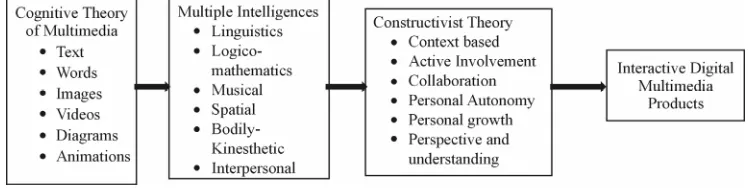
Designing interactive digital materials with Camtasia and Audacity using the principles of cognitive constructivist theory of multimedia (CCTM) produces functional interactive teacher- made digital learning materials that engages and motivates learners. See Figure 1. The cognitive constructivist theory of multimedia (CCTM) developed by Bull (2009) is the theoreti- cal framework guiding this paper. CCTM is a theory that inte- grates concepts from the constructivist theory, multiple intelli- gences theory, and cognitive theory of multimedia learning to
support designing teacher-made interactive digital materials. CCTM design is the integration of multimedia (text, image, animation, graphic, video and audio) in a systematic design structure of visual thinking combining verbal and non-verbal communication to minimize cognitive overload of the learner’s memory. CCTM also utilizes the learner’s multiple intelligen- ces, learning styles, and prior knowledge of multimedia con- tents and content information to construct and refine knowledge through multimedia files.
Interactive Digital Materials and Cognitive Theory of
Multimedia
CCMT is aligned with the cognitive theory of multimedia learning (CTM) as one of its supporting theories. In designing interactive digital learning materials, the learner utilizes visual and verbal information processing systems to engage in learn- ing. All auditory information received during this process of learning goes to the verbal system and all graphics, pictures and animations goes to the visual system. This means that educators in designing interactive digital materials should create a balance between verbal and visual repository systems of the learner to fully engage them in the learning process.
Mayer (2002) identified six major principles of multimedia design, which should be adhered to in designing interactive digital materials to create a balance between the verbal and visual systems for effective learning outcomes:
1) Multimedia/Multiple Representation—In designing digital interactive learning materials, instructors should ensure that information is presented in at least two modes (text, video, picture, animation and audio) of representation for clarity and understanding. Using at least two modes of representation cre- ates a multimedia learning effect, which enables learners to effectively develop verbal and visual models and build func- tional connections between them. This principle also taps into the multiple intelligences theory by utilizing the intelligences of each learner. For example, the presentation of pictures and text support both linguistic and spatial intelligences. A presentation of video recording supported by closed captioning supports different combination of intelligences, but predominantly ad- dresses linguistics, spatial, reasoning, interpersonal, and bod- ily-kinesthetic;
[image:2.595.110.485.619.713.2]2) Contiguity principle—Instructors should also combine pictures and words in designing digital interactive learning materials. Using at least two modes of multimedia to present a concept allows learners to understand a concept better than when the same modes are presented separately for the same concept. Camtasia has several options to combine pictures and words on the same canvass, via PowerPoint or using over lay on videos and pictures. Files created in Audacity can be em-
Figure 1.
bedded in Camtasia designed videos to promote the contiguity principle, which simply states that multimedia learning com- bining words/text and pictures in ones verbal and visual sys- tems constructs new knowledge. Corresponding words and pic- tures represented at the same time means a temporal congruity. On the other hand, words and pictures presented on same page, document, slide or screen promote spatial contiguity. This prin- ciple is aligned with the linguistics and spatial intelligences identified in multiple intelligences.
3) Split-Attention principle states that when words and texts are presented as narrations they are more effective in a multi- media presentation than when presented visually. Camtasia because of its narrative and video capabilities provides more opportunities and easier creation of the split-attention principle, which simply states that on-screen text and animation may overload the visual information system, but narration aligned with the verbal information system and animation aligned with visual information system does not overload in one system. Camtasia provides opportunities for live recording of audio narrations or video presentations of instructor teaching.
4) Individual Differences principle states that unique learning qualities of the learner aligned with multimedia, contiguity and split-attention principles determine how well the learner is able to conceptualize learning. From the constructivist theory’s per- spective, learners with high prior knowledge are able to draw visual images from their image repository when presented with only an animation or reading a text. From the multiple intelli- gences theory’s perspective, learners with high spatial ability are able to draw from their verbal and visual repositories when presented with contiguous word and picture presentations. Camtasia interactive digital videos allow learners with individ- ual differences and different learning styles to tap into their unique learning qualities to gain knowledge.
5) Coherence principle states that learners learn better in a multimedia environment when exposed to fewer rather than many words and pictures. The goal in this principle is to be concise and to the point in presenting concepts with pictures and words. For interactive digital projects teachers should minimize use of text and picture on slides, especially if video option is utilized. For digital materials with text and pictures, the design should focus on using the picture with few words to tell the story.
6) The resulting effect of the coherence principle is called “redundancy effect.” In designing interactive digital materials, learners gain knowledge better with animation and text, than from narration, animation and text. Text is a visual presentation, which competes with the animation for visual attention in the presentation. When video capabilities are utilized, teachers should not use animations since that will compete with the movement in the video. An animation as a short video file can- not compete with another video file in the same environment.
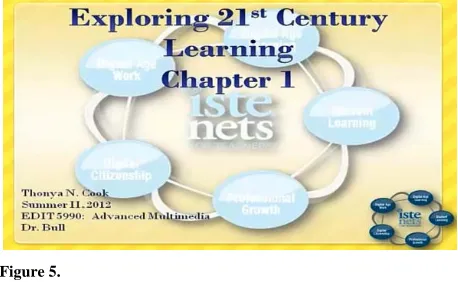
[image:3.595.309.537.84.204.2]Using CCMT as a theoretical framework for designing inter- active digital materials, educators can create functional teacher- made multimedia materials aligned with their curriculum, stu- dent learning outcomes and competencies. Materials created by teachers are more focused on addressing student learning out- comes. File created by teachers can easily be shared via the Web using Camtasia’s web sharing location at screencast.com. This website provides 2 GBs of free space with an option to pay for additional space. The site generates a web address or URL, which is shared with students to access files anywhere and anytime. Figures 2-6 show as variety of ways teacher-
Figure 2.
Lecture presentation on the scientific method.
Figure 3.
[image:3.595.308.538.239.357.2]Lecture presentation on thesis workshop.
Figure 4.
Article review multimedia file.
Figure 5.
Chapter presentation multimedia file.
made interactive digital materials can impact classroom learn- ing:
[image:3.595.308.537.545.686.2]Figure 6.
Lecture presentation multimedia file.
designed by a middle school science teacher;
Figure 3 is a video presentation on thesis writing by a high school language arts teacher;
Figure 4 is an article review done by a graduate student in my course. This exercise was done to flip class presenta- tions;
Figure 5 is a chapter presentation done by a graduate stu- dent in my course. This is a shift from the tradition class- room presentation to flipping class presentations with video podcasts;
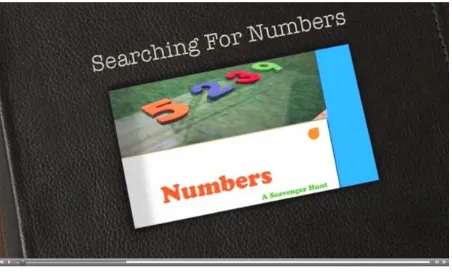
Figure 6 is an of a class demonstration done in one of my graduate course to help students understand a concept; Figure 7 is an example of a mathematics lesson on numbers
created by an elementary teacher.
Interactive Digital Materials and Multiple
Intelligences Theory
Gardner (1993) states that intelligence should not be meas- ured as a singular entry, but by multiple entries relating intelli- gences possessed by all humans. Gardner’s eight basic multiple entries could be addressed in different combinations in design- ing interactive digital materials for instruction. Multiple intelli- gences theory allows multimedia designers to create interactive learning materials aligned with universal design for learning and differentiated learning for students. These two principles are intricately aligned with learning and teaching styles. The universal design for learning is a set of principles that provide all learners with equal opportunities to learn. Designing interac- tive digital learning materials with a focus on the multiple intel- ligences of learners provide learners with equal opportunities to learn based on their learning styles and combination of their intelligence entries in the areas of linguistic, logico-mathemat- ics, spatial, bodily-kinesthetic, musical, interpersonal, intraper- sonal, and naturalist intelligences. Understanding how students demonstrate their intellectual capacity is an important factor for teachers in designing instruction to meet the specific learning needs of students who may be dominant in one or several intel- ligence as opposed to other forms of intelligence. On the other hand, differentiated instruction is a method of teaching that involves matching learning styles with abilities. This is best accomplished through intentional design of interactive multi- media files to address learning styles, academic levels, and intelligences of students to better facilitate the learning process.
The process of designing interactive digital materials to sup- port universal learning design and differentiated learning align- ed with multiple intelligences requires an understanding of how
Figure 7.
Lesson on numbers for kindergarten students.
multimedia is aligned with each intelligence (Brown, 2005). The following is an overview of how multiple entries could be addressed in using CCTM as the theoretical framework to de- sign interactive digital learning materials addressing verbal and visuals systems:
Linguistic intelligence (Verbal system)—Interactive digital materials promotes use of this entry through a variety of op- tions: Use of text, text overlays on videos, use of text in content area, presentation of text in videos, use of audio and audio that is part of the video (Moreno, 2006; Moreno, 2007).
Logical-mathematical intelligence (Verbal and visual sys- tems)—this entry is promoted in interactive digital learning materials through logical audio presentations, video pres- entations and mathematic/logical presentations;
Spatial intelligence (Visual system)—this entry is promoted in interactive digital learning materials through visual-spa- tial ideas, use of graphics, pictures, images, animations, ap- plets, maps, and videos;
Bodily-kinesthetic intelligence (Verbal and visual system) —this entry is promoted in interactive digital learning ma- terials through the video components of Camtasia. Instruc- tors can record demonstrations and movements, which stu- dents would emulate, work on or modify;
Musical intelligence (Verbal and visual system)—this entry is promoted in interactive digital learning materials in a va- riety of ways. Music or sound could be embedded in the videos such as songs, musical videos, musical demonstra- tions and use of musical pieces as background, introductory or end of presentations. Audacity is more effective in de- signing audio files;
Interpersonal intelligence (Verbal)—this entry is promoted in interactive digital learning materials through audio or video presentations. This entry deals with an individual’s capacity to understand, perceive and relate to other people; Intrapersonal intelligence (Verbal and visual system)—this
entry promotes use of interactive digital learning materials to support asynchronous learning. It provides students with opportunity to review presentations at their own pace and time and with many opportunities to do so;
[image:4.595.59.287.85.213.2]The combination of Gardner’s multiple intelligences theory aligned with Mayer’s six principles of multimedia design within CCMT promotes the design of effective interactive digital mate- rials to engage, motivate, and achieve student learning outcomes.
Interactive Digital Learning Materials and
Constructivist Theory
The use of constructivist approach in instructional design and delivery of multimedia content of CCTM focuses on construc- ting knowledge through prior visual and verbal experiences. The constructivist theory of instruction is based on principles of learning that were derived from branches of cognitive science. The constructivist teaching approach theory makes effective use of students’ prior knowledge and cognitive structures based on those experiences (Mayer et al., 1999; Bull, 2012). An example of what this means for designing interactive digital learning materials in that images, animations, pictures and graphics used should relate to student’s prior experiences. Interactive digital learning materials support the integration of images, animations, pictures and graphic to promote learning through experiences aligned with visual and verbal repository systems of the learner (Moreno & Mayer, 2000).
To ensure that instruction presented as part of an interactive digital learning material is aligned with tenets of constructivism, teachers and educators should ensure that the content, design and presen- tations of interactive digital materials are aligned with following: Digital learning materials should be context based;
Content presented should relate to objectives of the lesson or presentation;
Digital learning materials should promote participation through active involvement;
Digital learning materials should promote collaboration and engage students in learning;
Digital learning materials presented should lay the founda- tion for students to develop autonomy and control over learning by creating new knowledge;
Digital learning materials should promote personal growth of students by creating new knowledge;
Learning outcomes should stimulates a perspective and an understanding rather than a prescribed outcome.
Case Studies
Case Study #1
Anderson and Bull (2010) conducted a study on the effects of using teacher-made multimedia interactive materials on stu- dents’ perceptions of learning with multimedia presentations and how multimedia promoted learning. Participants were 38 first grade students and two certified teachers.
Methodology
Researchers designed interactive digital materials on Black History Month teaching unit. Classroom teachers were trained on how to implement multimedia lessons. The study employed both qualitative and quantitative data analysis. Data for the qualitative analysis were obtained from observations, surveys, students’ Black Wax Museum, and focus group discussion.
Case Study #1 Findings
The case study findings yielded the following themes:
Students were engaged in learning; Addressed different learning styles;
Promoted use of prior knowledge aligned with visual and verbal knowledge;
Promoted higher level thinking skills; Promoted literacy skills;
Motivated students to learn.
Case Study #2
Researcher conducted a case study on the effects of flipping a graduate course with instructor and students’ designed inter- active digital materials on student learning outcomes.
Participants were 10 graduate students and researcher.
Methodology
Research designed interactive learning materials for course presentations, lectures, and demonstrations of concepts. See Table 1 for samples of teacher-made interactive digital materi- als. Students were trained to use Camtasia and Audacity to design interactive learning materials for course presentations, article reviews, assignments, and chapter presentations. See Figures 2-6. Data for the qualitative analysis were obtained from observations, surveys, and focus group discussion.
Case Study #2 Findings
Analysis of data revealed the following themes:
Creating interactive digital materials promoted effective use of instructional time;
Transformed students to producers of knowledge; Files were archived and access as needed;
Supported synchronous and asynchronous learning; Students learn at their pace and time;
Skills required to design interactive digital materials are per- quisites to flip a classroom;
Instructor’s knowledge on how to design and flip was key to successful implementation;
Promoted mobile learning as files shared via web portals were accessed with mobile devices.
Benefits of Interactive Digital Materials
There are several benefits of using CCTM in designing tea- cher-made interactive digital learning materials. The follow- ing are some of the benefits:
An effective way of delivering asynchronous learning; Promotes online delivery of instruction;
Promotes flipping the classroom;
Alternative method of instruction to face-to-face instruction; Easily capture and synchronize audio and video with slides
from your PowerPoint presentations; Create rich-media presentations;
Create an engaging rich-media presentation that can help students understand concepts better;
Interactive digital learning materials address a variety of learning styles that tap into the multiple intelligences of students;
Supports a wide variety of audio and video file formats, for high-quality audio and video;
Enables capture of live audio and video using any capture device;
Table 1.
Samples of instructor designed materials.
File Name and URL Creating a Form
http://www.screencast.com/t/EwKcxfFIY8S Validating Forms Video
http://www.screencast.com/t/bSvDR24zMZW6 Creating a Spry Validation http://www.screencast.com/t/Q4C8rXZicQT
Creating a Form Radio Button http://www.screencast.com/t/ubS03bH1Js
Creating a Form Checkbox http://www.screencast.com/t/ubS03bH1Js
Saves time while offering great flexibility and high-quality output;
Promotes anywhere and anytime learning;
Promotes mobile learning as files can be accessed online on mobile devices.
Discussion
Educational Implications
In general, when teachers create functional digital learning materials for their classrooms, learning is enhanced, students are engaged and motivated to learn. It also promotes a shift from commercially generated files to files that are more aligned with competencies and objectives. Teachers could develop training contents for tutorials, telefieldtrips, and virtual training. Interactive digital files address unique teaching and learning styles to improve how students learn. Promoting teacher-made digital learning materials would require that educational sys- tems improve staff development training for teachers. Teachers can produce on-demand broadcast by capturing live video and audio presentations. It promotes a paperless environment in which educational institutions are able to archive events and other school activities. It lays the foundation for asynchronous learning via the web. Finally, it saves money as institutions would spend less on commercially designed materials.
Conclusion
Use of teacher-made interactive digital learning materials will revolutionize educational presentations and enhance e- learning delivery when aligned with CCMT to produce dy- namic presentations that create a balance between the learners’ prior verbal and visual experiences, sensory repository, multi- ple intelligences and learning styles to construct new knowl- edge. Camtasia and Audacity are great tools with great benefits for synchronous and asynchronous learning. As is the case with designing interactive learning materials for learning, issues of copyright, fair use guidelines, access to camcorder or knowl- edge and use of camcorders, downloading and editing videos,
time constraints, technical support and access to a server to upload final projects may pose some limitations to the effective use of Camtasia and Audacity in designing interactive digital learning materials.
Acknowledgements
The author thanks graduate students whose work are men- tioned and displayed in this paper.
REFERENCES
Anderson, D., & Bull, P. (2010). Constructivist teaching approach: In- tegrating a multimedia tool to enhance student learning in a first grade classroom. In D. Gibson, & B. Dodge (Eds.), Proceedings of society for information technology & teacher education interna-
tional conference 2010 (pp. 3055-3059). Chesapeake, VA: AACE.
Audacity. http://audacity.sourceforge.net
Brown, A. (2005). The challenging marriage of interaction design and learning design in multimedia educational products. In P. Kommers, & G. Richards (Eds.), Proceedings of world conference on educa-
tional multimedia, hypermedia and telecommunications 2005 (pp.
929-932). Chesapeake, VA: AACE. http://www.editlib.org/p/20198
Bull, P. (2009). Cognitive constructivist theory of multimedia design: A theoretical analysis of instructional design for multimedia learning. In G. Siemens, & C. Fulford (Eds.), Proceedings of world conference on educational multimedia, hypermedia and telecommunications 2009 (pp. 735-740). Chesapeake, VA: AACE.
http://www.editlib.org/p/31581
Bull, P. H. (2012). Using spatial constructivist thinking theory to en- hance classroom instruction for students with special needs. In J. Aitken, J. Fairley, & J. Carlson (Eds.), Communication technology
for students in special education and gifted programs (pp. 66-81).
Hershey, PA: Information Science Reference.
Camtasia. http://www.techsmith.com/camtasia.html
Gardner, H. (1993). Multiple intelligences: The theory in practice. New York: Basic Books.
Mayer, R. E. (2002). Multimedia learning. Cambridge: Cambridge University Press.
Mayer, R. E., Moreno, R., Boire M., & Vagge S. (1999). Maximizing constructivist learning from multimedia communications by mini- mizing cognitive load. Journal of Educational Psychology, 91, 638-
643.
Moreno, R., & Mayer, R. E. (2000). A learner-centered approach to multimedia explanations: Deriving instructional design principles from cognitive theory. Interactive multimedia electronic. Journal of
Computer-Enhanced Learning.
http://imej.wfu.edu/articles/2000/2/05/index.asp
Moreno, R. (2006). Does the modality principle hold for different me- dia? A test of the method-affects-learning hypothesis. Journal of
Computer Assisted Learning, 22, 149-158.
Moreno, R. (2007). Optimising learning from animations by minimis- ing cognitive load: Cognitive and affective consequences of signal- ling and segmentation methods. Applied Cognitive Psychology, 21,