University of New Orleans University of New Orleans
ScholarWorks@UNO
ScholarWorks@UNO
University of New Orleans Theses and
Dissertations Dissertations and Theses
8-10-2005
Prototype Digital Forensics Repository
Prototype Digital Forensics Repository
Sonal Mandelecha University of New Orleans
Follow this and additional works at: https://scholarworks.uno.edu/td
Recommended Citation Recommended Citation
Mandelecha, Sonal, "Prototype Digital Forensics Repository" (2005). University of New Orleans Theses and Dissertations. 292.
https://scholarworks.uno.edu/td/292
This Thesis is protected by copyright and/or related rights. It has been brought to you by ScholarWorks@UNO with permission from the rights-holder(s). You are free to use this Thesis in any way that is permitted by the copyright and related rights legislation that applies to your use. For other uses you need to obtain permission from the rights-holder(s) directly, unless additional rights are indicated by a Creative Commons license in the record and/or on the work itself.
PROTOTYPE DIGITAL FORENSICS REPOSITORY
A Thesis
Submitted to the Graduate Faculty of the
University of New Orleans
in partial fulfillment of the
requirements for the degree of
Master of Science
in
The Department of Computer Science
by
Sonal Mandelecha
B.S., University of Mumbai, India, 2002
Table of Contents
LIST OF FIGURES ...v
ABSTRACT... vi
Chapter 1. INTRODUCTION ...1
1.1 Background ...1
1.2 Objectives...2
1.3 Approach ...2
1.4 Organization...3
Chapter 2. DIGITAL FORENSICS ...4
2.1 History of Forensics ...4
2.2 Computer Forensics...4
2.3 Need for Digital Forensics ...4
2.4 Sources of Digital Evidences ...5
2.5 Definition ...6
Chapter 3. DIGITAL FORENSICS INVESTIGATION PROCESS ...8
3.1 Overview ...8
3.2 Identification ...9
3.3 Acquisition ...9
3.4 Data Recovery ...10
3.5 Analysis ...13
3.6 Presentation ...17
3.7 Documenting and Reporting...18
3.8 Tools used in Forensics investigation process ...18
3.9 Rules of Forensic Computing...22
Chapter 4. RELATED WORK...28
Chapter 5. TECHNOLOGY OVERVIEW...36
5.1 Basic Technologies ...36
5.2 Database SQL Server 2000 ...42
5.3 Multi-Tier IIS Applications ...43
Chapter 6. PROTOTYPE FORENSICS REPOSITORY IMPLEMENTATION...46
6.1 Technology Architecture ...46
6.2 Functional Architecture ...46
Chapter 7. CONCLUSION AND FUTURE WORK ...55
7.1 Conclusion ...55
7.2 Future Work...56
Chapter 8. REFERENCES ...58
Acknowledgements
I express my grateful acknowledgement of the advice and counsel of my thesis advisor,
Dr. Golden G. Richard III. I thank him for giving me the freedom to explore the cutting
edge technologies. I would also like to express my appreciation to my thesis committee
members, Dr. Vassil Roussev and Dr. Shengru Tu. I especially thank Dr. Shengru Tu for
the access of his license of SQL Server 2000. My heartfelt thanks to Dr Vassil Roussev
for his ideas, motivation, and all the lengthy hours of discussion over building this
Repository. Also, I would like to thank Dr. Nauman Chaudhry for all his help in Web
Applications and Databases. My most sincere thanks to Dr. Frederick A. Hosch for
teaching me Java, all the way up from 2120, 2125 to 4501. And I certainly, thank Dr.
Abdelguerfi Mahdi, Chairman, Department of Computer Science, University of New
Orleans, for his support. I would also like to express my gratitude to all the other
professors in the department.
Last, but not the least, I thank all the people, who in big and small ways helped me
through my Thesis. I thank my family, my fiancée Arjun A Jobanputra, my friends and
colleagues, Sriram Kuchimanchi, Fareed Qaddoura, Yun Gao without whose help and
List of Figures
Figure
3.1 Image of EnCase Version 3 ...20
3.2 Usual software tools in forensics computing ...21
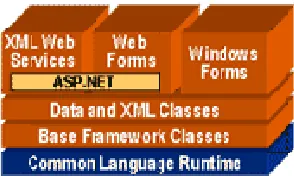
5.1 The .NET Framework Architecture...37
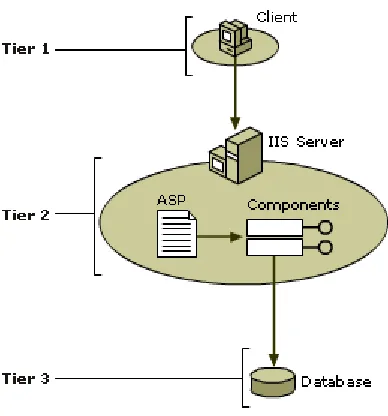
5.2 3-Tier Technology Architecture ...45
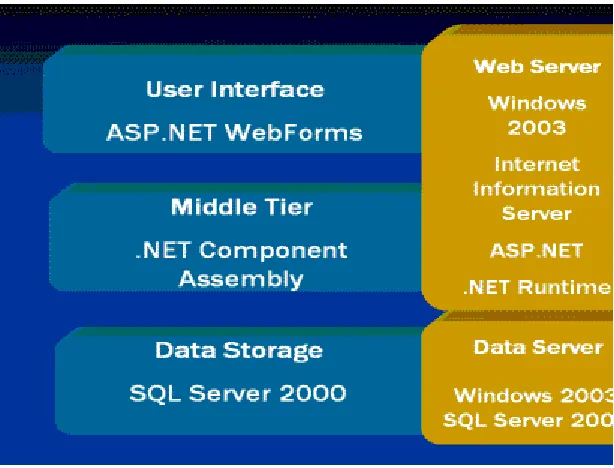
6.1 Physical architecture mapped against 3-tier architecture ...46
6.2 Functional architecture of the application ...47
6.3 Class Diagram ...48
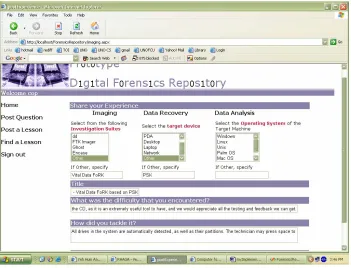
6.4 Snapshot 1...50
6.5 Snapshot 2...51
6.6 Database table LLearned ...52
6.7 RSS Request Process...53
Abstract
The explosive growth in technology has led to a new league of a crime involving identity
theft, stealing trade secrets, malicious virus attacks, hacking of DVD players, etc. The
law enforcement community which has been trained to deal with traditional form of
crime, is now being trained in a new realm of Digital Forensics. Forensics investigators
have realized that often the most valuable resource available to them is experience and
knowledge of fellow investigators. But there is seldom an explicit mechanism for
disseminating this knowledge. Hence the same problems and mistakes continue to
resurface and the same solutions are re-invented.
In this Thesis we design and create a knowledge base, a Digital Forensics Repository, to
support the sharing of experiences about the Forensics Investigation Process. It offers
capabilities such as submission of lessons, online search and retrieval which will provide
Chapter 1
Introduction
1.1
Background
With the wide use of Technology, electronic devices are becoming increasingly
commonplace in society. Along with the widespread use also comes widespread abuse of
electronic devices ranging from trivial hacking of DVD players to more serious crimes
such as identity theft, stealing trade secrets, malicious virus attacks, etc. The rate at which
electronic crime is increasing is putting a severe strain on the already limited resources
used to investigate and solve the same. The law enforcement community which has been
trained to deal with the more traditional form of crimes is now being trained in a whole
new field of digital forensics. But even the most successful forensics training can only
give common sense about computers and other digital devices. Forensics investigators
meet new challenges with very new case. Every new case may involve a new source of
digital evidence. Sources of digital evidences include many more than
PDA
Cell Phones Computers USB Flash Cards FAX Machines
Telephones/Answering machines, Copiers,
Video game systems, GPS devices,
Digital cameras
Forensics technicians and investigators have realized that very often the most valuable
investigators. The experiences of every forensics technician and investigator contain
valuable information. But there is seldom an explicit mechanism for disseminating this
knowledge. As a consequence, the same problems and mistakes continue to resurface and
the same solutions are re-invented often after consumption of already scarce resources
such as time, money and effort. What is missing is a knowledge base that can act as a
repository of information and a means to provide a widespread and an easy access to this
knowledge base.
1.2 Objectives
The preservation, identification, extraction, documentation, and interpretation of the
information stored within these devices for evidentiary analysis [13] is the province of
the digital forensics specialist. The goal of maintaining a repository of “lessons learned”
during the forensics investigation process is to collect information about experiences that
will discourage the use of work practices that lead to undesirable outcomes and
encourage the use of work practices that lead to desirable outcomes. Also, the system
should be able to gather information from already available resources such as the Web.
1.3 Approach
In this Thesis we design and create a knowledge base, a digital forensics Repository, to
support the sharing of experiences about the forensics investigation Process. It is a
web-based application for storing “lessons learned”. The prototype is located at [14]. The
prototype repository offers the following capabilities:
Collecting the lessons
Storing and maintaining the lessons Retrieving and using the lessons Book marking lessons
Provides infrastructure for RSS feeds Allows users to rate lessons
Allows users to post questions and get help from other users
Search the available resources on the web such as Google, Yahoo groups and other forensics sites
Allows users to create lessons from these available resources
1.4 Organization
The remaining chapters are organized as follows:
Chapter 2 introduces the science of digital forensics and the rising need for digital
forensics. Chapter 3 describes the process of investigation in digital forensics.
Chapter 4 gives an overview of the related work done in this area. Chapter 5 gives a
detailed introduction to the technologies used in this implementation. Implementation
details are discussed in Chapter 6. Chapter 6 also explains the functional architecture,
system architecture and database design. Chapter 7 contains the conclusion and future
Chapter 2
Digital Forensics
2.1 History of Forensics
Forensic science is the principles and techniques that identify evidence at a crime scene.
In 1784, an Englishman was convicted of murder when a torn piece of newspaper that
held the murder weapon matched a piece in his pocket - the first documented use of
physical evidence. In 1835, Scotland Yard's Henry Goddard first used bullet comparison
to catch a killer by tracing the bullet back to its mold.
2.2 Computer Forensics
Computer forensics is about evidence from computers that is sufficiently reliable to stand
up in court and be convincing. Computer crime covers a wide range of criminal activity,
from stealing trade secrets to fraud, identity theft to malicious virus attacks. Computer
forensics is used to conduct investigations into computer related incidents, whether the
incident is an external intrusion into your system, internal fraud, or staff breaching your
security policy.
2.3 Need for Digital Forensics
Digital Forensics is probably a better term than Computer Forensics because many
devices beyond those traditionally called “computers” are involved in today’s world.
almost everywhere. As digital devices proliferate so does criminal activity utilizing them.
While the proliferation of new techno-gadgets has perhaps improved the quality of life
for society at large, they have stretched resources to the breaking point within the law
enforcement community. Now, many areas of law enforcement are turning to computer
forensics experts to provide evidence across a wide range of crimes which involve
computers or other digital devices. Civil proceedings also use computer forensics. Civil
court cases might rely on computer records and data in determining the outcome of
divorce, discrimination or harassment cases. Insurance companies use computer forensic
evidence in possible cases of accident fraud, or arson and workman compensation cases.
Corporations hire computer forensics experts to help discover evidence in sexual
harassment, embezzlement, wrongful termination, theft and other kinds of corporate
crimes. Security Agencies like Secret Service, CIA, FBI, and NSA use digital forensics in
anti-terrorism efforts.
2.4 Sources of Digital Evidences
Sources of digital evidences include:
Digital files or documents or images
Chat logs, illegally copied software or other copyrighted material Contraband (e.g., child pornography)
File slack
Files are created in varying lengths depending on their contents. Computers store files in fixed length blocks of data called clusters. Rarely do file sizes exactly match the size of one or multiple clusters perfectly. The data storage space that exists from the end of the file to the end of the last cluster assigned to the file is called "file slack"[20].
Browser and memory cache
copies of frequently requested files so local users can access them more quickly than going all the way to the origin server.
Telephones/Answering machines, Copiers,
Video game systems, GPS devices,
Digital cameras, Floppies,
ZIP disks,
Flash memory cards, Unallocated storage space
When files are erased or deleted in DOS, Windows, Windows 95, Windows 98 and Windows NT, the content of the file is not actually erased. Data from the deleted file remains behind in an area called unallocated storage space[21]. Backup tapes,
Compact disks,
DVDs,
Micro drives, DAT,
Memory sticks and many more.
2.5 Definition
Digital forensic Science as defined at DFRWS 20011:
The use of scientifically derived and proven methods toward the preservation, collection,
validation, identification, analysis, interpretation, documentation and presentation of
digital evidence derived from digital sources for the purpose of facilitating or furthering
the reconstruction of events found to be criminal, or helping to anticipate unauthorized
actions shown to be disruptive to planned operations.
As we have seen there are numerous sources of digital evidences. The use of digital
devices in white collared crimes makes it very important for all the evidences to be
seized. The next Chapter gives a detailed overview of the forensics investigation process,
the different phases involved in the investigation, the hardware and software tools used
Chapter 3
Digital Forensics Investigation Process
In this Chapter we present a detailed explanation of the steps involved in the digital
investigation process, the hardware and software tools available for the investigation, and
the rules of investigation. Finally we discuss the limitations encountered during the
investigation process, in spite of the available resources, due to the variety of digital
sources that can act as digital evidences, and different behaviors of softwares on different
operating systems.
3.1 Overview
There is a basic, inherent process to computer forensics which can be outlined as the
following:
Identification Acquisition Data recovery Analysis Presentation
Documenting and reporting
Each of the above phases has a set of standard procedures and tools being used.
In [1], Rodney McKemmish makes an analysis of the different aspects of forensic
3.2 Identification
Identification deals with intelligence gathering. In this step, the examiner identifies all
the digital devices that can act as source of evidence such as mobile phones,
electronic organizers, floppy disks, hard drive, etc. The examiner must be able to
determine where and how the evidence was stored. This will be very important for
presenting in Court.
3.2.1 Limitations
The process of forensics investigation requires the law enforcement personnel,
dealing with it, to be trained in electronic devices, their hardware and software. Even
the most successful forensics training can only give common sense about computers
and other digital devices. Considering the variety of digital devices being a potential
source for forensics evidence, it is hard for a forensics investigator to tell which
device can have what data. For example, an innocuous looking Xbox console could
be running a Linux FTP Server inside it. Identification of digital evidences could be a
cumbersome step. A knowledge base of lessons could keep the examiner more
alarmed about such cases.
3.3 Acquisition
The acquisition phase saves the state of a digital system so that it can be later analyzed.
This entails the recording of the physical scene and duplicate digital evidence using
element in the forensic computing because it will be used in court. Therefore is it very
important not to make any kind of modification. However, if changes were unavoidable
the examiners would have to try to make the least number of changes as possible and
when showing the modified evidence in court, all kinds of alteration would have to be
explained in detail; changes in data or physical changes. The validity of the evidence
depends on the explanation that the examiners give. This digital data includes both
snapshot and live datasets as needed. A snapshot is an image taken of the display screen
by a program or by using a camera and stored in a file for later use.Dataset means any
resource that is a collection of pieces of data. Databases, data in spreadsheets or
collections of statistics are examples of dataset. Live dataset refers to a dataset found at
the crime scene. All snapshot data sources are seized or forensically imaged and live data
is acquired in a notarized manner. Imaging is the term given to creating a physical sector
copy of a disk and compressing this image in the form of a file. During the acquisition
phase, at a minimum, the allocated and unallocated areas of a hard disk are copied, which
is commonly called an image. This process is referred to as “Imaging”.
This image file can then be stored on dissimilar media for archiving or later restoration.
Actions taken to secure and collect digital evidence should not affect the integrity of that
evidence. Examination is best conducted on a copy of the original evidence.
3.4 Data Recovery
Forensic data recovery is the science of recovering information from a computer that may
have been deleted or otherwise damaged or hidden. Discussed below are two different
identifies and recovers data across the entire physical drive without regard to file system.
The logical extraction phase identifies and recovers files and data based on the installed
operating system(s), file system(s), and/or application(s).
3.4.1 Physical extraction
During this stage the extraction of the data from the drive occurs at the physical level
regardless of file systems present on the drive. This may include the following methods:
Performing a keyword search across the physical drive to extract data.
File carving utilities processed across the physical drive to recover and extract
useable files and data. File carving utility is the process of recovering files from
unallocated file space.
Examining the partition structure to identify the file systems present.
3.4.2 Logical extraction
During this stage the extraction of the data from the drive is based on the file system(s)
present on the drive and may include data from such areas as files, deleted files, file
slack, and unallocated file space. Steps may include:
Extraction of the file system information to reveal characteristics such as
directory structure, file attributes, file names, date and time stamps, file size, and
file location.
Data reduction to identify and eliminate known files through the comparison of
Extraction of files pertinent to the examination. Methods to accomplish this may
be based on file name and extension, file header, file content, and location on the
drive.
Recovery of deleted files.
Extraction of password-protected, encrypted, and compressed data.
Extraction of file slack.
Extraction of the unallocated space.
3.4.3 Limitations
Every new investigation process can have new hardware and software involved.
Repeating steps performed in the past investigations cases, might hardly be useful. With a
different device, a different Operating System, and a different version, the difficulty of
the investigation problem may increase threefold. Sometimes, there is no explanation for
the way softwares behave. A program installed and executed at one instance of time over
a given combination of hardware device and Operating System, may not work on a
similar combination, at some other instance of time, due to conflict in versions used.
For example, an examiner acquired a zipped file as one of the evidence sources. It was
password protected using the latest version of WinZip. This version of WinZip used a
different password encryption scheme than the older versions. Available commercial and
open source Password crackers could not break the encryption on the latest WinZip
version. These password crackers worked successfully on the older version of WinZip.
But when the examiner tried to unzip the zipped file with any other older versions of
lead to a dead end, and the files in the zipped file can never be recovered. The only
solution to it is, upon knowing the password, open the file using the same version of
WinZip that was used to zip it. Issues like these, if not documented, can waste a lot of
time in trying to reach the solution. There can be some other forensics investigator, who
could be facing the same problem. A small help like this could be invaluable to the
forensics community. Hence it is important that we document such results and
experience.
3.5 Analysis
Analysis refers to the interpretation of the recovered data and putting it in a logical and
useful format. Some examples of analysis that may be performed include timeframe
analysis, data hiding analysis, application and file analysis, and ownership and possession
analysis.
3.5.1 Timeframe analysis
Timeframe analysis can be useful in determining when events occurred on a computer
system, which can be used as a part of associating usage of the computer to an
individual(s) at the time the events occurred. Two methods that can be used are:
Reviewing the time and date stamps contained in the file system metadata (e.g.,
the time the file was last modified, last accessed or created) to link files of interest
to the timeframes relevant to the investigation.
Reviewing system and application logs that may be present. These may include
examination of a security log may indicate when a user name/password
combination was used to log into a system.
3.5.2 Data hiding analysis
Data can be concealed on a computer system. Data hiding analysis can be useful in
detecting and recovering such data. Methods that can be used include:
Correlating the file headers to the corresponding file extensions to identify any
mismatches. Presence of mismatches may indicate that the user intentionally hid
data.
Gaining access to all password-protected, encrypted, and compressed files, which
may indicate an attempt to conceal the data from unauthorized users.
Steganography. Steganography is the art and science of hiding information by
embedding messages within other messages. Steganography works by replacing
bits of useless or unused data in regular computer files (such as graphics, sound,
text, HTML, or even floppy disks) with bits of other, invisible information. This
hidden information can be plain text, cipher text, or even images.
3.5.3 Application and file analysis
Many programs and files identified may contain information relevant to the investigation
and provide insight into the capability of the system and the knowledge of the user.
Results of this analysis may indicate additional steps that need to be taken in the
extraction and analysis processes. Some examples include:
Examining file content.
Identifying the number and type of operating system(s).
Correlating the files to the installed applications.
Considering relationships between files. For example, correlating internet history
to cache files and e-mail files to e-mail attachments.
Identifying unknown file types to determine their value to the investigation.
Examining the users' default storage location(s) for applications and the file
structure of the drive to determine if files have been stored in their default or
alternate location(s).
Examining user-configuration settings.
Analyzing file metadata, the content of the user-created file containing data
additional to that presented to the user, typically viewed through the application
that created it. For example, files created with word processing applications may
include authorship, time last edited, number of times edited, and where they were
printed or saved.
3.5.4 Ownership and possession analysis
In some instances it may be essential to identify the individual(s) who created, modified,
or accessed a file. It may also be important to determine ownership and knowledgeable
possession of the questioned data. Elements of knowledgeable possession may be based
on the following factors:
Placing the subject at the computer at a particular date and time may help
Files of interest may be located in non-default locations (e.g., user-created
directory named "child porn") (application and file analysis).
The file name itself may be of evidentiary value and also may indicate the
contents of the file (application and file analysis).
Hidden data may indicate a deliberate attempt to avoid detection (hidden data
analysis).
If the passwords needed to gain access to encrypted and password-protected files
are recovered, the passwords themselves may indicate possession or ownership
(hidden data analysis).
Contents of a file may indicate ownership or possession by containing
information specific to a user (application and file analysis).
3.5.5 Limitations
During the investigation, some configurations or devices occur infrequently enough that
the solution, though known and previously used, is not clearly remembered and needs to
be researched. Dealing with such issues can take days and weeks, following up dead ends
and researching the technology.
For instance, one of the examiners was asked to image a hard drive and provide the
image file for analysis. He found that the hard drive exhibited some partition table errors
that rendered it absolutely unavailable in the DOS or Windows environment. Ordinary
tools for partition table examination could not identify the partition type, but the data area
of the drive clearly contained a Windows operating system and typical applications for a
Linux dd command. Unfortunately, the Linux dd command has literally dozens of
combinations of command line switches. Luckily, someone had already researched the
use of dd as a forensic tool, and posted a page (http://www.crazytrain.com/dd.html)
providing exactly the information needed to put dd to use as a forensics tool. This lesson
literally saved the investigator dozens of hours of research and trial and error. Thus it is
very important that there exist a knowledge base that can contain information and
experience of other examiners.
3.6 Presentation
The presentation of digital evidence is the part of the forensic computer that is more
related to the law. All the work described before would have no meaning if the
information obtained from the electronic evidence could not be used in a trial. That is
why the manner of presenting evidence is very important. Presentation will involve
creating a final report to present the digital evidence obtained and supporting a liturgical
process if needed. This report must be a self contained, self explanatory written document
in which all relevant actions taken during the identification, acquisition and analysis
phases are reflected. Digital evidence should be presented along with all the needed detail
necessary for an independent examiner to reproduce and validate such piece of evidence.
That has to be done by qualified examiners who can give understandable explanations
about the technological methods used to analyze it.
It has to be considered that it is possible to find people in court that do not have any
investigation and analysis processes within forensic computing, like in other areas of
information technology, should be done legally and carefully.
Even if the results and information obtained are correct and imply the real criminals, they
would be invalid in court if the legal forms would not have been respected.
3.7 Documenting and reporting
The examiner is responsible for completely and accurately reporting his or her findings
and the results of the analysis of the digital evidence examination. Documentation is an
ongoing process throughout the examination. It is important to accurately record the steps
taken during the investigation process.
3.8 Tools used in Forensics investigation process
3.8.1 Hardware Tools
In a digital forensics computing examination, it is important to have efficient tools for the
analysis, both for software and hardware. Some of the hardware tools used by forensics
investigators are:
Image Master [2]
Image Master can be used as standalone tool for effective image processing.
DRAC Series Computers
They are engineered for investigation and recovery of digital artifacts.
FRED (forensic Recovery of Evidence Device)
The hard drive(s) from the suspect system are plugged into FRED to acquire the
digital data.
VOOM ShadowDrive
It enables forensics investigators to boot and view a suspect’s system on site,
without threat of altering the evidence on the boot drive.
The Mobile forensic platform
The Mobile forensic platform [3] (MFP) is a stand-alone machine, connected to
the same local subnet as the machine to be investigated, allowing for high-speed
transfer of data. The investigator, or an administrator, connects to the MFP
through a secured connection (either through the Internet via a VPN2 or a phone
line), encrypting all data transferred between the machines, such as via HTTPS.3
3.8.2 Software Tools
Before analyzing digital evidence, it is important that the investigator starts with a good
image of the media that he wants to investigate. The reason is that the examiner must not
modify the data during the seizure [4]. Some of the standard forensic software tools used
by examiners during recovery and analysis of data are:
2
VPN stands for Virtual parallel network
3
Figure 3.1 Image of EnCase Version 3
Data dumper (dd)
dd is a freely available utility for Unix systems that can make exact copies of
disks that are suitable for forensic analysis. It is a command line tool and requires
a sound knowledge of the command syntax to be used properly.
EnCase
EnCase software allows investigators to view computer drive contents including
files, operating system artifacts, file system artifacts, and deleted files or file
fragments located in file slack or unallocated space. It mounts the copied
bit-stream images as read-only virtual drives. EnCase is most used when the
examiners are using Windows systems as the investigation platform.
Coroner’s Toolkit
Coroner’s Toolkit [6]. This software package is an entire suite of tools used for
examining forensic evidence. Examples of programs in The Coroner’s Toolkit
include the “mactime” program which is used for investigating the MAC
(Manipulation, Access, Creation) times associated with every file, programs that
are used in recovering unallocated clusters of raw data, etc.
FTK
FTK is another software tool available for computer forensic examination. FTK
provides features like file filtering, search functionality, performing e-mail
analysis, advance searches for JPEG images and internet text, recovering deleted
files and partitions, decrypting protected storage data, viewing registry files, etc.
In Figure 3.2 [5] we can see a comparison of these tools:
3.8.3 Limitations
In spite of the available hardware tools and software investigative suites, an examiner
every now and then experiences problems that cannot be straightforwardly solved using
these tools. For example, an employee of a company reports a problem on his machine.
The administrator reinstalls Windows on the machine. Reinstallation wipes out the
Outlook file header. Emails are encrypted using Outlook’s default encryption cipher.
None of the existing commercial tools described above could recover the emails, because
the outlook file header was lost. A simple solution of this problem was to write software
that would use a simple substitution table to recover the headers of the emails. The key
point here was to recognize the fact that a simple substitution table could recover the
body of the emails. A documented lesson like this can be so important to the forensics
community. What seemed to be an impossible recovery mechanism was just a matter of
simple substitution. Had this knowledge been documented correctly, this could be of use
to so many investigators.
3.9 Rules of Forensics Computing
There exist different kinds of rules in forensic computing. Some of them are related to the
correct awareness for the investigation, and other rules talk about the steps that the
forensic examiners must follow if they want to proceed according to the law and avoid
3.9.1 General Rules
As McKemmish explains in [1], we should not forget that the final goal of the forensic
computing is to use the evidence analyses in a Court, so it is very important to follow, all
the time, the rules of the governing laws. So, considering this idea, he defines four rules
for forensic computing:
Rule 1- Minimal handling of the original.
“The application of forensics investigation during the examination of original
data shall be kept to an absolute minimum”
This is the most important rule of forensic computing. As the electronic evidence
will be used in Court, it must be shown with the minimal alteration possible. That
is why, for showing the results of the analysis of the real “objects” you have to
make an analysis of a copy of the original evidence.
Rule 2- Account for any change
“Where changes occur during a forensic examination, the nature, extent and
reason for such changes should be properly documented”
Sometimes it is impossible to avoid alteration in the original. When the examiner
is in this situation, he must have a fully understanding of the kind of the
alteration. The examiner must explain with all kinds of details why the evidence
was changed, which change was made, which consequences the change produces
in the evidence and in general in all the analysis etc. Perhaps this issue is not a
problem when the examiner is making the analysis, but can be a big problem
during judicial proceedings. If there exists any kind of doubt in the explanation of
But sometimes it is necessary to alter the evidence, for example if the examiner is
forced to change a logical flag like an access bit or an entire string of binary data
for the access. In this kind of situations, the examiner must explain that this kind
of change does not change the contents of the evidence, and it is only in order to
access to the information.
Rule 3- Comply with the rules of evidence
“The application or development of forensic tools and techniques should be
undertaken with regard to the relevant rules of evidence”.
This point explains that in forensic computing the application of tools and
techniques must not change the evidence.
Rule 4- Do not exceed your knowledge
“The forensic computing specialist should not undertake an examination that is
beyond their current level of knowledge and skill”.
It is very important that the examiner is aware of the limits of their knowledge
and never exceed it. That is why if in an investigation the examiner continues
with the examination in the hope that all goes well and without skilled personnel,
it is very dangerous because the examiner must be able to describe correctly the
methods and the process used during the examination. If it is not possible to
explain in a clear form these issues, it means that the credibility of the evidence
and the examiner is in doubt and it has consequences in the Court. A correct
forensic investigation must be led by qualified examiners who receive a
competent training in this field because the results of their investigation can
3.9.2 Rules in the investigation procedure and seizure
These general rules as shown above are steps that forensics computing examiners must
follow in a rigorous form. A few of these steps are given in federal guidelines for
searching and seizing computers [7].
1. Have a legal right to seize and investigate the suspect computer. Have appropriate
approval, search warrant, subpoenas etc.
2. Protect the crime scene- The scene should be documented in great detail.
Photograph the computer from all angles and the surrounding area. In addition to
photography, diagram the computer configuration on paper and by labeling which
cables are attached and what they attach to.
3. Kill the computer’s power source - Do not shut the computer down through the
normal shutdown process. There could be cleanup procedures implemented to
delete data. Unplug the computer from the power source. This should be a direct
source of power such as a wall outlet, power strip, or UPS if one is present.
4. Disconnect the hard drive – You should never use the suspect computer’s hard
drive to boot from or it operating system to perform investigative tasks. You do
not know what type of cleanup procedures are waiting in the boot process.
Disconnect the hard drive and boot from floppy disk (the BIOS may need to be
modified to allow boot from a floppy).
5. Make a bit stream image of all disk space –You should make a bit stream image
of the suspect hard drive before anything else.
6. Examine free space and file slack, which can contain deleted information and/or
written to or have been made available from hidden files. File slack is the area of
space in an occupied cluster that spans the point where file data ends to the end of
the cluster. This area is sometimes used to hide data or where deleted data may
remain.
7. Be aware of swap files that may contain valuable data. Some systems have files
that are used to cache information between memory and the hard drive; these files
are known as swap files.
8. Mathematically authenticate the data – use a hash algorithm to generate a numeric
expression and compare this to the same hash algorithm on the data that was
backed up. This is used as proof that the file has not changed.
9. Discover all files – Use disk utilities such as undelete to recover as much of the
deleted data as possible. When recovering data with the undelete utility, you
should avoid using the real first character. It is recommended to use a common
character that is not typical to any filenames. This way you can identify what files
were recovered by being undeleted: In addition, use utilities to search the disk for
hidden files.
10.Search the contents of the hard drive for any incriminating evidence. Make a list
of key words that pertain to the investigation. This could help narrow down some
of the data that is pertinent.
11.Analyze all of the relevant data that was found from your search.
12.Document all processes in detail as they are being performed. From the beginning
13.Prepare to make and defend your accusations in a Court of law. You should be
Chapter 4
Related Work
In this thesis we design and create a knowledge base, a digital forensics repository, to
support the sharing of experiences about the forensics investigation process. It offers
capabilities such as submission of lessons, online search and retrieval which will provide
a means of querying into an ever increasing knowledge base. Amongst the available
resources in building such a repository, there is a paper on “A Lessons Learned
Repository for Computer forensics” [12] that discusses the layout and classification and
other policies as required by the forensics community. The paper serves as a guideline in
building this repository of “Lessons Learned”.
Here we briefly describe the various policies discussed in the paper [12] and our
implementation of these policies and further improvements on it.
Who can add a lesson?
The Paper’s proposal:
The “contributor policy” could be as loose as allowing anyone with access to an internet
connection and a web browser to add lessons at will. On the other hand, one could
imagine a much more restrictive policy in which individual users are “certified” as
Our Implementation:
The prototype repository has three levels of access control.
1. Privilege of posting lesson without any supervision
2. Privilege of posting lesson only with supervision.
3. No privilege of posting lesson.
Who can read a lesson?
The Paper’s proposal:
Under the most restrictive implementation of the “user policy”, only representatives of
bona fide law enforcement organizations would be able to access the content of the
repository. This would make the operation of the repository extremely expensive, since
every user would have to be evaluated.
Our Implementation:
There is no restriction on who can read the lessons. All users of our system can view all
lessons.
How much does a Contributor need to tell about themselves?
The Paper’s proposal:
The least restrictive implementation of this policy is simply allowing contributors to
remain totally anonymous. The alternative to total anonymity is to require contributors to
Our Implementation:
We choose the least restrictive implementation of this policy, where in contributors can
remain totally anonymous.
How to ensure the validity of a lesson?
The Paper’s proposal:
1. Prior to publishing a lesson, it is reviewed by a panel of peers who agree that the
lesson will work.
2. Users are encouraged to rate the degree to which they trust the lessons.
Our Implementation:
We allow the users to rate a lesson. Users can rate lessons according to their discretion,
depending on whether or not and how useful the lesson was to them. Depending on the
lesson rating, we choose the lesson of the day. The key idea behind using this policy was
that it is cost-effective and easy to implement.
Contributing to the Repository:
The paper’s Proposal:
A generalized 2-3 line summary of the lesson that concisely represents the lesson so the
user can tell if it is applicable to their needs without reading the entire lesson.
A discussion of the details relating to this lesson. It is expected that this section
convey the “wisdom” to be found in the lesson. While this should not be a
voluminous tome, some detail should be conveyed so the wisdom can be
A series of "index categories" intended to aid users in locating applicable lessons.
These indexes consist of beneficiary, phase, classification and technology. The
index information is selected from a pre-defined list of choices if possible to
avoid “index sprawl” and enforce consistency in contributor indexing.
Optional electronic mail/name/agency of the contributor.
Our Implementation:
Our implementation of the prototype follows the paper to some extent, and introduces a
new category of keywords for each lesson. In order to make the contribution process less
tedious for the users, we categorize data to be submitted in a manner that is easy and
flexible. This is how we classify the data to be contributed:
Firstly, we divide the data based on the “phases of investigation” where the user
might have experienced problems. An investigator might not have experienced
difficulty at every step in the investigation process. For instance, an investigator
might be successful in recovering all the data, from the available evidences, but
he might have problems during the analysis stage. So we let the user select from
the following “phases of investigation”:
o Imaging
o Data recovery
o Data analysis
Each of these phases is associated with a set of tools. For example, to make an
image or copy of the evidence, users may use the dd command or may use some
System of the target machine. So the user selects from a series of index categories
such as
o Investigation suites
For the imaging phase, along with dd, the following standard and
commonly used investigation suites are listed:
FTK imager Ghost Encase
o For data recovery and data analysis phases other investigation Suites are
listed:
FTK
iLook SMART Encase
Coroner’s Tool Kit
o Target devices
The target devices are a set of digital devices which can be treated as
evidence. These target devices are:
Cell Phone PDA Desktop Laptop Network
o Operating System of the target machine
A list of Operating Systems is displayed:
Users may add any other index that is not defined by selecting the “Other”
option. This is just to provide the required flexibility.
Then a few words that define the most appropriate title for the lesson
The problem encountered during that Phase
The procedure used to tackle this problem. This may be the actual/best solution of
this problem or the one adopted by the user to get around with this difficulty.
A few keywords that will help in searching the lessons more efficiently.
Submit report
Optionally, the User may also upload a text, word, power point or html file
containing a summary or description of the problem they encountered and the
solution to it. Keywords are also required to be associated with the file uploaded.
What are Keywords and why should they be used?
o Keywords are words that would be most appropriate to search for the lesson.
o It defines the specialty of the lesson, not the generality.
o Keywords are useful tools in searching for the lesson.
o Keywords help in reducing noise while searching.
Searching the lessons
The Paper’s proposal:
Several interaction approaches are possible, including index searches, full-text,
“in-string” searches and simply allowing users to browse through the individual lessons.
can tell how well a lesson matches their criteria, so lessons that just match one index out
of several are flagged as being “less of a match” than lessons containing every search
term.
Our Implementation:
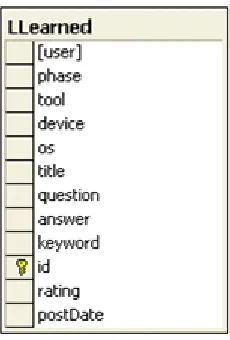
Lessons are stored in Database using two Tables. The Table ‘LLearned’ consists of the
well-structured lesson as submitted by the user. The table ‘Upload’ contains the text,
word, power point or html files submitted. For searching the lessons the User can select
from the indexed categories of investigative suites, target device and operating system,
and enter their search queries. The keywords and title of the lessons, stored in the
database, are searched using these indexes and search query and appropriate matches are
returned. The use of keywords leads in less number of false matches and more correct
results. The user is free to select any or none of the given indexes. While searching
reports too, only title and keywords are searched, the entire text of the report is not
searched, thus generating less noise.
Other Features
Other than the above mentioned features and policies our Repository implements the
following features:
Book marking lessons
Users may want to bookmark lessons of their choice for later use or reference. For
now our implementation does not have a limit on the bookmarks, but in the future,
we may impose and limit and allow users to edit their bookmarks.
Posting Questions to other Users
Users can get answers to Questions that are not available in the repository.
Searching the available resources on the Web
The best resource available for most investigators is online tutorials. We allow
Users to search existing Forums such as http://www.forensicsfocus.com and
Yahoo Groups and incorporate their search results on our Webpage.
Creating lessons from available resources
When the Users finds a tutorial or lesson or article on the Web useful and would
like to submit that article to the repository, then based on his privilege levels, he is
allowed to save that article in the database.
Related work
There is a lot of literature on Knowledge-based systems and Content management
systems. For our Repository of lessons Learned from forensics computing, we looked at
the following works.
KnowledgeTree™ [9] is an Open Source document management system. The product
provides a content repository, workflow and routing of content, content publication and
content metrics definition and analysis. This product allows
• Version control
• Full-text search of common file formats (MS Word, MS Excel, PDF, TXT, HTML)
• Archiving according to expiry date, expiry time period or utilization for enhanced speed
The COTS lessons learned repository [10] aims at disseminating valuable knowledge and
experience between practitioners involved in COTS-based development. The prototype is
at [11]. The lessons are described in the repository by a set of attributes, the most
important being the ones describing the context in which the lesson was learned (type of
system, type of company, number and type of COTS). Other attributes refer to type of
data, recommended audience, relevant life cycle phase, etc. Most of the attributes were
chosen based on a bottom-up effort to differentiate the lessons learned in the initial
repository, but others were added simply because they seemed to reflect issues of interest
to potential practitioners (e.g. impact on cost, quality and schedule).
The interface to the repository supports search and retrieval based on text searches over
all attributes. Links to the original source of each lesson are also provided.
The model we required for the forensics repository required the data to be classified in a
manner that would organize it based upon its utilization in the forensics investigation
process. An officer working on some case, might need to find something about how to
image a file using dd. And so if he looked up information on the web, he might be forced
to read through a lot of tutorials that might not be even relevant to what he is doing. So
we needed a classification that was unique to the digital forensics computing process.
Chapter 5
Technology Overview
5.1 Basic Technologies
For building this Web application, we use the .NET Framework. Web pages are built in
Active Server Pages (ASP.NET). C# is the language used.
The .NET Framework
The .NET Framework consists of two main parts [16]: the common language runtime
(CLR) and a unified, hierarchical class library that includes Active Server Pages
(ASP.NET), an environment for building client applications (Windows Forms), and a
loosely-coupled data access subsystem (ADO.NET). The Microsoft .NET Framework is a
multi-language platform for building, deploying, and running Web Services and
applications.
Common Language Runtime
The common language runtime (CLR) is responsible for run-time services such as
language integration, security enforcement, and memory, process, and thread
management. In addition, the CLR has a role at development time when features such as
life-cycle management, strong type naming, cross-language exception handling, and
dynamic binding reduce the amount of code that a developer must write to turn business
Figure 5.1 The .NET Framework Architecture
Class Libraries
Base classes provide standard functionality such as input/output, string manipulation,
security management, network communications, thread management, text management,
and user interface design features.
The ADO.NET classes enable developers to interact with data accessed in the form of
XML through the OLE DB, ODBC, Oracle, and SQL Server interfaces. XML classes
enable XML manipulation, searching, and translations. The ASP.NET classes support the
development of Web-based applications and Web services. The Windows Forms classes
support the development of desktop-based smart client applications.
Together, the class libraries provide a common, consistent development interface across
all languages supported by the .NET Framework.
Visual Studio .NET
Visual Studio .NET is a complete set of development tools for building ASP Web
ASP.NET Web Application
ASP.NET is a compiled, .NET-based environment; you can author applications in any
.NET compatible language, including Visual Basic .NET, C#, and JScript .NET. Web
Forms is an ASP.NET feature that you can use to create the user interface for your Web
applications. The user interface programming is divided into two distinct pieces: the
visual component and the logic. The visual element is referred to as the Web Forms page.
The page consists of a file containing static HTML, or ASP.NET server controls, or both
simultaneously. The logic for the Web Forms page consists of code that you create to
interact with the form. The programming logic resides in a separate file from the user
interface file. This file is referred to as the "code-behind" file.
Session Management in ASP.NET
HTTP, the underlying transport of the Web, is a memory-less protocol. Every time a
client requests an application, HTTP has no idea of the caller's identity. It simply
forwards the request to the Web server.
Both JSP and ASP.NET use the concept of sessions and Session objects to store data
unique to a particular client while that client is connected to a Web application. When a
session begins, the requesting browser is given unique piece of information, or "ticket,"
that is presented by the browser on subsequent visits to identify the user. The Web
application can then, for example, customize the settings for that user when she visits,
since it can find her personal preferences using the information stored in the Session
The session state has no correspondence to any of the logical entities that make up the
HTTP protocol and specification. The session is an abstraction layer built by server-side
development environments such classic ASP and ASP.NET.
Lifetime of a Session:
An important point about ASP.NET session management is that the life of a session state
object begins only when the first item is added to the in-memory dictionary. Only after
executing code like in the following snippet, can an ASP.NET session be considered
started.
Session["MySlot"] = "Some data";
The Session dictionary generically contains Object types; to read data back, you need to
cast the returned values to a more specific type.
string data = (string) Session["MySlot"];
A script can end a session programmatically by calling the Abandon method of the
Session object. When a user completes an application and a session is no longer needed,
the script can simply call Session.Abandon to end the session and free the server
resources used by that session. A session can also end if the user does not make any
HTTP requests to the ASP application for a specified time-out period. This period
defaults to 20 minutes, but can be adjusted by setting the Timeout property of the Session
object. If a user begins a session, but stops making requests to the Web application, ASP
C#:
C# is an elegant, simple, type-safe, object-oriented language that allows enterprise
programmers to build a breadth of applications.
C# also gives you the capability to build durable system-level components by virtue of
the following features:
• Full COM/Platform support for existing code integration.
• Robustness through garbage collection and type safety.
• Security provided through intrinsic code trust mechanisms.
• Full support of extensible metadata concepts.
Google API
We have integrated the Google Web API [17] into our web-application for searching the
available resources online. With the Google Web APIs service, we can query more than 8
billion web pages and use the search results to create lessons. Google Web APIs are
implemented as a web service. The service supports several SOAP methods.
The web-application connects remotely to the Google Web APIs service and queries its
methods.
RSS 2.0 Feeds
RSS stands for “Really Simple Syndication”. RSS is a XML format designed for sharing
headlines and other Web content. An RSS feed is a regularly updated XML document
grammar for sharing news. Each RSS text file contains both static information about the
site, plus dynamic information about the news headlines, all surrounded by matching start
and end tags. Minimally an RSS feed consists of a channel that represents the news
source, which has a title, link, and description that describe the news source.
Additionally, an RSS feed typically contains one or more item elements that represent
individual news items, each of which should have a title, link, or description.
RSS-aware programs are called news aggregators. A news aggregator can help you find,
organize and view RSS feeds. Our Repository application provides an infrastructure for
generating RSS feeds for “lesson of the day”.
5.2 Database: SQL Server 2000
Microsoft SQL Server is a relational database management and analysis system for
e-commerce, line-of-business, and data warehousing solutions.
SQL Server 2000 includes
• support for XML and HTTP
• Performance and availability features to partition load and ensure uptime and
advanced management and tuning functionality to automate routine tasks.
• SQL Server 2000 offers an enhanced full-text search service that allows you to:
1. Update indexes in the background: Populating or updating an index
does not have to interfere with other tasks. Full-text index updates can be
scheduled in the background using the Full-text Indexing wizard, SQL
2. Choose among three methods of maintaining a full-text index:
Depending on your data and resources, you can choose among the full
rebuild, the timestamp-based incremental rebuild, and the change tracking
methods to maintain your full-text indexes. The full rebuild method
involves rescanning all rows. The timestamp-based incremental rebuild
method only rescans those rows that have changed since the last rebuild
(full or incremental) of the index. With the change tracking method, SQL
Server maintains a list of all changes to the indexed data and you can use
this list to update the full-text index. We use the change tracking
method.
3. The Full-Text Search feature of Microsoft SQL Server 2000 allows you to
perform fast and flexible queries against indexes built on unstructured text
data. A common use of Full-Text Search is that of the search engine for
web sites.
5.3 Multi-Tier IIS Applications
In the implementation of this Prototype Repository we use the n-tier architecture. In this
model, processing is distributed between the client and the server, and business logic is
captured in a middle tier. Most systems perform the following three main tasks, which
correspond to three tiers, or layers, of the n-tier model.
The following table describes the three tiers as discusses in [8]: The three-tier
architecture isolates each major piece of functionality, so that the presentation layer is
data. This model requires much more analysis and design up front, but greatly reduces
maintenance costs and increases functional flexibility in the long run.
Task Tier Description
Presentation
Layer
Tier 1 This layer comprises the entire user experience. Not only does this layer
provide a graphical user interface (GUI) so that users can interact with
the application, input data, and view the results of requests, it also
manages the manipulation and formatting of data once the client
receives it back from the server. In Web applications, a Web browser
performs the tasks of this layer.
Business
logic
Tier 2 Between the interface and data services layers, is the domain of the
distributed application developer. Business logic, which involves the
rules that govern application processing, connects the user in tier 1 with
the data in tier 3. The functions that the rules govern closely mimic
everyday business tasks, and can be a single task or a series of tasks.
The code in this tier must be developed with security in mind because
user input crosses trusted boundaries.
Database
services
Tier 3 Database services are provided by a structured (SQL, Oracle database,
XML database) or unstructured (Microsoft® Exchange, Microsoft®
Message Queuing) data store, which manages and provides access to
of one or more data stores.
The following illustration Figure 5.2 shows the Microsoft technologies [8] that service
the various tiers in the new system architecture.
Chapter 6
Prototype Forensics Repository implementation
6.1 Technology Architecture
The prototype has the following multi tier technology architecture as shown in Figure 6.1
[18]. Figure 6.1 shows where the components are deployed in the architecture and which
tier sustains each component such as the Database, ASP.NET Web Forms and IIS Server.
Figure 6.1 Physical architecture mapped against 3-tier architecture
6.2 Functional Architecture
Figure 6.2 shows the various Web forms deployed in the application. It presents a
When the User logs in, the privilege level associated with the User is retrieved from the
Database. Depending upon the Privilege level, the User can either post lessons with or
without supervision or not post at all.
A new User would require registering to view any lessons. The Home page shows the
most recent questions posted and the solutions if any, the lesson of the Day and the
Bookmarks the User added. A User can Find lessons, Search the Web, create lessons
from the resources available online, add bookmarks, rate lessons as per their discretion.
6.3 Utility Classes and Web Pages
Class Diagram
Figure 6.3 Class Diagram
Login.aspx
Processing Detail: This is the first screen of the application. The Login class
authenticates the User using password hashing against a “repository” database contained
Register.aspx
Processing Detail:
1. Creates new user accounts
2. Checks for duplicate accounts
3. Stores user information in the Database
Home.aspx
Processing Detail: The Home page retrieves the top 5 most recent questions posted and
the solutions if any, the lesson of the Day and the Bookmarks the User added from the
database.
Mailing List
Users can post Questions, which can be answered by any other User. The mailing List
session interacts in the following way amongst the pages postQuestion.aspx,
ViewMessage.aspx and sendReply.aspx
postlesson.aspx
Processing Detail: Depending upon the phase selected, Imaging, data recovery, Data
Analysis, user is brought to a page which indexes a list of investigative Suites/Tools,
The User submits the lesson and depending upon the User’s privilege level, the lesson is
either added to the Database and available for other Users to view it, or is sent to a
Supervisory board for approval, and posted later if approved.
On validation, the stored Procedure ‘postLLearned’ is executed, which stores the lesson
into the Database. The User may also Upload a File that will be stored in the Database
Table Uploads.
Figure 6.5 Snapshot
Findlesson.aspx
Processing Detail: This page retrieves lessons from the Database depending upon the
indexes selected like investigative Suites, operating Systems, target device and the search
word. The Database stores lessons in LLearned table. Only the title and keywords
columns of the table LLearned are indexed for full-text searches. So it looks up for the
search words in the title and keywords columns and returns the search results.
It also searches the Text/Html/Document/PowerPoint reports uploaded with the given
search words and retrieves the documents. Users’ bookmarks can also be viewed here.
Figure 6.6 Database table LLearned
lessonOfDay.aspx
Depending upon User ratings a lesson of the day is chosen and converted into RSS Feed,
so that the Users can use a RSS reader to receive these feeds everyday.
RSS Request Processing Detail:
The figure below [19] explains the RSS request processing Details. The client browser or
RSS reader requests an RSS document from the site. IIS sees the .rss file extension and
invokes .NET to process it. Based on information in the Web.Config file, .NET invokes

![Figure 3.2 Usual software tools in forensics computing [6]](https://thumb-us.123doks.com/thumbv2/123dok_us/8939374.1849102/28.612.209.453.408.635/figure-usual-software-tools-forensics-computing.webp)