Security and Law
Security and Law
Volume 7 Number 2 Article 9
2012
Technology Corner Automated Data Extraction Using Facebook
Technology Corner Automated Data Extraction Using Facebook
Nick V. Flor
Technology Corner Automated Data Extraction Using Facebook
Follow this and additional works at: https://commons.erau.edu/jdfsl
Part of the Computer Engineering Commons, Computer Law Commons, Electrical and Computer Engineering Commons, Forensic Science and Technology Commons, and the Information Security Commons
Recommended Citation Recommended Citation
Flor, Nick V. (2012) "Technology Corner Automated Data Extraction Using Facebook," Journal of Digital Forensics, Security and Law: Vol. 7 : No. 2 , Article 9.
DOI: https://doi.org/10.15394/jdfsl.2012.1124
Available at: https://commons.erau.edu/jdfsl/vol7/iss2/9
This Article is brought to you for free and open access by the Journals at Scholarly Commons. It has been
accepted for inclusion in Journal of Digital Forensics, Security and Law by an authorized administrator of Scholarly Commons. For more information, please contact [email protected].
Technology Corner
Automated Data Extraction Using Facebook
Nick V. Flor
Marketing, Information & Decision Sciences
Anderson School of Management
University of New Mexico
[email protected]
ABSTRACT
Because of Facebook’s popularity, law enforcement agents often use it as a key source of evidence. But like many user digital trails, there can be a large amount of data to extract for analysis. In this paper, we explore the basics of extracting data programmatically from a user’s Facebook via a Web app. A data extraction app requests data using the Facebook Graph API, and Facebook returns a JSON object containing the data. Before an app can access a user’s Facebook data, the user must log into Facebook and give permission. Thus, this approach is limited to situations where users give consent to the data extraction.
AUTOMATED DATA EXTRACTION USING FACEBOOK
Facebook is the world’s most popular social networking site. The site allows users to post text, pictures, and videos, as well as to view other users’ content— subject to friend and privacy settings. On a given day, Facebook reports an average of 526 million active users on their site, with over 80% of its monthly active users outside the United States and Canada (Facebook, 2012). In the United States alone slightly over 50% of the population has a Facebook account. Because of its popularity, many individuals under criminal investigation are likely to have Facebook accounts, and it is common for law enforcement agents to subpoena a suspect’s Facebook records as governed by the United States Code, Title 18, Chapter 121, Sections 2701-2712—“Stored wire and electronic communications and transactional records access” (Facebook, 2012b).
When investigators receive a user’s Facebook records via subpoena they get an archive similar to what Facebook calls the user’s “Expanded Archive”, which the site allows users to download on demand (Facebook, 2012a). This archive includes a user’s: profile information, postings, friends postings, photos and videos uploaded, friend list, notes, event RSVPs, sent & received private messages, IP addresses, login info, log out info, pending friend requests, account status changes, poke info, events info, mobile phone numbers, currently listed city & hometown, family member names, relationship info, list of languages, and history of changes made to the account name.
The problem is that this archive is merely a data dump and it can be difficult to filter and analyze — see Carioli (2012) for an example of Facebook data received by police investigators. However, if one has a user’s consent, such as an investigator for a defense team or if a suspect gives law enforcement consent to access his or her Facebook account, more automated techniques can be used. In this paper, I describe the basics of automating the extraction of data from a user’s Facebook account. The key technology one uses to extract data is Facebook’s Graph API.
FACEBOOK GRAPH API
The Facebook Graph API (Facebook, 2012c) is an application programming interface that allows application developers to access data programmatically from a user’s Facebook account. In addition to accessing data, the API can also be used to automate the posting of content to a user’s Facebook account. The API is based on a Representational State Transfer (“REST”) web service design (Fielding & Taylor, 2002). While at a theoretical level, the REST design architecture is independent of any specific networking technology, from a practical standpoint a REST web service allows a developer to read and write information from a service provider using standard HTTP methods such as GET and POST.
An Example of Retrieving Data Manually from the Facebook Graph API
If you have a Facebook account, you can experiment with retrieving your public information via Facebook’s Graph API by entering
https://graph.facebook.com/USERNAME into your browser’s address (URL) box.
For example, my Facebook username is ProfessorF, so to access my publically available information I can enter https://graph.facebook.com/ProfessorF into my browser’s address box (refer to Figure 1).
Figure 1. An example of using the Facebook Graph API to retrieve my publically available Facebook information. In response to a data request of the
form https://graph.facebook.com/USERNAME, Facebook returns a JSON file (see orange pop-up) instead of a web pate.
Instead of Facebook returning a webpage that is displayed in the browser, Facebook returns a javascript (.js) file containing my publically available information, which my browser gives me the option of saving or opening. When I save the file with a .txt extension and then open it, I discover that it contains the following data (see Figure 2).
{
"id": "100000417681039", "name": "Nick Flor", "first_name": "Nick", "last_name": "Flor", "username": "ProfessorF", "gender": "male", "locale": "en_US" }
Figure 2. The content of the professorf.js file returned by Facebook after I entered https://graph.facebook.com/ProfessorF into my browser’s address box.
The data is formatted in JSON.
This data is essentially what a Facebook user sees if he or she is not on my “friend list” and tries to view my Facebook page, but the data in this case is formatted in JavaScript Object Notation.
Java Script Object Notation (JSON)
JavaScript Object Notation (or “JSON” for short) “is a text format for the serialization of structured data… derived from the object literals of JavaScript”, (Crockford, 2006). JSON has four primitive value types: strings, numbers, booleans, and null; along with two structured types: objects and arrays. An object is a collection of “name : value” pairs enclosed within curly braces “{…}”, and an array is a collection of values enclosed within square brackets “[…]”. For example, the content of the file in Figure 2 is a JSON object with seven name : value pairs, e.g., “username” : “ProfessorF”.
The Facebook Graph API and the Data ID
To summarize, one can extract information from a user’s Facebook account in a computer-readable form via the Facebook Graph API. Extraction requires specifying a URL in the format https://graph.facebook.com/ID. A key point is that every piece of data stored in Facebook’s database has a unique ID associated with it, which is usually a label or a number. For example, instead of https://graph.facebook.com/ProfessorF, I could have retrieved the same
information with the URL https://graph.facebook.com/100000417681039, which is the ID associated with my public information (see the value of the “ID” key in Figure 2). To access non-public information requires both specifying an ID in the URL and passing an authorization code in the URL.
EXTRACTING NON-PUBLIC USER DATA PROGRAMMATICALLY VIA THE FACEBOOK GRAPH API: A TUTORIAL
While one can experiment with the Facebook Graph API using a browser, the potential of the API for forensics, business, or other kinds of analyses is realized when the API is accessed programmatically. However, there are certain technology requirements that must first be met.
Step 0. Meet Technology Requirements
To extract data from a user’s Facebook account programmatically you will need: (1) your own Facebook account; and (2) your own website—both domain name and hosting space. The first is necessary because Facebook requires that you register your app under your Facebook username, and the second is needed for you to store your web apps and for Facebook to ensure that the proper level of security exists between the user and your website. Note that instead of a web app, one can also access the Facebook Graph API by writing an iPhone/iPad app or an Android app, but web apps are generally easier to develop. The following example uses my website is professorf.com.
Step 1. Register Your Website / Provide Preliminary App Details
Given a website to host your data-extraction app, the next step is to register your website with Facebook and to enter preliminary details about the app. Direct your browser to:
https://developers.facebook.com/apps
Figure 3. The App Information Page for Facebook Developers. Developers use this page to enter the website that will host their Facebook apps and to add
details about apps.
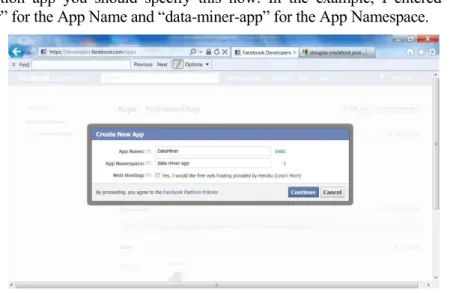
Click on the button labeled “+ Create New App” near the upper-right corner of the page, which will display the “Create New App” dialog box (see Figure 4). Enter a unique App Name and a unique label for the App Namespace, but leave the Web Hosting box unchecked. Facebook will enforce the uniqueness of both the App Name and App Namespace, and you will not be allowed to continue until you provide unique values. Note that the Namespace is for more advanced programming and is optional, but since it is common to modify and extend a data-extraction app you should specify this now. In the example, I entered “Data Miner” for the App Name and “data-miner-app” for the App Namespace.
Figure 4. Dialog Box: Create New App. Developers enter a unique App Name and a unique label for the App Namespace — Facebook will enforce
uniqueness.
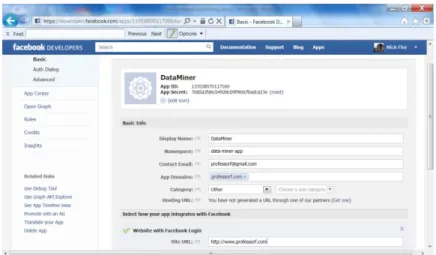
Click on the “Continue” button, which will bring you to a CAPTCHA security page (not shown). After entering the CAPTCHA letters, your browser will display the Basic information page for your app (see Figure 5).
Figure 5. App Basic Information Page. This page is prfilled with your e-mail, the App Name, and the App Namespace (see Figure 4). Enter values for
the input boxes labeled App Domains, e.g., professorf.com; Category, e.g., Other, and Site URL, e.g., http://www.professorf.com.
Facebook automatically pre-fills most of the input boxes on this page including
Contact E-mail, Display Name, and Namespace. You must enter values for the input boxes labeled App Domains and Category. You must also check the label
Website with Facebook Login and enter a Site URL. For App Domain, and for
Site URL enter the location of your website, e.g., professor.com & http://www.professorf.com. When finished, scroll to the bottom of the page and click the “Save Changes” button (not shown). The web page will display the message: “Changes saved. Note that your changes may take several minutes to propagate to all servers.”
At this point you are ready to develop your data extraction app. Before doing so, write down the AppID, which is displayed underneath the App Name near the top of the page. This is a unique number that Facebook assigns to your app, which you will embed in your code. Facebook uses this ID along with your site’s domain for authentication and authorization. In this example, the AppID is 133538570117160 (see Figure 5). If you misplace your AppID, you can always revisit:
https://developers.facebook.com/apps
Step 2. Create a “Skeleton” HTML FileCreate a “skeleton” HTML file using your favorite code editor. I recommend using Microsoft’s free Visual Web Developer if you are using a PC. However, a simple program like Notepad will work just as well. A “skeleton” HTML file is a file containing empty <html>, <head>, <title>, and <body> tags. While it is
beyond the scope of this paper to discuss HTML, there are many good tutorials online. Figure 6 depicts a skeleton html file.
<html> <head>
<title>Sample: Very Basic Facebook-Friend Data Mining Script</title> <script> </script> </head> <body> </body> </html>
Figure 6. Skeleton HTML File. See text for explanation.
Step 3. Add the Javascript SDK Access Code in the <body> Tag
To facilitate app development, Facebook provides developers access to their “Javascript SDK”. The Javascript SDK shields developers from many of the low-level coding details needed to access the Facebook Graph API, and from the details of authentication and authorization needed by your app to in order to retrieve a user’s non-public information. Thus, a developer does not have to write code to send an HTTP URL and then write code to parse the JSON object returned (as in Figure 1 and Figure 2). Instead the developer calls functions that map to HTTP requests and that return JSON objects. To use the Javascript SDK, a developer adds the code in Figure 7 just after the <body> tag in the skeleton html file. Note that the code is the same for all web apps, except you substitute the appId attribute from step 2.
<div id="fb-root"></div> <script>
window.fbAsyncInit = function () { FB.init({
appId: '133538570117160', // App ID status: true, // check login status
cookie: true, // enable cookies for session access xfbml: true // parse XFBML
}); };
// Load the SDK Asynchronously (function (d) {
var js, id = 'facebook-jssdk', ref = d.getElementsByTagName('script')[0]; if (d.getElementById(id)) { return; }
js = d.createElement('script'); js.id = id; js.async = true;
ref.parentNode.insertBefore(js, ref); } (document));
</script>
Figure 7. Facebook Javascript SDK Access Code. This code goes immediately after the <body> tag. See text for an explanation of the code’s function.
Step 4. Add a Facebook Login Button and Set the Scope Attribute
In order for your code to access a user’s non-public information programmatically, the user must login to Facebook. Facebook uses OAuth 2.0 for authorization (Recordon & Hardt, 2012). Briefly, before your app can access a user’s information, the user must log onto Facebook (authentication) and then explicitly give permission to your app (authorization) to access non-public information. Facebook then returns an access token that your app can use when it calls the Facebook Graph API. It should be noted, however, that the Javascript SDK hides the access token from the developer. If one chooses not to use the SDK, the Graph API documentation shows how the access token is used (Facebook, 2012c)—it is a key-value attribute appended to the URL sent to the Graph API.
To allow the user to authenticate with Facebook and authorize your app to access the user’s information, you add the following code after the Javascript SDK access code (see Figure 8), which will display a Facebook Login Button in your web app. This code will be the same in all your web apps, except for the scope
attribute. The value of the scope attribute specifies the type of non-public user information that your app will retrieve. If you do not specify a value for this attribute, your app can only access a user’s basic information (id, name, picture, gender, and locale) or basic objects like the user’s list of friends. The example scope attribute in Figure 8 lists: email, user_checkins, and read_stream. This gives an app the ability to also access a user’s email, the locations that a user checks into, and to read postings on the user’s wall.
<div class="fb-login-button"
scope="email,user_checkins,read_stream"> Login with Facebook
</div>
Figure 8. The Facebook Login Button. This code goes immediately after the Javascript SDK Code. See text for an explanation of the code’s function. The list of possible values for the scope attribute can be found at the Facebook Developer’s Permissions Reference page: https://developers.facebook.com/docs/authentication/permissions/
Step 5. Determine How to Request Data and the Format of the Return Object
While the Facebook developer’s documentation is copious, it is incomplete with regard to the format of the JSON objects returned by the Graph API. Thus, before writing code, you will have to experiment by (1) making calls to the Graph API manually—using a browser, and (2) inspecting the results returned visually, as in Figure 1 and Figure 2, respectively. The first will determine how to request the data and the second determines the structure of object returned.
For example, suppose you wanted to retrieve posts from a user’s Facebook page (Wall). The Graph API documentation indicates that to do this manually, the URL is:
https://graph.facebook.com/me/feed?access_token=ACCESS_TOKEN
Entering that into a browser returns a JSON object with a structure similar to Figure 9.
{
"data": [ {
"id": "value omitted", "from": {object omitted}, "message": "value omitted",
"actions": [array of objects omitted], "privacy": {object omitted},
"type": "value omitted",
"created_time": "value omitted", "updated_time": "value omitted", "comments": {
"data": [array of objects omitted] "count": value omitted
} }, …
Figure 9. Fragment of the JSON Object Returned From the Graph API for a User’s Wall Postings Request
Analyzing the JSON object returned shows that it consists of a single “data” field whose value is an array of objects. Each object has at least the fields: id, from, message, actions, privacy, type, created_time, updated_time, and comments. Moreover, the values of these fields can be objects or arrays of objects. Knowing the request format and the structure of the return object gives you the information necessary to write the data-extraction code.
Step 6. Write Code
Given that you know how to request the data manually and the structure of the returned object, you can write both the code to request the data programmatically,
and the code to extract the values in the JSON return object. To request the data programmatically, you use the Javascript SDK function “FB.api”, passing two parameters. The first parameter is the ID of the data object that you are requesting. Generally, this id is everything between “https://graph.facebook.com” and the “?access_token=xxx”. In our example, the id would be “/me/feed”. The second parameter is a callback function, which is invoked when the call completes. The callback function is passed the JSON return object. Figure 10 depicts javascript code that calls the FB.api function with our example ID and that provides a callback function to extract specific data.
…
<script>
function DataMineWall() {
FB.api('/me/feed', function (response) { var data = response.data;
dvResult.innerHTML = "Total Messages: " + data.length + "<br />";
for (var i = 0; i < data.length; i++) {
dvResult.innerHTML += data[i].message + '<br />'; } }); } </script> …
<input type="button" value="Data Mine Wall" onclick="DataMineWall()" />
Result: <div id="dvResult"></div> …
Figure 10. Call to FB.api, Button to Call the Code, and <div> to Hold the Results. See Text For Explanation.
The JSON return object is passed as “response”. The code works as follows. First, the “data” for the response is placed into a variable named data. Recall from the previous step that this particular data object is an array of objects. So to extract the values in the array of objects, a loop is needed. In the sample code, I next loop through the array of objects extracting just the “message” and appending it to a <div> container (dvResult) on the webpage.
The call to FB.api is contained in the function DataMineWall() and the function is invoked via a button on the web page with the caption “Data Mine Wall”. The entire code for extracting the messages for a Facebook user is depicted in Appendix A. I have also given the code for extracting a user’s entire list of friends and displaying this list on a web page in Appendix B.
With the code written, the final step is to upload it to your website and to test the code. I uploaded the file to professor.com as datamine_wall.html. If you want to test this code, enter the following URL into a browser
http://professorf.com/datamine_wall.html
This will bring up the following simple web page (see Figure 11).
Figure 11. The Data Extraction Web App.
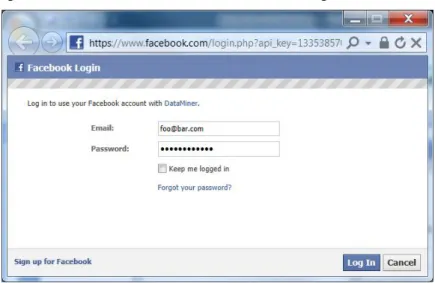
Click on the “Login with Facebook” button. The browser will direct you to a login page on the Facebook site for authentication (see Figure 12).
Figure 12. Facebook Login Page
If you already have a Facebook account, login to Facebook by entering your Email and Password, then click the “Log In” Button. Otherwise click on the
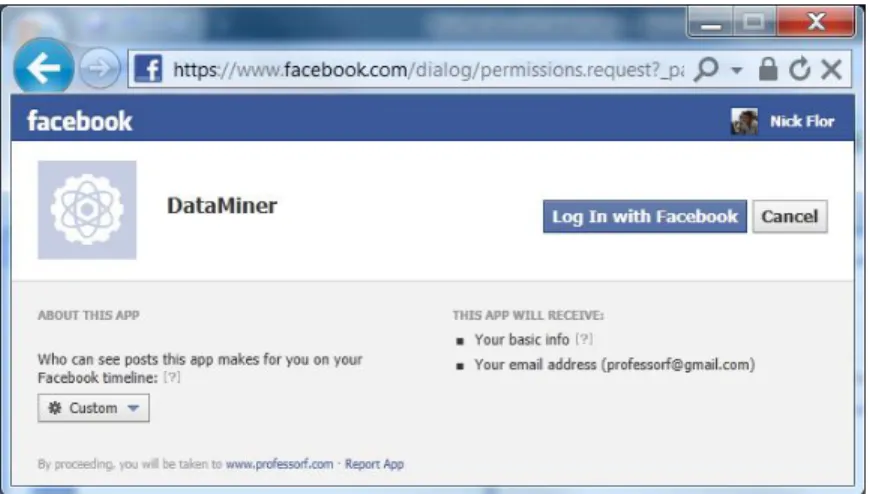
“Sign up for Facebook” link and then log in. Facebook will display a page with information about the DataMiner app, and with a description of the basic information that the DataMiner app will access (see Figure 13).
.
Figure 13. Facebook Authorization Page for the DataMiner App to Access Basic Info.
Click on the “Log In with Facebook” button to give the DataMiner app authorization to access your basic information and your e-mail address. Because the DataMiner app also accesses non-public information—specifically, postings on your Facebook wall—Facebook will display another page that gives you the option of authorizing access to this non-public information (see Figure 14).
Figure 14. Another Authorization Page that Gives a User the Option of Authorizing the DataMiner App to Access Non-Public Information on the
User’s News Feed (Wall).
You can now click on the “Data Mine Wall” button and the script will display the total number of messages on your wall and the messages themselves (see Figure 15).
Figure 15. A List of Messages from the User’s Wall
SUMMARY
This paper describes the basics of extracting data from a user’s Facebook account using a web app. The main preparatory steps included registering your app on Facebook, determining the ID for the data request, and discovering the format of the object returned. Knowing the data ID and the structure of the JSON return object allows one to write an app that requests data via the Facebook Graph API and that extracts the information inside the object. The paper presented an example of extracting the messages from a user’s Facebook wall, which can serve as the foundation for more complex data extraction. The entire code for this example is in Appendix A. Another example of extracting a user’s friend list is given in Appendix B.
REFERENCES
Carioli, C. (2012, April 6). When the Cops Subpoena your Facebook Information, Here's what Facebook Sends the Cops. Retrieved June 30, 2012,
from The Boston Phoenix:
http://blog.thephoenix.com/blogs/phlog/archive/2012/04/06/when-police-subpoena-your-facebook-information-heres-what-facebook-sends-cops.aspx Crockford, D. (2006, July). The Application/JSON Media Type for JavaScript Object Notation (JSON). Retrieved June 30, 2012, from The Internet Engineering Task Force (IETF): http://www.ietf.org/rfc/rfc4627.txt
Facebook. (2012, March). Key Stats. Retrieved June 30, 2012, from Facebook: http://newsroom.fb.com/content/default.aspx?NewsAreaId=22
Facebook. (2012a). Download Your Information. Retrieved June 30, 2012, from Facebook: https://www.facebook.com/help/?page=116481065103985 Facebook. (2012b). Information for Law Enforcement Authorities. Retrieved June 30, 2012, from Facebook: https://www.facebook.com/safety/groups/law/guidelines/
Facebook. (2012c). Graph API. Retrieved June 2012, 30, from Facebook: https://developers.facebook.com/docs/reference/api/
Fielding, R. T., & Taylor, R. N. (2002). Principled Design of the Modern Web Architecture. ACM Transactions on Internet Technology, 2, 115-150.
Recordon, D., & Hardt, D. (2012, June 8). The OAuth 2.0 Authorization Framework. Retrieved June 30, 2012, from The Internet Engineering Task Force (IETF): http://tools.ietf.org/html/draft-ietf-oauth-v2-28
APPENDIX A: SCRIPT FOR EXTRACTING MESSAGES FROM A USER’S FACEBOOK WALL
You can test this script at:
http://www.professorf.com/datamine_wall.html
<html> <head>
<title>Sample: Very Basic Facebook-Wall Data Mining Script</title> <script>
function DataMineWall() {
FB.api('/me/feed', function (response) { var data = response.data;
dvResult.innerHTML = "Total Messages: " + data.length + "<br />";
for (var i = 0; i < data.length; i++) {
dvResult.innerHTML += data[i].message + '<br />'; } }); } </script> </head> <body> <div id="fb-root"></div> <script> window.fbAsyncInit = function () { FB.init({ appId: '133538570117160', // App ID status: true, // check login status
cookie: true, // enable cookies for session access xfbml: true // parse XFBML
}); };
// Load the SDK Asynchronously (function (d) {
var js, id = 'facebook-jssdk',
ref = d.getElementsByTagName('script')[0]; if (d.getElementById(id)) { return; }
js = d.createElement('script'); js.id = id; js.async = true; js.src = "//connect.facebook.net/en_US/all.js"; ref.parentNode.insertBefore(js, ref); } (document)); </script> <div class="fb-login-button" scope="email,user_checkins,read_stream"> Login with Facebook
</div>
<input type="button" value="Data Mine Wall" onclick="DataMineWall()" />
Result: <div id="dvResult"></div> </body>
APPENDIX B: SCRIPT FOR EXTRACTING A FACEBOOK USER’S FRIEND LIST
You can test this script at:
ttp://www.professorf.com/datamine_friends.html
<html> <head>
<title>Sample: Very Basic Facebook-Friend Data Mining Script</title>
<script>
function DataMineFriends() { FB.api('/me/friends', function (response) { var data= response.data;
dvResult.innerHTML = "Total Friends: " + data.length + "<br />";
for (var i = 0; i < data.length; i++) {
dvResult.innerHTML += data[i].name + '<br />'; } } ); } </script> </head> <body> <div id="fb-root"></div> <script> window.fbAsyncInit = function () { FB.init({ appId: '133538570117160', // App ID status: true, // check login status
cookie: true, // enable cookies for session access xfbml: true // parse XFBML
}); };
// Load the SDK Asynchronously (function (d) {
var js, id = 'facebook-jssdk', ref = d.getElementsByTagName('script')[0]; if (d.getElementById(id)) { return; }
js = d.createElement('script'); js.id = id; js.async = true; js.src = "//connect.facebook.net/en_US/all.js";
ref.parentNode.insertBefore(js, ref); } (document));
</script>
<div class="fb-login-button" scope="email,user_checkins"> Login with Facebook
</div>
<input type="button" value="Data Mine Friends" onclick="DataMineFriends()" />
Result: <div id="dvResult"></div> </body>