At a glance:
More powerful management
Improved performance and scalability
Better security and availability
Changes for developers
SQL Server 2008:
what’s new?
Once again, Microsoft has released a new version
of SQL Server that promises to improve life for
database administrators. The latest version is SQL
Server 2008, and it offers a large variety of new
Randy Dyess
features and functionality that will make the administration a whole lot better.
Database administrators who have been using SQL Server 2005 for any length of time will find many of the same features that they use in their day-to-day jobs, but they’ll also soon discover that these familiar tools have been enhanced in SQL Server 2008. The new functionality built on the existing features goes a long way in reducing the number of workarounds or customisations once needed for using various features in complex data-base environments.
New features in SQL Server 2008 involve a large range of database job roles, making it difficult to categorise them. As I classify fea-tures under different topics, I realise that some readers will be wondering why I placed Feature X under Category Y when it clearly belongs under Category Z. It’s a matter of perspective, and it’s affected by how your company does business.
I do understand that database people of-ten find themselves doing many different job roles, but I will try to break down the new features so they fit into the following
This article is based on a prerelease version of SQL Server 2008. All information herein is subject to change.
34 To get your FREE copy of TechNet Magazine subscribe at: www.microsoft.com/uk/technetmagazine
Performance, High Availability, Security, De-velopment and Business Intelligence. What’s new for management?
For database administrators (like me), the additional management functional-ity makes SQL Server 2008 a very exciting new product. The new policy management, multiple server query capability, configura-tion servers and data collector/management warehouse offer powerful new abilities for database administrators who are often re-sponsible for managing large and complex database environments with hundreds or thousands of databases on dozens or even hundreds of servers.
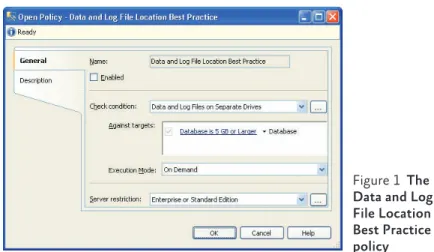
The SQL Server 2008 Policy Management feature, which was actually called Declara-tive Management Framework in the Com-munity Technology Previews (CTPs), allows you to create and execute configuration policies against one or more database serv-ers. With these policies, you can ensure that standard configuration settings are applied and maintained on each of the targeted serv-ers and databases. You can see an example of this feature in Figure 1.
Policies are created from a predefined set of facets. Each facet contains a subgroup of SQL Server 2008 configuration settings and other events that you can control. You pair these facets with conditions in order to cre-ate a policy. Conditions are the values that are allowed for the properties of a facet, the configuration settings, or other events con-tained within that facet.
Conditions are also values used for policy filters. Say you want the policy to be execut-ed only against a certain database. In this case, you can create a condition that contains the name of the database and then add this con-dition to the policy. Now the policy will only apply to that one database. Trust me on this – SQL Server 2008 Policy Management may sound complex, but once you try it you’ll re-alise it’s pretty intuitive.
The new Multiple Server Interaction and Configuration Servers capabilities come in handy when you need to execute queries against multiple servers at the same time. You can register servers in your Management Studio and then place those servers
togeth-ecute a policy or query against all the servers in the grouping, you simply right-click on the grouping and do so.
As an added benefit, you can configure this feature to return one resultset per server or merge all the resultsets together into one big resultset. You can also specify whether you want the server and database names as part of the results so you can separate the indi-vidual results from each server. Being able to store the registered servers on the configu-ration server rather than in each individual’s Management Studio is a big benefit.
Another nice new management feature is the Data Collector. Database administra-tors often need to collect management data from a large number of servers, and many of these DBAs have created their own custom solution for doing so. The Data Collector is a built-in mechanism that eases the task of col-lecting management-related data. It allows you to use the SQL Server Agent and SQL Server Integration Services (SSIS) to create a framework that collects and stores your data while providing error handling, auditing, and collection history.
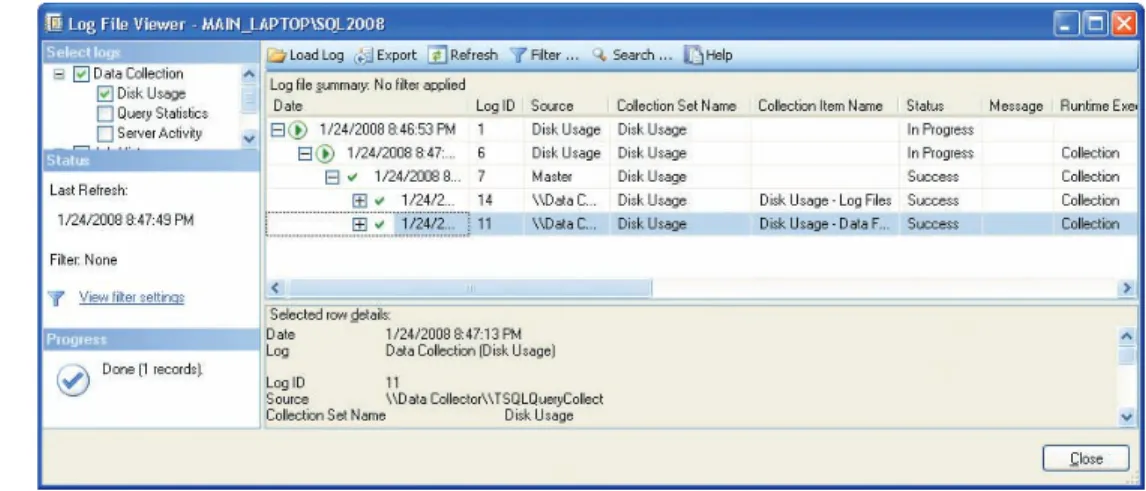
Unlike third-party tools and custom jobs, the Data Collector will be easily understood by most database administrators since it uses SQL Server Agent and SSIS to create a set of jobs and packages to handle the connections, collection, and storage of data (as you can see in Figure 2). Once this data is stored in a cen-tral location, referred to as the Management Warehouse, it can be viewed and organised through a set of T-SQL statements and SQL Server 2008 Reporting Services reports. This
Figure 1 The Data and Log File Location Best Practice policy
Management
allows you
to create
and execute
configuration
policies
against one
or more
database
servers
central data store makes it much easier to analyse and view the overall management metrics of the database environment. What’s new for scalability?
Over the years, SQL Server database admin-istrators have found their database environ-ments becoming increasingly large. As the size of your database environment increases, you need new methods and tools to achieve the scalability that most enterprises require. SQL Server 2008 has introduced several new features that will help.
SQL Server 2008 has built-in compression that allows you to compress the database files and the transaction log files associated with the compressed database. SQL Serv-er 2005 introduced the ability to compress data on a read-only file or filegroup, but this form of compression simply used the com-pression ability of Windows NTFS. With SQL Server 2008, you now get both row-lev-el and page-levrow-lev-el compression, offering ben-efits you don’t get with compression at the data file level.
Compression at the row and page levels re-duces the amount of data space needed, plus it reduces the amount of memory needed since the data remains compressed while in memory. Compressed data in memory results in increased memory utilisation, which ben-efits the scalability of many systems.
SQL Server 2008 also introduces com-pression at the backup level. While database backups only back up the active portion of the database, this still represents as many as hundreds of gigabytes or even dozens of tera-bytes. In database environments that have
more than one copy of a multi-terabyte back-up file, these backback-ups often take back-up valuable storage space that could be used more effec-tively. By allowing database administrators to compress their backup files, SQL Server 2008 frees up some of this space, so it can be used for live data.
Then there’s the Resource Governor. This new feature lets you define the amounts of resources that individual or groupings of workloads are allowed to use during execu-tion. With Resource Governor, you can cre-ate an environment in which many different workloads coexist on one server without the fear of one or more of those workloads over-whelming the server and reducing the per-formance of the other workloads.
The benefit of this feature is that you can more effectively use the total amount of re-sources that are available on your database servers. Figure 3 shows an example of using the Resource Governor to limit activity on a server.
What’s new for performance?
The general performance of databases im-proves with SQL Server 2008. Thanks to several new features found in SQL Server 2008, you can control and monitor the per-formance of your databases and the applica-tions that execute against them.
When you have large numbers of transac-tions performed every second, the locking that normally occurs during these transac-tions can have a negative impact on the per-formance of your database applications. SQL Server is designed to reduce the total num-ber of locks a process holds by escalating
Figure 2 The Data Collector Disk Usage Log file
36 To get your FREE copy of TechNet Magazine subscribe at: www.microsoft.com/uk/technetmagazine
important to understand that this escalation of locks can cause problems. For example, a single transaction can lock an entire table and prevent other transactions from work-ing with that table.
SQL Server 2008 works with the table par-titioning mechanism (which was introduced in SQL Server 2005) to allow the SQL Server engine to escalate locks to the partition level before the table level. This intermediary lev-el of locking can dramatically reduce the ef-fects of lock escalation on systems that have to process hundreds and thousands of trans-actions per second.
SQL Server 2008 offers several new query processor improvements for when the ry interacts with partitioned tables. The que-ry optimiser can now perform queque-ry seeks against partitions as it would against individ-ual indexes by only working with the parti-tion ID and not the partiparti-tioning mechanism at the table level.
What’s new for high availability?
As database environments become more complex and databases grow in size, the abil-ity to ensure the availabilabil-ity of those data-bases becomes increasingly difficult. The familiar mechanisms you have used in the past to achieve high availability are still pres-ent in SQL Server 2008. But some of these features have been enhanced in SQL Server 2008 and some new ones have been added.
With SQL Server 2005, many administra-tors started implementing database mirror-ing to achieve high availability. SQL Server 2008 offers many improvements for the prac-tice of database mirroring. For instance, in the past, database mirroring occasionally had performance issues related to moving trans-action log data from the principal to the mir-rored databases. In response, SQL Server 2008 now reduces the amount of informa-tion that is moved across the network from the principal’s transaction log to the mirror’s transaction log by compressing the informa-tion before sending it to the mirror’s transac-tion log for hardening.
You now have the ability to repair corrupt-ed data pages on the principal. If a principal database suffers corrupt data pages due to
er-rors 823 and 824, the principal can request a fresh copy of those data pages from the mir-rored servers. This request of good data pages is an automated process that is transparent to any users who are currently accessing the principal databases.
Another new feature, Hot Add CPU, lets you add additional CPUs to a database server without affecting the availability of the
da-USE master go
--Drop function
IF OBJECT_ID(‘rgclassifier_demo’,’Function’) IS NOT NULL DROP FUNCTION rgclassifier_demo
go
--Create a classifier function for report group CREATE FUNCTION rgclassifier_demo() RETURNS SYSNAME WITH SCHEMABINDING
AS BEGIN
DECLARE @group_name AS SYSNAME IF (USER_NAME() LIKE ‘%Launch_Demo%’) SET @group_name = ‘demogroup’ RETURN @group_name
END GO
--Drop workload group for anything coming from Management Studio IF EXISTS (SELECT name FROM sys.resource_governor_workload_groups WHERE name = ‘demogroup’)
BEGIN
DROP WORKLOAD GROUP demogroup END
GO
--Create workload group CREATE WORKLOAD GROUP demogroup GO
--Register the classifier function with --Resource Governor
ALTER RESOURCE GOVERNOR WITH (CLASSIFIER_FUNCTION= dbo.rgclassifier_demo) GO
--Alter the dbogroup workload group to only --allow 10% of CPU for each workload request ALTER WORKLOAD GROUP demogroup
WITH (REQUEST_MAX_CPU_TIME_SEC = 10) GO
--Create a new resource pool and set a maximum CPU limit for all workloads. IF EXISTS (SELECT name FROM sys.resource_governor_resource_pools
WHERE name = ‘pooldemo’) DROP RESOURCE POOL pooldemo GO
CREATE RESOURCE POOL pooldemo WITH (MAX_CPU_PERCENT = 40) GO
--Configure the workload group so it uses the --new resource pool.
ALTER WORKLOAD GROUP demogroup USING pooldemo
GO
--Apply the changes to the Resource Governor --in-memory configuration.
ALTER RESOURCE GOVERNOR RECONFIGURE GO
tabases residing on that server. However, you should know that Hot Add CPU does have some limitations, as it is only useful when running the 64-bit Itanium-based Windows Server 2008 Enterprise Edition or Datacen-ter Edition, and it requires the EnDatacen-terprise Edition of SQL Server 2008.
What’s new for security?
SQL Server 2005 introduced data security in the form of data encryption. With SQL Server 2008, encryption is much enhanced through two new features: Extensible Key Manage-ment and Transparent Data Encryption.
Extensible Key Management allows for an enhanced structure to safely store the keys used in the encryption infrastructure – not only in the database itself but also outside the database in third-party software modules or with a Hardware Security Module.
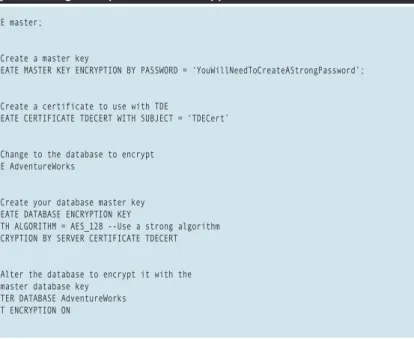
Transparent Data Encryption offers im-proved flexibility for encrypting data by al-lowing encryption to be a property of the database and not just the result of func-tions in a line of code. The result is that ad-ministrators do not have to perform the large number of changes that are required for their database structure and application code when they perform encryption at the data level. The code in Figure 4 shows how you can encrypt a database with Transparent Data Encryption.
What’s in store for developers?
Database administrators are not the only peo-ple that will benefit directly from the chang-es in SQL Server 2008. There are a number of new features that are designed to help da-tabase developers. These range from several new T-SQL enhancements to new compo-nents that can help developers create and utilise database queries.
Many database developers are responsi-ble for creating the queries that are needed for returning the data required for their ap-plications. You’re probably familiar with the LINQ (Language Integrated Query) tool that enables database developers to issue queries against a database using a Microsoft .NET-based programming language instead of the normal T-SQL statements. Well, SQL Serv-er 2008 enhances LINQ by providing a new LINQ to SQL provider that allows develop-ers to issue LINQ commands directly against SQL Server tables and columns. This will re-duce the amount of time it takes to create new data queries.
When developing against databases, de-velopers use higher-level objects that they map to individual database tables and col-umns. These objects, also known as entities, represent the data needed for database appli-cations and, therefore, the developer doesn’t need to understand the actual storage struc-ture of the data and schema of the database. The new ADO.NET Entity Framework now allows developers to create database queries using these entities. The abstracting of the underlying database structure allows devel-opers to be more productive.
SQL Server 2008 offers many different en-hancements to T-SQL that allow database developers to be more efficient. One exam-ple is the new MERGE statement, which al-lows the developer to check for the existence of data before trying to insert the data. This check prior to performing the INSERT state-ment allows the data to be updated. No lon-ger is it necessary to create complex joins in order to update data that exists and to insert data that does not already exist, all during a single statement.
In addition, separating time and date data from the combined date/time data type has been made easier. SQL Server 2008 introduc-es two separate data typintroduc-es to handle date and USE master;
GO
--Create a master key
CREATE MASTER KEY ENCRYPTION BY PASSWORD = ‘YouWillNeedToCreateAStrongPassword’; GO
--Create a certificate to use with TDE
CREATE CERTIFICATE TDECERT WITH SUBJECT = ‘TDECert’ GO
--Change to the database to encrypt USE AdventureWorks
GO
--Create your database master key CREATE DATABASE ENCRYPTION KEY
WITH ALGORITHM = AES_128 --Use a strong algorithm ENCRYPTION BY SERVER CERTIFICATE TDECERT GO
--Alter the database to encrypt it with the --master database key
ALTER DATABASE AdventureWorks SET ENCRYPTION ON
GO
Figure 4Using Transparent Data Encryption
38 To get your FREE copy of TechNet Magazine subscribe at: www.microsoft.com/uk/technetmagazine
since there will no longer be a need to per-form an operation on the data before it can be used in the query.
When creating newer database structures, database developers often find themselves stretching the structure of databases in order to implement mapping applications. SQL Server 2008 helps to address this issue with new spatial data types. The two spatial data types, GEOGRAPHY and GEOMETRY, al-low developers to store location-specific data directly into the database without having to break those data elements down into for-mats that fit other standard data types. The code in Figure 5 is an example of a simple spatial table.
A very common issue for database devel-opers in the past was how to store and utilise large binary objects such as documents and media files. The method typically used was to store the files outside of the database and just store a pointer in the database to the external file. With this method, however, when you move the file, you must also remember to up-date the pointer.
SQL Server 2008 handles this issue with the new FILESTREAM data type. With this data type, files can still be stored outside of the database, but the data is considered part of the database for transactional consistency. This allows for the use of common file op-erations while still maintaining the perfor-mance and security benefits of the database. What about business intelligence?
Increased use of SQL Server over the last few years has been driven in large part by the adoption of business intelligence strat-egies. Business intelligence capabilities are not new to SQL Server, but SQL Server 2008 does bring some new features to the table.
For example, when data is stored in data warehouses, space is often wasted due to NULL values. Columns that store NULL val-ues take up the space of the largest allowed data size defined in the column. This means that a column with thousands of NULL val-ues can actually consume many MB of space without actually storing any data.
SQL Server 2008 introduces sparse col-umns, which allows NULL values to be
stored without taking up any physical space on the disk. Because sparse columns do not consume actual space, tables that contain sparse columns can actually exceed the 1,024 column limit.
SQL Server 2008 also introduces a new mechanism, Change Data Capture, for man-aging incremental changes that need to be loaded into the data warehouse. This cap-tures and places changed data into a set of change tables. Capturing updated, deleted and inserted data in an easily consumed stor-age schema allows for the incremental load-ing of data warehouses from those tables – as opposed to having to build custom insert statements that try to figure out the changes made to existing rows of data before updat-ing the data warehouse.
Wrapping up
This is just a quick overview of what SQL Server 2008 has in store. It will bring a broad set of new features and updates to existing features that will improve life for both data-base administrators and datadata-base developers. Ultimately, it will offer much improved per-formance and scalability for today’s
ever-de-manding databases. ■
IF OBJECT_ID ( ‘Demo_SpatialTable’, ‘Table’ ) IS NOT NULL DROP TABLE Demo_SpatialTable
GO
--Create table to hold spatial data CREATE TABLE Demo_SpatialTable ( SpatialID int IDENTITY (1,1), SpatialInputCol geography,
SpatialOutputCol AS SpatialInputCol.STAsText() ) GO
--Insert data into table
INSERT INTO Demo_SpatialTable (SpatialInputCol)
VALUES (geography::STGeomFromText(‘LINESTRING(47.656 -122.360, 47.656 -122.343)’, 4326)); INSERT INTO Demo_SpatialTable (SpatialInputCol)
VALUES (geography::STGeomFromText(‘POLYGON((47.653 122.358, 47.649 122.348, 47.658 -122.348, 47.658 -122.358, 47.653 -122.358))’, 4326));
GO
--View data to see that data has been converted and stored in col2 SELECT * FROM Demo_SpatialTable
Randy Dyess is a mentor with Solid Quality Mentors. He specialises in SQL Server OLTP systems. Randy is the author of TransactSQL Language Reference Guide, coauthor of MCTS Self-Paced Training Kit: Microsoft SQL Server 2005 Implementation and Maintenance (Exam 70-431), and numerous magazine and newsletter articles. Randy is also the Director of Programs for the North Texas SQL Server Users Group and is a SQL Server MVP. Visit his blog at http://blogs.solidq.com/EN/rdyess/default.aspx.