DigitalCommons@USU
DigitalCommons@USU
All Graduate Plan B and other Reports Graduate Studies
12-2012
Effective use of Interactive Learning Modules in Classroom Study
Effective use of Interactive Learning Modules in Classroom Study
for Computer Science Education
for Computer Science Education
Goldee Jamwal Utah State University
Follow this and additional works at: https://digitalcommons.usu.edu/gradreports Part of the Computer Sciences Commons
Recommended Citation Recommended Citation
Jamwal, Goldee, "Effective use of Interactive Learning Modules in Classroom Study for Computer Science Education" (2012). All Graduate Plan B and other Reports. 225.
https://digitalcommons.usu.edu/gradreports/225
This Report is brought to you for free and open access by the Graduate Studies at DigitalCommons@USU. It has been accepted for inclusion in All Graduate Plan B and other Reports by an authorized administrator of DigitalCommons@USU. For more information, please contact [email protected].
EFFECTIVE USE OF INTERACTIVE LEARNING MODULES IN CLASSROOM STUDY IN COMPUTER SCIENCE
by
Goldee Jamwal
A report submitted in partial fulfillment of the requirements for the degree
of MASTER OF SCIENCE in Computer Science Approved: _______________________ _______________________
Dr. Vicki H. Allan Dr. Dan Watson
Major Professor Committee Member
_______________________ Dr. Curtis Dyreson Committee Member
UTAH STATE UNIVERSITY Logan, Utah
Copyright © Goldee Jamwal 2012 All Rights Reserved
ABSTRACT
Effective use of Interactive Learning Modules in Classroom Study for Computer Science Education
by
Goldee Jamwal Utah State University, 2012
Major Professor: Dr. Vicki H. Allan Department: Computer Science
The National Science Foundation (NSF) is spending substantial resources to improve science, technology, engineering, and mathematics (STEM) education in the United States. The ultimate goal of these programs is to produce students with a better knowledge of math and science and who are more likely to pursue careers in STEM fields. Interactive learning modules can be used in the classroom environment for effective learning.
This study examines the learning preferences of Logan High School (located in Logan, Utah) students and evaluates the impacts of using interactive learning modules with classroom lectures compared to other traditional methods of teaching.
ACKNOWLEDGMENT
I thank Dr. Vicki H. Allan, for helping me throughout my graduate career and providing me with valuable support. She gave me not only the technical knowledge, but also the inspiration to carry out my work.
I am grateful to my committee members, Dr. Dan Watson and Dr. Curtis Dyreson, for their interest in this project and their valuable guidance. Dr. Watson helped me gain knowledge about various problem-solving techniques, and Dr. Dyreson helped me improve my database skills.
I thank Mr. Russ Weeks and Kelly Bennett for their time, effort, and interest in this research.
I also thank my family and friends for providing moral support to accomplish my master’s degree.
This project was funded as a part of NSF grant 0829563.
CONTENTS Page ABSTRACT...3 ACKNOWLEDGMENTS ...4 LIST OF TABLES...7 LIST OF FIGURES ...8 CHAPTER 1 INTRODUCTION ...1 1.1 Significance...1 1.2 Problem ...1 1.2 Related Work ...3 2 EXPERIMENT DESIGN...7
2.1 Student Activity Survey and Quiz ...7
2.2 Learning Styles Survey ...8
2.3 In-Class Observations ...8
3 INTERACTIVE LEARNING MODULES ...10
3.1 Counterfeit Coin ILM ...10
3.2 Boolean Ninja ILM ...12
3.3 Minimum Spanning Tree ILM...14
4 EXPERIMENT DETAILS...16
4.1 Activity ...16
4.2 Learning Styles Survey ...18
5 RESULTS ...19
5.1 Most of the Students Like to Use ILMs...19
6 DESIGN AND BENEFITS OF ILMS...30
6.1 Designing ILMs for Classroom Setting ...30
6.2 Benefits of ILMs for Classroom Setting...32
7 FINDINGS FROM THE USE OF ILMS IN CS2420 ...37
7.1 Experiment Details...37
7.2 Quiz Activities ...37
7.3 Results...48
8 CONCULSION AND FUTURE WORK ...58
REFERENCES ...60
APPENDICES ...66
Appendix A. Pre-activity Survey...67
Appendix B. Post-activity Survey...67
LIST OF TABLES
Page
1 Pre-activity motivation Survey ...17
2 Preferred method of learning as student’s first or second choice ...19
3 Students with different Learning Styles...20
4 Students preference for learning methods based on Learning Styles ...21
5 Questions used in survey for finding likability of ILMs...23
6 Post quiz survey question...47
7 Some comments of students showing problems after Splay Tree quiz ...52
8 Some comments of students showing positives after Splay Tree quiz ...53
9 Some comments of students showing problems after Graph1 quiz...53
10 Responses from students for survey question,” Do you feel online quizzes are an advantage over the old way of evaluation?” ...55
11 Students’ responses for question, “Do you feel that completing the quizzes provides valuable feedback and prepares you for the way the material may be tested in an exam?” ...56
LIST OF FIGURES
Page
1 Counterfeit Coin ILM ...11
2 Boolean Ninja ILM. ...13
3 Minimum Spanning Tree ILM...15
4 Post-Activity Survey response by students who used ILMs...22
5 Post-Activity Survey response for Boolean Ninja ILM...23
6 Post-Activity Survey response for Counterfeit Coin ILM...24
7 Post-Activity Survey response for Minimum Spanning Tree ILM ...24
8 Pre-Activity Survey response for “I expect to be able to solve a problem like this.” ...27
9 Pre-Activity Survey response for “How interested are you in this problem?” ...27
10 Pre-Activity Survey response for “How much do you think this problem will benefit you?”...29
11 Perceived Time-spent by students. ...33
12 Screenshot of AVL ILM. ...38
13 Screenshot of Splay Tree ILM...39
14 Screenshot of Hashing ILM. ...40
15 Screenshot of Binomial Queue ILM. ...41
16 Screenshot of Sorting ILM...42
17 Screenshot of Sort Detective ILM. ...42
19 Screenshot of Graph Storage ILM. ...44
20 Screenshot of BFT ILM. ...45
21 Screenshot of Floyd Warshall Algorithm ILM...45
22 Screenshot of Network Flow ILM. ...46
23 Screenshot of Graph Coloring ILM. ...47
24 AVL ILM Survey Response ...48
25 Hashing ILM Survey Response ...48
26 Binomial Queue ILM Survey Response ...49
27 Sorting ILM Survey Response...49
28 Splay Tree Survey Response ...49
29 Union Find ILM Survey Response ...50
30 Graph1 ILM Survey Response...50
CHAPTER 1
INTRODUCTION
1.1
Significance
There has been a high demand for computer science graduates in recent years. According to the Bureau of Labor statistics, jobs related to the computer science field are among the fastest growing [14]. In order to address issues related with computer science educational research, several government funded researchers are working on improving computer science education. One such research project has been going on in the Utah State University under NSF grant named CPATH CB: Computational Thinking Showcase: Computing Concepts Across the curriculum (NSF ID: 0829563). As part of this research project, a website of Interactive learning modules inspired by the project called The National Library of Virtual Manipulatives (NLVM), a NSF supported project is being developed [8].
Our research is focused on making computer science education more effective and more interesting to students.
1.2 Problem
Compared to the demand for well-trained engineers and scientists, the number of enrollments in computer science is low, creating a serious issue [15, 16]. From 1998 to 2004, interest of students in the field of computer science has decreased by 80% [17]. Even the dropout rates for the introductory courses in computer science are high [13]. According to NSF statistics for number bachelor’s degrees awarded, by field and sex,
38,496 bachelor’s degrees were awarded to men and only 6,894 to women in the year 2009 in computer science [20]. Some studies found that the low enrollment of women in computer science is not because of the weak academic performance by women [16, 24, 37]. Study has indicated several issues related to low enrollments of students [24]. In a study, Teague and Roe have discussed problems related to low interest in students for computer science and has suggested collaborative learning techniques to make learning more interesting and effective [24].
For improving enrollment of women in computer science and other related fields, Sapna et al. emphasize improving the classroom learning environment [21]. Lecia et al. also suggest in-class collaborative learning using problem solving activities to improve interest of students in class and decrease dropouts [22]. In order to make classroom learning more effective and interesting, we use interactive learning modules (ILMs) in the classroom environment. These interactive learning modules present the problems and concepts in visual form, so that the students can see and perform the actual steps used in solving the problem.
For effective use of these ILMs in classroom environment, we studied the issues of using ILM’s in a classroom. It is hoped that the use of ILM’s will help teachers make classroom teaching more attractive and will help students to get more interest in the field. To check student’s reaction to ILMs in classroom study, a series of surveys were conducted for each ILM used. We conducted a learning styles survey to know the learning preferences of the students.
1.3 Related Work
Active learning is defined as any instructional style that engages students in the learning process, encourages them to evaluate what they are doing, and requires them to develop their own learning paths[7]. Active learning allows students to actively participate in the process rather than being a passive listener. A broad spectrum of activities falls under active learning. Active learning includes traditional activities like homework, but typically refers to what happens in the classroom. Active learning involves talking and listening. For example, one researcher used jeopardy to make learning more motivating and enjoyable [1]. Another researcher has suggested an active learning technique in which students try to solve some problems and discuss their solutions with others [9]. Some have applied different techniques of active learning in computer science classroom studies [29, 30, 31]. Studies have found active learning more effective than traditional teaching (passive learning) in specific classroom learning experiments [2, 6].
In one research study, Prince [7] incorporated different forms of active learning and used activities intermittently in the lecture. While instructors often feel that individual work and competition between students is the best way to motivate students, there is significant evidence that collaborative and cooperative environments are extremely desirable [7]. Use of collaborative learning in class improves student to student interaction and increases students’ interest in class [22]. Studies suggest increasing motivation among students for the subject and collaborative learning in classroom could help reduce high dropout rates [13, 18]. Sims emphasizes a focus on instructional design,
graphic design and communication design for better interaction between the user and the computer [12].
In research related to motivation theories, Wigfield and Eccles [11] discuss the expectancy- value theory and provide some results. They tried to find the origins of the construction of one’s ability-beliefs, expectations and values using real data from different schools. They showed that as students grow old their ability beliefs and values decrease in some subjects or activities. Different explanations for this type of behavior were
presented, such as better self assessment due to peer comparisons and underestimation due to increased competition. Their results showed that one’s ability-beliefs and expectancies were the strongest predictors of performance. They also found that future choices of students of which subjects to take were predicted by values of those subjects to them. See [35] for more information.
One approach to teaching has been described by Cooper and Cunningham [32]. They found that an understanding of the basic principles behind the subject and their applications increases the student’s motivation for the subject. They also believe that understanding the context in introductory courses will help students gain interest in research. The authors discuss two interactive learning tools, the Alice programming environment [33] and media computation [34], which makes teaching and learning of programming concepts easier by using contexts of creating animation and manipulating data respectively. The authors believe that similar tools will help increase the number of students in the computer science field.
In a study, active animation tools and passive animation tools were compared for their effectiveness in teaching the algorithm concepts [36]. Active animation tools were defined as those tools which allow users to predict the next step and let users interact with the tool in every step of execution. Passive animation tools were defined as tools which let users control the animation speed and allow users to enter inputs. Both types of animation tools were implemented by java applets in the experiment. According to the authors, predictive or active learning tools significantly improve performance of the students compared to passive learning tools.
Felder and Silverman propose a learning style model that classifies students by four scales [4,5]. Students are categorized as Sensory or Intuitive depending upon whether students would rather have facts or intuition. Students can be categorized as Visual or Verbal depending on how they perceive information most effectively. Students can be categorized as Active or Reflective based on, whether they learn best by doing or by thinking through the problem. Finally, students can be categorized as Global or Sequential depending on whether the student would rather learn by first seeing the big picture or in a logical, sequential path.
Many studies have been conducted at various universities categorizing students in these four scales. In a broad survey of engineering students, the average percentages of students found in each category was 64% Active, 63% Sensing, 82% Visual and 60% Sequential [3]. However, it should be noted that, in this study, students were categorized as one trait or its opposite; no neutral category was allowed. It is believed that students are
more comfortable in learning using their own learning style [3]. Learning styles of the participants in our study were linked to strong preference for interactive learning modules.
CHAPTER 2
EXPERIMENT DESIGN
This chapter describes the methods used to collect the data required for the study. Class usage of ILMs was required to conduct the experiment. At the end of the school year, six Logan High School classes agreed to use ILMs and participate in surveys and observation. In these classes, every student had access to a computer. For these reasons, we selected Logan High School for our experiment.
2.1 Student Activity Survey and Quiz
To evaluate the use of ILMs in classroom study, observation, quizzes, and surveys were utilized in six different classes with Logan High School students. For each class, we used two different ILM activities. To allow for ILM experimentation and survey completion, we required three days to complete the two activities in each class.
The basic research questions for designing these surveys and quizzes are,
a. “Do students like to use ILM’s? Are all ILM’s similar in terms of likability?” b. “Do initial interests have any significance in activity performance?”
c. “Do future benefits of the activity drive motivation to learn the material or does it depend on the activity?”
d. “Do students prefer to use ILMs over doing homework or other learning activities?”
Student activity surveys and quizzes were designed to compare attitude and background knowledge of the students before and after the activity. The student’s attitude
greatly affects the student’s performance and future choices [11]. In our results, initial interest determined the future interest in the activity. Quizzes were short so they could feasibly be completed in a small amount of time (around five minutes). Results of quizzes indicated the effectiveness of the activities.
2.2 Learning Styles Survey
For exploring the student’s interest in the use of ILMs in classroom environment, we conducted a learning styles survey. This survey contained the questions related to the learning preferences of the students [3, 5]. With the help of this survey, we could categorize students into Active/Reflective, Visual/Verbal, Sensing/Intuitive and Sequential/Global learners [3, 5]. This survey was conducted independently from the activities in the class.
Here, the basic research question is, “ILM’s are designed to appeal to visual and active learners. Are such learners more inclined to like ILMs? ” For answering this question, we included questions in the learning styles survey about student’s preferences for different learning methods. In our activity survey results, we saw similar patterns of likability towards the ILMs. We also found dislikes for some learning methods in various categories of students.
2.3 In-Class Observations
Some questions like “How can one make effective use of ILM’s?” and “Are ILM’s manageable in large classroom?” cannot be answered with data alone. Therefore, we chose to observe certain things like problems with using ILMs, student’s enthusiasm in
using ILM’s, and feedback needed. With the help of six dedicated instructors, we were able to observe these factors.
CHAPTER 3
INTERACTIVE LEARNING MODULES
Interactive learning modules (ILM’s) are small web applications which provide an environment where students interact with the learning activity and learn by watching the animation or visual information. Our ILMs are available online at csilm.usu.edu. Various computer science topics are covered in the website like computational thinking, data structures and algorithms, advanced algorithms, hardware concepts, information representation, programming, and security. Our study involved student reactions to three ILM activities.
Three ILMs were used for the experiment. The ILMs used for the experiment were selected on the basis of their applicability to geometry and programming classes at Logan High School, which were the classes which volunteered to participate in this research. The chosen ILMs were Counterfeit Coin ILM, Boolean Ninja ILM and Minimum Spanning Tree ILM. The Counterfeit Coin and Minimum Spanning Tree problems are general and do not require much background knowledge except a little knowledge of mathematics. Some basic Boolean Logic had already been covered in the class, so introducing Boolean Ninja seemed applicable for the experiment. The details of these three ILMs are given below.
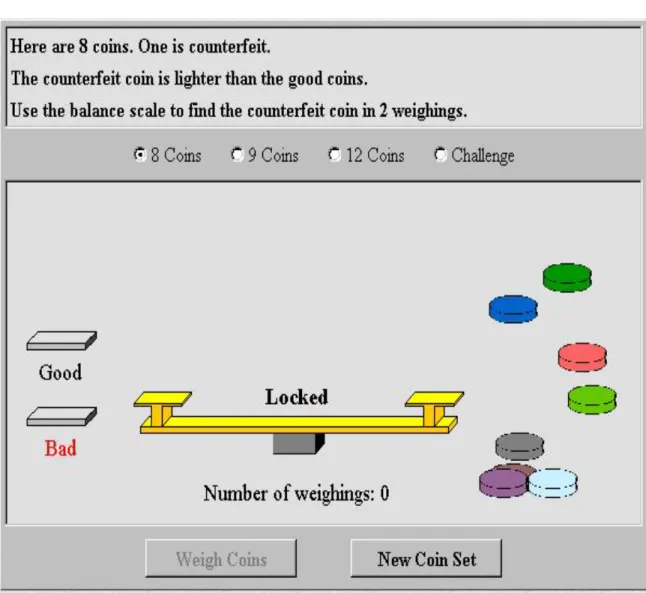
3.1 Counterfeit Coin ILM
The Counterfeit Coin ILM is provided by the National Library of Virtual Manipulatives. In the Counterfeit Coin problem, a fixed number of coins are given to the
user, and the user is asked to find a counterfeit coin among them by using a balance scale. The minimum number of weighings is desired in finding a bad coin. A screenshot of the ILM can be seen in Figure 1.
In the ILM used for the Counterfeit Coin problem, coins are colored to keep track of tested coins. Coins can be dragged and placed on balance scale. On the left side of screen, there are two containers, one for good coins and other for one bad coin. When the user places a coin in the bad container, feedback on the solution is provided to the user. There are three levels to the problem. In the challenge problem, there are twelve coins and no information is provided to the user about whether the counterfeit coin is heavier or lighter. The ILM gives feedback on the solution and keeps track of the number of weighings used. Depending on the solution provided, the feedback varies. One example is “That’s correct! You found the counterfeit coin in 3 weighings! Can you find it with fewer?” Another example of feedback is “That’s correct! You found the counterfeit coin in only 1 weighings! But you tested 3 coins. Maybe you were guessing. Can you do it again?”
3.2 Boolean Ninja ILM
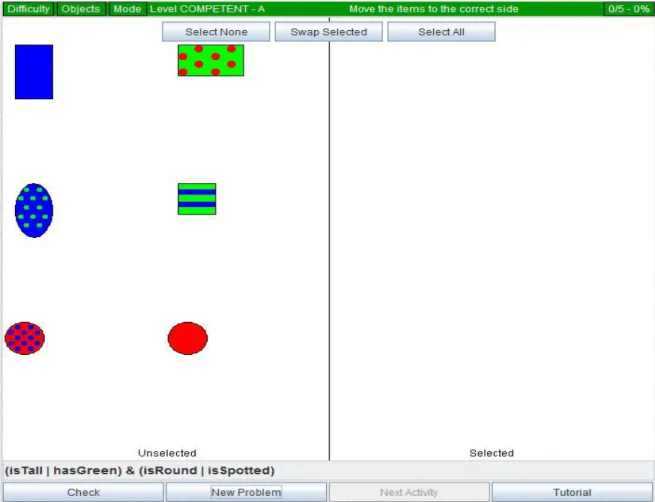
The Boolean Ninja ILM was developed by Kyle Feuz and modified by Colin Mills, computer science students at Utah State University, as the members of CPATH team. Boolean Ninja ILM presents Boolean Logic problems. Boolean Logic problems cover the use of basic logical operators and logical expressions. ILM can be seen in Figure 2. The ILM presents the Boolean logic expressions on the bottom of screen. According to the expression, the user has to drag given figures on the left side to the right side of the screen. The user can use the given buttons on the top of the screen to perform the
indicated actions. For example, in the case of the “Select All” button, every figure will go to the right side. In the case of the “Swap Selected” button, figures on the right will go to left and left will go to the right side.
Depending on the levels, problem difficulty will vary. Users can change these levels. To motivate students, scores are also given for correct answers. For the purpose of the experiment, we changed the seed of the random function, in order to get the same problems in every computer for promoting group work. The ILM provides feedback when the user clicks on “check” button. Feedback provides the correct solution or a hint in case of incorrect answers. In Expert level, ILM provides problems consisting of advanced operators like “NAND, “NOR”, and “XNOR”.
3.3 Minimum Spanning Tree ILM
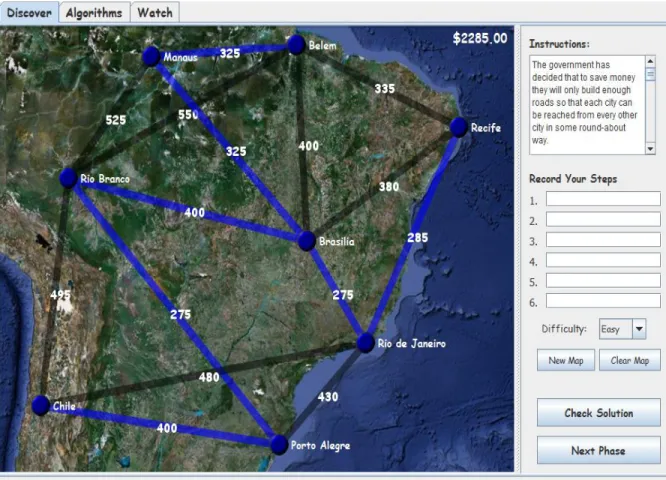
The Minimum Spanning Tree ILM was developed by Bryan Hansen, a computer science student at Utah State University. MST ILM presents a minimum spanning tree problem. In this problem, a graph is given to the user and the user needs to find the minimum weighted tree that connects all the vertices in the graph. A screenshot of the ILM can be seen in Figure 3.
The problem is presented using the case of a road connection. The user needs to find the cheapest set of roads connection connecting all cities. The ILM provides a set of maps with three levels of difficulty. This ILM has three modes. The first one is a Discover mode that lets the users discover the solution by themselves. The second is an Algorithms mode that shows different algorithms to apply to the problem. The third is a Watch mode that shows videos of the application of the algorithms. By clicking on the roads, roads can be selected as part of the solution. The amount of money spent on the set of roads can be seen on the top right of the screen. By clicking on the “Check Solution” button, feedback is provided about the correctness of the solution. In the case of incorrect answers, the
feedback says something like “Not all cities are reachable, you need more roads!” and “Sorry… but it can be done for cheaper”.
CHAPTER 4
EXPERIMENT DETAILS
The experiment was performed using five Geometry classes and one programming class at Logan High School. In each class, we performed two activities by using the same experiment pattern. For completing two activities and learning styles survey, we went to Logan High School for three consecutive days. Our experiment was divided into two parts. The first part was getting data for each activity, and the second part was getting learning style survey results from each student.
4.1 Activity
In each activity, we followed the same steps. These steps are explained below. 1. Brief presentation of the topic
A five-minute introduction about the topic is provided to the students. In this introduction, we explain the problem being covered and provide required background knowledge to solve the problem. In this introduction, the ILM was also shown to all of the students.
2. Pre-activity quiz and survey
After the introduction, students are asked to fill a short questionnaire. This questionnaire is used to assess student’s background knowledge, interest in the problem, valuation of the topic, and confidence to solve the problem. Questions for getting these values are listed in Table 1. A short quiz to measure previous knowledge was also provided with this survey. The estimated time to complete the whole questionnaire was about 2 minutes.
Table 1. Pre-activity motivation survey. Experience Have you ever worked a problem
like this before toady?
(a) No (b) Yes If Yes, explain Interest How interested are you in this
problem? (a) high interest (b) moderate interest (c) low interested (d) no interest
Benefit How much do you think this
problem will benefit you? (a) high (b) moderate (c) low (d) no Confidence I expect to be able to solve a
problem like this. (a) strongly agree (b) agree (c)disagree (d) strongly disagree
3. Main Activity
After the pre-activity survey and quiz, students were divided into two groups, who study the topic using two approaches. One group was instructed to perform a paper and pencil activity and the other to perform ILM activity. Students in the paper and pencil group were provided with a worksheet. This worksheet contains problems similar to those available in the ILM. Irrespective of the group, additional help was provided to students whenever needed. Around 20 minutes were given to the students to perform the activity.
4. Post-activity quiz
The activity was followed by a quiz containing basic questions from the topic covered. No time limits were placed on this quiz, but the estimated time to complete the quiz was about 5 minutes.
5. Post-activity Survey
After the quiz, students were asked to complete a survey. This survey was used to get information about the student’s experience with the activity. The survey also asked about interest and value factors after the activity. This survey was also used to get students suggestions about improving the activity.
Refer to Appendix B for all the quizzes and surveys used during the activity.
4.2 Learning Styles Survey
For gathering learning styles data from all the students, we conducted a learning style survey which is an extension of Index of Learning Styles Questionnaire [27]. The questionnaire, which was developed by Soloman and Felder [27], helps in assessing the learning preferences of students in four dimensions, Active/Reflective, Visual/Verbal, Sensing/Intuitive and Sequential/Global [5].
In addition to the questionnaire [27], some questions related to preferences about group work, competition and help needed were included in the survey. The main purpose of this survey was to find student’s likes and dislikes in terms of learning methods. Refer to Appendix A for the questions used in the survey.
CHAPTER 5
RESULTS
This chapter presents the results of the experiment.5.1 Most of the Students Like to Use ILMs
Working in groups and using ILMs were the preferred learning choices of the students. A total of 128 students completed the learning style survey. In this survey, we found strong preferences for both of the learning methods. Table 2 presents the details of preferred methods of learning for students.
Table 2. Preferred method of learning as student’s first or second choice.
Learning Method Number of Students (Percentage) (Total 128 students)
Using Interactive Learning Modules (ILMs)
71 (55%)
Reading Text 37 (29%)
Working in small groups 85 (66%)
Doing written homework 29 (23%)
Video lectures 43 (34%)
The reasons for the strong preference for using ILMs can be explained by Learning Styles of the students [4]. Felder and Silverman describe the learning styles using four dimensions [4]. These learning styles are assessed by Felder-Soloman Index of learning styles, where each dimension scale is in the range of -11 to 11 [5]. Thus, for the A/B scale (where A/B is taken from Active/Reflective, Visual/Verbal, Sensing/Intuitive, or Sequential/Global), 11 is strongly A and -11 is strongly B. Previous studies categorized an individual as type A if they were anywhere in the range of 1-11, even though the authors
indicated that those less than five had no strong preference [3]. In our study, from a scale of A to B, we used three categories A (5, 11), no preference (-4, 4), and B (-11, -5).
Learning style preference of the students is shown in Table 3. Notice, a significant percentage of students prefer Active and Visual learning.
Table 3. Students with different Learning Styles (128 students).
Learning Style Count (percent) Neutral Complement learning Style Count (percent) Active 60 (47%) 56 (44%) Reflective 12 (9%) Visual 96 (75%) 27 (21%) Verbal 5 (4%) Sensing 25 (20%) 76 (59%) Intuitive 27 (21%) Sequence 35 (27%) 82 (64%) Global 11 (9%)
By looking at various combinations of attributes in different dimensions of the learning style model (e.g. Active/Visual), we found that the learning preferences are statistically independent of each other. No relationship is found between gender and learning style, which simplifies our recommendations.
Visual learners prefer to perceive information visually and Active learners prefer to try things in order to learn them. ILMs present the material visually and also let the users interact with them. These features are compatible with Active and Visual learners. By constructing the bivariate logistic regression model using 128 students, we computed
odd ratios (95% confidence interval), which helps in predicting whether a student will prefer a particular learning method given a learning style. Here, confidence interval indicates that if the experiment is repeated, 95 % of the time, the value will occur in the interval specified. Thus, there is no statistical significance if the confidence interval includes one. These results are shown in Table 4. Active and Visual learners show a high preference for ILMs. According to results, Active learners are 3.1 times as likely to prefer ILMs as Active learners and Visual learners are 3.2 as likely to prefer ILMs as non-Visual learners. A statistically significant low preference for homework is also seen among Active and Visual learners. In the results, Sequential learners showed less preference for Videos.
Table 4. Students preference for learning methods based on Learning Styles (128 students).
Active Visual Sensing Sequential
ILM 3.1 (1.5, 6.6) 3.2 (1.4, 7.6) 0.5 (0.18, 1.1) 1.8 (0.8, 4.1) Text 0.5 (0.2, 1.1) 0.6 (0.3, 1.4) 1.9 (0.7, 4.7) 1.2 (0.5, 2.7) Groups 2.1 (0.99, 4.6) 1.8 (0.8, 4.1) 1.1 (0.4, 2.9) 0.6 (0.3, 1.3) HW 0.1 (0.03, 0.3) 0.3 (0.1, 0.7) 1.4 (0.5, 3.8) 1.3 (0.5, 3.1) Video 0.97 (0.5, 2.0) 1.7 (0.7, 4.5) 1.1 (0.4, 2.8) 0.4(0.1, 0.96)
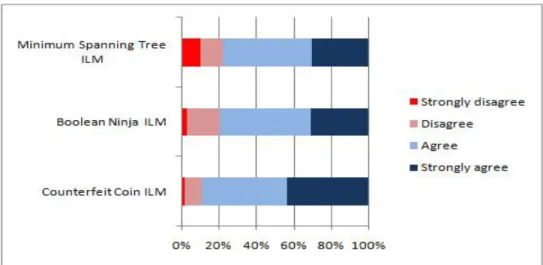
During the activities, we observed that most of the students wanted to work on ILMs. Even when the students belonged to paper and pencil group, they often chose to use ILMs using a touch screen monitor at the front of the classroom. Figure 4 shows the response (of
the students who used ILMs) to the question “Given a choice of "paper and pencil" or using the computer, I prefer to use computer activity (ILM) in the future.” Results clearly show the popularity of ILMs.
Figure 4. Post-Activity Survey response by students who used ILMs. Response to question, “Given a choice of “paper and pencil” or using the computer, I prefer to
use computer activity(ILM) in the future.”
5.2 Background Knowledge and Motivation is Required in Using ILMs
All three ILMs were appreciated by the majority of the students. We noticed that some ILMs received more positive feedback than others. During the experiment, students were engaged in solving the problems in ILMs. We did not notice any dislike amongstudents for any particular ILM at that time. In student’s post survey results, we found some differences in the likability of ILMs. Questions for collecting feedback about ILMs are given in the Table 5.
Table 5. Questions used in survey for finding likability of ILMs I found this activity useful in learning the material.
I found the activity easy to use.
How well did the activity help you in learn the material? I found this topic interesting
Given a choice of "paper and pencil" or using the computer, I prefer to use computer activity (ILM) in the future.
I have a better understanding of these concepts because of this activity. I have a better understanding of the topic because of the activity.
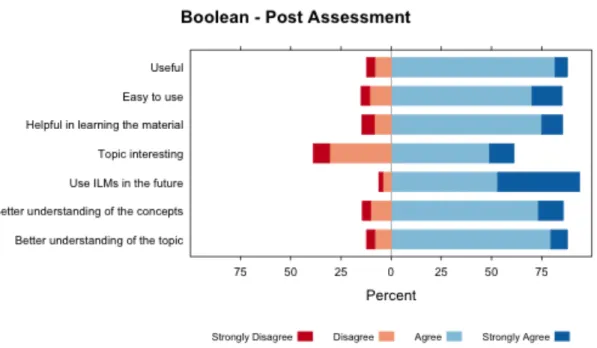
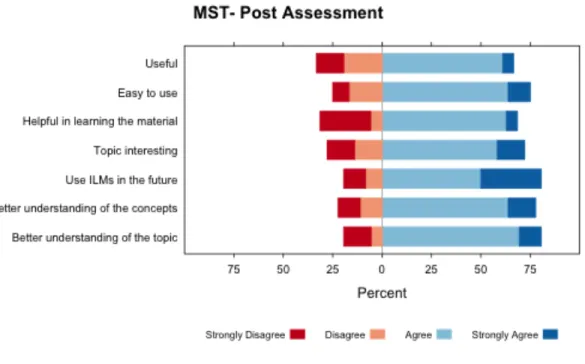
Figure 6. Post-Activity Survey response for Counterfeit Coin ILM.
In Figures 5, 6 and 7, there are differences in terms of likability of the ILMs. A total of 36 students used the minimum spanning tree ILM and out of them 11 students did not find the ILM helpful in learning the material. Some of the comments of students (who did not use the ILM) were “I still don’t really get what we did. I felt like I was a little rushed” and “I didn’t learn anything.” Since those comments were also negative, it indicates that it is not the ILM but the topic (and context) that are at fault. Some of the comments of students (who used the ILM) were “what material?” and “it has no point to teaching you.” These comments clearly show that these students lacked background knowledge. Students like to start the main activity directly and skip its instructions [10]. Students indicated that they did not understand the motive behind this activity. In fact, we did not provide any algorithm to them, leaving them to discover it on their own. One of the instructors offered this explanation:
“You are asking the students to discover the solution. Public education is often about being told how to solve a problem. That is what students expect. Not everyone is going to think discovering the solution is better. Students will take some time to get used to it.”
Some researchers believe that proper background knowledge is critical in discovery learning [28]. Rivka, Mordechai and Michal suggest providing background knowledge prior to activities [19]. We also recommend that students be provided with a certain amount of knowledge to make them feel confident about the problem they are trying to solve. In Figure 8, it is shown that students lacked confidence in solving the problem. In the coin activity, most of the students had the confidence to solve the problem
and the post activity results of the activity also showed that students felt positively about the activity. We believe that the counterfeit coin activity was well liked because it was easy to understand and students felt success even if their solution was not perfect. In contrast, finding the minimum spanning tree was difficult to understand and the problem did not allow for partial success. In counterfeit coin ILM, feedback like “That’s correct! You found the counterfeit coin in 3 weighings! Can you find it with fewer?” was
provided. This may have given students a positive feeling of success or partial success. This was lacking in minimum spanning tree ILM. It just gave feedback like “Sorry… but it can be done for cheaper”. Students did not understand the problem and they were only applying trial and error. Therefore, we should provide students with proper background knowledge to make the ILM learning more helpful in learning.
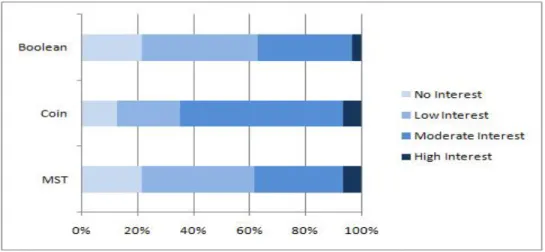
In Figures 5, 6 and 7 of post-activity results, some students did not find the topic interesting. Statistical results showed that initial interest was associated with how interesting they found the activity. Since the pretest was followed by a five-minute presentation, it seems that students made up their mind about the activity just after the introduction. Initial interest results are shown in Figure 9. We can draw two conclusions from this: First, the topic must be presented in a way that makes students like it. Second, the student’s interest in the topic may depend upon the topic itself.
Figure 8. Pre-Activity Survey response for “I expect to be able to solve a problem like this.”
Figure 9. Pre-Activity Survey response for “How interested are you in this problem?”
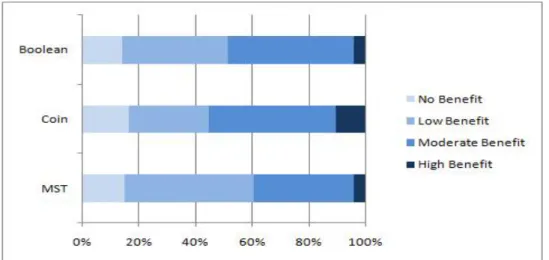
In their research, Wigfield and Eccles [11] have proposed that expectations and values of subject-tasks influence the performance and choice of these subjects-tasks. They hypothesized that the initial benefit of the activity would directly influence the students’ choices about learning the activity. In our statistical results, we found that the initial benefit was associated with understanding of the topic. Conversely, students who did not think the activity would be beneficial to them did not try very hard to understand it. Some of the comments of students (with less initial benefit) are “I don't know what I will ever need to that stuff for.” and “I can see the concept of the material, but I don't see how it appeals to me.” Cooper and Cunningham suggest that applications of the concepts should be informed to the learners to increase learners’ motivation. Therefore, providing benefits of the topic is beneficial while using the activities.
Our statistical results showed no relation between student’s GPA and post-activity scores from any activity. During our experiments, the activities were not part of assignments for class, so most of the students were learning the topics just for the sake of learning. We believe that ILMs motivated most students to learn the topic irrespective of their academic-abilities.
The ability to impact student perception of interest and importance is an open question.
Figure 10. Pre-Activity survey response for “How much do you think this problem will benefit you?”
CHAPTER 6
Design and Benefits of ILMs
This chapter describes our recommendations on design of ILMs. It also includes benefits of ILMs over traditional methods based on our results and observations.
6.1 Designing ILMs for Classroom Setting
The main goal of active learning techniques is student engagement in the learning activities. By using Interactive Learning Modules, we try to provide active and visual environment for the students to learn the topic. The most important thing in making these activities successful is feedback because it makes the student engage in the activity. By frequent feedback, students feel more confident about their progress. While experimenting in the class, we observed that some students were constantly working with ILMs and required less supervision. In contrast, many of the paper and pencil group needed constant help. When we left the paper and pencil group students, they deviated from the actual activity. As per our observations during the activity, ILM groups required much less supervision compared to paper and pencil group. We believe, in order to keep students engaged, we should make ILMs interactive and provide frequent feedback.
Some Interactive Learning Modules (ILMs) are more attractive to users than others. ILMs are used in class to make classroom study more interesting. To do this, we should make them graphically appealing to learners. In suggestions, some students made
comments like “more like a game than a worksheet” and “make it more interesting for the students.” In the learning styles survey results shown in Table 3, the visual learners make up the majority of students. Visual learners prefer to perceive information graphically. In order to help those students learn more effectively, we need to present information more visually by making the ILMs more graphically appealing and with more visual
information.
In the Boolean Ninja ILM, the problems were presented like a quiz and scores were given to students for each correct or incorrect solution. This ILM has different levels of problems with the complexity of the problem gradually increasing. During the
experiment we observed some comments between students like “Do you understand what this symbol is?” ”Are you able to get to the next level?” This showed a positive
competition among students. Students were also learning from their peers. While ILM users were getting more and more complex problems, paper and pencil users quickly completed their worksheets and were off topic. To keep students interested in using the ILMs, we need to make them adaptable to the needs of the students. As students learn to solve easy problems, they will need more complex problems. Adaption to the needs of the students should be considered in design of ILM so the students’ learning pace will be controlled by students themselves.
Instructions are provided with the ILMs, but students do not like to read
instructions as posited by Milan in [10]. If an ILM works as an electronic textbook, then it contributes little, other than eliminating the textbook. As we observed in the classes, in the
case of the minimum spanning tree activity, when students had to read the algorithm described in the ILM, many did not. Students expect active learning to be active, and are less likely to engage in passive fact gathering activities. A video was also present in the ILM, but students were not very interested in the video either. Lack of understanding the minimum spanning tree ILM made it somewhat unpopular among students. As students were unaware of their next steps, they needed some explanations from the instructors. Therefore, we propose creating ILMs that are self-explanatory and require less reading.
In the counterfeit coin ILM, students use the ILM to keep track of the number of weighings. If the student guessed the right coin without sufficient number of weighings, they were given feedback like “You’re just guessing!” making students aware that they should follow some approach. In contrast, when students were using the minimum spanning tree, they did not get feedback. In case of minimum spanning tree, because of numerous possible approaches, the ILM could not check if the user was just guessing. On the other hand, putting too many constraints in approach can sometimes limit the student’s creativity. Therefore, while designing ILMs, we should take into account the issue of guessing but also avoid limiting the creativity of students.
6.2 Benefits of ILMs for classroom setting
1.
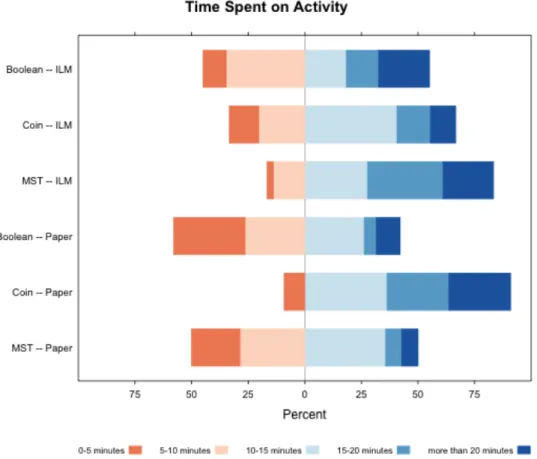
Increase time on taskIn our results and observations, we found that students who were using ILMs spent more time on doing the activity compared to paper and pencil group. According to Milan, if students spent more time on ILMs, they have an
opportunity to learn more [10]. Results for self-reported time-spent are shown in Figure 11:
Figure 11. Perceived Time-spent by students
During activities, students who were using ILMs typically spent more time on the task than the paper and pencil users because they were engaged in solving more problems. ILM users had the choice of getting more, different types of problems that non-ILM users did not have. In the paper and pencil group, they had
a fixed set of problems provided via worksheets. In Boolean logic activity, we observed that students who were in the paper and pencil category left the activity in a short amount of time whereas ILM users were solving problems in the activity with greater interest. In addition, ILM users were more aware of their mistakes because of the feedback. Consequently, they also took time to correct their mistakes instead of finishing quickly without knowing if they understood
During the counterfeit coin activity, we observed that students belonged to paper and pencil group were finding it difficult to understand the problem. Some of the students from the paper and pencil group even tried using the ILM in the smart board for a better explanation. We can see in our results that the time needed in the paper and pencil group during counterfeit coin problem was a little high. They required more help from the instructors. We have seen in the counterfeit coin activity post-activity survey results that approximately 90 percent of the students wanted to use ILMs in future.
Because of the need to correct mistakes and the chance to get more problems to solve, students who use ILMs spend more time on the task.
2.
Group work is encouraged by ILMsIn our experiment, we let students perform activities in groups. We observed that some students paired to use ILMs. In those groups, students discussed problems with their partners. Students in the paper and pencil group also formed groups. We know that collaborative learning increases student’s interest in
class [22], but in the paper and pencil groups, some students seem to get distracted from the activity. Those groups needed much more supervision by instructors than the ILM groups. During the experiment, we also observed that even single users of ILMs were saying things to their peers like “What did you get for output?”“Do you understand what this symbol is?”, and “Are you able to get to the next level?” These students seem more motivated by the use of ILMs. The main advantage of this type of collaborative learning in our case is that it requires less supervision and frees teachers to tutor students requiring individual attention. In this environment, peers became tutors, facilitating comparison and collaboration.
3.
ILMs are manageable in large classroomIn our experiment in order to provide computers for the students, there was one class that was made by combining two different classes, totaling 53 students. We found no significant difference in the performance of that class as compared to other classes. In every class, the students required little supervision to instruct them about the use of ILMs. In paper and pencil groups, students needed much more supervision. We were not able to provide immediate help to every student in that class’s paper and pencil group, even though there were fewer students in the paper and pencil groups. Some researchers have also found that in large classes there are issues such as less instructor time and less feedback to students [26]. Some researchers think that active learning techniques might not work in large classes, but in our experiment, we did not find any difficulty in handling large
classes. The reason for that could be the interaction between ILM and users. ILMs provide immediate feedback and broad array of problems to involve the student.
CHAPTER 7
FINDINGS FROM THE USE OF ILMS IN CS2420
This chapter focuses on our experience of using ILMs with homework quizzes in the undergraduate course Data Structures and Algorithms.
7.1 Experiment Details
The undergraduate course CS2420 Data Structures and Algorithms was taught with a new approach in Fall2011. Previously, students had been provided with programming assignments and written homework to reinforce the material taught in class. We replaced the written homework assignments with quiz activities. Canvas (learning management system) was used to manage course content. Students were provided with lecture notes, quiz activities and programming assignments for all topics covered in class.
7.2 Quiz Activities
Students were given feedback about their quiz scores immediately. They had three chances to submit the quiz, after which they were asked to fill out an online survey for a bonus point. Eight quiz activities were used throughout the course. Each student was provided with one or more ILMs to work on before or during the quiz. The activities used are described below:
1. AVL Tree
In this activity, the AVL ILM was provided through which one can create an AVL tree and perform operations like insert, find, delete and perform different traversals (in-order, pre-order and post order). For each operation, the ILM
provides an animation demonstrating the steps of that operation. A video accompanied the ILM explaining how to use it. Figure 12 is a screenshot of the AVL ILM.
Figure 12. Screenshot of AVL ILM 2. Splay Tree and B+ Tree
In this activity, Splay Tree ILM was provided through which one can perform operations like insert, delete and find. The user can also control the speed of the animation. A video was provided with the ILM explaining how to use it properly. ILM was not provided for B+ trees. However, notes about Splay tree
and B+ tree were provided to students. Figure 13 shows a screenshot of the Splay tree ILM.
Figure 13. Screenshot of Splay Tree ILM
3. Hashing
In this activity, Hashing ILM was provided through which one can insert, find and delete values using different hashing functions and collision resolution strategies. This ILM permits the users to see the load factor and probe values for each operation. It also presents a view of the code execution while these operations are performed. A video was also provided to explain the usage of the ILM. A screenshot of the Hashing ILM can be seen in Figure 14.
Figure 14. Screenshot of Hashing ILM 4. Binomial Queue
In this activity, the Binomial Queue ILM was provided in which one can perform operations like insert, delete minimum and union operations. This ILM also included logical, physical views of the binomial queues and methods for students to undo and redo their steps. A video was also provided to explain the usage of the ILM. In Figure 15, a screenshot of the Binomial Queue ILM is shown.
Figure 15. Screenshot of Binomial Queue ILM 5. Sorting
In this activity, the Sorting ILM was provided in which one can view operations of different algorithms with varying problem’ properties and sizes. This ILM also provided a method to view different algorithms working simultaneously. A video was also provided to explain usage of this ILM. A Sort Detective ILM was also provided in this activity as a quiz, which presents seven different algorithms on seven unlabeled buttons. Users can only see the runtime performance with changing input sizes and sort orders of these algorithms. Students were asked to determine which button corresponds to which algorithm. Screenshots of these ILMs are in Figure 16 and 17.
Figure 16. Screenshot of Sorting ILM
6. Union Find (Disjoint Set)
This activity included a Disjoint Set ILM in which users can add and find values, union sets and optimize operations by Union by Rank, Union by Size and Path Compression techniques. Users were able to see all the specific steps of the operations, including number of finds, number of union steps, etc. A video was provided with the ILM to explain its usage. A screenshot of the ILM is provided in Figure 18.
7. Graph Part1 (graph storage, BFT traversal, shortest and all pairs shortest path) In this activity, Graph Storage ILM, Breath First Traversal ILM, Shortest Path ILM and All Pair Shortest Path ILM were provided. In the graph storage ILM, users were able to create graphs and view their storage in different data structures. In Breath First Traversal, Shortest Path and All Pair Shortest Path ILMs, users were able to create graphs, and visualize breath first traversal, shortest path and all pair shortest path algorithms on those graphs. Videos accompanied each ILM. Screenshots of these ILMs are shown in Figure 19, 20 and 21.
Figure 20. Screenshot of BFT ILM
8. Graph Part2 (network flow, graph coloring and minimum spanning tree)
In this activity, Network Flow, Graph Coloring and Minimum Spanning Tree ILMs were provided to the students. In the Network Flow ILM, students were able to visualize Ford-Fulkerson’s algorithm in the given graphs. In the Graph Coloring ILM, students were able to select graphs or maps and verify their coloring (optimal). The Minimum Spanning Tree ILM has been described in section 3.3 in detail. Videos were also provided to students with each ILM. Figure 22 and 23 show screenshots of these ILMs.
Figure 23. Screenshot of Graph Coloring ILM
After each activity, students filled out a survey about their experiences with the quiz or ILM. Table 7 contains some questions from the survey.
Table 6. Post quiz survey question I felt that experimenting with the activity was a good use of my time. I found the activities easy to use.
I found the activities useful in learning the material.
Do you have any suggestions for improvement of the activities? Did you have any technical difficulties? If so, please describe.
7.3 Results
Figures 12, 13, 14, 15, 16, 17, 18 and 19 show students’ responses to the first three questions of the survey given in Table 7 i.e. “good use of time”, “easy to use” and “useful in learning”.
Figure 24. AVL ILM Survey Response
Figure 26. Binomial Queue ILM Survey Response
Figure 27. Sorting ILM Survey Response (Website was down)
Figure 29. Union Find ILM Survey Response
Figure 30. Graph1 ILM Survey Response
These responses indicate that students found these activities (quizzes with use of ILMs) useful for learning the material. However, when the comments were categorized, we found that there were several problems which made the activities unpopular with students. They are described below.
1. Not able to use ILMs
Some students were not able to use the ILMs for the quizzes. There were different reasons for this problem. Sometimes the website was down so the ILM was inaccessible. In the case of the Sorting ILM, the server was down on the day that the quiz was to be given. Student response for this activity is shown in Figure 15. In some cases, students were not able to use the ILMs because of the incompatibility of operating systems, internet browsers, or JRE, an occurrence about which students were understandably upset. Two students also faced this type of issue while working with the graph2 activity and responded negatively to the “good use of time” question. In order to create more successful activities in the future, we will take these issues into account. 2. Not able to relate ILMs or material taught in class with questions in quiz.
In the Graph1 and the Splay Tree activities, some questions required more information than was provided in the ILMs. Students assumed everything they needed to know would be contained in the ILMs, and that was not the case. In Splay Tree quiz, students were asked question about a top - down splay tree but the ILM contained a bottom - up splay tree. In student survey responses in
Figure 16, we can see that many students did not find the Splay Tree ILM a useful learning tool or a good use of time. Student comments about the Splay Tree activity can be found in Table 8 and 9. In the graph1 activity, some students made similar comments, shown in Table 9. In Table 8, we can see some students were displeased because there was no immediate feedback about written answers. This is another reason for the negative evaluation of the Splay Tree activity. Another reason may have been because the Splay Tree activity required them to consult outside materials and write their answers rather than receive immediate feedback on questions related directly to the ILM.
Table 7. Some comments of students showing problems after Splay tree quiz I don't find them terribly useful. Also, they lag like none other.
The ILM works as a bottom up splay tree and we learned the top-down splay tree. The animations could be improved to be more in line with the algorithm used.
If there could be some way to improve the interactive activity so that its easier to create a specific splay tree, such as a drag option, that would help a lot with making the concept easier to understand.
Provide more examples online, so if we are reviewing before taking the quiz, we have examples to look from and practice. I did not have any technical difficulties.
cut down the writing i dont learn the material writing about it after i do it less writing
The splay tree speed control was a little screwed up on the campus computers. When I pushed the slow button any number of times, it would slow down to an incredible crawl. No matter how fast I tried to make it go, it would remain at that same slow pace. The algorithms used in the activity were bottom-up splaying, when the quiz was on top-down splaying. It was hard to follow what the program was doing.
Choosing between top-down and bottom-up would be nice on the interactive activities. ILM for this didn't work correctly on my browser.
I wish that the animation would correspond to the logic taught in class, so that it is easier to visualize what is being coded.
Table 8. Some comments of students showing positives after Splay tree quiz
:) They're pretty.
It is helpful to see the end result of actions.
It forced me to take a look at the subject and try to understand it deeper.
It's great to have a structured way to review the material we learned about in class. good learning applets to show how it works
somewhat explained the trees It did teach bottom-up splaying. It showed the end result
Well, it was helpful to verify the end result of inserting, deleting, etc on the splay tree. I felt like I knew what I was doing after reading the information
Table 9. Some comments of students showing problems after Graph1 quiz They still don't load on my computer. I've tried many different browsers and versions of java and flash.
Some of the questions seemed to be about material we had not covered which made the quiz difficult. Such as the simple path question, replacing a queue in a breadth first order.
some questions needed to be worded better. dont know what a true queue is supposed to imply.
some questions were worded in a confusing manner
The ILM's were really well put together for these assignments. There were just a few things I'd would adjust. I couldn't really think of any ways to improve the Floyd Warshall ILM, though the lines quickly became quite cluttered. The programmers did a very good job organizing the information in a way that I could understand, and it walked me through it very well. The visual image just got clustered and unreadable near the end.
On the breadth first/depth first traversal ILM, after a few times, they do-it-yourself section stopped working so I reload the page again, but it was fine afterwards
3. Usability problems
Students were also unhappy with the usability of ILMs. For example, in the Binomial Queue ILM, one of the students commented, “For the binomial queue applet, I'd spend more time animating it. At least demonstrating in some way
which nodes will be affected. The structure of the trees was confusing to understand initially as well. I'd simply revisit it, touching it up a bit more for next use.” One student had this comment about the AVL Tree ILM “make it possible to build a tree without inserting nodes one at a time.” Table 8 contains similar comments from students. Many of them did not find the activities “easy to use,” according to their survey responses. Therefore, we should consider making them more user-friendly before presenting them to future classes. 4. Technical problems
For the Union Find ILM, one student pointed out some problems in calculating the count in some situations. According to this student, “The find count in the counter was not incremented when find was performed while unioning. This was misleading making it seem like find operations were not performed in order to do unioning.” Such students responded negatively to the “useful in learning” and “good use of time” fields. Therefore, we should fix any technical problems in the ILMs to make them more useable for students.
The survey revealed that most of the students preferred quiz activities over written homework. Their comments are shown in Table 10. Students said that online quizzes give them instant feedback, and they can correct their mistakes by reviewing the material again. They also require less work on the part of both students and graders. Students can put more effort into learning and can spend time studying the material until they fully understand it.
Table 10. Responses from students for survey question “Do you feel online quizzes are an advantage over the old way of evaluation?”
I feel like the material covered is more specific and in depth to what you REALLY want us to learn rather than chuck full of filler to make a big textbook.
I like the quizzes. These ones were harder. I didn't like explaining the results, rather, I liked giving the actual result. Not the process.
Yes, you can get feedback faster.
I feel with online quizzes, especially with written answers we are required to understand the same material. If all questions are indeed graded on online quizzes, it is very advantageous.
Yes I feel they have a huge advantage. The automatic feedback always me to quickly go back and reevaluate my errors. This gives me the opportunity to quickly find my mistakes and change my way of thinking or if necessary seek assistance. Also, the multiple submission attempts makes the work less stressful and more enjoyable.
Yes, I do. It's easier for us to accomplish the assignments, and it's easier for the quizzes to be graded.
Absolutely, online quizzes are easier to take, easier to keep track of, and often more convenient than paperwork.
no less feedback from graders.
The writing toke a very long time, regardless. but the quizzes seem ok.
I believe so. A main purpose behind computer technology is to speed up tedious work to improve efficiency. The online quizzes can be a guide for the grader and do most of the work for him. Anything that helps the grader be more efficient only helps us, too.
yes. Its faster.
Yes, I feel closer to all the information and I can also test my solutions.
Yes, but not so much on this assignment - half of the questions were in typed form that wasn't instantly graded.
I feel it is hard to find them in the organization of Canvas.
Yes. I get quick feedback, so that I know if I'm understanding the material.
Yes, because they provide instant feedback, which helps me if I feel like I haven't fully grasped a subject.
In the survey, we asked students for their views on these quiz activities. Their opinions can be seen in Table 11. Most of the students liked these activities and found them helpful for learning the material. Some students suggested providing more feedback about their mistakes in these quizzes.
Table 11. Students’ responses for question “Do you feel that completing the quizzes provides valuable feedback and prepares you for the way the material may be tested
in an exam?”
Yes, but more so it provides another chance to review the material that we have covered more in depth and hands on.
Sure. I would be totally fine with just programming and exams too. I am understanding the material just fine.
Yes, the quizzes make sure you understand the concepts better and helps in programming and the test taking.
It is hard to say, because we have not had an exam at this point.
Yes I do feel that the quizzes provide valuable feedback. If you are willing to look at your errors and try to determine the cause of them, you can learn a lot more about the concepts then if there are no quizzes. Also, this forces students to look at material and learn it prior to a test and having to cram. The quizzes have multiple benefits.
Yes, I do feel that completing the quizzes helps prepare us for the way a material may be tested. It's worth the work to help make sure we are prepared to answer questions concerning the concept.
Yes, quizzes let me know how well i know the material and what i need to study.
yeah i feel like that this material will be the majority of what i see on my professors exam. yes, but the quizzes do not give enough feedback to understand where you went wrong. Absolutely. I make the big mistakes during these quizzes when I would have made them during the test if they weren't there. I can read text all day and think I understand, but I only truly begin understanding the material when I am forced to think actively about the information.
yes it does. Extra work always helps.
I think the quizzes are helping me a lot, maybe more than the lectures. Yes, I think that it made me learn the material much more solidly.
your mistakes and how to correct them.
It's possible, although I haven't taken an exam yet, so I can't really say. Yeah, I believe that it helps me understand the concepts more fully.
Yes, when I see that I have done well or not on a quiz, I instantly know exactly what I need to study. It also gives me an understanding of the structure of the exam questions so I know how to study as well.
In the survey conducted to gauge student preference for different learning methods, we found that using interactive learning modules (ILMs) was the most preferred learning method. In comparison to school survey results, we observed some major differences between students’ preferred methods. Here in Table 12, 47 percent of students prefer to read text and only 26 percent prefer working in small groups, whereas in school, 29 percent prefer to read text and 66 percent prefer to work in groups, as shown in Table 2 (in Chapter 5). There is a possibility that these students’ preferences changes with time or with their experiences. However, it must be noted that the participant pool for the students in the data structures class was too small to obtain any meaningful statistical evidence. Study can be done in future to determine if student’ preferences change over time.
Table 12. Preferred method of learning in the data structures class as student’s first or second choice.
Learning Method Number of Students (Percentage) (Total 19 students)
Using Interactive Learning Modules (ILMs)
19 (63%)
Reading Text 9 (47%)
Working in small groups 5 (26%)
Doing written homework 5 (26%)