Software Engineering for
Adaptive Hypermedia Systems
Reference Model, Modeling Techniques
and Development Process
Nora Parcus de Koch
Dissertation
zur Erlangung des akademischen Grades
des Doktors der Naturwissenschaften
an der Fakultät für Mathematik und Informatik
der Ludwig-Maximilians-Universität München
Tag der Einreichung: 20. Oktober 2000 Tag der mündlichen Prüfung: 12. Dezember 2000
Berichterstatter Prof. Dr. Martin Wirsing Priv.-Doz. Dr. Rolf Hennicker
to my daughters
Tania and Ivonne
Abstract
This work proposes an engineering approach for adaptive hypermedia applications. Adaptive hypermedia applications are user-centred systems that are based on the hypermedia paradigm, i.e. they are a network of nodes connected by links and they administrate a user model to adapt themselves dynamically to the user.This software engineering approach consists of an object-oriented, incremental and iterative development process. It supports the entire lifecycle of adaptive hypermedia applications from feasibility study to maintenance and includes project management, software development and quality management activities. The main focus of the work is the description of a systematic methodology for the analysis and design of adaptive hypermedia applications. An extension to the Unified Modeling Language (a so-called UML profile) is specified to provide an adequate notation for the visual representation. It allows for an easy construction of navigation, presentation and adaptation models, which are part of the proposed methodology. The software engineering approach is based on an object-oriented reference model for adaptive hypermedia applications that is visually modeled in UML and formally specified in the Object Constraint Language (OCL).
This software engineering approach is also appropriate for the development of personalised Web applications and the development of non-adaptive hypermedia applications that can make use of the presented techniques and methodology merely by skipping the specific features of user modeling and adaptation.
Acknowledgements
I am indebted to a large number of people for their inspiration and support during the research and writing of my doctoral thesis.Particular thanks go to:
Martin Wirsing, my adviser, whose constant support, and confidence that I could do it, encouraged me to continue and complete this project.
Rolf Hennicker, whose interest in my work, discussions on software engineering and valuable critique of the methodology I proposed, had a great influence on my research progress.
commitment to this program. Thanks also to the interdisciplinary and multicultural members of the HSP-Kolloquium for sharing their experience in the preparation of doctoral thesis and post-doctoral projects.
María Victoria Cengarle, for numerous discussions on software engineering, formal methods and, especially, on OCL.
Julita Vassileva, for suggestions and comments related to user modeling and adaptive systems.
Luis Mandel, Daniel Schwabe, Alicia Diaz, Hubert Baumeister, Alfred Helmerich, and Friederike Nickl, for discussions on hypermedia design and Web engineering.
Gustavo Rossi, whose doctoral thesis was a source of inspiration at the beginning of my research activities.
Florian Albrecht and Thomas Tiller, for the excellent work they did during their diploma thesis on implementing the adaptive hypermedia system SmexWeb.
Rudolf Haggenmüller, for flexible working hours at F.A.S.T. GmbH.
Alexander Knapp and Luis Mandel, for helping me make my come back in the academic world after years of working in industry.
Dorith Schießl, Alba Püschel and Lindsay Dyson-Smith, for their friendship and advice in the use of the English language.
My special thanks to:
Miguel, my husband, without whose love and patience I would never have finished this work.
My daughters, Tania and Ivonne, for their love and understanding for so much time I spent in front of the computer over the last few years.
Contents
1 INTRODUCTION...1
1.1 MOTIVATION... 5
1.2 GOALS AND RESULTS... 6
1.3 ORGANISATION OF THE WORK... 8
2 ADAPTIVE HYPERMEDIA SYSTEMS...11
2.1 ADAPTATION AND FEASIBILITY... 13
2.1.1 Objectives ...13 2.1.2 Benefits ...14 2.1.3 Risks ...14 2.1.4 Difficulties ...15 2.2 ADAPTATION LIFECYCLE... 15 2.3 LEVELS OF ADAPTATION... 18
2.4 ADAPTATION METHODS AND TECHNIQUES... 19
2.4.1 Adaptive Content...20
2.4.2 Adaptive Navigation ...22
2.4.3 Adaptive Presentation...24
2.5 THE ROLE OF THE USER MODEL... 25
2.6 ACQUISITION TECHNIQUES... 26
2.7 USER INTERACTION POSSIBILITIES... 27
2.8 APPLICATIONS AREAS... 27
2.8.1 Instructional Hypermedia Systems ...28
2.8.2 Hypermedia Search Engines...29
2.8.3 Online Information Systems ...30
2.8.4 Online Help Systems ...31
2.8.5 Personal Assistants ...32
2.9 HOW TO MEASURE ADAPTIVE HYPERMEDIA SYSTEMS... 32
3 USER MODELS AND USER MODELING...35
3.1 CHARACTERISTICS OF USER MODELS... 38
3.2 USER MODEL FOUNDATIONS... 39
3.3 TYPES OF USER MODELS... 41
3.4 OBJECTIVES OF USER MODELING... 44
3.4.1 Help to Learn ...44
3.4.2 Support Collaboration and Assistance...45
3.4.3 Find and Tailor Information ...46
3.4.4 Improve Man-Machine Communication ...46
3.5 INITIALISATION OF USER MODELS... 46
3.5.1 Explicit Questioning ...46
3.5.2 Default Assumptions ...47
3.6 USER MODEL INTERNAL STRUCTURE... 48
3.6.1 Overlay Model...49
3.6.2 User Profile ...50
3.6.3 Stereotyped Model ...50
3.7 USER MODELS UPDATING PROCESS... 52
3.7.1 Acquisition techniques...53
3.7.2 Acquisition process ...54
3.8 SHARING USER MODELS... 58
3.9 DEVELOPMENT OF USER MODELS... 59
4 AN OBJECT-ORIENTED REFERENCE MODEL...61
4.1 REFERENCE MODELS FOR HYPERMEDIA SYSTEMS... 62
4.1.1 The Dexter Hypertext Reference Model ...64
4.1.2 AHAM: Adaptive Hypermedia Application Model ...69
4.1.3 AHM: Amsterdam Hypermedia Model ...71
4.1.4 DFHM: Dortmund Family of Hypermedia Models...72
4.2 THE MUNICH REFERENCE MODEL... 73
4.2.1 Architecture of Adaptive Hypermedia Systems...73
4.2.2 Extensions to the Dexter Hypertext Reference Model ...75
4.3 FORMAL SPECIFICATION OF THE MUNICH MODEL... 77
4.3.1 The Domain Model ...78
4.3.2 The User Model...92
4.3.3 The Adaptation Model ...98
4.3.4 The Run-Time Layer ...104
4.3.5 Authoring Functions ...114
4.4 BASIS FOR THE DEFINITION OF MODELING TECHNIQUES...119
5 COMPARISON OF HYPERMEDIA ENGINEERING APPROACHES...121
5.1 DEVELOPMENT OF HYPERMEDIA SYSTEMS...122
5.1.1 HDM: Hypermedia Design Method...124
5.1.2 RMM: Relationship Management Methodology ...125
5.1.3 EORM: Enhanced Object Relationship Methodology ...126
5.1.4 OOHDM: Object-Oriented Hypermedia Design ...127
5.1.5 SOHDM: Scenario-based Object-orientedHypermedia Design Methodology ...129
5.1.6 WSDM: Web Site Design Method...129
5.1.7 MacWeb Approach...130
5.1.8 HFPM: Hypermedia Flexible Process Modeling ...131
5.1.9 OO/Pattern Approach...133
5.1.10 WAE – Conallen Process...133
5.1.11 Lowe-Hall’s Engineering Approach ...134
5.2 NOTATIONS USED IN HYPERMEDIA DESIGN...134
5.3 COMPARING HYPERMEDIA DEVELOPMENT METHODS...135
5.4 THE UNIFIED PROCESS AND HYPERMEDIA DEVELOPMENT...140
5.5 LESSONS LEARNED FROM THE COMPARATIVE STUDY...144
6 MODELING TECHNIQUES FOR THE DESIGN OF ADAPTIVE HYPERMEDIA 145 6.1 USE CASE MODEL...148
6.2 CONCEPTUAL MODEL...150
6.3 USER MODEL...153
6.4 NAVIGATION MODEL...155
6.4.2 Navigation Structure Model ...159
6.5 PRESENTATION MODEL...173
6.5.1 Abstract User Interface Model...174
6.5.2 Presentation Structure Model ...179
6.5.3 Presentation Flow Model...184
6.5.4 Object Lifecycle Model ...187
6.6 ADAPTATION MODEL...189
7 THE SOFTWARE DEVELOPMENT PROCESS ...195
7.1 ADAPTIVE HYPERMEDIA SYSTEMS...197
7.1.1 Covering the Life Cycle ...198
7.1.2 Iterative Development...199
7.2 PHASES OF THE PROCESS...201
7.2.1 Inception ...203 7.2.2 Elaboration...206 7.2.3 Construction ...207 7.2.4 Transition ...209 7.2.5 Maintenance ...210 7.3 DEVELOPMENT PROCESS...211 7.3.1 Requirements Capture ...212
7.3.2 Analysis and Design ...230
7.3.3 Implementation...252 7.4 PROJECT MANAGEMENT...262 7.4.1 Risk Management...262 7.4.2 Iteration Planning ...268 7.4.3 Iteration Evaluation...272 7.5 QUALITY MANAGEMENT...275 7.5.1 Validation ...276 7.5.2 Verification ...279 7.5.3 Testing...282
8 DEVELOPMENT OF SMEXWEB APPLICATIONS – A CASE STUDY ...287
8.1 THE SMEXWEB FRAMEWORK...288 8.1.1 The Architecture...289 8.1.2 The Tutor ...292 8.1.3 The Communication...293 8.1.4 The UserModel...293 8.1.5 The Hyperspace ...294
8.2 DEVELOPMENT OF THE EBNF-APPLICATION...295
8.2.1 Inception Phase (Iteration 1) ...296
8.2.2 Elaboration Phase (Iterations 2 and 3) ...298
8.2.3 Construction Phase (Iteration 4 and 5) ...302
8.2.4 Transition Phase (Iteration 6) ...305
8.2.5 Maintenance Phase (Iteration >= 7) ...308
8.3 ANALYSIS AND DESIGN MODELS FOR THE EBNF-APPLICATION...309
8.3.1 Use Case Model ...309
8.3.2 Conceptual Model...311
8.3.3 User Model ...312
8.3.5 Presentation Model ...317
8.3.6 Adaptation Model...321
8.4 THE TAXONOMY APPLICATION...324
8.5 LEARNING PROCESS SUPPORTED BY SMEXWEB...325
9 CONCLUSIONS...327
9.1 CONCLUDING REMARKS ABOUT THE REFERENCE MODEL...328
9.2 CONCLUDING REMARKS ABOUT THE MODELING TECHNIQUES...329
9.3 CONCLUDING REMARKS ABOUT THE DEVELOPMENT PROCESS...331
9.4 PROPOSING FUTURE RESEARCH...332
APPENDIX UML EXTENSION FOR HYPERMEDIA...335
STEREOTYPES FOR MODELING HYPERMEDIA APPLICATIONS...335
STEREOTYPES FOR MODELING ADAPTIVE FEATURES...338
List of Figures and Tables
Figure 2-1 Lifecycle Model of Adaptation ...16
Table 2-2 Methods and Techniques for Adaptive Content ...21
Table 2-3 Methods and Techniques for Adaptive Navigation...24
Table 2-4 Methods and Techniques for Adaptive Presentation...25
Figure 3-1 A User Stereotype Hierarchy...48
Figure 3-2 Bayesian Network ...52
Figure 4-1 Layers of the Dexter Hypertext Reference Model...65
Figure 4-2 UML Class Diagram for the Storage Layer of the Dexter Model...68
Figure 4-3 UML Class Diagram for the Run-Time Layer and Part of the Storage Layer...69
Figure 4-4 Architecture of Adaptive Hypermedia Systems...74
Figure 4-5 UML Class Diagram of the Domain Model...78
Figure 4-6 The Children Association Class...89
Figure 4-7 UML Class Diagram of the User Model and Associations to the Domain Model...93
Figure 4-8 Adaptation Model...100
Figure 4-9 UML Class Diagram for the Run-Time Layer and Part of the Storage Layer...105
Table 5-1 Methods for Hypermedia Development: Processes, Techniques, Notations and Tools...136
Table 5-2 Concepts Used in the Methods...138
Figure 5-3 UP Workflows covered by the Hypermedia Development Method...139
Figure 6-1 Models built during the Design...147
Figure 6-2 Use Case Model for the Online Library Application...149
Figure 6-3 Class with additional Compartment Variants...151
Figure 6-4 Conceptual Model of the Online Library Application...152
Figure 6-5 User Model of the Online Library Application...154
Figure 6-6 User Model Packages...155
Figure 6-7 Navigation Class...157
Figure 6-8 Stereotype for External Node ...157
Figure 6-9 Navigation Space Model of the Online Library Application...158
Figure 6-10 Index Class...161
Figure 6-11 Shorthand Notation for Index Class...161
Figure 6-12 Guided Tour Class...161
Figure 6-13 Shorthand Notation for Guided Tour Class...161
Figure 6-14 Query Class...162
Figure 6-15 Shorthand Notation for Query...162
Figure 6-16 Navigation Structure Model (First Step)...163
Figure 6-18 Shorthand for Menu Class...165
Figure 6-19 Navigation Structure Model (Second Step)...166
Figure 6-20 Pattern for Access Structures...167
Figure 6-21 Navigation Structure Model (Third Step)...169
Figure 6-22 Indexed Guided Tour...170
Figure 6-23 Navigation Context triggered by an Index ...171
Figure 6-24 Grouped Context...172
Figure 6-25 Context Package and Context Change...172
Figure 6-26 Shorthand for Context Package...172
Figure 6-27 Presentation Class as Container other Presentation Modeling Elements ..175
Figure 6-28 Presentation Class of Library Main Menu...177
Figure 6-29 Presentation Class.of Composite Library and Author Menu...177
Figure 6-30 Presentation Class Author...177
Figure 6-31 Presentation Class Article ...177
Figure 6-32 Presentation Class SearchAuthorByName...178
Figure 6-33 Presentation Class AuthorIndexByName...178
Figure 6-34 Window Class...180
Figure 6-35 Frameset Class and Frame Class...180
Figure 6-36 Pattern for Main Presentation Elements...181
Figure 6-37 Partial Presentation Structure Model ...182
Figure 6-38 Page Presentation...182
Figure 6-39 Alternative Representation for Page...183
Figure 6-40 Presentation Flow Model of the “Search Author” Scenario...186
Figure 6-41 Object Lifecycle Model...188
Figure 6-42 Rule Class...190
Figure 6-43 User Behaviour Class...190
Figure 6-44 Pattern for Adaptation...191
Figure 6-45 Part of the Adaptation Model...193
Figure 7-1 Iteration Workflow...200
Figure 7-2 UML-based Web Engineering Process for One Release...203
Figure 7-3 Requirements Capture Workflow...214
Figure 7-4 Template for Use Case Description...227
Figure 7-5 Use Case Model for the Online Library Application...228
Figure 7-6 Part of the Glossary...229
Figure 7-7 Analysis and Design Workflow...231
Figure 7-8 Conceptual Model of the Online Library Application...239
Figure 7-9 User Model of the Online Library Application...241
Figure 7-10 Navigation Space Model of the Online Library Application...243
Figure 7-11 Navigation Structure Model of the Online Library Application...244
Figure 7-12 Presentation Structure Model of the Online Library Application (Partial View) ...245
Figure 7-13 Presentation Class of Library Main Menu...246
Figure 7-15 Presentation Class Author...247
Figure 7-16 Presentation Class Article...247
Figure 7-17 Abstract User Interface Model of one Online Library Page...247
Figure 7-18 Presentation Flow Model of the Online Library Application (Partial View) ...248
Figure 7-19 Adaptation Model of the Online Library Application...249
Figure 7-20 Architecture of the Online Library Application...250
Figure 7-21 Class Description...251
Figure 7-22 Subsystems of the Online Library Application...252
Figure 7-23 Implementation Workflow...253
Figure 7-24 Risk Management Workflow...263
Table 7-25 Risks for the Online Library Project...267
Table 7-26 Actions to Mitigate Risks for the Online Library Project...267
Figure 7-27 Iteration Planning Workflow...268
Figure 7-28 Iteration Evaluation Workflow...272
Figure 7-29 Sample Iteration Report for the Online Library Project...274
Figure 7-30 Validation Workflow...276
Figure 7-31 Verification Workflow...280
Figure 7-32 Testing Workflow...283
Figure 8-1 Architecture of SmexWeb...290
Figure 8-2 The SmexWeb Server...291
Table 8-3 Activities performed during the Inception Phase...297
Figure 8-4 Frameset proposed for SmexWeb Applications...299
Table 8-5 Activities performed during the Elaboration Phase...300
Table 8-6 Activities performed during the Construction Phase ...302
Figure 8-7 Formal Description of the Exercise’s Task of the EBNF-Application...304
Figure 8-8 Pragmatic Description of the Exercise’s Task ofthe EBNF-Application...305
Figure 8-9 An Interactive Exercise of the EBNF-Application...306
Table 8-10 Activities performed during the Transition Phase...307
Table 8-11 Activities performed during the Maintenance Phase ...308
Figure 8-12 Use Case Model of the EBNF-Application...310
Figure 8-13 Conceptual Model of the EBNF-Application...311
Figure 8-14 User Model of the EBNF-Application ...313
Figure 8-15 Exercise View of the Navigation Space Model...314
Figure 8-16 General View of the Navigation Space Model...315
Figure 8-17 Exercise View of the Navigation Structure Model ...316
Figure 8-18 General View of the Navigation Structure Model ...317
Figure 8-19 Presentation Structure Model ...319
Figure 8-20 Presentation Flow Model ...320
Figure 8-21 Abstract User Interface Model of the Exercise “Building Rules”...321
"As We May Think" Vannevar Bush, The Atlantic Month,
July 1945
1 Introduction
The World Wide Web (WWW or Web) has changed the way we work and the way we live. The Web is currently the most successful hypermedia system in existence, but “the Web is far from done” as Berners-Lee (1999), the inventor of the WWW stresses. We are moving to a more “intelligent”, collaborative, and personalised Web. It is becoming more a personal environment for collaborative creation than just for browsing. The future “semantic Web” proposed by Berners-Lee is a Web of data with meaning in the sense that software can learn about what the data means, to process it.
This work focuses on the development of “personalised” hypermedia applications (Web applications are a special case of hypermedia applications, i.e. hypermedia applications for the Web)1. Personalisation, also called customisation or adaptation, is the process, which – when applied to software – consists of a change in the behaviour of the system based on the knowledge the system has of the user. This knowledge can be supplied by the user herself2 or by the software system, which is prepared to observe and register the user’s behaviour. Software systems with the capability to acquire information about the user, to build a user model with it, and
1
In this work the more general term hypermedia is used.
2
The feminine form is used in this work for for users and customers and the masculine form for developers.
to utilise the user model to dynamically adapt themselves are called adaptive systems.
Adaptive hypermedia systems (AHS) are both, adaptive and hypermedia systems. They combine hypermedia with Intelligent Tutoring Systems (ITS) guidance through the adaptation of the information presented, the layout of the presentation or the way in which the information units are visited, i.e. how navigation is performed.
The concept of hypertext, later hypermedia was created by Nelson (1960), who defined hypertext as “non-sequential writing – text that branches and allows choices to the reader, best read at an interactive screen”. Nelson assumed that both the reading and writing process would be supported by hypertext. However, the first person to define the concept of hypertext (without using the word hypertext) was Busch in his famous article “As we may think” (1945). There – referring to scientific publications – he says: “A record, if it is to be useful to science, must be continuously extended, it must be stored, and above all it must be consulted... Our ineptitude in getting the record is largely caused by the artificiality of systems of indexing... The human mind does not work that way. It operates by association”. Busch proposed a solution called a memex: “A memex is a device in which individual stores all his books, records, and communications, and which is mechanized so that it may be consulted with exceeding speed and flexibility. It is an enlarged intimate supplement to his memory”.
A more pragmatic description of hypertext stems from Conklin (1987): “The concept of hypertext is quite simple: Windows on a screen are associated with objects in a database, and links are provided between these objects, both graphically (as labelled tokens) and in the database (as pointers)”.
The essential feature of hypermedia is the concept of a network of nodes connected by links. A node is a unit that contains text and/or multimedia elements, such as images, video, audio, or animations. A link is usually directed and connects two nodes: the source node and the destination node. A link is associated with a specific part of the content of the source node, e.g. a word, a phrase or an image. This part of the source node is called an anchor. It is the linking capability which allows a non-linear organisation of the text or multimedia content. The activity whereby the user accesses a node by following links is known as browsing or
navigation. Hypertext basic concepts are formally described by the Dexter Hypertext Reference Model in the specification language Z (Halasz & Schwartz, 1990). Adaptive hypermedia applications are those that adapt the content or presentation of their nodes and/or their links to the user.
The advantage of the hypermedia style of structuring and accessing information has, however, some limitations and shortcomings for users and developers. The disadvantages for the users are an easy disorientation – the so called “lost in the hyperspace” syndrome – and the cognitive overload. Thus, the developer’s challenge is the management of the cognitive burden which is placed to the user, producing high quality hypermedia applications that reduce the overhead of remembering hyperlinks and support the users through navigation. If a hypermedia application is well developed the user does not require to understand the entire information space; to navigate she has only to understand the local context to find a suitable link destination (Lowe & Hall, 1999).
The typical design problems of hypermedia, such as how to increase local and global coherence of a hypermedia applications, how to improve orientation and how to facilitate navigation are addressed by many researchers. Among others the following design principles are suggested: the use of higher order information units, the visualisation of the structure of the hypermedia system (e.g. overview or local maps), the provision of additional navigation facilities (e.g. forward and backward navigation, providing indexes, history trails, landmarks and bookmarks), and the use of a stable screen layout (Thüring, Hannemann & Haake, 1995 and Linard & Zeiliger, 1995).
Adaptive hypermedia systems seek to solve the disorientation and cognitive overload problems in a different way, i.e. by adopting a user-centred approach. The user is observed by the system, a user model is built for the individual user, and the system adapts visible aspects of the system to the user. More precisely, the adaptation of the content and presentation avoids cognitive overhead by showing the appropriate information with the adequate layout to the individual user. Adaptive navigation solves the disorientation problem by limiting browsing space, providing annotations for the links, hiding some irrelevant links or suggesting the best link to follow. From the commercial point of view, personalisation has the advantage to draw new visitors, to turn visitors into buyers, to increase revenues and to increase advertising efficiency.
Eklund and Zeiliger (1996) summarise the characteristics of adaptive hypermedia systems as follows: AHS are “explicitly based on hypertext (or hypermedia), and use a model of the user's knowledge or goals to modify links or content to present individualised instruction or guidance”. Adaptive hypermedia gives the Web intelligence in the sense that these systems have the ability to “understand” the user and to customise the application.
Most of the current adaptive hypermedia applications have been implemented as prototypes and improved in successive steps. We need a process to perform the development in an effective and efficient way. This process must address project
management, development and test techniques, metrics for evaluation, etc. Such a process supports, the human mind’s planning activities during the development of complex software systems through knowledge representations and guidelines. In this work an engineering approach for adaptive hypermedia systems is presented. It focuses on the process and on object-oriented modeling. It is not concerned with implementation. The main motivation for this decision is the fast evolution of the implementation technologies and platforms.
The proposed software engineering approach consists of a reference model, modeling techniques and a development process. The Unified Modeling Language (UML, 1999)3 was chosen for all models, techniques and notations used. This decision was taken based on the fact that the UML is an international standard since 1997 (OMG, 2000). The Object Constraint Language (OCL)4, that is part of the UML, is used for the formal specification and the process is based on the Unified Software Development Process (Jacobson, Booch, Rumbaugh, 1999). In summary, the software engineering approach is a Unified Process and UML-based approach. It is named UWE, acronym for UML-UML-based Web Engineering. The main characteristics of UWE are:
• It is an entirely object-oriented approach.
• It presents a reference model visually represented in UML and formally specified in OCL.
• It supports visual modeling techniques.
• It provides a UML extension (profile) for adaptive hypermedia applica-tions.
• It defines a development process that covers the whole lifecycle of adaptive hypermedia applications.
The UML-based Web engineering approach was validated using several case studies. This work shows how the guidelines and techniques of UWE have been used in the development process of an adaptive hypermedia exercising system for computer science students. The SmexWeb framework (Albrecht, 1998 and Tiller, 1998) was used for the implementation of this exercising system.
3 UML Version 1.3
4
1.1 Motivation
Adaptive hypermedia applications are complex software systems, whose development process demands an exhaustive feasibility study, adequate planning and experience in the construction of hypermedia applications, user modeling and adaptation techniques.Software engineering is always a knowledge-intensive process. It requires different types of knowledge from the software developers: procedural, semantic and episodic. Procedural knowledge is related to the developer’s ability to interact with the environment, e.g. finding the appropriate people to interview (potential users and customers) or using a case tool. Semantic and episodic knowledge are based on information. The former is related to the meaning of descriptions, such as processes, notations and adaptation techniques. The latter consists of experience with such knowledge, e.g. the usefulness of certain diagrams, patterns, user models or programming constructs. Semantic knowledge is obtained through learning, while episodic knowledge is obtained through experience based on the topics learned (Robilliard, 1999). Adaptive hypermedia developers and adaptive Web developers as well as general software developers all require semantic, episodic and procedural knowledge.
Software development involves processing a large amount of information belonging to a set of different domains. As we are not able to register all this information, we require assistance to manage it. A specific methodology for adaptive hypermedia applications, such as the engineering approach presented in this work allows for the reuse of information and knowledge gained in the development of a wide spectrum of hypermedia and adaptive applications. It supports a more effective and efficient development of such applications. Adaptive hypermedia and adaptive Web development is different because between others, it requires a great deal of communication and team synergy, tasks are often done in parallel and the goal is to take into account the needs, preference and knowledge of each user. The complexity of adaptive hypermedia applications is generally underestimated. Managers, developers and academics still consider hypermedia development as an authoring activity rather than an application development to which well-known software engineering practices could apply (Murugesan, Deshpande, Hansen & Ginige, 1999).
This work was motivated by the lack of an software engineering approach for adaptive hypermedia systems. The main aim of this approach was the use of current object-oriented techniques. General object-oriented software engineering approaches, such as the Unified Process (Jacobson, Booch & Rumbaugh, 1999) and the Rational Unified Process (Kruchten, 1998) or specific methodologies for
hypermedia like RMM (Isakowitz, Stohr & Balasubramanian, 1995), OOHDM (Schwabe & Rossi 1998), and HFPM (Olsina, 1998) are not sufficient as they do not cover user modeling and adaptation issues. Wu, Houben and de Bra (1999) cover specific adaptive aspects, but they neither address a process that allows the systematic development of adaptive applications nor use object-oriented techniques.
In addition, the choice of UML as the modeling language for this work was taken before the UML became an OMG standard. Kobryn (1999) stresses that the major benefits of international standardisation for a specification include wide recognition and acceptance, which typically enlarge the market for products based on it. Despite the problems with UML, having a standard is a step in the right direction. The modeling community can focus now on improving one modeling language instead of a few dozen OO languages (Siau & Cao, 2001). The use of UML for modeling purposes is a must, as there is a guarantee that UML is updated and improved, it is supported by tools, conferences and books, and, even most importantly, UML improves the communication between people involved in a software development project as they “talk” the same language.
1.2 Goals and Results
By way of an analogy to hypermedia engineering (Lowe & Hall, 1999), engineering for adaptive hypermedia applications can be defined as a systematic, disciplined and measurable approach that supports the entire life cycle of adaptive hypermedia systems. This life cycle goes from conception through the elaboration, construction, delivery and maintenance to the cessation of the application.The goal of the software engineering approach is to support developers during these different phases in organising mental activities, working at various levels of detail and abstraction, generating visual representations adapted to the designers level of experience, presenting the solution’s constraints, building representations of the application and finally outlining plan structures and strategies (Robilliart, 1999).
The main results of the present work – the UWE approach – are a reference model for adaptive hypermedia systems, modeling techniques for the analysis and design of such applications and a development process that covers the entire lifecycle of these applications. The validation of the engineering approach was done using a case study of an adaptive learning-system for student use.
The reference model for adaptive hypermedia applications was elaborated in order to identify the features that characterise adaptive hypermedia and personalised Web applications as a previous step to the definition of appropriate modeling techniques. It is named after the place where it was developed: Munich Reference Model. The use of UML allows for a graphical representation of the reference model and the use of OCL for a formal description of the functionality of the model (Gogolla & Richters, 2000).
The main characteristics of the Munich Reference Model are: • It is based on the Dexter Hypertext Reference Model. • It includes a user model and an adaptation model.
• It is formally specified in OCL and visually represented in UML. Existing user modeling techniques and the more relevant methodologies for general hypermedia have been compared in this work prior to the definition of a specific development process for adaptive hypermedia applications. The survey analyses how these engineering approaches cover the hypermedia applications lifecycle, which techniques and notations they use, and what their strengths and weaknesses are.
The modeling techniques of the UWE approach for the methodical analysis and design of adaptive hypermedia applications comprise modeling elements, notation and a method. The notation and semantics of these elements define a “lightweight” UML extension (profile); the method supports the systematic construction of adaptive hypermedia applications. The aim is to obtain a method that allows as many steps as possible to be performed in an automatic way.
The main characteristics of the UWE modeling techniques are: • It supports visual and systematic modeling.
• Hypermedia issues, such as content, navigation and presentation are treated separately from user modeling and adaptation issues.
• It provides a UML profile based on the extension mechanisms of the UML and uses it for the construction of the analysis and design models. These modeling techniques were developed during the initial phase of this project and are also known as UML-based Hypermedia Design Method (UHDM). They are now integrated in the analysis and design workflows of UWE development process for adaptive hypermedia.
The development process of UWE tailors the Unified Process for the hypermedia (Web) domain and for adaptive hypermedia, in particular. At the same time it extends the Unified Process to include project management and quality management support. UWE includes a maintenance phase and changes the idea of quality control management incorporating workflows for requirements validation and design verification in addition to the testing of the implemented software. The main characteristics of the development process of the UWE approach are:
• It is an object-oriented, workflow-based, iterative and incremental process.
• It specialises the Unified Process for the development of adaptive hypermedia applications describing which “experts” (workers) are required, which activities they perform and which specific artifacts they produce.
• It extends the coverage of the Unified Process development cycle including a maintenance phase.
• It adds development process supporting workflows for project mana-gement and quality manamana-gement.
• It changes the idea of quality control management incorporating workflows for requirements validation and design verification in addition to testing.
In summary, this work presents UWE, an object-oriented engineering approach for adaptive hypermedia systems. Special emphasis has been put on visual modeling and the definition of an appropriate UML profile. The modeling techniques are embedded in the development process, which aims to cover the entire lifecycle form inception to maintenance of adaptive hypermedia applications. This work also focuses on an object-oriented, formal specification of a reference model for these applications in UML and OCL.
1.3 Organisation of the Work
This work is organised in nine chapters.The current Chapter 1 provides the introduction to this work and focuses on its motivation and goals.
Chapter 2 introduces the main concepts relating to adaptive hypermedia, adaptation methods and adaptation techniques.
Chapter 3 describes the characteristics of user models, classifies them and outlines the user modeling process.
Chapter 4 presents an object-oriented reference model for adaptive hypermedia applications.
Chapter 5 gives a comparative overview of methods for the development of hypermedia applications. It constitutes a basis for the design techniques and the development process for adaptive hypermedia applications presented in the next two chapters.
Chapter 6 presents modeling techniques for the analysis and design of adaptive hypermedia applications. It includes the definition of a set of modeling elements and methodical steps for the construction of each model.
Chapter 7 presents a development process covering the whole lifecycle of adaptive hypermedia applications.
Chapter 8 describes how the modeling techniques and the development process are validated with case studies.
Chapter 9 outlines conclusions on the results of this work and provides ideas about future work to be done in this field.
Appendix A includes the UML profile defined for the adaptive hypermedia domain.
“The greatest strength and weakness of a hypermedia system lies in the issue of navigation” John Eklund & Romain Zeiliger, AusWeb´1996.
2 Adaptive Hypermedia Systems
“Adaptive hypermedia systems are hypermedia systems which reflect some features of the user in a user model and use this model by adapting various visible aspects of the system to the user” (Brusilovsky, 1996b). They have the advantages of both user-model-based adaptive systems and hypermedia systems. Classical hypermedia applications, are thus enhanced by an agent that improves the system behaviour based on the analysis of the user behaviour.
According to this definition an adaptive hypermedia system (AHS) must fulfil the following requirements:
• it must be a hypermedia system allowing navigation through the hyperspace of the application domain,
• it must include a user model to describe the user, and
• it must provide an adaptive mechanism for the dynamic adaptation of the hypermedia on the basis of the state of the user model.
The adaptation consists in changes of the content and/or the presentation of nodes and links.
What does the user model contain? Let us call a user characteristic the user’s knowledge, preference, interest, tasks or goals. A user model can therefore be defined as a representation of characteristics, which the system “believes” that a user possesses (Benyon & Murray, 1993). It contains characteristics, which are
different from both, the actual characteristics the user has and the characteristics the designer of the system believes the user has and he employs in the design of the system. The representation of the user can only be a partial and incomplete representation. It is a less complete knowledge than the knowledge another person could acquire of the user because a live person can use different input channels – audio, visual, tactile – simultaneously to get information. The system may, however be able to reason faster and more precisely than people. User models are usually very pragmatic as they limit the number of characteristics to those that are strictly required for a specific application.
A clear distinction must be made between hypermedia systems that are customisable – called adaptable systems – and adaptive hypermedia systems. In both cases the user plays a central role and the ultimate goal is to offer a personalised system. They differ in the way the adaptation is performed.
• An adaptable hypermedia system allows the user to configure the system by changing some parameters and the system then adapts its behaviour accordingly. It is an external system or the user who decides when her user model should be changed, e.g. at the beginning of a session. This configuration consists of setting preferences.
• An adaptive hypermedia system is a hypermedia system that adapts autonomously (Bulterman, Rutledge, Hardman & van Ossenbruggen, 1999). It monitors the user’s behaviour, registers this behaviour in a user model and adapts the system dynamically to the current state of the user model. The system uses the user’s browsing actions, her answers to questionnaires and the initial information the user may provide, to adapt the nodes and the navigation. These adaptations can be made by changing predefined presentations or constructing them out of pieces of information. In the latter case, where a dynamic generation of pages is performed, such systems are also known as dynamic hypermedia systems (De Bra, 1999).
Most of the applications that make use of adaptive hypermedia are currently in the area of educational hypermedia, because in this area it is easier to build a detailed user model (Patterno & Mancini, 1999).
This chapter presents an overview of adaptive hypermedia systems. The first section outlines the objectives, benefits and risks of adaptation. Section 2 presents an adaptation lifecycle and Section 3 defines three different adaptation levels. For each of these levels of adaptation methods and techniques are briefly described in Section 4. Sections 5, 6 and 7 delineate the role of the user model, acquisition techniques and user interaction possibilities in adaptation, respectively. Section 8 presents a classification of application areas for which adaptive systems have been
implemented. Finally, Section 9 provides a list of possible measures for adaptive hypermedia systems.
2.1 Adaptation and Feasibility
Many questions arise related to adaptation in hypermedia systems.• Do we need hypermedia systems that are adaptive? • What are the goals of these systems?
• What benefits do this type of system offer to the user? • Which additional risks do adaptive hypermedia systems have?
Every hypermedia system is adaptive in some sense as the user decides what link to follow in each browsing step. Users use the same hypermedia application in different ways by the selection of different navigation paths. But navigation sometimes offers too much freedom or insufficient guidelines (Eklund & Zeiliger, 1996), as the user does not know which path to select, i.e. which path is most appropriate for her. Adaptive hypermedia techniques can be a powerful tool to support users while browsing on the WWW. These techniques increase the functionality of the Web.
2.1.1 Objectives
The objective of a hypermedia system is to make information easily accessible to the user. An adaptive hypermedia system has the enhanced objective of improving the flexibility and the comfort, which a hypermedia system provides to each individual user. Hypermedia systems improve the human computer interaction, operational speed and accuracy as well as they enhance the user learning process, the user satisfaction and they increment the number of users. This goal is achieved by gradually adapting content and the functionality to the level of competence and interests of the user. Adaptive hypermedia systems therefore, seek to learn as much as possible about the users while they interact with the system. The communication can be seen as a dialog between user and adaptive system, which improves with time as the system’s knowledge of the user becomes more precise and the user gets used to the system (de La Passardiere & Dufresne, 1992).
Consequences of an adaptive and flexible system are that a wider group of users can be reached, i.e. for each user the system behaves as it if had been built for her
interests and competence. And last but not least, if the hypermedia system is easy to use, e.g. fewer clicks to reach useful information, this is a factor in motivating users to continue using the system.
2.1.2 Benefits
Adaptive hypermedia systems improve human computer interaction, operational speed and accuracy as well as they enhance the user learning process and the user satisfaction. They improve comprehension of the content and decrease search and navigation time. There are two other benefits that adaptive hypermedia systems offer: they are useful for a heterogeneous group of users and reduce the risk of being “lost in hyperspace”. They allow for a good combination of an active, self-directed participation of the user and some guidance or help provided by the system.
The adaptation is performed in a similar way to a tutor adapting his lessons based on feedback received from the students sitting in front of him. In both cases, the adaptation plays an important role in the success of the system or lessons, respectively. Users’ goals, knowledge, tasks, interests and preferences can vary at an initial point in time as well as through the period of time during which they are using the system. A solution, therefore, is to implement a system that takes into account these changing user characteristics. The same applies to frequently used Web systems, which seek to attract the attention of a heterogeneous group of users with varying interests, knowledge and tasks.
“Lost in hyperspace” means to be unable to find the path to information needed, or to be unable to find the way back to information that has already been read or seen (sometimes a mere couple of minutes ago). The risk of “lost in hyperspace” is reduced with adaptive hypermedia systems as they reduce the navigation space, thus eliminating links that are not of interest to the user or which might confuse her.
2.1.3 Risks
Adding intelligence to the hypermedia system and moving partial control from the user to the systems is contrary to the philosophy of the hypertext paradigm, which is supposed to give the user full control to explore the hyperspace. An adaptive interface is often perceived by the user as limiting, disorienting, unpredictable and incoherent. The design of an adaptive interface therefore, means that special
attention must be paid to such risks so that techniques are applied that are non-intrusive, motivating, non-disorienting, and helpful.
One of the problems of adaptive systems is that the interface is less stable for the user, making it more difficult for her to orient herself. The major risk is therefore, changing navigation and a presentation that confuses the user. For example, if the user goes back to take another look at pages she has already seen, these pages very often look different to the first time she saw them, as they are generated dynamically according to the current state of the user model. The user may be irritated by incomplete and/or hidden information or anchors, because she wants to decide for herself which links to follow. This risk is eliminated by systems like SmexWeb (Albrecht, Koch &Tiller, 2000), which keep a history of changes to the user model. In this way one page has the same look and feel throughout a session for a particular user.
Adaptive systems tend to become complex and are therefore systems that are expensive to build and maintain. Nevertheless, industry observers see the personalisation of the Web as the next important step in e-commerce applications, although one of the main problems is privacy. The concept of personalisation is subject of ethical debate. Some people fear the misuse of personal information gathered by organisations with or without the permission of their customers. Industrial observers, however, maintain that people will get use to this and will begin to see it less as an invasion of privacy and more as the benefit of software offering improved service and faster access to preferred information (Waters, 2000).
2.1.4 Difficulties
The main difficulty consists of building adaptive functionality. The design and implementation of such systems represent a time-consuming and difficult job as adaptive hypermedia systems are complex and expensive systems. Another difficult is to determine how correct is the user model. Most of the existing adaptive hypermedia systems or frameworks have been developed by computer scientists and so have the first applications of these systems. There is a need for methodologies and case tools that make the construction of adaptive hypermedia systems easier, mainly for authors that are not computer experts.
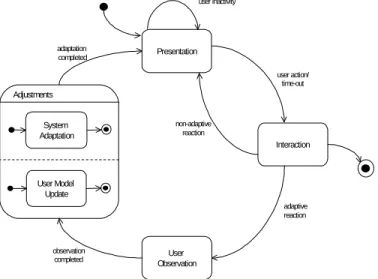
Adaptive hypermedia systems and indeed adaptive systems in general, go through different steps during utilisation or stay in different states so as to interact with the user, adapt the presentation and update the user model. By contrast, non-adaptive software systems only oscillate between presentation and interaction. Jungmann and Paradies (1997) outline a four-steps lifecycle model. The steps are presentation, interaction, analysis and synthesis.
A slightly different lifecycle model for adaptation is shown in Figure 2-1. It is graphically represented with a UML state diagram (UML, 1999 and Harel & Gery, 1997), which depicts the states of the lifecycle model and the possible transitions between these states.
The states are: presentation, interaction, user observation, and adjustment. The adjustment state is refined by using two concurrent states: system adaptation and
user model update. Two adjustment alternatives are possible: user model update before or after the systems adapts according to the content of the user model. In addition to the four sequential transitions (user action, adaptive reaction, acquisition completed and adaptation completed), the model includes the transitions user inactivity and non-adaptive reaction. The former depicts the system waiting for a user action. The latter, non-adaptive reaction transition,
System Adaptation User Model Update User Observation Presentation Interaction user inactivity user action/ time-out adaptive reaction non-adaptive reaction observation completed adaptation completed Adjustments
shows that the system can also react without adjusting the user model and the presentation.
The cycle starts with an initial presentation and a default user model. Stereotypes or interviews are usually used to provide the information for the first user model. These states have the following semantics:
• Presentation. The system presents to the user presentation elements or a page appropriate to the properties the system knows about the user. The system remains in this state until the user becomes active or it receives a time-out signal.
• Interaction. The system decides how to react to user action. Two alternatives are represented with two outgoing transitions: a non-adaptive and an adaptive reaction.
• User observation. This is a state the aim of which is to evaluate the information obtained from the user interaction with the system.
• Adjustments. This statecomprises two sub-states: the user model update and the user interface (UI) adaptation, performed concurrently.
• User model update. In this state the result of the acquisition is used by the system to update the user model.
• System adaptation. The user model is utilised to adapt the presentation, content or links, i.e. to modify the user interface or generate a presentation that takes into account the user’s goals or characteristics. A user action produces the change from the state presentation to the state interaction, i.e. the user is then waiting for an activity of the system – usually the presentation of another page or interface object. In some systemsa time-out can
also trigger the transition from the state presentation to the state interaction. The system stays in the interaction state for as long as it needs to decide whether it will perform an adaptive or a non-adaptive cycle, and then changes to state acquisition or state presentation, respectively.
The transition to the adjustments state occurs after the user observation activities are completed. As soon as the user model is updated and the system adjusted for the next presentationthe system proceeds to the next presentation. To note is that the system’s adaptation can be performed before or after the user model update (pre and post mode). The finalisation of the adjustments mark the transition from the adjustments state to the presentation state.
During these states errors can be introduced due to an inappropriate acquisition of information about the user, incorrect assumptions by the user model update or errors by the adaptation process (Brusilovsky, 1998).
2.3 Levels of Adaptation
Content, structure and presentation are important issues in hypermedia systems. These issues are mostly treated separately by authoring processes and methods for hypermedia applications (see Chapter 5). Adaptive hypermedia systems also benefit from this separate treatment as they allow for adaptive content, adaptive navigation and adaptive presentation as defined in the next section. The scope of each of these issues is given below.• content: The content consists of pieces of information included in hypermedia applications. They may be either time independent – called passive elements – such as text and images, or time-dependent – active elements – like video clips, audio tracks and animations.
• structure: This is the organisation of the content with a specification as to
which content items will be visited and how they will be visited through navigation.
• presentation: This is the visualisation of the content and of the interactive elements that support the functionality of the hypermedia system. There are thus two different aspects to the presentation: the static layout and the description of the user interaction possibilities.
Interactive elements are those, which make it possible to access other elements (“navigate to”), to show passive elements (“display”) or to activate multimedia elements (“play”).
Adaptive systems tailor the information presented to the user’s preferences, knowledge or interests. This customising process may include changes such as the selection of pieces of information that are appropriate to the knowledge level of the user, or some guidance performed through the removal of links that the system considers of little use to the state of the user model at a given point in time. An adaptive system can adapt for example, on the basis of the user variability, the help, error messages, formatting, search strategies, task offer, input devices, dialogue style, content, etc.
Two different forms of hypermedia adaptation (technologies) are distinguished by Brusilovsky (1996a):
• adaptive presentation (at content-level) and • adaptive navigation support (at link-level).
Another possible adaptation is a change at presentation-level, i.e. changes to the layout that do not affect the content, such as colours, font type or font size. If these changes to the layout are distinguished from content adaptation, then the following classification for adaptation is presented (Patterno & Mancini, 1999):
• adaptive content consists of selecting different information, such as different text, images, videos, animation, etc. depending on the current state of the user model. For example, the adaptive hypermedia system provides an expert in a certain domain with more information than a novice.
• adaptive navigation changes the link appearance, the link target or the number of links presented to the users as well as the order in which these links are presented.
• adaptive presentation shows different layouts of perceivable user interface elements, such as different type of media, different ordering or different colours, font size, font type or image size. The first classification in content-level and link-level adaptation is based on the structure of the hypermedia and consists of nodes and links. The second classification is based on the three main aspects to be considered when developing hypermedia applications: content, navigation structure and presentation.
2.4 Adaptation Methods and Techniques
Different methods can be used to achieve adaptation. A method is determined by an adaptation idea defined at conceptual level. Adaptation methods are defined by Brusilovsky (1996b) as an abstraction of adaptive techniques. A technique is defined by a user model representation and an adaptation algorithm.An adaptation method can be implemented by using different techniques and a technique can be used to implement more than one method (conceptual idea). The techniques mentioned above have been implemented by one or more existing adaptive hypermedia systems.
In the following subsections adaptation methods and techniques for content, navigation and presentation are outlined. A detailed description of adaptation methods, techniques and systems, which use these methods and implement
techniques, is presented by Brusilovsky (1996b). He distinguishes methods and techniques for adaptive presentation and adaptive navigation. In this work three methods and techniques are distinguished based on the definitions presented above. There are methods and techniques for adaptive content, adaptive navigation and adaptive presentation.
2.4.1 Adaptive Content
The objective of content-level adaptation methods is to increment the application usability for a wide group of users that have different knowledge or background. The content-level adaptation consists of providing additional, comparative or alternative content as well as hiding content.
The methods for adaptive content are: • additional content
This is the most frequently used method for adaptive content. It consists of showing only relevant parts of information (hiding irrelevant parts) according to the user’s level of knowledge, her goal, interests or preferences. This method is used to show
− additional explanations,
− prerequisite explanations, or − comparative explanations
to be applied to concepts (terminology that comes from applications in educational areas).
• content variant
This method can be seen as a variant of the showing/hiding content method as it consists of showing a part of the information while at the same time hiding another part of the information. This method is also known as explanation variants.
The following techniques can be used to implement the methods described above, i.e. to manipulate content to be adapted to the user’s characteristics. Most of these are used in adaptive hypertext systems, i.e. they are used for content of type text. But most of them can also be applied to multimedia content in general.
• stretchtext
The content is organised as a set of visible placeholders. Instead of moving to a new page, an activation of a placeholder will replace the activated placeholder extending the text (Höök, 1998). The adaptive hypermedia system determines which fragments are “stretched” (expanded) and which are “shrunk” (collapsed) for the initial presentation. The user can then decide which placeholder she will stretch, and which she might want to shrink. It should be noted that this technique allows both the user and the system to adapt the content. • conditional fragments
The user model and the concept relationships of the domain model provide the information that allows the system to determine which chunk of information should be presented to the user. The chunk of information may also consists of fragment variants, i.e. fragments related by an “or-exclusive” relationship.
• page variants
This is a very simple technique, which consists of keeping two or more alternative pages with adapted content, e.g. one for each knowledge level: beginner, intermediate and expert.
• frame-based approach
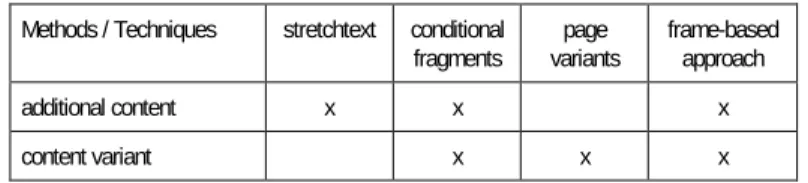
This technique allows the inclusion of all related information in a frame. Frames can be shown, hidden, presented alternatively or ordered. The frameset includes rules to decide which frames are presented to a user. Table 2-2 shows which technique can be combined and used for the implementation of each adaptive content method.
Methods / Techniques stretchtext conditional fragments page variants frame-based approach additional content x x x content variant x x x
2.4.2 Adaptive Navigation
The objective of link-level adaptation is to support navigation preventing users to follow navigation paths that are irrelevant with their tasks or goals (Brusilovsky, 1997). Methods for adaptive navigation provide global or local guidance, support global or local orientation and generate personalised views. The adaptation consists of changes to the navigation structure or how this navigation structure is presented to the user.
Link-level adaptation can be applied to contextual links as well as to non-contextual links. Additional navigation support in form of site maps or trees, table of content, indexes and historical bookmarks lists also can benefit from adaptive navigation techniques.
The methods to support adaptive navigation are: • global guidance
The objective of the global guidance method is to assist the user in finding the shortest navigation path to the information she is looking for or wants to learn.
• local guidance
The objective of the local guidance method is to assist the user in just one navigation step, i.e. to find the “best” link to follow from the current node.
• global orientation
The objective of this method is to support the user in her knowledge of the hyperspace structure and her position in it.
• local orientation
The objective of this method is to support the user in understanding what the different navigation possibilities of the current position mean and to help the user to follow the appropriate link.
• personalised views
This method is an agent-based approach. It consists in the generation and update of a personalised view of a hyperspace. The agents are responsible for finding appropriate links for the user, thus maintaining the personalised view.
The following techniques for navigation adaptation manipulate anchors and links with the purpose of adapting navigation dynamically to the user characteristics given by the current state of the user model, i.e. they are used to implement the methods mentioned above.
These techniques for adaptive navigation are: • direct guidance
The user sees only one option to continue with the browsing activity, i.e. just one anchor or button to navigate to the “next” page is displayed. The destination of this “best” link is determined by the system.
• link annotation
Anchors of links are “annotated”, that is they present a different visible aspect, such as a different colour, bullet or text to show the relevance of the destination. Even a Boolean adaptive annotation (visited/not visited) can be quite useful. Special cases of link annotation are link highlighting
and link hiding. Highlighting of links is used even in non-adaptive applications. Hidden links are present but their anchors are not visible as they are annotated in the same way as text is presented in their surroundings, i.e. these anchors cannot be recognised as anchors of links. The “traffic-light” annotation is a well-known example where red, yellow and green icons are presented together with the anchored text of a link to indicate the degree of appropriateness.
• link removing
Links that the system considers inappropriate are removed, i.e. they are not longer available. Anchors of these links are replaced by text, for example.
• sorting of links
This consists of the ordering of a set of anchors, so that links are presented in decreasing order of relevance to the user. The disadvantage of adaptive ordering is that each time the user enters the same page, the ordered anchors may be different.
• passive navigation
This consists of the addition of non-explicit links (without anchors) that are used by the system to offer assistance to the user when the system identifies a user behaviour pattern, e.g. the user remains inactive during a certain period of time or the user navigates back and forward.
Another technique described in the literature is map-adaptation (e.g. Brusilovsky, 1998 and De Bra, Houben & Wu, 1999). It consists of a combination of the other techniques, the only difference being that it is applied to a graphical visualisation of the navigation (link) structure. The map is usually presented in a separate frame. Adaptive navigation techniques reduce the navigation space either by eliminating anchors (direct guidance, link hiding and link removal) or by guiding the user’s attention to a reduced group of anchors (annotated and sorted links). A user-specific limitation of the navigation space prevent users from getting “lost in the hyperspace”.
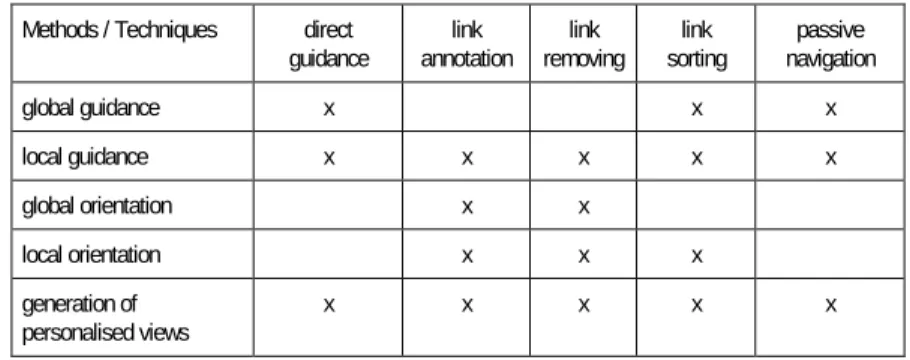
These five techniques for adaptive navigation can be combined for optimal navigation support. Table 2-3 shows which technique can be used for the implementation of each navigation content method.
Methods / Techniques direct
guidance annotation link removing link sorting link navigation passive
global guidance x x x local guidance x x x x x global orientation x x local orientation x x x generation of personalised views x x x x x
Table 2-3: Methods and Techniques for Adaptive Navigation
2.4.3 Adaptive Presentation
The objective of presentation-level adaptation is to adapt the layout to the visual preferences or needs of the user. Methods for adaptive presentation assist the user with an appropriate layout or language. The adaptation consists of changes to the presentation. Sometimes these changes happen simultaneously with adaptation of content. Methods and techniques for adaptive presentation are often grouped with those for adaptive content. In this work they are presented separately so as to distinguish between methods and techniques that produce modifications in the layout and techniques that change the content shown to the user
• multi-languages
The objective of the multi-language method is adaptation to the language preferred by the user. This may be also context dependent.
• layout variants
The layout variants method includes all possible alternatives required in a presentation, e.g. colours, font size or font type, maximum size of images, text orientation, ordering of content fragments, etc.
The same techniques as for adaptive content, with the exception of stretchtext, can be used for presentation adaptation. These techniques are page variants,
conditional fragments and frame-based approach. In addition, the styleguiding
technique is used to implement the methods mentioned above. • styleguiding
This consists of the definition of different styleguides that are used alternately for layout variants.
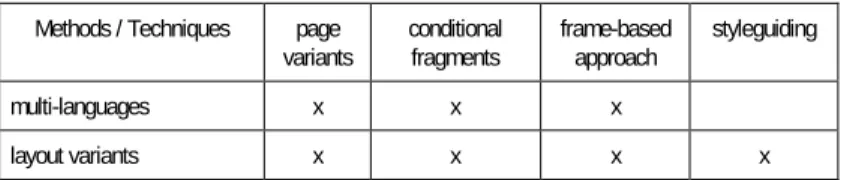
Table 2-4 shows which technique can be used for the implementation of each adaptive presentation method.
Methods / Techniques page
variants conditional fragments frame-based approach styleguiding
multi-languages x x x
layout variants x x x x
Table 2-4: Methods and Techniques for Adaptive Presentation
2.5 The Role of the User Model
Adjusting information (adaptive content), individualising layout (adaptive presentation) or providing the user with navigation support (adaptive navigation) are performed within the system on the basis of the information kept in the user model. Hence, the user model is an important part of an adaptive hypermedia system. It is defined as the system’s representation of certain user characteristics and attitudes (Eklund & Zeilinger, 1996 and Paiva, Self & Hartley, 1995).According to Eklund & Zeiliger (1996) the five main features that are represented inside user models are:
• the user’s current goal or task,
• the user’s knowledge on the domain presented in the hypermedia, • the user’s background or general knowledge,
• the user’s experience, e.g. in the use of similar applications, or in hyper-space, and
• the user’s preferences or interests.
A detailed description of user models and user modeling is presented in Chapter 3.
2.6 Acquisition Techniques
The features included in user models (listed above) need to be initialised and updated, i.e. the system needs to acquire information about the user. Different techniques are used to perform this acquisition (Kobsa, Müller & Nill, 1994), such as:• stereotypes, that are defined by the designer at design-time. At run-time the system assigns a stereotype to each user.
• interviewing is performed by the system at run-time; the information supplied by the user is used for example to initialise the user model. • observation of user behaviour consists of the analysis of the user’s
actions, plan recognition or inference mechanisms.
The process of acquiring information concerning the user behaviour comprises the steps of capturing the appropriate data, selecting the relevant information from data and inferring, i.e. interpreting the user interactions activities. How effectively user models can represent users is still controversial. Ramscar, Pain and Lee (1997) formulate this doubt as follows: Do we know what the user knows, and does it matter?” Kay (1993) remarks that modeling cannot be anything but a guess if it attempts to model the user’s knowledge. Self (1996) stresses that “...the power of a student model does not lie in its fidelity but in the differences it indicates”. Höök, Kaelgren and Waern (1995) and others promote the idea of a user model of the “glass box” type, i.e. a user model that is visible to the user and potentially manageable by the user.