CertPrs8(SUN)/ Sun Certified Programmer & Developer for Java 2 Study Guide / Sierra / 222684-6 / Chapter 6 Blind Folio6:351 CertPrs8(SUN)/ Sun Certified Programmer & Developer for Java 2 Study Guide / Sierra / 222684-6 / Chapter 6 Blind Folio6:351
6
Java.lang—The
Math Class,
Strings, and
Wrappers
CERTIFICATION OBJECTIVES•
Using the java.lang.String Class•
Using the java.lang.Math Class•
Using Wrapper Classes•
Using theequals()Method with Strings and Wrappers and Objects✓
Two-Minute DrillQ&A Self Test
P:\010Comp\CertPrs8\684-6\ch06.vp Friday, November 15, 2002 12:36:12 PM Color profile: Generic CMYK printer profile Composite Default screen
CertPrs8(SUN)/ Sun Certified Programmer & Developer for Java 2 Study Guide / Sierra / 222684-6 / Chapter 6
CertPrs8(SUN)/ Sun Certified Programmer & Developer for Java 2 Study Guide / Sierra / 222684-6 / Chapter 6
T
his chapter focuses on the aspects of the java.lang package that you’ll need to understand for the exam. The java.lang package contains many of the most fundamental and often-used classes in the Java API. The exam will test your knowledge of String and StringBuffer basics, including the infamous immutability of String objects, and how the more common String and StringBuffer methods work. You will be tested on many of the basic methods included in the Math class (extremely interesting), and you will need to know all about wrappers—those methods that allow you to encapsulate your favorite primitives into objects, so that you can do object-like stuff with them (like put them in collections). Finally, we’ll reveal more than you’ve ever wanted to know about how theequals()method and==operator work when dealing with String objects and wrappers.As always, our focus will be on the knowledge you’ll really need to pass the exam. Undoubtedly some very wonderful methods will be overlooked in our tour of java.lang, but we’re dedicated to helping you pass this test.
CERTIFICATION OBJECTIVE
Using the String Class (Exam Objective 8.2)
Describe the significance of the immutability of String objects.This section covers the String and StringBuffer classes. The key concepts we’ll cover will help you understand that once a String object is created, it can never be changed—so whatishappening when a String objectseemsto be changing? We’ll find out. We’ll also cover the differences between the String and StringBuffer classes and when to use which.
Strings Are Immutable Objects
Let’s start with a little background information about strings. Strictly speaking you may not need this information for the test, but a little context will help you learn what youdohave to know. Handling “strings” of characters is a fundamental aspect of most programming languages. In Java, each character in a string is a 16-bit
352
Chapter 6: Java.lang—The Math Class, Strings, and WrappersCertPrs8(SUN)/ Sun Certified Programmer & Developer for Java 2 Study Guide / Sierra / 222684-6 / Chapter 6
P:\010Comp\CertPrs8\684-6\ch06.vp Friday, November 15, 2002 12:36:12 PM Color profile: Generic CMYK printer profile Composite Default screen
Unicode character. Because Unicode characters are 16 bits (not the skimpy 7 or 8 bits that ASCII provides), a rich, international set of characters is easily represented in Unicode.
In Java, strings are objects. Just like other objects, you can create an instance of a String with thenewkeyword, as follows:
String s = new String();
This line of code creates a new object of class String, and assigns the reference variablesto it. So far String objects seem just like other objects. Now, let’s give the String a value:
s = "abcdef";
As you might expect the String class has about a zillion constructors, so you can use a more efficient shortcut:
String s = new String("abcdef");
And just because you’ll use strings all the time, you can even say this:
String s = "abcdef";
There are some subtle differences between these options that we’ll discuss later, but what they have in common is that they all create a new String object, with a value of “abcdef ”, and assign it to a reference variables. Now let’s say that you want a second reference to the String object referred to bys:
String s2 = s; // refer s2 to the same String as s
So far so good. String objects seem to be behaving just like other objects, so what’s all the fuss about? The certification objective states: “describe the significance of the immutability of String objects.” Ah-ha! Immutability! (What the heck is immutability?) Once you have assigned a String a value, that value can never change— it’s immutable, frozen solid, won’t budge, fini, done. (We’ll also talk about why later, don’t let us forget.) The good news is that while the Stringobjectis immutable, its
reference variableis not, so to continue with our previous example:
s = s.concat(" more stuff"); // the concat() method 'appends // a literal to the end
CertPrs8(SUN)/ Sun Certified Programmer & Developer for Java 2 Study Guide / Sierra / 222684-6 / Chapter 6
CertPrs8(SUN)/ Sun Certified Programmer & Developer for Java 2 Study Guide / Sierra / 222684-6 / Chapter 6
Using the String Class (Exam Objective 8.2)
353
CertPrs8(SUN)/ Sun Certified Programmer & Developer for Java 2 Study Guide / Sierra / 222684-6 / Chapter 6P:\010Comp\CertPrs8\684-6\ch06.vp Friday, November 15, 2002 12:36:13 PM Color profile: Generic CMYK printer profile Composite Default screen
CertPrs8(SUN)/ Sun Certified Programmer & Developer for Java 2 Study Guide / Sierra / 222684-6 / Chapter 6
CertPrs8(SUN)/ Sun Certified Programmer & Developer for Java 2 Study Guide / Sierra / 222684-6 / Chapter 6
CertPrs8(SUN)/ Sun Certified Programmer & Developer for Java 2 Study Guide / Sierra / 222684-6 / Chapter 6
Now wait just a minute, didn’t we just say that Strings were immutable? So what’s all this “appending to the end of the string” talk? Excellent question; let’s look at what really happened…
The VM took the value of Strings(which was“abcdef”), and tacked“ more stuff”onto the end, giving us the value“abcdef more stuff”. Since Strings are immutable, the VM couldn’t stuff this new String into the old String referenced bys, so it created a new String object, gave it the value“abcdef more stuff”, and madesrefer toit. At this point in our example, we have two String objects: the first one we created, with the value“abcdef”, and the second one with the value“abcdef more stuff”. Technically there are nowthreeString objects, because the literal argument to concat“ more stuff”isitselfa new String object. But we have references only to“abcdef”(referenced bys2) and “abcdef more stuff”(referenced bys).
What if we didn’t have the foresight or luck to create a second reference variable for the“abcdef”Stringbeforewe called:s = s.concat(“ more stuff”);? In that case the original, unchanged String containing“abcdef”would still exist in memory, but it would be considered “lost.” No code in our program has any way to reference it—it is lost to us. Note, however, that the original “abcdef ” String didn’t change (it can’t, remember, it’simmutable); only the reference variableswas changed, so that it would refer to a different String. Figure 6-1 shows what happens on the heap when you reassign a reference variable. Note that the dashed line indicates a deleted reference.
To review our first example:
String s = "abcdef"; // create a new String object, with value "abcdef", // refer s to it
String s2 = s; // create a 2nd reference variable referring to // the same String
s = s.concat(" more stuff"); // create a new String object, with value // "abcdef more stuff", refer s to it. // (change s's reference from the old // String to the new String. ( Remember // s2 is still referring to the original // "abcdef" String.
354
Chapter 6: Java.lang—The Math Class, Strings, and WrappersCertPrs8(SUN)/ Sun Certified Programmer & Developer for Java 2 Study Guide / Sierra / 222684-6 / Chapter 6
P:\010Comp\CertPrs8\684-6\ch06.vp Friday, November 15, 2002 12:36:13 PM Color profile: Generic CMYK printer profile Composite Default screen
CertPrs8(SUN)/ Sun Certified Programmer & Developer for Java 2 Study Guide / Sierra / 222684-6 / Chapter 6
CertPrs8(SUN)/ Sun Certified Programmer & Developer for Java 2 Study Guide / Sierra / 222684-6 / Chapter 6
Let’s look at another example:
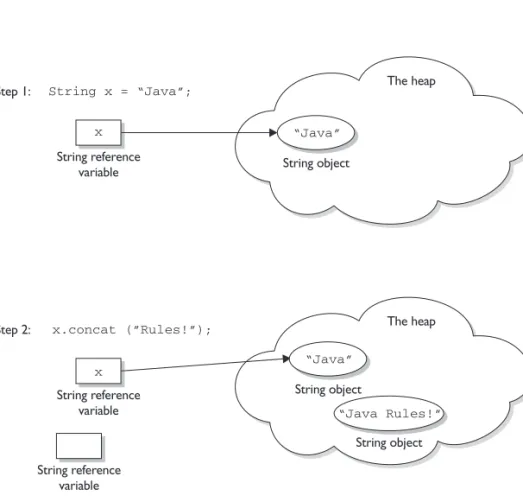
String x = "Java"; x.concat(" Rules!");
System.out.println("x = " + x);
Using the String Class (Exam Objective 8.2)
355
CertPrs8(SUN)/ Sun Certified Programmer & Developer for Java 2 Study Guide / Sierra / 222684-6 / Chapter 6FIGURE 6-1 String objects and their reference variables P:\010Comp\CertPrs8\684-6\ch06.vp Friday, November 15, 2002 12:36:13 PM Color profile: Generic CMYK printer profile Composite Default screen
The output will bex = Java.
The first line is straightforward: create a new String object, give it the value “Java”, and referxto it. What happens next? The VM creates a second String object with the value“Java Rules!”but nothing refers to it!!! The second String object is instantly lost; no one can ever get to it. The reference variablexstill refers to the original String with the value“Java”. Figure 6-2 shows creating a String object without assigning to a reference.
Let’s expand this current example. We started with
String x = "Java"; x.concat(" Rules!");
System.out.println("x = " + x); // the output is: x = Java CertPrs8(SUN)/ Sun Certified Programmer & Developer for Java 2 Study Guide / Sierra / 222684-6 / Chapter 6
CertPrs8(SUN)/ Sun Certified Programmer & Developer for Java 2 Study Guide / Sierra / 222684-6 / Chapter 6
356
Chapter 6: Java.lang—The Math Class, Strings, and WrappersCertPrs8(SUN)/ Sun Certified Programmer & Developer for Java 2 Study Guide / Sierra / 222684-6 / Chapter 6
FIGURE 6-2 A String object is abandoned upon creation P:\010Comp\CertPrs8\684-6\ch06.vp Friday, November 15, 2002 12:36:14 PM Color profile: Generic CMYK printer profile Composite Default screen
CertPrs8(SUN)/ Sun Certified Programmer & Developer for Java 2 Study Guide / Sierra / 222684-6 / Chapter 6 CertPrs8(SUN)/ Sun Certified Programmer & Developer for Java 2 Study Guide / Sierra / 222684-6 / Chapter 6
Now let’s add x.toUpperCase();
System.out.println("x = " + x); // the output is still: x = Java
(We actuallydidjust create a new String object with the value“JAVA”, but it was lost, andx stillrefers to the original, unchanged String“Java”.)
How about adding x.replace('a', 'X');
System.out.println("x = " + x); // the output is still: x = Java
Can you determine what happened? The VM created yet another new String object, with the value“JXvX”, (replacing thea’s withX’s), but once again this new String was lost, leavingxto refer to the original unchanged andunchangeable String object, with the value“Java”. In all of these cases we called various String methods to create a new String by altering an existing String, but we neverassigned the newly created String to a reference variable.
But we can put a small spin on the previous example: String x = "Java";
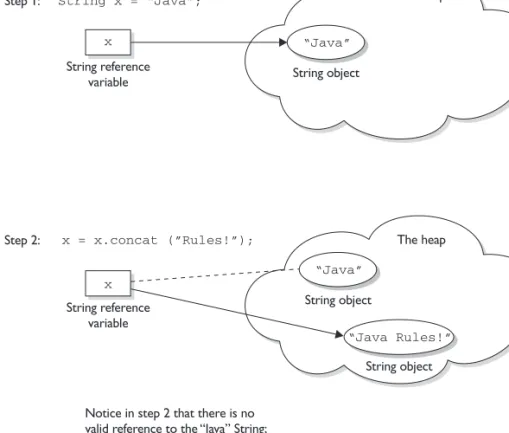
x = x.concat(" Rules!"); // Now we're assigning x to the new String System.out.println("x = " + x); // the output will be:
// x = Java Rules!
This time, when the VM runs the second line, a new String object is created with the value of“Java Rules!”, andxis set to reference it. But wait, there’s more—now the original String object,“Java”, has been lost, and no one is referring to it. So in both examples we createdtwoString objects and onlyone reference variable, so one of the two String objects was left out in the cold. See Figure 6-3 for a graphic depiction of this sad story. The dashed line indicates a deleted reference.
Let’s take this example a little further: String x = "Java";
x = x.concat(" Rules!");
System.out.println("x = " + x); // the output is: x = Java Rules!
x.toLowerCase(); // no assignment, create a new, abandoned String
System.out.println("x = " + x); // no assignment, the output is // still: x = Java Rules
Using the String Class (Exam Objective 8.2)
357
CertPrs8(SUN)/ Sun Certified Programmer & Developer for Java 2 Study Guide / Sierra / 222684-6 / Chapter 6
P:\010Comp\CertPrs8\684-6 (reprint)\ch06.vp Tuesday, February 25, 2003 6:11:48 PM Color profile: Generic CMYK printer profile Composite Default screen
x = x.toLowerCase(); // create a new String, assigned to x System.out.println("x = " + x); // the assignment causes the output:
// x = java rules!
The previous discussion contains the keys to understanding Java String immutability. If you really, reallygetthe examples and diagrams, backwards and forwards, you should get 80 percent of the String questions on the exam correct. We will cover more details about Strings next, but make no mistake—in terms of bang for your buck, what we’ve already covered is by far the most important part of understanding how String objects work in Java.
We’ll finish this section by presenting an example of the kind of devilish String question you might expect to see on the exam. Take the time to work it out on paper (as a hint, try to keep track of how many objects and reference variables there are, and which ones refer to which).
CertPrs8(SUN)/ Sun Certified Programmer & Developer for Java 2 Study Guide / Sierra / 222684-6 / Chapter 6 CertPrs8(SUN)/ Sun Certified Programmer & Developer for Java 2 Study Guide / Sierra / 222684-6 / Chapter 6 CertPrs8(SUN)/ Sun Certified Programmer & Developer for Java 2 Study Guide / Sierra / 222684-6 / Chapter 6
358
Chapter 6: Java.lang—The Math Class, Strings, and WrappersCertPrs8(SUN)/ Sun Certified Programmer & Developer for Java 2 Study Guide / Sierra / 222684-6 / Chapter 6
FIGURE 6-3 An old String object being abandoned P:\010Comp\CertPrs8\684-6 (reprint)\ch06.vp Tuesday, February 25, 2003 6:11:49 PM Color profile: Generic CMYK printer profile Composite Default screen
CertPrs8(SUN)/ Sun Certified Programmer & Developer for Java 2 Study Guide / Sierra / 222684-6 / Chapter 6
CertPrs8(SUN)/ Sun Certified Programmer & Developer for Java 2 Study Guide / Sierra / 222684-6 / Chapter 6
String s1 = "spring "; String s2 = s1 + "summer "; s1.concat("fall "); s2.concat(s1); s1 += "winter "; System.out.println(s1 + " " + s2);
What is the output?
For extra credit, how many String objects and how many reference variables were created prior to theprintlnstatement? Answer:
The result of this code fragment is“spring winter spring summer”. There are two reference variables,s1ands2. There were a total of eight String objects created as follows: “spring”, “summer ” (lost), “spring summer”, “fall” (lost), “spring fall” (lost), “spring summer spring” (lost), “winter” (lost), “spring winter” (at this point “spring” is lost). Only two of the eight String objects are not lost in this process.
Important Facts About Strings and Memory
In this section we’ll discuss how Java handles string objects in memory, and some of the reasons behind these behaviors.
One of the key goals of any good programming language is to make efficient use of memory. As applications grow, it’s very common that String literals occupy large amounts of a program’s memory, and that there is often a lot of redundancy within the universe of String literals for a program. To make Java more memory efficient, the JVM sets aside a special area of memory called the “String constant pool.” When the compiler encounters a String literal, it checks the pool to see if an identical String already exists. If a match is found, the reference to the new literal is directed to the existing String, and no new String literal object is created. (The existing String simply has an additional reference.) Now we can start to see why making String objects immutable is such a good idea. If several reference variables refer to the same String without even knowing it, it would beverybad if any of them could change the String’s value.
You might say, “Well that’s all well and good, but what if someone overrides the String class functionality; couldn’t that cause problems in the pool?” That’s one of the main reasons that the String class is markedfinal. Nobody can override the behaviors of any of the String methods, so you can rest assured that the String objects you are counting on to be immutable will, in fact,beimmutable.
Using the String Class (Exam Objective 8.2)
359
CertPrs8(SUN)/ Sun Certified Programmer & Developer for Java 2 Study Guide / Sierra / 222684-6 / Chapter 6P:\010Comp\CertPrs8\684-6\ch06.vp Friday, November 15, 2002 12:36:15 PM Color profile: Generic CMYK printer profile Composite Default screen
CertPrs8(SUN)/ Sun Certified Programmer & Developer for Java 2 Study Guide / Sierra / 222684-6 / Chapter 6
CertPrs8(SUN)/ Sun Certified Programmer & Developer for Java 2 Study Guide / Sierra / 222684-6 / Chapter 6
CertPrs8(SUN)/ Sun Certified Programmer & Developer for Java 2 Study Guide / Sierra / 222684-6 / Chapter 6
Creating New Strings
Earlier we promised to talk more about the subtle differences between the various methods of creating a String. Let’s look at a couple of examples of how a String might be created, and let’s further assume that no other String objects exist in the pool:
1 – String s = "abc"; // creates one String object and one reference // variable
In this simple case,“abc”will go in the pool andswill refer to it.
2 – String s = new String("abc"); // creates two objects, and one // reference variable
In this case, because we used thenewkeyword, Java will create a new String object in normal (nonpool) memory, andswill refer to it. In addition, the literal “abc”will be placed in the pool.
Important Methods in the String Class
The following methods are some of the more commonly used methods in the String class, and also the ones that you’re most likely to encounter on the exam.
public char charAt(int index)
This method returns the character located at the String’s specified index. Remember that String indexes are zero-based—for example,
String x = "airplane";
System.out.println( x.charAt(2) ); // output is 'r'
public String concat(String s)
This method returns a String with the value of the Stringpassedin to the method appended to the end of the String used toinvokethe method—for example,
String x = "taxi";
System.out.println( x.concat(" cab") ); // output is "taxi cab"
The overloaded + and += operators perform functions similar to theconcat() method—for example,
String x = "library";
System.out.println( x + " card"); // output is "library card"
360
Chapter 6: Java.lang—The Math Class, Strings, and WrappersCertPrs8(SUN)/ Sun Certified Programmer & Developer for Java 2 Study Guide / Sierra / 222684-6 / Chapter 6
P:\010Comp\CertPrs8\684-6\ch06.vp Friday, November 15, 2002 12:36:15 PM Color profile: Generic CMYK printer profile Composite Default screen
CertPrs8(SUN)/ Sun Certified Programmer & Developer for Java 2 Study Guide / Sierra / 222684-6 / Chapter 6
CertPrs8(SUN)/ Sun Certified Programmer & Developer for Java 2 Study Guide / Sierra / 222684-6 / Chapter 6
CertPrs8(SUN)/ Sun Certified Programmer & Developer for Java 2 Study Guide / Sierra / 222684-6 / Chapter 6
1. String x = "Atlantic"; 2. x += " ocean"
3. System.out.println( x ); // output is "Atlantic ocean"
In the preceding “Atlantic Ocean” example, notice that the value ofx really did change!Remember that the += operator is anassignmentoperator, so line 2 is really creating a new String, “Atlantic Ocean”, and assigning it to thexvariable. After line 2 executes, the original Stringxwas referring to, “Atlantic”, is abandoned.
public boolean equalsIgnoreCase(String s)
This method returns abooleanvalue (trueorfalse) depending on whether the value of the String in theargumentis the same as the value of the Stringused to invoke the method.This method will returntrueeven when characters in the String objects being compared have differing cases—for example,
String x = "Exit";
System.out.println( x.equalsIgnoreCase("EXIT")); // returns "true"
System.out.println( x.equalsIgnoreCase("tixe")); // returns "false"
public int length()
This method returns the length of the String used to invoke the method—for example,
String x = "01234567";
System.out.println( x.length() ); // returns "8"
Arrays have an attribute (not a method), calledlength. You may encounter questions in the exam that attempt to use thelength()methodon an array, or that attempt to use thelengthattributeon a String. Both cause compiler errors—for example,
String x = “test”;
System.out.println( x.length ); // compiler error or
String [] x = new String[3];
System.out.println( x.length() );
Using the String Class (Exam Objective 8.2)
361
CertPrs8(SUN)/ Sun Certified Programmer & Developer for Java 2 Study Guide / Sierra / 222684-6 / Chapter 6
P:\010Comp\CertPrs8\684-6 (reprint)\ch06.vp Tuesday, February 25, 2003 6:12:05 PM Color profile: Generic CMYK printer profile Composite Default screen
public String replace(char old, char new)
This method returns a String whose value is that of the String used to invoke the method, updated so that any occurrence of thecharin the first argument is replaced by thecharin the second argument—for example,
String x = "oxoxoxox";
System.out.println( x.replace('x', 'X') ); // output is "oXoXoXoX"
public String substring(int begin)
public String substring(int begin, int end)
Thesubstring()method is used to return a part (orsubstring) of the String used to invoke the method. The first argument represents the starting location (zero-based) of the substring. If the call has onlyoneargument, the substring returned will include the characters to the end of the original String. If the call has
twoarguments, the substring returned will end with the character located in thenth position of the original String wherenis the second argument. Unfortunately, the ending argument is not zero-based, so if the second argument is 7, the last character in the returned String will be in the original String’s 7 position, which is index 6 (ouch). Let’s look at some examples:
String x = "0123456789"; // as if by magic, the value of each char // is the same as its index!
System.out.println( x.substring(5) ); // output is "56789" System.out.println( x.substring(5, 8)); // output is "567"
The first example should be easy: start at index 5 and return the rest of the String. The second example should be read as follows: start at index 5 and return the characters up to and including the 8th
position (index 7). public String toLowerCase()
This method returns a String whose value is the String used to invoke the method, but with any uppercase characters converted to lowercase—for example,
String x = "A New Moon";
System.out.println( x.toLowerCase() ); // output is "a new moon"
public String toString()
This method returns the value of the String used to invoke the method. What? Why would you need such a seemingly “do nothing” method? All objects in Java must
CertPrs8(SUN)/ Sun Certified Programmer & Developer for Java 2 Study Guide / Sierra / 222684-6 / Chapter 6
CertPrs8(SUN)/ Sun Certified Programmer & Developer for Java 2 Study Guide / Sierra / 222684-6 / Chapter 6
CertPrs8(SUN)/ Sun Certified Programmer & Developer for Java 2 Study Guide / Sierra / 222684-6 / Chapter 6
362
Chapter 6: Java.lang—The Math Class, Strings, and WrappersCertPrs8(SUN)/ Sun Certified Programmer & Developer for Java 2 Study Guide / Sierra / 222684-6 / Chapter 6
P:\010Comp\CertPrs8\684-6\ch06.vp Friday, November 15, 2002 12:36:15 PM Color profile: Generic CMYK printer profile Composite Default screen
have atoString()method, which typically returns a String that in some meaningful way describes the object in question. In the case of a String object, what more meaningful way than the String’s value? For the sake of consistency, here’s an example:
String x = "big surprise";
System.out.println( x.toString() ); // output – reader's exercise
public String toUpperCase()
This method returns a String whose value is the String used to invoke the method, but with any lowercase characters converted to uppercase—for example,
String x = "A New Moon";
System.out.println( x.toUpperCase() ); // output is "A NEW MOON"
public String trim()
This method returns a String whose value is the String used to invoke the method, but with any leading or trailing blank spaces removed—for example,
String x = " hi ";
System.out.println( x + "x" ); // result is " hi x" System.out.println( x.trim() + "x"); // result is "hix"
The StringBuffer Class
The StringBuffer class should be used when you have to make a lot of modifications to strings of characters. As we discussed in the previous section, String objects are immutable, so if you choose to do a lot of manipulations with String objects, you will end up with a lot of abandoned String objects in the String pool. On the other hand, objects of type StringBuffer can be modified over and over again without leaving behind a great effluence of discarded String objects.
A common use for StringBuffers is file I/O when large, ever-changing streams of input are being handled by the program. In these cases, large blocks of characters are handled as units, and StringBuffer objects are the ideal way to handle a block of data, pass it on, and then reuse the same memory to handle the next block of data.
CertPrs8(SUN)/ Sun Certified Programmer & Developer for Java 2 Study Guide / Sierra / 222684-6 / Chapter 6
CertPrs8(SUN)/ Sun Certified Programmer & Developer for Java 2 Study Guide / Sierra / 222684-6 / Chapter 6
CertPrs8(SUN)/ Sun Certified Programmer & Developer for Java 2 Study Guide / Sierra / 222684-6 / Chapter 6
Using the String Class (Exam Objective 8.2)
363
CertPrs8(SUN)/ Sun Certified Programmer & Developer for Java 2 Study Guide / Sierra / 222684-6 / Chapter 6P:\010Comp\CertPrs8\684-6\ch06.vp Friday, November 15, 2002 12:36:15 PM Color profile: Generic CMYK printer profile Composite Default screen
CertPrs8(SUN)/ Sun Certified Programmer & Developer for Java 2 Study Guide / Sierra / 222684-6 / Chapter 6
CertPrs8(SUN)/ Sun Certified Programmer & Developer for Java 2 Study Guide / Sierra / 222684-6 / Chapter 6
In the previous section, we saw how the exam might test your understanding of String immutability with code fragments like this:
String x = "abc"; x.concat("def");
System.out.println("x = " + x); // output is "x = abc"
Because no new assignment was made, the new String object created with the concat()method was abandoned instantly. We also saw examples like this:
String x = "abc"; x = x.concat("def");
System.out.println("x = " + x); // output is "x = abcdef"
We got a nice new String out of the deal, but the downside is that the old String “abc”has been lost in the String pool, thus wasting memory. If we were using a StringBuffer instead of a String, the code would look like this:
StringBuffer sb = new StringBuffer("abc"); sb.append("def");
System.out.println("sb = " + sb); // output is "sb = abcdef"
All of the StringBuffer methods we will discuss operate on the value of the StringBuffer object invoking the method. So a call tosb.append(“def”); is actually appending“def”to itself(StringBuffer sb). In fact, these method calls can bechainedto each other—for example,
StringBuffer sb = new StringBuffer("abc"); sb.append("def").reverse().insert(3, "---");
System.out.println( sb ); // output is "fed---cba"
The exam will probably test your knowledge of the difference between String and StringBuffer objects. Because StringBuffer objects are changeable, the following code fragment will behave differently than a similar code fragment that uses String objects:
StringBuffer sb = new StringBuffer("abc"); sb.append("def");
System.out.println( sb );
In this case, the output will be
“abcdef”
CertPrs8(SUN)/ Sun Certified Programmer & Developer for Java 2 Study Guide / Sierra / 222684-6 / Chapter 6
364
Chapter 6: Java.lang—The Math Class, Strings, and WrappersCertPrs8(SUN)/ Sun Certified Programmer & Developer for Java 2 Study Guide / Sierra / 222684-6 / Chapter 6
P:\010Comp\CertPrs8\684-6\ch06.vp Friday, November 15, 2002 12:36:15 PM Color profile: Generic CMYK printer profile Composite Default screen
CertPrs8(SUN)/ Sun Certified Programmer & Developer for Java 2 Study Guide / Sierra / 222684-6 / Chapter 6
CertPrs8(SUN)/ Sun Certified Programmer & Developer for Java 2 Study Guide / Sierra / 222684-6 / Chapter 6
CertPrs8(SUN)/ Sun Certified Programmer & Developer for Java 2 Study Guide / Sierra / 222684-6 / Chapter 6
Important Methods in the StringBuffer Class
The following method returns a StringBuffer object with the argument’s value appended to the value of the object that invoked the method:
public synchronized StringBuffer append(String s)
As we’ve seen earlier, this method will update the value of the object that invoked the method, whether or not the return is assigned to a variable. This method will take many different arguments,boolean,char,double,float,int,long, and others, but the most likely use on the exam will be a String argument—for example,
StringBuffer sb = new StringBuffer("set "); sb.append("point");
System.out.println( sb ); // output is "set point"
or
StringBuffer sb = new StringBuffer("pi = "); sb.append(3.14159f);
System.out.println( sb ); // output is "pi = 3.14159"
public synchronized StringBuffer insert(int offset, String s)
This method returns a StringBuffer object and updates the value of the StringBuffer object that invoked the method call. In both cases, the String passed in to the second argument is inserted into the original StringBuffer starting at the offset location represented by the first argument (the offset is zero-based). Again, other types of data can be passed in through the second argument (boolean,char,double,float,int,
long, etc.), but the String argument is the one you’re most likely o see:
StringBuffer sb = new StringBuffer("01234567"); sb.insert(4, "---");
System.out.println( sb ); // output is "0123---4567"
public synchronized StringBuffer reverse()
This method returns a StringBuffer object and updates the value of the StringBuffer object that invoked the method call. In both cases, the characters in the StringBuffer
Using the String Class (Exam Objective 8.2)
365
CertPrs8(SUN)/ Sun Certified Programmer & Developer for Java 2 Study Guide / Sierra / 222684-6 / Chapter 6P:\010Comp\CertPrs8\684-6\ch06.vp Friday, November 15, 2002 12:36:15 PM Color profile: Generic CMYK printer profile Composite Default screen
are reversed, the first character becoming the last, the second becoming the second to the last, and so on:
StringBuffer sb = new StringBuffer(“A man a plan a canal Panama”); sb.reverse();
System.out.println(sb); // output is “amanaP lanac a nalp a nam A”
public String toString()
This method returns the value of the StringBuffer object that invoked the method call as a String:
StringBuffer sb = new StringBuffer("test string");
System.out.println( sb.toString() ); // output is "test string"
That’s it for StringBuffers. If you take only one thing away from this section, it’s thatunlike Strings, StringBuffer objects can be changed.
Many of the exam questions covering this chapter’s topics use a tricky bit of Java syntax known aschained methods.A statement with chained methods has the general form:
result = method1().method2().method3();
In theory, any number of methods can bechainedin this fashion, although typically you won’t see more than three. Here’s how to decipher these “handy Java shortcuts” when you encounter them:
1. Determine what the leftmost method call will return (let’s call itx). 2. Usexas the object invoking the second (from the left) method. If there
are only two chained methods, the result of the second method callisthe expression’s result.
3. If there is a third method, the result of the second method call is used to invoke the third method, whose resultisthe expression’s result— for example,
String x = "abc";
String y = x.concat("def").toUpperCase().replace('C','x'); //chained methods System.out.println("y = " + y); // result is "ABxDEF"
Let’s look at what happened. The literal“def”was concatenated to“abc”, creating a temporary, intermediate String (soon to be lost), with the value
“abcdef”. ThetoUpperCase()method created a new (soon to be lost) temporary String with the value“ABCDEF”. Thereplace()method created a final String with the value“ABxDEF”, and referredyto it.
CertPrs8(SUN)/ Sun Certified Programmer & Developer for Java 2 Study Guide / Sierra / 222684-6 / Chapter 6 CertPrs8(SUN)/ Sun Certified Programmer & Developer for Java 2 Study Guide / Sierra / 222684-6 / Chapter 6 CertPrs8(SUN)/ Sun Certified Programmer & Developer for Java 2 Study Guide / Sierra / 222684-6 / Chapter 6
366
Chapter 6: Java.lang—The Math Class, Strings, and WrappersCertPrs8(SUN)/ Sun Certified Programmer & Developer for Java 2 Study Guide / Sierra / 222684-6 / Chapter 6
P:\010Comp\CertPrs8\684-6 (reprint)\ch06.vp Tuesday, February 25, 2003 6:12:18 PM Color profile: Generic CMYK printer profile Composite Default screen
CertPrs8(SUN)/ Sun Certified Programmer & Developer for Java 2 Study Guide / Sierra / 222684-6 / Chapter 6
CertPrs8(SUN)/ Sun Certified Programmer & Developer for Java 2 Study Guide / Sierra / 222684-6 / Chapter 6
CERTIFICATION OBJECTIVE
Using the Math Class (Exam Objective 8.1)
Write code using the following methods of the java.lang.Math class: abs, ceil, floor, max, min, random, round, sin, cos, tan, sqrt.
The java.lang package defines classes that are fundamental to the Java language. For this reason, all classes in the java.lang package are imported automatically, so there is no reason to write animportstatement for them. The package defines object wrappers for all primitive types. The class names are Boolean, Byte, Character, Double, Float, Integer, Long, Short, and Void as well as Object, the class from which all other Java classes inherit.
The java.lang package also contains the Math class, which is used to perform basic mathematical operations. The Math class defines approximations for the mathematical constantspiande. Their signatures are as follows:
public final static double Math.PI public final static double Math.E
Because all methods of the Math class are defined asstatic, you don’t need to create an instance to use them. In fact, it’s notpossibleto create an instance of the Math class because the constructor isprivate. You can’t extend the Math class either, because it’s markedfinal.
Methods of the java.lang.Math Class
The methods of the Math class are static and are accessed like any static method—through the class name. For these method calls the general form is
result = Math.aStaticMathMethod();
The following sections describe the Math methods and include examples of how to use them.
Using the Math Class (Exam Objective 8.1)
367
CertPrs8(SUN)/ Sun Certified Programmer & Developer for Java 2 Study Guide / Sierra / 222684-6 / Chapter 6
P:\010Comp\CertPrs8\684-6\ch06.vp Monday, November 18, 2002 2:23:20 PM Color profile: Generic CMYK printer profile Composite Default screen
abs()
Theabs()method returns the absolute value of the argument—for example,
x = Math.abs(99); // output is 99 x = Math.abs(-99) // output is 99
The method is overloaded to take anint, along, afloat, or adoubleargument. In all but two cases, the returned value is non-negative. The signatures of theabs() method are as follows:
public static int abs(int a) public static long abs(long a) public static float abs(float a) public static double abs(double a)
ceil()
Theceil()method returns the smallest integer, as adouble, that isgreater than or equal to the argumentandequal to the nearest integer value. In other words, the argument is rounded up to the nearest integer equivalent.
Let’s look at some examples of this in action, just to make sure you are familiar with the concept. All the following calls toMath.ceil()return thedouble
value 9.0:
Math.ceil(9.0) // result is 9.0 Math.ceil(8.8) // rises to 9.0 Math.ceil(8.02) // still rises to 9.0
Negative numbers are similar, but just remember that –9 is greater than –10. All the following calls toMath.ceil()return thedoublevalue -9.0:
Math.ceil(-9.0) // result is –9.0 Math.ceil(-9.4) // rises to –9.0 Math.ceil(-9.8) // still rises to –9.0
There is only oneceil()method and it has the following signature:
public static double ceil(double a)
floor()
Thefloor()method returns the largestdoublethat is less than or equal to the argument and equal to the nearest integer value. This method is the antithesis of theceil()method.
CertPrs8(SUN)/ Sun Certified Programmer & Developer for Java 2 Study Guide / Sierra / 222684-6 / Chapter 6
CertPrs8(SUN)/ Sun Certified Programmer & Developer for Java 2 Study Guide / Sierra / 222684-6 / Chapter 6
368
Chapter 6: Java.lang—The Math Class, Strings, and WrappersCertPrs8(SUN)/ Sun Certified Programmer & Developer for Java 2 Study Guide / Sierra / 222684-6 / Chapter 6
P:\010Comp\CertPrs8\684-6\ch06.vp Friday, November 15, 2002 12:36:16 PM Color profile: Generic CMYK printer profile Composite Default screen
All the following calls toMath.floor()return thedoublevalue 9.0:
Math.floor(9.0) // result is 9.0 Math.floor(9.4) // drops to 9.0 Math.floor(9.8) // still drops to 9.0
As before, keep in mind that with negative numbers, –9 is less than –8! All the following calls toMath.floor()return thedoublevalue –9.0:
Math.floor(-9.0) // result is –9.0 Math.floor(-8.8) // drops to –9.0 Math.floor(-8.1) // still drops to –9.0
The signature of thefloor()method is as follows:
public static double floor(double a)
Thefloor()andceil()methods take onlydoubles.There are no overloaded methods for integral numbers, because the methods would just end up returning the integral numbers they were passed. The whole point offloor()andceil()is to convert floating-point numbers(doubles), to integers, based on the rules of the methods. It may seem strange (it does to us) that the integer values are returned in adoublesized container, but don’t let that throw you.
max()
Themax()method takes two numeric arguments and returns the greater of the two—for example,
x = Math.max(1024, -5000); // output is 1024.
This method is overloaded to handleint,long,float, ordoublearguments. If the input parameters are the same,max()returns a value equal to the two arguments. The signatures of themax()method are as follows:
public static int max(int a, int b) public static long max(long a, long b) public static float max(float a, float b) public static double max(double a, double b)
CertPrs8(SUN)/ Sun Certified Programmer & Developer for Java 2 Study Guide / Sierra / 222684-6 / Chapter 6
CertPrs8(SUN)/ Sun Certified Programmer & Developer for Java 2 Study Guide / Sierra / 222684-6 / Chapter 6
Using the Math Class (Exam Objective 8.1)
369
CertPrs8(SUN)/ Sun Certified Programmer & Developer for Java 2 Study Guide / Sierra / 222684-6 / Chapter 6P:\010Comp\CertPrs8\684-6\ch06.vp Friday, November 15, 2002 12:36:16 PM Color profile: Generic CMYK printer profile Composite Default screen
CertPrs8(SUN)/ Sun Certified Programmer & Developer for Java 2 Study Guide / Sierra / 222684-6 / Chapter 6
CertPrs8(SUN)/ Sun Certified Programmer & Developer for Java 2 Study Guide / Sierra / 222684-6 / Chapter 6
min()
Themin()method is the antithesis of themax()method; it takes two numeric arguments and returns the lesser of the two—for example,
x = Math.min(0.5, 0.0); // output is 0.0
This method is overloaded to handleint,long,float, ordoublearguments. If the input parameters are the same,min()returns a value equal to the two arguments. The signatures of themin()method are as follows:
public static int min(int a, int b) public static long min(long a, long b) public static float min(float a, float b) public static double min(double a, double b)
And for the record, we’re pretty impressed with our use of the word “antithesis”.
EXERCISE 6-1
Using the Math Class
In this exercise we will examine some numbers using theabs(),ceil(), and floor()methods of the Math class. Find the absolute, ceiling, and floor values of the following numbers: 10.5, –10.5, Math.PI, and 0.
■ Create a class and amain()method to perform the calculations. ■ Store these numbers in an array ofdoublevalues.
■ Use aforloop to go through the array and perform the tests on each of these numbers.
■ Try to determine what the results of your program will be before running it. ■ An example solution is provided at the end of the chapter.
random()
Therandom()method returns a randomdoublethat is greater than or equal to 0.0 and less than 1.0. Therandom()method does not take any parameters— for example,
370
Chapter 6: Java.lang—The Math Class, Strings, and WrappersCertPrs8(SUN)/ Sun Certified Programmer & Developer for Java 2 Study Guide / Sierra / 222684-6 / Chapter 6
P:\010Comp\CertPrs8\684-6\ch06.vp Friday, November 15, 2002 12:36:16 PM Color profile: Generic CMYK printer profile Composite Default screen
CertPrs8(SUN)/ Sun Certified Programmer & Developer for Java 2 Study Guide / Sierra / 222684-6 / Chapter 6
CertPrs8(SUN)/ Sun Certified Programmer & Developer for Java 2 Study Guide / Sierra / 222684-6 / Chapter 6
public class RandomTest {
public static void main(String [] args) { for (int x=0; x < 15; x++)
System.out.print( (int)(Math.random()*10) + " " ); }
}
Theprintln()method multiplies the result of the call toMath.random() by 10, and then casts the resultingdouble(whose value will be between 0.0 and 9.99999999…), to an integer. Here are some sample results:
6 3 3 1 2 0 5 9 3 5 6 6 0 3 5 4 9 3 6 6 8 1 1 3 0 3 2 5 3 4
The signature of therandom()method is as follows:
public static double random( )
round()
Theround()method returns the integer closest to the argument. The algorithm is to add 0.5 to the argument and truncate to the nearest integer equivalent. This method is overloaded to handle afloator adoubleargument.
The methodsceil(),floor(), andround()all take floating-point arguments and return integer equivalents (although again, delivered in adouble
variable). If the number after the decimal point isless than0.5,Math.round() is equal toMath.floor().If the number after the decimal point isgreater than or equal to0.5,Math.round()is equal toMath.ceil(). Keep in mind that with negative numbers, a number at the .5 mark will round up to thelargernumber— for example,
Math.round(-10.5); // result is –10
The signatures of theround()method are as follows:
public static int round(float a) public static long round(double a)
sin()
Thesin()method returns the sine of an angle. The argument is adouble
representing an anglein radians. Degrees can be converted to radians by using Math.toRadians()—for example,
Math.sin(Math.toRadians(90.0)) // returns 1.0
Using the Math Class (Exam Objective 8.1)
371
CertPrs8(SUN)/ Sun Certified Programmer & Developer for Java 2 Study Guide / Sierra / 222684-6 / Chapter 6P:\010Comp\CertPrs8\684-6\ch06.vp Friday, November 15, 2002 12:36:16 PM Color profile: Generic CMYK printer profile Composite Default screen
CertPrs8(SUN)/ Sun Certified Programmer & Developer for Java 2 Study Guide / Sierra / 222684-6 / Chapter 6
CertPrs8(SUN)/ Sun Certified Programmer & Developer for Java 2 Study Guide / Sierra / 222684-6 / Chapter 6
The signature of thesin()method is as follows:
public static double sin(double a)
cos()
Thecos()method returns the cosine of an angle. The argument is adouble
representing an anglein radians—for example,
Math.cos(Math.toRadians(0.0)) // returns 1.0
The signature of thecos()method is as follows:
public static double cos(double a)
tan()
Thetan()method returns the tangent of an angle. The argument is adouble
representing an anglein radians—for example,
Math.tan(Math.toRadians(45.0)) // returns 1.0
The signature of thetan()method is as follows:
public static double tan(double a)
Sun does not expect you to be a human calculator. The certification exam will not contain questions that require you to verify the result of calling methods such asMath.cos(0.623). (Although we thought it would be
funto include questions like that…) sqrt()
Thesqrt()method returns the square root of adouble—for example,
Math.sqrt(9.0) // returns 3.0
What if you try to determine the square root of a negative number? After all, the actual mathematical square root function returns a complex number (comprised of real and imaginary parts) when the operand is negative. The JavaMath.sqrt() method returnsNaNinstead of an object representing a complex number.NaNis a bit pattern that denotes “not a number.” The signature of thesqrt()method is as follows:
public static double sqrt(double a)
372
Chapter 6: Java.lang—The Math Class, Strings, and WrappersCertPrs8(SUN)/ Sun Certified Programmer & Developer for Java 2 Study Guide / Sierra / 222684-6 / Chapter 6
P:\010Comp\CertPrs8\684-6\ch06.vp Friday, November 15, 2002 12:36:16 PM Color profile: Generic CMYK printer profile Composite Default screen
EXERCISE 6-2
Rounding Random Numbers
In this exercise we will round a series of random numbers. The program will generate ten random numbers from 0 through 100. Round each one of them, then print the results to the screen. Try to do this with as little code as possible.
1. Create a class and amain()method to perform the calculations. 2. Use aforloop to go through ten iterations.
3. Each iteration should generate a random number usingMath.random(). To get a number from 0 through 100 simply multiply the random number by 100. Print this number to the screen. Without rounding it, though, you can’t ever get to 100 (therandom()method always returns somethingless than 1.0).
4. Round the number using theMath.round()method. Print the rounded number to the screen.
5. A sample solution is listed at the end of the chapter.
As a bonus, note whether the numbers look random. Is there an equal number of even and odd numbers? Are they grouped more towards the top half of 100 or the bottom half? What happens to the distribution as you generate more random numbers?
toDegrees()
ThetoDegrees()method takes an argument representing an angle in radians and returns the equivalent angle in degrees—for example,
Math.toDegrees(Math.PI * 2.0) // returns 360.0 The signature of thetoDegrees()method is as follows: public static double toDegrees(double a)
CertPrs8(SUN)/ Sun Certified Programmer & Developer for Java 2 Study Guide / Sierra / 222684-6 / Chapter 6 CertPrs8(SUN)/ Sun Certified Programmer & Developer for Java 2 Study Guide / Sierra / 222684-6 / Chapter 6 CertPrs8(SUN)/ Sun Certified Programmer & Developer for Java 2 Study Guide / Sierra / 222684-6 / Chapter 6
Using the Math Class (Exam Objective 8.1)
373
CertPrs8(SUN)/ Sun Certified Programmer & Developer for Java 2 Study Guide / Sierra / 222684-6 / Chapter 6
P:\010Comp\CertPrs8\684-6\ch06.vp Monday, November 18, 2002 2:52:01 PM Color profile: Generic CMYK printer profile Composite Default screen
CertPrs8(SUN)/ Sun Certified Programmer & Developer for Java 2 Study Guide / Sierra / 222684-6 / Chapter 6
toRadians()
ThetoRadians()method takes an argument representing an angle in degrees and returns the equivalent angle in radians—for example,
Math.toRadians(360.0) // returns 6.283185, which is 2 * Math.PI
This method is useful for converting an angle in degrees to an argument suitable for use with the trigonometric methods (cos(),sin(),tan(),acos(), asin(),andatan()). For example, to determine the sin of 60 degrees:
double d = Math.toRadians(60);
System.out.println("sin 60 = " + Math.sin(d) ); // "sin 60 = 0.866…"
The signature of thetoRadians()method is as follows:
public static double toRadians(double a)
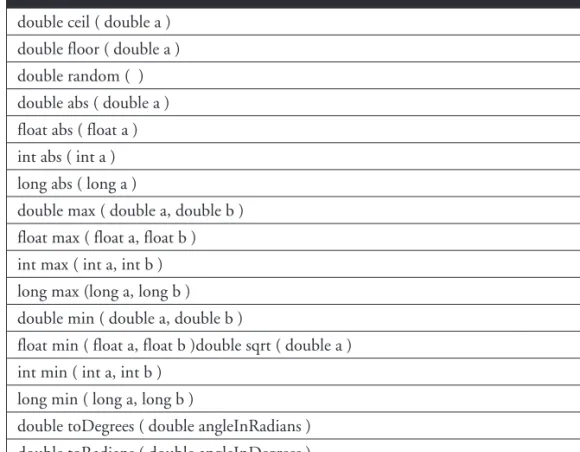
Table 6-1 summarizes the key static methods of the Math class.
CertPrs8(SUN)/ Sun Certified Programmer & Developer for Java 2 Study Guide / Sierra / 222684-6 / Chapter 6
374
Chapter 6: Java.lang—The Math Class, Strings, and WrappersCertPrs8(SUN)/ Sun Certified Programmer & Developer for Java 2 Study Guide / Sierra / 222684-6 / Chapter 6
Static Math Methods double ceil ( double a ) double floor ( double a ) double random ( ) double abs ( double a ) float abs ( float a ) int abs ( int a ) long abs ( long a )
double max ( double a, double b ) float max ( float a, float b ) int max ( int a, int b ) long max (long a, long b ) double min ( double a, double b )
float min ( float a, float b )double sqrt ( double a ) int min ( int a, int b )
long min ( long a, long b )
double toDegrees ( double angleInRadians ) double toRadians ( double angleInDegrees ) double tan ( double a )
TABLE 6-1 Important Static Math Class Method Signatures P:\010Comp\CertPrs8\684-6\ch06.vp Friday, November 15, 2002 12:36:17 PM Color profile: Generic CMYK printer profile Composite Default screen
CertPrs8(SUN)/ Sun Certified Programmer & Developer for Java 2 Study Guide / Sierra / 222684-6 / Chapter 6
Miscellaneous Math Class Facts
The following program demonstrates some of the unusual results that can occur when pushing some of the limits of the Math class or performing mathematical functions that are “on the edge” (such as dividing floating-point numbers by 0). These are some of the basic special cases. There are many more, but if you know these you will be in good shape for the exam.
If you want to live dangerously, or you’re running out of study time before the big day, just focus on the examples below with the **.
double d;
float p_i = Float.POSITIVE_INFINITY; // The floating point classes have double n_i = Double.NEGATIVE_INFINITY; // these three special fields. double notanum = Double.NaN; // They can be Float or Double
if ( notanum != notanum ) // ** NaN isn't == to anything, not // even itself!
System.out.println("NaNs not equal"); // result is "NaNs not equal"
if ( Double.isNaN(notanum)) // Float and Double have isNan() // methods to test for NaNs System.out.println("got a NaN"); // result is "got a NaN"
d = Math.sqrt(n_i); // square root of negative infinity? if ( Double.isNaN(d) )
System.out.println("got sqrt NaN"); // result is "got sqrt NaN"
System.out.println( Math.sqrt(-16d)); // result is "NaN"
System.out.println( 16d / 0.0 ); // ** result is (positive) "Infinity" System.out.println( 16d / -0.0 ); // ** result is (negative) "-Infinity"
// divide by 0 only works for floating point numbers
// divide by 0 with integer numbers results in ArithmeticException
System.out.println("abs(-0) = "+ Math.abs(-0)); // result is "abs(-0) = 0"
CertPrs8(SUN)/ Sun Certified Programmer & Developer for Java 2 Study Guide / Sierra / 222684-6 / Chapter 6
Using the Math Class (Exam Objective 8.1)
375
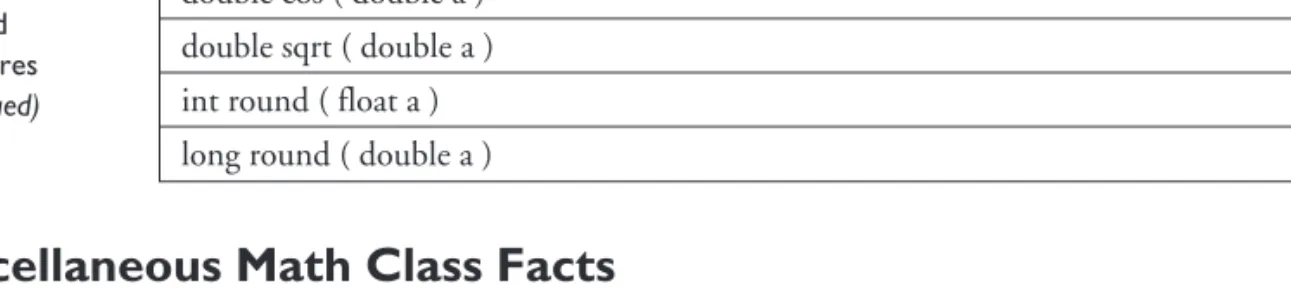
CertPrs8(SUN)/ Sun Certified Programmer & Developer for Java 2 Study Guide / Sierra / 222684-6 / Chapter 6Static Math Methods double sin ( double a ) double cos ( double a ) double sqrt ( double a ) int round ( float a ) long round ( double a )
TABLE 6-1 Important Static Math Class Method Signatures (continued) P:\010Comp\CertPrs8\684-6\ch06.vp Friday, November 15, 2002 12:36:17 PM Color profile: Generic CMYK printer profile Composite Default screen
CertPrs8(SUN)/ Sun Certified Programmer & Developer for Java 2 Study Guide / Sierra / 222684-6 / Chapter 6
CertPrs8(SUN)/ Sun Certified Programmer & Developer for Java 2 Study Guide / Sierra / 222684-6 / Chapter 6
The exam will test your knowledge of implicit casting. For the numeric primitives, remember that from narrowest to widest the numeric primitives types arebyte, short, int, long, float, double. Any numeric primitive can be implicitly cast to any numeric primitive type that is wider than itself. For instance, abytecan be implicitly cast to any other numeric primitive, but afloatcan only be implicitly cast to adouble. Remembering implicit casting, and the method signatures in Table 6-1, will help you answer many of the exam questions.
CERTIFICATION OBJECTIVE
Using Wrapper Classes (Exam Objective 8.3)
Describe the significance of wrapper classes, including making appropriate selections in the wrapper classes to suit specified behavior requirements, stating the result of executing a fragment of code that includes an instance of one of the wrapper classes, and writing code using the following methods of the wrapper classes (e.g., Integer, Double, etc.): doubleValue, floatValue, intValue, longValue, parseXxx, getXxx, toString, toHexString.
The wrapper classes in the Java API serve two primary purposes:
■ To provide a mechanism to “wrap” primitive values in an object so that the primitives can be included in activities reserved for objects, like as being added to Collections, or returned from a method with an object return value. ■ To provide an assortment of utility functions for primitives. Most of these
functions are related to various conversions: converting primitives to and from String objects, and converting primitives and String objects to and from different bases (or radix), such as binary, octal, and hexadecimal.
An Overview of the Wrapper Classes
There is a wrapper class for every primitive in Java. For instance the wrapper class forintis Integer, forfloatis Float, and so on.Remember that the primitive name is
376
Chapter 6: Java.lang—The Math Class, Strings, and WrappersCertPrs8(SUN)/ Sun Certified Programmer & Developer for Java 2 Study Guide / Sierra / 222684-6 / Chapter 6
P:\010Comp\CertPrs8\684-6\ch06.vp Monday, November 18, 2002 2:26:17 PM Color profile: Generic CMYK printer profile Composite Default screen
CertPrs8(SUN)/ Sun Certified Programmer & Developer for Java 2 Study Guide / Sierra / 222684-6 / Chapter 6
CertPrs8(SUN)/ Sun Certified Programmer & Developer for Java 2 Study Guide / Sierra / 222684-6 / Chapter 6
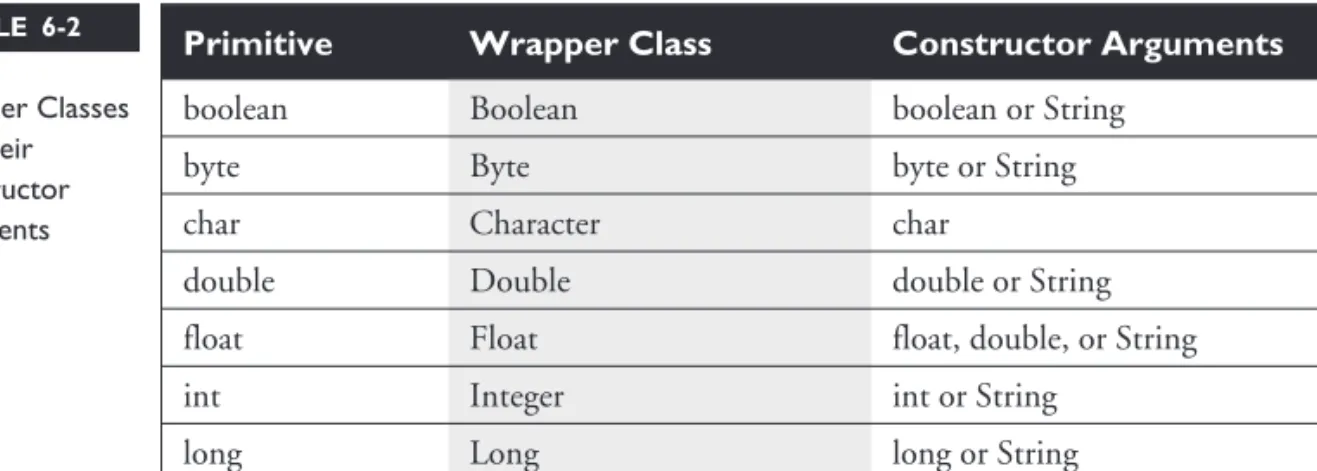
simply the lowercase name of the wrapper except for char, which maps to Character, and int, which maps to Integer. Table 6-2 lists the wrapper classes in the Java API.
Creating Wrapper Objects
For the exam you need to understand the three most common approaches for creating wrapper objects. Some approaches take a String representation of a primitive as an argument. Those that take a String throw NumberFormatException if the String provided cannot be parsed into the appropriate primitive. For example “two” can’t be parsed into “2”. Like another class previously discussed in this chapter, wrapper objects are immutable. Once they have been given a value, that value cannot be changed. (Can you guess which other class we’re talking about?)
The Wrapper Constructors
All of the wrapper classes except Character provide two constructors: one that takes a primitive of the type being constructed, and one that takes a String representation of the type being constructed—for example,
Integer i1 = new Integer(42); Integer i2 = new Integer("42");
or
Float f1 = new Float(3.14f); Float f2 = new Float("3.14f");
Using Wrapper Classes (Exam Objective 8.3)
377
Primitive Wrapper Class Constructor Arguments
boolean Boolean boolean or String
byte Byte byte or String
char Character char
double Double double or String
float Float float, double, or String
int Integer int or String
long Long long or String
short Short short or String
TABLE 6-2 Wrapper Classes and Their Constructor Arguments P:\010Comp\CertPrs8\684-6 (reprint)\ch06.vp Tuesday, February 25, 2003 6:12:37 PM Color profile: Generic CMYK printer profile Composite Default screen
CertPrs8(SUN)/ Sun Certified Programmer & Developer for Java 2 Study Guide / Sierra / 222684-6 / Chapter 6
The Character class provides only one constructor, which takes acharas an argument—for example,
Character c1 = new Character('c');
The constructors for the Boolean wrapper take either abooleanvaluetrueor
false, or a case-insensitiveString with the value“true”or“false”. But a Boolean object can’t be used as an expression in abooleantest—for instance,
Boolean b = new Boolean("false");
if (b) // won't compile, expecting a boolean not a Boolean
The valueOf() Methods
The staticvalueOf()methods provided in most of the wrapper classes give you another approach to creating wrapper objects. Both methods take a String representation of the appropriate type of primitive as their first argument, the second method (when provided) takes an additional argument,int radix, which indicates in what base (for example binary, octal, or hexadecimal) the first argument is represented—for example,
Integer i2 = Integer.valueOf("101011", 2); // converts 101011 to 43 and // assigns the value 43 to the // Integer object i2
or
Float f2 = Float.valueOf("3.14f"); // assigns 3.14 to the Float object f2
Using Wrapper Conversion Utilities
As we said earlier, a wrapper’s second big function is converting stuff. The following methods are the most commonly used, and are the ones you’re most likely to see on the test.
xxxValue()
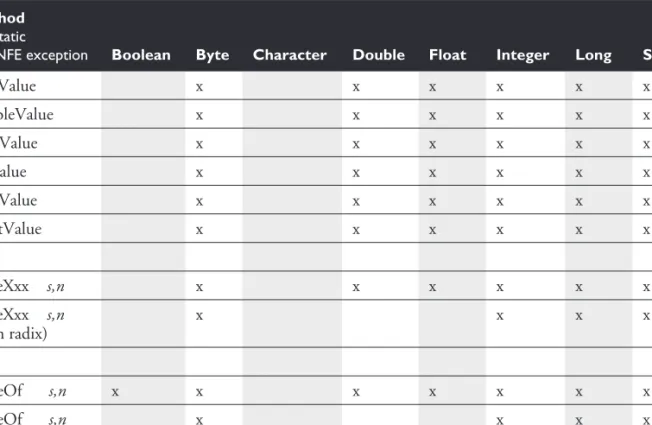
When you need to convert the value of a wrapped numeric to a primitive, use one of the manyxxxValue()methods. All of the methods in this family are no-arg methods. As you can see by referring to Table 6-3, there are 36xxxValue() methods. Each of the six numeric wrapper classes has six methods, so that any numeric wrapper can be converted to any primitive numeric type—for example,
CertPrs8(SUN)/ Sun Certified Programmer & Developer for Java 2 Study Guide / Sierra / 222684-6 / Chapter 6
378
Chapter 6: Java.lang—The Math Class, Strings, and WrappersCertPrs8(SUN)/ Sun Certified Programmer & Developer for Java 2 Study Guide / Sierra / 222684-6 / Chapter 6
P:\010Comp\CertPrs8\684-6\ch06.vp Friday, November 15, 2002 12:36:17 PM Color profile: Generic CMYK printer profile Composite Default screen
CertPrs8(SUN)/ Sun Certified Programmer & Developer for Java 2 Study Guide / Sierra / 222684-6 / Chapter 6
Integer i2 = new Integer(42); // make a new wrapper object byte b = i2.byteValue(); // convert i2's value to a byte
// primitive
short s = i2.shortValue(); // another of Integer's xxxValue // methods
double d = i2.doubleValue(); // yet another of Integer's // xxxValue methods
or
Float f2 = new Float(3.14f); // make a new wrapper object short s = f2.shortValue(); // convert f2's value to a short
// primitive
System.out.println(s); // result is 3 (truncated, not // rounded)
Using Wrapper Classes (Exam Objective 8.3)
379
CertPrs8(SUN)/ Sun Certified Programmer & Developer for Java 2 Study Guide / Sierra / 222684-6 / Chapter 6Method s = static
n = NFE exception Boolean Byte Character Double Float Integer Long Short
byteValue x x x x x x doubleValue x x x x x x floatValue x x x x x x intValue x x x x x x longValue x x x x x x shortValue x x x x x x parseXxx s,n x x x x x x parseXxx s,n (with radix) x x x x valueOf s,n x x x x x x x valueOf s,n (with radix) x x x x
TABLE 6-3 Common Wrapper Conversion Methods
P:\010Comp\CertPrs8\684-6\ch06.vp Friday, November 15, 2002 12:36:17 PM Color profile: Generic CMYK printer profile Composite Default screen
380
Chapter 6: Java.lang—The Math Class, Strings, and WrappersCertPrs8(SUN)/ Sun Certified Programmer & Developer for Java 2 Study Guide / Sierra / 222684-6 / Chapter 6
parseXxx() and valueOf()
The sixparseXxx()methods (one for each numeric wrapper type) are closely related to thevalueOf()method that exists in all of the numeric wrapper classes (plus Boolean). BothparseXxx()andvalueOf()take a String as an argument, throw a NumberFormatException if the String argument is not properly formed, and can convert String objects from different bases (radix), when the underlying primitive type is any of the four integer types. (See Table 6-3.)
The difference between the two methods is
■ parseXxx()returns the named primitive.
■ valueOf()returns a newly created wrapped object of the type that invoked the method.
Some examples of these methods in action:
double d4 = Double.parseDouble("3.14"); // convert a String to a primitive System.out.println("d4 = " + d4); // result is "d4 = 3.14"
Double d5 = Double.valueOf("3.14"); // create a Double object System.out.println(d5 instanceof Double ); // result is "true" Method
s = static
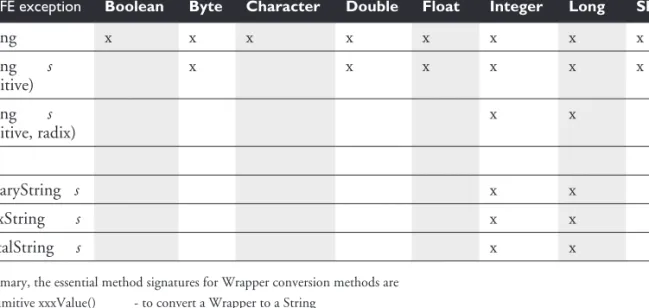
n = NFE exception Boolean Byte Character Double Float Integer Long Short
toString x x x x x x x x toString s (primitive) x x x x x x toString s (primitive, radix) x x toBinaryString s x x toHexString s x x toOctalString s x x
In summary, the essential method signatures for Wrapper conversion methods are • primitive xxxValue() - to convert a Wrapper to a String
• primitive parseXxx(String) - to convert a String to a primitive • Wrapper valueOf(String) - to convert a String to a Wrapper
TABLE 6-3 Common Wrapper Conversion Methods(continued)
P:\010Comp\CertPrs8\684-6 (reprint)\ch06.vp Tuesday, February 25, 2003 6:12:51 PM Color profile: Generic CMYK printer profile Composite Default screen
The next examples involve using the radix argument, (in this case binary):
long L2 = Long.parseLong("101010", 2); // binary String to a primitive System.out.println("L2 = " + L2); // result is "L2 = 42"
Long L3 = Long.valueOf("101010", 2); // binary String to Long object System.out.println("L3 value = " + L3); // result is "L2 value = 42"
toString()
The class Object, the alpha class, the top dog, has atoString()method. Since we know that all other Java classes inherit from class Object, we also know (stay with me here) that all other Java classes have atoString()method. The idea of thetoString()method is to allow you to get somemeaningful representation
of a given object. For instance, if you have a Collection of various types of objects, you can loop through the Collection and print out some sort of meaningful representation of each object using thetoString()method, which is guaranteed to be in every class. We’ll talk more about thetoString()method in the Collections chapter, but for now let’s focus on how thetoString()method relates to the wrapper classes which, as we know, are markedfinal. All of the wrapper classes have ano-arg,nonstatic,instanceversion oftoString(). This method returns a String with the value of the primitive wrapped in the object—for instance,
Double d = new Double("3.14");
System.out.println("d = " + d.toString() ); // result is "d = 3.14"
All of the numeric wrapper classes provide an overloaded,static
toString()method that takes a primitive numeric of the appropriate type (Double.toString()takes adouble,Long.toString()takes along, etc.), and, of course, returns a String with that primitive’s value—for example,
System.out.println("d = " + Double.toString(3.14); // result is "d = 3.14"
Finally, Integer and Long provide a thirdtoString()method. It isstatic, its first argument is the appropriate primitive, and its second argument is aradix. The radix argument tells the method to take the first argument (which is radix 10 or base 10 by default), and convert it to the radix provided, then return the result as a String—for instance,
System.out.println("hex = " + Long.toString(254,16); // result is "hex = fe" CertPrs8(SUN)/ Sun Certified Programmer & Developer for Java 2 Study Guide / Sierra / 222684-6 / Chapter 6
Using Wrapper Classes (Exam Objective 8.3)
381
CertPrs8(SUN)/ Sun Certified Programmer & Developer for Java 2 Study Guide / Sierra / 222684-6 / Chapter 6P:\010Comp\CertPrs8\684-6\ch06.vp Friday, November 15, 2002 12:36:18 PM Color profile: Generic CMYK printer profile Composite Default screen
toXxxString() (Binary, Hexadecimal, Octal)
The Integer and Long wrapper classes let you convert numbers in base 10 to other bases. These conversion methods,toXxxString(), take anintorlong, and return a String representation of the converted number, for example,
String s3 = Integer.toHexString(254); // convert 254 to hex
System.out.println("254 in hex = " + s3); // result is "254 in hex = fe"
String s4 = Long.toOctalString(254); // convert 254 to octal
System.out.println("254 in octal = "+ s4); // result is "254 in octal = 376"
Studying Table 6-3 is the single best way to prepare for this section of the test. If you can keep the differences betweenxxxValue(),parseXxx(), and valueOf()straight, you should do well on this part of the exam.
CERTIFICATION OBJECTIVE
Using equals()(Exam Objective 5.2)
Determine the result of applying the booleanequals(Object)method to objects of any combination of the classes java.lang.String, java.lang.Boolean, and java.lang.Object.
In this chapter we begin our discussion of==and theequals()method, and in the Collections chapter we’ll dive deeper into these two mysterious comrades. For now, we’ll limit our discussion to how==and theequals()method relate to String, and the wrapper classes, and an overview of other object classes.
An Overview of == and the equals() Method
There are three kinds of entities in Java that we might want to compare to determine if they’re equivalent: primitive variables, reference variables, and objects. Part of this discussion looks at a critical question:What exactly does “equivalent” mean?
Comparing Variables
Let’s start with primitive and reference variables. You always compare primitive variables using==; theequals()method obviously can’t be used on primitives.
CertPrs8(SUN)/ Sun Certified Programmer & Developer for Java 2 Study Guide / Sierra / 222684-6 / Chapter 6
382
Chapter 6: Java.lang—The Math Class, Strings, and WrappersCertPrs8(SUN)/ Sun Certified Programmer & Developer for Java 2 Study Guide / Sierra / 222684-6 / Chapter 6
P:\010Comp\CertPrs8\684-6\ch06.vp Monday, November 18, 2002 2:27:26 PM Color profile: Generic CMYK printer profile Composite Default screen