High Performance Computing Clusters
Parth Desai
Undergrad students
Electronic and Telecommunication, Dwarkadas.J.Sanghvi College of engineering,
Mumbai University
Sharyu Mahale
Undergrad students
Electronic and Telecommunication, Dwarkadas.J.Sanghvi College of engineering,
Mumbai University
Pooja Desai
Undergrad students
Electronic and Telecommunication, Dwarkadas.J.Sanghvi College of engineering,
Mumbai University
Tanaji Biradar
Professor
Electronic and Telecommunication Dwarkadas.J.Sanghvi, College of engineering,
Mumbai University
ABSTRACT
A computer cluster is a group of internconnected computers which are connected to form a single computer. Interconnections between computers in a cluster are made through local area networks. Problems regarding computing are solved by using high performance computing(HPC) which is an amalgamation between super computers and computing clusters.HPC combines of systems administration and parallel programming into a combination of computer architecture, system software, programming languages, algorithms and computational techniques. This paper consist of mechanism required for the creation of a 96 node single cluster.
Keywords
High-Performance computing, infiband, GNU, GCC
1.INTRODUCTION
HPC stack which provides information about different stack components which are needed for the implemetation cluster implementation and its dependencies on one another.[1,2]
1.1 Hardware
HPC hardware consists of at least one Master Node, many Compute Nodes, Storage, Network and Storage Switches, connectivity channels/cables. The Master node acts as an adminstrative node for the entier cluster[3,6]. The centralized facility to create/delete users, create ACLs, and define roles for different compute nodes, installation of software and many administrative activities. A HPC cluster should Atleast have one master node. More than one master nodes may also exist.[7,9,8]
1.2 Operating Systems
OS is responsible for management of resources according to configuration and specifications.Application on the cluster in the OS is to centralized home directory management, synchronization of user information, facility to execute commands concurrently across the cluster nodes
1.3 Libraries
Libraries consists of resources needed to develop software. It consists of pre written codes. These may include pre-written code and subroutines, classes, values or type specifications. Libraries contain code and data that provide services to independent programs.
1.4 Compiler
Compliers are needed to convert sourse codes into target codes. The GNU Compiler Collection (GCC) is a compiler system produced by the GNU Project supporting various programming languages.
1.5 MPI
MPI is a language-independent communications protocol used to program parallel computers. Both point-to-point and collective communication are supported. MPI is the dominant model which is used in high-performance computing today.
1.6 Monitoring tools
Monitoring tools are harware and software systems which are used to monitor performance in a computing system
Fig1. Illustartion of HPC Stack
Fig3. Detailed illustration of Rack 1
Fig4. Block Diagram depicting nodes
2 .CLUSTER INFORMATION
Eth0 IP Add (Private) :- 10.1.1.1 /16 Eth1 IP Add (Public ) :- 10.26.22.161/24 Storage1 IP Add :- 10.1.255.150/16 Storage2 IP Add :- 10.1.255.151/16[3][4]Storage1 is Mounted on Master Node and all compute node as a /scratch through NFS
Storage2 is Mounted on Master Node and all compute node as a /stage through NFS
2.1 Step for Shutdown Cluster
1. Unmount Storage using following command in master node (rocks run host „umount /scartch‟)
2. Unmount Storage using following command in master node (rocks run host „umount /stage‟)
3. Shutdown storage1 using following command shutdown –h now
4. Shutdown storage2 using following command shutdown –h now
5. Shutdown compute node using following command (rocks run host „shutdown –h now‟)
6. See all node are shutdown properly in http://amul/ganglia
7. Shutdown Master Node using following command shutdown –h now
2.2 Step for Power on Cluster
1. First power on storage1 and storage2 (login as a root and see the NFS service is running on both server) using service nfs status if service is not running type service nfs start to start the service.[3][4]
2. Power on the master server (login as a root and see the NFS service is running on master) using service nfs status if service is not running type service nfs start to start the service. and then see storage is mounted on master using df –h command if not mounted mount storage using mount –a (wait for 5 min)
3. Then power on compute node one by one (wait for 5 min)
4. Go to master node and see all node are boot properly in http://amul/ganglia
5. Open new terminal and type ssh compute-0-0 for access compute node and type fping –g first node ip last node ip (to see all node are communicated each other) all node are alive.
6. See storage in mounted on all compute node using rocks run host „df –h‟ command if not type rocks run host „mount –a‟
2.3 Install and Configure Your Frontend
1. Insert the rocks cluster CD into your master machine and reset the master machine.[3][4]
2. After the frontend boots off the CD, type build command
3. After you type frontend, the installer will start running. Soon, you'll see a screen that looks like
4. Click Next
5. Then you'll see the Cluster Information screen
6. Fill your cluster information
7. The private cluster network configuration screen allows you to set up the networking parameters for the Ethernet network that connects the Master to the compute nodes.
9. The public cluster network configuration screen allows you to set up the networking parameters for the ethernet network that connects the frontend to the outside network (type your network IP ADD.) (e.g., the 10.26.22.161 subnet mast 255.255.255.0)
10. Input the root password:
11. Configure the time:
12. The disk partitioning screen allows you to select automatic or manual partitioning. Click on manual partitioning.
13. Create partitioning (e.g. /root /boot and swap partitioning) and click next
14. Finally, the boot loader will be installed and post configuration scripts will be run in the background. When they complete, the Master will reboot.
Fig5. Configuration and installation at frontend
2.4 Login from Linux Machine
[root@localhost ~] ssh [email protected]Password:
[locuz@amul ~]$
3. CREATING USER ACCOUNT INTO
THE AMUL CLUSTER
3.1 User Creation
Create a user account and propagate the information to the compute nodes with:
# useradd <username>
# passwd <username>
New password:
Re-enter password:
It creates a user‟s home directory at location /export/home/$USER
# rocks sync users
Update all user-related files (e.g., /etc/passwd, /etc/shadow, etc.) on all known hosts.
Also, restart autofs on all known hosts.
3.2 User Deletion
# userdel <username>Then run the
# rocks sync users
3.3 Copy a File or Directory of Every
Compute Node
$ rocks iterate host compute "scp <file> %:/tmp/"
Copies file to the /tmp directory of every compute node
$ rocks iterate host compute "scp -r <directory> %:/tmp/"
Copy a directory to the /tmp directory of every compute node
3.4 Copy a File to Defined Compute Node
$ scp <filename> <compute node name>:/tmp$ scp -r <directory> <compute node name>:/tmp
3.5 Copy a Data from End-user Windows
Machine to Cluster
Step 1:
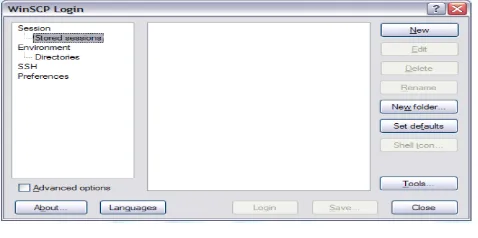
[image:5.595.316.561.73.226.2]Install and start WinSCP, then following screen is shown. Click 'New' button.
Fig 6. WinSCP Login Window
Step 2:
Following screen is shown. Input information‟s to login like below.
Fig7. Input information to login
Step 3:
It‟s possible to upload or download files
Copy a data from end-user Linux machine to cluster
[root@localhost ~] scp <filename> [email protected]
Coping a file into user locuz home directory
[root@localhost ~] scp –r <directory> [email protected]
Coping a directory into user locus home directory
Rocks run host:
Used to run any command on compute node of the cluster
$ rocks run host “<command>”
Run the particular command on all nodes
$ rocks run host -n <node name> "<command>"
[image:5.595.56.295.283.402.2]4. MONITORING TOOL – GANGLIA
Ganglia is a scalable distributed system monitor tool for high performance computing systems such as clusters and grids. It allows the user to remotely view live or historical statistics (such as CPU load averages or network utilization) for all machines that are being monitored. There are three services are mandatory for Ganglia. At server, httpd, gmetad and gmond, and at client, gmond only. If user wants to restart these services, he has to login as root, and restart three services at master node and one at every compute nodes:# service httpd restart
# service gmetd restart
# service gmond restart
5. SHUTDOWN SEQUENCE
Step1. Unmount the storage mounted on all the server using the command[3][4]Compute nodes
root@Amul ~] rocks run host “hostname; umount /scratch”
root@Amul ~] rocks run host “hostname; umount /scratch2” root@Amul ~] rocks run host “hostname; umount
/export/home”
Master node
root@Amul ~] Umount /scratch
root@Amul ~] Umount /scratch
root@Amul ~] Umount /export/home
Step2. Shut down the compute nodes
root@Amul ~] Rocks run host “hostname; init 0”
Step3. Shut down the master node
root@amul ~] Init 0
6. CONCLUSION
Thus high performance computing clusters can tackle complex workloads. Resource utilization is optimized. Due to large span of area being covered by a cluster, not all devices in the cluster fall prey to power failures within a specific region. Centralised management system, with a central controller that manages other devices in the cluster. With the high performance the users can access computational
resources. Some examples of HPC usage include: decoding genomes, animated movies, analysing financial risks, streamlining crash test simulations, modelling global climate solutions and other highly complex problems.
7. ACKNOWLEDGEMENT
We would like to thank the respected principal Dr. Hari Vasudevan of D. J. Sanghvi College of Engineering and for giving us facilities and providing a propitious environment for working in the college. We would also like to thank S.V.K.M. for encouraging us in such co-curricular activities.
8. REFRENCES
[1] High Performance Cluster Computing (Architecture, Systems, and Applications), R. Buyya, Monash University, Melbourne
[2] A large-scale study of failures in high-performance-computing systems. December 2005 Bianca Schroeder, Garth A. Gibson. Carnegie Mellon University
[3] A. Mahale, Micro point computing pvt.ltd.http://www.mpcl.in/
[4] V. Chavan.Scientific Officer (G) and Group Leader - SIAT Group. Refuelling Technology Division, Baba Atomic Research Centre
[5] Using MPI", Gropp, Lusk and Skjellum. MIT Press, 1994.
[6] "A User's Guide to MPI", Peter S. Pacheco. Department of Mathematics, University of San Francisco.
[7] ] Z. Fan, F. Qiu, A. Kaufman, S. Yoakum-Stove, “GPU Cluster for High Performance Computing,”, in Proc. ACM/IEEE conference on Supercomputing, 2004
[8] D. Göddeke, R. Strzodka, J. Mohd-Yusof, P. McCormick, S. Buijssen, M. Grajewski, and S. Tureka, “Exploring weak scalability for FEM calculations on a GPU-enhanced cluster,” Parallel Computing, vol. 33, pp. 685-699, Nov 2007