5
X
October 2017
NetworkMonitoring System (NMS)
Mohammad A. Mikki1, AimanA. AbuSamra2, Aahed A. Bader3
1, 2, 3
Computer Engineering Department, Islamic University of Gaza
Abstract: Due to rapid changes and consequent new threats to computer networks there is a need for the design of systems that enhance network security. These systems make network administrators fully aware of the potential vulnerability of their networks. This paperdesigns a Network Monitoring System (NMS) which is an active defense and complex network surveillance platform designed for ISPs to meet their most rigorous security requirements. This system is motivated by the great needof government agencies, ecommerce companies and Web development organizations to secure their computer networks. The proposed system is also used by network administrators to enable them understand the vulnerabilities affecting computer networks.This enables these administrators to improve network security. The proposed system is a lawful network traffic (Internet Service Provider IP trffic) interception system with the main task of obtaining network communications, giving access to intercepted traffic to lawful authorities for the purpose of data analysis and/or evidence. Such data generally consist of signaling, network management information, or the content of network communications. The intercepted IP traffic is gathered and analyzed for network vulnerability in real time. Then, the corresponding TCP/UDP traffic (Web page, email message,VOIP calls, DHCP traffic, files transferred over the LAN such as HTML files, images, and video files, etc.) is rebuilt and displayed. Based on the results of the analysis of the rebuilt TCP/UDP an alarm could be generatedif amalicious behavior is detected. Experimental results show that the proposed system has many features that make it much better than existing similar tools such as wireshark.In addition, experimental results show that the proposed system has high accuracy and efficiency in regards to network packets capturing and corresponding Web pages restructuring.
Index Terms—Network security, nework traffic interception, packet filtering, network malicious behavior, network attacks
I. INTRODUCTION
Internet users are at high risk of virtual attacks. At the early history of the Internet only speacialist used it. Today, the Internet has already become an essential part of our lives. It’s where we access our banking records, credit card statements, tax returns and other highly sensitive personal information. By the end of this decade, over 2 billion people will be connected to the Internet that’s about one third of the world’s current population [1].
Due to the openness of the Internet it opens the door to serious, potentially devastating threats. Unlike corporate and government computer systems, few personal computers have any safeguards beyond basic virus protection. That means anytime you’re online, you are a potential target for online criminals and hackers [2].
Computer networksmalicious activities usually affect computers that are connected to the Internet, because these connections are attractive targets for attackers. Symantec categorizes malicious activities as follows:
A. Malicious code: This includes programs such as viruses, worms, and Trojans that are secretly inserted into programs. The
pur-pose of malicious code includes destroying data, running destructive or intrusive programs, stealing sensitive information, and compromising the security or integrity of a victim’s computer data [3].
B. Spam zombies: These are remotely controlled, compromised systems specifically designed to send out large volumes of junk or
unsolicited email messages. These email messages can be used to deliver malicious code and phishing attempts [4].
C. Phishing hosts: Phishing hosts are computers that provide website services in order to illegally gather sensitive user information
while pretending that the attempt is from a trusted, well known organization by presenting a website designed to mimic the site of a legitimate business [5].
D. Bot-infected computers: Malicious programs have been used to compromise computers to allow an attacker to control the
tar-geted system remotely. Typically, a remote attacker controls a large number of compromised computers over a single reliable channel in a botnet, which can then be used to launch coordinated attacks [6].
E. Network attack origins: These measure the originating sources of attacks from the Internet. For example, attacks can target SQL
protocols or buffer overflow vulnerabilities [7].
F. Web-based attack origins: These measure attack sources that are delivered via the Web or through HTTP. Typically, legitimate
In adition, spyware is the new threat antivirus software won’t find. Internet criminals create spyware to steal sensitive personal in-formation. Stopping spyware requires even greater protection [9].
One of the most popular LAN attacks is session hijacking. Session hijacking is also referred to as TCP session hijacking, a security attack on a user session over a protected network.The most common method of session hijacking is called IP spoofing, when an at-tacker uses source-routed IP packets to insert commands into an active communication between two nodes on a network and dis-guising itself as one of the authenticated users [10]. In IP spoofing, the used IP address indicates that the message is coming from a trusted host [11].
Another type of session hijacking is known as a man-in-the-middle attack, where the attacker, using a sniffer, can observe the com-munication between devices and collect the data that is transmitted.In a man in the middle attack, the intruder uses a program that appears to be the server to the client and appears to be the client to the server. The attack may be used simply to gain access to the message, or enable the attacker to modify the message before retransmitting it [12].
This paper proposes a new networkpacket forensics system that monitors and intercepts network traffic crossing Network Interface Cards (NICs). It works by sniffing all the packets that arrive throw the NIC and recording them in log files, supporting packet
filter-ing and file recovery of the sniffed packets. It applies multiple policies to operate simultaneously on the entire nonitored IP packet
stream. This means that while network managers/governmental agents search for different strings inside each IP packet, they can also intercept VoIP calls, extract dialed digits and correlate DHCP log-ins with IP addresses. Each policy can have different resulting actions, such as forwarding packets to another analysis system or generating security threat reports. The proposed system is called aNetwork Monitoring System (NMS). It has the following capabilities:
G. Building an ISP Internet traffic monitoring / network behavior recording components
H. Logging IP traffic
I. Building lawful IP packet interception tool
J. Restoring the files transferred over the LAN (HTML files, images, videos, … ) using corresponding IP packets.
The motivation of this paper is thatthe ISPssufferfrom the lack of the toolsto support low level packet sniffing and monitoring. In addition, most of the present toolsdo not have the abilityto restore the original files from the intercepted packets. Also, current simi-lar tools are very expensive.
The rest of the paper is organized as follows: Section two presents related work. Section three presents the detailed design of the NMS. Section four presents experimental results. Finally, section six concludes the paper.
II. RELATEDWORK
This section presents some of the tools in the literature that are similar to the proposed NMS, namely; Wireshark, SkyGrabber, Free Network Analyzer, and NetworkMiner Analysis Tool.
Wireshark is a network packet analyzer that captures network packets and displaystheir data as detailed as possible. A network packet analyzer is a measuring device used to examine what’s going on inside a network cable. Wireshark is perhaps one of the best open source packet analyzers available today [13].Some examples of users of Wireshark include:
A. Network administrators use it to troubleshoot network problems
B. Network security engineers use it to examine security problems
C. Developers use it to debug protocol implementations
D. People use it to learn network protocol internals
Some of the features Wireshark provides: available for UNIX and Windows, capture live packet data from a network interface, open files containing packet data captured with tcpdump /WinDump, Wireshark, and a number of other packet capture programs, import packets from text files containing hex dumps of packet data, display packets with very detailed protocol information, save packet data captured, export some or all packets in a number of capture file formats, filter packets on many criteria, search for packets on many criteria, colorize packet display based on filters, create various statistics [14, 15].
SkyGrabber is an offline satellite Internet downloader.It allows to accept satellite Internet data, assemble this at in files (avi,mp3,mp4,etc.) and save files onto hard disk [16]. The program has user-friendly interface, diverse filter system and satellite
provider manager inside.SkyGrabber works only with free-to-air satellite Internet data. Features ofSkyGrabber include [16]:
E. ssemble TCP/IP sessions in files
F. Lock frequency to accept satellite Internet data
G. Support DiceqC (uncommited/commited)
I. Filter manager by file type
J. Filter manager by IP addresses (MAC addresses)
K. Monitoring system resource information (CPU usage, Memory usage, Free disk space)
L. Monitoring satellite signal information (Level, Quality)
M. Displaying progress bar of downloaded files
Free Network Analyzer is a software network packet sniffer and protocol analyzer for Windows platform. Using this free network monitoring software you may intercept any data transmitted via wired broadcast or wireless LAN (WLAN) and Internet connections of computers. Network sniffer allows users to capture, filter and display any traffic data flowing through network adapters. It de-codes captured network communication packet's raw data, displaying the binary, hex, decimal and text field values in each packet, and analyzes its contents according to the RFC and other specifications. Packets data is parsed, extracted and represented in simple human-readable form, allowing users to perform effective forensic analysis of any data transferred via PC network interfaces.Free network protocol analyzer installs NDIS filter driver over the network adapter device driver and then monitors all requests passed via Windows network interface.This free network data explorer supports advanced data filtering, highlighting and searching for pat-terns with regular expressions, which makes this software extremely useful for deep network traffic analysis [17].
Finally, NetworkMiner is a Network Forensic Analysis Tool (NFAT) for Windows (but also works in Linux / Mac OS X / FreeBSD). NetworkMiner can be used as a passive network sniffer/packet capturing tool in order to detect operating systems, sessions, host-names, open ports etc. without putting any traffic on the network. NetworkMiner can also parse PCAP files for off-line analysis and
to regenerate/reassemble transmitted files and certificates from PCAP files. NetworkMiner makes it easy to perform advanced
Net-work Traffic Analysis (NTA) by providing extracted artifacts in an intuitive user interface. The way data is presented not only makes the analysis simpler, it also saves valuable time for the analyst or forensic investigator. NetworkMiner has, since the first release in 2007, become a popular tool among incident response teams as well as law enforcement. NetworkMiner is today used by companies and organizations all over the world.[18].
III.NETWORKMONITORINGSYSTEM(NMS)DESIGN
A. Introduction
NMS is a network packet analyzer that captures network packets. Packet data is then parsed, extracted and represented in simple human-readable form, allowing users to perform effective forensic analysis of any data transferred via PC network interfaces. Then, corresponding packet data is displayed for the user to examine.
The following software packages and tools are required to be able to use the designed tool:
1) Visual studio 2012
2) SQL server 2008
3) Server with windows serves 2012
NMS can work in situations with NIC that receive high traffic. NMS has many capabilities and features including the following:
4) Capture live packet data from a network interface.
5) Display packets with very detailed protocol information.
6) Support both wired an wireless LAN interfaces
7) Support many types of packet filters (source, destination, protocol type, packet direction, …)
8) HTTP analysis (extract the HTTP data from the packets (method,ULR,file name, content type,compression type))
9) Support filters on HTTP data (HTTP methods, content type, HTTP response,user IP, Host website,content size)
10) Generate files from packets (Generateone file, Generate all files by user,Generate all files by host)
11) Support high traffic data because of the good memory management
B. Proposed System Modules
Fig.1 NMSblock diagram
As Fig. 1 shows, NIC Listening and Packet Capturing module listens to Network Interface Card (NIC)and captures crossing packets. These captured packets are put into Captured PacketsQueue. Captured packets are then parsed by the Packet Parsing module and two separate queues are generated: Parsed HTTP Packets Queue (for HTTP packets only) and Parsed Packets Queue (for all packet types). Hence, the proposed system treats HTTP packets separately. Either the Parsed Packets Queue or the Parsed HTTPPackets Queueis used by the File Generation module to generate the corresponding files that the packets represent. We could apply HTTP Packet Filter to Parsed HTTP Packets Queue and Packet Filter to Parsed PacketsQueueto determine which packets are displayed to the user in the packets view pane in themain window of NMS.
NMS is a multithreaded parallel system where all modules run simultaneously. Sepecifically, the following modules run in parallel as parallel threads:
In the following sub-sections, we describe the modules and queues shown in Fig. 1 in some detail.
1) NIC Listening and Packet Capturing Module : NIC Listening and Packet Capturing moduleselects the network interface to listen to,and creates a thread to start listening to it.When a packet is transmitted or received, the thread copies the packet and pushes it to the captured packets queue.This queue is a mutual exclusion data structure because the NMS is a multithreaded system where other modules need to read/write the queue. The NIC Listening and Packet Capturing modulepseudo-code is shown in Code Fragment 1.
1. Identify and select a network interface that is connected to
the compute running the module to start monitoring.
2. Create a listening thread
3. Check the listening status
4. Start listening to the selected NIC
5. Add received packets to the Captured Packets Queue
Code Fragment 1 The NIC Listening and Packet Capturing module pseudo-code
Fig.2 NIC Listening and Packet Capturing moduleblock diagram
2) Captured Packets Queue: Captured Packets Queue is a data structure that is used to store the packets that are captured by the
NIC Listening and Packet Capturing module. This is a temporary storage for packets that are captured but not parsed yet.Since
NMS is multithreaded, this queue is a mutual exclusion access storage to prevent packets being accessed by more than one thread simultaneously.
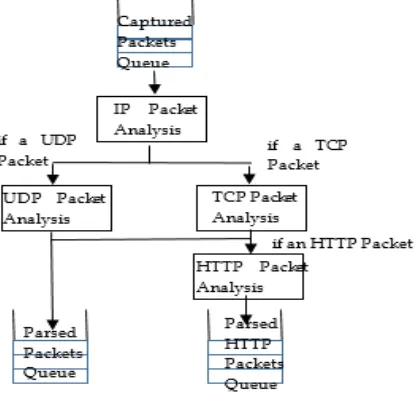
[image:6.612.206.415.379.576.2]3) Packet Parsing Module: The Packet Parsingmodule (see Fig. 3) is a thread that reads packets from Captured Packets Queueand analyses them, i.e., parses their fields to study their details. Itextracts the IP packet header, TCP/UDP header, and HTTP header.It builds a data structure for each packet that contains the parsed fields. Then, it addsparsed packets to Parsed PacketsQueue. If the parsed packet is an HTTP packet, then this module adds it to Parsed HTTP Packets Queue.
Fig. 3Packet parsing module
The pseudo-code of the Packet Parsing module is shown in Code Fragment 2. Create a parsing thread
While Captured Packets Queue is not empty Dequeue a packet from the queue
Apply IP header analysis Check transfer protocol If the protocol is TCP
2.4.1 apply TCP header analysis
Apply HTTP header analysis
Add packet to the Parsed HTTP Packets Queue
2.5If the protocol is UTP
apply UTP header analysis
Add packet to Parsed Packets Queue End while
Code Fragment 2 Packet Parsing module pseudo-code
IP packet analysis module includes parsing the fields (these fields are added to the built data structure) in the IP header of the packet which are shown in Table 1.
TABLE 1PARSED FIELDS IN THE IP HEADER
Field Meaning
VersionAndHeaderLength 8 bits for version and header length
DifferentiatedServices 8 bits for differentiated services
(TOS)
TotalLength 16 bits for total length of the header
& message
Identification 16 bits for identification
FlagsAndOffset 16 bits for flags and fragmentation
offset
TTL 8 bits for Time To Live ( TTL )
Protocol 8 bits for the underlying protocol
Checksum 16 bits containing the checksum of
the header (checksum can be nega-tive so taken as short)
SourceIPAddress 32 bit source IP Address
DestinationIPAddress 32 bit destination IP Address
Direction one bit direction of the packet
Data the data transmitted with the packet
TCP packet analysis task includes parsing the fields (these fields are added to the built data structure) in the TCP header of the pack-et which are shown in Table 2.
TABLE 2PARSED FIELDS IN THE TCP HEADER
Field Meaning
SourcePort 16 bit for the source port number
DestinationPort 16 bits for the destination port number
SequenceNumber 32 bits for the sequence number
AcknowledgementNumber 32 bits for the acknowledgement number
DataOffsetAndFlags 16 bits for flags and data offset
Window 16 bits for the window size
HeaderLength Header length
MessageLength Length of the data being carried
TCPData array of bytes as data carried by the TCP
packet
packet which are shown in Table 3.
TABLE 3PARSED FIELDS IN THE UDP HEADER
Field Meaning
SourcePort 16 bits for the source port number
DestinationPort 16 bits for the destination port number
Length Length of the UDP header
Checksum 16 bits for the checksum (checksum
can be negative so taken as short)
UDPData array of bytes as data carried by the
UDP
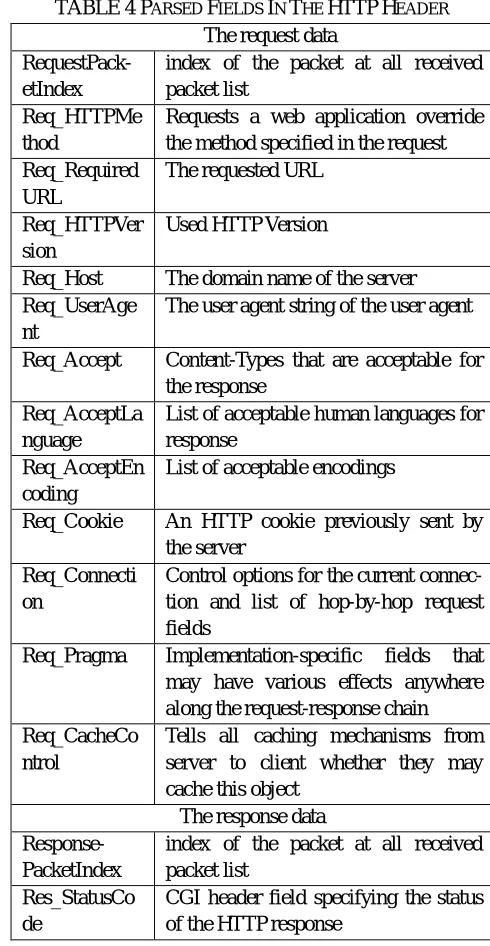
HTTP packet analysis task includes parsing the fields (these fields are added to the built data structure) in the HTTP header of the packet which are shown in Table 4.
TABLE 4 PARSED FIELDS IN THE HTTP HEADER The request data
RequestPack-etIndex
index of the packet at all received packet list
Req_HTTPMe thod
Requests a web application override the method specified in the request Req_Required
URL
The requested URL
Req_HTTPVer sion
Used HTTP Version
Req_Host The domain name of the server
Req_UserAge nt
The user agent string of the user agent
Req_Accept Content-Types that are acceptable for
the response Req_AcceptLa
nguage
List of acceptable human languages for response
Req_AcceptEn coding
List of acceptable encodings
Req_Cookie An HTTP cookie previously sent by
the server Req_Connecti
on
Control options for the current connec-tion and list of hop-by-hop request fields
Req_Pragma Implementation-specific fields that
may have various effects anywhere along the request-response chain Req_CacheCo
ntrol
Tells all caching mechanisms from server to client whether they may cache this object
The response data
Response-PacketIndex
index of the packet at all received packet list
Res_StatusCo de
[image:8.612.180.425.264.737.2]Res_Date Acceptable version in time
Res_Server A name for the server
Res_LastModi fied
The last modified date for the re-quested object
Res_ETag An identifier for a specific version of a
resource Res_AcceptRa
nges
What partial content range types this server supports
Res_Connecti on
Control options for the current connec-tion and list of hop-by-hop request fields
Res_ContentT ype
The MIME type of the body of the request (used with POST and PUT requests)
Res_ContentE ncoding
The type of encoding used on the data
Res_ContentL ength
The length of the request body in oc-tets (8-bit bytes)
4) Parsed PacketsQueue : Parsed Packets Queue is a data structure that is used to store the parsed packets. Only the Packet Parsing module writes to this queue.The following modules read from this queue:Packet Filter module reads the queue to select the packets from the queue that meet some requirements i.e., meet the packet filter parameters.The File Generation module reads the queue in order to bulid the corresponding files that packets repreent. Since the proposed tool is multithreaded, this queue is a mutual exclusion access storage to prevent packets being accessed by more than one thread simultaneously.
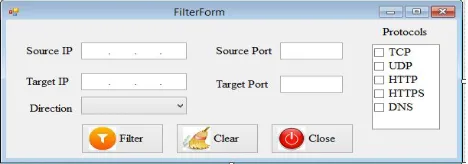
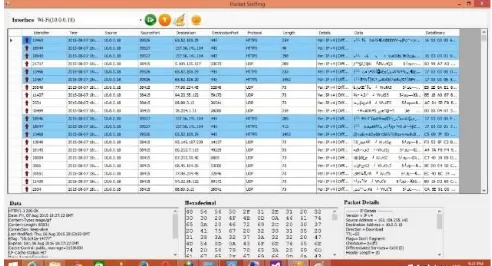
5) Packet FilterModule: Packet Filter module gets the packets filter parameters from a GUI form (see Fig. 4). Then, it filters the Parsed Packets Queue based on these parameters. These parameters are entered by the user. As shown in Fig. 4, the currently allowed filter parameters are:
a) Source IP
b) Destination IP (target IP)
c) Source port
d) Destination port (target port)
e) The transport/application protocol e.g., TCP, UDP, DNS, HTTP, HTTPS
[image:9.612.191.425.517.599.2]f) The direction of the packet (upload, download)
Fig. 4 Packet Filter module packets parameters form
When the user selects the packets filter parameters and clicks "Filter" on the form in Fig. 4, the module filters all parsed packets based on the selected parameters.PacketsView module uses output of Packet Filter module to display packets.
HTML files.
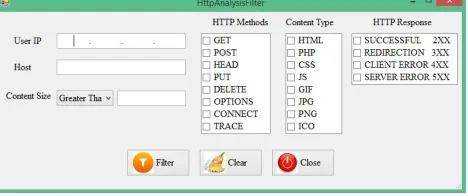
7) HTTP Packet Filter Module: HTTP Packet Filter module gets the packets filter parameters from a GUI HTTP Packets Filter form (see Fig. 5). Then, it filters the Parsed HTTP Packets Queue based on these parameters. These parameters are entered by the user. As shown in Fig. 5, the currently allowed filter parameters are:
1) User IP address
2) Host (Web site name i.e., the domain name)
3) Content size (Greater than/Less than)
4) HTTP methods (GET, POST, HEAD, PUT, …)
5) Content type (HTML, PHP, CSS, JS, GIF, JPG,PNG, ICO, …)
[image:10.612.191.425.215.313.2]6) HTTP Response (SUCCESSFUL, REDIRECTION, CLIENT ERROR , SERVER ERROR)
Fig. 5 HTTP Packet Filter module form
When the user selects the HTTP packets filter parameters and clicks "Filter" on the form in Fig. 5, the module filters all parsed HTTP packets based on the selected parameters. PacketsView module uses the output of HTTP Packet Filter module to display packets.
7) Packets View Module: PacketsView module displays packets in the packets view pane in the main window of NMS. Type of packets displayed is based on some options selected by the user as shown in Code Fragment 3.
If (Packet Filter not selected AND HTTP Packet Filter not selected)
Display packets in Parsed Packets Queue If (Packet Filter selected latest)
Display packets in Parsed Packets Queue after applying selected Packet Filter parameters
If (HTTP Packet Filter selected latest)
Display packets in Parsed HTTP Packets Queue after applying selected HTTP Packet Filter parameters
Code Fragment 3 Selection creteria used by Packets View module to display packets
When Packet Filter module parameters or HTTP Packet Filtermodule parameters are updated,then Packets View module updates the packet view pane to display packets that meet the new parameters.
8) File Generation Module: File Generation module currently supports reconstructing HTTP files. It builds files from their corresponding HTTP packets.This module getsits input from Parsed HTTP PacketsQueue and produces the generated file(s) as an output. The module reads all related packets that constitute the file(s)to be built and sortsthem according to theirHTTP sequence number and combinestheir data in binary format and stores this data in a newly created file.Hence, this module restores the original files from their constituting packets.
a) The module supports three modes:
ii) The selected host mode: All files that are transmitted by the host which transferred the selected packet are generated.
iii) The selected user mode:All files that are transmitted by the user which transferred the selected packet are generated.
The pseudo-code of the File Generation module for the selected file mode is shown in Code Fragment 4. It generates a single file. //User selected "selected file mode"
Select a packetp from the packets view pane
List L = select all packets in the Parsed HTTP Packets
Queue for which AcknowledgementNumber≥
Acknow-ledgementNumber of p Sort L by SequenceNumber FILE f = CreateFile ( ) Open the file f
Save f at the specified path by the user
Use data in p to specify file name and extension of f For each packet pxin L
Extract data from px (in bytes) Write extracted data to f
If PSH flag of p isset //this is the last packet close f
Go to 10 Close f
If ContentEncoding of f = gzip // file is encrypted decompress f
11.End
Code Fragment 4 File Generation module pseudo-code for the selected file mode
The pseudo-code of the File Generation module for the selected host mode is shown in Code Fragment 5. It generates multiple files. //User selected "selected host mode"
Select a packet p from the packets view pane h = host name (server name) in packet p
List L = select all packets in the Parsed HTTP Packets Queue for which host name = h
Build all files that packets in L represent using code similar to Code Fragment 4.
Save all files at the specified path by the user End
Code Fragment 5File Generation module pseudo-code for the selected host mode
The pseudo-code of the File Generation module for the selected user mode is shown in Code Fragment 6. It generates multiple files. //User selected "selected user mode"
Select a packet p from the packets view pane u = user (client) in packet p
List L = select all packets in the Parsed HTTP Packets Queue for which user name = u
Build all files that packets in L represent using code similar to Code Fragment 4.
Save all files at the specified path by the user End
IV. EXPERIMENTALRESULTS
This section validates NMS therough experimentation. It examinsNMSthrough executing it and shows itsactual behavior when it is running.We verify that it runs correctly and efficiently.
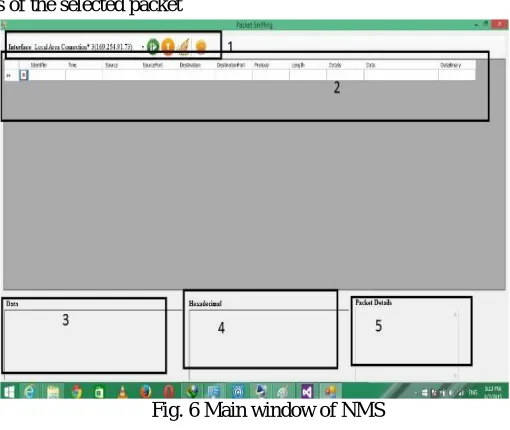
Fig. 6 shows the main window of NMSwhen it is launched. The main window consists of five components (They are numbered in the figure):
A. Combo and Toolbar:CombodDetects the NICs connected to the computer. The toolbar displays 4 tool icons. These buttons are
start/stop button to start/stop capturing packets, filter button to filter displayed packets, HTTP filter button to filter displayed HTTP packets, and clear button to clear the packet view pane.
B. Packetsview pane: Displays parsed packets (after applying filters). The top line of the pane displays the header (title of each
displayed field of the packet)
C. Data: Displays data of the selected packet
D. Hexadecimal: Displays hexadecimal value of data of the selected packet
[image:12.612.181.436.231.446.2]E. Packet details: Displays details of the selected packet
Fig. 6 Main window of NMS
Fig. 7 shows the NIC selection combo box which lists all NICsconnected to thecomputer thatruns NMS. In addition, the NIC selec-tion combo also shows the corresponding IP addresses of these NICs. Selecting the NICto be monitored is the first step that has to be done before start listening to thecrossing packets and capturing them. After choosing the interface, the user has to press the "start" button which is shown in the main window of NMS (the green button in the toolbar).
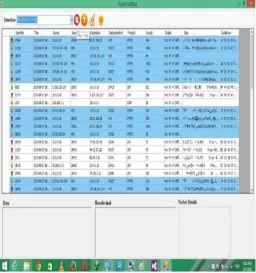
After pressing the "start" button in the main window of NMS, the list of crossing packets will be parsed and displayed in the packets view pane (See Fig. 8). In addition, these captured packets will be added to the Captured Packet Queue.
The Packet Parsing module adds captured packets after being parsed to the Parsed Packets Queue and the adds the parsed HTTP packet to the Parsed HTTP Packets Queue.
Fig.8Display of captured packets in thepackets view pane
When the user selectsapacket from the displayed packets in the packets view pane by clicking the left button of the mouse on it, the details of that packet aredisplayedas shown in Fig.9. Selected Packet details are displayed in the data, hexadecimal, and packet de-tails panes which are located at the bottom of the main window of NMS.
Data about the selected packet (e.g., protocol, date, content-type, etc., ) are displayed in the data pane as shown in Fig. 10. Data in hexadecimal format of the selected packet are displayed in the hexadecimal pane as shown in Fig. 11.
Packet details (IP packet details) of the selected packet are displayed in the packet details paneas shown in Fig.12.
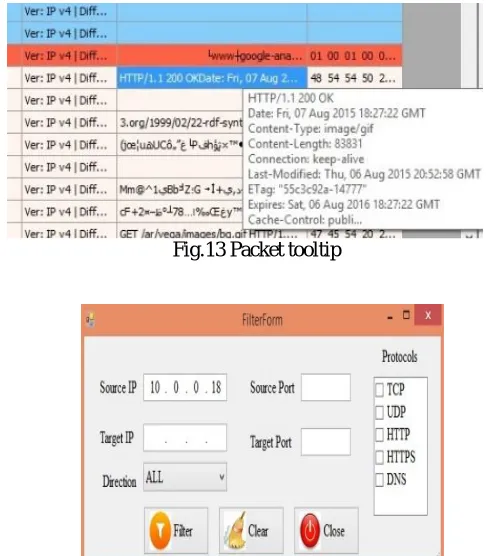
[image:13.612.159.455.523.721.2]Fig. 13 shows the tool tip of the packet when the mouse is positioned over the data field of that packet in the packets view pane. When the user presses Filter button, he gets the form shown in Fig. 14. The figure displays the packet filter options supported by the application. Using this form, the user can select one of the options offered. After selecting the required options, the user can click "Filter" to display captured and parsed packets in the packets view pane that meet the selected filter options. The user can clear the selected options and start selecting new options again. He can also close the form without taking any action.
Fig.10Display of data of the selected packet in data pane
[image:14.612.185.439.64.231.2]Fig.11Display of data (in hexadecimal format) of the selected packet in hexadecimal pane
[image:14.612.233.383.270.354.2]Fig.12Display of details of the selected packet in packet details pane
Fig.13 Packet tooltip
Fig.14 Packet filter optionsform showing supported options by NMS
[image:14.612.187.430.388.666.2]Fig. 15 The packets view pane when the user filters packets by source address of value 10.0.0.18 using packet filter options form
Fig. 16 shows the packets view pane when the user filters packets using HTTP protocol and data direction of download using packet filter options.
-Fig. 16 The packets view pane when the user filters HTTP packets using HTTP protocol and data direction of download using pack-et filter options form
[image:15.612.165.454.266.466.2]When the user presses HTTP Filter button, he gets the form shown in Fig.17. The figure displays the HTTP packet filter options supported by the application. Using this form, the user can select one of the options offered and click "Filter" to display HTTP pack-ets in the packpack-ets view pane that meet the selected filter options. The user can clear the selected options and start selecting new op-tions again. He can also close the form without taking any action.
Fig.17 HTTP Filter options form showing supported options by NMS
[image:15.612.182.434.569.671.2]Fig.18The packets view pane when the user filters HTTP packets by selecting "SUCCESSFUL” HTTP Response using HTTP filter options form
By pressing the HTTP analysis icon (button) in the main window of NMS, a new form is displayed which displays HTTP view pane as shown in Fig.19.The user may press clear button to clear the HTTP view pane.
Fig.19 HTP view pane
The user can select one of the HTTP packets from the HTTP packets view pane as shown in Fig.20.
Fig.20 Selection of one HTTP packet that are displayed in the HTTP view pane
Fig.21 Request header of the selected HTTP packet
Fig.22 Response header of selected HTTP packet
To generate file(s) from captured packets,the user has to select a packet from the packets view pane first. Then, he presses the folder icon (file generation button)to run File Generation module. This button is displayed in the the toolbar in the main window of NMS. File Generationform will appear as shown in Fig.23. Fig.23 lets the user select one of file generationmodes as described in sub-section 3.2.9. File generation form also lets the usr choose the destination folder of the file(s) to be generated.
After the user pressing the file generation button and selecting the destination folder, he could press "Extract" button in the file gen-eration form. An example of file gengen-eration is shown in Fig. 24. Fig. 24 displays the folder "d:\MY_Data" that contains the files generated from the packets. In this example, the user chooses the selected host mode and alwatanvoice.com as the host name (the selected packet contains this host the server name).
Fig.24An example of file generation
The results of above experiments show that NMS runs correctly and efficiently. It monitors NICs, it captures packets, it parses pack-ets, it filters packpack-ets, and it builds files from packets. In short, it does what is was intended to do correctly and accurately.
NMS design enables ISPs to overcome the lack of the tools to support low level packet sniffing and monitoring. In addition, most of the present tools do not have the abilityto restore the original files from the intercepted packets. Also, current similar tools are very expensive tompared to NMS.
V. CONCLUSION
This paper dsigns a network monitoring system called NMS.Using NMS we could view data transmitted over the computer net-works and crossing NICs connected to our computers. This enables us to analyse packets and data, detect malicious behavior, and produce warning messages. The network administrator can use NMS to monitor and analyse packets over the network and build network intrusion detection systems.
Challenges that face the design of intrusion detection systems, packet filtering, and data analysis like the one proposed in this paper include processing high-volume of data, possibility of packet loss/drop, and the requirement for system flexibility and scalability. To overcome thesechallenges, we developed the system using low level packet sniffing and C# which is very powerfull in regards to memory management.In addition, we applied some ideas from adaptive pattern matching techniques. One of the key components in NMS is HTTP filter analysis and file generationfrom pure packets.NMS could invistigate all traffic that is specificto a single user, or specific to a single host. The proposed application could save such traffic in any destination folder for later analysis (offline analy-sis). NMS could detect malicious traffic in real time. The user of the proposed system could do many statistics on collected data based onvisited hosts, the contents of generated files. Current version of NMS focuses on HTTP protocol.
e could enhance and improve NMS as follows: support, filter and snif other protocols that are not currently supported, add more filters to the packets (filter by text content, Internet browser used, date and time, …), add the other protocols analysis (DNS, ICMP, POP3, ), extractsecrets key of HTTPS, support the password sniffing, decrypt HTTPS data and extract files from it, detect malicious behavior (man in the middle, DNS poisoning, fishing, …), create alert systems to send warnings when malicious behavior is de-tedcted, and finally, add a module to edit received packets and retransmit them.
REFERENCES
[1] Security Measures in a Secure Computer Communications Architecture,Bottino, L.J. ; Fed. Aviation Adm., Atlantic CityInt. Airport, NJ, 25th Digital Avionics
Systems Conference, 2006 IEEE/AIAA.
[2] Securing IPv6 network infrastructure: A new security model Choudhary, A.R. ; SEGMA Technol. Inc., Silver Spring, MD, USA ; Sekelsky, A. Technologies
for Homeland Security (HST), 2010 IEEE International Conference.
[3] A malicious activity detection system utilizing predictive modeling in complex environments Almaatouq, A. ; Alabdulkareem, A. ; Nouh, M. ; Alsaleh,
M. Consumer Communications and Networking Conference (CCNC), 2014 IEEE 11th .
[4] An approach to detect malicious activities in SCADA systems Pramod, T.C. ; Dept. of Comput. Sci. & Eng., Siddaganga Inst. of Technol., Tumkur, India ; Sunitha, N.R. Computing, Communications and Networking Technologies (ICCCNT),2013 Fourth International Conference
[5] Evaluation of applicability of modified vector space representation for in-VM malicious activity detection in Cloud Borisaniya, B. ; Comput. Eng. Dept., NIT
Surat, Surat, India ; Patel, K. ; Patel, D. India Conference (INDICON), 2014 Annual IEEE.
[6] MAC aggregation resilient to DoS attacks Kolesnikov, V. ; Bell Labs., Alcatel-Lucent, Murray Hill, NJ, USA ; Wonsuck Lee ; Junhee Hong Smart Grid
Com-munications (SmartGridComm), 2011 IEEE International Conference.
[7] Understanding complex network attack graphs through clustered adjacency matrices Noel, S. ; Center for Secure Inf. Syst., George Mason Univ., Fairfax, VA
[8] A resource management approach to web browser security Jun Li ; Univ. of Oregon, Eugene, OR, USA ; Dongting Yu ; Maurer, L. Computing, Networking and Communications (ICNC), 2012 International Conference.
[9] Security assessment of computer networks -an ethical hacker's perspective Rao, G.S. ; Core Design Excellence Group, Tata Consultancy Services, Hyderabad,
India ; Naveen Kumar, P. ; Swetha, P. ; BhanuKiran, G. Computer and Communications Technologies (ICCCT), 2014 International Conference.
[10] Hijacking spoofing attack and defense strategy based on Internet TCP sessions Yongle Wang ; Xuchang Ploughs the Recent Inf. Sci. Res. Inst., Xuchang, China
; JunZhang Chen Instrumentation and Measurement, Sensor Network and Automation (IMSNA), 2013 2nd International Symposium.
[11] IP Spoofing Detection Using Modified Hop Count Mukaddam, A. ; Electr. & Comput. Eng. Dept., American Univ. of Beirut, Beirut, Lebanon ; Elhajj,
I. ; Kayssi, A. ; Chehab, A. Advanced Information Networking and Applications (AINA), 2014 IEEE 28th International Conference.
[12] Man-in-the-middle attack test-bed investigating cyber-security vulnerabilities in Smart Grid SCADA systemsYang, Y.; McLaughlin, K.; Littler, T.; Sezer,
S.; Eul Gyu Im; Yao, Z.Q.; Pranggono, B.; Wang, H.F.Sustainable Power Generation and Supply (SUPERGEN 2012), International Conference.
[13] Topology discovery of PROFINET networks using WiresharkSahin, V.H.; Ozcelik, I.; Balta, M.; Iskefiyeli, M. Electronics, Computer and Computation
(ICECCO), 2013 International Conference.
[14] Analysis and application of Wireshark in TCP/IP protocol teachingShaoqiang Wang; DongSheng Xu; ShiLiang Yan E-Health Networking, Digital Ecosystems
and Technologies (EDT), 2010 International Conference.
[15] Bottleneck Analysis of Traffic Monitoring using WiresharkDabir, A.; Matrawy, A. Innovations in Information Technology, 2007. IIT '07. 4th International Conference.
[16] SkyGrabber, Available at http://www.skygrabber.com/en/index.php, Last accessed on 10th of Sep. 2017.
[17] Free Network Analyzer, Available at https://freenetworkanalyzer.com/, Last accessed on 10th of Sep. 2017.