Systems Reference Library
File Number 1401/1460-32 Form C24-3156-1
Tape Utility Programs with 120-Character Label Capability
for
IBf'i1
1401/1460:
Specifications and Operating Procedures
Program Number 1401-UT-025
This publication contains the specifications and operating procedures of three tape utility
programs for IBM 1401 or 1460 Data Processing Systems. The programs are:
Card--to-Tape - Tape--to-Card - Tape--to-Printer.
These programs perform a function similar to that performed by three antecedent programs described in the publication: Utility Programs for IBM 1401 Tape Systems: Specifications, J24-1411. These three new programs differ from the former in the following ways:
The capability of processing the IBM standard 120-character tape labels, using procedures similar to those available from lOCS.
A simplified exception procedure.
Selective processing of tape files identified by tape header labels.
An "end-of-job option providing: 1. No rewind
2. Rewind
Major Revision (November 1963)
This publication, C24-3156-1, is a major revision of and obsoletes the previous edition, C24-3156-0. Changes have been made throughout the specifications section, and an entirely new section has been added covering the operating procedures.
© 1963 by International Business Machines Corporation
Copies of this and other IBM publications can be obtained through IBM Branch Offices
Specifications
Machine Requirements
Card-to-Tape Program
Input Files • • • • • Output Files • • • • • Sequence Checking ExcE:ption Procedures •• Field Selection. • . • Column-Binary Cards Parity • • • • • • • . . •
Group-Mark Conversion
Tap'~ Rewind • • Totals Print- Out • . • •
Tape-to- Card Program
Inpu.t Files • • . • • • Output Files
Sequence Numbe:ring • • Exception Procedures Field Selection • • • Binary Tape Records Parity . • • • • . . . Group-Mark Conversion Tape Rewind . • Totals Print- Out . . • .
Tape-to- Printer Program
Input Files . . . • . Output Format • . . Exc£:ption Procedtlres Field Selection • Parity • • • • • • Tape Rewind • • Totals Print-Out
Control Card
Field-Selection Cards Exception Card
5 5
5 5 5
5 6 6 6 6
7 7 7
7
7 7 8 8 8
8
9 9 9 9
9
9 10 10
10 11 11 11
12
13
14
Tape Labels .. 14
RDIlN Card . • • . 15
Usel:-Information Card. 15
Tape Error Routines. . . .. 15
Operating Procedures . Card-to-Tape Program
Object Program Deck Makeup. System Preparation
Diagnostic Phase •• Programmed Halts •
Tape-to- Card Program
Object Program Deck Makeup. System Preparation
Di agnostic Phase Programmed Halts •
Tape-to- Printer Program
Object Program Deck Makeup System Preparation
Diagnostic Phase Programmed Halts
CONTENTS
16
16 16 16 16 17
19 19 19 20 21
24 24 24
This publicatjion describes three tape utility programs for IBM 1401 and 1460 systems:
C ard-to"": Tape - Tape-to-Card - Tape-to- Printer.
These are generalized utility programs, supplied by IBM as condensed-card object decks. The programs modify themselves to fit a specific application through the use of a control card.
. Machine Requirements
4,000 positions of core stora~~e. (Additional core storage can be used for increased data-record size. )
One IBM 1402 Card Read- Punch.
One IBM 1403, Model 2 or 3, or IBM 1404 Printer.
One IBM 7330 or 729 Magnetic Tape Unit. Special Features: A 1401 system must include the sense switches special feature (standard on 1460). If binary tape records or column binary cards are to be processed, th.e appropriate special feature must be available:
1401 - Column binary feature. - 1460 - Binary transfer feature.
CARD-To-TAPE PROGRAM
The;) card-to-tape program trans:fers data from punched cards to magnetic tape. Although the basic data records, when processed from tape, may remain the same as they were when in cards, it is often desirable to modify the format of the records. Fields that were required in the card file may not be required on tape. The information in master and detail cards may be rearranged and consolidated in the tape records. Exception procedures and field-selection ability are provided in this program to facilitate such modification.
.!!!2ut Files
Input files must consist of fixed-length records. Each record must begin on a new card. The number of cards per data record must be the same for each record and is limited only by the amount of core storage available for the output tape record (see Output Files)" except when performing field selection. In this case, the input record cannot consist of more than 99 cards.
SPECIFICATIONS
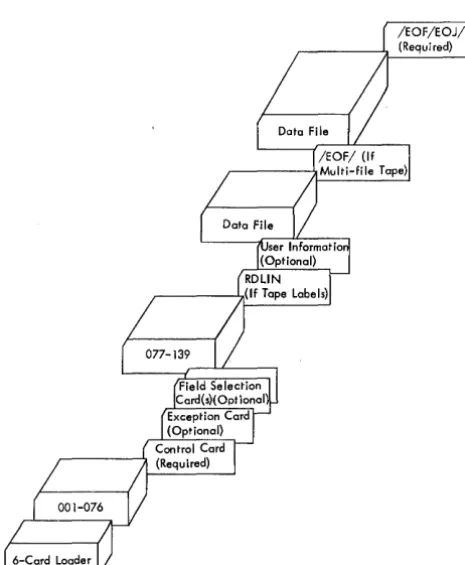
The program can produce multi -file tapes. The last file to be written must be followed by a card with /EOF/EOJ/ in columns 1-9. If multiple files with identical control-card specifications are processed, each file except the last is followed by a card with /EOF/ in columns 1-5.
If files with different control-card specifications are to be written on the same reel, follow the first file with a card containing /EOF/EOJ/ and with NO REWIND specified in the control card. Reload the program (with sense switch C on, if using tape labels) and the next file will be written .
If tape labels are to be written, a RDLIN card and a user-in:formation card, if necessary (see Tape Labels), must precede the first record of each file.
Output Files
Output files consist of fixed-length data records that can be blocked or unblocked. The blocking factor (number of data records per tape block) is specified in columns 6-9 of the control card. In the event of an incomplete last block, the block is padded with a character indicated in the control card and is written as a full-length block. Terminal record marks can be inserted after each record in a block.
The record size and blocking factor used is limited only by the size of the output-tape record that can be accommodated. The maximum output-tape record size depends on machine size:
2, 000 characters for a 4K machine. 6,000 characters for an 8K machine. 10,000 characters for a 12K machine. 14, 000 characters for a 16K machine.
Machine size is determined automatically by the program.
If tape labels are not written, single tape marks are written at the end of each file and, in the event of multi-reel files, at end-of-reel.
If tape labels are written, the program writes a header label followed by a tape mark before each file and a trailer label preceded and followed by a tape mark after each file. End·-of-reel, in the event of multi-reel files, is indicated by an EO~ trailer label preceded and followed by a tape mark.
Sequence Checking
1. Interrecord sequence checking is performed by comparing a predetermined field from one record to the next to assure ascending sequence of the records within a file. The field to be compared against can be a maximum of ten digits. It must be in the same location in each input record. Also, it must be an all-numeric field (blanks are converted to zeros) contained within one card of the cards comprising each input record. The first sequence number cannot be all zeros. Duplicate numbers are interpreted as a sequence error. Exception records are included in the check.
2. Intrarecord sequence checking is performed by comparing a predetermined field from one card to the next to assure ascending sequence of the cards composing a record. The field is
normally one or two positions long, allowing as many as 99 cards per record. When this· is the case, the sequence can begin again (normally with 01) with the first card of each record. If it is desired to assure ascending sequence of all the cards within the file, rather than within a single record, this field can be increased to a maximum of ten digits. In all cases, the field must be in the same location in each input card and must be an all-numeric field (blanks are converted to zeros). The first sequence number cannot be all zeros.
Exception Procedures
Records identified by the presence or absence of a field of up to 72 constant exception characters can be bypassed when performing the card-to-tape operation. A punch in column 16 of the control card specifies that exception procedures are to be
followed. A separate card called the exception card is supplied with the constant exception characters and the following information:
1. Whether the records bypassed are to be
identified by the presence or the absence of the exception characters.
2. The length of the exception field.
3. The locatIOn of the field within the input record. The exception field must be contained within one card and that card must be in the same location in each record.
Field Selection
The program can select fields from the input record and arrange these fields in any order in the output record. A field selected for output must be within the limits of one card of the input record. Up to
16 fields can be selected. They are defined in separate field-selection cards in the order of their occurrence in the input record (see Field Selection Cards).
Each field definition specifies:
1. The location of the field in the input record. 2. The length of the field (maximum 80 positions). 3. The location in which it is to be inserted in the
output record.
Any positions of the output record that are not used are written as blanks.
Note: If a group mark is present in the high--order position of a selected field, a wrong-Iength-record error will occur.
Column- Binary Cards
This program can prepare binary tapes from binary cards. Input can consist entirely of column-binary cards or column-column-binary intermixed with BCD (binary-coded-decimal) cards. When processing column-binary cards, each card is treated as a single record. The following operations cannot be performed when processing binary intermixed with BCD records:
1. Sequence checking. 2. Exception procedures. 3. Field selection. 4. Blocking.
5. Group-mark conversion. 6. Record-mark insertion.
When a file contains column-binary cards intermixed with BCD cards, the column-binary cards must have 7 and 9 punches in column 1. The resulting tape records .are 84-characters long for BCD cards and 168-characters long for column-binary cards. The last four characters of BCD records and the last eight characters of binary records are written automatically by this program to provide a look-ahead feature that enables a program to distinguish between BCD and binary records during tape reading.
Files that contain all column-binary cards do not require the 7 and 9 punches in column 1. The user can specify that either the first 72 or all 80 columns of each card be used, producing either 14:4-or 160-character-position tape rec14:4-ords. Look-ahead characters are not written after the records of all-binary files.
Parity
When b.inary or intermixed binary and BCD L'(~cords are processed, 'the binary records are always written in odd parity and the BCD records are always written in even parity. Tape labels are always written in even parity.
Group- Mark Conversion
An IBM 7080 group mark (12-5--8) in cards can be converted to an IBM 1400 series group mark (12-7-8) when it. is written on tape.
Tape Rewind
The user sp1ecifies in 'column 1'1 of the control card which one of the following options he desires at end-of-job:
1. No tape rewin9.. 2. Tape rewind.
3. Tape rewind and unload.
Note: Tape is not rewound at beginning of job.
Totals Print-Out
At the end of each file, the pro!~ram prints the number of cards read and the number of data records (including padded records) written on tape.
Note: See Control Card for a summary of the control-card information required.
TAPE-TD-CARD PROGRAM
This program punches tape files into cards. An
exception procedure is provided to allow certain records to be bypassed. Defined fields can be selected from fixed-length input records and punched in any order. The program can process multiple files during one run and select particular files from a multi-file tape. If tape labels are used, the header label of each file eneountered is printed. By the setting of a sense switch, each card is printed as punched.
Input Files
This program can process fixed-length records, blocked or unblocked~ and variable-length,
unblocked records. The maximum input tape-record size allowed depends on machine size:
2, 000 characters for a 4K machine. 6,000 characters for an 8K machine.
10, 000 characters for a 12K machine. 14,000 characters for a 16K machine.
Machine size is determined automatically by the program.
If data records are blocked on tape, all blocks must be the same length, with the last block padded, if necessary.
The program can process multi-file reels, punching a specified number of files or searching for and punching those identified by certain header labels. If unlabeled files are processed, or if tape labels are bypassed, the exact number of files to be processed is punched in the control card. When processing labels, a RDLIN card is supplied for each file to be punched. If a file is encountered with a header label for which no RD UN card is furnished, the program can either halt or bypass this file and continue searching for the file identified by the RDLIN card. The RDUN cards must be in the same sequence as the tape files. No attempt is made to search for a label on that portion of tape already read.
When processing tape labels, the program assumes end-of-job after processing the file identified by the last RDLIN card. If an EOR trailer label is detected before end-of-job, the tape is rewound and unloaded. The next tape can be loaded to continue processing.
When bypassing tape labels, the program continues until the number of files specified has been processed. Again, if an E OR trailer label is read before completing the specified number of files, the tape is rewound and tmloadled. The next tape can be loaded to continue processing.
When processing a file with no labels, the program continues until the number of files specified has been processed. It is important that the number of files specified does not exceed the number actually on the reel. A tape mark is always interpreted as end-of-file. Therefore, even if double tape marks were written at the end of a reel, the program would not interpret them as an EOR condition but would continue trying to read additional files. Each reel of an unlabeled multi-reel file must be treated as a separate file. The program must be reloaded for each reel, with one file speCified in the control card.
Output Files
During field selection, the output record length is only long enough to contain the defined fields. Any unused positions of the output record preceding the last selected field are punched as blanks. This can include complete cards.
Sequence Numbering
When processing fixed-length records, this program can generate and punch inter record and intrarecord sequence numbers in the output file. Intrarecord sequence numbers are punched in each card. The field can be a maximum of ten positions. The two low-order positions of this field contain the number of the card within the record. This value begins with 01 for each record and allows a maximum of 99 cards per output record. If more than two positions are reserved for this field, the record number (beginning with 000001) is punched beginning in the third position, with as many high-order zeros as necessary to fill out the field.
Interrecord sequence numbers are punched in each record of a file. The field can be a maximum of ten positions. The value begins with 0001 (with up to nine high-order zeros) for the first record in each file.
Any data normally punched in the fields used for these sequence numbers is lost unless relocated through field selection. The intrarecord numbers can be punched in any portion of the cards and are punched in the last card of the record even when. the data record ends in a portion of the card preceding the field. The interrecord number, however, must be punched in a field within the actual data record.
It can be punched after the data record in blank card columns following the last character of the record, only when performing field selection.
Exception Procedures
Records identified by the presence or absence of a field of up to 72 constant exception characters can be bypassed when performing the tape-to-card
operation. A punch in column 16 of the control card specifies that exception procedures are to be
followed. A separate card called the exception card (see Exception Card) is supplied with the constant exception characters and the following information: 1. Whether the records bypassed are to be
identified by the presence or the absence of the exception characters.
2. The length of the exception field.
3. The location of the field within the input record. The exception field must be contained within 72
consecutive locations of the input record and must be in the same location in each record.
Padded records can be bypassed by defining an exception field that consists entirely of the padding character.
Field Selection
When processing fixed-length records, the program can select fields from the input record and arrange these fields in any order in the output record. A field selected for output must be within the limits of one card of the output record. Up to 16 fields can be selected. They are defined in separate field-selection cards in the order in which they are to be punched in the output record (see Field-Selection Cards).
Each field definition specifies:
1. The location of the field in the input record. 2. The length of the field.
3. The location in which it is to be inserted in the output record.
When field selection is performed, the output record can consist of a maximum of 99 cards. Binary Tape Records
This program can process binary tapes and punch column binary cards. This operation requires that the machine be equipped with the column binary feature. Input can consist entirely of binary records or binary intermixed with BCD records. The follow-ing operations cannot be performed when processfollow-ing binary records or binary intermixed with BCD records:
1. Sequence numbering. 2. Exception procedures. 3. Field selection. 4. Blocking.
5. Group-mark conversion.
When a file contains binary records intermixed with BCD records, the tape records must be in the following form:
Binary Records - Must be 168 character-positions long and the last eight character-positions must contain:
1. b5b Ib5b4, if the next record is binary 2. b4bbbIbb, if the next record is BCD.
- BCD Records - Must be 84 characters long and the last four positions must contain:
1. 9977, if the next record is binary 2. bbbb, if the next record is BCD.
The first 80 characters of the BCD records are punched in the standard IBM card code.
When the input file contains all-binary records, the program can punch either 72- or 80-column binary cards from the first 144 or 160 character-positions of the input record.
BCD tape records can be read in either even or odd parity. Even parity is assumed unless odd parity is specified in column 18 of the control card.
When binary or intermixed binary and BCD records are processed, the' binary records are always read in odd parity and the BCD records are always read in even parity. Tape labels are always read in even parity.
Group- Mark Conversion
An IBM 1401 group mark (12-7-8) on tape can be converted to an IBM 7080 group mark (12-5-8) when it is punched into cards.
Tape Rewind
The user specifies in column 1'7 of the control card which one of the following options he desires at end-of-job:
1. No tape rewind. 2. Tape rewind.
3. Tape rewind and unload.
Note: Tape is not rewound at beginning of job.
Totals Print-Out
At the end of each file, the program prints the number of input records read and the number of cards punchled as output.
Note: See Control Card for a summary of the control-card information required.
T APE-TO- PRINTER PROGRAM
The tape-to-·printer program prints the contents of tape recordB. Field-selection ability (fixed-length records only) is provided to allow the user to specify the fields to be printed and the format desired in the printed output. If tape labels are used, the header label of each file encountered is printed.
Input Files
This program can process fixed- or variable-length records, and the tape records can be blocked or unblocked. If blocked, variable-length records are processed, each record within the block (including the last) must be terminated by a record mark. Since the first four characters of blocked, variable-length tape records are normally a block character
..Q.Q!W1, this program excludes these positions from the print-out. The fifth position of the tape block is considered the first position of the first data record.
The maximum input tape record size allowed depends on machine size:
2,000 characters for a 4K machine. 6,000 characters for an 8K machine. 10,000 characters for a 12K machine. 14,000 characters for a 16K machine.
Machine size is determined automatically by the program.
The program can process multi-file reels, printing a speCified num bel' of files or only those identified by certain header labels. If unlabeled files are processed, or if tape labels are bypassed, the exact number of files to be processed is punched in columns 21 and 22 of the control card. When processing labels, a RD LIN card is supplied for each file to be printed. If a file is encountered with a header label for which no RDLIN card is furnished, the program can either halt or bypass this file and continue searching for the file identified by the RDLIN card. The RDLIN cards must be in the same sequence as the tape files. No attempt is made to search for a label on that portion of tape already read.
When processing tape labels, the program assumes end-of-job after processing the file identified by the last RDLIN card. If an EOR trailer label is detected before end-of-job, the tape is rewound and unloaded. The next tape can be loaded to continue processing.
When bypassing tape labels, the program continues until the number of files speCified has been processed. Again, if an E OR trailer label is read before completing the speCified number of files, the tape is rewound and unloaded. The next tape can be loaded to continue processing.
additional files. Each reel of an unlabeled multi-reel file must be treatea as a separate file. The program must be reloaded for each reel, with one file specified in the control card.
Output Format
During processing of labeled files, each header label is printed on a separate page preceding the data file.
Unless excluded by a punch in column 24 of the control card, a page number is printed at the top of each page of the printed output. This number begins with 1 for the first page of each file.
One line of heading information can be printed on each page, on the same line as the page number. A I-punch in column 23 of the control card indicates the presence of two heading-information cards. The 132-position print line is taken from all 80 columns of the first card and the first 52 columns of the second card. If different heading lines are required at the beginning of each file when processing
multiple-files, the program must be reloaded for each file.
Note: If page numbering is not suppressed, the page-number field will be printed in place of positions 124-132 of the heading line.
If no field selection is performed, each record is printed beginning on a new line and continuing for as many lines as necessary.
When performing field selection (fixed-length records only), as many lines are printed as are necessary for the last defined field, up to a
maximum of nine lines. A field selected for output must be contained within one 132-character print line. Any portions of the output record that do not contain selected fields are printed as blanks.
Single spacing is always maintained between lines within a record. The spacing between records can be determined either through control-card designation or through first-character forms control.
Column 25 of the control card is used to specify that single-, double, or triple spacing be maintained between records. If the first character of each record is to determine spacing, column 25 contains a code indicating that fact.
When operating under first-character forms control, the following codes in the first position of a record cause an immediate space or skip:
Code Space or Skip Action blank single space
Zero double space - (B-bit) triple space
1-9 or J-R skip to channel 1-9 (that is, 1 or J=
skip to channel 1; 2 or K
=
skip to channel 2; etc. ).An ampersand (&) is sometimes used as a first-character control code to cause space suppres-sion. This program does not provide for space suppression. Column 25 of the control card is also used to specify that, in the event of an ampersand forms-control character, the record be either:
1. Bypassed, or
2. Printed after a line containing three asterisks" Note: When processing fixed-length records with first-character forms control, the forms-control character is considered to be the first chara!Jter of the data record and is printed unless excluded through field selection. When proceSSing variable-length records, the forms-control
character is not printed.
Exception Procedures
Records identified by the presence or absence of a field of up to 72 constant exception characters can be bypassed when performing the tape-to-printer operation. A punch in column 16 of the control card specifies that exception procedures are to be
followed. A separate card called the exception card (see Exception Card) is supplied with the constant exception characters and the following information:
1. Whether the records bypassed are to be
identified by the presence or the absence of the exception characters.
2. The length of the exception field.
3. The location of the field within the input record. The exception field must be contained within 72 consecutive positions and must be in the same location in each record. Note that when processing with first-character forms control, the forms-control character is considered to be the first character of the data record. When processing variable-length blocked records, however, the block character count (positions 1-4 of the tape record) is not considered part of the first data record.
Padded records can be bypassed by defining an exception field that consists entirely of the padding character.
Field Selection
which they are to be printed (see Field-Selection .Qards). The selected fields can be contained in a maximum of nine lines. Each field definition specifies:
1. The loeation of the field in the input record. 2. The length of the field.
3. The prilnt position in which it is to be printed. When field selection is performed, the output may consist of a maximum of nine lines per record.
Tape can be read in either even or odd parity. Even parity is assumed unless odd parity is called for in column 18 of the control card.
Tape Rewind
The user specifies in column 17 of the control card which one of the following options he desires at end-of-job:
1. No tape: rewind. 2" Tape rewind.
3" Tape rewind and unload.
Note: Tape is not rewound at beginning of job.
Totals Print- Out
At the end of each file, the program prints the number of records read and the number of records printed.
CONTROL CARD
Each of these programs modifies itself at load time to process a particular file format, using a
particular choice of options. The information that forms the basis of this modification is supplied to the program in a control card punched by the user. The control cards used are similar in format for all three programs. Control-card fields that are not applicable to any given program must be left blank for that program.
Record Size and Blocking (Columns 1-14). Columns 1-5 contain the number of characters per fixed-length input record. This field must be all-numeric and high-order zeros must be punched. When processing variable-length input records (tape-to-card and tape-to-printer programs only), punch
vvvvv.
Columns 6-9 contain the tape blocking factor (number of data records per tape record). During processing of fixed-length records, the field must be all-numeric with high-order zeros punched. When processing variable-length, unblocked records (tape-to-card and tape-to-printer only), punch UUUU. When processing variable-length, blocked records (tape-to-printer only), punch BBBB.
Columns 10-14 need be used only when performing field selection with the card-to-tape program. Punch the number of characters per output data record, not including the terminal record mark if appended by the program. Tape-Label Code (Column 15). Column 15 is
punched with one of the following tape-label codes:
Code
N
1
2
3
Label Condition
If no labels are to be read or written. If IBM standard 120-character labels are to be written by the card-to-tape program or read and checked in their entirety by the to-card and tape-to-printer program s.
If IBM standard 120-character labels are to be read and checked only on the file-identification field.
If IBM standard 120-character labels are to be read and bypassed.
Exception Code (Column 16). Column 16 is punched with a 1 if exception procedures are to be
performed. If no exception card is used, leave this column blank.
Rewind Option (Column 17). Column 17 contains a code indicating the action to be taken at end-of-job:
Code blank
1
2
Action no rewind rewind
rewind and unload
Parity (Column 18). Column 18 is left blank if tape is to be read or written in even parity. Punch a 1 in this column if odd parity is to be used. Field Selection (Columns 19-20). Columns 19 and
20 are left blank if no field selection is to be performed. If field-selection cards are used
(fixed-length records only), punch the number of fields to be selected in these columns. (Punch high-order zero. )
Files Control (Columns 21-22). Columns 21 and 22· are used only with the card and tape-to-printer programs. They are punched with the number of tape files to be processed and must be used when:
1. No labels are present, or 2. Labels are present but bypassed.
If tape labels are processed against RDLIN cards (file-identification field only or full check), end-of-job is assumed when the last RDLIN card has been processed. In this case, leave these columns blank.
Print Options (Columns 23-25). Column 23 is used only with the tape-to-printer program. Punch a 1 if two cards are supplied containing a heading line to be printed at the top of each page. If no heading line is to be printed, leave this column blank.
Column 24 is punched with a 1 if the normal page numbering routine is to be bypassed.
Column 25 is punched with a code indicating the spacing to be maintained between records.
Code Spacing
blank No additional space. 1 One additional space. 2 Two additional spaces. 3 Three additional spaces.
S First-character control. Records
pre·-*
Group-Mark Conversion (Column 26). Column 26 is punched with a 1 if group-·mark conversion is to be performed by the card·-to-tape and tape-to-card programs. If group marks are not to be converted, leave this column blank.
Column Binary Cards (Column~ Column 27 is used only with the card-to-tape and tape-to-card program s. It is punched with a code indicating the type of records to be processed.
Code blank
1 2
3
Record T.~~ All BCD.
All binary, 80-column records. All binary, 72-column records. Mixed BCD and 80-column-binary records.
If this column is punched, columns 1-14 must be blank.
Padding Character (Column 281. Column 28 contains the character to be inserted by the card-to-tape program as padding to fill out an incomplete block at the end of a file.
The following characters cannot be used as padding:
Defined Character Group mark Record mark Tape mark Word separator Substitute blank
Card Code 12-7-8 0-2-8 7-8 0-5-8 2-8 Terminal Record-Mark Option (Column 29).
Column 29 is used only with the card-to-tape program. Punch a 1 in this column if a record
mark is to be appended to the end of each record (including padded records) in a tape block.
Creation Date (Columns 31-35). Columns 31-35 are used only with the card-to-tape program and then only when processing IBM standard 120-character labels (I-punch in column 15). They contain the date of the day that the program is being run. This date is used to check the retention cycle of the output tape before writing on the tape. The date is then used in the new header label, ignoring the date field in the RDLIN card. The columns are punched as follows:
Column 31-32 33-35
Contents Year (i. e., 64).
Day of year (001 represents Jan. 1, 365 represents Dec. 31).
Reel Serial Number (Columns 40). Columns 36-40 are used only with the card-to-tape program and then only when processing IBM standard 120-character labels (I-punch in column 15). The reel serial number written in a new header label is normally taken from the old label. However,
if the retention cycle check of the old label is bypassed (either by setting sense switch C on before beginning the run or setting it on after a read error when attempting to read the header label), the contents of these columns are used as the reel serial number in the new label.
Sequence Checking and Numbering (Columns 41-51). The card-to-tape program can check the sequence of records within a file and of cards within a record. The tape-to-card program can generate and punch a series of consecutive sequence numbers, to be used in sequence checking when the card file is processed at a later time.
Columns 41-45 contain the high-order position within the record of the field to be checked or punched for interrecord sequencing.
Columns 46-47 contain the number of characters in the interrecord sequence field.
Columns 48-49 contain the number of the column in each card in which the intrarecord sequence field begins.
Columns 50-51 contain the number of characters in the intrarecord sequence field.
Note: Either interrecord or intrarecord sequence-checking or numbering can be performed without the other.
FIELD-SELECTION CARDS
One or more field-selection card(s) must be
supplied to each of these program s if field selection is performed. The number of selected fields determines the number of field-selection cards required. In the card-to-tape and tape-to-card programs, each field definition requires ten positions, allowing the maximum of 16 fields to be defined in two cards. In the tape-to-printer pro-gram, each field definition requires 11 positions, requiring three cards for the maximum of 16 selected fields.
Selected fields must be defined in order of their appearance in the input record for the card-to-tape program and in the order of appearance in the output record for the tape-to-card and tape-to-printer programs. Unused columns must be left blank.
Position 1-2 3-4 5-6 7-10 Content Card Number (The program computes the number of cards in each record from the number of characters per record. )
Card column in which the field begins.
Number of characters in the field. High-order position of the field in the output record.
Tape-to-Card - Each selected-field definition is punched in ten columns as follows:
Position 1-4 5-6 7-8 9-10 Content
High-order position of the field in the input record.
Number of characters in the field. Number of the card in which the field is to be punched.
Card column in which the field is to begin.
Tape-to- Printer - Each selected-field definition is punched in eleven columns as follows:
Position 1-4 5-7 8 9-11 Content
High-order position of the field in the input record.
Number of characters in the field. Line number.
High-order print position. EXCEPTION CARD
An exception card must be supplied to each of the program s if exception procedures are to be
performed. The format of the card is the same for all three programs and is as follows:
Column Content
1-72 The field compared against to identify an exception record. The field is punched beginning in column 1 and continuing as far as necessary.
73 An exception code. The possible codes and the resulting action are:
Code Action
blank Records identified by the presence of the exception field are bypassed. 1 Records identified by the
absence of the exception field are bypassed. 74-75 Number of columns to be compared. 76-80 High-order position within the record
of the field to be compared.
TAPE LABELS
These programs can process files with no tape labels or files with the IBM standard 120-character (type A) tape labels. No other label format can be used. The format of the IBM standard label is given in the publication: IBM Standard Label. C28-8142. If labeled files are processed, tape marks must appear after the header label and before and after the trailer label.
Output Labels. If labels are specified in the control card, the card-to-tape program checks the retention cycle in the first label on each output tape and prints the label. The date in the control card is used for this check. This check can be bypassed by turning sense switch Con. This may be desired when:
1. The output tape has no label.
2. The output tape has a nonstandard label. 3. The retention cycle is not expired but the
operator knows that the contents of the reel can be destroyed.
The new header label is written using the information supplied in a RDLIN card and, if used, a user-information card. The file-creation date is taken from the control card. The new header label is printed.
After writing a data file (or at end-of-reel), the card-to-tape program writes a standard 120-character trailer label. The trailer label contains the label identifier (1EOFb or 1EORb), the block count (positions 67-72), and, if furnished for the header label, the user infor-mation (positions 101-120).
Input Labels. Input header labels are checked against the information supplied in a RDLIN card and, if present, a user-information card.
The tape-to-card program prints all header labels encountered, regardless of whether labels are checked or bypassed. The tape-to-printer program always prints the first header label of each file but, in the event of multi-reel files, bypasses the print-out of all other labels.
RDLIN Card
If the files to be processed have no labels, or if
labels are to be bypassed, no RDLIN cards are requi.red. A RDLIN card must be supplied for each labeled fih~ that is to be checked. (Multi -reel, labeled fik~s require only one RDLIN card. )
If only the file-identification field is to be checked, the RDLIN card need be punched only in columns 16-20 and 30-39. If the entire label is to be
checked, all fields present in the first 100 positions of the label except the label identifier and the reel serial number are compared against the correspond-ing fields :in the RD LIN card.
The format of the RDLIN card is as follows: ColuITUl 1-15 16-20 21-24 25-29 30-39 40-44 45-48 49-52 53 54 55 56 57 58 59-62 63 64-68 69-73 74 75 76 77-80 Content Not used RDLIN
Retention period Creation date File identification File serial number Reel sequenc,e number blank
Density Checksum Block sequence
Tape checking/interpreting Tape data reeording technique Tape data processing technique Creating system
Record format Record length Blocking factor/size Checkpoint
Not used
Indication of whether user-information card is supplied. If
label positions 101-120 contain any-thing other than blanks, supply a user-information card and punch a 1 in this column of RDLIN card. Not used
U ser-Information Card
A user-information card is supplied for a file if information is to be written in or compared against
positions 101-120 of the header label. The card is punched as follows:
Column 1-20 21-80
Content
Contents of header-label positions 101-120.
Not used.
TAPE ERROR ROUTINES
In the event of a tape write error, the card-to-tape program backspaces the tape and tries the write operation two more times. If still unsuccessful, the program backspaces the tape and executes a skip-and-blank-tape instruction before trying again.
If still unsuccessful after thirty attempts to write, the program halts.
If an error occurs while attempting to read a tape block, the tape-to-card and tape-to-printer programs backspace and attempt the read operation up to 99 more times. If an error occurs when reading a tape record of less than 13 characters, it is considered a noise record. No attempt is made to reread the record.
The tape-to-card and tape-to-printer program s use the substitute blank (A-bi.t) to test for a valid read. operation. The presence of this character in a tape record in an all BCD file written in odd parity causes erroneous output in the following instances:
1. If the substitute blank is present in a variable-length record read by the to-card or tape-to-printer programs, only that portion of the record that precedes the character is
processed.
OPERATING PROCEDURES
CARD-TO-TAPE PROGRAM
Object Program Deck Makeup
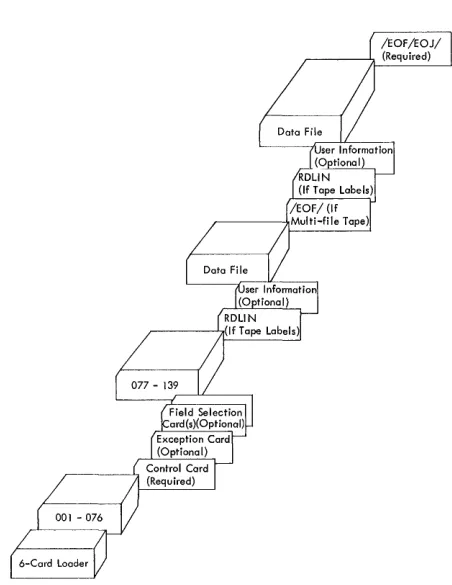
The card-to-tape program is supplied as a con-densed-card object deck. The deck is in the standard condensed format produced by the 1401/ 1311 Autocoder. The first six cards in the deck are the standard Autocoder loader. The cards following the loader have sequence numbers (beginning with 001) in columns 73-75 and the identification code (11125) in columns 76-80.
Figure 1 shows where the control cards are inserted in the deck.
System Preparation
1. Place the program deck and data file(s) in the read hopper.
2. Ready the output tape on tape unit 1.
3. Ready the printer. It must have a carriage tape with channels 1 and 12 punched. (Other channels can be punched.)
[image:16.617.319.563.83.393.2] [image:16.617.55.288.420.703.2]4. Set the I/O check stop switch on. 5. Set the sense switches as follows:
Figure 1. Card-to-Tape Deck Makeup
Switch Setting
A On
B Not used
C Off
On
D Not used
E Not used
F Not used
G Not used
Diagnostic Phase
Condition
Always
The retention cycle of the existing label on the out-put tape is to be checked ..
The retention-cycle check is to be bypassed.
Note: Sense switch C is not used when no labels are specified (by an N-punch in column 15 of the control card).
The program reads and analyses the control card and, if present, the exception and field-selection cards. If incorrect control information is detected, the program halts after printing at least one of the following messages. The B-address register will contain b3bb at too time of the halt.
1. INVALID ENTRY IN COLUMNS 1-14
2. NO FLD SELN AND COL 10-14 NOT BLANK 3. OUTPUT TAPE REC SIZE INVALID
4. COLUMN 15 IS NOT 1 OR N
5. COLUMN 17 IS NOT BLANK, 1, OR 2 6. COLUMN 18 IS NOT A BLANK OR 1 7. COLUMN 26 IS NOT A BLANK OR 1 8. COLUMN 27 IS NOT A BLANK, 1, 2, OR 3 9. ILLEGAL PADDING CHARACTER - COL 28
(Padding character cannot be. $ , -'/, :j: ,V' , 1).)
10. COLUMN 29 IS NOT A BLANK OR 1 11. INVALID ENTRY FOR DATE
12. DATE/REEL SER # WITH NO LABEL SPEC 13. INVALID ENTRY IN COLUMNS 41-47 14. INVALID ENTRY IN COLUMNS 48-51
Programrned Halts
The following halts may occur during running of the card-to -ta.pe program. The information given for each halt consists of the contents of the B-address register, the reason for the halt, and the
recommended restart procedure. B-Address
Hegister Heason for Halt
b2bb Incorrect number of exception and/or field-selection cards, or invalid entries in the fields in the control card (column 16 or 19-20) that determine the number of these cards needed.
b3bb This halt occurs after printing at least one of the error messages listed under Diagnostic Phase.
24bb Intrarecord sequence error. Either a card is out of sequence or contains a
I
non-numeric value in the sequence field.
25bb Interrecord sequence error. A record is either out of sequence or contains a non-numeric value in the sequence field.
27bb Incomplete last reeord. At least one additional card is needed to build the final record in a file of multi-card records.
28bb End-of-file. The last card was read and contained /EOF/ in columns 1-5.
29bb End-of-job. The last card read contained /EOF/EOJ/ in columns 1-9.'
32bb The last card read should have been a RDLIN card but does not have RDLIN in columns 16-20.
33bb Tape error occurred while attempting to read header label.
Hestart Procedure Correct error condition and reload program.
Correct error conditions and reload program.
Heload program and start at beginning of file or press START RESET and START to accept the card and continue processing. Reload program and start at beginning of file or press START RESET and START to accept the record and continue processing. Place appropriate cards in read hopper and press START
Place additional file or files in read hopper (preceded by RDLIN card if tape labels) and press START.
Replace the card read with the appropriate RDLIN card and press START.
34bb The retention period for the output tape Either replace the tape reel and
has not expired. press START, or set sense
switch C on and press START to bypass the header label.
35bb Tape error occurred while attempting Press START to retry. to write header label.
36bb Tape error occurred while attempting Press START to retry. to write trailer label •.
37bb 30 attempts to write a tape record have Press START to retry. failed.
38bb End of reel. Mount new reel. Press START
TAPE-TO-CARD PROGRAM Object Program Deck MakeuI~
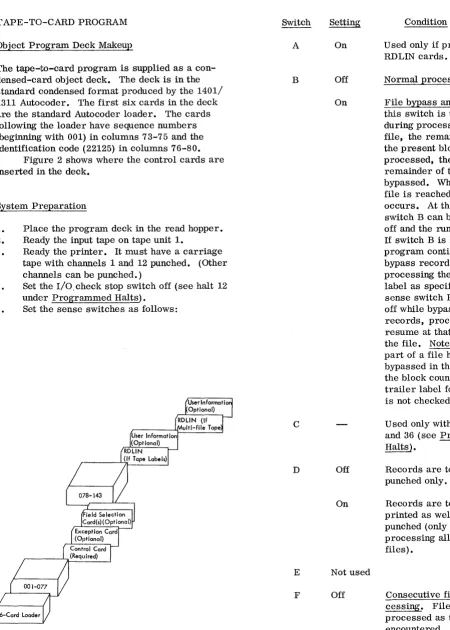
The tape-1to-card program is supplied as a con-densed-card object deck. Th.e deck is in the standard eondensed format produced by the 1401/ 1311 Autocoder. The first si.x cards in the deck are the standard Autocoder loader. The cards following the loader have sequence numbers (beginning with 001) in columns 73-75 and the identification code (22125) in columns 76-80.
Figure 2 shows where the control cards are inserted in the deck.
System Preparation
1. Place the program deck in the read hopper. 2. Ready the input tape on tape unit 1.
3. Ready the prjnter. It must have a carriage tape with channels 1 and 12 punched. (other charmels can be punched. )
4. Set the I/O,check stop switch off (see halt 12 under Programmed Hal~.
5. Set the sense switches as follows:
Figure 2. Tape-to-Card Deck Makeup
Switch
A
B
C
D
Setting On
Off On
Off
Condition
Used only if processing RDLIN cards.
Normal processing File bypass and halt. If
this switch is turned on during processing of a file, the remainder of the present block is processed, then the remainder of the file is bypassed. When end-of-file is reached, halt 16 oecurs. At this time, switch B can be turned off and the run continued.
If switch B is left on, the program continues to bypass records (after processing the header label as specified). If
sense switch B is turned off while bypassing records, processing will resume at that point in the file. Note: If any part of a file has been bypassed in this marmer, the block count in the trailer label for this file is not checked.
U sed only with halts 33 and 36 (see Programmed Balts).
Records are to be punched only. On Records are to be
printed as well as punched (only when processing all-BCD files) •
E Not used
F Off Consecutive file
pro-cessing. Files are
[image:19.613.72.522.82.712.2]On
G Off
On
cards are used and a header label is read that fails to match the last RD LIN card, the program halts. See halt 30 under Programmed Halts.
File Search. Tape is read until a header label with the identification field specified in the RDLIN card is foundo
The label is then pro-cessed to the extent specified in column 15 of the control card.
RDLIN cards should be in the order that the files appear on tape. Otherwise, in an attempt to search for a file already bypassed or not present, the program will attempt to read beyond the end of the tape. If the order of files is unknown, only one file should be searched for during a program run.
Nonnal processing. If a permanent tape read error (99 attempts to reread) occurs with sense switch G off, the operator has the option of bypassing the error record by pressing START or accepting the record by pressing START RESET and ST ART. (See halt 13 under Programmed Halts. )
Error scan. If a perma-nent tape read error occurs with switch G on, the operator can perform a storage scan to locate the character with in-correct parity. (see halt 15 under Program-med Halts.)
Diagnostic Phase
The program reads and analyses the control card and, if present, the exception and field-selection cards. If incorrect control information is
detected, the program halts after printing at least one of the follOwing messages. The B-address register will contain b3bb at the time of the halt.
Programrned Halts
The following halts may occur during running of the tape-to-card program. The information given for each halt consists of the contents of the B-address register, the reason for the halt, and the recommended restart procedure.
B-Address
Register Reason for Halt
b1bb Card read-error encountered during program load.
b2bb Incorrect number of exception' and/or field-selection cards, or invalid entries in the fields in the control card (column 16 or 19-20) that deter-mine the number of these cards needed. b3bb This halt occurs after printing at least
one of the error messages listed under Diagnostic Phase.
11bb Card read-error when reading a con-trol card, exception card, field-selection card, or RDLIN card. 12bb A total of 10 punch errors have
occurred during this program run. Note: Correctly punched cards are selected into stacker 4. Cards punched incorrectly fall into the normal stacker. The card is then repunched and, i.f correct, is selected into stacker 4. At the end of each file, a blank card is selected to stacker 8.
13bb Failed to read tape record correctly after 100 attempts or a wrong-length record has been read.
14bb Invalid look-ahead characters on tape record when processing file of inter-mixed binary and BCD records.
Restart Procedure Reload program
Correct error condition and reload program.
Correct error conditions and reload program.
Replace last card read and press START.
Press START to reset punch-error counter and continue processing.
The operator has the following option:
1. Press START to bypass the record.
15bb
16bb
Failed to read tape record correctly after 100 attempts. (Sense switch G on.)
End of bypassed file.
29bb End of job. 30bb
31bb
32bb
Tape header label read with file identification other than that in RDLIN card.
File identification field in header label corresponds to that in RDLIN card but remainder of fieldsl-19 and/ or user information (positions 101-120) do not correspond.
The last card read should have been a RDLIN card but does not have RDLIN in columns 16-2Q.
The operator can take either of the options listed for halt 13 or he can investigate the error by taking these steps:
1. Set the tape-select switch to D (diagnostic).
2. Press START to reread the error block. This stores the characters as they are writ-ten on tape, without inter-nally correcting any parity error. (If an invalid char-acter enters core storage, the check reset light is turned on. ) After this read, the program branches to halt 13.
3. Do a storage-scan to locate the invalid character. 4. Correct the record in core
storage, if possible. 5. Reset TAPE SELECT to N
and press CHECK RESET. 6. Press START RESET and
START to process a cor-rected block, or START to bypass an incorrect block.
Turn sense switch B off, and press START to process the next file. Leave sense switch B on and press START to bypass the next file or to go to the end-of-job, if no more files.
Note: If labels are specified, the header label is processed.
Either change tape reel and press START, or, to search for the file specified in the RDLIN card, turn sense switch F on and press START.
Mount correct tape and press START, or press START RESET and START to accept the labels as read.
-33bb Tape error occurred while Press START to retry or set attempting to read a header label. sense switch C on and press
START to bypass the label. 36bb Tape error occurred while Press START to retry or set
attempting to read trailer label. sense switch C on and press ST ART to bypass the label.
38bb End of reel. Mount new reel. Press START
to continue.
39bb Block-count check failed when Press START to continue pro-checking trailer label. (This will cessing. Display positions occur if any records are bypassed 82-87 for the accumulated block when restarting after halts 13 and 15.) count and positions 267 -27 ~~ for
the trailer-label block count.
-TAPE-TO-PRINTER PROGRAM
Object Program Deck Makeup
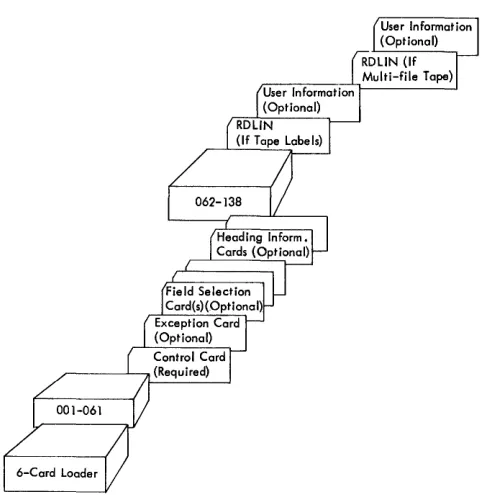
[image:24.613.55.548.81.727.2] [image:24.613.54.297.455.703.2]The tape-to-printer program is supplied as a con-densed-card object deck. The deck is in the standard condensed format produced by the 1401/ 1311 Autocoder. The first six cards in the deck are the standard Autocoder loader. The cards following the loader have sequence numbers (beginning with 001) in columns 73-75 and the identification code (33125) in columns 76-80.
Figure 3 shows where the control cards are inserted in the program deck.
System Preparation
1.
2. 3.
4.
5.
Place the program deck in the read hopper. Ready the input tape on tape unit 1.
Ready the printer. It must have a carriage tape with channels 1 and 12 punched and, if
first-character forms control is being pe rformed, the channels required for that operation must be punched.
Set the I/O check stoi> switch on. Set the sense switches as follows:
Figure 3. Tape-to-Printer Deck Makeup
Switch
A
B
C
D
E
Setting On
Off On
Not used Off On
Condition
U sed only if processing RDLIN cards.
Normal processing. File bypass and halt.
If this switch is turned on during the processing of a file, the remainder of the present block is processed, then the remainder of the file is bypassed. When end-of--file is reached, halt 16 occurs. At this time, switch B can be turned off and the run continued.
If switch B is left on, the program continues to bypass records (after processing the next header label, if
specified). If sense switch B is turned off while bypassing records" processing will resume at that point in the file. Note: If any part of a file has been bypassed in this manner, the block count in the trailer label for this file is not checked.
U sed only with halts 33 and 36 (see
Programmed Halts).
Normal processing. First line print-out. If
F Off
On
G Off
Consecutive File Pro-gessing. Files are processed as they are encountered. If RDLIN cards are used and a he ader label is read that fails to match the last RDLIN card, the program halts. See halt 30 under Program-med Halts.
File Search. Tape is read until a header label with the identifi-cation field specified in the RDLIN card is found. The label is then processed to the extent specified in column 15 of the control card.
RDLIN cards should be in the order that the files appear on tape. Otherwise, in an attempt to search for a file already bypassed or not present, the program will read beyond the end of the tape. If the orde r of files is unknown, only one file should be searched for during a
On
Diagnostic Phase
Error scan. If a permanent tape read error occurs with switch G on, the operator can perform a storage scan to locate the character with incorrect parity. See halt 15 under Program-med Halts.
The program reads and analyses the control card and, if present, the exception and field-selection cards. If incorrect control information is detected, the prog~am halts after printing at least one of the following messages. The B-address register will contain b3bb at the tim.e of the halt.
1. COLUMNS 1-5 CONTAIN AN INVALID ENTRY 2. COLUMNS 6-9 CONTAIN AN INVALID ENTRY 3. COLUMN 15 IS NOT 1, 2, 3, OR N
4. COLUMN 16 IS NOT A BLANK OR 1 5. COLUMN 17 IS NOT A BLANK, 1, OR 2 6. COLUMN 18 IS NOT A BLANK OR 1
7. COLUMNS 19-20 CONTAIN INVALID ENTRIES 8. COLUMNS 21-22 CONTAIN INVALID ENTRIES 9. COLUMN 23 IS NOT A BLANK OR 1
10. COLUMN 24 IS NOT A BLANK OR 1
11. COLUMN 25 IS NOT A BLANK, 1, 2, 3, S, OR
*
12. COL 19-20 SPECIFIED WITH V AR LENGTH 13. COLUMN 73 OF AN EXCEPTION CARD IS Norprogram run. BLANK OR 1
Normal processing. If a permanent tape read error (99 attempts to re-read) occurs with sense switch G off, the operator has the option of bypassing the error record by pressing START or accepting the record by pressing START RESET and ST ART. See halt 13 under Programmed ![alts.
14. COL 74-80 OF EXCP CARD CONTAIN INVALID ENTRIES
15. ERROR IN NUMBER OF FIELD SELECTION CARDS
Programmed Halts
The following halts may occur during running of the tape-to-printer program. The information given for each halt consists of the contents of the B-address register, the reason for the halt, and the recommended restart procedure.
B-Address Register
b3bb
13bb
15bb
Reason for Halt
This halt occurs after printing at least one of the error messages listed under Diagnostic Phase.
Failed to read tape record correctly after 100 attempts or a wrong-length record was read.
Failed to read tape record correctly after 100 attempts. (Sense switch G on.)
Restart Procedure Correct error conditions and reload program.
Operator has the following option:
1. Press START to bypass the record.
2. Press START RESET and START to accept the record as read.
The operator can take either of the options listed for halt 13 or he can investigate the error by taking these steps:
1. Set the tape-select switch to D (diagnostic). 2. Press START to reread the error block. This stores the characters as they are written on tape, without internally correcting any parity error. (If an invalid character enters core storage, the Check Reset light is turned on. ) Mter this read, the program branches to halt 13.
3. Do a storage-scan to locate the invalid character.
4. Correct the record in core storage, if possible. 5. Reset the tape-select
switch to N and press CHECK RESET.
6. Press START RESET and ST ART to process a
16bb End of bypassed file.
29bb End of job.
Turn sense switch B off and press START to process the next file.
Leave sense switch B on and press START to bypass the next file or to go to end-of-job, if no more files.
---~ 30bb Tape header label read with file
identification other than that in RDLIN card.
Either change tape reel and press START, or, to search for the file specified in the RDLIN card, turn sense switch F on and press START. ---~
31bb' File identification field in header label corresponds to that in RDLIN card but remainder of fields 1-19 and/or user information (positions 101-120) do not correspond.
Mount correct tape or supply correct RDLIN card and press START or press START RESE _ and START to accept the label as read.
---~ 32bb The last card read should have been
a RDLIN card but does not have RDLIN in columns 16-20
Replace the card read with the appropriate RDLIN card and press START.
---~ 33bb Tape error occurred while attempting
to read a header label.
Press START to retry or set sense switch C on and press START to bypass the label. ---~
36bb
38bb
39bb
~pe error occurred while attempting to read trailer label.
End of reel.
Block-count check failed when checking trailer label. (This will occur if any records are bypassed when restarting after halts 13 and 15.)
Press START to retry or set sense switch C on and press START to bypass the label.
Mount new reel. Press START to continue.
Press START to continue processing. Display positions 82-87 for the accumulated block count and positions 267-272 for the trailer-label block count.
J[B,.,
Technical Newsletter
File No. 1401/1460-32/
Re: Form No. C24-3156-1This Newsletter No. N24-0213
Date: June 9, 1964
Previous Newsletter Nos. None
R:.eplacement pages for Tape Utilit y Programs with 120-Character Label Capabilit y for
I BM 1401/1460: Specifications and Operating Procedures, Form C24-3156-1.
'1'0 bring your publication up to date, please replace the following pages wi t h the corresponding pages attached to this Newsletter. Changes are indicated by a vertical line at the left of the affected text and by a dot ( • ) at the left of the figure title of the affected figure.
5 and 6 11 and 12 13 and 14 15 and 16
I>lease insert this page to indicate that your publication now includes the modified pages issued with this Teelmical Newsletter:
]~orm Date
N24-0213 6, 12, 14, 15, 16, and 27 6/9/64
The last page of this Newsletter is a Reader's Survey Form included for your comments
about this publication (C24-3156-1). We solicit your participation in this survey so we
can provide you with publications of the highest quality. If you wish to complete the
form later, you may insert it in the manual. When mailed in the United states, it requires no postage.
Internati01~al BusineJS Machines Corp., Product Publications Dept., Endicott, N. Y.
This publication describes three tape utility programs for IBM 1401 and 1460 systems:
Card-to--Tape -- Tape-to-- Card -- Tape-to-- Printer.
These are l~enera1ized utility programs, supplied by IBM as condensed-card object decks. The programs modify themselves to fit a specific application through the use of a control card.
lV1achine Requirements
4,000 positions of core storage. (Additional core storage can be used for increased data-record size. )
One IBM 1402 Card Read- Punch.
One IBM 1403, Model 2 or 3, or IBM 1404 Printer.,
On,e IBM 7330 or 729 Magnetic Tape Unit. Special Features: A 1401 system must include the sense switches special feature (standard on 1460). If binary tape records or column binary cards are to be processed, the appropriate special feature must be available:
1401 - Column binary feature. - 1460 - Binary transfer feature.
CARD-TO--TAPE PROGRAM
The card-to-tape program transfers data from punched cards to magnetic tape. Although the basic data records, when processed from tape, may remain the same as they were when in cards, it is often desirable to modify the format of the records. Fields that were required in the card file may not be required on tape. The information in master and detail cards may be rearranged and consolidated in the tape records. Exception procedures and field-selection ability are provided in this program to facilitate such modification.
Input Files
Input files must consist of fixed-length records. Each record must begin on a new card. The number of cards per data record must be the same for each record and is limited only by the amount of core storage available for the output tape record (see Output Fil~, except when performing field selection. In this case, the input record cannot consist of more than 99 cards.
SPECIFICATIONS
The program can produce multi-file tapes. The last file to be written must be followed by a card with /EOF/EOJ/ in columns 1-9. If multiple files with identical control-card speCifications are processed, each file except the last is followed by a card with /EOF/ in columns 1-5.
If files with different control-card speCifications are to be written on the same reel, follow the first file with a card containing /EOF/EOJ/ and with NO REWIND specified in the control card. Reload the program (with sense switch C on, if using tape labels) and the next file will be written.
If tape labels are to be written, a RDLIN card and a user-information card, if necessary (see Tape Labels), must precede the first record of each file.
Output Files
Output files consist of fixed-length data records that can be blocked or unblocked. The blocking factor (number of data records per tape block) is specified in columns 6-9 of the control card. In the event of an incomplete last block, the block is padded with a character indicated in the control card and is written as a full-length block. Terminal record marks can be inserted after each record in a block.
The record size and bloeking factor used is limited only by the size of the output-tape record that can be accommodated. The maximum output-tape record size depends on machine size:
2,000 characters for a 4:K machine. 6,000 characters for an 8K machine. 10,000 characters for a 12K machine. 14,000 characters for a 16K machine.
Machine size is determined automatically by the program.
If tape labels are not written, single tape marks are written at the end of each file and, in the event of multi-reel files, at end-of-reel.
If tape labels are written, the program writes a header label followed by a tape mark before each file and a trailer label preceded and followed by a tape mark after each file. End-of-reel, in the event of multi-reel files, is indicated by an EOR trailer label preceded and followed by a tape mark.
Sequence Checking
This program can perform two types of sequence checks on the input records:
Form C24-3156-1 Page Revised 6/9/64
By TNL N24-0213
1. Interrecord sequence checking is performed by comparing a predetermined field from one record to the next to assure ascending sequence of the records within a file. The field to be compared against can be a maximum of ten digits. It must be in the same location in each input record. Also, it must be an all-numeric field (blanks are converted to zeros) contained within one card of the cards comprising each input record. The first sequence number cannot be all zeros. Duplicate numbers are interpreted as a sequence error. Exception records are included in the check.
2. Intrarecord sequence checking is performed by comparing a predetermined field from one card to the next to assure ascending sequence of the cards composing a record. The field is
normally one or two positions long, allowing as many as 99 cards per record. When this is the case, the sequence can begin again (normally with 01) with the first card of each record. If it is desired to assure ascending sequence of all the cards within the file, rather than within a single record, this field can be increased to a maximum of ten digits. In all cases, the field must be in the same location in each input card and must be an all-numeric field (blanks are converted to zeros). The first sequence number cannot be all zeros.
Exception