University of Huddersfield Repository
Abdulrasool, Salah Mahdi, Mishra, Rakesh, Fieldhouse, John D., Ward, Steve and McComish, John
Effect of integration of computer simulations in traditional teaching methodology
Original Citation
Abdulrasool, Salah Mahdi, Mishra, Rakesh, Fieldhouse, John D., Ward, Steve and McComish, John
(2006) Effect of integration of computer simulations in traditional teaching methodology. In:
Proceedings of Computing and Engineering Annual Researchers' Conference 2006: CEARC’06.
University of Huddersfield, Huddersfield, UK, pp. 18.
This version is available at http://eprints.hud.ac.uk/id/eprint/7685/
The University Repository is a digital collection of the research output of the
University, available on Open Access. Copyright and Moral Rights for the items
on this site are retained by the individual author and/or other copyright owners.
Users may access full items free of charge; copies of full text items generally
can be reproduced, displayed or performed and given to third parties in any
format or medium for personal research or study, educational or notforprofit
purposes without prior permission or charge, provided:
•
The authors, title and full bibliographic details is credited in any copy;
•
A hyperlink and/or URL is included for the original metadata page; and
•
The content is not changed in any way.
For more information, including our policy and submission procedure, please
contact the Repository Team at: [email protected].
1
Effect of integration of computer simulations in traditional teaching methodology
Salah Abdulrasool1, Dr R.Mishra1, Dr J.Fieldhoues2, Dr Steve Ward3, Dr J McComish4 University of Huddersfield, Queensgate, Huddersfield HD1 3DH, UK
ABSTRACT
This paper investigates the effect of the integration of computer simulations in the traditional teaching methodology on learning effectiveness of a group of students having significant variation in marks obtained in pre-learning examination. For comparison another group of students having a relatively low distribution in marks have also been examined for their learning effectiveness when traditional teaching methodology is used.
This study in the subject area of mechanical engineering (Computer aided design/computer aided manufacturing /computerized numerical control machines) shows that the average marks obtained by the group taught using computer assisted instructions in various evaluation categories are significantly higher with fairly low standard deviation as compared to the marks obtained by the group taught using traditional teaching method.
Keywords: Computer technology
1- Introduction
The engineering education and practices being adopted therein are changing at a very fast rate. The visual and simulation capabilities of computer aided teaching materials and inherent flexibility in their use have forced educators to develop computer assisted instructions to assist in teaching and learning process [Wang et al (2000), Ballie and Morre (2004), Bourne et al (2000)]. The specific advantages offered by computing resources in a typical and learning process are quick calculations, data storage and dynamic simulations. It has been shown computing resources properly strategically integrated with existing teaching methods can result in dramatic improvement in learning experience of students [Gall (2002), Bhavnani and John (2004), Jony and Surty (1994)]. A lot of literature is currently being published on improving effectiveness of e-learning to widen its base and acceptability. At the same time traditional teaching techniques are being modified to satisfy stringent quantitative quality requirements.
Within mechanical engineering education, especially in CAD/CAM subject area, there is a need to understand the mechanics of learning process [Wang et al (2000), Bhavnani and John (2004)].to satisfy learning outcomes requirements. The aims and objectives of the modules in this subject area are defined carefully to enable students to satisfy workforce requirements in the industry after they gain qualifications. In CAD/CAM/CNC subject area the various learning skills are as shown in the flow chart (figure 1) [Jony and Surty (1994), Fry et al (2003)].
School of Computing and Engineering Researchers’ Conference, University of Huddersfield, Dec 2006
2
[image:3.595.59.529.161.289.2]In this study, it is proposed to investigate mechanics of learning process in a group environment and effectiveness of computer assisted instructions in helping low pre-ability students’ learning process. To investigate the above, two student groups were formed, each having 15 students, with almost similar average marks in pre class examination as shown in table 1.
Table 1: Details of pre-learning indicators
:
The group 1 students (having low standard deviation in marks indicating an almost homogeneous group) were exposed to traditional teaching, where as group 2 students (having high standard deviation indicating heterogeneous group) were exposed to computer assisted instructions.
2- Learning activities
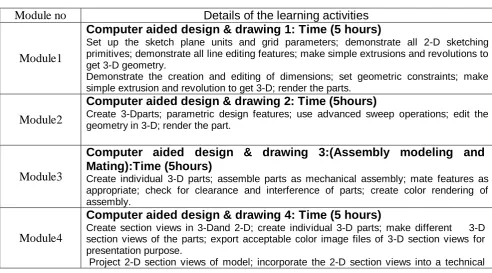
To satisfy learning outcomes as shown pictorially in figure 1, various learning activities were formulated in a modular pattern to manage teaching and learning process in CAD/CAM/CNC subject area. The required learning activities have been detailed under six modules as explained below. The time allocated for each learning module has also been shown in the table 1. Out of these six modules, four modules represent computer aided drawing skills which require 5 hours each and one module incorporates machine prototyping skills requiring 15 hours of managed teaching and learning process. The last module incorporates the final manufacture of the object, its analysis and quality evaluation requiring 25 hours of teaching and learning process.
Table 2:
Details of the learning activities
Details of the learning activities
Module no
Computer aided design & drawing 1: Time (5 hours)
Set up the sketch plane units and grid parameters; demonstrate all 2-D sketching primitives; demonstrate all line editing features; make simple extrusions and revolutions to get 3-D geometry.
Demonstrate the creation and editing of dimensions; set geometric constraints; make simple extrusion and revolution to get 3-D; render the parts.
1
Module
Computer aided design & drawing 2: Time (5hours)
Create 3-Dparts; parametric design features; use advanced sweep operations; edit the geometry in 3-D; render the part.
2
Module
Computer aided design & drawing 3:(Assembly modeling and
Mating):Time (5hours)
Create individual 3-D parts; assemble parts as mechanical assembly; mate features as appropriate; check for clearance and interference of parts; create color rendering of assembly.
3
Module
Computer aided design & drawing 4: Time (5 hours)
Create section views in 3-Dand 2-D; create individual 3-D parts; make different 3-D section views of the parts; export acceptable color image files of 3-D section views for presentation purpose.
Project 2-D section views of model; incorporate the 2-D section views into a technical
4
Module
Teaching methods No of students
Pre-ability indicators
Average Mark Standard Deviation
Traditional Teaching 15 67 5.84
Computer Assisted Teaching
[image:3.595.45.538.498.771.2]3
drawing.
Generate and dimensioning three-view drawing on a suitable drawing sheet style; add centerlines where appropriate; dimension the drawing; add a title block and appropriate notes.
Save each part as DXF file.
Rapid prototyping: Time (15 hours)
.
Create cutting parameter for each part (cutting tool, tool size, tool materials, and work materials).
Generate tool paths for different layers for each part (X, Y, Z direction, cutting loop, depth of cut, feed and speed).
Save each part as numerical control (NC) file and send the file to the prototyping machine. Set the work piece; set the tool at zero position; check the direction of rotation for the chuck and the cutter; check that the work piece and the cutting tool are securely clamped; verify the NC program for any shaft and any gear, and simulate the motion of assembly file of the shaft and gear ); run the machine and then the program.
5
Module
Manufacturing and analysis: Time (25 hours)
.
Generate final checklist for prototype (dimensions, assembly, motion, tolerance and fit). Submit final report of the project.
6
Module
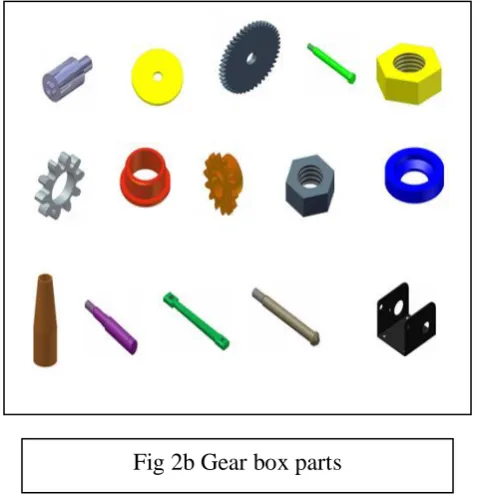
All the above modules were incorporated in teaching and learning process used to design and manufacture a gear box assembly as shown below (figure 2a). This gear box assembly consists of parts shown in figure2b and students have been taken through the learning process as per the modules described in table2.
[image:4.595.39.527.448.705.2]1 2
[image:4.595.286.525.451.699.2]School of Computing and Engineering Researchers’ Conference, University of Huddersfield, Dec 2006
4
3- Teaching and learning process
3-1 Group 1: Traditional classroom teaching
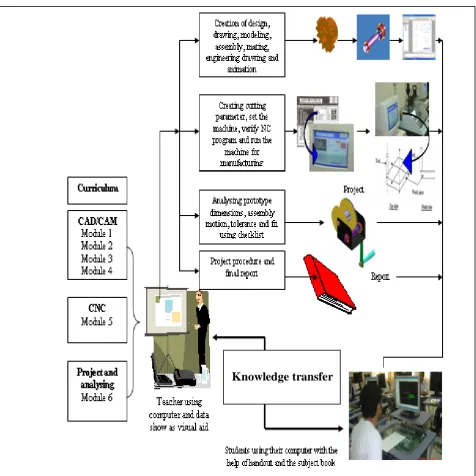
Various features of traditional classroom teaching are shown in the figure 3 and explained below. a) The instructor delivers the lecture using the computer interface of spectra light linked with
a projector.
b) The students are given manual, hand book and access to computers to work on and encouraged to consult the teacher while learning various skills. Computer simulation software is not provided in this mode of teaching and learning process.
[image:5.595.64.541.216.693.2]c) The above steps (a) and (b) are used in all six modules defined in learning activities section.
5
3.2 Group2 Computer assisted instructions
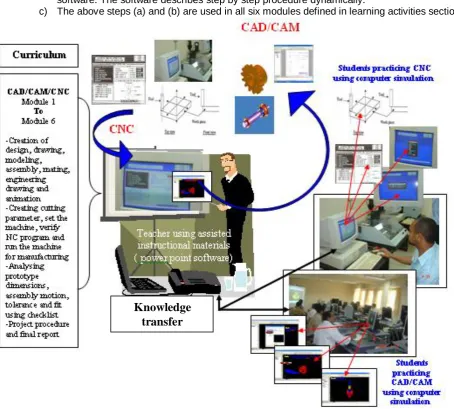
Various features of computer assisted instructions are shown in figure 4 and explained below.
a) The instructor delivers the lecture with the use of computer interface of spectra light linked with projector.
b) The students are given manual, hand book and access to computers with simulation software. The software describes step by step procedure dynamically.
[image:6.595.69.524.170.579.2]c) The above steps (a) and (b) are used in all six modules defined in learning activities section.
Figure 4– Computer assisted instructions
School of Computing and Engineering Researchers’ Conference, University of Huddersfield, Dec 2006
6
4. Evaluation
The two teaching and learning processes described above were analysed for their effectiveness and following five learning outcomes were evaluated.
a) Creation of drawing and design using Computer aided design software b) Using data exchange format (DXF) to create numerical control file c) Final setup check of computerised numerical control machine d) Final manufacturing of the product using CNC.
e) Quality evaluation.
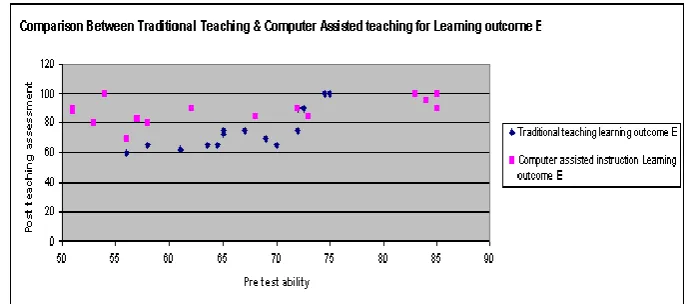
To evaluate effectiveness of different teaching methods, marks obtained by students in an outcome have been plotted against marks obtained by students in the previous class (pre-learning indicator). Figure 5 shows that for the group 1(tradition teaching cohort), students with the higher pre-ability scored more marks as compared to students with low pre-ability. The group 2 students (exposed to computer simulations) scored higher marks as compared to the group exposed to traditional teaching with smaller dispersion in marks obtained.
This indicates that for a group of students having widely varying abilities, computer assisted instructions help in satisfactory achievement of learning outcomes.
Figure 5: Variation of marks obtained against learning outcome (a) with pre-learning ability indicator
Similar effects are seen in figure 6 which shows similar correlation for learning outcome (b). It however shows a bigger difference in the marks obtained by students with low pre-ability indicators as compared to students with relatively higher pre-ability indicators for the group exposed to traditional teaching methodology.
7
Similar effects can be noticed in figure 7 as well. The data trends seen in figs.5 and 6vare seen here as well but the limitations of traditional teaching methodology in helping low-ability students are further exposed here. Since learning outcome (c) follows learning outcomes (a) and (b), the students who were lagging behind earlier are seen to be pushed further back. The group 2 students are seen to have almost similar levels of achievement and both low as well as high ability students are seen to be achieving almost at the same level.
[image:8.595.101.439.155.320.2]Figure 7: Variation of marks obtained against learning outcome (c) with pre-learning ability indicator
[image:8.595.89.438.367.522.2]Figure 8: Variation of marks obtained against learning outcome d with pre-learning ability indicator
[image:8.595.93.437.562.714.2]
School of Computing and Engineering Researchers’ Conference, University of Huddersfield, Dec 2006
8
Figures 8 and 9 show similar trends for learning outcomes (d) and (e). Hence it can be concluded that computer assisted instructions are far more helpful in achieving all the above mentioned learning outcomes as compared to the traditional teaching methodology. To quantify this effect further figure 10 has been prepared which shows the variation of average marks obtained against all the learning outcomes with pre-learning abilities of students and it can be clearly seen that computer assisted instructions help all students in achieving all the learning outcomes with a good success rate whereas traditional teaching helps more able students better than the less able students. This clearly indicates that traditional teaching methods increase the difference in achievement levels of low and high ability students whereas computer assisted instructions reduce this gap.
Comparison Between Traditional Teaching & Computer
Assisted Teaching achievement
50 60 70 80 90 100
50 60 70 80 90
Pre test ability
P o s t te a c h in g a s s e s s m e n t Traditional Tecahing
Computer assisted instructions
Figure 10: Variation of average marks obtained with pre-learning ability indicator
5- Conclusion
This study has clearly demonstrated the effectiveness of computer assisted instructions in a heterogenous group learning activity. It has been seen that the group exposed to computer assisted instructions performed much better than the group exposed to traditional teaching. Further computer assisted instruction helped students with widely varying pre-learning abilities to satisfy various learning outcomes in CAD/CAM/CNC subject area.
References
1- MARCY J.WANG, M.A , PAUL B.CONTINO,M.A , EDWIN S. RAMIREZ,B.S GUSTAVE L, AND JANET W.LEVY.1997. Implementing cognitive learning strategies in computer-based
educational technology. Levy library and The Department of Medicine Mount Sinai School of Medicine New York, New York
2- Caroline Baillie & Ivan Moore. 2004. Effective learning & teaching in engineering. USA, Canada.
3- J.BOURNE, A BRODERSEN, M.DAW. 2000. The influence of technology on Engineering Education. NewYork, London, Tokyo.
4- JAMES E.GALL. 2001-2002. Rethinking the computer in education. J, Educational Technology systems, 30(4), 379-388.
5- SURESH K. BHAVNANI AND BONNIE E. JOHN - CARNEGIE MELLON UNIVERSITY, 2000.The strategic use of complex computer systems. Human-Computer interaction,15,107-137.
6- TON DE JONY AND LUIGI SARTI. 1994. Design and Production of Multimedia and Simulation-Based Learning Material. Netherlands
7- Heather FRY. STEVE KETTERDGE, STEPHANIE MARSHALL . 2003. A hand Book for teaching &learning in higher Education- Enhancing academic practice