GE-International Journal of Engineering Research
Vol. 4, Issue 5, May 2016 IF- 4.721 ISSN: (2321-1717)
© Associated Asia Research Foundation (AARF) Publication
Website: www.aarf.asiaEmail : [email protected] , [email protected]
IMAGE COMPRESSION USING WAVELETS
1
Prof.C.Arunabala 2Suneetha 1
Electronics and communications engineering, Ravindra College of Engineering For Women,Kurnool-3-AP-INDIA.
2
Electronics and communications engineering, Kallam Haranadhreddy Institute of Technology, Guntur-AP-INDIA.
ABSTRACT
Signal analysts already have at their disposal an impressive arsenal of tools. Perhaps
the most well-known of these is Fourier analysis, which breaks down a signal into constituent
sinusoids of different frequencies. Another way to think of Fourier analysis is as a
mathematical technique for transforming our view of the signal from time-based to
frequency-based. For many signals, Fourier analysis is extremely useful because the signal’s
frequency content is of great importance. Fourier analysis has a serious drawback. In
transforming to the frequency domain, time information is lost. When looking at a Fourier
transform of a signal, it is impossible to tell when a particular event took place. If the signal
properties do not change much over time — that is, if it is what is called a stationary signal—
this drawback isn’t very important. However, most interesting signals contain numerous non
stationary or transitory characteristics: drift, trends, abrupt changes, and beginnings and
ends of events. These characteristics are often the most important part of the signal, and
Fourier analysis is not suited to detecting them. In an effort to correct this deficiency, Dennis
Gabor (1946) adapted the Fourier transform to analyze only a small section of the signal at a
time—a technique called windowing the signal. Gabor’s adaptation, called the Short-Time
Fourier Transform (STFT), maps a signal into a two-dimensional function of time and
frequency.The STFT represents a sort of compromise between the time- and frequency-based
signal event occurs. However, you can only obtain this information with limited precision,
and that precision is determined by the size of the window. While the STFT compromise
between time and frequency information can be useful, the drawback is that once you choose
a particular size for the time window, that window is the same for all frequencies. Many
signals require a more flexible approach—one where we can vary the window size to
determine more accurately either time or frequency.
Keywords
COMPRESSION AND DECOMPRESSION TECHNIQUES ,WAVELETS, DIGITIZATION ,QUANTIZATION ,ENTROPY CODING
Introduction
COMPRESSION AND DECOMPRESSION TECHNIQUES:
One of the imports aspects of image storage is its efficient Compression. To make this fact
clear let's see an example. An image, 1024 pixel x 1024 pixel x 24 bit without compression would require 3 MB of storage and 7 minutes for transmission, utilizing a high speed 64
Kbits/s ISDN line. If the image is compressed at a 10:1 compression ratio, the storage
requirement is reduced to 300 KB and the transmission time drops to under 6 seconds. Seven
1 MB images can be compressed and transferred to a floppy disk in less time than it takes to
send one of the original files, uncompressed, over an AppleTalk network. In a distributed
environment large image files remain a major bottleneck within systems. Compression is an
important component of the solutions available for creating file sizes of manageable and
transmittable dimensions. Increasing the bandwidth is another method, but the cost
sometimes makes this a less attractive solution.. Platform portability and performance are
important in the selection of the compression/decompression technique to be employed.
Compression solutions today are more portable due to the change from proprietary high end
solutions to accepted and implemented international standards. JPEG is evolving as the
industry standard technique for the compression of continuous tone images.
Image Compression Using Wavelets:
Images require much storage space, large transmission bandwidth and long transmission time. The only way currently to improve on these resource requirements is to compress
images, such that they can be transmitted quicker and then decompressed by the receiver. In
image processing there are 256 intensity levels (scales) of grey. 0 is black and 255 is white.
11111111. An image can therefore be thought of as grid of pixels, where each pixel can be
represented by the 8-bit binary value for grey-scale. The resolution of an image is the pixels
per square inch. (So 500dpi means that a pixel is 1/500th of an inch). To digitize a one-inch
square image at 500 dpi requires 8 x 500 x500 = 2 million storage bits. Using this
representation it is clear that image data compression is a great advantage if many images are
to be stored, transmitted or processed. "Image compression algorithms aim to remove
redundancy in data in a way which makes image reconstruction possible." By removing the
redundant data, the image can be represented in a smaller number of bits, and hence can be
compressed.
With the growth of technology and the entrance into the Digital Age, the world has found
itself amid a vast amount of information. Dealing with such enormous amount of information
can often present difficulties. Digital information must be stored and retrieved in an efficient
manner, in order for it to be put to practical use. Wavelet compression is one way to deal with
this problem. For example, the FBI uses wavelet compression to help store and retrieve its
fingerprint files. The FBI possesses over 25 million cards, each containing 10 fingerprint
impressions. To store all of the cards would require over 250 terabytes of space. Without
some sort of compression, sorting, storing, and searching for data would be nearly
impossible. Using wavelets, the FBI obtains a compression ratio of about 1:20.
COMPRESSION STEPS
The steps needed to compress an image are as follows:
1. Digitize the source image into a signal s, which is a string of numbers.
2. Decompose the signal into a sequence of wavelet coefficients w.
3. Use thresholding to modify the wavelet coefficients from w to another sequence w'.
4. Use quantization to convert w' to a sequence q.
DIGITIZATION
The first step in the wavelet compression process is to digitize the image. The digitized image
can be characterized by its intensity levels, or scales of gray which range from 0 (black) to
255 (white), and its resolution, or how many pixels per square inch. Each of the bits involved
in creating an image takes up both time and money, so a tradeoff must be made.
WAVELET DECOMPOSITION:
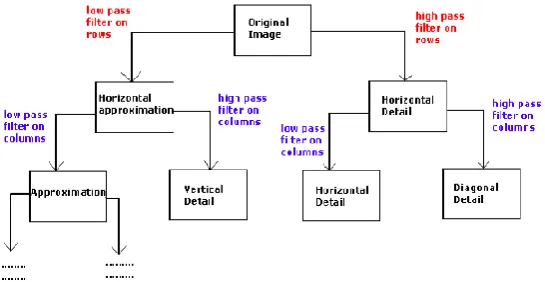
Images are treated as two dimensional signals, they change horizontally and vertically, thus
2D wavelet analysis must be used for images. 2D wavelet analysis uses the same ’mother wavelets’ but requires an extra step at every level of decomposition. The 1D analysis filtered
out the high frequency information from the low frequency information at every level of
decomposition; so only two sub signals were produced at each level. In 2D, the images are
considered to be matrices with N rows and M columns. At every level of decomposition the
horizontal data is filtered, then the approximation and details produced from this are filtered
on columns. At every level, four sub-images are obtained; the approximation, the vertical
detail, the horizontal detail and the diagonal detail. Below the Saturn image has been
decomposed to one level. The wavelet analysis has found how the image changes vertically,
[image:4.595.89.362.434.575.2]horizontally and diagonally.
Fig 2:2-D Decomposition of Saturn Image to level 1
To get the next level of decomposition the approximation sub-image is decomposed, this idea
can be seen in figure 3. When compressing with orthogonal wavelets the energy retained is:
The number of zeros in percentage is defined by:
Fig 3: Saturn Image decomposed to Level 3. Only the 9 detail images and the final
[image:5.595.75.255.490.658.2]THRESHOLDING
In certain signals, many of the wavelet coefficients are close or equal to zero.
Through a method called thresholding, these coefficients may be modified so that the
sequence of wavelet coefficients contains long strings of zeros. Through a type of
compression known as entropy coding, these long strings may be stored and sent
electronically in much less space.
QUANTIZATION
The fourth step of the process, known as quantization, converts a sequence of
floating numbers w' to a sequence of integers q. The simplest form is to round to the nearest
integer. Another option is to multiply each number in w' by a constant k, and then round to
the nearest integer. Quantization is called lossy because it introduces error into the process,
since the conversion of w' to q is not a one-to-one function.
ENTROPY CODING
Wavelets and thresholding help process the signal, but up until this point, no
compression has yet occurred. One method to compress the data is Huffman entropy coding.
With this method, and integer sequence, q, is changed into a shorter sequence, e, with the
numbers in e being 8 bit integers. The conversion is made by an entropy coding table.
Strings of zeros are coded by the numbers 1 through 100, 105, and 106, while the non-zero
integers in q are coded by 101 through 104 and 107 through 254. In Huffman entropy coding,
the idea is to use two or three numbers for coding, with the first being a signal that a large
number or long zero sequence is coming. Entropy coding is designed so that the numbers that
are expected to appear the most often in q, need the least amount of space in e.
Conclusion
Results:
The results of the compression achieved were as follows.
Image:
Original Image Size: 66kb (Bitmap)
Compressed Image Size (using WinZip): 54kb
Sound:
Original File Size : 215kb (wave)
Compressed File Size(using WinZip): 196kb
Compressed File Size (using Wavelets and then WinZip): 26kb
Original Gray Level Image:
Compressed Image (Using Bi-Orthogonal 3.7 Decomposition Level 2):
Matlab Code:
%to compress an image
function Compress(FileName) % calling a function
[ImgData,Map] = imread(FileName); % read the image and store the values in an array
[Coef,Pos] = wavedec2(ImgData,2,'Bior3.7'); % apply wavelet decomposition
%[thr,s_or_h,keep_app] = ddencmp('cmp','wv',ImgData);
[thr,s_or_h,keep_app] = compthreshold(c,s,percentageCompression,keepapp); apply
[xcomp,CXC,LXC,PERF0,PERFL2] =
wdencmp('gbl',Coef,Pos,'Bior3.7',2,thr,s_or_h,keep_app);
MaxValue = max(CXC);
NormalizationFactor = MaxValue / 255; %calculate normalization factor
NormalizedCoef = Coef / NormalizationFactor; % calculate normalization coefficient
IntValues = fix(NormalizedCoef);
EightBitValues = uint8(IntValues); Convert into 8 bit data
save compressed.mat EightBitValues Pos NormalizationFactor Map;
% save the compressed image
%%%%% applying the thresholding values
function [threshold,sorh,keepap] = compthreshold(c,s,percentage,keepapp)
sorh = 'h'; % type of compression hard which uses averaging filtering
keepap = keepapp;
if keepapp == 1
x = abs (c(prod(s(1,:))+1:end)); calculate the threshold for a given image
x = sort(x);
dropindex = length(x) * percentage/100;
dropindex = round(dropindex);
threshold = x(dropindex); initialize the value as a threshold
else %drop coefficients even from the approximation
x = abs(c);
x = sort(x);
dropindex = length(x) * percentage/100;
dropindex = round(dropindex);
threshold = x(dropindex);
if (threshold == 0) % if the value of threshold is 0 then execute the following statement
threshold = 0.05*max(abs(x));
end
%now apply the above two functions for the image compression
function y = ImageCompression (levelOfdecomposition,percentageCompression,keepapp)
%[X,map] = imread ('badcloning','jpg'); % read the image and store the data into an array
load wbarb; %here loading a wbarb image from image processing toolbox of matlab
IMWRITE(X,map,'OriginalImage.bmp');
figure;
colormap(map); %apply the mapping
image(X);
save Original.mat X; %save the read image
title('ORIGINAL IMAGE');
[c,s] = wavedec2(X,levelOfdecomposition,'bior3.7');%apply wavlet decomposition
[threshold,sorh,keepapp] = compthreshold(c,s,percentageCompression,keepapp);
[Xcomp,cxc,lxc,perf0,perfl2] = wdencmp
('gbl',c,s,'bior3.7',levelOfdecomposition,threshold,sorh,keepapp);
save Compressed.mat cxc;
IMWRITE(Xcomp,map,'compressedImage.bmp');
figure;
%colormap(map);
colormap(map);
image(Xcomp);
title('COMPRESSED IMAGE');
%%%%
%% apply two dimensional wavlet transforms
function TwoDimDWT
ImgData = imread('cons.bmp');
[a1,h1,v1,d1] = dwt2(ImgData,'Bior3.7'); %educe it into decomposition levels
figure;
image(ImgData);
title('Original Image');
colormap(map);
pause;
subplot(221);
image(a1);
title('Approximations');
subplot(222);
image(h1);
title('Horizontal Details');
subplot(223);
image(v1);
title('Vertical Details');
subplot(224);
image(d1);
title('Diagonal Details');
ReConsImg = idwt2(a1,h1,v1,d1,'Bior3.7'); %reconstruct the image by apllying inverse
transforms
pause;
subplot(111);
image(ReConsImg);
colormap(map);
title('Re-Constructed Image');
%%%%%
%% now uncompress the image
function Uncompress
load compressed.mat;% load the previously saved compressed image and apply inverse
transforms
ActualCoef = double(EightBitValues); %convert back into original bits back from 8-bit data
ActualCoef = ActualCoef .* NormalizationFactor; %calculate actual coefficients
imwrite(ImgData,Map,'aRecon.bmp'); %write the uncompressed image
APPLICATIONS:
Applications of image processing:
1.Photography and printing
2.Satellite image processing
3. Medical image processing
4. Face detection, feature detection, face identification
5. Microscope image processing
References
[1] Digital Image Processing using MATLAB--Rafael C. Gonzalez, Richard E. Woods
Steven C. Eddies
[2] Guttmann, Peter (1995)-- Introduction to Data Compression.
[3] Lane, Tom (1995)--Introduction to JPEG. Compression.
[4] http://www.cis.ohio-state.edu/hypertext/faq/usenet/compression-faq/part2/faq.html
[5] Sprigg, Graham (ed.) (1995)-- The Unsolved Problem of Image Compression.
[6] Wavelet Toolbox, Signal Processing toolbox, Symbolic toolbox.
[7] Burt, P.; Adelson, E. (1 April 1983). "The Laplacian Pyramid as a Compact Image
Code".IEEE Transactions on Communications31(4): 532–
540. doi:10.1109/TCOM.1983.1095851.
[8]Jump up^ Shao, Dan; Kropatsch, Walter G. (February 3–5, 2010). "Irregular Laplacian
Graph Pyramid" (PDF).Computer Vision Winter Workshop 2010(Nove Hrady, Czech