Implementing VB.NET Interface for some
Physics Models
*D.A. Adenugba, **M.T Babalola, ***I.A Fuwape
*, **, ***Department of Physics The Federal University of Technology, Akure
P.M.B 704, Akure, Ondo State. Nigeria.
ABSTRACT
VB.NET interface is a powerful abstraction tool that prevents post-implementation changes to design from breaking down application codes. Microcomputers are indispensable tools in research, teaching and learning of Physics; their use in Nigeria is receiving serious attention. This paper discusses the usefulness and pitfalls of microcomputers to Physics education. Eight interfaces with varying members were defined in a class library. Through another class library some of the interfaces were carefully implemented for projectiles and eleven magnetism models. Two client applications, JectileSoft and MagneticSoft were developed and integrated to form PHYJectMagSoft package. The workings to all the projectile and magnetism problems are generated at every stage of evaluation. All the functions, methods and properties work to specifications. Our attractive applications could be utilized unassisted with little knowledge of the computer, since common windows features, as well as access and shortcut keys are included. Software developers will find our interfaces useful in their work. Besides, lecturers and learners will find the accurate, reliable and flexible packages beneficial in teaching-learning environment.
General Terms
Software, Physics.
Keywords
Interface, Magnetism, Microcomputers, Projectile
1.
INTRODUCTION
Everyone who studies Physics has to study projectiles and magnetism. The concept of projectiles is fundamental to sport, military and space science. During this competitive era of satellites, the pupils in the Senior Secondary School have to be introduced to this very significant topic early. Before the new curriculum in Nigeria, students have to wait till the first or second year in the university before they understand that projected particles describe parabolic curve known as trajectory. Now, both secondary and tertiary institutions study projectiles; pleasant development! The concept of projectiles, through simple, should be taught with care and to time (not a week to the exam), so as not to confuse the pupils. Those who grasp the concept of projectiles are likely going to appreciate Space Science and Satellites, and probe further into them. The development of computer software applications is man’s greatest need to advance his mundane course in life. Development of computer software packages is still very low in developing nations. Owate (1999) stressed the need for writing software on Physics–related problems. Software is the hub for national development and growth. The increasing
demand for computer software applications is clearly seen in the complexity of tasks swiftly done in our society nowadays. Computer software package is like a palatable stew which richness, sweetness and usefulness is exposed only through eating (application). The greatest mistake of national capacity building is to think that we can build anything meaningful, concrete and enduring by neglecting to soundly develop computer software base. A nation without a meaningful software development program is toying with backwardness in this competitive 21st century where almost everything is automated. Thus much of developing nations’ backwardness stems from misplacement of priorities and failure to finance sufficiently the development of computer software applications to drive what ought to be driven. Thus, priceless time spent sweating under a good functioning air-conditioner could be utilized elsewhere doing something worthwhile. The greatest tragedy that could occur to a business outfit in this 21st century is to fail to ride on the crest of the wave of IT
gliding across the nations of the globe. Nationhood reaches its highest economic growth, scientific and technological advancement and richness in the ability to automate activities through computer software applications. The glory and honour of any nation are not only tied to its teeming loyal population, but keenly knotted to its capability to drive her chores through software packages.
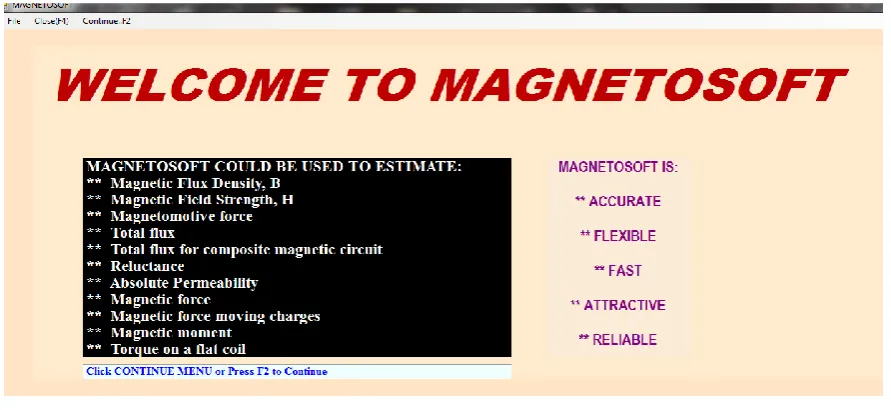
Further motivations for this work are to encourage Physics tutors all over the world to swiftly teach projectiles and magnetism in an exciting, flexible and simple way using a computer software package, JectileSoft and MagneticSoft. Also, to motivate the students to learn projectiles and magnetism that is central to modern gadgets, on their own and at their comfort and convenience; which our applications are geared toward providing, as solutions are generated for every problem.
shall implement dvInterfaceCls for the well-established projectiles models and eleven magnetic models through another class library. The workings will be fully and dynamically generated for all the models considered. Two flexible client applications, JectileSoft and MagneticSoft will be developed and tested comprehensively to ascertain its accuracy, flexibility and reliability.
2.
COMPUTER IN PHYSICS
By pressing a button a great deal of complex Physics problems could be solved with the computer quickly, efficiently and accurately. The indefatigable nature of computer permits any learner to repeatedly use a program, without the program complaining, and thus learn at his/her own pace and comfort. From Mechanics to particles Physics, computer finds uses as a reliable device for research and teaching. Professional Physicists make extensive use of computer in numerous analyses of complex dynamic systems. Through the use of computer in Physics, better insight could be gained into internal interactions of any system.
Thompson (1982) observed that computer in real-time experiment is an accurate timer. Owate (1999) correctly noted that solidification process is time-dependent, and an on-line computer approach would produce relatively good result. Computer could be utilized to control experiments, collect, store and analyze data. In atmospheric Physics, for instance, such parameters as rain drop sizes, temperature, pressure and relative humidity could easily and accurately be collected and stored by interfacing computer with the environment. Human error in data acquisition is thus drastically reduced or eliminated.
Some experiments, such as nuclear reactor, may require highly sophisticated, expensive and harmful materials and equipment. Performing such experiments may not be encouraged in the sense that it may cause bodily injury and even leads to the demise of the experimentalist. Also, it may be uneconomical from the standpoint of its uncertainty vis-à-vis the colossal sum of money involved. The experiment could be simulated with computer to confirm its benefits and demerits before plunging into its actual execution. This way, cost is saved and possible harm to life removed.
Stimulated interest and better understanding come through computer simulation [16]. Computer simulation has been found to be an efficient tool for the study of particle packing. It has also been widely utilized to study the effect of the particle size distribution on particle packing [11]. Rodriguez et al. (1986), as quoted by [11], proposed a computer method to simulate the random packing of spheres under gravity, which provides a mean for simulating a wider size distribution of spheres. Kuo-Jen Hwang et al. (1997) designed a computer program to simulate two-dimensional packing structures of spheroidal particles in cake filtrations. All these points indicate the usefulness and more use of computer to perform experiments which could have cost colossal sum of money.
3.
DRAWBACKS
However, computer has its limitations in the teaching and learning of Physics. When not properly and carefully applied it can lead to misconception of what Physics is all about. This is particularly so when the Physics is sacrificed at the expense of beauty and logic of a program [16]. Before one knows it, Physics will be regarded as an elegance magical device that has to be avoided at all cost. Teaching and learning may not be enhanced after-all when bad program is used to teach good Physics. Students will be more confused and discouraged to
take to Physics. Considerable skills and thoughts are needed to simulate experiments and perform complex analysis with computer. Computer, as an electronic machine, is not flexible, sensitive as human beings and does not know how to reject instructions unless told to do so via a program [16]. Its sensitivity and flexibility is limited to the extent to which the programmer allows it.
Consequently, certain unique attention required by weak learners may not be supplied by the computer. Over-dependent on computer is dangerous as it could produce picture of abstraction and prevent students from actually acquiring basic skills needed for conducting real experiment [16]. To concretize learning, students need to perform experiment with real apparatus. Physics electronics is one such area where this ought to be encouraged. Electricity is another area which should be given more practical attention.
4.
PROJECTILES AND MAGNETISM
MODELS
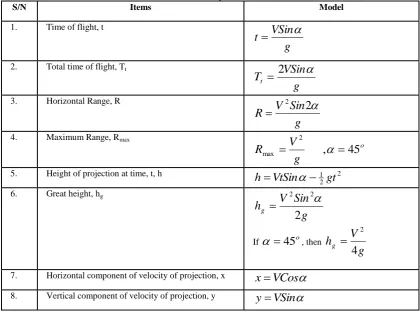
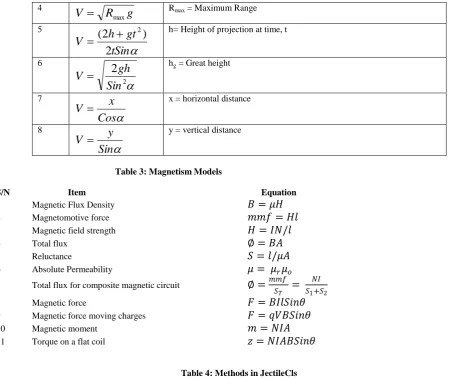
The Microsoft VB.NET computer high level programming language was employed to code models in Tables 1-3. What Table 2, derived from Table 1 for velocity, informs us is that for any givens from Table 1, velocity could be evaluated. Where V is the velocity of the projected particle,
is the angle of projection, t is the time of flight and Tt is the totaltime of flight and the acceleration due to gravity, g retains its usual numeric value of 9.8m/s2. For detailed discussions on projectiles, please see [4-6, 8, 10]; and for fuller discussion on magnetism check [4-8]. Where in Table 3 µr and µo are the
relative and space permeability respectively with µo = 4П x
10-7 H/m; l is the length of the coil(m), A is the cross-sectional area (m2); I is the current (A), S1 = l1 / µ1a1 , S2 = l2 / µ2a2 , ST
= l1 /µ1a1 + l2 /µ2a2, θ is the angle which the plane makes with
the uniform magnetic field(B), q is moving charge(C), V is the velocity(m/s).
5.
CREATING AND IMPLEMENTING
INTERFACE
Thompson (1982) quoted Leibniz as saying, “It is unworthy of excellent man to lose hours like slaves in the labour of calculation.” The truth of this statement becomes apparent when a large number of items, though simple like our equations here, are to be computed in a relatively short time. The IdvInterfaceCls class library for this work has eight interfaces with varying members; and the letter I in the interface name quickly reminds us it is an interface; though conventional, it is not mandatory. The first four interfaces (IdvInterWizardAdd,
IdvInterWizardDiv,IdvInterWizardMinus,
Implements keyword is employed to implement interface in a class library. This keyword is followed by the root namespace (IdvInterfaceRoot), then a period (.), and then the class name (IdvInterfaceCls), again a period and then the particular interface name (IdvInterWizard) to implement. This is a single line of code immediately after the second class library name we developed to implement our interface, IdvInterWizard:
Implements IdvInterfaceRoot.IdvInterfaceCls.IdvInterWizard All members in the interface must be implemented; that is mandatory by Microsoft design. Since a particular member of an interface can be summoned for implementation for a particular task, interface thus supports code modularization that enables developer to focus on a particular task that can easily be implemented and modified at a later time without fear of disrupting previous codes. It is sufficient to say that we implemented all the members in our declared interface for all the models treated and accurate results were obtained. A typical example of such implementation is this for reluctance.
Public Function dvCalReluctance(ByRef DGVIn DataGridView) As Object Implements _
IdvInterfaceRoot.IdvInterfaceCls.IdvInterWizard.dvInterWizU p
Note that dvInterWizUp is the function name declared in IdvInterfaceCls class library; dvCalReluctance is the name of the method in the second class where the interface was implemented. Let it be mentioned that DGVIn is a Microsoft DataGridView control for holding input(s) and output(s). Up to one hundred thousand items could be computed for each of the items in Tables 1-3, by calling the appropriate method. The methods for projectile are shown in Table 4. There are two ways to key-in inputs: interactively and through a file. The inputs are two: velocity, V and angle of projection,
for all the models, and addition of time to height of projection at time, t (see Table 1, S/N 5). The file format is expected to follow this order; velocity in column 1 and angle of projection in column 2. If this order is not followed, incorrect result will be produced as wrong inputs will be used.Table 1: List of Projectiles Models
S/N Items Model
1. Time of flight, t
g
VSin
t
2. Total time of flight, Tt
g
VSin
T
t
2
3. Horizontal Range, R
g
Sin
V
R
2
2
4. Maximum Range, Rmax
o
g
V
R
,
45
2
max
5. Height of projection at time, t, h 2
2 1
gt
VtSin
h
6. Great height, hg
g
Sin
V
h
g2
2
2
If
45
o, theng
V
h
g4
2
7. Horizontal component of velocity of projection, x
x
VCos
8. Vertical component of velocity of projection, y
y
VSin
[image:3.595.87.508.294.621.2]
Table 2: Velocity Models Derived From Table 1
S/N Velocity, V Remarks
1
Sin
tg
V
t = time (s) to reach the maximum height; not the time of flight, which is the total time of flight, T (see 2).
2
Sin
Tg
V
2
T = Total time of Flight (s)3
2
Sin
Rg
V
4
g
R
V
maxRmax = Maximum Range
5
tSin
gt
h
V
2
)
2
(
2
h= Height of projection at time, t6
2
2
Sin
gh
V
hg = Great height
7
Cos
x
V
x = horizontal distance
8
Sin
y
V
y = vertical distance
Table 3: Magnetism Models
S/N Item Equation
1 Magnetic Flux Density
𝐵 = 𝜇𝐻
2 Magnetomotive force
𝑚𝑚𝑓 = 𝐻𝑙
3 Magnetic field strength
𝐻 = 𝐼𝑁/𝑙
4 Total flux
∅ = 𝐵𝐴
5 Reluctance
𝑆 = 𝑙/𝜇𝐴
6 Absolute Permeability
𝜇 = 𝜇
𝑟𝜇
𝑜7 Total flux for composite magnetic circuit
∅ =
𝑚𝑚𝑓𝑆𝑇
=
𝑁𝐼 𝑆1+𝑆2
8 Magnetic force
𝐹 = 𝐵𝐼𝑙𝑆𝑖𝑛𝜃
9 Magnetic force moving charges
𝐹 = 𝑞𝑉𝐵𝑆𝑖𝑛𝜃
10 Magnetic moment
𝑚 = 𝑁𝐼𝐴
[image:4.595.58.510.70.449.2]11 Torque on a flat coil
𝑧 = 𝑁𝐼𝐴𝐵𝑆𝑖𝑛𝜃
Table 4: Methods in JectileCls
S/N Method Name Task(s)
1 dvTimeFlight It calculates time of flight. 2 dvTotalTimeFlight It computes total time of flight. 3 dvHorizRange It calculates horizontal projection.
4 dvProjection It evaluates the height of projection at time t.
5 dvHorizComponent It computes horizontal component of velocity of projection. 6 dvVertComponent It computes vertical component of velocity of projection. 7 dvMaxRange It estimates maximum range.
8 dvGreatHt It calculates the highest height.
Similar methods to that in Table 4 exist for velocity models in Table 2, as well as for all the magnetism models of Table 3. By modularizing the class libraries future upgrade and maintenance will be swiftly and easily carried out. All the methods are overloaded for single and multiple results. The single method for magnetic field strength (Table 3, S/N 3), for instance, has three inputs and the reference object argument returns the result. However, a reference DGV control for the multiple results holds both input(s) and output(s).What the methods do is to determine the number of columns and rows in DGV control. If the column number is less than the expected for input(s), an exception is thrown and operation terminated with informed message; else, column(s) is inserted in the control for outputting results. The next thing is to insert title in row 1 of the control, noting that it is zero-based. Enter a loop to read the input(s) to use from row two since row1 is title row. Validate the inputs, if found worthy, the appropriate single result method is summoned to calculate the result(s) which is then stored in the DGV control.
6.
NAVIGATION
[image:4.595.90.507.73.228.2]7.
RESULTS
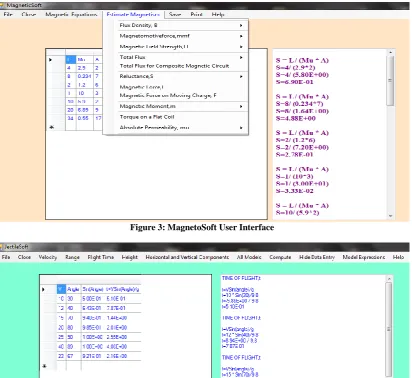
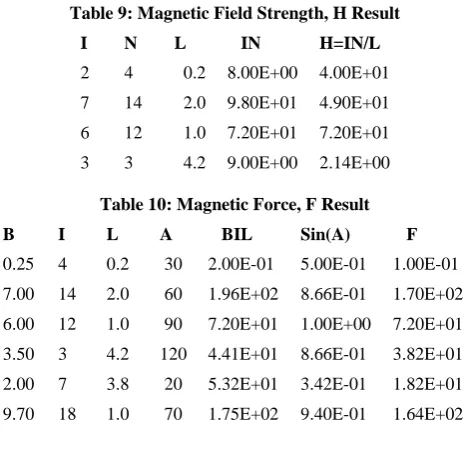
When the first submenu is clicked under Flight Time main menu, Table 1 accurate result for flight time is obtained. The third, fourth and fifth submenus respectively produced Tables 6-8 correct outputs. For magnetism, by clicking the third and seventh submenus (see figure 3), we got the accurate result in Tables 9-10. Similar results were computed for all the other models through the submenus in our packages.
[image:5.595.76.522.173.378.2]The window for gleaning two numeric inputs is shown in figure 2; similar ones for three and more inputs are available for use. To display keyed-in data in a DGV control to the right of figure 2, which enables you to see the keyed-in input directly, you need to click Show Data Entry menu. Upon doing this, the Hide Data Entry menu will be shown as you can see in figure 2.
Figure 1: Windows for MagnetoSoft Package
Figure 2: JectileSoft User Interface
Table 5: Time of Flight Result
V Angle Sin(Angle) t=VSin(Angle)/g
1 10 1.74E-01 1.77E-02 5 20 3.42E-01 1.75E-01 10 35 5.74E-01 5.85E-01 20 30 5.00E-01 1.02E+00 30 35 5.74E-01 1.76E+00
Table 6: Highest Height (km) Result
V A V*V AA VVAA hg
Figure 3: MagnetoSoft User Interface
Figure 4: Window showing DGV control where inputs and result(s) are stored and the workings
Table 7: Velocity Result Given Horizontal Range and Angle
V Angle R*g Sin(2*Angle) R=Sqrt(R*g/Sin(2*Angle))
[image:6.595.80.517.500.743.2]1 10 9.80E+00 3.42E-01 5.35E+00 5 20 4.90E+01 6.43E-01 8.73E+00 10 35 9.80E+01 9.40E-01 1.02E+01 20 30 1.96E+02 8.66E-01 1.50E+01 30 35 2.94E+02 9.40E-01 1.77E+01 40 40 3.92E+02 9.85E-01 2.00E+01
Table 8: All Models (in Table 1) Result
V Angle t T R Rmax hProj hg x y
Table 9: Magnetic Field Strength, H Result
I N L IN H=IN/L
2 4 0.2 8.00E+00 4.00E+01 7 14 2.0 9.80E+01 4.90E+01 6 12 1.0 7.20E+01 7.20E+01 3 3 4.2 9.00E+00 2.14E+00
Table 10: Magnetic Force, F Result
B I L A BIL Sin(A) F
0.25 4 0.2 30 2.00E-01 5.00E-01 1.00E-01 7.00 14 2.0 60 1.96E+02 8.66E-01 1.70E+02 6.00 12 1.0 90 7.20E+01 1.00E+00 7.20E+01 3.50 3 4.2 120 4.41E+01 8.66E-01 3.82E+01 2.00 7 3.8 20 5.32E+01 3.42E-01 1.82E+01 9.70 18 1.0 70 1.75E+02 9.40E-01 1.64E+02
8.
DISCUSSION
Good software should make tasks trivial, flexible to achieve at a relatively small time with absolute accuracy. Accurate results in Tables 5-10 bear eloquent testimony to the accurate of our codes. Figure 5 shows the plot of velocity against time for maximum range. Interface aids us to separate tasks definition from its implementations. Once implemented, not minding the length of time and labour it takes, it could be summoned in several places for use in a class or classes as class library supports multiple implementation of interface. This is in line with previous observations [1-3, 9, 12, 15,17].
8.1 Workings, Error Trappings and Keys
[image:7.595.55.267.524.684.2]The solution provided for every problem is extremely useful to learners and lecturers to copy, print and save the way they like. A typical solution could be seen to the left of figures 3 and 4 for magnetism and projectile respectively. Each time there is evaluation the working(s) is generated. The formula is written, followed by the substitution before the result is given. By design, this is expected to assist user to learn or teach with our package with ease.
Figure 5: Velocity-Time graph for maximum range
Also, the title of the DGV control in row 1 is informative, carrying part and full formula all the time as could be seen in figures 3 and 4, and the output in Tables 5,7 and 9. This is omitted for the rest tables, so as to make the tables compact. The insertion of part and full formula is a deliberate design to make our package useful for research and teaching and learning with absolute ease. Error(s) in the class libraries and client applications are trapped at every place where it is likely to occur. When error occurs in the libraries the nature and number of the error is reported to the user. Information is given at every stage where we think it is necessary.
Access and shortcut keys are provided in our packages. F4 will close a form or terminate the application. Through the keys, flexibility is injected into our package. A StatusStrip control is added to each of the applications to provide useful information throughout the packages runtime existence, thus users are not left in the dark as to what is/are going on. It is gratifying to note that all the functionalities of our classes work to specifications. The inclusion of common modern utilities such as save, copy and print make the use of our packages to require no special learning and knowledge of the computer before it could be utilized. Consequently, students in secondary schools, apart from tertiary institutions, could make use of our packages unaided and with ease. The adept design used at the class libraries’ side and interface declarations’ makes coding simple and straightforward to follow, and later maintainability will be easily performed. At the clients’ side, the codes are drastically reduced, which is the very purpose of developing class libraries. Generally, classes reduce coding in client applications and several programmers can make use of them in their work [3].
9.
CONCLUSION
Accurate class libraries have been developed using Microsoft VB.NET for projectile and magnetism. Their functionalities have been exposed in our client applications and found to work correctly. The results obtained corroborate existing facts on projectile and magnetism. The attractive applications JectileSoft and MagneticSoft are accurate as comparison with previous works revealed. They are easy to navigate and use for research, learning and teaching projectile and magnetism. The two applications were integrated to form PHYJectMagSoft. Access and shortcut keys provided assist common tasks to be quickly performed. There are several parameter options made available and data entry could be achieved interactively and through uploading of data from files. Through our flexible packages teaching and learning of Physics will be enhanced.
The magnetic models in this work are inadequate to handle this vast area of Physics, thus more models should be included. To stop labouring like a slave in the act of computations and in performing other daily chores, developing nations should concentrate efforts developing computer software applications, without minding the several months it takes to come up with an accurately working package. If the much talked about national growth and development is to be actualized in developing nations, more youths should be encouraged to study programming and develop packages for use in virtually all areas of human endeavours.
0 20 40 60 80 100
1 3 5 7 9 11 13 15
Velo
cit
y
(m
/s
)
Time(s)
10. REFERENCES
[1] Craig Utley 2001. A Programmer’s Guide to Visual Basic. NET. Sams Publishing.
[2] Dave Grundgeiger 2002. Programming Visual Basic.NET. O’ Reilly and Associate, Inc.
[3] Evangelos Petroutsos 2002. Mastering Visual Basic.NET. Sybex, Inc.
[4] Farinde, O.E and Ehimetalor, H.E. Essential Physics. 2003. Tonad Publishers Ltd. 29-34.
[5] Frederick J. Bueche and Eugene Hecht. 2006. College Physics. Schaum’s Outlines. McGraw-Hill. 10th ed. Pp.
15-27; 298-314.
[6] Halliday, D And Resnick, R: Fundamentals Of Physics. 1974. John Wiley & Sons Inc. Pp. 45-58.
[7] Hughes, E.1980. Electrical Technology.ELBS and Longman Group Ltd., 5th ed., Pp. 39-104.
[8] Jay Orear: Physics. 1979. Collier Macmillan Inc. Pp. 38-49.
[9] Jerry Lee Ford, Jr (2009), Microsoft Visual Basic 2008 Express Programming for the Absolute Beginner Course Technology Cengage Learning.
[10] Kolawole, L.B: Physics Revision Notes And Objective Questions. 2006. Okelisa Publishing. Pp. 37-47. [11] Kuo-Jen Hwang, Yeong-Shing Wu and Wei-Ming Lu.
1997. Effect Of The Size Distribution Of Spheroidal Particles Of The Surface Structure Of A Filter Cake. Power Technology. 91, 105-113.
[12] MSDN Documentation
[13] Owate Israel: Application Of Microcomputers In Enhancing The Teaching Of Physics.1999. NIP. Book of Abstracts. p. 43.
[14] Rodriguez, J, Allibert, C.H and Chaix, J.M . 1986. 47. 25.
[15] Thearon and Bryan. 2010. Beginning Microsoft Visual Basic 2010. Wiley Publishing Inc.
[16] Thompson, D.L, Microcomputers And School Physics. 1982. Pitman. 1-94.