Speech Enabled Intelligent Human Machine
Interaction with Mobile Robotics
P. G. V. Suresh Kumar
Associate Professor, Department of IT & SC, AAiT, Addis Ababa University, Addis Ababa, Ethiopia
ABSTRACT: This paper is based on an application for controlling robot using speech. Recent developments in speech recognition technology have made an impact in various areas and are deployed for a wide range of applications. The work described here is an example of speech recognition technology coupled with mobile robotics. It provides a glimpse of the ample possibilities of human-machine interaction in the field of robotics. A 4-channel radio controlled Wheelbot and Microsoft’s speech SDK is deployed in this work. The application has been incorporated with the ability to recognize predefined commands and the robot has been designed to move according to the commands given by the user.
KEYWORDS: Mobile Robotics, Speech Recognition, Man-Machine Interface, Wheelbot.
I. INTRODUCTION
Speech recognition is the process of converting speech signals to a sequence of words to identify the utterance [1], [2]. Speech can be captured by a system using an audio input device such as microphone or a telephone. A system may allow a user to input a limited number of words or sentences. Such system is commonly referred to as command and control application [1], [2], [3]. Speech recognition has three main components namely the SR engine, application program and an application program interface. All such systems can be viewed as having a three layered architecture.
Fig1: Architecture of a speech enabled application.
It polls the SAPI for information about grammar, performs recognition and generates event such as false recognition to provide information to the application.
II. THE WHEELBOT
A radio controlled Wheelbot with a pair of TX-2B/RX-2B CMOS LSI mounted on the controller and the Wheelbot respectively has been used in the experiment. The TX-2B/RX-2B has five control keys for controlling the motions i: e; forward, backward, left, a right and stop functions. The controller uses an infrared tower to transmit signals to the Wheelbot. These signals are received by the Wheelbot when it is in the range of controller. The range of the controller is observed to be 7 to 8 meters approximately. These signals are interpreted as instructions to activate one of the five functions [5].Fig2 shows six important pins of TX-2B chip. Pin 1, 4, 5 and 14 are responsible for movements in right, backward, forward, and left directions respectively. Whichever of these pins is fed logic 0 the corresponding function is activated (actually a coded signal is generated which when received by the Wheelbot the corresponding functions is generated).Pin 3 is grounded and pin 9 is connected to the voltage supply.
Fig 2: Pin configuration of TX-2B chip [5]
III.MOTIVATION
Table1: Port address of 3 different ports
Fig 3: Wheelbot
A. DATA PORT
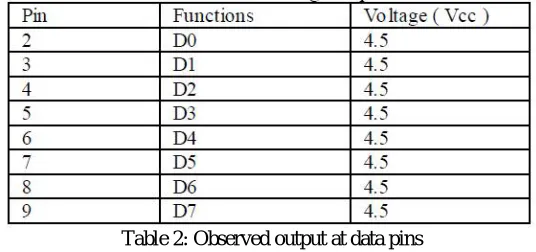
The data pins are TTL level output pins. These pins ideally put 0V when they are in low level logic and +5V when they are in high level logic. However the voltages can vary from ideal conditions when the circuit is loaded [7], [8]. As shown in the Table 2 below we observed the voltage output to be 4.5V.
Table 2: Observed output at data pins
B. INTERFACING CIRCUIT TO PARALLEL PORT
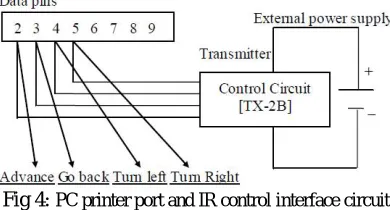
Fig 4: PC printer port and IR control interface circuit
IV.CONTROLLINGOVERVOICE
The controller of the Wheelbot is attached (using printer cable) to the printer port of the computer which runs an application capable of recognizing six commands (run, back, left, right and straight).A CFG grammar is written ,compiled and stored in a DLL file which is loaded by the application at run time to recognize these six commands. The grammar also restricts the system to recognize only these six commands. The application program is designed to make an output on the particular pin on the DATA port go high and low depending upon the command recognized[8].When the output on a particular data pin is low (logic 0)the corresponding pin on the controlling activates a particular function. Thus the Wheelbot can be controlled using speech.
V. PROPOSEDWORK
The application contains a single form. The form on being loaded displays an empty text box shown in fig 5 and in the background the form load event initializes some information containing speech recognition events on the form. Speech API returns certain events to the application such as a successful recognition. The application then addresses or ignores the events .Furthermore the application can selectively reject certain types of events if there is no need to work with them. The action corresponding to a recognition event is handled by appropriate SAP events handler defined by the application designer. Upon successful recognition of the command, the speech recognition event SRERecognition is returned and the name of the recognized command gets displayed in the text box, as shown in Fig 5.
Fig 5: User interface displaying the result of a successful recognition.
VI. CONCLUSION
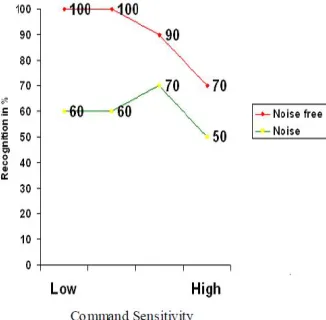
with some noise. We observed that when the noise is less and the confidence threshold is set to low then system‟s recognition is as high as 100%. In the same environment with systems confidence threshold set to high, performance degrades to 70%. when the system was tested in a noisy environment with low confidence threshold than system misinterpreted some external noise as a command and thus behaved unexpectedly. And with high confidence the system performance comes down to 50%. The observation shown in the graph fig 5 is indicative and may vary every time the system is tested. As the system was tested by four different users the result can be better if it is used by a dedicated user with good English accent. Result can also be improved by giving more training to the system. The confidence threshold can be set using the speech properties in the control panel of the computer.
Fig 6: Graph Showing Percent of Recognition vs Command Sensitivity
VII. FUTURE SCOPE
The system can be extended in a way that the user of the machine is able to control and monitor the device on a network. The system has been incorporated with intelligence to recognize human voice instructions and respond to it .Efforts to make the system capable of tracking obstacles in its path and making decisions on its own are under progress. Efforts to improve the systems performance in the terms of reduced word error rate under varying environments is under progress [4].
REFERENCES
[1] http://en.wikipedia.org
[2] http://cslu.cse.ogi.edu
[3] www.pronexus.com
[4] Li Deng, Xuedong Huang “Challenges In Adopting Speech Recognition”, In Communications of the ACM January 2004/Vol.47.No.1
[5] http://pdf1.alldatasheet.com
[6] www.arroncake.net
[7] www.epanorama.net
[8] Peter H. Anderson “Use of a PC Printer Port for Control and Data Acquisition” in the Electronic journal for Engineering Technology pp no
![Fig 2: Pin configuration of TX-2B chip [5]](https://thumb-us.123doks.com/thumbv2/123dok_us/1623966.1202035/2.595.217.373.366.565/fig-pin-configuration-tx-b-chip.webp)